
linux(shell循环语句)
声明变量并赋值
变量名=字符串/数字
例:
引用时加$符号定义变量是不加
Int1 XXX int2
XXX
-eq 等于
-ge 大于等于
-le 小于等于
-gt 大于
-it小于
-ne 不等于
绿色为可执行文件
root下新建目录work,进入,在终端中打开
1、ls
2、aa=123
3、echo $aa
4、aa=abc
5、echo $aa
6、vi shell_001.shell
#!/bin/bash
num=120
str=”happy new year.”
echo $num
echo $str
保存退出
7、li –l
8、chmod 755 shell_001.shell
9、ls –l
10、ls
11、运行./shell_001.shell
12、结果为:120 happy new year
13、修改:echo “your age is :”$sum
echo “zhufu :”$str
14、shell_002.shell
#!/bin/bash
a=20
b=30
if [ $a –gt $b ]
then
echo “The Max Num is:”$a
else
echo “The Max Num is:”$b
fi
echo “Task is Finished.”
保存
15、ls
16、chmod 755 shell_002.shell
17、./shell_002.shell
运行结果:The Max Num is:30
Task is Finished。
18、在work目录下创建目录data
在目录data下新建data01.txt 到data09.txt
19、创建shell_003.shell
#!/bin/bash
str=”data01.txt”
if [ -f $str ]
then
echo “The File is Exist.” >> re.txt//重定向到文件re.tet中else
echo “The File is not Exist.” >> re.txt
fi
echo “Task is Finished.”
此时运行结果:The File is not Exist.
Task is Finished
在第二行后加cd /root/work/data
此时运行结果:The File is Exist
Task is Finished
重定向时,叠加用>>不追加用>,不追加“>>”可重复写,一句一句往上写,不追加即新内容覆盖原内容
20、P319 while循环要考
21、新建shell_004.shell
#!/bin/bash
n=100
i=1
sum=0
while [ $i –le $n ] //i<=n时
do
((sum=$sum+$i))
((i=$i+1))
done
echo “The Sum is:”$sum >> sum.txt
运行结果:The Sum is:5050
#!/bin/bash
i=1
fn=””
cd /root/work/data
while [ $i –le 20 ] //i<=20时
do
if [ $i –lt 10 ] //or [ $i –le 9 ]
then
fn=”data0”$i”.txt”
else
fn=”data”$i”.txt”
fi
if [ -f $fn ]
then
echo “提交终端编号:”$i >> co.txt else
echo “未提交终端编号:”$i >> noco.txt fi
((i=$i+1))
done
运行结果:。
linux shell 判断语句

linux shell 判断语句Linux shell 是一种命令行解释器,它能够执行用户输入的命令并返回相应的结果。
在使用 Linux shell 进行脚本编程时,判断语句是非常重要的,它可以帮助程序根据不同的条件执行不同的操作。
下面列举了十个常用的 Linux shell 判断语句,供大家参考。
1. if 判断语句if 判断语句用于根据条件的真假执行不同的代码块。
语法如下:```shellif [ condition ]; then# code blockfi```其中`condition` 是一个条件表达式,如果条件为真,则执行`code block` 中的代码。
2. if-else 判断语句if-else 判断语句用于根据条件的真假执行不同的代码块。
语法如下:```shellif [ condition ]; then# code block 1else# code block 2fi```当`condition` 为真时,执行`code block 1`,否则执行`code block 2`。
3. if-elif-else 判断语句if-elif-else 判断语句用于根据多个条件的真假执行不同的代码块。
语法如下:```shellif [ condition1 ]; then# code block 1elif [ condition2 ]; then# code block 2else# code block 3fi```当 `condition1` 为真时,执行 `code block 1`;当 `condition1` 为假且 `condition2` 为真时,执行 `code block 2`;否则执行 `code block 3`。
4. case 判断语句case 判断语句用于根据不同的值执行不同的代码块。
语法如下:case $variable invalue1)# code block 1;;value2)# code block 2;;*)# code block 3;;esac```根据 `$variable` 的值,执行相应的代码块。
shell循环详解及实例

shell循环详解及实例⼀、条件选择、判断(if、case)1.1 if语句⽤法及实例当我们在脚本中遇到需要判断的时候,我们就可以⽤if语句来实现。
具体的语法如下:单分⽀if 判断条件;then 条件为真的分⽀代码 fi双分⽀if 判断条件; then条件为真的分⽀代码else条件为假的分⽀代码fi多分⽀if 判断条件1; then条件为真的分⽀代码elif 判断条件2; then条件为真的分⽀代码elif 判断条件3; then条件为真的分⽀代码else以上条件都为假的分⽀代码fi在多分⽀中,系统会逐条判断你写⼊的条件,第⼀次遇到“真”条件时,执⾏该分⽀,⽽后结束整个if语句。
注意:1、if和fi是成对出现的2、if语句可以嵌套。
Example:1)判断两个数字的⼤⼩1 #!/bin/bash2 #定义变量3 read -p "Please input the first num:" num14 read -p "Please input the second num:" num25 #判断数字是否符合标准6 if [[ $num1 =~ ^[0-9]+$ && $num2 =~ ^[0-9]+$ ]];then7 # 判断两个数字的⼤⼩并输出判断结果8 if [ $num1 -lt $num2 ];then9 echo "The num2 is biger than the num1"10 elif [ $num1 -eq $num2 ];then11 echo "Two numbers equal"12 else13 echo "The num1 is biger than the num2"14 fi15 else16 echo "Please enter the correct number"17 fi1819 #删除变量20 unset num1 num22)编写脚本/root/bin/createuser.sh,实现如下功能:使⽤⼀个⽤户名做为参数,如果指定参数的⽤户存在,就显⽰其存在,否则添加之;显⽰添加的⽤户的id号等信息1 #!/bin/bash2 #定义变量3 read -p "请输⼊⼀个⽤户名:" name4 #判断⽤户名是否存在5 if `id $name &> /dev/null`;then6 # 若存在,则输出ID等信息7 echo "⽤户存在,⽤户的ID信息为:`id $name`"8 else9 # 若不存在,则添加⽤户,设置密码为随机8位,下次登录时提⽰修改密码,同时显⽰ID等信息10 passwd=`cat /dev/urandom |tr -cd [:alpha:] |head -c8`11 `useradd $name &> /dev/null`12 `echo "$passwd" | passwd --stdin $name &> /dev/null`13 echo "⽤户名:$name 密码: $passwd" >> user.txt14 `chage -d 0 $name`15 echo "⽤户已添加,⽤户的ID信息为:`id $name` 密码为:$passwd"16 fi1718 #删除变量19 unset name passwd1.2 case⽤法及实例当涉及到多个条件匹配的时候,我们⽤if可能就很⿇烦了,这个时候,我们就可以⽤case来编写这个脚本。
shell脚本之循环使用forwhile详解

shell脚本之循环使⽤forwhile详解任何⼀种编程语⾔中循环是⽐不可少的,当然 shell 脚本也少不了循环语句,包括 for 语句、 while 语句。
⽂中主要以实际⽤例来说明 for while 都有哪些常见的使⽤⽅法和技巧。
⼀、for 循环使⽤1. seq 命令⽅式for i in $(seq10);doecho"$i"done2. C语⾔语法⽅式for ((i=0; i<9; i++));doecho"$i"done3. 循环遍历⽂件列表for file in $(ls /root/); doecho"$file"done4. 循环遍历数组元素for i in ${arr[@]}; doecho"$i"done5. 循环遍历脚本参数列表for arg in $*; doecho"$arg"done6. 显式指定列表for i in123 ;doecho $idone7. 列表 for 循环for i in {1..5}; doecho"$i"done8. 步数跳跃⽅式进⾏循环for i in {1..20..2};doecho"$i"done⼆、while 循环使⽤1. 普通 while 语法while(( i<=100 ));do... ...donewhile [[ "$num" != 4 ]]; do... ...donewhile [ "$num" -gt 0 ]; do......done待更新。
Linuxshell实现用for循环100次的方法

C语言风格
for ((i=1; i<=100; i++)) do
echo $i done
Python风格(in的使用)
for i in {1..100} do
Байду номын сангаасecho $i done
Seq的使用
注意代码中不是单引号。
for i `seq 1 100` do
echo $i done
以上这篇Linux shell 实现用for循环100次的方法就是小编分享给大家的全部内容了,希望能给大家一个参考,也希望大家多多 支持。
这篇文章主要介绍编写一个awk脚本来找到一组单词中出现次数最多和最少的单词频率有需要的朋友可以借鉴参考下希望能够有所帮助祝大家多多进步早日升职加薪
Linuxshell实现用 for循环 100次的方法
前言
循环不管在程序中还是脚本中都需要经常用到,在写shell脚本时,经常需要for进行100次循环。这里谈谈几种从1到100的循 环方法。
Linux shell while循环和until语句
Linux shell while循环和until语句
while语句是shell提供的另一种循环语句,它在指定条件为真时用于执行一组语句,条件一旦为假,循环就马上终止;如果指定条件开始就为假,循环将不会执
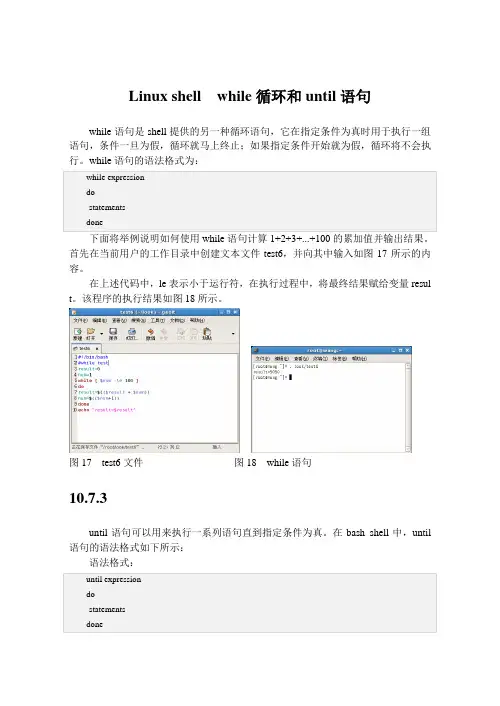
下面将举例说明如何使用while语句计算1+2+3+...+100的累加值并输出结果。
首先在当前用户的工作目录中创建文本文件test6,并向其中输入如图17所示的内容。
在上述代码中,le表示小于运行符,在执行过程中,将最终结果赋给变量resul t。
该程序的执行结果如图18所示。
图17 test6文件图18 while语句
10.7.3
until语句可以用来执行一系列语句直到指定条件为真。
在bash shell中,until 语句的语法格式如下所示:
语法格式:
until语句的作用是重复do和done之间的操作直到表达式成立。
它和while非常相似,但是while是在条件成立时才执行,而until是在条件不成立时才执行。
假设该程序位于文件test6中,内容如图19所示
该程序的计算内容与使用while语句计算的内容是一样的,而且计算结果也是一样的,因而,它们的作用几乎相同,通常情况下可以随意更换,其执行结果如图20所示。
图19 文件内容图20 使用until语句。
linuxshellfro循环自增在linuxshell中使用for遍历产生的递增数字序

linuxshellfro循环自增在linuxshell中使用for遍历
产生的递增数字序
在Linux shell中,可以使用`for`循环来遍历产生的递增数字序列。
可以使用以下方式来实现:
```shell
#!/bin/bash
for i in $(seq 1 10); do
echo $i
done
```
上面的代码将输出从1到10的数字序列。
使用`seq`命令可以生成指定范围的数字序列。
`seq`命令的语法为
`seq [选项] 开始值步长结束值`。
在上面的例子中,使用`seq 1 10`
生成了从1到10的数字序列。
在`for`循环中,变量`i`会依次取值数字序列中的每个元素。
在循环
体内,可以对`$i`进行相应的处理。
注意,`seq`命令在一些系统中可能不可用,你可以尝试使用其他方
法来生成数字序列。
例如,你可以使用`{开始值..结束值}`的语法,如下
所示:
```shell
#!/bin/bash
for i in {1..10}; do
echo $i
done
```
这样也可以生成从1到10的数字序列。
shell中的for、while循环及if语句
shell中的for、while循环及if语句shell与其他语⾔⼀样也⽀持for、while循环for循环的⼀般格式如下:1 #!/bin/sh23for变量in列表4do5 command 16 command 27 command 18 .........9 command n10done列表是⼀组值(数字、字符串等)组成的序列,每个值通过空格分隔。
每循环⼀次,就将列表中的下⼀个值赋给变量。
列表也可以是⼀个⽂件:in 列表是可选的,如果不⽤它,for 循环使⽤命令⾏的位置参数。
1 #!/bin/sh23for line in12345674do5echo"line is $line"6done结果:[root@localhost 1st]# sh test.shline is 1line is 2line is 3line is 4line is 5line is 6line is 7下⾯⽤for循环读⼀个⽂件:查看⽂件内容1 [root@localhost 1st]# cat test.txt2 hello3 wolrd4 hello5 shell6 [root@localhost 1st]#code:1 #!/bin/sh23 FILE=./test.txt45for line in $(<$FILE)6do7echo"line is: $line"8doneResults:1 [root@localhost 1st]# sh xx.sh2 line is: hello3 line is: wolrd4 line is: hello5 line is: shell6 [root@localhost 1st]#while循环的⼀般格式如下:1while command2do34 statement56done3 i=04sum=05while [ $i -le 100 ]6do7sum=$(($sum + $i))8 i=$(($i + 1))9done10echo"sum is $sum"rusults:1 [root@localhost 1st]# sh xx.sh2sum is 50503 [root@localhost 1st]#if语句的⼀般格式如下:1if ....; then2 ....3elif ....; then4 ....5else6 ....7fiif 条件语句:⽂件表达式:1 [ -f "somefile" ] : 判断是否是⼀个⽂件2 [ -x "/bin/ls" ] : 判断/bin/ls是否存在并有可执⾏权限3 [ -n "$var" ] : 判断$var变量是否有值4 [ "$a" = "$b" ] : 判断$a和$b是否相等5 -r file ⽤户可读为真6 -w file ⽤户可写为真7 -x file ⽤户可执⾏为真8 -f file ⽂件为正规⽂件为真9 -d file ⽂件为⽬录为真10 -c file ⽂件为字符特殊⽂件为真11 -b file ⽂件为块特殊⽂件为真12 -s file ⽂件⼤⼩⾮0时为真13 -t file 当⽂件描述符(默认为1)指定的设备为终端时为真字符串表达式:[string string_operator string]这⾥string_operator可为如下⼏种:1 = 两个字符串相等。
shell脚本中的4种循环语句使用
shell脚本中的4种循环语句使⽤1、for循环#语法结构#第⼀种:取值变量for变量名in变量取值表do指令done#例⼦:#⽰例for a in {1..9}domkdir dir$adone#第⼆种:C语⾔型for循环for ((exp1; exp2; exp3))do指令done#例⼦:#⽰例for ((i=1;i<=3;i++))doecho $idone#解释:i从1开始,当i<=3就可以运⾏,如果运⾏的值⼤于3,就退出循环#语法结构讲解for关键字后的双括号是三个表达式,第⼀个是变量初始化(例如:i=1),第⼆个为变量的范围(例如i<=3),第三个为变量⾃增或⾃减(例如i++)。
当第⼀个表达式的初始化值符合第⼆个变量的范围时,就进⾏如循环执⾏,当条件不满⾜时就退出循环#简单⽰例#1.竖向打印10 9 8 7 6 5⼏个数字#第⼀种⽅法:直接列出元素[root@game scripts]# cat for1.sh#!/bin/bashfor i in12345doecho $idone#效果[root@game scripts]# sh for1.sh12345第⼆种⽅法:使⽤⼤括号{}⽣成数字序列[root@game scripts]# cat for2.sh#!/bin/bashfor i in {1..5}doecho $idone#效果[root@game scripts]# sh for2.sh12345#第三种⽅法:使⽤seq⽣成数字序列[root@game scripts]# cat for3.sh#!/bin/bashfor i in `seq 15`doecho $idone#效果[root@game scripts]# sh for3.sh12345#2.获取当前⽬录下的⽬录或⽂件名,并将其作为变量列表打印输出#数据[root@game ~]# mkdir -p /test/{test1.txt,test2.txt,guo.txt,ke.txt}[root@game ~]# ls -l /test/total 0drwxr-xr-x. 2 root root 6 Aug 2122:14 guo.txtdrwxr-xr-x. 2 root root 6 Aug 2122:14 ke.txtdrwxr-xr-x. 2 root root 6 Aug 2122:14 test1.txtdrwxr-xr-x. 2 root root 6 Aug 2122:14 test2.txt#编写脚本[root@game scripts]# cat for4.sh#!/bin/bashusage(){echo "directory not found"}[ ! -d /test ] && usage && exit 1cd /testfor i in `ls`doecho $idone#效果[root@game scripts]# sh for4.shguo.txtke.txttest1.txttest2.txt2、while循环#while循环⼀般应⽤于守护进程程序或⼀直循环执⾏#语法格式while <条件表达式>do指令done#简单⽰例每隔2秒在屏幕上输出⼀次负载值[root@game scripts]# cat while1.shwhile truedouptimesleep 2 #暂停2秒再执⾏done#提⽰:while true表⽰条件永远为真,因此会⼀直运⾏,像死循环⼀样,称为守护进程#效果:每隔2秒就输出⼀次[root@game scripts]# sh while1.sh23:11:35 up 2 days, 2:00, 2 users, load average: 0.00, 0.01, 0.0523:11:37 up 2 days, 2:00, 2 users, load average: 0.00, 0.01, 0.0523:11:39 up 2 days, 2:00, 2 users, load average: 0.00, 0.01, 0.053、until循环#until循环是当条件表达式不成⽴时,就会进⼊循环,当条件表达式成⽴时,就会终⽌循环#语法格式until <条件表达式>do指令done#⽰例#如果⽤户输出的是guoke就符合条件,退出循环,如果不是,⽤户输⼊3次之后就退出循环[root@game scripts]# cat until1.sh#!/bin/bashi=1until [ "$user" = "guoke" -o "$i" -gt 3 ]doread -p "please enter you username:" userlet i++done#效果[root@game scripts]# sh until1.shplease enter you username:guoke[root@game scripts]# sh until1.shplease enter you username:1please enter you username:1please enter you username:1[root@game scripts]#4、select循环#语法格式select变量名in [菜单取值列表]do指令done#⽰例#第⼀种:直接使⽤列表字符串[root@game scripts]# cat select1.sh#!/bin/bashselect name in apache httpd nginx tomcatdoecho $namedone#效果[root@game scripts]# sh select1.sh1) apache2) httpd3) nginx4) tomcat#? 1#? 3nginx#? 4tomcat#? ^C#第⼆种:采⽤数组做变量列表[root@game scripts]# cat select2.sh#!/bin/basharray=(apache nginx tomcat lighttpd)select name in"${array[@]}"doecho $namedone#效果[root@game scripts]# sh select2.sh1) apache2) nginx3) tomcat4) lighttpd#? 3tomcat#? 4lighttpd#? ^C5.循环控制及状态返回值break (循环控制)continue (循环控制)exit (退出脚本)return (退出函数)#区别break continue在条件语句及循环语句(for if while等)中⽤于控制程序的⾛向exit是终⽌所有语句并退出脚本return:仅⽤于在函数内部返回函数执⾏的状态值#break⽰例#如果i等于3,那么就终⽌循环[root@game scripts]# cat break1.sh#!/bin/bashfor ((i=0;i<=5;i++))doif [ $i -eq 3 ];thenbreakelseecho $ifidoneecho "1111"yum install net-tools -y > /dev/null[ $? -eq 0 ] && echo "already install"#效果[root@game scripts]# sh break1.sh121111already install#说明:i等于3的时候就终⽌循环,但是没有跳出脚本#exit⽰例[root@game scripts]# cat exit1.sh#!/bin/bashfor ((i=0;i<=5;i++))doif [ $i -eq 3 ];thenexit 1fiecho $idoneecho "ok"#执⾏效果[root@game scripts]# sh exit1.sh12#说明:当i等于3的时候就会退出脚本了,就不会执⾏后⾯的语句#continue⽰例[root@game scripts]# cat con1.sh#!/bin/bashfor ((i=0;i<=5;i++))doif [ $i -eq 3 ];thencontinueelseecho $ifidoneecho "ok"#执⾏效果[root@game scripts]# sh con1.sh。
linux shell 循环语句
linux shell 循环语句Linux Shell是一种强大的命令行工具,它提供了很多循环语句,可以帮助我们快速地处理大量的数据。
在本文中,我们将介绍一些常用的循环语句,包括for循环、while循环、until循环等,以及它们的用法和示例。
1. for循环for循环是一种常用的循环语句,它可以遍历一个列表或者一个范围内的数字。
for循环的语法如下:```for variable in listdocommand1command2...done```其中,variable是一个变量名,list是一个列表,可以是一个数组、一个文件列表或者一个字符串列表。
在循环中,变量variable会依次取list中的每个元素,并执行循环体中的命令。
例如,我们可以使用for循环来遍历一个数组:```#!/bin/bashfruits=("apple" "banana" "orange" "grape")for fruit in "${fruits[@]}"doecho "I like $fruit"done```输出结果为:```I like appleI like bananaI like orangeI like grape```2. while循环while循环是一种基于条件的循环语句,它会在条件为真的情况下一直执行循环体中的命令。
while循环的语法如下:```while conditiondocommand1command2...done```其中,condition是一个条件表达式,可以是一个比较运算符、一个逻辑运算符或者一个函数调用。
在循环中,只要条件为真,就会一直执行循环体中的命令。
例如,我们可以使用while循环来读取一个文件中的每一行:```#!/bin/bashwhile read linedoecho "$line"done < file.txt```其中,file.txt是一个文件名,read命令会读取文件中的每一行,并将其赋值给变量line。
linux基本shell语法
linux基本shell语法1. 执行命令:输入命令后按下回车键即可执行。
2. 变量赋值:使用等号(=)将值赋给变量,例如:`variable_name=value`3. 输出变量:使用`echo`命令输出变量的值,例如:`echo variable_name`4. 注释:使用井号(#)来添加注释,注释会被解释器忽略。
5. 重定向输入输出:使用重定向符号来将命令的输入输出重定向到文件中,例如:`command > output_file` (将命令的输出重定向到文件)或 `command < input_file` (将文件内容作为命令的输入)6. 管道:使用竖线(|)将前一个命令的输出作为后一个命令的输入,例如:`command1 | command2` (将command1的输出作为command2的输入)7. 执行前一个命令的退出状态码:使用美元符号和问号(?)获取前一个命令的退出状态码(0表示命令成功执行),例如:`echo ?`8. 条件判断:使用`if`语句进行条件判断,例如:```if conditionthencommand1elsecommand2fi```9. 循环:使用`for`和`while`循环进行迭代操作,例如:```for item in listdocommanddone``````while conditiondocommanddone```10. 函数定义和调用:使用`function`关键字定义函数,例如:```function function_name {command1command2return value}``````function_name```以上是一些基本的Linux shell语法,还有更多高级用法可以进一步学习和探索。