
[WEST]P4100_P6100_P8100说明书
7.1.1
进入选择模式 ........................................................................................... 24
7.1.2
操作指南 ..................................................................................................24
5.1 上电步骤 .............................................................21
5.2 前面板及按键 .........................................................21
5.3 显示 21
5.4 LED 指示灯功能.......................................................22
6 故障显示 .................................................................................................................... 23
7 操作模式 .................................................................................................................... 23
7.1 选择模式 .............................................................24
4.30 输出 3 – 变送器电源 ...................................................20
5 上电 ........................................................................................................................... 21
7.2 开锁密码 .............................................................24
7.3 自整定模式 ...........................................................25
7.3.1
操作指南 ..................................................................................................25
4.24 输出 2 – SSR 驱动.....................................................18
4.25 输出 2 – 固态继电器 ...................................................18
4.26 输出 2 – 线性直流 .....................................................19
4.21 输出 1 – 线性直流 .....................................................17
4.22 输出 2 - 继电器 ........................................................17
4.23 输出 2 – 双继电器 .....................................................18
4.18 输出 1 - 继电器 ........................................................16
4.19 输出 1 - SSR 驱动 .....................................................16
4.20 输出 1 – 固态继电器 ...................................................17
注意: 在仪表接线端子处有此警告标志,在仪表接线时请仔细阅读本手册 本手册使用产品型号: P4100, P6100 & P8100
ii
Danaher Sensors & Controls
1/4 -DIN, 1/8 -DIN & 1/16 -DIN 控制器、显示仪和程序控制器手册
目录
目录...................................................................................................................................... iii 如何使用本手册 ..................................................................................................................... 1 1 简介..............................................................................................................................2 2 安装..............................................................................................................................3
2.1 开箱检查.............................................................. 3 2.2 安装 3 2.3 开孔尺寸.............................................................. 4 2.4 面板安装.............................................................. 4 3 选件模块及功能............................................................................................................5 3.1 模块自动识别.......................................................... 5 3.2 模块更换前的准备工作.................................................. 7 3.3 更换模块.............................................................. 7 3.4 将仪表重新插入表壳.................................................... 8 4 接线..............................................................................................................................9 4.1 安装注意事项.......................................................... 9 4.2 交流接线注意事项 ( 100-240 AC)......................................... 9 4.3 接线隔离措施.......................................................... 9 4.4 使用屏蔽电缆......................................................... 10 4.5 抑制干扰的措施....................................................... 10 4.6 传感器更换 (热电偶和热电阻) ........................................... 10 4.7 接线 11 4.8 电源接线(100-240VAC) ............................................. 12 4.9 电源接线 (24/48V AC/DC) ........................................... 13 4.10 通用输入 – 热电偶 (T/C) ............................................... 13 4.11 通用输入— 热电阻(RTD) ............................................ 13 4.12 通用输入 – 线性直流 .................................................. 14 4.13 第二输入 – 数字输入 .................................................. 14 4.14 第二输入 – 电流互感器输入 ............................................ 15 4.15 第二输入 – 遥控设定 .................................................. 15
Philips 4100 系列全高清LED电视说明书
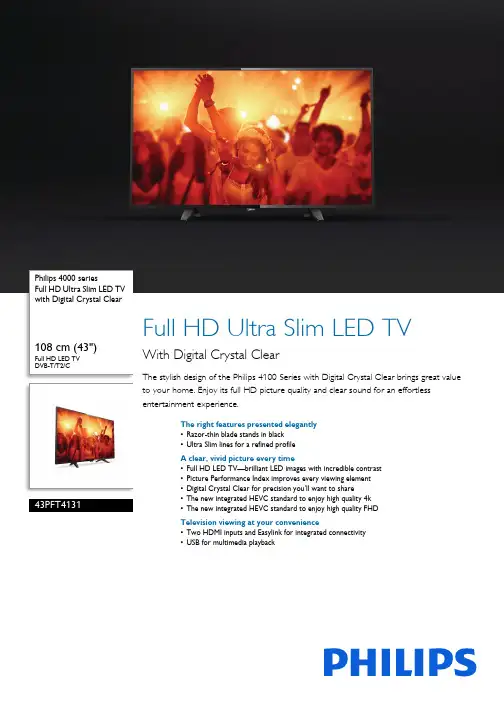
Philips 4000 seriesFull HD Ultra Slim LED TV with Digital Crystal Clear108 cm (43") Full HD LED TV DVB-T/T2/C43PFT4131Full HD Ultra Slim LED TVWith Digital Crystal ClearThe stylish design of the Philips 4100 Series with Digital Crystal Clear brings great value to your home. Enjoy its full HD picture quality and clear sound for an effortless entertainment experience.The right features presented elegantly•Razor-thin blade stands in black•Ultra Slim lines for a refined profileA clear, vivid picture every time•Full HD LED TV—brilliant LED images with incredible contrast•Picture Performance Index improves every viewing element•Digital Crystal Clear for precision you’ll want to share•The new integrated HEVC standard to enjoy high quality 4k•The new integrated HEVC standard to enjoy high quality FHDTelevision viewing at your convenience•Two HDMI inputs and Easylink for integrated connectivity•USB for multimedia playbackHighlightsUltra Slim profileSleek. Cutting edge. Refined. Precise. The Philips Ultra Slim silhouette. That something so slim can inspire so much interest shouldn’t be surprising, given how much sophistication it will bring to your décor.Black blade standsDark, mysterious and incredibly strong. The Philips black blade stands take your TV to another level. Durable construction in an ultra-thin design meticulously exude the elegance and style of your new TV. And with their powerful stance, it's a wonder how something so small can do so much.Digital Crystal ClearFor natural looking pictures from any source, Philips created Digital Crystal Clear. Whetheryou’re indulging in your favorite shows,movies, the news, or are simply having a few friends over for a night in, you'll enjoy it all in optimal contrast, color and sharpness.Full HD LED TVPicture Quality matters. Regular HDTVs deliver quality, but you expect more. Imagine crisp detail paired with high brightness, incredible contrast and realistic colors for a true to life picture.Picture Performance IndexPicture Performance Index combines Philips display technology and advanced pictureprocessing engines to improve the elements of perception: sharpness, motion, contrast and color. No matter the source, you’ll always enjoy razor sharp pictures with incredibledetail and depth, the deepest blacks, the brightest whites, and the most vivid, brilliant colors as well as natural, lifelike skin tones every time.Two HDMI inputs with EasylinkAvoid cable clutter with a single HDMI cable to carry both picture and audio signals from your devices to your TV. HDMI uses uncompressed signals, ensuring the highest quality from source to screen. Together with PhilipsEasylink, you’ll need only one remote control to perform most operations on your TV, DVD, Blu-ray, set top box or home theatre B (photos, music, video)Share the fun. Connect your USB memory-stick, digital camera, mp3 player or other multimedia device to the USB port on your TV to enjoy photos, videos and music with the easy to use onscreen content browser.HEVC support for FHD broadcastThe new integrated HEVC standard allow you to enjoy high picture quality FHD resolutionbroadcast.Issue date 2022-07-14 Version: 9.2.112 NC: 8670 001 39139 EAN: 87 18863 01010 5© 2022 Koninklijke Philips N.V.All Rights reserved.Specifications are subject to change without notice. Trademarks are the property of Koninklijke Philips N.V. or their respective owners.SpecificationsPicture/Display•Peak Luminance ratio: 65 %•Display: LED Full HD•Diagonal screen size: 43 inch / 108 cm•Panel resolution: 1920x1080p•Aspect ratio: 4:3/16:9•Brightness: 200 cd/m²•Picture enhancement: Digital Crystal Clear User Interaction•Program: Pause TV, USB Recording*•Ease of Use: One-stop Home button •Firmware upgradeable: Firmware auto upgrade wizard, Firmware upgradeable via USB•Signal strength indication•Teletext: 1000 page Hypertext•Electronic Program Guide*: 8days Electronic Program Guide•Screen Format Adjustments: Autozoom, Superzoom, Movie expand 16:9, Unscaled, 4:3, 16:9Sound•Output power (RMS): 16W•Sound Enhancement: Incredible Surround, Clear Sound, Auto Volume Leveler, Bass Control, Smart SoundConnectivity•Number of HDMI connections: 2•Number of scarts(RGB/CVBS):1•Number of USBs: 1•Other connections: Common Interface Plus (CI+), Digital audio out (optical), Audio in (DVI), Headphone out, Service connector, Antenna IEC75•EasyLink (HDMI-CEC): Remote control pass-through, System audio control, System standby, One touch playMultimedia Applications•Video Playback Formats: Containers: AVI, MKV, H264/MPEG-4 AVC, MPEG-1, MPEG-2, MPEG-4, WMV9/VC1, HEVC (H.265)•Subtitles Formats Support: .SMI, .SRT, .SSA, .SUB,.TXT, .ASS•Music Playback Formats: AAC, MP3, WAV, WMA(v2 up to v9.2)•Picture Playback Formats: JPEG, BMP, GIF, PNGSupported Display Resolution•Computer inputs: up to 1920x1080 @ 60Hz•Video inputs: 24, 25, 30, 50, 60 Hz, up to1920x1080pTuner/Reception/Transmission•Digital TV: DVB-T/T2/C•MPEG Support: MPEG2, MPEG4•Video Playback: NTSC, PAL, SECAMPower•Mercury content: 0 mg•Presence of lead: Yes*•Mains power: AC 220 - 240 V 50/60Hz•Ambient temperature: 5 °C to 35 °C•Eu Energy Label power: 43 W•Annual energy consumption: 63 kW·h•Energy Label Class: A+•Standby power consumption: <0.3W•Off mode power consumption: <0.3•Power Saving Features: Auto switch-off timer, Ecomode, Picture mute (for radio)Dimensions•TV stand width distance: 632.03 mm•Box dimensions(W x H x D):1070 x 670 x 160 mm•Set dimensions(W x H x D):968.2 x 575.9 x 79.4 mm•Set dimensions with stand (W x H x D):968.2 x 615.4 x 195.37 mm•Product weight: 8.33 kg•Product weight (+stand): 8.46 kg•Weight incl. Packaging: 11.2 kg•Wall mount compatible: 200 x 200 mmAccessories•Included accessories: Remote Control, 2 x AAABatteries, Table top stand, Power cord, Quick startguide, Legal and safety brochure*EPG and actual visibility (up to 8 days) is country and operatordependent.*Energy consumption in kWh per year, based on the powerconsumption of the television operating 4 hours per day for 365days. The actual energy consumption will depend on how thetelevision is used.*The TV supports DVB reception for 'Free to air' broadcast. SpecificDVB operators may not be supported. An up to date list can befound in the FAQ section of the Philips support website. For someoperators Conditional Access and subscripction are required.Contact your operator for more information.*(Philips) only compatible with specific Philips player device.。
菲利普6100系列智能全高清LED电视用户手册说明书

Philips 6000 seriesSlim Full HD LED TV with Smart TV and Pixel Plus HD119 cm (47")Full HD LED TV Dual Core DVB-T/C/S/S247PFK6109Slim Full HD LED TVWith Smart TVCatching up with friends on Skype™ just got easier thanks to the integrated Wi-Fi on the Philips 6100 series Smart Full HD LED TV. Powered by the Pixel Plus HD engine, enjoy brilliant 3D and a world of online content in clear, vivid detail.A TV that’s more than Smart, it’s beautiful •Slim dimensions compliment your interior•Ultra Narrow bezel gives you more picture to loveEntertainment at a higher level•Pixel Plus HD for beautiful images you’ll love•Full HD LED TV—brilliant LED images with incredible contrast •200Hz PMR for fluid moving images•3D realistically takes you places you’ve never been before Connect, communicate, record and share •Smart TV: a whole new world to explore•MyRemote app: the Smarter way to interact with your TV•Wi-Fi Miracast™—mirror your smartphone screen to your TV •Skype™ brings people together (camera optional)•Cloud Explorer and Dropbox™:share directly to the big screen •Multiroom client—view live TV and recordings from another TVHighlightsSlim profilePhilips Slim profile TV makes a statement with its sleek, sophisticated dimensions. After all, why shouldn’t your TV be as beautiful as it is functional?Ultra narrow bezelTraditional TVs have a bezel that wraps around the TV like a picture frame. Our Ultra Narrow bezel is modern and thin, so you have more picture to enjoy.Pixel Plus HDThere’s nothing like settling in to watch your favorite movie or documentary. And whether you stream online or watch a DVD, Philips Pixel Plus HD Engine delivers a more realistic picture thanks to brighter whites and blacker blacks.Full HD LED TVPicture Quality matters. Regular HDTVs deliver quality, but you expect more. Imagine crisp detail paired with high brightness, incredible contrast and realistic colors for a true to life picture.200Hz Perfect Motion RateNothing beats the adrenaline rush of gaming, fast paced sporting events or action films. That's why this Philips TV has 200Hz Perfect Motion Rate; so you’ll enjoy fluid moving images. Because even though your pulse mayjump, the image you’re watching shouldn’t.3DEnjoy hours of viewing comfort thanks topassive 3D technology that delivers you highquality 3D. Convert any 2D content into vividand flawless 3D. The stylish, lightweight 3Dglasses are comfortable to wear and do notrequire batteries.Smart TVDiscover a Smarter experience that liesbeyond traditional TV. Rent and streammovies, videos or games from online videostores. Watch catch-up TV from your favoritechannels and enjoy a growing selection ofonline apps such as Youtube.MyRemote*Control your Philips TV directly from yourSmart device. With the MyRemote App itsnever been easier to share content from yourSmart device onto your TV (SimplyShare) orstay up to date thanks to the TV ProgramGuide.Wi-Fi Miracast™*Mirror what you see on your smart device andshare it with friends and family on your TV.From photos to videos, games and more,mirror anything from your smartphone andtablet to your big screen with a simplecommand.Skype™ TV video calls*Add a new dimension to your calls and shareexperiences with the people that matter toyou, wherever they are. With Skype™ on yourTV, make voice and video calls from your livingroom. Just connect the optional Philips TVcamera (PTA317) to your TV and enjoyexcellent video and sound quality from thecomfort of your couch.Cloud ExplorerCloud Explorer makes sharing easy by allowingyou to access your Dropbox™ account viayour TV. Easily pull and view any content youhave stored online onto your TV screen. Whynot spread the joy? Simply upload and viewcontent from shared Dropbox™ accountswith friends and family around the world.Multiroom clientMultiply your viewing pleasure. Create an in-house network that lets you watch programswherever you choose by receiving a signalfrom a Philips server TV elsewhere in yourhouse. Once connected, you can pull digitalbroadcast TV and recordings from the serverTV to the client TV, all without laying newcables or spending more money on multiplesubscriptions.Issue date 2022-07-14 Version: 2.0.112 NC: 8670 001 11401 EAN: 87 12581 70978 5© 2022 Koninklijke Philips N.V.All Rights reserved.Specifications are subject to change without notice. Trademarks are the property of Koninklijke Philips N.V. or their respective owners.SpecificationsPicture/Display•Display: LED Full HD•Diagonal screen size: 47 inch / 119 cm•Panel resolution: 1920x1080p•3D: Passive 3D, 2 Player Full Screen Gaming*, 3D Depth adjustment, 2D to 3D conversion, Auto 3D detection, Flickerfree 3D•Aspect ratio: 4:3/16:9•Brightness: 350 cd/m²•Picture enhancement: Pixel Plus HD, 200Hz Perfect Motion Rate, Micro DimmingSmart TV•Interactive TV:HbbTV•SmartTV apps*: Catch-up TV, Netflix, Spotify, Online apps, Online Video stores, Open Internet browser, YouTube•Social TV: Skype, Twitter•TV programe guide*: 8 day Electronic Program GuideUser Interaction•Wireless interaction: SimplyShare, MultiRoom Client, Wi-fi Miracast Certified*, Cloud TV* and Cloud Explorer•Program: Pause TV, USB Recording*•Ease of Installation: Auto detect Philips devices, Device connection wizard, Network installation wizard, Settings assistant wizard•Ease of Use: One-stop Home button, Onscreen Usermanual•Firmware upgradeable: Firmware auto upgrade wizard, Firmware upgradeable via USB, Online firmware upgrade•Screen Format Adjustments: Advance - Shift, Basic - Fill Screen, Fit to Screen, Stretch, Zoom •Signal strength indication•Teletext: 1000 page Hypertext•My Remote App*: Control, Simply Share, TV Guide CPU•Processor type: Dual-CoreSound•Output power (RMS): 20W•Sound Features: Smart Stereo, Ambi wOOx, Natural Sound•Sound Enhancement: Incredible Surround, Clear Sound, Auto Volume Leveler, Smart Sound, Bass Enhancement Connectivity•Number of HDMI connections: 3•Number of component in (YPbPr): 1•Number of scarts(RGB/CVBS):1•Number of USBs: 2•Wireless connection: Wi-Fi 2x2 Integrated•Other connections: Antenna IEC75, SatelliteConnector, CI+1.3 certified, Audio in (DVI),Common Interface Plus (CI+), Ethernet-LAN RJ-45, Digital audio out (optical), Audio L/R in,Headphone out, Service connector•HDMI features: 3D, Audio Return Channel•EasyLink (HDMI-CEC): Remote control pass-through, System audio control, System standby,Auto subtitle shift (Philips)*, Pixel Plus link(Philips)*, One touch playMultimedia Applications•Video Playback Formats: Containers: AVI, MKV,H264/MPEG-4 AVC, MPEG-1, MPEG-2, MPEG-4,WMV9/VC1•Subtitles Formats Support: .AAS, .SMI, .SRT, .SSA,.SUB, .TXT•Music Playback Formats: AAC, AMR, LPCM, M4A,MP3, MPEG1 L1/2, WMA (v2 up to v9.2)•Picture Playback Formats: JPEG, BMP, GIF, JPS,PNG, PNSSupported Display Resolution•Computer inputs: up to 1920x1080 @ 60Hz•Video inputs: 24, 25, 30, 50, 60 Hz, up to1920x1080pTuner/Reception/Transmission•Digital TV: DVB-T/C/S/S2•MPEG Support: MPEG2, MPEG4•Video Playback: NTSC, PAL, SECAMPower•Mains power: AC 220 - 240 V 50/60Hz•Ambient temperature: 5 °C to 35 °C•Eu Energy Label power: 40 W•Annual energy consumption: 58 kW·h•Standby power consumption: < 0.3 W•Power Saving Features: Auto switch-off timer, Ecomode, Picture mute (for radio)•Off mode power consumption: < 0.3•Energy Label Class: A++Dimensions•Box dimensions(W x H x D):1220 x 710 x 133 mm•Set dimensions (W x H x D): 1068 x 618 x 56 mm•Set dimensions with stand (W x H x D):1068 x 678 x 222 mm•Product weight: 9.8 kg•Product weight (+stand): 11.2 kg•Weight incl. Packaging: 14.6 kg•Wall mount compatible: 400 x 200 mmAccessories•Included accessories: 4x Passive 3D Glasses,Remote Control, 2 x AAA Batteries, Power cord,Quick start guide, Legal and safety brochure,Warranty Leaflet, Tabletop swivel stand•Optional accessories: Philips TV camera PTA317,3D glasses PTA417*MyRemote app and related functionalities varies per TV model andcountry, as well as smart device model and OS. For more detail,please visit: /TV.*For smart TV app, visit /TV to discover the servicesoffering in your country*Cloud TV offering depends on country availability and regulations*Compatibility depends on Wifi Miracast certification & Android 4.2or later. For more details please refer to your device documentation.*USB recording for digital channels only, recordings may be limited bybroadcast copy protection (CI+). Country and channel restrictionsmay apply.*Philips TV camera (PTA317) is sold separately.*Parents should monitor their children during 3D viewing and ensurethey do not experience any discomfort as mentioned above.Watching 3D is not recommended for children under 6 years of ageas their visual system is not fully developed yet.*The TV supports DVB reception for 'Free to air' broadcast. SpecificDVB operators may not be supported. An up to date list can befound in the FAQ section of the Philips support website. For someoperators Conditional Access and subscripction are required.Contact your operator for more information.*Energy consumption in kWh per year, based on the powerconsumption of the television operating 4 hours per day for 365days. The actual energy consumption will depend on how thetelevision is used.*EPG and actual visibility (up to 8 days) is country and operatordependent.*(Philips) only compatible with specific Philips player device.。
P4100,P8100,P6100简易说明

低报警 2 值* 带报警 2 值* 偏差报警 2 值* 报警 2 回差*
回路报警
' = C= CC
)?
偏差报警 带报警 无报警
输入量程下限至输入量程上限
)' '
=' $4 '
从设定点起,1 LSD 至量程上限 从设定点起,+/- 输入量程 1 LSD 至量程上限 同报警 1 的选项
4.8 KBPS
.
9.6 KBPS
.
19.2 KBPS
==+ 1 - 2 5 5 ( M O D B U S ) , 1 - 9 9 ( A S C I I )
+:Ww 3 C
+:
读/写 只读
=- =#
=,
设定点 1/设定点 2 选择 自动/手动选择
报警 1,正动作 报警 1,反动作 报警 2,正动作 报警 2,反动作 回路报警,正动作 回路报警,反动作 逻辑报警 1 或 2,正动作 逻辑报警 1 或 2,反动作 逻辑报警 1 与 2,正动作 逻辑报警 1 与 2,反动作
C C! )+
线性输出 1 类型
+!/+!/) : :
设定点变送输出 过程值变送输出 0 – 5 V DC 输出 0 – 10 V DC 输出
Pt.C Pt100: –128.8 - 537.7 ºC Pt.F Pt100: –199.9 - 999.9 ºF
j.C J: –128.8 - 537.7 ºC j.F J: –199.9 - 999.9 ºF
SC S: 0 - 1762 ºC SF S: 32 - 3204 ºF
: 0 - 20 mA DC : 4 - 20 mA DC
59310-2 P4100 P8100 & P6100 Concise Manual (Chinese)_2007.08.03

开口尺寸 A
1/16 和 1/8 Din = 45 毫米 1/4 Din = 92 毫米
开口尺寸 B
1/16 Din = 45 毫米 1/8 和 1/4 Din = 92 毫米
若要并排安装 n 个仪表,开口尺寸 A 为 (48n-4) 毫米(1/16 和 1/8 Din 规格)或 (96n-4) 毫米(1/4 Din 规格)
B
A
误差范围为 +0.5 到 -0.0 毫米
安装面板 仪表外壳
顺着仪表外壳向安装面板 的后侧滑动固定卡箍,直 到其凸出部分同棘爪咬 合,并且将仪表夹持住。
棘爪 衬垫
将仪表固定到位(请仅对 前盖用力)
小心:请勿取下面板衬垫,否则会影响防尘和防潮。
后部端子接线
请使用铜导线(T/C 输入端子除外) 单股线直径:最大为 1.2 毫米 (18SWG)
=:+
报警 1 和报警 2 的逻辑 “与” 运算,反向动作
+!/+!/) : : /4) : : :
中继给定值 SP 输出 中继实际值 PV 输出 0 到 5 伏直流输出 0 到 10 伏直流输出 2 到 10 伏直流输出 0 到 20 毫安直流输出 4 到 20 毫安直流输出
安装选件模块
1/16 Din (48 x 48mm) 规格仪表
CPU 电路板
装配支架
选件模块 1
选件模块 A
选件模块 2
选件模块 3
PSU 电路板 1/8 Din (96 x 48mm)和 1/4 Din (96 x 96mm) 规格仪表
CPU 电路板 选件模块 B
选件模块 2 选件模块 1
装配支架 选件模块 A 选件模块 3 PSU 电路板
GP4100硬件手册
GP:1 台
• 英语和日语安装手册 (各1份)
防水橡皮垫圈:1 个 ( 已装在 GP 上 )
安装固定螺丝:2 套
串口接头 (1 个 ) ( 用于 RS-232C 和 RS-422/485)
( 已装在 GP 上 )
• 警告 / 注意信息 (1 份 )
这些产品经过精心包装。但是,如果您发现任何损坏或缺失,请立即联系当地 GP 代理商。
工业控制设备标准 加工控制设备标准
< 注意事项 > 将 GP 嵌入终端产品之前,请注意:
• 在 Type 4X ( 仅室内使用 ) 与 / 或 Type 13 的平面上使用。
CE 标记
以下机型标有 CE 标记,符合 EMC 指令。 它们符合 EN61000-6-2、 EN61000-6-4 和 EN61131-2 标准。
4
请勿在低于 GP 规格建议的温度下存放 GP,否则会造成 LCD 显示屏中的液体凝结,从而损坏 LCD。 此外,如果存放 GP 的环境温度高于指定范围, LCD 屏的液体将变为等向性阵列,从而对 LCD 造成无法挽 回的损害。因此,存放 GP 的环境温度 必须在 GP 的规定范围内。 在 GP 关机后,请等待几秒钟后再开机。重启过快可能会造成 GP 运行异常。 请务必备份 GP 画面数据,预防意外丢失。
恢复显示,则表明背光灯已烧毁。
操作
请勿拆卸或修改 GP,否则可能会引起火灾或触电事故。 请勿在存在易燃气体的环境中操作 GP,否则可能会引起爆炸。
接线
为避免触电或设备损坏,在安装 GP 或连接 GP 导线之前,请务必拔下 GP 的电源插头。 为了防止触电,请在 GP 接线之前拔下 GP 的电源线。 请勿使用超过 GP 指定范围的电压,否则可能会引起火灾或触电事故。 连接到 GP 的电缆应使用电缆夹进行固定,以免电缆的重量或拉力加到接头或端子上。 应仔细检查 GP 的接线,确认工作电压和接线端子的位置都正确无误。如果电压或接线端子位置错误,可能会 引起火灾或事故。
海康6100系列使用说明书
6100系列视频服务器用户使用手册(Ver2.1)非常感谢您购买我公司的产品,如果您有什么疑问或需要请随时联系我们。
本手册适用于DS-6100HC、DS-6100HF、DS-6101HF-IP视频服务器。
本手册可能包含技术上不准确的地方、或与产品功能及操作不相符的地方、或印刷错误。
本手册的内容将根据产品功能的增强而更新,并将定期改进或更新本手册中描述的产品或程序,更新的内容将会在本手册的新版本中加入,恕不另行通知。
物品清单小心打开包装盒,检查包装盒里面应有以下配件:一台视频服务器一本用户手册一根DTE线一根电源线一张保修卡一张合格证一个光盘如果发现有所损坏或者任何配件短缺的情况,请及时和经销商联系。
第一章用户手册简介感谢您购买DS-6100系列视频服务器!在您准备使用本产品之前,请先仔细阅读本手册,以便能更好的使用本产品的所有功能。
1.1用途本手册的用途是帮助您熟悉和正确的使用DS-6100系列视频服务器!1.2用户手册概述第一章:用户手册简介第二章:产品概述第三章:硬件安装第五章:参数配置第六章:广域网接入附录A:常见问题解答附录B:技术参数第二章产品概述2.1产品简介DS-6100系列视频服务器是专为远程监控而设计的嵌入式数字监控产品,采用最新的达芬奇平台处理芯片,LINUX嵌入式系统,完全脱离PC 平台,系统调度效率高,代码固化在FLASH中,系统运行更加稳定可靠。
DS-6100系列视频服务器具有视频信号和音频信号的硬件同步压缩功能,压缩码流通过网络进行传输,通过网络可进行实时视频和音频预览,支持流协议(RTP/RTCP),支持IE预览,支持双向语音对讲,多种语言支持等功能。
2.2 产品型号说明根据编码分辨率分两种:DS-6100HC:1~4路视频,音频输入,每路的视频分辨率最高支持CIF,也可以选择QCIF,不可以安装硬盘。
DS-6100HF: 1~2路视频,音频输入,每路的视频分辨率最高支持4CIF,也可以选择DCIF,2CIF,CIF,QCIF等,不可以安装硬盘。
WEST8100温控表选型手册
技术指标
特点 控制类型 自动/手动 输出配置 报警类型 人机界面 计算机组态
输入 热电偶 RTD DC 直流 阻抗 精度 采样频率 传感器断路检测
输出和选件 控制和报警继电器 SSR 输出 故态继电器输出 直流输出 变送器电源 通讯 数字输入 遥控输入
操作环境 温度和湿度 电源 前面板防护 认证
PID 控制,on/off 控制,自整定、自适应,单输出或加热/制冷双输出。 无扰动切换,通过按键或数字输入切换。 最多 3 个输出,可以自由设置输出用途(控制、报警、变送输出、变送器电源)。 过程高/低报警,偏差报警,,带报警,逻辑与/或报警,回路断线报警。 4 键操作, 双 4 位 10mm、8mm LED 显示, 5 个 LED 指示灯 离线计算机组态 (不需通讯选件),组态软件:PS1-CON。
选件 B
零件号
遥控输入及数字输入...............PB1-W0R
选件 B
0
无
R
遥控输入/数字输入
显示颜色
0
红色/红色
1
绿色/绿色
2
红色/绿色
3
绿色/红色
电源
0
100-240V AC
2
24-48V AC/DC
选件 A
0
无
1
RS485 通讯
3
数字输入
4
遥控输入(基本型)
选件 3
0
无
1
继电器
2
选件 1
零件号
继电器模块 ..............................PO1-C10
直流模块.................................. PO1-C21
4100操作说明书
第一部分系统综述介绍S imlex 4100/4120是单个微机为基础,运用最新的安全技术的防火报警控制设备,该系统设备已通过美国U.L.认证,具有省电和自动巡监功能,并且可防止交流电源停电,并自动记录且显示该状态。
根据用户的选择,本设备可控制1270个点。
这个基本的系统包括一个主机板,现场接线端子,80个字符的LCD显示,电源和机箱。
根据不同要求,可配置各类卡或组件。
4100/4120系统单机最大可监控1270点。
4100主机和4120主机的区别在于是否有网卡,是否是网络的一台主机。
当主机不在网络中时为4100,当主机在网络中时称4120。
4100/4120主机的指采用了最新最快的微机处理器。
组态数据存在于可电擦除的FLACK EPROM中,使用现场修改组态数据更加简单。
主机板上更有备有电池的RAM 以保存重要的历史数据,哪怕完全将主机关闭。
4100/4120系统中采用的是开关电源,此电源提供24VDC 8安培的容量给负载设备和系统运行,提供4安培电流给蓄电池充电。
另外,此电源通过机内通开线路和主机板直接通讯,向主机板报告系统电压、当前电流和充电情况等30多个参数。
当系统存在不正常情况时,本机发出声音指示,并通过LCD显示出具体位置和电容。
4100/4120的面板上LCD显示器可显示出本系统的情况。
这个LCD显示器能显示出各种提示,通过菜单方式来指导用户按照程序操作以排除非正常状态。
本系统可完全现场编程组态,并且用户可按照建筑的实际情况和当地的规范要求进行变化。
系统操作描述4100/4120操作面板,后称面板,如下图所示:●绿色“PowerON”发光二极管(后称LED)指示交流电供电正常。
●其它LED不亮。
●LCD上字符显示如下,表示系统处于正常状态。
如果面板上的报警发光二极管二类报警发光二极管,监视发光二极管或故障发光二极管闪光,并且有声音报警就说明有不正常的情况出现,LCD显示可提供有关探测点的状况(报警, 二类报警监视和故障)。
HP_EVA系列EVA4100_6100_8100培训资料
−
借助统一的管理工具管理整个存储 池
− 基于存储属性
− 采用简化、统一的界面(向导)
• EVA组件采用环保技术,符合甚至 高于国际环保标准,如WEEE和 RoHS
• EVA可集成到惠普动态智能散热能 源管理系统中
2007年6月19日
惠普(HP)机密
12
共存和升级
• EVA4100/6100/8100与EVA4000/6000/8000具备 相同的共存特性
惠普(HP)机密
13
定价与上市信息
• EVA4100/6100/8100与EVA4000/6000/8000的定 价相同
− 性能更高 − 可靠性和可用性更高
• 可用性
− XCS 6.110 – 6月19日上市 − EVA4100/6100/8100 – 6月19日上市 − EVA4100入门套件 – 6月19日上市
• XCS V6.110是最低版本的EVA4100/6100/8100
• Command View V7.0
• RSM V3.0
产品特性
• 借助LUN新的自动增减能力,提高容量管理效率,实现存储容量供应 的自动化
• HDD固件代码自动加载 • 经改进的Mirror Clone技术 - 借助Mirror Clone技术,对卷进行远程
优势:
空间
将存储设备集中成大型 磁盘组,而不再是零散 的小型磁盘组;将快照 复制到未分配的空间中, 无需再预留LUN。
时间
自动磁盘组与LUN设置, 自动在线LUN扩展,自动 阵列调整,快照式克隆-这些功能将为我们的客 户带来更多利润
成本
使缺乏经验的人员也可 以轻松管理阵列,技术 水平较高的专家可以集 中精力为客户创造利润, 同时防止人为失误发生。
ManuSP6100_CH
1. 本说明书适用于 SUPERPOR/6100, SUPERPOR/611S, SUPERPOR/610P。
2. 为了能方便快速的连接编程器,请在安装软后连接硬件。 3.使用编程器前,请仔细阅读说明书。 4.请不要使用自制适配器。自制适配器会导致联机错误,请选购 Xeltek 公司的原装适配器。
4.1.3 器件(Device)........................................................................ 26 4.1.4 选项(Option)........................................................................ 31 4.1.5 工程(Project)....................................................................... 40 4.1.5 帮助(Help).......................................................................... 43
第三章 快速入门......................................................................................................................10
3.1 应用软件的用户界面.......................................................................................................................... 10 3.2 烧录器件的步骤.................................................................................................................................. 11