
在Oracle数据库的表中插入图片的方法
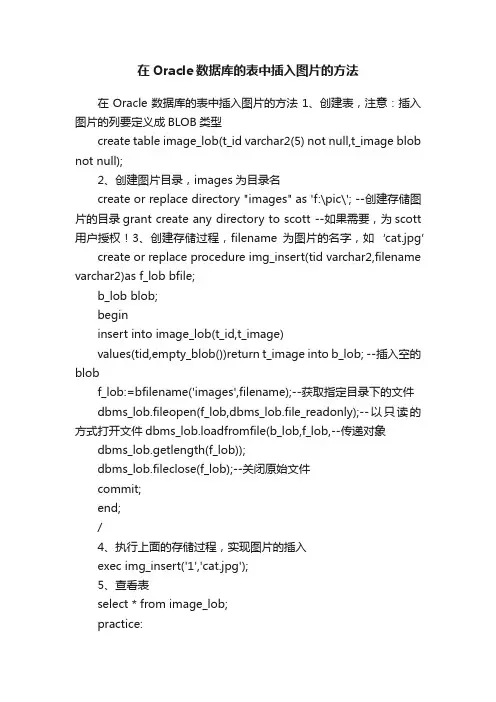
在Oracle数据库的表中插入图片的方法1、创建表,注意:插入图片的列要定义成BLOB类型
create table image_lob(t_id varchar2(5) not null,t_image blob not null);
2、创建图片目录,images为目录名
create or replace directory "images" as 'f:\pic\'; --创建存储图片的目录grant create any directory to scott --如果需要,为scott用户授权!3、创建存储过程,filename为图片的名字,如‘cat.jpg’
create or replace procedure img_insert(tid varchar2,filename varchar2)as f_lob bfile;
b_lob blob;
begin
insert into image_lob(t_id,t_image)
values(tid,empty_blob())return t_image into b_lob; --插入空的blob
f_lob:=bfilename('images',filename);--获取指定目录下的文件
dbms_lob.fileopen(f_lob,dbms_lob.file_readonly);--以只读的方式打开文件dbms_lob.loadfromfile(b_lob,f_lob,--传递对象
dbms_lob.getlength(f_lob));
dbms_lob.fileclose(f_lob);--关闭原始文件
commit;
end;
/
4、执行上面的存储过程,实现图片的插入
exec img_insert('1','cat.jpg');
5、查看表
select * from image_lob;
practice:
1. create table image_lob(t_id varchar2(5) not null,t_image blob not null);
2. create or replace directory "images" as 'd:\pic\';
3.
create or replace procedure img_insert(tid varchar2,filename varchar2)as
f_lob bfile;
b_lob blob;
begin
insert into image_lob(t_id,t_image)
values(tid,empty_blob())return t_image into b_lob; f_lob:=bfilename('images',filename);
dbms_lob.fileopen(f_lob,dbms_lob.file_readonly); dbms_lob.loadfromfile(b_lob,f_lob,
dbms_lob.getlength(f_lob));
dbms_lob.fileclose(f_lob);
commit;
end;
4. exec img_insert('1','bg.jpg');
5. select * from image_lob。
如何将图片插入到数据库中
试验十数据库编程1、新建项目项目名称为“d bgl”。
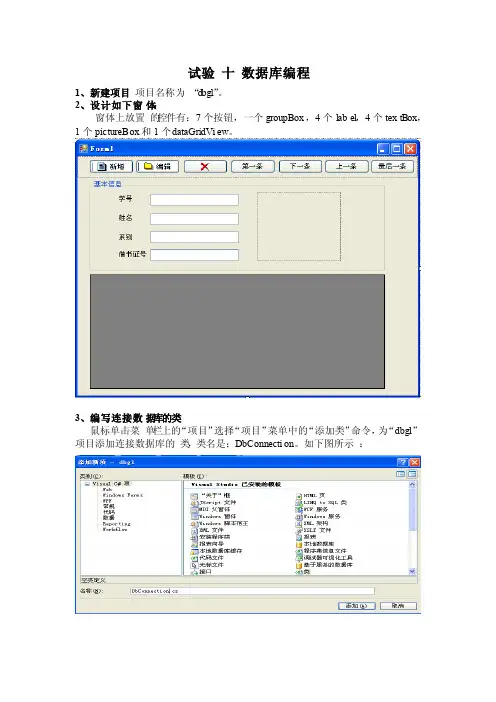
2、设计如下窗体:窗体上放置的控件有:7个按钮,一个groupBox,4个label,4个textBox,1个pictureBo x和1个d ataGr idVie w。
3、编写连接数据库的类鼠标单击菜单栏上的“项目”选择“项目”菜单中的“添加类”命令,为“dbgl”项目添加连接数据库的类,类名是:DbConn ectio n。
如下图所示:DbConn ectio n类的代码如下图所示:注意需要引入Sy ste m.Data.SqlCli ent名称空间。
4、编写操作数据的类为“dbgl”项目添加操作数据的类,该类名为“DbOper ation”。
首先,实例化“DbConn ectio n”类,代码如下:其次,编写方法ge tdata set,该方法返回一个DataSet对象的数据集。
代码如下:接着编写执行SQL语句的方法“sqlcmd”。
该方法的代码如下:最后编写方法“GetTab le”,该方法用于返回一个Da taTab le类型的数据。
代码如下:5、为窗体编写代码,完成对数据库操作的功能。
在窗体的代码视图中:(1)定义一个窗体级别的Bi nding Manag erBas e类变量m ybind用来管理多个控件绑定到一个数据源,以便实现同步操作。
代码如下:(2)在窗体的Lo ad事件中编写,为相关控件绑定相数据。
代码如下:(3)为“第一条”按钮控件编写代码:代码如下图所示:(4)为“下一条”按钮控件编写代码:代码如下图所示:(5)为“上一条”按钮控件编写代码:代码如下图所示:(6)为“最后一条”按钮控件编写代码:代码(略)。
自己编写(7)给“新增”按钮编写代码,完成添加一条记录首先,给项目添加一个窗体,窗体名称为“FormBa se”。
ACCESS教程3

一、在表中输入数据1、打个一个表打开表有两种方法,一是:用鼠标双击这个选项,二是:先单击这个选项选中它,然后再单击数据库窗口上的“打开”按钮。
打开这个表之后,我们就开始往里面输入数据。
2、在表中添加、修改和删除数据?3、让单元格中的数据全部显示出来?一种:是将鼠标移动到标题行中两个字段的交界处,如果位置适当的话,鼠标的光标位置可以拖动。
按住鼠标左键,向右拖动鼠标来拉长字段的宽度,让这个字段中的文字全部显示出来,再松开左键就可以了。
另一种方法:就是将鼠标移动到字段的标题上,这时鼠标的光标会变成向下指的箭头符号,单击鼠标右键,就会弹出一个菜单,单击菜单上的“列宽”命令,出现“列宽”对话框,输入数值来定义列的宽度。
也可以单击“最佳匹配”按钮,这样这一列的列宽就可以自动进行调整,保证能将这个字段中最长的值显示出来。
完成这些后单击对话框上的“确定”按钮就可以了。
在Access中,改变表中文字的字号大小时,表的大小也会按比例随着变化,所以不能用改变字体大小的方法来让文字都显示出来。
不拉长列宽,也可以加大行高,使那些较长的值多用几行显示。
调整行的高度和调整列宽度的方法基本类似,也有两种方法,第一种就是将鼠标移动到相邻两行之间,这时鼠标变成可拖动形状,按住鼠标左键,上下拖动鼠标调整行的高度;第二种方法是选中某一行,单击鼠标右键,在弹出的菜单里用鼠标单击“行高”命令,在出现的“行高”输入栏中输入一定的数值来改变行的高度。
完成后单击“确定”按钮,这时其它行的高度也改变了,因为在表中各个记录都是相关的,调整一行的行高,其他行的行高都会相应调整,以保持各行的高度一样。
4、怎样在表中插入、删除和移动字段插入和删除字段:在要插入和删除的字段上右键。
移动字段:首先将鼠标移动到字段的标题处,鼠标变成向下的箭头,单击鼠标右键选中这个字段,等它都变成黑色后,按住鼠标左键,拖动字段,松开左键,这个字段就移动了。
5、怎样让表中的一些列总是显示出来?可以通过“冻结列”的方法来实现,冻结后的列不会随着横向滚动条的拖动而移动。
oracle存储图片到数据库

Using The interMedia Relational Interface To Manage Media Data In BLOBs And BFILEs类型: SAMPLE CODE状态: PUBLISHED内容类型: TEXT/PLAIN创建日期: 03-JUN-2002上次修订日期: 26-APR-2004PURPOSE ------- This document provides examples of the usage of the interMedia Relational Interface to manage media data stored in BLOBs and BFILEs. SCOPE & APPLICATION ------------------- Application developers, dealing with multimedia applications without using the interMedia object types to store and manager media data in relational tables. The examples provided in this note show possible methods dealing with images, however, similar methods exist also for video and audio data. Using the interMedia Relational Interface to manage media data in BLOBs and BFILEs =========================================================== ======================= Contents -------- 1) Introduction 2) InterMedia Methods available for BLOB and BFILE data processing 3) Setting up the environment 4) LoadingImages into a BLOB Column from the Operating File System 5) Setting new Image Properties 6) Copying Images into another column 7) Extracting Image Properties 8) Writing Images back to the file system 9) Displaying images 1) Introduction --------------- Many applications exist, where media data is stored in BFILEs or BLOBs and not within interMedia object types. The interMedia Relational Interface provides static methods that allows applications developers who do not want to migrate their existing multimedia applications to use interMedia objects to manage their media data. This document shows examples on how to use the interMedia Relational Interface. 2) InterMedia Methods available for BLOB and BFILE data processing ------------------------------------------------------------------ The following is a list of all interMedia methods available for media file processing. For a full description of the methods refer to the "Oracle interMedia User's Guide and Reference Release 9.2" chapter 10. a) Generic methods available for image, video, audio and document data - export( ) : copies data from a local source within an Oracle database to the specified external data source. Applies to BLOBs only - importFrom( ) : transfers data from the specified external data source to the specified local source within an Oracle database and, if the 'all attributes' form is used, returns format and mimeType ifavailable. Applies to BLOBs only - getProperties( ) : reads the BLOB/BFILE data to get the values of the media attributes and then stores them in the input CLOB in XML form. If the 'all attributes' form of the method is used, the method also returns all attributes in explicit parameters. Applies to BLOBs and BFILEs b) Methods available for image data only - process( ) : performs in-place image processing on an image stored in a BLOB. Applies to BLOBs only. - processCopy( ) : copies an image from a BLOB/BFILE to the destination BLOB while performing image processing on the destination BLOB. Applies for source data in BLOBs and BFILEs 3) Setting up the environment ----------------------------- The first step to use interMedia to manage image data in BLOBs and BFILEs is, to ensure, that the Relational Interface has been set up correctly. Beginning with Oracle9i, the Relational Interface is installed together with the interMedia standard installation. In 8.1.7 you have to install it manually. For further information about the installation and verification of the Relational Interface installation, please refer to [NOTE:198113.1] Usage, Installation and Configuration of the interMedia Relational Interface The following section lists the set of commands needed to create the environment used in the examples from thefollowing chapters. It is assumed, that you already created a directory on Windows NT called c:\pictures and an image called image1.jpg is stored in that directory. sqlplus /nolog CONNECT / AS SYSDBA CREATE USER intermedia IDENTIFIED BY intermedia DEFAULT TABLESPACE users TEMPORARY TABLESPACE temp; GRANT CONNECT, RESOURCE TO intermedia; GRANT CREATE ANY DIRECTORY TO intermedia; -- the following is needed for the interMedia export() method GRANT JAVASYSPRIV TO ORDSYS; GRANT JAVASYSPRIV TO ORDPLUGINS; CALL DBMS_JAVA.GRANT_PERMISSION( 'INTERMEDIA', 'java.io.FilePermission', 'C:\PICTURES\*', 'write'); CONNECT intermedia/intermedia CREATE DIRECTORY PICTURES AS 'C:\PICTURES'; GRANT READ ON DIRECTORY PICTURES TO ORDSYS; GRANT READ ON DIRECTORY PICTURES TO ORDPLUGINS; CREATE TABLE TRelational_Demo( table_id NUMBER CONSTRAINT pk_trel_demo PRIMARY KEY, media_blob BLOB, media_attr CLOB); INSERT INTO TRelational_Demo VALUES( 1, EMPTY_BLOB(), EMPTY_CLOB()); INSERT INTO TRelational_Demo VALUES( 2, EMPTY_BLOB(), EMPTY_CLOB()); INSERT INTO TRelational_Demo VALUES( 3, EMPTY_BLOB(), EMPTY_CLOB()); COMMIT; CREATE TABLE TRelational_Demo_Bfile( table_id NUMBER CONSTRAINTpk_trel_demo_bfile PRIMARY KEY, media_bfile BFILE, media_attr CLOB); INSERT INTO TRelational_Demo_Bfile VALUES( 1, NULL, EMPTY_CLOB()); COMMIT; 4) Loading Images into a BLOB Column from the Operating File System ------------------------------------------------------------------- To load images into a BLOB column, you have to use the ImportFrom() method. The following procedure loads the image1.jpeg into the TRelational_Demo table. Create or Replace Procedure load_image_blob(in_id NUMBER, in_file VARCHAR2) IS the_blob BLOB; ctx RAW(4000) := NULL; BEGIN -- Open the empty BLOB for updating SELECT media_blob INTO the_blob FROM TRelational_Demo WHERE table_id = in_id for update; -- import the data ORDSYS.ORDImage.importFrom(ctx, the_blob, 'FILE' , 'PICTURES', in_file); COMMIT; EXCEPTION When ORDSys.ORDSourceExceptions.NULL_SOURCE Then Dbms_Output.Put_Line('Local File does not exist'); When ORDSys.ORDSourceExceptions.METHOD_NOT_SUPPORTED Then Dbms_Output.Put_Line('Method not supported'); When ORDSys.ORDSourceExceptions.SOURCE_PLUGIN_EXCEPTION Then Dbms_Output.Put_Line('Source Plugin Exception'); When Others then Dbms_Output.Put_Line(SQLERRM); End; / nowexecute the procedure: sqlplus intermedia/intermedia SQL> set serveroutput on SQL> execute load_image_blob(1,'image1.jpg'); PL/SQL procedure successfully completed. Note: As BFILEs are only a reference to a file stored physically on the operating file system, there is no according interMedia importFrom() for BFILEs like the one for BLOBs. You can use a direct insert statement to add the file pointer information. See also [NOTE:66046.1] "Oracle8i: LOBs" on how to insert the BFILE reference into a table with a BFILE column So, to load a reference to image1.jpg into the table TRelational_Demo_Bfile table, execute the following update statement: UPDATE TRelational_Demo_Bfile set media_bfile = BFILENAME('PICTURES','image1.jpg') WHERE table_id = 1; COMMIT; 5) Setting new Image Properties ------------------------------- To modify the properties (eg: the size or the image format) of an existing image stored in a BLOB column, you can use the process() method. Note: As BFILEs are read only this method only applies to data stored in BLOB columns. CREATE OR REPLACE PROCEDURE modify_image_blob (in_id IN NUMBER, in_properties VARCHAR2) is the_blob BLOB; the_attributes CLOB; my_fileFormat VARCHAR(40); my_MimeType VARCHAR2(4000); my_contentFormat VARCHAR2(4000);my_compressionFormat VARCHAR2(4000); my_Width NUMBER; my_Height NUMBER; my_contentLength NUMBER; BEGIN SELECT media_blob, media_attr INTO the_blob, the_attributes FROM TRelational_Demo WHERE table_id = in_id FOR UPDATE; -- extract the properties, this time we will get back both an XML -- data block as well as individual attributes in their corresponding -- variables ORDSYS.ORDImage.getProperties(the_blob, the_attributes, my_MimeType, my_Width, my_Height, my_fileFormat, my_contentFormat, my_compressionFormat, my_contentLength); -- Let's check out how big the image we provided is. DBMS_OUTPUT.PUT_LINE('Original width =' || my_Width); DBMS_OUTPUT.PUT_LINE('Original height =' || my_Height); -- Process the data DBMS_OUTPUT.PUT_LINE('processing the image'); ORDSYS.ORDImage.process(the_blob, in_properties); -- We now get the attributes from our new image ORDSYS.ORDImage.getProperties(the_blob, the_attributes, my_MimeType, my_Width, my_Height, my_fileFormat, my_contentFormat, my_compressionFormat, my_contentLength); --Now let's see how big it is DBMS_OUTPUT.PUT_LINE('New width =' || my_Width); DBMS_OUTPUT.PUT_LINE('New height =' || my_Height); -- Update the BLOB in the database UPDATE TRelational_Demo SET media_blob = the_blob, media_attr = the_attributes WHERE table_id = in_id; COMMIT; EXCEPTION WHEN ORDSYS.ORDImageExceptions.DATA_NOT_LOCAL THEN DBMS_OUTPUT.PUT_LINE('local blob has not been initialized'); WHEN ORDSYS.ORDImageExceptions.NULL_CONTENT THEN DBMS_OUTPUT.PUT_LINE('Content attribute is null'); WHEN OTHERS THEN DBMS_OUTPUT.PUT_LINE(SQLERRM); END; / now execute the procedure: sqlplus intermedia/intermedia SQL> set serveroutput on SQL> execute modify_image_blob(1, 'scale=0.5'); Original width =2048 Original height =1536 processing the image New width =1024 New height =768 PL/SQL procedure successfully completed. 6) Copying Images into another column ------------------------------------- Using the processCopy() method, you are able to either copy an image stored in a BFILE or in a BLOB into another BLOB column. ProcessCopy() additionally allows you to modify some of the destination image attributes. A typical example would be to use processCopy() to generate a thumbnail out of your source image and store it in a seeparate BLOB column. BLOBExample: In our example we copy the image stored in the row with ID 1 into the one with ID 2 and modify the image to become a GIF file with a smaller size. CREATE OR REPLACE PROCEDURE copy_image_blob (in_id IN NUMBER, new_id IN NUMBER, in_properties IN VARCHAR2) is dest_attributes CLOB; source_blob BLOB; dest_blob BLOB; BEGIN -- get the source image file SELECT media_blob INTO source_blob FROM TRelational_Demo WHERE table_id = in_id; -- get the get the destination image file SELECT media_blob, media_attr INTO dest_blob, dest_attributes FROM TRelational_Demo WHERE table_id = new_id FOR UPDATE; -- now copy the source image into the destination image ORDSYS.ORDImage.processCopy(source_blob, in_properties, dest_blob); -- Now set the image properties of the new file ORDSYS.ORDImage.getProperties(dest_blob,dest_attributes); -- Update the BLOB in the database UPDATE TRelational_Demo SET media_blob = dest_blob, media_attr = dest_attributes WHERE table_id = new_id; COMMIT; EXCEPTION WHEN ORDSYS.ORDImageExceptions.DATA_NOT_LOCAL THEN DBMS_OUTPUT.PUT_LINE('local blob has not been initialized'); WHEN ORDSYS.ORDImageExceptions.NULL_CONTENT THEN DBMS_OUTPUT.PUT_LINE('Content attribute is null'); WHENOTHERS THEN DBMS_OUTPUT.PUT_LINE(SQLERRM); END; / BFILE Example: In our example we copy the image stored in the row with ID 1 into the one with ID 3 and modify the image to become a GIF file with a smaller size. CREATE OR REPLACE PROCEDURE copy_image_bfile (in_id IN NUMBER, new_id IN NUMBER, in_properties IN VARCHAR2) is dest_attributes CLOB; source_bfile BFILE; dest_blob BLOB; BEGIN -- get the source image file SELECT media_bfile INTO source_bfile FROM TRelational_Demo_Bfile WHERE table_id = in_id; -- get the destination image file SELECT media_blob, media_attr INTO dest_blob, dest_attributes FROM TRelational_Demo WHERE table_id = new_id FOR UPDATE; -- now copy the source image into the destination image ORDSYS.ORDImage.processCopy(source_bfile, in_properties, dest_blob); -- Now set the image properties of the new file ORDSYS.ORDImage.getProperties(dest_blob,dest_attributes); -- Update the BLOB in the database UPDATE TRelational_Demo SET media_blob = dest_blob, media_attr = dest_attributes WHERE table_id = new_id; COMMIT; EXCEPTION WHEN ORDSYS.ORDImageExceptions.NULL_DESTINATION THEN DBMS_OUTPUT.PUT_LINE('value of dest is null'); WHENORDSYS.ORDImageExceptions.NULL_LOCAL_DATA THEN DBMS_OUTPUT.PUT_LINE('source local data is null'); WHEN OTHERS THEN DBMS_OUTPUT.PUT_LINE(SQLERRM); END; / now execute the procedure: sqlplus intermedia/intermedia SQL> set serveroutput on SQL> execute copy_image_blob (1,2, 'fileformat=GIFF scale=0.3'); PL/SQL procedure successfully completed. SQL> execute copy_image_bfile (1,3, 'fileformat=GIFF scale=0.3'); PL/SQL procedure successfully completed. 7) Extracting Image Properties ------------------------------ Here is an example of extracting attributes and properties from the demo image. An XML record of these attributes will also be stored in the CLOB. BLOB Example: CREATE OR REPLACE PROCEDURE extract_image_attributes_blob (in_id NUMBER) IS the_blob BLOB; the_attributes CLOB; attr_offset NUMBER; attr_len NUMBER; my_fileFormat VARCHAR(40); my_MimeType VARCHAR2(4000); my_contentFormat VARCHAR2(4000); my_compressionFormat VARCHAR2(4000); my_Width NUMBER; my_Height NUMBER; my_contentLength NUMBER; BEGIN -- Select the attributes from the table and get ready to change them SELECT media_blob, media_attr INTO the_blob, the_attributesFROM TRelational_Demo WHERE table_id = in_id FOR UPDATE; -- extract the properties, these will be placed in an XML attribute -- CLOB ORDSYS.ORDImage.getProperties(the_blob, the_attributes); -- Print out the image attribute XML to see what it looks like IF (the_attributes IS NOT NULL) THEN attr_len := DBMS_LOB.GETLENGTH(the_attributes); attr_offset := 1; WHILE (attr_offset + 249 <= attr_len) LOOP DBMS_OUTPUT.PUT_LINE(DBMS_LOB.SUBSTR(the_attributes, 250, attr_offset)); attr_offset := attr_offset + 250; END LOOP;DBMS_OUTPUT.PUT_LINE(DBMS_LOB.SUBSTR(the_attributes,attr_len - attr_offset + 1, attr_offset)); ELSE DBMS_OUTPUT.PUT_LINE('NULL'); END IF; -- now also display only a single attribute from the BLOB ORDSYS.ORDImage.getProperties(the_blob, the_attributes, my_MimeType, my_Width, my_Height, my_fileFormat, my_contentFormat, my_compressionFormat, my_contentLength); DBMS_OUTPUT.PUT_LINE('The Contentlength of the Image is : '|| my_contentLength); -- Update our CLOB with image data UPDATE TRelational_Demo SET media_attr = the_attributes WHERE table_id = in_id; COMMIT; EXCEPTION WHENORDSYS.ORDImageExceptions.NULL_CONTENT THEN DBMS_OUTPUT.PUT_LINE('The content attribute of the Image is NULL'); WHEN OTHERS THEN DBMS_OUTPUT.PUT_LINE(SQLERRM); END; / BFILE Example: CREATE OR REPLACE PROCEDURE extract_image_attributes_bfile (in_id NUMBER) IS the_bfile BFILE; the_attributes CLOB; attr_offset NUMBER; attr_len NUMBER; my_fileFormat VARCHAR(40); my_MimeType VARCHAR2(4000); my_contentFormat VARCHAR2(4000); my_compressionFormat VARCHAR2(4000); my_Width NUMBER; my_Height NUMBER; my_contentLength NUMBER; BEGIN -- Select the attributes from the table and get ready to change them SELECT media_bfile, media_attr INTO the_bfile, the_attributes FROM TRelational_Demo_Bfile WHERE table_id = in_id FOR UPDATE; -- extract the properties, these will be placed in an XML attribute -- CLOB ORDSYS.ORDImage.getProperties(the_bfile, the_attributes); -- Print out the image attribute XML to see what it looks like IF (the_attributes IS NOT NULL) THEN attr_len := DBMS_LOB.GETLENGTH(the_attributes); attr_offset := 1; WHILE (attr_offset + 249 <= attr_len) LOOP DBMS_OUTPUT.PUT_LINE(DBMS_LOB.SUBSTR(the_attributes, 250,attr_offset)); attr_offset := attr_offset + 250; END LOOP;DBMS_OUTPUT.PUT_LINE(DBMS_LOB.SUBSTR(the_attributes,attr_len - attr_offset + 1, attr_offset)); ELSE DBMS_OUTPUT.PUT_LINE('NULL'); END IF; -- now also display only a single attribute from the BLOB ORDSYS.ORDImage.getProperties(the_bfile, the_attributes, my_MimeType, my_Width, my_Height, my_fileFormat, my_contentFormat, my_compressionFormat, my_contentLength); DBMS_OUTPUT.PUT_LINE('The Contentlength of the Image is : '|| my_contentLength); -- Update our CLOB with image data UPDATE TRelational_Demo_Bfile SET media_attr = the_attributes WHERE table_id = in_id; COMMIT; EXCEPTION WHEN ORDSYS.ORDImageExceptions.NULL_CONTENT THEN DBMS_OUTPUT.PUT_LINE('The content attribute of the Image is NULL'); WHEN OTHERS THEN DBMS_OUTPUT.PUT_LINE(SQLERRM); END; / now execute the procedure: (Note: this does only list the output of the BLOB procedure but a similar output will be generated when excuting the extract_image_attributes_bfile procedure) sqlplus intermedia/intermedia SQL> set serveroutput on SQL> executeextract_image_attributes_blob(1); <?xml version="1.0"?> <-- Generated by Oracle interMedia --> <ImageAnn> <Attributes> <MEDIA_SOURCE_MIME_TYPE desc="MIME Type of the media/its samples" dt="ng.String"> <[CDATA[image/jpeg]]> </MEDIA_SOURCE_MIME_TYPE> <MEDIA_SI ZE desc="Image contentLength" dt="ng.Integer"> <[CDATA[131347]]> </MEDIA_SIZE> <MEDIA_SOURCE_FILE_FORMAT desc="Image fileFormat" dt="ng.String"> <![CDATA[JFIF]]> </MEDIA_SOURCE_FILE_FORMAT> <IMAGE_CONTENT_FORMAT desc=" Image contentFormat" dt="ng.String"> <![CDATA[24BITRGB]]> </IMAGE_CONTENT_FORMAT> <IMAGE_COMPRESSION_FORMAT desc="Image compressionFormat" dt="ng.String"> <![CDATA[JPEG]]> </IMAGE_COMPRESSION_FORMAT> <IMAGE_HEIGHT desc=" Image Height" dt="ng.Integer"> <![CDATA[1536]]> </IMAGE_HEIGHT> <IMAGE_WIDTH desc="Image width" dt="ng.Integer"> <![CDATA[2048]]> </IMAGE_WIDTH> </Attributes> </ImageAnn> The Contentlength of the Image is : 131347 PL/SQL procedure successfully completed. 8) Writing Images back to the file system ----------------------------------------- In order to successfully write an image file with the export() method to disk, theappropriate java file permission grants on the operating system directories and the file need to be made prior to the call to the export() method. You may also refer to [NOTE:133599.1] Problem with 8.1.7 interMedia export method for further information. Note: As only BLOBs are stored in the database, the export() method doesn't apply to image references stored in BFILE columns. CREATE OR REPLACE PROCEDURE unload_image_blob(in_id NUMBER, in_file VARCHAR2) IS the_blob BLOB; ctx RAW(4000) := NULL; BEGIN -- Select the BLOB to in order to write it to the file system SELECT media_blob INTO the_blob FROM TRelational_Demo WHERE table_id = in_id; -- export it to the file system ORDSYS.ORDImage.export(ctx, the_blob, 'FILE' , 'PICTURES', in_file); COMMIT; EXCEPTION WHEN ORDSYS.ORDSourceExceptions.INCOMPLETE_SOURCE_INFORMATION THEN DBMS_OUTPUT.PUT_LINE('Source Type is NULL'); WHEN ORDSYS.ORDSourceExceptions.METHOD_NOT_SUPPORTED THEN DBMS_OUTPUT.PUT_LINE('Method is not supported'); WHEN ORDSYS.ORDSourceExceptions.SOURCE_PLUGIN_EXCEPTION THEN DBMS_OUTPUT.PUT_LINE('Source Plugin Exception'); WHEN ORDSYS.ORDSourceExceptions.IO_ERROR THEN DBMS_OUTPUT.PUT_LINE('IO Error encountered'); WHEN OTHERSTHEN RAISE; END; / now execute the procedure: sqlplus intermedia/intermedia SQL> set serveroutput on SQL> execute unload_image_blob(1, 'outfile.dat');。
在Oracle数据库的表中插入图片的方法
在Oracle数据库的表中插入图片的方法在Oracle数据库的表中插入图片的方法1、创建表,注意:插入图片的列要定义成BLOB类型create table image_lob(t_id varchar2(5) not null,t_image blob not null);2、创建图片目录,images为目录名create or replace directory "images" as 'f:\pic\'; --创建存储图片的目录grant create any directory to scott --如果需要,为scott 用户授权!3、创建存储过程,filename为图片的名字,如‘cat.jpg’create or replace procedure img_insert(tid varchar2,filename varchar2)as f_lob bfile;b_lob blob;begininsert into image_lob(t_id,t_image)values(tid,empty_blob())return t_image into b_lob; --插入空的blobf_lob:=bfilename('images',filename);--获取指定目录下的文件dbms_lob.fileopen(f_lob,dbms_lob.file_readonly);--以只读的方式打开文件dbms_lob.loadfromfile(b_lob,f_lob,--传递对象dbms_lob.getlength(f_lob));dbms_lob.fileclose(f_lob);--关闭原始文件commit;end;/4、执行上面的存储过程,实现图片的插入exec img_insert('1','cat.jpg');5、查看表select * from image_lob;practice:1. create table image_lob(t_id varchar2(5) not null,t_image blob not null);2. create or replace directory "images" as 'd:\pic\';3.create or replace procedure img_insert(tid varchar2,filename varchar2)asf_lob bfile;b_lob blob;begininsert into image_lob(t_id,t_image)values(tid,empty_blob())return t_image into b_lob; f_lob:=bfilename('images',filename);dbms_lob.fileopen(f_lob,dbms_lob.file_readonly);dbms_lob.loadfromfile(b_lob,f_lob,dbms_lob.getlength(f_lob));dbms_lob.fileclose(f_lob);commit;end;4. exec img_insert('1','bg.jpg');5. select * from image_lob。
在报表中加载图片的方法
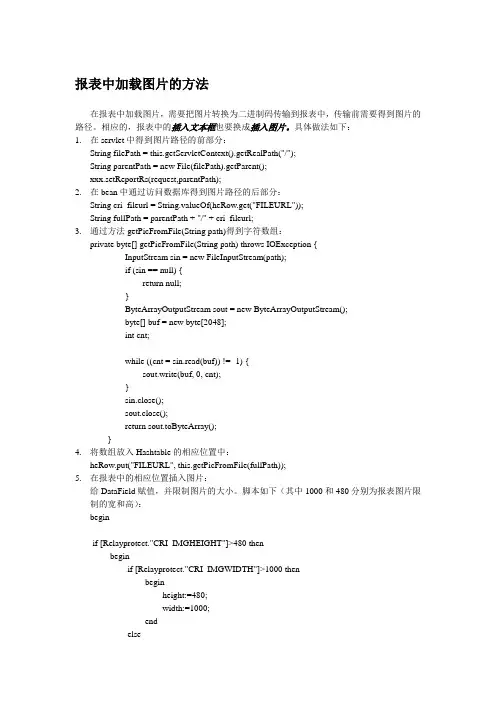
报表中加载图片的方法在报表中加载图片,需要把图片转换为二进制码传输到报表中,传输前需要得到图片的路径。
相应的,报表中的插入文本框也要换成插入图片。
具体做法如下:1.在servlet中得到图片路径的前部分:String filePath = this.getServletContext().getRealPath("/");String parentPath = new File(filePath).getParent();xxx.setReportRs(request,parentPath);2.在bean中通过访问数据库得到图片路径的后部分:String cri_fileurl = String.valueOf(heRow.get("FILEURL"));String fullPath = parentPath + "/" + cri_fileurl;3.通过方法getPicFromFile(String path)得到字符数组:private byte[] getPicFromFile(String path) throws IOException {InputStream sin = new FileInputStream(path);if (sin == null) {return null;}ByteArrayOutputStream sout = new ByteArrayOutputStream();byte[] buf = new byte[2048];int cnt;while ((cnt = sin.read(buf)) != -1) {sout.write(buf, 0, cnt);}sin.close();sout.close();return sout.toByteArray();}4.将数组放入Hashtable的相应位置中:heRow.put("FILEURL", this.getPicFromFile(fullPath));5.在报表中的相应位置插入图片:给DataField赋值,并限制图片的大小。
oracle存储图片

Oracle存图片默认分类 2010-04-21 11:58:03 阅读279 评论0 文章由网提供.net有两种方式向Oracle的blob字段中存储图片:在存储之前都需要获取图片的字节数组,示例代码如下:using (FileStream fs = new FileStream(sFiles[i], FileMode.Open)){len = int.Parse(fs.Length.ToString());bBuffer = new byte[len];fs.Read(bBuffer, 0, len);}下面说明将读取的字节数组存入Oracle中的Blob字段的两种方法:(1)使用OracleLob对象的Write方法。
代码如下:OracleCommand cmd = conn.CreateCommand();mandText = "Select ... For Update";cmd.Transaction= conn.BeginTransaction();using(reader = cmd.ExecuteReader()){OracleLob blob = reader.GetOracleLob(blobIndex);blob.Write(bBuffer, 0, bBuffer.Length);}mit();这种方法有两个关键点:一是在写查询的SQL语句时,需要在最后添加“For Update”,否则会出错;二是需要将blob的Write方法包含在Oracle的事务处理中,即下面的两句代码:cmd.Transaction= conn.BeginTransaction();mit();(2)使用OracleDataAdapter的Update方法,改方法的示例代码如下:cmd = new OracleCommand();cmd.Connection = conn;//更新数据adapter = new OracleDataAdapter("Select ...", conn);DS = new DataSet(m_sTbName);adapter.UpdateCommand = new OracleCommand("Update " + m_sTbName + " set " +sBlobFieldName + "=:NewImage " + "Where " + m_sKeyFieldName + "= '" + sKeyFieldValue + "'", conn);adapter.UpdateCommand.Parameters.Add(":NewImage", OracleType.Blob, bBuffer.Length, sBlobFieldName);adapter.MissingSchemaAction = MissingSchemaAction.AddWithKey; adapter.FillSchema(DS, SchemaType.Source, m_sTbName);//填充数据集adapter.Fill(DS, m_sTbName);//寻找当前图片文件对应的记录row = DS.Tables[m_sTbName].Rows.Find(sKeyFieldValue);//开始编辑行row.BeginEdit();if (bBuffer.Length != 0){row[sBlobFieldName] = bBuffer;}row.EndEdit();//对数据库进行更新adapter.Update(DS, m_sTbName);两种方法相比,第一种方法效率更高,也跟简单。
上传图片至数据库内功能的实现(OLE对象)
上传图片至数据库内功能的实现(OLE对象)一般的无组件上传类,其上传过程是将图片先保存到指定文件夹,与此同时将该路径保存至数据库字段的。
显示图片则是根据数据库表中的路径字段对应显示的。
当然有关图片的管理,比如删除:只删除了路径,实际的图片需要根据该路径通过FSO进行删除……那有没有这样一种情况:将图片直接作为一个字段的值保存。
对图片的操作就象是对数据字段的操作一样熟练。
答案是肯定的,只是将该字段的类型设为OLE对象知识点:OLE对象字段用来存储诸如Microsoft Word或Microsoft EXCEL文档、图片、声音的数据以及在别的程序中创建的其他类型的二进制数据。
OLE对象可以链接或嵌入到Microsoft Access表的字段中。
一、设计数据库testimg.mdb为方便调试,设计表imgurl,其中两个字段:id(自动编号、关键字)、img(OLE对象)二、连接数据库文件conn.asp三、提供上传图片的表单页面upload.html四、接受数据并添加记录页upload.asp<!--#include file="conn.asp"--><%formsize=request.totalbytesformdata=request.binaryread(formsize)bncrlf=chrB(13)&chrB(10)divider=leftB(formdata,clng(instrb(formdata,bncrlf))-1) datastart=instrb(formdata,bncrlf&bncrlf)+4dataend=instrb(datastart+1,formdata,divider)-datastart mydata=midb(formdata,datastart,dataend)set rs=server.createobject("ADODB.recordset")rs.open "SELECT * FROM imgurl",conn,3,3rs.addnewrs("img").AppendChunk myDatars.updaters.closeset rs=nothingset conn=nothingresponse.redirect "index.asp"%>五、提取数据库表中图片字段内容以做显示图片页showimg.asp六、显示图片的index.asp。
如何将图片保存到SqlServer、Oracle、Access数据库中。-懒猫星空--...
如何将图片保存到SqlServer、Oracle、Access数据库中。
-懒猫星空--...如何将图片保存到SqlServer、Oracle、Access数据库中。
首先,我们要明白图片是以二进制的形式保存在数据库中的,那么把图片保存到数据库中的步骤大体上有这几步1.将图片转换为二进制数组(byte[]);2.把转换后的二进制数组(byte[])作为参数传递给要执行的Command;3.执行Command;首先,如何把图片转换成byte[],如果你使用的是2.0,那么你可以使用FileUpLoad控件来实现byte[] fileData = this.FileUpload1.FileBytes;如果你用的是1.1或者你在创建WinForm那么你可以使用下面的方法来把图片转换为byte[] public byte[] getBytes(string filePath){System.IO.FileStream fs = new System.IO.FileStream(filePath, System.IO.FileMode.Open);byte[] imgData = new byte[fs.Length];fs.Read(imgData, 0, (int)fs.Length);return imgData;}1.SqlServer数据库。
SqlServer有Image字段类型,最大可以存储2G的数据。
byte[] fileData = this.FileUpload1.FileBytes;string sql = "insert into t_img(img) values (@img)";string strconn = System.Configuration.ConfigurationManager.ConnectionStrings[ "fengdongDB"].T oString();SqlConnection sqlConn = new SqlConnection(strconn);SqlCommand sqlComm = new SqlCommand(sql, sqlConn);sqlComm.Parameters.Add("@img", SqlDbType.Image);//添加参数sqlComm.Parameters["@img"].Value = fileData;//为参数赋值sqlConn.Open();sqlComm.ExecuteNonQuery();sqlConn.Close();2.Oracle数据库。
向Access数据库报表中添加图像的方法分析
息 以便查看信息 . 并将数据 以格式化的方式发送 到打印机 。 在 日常应用中. 经常需要 在报表中添加一定数量的图像 。 有 意的效果 。 在” 图片类型” 属性框中 。 指定要嵌入 图像还是链接图像 。 链 时为了修饰报表我们会在报表 中添加少量图像 。如公司的徽 标 因为此时文件单独存 在, 不会影 等: 有时需要显示大量 图像 , 如某学校学籍管理数据库报表 中所 接 方式适合于图像很 大的情 况。 有学生的照片等。 这时就需要 用户根据实际情况 , 取适 当的方 响数据库文件的规模 : 采 并且 以链接方 式加入图像 。 其他报表 、 窗 体 或 应 用 程 序 均 可共 用 这 个 图像 。 法 向报表中添加 图像 。 以提高工作效率 。 添加的背景 图片和使用图像控件添加 的图像 .被称为静态 合适方法的选取有桢于我们对一些重要概念 的理解 。在报 在报表中不能修改它们 , 只能到原始 文件 中进行修改。需 表中显示的图像被分为两种 : 未绑定图像和绑定图像。 未绑定 图 图像。 像不是报表 中要显示记录 中的一部分 。它不会随数据库记录或 要注意的是当使用嵌入 图像 时 .在更改原始文件后需要刷新嵌 报表页的移动而更改 . 如向报 表中添加 的背景 图片、 公司标识等 入 的 图像 。 就是未绑定图像。相反 ,绑定 图像是报表 中各条记 录中的一部 3 使用未绑定对象框添加 未绑定 图像 . 使用未绑定对象框也可 以添加图像 。方法与使 用图像控件 分 。 随每个数据库记 录或报表页而更改 的图像, 如 。 是 例 某公 司 在报表设计视 图中把工具箱 的“ 未绑定对 的人事管理数据库。 需要显示 每位 员工的信 息及照片 , 则使用绑 添加图像的方法类似 . 控件拖动到报表 中适 当的位置 。 松开 鼠标后弹 出一个对话 定图像 使用绑定或未绑定图像将决定 报表 中使用 的控件类 型。 象框” 如果使用绑定图像 . 则使用 图像控 件或绑定对 象框控件 ; 要显示 框 . 选择 “ 由文件创建 ”然后单击” , 浏览” 定位要添加的图像 。如 未绑定 图像 . 可在图像控件 和未绑定对象框之间进行选择。 以 果要链接到一个 图像 , 所 则选 中” 链接 ” 复选框 , 然后单击” 确定” 按 要将图像嵌入到报表 中, 么保持” 那 链接” 复选 确定报表 中要添加 的是绑定还是未绑定图像是一个关键问题 。 钮来完成此过程 :
在excle如何插入图片?
在excle如何插入图片?excle怎么插入图片?下面是小编为大家精心整理的关于在excle如何插入图片?希望能够帮助到你们。
方法/步骤1打开表格。
2找到顶部菜单中的插入按钮,点击插入。
3在插入菜单下选择图片按钮。
4这个时候可以在本地选择想要插入的图片。
5点击确定按钮,就顺利的插入图片了。
6这个时候就可以看到表格插入图片顺利完成了。
选定单元格、行和列以及对象Ctrl+空格键选定整列Shift+空格键选定整行Ctrl+A选定整张工作表Shift+Backspace在选定了多个单元格的情况下,只选定活动单元格Ctrl+Shift+空格键在选定了一个对象的情况下,选定工作表上的所有对象Ctrl+6在隐藏对象、显示对象和显示对象占位符之间切换Ctrl+Shift+*(星号)选定活动单元格周围的当前区域(包围在空行和空列中的数据区域)。
在数据透视表中,选定整个数据透视表Ctrl+/选定包含活动单元格的数组Ctrl+Shift+O(字母O)选定含有批注的所有单元格扩展选定区域快捷键End+Shift+箭头键将选定区域扩展到与活动单元格在同一列或同一行的最后一个非空单元格End+Shift+Home将选定区域扩展到工作表的最后一个使用的单元格(右下角)End+Shift+Enter将选定区域扩展到当前行中的最后一个单元格。
如果已打开“Lotus1-2-3常用键”(“工具”菜单上“选项”命令中的“1-2-3的帮助”选项卡),则此快捷键次序将不起作用ScrollLock+Shift+Home将选定区域扩展到窗口左上角的单元格ScrollLock+Shift+End将选定区域扩展到窗口右下角的单元格Enter完成单元格输入并选取下一个单元格Alt+Enter在单元格中换行Ctrl+Enter用当前输入项填充选定的单元格区域Shift+Enter完成单元格输入并向上选取上一个单元格Tab完成单元格输入并向右选取下一个单元格。