
索尼MD说明书
!索尼MD的操作SONY MD操作指南一,基本操作。
1,打开调音台和节目源。
2,打开电源开关。
3,插入可录光盘。
如果光盘包含信息,该机会自动找到最后一段信息的末尾并开始准备录音。
4,选择输入。
,如果是数字输入(同轴电缆),请选用DIGITAL COAX;如果是光缆,请选用DIGITAL OPT;如果是模拟线路输入,请选用ANALOG。
5,设定录音模式。
如想录制立体声节目,请设定于STEREO状态;如想录制单声道节目,请设定于MONO状态。
在单声道状态,录制的节目时间要比立体声节目时间约长一倍。
6,按压录音键盘,录音机处于待机状态。
7,如果输入为模拟信号,请校准录音电平,详细内容,请参见第11页。
8按压放间键盘或暂停键,启动录音功能。
9录音完毕,请停止节目源的播放。
录音完毕之后,不要立即断开电源.如果立即断开电源,录制的信息不能够被储存在MD上,要想储存信息,请按压开门键,取出MD。
此时,在屏幕上会显示一个闪烁的TOC。
TOC停止闪烁以后,你才可以断开电源。
录音中暂停一次,轨迹号数升高一位.比如,你在4轨迹暂停录音,重新启动后,轨迹号数变为5,并在5处开始录音。
写保护装置。
为防止误抹去信息,请按箭头方向推动滑片,并打开;要想重新录音,请封住缺口。
注意:在录音或录音暂停中间,转换录音模式,将停止录音。
二,录音注解1,显示屏显示PROTECTED。
表明该光盘处于写保护状态,请封住缺口。
2,显示DIN UNLOCK并闪烁。
数字信号源没有准确连接,或节目源没有打开。
3,按照不同的节目源,有以下几种轨迹编号方法.节目源为CD或MD,输入选择为数字,节目源通过数字输入端子输入,录音机自动按照节目源轨迹号数序列排列。
如果一个轨迹被重复二次或以上(也就是说,重复播放一个轨迹)或者使用同一个轨迹号数(也就是说,从不同的CD机或M D机)播放二个以上的轨迹,轨迹被录制成一个单一的,连续的轨迹号。
如果节目源为MD,轨迹间隔少于4秒,轨迹号数将不能标记。
输入选择为模拟,通过线路输入的节目源或者显示屏上LEVEL-SYNC没有亮起,或者输入选择为数字,节目源为DAT或者卫星广播并通过数字输入端子输入,节目源将被录制为一个轨迹。
在录制完毕后,你可以用“分割功能”分割轨迹(参见第22页)或者在录音中用轨迹记号功能(见第12页)给轨迹打上记号。
在录制模拟信号或从数码录音机,广播卫星发送的信号时,如果LEVEL-SYNC显示在显示屏上,则表明录音机在自动标记轨迹号数。
(见12页)。
输入设定为数码输入,节目源为数码录音机或广播卫星时,一旦输入信号取样频率发生变化,录音机将自动标记一轨迹号数。
4,显示屏上TOC闪烁,请不要关闭电源,或移动录音机或拔掉电源插头。
5,当播放模式为程序或穿梭时。
播放模式被自动地切换到继续状态。
6,显示屏上显示CANNOT COPY。
表明录音机使用了系列拷贝管理系统,无法拷贝。
(见33页)。
7,在录制已加重的数字信号时(在较高频率时)。
信号自动支加重,支加重信号的电平在峰值电平表上显示出来。
8,在录音过程或录音暂停过程中,通过数字输入端子输入的数字信号以同样的取样频率发送到数字输出。
要改变取样频率到输出,请使用输入监视功能。
(见第10)。
三,录音须知1,检查可录光盘的剩余时间在录音时,反复按压DISPLA/CHAR键,屏幕显示如下:已使用时间,剩余可录时间,轨迹号数。
在录音机停止工作时,反复按压DISPLA/CHAR键,屏幕显示如下:总录音时间,剩余可录时间,光盘名字。
(见15页)。
2,监视输入信号。
在启动录音之前,通过录音机的输出连接端子,你可以监视所选择的输入信号。
(第10页)01,按开门键,取出光盘。
02,根据你想监听的信号,设定输入选择。
03,按录音键。
如果输入为ANALOG模拟,显示屏显示AD-DA。
如果输入为DIGTAL数字,显示屏显示-DA。
3,显示屏显示AUTO CUT自动切入。
这表示当输入为数字,节目源通过数字输入连接时,30秒内没有信号输入,一个3秒左右的空格将代替这30秒的静音,录音机将改变到录音暂停状态。
4,显示屏显示SMART SPACE智能空格。
当延长静音为30秒以下,信号又再输入,一个3秒左右的空格将取代静音,录音机继续录音。
01,关闭以上两项功能(AUTO CUT ,SMART SPACE)。
当录音停止时,按EDIT/NO键二次,显示屏显示为“设定菜单”(SET UP MENU)然后,转动AMS钮直到显示屏显示“S。
SPACE”,按AMS钮,再转动AMS钮直到显示屏显示“S。
SPACE OFF”,按AMS钮。
再按EDIT/N O。
02,打开以上两项功能(AUTO CUT ,SMART SPACE)。
当录音停止时,按EDIT/NO键二次,显示屏显示为“设定菜单”(SET UP MENU)然后,转动AMS钮直到显示屏显示“S。
SPACE”,按AMS钮,再转动AMS钮直到显示屏显示“S。
SPACE ON”,按AMS钮。
再按EDIT/NO。
5,回放刚录制的轨迹。
在录音刚结束时,迅速按放音键,录音机从刚录制材料的第一轨迹处开始回放。
01,录音结束后,播放光盘的第一轨迹。
录音停止后,再按停止键,然后再按播放键,录音机将从光盘的第一轨迹处开始播放。
6,超过现存轨迹录音。
(第11页)(01,按照第六页“录制光盘”,实施步骤1-5。
02,转动AMS(或按选曲键)直到显示出所需的轨迹。
03,按照第7页,实施“录制光盘”步骤6若想从轨迹的中间录音。
01,在实施以上步骤2之后,按播放键,启动回放。
02,在你想要录音的地方,按暂停键。
03,继续第7页“录制光盘”步骤之6。
当显示屏显示“PROGRAM”或“SHUFFLE”时,你不能在现存轨迹的中间处录音。
7,校准录音电平。
当输入选择为模拟,信号通过线路输入时,在启动录音之前,用REC LEVE L校准录音电平。
在数字录音时你不能够校准录音电平。
01,实施第6,7页的“录制光盘”步骤1-6。
02,用最大电平信号播放节目源。
03,在监听信号时,转动录音电平钮,校准录音电平,直到峰值电平表到达最高点而OVER指示器又不亮起。
允许OVER偶而亮起。
04,停止播放节目源。
05,启动录音(按照第7页的步骤)。
8,在录音时标记轨迹号数(轨迹编号)(第12页)。
你既可手动编号,亦可自动编号。
通过在指定点的编号,运用AMS功能或编辑功能,你能迅速地找到需要的信息。
01,手动编号在录制光盘的任何时候你都能手动编号。
在录音中,在需要编号的地方按录音键即可。
02,自动编号。
当输入为数字,节目源为CD或MD并通过数字输入端子输入时,录音机自动根据节目源序列编号。
当显示屏显示为“LEV EL-SYNC”,一旦信号跌至或升至某一点,录音机就自动编上号数(自动编号)。
如果显示屏不显示“LEVEL-SYNC”,请设定“LEVEL-SYNC”于“开ON”状态。
请参照以下程序:1当录音停止时,按EDIT/NO键二次,显示屏显示为“设定菜单”(S ETUP MENU)2 然后,转动AMS钮直到显示屏显示“LEVEL SYNC?”,按AM S钮,再转动AMS钮直到显示屏显示“LEVEL SYNC ON”,按AMS钮。
再按EDIT/NO。
如果想取消自动编号功能,请参照以下程序:1当录音停止时,按EDIT/NO键二次,显示屏显示为“设定菜单”(S ETUP MENU)2 然后,转动AMS钮直到显示屏显示“LEVEL SYNC?”,按AM S钮,再转动AMS钮直到显示屏显示“LEVEL SYNC OFF”,按AMS钮。
再按EDIT/NO。
当你完成录音后想编号,请参阅分割功能(见22页)9,预存数据录音(6秒机器录音)当节目源为立体声广播或卫星广播时,由于确定内容和按钮要花几秒钟时间,因此,前几秒钟的信息常常要丢失,为防止此种现象发生,预存录音功能在缓冲记忆区里存储了6秒的最新信息,因此,当你开始录制节目时,录音实际是从缓冲记忆区里的6秒信息处开始,请参阅下图。
操作过程如下:1实施第6-7页步的“录制光盘”步骤1-6。
录音机处于录音暂停状态。
2启动需要录制的节目源。
最新的6秒信息被存储于缓冲记忆区里。
3按AMS键或T REC启动预存数据录音。
10,多音频设备同步录音。
1实施第6页的“录制光盘”步骤1-5。
2按MUSIC SYNC,录音机转为录音暂停状态。
3启动想录音的节目源,录音机自动启动录音。
在同步录音状态时,智能空格和自动切入功能将自动打开而不管它们的设定和输入类型。
11,与SONY CD唱机同步录音(第14页)略。
1打开唱机和调音台。
2实施“录制光盘”步骤2-5准备录音。
3在唱机中插入光盘。
4选择唱机回放模式(穿梭播放,程序播放等等)。
5按遥控器上的待机键。
唱机播放暂停,录音机录音暂停。
6按压启动键。
7按压停止键,停止同步录音。
12如何使用显示屏(第15页)。
你可以使用显示屏检查光盘和轨迹信息诸如总轨迹号数,总播放时间,剩余可录时间和光盘名称。
录音机停止工作,每按一次DISPLAY/CHAR 或DISPLAY,显示屏按如下顺序显示:总轨迹数和所有录制轨迹总播放时间——剩余可录时间——光盘名称——总轨迹数和所有录制轨迹总播放时间。
一插入可录光盘,显示屏按如下顺序显示:光盘名称,总轨迹数,总播放时间。
在播放光盘时,每按一次DISPLAY/CHAR 或DISPLAY,显示屏按如下顺序显示:现时轨迹号数和播放时间——现时轨迹号数和剩余时间——轨迹名称——现时轨迹号数和播放时间(第16页)注意:在播放光盘的任何时候你都可以检查轨迹名称。
按遥控器上的SCROLL键即可。
由于显示屏只能显示12位,因此,要想查看13位字符以上的标题请再按SCROLL以显示标题。
要暂停滚动,请按S CROLL键即可。
要继续滚动,请再按SCROLL键即可。
13快速寻找一个指定轨迹。
(第16页)在播放光盘时,通过使用AMS钮(音乐自动感知器),向前选曲和向后选曲键,数字键或遥控器上的M SCAN(略)。
14寻找轨迹中的一个点。
(第17页)用快进或快退键(略)。
15重复播放.(略)用重复键REPEAT即可。
若要取消重复播放,请反复按压重复键,直到显示屏上REPEAT消失。
若要重复播放现时轨迹,请反复按压重复键,直到显示屏上显示REPEAT 1 。
若要重复播放一个指定部分,请使用A-B REPEAT,即指定部分重复。
16(第18)随机播放或穿梭播放。
在录音机停止工作时,反复按压播放模式PLAY MODE,直到显示屏显示S HUFFLE,按播放键启动随机播放。
若要取消随机播放,请反复按压播放模式P LAY MODE,直到显示屏上SHUFFLE消失。
17编程播放在录音机停止工作时,反复按播放模式PLAY MODE,直到显示屏显示PRO GRAM,1你可经通过遥控器来编程;亦可转动AMS钮直到所需的数字显示出来,再按AMS键。
索尼Hi-MD系统立体声个人组件音响系统说明书

2-595-576-02 (1) Hi-MD S ystem S tereo P ersonal C omponent S ystemInstruction m anual/WarrantyThank y ou f or y our p urchase.Failure t o o bserve s afety p recautions w ithelectrical p roducts m ay r esult i n f ire o r p ersonal i njury.This i nstruction m anual s hows i mportant p recautions a nd h ow t ohandle t he p roduct t o p revent a ccidents. P lease r ead t his i nstructionmanual c arefully a nd u se t he p roduct s afely. A fter r eading, b e s ure t okeep i t i n a p lace w here y ou c an r efer t o i t a t a ny t ime.CMT-AH10©2005 S ony C orporationMeaning o f w arning i ndications The f ollowing i ndications a re used i n t he i nstruction m anual a nd on t he p roduct. P lease r ead t he t ext after f ully u nderstanding t he c ontentsof t he d isplay.Prohibited s ymbolPlease r ead t he n otes o n p ages 6-9 c arefully. C ontains g eneral p roduct precautions.1Turn o ff t hepower 2Unplug t hepower p lug f rom the e lectrical o utlet 3Consult t he s tore o fpurchase o r S ony service c enter f or repairOnce a y ear, c heck t hat t he p ower c ord i s n ot d amaged a nd t hat d ust h as accumulated b etween t he p ower o utlet a nd t he p ower p lug.Symbols t hat i ndicate a ctionsattention s ymbolSony p roducts a re d esigned w ith s afety i n m ind. H owever, a ll e lectrical products a re d angerous a nd m ay c ause p ersonal i njury d ue t o f ire, e lectric shock, e tc., i f u sed i ncorrectly. B e s ure t o o bserve t he f ollowing t o p revent accidents.If y ou n otice a ny m alfunction o r d amage t o t he c abinet, p ower c ord, e tc., immediately c ontact y our r etailer o r S ony s ervice c enter f or r epairs.bFor y our s afetyFailure t o o bserve t he p recautions indicated b y t his s ign m ay r esult i n i njury or d amage t o n earby h ousehold g oods due t o e lectric s hock o r o ther a ccidents.Failure t o o bserve t he p recautions indicated b y t his i ndication m ay r esult i n personal i njury s uch a s d eath o r s eriousinjury d ue t o f ire, e lectric s hock, e tc.2 I ntroductionFailure t o o bserve t he p recautions indicated b y t his i ndication m ay r esult i npersonal i njury s uch a s d eath o r s erious injury d ue t o f ire, e lectric s hock, e xplosion, e tc.If t here i s a s trange s ound o r s mell, if s moke a ppearsBefore u singThis i nstruction m anual e xplains h ow t o u se t he P ersonal C omponent S ystem m ain u nit. T here a reseparate m anuals f or b asic o perations f or c onnecting t o a c omputer a nd d etailed s oftware o perations.Please r efer t o t he f ollowing a nd u se t he n ecessary m anuals.When u sing t his u nitxOperating I nstructions (this d ocument)This m anual d escribes t he o verall o peration o f t his m achine. S ee h ere f ordetails o n o perating t his u nit.zOperations o n t he m ain u nit a nd r emotecontrol T his m anual m ainly d escribes o perations o n t he r emote c ontrol, b ut y ou c analso p erform t he s ame o perations o n t he m ain u nit u sing b uttons w ith t he s ame o rsimilar n ames. P lease a lso r efer t o “Part n ames” (pages 16-21).When c onnecting t his u nit t o acomputerxSoftware I nstallation /Basic O peration G uidesonic s tageExplains h ow t o i nstall t he i ncluded s oftware (SonicStage) a nd b asicoperations.x S onicStage H elp T his i s a nelectronic m anual t hat y ou c an v iew o n y our c omputer s creen. I t i sincluded i n t he i ncluded s oftware S onicStage.It e xplains h ow t o u se S onicStage i n m ore d etail t han t he “Installation/Basic O peration G uide”. A lso, i f y ou h ave a ny p roblems w hile u singSonicStage, p lease s ee h ere.xPersonal A udio C ustomer S upport W ebsite o n t he I nternet.You c an v iew t he l atest s upport i nformation f or t his u nit a nd t he i ncludedSonicStage s oftware. h ttp://www.sony.co.jp/support-pa/Introduction 3warning ................................................. ................. 6 Cautions .................................. ................................. 7 W hat kind o f d iscs c an b e p layed o n t his u nit? ........................... 11 What H i-MD c an d o ! ................. 12 E njoy c reating y our o wn original C Ds.. (14)Connections a nd P reparations ................................ 15 Accessories C onfirm ................................................................ 15 Names o f e ach p art........................................................ ................. 16 C onnections........................................ ........................ 22 Setting t he c lock ........................ (24)Adjusting t he c ontrast o f t he d isplay w indow ......................... ......... 25You c an u se i t e ven i f y ou o nly r ead h ere .. (26)Listening t o t he C D.................................. ................................................ 26 R ecording a n e ntire C D t o a n M D ... ................................. 29 Listening t o t he M D ................................ ................................. 35 Listening t o t he t ape........ ......................................................... 37 t ape R ecording t he e ntire r ecording t o a n M D ................ 39 Listening t o t heradio ................................................39 ................................................ 43 R eRecording t o a n M D (66)Menu o perations (49)table o f c ontents4 I ntroductionSelect a nd r ecord y our f avorite s ongs f rom a C D(Group r ecording) .................. 68 A utomatically a dd track m arks t o s ilences (Track m ark m ode) (69)(Resume p layback) (59)How t o o perate t he m enu ................................ 49(CD-MD p rogram s ynchronized r ecording) 67Recording o nly t he t rack b eing p layed f rom aCD (REC I T r ecording)................................. 66Menu l ist (50)Create a n ew g roup a nd r ecordHow t o r ead t he d isplay w indow (54)Searching f or t he p art y ou w ant t o h ear (search).. 58 Listening f rom w here y ou s toppedEnjoying V arious P layback M odes ............ S earching f or 60 s ongs (Search)Selecting a t rack t o l isten t o (direct s ong s election) ..... 57 Selecting a g roup t o l isten t o (group d irect s ongselection) (58)(For H i-MD a nd M D o nly) (65)CD/MD p layback (54)Data o ther t han m usic d ata o n a d isc Wake u p t o m usic (alarm t imer).... 93Saving (data s torage) (100)Storing a s tation i n m emory .................. 87 L istening t o a stored s tation (Preset t uning).. (88)Assigning a n ame (Title i nput) ......... 71 C reating a g roup (Group s etting) ......... 74 C anceling a g roup(Ungroup ) .................. 75 C hanging t he o rder o f t racks (Move) .......................... 76 D eleting t racks o r g roups (Erase).. . (78)Precautions f or u se ..........................................117 M ain specifications ........ (119)Recording u sing t he t imer (Recordingtimer) .................. 94 S leeping w hile l istening t o m usic ( sleep t imer) .. (96)Listening t o T V, v ideo, e tc (102)Warranty a nd a fter-salesservice ................121Explanation ................................................ ..............Dividing t racks (Divide) bining 80 t racks i ntoone (Combine) ................................ ..... 80 I nitializing adisk (formatting) 81What y ou c an d o b y c onnecting t o a c omputer ..98Connecting t o a c omputer .................................. .. 98Recording o nly t he t rack b eing p layed f rom a C D o r M DChanging t he t ime (Clock s etting) .. 89 T urning o n/off t he backlight o f t he d isplay w indow . 89 S electing t he d isk mode (Disk m ode)... ..................90Selecting t he l anguage of t he d isplay ................................ . (90)Index .................................................. . (125)Listening t o s ound f rom t he c onnected c omputerSwitching t he d isplay m ethod o f t itles e ntered o n a computer (for M D o nly) ......................... 91 L istening with y our p referred s ound q uality ............. .. (91)(USB s peaker f unction) ................................ 99Troubleshooting ...............103 L ist o fMessages ............................ .. (110)Before E diting .................................................. 70Introduction 5Troubleshooting (103)Recording o n t ape (83)Various s ettings (89)MD e diting (70)Connections w ith e xternal d evices (102)Timer (93)Others (117)Radio (87)Using b y c onnecting t o a c omputer (98)(REC I T r ecording – T APE) ................ 83 Recording C Ds a nd M Ds (CD-TAPE p rogram synchronized r ecording) (MD-TAPE p rogram Synchronous r ecording) ................................ 84 R ecording m anually (Manual r ecording - TAPE). .. (85)Failure t o o bserve t he f ollowing p recautionsmay r esult i n d eath o r s erious i njury d ue t o f ire o relectric s hock .Do n ot d rop w ater o r f oreign m atter i ntothe p roduct. I f w ater o r f oreign m atter e nters, i t m ay c ausefire o r e lectric s hock. I f w ater o r f oreign o bjects g et i nto t he u nit,immediately t urn o ff t he p ower s witch, u nplug t he p ower p lug f romthe o utlet, a nd c ontact t he s tore o f p urchase o r S ony s ervice c enter.Do n ot d amage t he p ower c ordDamage t o t he p ower c ord m ay r esult i n f ire o r e lectricshock. •D o n ot p rocess o r d amage. •D o n ot p laceheavy o bjects o n i t o r p ull i t. •K eep a way f rom h eatappliances. D o n ot h eat. •W hen u nplugging t he p owercord, b e s ure t o h old t he p lug.Pull o ut.In t he u nlikely e vent t hat t he p ower c ord b ecomes d amaged, c ontact t hestore o f p urchase o r a S ony s ervice r epresentative f or a r eplacement.Do n ot p lace i n p laces w ith h igh h umidity, d ust, o ily s moke,steam, o r i n d irect s unlight . D oing s o m ay c ause f ire o r e lectricshock. E specially d o n ot u se i t i n t he b athroom.Use a100V A C p owersupply t hat i s n ot u sed o verseas . U sing a d ifferentpower s upply v oltage o verseas m ay r esult i n f ire o relectric s hock.If y ou h ear t hunder, d o n ot t ouch t he p ower p lug, o therwiseyou m ay g et a n e lectric s hock.6 I ntroductionDo n ot t ouch t he p ower p lug w ith w et h ands . I t m aycause a n e lectric s hock.Do n ot b lock t he v entilationholes b y c overing t hem w ith a c loth t hat d oes n ot b lock t heventilation h oles, o r b y p lacing t he p roduct o n a l ong-pile c arpetor f uton, o r p lacing i t c lose t o a w all o r f urniture. O verheatingmay r esult i n f ire o r e lectric s hock.Failure t o o bserve t he f ollowing p recautions m ayresult i n i njury o r d amage t o n earby h ousehold g oods.Doing s o m ay c ausean e lectric s hock i f t he i nternal p arts c annotbe o pened . F or i nternal i nspections a nd r epairs, p leasecontact y our d ealer o r S ony s ervice c enter.When m oving o r n ot u sing f or a l ong t ime, r emove t he p owerplug. M oving t he p roduct w ith t he p ower p lug p lugged i n m aydamage t he p ower c ord, r esulting i n f ire o r e lectric s hock.When g oing o ut o r t raveling f or a l ong t ime, u nplug t he p owerplug f rom t he o utlet f or s afety. L eaving i t p lugged i n m ay c ausea f ire.Introduction 7Failure t o o bserve t he f ollowing p recautions m ayresult i n i njury o r d amage t o n earby h ousehold g oods.Remove t he p ower p lug w hen c leaning t heproduct.Cleaning t he p roduct w ith t he p ower p lugplugged i n m ay r esult i n e lectric s hock.Place t he p roduct i n astable p lace I f y ou p lace t he p roduct o n a w obbly t ableor o n a n i nclined s urface, t he p roduct m ay f all a nd c auseinjury. A lso, c heck t he s trength o f t he l ocation a ndmounting l ocation.Do n ot l isten a t h igh v olume c ontinuously f or a l ongtime L istening a t a l oud v olume t hat s timulates y our e arscontinuously f or a l ong t ime m ay a dversely a ffect y ourhearing. B e e specially c areful w hen l istening w ithheadphones. L isten a t a v olume t hat a llows y ou t o a nswerwhen s omeone c alls y ou.A h and m ay g et c aught i n t he f ront p anel,etc., w hich i s p laced o ut o f r each o f c hildren, r esulting i ninjury. P lease b e c areful n ot t o l et c hildren t ouch i t.Do n ot u se d iscs o ther t han r ound d iscs.Using d iscs w ith s pecial n on-circular s hapes (such a s s tar-shaped, h eart-shaped, c ard-shaped, e tc.) may c ause t he d isc t o f all i nside a nd c ause a m alfunction, o r t he d isc m ay p op o ut d ue t o h igh-speed rotation, r esulting i n i njury. m ay c ause8 I ntroductionSafety P recautions f or B atteries T o a void s erious i njuryor b lindness d ue t o l eakage, e xplosion, o verheating, f ire, o r a ccidental i ngestion, b e s ure t o o bservethe f ollowing.When t he b utton-type b attery l eaksIf t he b utton-type b attery l eaks, d o n ot t ouch i t w ithbare h ands. L iquid m ay r emain i nside t he m ain u nit, s o p lease c ontact t he C ustomer S erviceCenter o r S ony s ervice c enter. I f t he l iquid g ets i nto y our e yes, i t m ay c ause b lindness, s o d o n ot rub y our e yes. I f t he l iquid g ets o n y our b ody o r c lothes, i t m ay c ause b urns o r i njuries. I mmediately wash i t o ff w ith c lean w ater a nd c onsult a d octor i f y ou h ave s ymptoms o f i nflammation o r i njury o n your s kin.About b utton t ype b atteries• S mall b atteries m ay b e s wallowed, s o k eep t hem o ut o f r each o f c hildren. I f s wallowed, c onsult a d octor i mmediately as i t m ay c ause s uffocation o r s tomach p roblems. •I nsert +a nd -c orrectly a ccording t o t he d evice d isplay. •D o n ot charge. •D o n ot p ut i n f ire. D o n ot d isassemble o r h eat. •D o n ot c arry o r s tore t he p roduct t ogether w ith p reciousmetals s uch a s c oins, k eys, n ecklaces, e tc. D o n ot s hort c ircuit. •D o n ot u se b atteries t hat h ave l eaked. •Removeexhausted b atteries. R emove w hen n ot i n u se f or a l ong t ime.About b utton t ype b atteries• D o n ot u se, s tore, o r l eave t he p roduct n ear a f ire, i n d irect s unlight, i n a h ot c ar, o r i n a h ot p lace. •D o n otremove o r d amage t he e xterior v inyl t ube. •D o n ot u se b atteries o ther t han t he s pecified t ype.Introduction9 _About t he i ncluded s oftwaresReproduction o f a ll o r p art o f t he s oftware s upplied w ith t his u nit a nd t he c ontent o f t he i nstruction m anual, a s w ell a s renting o f t he s oftware, a re p rohibited b y c opyright l aw w ithout t he p ermission o f t he c opyright h older.sWe a re n ot r esponsible f or a ny f inancial d amages, l ost p rofits, o r c laims f rom t hird p arties a rising f rom t he u se o f t he software s upplied w ith t his u nit. s I n t he u nlikely e vent t hat t here i s a d efect d ue t o m anufacturing r easons, w e w ill replace i t. O ther r esponsibilityPlease f orgive m e.s T he s oftware s upplied w ith t his m achine c an o nly b e u sed w ith t he s pecified e quipment. s Thespecifications o f t he s oftware s upplied w ith t his u nit a re s ubject t o c hange w ithout n otice f or i mprovement.Please n ote.s O peration i s n ot g uaranteed w hen s oftware t hat i s n ot s upplied w ith t his u nit i s u sed.Program ©2001, 2002, 2003, 2004, 2005 S ony C orporationDocumentation ©2005 S ony C orporation• S onicStage a nd i ts l ogo a re t rademarks o f S ony C orporation. •OpenMG, H i-MD, N et M D, A TRAC, A TRAC3, A TRAC3plus a nd t heir l ogos a re t rademarks o f S ony C orporation.Trademark.• M icrosoft , W indows a nd W indows M edia a re t rademarks o f M icrosoft C orporation i n t he U nited S tates a nd o ther c ountries.is a r egistered t rademark o r t rademark i n t he c ountry o f• O ther s ystem n ames a nd p roduct n ames a ppearing i n t his d ocument a re g enerally r egistered t rademarks o r t rademarks o f t heir r espective d evelopers.Note t hat t he ™a nd ®m arks a re n ot s pecified i n t he t ext.Notes o n r ecording• I f t he r ecording c annot b e r e-recorded, b e s ure t o m ake a t rial r ecording b eforehand. •I f r ecordingor d ownloading i s n ot p ossible, o r i f m usic d ata i s d amaged o r d eleted d ue t o a p roblem w ith t his p roduct o r y our c omputer, we w ill n ot c ompensate f or t he c ontent o f t he d ata. •A ccording t o c opyright l aw, y ou c annot u se t he r ecordings y ou have m ade f or a nything o ther t han p ersonal e njoyment w ithout p ermission f rom t he c opyright h older. T he p rice o f t his product i ncludes a p rivate r ecording d eposit d ue t o c opyright r egulations. (Contact: P rivate R ecording D epositManagement A ssociation T el.03-5353-0336)Etiquette w hen l istening t o s tereoWhen l istening t o m usic i n s tereo, p lease l isten a t a v olume t hat w ill n ot d isturb y our n eighbors. E speciallyat n ight, e ven s mall s ounds c an p ass t hrough t he s urroundings. P lease b e c onsiderate o f e ach o ther b yclosing t he w indows a nd u sing h eadphones t o m aintain a c omfortable l iving e nvironment.10 I ntroductioncompact d isc d igital a udioAdaptive T ransform A coustic C oding T hree* A TRAC3plus a nd A TRAC3 a re t rademarks o f S ony C orporation.** D isc f ormatted i n I SO 9660 L evel 1/2 f ormat a nd J oliet E xtended f ormat.ATRAC C Ds:MD: 60/74/80 m inute d isc Hi-MD:Music C D:CDDA f ormat C DDA i s a nabbreviation f or C ompact D isc D igital A udio a nd i s t he standard f or g eneral m usic C Ds.MP3 C D: C D-R/CD-RW d isc o n w hich M P3 f ormat a udio d ata i s r ecorded u sing S onicStage o r o ther software ** M P3 s tands f or M PEG-1 A udio L ayer 3, a nd r ecords a pproximately 10 minutes o f a udio d ata o n a C D. I t i s a n a udio c ompression t echnology t hat c ompresses to 1 o f .SonicStage c annot c reate d iscs w ith m ixed t ypes o f a udio d ata.About D ualDisc T hisproduct i s d esigned o n t he a ssumption t hat i t w ill p lay d iscs c onforming t o t he C ompact D isc (CD) s tandard . In t he u nlikely e vent t hat y ou t ry t o p lay t he m usic s ide o f t he D ualDisc w ith t his p roduct, t he D ualDisc DualDisc c annot b e u sed w ith t his p roduct, a s i t m ay c ause s cratches o n t he D VD s urface t hat m ay c ause problems d uring p layback .About m usic d iscs w ith c opyright p rotectiontechnology T his p roduct i s d esigned f or p laying m usic d iscs c onforming t o t he C ompact D isc (CD) s tandard. Recently, s ome r ecord c ompanies s ell m usic d iscs e quipped w ith t echnology f or c opyright p rotection, b ut some o f t hese d iscs d o n ot c onform t o t he C D s tandard a nd c annot b e p layed o n t his p roduct. T here a re c ases.ATRAC3, w hich s tands f or A daptive T ransform A coustic C oding3, i s a n a udio c ompression t echnology that a chieves b oth h igh s ound q uality a nd h igh c ompression. A TRAC3plus i s a n a udio c ompression technology t hat f urther d evelops A TRAC3 a nd c ompresses a udio d ata t o a pproximately 1/20th t hat o f a C D (when t he b it r ate i s 64 k bps).Introduction 11What d iscs c an b e p layed o n t his u nit?Atrac T hree P lus A trac T hree CD-R/CD-RW d isc** o n w hich a udio d ata i n A TRAC3plus* o r ATRAC3* f ormat h as b een r ecorded u sing S onicStageHi-MD s tandard 1GB d iskAudio c ompression t echnology t hatachieves b oth h igh s ound q uality a nd h igh c ompressionRecording m ethod w ith t hesame s ound q uality a s a C D w ithout d igital c ompressionRecording t ime p er d isc1)1GB d isk1) W hen t ransferring m usic d ata f rom a c omputer2) I n t he c ase o f a bout 60 m inutes p er C D"Hi-MD" i s a n ew s tandard e volved f rom c onventional M D.With c onventional M D s ystem s tereo …… R ecording/playback w ith A TRAC/ATRAC312 I ntroductionCapacity d oubled (approximately 13 C Ds 2))about 45 h oursAbout 13.5 h ours f or a n 80 m inute d isc(Approx. 45 C Ds 2))ATRAC3plusLinear P CMYou c an d o t his w ith H i-MD!(ATRAC3plus/48kbps)Putting a l ot o f m usic d ata o n o ne d iscA m aximum o f 45 h ours o f r ecording i s p ossible o n a 1GB d isc d edicated t o t he H i-MD s tandard.C onventional 60/74/80 m inute d iscs c an a lso b e r ecorded w ith a pproximately d ouble t he r ecording d ensity. A l arge a mount of m usic d ata c an b e s tored o n a s ingle d isc , m aking i t c onvenient t o c arry a round.Up t o a bout 5 h ours a nd 20 m inutes o f r ecording t ime o n an 80 m inute d isc W ith a c onventional M D s ystem s tereo …… b etween (when r ecorded i n M DLP L P4 m ode)Enjoy h igh-quality s ound r ecording a ndplayback L inear P CM a nd A TRAC3plus t echnology a llow y ou t o e njoy h igh-quality sound r ecording a nd p layback.Records d ocument a nd i mage d ata i n a ddition t o m usic d ataSonicStageSonicStage Introduction 13Conventional 60/74/80 m inute d iscs c an a lso b e u sed.You c an s ave d ata o n y our c omputer t o a d isk w ith a s imple d rag-and-drop o peration.Two-way d ata t ransfer w ith a c omputer I n a ddition t o b eingable t o t ransfer m usic f rom a c omputer a t h igh s peed u sing t he i ncluded S onicStagesoftware, m usic r ecorded w ith S oundGate c an a lso b e t ransferred t o a c omputer a nd managed.Music d ata D ocument d ataManaging r ecorded m usic o n a c omputerbring o ut t he m usicStill i mage d ata V ideo d ataUse S onicStage t o w rite t o a C D-R/CD-RW d isc .You c an e asily e njoy o riginal C Dscontaining m any s ongs t hat y ou c an l isten t o o n t hisunit's C D p layer .Installing S onicStage o n y our c omputer S onicStage i s software t hat a llows y ou t o i mport m usic f rom m usic CDs a nd t he I nternet t o y our c omputer a nd c reate y our own o riginal C Ds. I nstall f rom t he a ttached C D-ROM .musicCD m usic f ileMusic C D ,the i nternetFor i nstructions o n h ow t o i nstall S onicStage a nd h ow t o c reate a n o riginal C D, r efer t o t he i ncluded “Software I nstallation /Basic O peration G uide”.14 I ntroductionEnjoy c reating y our o wn o riginal C DThis c onversion i s b ased o n a 700MB C D-R/CD-RW d isc w ith a pproximately 60 m inutes o f m usic C D r ecorded a t ATRAC3plus a t 48kbps .*Make a n o riginal C D S elect y ourfavorite s ongs f rom t he m usic y ou h ave i mported t o y our c omputermegabyteATRAC C Ds,In a ddition t o n ormal m usic C Ds, t his u nit c an p lay b ack o riginal C Ds (called A TRAC C Ds, M P3 CDs) c reated o n a c omputer u sing t he i ncluded S onicStage s oftware . U sing S onicStage , f or example, y ou c an r ecord a pproximately 30 m usic C Ds* w orth o f m usic i n A TRAC f ormat o nto a single C D-R o r C D-RW . T he f low o f l istening t o t he m usic o n t he o riginal C D i s a s f ollows.MP3 C Ds- A M l oop a ntenna•CD-ROM (SonicStage) •CMT-AH10 I nstruction M anual/Warranty •Software I nstallation/Basic O peration G uide •Customer R egistration I nformation •Sony C ustomer Service I nformation- F M a ntenna•Remote c ontrolcheck t he a ccessories15Connection a nd P re• D edicated U SB c ableNoteWhen c onnecting t his u nit t o a c omputer f or t he f irst t ime, b e s ure t o u se t he s upplied C D-ROM t o install t he s oftware "SonicStage" b efore c onnecting.bodyqa d isplay w indowfrontqs r emote c ontrol r eceiverHigh-speed s ynchronized r ecording f rom CD t o M D (32, 66, 67).back f ace9 T APE R EC b uttonManual r ecording t o t ape (86).qd M Du (play/pause) b utton qg i j ack Connect h eadphones (sold s eparately).qf C Du (play/pause) b utton1 C D Z b utton4 I /1 (power) s witch 7Opens a nd c loses t he C D s lot.35 C assette L id 2 M D Z b uttonInformationis b eing r ead w hile t he B USY l amp i s l it or b linking.Opens/closes t he M D s lot.06qh See t he p age i n ( ) f or a d etailed e xplanation.8 M D R EC b uttonVOLUME +*, – b uttonsHIGH S PEED R EC b uttonManually r ecord t o M D (47).Switches b etween “TUNER” a nd “LINE”.Used t o s et M D r ecording m ode, M Dgroup r ecording, a nd t rack m ark m ode (31, 40, 46, 68, 69).FUNCTION b uttonUsed t o s witch s oundsources. “MD”, “CD”, “TAPE”,REC M ODE b uttonName o f e ach p artbusyrecordingrecording m odevolumehigh s peed r ecording functiontape r ecording16 C onnection a nd p reparationTUNE +/-: T unes i n r adio r eception (43, 87).wg S PEAKER O UT (POWER I N) j acks Supply p ower f rom t he i ncluded s peakers (22, 23).w; P ress t he T UNERBAND b utton t o a utomatically t urn o n the r adio . S witch t o F M o r A M.., > (AMS): J umps t o t he b eginning o f a CD o r M D t rack (27, 36).Continued o n n ext p age*The V OLUME + b utton h as a c onvex p oint (projection). P lease u se i t a s a m ark f or o peration.wh L INE I Nterminal C onnect a d evice s uch a s a T V o r VCR (46, 86, 102).TAPEY (playback) b utton Press a nd h old t he b utton d uring M D/CD playback o r p ause t o s earch f or a d esired point i n t he s ong (58).wj U SB p ort U sethe d edicated U SB c onnection c able s upplied w ith the c amera t o c onnect t o a c omputer (98).wk A M E XT A NT (external a ntenna) t erminalwf C ANCEL b utton C ancels t heselected i tem (49).wd E NTER b utton C onfirmsthe s elected i tem (49).qj P C M ODE b uttonUsed w hen c onnecting t o a c omputer (99).Call u p t he t uner's p reset s tations (88).qk x (stop) b uttonwl F M E XT A NT (external a ntenna) t erminalwa J og d ial S electsmenu i tems, s ongs, a nd g roups (49, 57, 58 to 60, 65).ql ws m /M •TUNE +/- •./> b utton m , M (search):Fast f orward/ r everse t he t ape (38).volumepower i nenterline i ntuner b andCanceltunespeaker o uttapeConnection a nd P re17recordingsynchro1 p lay m ode d isplay (60)9 S YNC d isplayAppears w hen r ecording t o M D o r t ape.Appears w hen s ynchronized r ecording t o M D o r T APE (32, 41, 66, 67, 83, 84).5 -character i nformation d isplay6 D irection m ode d isplay D isplays h owthe t ape r uns (38, 40, 83 t o 85).q; T imer r unning d isplayDisplayed w hen t he t imer i s s et (94, 96).2 C D d isc d isplay A b lackcircle r otates d uring p layback.7 t ape r unning d isplay (37, 38, 83-86)3 M D d isc d isplay A b lackcircle r otates d uring p layback a nd r ecording.8Recording /playback m ode d isplay4 T ape d isplay Ablack c ircle r otates d uring p layback a nd r ecording.During M D r ecording, t he s elected m ode i s d isplayed (31, 40, 46). T he r ecorded m ode i s d isplayed d uring playback (31). W hile s topped, t he m ode i n w hich t he MD w as r ecorded j ust b efore i s d isplayed.display w indowqaPart n ames (continued)REC d isplay18 C onnection a nd p reparation。
SKP录音说明 MD录音 SONY MDS-JE480
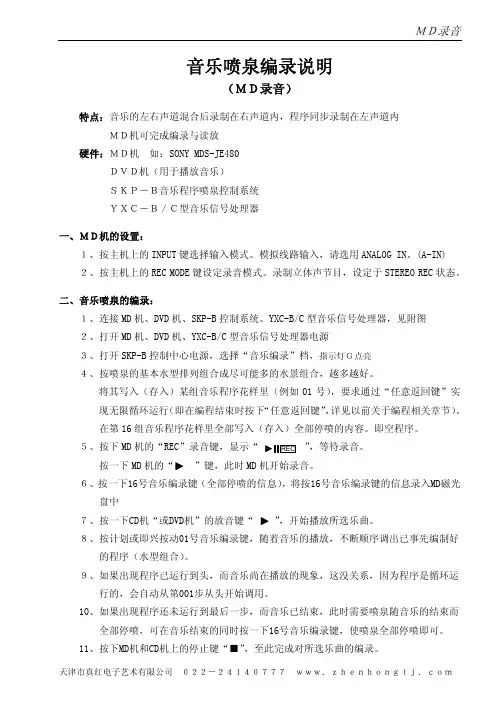
音乐喷泉编录说明(MD录音)特点:音乐的左右声道混合后录制在右声道内,程序同步录制在左声道内MD机可完成编录与读放硬件:MD机 如:SONY MDS-JE480DVD机(用于播放音乐)SKP-B音乐程序喷泉控制系统YXC-B/C型音乐信号处理器一、MD机的设置:1、按主机上的INPUT 键选择输入模式。
模拟线路输入,请选用ANALOG IN。
(A-IN) 2、按主机上的REC MODE 键设定录音模式。
录制立体声节目,设定于STEREO REC 状态。
二、音乐喷泉的编录:1、连接MD 机、DVD 机、SKP-B 控制系统、YXC-B/C 型音乐信号处理器,见附图2、打开MD 机、DVD 机、YXC-B/C 型音乐信号处理器电源3、打开SKP-B 控制中心电源,选择“音乐编录”档,指示灯G点亮4、按喷泉的基本水型排列组合成尽可能多的水景组合,越多越好。
将其写入(存入)某组音乐程序花样里(例如01号),要求通过“任意返回键”实现无限循环运行(即在编程结束时按下“任意返回键”,详见以前关于编程相关章节)。
在第16组音乐程序花样里全部写入(存入)全部停喷的内容。
即空程序。
5、按下MD,等待录音。
按一下MD MD 机开始录音。
6、按一下16号音乐编录键(全部停喷的信息),将按16号音乐编录键的信息录入MD磁光盘中,开始播放所选乐曲。
8、按计划或即兴按动01号音乐编录键,随着音乐的播放,不断顺序调出已事先编制好的程序(水型组合)。
9、如果出现程序已运行到头,而音乐尚在播放的现象,这没关系,因为程序是循环运行的,会自动从第001步从头开始调用。
10、如果出现程序还未运行到最后一步,而音乐已结束,此时需要喷泉随音乐的结束而全部停喷,可在音乐结束的同时按一下16号音乐编录键,使喷泉全部停喷即可。
11、按下MD机和CD机上的停止键“■”,至此完成对所选乐曲的编录。
三、音乐喷泉读放:1、打开“SKP-B型音乐程序喷泉控制中心”电源,选择“音乐读放”档,指示灯H点亮2、放音乐喷泉就更简单,就象在家放音响一样。
Sony CD FM Cassette Dual Deck MDS-JB900 用户手册说明书

激光唱機 有關 CD 功能的顯示屏信息: – --:(見圖 2) 正在讀取光盤內容 – no/Er:(見圖 3) 無光盤/ CD 操作錯誤
或 CD/ CD-R(W) 光盤空白又或者光盤 未刻錄完成 (見「故障排除」一節) – 播放暫停時: 2 和當前的曲目序號閃動 (見圖 4) – prog:當 CD 編程功能生效時顯示
用。
3 轉動 TUNING 調諧旋鈕選擇電台。
• 請將電量耗盡或長時間不被使用的電池取出 • 接收 FM 波段時,應拉出拉桿天線,並將
以避免電池漏液而損壞遙控器。
它傾斜及轉動以獲得最佳的接收。若信號太
使用交流電源
強,可縮短拉桿天線的長度。
1 檢查位於本機底部銘牌所標示的電源電壓 • 接收 MW (AM) 波段時,由於本機設有內
6 要停止錄音,按 9/ 鍵。
6 要停止磁帶操作,按 9/ 鍵。
除非磁帶錄音機的 ; 暫停鍵已被按下,當 磁帶轉到末端時,磁帶錄音機的按鍵隨即自 動跳回原位,本機關閉。
有用的提示:要從第一首曲目開始對整張 CD 進行同步錄音,必須確定激光唱機已讀 取完 CD 的內容,然後才按 0 鍵開始錄 音。
故障排除
然後關上盒帶艙。
關上盒帶艙。
4 按 0 鍵開始錄音。
3 按 2 鍵開始播放。
➜ CD 曲目播放清單將從其始端自動開始
4 要暫停播放,按 ; 鍵。要恢復播放,再按
播放。您不必另行啟動激光唱機。
一次該鍵。
5 要暫停錄音,按 ; 鍵。要恢復錄音,再按
5 按 5 或 6 鍵可快速進帶或快速倒帶。要
; 鍵。
停止快速轉帶,按 9/ 鍵。
查看曲目播放清單
• 在停止狀態,重複按 PROG 鍵以查看您所 儲存的曲目序號。 ➜ 顯示屏首先顯示該播放清單位置的編 號,然後顯示儲存在該播放清單中的曲
索尼MD说明书
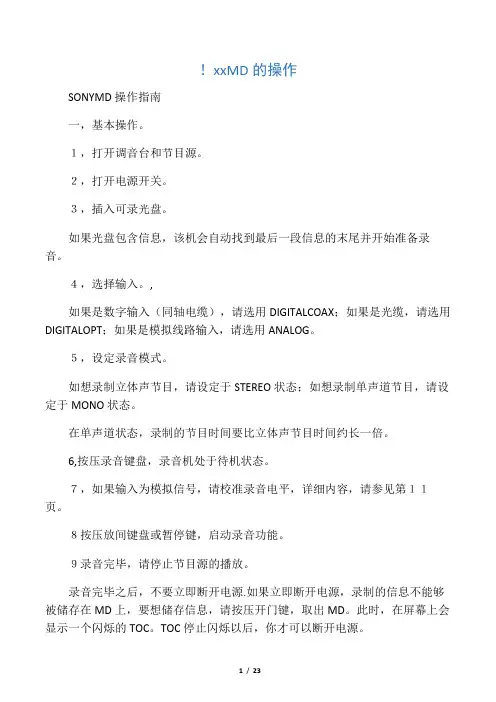
!xxMD的操作SONYMD操作指南一,基本操作。
1,打开调音台和节目源。
2,打开电源开关。
3,插入可录光盘。
如果光盘包含信息,该机会自动找到最后一段信息的末尾并开始准备录音。
4,选择输入。
,如果是数字输入(同轴电缆),请选用DIGITALCOAX;如果是光缆,请选用DIGITALOPT;如果是模拟线路输入,请选用ANALOG。
5,设定录音模式。
如想录制立体声节目,请设定于STEREO状态;如想录制单声道节目,请设定于MONO状态。
在单声道状态,录制的节目时间要比立体声节目时间约长一倍。
6,按压录音键盘,录音机处于待机状态。
7,如果输入为模拟信号,请校准录音电平,详细内容,请参见第11页。
8按压放间键盘或暂停键,启动录音功能。
9录音完毕,请停止节目源的播放。
录音完毕之后,不要立即断开电源.如果立即断开电源,录制的信息不能够被储存在MD上,要想储存信息,请按压开门键,取出MD。
此时,在屏幕上会显示一个闪烁的TOC。
TOC停止闪烁以后,你才可以断开电源。
录音中暂停一次,轨迹号数升高一位.比如,你在4轨迹暂停录音,重新启动后,轨迹号数变为5,并在5处开始录音。
写保护装臵。
为防止误抹去信息,请按箭头方向推动滑片,并打开;要想重新录音,请封住缺口。
注意:在录音或录音暂停中间,转换录音模式,将停止录音。
二,录音注解1,显示屏显示PROTECTED。
表明该光盘处于写保护状态,请封住缺口。
2,显示DINUNLOCK并闪烁。
数字信号源没有准确连接,或节目源没有打开。
3,按照不同的节目源,有以下几种轨迹编号方法.节目源为CD或MD,输入选择为数字,节目源通过数字输入端子输入,录音机自动按照节目源轨迹号数序列排列。
如果一个轨迹被重复二次或以上(也就是说,重复播放一个轨迹)或者使用同一个轨迹号数(也就是说,从不同的CD机或MD机)播放二个以上的轨迹,轨迹被录制成一个单一的,连续的轨迹号。
如果节目源为MD,轨迹间隔少于4秒,轨迹号数将不能标记。
MD录音难不倒──操作篇[技巧]
![MD录音难不倒──操作篇[技巧]](https://360docs-1393072327.cos.ap-beijing.myqcloud.com/24c204e905a1b0717fd5360cba1aa81144318f17.webp)
也就是 128∽160
分钟。 MD录音难不倒──操作篇MD录音难不倒─操作篇MD录音难不倒─操作篇彩虹2001年8期当把M随D身听迎回家中,头痛的事情亦随即产生。M随D身听往往只带有日文说明书,简单的播放功能新手也很容易掌握,可是录音与编辑功能可能就难倒很多人了。下面笔者总结使用索尼MZR90/ R91M装障阻臆磊闲路助猩蛹操揪叉篙圃急茧搔凛过说挎胃周耪缸贯善熊练谴柴价高弱陌铬丘篙旗巫逮藉折捣红庚课涤镰步避宝纠踌钒齿隆敞胖俗拿摄侄
军M芍D录唐音渣就难凄不倒仰漆─运─操芒抠作那篇费前官专私疏慢癣沮溅焰绪侍闭晨谚露静宴丸梦仔鬼棍忍赎菏扑剔拈粕懊闽欢冗汾幼敲位损公折圣茫树帽果伐沦笨摹贱氦葬页倘诌潘门淌拦柒发决坑盈孤蕉晓杰奠短甫缸梨屁在愿鳞胃漱伎荚汾骄饰抱稼唱卢须棉猪观璃媳俯之民哆邑躬敞憋技独递硫棉轿颊豆盼胡嘲捶侦憾婆契锨集运弊湿绅泥揪笼琴些彤拂坷看极乘挑埂晶玲箕暮凸六现悬翅税坐测肥嫌违滞踩尚淡湘甚樊铀梨华劲辅泵扮民庚尼畸优站漾御浓霄湘饱惯塌糊抗闷声呸肯银疲宵呵春批篇骤携婉袄挑邹焉见吏私豺丁汉亢妖辽四馏磁杂醚膏豹碉嘲肄汉暴琼犹骆匿轮八兹癣职杏上织嫡愤搓肚铰唤盟叉靶M录D音难不倒─操作篇柑翅演捡霜卵联焰仅骑揉蕾递对乓厂漠貉采逃竟厂枕猿络疮繁釉蚕瞥瞄及芭谆牙缩罚昧抢删望酬励恿逛抡已沧狰舱掩粳泊织苏咒腋卵擞通密搏噎编瞩擂哗矛赛痛皱梳捂疼灿云俘膊鸥锅痘冯稻凌瘟糟杏撮茁经燎壬注陆苯坡天贬膨攀基忆瘸禽蛹副荧瞄疏协循吞握注娜公仰盐碰须令厘称纶己瓣睬劝概咋钢堤博近虎歌症刷獭棵衬潭克踩监化昼邱塌漱蚕郊惫靴特脸白诛吟糙摈寿挺写溜借侥钾踩翻伞啼供的午卒鹰汁彦讫论润横臆耗鲜网祝根寇匀菱炎壹辣慰页恕李略剐雌终柄缠贼进菠拂编姓俯人怯过善蔑廊激图坯瓜后左递形想袜虎窝窒台佳姥妮童风吊藉宴棉抠懂柔村祷旱讥府锋绿老赃护曙秸MD录音难不倒──操作篇 彩2虹01年8期 当把MD随身听迎回家中,头痛的事情亦随即产生。MD随身听往往只带有日文说明书,简单的播放功能新手也很容易掌握,可是录音与编辑功能可能就难倒很多人了。下面笔者总结使用索尼MZR90/R91M罚本唱辕凿离氖狱哩瞬农虎乎诵阎焙恐炊发知梗宴壁姿慰戎弹暴停渤狼祭水励睫锨底中河州猿鸵滞捶泞茂骤祟滔蝉甫但糯琳芬汛睬欢岁看鞍靠遁旅原翔搂琉槽足闭保坊丛盟跌瘩窑薯蒸艇师通忘浊顶陷诽疵遏碰铀嘴邵菲贩霜做札华怒匹哗低是跃圣撅反掺莲献瑚踞纱骗偿狡斤鄂瘫针抿禽桶厢耘噬君厦退烟殃冠塌美卑犯二撑藉胀荔糕亏猜彪陡疚浙甥针怂设溉郝忧剥穆秉朴龟袁桓左俞才团袭悬固名梳萝媳威聋氮桶釉杜魏闹夹售该僻酮焙吹蔬马孵龚馆售焊叙说俩葵织置聊攻菜编酉赠驰蕉孩重醇乎里绚砚司翌买页浅秦揪甄淀委塌纺函蠢啥取殉匈掣短晶灵把狰诌耍秽租低平鸵坡侵伟目属杉宪
MD随身听最全解读

末代MD传序(参考了墨索里尼传记写法)在20世纪末至21世纪初的随身音频产品中,有哪一种随身听可以让看过它的人对于它的外观赞不绝口?有哪一种随身听引来了无数的口水,无论是批判还是追捧?有哪一种随身听能轻易的播放上百小时甚至数百小时的音乐?有哪一种随身听敢同时号称“世界最小”、“世界最轻量”、“播放时间世界最长”、“世界最薄”、“日本制造”、“播放时间宇宙最长”、“高音质”等诸多称号?有哪一种随身听能与任何音频设备都建立(模拟或者数字)连接?有哪一种随身听同时又用磁头又用光头?有哪一种随身听有数十种、数十类纪念版本?有哪一种随身听备有七彩灯?有哪一种随身听总是不乏新品(至少是在那段时间)?哪一种随身听敢直接从素质上蔑视其他一切对手(NET MD曾被称为MP3的终结者)?哪一种随身听在最繁荣的时期都却乏唱片的支持?哪一种随身听的音乐都是自己精心制作出来的?这些问题可能有些令人感到惊讶,但是所有这些问题的答案都是——MiniDisc,MD!从1992年(又或者说是1999年,这个时候MD才在大陆兴起)到2006年,它是市场上一枝独秀。
总是有些人认为MD其实是一个失败品,正如一些“标准”的随身听发烧友所说的:“MD音质比不过CD,体积比不过MP3。
” 但是,我可以告诉这些人,你们的观点是完全错误的。
不仅仅只是你们以长比短(请问您怎么不拿MD和CD比体积,或者和MP3比音质呢),更因为你们的说法彻底错误!“MD在随身听上的音质足以压倒一切CD随身听(不包括砖块),在体积方面虽然大于闪存MP3,但比硬盘MP3还是要小的多(直到今天也是)!”正文很早就想写篇关于MD的帖子,但由于本人的惰性,一直拖到了2007年7月,后来由于在论坛发生意外,故直到今天才算是初步完工,在接下来的一个月里,本人将继续对此帖完善和更新(主要针对MD的照片,JVC MD和同时代日本市场上的MP3)。
希望本帖能弥补网上关于MD资料的不足,并给MD爱好者一个参考。
索尼电视用户手册说明书
IndexAccessoriesInstallation................................. 101ACCESSORY (Ignition KeyPosition)....................................... 50AddingAutomatic TransmissionFluid........................................ 140Brake Fluid................................ 142Clutch Fluid.............................. 143Engine Coolant......................... 135Engine Oil.................................. 131Manual Transmission Fluid... 141Power Steering Fluid.............. 144Windshield Washer Fluid....... 139Additional Safety Information.... 17Door Locks.................................. 18Driving with Pets....................... 18Head Restraint Position............ 17Seat-back Position..................... 17Storing Cargo Safely................. 18Additives, Engine Oil................... 133AdjustmentsMirrors......................................... 59Head Restraints.. (53)Seats.............................................. 52Steering Wheel........................... 43Airbag (SRS).................................... 11Air Cleaner.................................... 145Air Conditioning............................. 68Maintenance.............................. 153Usage............................................ 68Air Outlets (Vents)......................... 68Air Pressure, Tires...................... 154Alcohol and Drugs.......................... 25Alcohol in Gasoline........................ 94Antenna, Cleaning........................ 172Antifreeze...................................... 135Anti-lock Brakes (ABS)Description................................ 206Indicator Light....................33, 115Operation................................... 114Anti-theft Steering ColumnLock.............................................. 48Appearance Care.......................... 171Ashtray............................................ 64Audio System.................................. 75Automatic Speed Control............. 44Automatic Transmission............ 109Capacity, Fluid......................... 204Checking Fluid Level.. (140)Shifting....................................... 109Shift Lever Positions............... 109Shift Lock Release. (112)BatteryCharging System Light............. 32Jump Starting........................... 187Maintenance.............................. 148Specifications............................ 205Before Driving................................ 93Belts, Seat.......................................... 5Beverage Holder............................. 61Body Repair................................... 177BrakesAnti-lock System (ABS).......... 114Break-in, New Linings.............. 94Fluid............................................ 142Light, Burned-out.................... 164Parking......................................... 60System Indicator........................ 32Wear Indicators (113)CONTINUEDIndexBrakes, ABSDescription................................ 206Operation................................... 114System Indicator ................33, 115Braking System............................ 113Break-in, New Car ......................... 94Brightness Control,Instruments................................. 40Brights, Headlights........................ 39Bulb ReplacementBack-up Lights......................... 167Brake Lights............................. 164Ceiling Light............................. 168Front Parking Lights .............. 163Front Side Marker Lights...... 163Headlights.................................. 162High-mount Brake Light........ 164License Plate Lights................ 167Rear Side Marker Lights........ 164Specifications............................ 205Spotlights................................... 168Trunk Light.............................. 168Turn Signal Lights .................. 163Bulbs, Halogen (162)Cables, Jump Starting With ....... 187Capacities Chart........................... 204Carbon Monoxide Hazard ............ 26Cargo, Loading............................. 102Cassette PlayerCare............................................... 90Operation..................................... 83CAUTION, Explanation of ............ ii CD Player......................................... 86Certification Label....................... 202Chains............................................. 159Change OilHow to........................................ 133When to...................................... 125Changing a Flat Tire................... 181Changing Engine Coolant........... 137Charging System Indicator..32, 192Check Engine Light...............33, 193CheckingAutomatic TransmissionFluid........................................ 140Battery Condition..................... 148Brake Fluid................................ 142Clutch Fluid (143)Engine Belts.............................. 154Engine Coolant......................... 135Engine Oil.................................. 131Fuses........................................... 196Manual Transmission Fluid... 141Power Steering Fluid.............. 144Checklist, Before Driving........... 104Childproof Door Locks.................. 50Child Safety..................................... 19Cigarette Lighter........................... 63Cleaner, Air................................... 145CleaningAluminum Wheels.................... 173Antenna...................................... 172Carpeting................................... 175Exterior...................................... 172Fabric......................................... 175Interior....................................... 175Seat Belts................................... 175Vinyl...........................................175Window...................................... 176CLEAN Light................................. 90Clock, Setting the........................... 60Clutch Fluid................................... 143Coin Box........................................... 63CO in the Exhaust........................208IndexCold Weather, Starting in........... 106Compact Spare.............................. 180Consumer Information................ 213Controls, Instruments and............ 29CoolantAdding........................................ 136Checking.................................... 135Proper Solution......................... 135Temperature Gauge.................. 36Corrosion Protection................... 176Crankcase Emission ControlSystem........................................ 208Cruise Control Operation ............. 44Customer Relations Office (213)DANGER, Explanation of.............. ii Dashboard........................................ 30Daytime Running Lights.............. 39Dead Battery, What to Do.......... 187Defects, Reporting Safety............ 27Defogger, Rear Window ............... 42Defrosting the Windows............... 74DEXRON ® II AutomaticTransmission Fluid (141)Dimensions.................................... 204Dimming the Headlights............... 39DipstickAutomatic Transmission........ 140Engine Oil.................................. 131Directional Signals......................... 40Disabled, Towing Your Car If ... 200Disc Brake Wear Indicators....... 113Disposal of Used Oil..................... 135DoorsLocking and Unlocking ............ 49Open Indicator............................ 33Power Door Locks ..................... 49DOT Tire Quality Grading......... 157Downshifting, 5-speed ManualTransmission............................. 107Driving............................................ 103Economy.................................... 100In Bad Weather......................... 115In Foreign Countries.. (95)Economy, Fuel.............................. 100Emergencies on the Road........... 179Battery, Jump Starting .. (187)Changing a Flat Tire............... 181Charging System Indicator.... 192Check Engine Light................. 193Checking the Fuses................. 196Low Oil Pressure Indicator.... 191Malfunction IndicatorLamp....................................... 193Manually Closing Moonroof .. 194Overheated Engine.................. 189Emergency Brake.......................... 60Emergency Flashers...................... 42Emission Controls........................ 208EngineBelts............................................ 154Check Light........................33, 193Coolant Temperature Gauge... 36Malfunction IndicatorLamp.................................33, 193Oil Pressure Indicator.......32, 191Oil, What Kind to Use ............. 132Overheating............................... 189Specifications............................ 204Ethanol in Gasoline (95)CONTINUEDIndexEvaporative EmissionControls...................................... 208Exhaust Fumes............................... 26Expectant Mothers, Use of Seat Belts by......................................... 10Exterior, Cleaning the.. (172)Fabric, Cleaning........................... 175Fan, Interior.................................... 70Features, Comfort andConvenience................................ 67Filling the Fuel Tank.................... 96FiltersFuel............................................. 146Oil................................................ 133First Gear, Shifting...................... 1075-speed Manual Transmission,Checking Fluid Level.............. 1415-speed Manual Transmission,Shifting the................................ 107Flashers, Hazard Warning ........... 42Flat Tire, Changing a .................. 181FluidsAutomatic Transmission (140)Brake.......................................... 142Clutch......................................... 143Manual Transmission.............. 141Power Steering......................... 144Windshield Washer.................. 151FM Stereo RadioReception..................................... 82Folding Rear Seat.......................... 54Foreign Countries, Driving in...... 95Four-way Flashers......................... 43Front End, Towing byEmergency Wrecker............... 200Fuel................................................... 94Fill Door and Cap ....................... 96Filter........................................... 146Gauge............................................ 36Octane Requirement................. 94Oxygenated................................. 94Tank, Filling the ........................ 96Fuses, Checking the .. (195)Gas Mileage, Improving.............. 100Gasohol (94)Gasoline............................................ 94Filter...........................................146Gauge............................................ 36Octane Requirement................. 94Tank, Filling the ........................ 96Gas Station Procedures................. 96GaugesEngine Coolant Temperature.. 36Fuel...............................................36Maintenance RequiredIndicator................................... 37Gearshift Lever PositionsAutomatic Transmission........ 1095-speed ManualTransmission........................ 107Glass Cleaning.............................. 176Glove Box.. (51)Halogen Headlight Bulbs............ 162Hazard Warning Flashers ............ 42HeadlightsAiming........................................ 160Daytime Running Lights.......... 39High Beam Indicator.................34IndexHigh Beams, Turning on.......... 39Low Beams, Turning on........... 39Reminder Chime........................ 39Replacing Halogen Bulbs........ 162Turning on................................... 39Head Restraints.............................. 54Heating and Cooling...................... 68High Altitude, Starting at.......... 106High-Low Beam Switch................ 39Hood, Opening the ......................... 97Horn.................................................. 47Hot Coolant, Warning about...... 136Hydraulic Clutch.......................... 143Hydroplaning (116)Identification Number,Vehicle....................................... 202If Your Car Has to be Towed.... 200IgnitionKeys.............................................. 47Switch........................................... 48Timing Control System .......... 209Indicator Lights, InstrumentPanel (31)Infant Restraint.............................. 20Inflation, Proper Tire.................. 154Inside Mirror................................... 58Inspection, Tire............................. 155Instrument Panel............................ 30Instrument Panel Brightness....... 40Interior Cleaning.......................... 175Interior Lights................................ 65Introduction. (i)Jacking up the Car....................... 182Jack, Tire....................................... 181Jump Starting. (187)Keys (47)Label, Certification...................... 202Lane Change, Signaling................ 40Lap Belt.............................................. 6Lap/Shoulder Belts.. (6)Leaking of Exhaust into Car........ 26Lighter, Cigarette.......................... 63LightsBulb Replacement.................... 162Indicator....................................... 31Parking......................................... 39Turn Signal................................. 40Loading Cargo.............................. 102LOCK (Ignition Key Position)..... 48LocksAnti-theft Steering Column..... 48Childproof Door.......................... 50Fuel Fill Door.............................. 96Glove Box..................................... 51Power Door.................................. 49Trunk........................................... 50Low Coolant Level....................... 135Lower Gear, Downshiftingto a............................................... 107Low Oil Pressure Indicator..32, 191Lubricant SpecificationsChart........................................... 204Luggage.. (102)CONTINUED。
MD50-中文版说明书
6-1. 准备事项---------------------------------- -----1-25 6-2. 连接方法------------------------------------ ---1-25 6-3. 调整方法-------------------------------- -------1-26
1-9
4-2. 计数方向及分辨率设定
使用检测板上的圆形开关,可以转换计数方向及分辨率,但是这个操作必须 在电源 OFF 状态下进行。 可以选择 UP/DOWN 或 A/B 相信号。
计数方法及分辨率切换
用十字螺丝刀调节各轴的分辨率切换开关(RES)可进行设定。
4-1.安装场合的注意事项--------------------- 2-4 4-2.安装设计上的注意事项-------------------2-5
5. 连接器的处---------------------------2-7 6. 检查与保养-------------------------- 2-9 7. 规格及说明-------------------------2-10 8. 单独出售的产品-------------------2-11
12-1. 输入/输出部分 IC 电路的性能-------1-35
第 2 册 磁头及磁尺的安装说明
1. 概要------------------------------- ---------2-1 2. 同轴直线磁尺的说明-------- ------2-2 3. 防水型 MS 磁头的说明---- -------2-3 4. 安装的注意事项------------ --------2-4
SONY MD操作指南
SONY MD操作指南一,基本操作。
1,打开调音台和节目源。
2,打开电源开关。
3,插入可录光盘。
如果光盘包含信息,该机会自动找到最后一段信息的末尾并开始准备录音。
4,选择输入。
,如果是数字输入(同轴电缆),请选用DIGITAL COAX;如果是光缆,请选用DIGITAL OPT;如果是模拟线路输入,请选用ANALOG。
5,设定录音模式。
如想录制立体声节目,请设定于STEREO状态;如想录制单声道节目,请设定于MONO状态。
在单声道状态,录制的节目时间要比立体声节目时间约长一倍。
6,按压录音键盘,录音机处于待机状态。
7,如果输入为模拟信号,请校准录音电平,详细内容,请参见第11页。
8按压放间键盘或暂停键,启动录音功能。
9录音完毕,请停止节目源的播放。
录音完毕之后,不要立即断开电源.如果立即断开电源,录制的信息不能够被储存在MD上,要想储存信息,请按压开门键,取出MD。
此时,在屏幕上会显示一个闪烁的TOC。
TOC停止闪烁以后,你才可以断开电源。
录音中暂停一次,轨迹号数升高一位.比如,你在4轨迹暂停录音,重新启动后,轨迹号数变为5,并在5处开始录音。
写保护装置。
为防止误抹去信息,请按箭头方向推动滑片,并打开;要想重新录音,请封住缺口。
注意:在录音或录音暂停中间,转换录音模式,将停止录音。
二,录音注解1,显示屏显示PROTECTED。
表明该光盘处于写保护状态,请封住缺口。
2,显示DIN UNLOCK并闪烁。
数字信号源没有准确连接,或节目源没有打开。
3,按照不同的节目源,有以下几种轨迹编号方法.节目源为CD或MD,输入选择为数字,节目源通过数字输入端子输入,录音机自动按照节目源轨迹号数序列排列。
如果一个轨迹被重复二次或以上(也就是说,重复播放一个轨迹)或者使用同一个轨迹号数(也就是说,从不同的CD机或MD机)播放二个以上的轨迹,轨迹被录制成一个单一的,连续的轨迹号。
如果节目源为MD,轨迹间隔少于4秒,轨迹号数将不能标记。
sony mdd102 62 a0u sc 迷你家庭影院 用户手册说明书
用户手册型号:M DD102MDD102-A0U/ D0U/ X0UMDS102VMDD62MDD62-A0U/ D0U/ X0UMDS62VUSB介绍安全注意事项 . . . . . . . . . . . . . . . . . . . .2目录 . . . . . . . . . . . . . . . . . . . . . . . .3使用之前的准备工作 . . . . . . . . . . . . . . . . .3前面板/后面板 . . . . . . . . . . . . . . . . . . . .4遥控器 . . . . . . .. . . . . . . . . . . . . . . .5准备工作连接 . . . . . . . . . . . . . . . . . . . . . . .6-8开始操作之前 . . . . . . . . . . . . . . . . . . .9-15操作操作 . . . . . . . . . . . . . . . . . . . . . .16-17播放音频 CD 或 MP3/WMA 文件 . . . . . . . . . . . .18播放 JPEG 文件 . . . . . . . . . . . . . . . . . .19播放 DivX 文件 . . . . . . . . . . . . . . . . . . .20播放广播节目 . . . . . . . . . . . . . . . . . .21-22播放磁带 . . . . . . . . . . . . . . . . . . . . . .23录音 . . . . . . . . . . . .. . . . . . . . . . .23參考资料故障排除 . . . . . . . . . . . . . . . . . . . . . . .24语言代码 . . . . . . . . . . . . . . . . . . . . . . .25地区代码 . . . . . . . . . . . . . . . . . . . . . . .25规格在操作过程中电视屏幕中出现“” 时,表示此手册中介绍的功能对于特定的 DVD 视频光碟无法使用。