
Sap+Hr+Codes
P1B1 Transfer hiring data for applicantP1B2 Transfer hiring data for applicantP1B3 Transfer hiring data for applicantP1B4 Transfer table T588Z, infotype 4000P1B5 Transfer opt. archive for applicantP1B6 Transfer hiring data for applicantP1B7 Conversion T750BP1OA Transfer Settings for Opt.ArchivingP201 Transfer T514D/V from Client 000P2W1 Transfer Incentive Wage AccountingP2W2 Copy Incentive Wage Forms P4SW Release notes BWPP5P1 Addition of IT0122 to T588B P5P2 Delete entries in T588BPA00 Initial PA Master Data MenuPA03 Maintain Personnel Control RecordPA04 Maintain HR Number RangesPA05 Number Range Maintenance: RP_COIFTPA06 Number Range Maintenance: PD_SEQ_NRPA07 Maintain Number Range: RP_GARNEMPA08 Maintain Number Range: RP_GARNSUBPA09PA10 Personnel FilePA20 Display HR Master Data PA30 Maintain HR Master Data PA40 Personnel ActionsPA41 Correct ActionsPA42 Fast Entry for ActionsPA46 Import from ResumixPA47 Export to ResumixPA48 Hiring from non-SAP system PA51 Display Time DataPA53 Display Time DataPA61 Maintain Time DataPA62 List Entry of Additional Data PA63 Maintain Time DataPA64 Calendar EntryPA70 Fast EntryPA71 Fast Entry of Time DataPA88 BenefitsPA97 Matrix MaintenancePA98 Compensation AdministrationPA99 Compensation Admin. - Release ReportPAAH Call Ad-Hoc Query PACA HR-CH: PF administrationPACB HR-CH: PF account maintenancePACC HR-CH: PF calculatorPACE HR-CH: Pension fund : PostingsPACK HR-CH: Pension fundPACN Number range maint: HRCHPKONTOPACP HR-CH: Pension fund, interfacePACT PC parameter maintenance PAJP Call reporting tree - Japan PAL1 Create Sales Representative PAL2 Display Sales Representative PAL3 Maintain Sales Representative PAL4 Create BuyerPAL5 Maintain BuyerPAL6 Display BuyerPAR1 Flexible employee dataPAR2 Employee listPAT1 Personnel Administration infosystemPAW1 Who is who PB00 RecruitmentPB04 Number Range Maintenance: RP_PAPLPB10 Init.entry of applicant master dataPB20 Display applicant master data PB30 Maintain applicant master data PB40 Applicant actionsPB50 Display Applicant ActivitiesPB60 Maintain Applicant Activities PB80 Evaluate vacanciesPBA0 Evaluate advertisementsPBA1 Applicant indexPBA2 List of applicationsPBA3 Applicant vacancy assignment listPBA4 Receipt of applicationPBA5 Recurring tasks: Print letters PBA6 Recurring tasks: Print letters PBA7 Recurring tasks: Data transfer PBA8 Recurring tasks: Transfer data PBA9 List of planned actionsPBAA Evaluate recruitment instrumentPBAB Maintain vacancy assignments PBAC Applicant statisticsPBAD Recurring tasks: Print letters PBAE Applicant poolPBAF Vacancy assignment list PBAG ScreeningPBAH DecisionPBAI All applicants via qualifications PBAJ Recruitment info system PBAK Recurring Tasks: Print Labels PBAL Bulk processingPBAM Variable Applicant ListPBAN Ad Hoc QueryPBAO ABAP QueryPBAP Internal Applicants Via QualsPBAQ External Applicants Via Quals PBAT Choose SAPscript or WinWord PBAU Maintain T750CPBAV Display T750CPBAW Maintain T750BPBAX Display T750BPBAY Maintain T750XPBAZ Display T750XPBCX Cust. Account Assign.Reference (MM)PBCY Cust. Account Assign. Reference (FX)PBCZ Cust. Account Assign. Reference (DE)PBW1 Career CenterPBW2 Career Center: Status trackingPBWW Customizing standard text in WinWordPC00 Menu for HR Payroll PC01 Payroll Menu: Germany PC02 Payroll Menu: Switzerland PC03 Payroll Menu: Austria PC04 Payroll Menu: SpainPC05 Payroll Menu: Netherlands PC06 Payroll Menu: France PC07Payroll menu Canada PC08Payroll Menu: Great Britain PC09Payroll Menu: Denmark PC10Payroll Menu: USA PC12Payroll Menu: Belgium PC14Payroll Menu: USA PC16Payroll Menu: South Africa PC1AHR Menu: Payroll for Austria PC1B Payroll Menu: BelgiumPC1C Menu for HR Payroll SwitzerlandPC1D HR Menu: Payroll for Germany PC1E HR Menu: Payroll for Spain PC1F HR Menu: Payroll for FrancePC1G HR Menu: Payroll for Great BritainPC1J HR menu : Payroll for Japan PC1K HR Payroll Menu for CanadaPC1LPC1M HR payroll menu Denmark PC1N HR NL: Payroll MenuPC1Q HR Payroll Menu - AustraliaPC1R HR-SG: Payroll Menu per periodsPC1S Menu for HR Payroll SwedenPC1T HR Payroll Menu for Czech RepublicPC1U HR Payroll Menu for USA PC1W Payroll Menu: South AfricaPC1X Payroll Menu: International VersionPC22 Payroll Menu: JapanPC23 Payroll Menu: Sweden PC25 Payroll Menu: Singapore PC2A New Payroll MenuPC2B Payroll Menu YearlyPC2C Menu for HR Payroll Annual Switz.PC2D New Payroll MenuPC2E New Payroll MenuPC2F Annual Payroll Menu (F)PC2G HR Menu: Payroll for Great BritainPC2J HR menu : Payroll for Japan PC2KPC2LPC2M HR-DK: Annual payroll activitiesPC2N HR NL: New Payroll Menu PC2R HR-SG: Payroll Menu: AnnualPC2S Menu for HR Payroll Annual SwedenPC2T HR Payroll Menu for Czech RepublicPC2U New Payroll Menu PC2W New Payroll Menu PC32 Payroll Menu: MexicoPC34 Payroll Menu for Indonesia PC3A Payroll Menu: Other Periods PC3B Other periodsPC3C Menu for RP Payroll Other per Switz.PC3D Payroll Menu: Other Periods PC3E Payroll Menu: Other PeriodsPC3F Payroll Menu (F): Other periodsPC3G HR Menu: Payroll for Great BritainPC3J HR menu : Payroll for Japan PC3KPayroll Menu: Other PeriodsPC3LPC3M Payroll Menu: Other PeriodsPC3N Payroll Menu: Other Periods (NL)PC3Q Pay Scale Reclassification AustraliaPC3R Payroll Menu: Other PeriodsPC3S Menu for RP Payroll Other per SwedenPC3T HR Payroll Menu for Czech RepublicPC3U Payroll Menu: Other Periods PC3W Payroll Menu: Other Periods PC4A New Payroll MenuPC4B Independent PeriodPC4C Menu for RP Payroll Other Switz.PC4D New Payroll Menu PC4E New Payroll MenuPC4F Payroll Menu (F): Period-unrelatedPC4G HR Menu: Payroll for Great BritainPC4J HR menu : Payroll for Japan PC4K New Payroll Menu (Canada)PC4LPC4N HR NL: New Payroll Menu PC4Q Pay Scale Increase AustraliaPC4R Payroll menue: Period-IndependentPC4S Menu for RP Payroll Other SwedenPC4T HR Payroll Menu for Czech RepublicPC4U New Payroll Menu PC4W New Payroll MenuPC5J HR payroll menu (Japan) - SYOYOPC5Q Pay Scale Inc. Extended AustraliaPC6J HR payroll menu (Japan) year-end adjPC7J HR payroll menu (Japan) - retirementPC8J HR payroll menu Social Insurance JPPC99 International Payroll MenuPCC0 Maintnce fam.rltd.bonuses Switz.PCP0 Post accounting dataPDA1 List of part-time work for pensionerPDA2 Construct transaction data list PDB1 Release Info 2.1A - Statements PDB2 Releaseinfo 2.2A StatementsPDF0 Convert form for remun.statementPDF2 Form table CY 94/95PDF7 Delete form in customer client PDF8 Copy form from SAP clientPDF9 Copy forms within customer clientPDI1 Copy Wage Types from Standard ClientPDJ1 HR Change of Year 93/94 (D)PDJ2 HR Fiscal year change 94/95 D Suppl.PDJ3 Bill of materials 3.0CPDJ6 Evaluation/statistic object list PDJ7 AV96/97 Continued PayPDJ8 Part-time work by pensionersPDK1 Copy W.Types from Standard ClientsPDLK HR D(G4) Form Tables f. PayrollAcctPDP0 Table entries for loans PDS1 Health insurance funds PDSD Object list DynMaßn tax DPDVA Copy VAG Wage Types for IT 0093PE00 Starts Transactions PE01,PE02,PE03PE01 HR: Maintain Payroll Schemas PE02 HR: Maintain Calculation Rules PE03 HR: FeaturesPE04 Creating Functions and OperationsPE51 HR form editorPEPM Profile MatchupPEPP ProfilesPF01 Test transact.PF02 Cust. test of value-based IMPF05 Number Range Maintenance: HRSOBJECTPFAC Maintain standard rolePFAL HR ALE: Distr. infotypes completelyPFCG Activity Group Maintenance PFCP Copy Workflow Tasks PFCT Task CatalogPFCU Task CustomizingPFOM Maintain Assignment to SAP Org.ObjsPFOS Display Assignment to SAP Org.ObjsPFSE Start PFS from R/3 SystemPFSO User's Organizational EnvironmentPFT Maintain Customer Task PFTC General Task Maintenance PFTR Standard Task for Transaction PFTS Standard TaskPFUDUser Master Data Reconciliation PFWF Maintain Workflow Task(customer)PFWS Maintain workflow templatePGOM Graphical Structure MaintenancePI30 PP-PI Options for Release 3.0 PI50 Transfer selected R/2 orders PI51 Transfer current R/2 orders PI60 Transfer confirmations to R/2PID1 HR-ID: Payroll Menu per periodsPID2 HR-ID: Payroll Menu: Annual PID3 Payroll Menu: Other PeriodsPID4 Payroll menue: Period-IndependentPIMN Human resources information systemPK00 KanbanPK01 Create control cycle PK02 Change control cycle PK03 Display control cyclePK99 Function Access via TransactionPKBCChnge Container Status with Bar CodePKC1 Process cost controllingPKG1 Copy entries for garnishment CAPKW1 Kanban board WWW PM00 Menu for HR Reports PM01 Enhance InfotypesPM03 Maintain Number Range FeaturesPM10 Statements SelectionPM11 Statements - Single Data Entry PM12 Statements - Fast Data Entry PM13 Statements - Print PMARChange plan for appropriation req.PO01 Maintain Work CenterPO02 Maintain Training Program PO03 Maintain JobPO04 Maintain Business Event Type PO05 Maintain Business EventPO06 Maintain LocationPO07 Maintain ResourcePO08 Maintain External PersonPO09 Maintain Business Event GroupPO10 Maintain Organizational Unit PO11 Maintain QualificationPO12 Maintain Resource TypePO13 Maintain PositionPO14 Maintain TaskPO15 Maintain CompanyPO16 Maintain ServicesPO17 Maintain Requirements Profile PO18 Maintain Resource RoomPO19 Maintain External Instructor POI1 Start Download of Master Data POIL View Received Data Log POIM Start Download of Master DataPOIT Start Download of Transaction DataPOIU Start Receiving Changes to DataPOTB Parameters for OTBPP01 Maintain Plan Data (menu-guided)PP02 Maintain Plan Data (Open)PP03 Maintain Plan Data (Action-Guided)PP05 Number RangesPP06 Number Range Maintenance: HRADATAPP07 Tasks/DescriptionsPP20 Career and SuccessionPlanningPP23 PD Cost Planning: Reset PasswordPP26 Plan Scenario AdministrationPP27 Release of plan scenarios for COPP28 PersCostPl: New Scenario PP29 PersCostPl: ResumptionPP2B PD CostPl.: Plan Basic Pay DirectPP2D PD CostPl1: Delete Payroll ResultsPP2P PD CPl: Plan Payroll Results DirectPP30 SAP Room Reservations PlanningPP31 SAP Room Reservations Planning: DataPP32 SAP Room Reservations: ServicesPP40 Correspondence PP61 Shift PlanningPP62 Shift Planning: Requirements MenuPP63 Requirements Processing PP64 Choose Plan VersionPP65 Edit an Entry ObjectPP66 Shift Planning: Entry ProfilePP68 Shift Planning: Current SettingsPP69 Choose Text for Organizational UnitPP6A Personal Shift PlanPP6B Attendance ListPP70 Organizational Management PP72 Shift PlanningPP74 Personnel Cost PlanningPP75 AssessmentPP7S Organizational Management PP90 Set Up OrganizationPPCI Copy InfotypePPCO Initial Screen: OrganizationalPlanPPCP Career Planning PPCT Task CatalogPPEM PD: Display Organizational StructurePPI0 Transfer of Table EntriesPPIS Human Resources Information SystemPPLB Evaluate CareersPPME Change Matrix Organization PPMM Personnel PlanningPPMS Display Matrix OrganizationPPO1 Change Cost Center AssignmentPPO2 Display Cost Center AssignmentPPO3 Change Reporting Structure PPO4 Display Reporting StructurePPO5 Change Object Indicators (O/S)PPO6 Change Object Indicators O/SPPOA Display Menu Interface (with dyn.)PPOC Create Organizational Unit PPOM Maintain Organizational Plan PPOS Display Organizational Plan PPPD Display ProfilePPPE Area Menu: Personnel DevelopmentPPPM Change ProfilePPQ1 Find Objects for Qualifications PPQ2 Find Objects for Requirements PPQD Display Qualifications CatalogPPRL Change Material When Profile DeletedPPRP Reporting: Personnel DevelopmentPPRV Change Material When Profile ChangedPPSC Create Structure PPSM Change Structure PPSP Succession PlanningPPSS Display StructurePPST Structure EvaluationPPUP Settings: User Parameters PQ01 Actions for Work CenterPQ02 Actions for Training Program PQ03 Actions for JobPQ04 Actions for Business Event TypePQ06 Location ActionsPQ07 Resource ActionsPQ08 Actions for External PersonPQ09 Actions for Business Event GroupPQ10 Actions for Organizational Unit PQ12 Actions for Resource Type PQ13 Actions for PositionPQ14 Actions for TaskPQ15 Actions for CompanyPQ17 Actions for Requirement ProfilesPQ18 Actions for Resource Room PQ19 Actions for External Instructor PQAH Transaction for Ad Hoc Query PQLV Australian Leave Processing PQRD Redundancies Australia PQTM Terminations AustraliaPR00 Trip CostsPR01 Maintain International Travel DataPR02 Fast Entry: Inter.Trip Costs DataPR03 Edit AdvancesPR04 Edit Weekly Reports PR05 Receipt EntryPR10 Number Range Maint.: RP_REINRPR11PR12 Number Range Maint. for Posting RunsPR71 Customizing Coding Block 1701PR72 Customizing Coding Block 1702PR73 Customizing Coding Block 1703PR90 Initial Screen: Public Sector PR91 Display: Trips with Periods PR92 Display: Trips with Periods PR93 Change: Trips with PeriodsPRAA Automatic Vendor MaintenancePRAP Approval of TripsPRC2 Customizing Coding Block 1200PRC7 Customizing Coding Block 1700PRCC Credit Card Clearing PRCD Delete/Copy Trip Countries PRCT Current SettingsPRCU Check Printing USAPRD1 Create DMEPRDE Delete/Restore Trip Prov.VariantPRDH Employees with Exceeded Trip DaysPRDX Call Country Version DME Pre.ProgramPREC Trip Costs Accounting Program PRF0 Standard FormPRF1 Summarized Form 1PRF2 Summarized Form 2PRFI Posting to Financial AccountingPRFW Income-rel.Expenses StatementPRHD Maximum Value Delimitation for MealsPRHH Scale Maximum Amounts for MealsPRHP Scale Per Diems for MealsPRIN Index for Personnel Number in VendorPRMC Trip Costs: Feature TRVCTPRMD Maintain HR Master Data PRMF Trip Costs: Feature TRVFDPRML Set Country Grouping via Dialog BoxPRMM Personnel Actions PRMS Display HR Master Data PRMT Update Matchcode T PROF Profit Center AccountingPRPD Delimitation of Per Diems for MealsPRPY Transfer to Payroll Accounting PRRW Post Accounting DataPRST Period StatisticsPRVT VAT RecoveryPS00 Basic dataPS01 Project Information System PS02 Operative StructuresPS03 Project PlanningPS04 Project ApprovalPS05 Project ExecutionPS06 Project Cost ControllingPS81 Call Up Report Tree PS81 (Ind.Overv)PS90 Call Up Report Tree PS90 (Overview)PS91 Call Up Report Tree PS91 (Costs)PS92 Call Up Report Tree PS92 (Revenues)PS93 Call Up Report Tree PS93 (Finances)PS94 Call Up Report Tree PS94 (Line Itms)PS95 Call Up Report Tree PS95 (Sum.over.)PS96 Call Up Report Tree PS96 (Sum.costs)PS97 Call Up Report Tree PS97 (Sum.rev.s)PS98 Call Up Report Tree PS98 (Sum.fin.)PSC PS Basic data: current settingsPSC0 Set Plan Version Valid for Cost PlanPSC2 PS Op.structures: current settingsPSC3 PS planning: Current settingsPSC5 PS Implementation: Update SettingsPSCP Set plan versionPSIC Curr.settings HR information systemPSJ1 Hokensya Santei AdjustmentPSO0 Set Plan Version for OrgManagementPSO1 Set Aspect for OrgManagementPSO2 PS System/Database Tools PSO3 Infotype overviewPSO4 Individual Infotype MaintenancePSO5 PD: Administration Tools PSOA Work Center Reporting PSOC Job ReportingPSOG OrgManagement General ReportingPSOI Tools Integration PA-PD PSOO Organizational Unit Reporting PSOS Position ReportingPSOT Task ReportingPSSD Check BNL flow typesPSV0 Change / Display Resources PSV1 Dynamic Attendance Menu PSV2 Dynamic Business Event Menu PSV3 Dynamic Information Menu PSV4 Set Plan VersionPSV5 Info: AttendancesPSV6 Reporting: Business Events PSV7 Reporting: ResourcesPSV8 Create AttendeePSV9 Change / Display Attendee PSVA Set AspectPSVC Training and Events:CurrentPSVL Set Business Event Language PSVO Change / Display Organizer PSVP Dynamic Planning Menu PSVR Dynamic Resource Menu PSVT Dynamic Tool MenuPT00 Time ManagementPT01 Create Work SchedulePT02 Change Work SchedulePT03 Display Work SchedulePT10PT11 Number Range Maintenance: PTM_QUONRPT12 Number Range Maintenance: HRAA_PDOCPT40 PDC Error TransactionPT41 Communication Parameters PT42 Supply Personnel DataPT43 Supply Master DataPT44 Upload RequestPT45 Post Person Time Events PT46 Post Working Time Events PT50 Leave AccrualPT60 Time EvaluationPT61 Time StatementPT62 Attendance ListPT63 Personal Work Schedule PT64 Absence ListPT65 Graphical Abs./Attendance OverviewPT66 Display Cluster B2PT67 Third-Party Payroll Accounting PT68 Activity AllocationPT70 Time Management Info SystemPT71 Tool Selection for Time ManagementPT82 CC1: Download HR Mini Master RecordsPT83 CC1: Download Employee Time BalancesPT84 Allowed Absence/AttendancePT85 Allowed External Wage Types PT86 Allowed Time Event Types PT87 Allowed PositionsPTE1 Generate Batch Input Session PTE2 Process Batch Input Session PTE3 Reorganize Interface FilePU00 Delete Personnel DataPU01 Delete current payroll result PU03 Change Payroll StatusPU11 Supplementary CS Benefits (D)PU12 Connection to Third-Party PayrollPU13 Correction ChecksPU14 On Demand Check for Regular PayPU15 On Demand Checks (Bonus)PU20 Preperation for issuing of tax formsPU21 Issuing of tax forms PU22 HR ArchivingPU23 SARA parameters set for PA_CALCPU24 SARA parameters set for PA_TIMEPU25 SARA parameters set for PA-TRAVELPU30 Wage Type Maintenance PU90 Delete applicant dataPU95 HR: Maintain Log. Views & WT GroupsPU96 HR: Maintain Wage Type GroupsPU97 HR: Logical View Maintenance PU98 Assign Wage Types to Groups PUC0 HR-CH: Maintain MA attributes PUCA HR-CH: PC admin. for PF PUCE HR-CH: PC editor for PFPUCF HR-CH: PC maintenance form PFPUCG HR-CH: Funds-total copierPUCK HR-CH: Entity copier for fundsPUCP HR-CH: PC parameter maint. for PFPUCV HR-CH: Entity copier for PC obj.PUCW HR-CH: Maint. of HSC outputs for PFPUG1 HR-GB: On-demand payroll PULT Transport HR Tables forLogisticsPUU1 BSI Test ToolPUUG Change remittance due date PV00 Book AttendancePV01Rebook Attendance PV02Prebook Attendance PV03Replace Attendance PV04Cancel Attendance PV05Book List: Attendees/Business Events PV06Prebook List: Attendees PV07Book List: Attendees PV08 Book List: Business Events PV09 Plan Business EventsPV0I Display Business Event OfferPV10 Create Business Event with ResourcesPV11 Create Business Event w/o ResourcesPV12Firmly Book / Cancel Business Event PV14Lock / Unlock Business Event PV15Follow Up Business Event PV16Prebooking List per Attendee PV17Billing PV18Cost Allocation PV1AChange Business Event PV1B Display Business Event PV1C Cost TransferPV1D Price ProposalPV1I Attendee Bookings (R/3 Users) PV26 Prebook List: Attendees/EventTypesPV2I Attendee Bookings (Web Users)PV32 AppraisalsPV33 Business Event Appraisal PV34 Attendee AppraisalPV3I Display Business Event OfferPV4I Attendee Bookings (Web Users)PV5I Attendee Bookings (R/3 Users)PV6I Attendee Bookings (Web Users)PVB0 Business Event BudgetPVB1 Create Business Event Budget PVB2 Display Business Event BudgetPVB3 Change Business Event BudgetPVBA Training & Events: Budget ComparisonPVBB Create/Change Training ProgramPVCT Master Data CatalogPVD0 Create/Change Business Event TypePVF0 Create/Change Location PVF1 Maintain LocationPVG0 Create/Change Resource PVG1 Create/Change Room PVG2 Lock/Unlock Resource PVG3 Maintain RoomPVH0 Create/Change External InstructorPVH1 Create/Change Instructor PVH2 Maintain External PersonPVL0 Create/Change Business Event GroupPVMN Training & Event Management PVR0 Create/Change Resource Type PVR1 Maintain Room Equipment PVU0 Create/Change Company PVU1 Maintain CompanyPVV0 Create/Change ServicePW00 Incentive WagesPW01 Maintain Incentive Wages Data PW02 Display Incentive Wages Data PW03 Enter Incentive Wages Data PW41 Generate Batch Input Session PW42 Process Batch Input Session PW43 Reorganize Interface FilePW61 Time LevelingPW62 Employment PercentagePW63 Reassignment of Pay Scale GroupPW70 Recalculate Indiv. Incentive WagesPW71 Recalculate Group Incentive WagesPW80 Incentive Wages: Current SettingsPW91 Incentive Wages: Control ParametersPW92 Incentive Wages: User ExitsPW93 Incentive Wages: Group ParametersPW94 Inc. Wages: Logistics ParametersPW95 Incentive Wages: PDC ParametersPX01 Planning area, external plan. toolPX02 Planning tool, physical system PX03 Planning ToolPX04 Ext.Planning Tool: StartParam. WinNTPY00 Maintenance T77PR for Rel.Notes 20.APY01 Adopt T77R* from release note 20.APY02 Adopt T77KL from release notesPYG1 HR-GB: Config. end of year filepathsPYG2 HR-GB: Generate EOY cluster。
SAP系统的HR模块介绍及其常用事务代码.
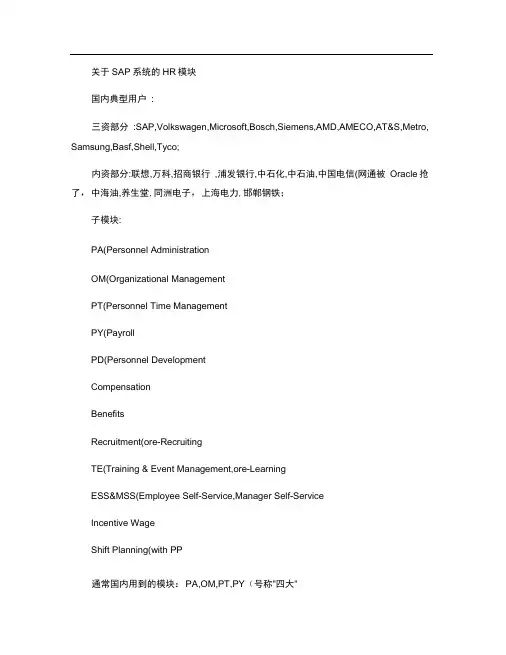
关于SAP系统的HR模块国内典型用户:三资部分:SAP,Volkswagen,Microsoft,Bosch,Siemens,AMD,AMECO,AT&S,Metro, Samsung,Basf,Shell,Tyco;内资部分:联想,万科,招商银行,浦发银行,中石化,中石油,中国电信(网通被Oracle抢了,中海油,养生堂,同洲电子,上海电力,邯郸钢铁;子模块:PA(Personnel AdministrationOM(Organizational ManagementPT(Personnel Time ManagementPY(PayrollPD(Personnel DevelopmentCompensationBenefitsRecruitment(ore-RecruitingTE(Training & Event Management,ore-LearningESS&MSS(Employee Self-Service,Manager Self-ServiceIncentive WageShift Planning(with PP通常国内用到的模块:PA,OM,PT,PY(号称"四大"一、PAPA基本上就是涵盖各个方面的员工主数据,PA有两个基本概念:lnfo type和Action 。
Info type是一类相关信息的集合,用四位数字为代码,例如:0001组织分配,0002 个人基本信息,0006地址,0008基本工资,0021家庭成员,每个Info type其实就是一个table,table里有很多字段,比如"0002"这个Info type里有的字段:姓/名/称谓/别名/婚姻/宗教/性别等等,同一个Info type 可以根据人员不同国家呈现不同的屏幕,并且某些Info type是特定国家专用的,比如中国专用的"个人所得税/社保/公积金/政治面貌/档案"等。
SAP系统的HR模块介绍及其常用事务代码

关于SAP系统的HR模块国内典型用户:三资部分:SAP,Volkswagen,Microsoft,Bosch,Siemens,AMD,AMECO,AT&S,Metro,Samsung,Basf,Shell,Tyco;内资部分:联想,万科,招商银行,浦发银行,中石化,中石油,中国电信(网通被Oracle抢了),中海油,养生堂,同洲电子,上海电力,邯郸钢铁;子模块:PA(Personnel Administration)OM(Organizational Management)PT(Personnel Time Management)PY(Payroll)PD(Personnel Development)CompensationBenefitsRecruitment(ore-Recruiting)TE(Training & Event Management,ore-Learning)ESS&MSS(Employee Self-Service,Manager Self-Service)Incentive WageShift Planning(with PP)通常国内用到的模块:PA,OM,PT,PY(号称"四大")一、PAPA基本上就是涵盖各个方面的员工主数据,PA有两个基本概念:Info type和Action。
Info type是一类相关信息的集合,用四位数字为代码,例如:0001组织分配,0002个人基本信息,0006地址,0008基本工资,0021家庭成员,每个Info type其实就是一个table,table里有很多字段,比如"0002"这个Info type里有的字段:姓/名/称谓/别名/婚姻/宗教/性别等等,同一个Info type 可以根据人员不同国家呈现不同的屏幕,并且某些Info type是特定国家专用的,比如中国专用的"个人所得税/社保/公积金/政治面貌/档案"等。
SAP系统的HR模块介绍及其常用事务代码.

关于SAP系统的HR模块国内典型用户:三资部分:SAP,Volkswagen,Microsoft,Bosch,Siemens,AMD,AMECO,AT&S,Metro, Samsung,Basf,Shell,Tyco;内资部分:联想,万科,招商银行,浦发银行,中石化,中石油,中国电信(网通被Oracle抢了,中海油,养生堂,同洲电子,上海电力,邯郸钢铁;子模块:PA(Personnel AdministrationOM(Organizational ManagementPT(Personnel Time ManagementPY(PayrollPD(Personnel DevelopmentCompensationBenefitsRecruitment(ore-RecruitingTE(Training & Event Management,ore-LearningESS&MSS(Employee Self-Service,Manager Self-ServiceIncentive WageShift Planning(with PP通常国内用到的模块:PA,OM,PT,PY(号称"四大"一、PAPA基本上就是涵盖各个方面的员工主数据,PA有两个基本概念:Info type和Action。
Info type是一类相关信息的集合,用四位数字为代码,例如:0001组织分配,0002个人基本信息,0006地址,0008基本工资,0021家庭成员,每个Info type其实就是一个table,table里有很多字段,比如"0002"这个Info type里有的字段:姓/名/称谓/别名/婚姻/宗教/性别等等,同一个Info type 可以根据人员不同国家呈现不同的屏幕,并且某些Info type是特定国家专用的,比如中国专用的"个人所得税/社保/公积金/政治面貌/档案"等。
SAPHR工资模块简易操作指南

SAPHR系统工资模块简易操作指南SAP系统工资模块运行成功的前提条件是对组织管理、人事管理、时间管理三个模块中的相关信息维护好。
组织管理模块信息的维护包括:组织单元、职位(备注:注意时间的设置)。
人事管理模块信息的维护包括:人事活动(PA40)的基本信息(人员的基本信息、保险、公积金、基本工资、合同要素、计划工作时间、所得税);维护(PA30)中关于经常性支付/扣除、额外支付款的信息。
时间管理模块信息的维护包括:员工报酬信息(计划工作时间选择0的情况下).操作技巧:多使用回车键,然后再保存。
具体操作如下:一、前期信息维护操作图1:特例:没有岗位的情况下,也可以对其进行工资核算。
如实习生。
图中的时间是指组织单元和职位的创建时间。
在图1中建立了组织单元和组织单元下的职位,接着给建立的职位配备人员。
入职时间的确定跟以后的社保、住房共积的公司缴纳有直接关系.图2中的时间是指员工入职的时间,也是开始计算工资的时间。
图3:总部人事子范图3中的工资范围选择重要,要选对,要和后面的工资运行时选的工资范围是对应的。
以上各图中用红圈圈起的部分,比较重要,特别是工资范围项。
(注:图4中性别一项如果选择女性,后面的保险项选择会多一项孕产保险。
)图5:0—没有时间评估是记录员工全部计划时间,如果选择此项,对后面计划工作时间的维护只需对员工报酬信息进行维护.不必对缺勤,出勤,缺勤定额等项进行维护.1—实际时间的时间评估是跟计划工作时间时数相反的记录,如果选择此项,后面的操作需要对缺勤,出勤,缺勤定额三项进行维护。
图6中的工时数系统自动产生,在计划工作时间维护的情况下。
图7:注意:税协议一项一定要打上勾. 图9:一般情况各种险种从每月的第一天计起。
(简单介绍) 保险类型包括:养老、失业、医疗、工伤、孕产人力资源主数据中的维护部分:对总额/净额工资发放标题栏下的经常性支付/扣除、额外支付款进行维护。
图11:经常性支付、扣除指的是周期性的支付额外支付款指的非周期性的支付图12:图13:对具体的保险数值进行维护。
SAP薪酬计算schema实例详解
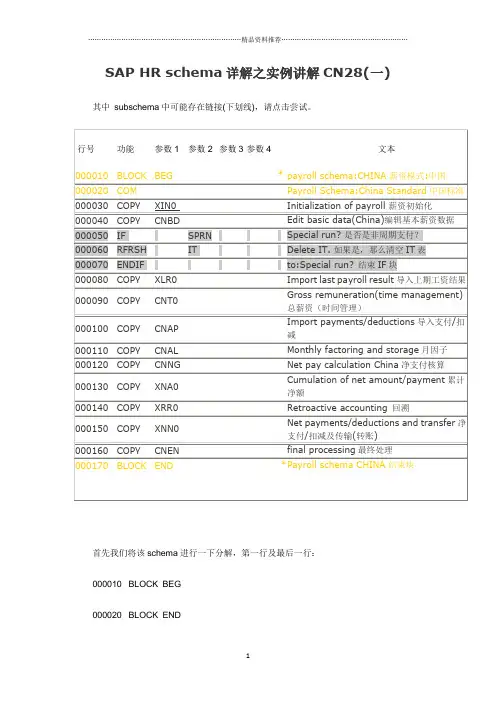
SAP HR schema详解之实例讲解CN28(一) 其中subschema中可能存在链接(下划线),请点击尝试。
首先我们将该schema进行一下分解,第一行及最后一行:000010 BLOCK BEG000020 BLOCK END是模式中的一个包含语句,没有逻辑作用,只起到运行日志分块的作用,即在薪资运行时,为方便日志的查看而分块。
该function只定义了【参数1】可以说BEG\END。
同时该function可以被嵌套,在subschema中每一个BEG必须存在一个END与之对应。
如subschema CNBD的日志如下:SAP HR schema详解之实例讲解CN28(一)" TITLE="SAP HR schema详解之实例讲解CN28(一)" />大家或许看到在D列中有*号的出现,在D列中如果有*号的出现,那么说明该行语句已经被“注释”在逻辑中不起任何作用,但此"注释"与上面说讲的注释不是一回事。
接下来的第二行:000020 COM是schema中的一个注释语句,同样没有任何逻辑作用,该function可以在schema的任何一点使用,无参数定义。
其中000050 IF SPRN000060 RFRSH IT000070 ENDIF三行是一个IF/ELSE,ENDIF判断逻辑块,该语句是逻辑如下图:由于为了清楚,本流程图不是标准规范的流程图。
其中【参数2】为必选参数,另外由于该function细节太多,不再赘述请查看F1帮助。
剩下的其他行中都以COPY function去调用subschema。
在【参数1】中是的subschema的名称,这样的设计有益于对schema后期的维护等,这犹如在软件开发中的模块化编程,将相关及相近的操作归入一个subschema。
000030 PGM ABR为工资核算驱动提供选择信息,这就相当于去选择一个程序类型,其中参数定义的仅为参数1,且【参数1】是必需的。
SAP HR模块用户操作手册
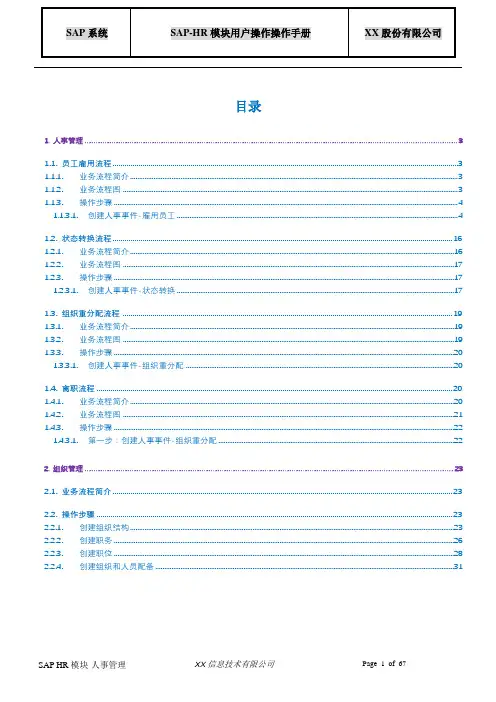
目录1.人事管理 (3)1.1.员工雇用流程 (3)1.1.1.业务流程简介 (3)1.1.2.业务流程图 (3)1.1.3.操作步骤 (4)1.1.3.1.创建人事事件-雇用员工 (4)1.2.状态转换流程 (16)1.2.1.业务流程简介 (16)1.2.2.业务流程图 (17)1.2.3.操作步骤 (17)1.2.3.1.创建人事事件-状态转换 (17)1.3.组织重分配流程 (19)1.3.1.业务流程简介 (19)1.3.2.业务流程图 (19)1.3.3.操作步骤 (20)1.3.3.1.创建人事事件-组织重分配 (20)1.4.离职流程 (20)1.4.1.业务流程简介 (20)1.4.2.业务流程图 (21)1.4.3.操作步骤 (22)1.4.3.1.第一步:创建人事事件-组织重分配 (22)2.组织管理 (23)2.1.业务流程简介 (23)2.2.操作步骤 (23)2.2.1.创建组织结构 (23)2.2.2.创建职务 (26)2.2.3.创建职位 (28)2.2.4.创建组织和人员配备 (31)3.酬薪管理 (37)3.1.业务流程简介 (37)3.2.操作步骤 (37)3.2.1.创建基本工资 (37)3.2.2.创建绩效工资系数 (38)3.2.3.创建五保一险的基数 (40)3.2.4.创建绩效工资 (42)3.2.5.创建住房供资金分摊标准 (44)3.2.6.创建所得税 (47)3.2.7.创建五保一险标准 (49)3.2.8.创建控制记录维护 (51)3.2.9.创建模拟工资核算 (53)3.2.10.创建起始工资核算 (56)3.2.11.检查工资核算结果 (56)3.2.12.更正工资核算结果 (58)3.2.13.退出工资核算 (58)3.2.14.银行转盘 (59)3.2.15.锁定人员 (60)4.时间管理 (62)4.1.业务流程简介 (62)4.2.操作步骤 (62)4.2.1.创建加班 (62)4.2.2.第二:创建缺勤 (64)4.2.3.快速创建 (66)1. 人事管理1.1. 员工雇用流程1.1.1.业务流程简介本流程描述的是XX汽车公司新雇用员工主数据维护流程。
SAP操作常用事务代码
SAP操作常用事务代码SAP是世界上最大的企业管理软件公司之一,其软件产品广泛应用于全球各行各业的企业中。
在SAP系统中,使用事务代码来访问各个模块的功能。
下面是一些常用的SAP操作事务代码的详细介绍。
1.MM模块事务代码-ME21N:创建采购订单-ME22N:更改采购订单-ME23N:显示采购订单-ME51N:创建采购申请-ME52N:更改采购申请-ME53N:显示采购申请-MIGO:物料入库-MB1C:物料创建-ME11:创建物料主数据2.SD模块事务代码-VA01:创建销售订单-VA02:更改销售订单-VA03:显示销售订单-VL01N:创建发货单-VL02N:更改发货单-VL03N:显示发货单-VF01:创建发票-VF02:更改发票-VF03:显示发票3.FI模块事务代码-FB60:录入供应商发票-F-02:录入通用记账凭证-FB50:录入会计凭证-F-22:更改会计凭证-FB03:显示会计凭证-FBL3N:显示总账科目明细-F.01:运行财务报表-F110:自动支付建议书4.CO模块事务代码-KB21N:创建原始成本运行-KO88:结转主生产成本-KP06:更改期间定价-KSB1:显示成本中心余额-KSBT:成本分配-OKB9:更改定价条件5.PP模块事务代码-CO01:创建生产订单-CO02:更改生产订单-CO03:显示生产订单-CO15:创建订单交货-CO14:更改订单交货-CO11N:录入确认-COOIS:显示生产订单信息系统-C228:BOM更改6.HR模块事务代码-PA30:显示和更改员工主数据-PA40:员工入职-PT60:计划员工工时-PC_PAYRESULT:工资单-PRAA:重评估职工费用-PTMW:员工考勤以上是一些常用的SAP操作事务代码,涵盖了不同模块中的关键功能。
然而,这只是其中一部分,因为SAP系统的功能非常广泛,还有许多其他事务代码可供使用。
每个企业根据其特定需求可能会使用不同的事务代码。
SAPHRSchema详解
[推荐][原创]SAP HR Schema 详解(一)一、Payroll schema基础1、Schema 和Function在SAP薪酬中,Function为薪酬计算提供了逻辑公式。
Function执行一般的过程-如在给定的薪资方法上计算薪酬税,从特定的信息类型中读取工资类型,计算奖金,并保存薪酬计算的结果。
SAP薪酬系统中有几十个Function,有些是与国家相关的而有些不是。
每个Function在PE04中定义并有文档;在4.5版本以上可以通过PDSY查看Function文档,在早期的版本可以通过RPDSYS00查看。
在SAP HR术语中,一个薪酬Function与一个ABAP Function是不一样的。
薪酬Function也包含ABAP代码,但它不像ABAP Function那样执行。
薪酬Function在Schema 中被薪酬驱动程序(假定为PRCALCUO)所执行。
Schema 是一系列Function以某种顺序执行的集合-每个Function执行后把结果传给下一个Funct ion。
Schema 可以通过PE01被创建和编辑,但是被保存在表T52C0(SAP标准Schema )和表T52 C1(用户创建的Schema 和修改SAP标准Schema )。
薪酬驱动读取T52C0/T52C1表中的行并依次执行Function。
我们如何跳过保存在表中的薪酬Function而执行ABAP代码来完成工作呢?在t-code PE04中可以看到ABPA代码对应的每个Function。
在Schema 中Function名与ABAP Form有关联,如薪酬Fu nction WPBP映射到ABAP form ‘fuwpbp’;Function USTAX映射到form ‘fuustax’。
所以当薪酬驱动执行Schema 时,它从Schema 中取得Function名,然后在名称前加上‘FU’,然后执行perform语句。
SAPHR工资模块简易操作指南
SAPHR工资模块简易操作指南1.登录SAPHR系统首先,打开SAPHR系统,并使用您的用户名和密码登录。
进入系统后,您会看到系统的主屏幕。
2.系统导航在主屏幕上,您可以看到系统的导航菜单。
导航菜单列出了系统中可用的各种功能模块。
找到并点击“工资”模块,进入工资管理页面。
3.设置工资基础数据在工资管理页面中,您可以设置工资基础数据,包括工资标准、工资级别和工资计算规则等。
点击“设置工资基础数据”选项,进入设置页面。
在设置页面中,您可以添加新的工资标准,设置工资级别和工资计算规则等。
根据您的需求,进行相应的设置,并保存更改。
4.创建工资项目在工资管理页面中,您可以创建工资项目,用于记录员工的工资信息。
点击“创建工资项目”选项,进入创建页面。
在创建页面中,填写员工的基本信息和工资信息,包括工资发放周期、工资发放日期和相关扣款项目等。
填写完成后,保存工资项目。
5.发放工资在工资管理页面中,您可以发放员工的工资。
点击“发放工资”选项,进入发放页面。
在发放页面中,您可以选择待发放工资的员工,并选择发放方式(如现金、银行转账等)。
选择完成后,点击“发放工资”按钮,系统将会自动计算并发放工资。
6.查看工资报表在工资管理页面中,您可以查看员工的工资报表。
点击“查看工资报表”选项,进入报表页面。
在报表页面中,您可以选择特定的时间段和工资项目,系统将会生成相应的工资报表。
您可以查看员工工资的详细信息,包括工资发放金额、扣款金额和实际到账金额等。
以上是SAPHR工资模块的简易操作指南。
通过这些步骤,您可以轻松地管理员工的工资信息,并实现工资的计算和发放。
希望这篇文章能够帮助您更好地使用SAPHR工资模块。
SAP HR系统简介及配置教程说明书
About the T utorialSAP Human Capital Management (SAP HCM) is one of the key modules in SAP and is also called SAP Human Resource (HR) or SAP Human Resource Management System (SAP HRMS). This introductory tutorial gives a brief overview of the features of SAP HR and how to use it in a systematic mannerAudienceHuman capital management products from SAP can help your organization hire and retain the right people, manage the work environment, streamline HR processes, ensure legal compliance, and create a people-centric organization.This tutorial is designed to configure the HR module of SAP in an easy and systematic way. Packed with plenty of screenshots, it will be useful for consultants as well as end-users.PrerequisitesBefore you start proceeding with this tutorial, we are assuming that you are already aware of the basics of SAP. It will be helpful if you have some exposure to the HR functions normally conducted in an organization.Copyright & DisclaimerCopyright 2018 by Tutorials Point (I) Pvt. Ltd.All the content and graphics published in this e-book are the property of Tutorials Point (I) Pvt. Ltd. The user of this e-book is prohibited to reuse, retain, copy, distribute or republish any contents or a part of contents of this e-book in any manner without written consent of the publisher.We strive to update the contents of our website and tutorials as timely and as precisely as possible, however, the contents may contain inaccuracies or errors. Tutorials Point (I) Pvt. Ltd. provides no guarantee regarding the accuracy, timeliness or completeness of our website or its contents including this tutorial. If you discover any errors on our website or inthistutorial,******************************************iT able of ContentsAbout the Tutorial (i)Audience (i)Prerequisites (i)Copyright & Disclaimer (i)Table of Contents (ii)OVERVIEW (1)1.SAP HR – Introduction (2)Organization Management (2)Organizational Object Types (4)Number Ranges (5)2.SAP HR – Maintaining Relationships (8)Object Types and Essential Relationships (9)Relationship Maintenance (11)3.SAP HR – Time Constraints (13)Maintaining Personnel Actions (15)4.SAP HR – Maintaining Infotypes (17)Components of Infotypes (17)How to Maintain Infotypes? (18)Maintaining Info Subtypes (19)PERSONNEL ADMINISTRATION (22)5.SAP HR – Personnel Administration (23)Organization Structure (23)Enterprise Structure (23)Personnel Structure (24)Hiring an Employee (25)6.SAP HR – HR Master Data (28)HR Master Data Structure (28)Processing HR Master Data (28)Selecting HR Master Data (29)7.SAP HR – Infotypes (30)Creating an Infotype (31)Display an Infotype (32)Delete an Infotype (34)8.SAP HR – Personnel Actions (36)Building Enterprise Structure (38)Editing Company Code Data (40)Assigning a Company Code (40)Creating Personnel Areas (41)Assigning Personnel Area to Company Code (43)iiIntegration with Time & Payroll (50)TIME MANAGEMENT (51)10.SAP HR – Time Management (52)Advantages of Time Management (52)Time Recording and Evaluation (52)Transaction Codes for Time Recording (53)11.SAP HR – Work schedules (58)Daily Work Schedules (58)Work Schedule Rules (58)12.SAP HR – Public Holiday Calendar (63)13.SAP HR – Attendance Absences (66)Shift Management in HR (66)Shift Planning Component (67)Change Shift Plans (68)Overtime and Breaks Schedules (69)BENEFITS (71)14.SAP HR – Benefits (72)Enrollment Overview (72)Types of Enrollment (72)Benefit Area (73)Benefit Category (75)Benefit Plan type (76)Benefit Plans (76)PAYROLL (78)15.SAP HR – Payroll Management (79)Payroll Control Record (79)Options in Payroll Control Record (81)16.SAP HR – Basic Pay Infotypes (82)Pay Scale Reclassification (82)Pay Scale Structure (83)17.SAP HR – Primary & Secondary Wage types (85)Primary Wage Type (85)Dialogue Wage Type (85)Secondary Wage or Technical Wage Type (86)18.SAP HR – Payroll Process (87)Payroll Areas to Run Payroll (87)iiiPayroll Cycle & Time Management Data (90)Payroll Integration (91)20.SAP HR – Payroll Cycle (93)Payroll Areas to Run Payroll (93)Remuneration Statement (94)21.SAP HR – Universal Work List (99)Universal Work List – Setup (99)Security in SAP HCM (99)Authorization Objects (100)Data Migration in SAP HR (101)ivOverview1.SAP HRSAP Human Capital Management (SAP HCM) is one of the key modules in SAP and is also called SAP Human Resource (HR) or SAP Human Resource Management System (SAP HRMS). SAP HCM contains many submodules and all these modules are integrated with each other.The key modules are as follows:∙Organizational Management: Organizational Management includes Personnel development, Personnel cost planning and event management.∙Time Management: Time management includes time recording, attendance, time schedule, shift management, etc.∙Personnel Administration:Personnel Administration includes personal and organizational structure, Infotypes, integration with time and payroll, etc.∙Payroll: Payroll deals with payroll types, payroll group configuration, primary and secondary wages, gross pay, bonus, etc.∙Recruitment: Recruitment includes hiring an employee, maintaining HR master data, etc.∙Training and Event Management: Training and Event Management deals with identifying training needs, scheduling training, training cost management, etc.∙Travel Management:Travel Management includes managing official trips, cost management for travel, travel expenses, etc.Organization ManagementOrganization Management allows you to manage the enterprise structure and analyze organization plans.The key features are:∙In organization management, you can configure system settings that is required for enterprise structure, personnel cost planning, etc.∙You can define plan version to configure various organization plans at the same time.∙Only one plan version defines your organizational current plan.∙You can edit, change or compare different organization plans using plan version.∙You can have two different plan versions, one for marketing and other one for sales hierarchy.You can compare or edit both the plans but only one plan can be used at a time.How to set a Plan version as active?There are two ways to set a plan version.1. Use the code T-Code: OOPV2. Go to IMG -> Personnel Management -> Global Settings -> Plan Version Maintenance -> Maintain Plan Versions.You can select from the list of available plans.Organizational Object T ypesAn Organization plan consists of various object types, which define the grouping of similar data together. Each object type consists of a unique object key. All object types are linked together with a relationship among each other.Example: A person holding a position that is defined by a specific job.RelationshipIn an Organization plan, relationships are used to link different object types. Example: A person holding a position in an organization and is assigned with cost center. It defines Person to position relationship and position to Organization unit.While defining an hierarchical organization structure, you are creating a relationship between organization objects. When a person is holding a position in an organization unit, it means there is relationship between the position object and the organization object.V alidityIt determines the life of object types. At the time of object creation, you enter the start and the end time of the project and this determines the validity of the object.There are various types of object types that can be defined in an organization plan. Given below are most common object types and their keys-Key Features of Organization ObjectsThe key features are:∙You can create or change an existing object types, which are not managed.Example- Object type person from HR Master Data.∙You can also define the relationship between different object types that should be proposed in the course of the authorization check.∙It is also possible to define an object type hierarchy to generate reporting.∙It is also possible to change the key of standard objects type- "S" for Position, "T"for task.There are two types of Relationships-∙Relationships with the same object types.∙Relationships with different object types.Number RangesYou can maintain different number ranges for Organization Management and Personnel administration in SAP HR. As discussed in previous topic, OM contains different object types.To maintain the different number ranges for OM objects, you can use T-Code: OONR.You can also choose the following path.Go to IMG-> Personnel management-> Organizational management-> Basic settings-> Maintain number ranges -> set up number assignment for all plan versions -> Execute.The first two digits represent your plan version and the next two letters represent the object type.Similarly, you can maintain number ranges for personnel numbers. A Personnel number is generated when an employee is hired. It can be generated internally or externally.The personnel number range whether internal or external should be defined at the following configuration node.1. Use T-code: PA042. You can also go to SPRO -> IMG-> Personnel management-> Personnel Administration -> Basic settings->Maintain number range intervals for personnel numbers.3. A new window opens. You will see Range Maintenance: Human resources. Go to Intervals to display intervals.4. It will open a new window, Maintain Intervals: Human resources. You can check different number ranges for personnel number as shown below:The NR Status indicates the last personnel number assigned/used up for that respective MOLGA. MOLGA Is used to support multi-country human resource management.2.SAP HRIn an Organization plan, relationships are used to link different object types. Example: A person holding a position in an organization is assigned with cost center. It defines a Person to position relationship and position to Organization unit.While defining a hierarchical organization structure, it means you are creating a relationship between organization objects. When a person is holding a position in an organization unit, it means there is relationship between position object and organization object.A relationship can be created in both the ways- top down and bottom approach. These relationships are normally maintained in HRP001table. If these relationships are not standard, you may need additional tables.To maintain relationship, use T-Code: PP01 or PP03.A new window will open with the name Maintain Object.Select the Object type, enter position number, give relationship and click create (F5).Object T ypes and Essential RelationshipsGo to SPRO -> IMG -> Personnel Management -> Organizational Management -> Basic Settings -> Data model enhancement ->Maintain Object Types -> ExecuteTo create new object type and assigning relationships follow the steps given below.1.Create new object type and assign essential relationships.2.Assign object to the required Infotypes.3.Maintain subtypes.4.Maintain personnel actions.5.Assign number range.6.Maintain object via PP03 or PP01.7. Go to the Change View “Object Types”: Overview window. Click New Entries to create a new object type. You can also copy an existing object type.8. Enter Object type text, code, etc. When the object is created, assign essential relationships to it by clicking on essential relationships on the left side.∙Assigning a relationship means that once an object is created, the assigned relationships are mandatory to be maintained.∙Maintaining Object types is available in Table: T7780∙Maintaining Essential relationship is available in Table: T7750Relationship MaintenanceFor maintaining relationship in SAP HR module, go to SPRO ->IMG -> Personnel Management -> Organizational Management -> Basic Settings -> Data model enhancement ->Relationship Maintenance -> Maintain Relationships -> ExecuteIn the left pane, go to Allowed Relationships, select the relationship you want to maintain, click Position.3.SAP HRTime constraints are used to determine how the object type exists and how they will be updated in the HR system.You can also define time constraints for object types in Organization management to have a suitable system. You need not to keep orphan object types in the system.∙O- O -> Time Constraint 1∙O- S -> Time Constraint 2∙O- K -> Time Constraint 3∙S- O -> Time Constraint 4∙S - P -> Time Constraint 5There are three types of time constraints-∙Time Constraint 1 is mandatory for a record to exist in the HR system and can exist one at any point of time.∙Time Constraint 2 is not mandatory for a record but only one exists at any point of time.∙Time Constraint 3 is not mandatory for a record and can have many at any point of time.Assigning Time Constraints to a relation1. To assign time constraints to a relation, you have to use:SPRO ->IMG -> Personnel Management -> Organizational Management -> Basic Settings -> Data model enhancement ->Relationship Maintenance -> Maintain Relationships -> Execute2. In the left pane, go to the Time constraint tab as shown in the image given below-You can assign appropriate time constraints to the given relationship.Infotypes reactions as per time constraints:∙Time Constraint 1– Record must have no gaps, no overlapping. If you select this Time Constraint, there should not be any gaps nor overlapping. This TC is generally used for Infotypes like, 0001, 0008, 0009 etc. where there is only one valid record.∙Time Constraint 2 –This TC includes those records that can include gaps but there should be no overlapping. If you select this TC, it means that you can havegaps but NO overlapping. Consider an example of the marital status of an employee. The employee has a spouse but a gap can occur in case he is divorced.Time Constraint 3 – This TC includes records that can have gaps and can exist multiple times. For example, Infotype IT0014 can have multiple records in that particular Infotype at the same time with overlapping.Maintaining Personnel ActionsIn SAP HR system, personnel actions are performed for all the Infotypes that require data to be entered in the HR system. Common Infotypes that require a personnel action are hiring a new employee, termination of an employee, etc.1. To perform a Personnel action, use T-Code: PA 40 or go to SPRO -> IMG -> Personnel Management -> Personnel Administration -> Customizing Procedures -> Actions2. A new window ‘Personnel Actions’ opens.The screen consists of the following fields-SAP HR ∙Personnel No.: This field has an employee’s personnel number. When a new employee is hired, it is generated automatically by the system.∙Start: This field shows the start date of the personnel action.∙Action Type: In this field, you have to select the action type that needs to be performed.ExampleLet us understand how a new employee is hired in SAP HR system.1. Enter the hiring date as shown below.2. From Action type, select Hire.3. Click the Execute button given on top.A new window will open. Enter details like Reason for action, Personnel area, Employee group and sub group, etc. and click the Save icon at the top.4.SAP HRIn SAP HR system, Infotypes are used to store the data for all the personnel actions and administrative tasks in the system. Infotypes are known as small units of information in SAP HR system.Infotypes group the similar data together and define structure, enter data and define the information for specific period of time.Components of InfotypesAn Infotype consists of the following components-StructureAn Infotype contains a set of similar data records in the form of data structure. Infotype contains series of information like first name, last name, date of birth, marital status, etc. When an Infotype is updated in the system, old data is not removed from the system but time is delimited.Data EntryYou can enter predefined values for Infotype that helps in fetching and maintaining the data in the system. Entries in HR system are checked automatically for accuracy. Default value checks depend on the employee organization assignment.Time DependencyWhen an Infotype is updated in the system, old data is not erased. It is stored in the system for historical evaluation purpose. This allows each Infotype to have multiple records but all the records may vary as per their validity.Time based reaction of Infotype is defined in the Time constraint field. Infotype 0000 to 0999 are Personnel Administration Infotypes. It is also possible to define permissibility of Infotype for each country, this allows you to restrict Infotype while editing the master data.Go to SPRO -> IMG -> Personnel Management -> Personnel Administration-> Customizing Procedures -> Infotypes -> Assign Infotypes to CountriesHow to Maintain Infotypes?To maintain Infotype, follow the steps given below:1. Go to SPRO - > IMG -> Personnel Management - > Organizational Management - > Basic Setting -> Data model enhancement - >Infotype Maintenance - > Maintain Infotypes -> Execute2. Select the Infotypes to which the newly created custom object needs to be assigned. Select the Infotype and click the Infotypes per object type option.3. To assign custom objects to Infotype, click the New Entries option. You can uncheck the No Maintenance check box such that you can maintain custom objects via Organization Management transactions PP01.Maintaining Info SubtypesInfo Subtypes are known as sub units of an Infotype. Using subtype, you can easily manage and access the data in HR system and can control the Infotypes. You can easily assign different features to control the data like time constraints to sub types.You can assign different control features to sub types as per requirement like TC1, TC2, and TC3.ExampleConsider the example of an Infotype Addresses (0006). Following are the subtypes- ∙Subtype 1 – Permanent Residence address∙Subtype 2 –Temporary address∙Subtype 3 – Home addressConsidering Control feature – Time constraint for this Infotype, you should use TC-3 for Infotype Addresses, as we need to pass multiple values. Permanent Residence address subtype should be Time Constraint -1. Home address can exist once at any one time, hence it is Time Constraint -2.How to maintain subtypes?To maintain subtypes -1. Go to SPRO - > IMG -> Personnel Management - > Organizational Management - > Data model enhancement - >Infotype Maintenance - > Maintain subtypes -> Execute2. To maintain subtype, select the subtype in the next window. In the left pane, you have an option to add control feature - Time Constraint.3. Double click the Time constraint in the left pane, a new window ‘Change View “Time Constraint”: Overview’ will open.End of ebook previewIf you liked what you saw…Buy it from our store @ https://。