
Fedora Linux 系统调用或常用命令详细解析 rndc
NAME
rndc − name server control utility
SYNOPSIS
rndc[−b source−address][−c config−file][−k key−file][−s server][−p port][−V][−y key_id] {command}
DESCRIPTION
rndc controls the operation of a name server.It supersedes the ndc utility that was provided in old BIND
releases. If rndc is invoked with no command line options or arguments, it prints a short summary of the
supported commands and the available options and their arguments.
rndc communicates with the name server over a TCP connection, sending commands authenticated with
digital signatures. In the current versions of rndc and named,the only supported authentication algorithm is HMAC−MD5, which uses a shared secret on each end of the connection. This provides TSIG−style
authentication for the command request and the name server’s response. All commands sent over the
channel must be signed by a key_id known to the server.
rndc reads a configuration file to determine how to contact the name server and decide what algorithm and key it should use.
OPTIONS
−b source−address
Use source−address as the source address for the connection to the server.Multiple instances are
permitted to allow setting of both the IPv4 and IPv6 source addresses.
−c config−file
Use config−file as the configuration file instead of the default,/etc/rndc.conf.
−k key−file
Use key−file as the key file instead of the default,/etc/rndc.key.The key in/etc/rndc.key will be used
to authenticate commands sent to the server if the config−file does not exist.
−s server
server is the name or address of the server which matches a server statement in the configuration file
for rndc.If no server is supplied on the command line, the host named by the default−server clause in
the options statement of the rndc configuration file will be used.
−p port
Send commands to TCP port port instead of BIND 9’s default control channel port, 953.
−V
Enable verbose logging.
−y key_id
Use the key key_id from the configuration file.key_id must be known by named with the same
algorithm and secret string in order for control message validation to succeed. If no key_id is specified,
rndc will first look for a key clause in the server statement of the server being used, or if no server
statement is present for that host, then the default−key clause of the options statement. Note that the
configuration file contains shared secrets which are used to send authenticated control commands to
name servers. It should therefore not have general read or write access.
For the complete set of commands supported by rndc,see the BIND 9 Administrator Reference Manual or run rndc without arguments to see its help message.
LIMITATIONS
rndc does not yet support all the commands of the BIND 8ndc utility.
There is currently no way to provide the shared secret for a key_id without using the configuration file.
Several error messages could be clearer.
SEE ALSO
rndc.conf(5),rndc−confgen(8),named(8),named.conf(5),ndc(8), BIND 9 Administrator Reference Manual.
AUTHOR
Internet Systems Consortium
COPYRIGHT
Copyright © 2004, 2005, 2007 Internet Systems Consortium, Inc. ("ISC")
Copyright © 2000, 2001 Internet Software Consortium.。
Fedora Linux 系统调用或常用命令详细解析 rotatelogs
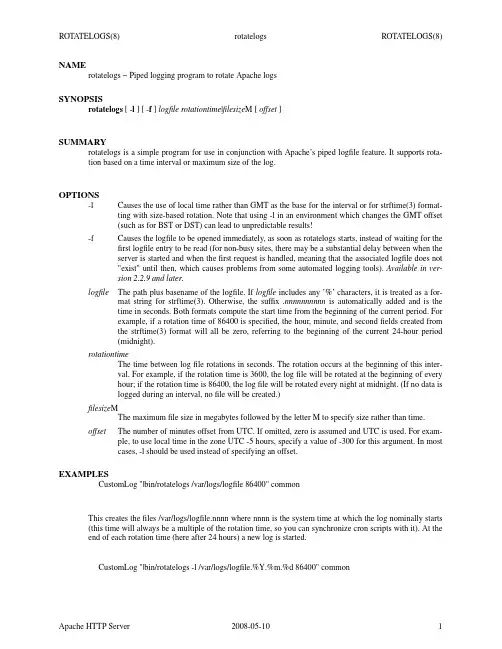
NAMErotatelogs − Piped logging program to rotate Apache logsSYNOPSISrotatelogs[-l][-f]logfile rotationtime|filesize M[offset]SUMMARYrotatelogs is a simple program for use in conjunction with Apache’s piped logfile feature. It supports rota-tion based on a time interval or maximum size of the log.OPTIONS-l Causes the use of local time rather than GMT as the base for the interval or for strftime(3) format-ting with size-based rotation. Note that using -l in an environment which changes the GMT offset(such as for BST or DST) can lead to unpredictable results!-f Causes the logfile to be opened immediately,as soon as rotatelogs starts, instead of waiting for the first logfile entry to be read (for non-busy sites, there may be a substantial delay between when theserver is started and when the first request is handled, meaning that the associated logfile does not"exist" until then, which causes problems from some automated logging tools).Available in ver-sion 2.2.9 and later.logfile The path plus basename of the logfile. If logfile includes any’%’ characters, it is treated as a for-mat string for strftime(3). Otherwise, the suffix.nnnnnnnnnn is automatically added and is thetime in seconds. Both formats compute the start time from the beginning of the current period. Forexample, if a rotation time of 86400 is specified, the hour,minute, and second fields created fromthe strftime(3) format will all be zero, referring to the beginning of the current 24-hour period(midnight).rotationtimeThe time between log file rotations in seconds. The rotation occurs at the beginning of this inter-val. For example, if the rotation time is 3600, the log file will be rotated at the beginning of everyhour; if the rotation time is 86400, the log file will be rotated every night at midnight. (If no data islogged during an interval, no file will be created.)filesize MThe maximum file size in megabytes followed by the letter M to specify size rather than time.offset The number of minutes offset from UTC. If omitted, zero is assumed and UTC is used. For exam-ple, to use local time in the zone UTC -5 hours, specify a value of -300 for this argument. In mostcases, -l should be used instead of specifying an offset.EXAMPLESCustomLog "|bin/rotatelogs /var/logs/logfile 86400" commonThis creates the files /var/logs/logfile.nnnn where nnnn is the system time at which the log nominally starts (this time will always be a multiple of the rotation time, so you can synchronize cron scripts with it). At the end of each rotation time (here after 24 hours) a new log is started.CustomLog "|bin/rotatelogs -l /var/logs/logfile.%Y.%m.%d 86400" commonThis creates the files /var/logs/logfile.yyyy.mm.dd where yyyy is the year,mm is the month, and dd is the day of the month. Logging will switch to a newfile every day at midnight, local time.CustomLog "|bin/rotatelogs /var/logs/logfile 5M" commonThis configuration will rotate the logfile whenever it reaches a size of 5 megabytes.ErrorLog "|bin/rotatelogs /var/logs/errorlog.%Y-%m-%d-%H_%M_%S 5M"This configuration will rotate the error logfile whenever it reaches a size of 5 megabytes, and the suffix to the logfile name will be created of the form errorlog.YYYY-mm-dd-HH_MM_SS.PORTABILITYThe following logfile format string substitutions should be supported by all strftime(3) implementations, see the strftime(3) man page for library-specific extensions.•%A−full weekday name (localized)•%a−3-character weekday name (localized)•%B−full month name (localized)•%b−3-character month name (localized)•%c−date and time (localized)•%d−2-digit day of month•%H−2-digit hour (24 hour clock)•%I−2-digit hour (12 hour clock)•%j−3-digit day of year•%M−2-digit minute•%m−2-digit month•%p−am/pm of 12 hour clock (localized)•%S−2-digit second•%U−2-digit week of year (Sunday first day of week)•%W−2-digit week of year (Monday first day of week)•%w−1-digit weekday (Sunday first day of week)•%X−time (localized)•%x−date (localized)•%Y−4-digit year•%y−2-digit year•%Z−time zone name•%%−literal ‘%’。
Linux内核中系统调用详解

Linux内核中系统调用详解什么是系统调用?(Linux)内核中设置了一组用于实现各种系统功能的子程序,称为系统调用。
用户可以通过系统调用命令在自己的应用程序中调用它们。
从某种角度来看,系统调用和普通的函数调用非常相似。
区别仅仅在于,系统调用由(操作系统)核心提供,运行于核心态;而普通的函数调用由函数库或用户自己提供,运行于用户态。
随Linux核心还提供了一些(C语言)函数库,这些库对系统调用进行了一些包装和扩展,因为这些库函数与系统调用的关系非常紧密,所以习惯上把这些函数也称为系统调用。
为什么要用系统调用?实际上,很多已经被我们习以为常的C语言标准函数,在Linux 平台上的实现都是靠系统调用完成的,所以如果想对系统底层的原理作深入的了解,掌握各种系统调用是初步的要求。
进一步,若想成为一名Linux下(编程)高手,也就是我们常说的Hacker,其标志之一也是能对各种系统调用有透彻的了解。
即使除去上面的原因,在平常的编程中你也会发现,在很多情况下,系统调用是实现你的想法的简洁有效的途径,所以有可能的话应该尽量多掌握一些系统调用,这会对你的程序设计过程带来意想不到的帮助。
系统调用是怎么工作的?一般的,进程是不能访问内核的。
它不能访问内核所占内存空间也不能调用内核函数。
(CPU)(硬件)决定了这些(这就是为什么它被称作"保护模式")。
系统调用是这些规则的一个例外。
其原理是进程先用适当的值填充(寄存器),然后调用一个特殊的指令,这个指令会跳到一个事先定义的内核中的一个位置(当然,这个位置是用户进程可读但是不可写的)。
在(Intel)CPU中,这个由中断0x80实现。
硬件知道一旦你跳到这个位置,你就不是在限制模式下运行的用户,而是作为操作系统的内核--所以你就可以为所欲为。
进程可以跳转到的内核位置叫做sysem_call。
这个过程检查系统调用号,这个号码告诉内核进程请求哪种服务。
然后,它查看系统调用表(sys_call_table)找到所调用的内核函数入口地址。
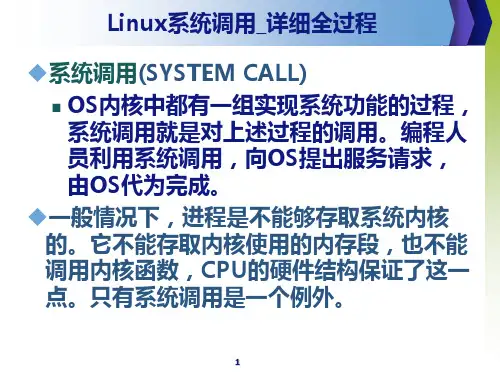
Linux系统调用详细全过程
6
系统命令、内核函数
系统调用与系统命令
系统命令相对API来说,更高一层。每个系统命令
都是一个执行程序,如ls命令等。这些命令的实现
调用了系统调用。
系统调用与内核函数
系统调用是用户进入内核的接口层,它本身并非内
核函数,但是它由内核函数实现。
进入内核后,不同的系统调用会找到各自对应的内
常,CPU便被切换到内核态执行内核函
数,转到了系统调用处理程序的入口:
system_call()。
int $0x80指令将用户态的执行模式转变为内
核态,并将控制权交给系统调用过程的起点
system_call()处理函数。
4
system_call()函数
system_cal()检查系统调用号,该号码告诉内核
SYMBOL_NAME(sys_exit)
.long
.longSYMBOL_NAME(sys_read)
SYMBOL_NAME(sys_fork)
.long
.longSYMBOL_NAME(sys_write)
SYMBOL_NAME(sys_read)
.long
.longSYMBOL_NAME(sys_open)
SYMBOL_NAME(sys_write)
.long
.long
…… SYMBOL_NAME(sys_open)
……
……
……
.long
SYMBOL_NAME(sys_getuid)
.long SYMBOL_NAME(sys_getuid)
* 4
+
21
系统调用的返回
当服务例程结束时,system_call( ) 从eax
Linux 系统命令及其使用详解

Linux 系统命令及其使用详解(大全)(来源: 中国系统分析员)cat cdchmod chowncp cut名称:cat使用权限:所有使用者使用方式:cat [-AbeEnstTuv] [--help] [--version] fileName说明:把档案串连接后传到基本输出(萤幕或加> fileName 到另一个档案)参数:-n 或--number 由 1 开始对所有输出的行数编号-b 或--number-nonblank 和-n 相似,只不过对于空白行不编号-s 或--squeeze-blank 当遇到有连续两行以上的空白行,就代换为一行的空白行-v 或--show-nonprinting范例:cat -n textfile1 > textfile2 把textfile1 的档案内容加上行号后输入textfile2 这个档案里cat -b textfile1 textfile2 >> textfile3 把textfile1 和textfile2 的档案内容加上行号(空白行不加)之后将内容附加到textfile3名称:cd使用权限:所有使用者使用方式:cd [dirName]说明:变换工作目录至dirName。
其中dirName 表示法可为绝对路径或相对路径。
若目录名称省略,则变换至使用者的home directory (也就是刚login 时所在的目录).另外,"~" 也表示为home directory 的意思,"." 则是表示目前所在的目录,".." 则表示目前目录位置的上一层目录。
范例:跳到/usr/bin/:cd /usr/bin跳到自己的home directory:cd ~跳到目前目录的上上两层:cd ../..指令名称:chmod使用权限:所有使用者使用方式:chmod [-cfvR] [--help] [--version] mode file...说明:Linux/Unix 的档案存取权限分为三级:档案拥有者,群组,其他。
linux文件系统的系统调用命令
linux文件系统的系统调用命令Linux文件系统的系统调用命令Linux是一个开源的操作系统,提供了许多强大且灵活的系统调用命令来管理文件系统。
本文将深入探讨Linux文件系统的系统调用命令,包括创建、删除、重命名、复制和移动文件,以及设置文件权限和属性等功能。
一、文件系统简介在Linux系统中,文件系统是指对存储设备的管理和组织。
它使用层次结构来管理文件和目录,允许用户在存储设备上创建、访问和操作文件。
文件系统的目的是提供一种有效和可靠的方式来组织和存储数据。
二、系统调用命令Linux系统提供了一系列的系统调用命令,可以通过调用这些命令来操作文件系统。
1.创建文件创建文件是文件系统中的常见操作。
在Linux中,可以使用open系统调用命令来创建文件。
open命令的语法如下:int open(const char *pathname, int flags, mode_t mode);pathname:指定文件的路径和名称。
flags:指定文件的打开模式,如O_RDONLY(只读)、O_WRONLY (只写)、O_RDWR(读写)等。
mode:指定文件的权限模式。
open命令返回一个文件描述符,以便在后续的操作中引用该文件。
2.删除文件删除文件是通过unlink系统调用命令实现的。
unlink命令的语法如下:int unlink(const char *pathname);pathname:指定要删除的文件的路径和名称。
3.重命名文件重命名文件是通过rename系统调用命令实现的。
rename命令的语法如下:int rename(const char *oldpath, const char *newpath);oldpath:指定要重命名的文件的路径和名称。
newpath:指定重命名后的文件的路径和名称。
4.复制文件复制文件是通过使用read和write系统调用命令实现的。
read命令用于从源文件中读取数据,write命令用于将数据写入目标文件。
Fedora Linux 系统调用或常用命令详细解析 rngd
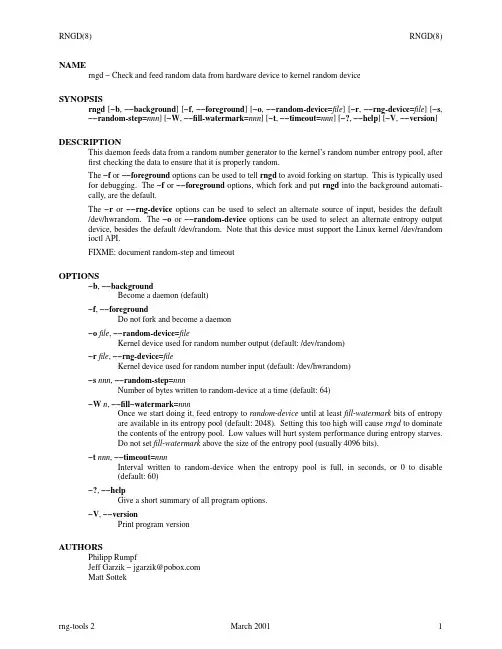
NAMErngd − Check and feed random data from hardware device to kernel random deviceSYNOPSISrngd[−b,−−background][−f,−−foreground][−o,−−random-device=file][−r,−−rng-device=file][−s,−−random-step=nnn][−W,−−fill-watermark=nnn][−t,−−timeout=nnn][−?,−−help][−V,−−version] DESCRIPTIONThis daemon feeds data from a random number generator to the kernel’s random number entropy pool, after first checking the data to ensure that it is properly random.The−f or−−foreground options can be used to tell rngd to avoid forking on startup.This is typically used for debugging. The−f or−−foreground options, which fork and put rngd into the background automati-cally,are the default.The−r or−−rng-device options can be used to select an alternate source of input, besides the default /dev/hwrandom. The−o or−−random-device options can be used to select an alternate entropy output device, besides the default /dev/random. Note that this device must support the Linux kernel /dev/random ioctl API.FIXME: document random-step and timeoutOPTIONS−b,−−backgroundBecome a daemon (default)−f,−−foregroundDo not fork and become a daemon−ofile,−−random-device=fileKernel device used for random number output (default: /dev/random)−rfile,−−rng-device=fileKernel device used for random number input (default: /dev/hwrandom)−s nnn,−−random-step=nnnNumber of bytes written to random-device at a time (default: 64)−W n,−−fill−watermark=nnnOnce we start doing it, feed entropy to random-device until at leastfill-watermark bits of entropyare available in its entropy pool (default: 2048).Setting this too high will cause rngd to dominatethe contents of the entropy pool. Low values will hurt system performance during entropy starves.Do not setfill-watermark above the size of the entropy pool (usually 4096 bits).−t nnn,−−timeout=nnnInterval written to random-device when the entropy pool is full, in seconds, or 0 to disable(default: 60)−?,−−helpGive a short summary of all program options.−V,−−versionPrint program versionAUTHORSPhilipp RumpfJeff Garzik − jgarzik@Matt Sottek。
Linux系统命令及其使用详解
Linux 系统命令及其使用详解(大全)(来源: 中国系统分析员)cat cdchmod chowncp cut名称:cat使用权限:所有使用者使用方式:cat [-AbeEnstTuv] [--help] [--version] fileName说明:把档案串连接后传到基本输出(萤幕或加> fileName 到另一个档案)参数:-n 或--number 由 1 开始对所有输出的行数编号-b 或--number-nonblank 和-n 相似,只不过对于空白行不编号-s 或--squeeze-blank 当遇到有连续两行以上的空白行,就代换为一行的空白行-v 或--show-nonprinting范例:cat -n textfile1 > textfile2 把textfile1 的档案内容加上行号后输入textfile2 这个档案里cat -b textfile1 textfile2 >> textfile3 把textfile1 和textfile2 的档案内容加上行号(空白行不加)之后将内容附加到textfile3名称:cd使用权限:所有使用者使用方式:cd [dirName]说明:变换工作目录至dirName。
其中dirName 表示法可为绝对路径或相对路径。
若目录名称省略,则变换至使用者的home directory (也就是刚login 时所在的目录).另外,"~" 也表示为home directory 的意思,"." 则是表示目前所在的目录,".." 则表示目前目录位置的上一层目录。
范例:跳到/usr/bin/:cd /usr/bin跳到自己的home directory:cd ~跳到目前目录的上上两层:cd ../..指令名称:chmod使用权限:所有使用者使用方式:chmod [-cfvR] [--help] [--version] mode file...说明:Linux/Unix 的档案存取权限分为三级:档案拥有者,群组,其他。
usermod_FEDORA_LINUX_命令解析
NAMEusermod − modify a user accountSYNOPSISusermod[options]LOGINDESCRIPTIONThe usermod command modifies the system account files to reflect the changes that are specified on the command line.OPTIONSThe options which apply to the usermod command are:−a,−−appendAdd the user to the supplementary group(s). Use only with the−G option.−c,−−comment COMMENTThe new value of the user´s password file comment field. It is normally modified using the chfn(1)utility.−d,−−home HOME_DIRThe user´s new login directory.If the−m option is given, the contents of the current home directory will be moved to the new homedirectory,which is created if it does not already exist.−e,−−expiredate EXPIRE_DATEThe date on which the user account will be disabled. The date is specified in the formatYYYY−MM−DD.−f,−−inactive INACTIVEThe number of days after a password expires until the account is permanently disabled.A value of 0 disables the account as soon as the password has expired, and a value of −1 disables thefeature.−g,−−gid GROUPThe group name or number of the user´s new initial login group. The group must exist.−G,−−groups GROUP1[,GROUP2,...[,GROUPN]]]A list of supplementary groups which the user is also a member of. Each group is separated from thenext by a comma, with no intervening whitespace. The groups are subject to the same restrictions asthe group given with the−g option.If the user is currently a member of a group which is not listed, the user will be removed from thegroup. This behaviour can be changed via the−a option, which appends the user to the currentsupplementary group list.−l,−−login NEW_LOGINThe name of the user will be changed from LOGIN to NEW_LOGIN.Nothing else is changed. Inparticular,the user´s home directory name should probably be changed manually to reflect the newlogin name.−L,−−lockLock a user´s password. This puts a ´!´ in front of the encrypted password, effectively disabling thepassword. You can´t use this option with−p or−U.Note: if you wish to lock the account (not only access with a password), you should also set theEXPIRE_DATE to1.−m,−−move−homeMove the content of the user´s home directory to the new location.This option is only valid in combination with the−d(or−−home)option.−o,−−non−uniqueWhen used with the−u option, this option allows to change the user ID to a non−unique value.−p,−−password PASSWORDThe encrypted password, as returned by crypt(3).Note:This option is not recommended because the password (or encrypted password) will be visibleby users listing the processes.You should make sure the password respects the system´s password policy.−s,−−shell SHELLThe name of the user´s new login shell. Setting this field to blank causes the system to select thedefault login shell.−u,−−uid UIDThe new numerical value of the user´s ID.This value must be unique, unless the−o option is used. The value must be non−negative.Valuesbetween 0 and 999 are typically reserved for system accounts.The user´s mailbox, and anyfiles which the user owns and which are located in the user´s homedirectory will have the file user ID changed automatically.The ownership of files outside of the user´s home directory must be fixed manually.−U,−−unlockUnlock a user´s password. This removes the ´!´ in front of the encrypted password. You can´t use thisoption with−p or−L.Note: if you wish to unlock the account (not only access with a password), you should also set theEXPIRE_DATE(for example to99999,or to the EXPIRE value from /etc/default/useradd).−Z,−−selinux−user SEUSERThe SELinux user for the user´s login. The default is to leave this field the blank, which causes thesystem to select the default SELinux user.CA VEATSYou must make certain that the named user is not executing any processes when this command is beingexecuted if the user´s numerical user ID, the user´s name, or the user´s home directory is being changed.usermod checks this on Linux, but only check if the user is logged in according to utmp on otherarchitectures.You must change the owner of any crontabfiles or at jobs manually.You must make any changes involving NIS on the NIS server.CONFIGURATIONThe following configuration variables in /etc/login.defs change the behavior of this tool:MAIL_DIR(string)The mail spool directory. This is needed to manipulate the mailbox when its corresponding useraccount is modified or deleted. If not specified, a compile−time default is used.MAIL_FILE(string)Defines the location of the users mail spool files relatively to their home directory.The MAIL_DIR and MAIL_FILE variables are used by useradd,usermod,and userdel to create, move, or delete the user´s mail spool.If MAIL_CHECK_ENAB is set to yes,they are also used to define the MAIL environment variable.MAX_MEMBERS_PER_GROUP(number)Maximum members per group entry. When the maximum is reached, a new group entry (line) isstarted in /etc/group (with the same name, same password, and same GID).The default value is 0, meaning that there are no limits in the number of members in a group.This feature (split group) permits to limit the length of lines in the group file. This is useful to makesure that lines for NIS groups are not larger than 1024 characters.If you need to enforce such limit, you can use 25.Note: split groups may not be supported by all tools (even in the Shadow toolsuite). You should notuse this variable unless you really need it.FILES/etc/groupGroup account information./etc/gshadowSecure group account information./etc/passwdUser account information./etc/shadowSecure user account information.SEE ALSOchfn(1),chsh(1),passwd(1),crypt(3),gpasswd(8),groupadd(8),groupdel(8),groupmod(8),login.defs(5),useradd(8),userdel(8).。
Fedora Linux 系统调用或常用命令详细解析 rndc-confgen
NAMErndc−confgen − rndc key generation toolSYNOPSISrndc−confgen[−a][−b keysize][−c keyfile][−h][−k keyname][−p port][−r randomfile][−s address][−t chrootdir][−u user]DESCRIPTIONrndc−confgen generates configuration files for rndc.It can be used as a convenient alternative to writingthe rndc.conffile and the corresponding controls and key statements in named.conf by hand. Alternatively, it can be run with the−a option to set up a rndc.keyfile and avoid the need for a rndc.conffile and acontrols statement altogether.OPTIONS−aDo automatic rndc configuration. This creates a file rndc.key in/etc(or whatever sysconfdir wasspecified as when BIND was built) that is read by both rndc and named on startup. The rndc.keyfiledefines a default command channel and authentication key allowing rndc to communicate with namedon the local host with no further configuration.Running rndc−confgen −a allows BIND 9 and rndc to be used as drop−in replacements for BIND 8and ndc,with no changes to the existing BIND 8named.conffile.If a more elaborate configuration than that generated by rndc−confgen −a is required, for example ifrndc is to be used remotely,you should run rndc−confgen without the−a option and set up arndc.conf and named.conf as directed.−b keysizeSpecifies the size of the authentication key in bits. Must be between 1 and 512 bits; the default is 128.−c keyfileUsed with the−a option to specify an alternate location for rndc.key.−hPrints a short summary of the options and arguments to rndc−confgen.−k keynameSpecifies the key name of the rndc authentication key.This must be a valid domain name. The defaultis rndc−key.−p portSpecifies the command channel port where named listens for connections from rndc.The default is953.−r randomfileSpecifies a source of random data for generating the authorization. If the operating system does notprovide a/dev/random or equivalent device, the default source of randomness is keyboard input.randomdev specifies the name of a character device or file containing random data to be used insteadof the default. The special value keyboard indicates that keyboard input should be used.−s addressSpecifies the IP address where named listens for command channel connections from rndc.Thedefault is the loopback address 127.0.0.1.−t chrootdirUsed with the−a option to specify a directory where named will run chrooted. An additional copy ofthe rndc.key will be written relative to this directory so that it will be found by the chrooted named.−u userUsed with the−a option to set the owner of the rndc.keyfile generated. If−t is also specified only thefile in the chroot area has its owner changed.EXAMPLESTo allow rndc to be used with no manual configuration, runrndc−confgen −aTo print a sample rndc.conffile and corresponding controls and key statements to be manually inserted into named.conf,runrndc−confgenSEE ALSOrndc(8),rndc.conf(5),named(8), BIND 9 Administrator Reference Manual.AUTHORInternet Systems ConsortiumCOPYRIGHTCopyright © 2004, 2005, 2007, 2009 Internet Systems Consortium, Inc. ("ISC")Copyright © 2001, 2003 Internet Software Consortium.。
Fedora系统介绍几及常用指令
Fedora系统介绍几及常用指令一、FC12系统目录结构简介/:系统根目录。
/bin/:系统启动时需要的执行文件所在目录。
/boot/:系统启动目录。
/boot/grub/grub.conf:启动脚本目录文件。
/dev/:设备目录。
/dev/hda1:硬盘设备文件。
/dev/mapper/:LVM设备所在目录。
/dev/null:空设备。
/dev/sda1:usb设备文件。
/dev/ttyS1:串口设备文件。
/etc/:系统配置。
/etc/crontab:定时启动配置文件。
/etc/exports:NFS服务目录配置文件。
/etc/fstab:启动时自动挂载目录配置文件。
/etc/group:用户组信息文件。
/etc/init.d/:系统启动服务软件所在目录。
/etc/inittab:系统启动配置文件。
/etc/mtab:当前挂载目录信息文件(参见mount命令)。
/etc/ntp.conf:NTP服务配置文件/etc/resolv.conf:域名服务器配置文件。
/etc/rc.local:链接文件,链接到/etc/rc.d/rc.local。
/etc/rc.d/rc.local:启动脚本文件。
/etc/samba/f:SAMBA服务配置文件/etc/selinux/config:SELINUX防火墙配置文件。
/etc/sysconfig/i18n:系统字符集文件/etc/sysconfig/network-scripts/ifcfg-ethX:网卡配置文件。
/etc/udev/rules.d/70-persistent-net.rules:网卡配置文件。
/etc/X11/xorg.conf:显示设备及显示格式配置文件。
非必须存在。
/etc/yum.conf:yum服务配置文件。
/figure/:风格自建目录。
对于服务器,通常会分配一个独立的分区;对于虚拟机,建议把它作为一个软链接,链到共享文件夹。