
三星 SyncMaster F2080 2380 LCD显示器 说明书
三星 BX1931N BX2031 BX2031N BX2231 BX2331说明书
SyncMaster BX1931N/BX2031/BX2031N/BX2231/BX2331/BX2431
显示器
用户手册
颜色和外观可能根据产品的不同而有所变化,并且出于性能提高对规格进行的更改,恕不另行通知。目录
主要安全注意事项
使用前注意事项 . . . . . . . . . . . . . . . . . . . . . . . . . . . . . . . . . . . . . . . . . . . . 1-1
保管和维护 . . . . . . . . . . . . . . . . . . . . . . . . . . . . . . . . . . . . . . . . . . . . . . . . 1-2
安全注意事项 . . . . . . . . . . . . . . . . . . . . . . . . . . . . . . . . . . . . . . . . . . . . . . 1-3
安装产品
包装清单 . . . . . . . . . . . . . . . . . . . . . . . . . . . . . . . . . . . . . . . . . . . . . . . . . . 2-1
安装支架 . . . . . . . . . . . . . . . . . . . . . . . . . . . . . . . . . . . . . . . . . . . . . . . . . . 2-2
连接 PC . . . . . . . . . . . . . . . . . . . . . . . . . . . . . . . . . . . . . . . . . . . . . . . . . . 2-3
使用 HDMI 缆线进行连接 . . . . . . . . . . . . . . . . . . . . . . . . . . . . . . . . . . . . . 2-4
显示器操作指南说明书

TABLE OF CONTENTS
IMPORTANT INFORMATION --------------------------------------------------------- 1
PRECAUTIONS ---------------------------------------------------------------------- 2
SPECIAL NOTES -------------------------------------------------------------------- 3
TAKE CARE OF THE MONITOR ------------------------------------------------ 3
BEFORE YOU OPERATE THE MONITOR ---------------------------------------- 4
FEATURES ---------------------------------------------------------------------------- 4
PACKING LIST ----------------------------------------------------------------------- 4
INSTALLATION INSTRUCTIONS ---------------------------------------------- 5
ADJUSTING THE VIEWING ANGLE ------------------------------------------- 7
OPERATING INSTRUCTIONS ------------------------------------------------------- 8
三星55英寸LED显示器说明书

55吋LED显示器
02目录
重要的安全指示3
特别通告..................................................................................................3
警告&注意事项........................................................................................3
清洁&维护...............................................................................................4
管理通知..................................................................................................4
概述6
检查所供附件..........................................................................................6
前控制面板..............................................................................................6
电池安装..................................................................................................6
后面板连接..............................................................................................7
Philips 238G4DHSD Gioco 3D LCD 显示器说明书
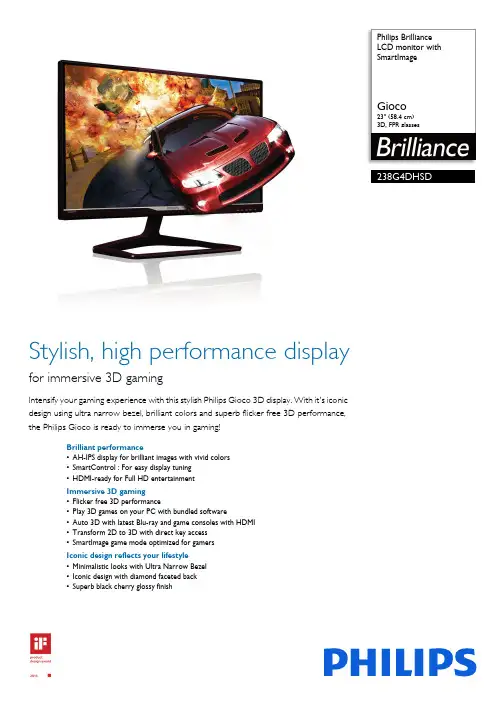
Philips Brilliance
LCD monitor with
SmartImage
Gioco
23" (58.4 cm)3D, FPR glasses
238G4DHSD
Stylish, high performance display
for immersive 3D gaming
Intensify your gaming experience with this stylish Philips Gioco 3D display. With it's iconic
design using ultra narrow bezel, brilliant colors and superb flicker free 3D performance,
the Philips Gioco is ready to immerse you in gaming!
Brilliant performance
•AH-IPS display for brilliant images with vivid colors
•SmartControl : For easy display tuning
•HDMI-ready for Full HD entertainment
Immersive 3D gaming
•Flicker free 3D performance
•Play 3D games on your PC with bundled software
•Auto 3D with latest Blu-ray and game consoles with HDMI
•Transform 2D to 3D with direct key access
•SmartImage game mode optimized for gamers
Iconic design reflects your lifestyle
•Minimalistic looks with Ultra Narrow Bezel
液晶显示器产品说明书

Extraction Arm Original
The Original arm is the perfect extractor for capturing welding smoke, fumes and dust inworkshops
The Original welding fume extraction arm is the perfect solution for
extracting welding smoke, fumes and dust in workshops. Our
extractor's patented design ensuresoptimum fume and dust
capturing capacity and maneuverability. The extraction hood has
integrated easy-to-reach buttons for lighting and fan control. The
extractor is suspended by a swivel, which allows the product to
rotate 360 degrees. This makes the extraction arm flexible in all
directions and very simple to position. The Original extraction arm
can be mounted in combination with different brackets, extension
arms, on exhaust rails or on fixed or portable filter equipment. The
product is equipped with a damper in the hood as standard. The
SAMSUNG SyncMaster 931BW 说明书

SyncMaster 931BW
驱动程序安装程序安装
SyncMaster 931BW
型号
符号
若不按照这个符号所指出的方向,就可能造成 对人体的伤害或者对设备的破坏。
禁止的任何时候阅读并理解都很重要
不要拆开从插座上拔下插头
不要碰接地以避免电击
电源
电源 要在相当长时间内不使用时,把你的 PC 置于DPMS。 如果使用屏幕保护器,则把它置于激活屏幕模式。
不要使用损坏了的或松动了的插头。
这有可能造成电击或起火。 SyncMaster 931BW
不要去拉电线来试图拔出插头,也不要用湿手去触摸插头。
这有可能造成电击或起火。
只使用适当接了地的插头和插座。
接地不好可能造成电击或设备损伤。
将电源插头插紧以防松脱。
连接不好可能导致起火。
不要过度地弯曲插头和电线,也不要在它们上面放置重物,这样可能造成损伤。
这有可能造成电击或起火。
在一个插座上不要连接太多的插销板或插头。
这可能引发火灾。
请勿在使用显示器时断开电源线连接。
断开电源线连接可能会导致浪涌,并有可能损坏显示器。
请勿在连接器或插头积尘的情况下使用电源线。
如果电源线的连接器或插头积尘,请用干布将其擦拭干净。
使用其插头或连接器积尘的电源线可能导致触电或起火。
安装
如果要将产品安装到多尘、高温或低温、湿度过高、存在化学物质以及 24 小时连续
使用本产品(如机场和车站等)的环境中,请一定与经授权的服务中心联系。
否则,安装不当会对显示器造成严重损坏。
把你的显示器放在一个湿度低而且灰尘尽量少的地方。
可能在显示器的内部产生电击或起火。
在搬动显示器时小心不要摔下来。
这会对产品造成损伤或者会伤着人。
将显示器基座安装到陈列柜或搁板时,避免其基座末端从陈列柜或隔板凸出。
本产品坠落可能会导致产品损坏或人身伤害。
不要将本产品放置在不稳或窄小的表面上。
请将本产品放置在平整、稳固的表面上,以防坠落伤人(特别是小孩)。
不要将本产品放在地板上。
液晶显示器说明书
Test & MeasurementData Sheet | 01.00R&S®AMU-Z7Analog I/Q CombinerSpecificationsVersion 01.00, August 2009
2 Rohde & Schwarz R&S®AMU-Z7 Analog I/Q Combiner Specifications Definitions General Product data applies under the following conditions: • Three hours storage at ambient temperature followed by 30 minutes warm-up operation • Specified environmental conditions met • Recommended calibration interval adhered to • All internal automatic adjustments performed, if applicable Specifications with limits Represent a range of values describing warranted product performance for the specified parameters, including measurement uncertainties and guard bands, if applicable. These specifications are marked with limiting symbols such as <, ≤, >, ≥, ±, or descriptions such as maximum, limit of, minimum. Specifications with limits. Specifications without limits Represent values describing warranted product performance for the specified parameters. These specifications are not specially marked. Typical values [typ.] Typical values are determined on the basis of a statistical evaluation of measured values obtained during ongoing series production of the instrument. When marked with <, > or as a range, the typical value represents a statistical performance met by 80 % of the instruments at production time. Otherwise it represents the average value. Typical values do not include measurement uncertainties. Nominal values [nominal] Values determined by design but not tested during production. Measured [measured] Values measured on representative instruments but not individually tested during production. Uncertainties Uncertainties define the expected range of values. They are calculated on the basis of the Guide to the Expression of Uncertainty in Measurement (GUM) and include the influence of the environmental conditions, aging and wear and tear. The stated values represent expanded uncertainties with a coverage factor of k = 2. Typical, nominal and measured values are not warranted by Rohde & Schwarz. Version 01.00, August 2009
三星智慧屏幕m8说明书
三星智慧屏幕M8说明书
1. 产品概述
三星智慧屏幕M8是一款高性能、智能化的电视产品,采用了先进的技术和创新的设计理念。该产品拥有出色的画质、强大的处理能力和丰富的功能,为用户提供了全新的观影体验。
2. 主要特点
2.1 高清画质
三星智慧屏幕M8配备了超高清显示屏,支持4K分辨率,带来更为细腻、逼真的图像表现效果。同时,该产品还具备HDR技术,能够展现更广阔的色彩范围和更高对比度,使画面更加生动。
2.2 强大处理能力
M8采用了先进的处理器和内存配置,保证了流畅的操作和快速的响应速度。用户可以轻松地切换各种应用程序,并享受到无缝播放高清视频内容的畅快体验。
2.3 智能化功能
M8支持人工智能语音助手,用户可以通过语音指令控制电视进行各种操作,如调节音量、切换频道、搜索内容等。此外,M8还具备智能推荐功能,根据用户的观影习惯和兴趣,为其提供个性化的影片和节目推荐。
2.4 多媒体连接
M8支持多种多媒体设备的连接,包括蓝牙、Wi-Fi、HDMI等接口。用户可以通过这些接口将手机、平板电脑、游戏机等设备与M8进行无线或有线连接,实现内容共享和屏幕投射。
3. 使用方法
3.1 连接电源和电视信号
首先,将M8的电源线插入电源插座,并将电视信号线插入相应接口。然后按下电源按钮,待屏幕亮起后即可开始使用。
3.2 设置网络连接
在初始设置界面中选择网络设置选项,并按照提示进行连接操作。用户可以选择有线或无线方式进行网络连接,并输入密码或其他必要信息。 3.3 调整画面和音量
通过遥控器上的方向键和音量键,用户可以调整画面亮度、对比度、色彩等参数,以及音量大小。
3.4 使用智能语音助手
长按遥控器上的语音按钮后,说出相应指令即可执行操作。例如,说出“打开Netflix”,M8会自动打开Netflix应用程序。
3.5 使用智能推荐功能
M8会根据用户的观影习惯和兴趣,自动推荐相关的影片和节目。用户可以通过遥控器上的推荐按钮查看并选择相关内容。
Philips SXGA 190C7FS 明朗20寸LCD显示器说明书
PhilipsLCD monitor48 cm (19")SXGA190C7FS
Elegance mattersOutstanding convenience meets great style: The environment friendly 190C7 will change the way you look at monitors with its clean, sophisticated, dual tone decor-enhancing design, thoughtful convenience features and superb value.Design that complements any interior•Chic dual-tone design enlivens your space•Convenient, understated control buttons create a clean look•'Hug' bezel for a warm, harmonious design lookOutstanding front of screen performance•Empowered for Windows Vista•5ms fast response time•sRGB ensures color matching between display and printoutsGreen design•For your safety: Aerospace composite fire retardant caseGreat convenience•Easy to adjust display settings with Philips SmartControl•Embedded power supply eliminates external power adaptors•Cable clip manages cables for a tidy work spaceHighlightsLCD monitor48 cm (19") SXGADual tone designDual tone design combines a glossy black strip located in the middle of the bottom bezel with a silver front bezel to make the front bezel appear slimmer. The subtle contrast between the two elements adds a lively spirit, eye appeal and interesting, unique elements to a room's decor.Clean-look designConvenient, unobtrusive controls are integrated with the brand banner, placing them at your fingertips when you need them, but making control buttons inconspicuous when not required to create an integral, crisp and clean look with simple, yet stylish aesthetic appeal.'Hug' bezel designA 'hug' bezel is a specially designed slanting surface that joins front and rear design elements in warm embrace, creating a warm, harmonious and smoothly flowing overall appearance.Windows Vista readyPhilips Vista-ready monitors are empowered for vibrant, exciting display of this new, visually sophisticated and demanding Windows operating system, designed to enhance your entertainment experience, make you more productive and help you control your computing experience at home and in the office, making viewing, finding and organizing information for work or play quick, efficient and easy.5ms on/off response timeOn-Off response time is the period required for a liquid crystal cell to go from active (black) to inactive (white) and back to active (black) again. It is measured in milliseconds. Faster is better: Lower response time means faster transitions and, therefore, results in fewer visible image artifacts in the display of transition of texts and graphics. On-Off response time is a more important measure in the display of business content like documents, graphs and photos.sRGB readysRGB is an industry standard that ensures the best possible match between the colors displayed on your screen and those in your printouts.Flame retardant cabinetPC/ABS plastic composite is the industry's best and toughest flame-retardant casing material; and is a space-age compound deployed in the aerospace and automotive industries as well as in fire detectors that is compliant with most stringent fire safety standards.SmartControlPC software for fine tuning display performance and settings. Philips offers users two choices for display setting adjustment. Either navigate the multilevel On Screen Display menu through buttons on the display itself or use the Philips SmartControl software to easily adjust the various display settings in a familiar way.Embedded power supplyAn embedded power supply is a power adaptor built into the body of a display device that replaces a bulky external power adaptor.Cable clipA clip shipped with monitors that manages cables by clipping them together for a tidy work space.Issue date 2022-05-18Version: 4.0.1112 NC: 8639 000 17272EAN: 87 10895 99031 8© 2022 Koninklijke Philips N.V.All Rights reserved.Specifications are subject to change without notice. Trademarks are the property of Koninklijke Philips N.V. or their respective owners.
三星SyncMaster成为WCG2009官方指定显示器
三星SyncMaster成为WCG2009官方指定显示器
佚 名
【期刊名称】《电子竞技》
【年(卷),期】2009(000)009
【摘 要】全球最大的电子竞技赛事WCG近日宣布。三星SyncMaster正式成为WCG官方指定显示器。据了解,该协议签署之后,8月的韩国国家总决赛、9月的美国国家总决赛以及11月份在中国成都举办的WCG2009全球总决赛.都会使用三星SyncMaster。除了提供给WCG参赛选手使用外,三星Svncmaste还计划将三星SyncMaster作为抽奖活动、线上促销等奖品,提供给广大用户。
【总页数】1页(P54)
【正文语种】中 文
【中图分类】TN873
【相关文献】
1.帅气 强大 聪明的新一代娱乐王 三星SyncMaster 2253BW液晶显示器 [J], ;
2.魔力四射--三星SyncMaster 710T液晶显示器测试 [J], 赛迪评测硬件事业部计算机外设实验室
3.液晶宽屏下的音画时尚--三星SyncMaster710M液晶显示器测试 [J], 赛迪评测硬件与网络事业部外设实验室
4.三星SyncMaster 730B液晶显示器 [J], 英姿
5.三星SyncMaster 730B液晶显示器 [J], 无
因版权原因,仅展示原文概要,查看原文内容请购买