
sap中文教材使用手册——PP工作中心
PPBDWKC.rtf
PP Work Centers
能力需求的分配 排产数据 排产基础 计算执行时间和内部处理的其它类型的公式 工序间隔时间 维护公式 创建公式 显示公式 测试公式 工作中心中的公式常量 Verkn黳fungen zum Arbeitsplatz 分配成本中心 分配资格 分配位置 分配人员 技术数据 通过复制创建工作中心 工作中心更名 查找工作中心 工作中心分类 给子系统分配工作中心 检查工作中心 冻结工作中心 删除工作中心 创建工作中心层次 分配工作中心
Page 5 of 5
72 72 72 73 74 74 75 75 76 76 77 78 78 79 80 80 81 81 82 82 82 83 83 83 84 84
PPBDWKC.rtf
PP Work Centers
归档工作中心
设置 默认工作中心 默认能力 工作中心中的字段选择
Page 6 of 6
PPBDWKC.rtf
PP Work Centers
· 能量 关 于 附 加 信 息, 参 见: 工作中心数据 能力数据 使用工作中心 created with Help to RTF file format converter
Page 3 of 3
43 43 44 44 44 45 46 46 47 47 47 48 48 49 49 49 50 51 51 51 52 52 52 53 53 54
PPBDWKC.rtf
PP Work Centers
层次维护中的分配 在工作中心维护中的分配 显示层次图 层次结构 连接工作中心 删除工作中心连接 显示层次结构 限制层次结构显示 维护能力 创建能力 表头数据 一般数据 可用能力 标准可用能力 计划细节 参照或复制可用能力 可用能力区间 显示可用能力区间 创建可用能力区间 复制可用能力区间 维护可用能力版本 班次 能力分配 通过复制创建能力 显示可用能力 累计可用能力
SAP 工 作 中 心 的 简 介
简介 工作中心数据
标准值 工作中心分配 默认值 公式 工作中心层次 工作中心主数据
PPBDWKC.rtf
能力数据 可用能力 显示可用能力 累计可用能力 能力分配
使用工作中心
PP Work Centers
Page 11 of 11
简介
工 作 中 心 是 在 生 产 工 厂 内 执 行 工 序 和 作 业 的 场 所 。工 作 中 心 也 可 以 代 表 一 台 机 器 或 一 组 机 器 以 及 一 个 人 或 一 组 人 员。
Page 1 of 1
7 7 7 8 9 9 9 10 11 13 14 14 15 15 17 18 19 20 21 22 23 23 23
PPBDWKC.rtf
PP Work Centers
能力数据 可用能力 参照可用能力 标准可用能力 可用能力区间 班次值 班次定义 班次顺序 显示可用能力 累计可用能力 能力分配 使用工作中心
SAP 是 SAP AG 的 注 册 商 标 。
本文档中涉及的其它产品是其他相应公司的注册或非注册商 标。
PPBDWKC.rtf
PP Work Centers
Page 8 of 8
SAP 联 机 帮 助 的 惯 例
( 以 下 文 字 的) 字 体 与 用 途 格式
文本屏幕
表 示 在 屏 幕 上 看 到 的 各 种 单 字 和 字 符( 这 些 包 括 各 种 系 统 信 息, 字 段 名, 屏 幕 标 题, 菜 单 名 称 和 菜 单 命 令)。
维护工作中心 Einf黨rung 创建工作中心 初始步骤 工作中心类别 基本数据 创建语言相关的短文 标准值码 效率码 默认值 控制码 标准文本码 工作中心中的能力数据 能力总览
Page 2 of 2
25 26 27 28 28 29 30 30 31 32 34 35
36 37 37 38 38 39 39 40 40 40 41 42 42 42
表 示 一 个 带 有 概 述 信 息 的 论 题。 通 常 用 来 标 识 各 章 的 概 述。
表 示 一 个 代 有 操 作 过 程 信 息 的 论 题。 用 来 标 识 R/3 系 统 中 的 一 步 步 操 作 的 过 程。
表 示 一 个 带 有 业 务 处 理 信 息 的 论 题。 用 来 描 述 商 业 处 理。
PPBDWKC.rtf
PP Work Centers
下 面 这 个 图 表 展 现 了 这 个 概 念 的 概 述:
Page 10 of 10
标准任务清单
PM
PP
QM
一般维护 任务清单
设备维护 任务清单
工艺路线
定额工艺路线
参照 定额工艺路线
粗能力 计划概要
检验计划
PS
标准网络
参照工序集
你可以用工作中心来完成任务清单和工作指令中的工序与活 动。你 可 以 创 建 生 产 的 工 作 指 令 , 质 量 保 证 , 工 厂 维 护 以 及 工 程 管 理 网 络。简 单 理 解 就 是 , 在 工 作 中 心 部 分 中, 术 语“ 工 序” 也 包 括 标 准 网 络 中 的“ 活 动”。 使用工作中心的维护数据,你可以 · 决定工序中使用哪台机器或哪些人 · 计 算 工 序 的 成 本 ,能 力 和 日 期 。
用户输入
用 户 输 入 的 内 容。 可 以 是 用 户 通 过 键 盘 在 文 档 中 的 输 入 的 各 种 单 字 和 字 符。
<可 变 用 户 输 入>
可 变 用 户 输 入。 这 里 的 尖 括 号 表 示 以 后 将 用 适 当 的 键 盘 输 入 来 替 代 这 些 变 量。
所有大写字母
Page 9 of 9
SAP R/3 系 统 中 的 工 作 中 心
工 作 中 心 , 与 物 料 单 和 工 艺 路 线 一 起 组 成 SAP 生 产 计 划 系 统(PP) 主 数 据 的 主 要 部 分。PP 系 统 是 R / 3 逻 辑 系 统 的 完 全 集 成 部 件。 PP 系 统 的 一 些 接 口 包 括 :
· 销 售 与 分 销(SD) · 物 料 管 理(MM) • 成 本 控 制(CO) · 项 目 系 统(PS) 和 · 人 力 计 划 和 发 展 系 统(PD)
具 有 R/3 应 用 的 集 成
工 作 中 心 用 于 下 列 对 象 的 工 序 与 活 动: · 工艺路线 · 定额工艺路线 · 参 照工 序 集 · 检验计划 · 维护任务清单 · 标准网络 SAP 是 R/ 3 系 统 的 高 度 集 成 并 设 计 这 些 对 象 有 相 同 的 结 构 和 功能性. 因为它们具有相同的功能性,所以用通用术语"标准任务清 单"来 介 绍 它 们。 你 将 经 常 看 到 " 任 务 清 单 " 这 个 缩 写 形 式。
表 示 一 个 带 有 概 念 信 息 的 论 题。 用 来 识 别 为应用本系统所需的各种概念和后台信 息, 以 达 到 完 成 商 业 处 理 的 目 的。
PPBDWKC.rtf
简介
PP Work Centers
SAP R/3 系 统 中 的 工 作 中 心 具 有 R/3 应 用 的 集 成
· 成本控制
· 排产
• 能力计划
PPBDWKC.rtf
默认 值
PP Work Centers
工作中心
成本核算 数据
Page 12 of 12
23 24
排产数据 和
可用能力
任务 任务清单
成本核算
提前期排产 能力计划
2724.00 1200.00
124.00
4048.00
工作中心与标准任务清单的关系
一 个 标 准 任 务 清 单 包 括 一 系 列 工 步。 你 必 须 指 定 一 个 工 作 中 心来确定 在哪里或用什么资源来执行工序和作业。 为 了 简 化 工 序 的 维 护, 你 可 以 在 工 作 中 心 中 为 它 们 输 入 默 认 值。当 工 作 中 心 被 分 配 时, 这 些 默 认 值 被 传 送 至 工 序。
PPBDWKC.rtf
PP Work Centers
Contents
PP 工 作 中 心 版本
版权
SAP 联 机 帮 助 的 惯 例 简介
SAP R/3 系 统 中 的 工 作 中 心 具 有 R/3 应 用 的 集 成 SAP 工 作 中 心 的 简 介 简介 工作中心数据 标准值 工作中心分配 默认值 公式 公式参数 公式举例 标准公式 定期准备公式 缓冷炉膛的公式 工作中心层次 工作中心主数据 成本中心 作业类型
版本
R/3 3.0 版 本 1996 年 四 月
版权
_1996 SAP AG。版 权 所 有 , 保 留 一 切 权 利 。
没 有 SAP AG 的 允 许 , 不 得 对 本 文 档 资 料 或 其 中 任 何 部 分 以 任 何形式借助任何手段进行复制或翻译成任何语言。
SAP AG 对 本 文 档 的 内 容 不 作 任 何 保 证 或 声 明 , 并 且 特 别 否 认 可 能 出 于 特 殊 目 的 而 暗 示 的 对 销 售 或 适 应 性 的 保 证 。 SAP AG 不对本文档中可能出现的错误负责。本文档的内容若有更 改 ,恕 不 另 行 通 知 。SAP AG 保 留 着 进 行 这 种 修 改 而 不 通 知 他 人 的 权 利 。 SAP AG 也 不 承 担 更 新 本 文 档 信 息 的 义 务 。
工 作 中 心 可 以 被 分 成 层 次 结 构。SAP 把 工 作 中 心 区 分 为 统 计 工 作 中 心 与 生 产 工 作 中 心。 统 计 工 作 中 心 仅 被 用 于 汇 总 数 据。 生 产 工 作 中 心 被 用 于 工 艺 路 线 中 的 工 序, 参 照 工 序 集 ,维 护 任 务 清 单 , 检 验 计 划 , 工 作 单 以 及 网 络 中 的 作 业。工 作 中 心 包 括 的 用于生产的数据如下:
PP_SSH_002_工作中心操作手册_V1.0

信息---SAP PP标准业务操作手册●手册名称:PP工作中心维护●手册编号:PP_SSH_002●发布日期:2009-03-02●版本:V1.0修改历史目录一、使用说明 (4)二、操作步骤 (4)三、操作实例 (4)1.1 操作目的: (4)1.2 操作说明 (4)1.3 操作要求 (14)一、使用说明工作中心定义:工作中心是一个组织单位,它给定什么时候在那里一道工序必须被执行。
工作中心设置有一个可用能力。
一个特定作业活动的量值借助或经过工作中心时通过该中心能力的使用率而得以测量,而这项特定作业的价值则通过成本中心(价值计算)及对应的作业类型(量值计算)间的关系转化而得以实现。
一个工作中心可以是一台机器作业的人生产线及一组工人等等。
工作中心设置:明白了工作中心的定义后,就可以根据工厂现状去设置分配我们的工作中心;在益海嘉里集团中,由于我们所处行业及产品的特点,一个工作中心的设置往往为一个加工过程的某道工序,以便过程成本控制及产品统计,故经常存在一条产线拆分为多个工作中心的现象。
二、操作步骤步骤操作码描述建议岗位、CR01/CR02 创建/更改SAP团队支持人员CR03 显示工作中心。
生产内勤/SAP团队支持人员三、操作实例1.通过CR01进入工作中心创建视图,按已经分类好的工作中心在系统中创建数据。
1.1 操作目的:当新建/产线变更,或已有工作中心划分不能满足生产或成本核算需求时,我们需要新建工作中心,得以满足如上需求。
1.2 操作说明工作中心的创建有两种途径:(1)通过已存在的参照工作中心创建,这样所参照视图数据将被默认带到新建工作中心中,而不必人工再次填写。
如图所示为参照工作中心创建过程:当键入cr01后进入如图- 1 所示界面,参照已有工作中心TLSO01创建新的工作中心TLSO09:图-1类别字段输入选择解释基本数据应当选择当点击基本数据时,系统会跳出所要参考创建的字段选择界面,这里你可以选择将要参考的字段视图。
SAP PP用户操作手册

Wirthwein China SAP rollout project Blueprint document – ProductionFreudenberg IT (Suzhou) Co., Ltd.Unit A1, Floor 5, Phase IIIInternational Science ParkJinjihu Avenue 328, SIP215021 Suzhou, ChinaPhone China +86 (0) 512 6262 1999Document revision historyVersion Person Action Date ContentsJin Creation 2009.2.20 Complete 1.0 KarenLi Approval 2009.2.20 Approved 1.0 BenJin Creation 2009.2.23 Complete 1.1 KarenLi Approval 2009.2.23 Approved 1.1 BenBlueprint document sign offCompany Name Sign off Date FIT ProjectManager WIRTHWEIN Project ManagerIndex Legend (6)Abbreviation (7)0Process list (8)1PRD100 BOM maintenance (9)1.1Business process overview (9)1.2Business process flow (10)1.3Step description (11)1.4Form and report requirement (11)2PRD110 Work center maintenance (12)2.1Business process overview (12)2.2Business process flow (13)2.3Step description (14)2.4Form and report requirement (14)3PRD120 Routing maintenance (15)3.1Business process overview (15)3.2Business process flow (16)3.3Step description (17)3.4Form and report requirement (17)4PRD200 MRP Process (18)4.1Business process overview (18)4.2Business process flow (19)4.3Step description (20)4.4Form and report requirement (20)5PRD300 Production order creation (21)5.1Business process overview (21)5.2Business process flow (22)5.3Step description (23)5.4Form and report requirement (23)6PRD310 Production order execution (24)6.1Business process overview (24)6.2Business process flow (25)6.3Step description (26)6.4Form and report requirement (26)7PRD320 Rework process (27)7.1Business process overview (27)7.2Business process flow (28)7.3Step description (29)7.4Form and report requirement (29)Legendstep stepdecision SAPdecision Non-SAPLegacy system stepAbbreviationAbbreviation Full NameManagementMM MaterialsBBP BusinessBlueprintPlanning MRP MaterialRequirementPro. Order Production OrderOrderPO PurchaseRICEF Report Interface Conversion Enhancement Form HQ HeadquarterPR Purchase Request0 Process listProcess ID Process NameOrganizational structurestructureCRS000 OrganizationalMaster data maintenanceCRS100 Material master maintenancePRD100 Production BOM maintenancemaintenancecenterPRD110 WorkmaintenancePRD120 RoutingPlanningPRD200 MRPProduction ordersPRD300 Production order creationPRD310 Production order executionPRD320 ReworksubcontractingCRS440 Cross-companyMiscmanagementCRS500 Batch*For cross-function process flows, please refer to document “WW China Blueprint Document - Cross-Function_V1.0.doc”.1 PRD100 BOM maintenance1.1 Business process overviewA formally structured list of the components that make up a product or assembly contains the object number of each component, together with the quantity and unit of measure.WW China use BOM in such activity such as:•Material requirements planning (MRP) department explodes bills of material on a certain date to calculate cost-effective order quantities for materials.•A work scheduling department uses bills of material as a basis for operation planning and production control.•A production order management department uses bills of material to plan the provision of materials. •Reservation and goods issue•Product costing. To calculate the costs of materials required for a specific product1.2 Business process flowin system?1.3 Step descriptionStep Department TCode Description10 ProductionChina N/A Apply for new BOM.When WW china needs to maintain BOM, they will send the request to WW Germany.20 WWGermany CS03 BOM exist or not in system?WW Germany receive the request, then they will check whether the BOM exist or not in the system.30 WWGermany NA Collect BOM items information.If the BOM does not exist, WW Germany collects the item information and provides it to WW China.40 WWGermany CS03CS09Find existent BOM in other plants to reference.If the BOM exists in another plant, WW china could copy it.50 ProductionChina CS01CS02Maintain BOM.WW China will maintain the BOM. If there is template to reference,we maintain BOM use copy method.60 ProductionChina CS02 Need to modify?Check whether the BOM is totally right.1.4 Form and report requirement •Display BOM level by level (TCode: CS11)•Display multilevel BOM (TCode: CS12)2 PRD110 Work center maintenance2.1 Business process overviewWork center is one of the most important master data in the R/3 production planning and control system. Work centers are used in task list operations and production orders.In the R/3 System work centers are business objects that can represent the following real work centers, For example:•Machines, machine groups• Production lines• Assembly work centers•Employees, groups of employees2.2 Business process flow2.3 Step descriptionStep Department TCode Description10 ProductionChina N/A Apply for new work center.When WW china needs to maintain a new work center, they will send the request to WW Germany.20 WWGermany N/A Collect work center information.WW Germany collects the items information and provides it to WW China.30 ProductionChina N/A Whether could refer to a template.Check whether there is standard template or not in WFS and WHA?40 ProductionChina CR01CR02Maintain work center.WW China will maintain the work center.50 ProductionChina N/A Maintain work center refer to a template.WW China will maintain the work center refer to a Chinese template.60 ProductionChina CR02CR03Need to modify?Check whether the work center is totally right.2.4 Form and report requirement •Work center information system (TCode: CR60) •Work center list (TCode: CR05)3 PRD120 Routing maintenance3.1 Business process overviewRoutings enable you to plan the production of materials (products). Therefore, routings are used as a template for production orders and run schedules as well as a basis for product costing. A routing is a description of which operations (process steps) have to be carried out and in which order to produce a material (product). As well as information about the operations and the order in which they are carried out, a routing also contains details about the work centers. Standard values for the execution of individual operations are also saved in routings.3.2 Business process flowNeed to modify?3.3 Step descriptionStep Department TCode Description10 ProductionChina N/A Apply for new Routing.When WW china need to maintain new routing , they will send the request to WW Germany.20 WWGermany N/A Collect routing information.Global will collect the item information and provide it to WW China30 ProductionChina CA01CA02Maintain routing.WW China maintains routing information.40 ProductionChina N/A Maintain equipment.WW Germany maintains equipment (PRT) and gives information of equipment structure to WFS/WHA.50 ProductionChina CA03 Need to modify?Check whether the routing is totally right.3.4 Form and report requirement N/A4 PRD200 MRP Process4.1 Business process overview•This procedure aims to evaluate the MRP result.•It may include two parts. One is checking everyday MRP result by buyer as well as planner and the other is checking the situation of finished products after online running by planner.•Planner and buyer will change the procurement proposal according to the exception message provided by the system and will determine the final plan.•Check the MRP result and reschedule the procurement proposal according to the exception message in the MRP list or Stock/Requirement list•Planner sometimes may create new production orders if necessary.4.2 Business process flow4.3 Step descriptionStep Department TCode Description10 Sales VA01ME38SAL200/SAL500.Please refer to process SAL200/SAL500 in SD.20 ProductionChina MD02 Run MRP.Run MRP for each material.30 Production China MD04 In-house production or purchase.It is defined as procurement type in material master data.40 Production China N/A Is stock available?Check if the stock is available.50 Production China MD02 Generate planned order.System will generate planned order according to sales requirement by MRP.60 Production China MD02 Generate reservation.System will make material reservation when the stock is available.70 Purchasing MD02 Generate PR.System will generate purchase requirements when we have material shortage.4.4 Form and report requirement •Stock /requirements list (TCode: MD04)5 PRD300 Production order creation5.1 Business process overviewPlanner will transfer the planned order to production order as production initial or create manually Production order has its own execution, including release, issue material, confirmation.5.2 Business process flowConvert plannedCreate producion5.3 Step descriptionStep Department TCode Description10 Production China N/A Does production order create by manual or not?You can choose to create a production order manually or convert from planned orders.20 Production China N/A Convert individually or collectively?When create production order, you can choose to convert planned order to production order individually or collectively.30 Production China CO40 Convert planned order to production order individually.Convert planned order to production order individually with normal production order type ZP01.40 ProductionChina CO41 Convert planned order to production order collectively.Convert planned orders to production order collectively with normal production order type ZP01.50 Production China CO01 Create production order directly by manual. Select an order type.5.4 Form and report requirement N/A6 PRD310 Production order execution6.1 Business process overview•The process aims to execute the production.•Production order may be created by conversion of planned order or creation manually.•Planner does ATP check and release production orders in the system after all the material for the production order is ready.•Warehouse does goods receipt for the order after confirming production order in system.•Planner will close the production order manually using “TECO” if the execution of an order has to be stopped prematurely or if the order could not be executed in the required manner and open requirements for the order (reservations, capacities) should be deleted.6.2 Business process flow6.3 Step descriptionStep Department TCode Description10 Production China N/AProduction Order creation.Please refer to process PRD 300.20 Production China CO02Check and update production order.Check whether the production order is totally right.30 ProductionChina CO02Release production order.If production order is ready to product, change production orderstatus to release, and then you can print production order.40 ProductionChina N/AManufacturing.Physical manufacturing.50 ProductionChina CO11NProduction Order confirmation and backflush.Confirm actual operation time and actual production quantity.When backflush, consume raw material and purchasing partsAnd print label for product with raw material batch numberIf we have missing documents, post corrections every day(MIGO).60 Production ChinaMIGOMB31Finish-Goods receipt.70 Production China CO02Technically close production order.If the execution of an order has to be stopped prematurely or if theorder could not be executed in the required manner and openrequirements for the order (reservations, capacities) should bedeleted, then we do this step to stop production.80 ProductionChina N/AProduction order settlement.Done by finance department.6.4 Form and report requirement•Missing parts info system (TCode: CO24)•Order information system (TCode: COOIS)• Production order print•Label print•Report of label information7 PRD320 Rework process7.1 Business process overviewProduction will create the rework order based on rework requirement.The master data of rework will be created manually in system for rework production order, including BOM, Routing, costing object for collection.Rework order has it own execution, including release, issue material, confirmation.Financial will finally close and settle the production order and cost to related financial element.7.2 Business process flowInput required7.3 Step descriptionStep Department TCode Description10 Production China CO01Create rework production order.Create rework production order with order type ZP03.20 ProductionChinaCO01CO02Input required operation and components.Input required operation and components which are used inrework.30 ProductionChinaCO01CO02Input settlement rule.Input parent production order as settlement rule.40 Production China CO02Release production order.If rework order is ready to product, change production order statusto release, and then print rework production order.50 ProductionChina CO11NConfirm pro.order and backflush material.Confirm actual operation time and actual production quantity.When backflush, consume components and print label for product.Post corrections every day (MIGO).60 Production China CO02Technically close production order.If the execution of an order has to be stopped prematurely or if theorder could not be executed in the required manner and openrequirements for the order (reservations, capacities) should bedeleted, then we do this step to stop production.70 Production ChinaProduction order settlement.Done by finance department.7.4 Form and report requirementN/A。
SAP系统PP主数据-工艺路线和工作中心
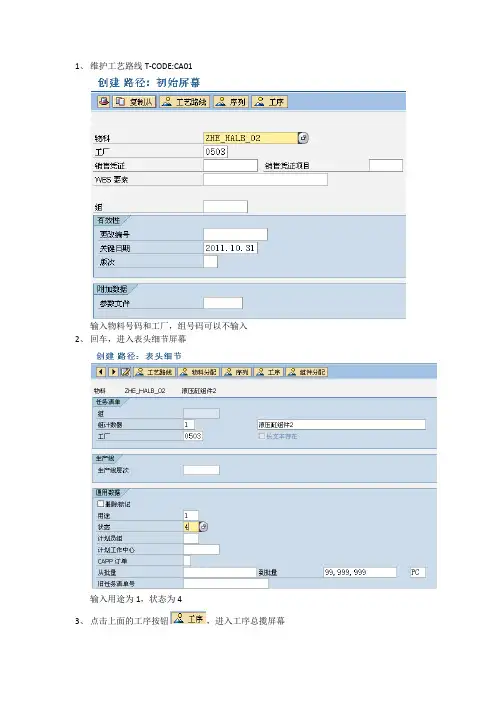
1、维护工艺路线T-CODE:CA01
输入物料号码和工厂,组号码可以不输入
2、回车,进入表头细节屏幕
输入用途为1,状态为4
3、点击上面的工序按钮,进入工序总揽屏幕
输入每道工序的名称,工作中心号码和每个工序所需的时间4、点组件分配按钮,进入物料构成总揽屏幕
选中物料行,点新分配
输入工序号码或点工序/活动清单选中工序
5、点击保存,工艺路线就维护完成了。
特殊情形一、替代工序
在工艺路线中点击序列图标,进入顺序总揽屏幕
点击新建图标
输入替代顺序描述,返回工序号码后点击图标工序
进入替代顺序的工序总揽屏幕
输入工序描述,工作中心和作业时间,保存即可
特殊情形二:平行顺序
同替代工序相同,在工艺路线中点击序列,点新建图标,选择并行顺序
输入并行顺序描述,返回工序号码。
点击图标工序
输入工序描述,工作中心和作业时间后保存即可。
SAP_PP_CA80_工作中心的使用处查询

⏹手册编号:BPP_CO_CA80
⏹功能说明:
工作中心的使用处查询是通过“CA80”在系统中进行操作。
⏹系统路径:
后勤->生产->主数据-> 工作中心->工作中心->替换系统事务代码:
CA80:工作中心的使用处查询
⏹前提条件:
已创建工作中心和使用这个工作中心的工艺路线
操作步骤:
字段名类型字段用途及说明
工厂必选键入工作中心适用的工厂代码
工作中心必选键入工作中心编码
关键日期可选系统默认为当前日期
类型源于必选选择任务清单类型,均选择路径,代表工艺路线
操作结果
点击“”按钮进入下一屏幕。
sap中文使用手册——PP能力计划新
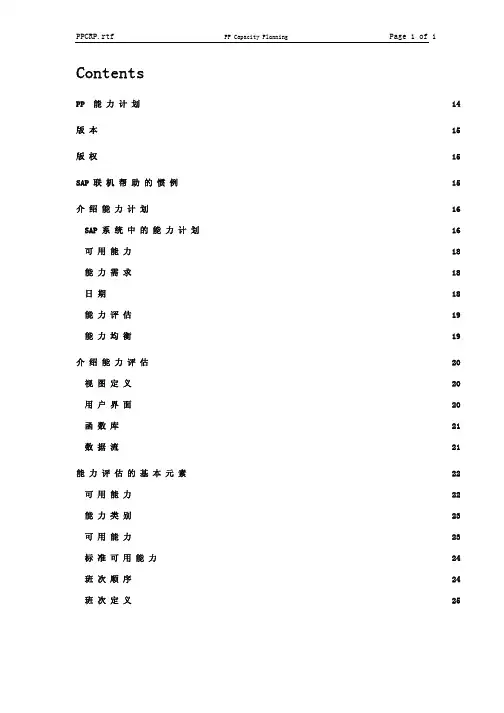
ContentsPP 能 力 计 划 14版 本 15版 权 15 SAP 联 机 帮 助 的 惯 例 15介 绍 能 力 计 划 16 SAP 系 统 中 的 能 力 计 划 16可 用 能 力 18能 力 需 求 18日 期 18能 力 评 估 19能 力 均 衡 19介 绍 能 力 评 估 20视 图 定 义 20用 户 界 面 20函 数 库 21数 据 流 21能 力 评 估 的 基 本 元 素 22可 用 能 力 22能 力 类 别 23可 用 能 力 23标 准 可 用 能 力 24班 次 顺 序 24班 次 定 义 25工 作 中 心 层 次 25可 用 能 力 的 累 积 26累 积 能 力 需 求 27排 产 计 划 27排 产 计 划 的 元 素 29计 划 和 生 产 订 单 的 排 产 计 划 元 素 29网 络, 工 厂 维 护 订 单, 加 工 订 单 和 PD 订 单 的 排 产 计 划 元 素 30工 序 的 持 续 期 31工 作/ 操 作 时 间 32排 产 计 划 是 怎 样 执 行 的 32缩 减 33计 划 部 分 确 认 工 序 34计 划 日 志 34能 力 需 求 34能 力 需 求 的 分 配 36分 配 码 36分 配 策 略 37分 配 功 能 37每 周 期 需 求 的 计 算 37根 据 时 间 点 的 分 配 37能 力 负 荷 缩 减 40剩 余 能 力 需 求 的 分 配 40能 力 评 估 的 过 程 42总 览 和 过 程 42待 评 估 数 据 的 选 择 43选 择 屏 幕 44选 择 标 准 44运 算 符 和 输 入 值 45链 接 46工 作 中 心 的 详 细 选 择 47从 工 作 中 心 层 次 中 的 工 作 中 心 选 择 47调 用 选 择 清 单 48评 估 类 型 48标 准 总 览 48调 用 标 准 总 览 49标 准 总 览 上 的 功 能 49标 准 总 览 的 图 形 51标 准 总 览 的 图 形 格 式 51标 准 总 览 的 图 形 功 能 52可 变 一 览 表 52需 求 选 择 标 准 53调 用 可 变 一 览 表 54可 变 一 览 表 上 的 功 能 54可 变 一 览 表 的 图 形 55可 变 一 览 表 图 形 中 的 格 式 56可 变 一 览 表 图 形 中 的 功 能 56能 力 详 细 清 单 56调 用 能 力 详 细 清 单 57能 力 详 细 清 单 中 的 功 能 57能 力 详 细 清 单 的 图 形 59能 力 详 细 清 单 图 形 的 格 式 59能 力 详 细 清 单 图 形 中 的 功 能 59图 形 60图 形 60图 形 61 EXCEL 接 口 61调 用 接 口 62设 置 62一 般 设 置 63一 般 63评 估 周 期 65周 期 65层 次 65分 配 66评 估 的 设 置 67图 的 设 置 68 EXCEL 接 口 的 设 置 69打 印 说 明 70能 力 评 估 中 的 相 关 功 能 70车 间 信 息 系 统 70能 力 评 估 中 的 选 择 71选 择 72评 估 72参 数 文 件 73总 括 参 数 文 件 74选 择 参 数 文 件 74选 项 参 数 文 件 75清 单 参 数 文 件 75图 形 参 数 文 件 76选 择 集 合 76需 求 的 分 配 77公 式 77介 绍 能 力 均 衡 79基 础 79能 力 均 衡 的 应 用 范 围 81排 产 计 划 和 能 力 需 求 计 算 84使 用 能 力 计 划 86能 力 均 衡 中 的 功 能 87调 度 工 序 88调 度 和 重 新 排 产 中 的 日 期 确 定 89定 义 调 度 顺 序 91创 建 一 个 顺 序 排 序 码 的 例 子 92执 行 日 期 和 工 作 中 心 的 检 查 93有 限 排 产 计 划 94检 查 调 度 结 果 95设 置 工 序 状 态 95中 点 法 计 划 安 排 96计 划 网 络 中 的 已 调 度 作 业 97使 用 更 多 计 划 功 能 97分 解 和 分 配 98临 时 模 拟 100用 户 退 出 101能 力 均 衡 中 的 显 示 101显 示 的 类 型 102计 划 表(SOP) 102计 划 表(REM) 103能 力 状 况 和 能 力 均 衡 104计 划 表 105计 划 表 106计 划 表 的 格 式 106用 计 划 表 工 作 107扩 展/ 压 缩 显 示 周 期 108移 动 显 示 周 期 109更 改 计 划 表 的 尺 寸 109图 的 滚 动 109调 整 图 之 间 的 大 小 110调 整 表 和 图 部 分 的 大 小 110更 改 排 序 110更 改 时 间 显 示 的 间 隔 111计 划 表 中 的 功 能 111显 示 单 独 对 象 的 信 息 111计 划 能 力 需 求 112手 工 调 度 工 序 113自 动 调 度 工 序 113重 新 排 产 工 序 113取 消 分 配 工 序 114分 解 和 分 配 能 力 需 求 115更 改 能 力 需 求 115更 改 可 用 能 力 116打 印 116显 示 多 重 委 托 117显 示/ 更 改 策 略 117显 示 参 数 文 件 117显 示 日 志 118保 存 计 划 118计 划 表( 表 格 式) 118计 划 表 的 格 式 119计 划 表( 表 格 式) 中 的 功 能 120调 度 需 求 121取 消 分 配 需 求 121分 解 需 求 121缩 减 准 备 时 间 122更 改/ 显 示 工 序, 订 单 或 能 力 的 数 据 122维 护 顺 序 号 123显 示 参 数 文 件 123进 一 步 的 显 示 功 能 124更 改 计 划 视 图 124能 力 总 览 125能 力 均 衡: 设 置,参 数 文 件 和 它 们 的 作 用 125能 力 均 衡 的 一 般 设 置 126能 力 均 衡 中 的 参 数 文 件 126控 制 参 数 文 件 128选 择 参 数 文 件 129时 间 参 数 文 件 130评 估 参 数 文 件 131策 略 参 数 文 件 131周 期 参 数 文 件 134计 划 表( 表 格 式) 的 参 数 文 件 134计 划 表 参 数 文 件 135清 单 参 数 文 件 136集 合 136变 量 136字 段 选 择 136一 般 设 置 的 例 子 137排 产 计 划 和 能 力 需 求 计 算 的 设 置 138排 产 层 次 138详 细 排 产 计 划 的 参 数 140重 复 制 造 的 设 置 141销 售 和 分 销(SD) 视 图 142销 售 和 分 销 中 的 能 力 计 划 142客 户 订 单 和 装 配 订 单 之 间 的 数 据 交 换 143装 配 订 单 中 的 排 产 计 划 143执 行 能 力 均 衡(SD) 144销 售 和 运 作 计 划(SOP) 的 视 图 144 SOP 中 的 能 力 均 衡 145粗 能 力 计 划 参 数 文 件 147创 建 一 个 粗 能 力 计 划 参 数 文 件 147更 改 一 个 粗 能 力 计 划 参 数 文 件 148显 示 一 个 粗 能 力 计 划 参 数 文 件 149系 统 定 制(SOP) 中 的 设 置 149在 SOP 中 执 行 能 力 均 衡 149长 期 计 划 视 图(LTP) 150长 期 计 划(LTP) 中 的 能 力 均 衡 150 MPS 和 MRP 的 视 图 150 MPS 和 MRP 中 的 能 力 均 衡 151确 定 基 本 日 期 151提 前 期 计 划 152系 统 定 制(MPS/MRP) 中 的 设 置 152执 行 能 力 计 划(MPS/MRP) 153能 力 均 衡 或 能 力 状 况 154能 力 检 查 154计 划 表 155单 项 目 计 划 155交 互 式 单 项 目 计 划 156计 划 订 单 处 理 156当 前 库 存/ 需 求 清 单 156调 用 能 力 均 衡 157物 料 视 图 中 的 能 力 均 衡 157订 单 视 图 中 的 能 力 均 衡 158能 力 均 衡 中 的 功 能 158能 力 选 择 159过 载 检 查 159最 大 负 荷 的 显 示 和 过 载 周 期 的 选 择 160显 示 排 产 计 划 数 据 160溯 源 需 求 的 详 细 显 示 161显 示 一 个 物 料 的 所 有 计 划 订 单 161物 料 视 图 中 的 能 力 计 划 162订 单 视 图 中 的 能 力 计 划 162转 到 计 划 表 162调 用 能 力 状 况 163能 力 状 况 中 的 功 能 164执 行 能 力 检 查 164重 复 制 造(REM) 视 图 164重 复 制 造 中 的 能 力 均 衡 165创 建 一 个 工 作 中 心 166创 建 一 个 PP 任 务 清 单 166创 建 一 个 生 产 版 本 167系 统 定 制(REM) 中 的 设 置 167执 行 工 作 中 心 指 定 的 能 力 计 划 167显 示 班 次 相 关 能 力 数 据 168执 行 物 料 指 定 的 能 力 计 划 169执 行 能 力 均 衡(REM) 170有 报 告 点 确 认 的 能 力 缩 减 171具 有 生 产 订 单 的 重 复 制 造 中 的 能 力 缩 减 171车 间 控 制(SFC) 视 图 171车 间 控 制 中 的 能 力 均 衡 171 SFC 中 的 可 用 能 力 172 SFC 中 的 能 力 需 求 172能 力 可 用 性 检 查 173确 定 基 本 负 荷 174手 工 能 力 可 用 性 检 查 175能 力 已 确 认 175可 用 能 力 检 查 中 的 有 限 排 产 计 划 176显 示 详 细 信 息 176自 动 能 力 可 用 性 检 查 177分 解 能 力 需 求 177缩 减 分 解 的 能 力 需 求 178删 除 能 力 需 求 179定 义 资 格 需 求 180系 统 定 制(SFC) 中 的 设 置 180执 行 能 力 均 衡(SFC) 180计 划 表( 表 格 式) 上 的 能 力 均 衡 181计 划 表 上 的 能 力 均 衡 182流 程 工 业(PP-PI) 视 图 182流 程 工 业 中 的 能 力 均 衡 182系 统 定 制( PP-PI ) 中 的 设 置 183执 行 能 力 均 衡(PP-PI) 183工 厂 维 护(PM) 视 图 184工 厂 维 护 视 图 - 总 览 184工 厂 维 护 中 的 能 力 均 衡 185工 厂 维 护 工 作 中 心 185工 厂 维 护 中 的 计 划 元 素 187工 厂 维 护 通 知 187维 护 任 务 清 单 187维 护 订 单 188维 护 计 划 188在 工 厂 维 护 中 产 生 能 力 需 求 188在 工 厂 维 护 中 调 度 能 力 需 求 189能 力 均 衡 的 理 由 189系 统 定 制(PM) 中 的 设 置 189执 行 能 力 均 衡(PM) 190使 用 能 力 均 衡 功 能 190分 解 190调 度 191取 消 分 配 191手 工 调 度 192更 改 一 个 PM 订 单 192显 示 可 用 能 力 193更 改 可 用 能 力 193项 目 系 统(PS) 视 图 193项 目 系 统 中 的 能 力 均 衡 194系 统 定 制(PS) 中 的 设 置 195执 行 能 力 均 衡(PS) 195用 计 划 表( 表 格 式) 的 能 力 均 衡 196用 计 划 表 的 能 力 均 衡 196用 项 目 计 划 板 的 能 力 均 衡 197使 用 WBS 中 的 时 间 排 产 计 划 的 能 力 均 衡 197使 用 结 构 计 划 的 能 力 均 衡 198网 络 的 能 力 均 衡 199人 员 计 划 和 开 发(PD) 视 图 199人 员 计 划 和 开 发 中 的 资 源 计 划 199系 统 定 制(PD) 中 的 设 置 200执 行 人 员 能 力 计 划(PD) 200PP 能力计划介绍能力计划有关能力评估的信息介绍能力评估能力评估的基本元素能力评估的过程能力评估中的相关功能能力评估中的选择有关能力均衡的信息介绍能力均衡能力均衡中的功能能力均衡中的显示能力均衡:设置,概要和它们的作用不同应用中的能力均衡销售和分销(SD)视图销售和工序计划(SOP)的视图长期计划视图(LTP)MPS 和 MRP 的视图重复制造(REM)视图车间控制(SFC)视图流程工业(PP-PI)视图工厂维护(PM)视图项目系统(PS)视图人员计划和开发(PD)视图要了解如何使用“帮助”,按 F1 键。
PP操作手册-工作中心维护

BBP Path: Logistics > Production > Master Data > Work Center > Create /Change/Display BBP Main Input Data: Plant :8200 plant ,Input the plant code for the work center Work center:Input the identifier for the work center. Work Center Category: Choose from pull down menu (labor, machine, etc). BBP Main Output Data: Work center will be created. BBP Area Responsible: O= Owner X= Involved Department Involved TP CF Create O Maintain O View O X
Formula for calculation capacity for networks etc. Key specifying distribution type for execution capacity Key specifying type of distribution for capacity requirements O
•Enter “H” or “MIN” for the time unit.
BU ERP
/ PP Team
© g e d a s China
• Business Solution – Training Material
• Oct. ,2006
• Page 6
SAPERPPP参数配置说明
SAPERPPP参数配置说明1.1工作中心通用数据 (3)1.1.1定义工作中心类别 (3)1.1.2定义字段选择 (4)1.1.3定义任务清单用途 (10)1.1.4标准值 (12)1.1.4.1定义参数 (12)1.1.4.2定义标准值码 (13)1.1.5确定负责人 (14)1.1.6定义默认的工作中心 (15)1.2工作中心中工艺路线数据 (17)1.2.1定义操纵码 (17)1.3工作中心能力计划 (17)1.3.1定义能力类别 (17)1.3.2定义能力计划员 (18)1.3.3工作中心公式 (19)1.3.3.1定义工作中心公式参数 (19)1.3.3.2定义工作中心公式 (20)2.1 BOM操纵数据 (22)2.1.1定义修正参数 (22)2.1.2定义缺省值 (22)2.2 BOM通用数据 (23)2.2.1BOM用途 (23)2.2.1.1 定义BOM用途 (23)2.2.1.2定义项目状态的缺省值 (24)2.2.1.3定义项目状态的复制缺省值 (25)2.2.2定义BOM表头的同意物料类型 (26)2.2.3定义BOM状态 (27)2.3 BOM项目数据 (28)2.3.1定义项目类别 (28)2.3.2定义对象类型 (29)2.3.3定义BOM项目的许可物料类型 (30)3.1工艺路线操纵数据 (32)3.1.1为工艺路线定义编号范围 (32)3.1.2定义带缺省值的参数文件 (35)3.2工艺路线通用数据 (40)3.2.1定义物料类型分配 (40)3.2.2定义工艺路线状态 (41)3.2.3配置计划员组 (42)3.3工艺路线中工序数据 (43)3.3.1定义操纵码 (43)4.1设定工厂参数 (46)4.1.1执行工厂参数总体保护 (46)4.2定义MRP组 (47)4.3定义号码范围 (48)4.4 MRP主数据 (50)4.4.1定义MRP操纵者 (50)4.4.2定义MRP类型 (52)4.4.3定义特殊采购类型 (54)4.4计划 (56)4.4.1定义总计划执行的计划范围 (56)4.4.2定义计划参数 (59)5.1重复制造交叉处理设置 (61)5.1.1定义修正参数 (61)5.2定义重复制造参数文件 (62)5.3为计划订单定义计划参数 (65)5.4计划表 (67)5.4.1保护输入项参数 (67)5.4.2保护行选择 (68)5.5定义分段运输下拉列表的操纵数据 (69)1.1工作中心通用数据1.1.1定义工作中心类别菜单路径: 生产->基本数据->工作中心->通用数据->定义工作中心类别交易代码: OP40注:定义工作中心类别,我们公司用类别0007(生产线)。
SAP信息化项目_前台操作手册_生产模块(PP)
XXX公司SAP信息化项目SAP-PP模块操作手册文档修改记录版本版本描述编写人最后修改日期V1初稿V2终稿V3修改XX2019-09-301.手册概要说明1.1业务说明生产模块PP是SAP的核心之一,它和MM(物料管理)、SD(销售与分销)构成了生产企业的产供销一条龙。
整个生产流程包括了三个子流程:MRP计算并生成计划订单,计划订单生成生产订单,生产领料及产成品入库。
根据销售订单等,经过MRP计算后生成计划订单。
计划订单一方面可以转采购申请,另一方面转生产订单。
线下,在每个月的月底还要做下个月的生产计划,进一步细分到周计划和与计划,根据计划手工制作采购申请,购买物料。
南方泵业在SAP的实践过程中,整个生产从“MRP--物料需求计划”这个功能开始。
并没有使用“SOP”、“MPS--主生产计划”功能,这个要注意,在实施的时候要区分开来,要了解它们的功能和异同。
1.2PP模块与其他模块的关系生产模块和销售模块的关系非常紧密。
生产上一般是依照销售部门签订的销售订单来安排生产;经过MRP计算后,需要采购部门采购相关物料。
PP和MM、SD有着非常紧密的联系,他们就是生产企业的核心业务。
1.3PP模块流程图PP主流程(含二期调整内容)如下图:2.物料需求计划MRP运算2.1功能操作前提录入销售订单等其它需求后,需要系统运行MRP后将需求转换成计划订单,进而转成生产订单或采购申请进行排单生产或采购。
2.2全工厂运行MRP(MD01)1)进入路径:SAP菜单→后勤→生产→物料需求计划→计划→总计划→联机或者直接输入事务码:MD01。
双击或者回车后进入下一屏。
2)按照上图要求填写下列信息。
(1)“工厂”填需要运行的工厂代码(2)“处理代码”选择“NETCH”(3)“创建采购申请”选择“3”(4)“计划行”选择“3”(5)“创建MRP清单”选择“1”(6)“计划模式”选择“3”(7)“调度”选择“1”。
3)回车后,提示;再回车,提示如下:4)继续回车,运行出以下结果。
SAP工作中心讲解
a) 001 Machine --- 机器产能
b) 002 Person --- 人工产能
■ Setup formula: 换线排程计算公式SAP001
■ Processing formula : 排程计算公式
a) SAP002 --- 机器排程
b) SAP003 --- 人工排程
SAP001 : 换线工时
基本数据
基本数据
• 名称与描述 •标准值码
缺省值 能力数据
缺省 能力
• 控制码 • 标准文本码 • 工资数据
• 可用能力 • 公式码
工艺路线数据
成本核算和 个人数据
工艺路线 分配
• 基本工艺路线 • 队列和移动时间 •公式码
• 成本中心 • 作业类型 •公式码
*
工作中心设定流程
Initial ( 定义属性)
工作中心隶属于工厂。
工作中心
定义
在工厂中执行工序或作业的地点称为工作中心。
示例
工作中心类型 o 单个工作中心 o 工作中心组 o 装配线 o 单个人 o 班组
*
示例 自动车床 17
车床厂 装配线 9 John Doe
组 12
工作中心用途
a) 定义W/C之属性(人工、机器.、统计用) b) Routing之基本单元 c) 产能分析之最小单元, 决定可用产能计算方式(Capacity) d) 决定生产排程计算方式(Schedule) e) 决定成本归属单位(Cost Center) f) 分段发料 g) 收集Activity Hrs&STD Hrs h) Group Work Center(减少Component Allocate次数) I) 外包Work Center建立
SAP PP后台配置与业务操作指南1
产能评估与资源分配
01
02
03
产能评估
分析生产线的设备能力、 人员技能以及工艺流程等 因素,评估当前产能状况 及潜在产能提升空间。
资源分配
根据生产计划和产能评估 结果,合理分配人力、物 力、财力等资源,确保生 产活动的顺利进行。
监控与调整
实时监控生产过程中的资 源利用情况,并根据实际 需要对资源分配进行调整, 以实现生产目标。
源。
资源优化
通过优化工艺、提高设备效率等 措施,降低资源消耗和成本。
在制品跟踪与监控
在制品跟踪 监控与预警
01
通过条码、RFID等技术手段, 对在制品进行实时跟踪和定位。
02
记录每道工序的完成情况、质量
状况等信息,确保生产过程的可
追溯性。
03
04
实时监控在制品的生产进度和质 量状况,发现异常情况及时预警。
质量管理(QM)
在PP模块中集成QM模块,实现生产过程中的质量控制和追溯,确 保产品质量符合标准。
常见问题解决方案
生产计划不准确
优化计划参数设置,提 高基础数据的准确性, 加强产销协同和预测分 析。
物料供应不及时
完善物料采购和库存管 理流程,加强与供应商 的合作与沟通,确保物 料供应的稳定性。
生产成本控制不力
建立全面的成本核算体 系,加强成本分析和控 制手段,降低生产成本。
THANKS
感谢观看
SAP PP后台配置与业务操作指南1
目 录
• SAP PP概述与基础设置 • 生产计划管理 • 物料需求计划(MRP) • 车间作业管理 • 质量管理与检验 • 集成与扩展应用
01
SAP PP概述与基础设置
SAP PP模块功能介绍