
APC停电网络自动关机设置手册
2011年7月13日
-版数单-
项
版数
年月日
作者
同意人
内容
1
第1.0版
2011.7.13
xxxxxx
创建
2
3
4
5
6
7
8
9
10
11
12
13
14
15
-目录-
1.
APC停电网络自动关机PowerChute安装及管理界面基本设置
1.1.
PowerChute安装
1.2.
管理界面操作方式
1.APC停电网络自动关机PowerChute安装
1.1. PowerChute安装
(1)双击安装程序点“下一步”
(2)同意协议要求点“I Agree”进入下一步
(3)选择安装目录,默认C盘,下一步。
(4)选择安装类型“Typical Install”,进入下一步。
(5)设置IP和端口号。
(6)设置管理员帐号密码和身份验证。
(7)等待设置完成。
(8)设置完成,进入下一步。(9)信息设置Fra bibliotek成进入安装界面。
(10)安装完毕,。
1.2.管理界面操作方式
(1)打开IE浏览输入httos://ifssur-test:6547.
(2)输入管理员帐号密码登录。
(3)登录进入管理操作界面设置关机,关机时通知所用用户。
(4)关机之后,UPS自动关闭,点击“Apply”应用。
/
(5)访问http://10.86.20.201/uppwrcht.htm设置可登陆设置网络自动关机客户端。
完毕。
APC网络关机软件用户使用手册

注意:在 NetWare 中对通过 NDS 登录的用户应使用完整的 NDS 用户名,例如: example.don.sales.myc(第一段是 DNS 用户名)。通过 Bindery 方式连接到服务器的 用户使用一般的用户名,如:don。确认用户使用何种方式连接到 NetWare 服务器,使用 Novell 控制台监视程序(MONITOR.NLM)的 connections 或 connections information 菜单。
事件列表
APC 技术支持
APC 大中国区 AGS 部
PCNS 用户使用手册 -1-
二○○三年三月
PowerChute Network Shutdown 软件用户使用手册
事件日志 这一页显示了已经发生的 UPS 事件,这些事件可能会对您的服务器有影响。事件
是按照时间顺序排列的。
PowerChute Network Shutdown 可以记录的事件描述请参见事件列表。注意部分事件 只适用于某个型号的 UPS,PowerChute Network Shutdown 只显示您的 UPS 支持的事 件。一些 UPS 事件(如:自检和运行时间校准等)不会影响连接在 UPS 上设备的正常 运行,因此这类事件不会记录在 PowerChute Network Shutdown 中。
Send notification again this often (seconds): 一定的时间后重发消息, 时间参数,以秒计。 在事件仍存在的情况下多长时间重复发送一次消息。如果该参 数为 0 或空,则消息不会重复发送。
Notify all users: 通知所有用户。消息会发送给相同域中的所有用户(对 Windows
注意:shutback 一行,只输入想停止的服务名。例如:如果只需要停止 SNA 服务, 命令变为:
APC Smart UPS网络管理卡AP9617安装管理手册及具体配置

APC Smart 系列UPS 网络管理卡 AP9617配置手册及服务器电源管理设计书一.APC网络管理卡AP9617管理卡功能简介:1 对UPS网络管理,适应10/100BaseT网络2 记录UPS事件日志3 支持HTTP,Telnet,SNMP协议4 事件Email报警,发送SNMP Traps陷阱5 支持FTP6 配合软件PowerChute Network Shutdown 可以安全关闭服务器7 支持定时开关机(UPS和服务器)功能(需服务器主板支持)8 支持NTP(Network Time Protocol)9 网络安全模块二.用计算机串口超级终端配置AP9617/AP9618/AP9619 使用AP9617,AP9618,AP9619之前,必须设置一些基本参数。
下面介绍了如何通过串口通讯方式配置AP9617,AP9618,AP9619. 配置步骤如下:1.使用940-0024C通讯线(网络管理卡附带)连接运行终端仿真程序的计算机和UPS。
2.如该计算机的串口(连接940-0024C通讯线)正被APC软件PowerChute Plus或其他程序使用,请关闭相关程序。
启动终端仿真程序如HyperTerminal,设置串口参数为:2400bps, No Parity , 8 data bits , 1 stop bit , and No Flow Control注:修改串口参数后,要断开并重新连接该会话(connection)之后,设置方生效。
3. 确认上述两步无误后,按回车键。
4. 输入User Name及Password ,其缺省设置均为apc。
5. 正确登录后,网络管理卡的管理界面将自动弹出。
显示界面如下:(请根据您的需求修改相关参数)User Name : apcPassword : ***American Power Conversion Network Management Card AOS v2.1.1 (c) Copyright 2002 All Rights Reserved Smart-UPS & Matrix-UPS APP v2.1.0 -------------------------------------------------------------------------------Name : Unknown Date : 12/11/2003Contact : Unknown Time : 11:47:50Location : Unknown User : AdministratorUp Time : 0 Days 0 Hours 20 Minutes Stat : P+ N? A+Environment : Threshold Violation Present, Contact Alarms Disabled, RelayDisabledSmart-UPS 1000 named : On Line------- Control Console -------------------------------------------------------1- Device Manager2- Network3- System4- Logout<ESC>- Main Menu, <ENTER>- Refresh, <CTRL-L>- Event Log> 2------- Network ---------------------------------------------------------------1- TCP/IP2- DNS3- Ping Utility4- FTP Server5- Telnet/SSH6- Web/SSL/TLS7- WAP8- SNMP9- Email10- Syslog<ESC>- Back, <ENTER>- Refresh, <CTRL-L>- Event Log > 1------- TCP/IP ----------------------------------------------------------------Network not started. Currently making a BOOTP request... -----------------------------------------------------------------------MAC Address : 00 C0 B7 67 37 4C1- Boot Mode : DHCP & BOOTP2- Advanced...<ESC>- Back, <ENTER>- Refresh, <CTRL-L>- Event Log > 1------- Boot Mode -------------------------------------------------------------1- DHCP & BOOTP2- DHCP only3- BOOTP only4- Manual<ESC>- Back, <ENTER>- Refresh> 4------- TCP/IP ----------------------------------------------------------------Network not started. Currently making a BOOTP request... -----------------------------------------------------------------------MAC Address : 00 C0 B7 67 37 4C* Changes will take effect on Logout.1- System IP : 159.215.125.2482- Subnet Mask : 255.255.255.03- Default Gateway: 159.215.125.14- Boot Mode : Manual5- Advanced...<ESC>- Back, <ENTER>- Refresh, <CTRL-L>- Event Log > 1System IP : 159.215.125.248------- TCP/IP ----------------------------------------------------------------Network not started. Currently making a BOOTP request... -----------------------------------------------------------------------MAC Address : 00 C0 B7 67 37 4C* Changes will take effect on Logout.1- System IP : 159.215.125.2482- Subnet Mask : 255.255.255.03- Default Gateway: 159.215.125.14- Boot Mode : Manual5- Advanced...<ESC>- Back, <ENTER>- Refresh, <CTRL-L>- Event Log > 5------- Advanced... ----------------------------------------------------------- Link is down.1- Host Name : APC2- Domain Name : 3- Port Speed : Auto-negotiation4- Accept Changes:<ESC>- Back, <ENTER>- Refresh, <CTRL-L>- Event Log > 4------- Advanced... ----------------------------------------------------------- Link is down.1- Host Name : APC2- Domain Name : 3- Port Speed : Auto-negotiation4- Accept Changes: Success<ESC>- Back, <ENTER>- Refresh, <CTRL-L>- Event Log>需要注意的是TCP/IP的三个参数包括System IP,Default Gateway,Subnet Mask都必须设置,尤其网关Default Gateway不能为0.0.0.0,否则会导致网络不通。
APC smart-UPS 说明书

3.
请将 UPS 用原包装寄回。如果不能,请 参见/support获取如何得到新 包装的信息。
妥善包装 UPS 以避免在运输过程中损 坏。不要使用聚苯乙烯泡沫塑料作为包 装材料。在运输中的损坏不在保修范围 内。 运输前始终将电池断开,以符合美国运 输部(DOT)规章。电池应该置放于 UPS 内;不需将其拆除。
5
2:
操作
前显示面板
指示灯 在线
说明 UPS 正将市电提供给所连接的设备(参见故障检测)。
AVR 电压降低 AVR 电压升高 电池供电
此时 UPS 校正过高的市电压。 此时 UPS 校正过低的市电压。 此时 UPS 将电池能量提供给所连接的设备。
过载
所连接的负载高于 UPS 的额定功率(参见故障检测)。
低转换点
输出电压 (仅 230V 型)
9
4: 储存、维修、运输和服务
储存
将 UPS 置放于阴凉干燥处,使电池完全充电。 当温度为-15 至+30C (+5 至+86F)时,应每 6 个 月对 UPS 充电一次。 当温度为+30 至+45C (+86 至+113F)时,应每 3 个月对 UPS 充电一次。
上次更换电池的 日期 由关闭状态返回 前的最小容量 电压灵敏度 UPS 可检测各种 线路电压失常现 象并作出反应, 通过转换为电池 运行状态,以保 护连接的设备。Βιβλιοθήκη 制造日期 0%灵敏度。
报警延迟控制 关机延迟
启用 90 秒
启用,静音,禁用 0、90、180、270、 360、450、540、 630 秒 2 分钟 :高亮度 - 低 电量报警级约 2 分 钟。 :中亮度 - 低 电量报警级约 5 分 钟。 :无亮度;低电 量报警级约 8 分 钟。
APC PX160 UPS开关机步骤
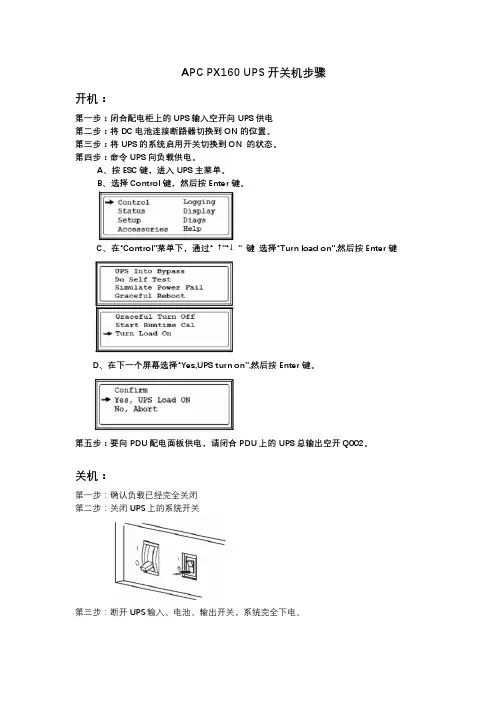
APC PX160 UPS开关机步骤
开机:
第一步:闭合配电柜上的UPS输入空开向UPS供电
第二步:将DC电池连接断路器切换到ON的位置。
第三步:将UPS的系统启用开关切换到ON 的状态。
第四步:命令UPS向负载供电。
A、按ESC键,进入UPS主菜单。
B、选择Control键,然后按Enter键。
C、在“Control”菜单下,通过“ ↑”“↓” 键选择“Turn load on”,然后按Enter键
D、在下一个屏幕选择“Yes,UPS turn on”,然后按Enter键。
第五步:要向PDU配电面板供电,请闭合PDU上的UPS总输出空开Q002。
关机:
第一步:确认负载已经完全关闭
第二步:关闭UPS上的系统开关
第三步:断开UPS输入、电池、输出开关,系统完全下电。
apc用户手册

MIMOTECAPController用户手册版(2014,9,26)发现APC可以对连接的APs进行扫描,且当它进行扫描时SNMPv3认证也在进行。
监控谷歌地图或自定义地图允许用户放置他们的APS,APC可以显示每个AP的统计数据,如IP地址、MAC地址、板的模型和固件的版本。
APC还会监视每个AP 的使用状态,如虚拟AP(VAP)状态,正常运行时间,自上次入住时间和空余内存。
每个VAP的统计都会显示,包括MAC地址、SSID、频道、加密和比特率。
APC监控最终用户(如移动电话、笔记本电脑),这些用户都连接到AP及Mimotec工作站也连接到了AP。
参数包括主机名、IP地址、MAC地址、链接的SSID,发射率,RX和TX速度都被包括在内。
当工作站每1分钟更新一次时终端用户每15秒更新一次。
管理(改变设置)每个单独的无线电的设置可以修改,可以为无线电创建多达16个SSID/VAPS 且无线配置,信道,传输功率,和ACK超时值都可以查看和编辑。
你还可以更改单个SSID设置,如无线模式、加密、MAC地址过滤、等,你也可以通过编辑”按钮同时申请多个可供选择AP设置。
用户APC可以持终端用户如手机,笔记本电脑的记录,这些用户都连接到所有的APS。
显示的参数包括主机名、IP地址、MAC地址、已连接的SSID,上传数据,下载数据也都显示出来,且终端用户每15秒更新一次。
固件升级APC可以让你选择多个APs同时升级。
SNMPv3用来管理升级过程。
FTP协议用来传输固件图像。
这种状态也会更新到APC(成功或失败)。
基于SNMP的监控APC通过使用SNMP来监控APS,SNMP是一个开放资源网络管理和监控工具,客户可以定制任何其他类型的状态进行监测,一个警告插件可用于发送短信。
硬件和软件组件APC驻留在网络设备硬件并预装应用默认设置,是一种基于LinuxCentOS的控制器。
CentOS(社区企业操作系统的缩写)是一个Linux发行版,它试图提供一个免费的企业级计算平台,这个平台具有100%上游源头的二进制兼容性——红帽企业的Linux。
APC PCNS (自动关机软件说明文档)Installation

Overview of PowerChuteNetwork ShutdownInstallationThe PowerChute Network Shutdown software works with the UPS Network Management Card to provide safe, unattended shutdowns of computer servers receiving power through a UPS.The software can be installed on supported operating systems like Windows, UNIX, Linux, Mac, and on virtualization software, see Operating System and Compatibility Chart.You can install PowerChute Network Shutdown (PCNS) with Single-, Redundant-, and Parallel-UPS configurations.For a description of possible configuration modes — Single, Redundant, Parallel — and the UPS devices that support these modes, see Configuration Wizard: UPS Electrical Configuration.See also:•Software and Hardware Requirements•Installing and Configuring PowerChute Network Shutdown•Further Information on Operating Systems•INI files in PowerChute Network ShutdownNotes:For ESXi installations, see the separate manual ESXi Installation.PCNS v3.x does not support Multiple-instances configurations.Product CenterThe PCNS Product Center page, Product Center page has many links to useful up-to-date information. This includes background information on vMA virtualization, loss of communications, and application notes which discuss varied subject matter including possible UPS configurations.Software and Hardware RequirementsNote: All references to UNIX ® in this help include the Solaris™, HP-UX ®, and AIX™ operating systems. (For ESXi, see the separate manual ESXi Installation).To install PowerChute Network Shutdown (PCNS), you must have the following:•A supported operating system and web browser , as listed on the website, Operating System and Compatibility Chart .•Disk space100 MB of free space on your hard drive for the actual installation process .A PCNS installation takes up about 6 MB of space if you have already installed a public JRE. A PCNS installation takes up about 100 MB of space when you accept the option of installing the private JRE with PCNS.Important Note: A private JRE means that it is specifically for the PCNS application.If you plan to use the public JRE, then you have to manually install it before you install PCNS.•For an installation, the computer hardware requirements are:•A UPS which supports the use of a Network Management Card (NMC). This currently includes:-any Smart-UPS with a card slot or an embedded NMC -any Smart-UPS DP UPS -any Galaxy UPS that works with an AP963n NMC (where n is a number)-any Symmetra UPS, and any Silcon Series UPS • A Network Management Card (part number AP9617, AP9618, AP9619, AP9630,AP9631, AP9635) with a firmware version of 3.3.1 or later. Or a Symmetra PX2 (which has an internal Network Management Card, OG-9354).-You can update your NMC firmware from the APC Web site .-PowerChute Network Shutdown cannot be used with PowerNet SNMP Adapters(cards). If your card has a part number of AP9605, AP9606, AP9205, or AP9603,contact customer support or your dealer to upgrade the card.OperatingSystemProcessor Memory Windows ®700 MHz 256 MB UNIX360 MHz 256 MB All Linux ®,virtualizationsoftware700 MHz 256 MB Mac ® OS X 600 MHz 256 MB•You must know the IP address for each NMC.Note: PCNS can only use IPv4 addresses to communicate with an NMC. It cannot use IPv6 addresses.•FirewallIf you are using a firewall, PCNS needs to be able to connect to the NMC Web Access port (default: TCP port 80) and receive data inbound to UDP port 3052 on the PCNS server machine.On Windows, when the Windows Firewall is enabled, you can allow the PCNS installation to configure the firewall automatically. That is, the NMC communication port (UDP 3052) is registered as an exception in the firewall and enabled. Also, exceptions are created for TCP ports 3052 (HTTP) and 6547 (HTTPS) but are left disabled for security reasons. If you want to enable remote access to a particular Web user interface, you can enable the appropriate exception.•JREYou must have a supported Java™ Runtime Environment (JRE), as seen for the different operating systems .With all supported operating systems — except HP-UX, AIX, and Mac OS X — PCNS gives you the option of installing a “private” JRE during an installation of PCNS v3.0.1.See Disk space.For most operating systems, you can download a Java Runtime Environment from http:// .•For the PCNS computer server: A monitor with a minimum resolution of 800 x 600;however, 1024 x 768 or greater is recommended.•You must have administrator privileges for the server (the host computer).•For ESX: You must have an installation of VMware Tools for each guest operating system on VMware.•You must remove PowerChute plus, PowerChute Business Edition, PowerChute Personal Edition, and PowerChute Server before installing PCNS.The installation process will perform an upgrade rather than a complete installation if you have v2.2.4 or higher of PCNS already installed. For earlier versions of PCNS and for Multiple-instances configurations, you must uninstall the software before installing v3.0.1.Installing and Configuring PowerChute Network ShutdownSetting up the operation of PowerChute Network Shutdown (PCNS) is divided into placing the executable files onto your drive and your actual configuration. You can subsequently use the configuration wizard to re-configure your setup at any time.•Installing PowerChute Network Shutdown•Configuring PowerChute Network ShutdownInstalling PowerChute Network ShutdownInstallations of PCNS can be standard, silent, an upgrade, or a silent upgrade.See these sections:•Upgrading the software•Silently upgrading the software•Installing the software•Silently installing the software•Installing on Netgear ReadyNASUpgrading the softwareIf you have v2.2.4 or higher of PCNS already installed, the installation process tells you it’s going to perform an upgrade rather than a complete installation. Upgrading enables you to retain your existing configuration settings.The main steps are the same for an upgrade and a standard installation, go to Installing PCNS: and perform steps 3 and 4. The configuration wizard does not run after an upgrade.Note: You can’t upgrade from a 32-bit version to a 64-bit version of PCNS, you must do a full installation. Also, you must manually uninstall the old version first.Silently upgrading the softwareIf you have v2.2.4 or higher of PCNS already installed, the installation process tells you it’s going to perform an upgrade rather than a complete installation. Upgrading enables you to retain your existing configuration settings. See also Silently installing the software.Installing the softwareTo install and operate the PowerChute Network Shutdown software, perform the following steps. (If you are upgrading from PCNS v2.4 or higher, refer to Upgrading the software).You can also use silent, non-interactive installation modes to set up your computer servers to have the same PowerChute Network Shutdown configuration (see Silently installing the software).1.Install the Network Management Card (NMC) in your UPS. For installation instructions,see the Network Management Card installation guide that was shipped with your card.If you are using a Redundant-UPS or a Parallel-UPS configuration, you use one Network Management Card in each UPS in the system.Install the NMC in your UPS and configure it with an IP address before beginning thePCNS installation. If you install PowerChute Network Shutdown first, additional steps will be required when installing the NMC.ing the NMC user interface, configure the UPS and the Network Management Card. Ata minimum, perform these tasks:a.Under the UPS tab, on the Configuration- shutdown page, set the Low BatteryDuration field value to at least five minutes.b.On the same page, you can set the authentication phrase for the administrator.Under the Administration tab, on the Local Users - administrator page, you canset the user name and password (these must be the same on all NMCs in aRedundant- or Parallel-UPS configuration).In the NMC, the default administrator user name and password are both apc, while the default setting for the authentication phrase is admin user phrase.3.Installing PCNS:The installation program must be run on the server to be protected.On VMware, the installation program must be run on the ESX Console Operating System (COS).On Hyper-V, the installation program must be run on the server console.Note: Multiple-byte characters (Chinese for example) and some single byte high-ASCII characters e.g. ß, é, ä, are not allowed in the installation path.To start the PowerChute Network Shutdown installation, choose from the sections directly below which specify different OS systems and hardware.Installing on Windows Server 2008 Server Core and Windows Hyper-V Server 2008a.Manually install the appropriate JRE version.b.Locate the installation file or files on the CD and copy them to a temporary directoryon your server. If necessary, unzip the installation file.c.Go to the temporary directory, and type cscript install.vbs at the commandprompt, as an administrator.d.When prompted for the installation directory, press Enter to accept the default or typeyour custom directory path.e.If the directory you specified already exists, you need to confirm that the installationshould go there by typing y and pressing Enter.f.Type the full directory location of your Java software, or search for the default bypressing Enter. You will be prompted if it’s not found. An example path is:C:\Program Files\java\jre1.6.0_16Confirm the directory by typing y and pressing Enter.g.When asked whether you want to install PCNS, type y and press Enter.Installing on WindowsDouble-click setup.exe - either the downloaded file or on the CD.When the Windows Firewall is enabled, you can allow the PCNS installation to configure the firewall automatically by choosing Yes when prompted:PowerChute Network Shutdown ports must be opened in the Windows Firewall to enable communication with the Network ManagementCard(s). Would you like this configuration to be performedautomatically?See Firewall for more information.Installing on Linux and UNIXYou should have root privileges to perform the installation.a.If you are installing from the CD, locate your installation files in one of the followingdirectories on the CD: Aix, Hpux, Linux, Solaris_Sparc, Solaris_x86, ESX. Copy them to a temporary directory on your server.b.If you are installing from the Web site, locate the filepcns Version_OS name.tar.gz(where Version is the PCNS version no, e.g. pcns301_linux.tar.gz) on the APC Web site and copy it to a temporary directory on your server.Change your working directory to the temporary directory. Then type the followingcommands:gunzip pcnsVersion_OS name.tar.gztar -xf pcnsVersion_OS name.tarc.To install in a conversational mode, log on as a root user, type the following commandat the root. (Alternatively you could use the sudo or su commands).If you are not logged on as the root user you need to run the installer using sudo, or switch to root user context using the su command and then run the installer../install.shNote: After a web download you might need to grant execute permissions:chmod +x install.shd.You cannot specify a directory name that contains a space, either for the installationor the Java directory.If you do not specify an installation directory, it will be installed to /opt/APC (thedefault).See JRE before proceeding.Installing on Mac OS XPerform the following steps.a.Download from the web. Or if the software is on a CD, copy the installation files fromthe Mac OS X folder to a folder on the Mac.b.Go to the folder on the Mac where you put the installation files.c.Double-click on the file mandd. A terminal window opens, prompting you for your password.e.Enter your password.plete the software installation.The PowerChute Network Shutdown service (on Windows) and the daemon (on Linux, VMware, UNIX, and Mac OS X) all start automatically when the installation is completed.You can then delete the installation files.5.On Windows Server 2008 Server Core, Windows Hyper-V Server, and virtualizationsoftware, go to a computer that has a browser and open the PCNS user interface with the URL: https://server_ip_address:6547. The wizard runs automatically.On Linux and UNIX, you must open the browser and enter the PCNS URL.When the Configuration Wizard displays, specify your configuration through its screenpages.Silently installing the softwareInstalling silently means the installation is unattended or non-interactive. The requirements for a silent installation are the same as for any other installation (see Software and Hardware Requirements).If you want the same settings on all servers, you install silently using the editedsilentInstall.INI or the silentInstall.sample file, and roll this out to the rest of the servers.Note: It is not possible to roll out your event configurations or shutdown settings using a silent installation. You can however, use pcnsconfig.ini to do this. See INI files in PowerChute Network Shutdown.See the following:•Silent Install on Windows and Mac•Silent Install on Linux and UNIX•Silent Install on Windows Server 2008 Server Core and Hyper-V Server•Editing your silent installations file•Error codes for silent installationsNote: The situation regarding a silent installation with Hyper-V is summarized below: -For the standalone Hyper-V Server 2008, and the Core edition of Windows Server 2008 R2 (Enterprise, Datacenter, and Standard) with Hyper-V functionality enabled,use the steps in Silent Install on Windows Server 2008 Server Core and Hyper-VServer.-For the Full edition of Windows Server 2008 R2 (Enterprise, Datacenter, and Standard) with Hyper-V functionality enabled, use the steps in Silent Install onWindows and Mac.Silent Install on Windows and MacYou can install PowerChute Network Shutdown (PCNS) by performing the following steps. Locate the installation file or files on the CD and copy them to a temporary directory on your server. If necessary, unzip the installation file(s).After you complete the installation, check the pcnsinst.log and errors.log files for error conditions. They are created in the folder where setup.exe is run from.Edit the silentInstall.ini file to set new parameters, if required; see Editing your silent installations file.•For an installation on Windows, navigate to the temporary directory on the server, and type the following on one line at the Windows command line:setup.exe –s silentInstall.ini•For an installation on Mac OS X, navigate to the temporary folder on the new server, and type the following command on one line:mand –s silentinstall.iniNote: Using sudo will always prompt the user to enter a password. To do this completely silently, you could use this command:Echo password | sudo –S ./mand –sOn the Mac, applicationDirectory should be the first line in the INI file or you might get an error, see Editing your silent installations file.Silent Install on Linux and UNIXEdit the silentInstall.sample file to set new parameters, if required; see Editing your silent installations file.Type the following command to start the installation, as an administrator:./install.sh –f silentInstall.sampleSilent Install on Windows Server 2008 Server Core and Hyper-V Server Follow these steps:1.Manually install the appropriate JRE version.2.Locate the installation file or files on the CD and copy them to a temporary directory onyour server. If necessary, unzip the installation file.Edit the silentInstall.sample file to set new parameters, if required; see Editing your silent installations file.3.Type cscript install.vbs /f silentInstall.sample (as an administrator).The installation starts and completes without user inputs.Editing your silent installations fileOn Windows Server Core and UNIX operating systems, the file that guides silent installations is named silentInstall.sample.On all other Windows operating systems and on a MAC, the file is namedsilentInstall.INI.These are plain text files and can be edited with an available text editor. Each field or line has a value that the installer needs to carry out the installation. The tables below explain the fields available; this can vary between operating systems.Windows (non-2008 Server Core) and MACField name DescriptionapplicationDirectory=Specifies the installation folder. Type the folder name after “=”, ensuring it hasvalid characters for the operating system. Precede each path separator (“\” forWindows and “/” for the Mac) with an escape character (“\”): for example,c:\\Programs\\apc\\PowerChutefor Windows.acceptEula=yes Yes signifies acceptance of the software licence agreement. The installationwill not proceed unless yes is specified here.*INSTALL_JAVA=The value System here signifies you want to use the public JRE for yourPCNS installation.The value PCNS here signifies you want to use the private JRE.See Disk space.*This is not applicable to the Mac which already has JRE installed.The installation detects whether the JRE meets the requirements, see JRE.UNIX and Windows 2008 Server CoreField name DescriptionacceptEula=YES Yes signifies acceptance of the software licence agreement. The installationwill not proceed unless yes is specified here.INSTALL_DIR=Specifies the installation directory. Type the directory name after “=”, ensuringit has valid characters for the operating system.JAVA_DIR=Specifies the JRE directory. Type the directory name after “=”, ensuring it hasvalid characters for the operating system.If this value is blank or absent, the private JRE is installed.Specify a public JRE for PCNS by setting the path to the JRE executable.See Disk space.All Supported Operating SystemsField name DescriptionREGISTER_WITH_NMC= yes | no Use yes or no. This specifies whether PCNS should be registered with the Network Management Card (NMC).MODE=single | redundant | parallel Use single, redundant, or parallel to specify the UPS configuration mode. See Configuration Wizard: UPS Electrical Configuration.IP_1=IP_2=IP_3=IP_4=IP_5=IP_6=IP_7=# IP_8=# IP_9=On each line, specify the IP address of each NMC that will be communicating with this PCNS installation. See Configuration Wizard: UPS Details .You can comment out unneeded entries by putting the hash/ pound sign - # - at the beginning of the line (see examples 8 and 9).IP_1_Outlet IP_2_Outlet=IP_3_Outlet=IP_4_Outlet=IP_5_Outlet=IP_6_Outlet=IP_7_Outlet=# IP_8_Outlet=# IP_9_Outlet=This applies only to UPS devices with Switched Outlet Groups (Smart-UPS SMX and SMT devices). Use 1, 2, 3, etc. to specify the outlet group that supplies power to the PCNS installation.In a shutdown you could use this information to turn off that particular outlet group while retaining the power supply to the other outlet groups.You can comment out unneeded entries by putting the hash/ pound sign - # - at the beginning of the line (see examples 8 and 9).PORT=This is the NMC web port: 80 for HTTP; 443 for HTTPS.PROTOCOL=HTTP | HTTPSUse HTTP or HTTPS to specify which protocol you are using. See Configuration Wizard: UPS DetailsacceptCerts=trueThis is required if you are using HTTPS as the NMC protocol and the SSL certificate is self-signed.See Configuration Wizard: UPS Details and Adding a Trusted Certificate to PCNS for NMC communication .USERNAME=PASSWORD=AUTHENTICATION_PH RASE=Enter the user name and password to validate PCNS communication with the NMC. Authentication phrase reverts to the default if not specified.The only acceptable characters for username and password are: the alphabet in both lowercase and uppercase (a to z and A to Z), numbers from 0 to 9, and the underscore (underline) character. The password length must be from 3 - 32 characters, and the username from 3 - 10 characters. The authentication phrase must be 15 - 32 ASCII characters. See Configuration Wizard: Security .LOCAL_IP_ADDRESS=This information applies to a PCNS server with multiple network cards. Use it to specify the IP address of the card that will communicate with PCNS. See Configuration Wizard: Select IP .All Supported Operating SystemsField nameDescriptionError codes for silent installationsWhen using silent installations (and upgrades), you can use the following list of error codes to understand what’s going wrong when the installation fails.For JExpress installs, the error code is written to a file called errors.log. For VBS and shell script installs, the error can be trapped directly.For the table below, use the scripts with operating systems as follows:•VBS is used by Windows 2008 Server Core.•JExpress is used by Mac OS X and Windows (except Server Core).•Shell script is used by all other OS’s.Error Code Description Error MessageAppliestoJExpressAppliesto VBSAppliesto ShellScript0Success: Indicates that installationsucceeded.Yes Yes Yes1Usage: Indicates that unrecognized parameters were passed to theage:install.sh [-f <config file>]:Silent install withconfiguration file.install.sh [-h|-H]: Print help.No Yes Yes4Administrator Only: Indicates that a non-administrator has tried to run theinstaller.Error: install.sh must be runwith root privileges!No Yes Yes5Unsupported OS: The installer hasdetected an Operating System itcannot support.Error: Unknown OS.Yes Yes Yes6Upgrade Not Supported: Indicatesthat PCNS cannot support upgradefrom a previous installation of PCNS.This can be due to the versioningbeing too old, or an attemptedupgrade of a previous multiple install.PowerChute NetworkShutdown is alreadyinstalled. Upgrade is notsupported for this version.Please uninstall the existingPCNS to continue withinstallation of PCNSv.3.0.1.Installation cancelled.Yes Yes Yes7User Abort: Indicates that the userhas aborted installation.Installation cancelled.No Yes Yes8PC Plus Detected: Indicates that the installer has aborted due to thedetection of a version of PowerChutePlus.You must remove theinstalled version ofPowerChute Plus.Yes No No9PCBE Detected: Indicates that the installer has aborted due to thedetection a version of PowerChuteBusiness Edition.You must remove theinstalled version ofPowerChute BusinessEdition Server.Yes Yes No10PowerChute Server Detected:Indicates that the installer hasaborted due to the detection of aversion of PowerChute Server.You must remove theinstalled version ofPowerChute Server.Yes No No11HyperV or VMware Detected:Indicates that the installer hasaborted due to the detection ofHyperV or VMware.VMware[Server|Workstation|Player]has been detected on yoursystem. This version ofPowerChute NetworkShutdown does not supportVMware. Please uninstallVMware Server, or consult for therequired version ofPowerChute NetworkShutdown.Microsoft Windows Hyper-Vhas been detected on yoursystem. This version ofPowerChute NetworkShutdown does not supportHyper-V. Please disableHyper-V, or consult for therequired version ofPowerChute NetworkShutdown.Yes Yes YesError Code Description Error Message toJExpressAppliesto VBSto ShellScript12Invalid Install Directory: Indicates that the installer has aborted due to aninvalid target directory.One of:Error: Too manyINSTALL_DIR insilentConfiguration.iniError: INSTALL_DIR muststart with '/'Error: INSTALL_DIR mustnot contain white space.Error: INSTALL_DIR mustnot contain back slash '\'Error: INSTALL_DIR is notconfigured.Installation directory muststart with "/"Installation directory mustnot contain white space " "Installation directory mustnot contain back slash "\"Failed to create directory<install directory>.Yes Yes Yes13Invalid Java Version: Invalid versionof Java specified in configuration file.Installation cancelled.No No Yes14Unsupported Locale: The installerhas detected an attempt to install anEnglish build on a Japanese system.This version of PowerChuteNetwork Shutdown doesnot support the Japaneselanguage. Please consult for therequired version ofPowerChute NetworkShutdown.Yes No Yes15Zipfile Missing: Indicates that theinstaller cannot find the zipfile, fromwhich to extract the PCNS install.Can't find <zip filename>No Yes Yes16Silent Configuration Missing:Indicates that the installer hasaborted because the specified silentconfiguration file could not be read.Error: Invalid file<filename>Yes Yes Yes17EULA Not Accepted: Indicates that the installer has aborted because theEnd User Licence Agreement wasnot accepted.Error: EULA must beaccepted by settingACCEPT_EULA=YES inconfig fileYes Yes Yes18Silent Configuration MissingParameter: Indicates that requiredparameters are missing from thesilent configuration file.[Error]: <configurationvalue> is not defined in<configuration file>No Yes NoError Code Description Error Message toJExpressAppliesto VBSto ShellScript19Silent Configuration MultipleParameters: Indicates that aparameter is duplicated in the silentconfiguration file.[Error]: Too many<configuration value> in<configuration file>No Yes No20Invalid Java Directory: Indicates that the installer has aborted due to aninvalid Java directory specified in thesilent configuration file.One of:Error: Too many JAVA_DIRin <configuration file>Error: JAVA_DIR must startwith /Error: JAVA_DIR must notcontain white space " "Error: JAVA_DIR must notcontain back slash "\"Error: Invalid JAVA_DIR.<directory> does not exist.Java is not available on thepath. Please specify a javadirectory.No Yes Yes21Registry Failure: Indicates theinstaller has aborted due to aninability to write registry entries.[Error]: <error code>Installation cancelled.No Yes No22Service Failure: The installer failed to register the PCNS service withWindows.[Error]: <error code>Installation cancelled.No Yes No23M11 Backup Failure: The installer has failed to back up the m11.cfgdata store during an upgrade.[Error]: <error code>Installation cancelled.No Yes No24IP Not Specified: The installer cannot determine the host IP address, due tomultiple network adapters.ERROR: Invalid value forLOCAL_IP_ADDRESSspecified in silentconfiguration file.Aborting with error code<error code>Yes No No25Invalid INI. The silent installer cannot write to the pcnsconfig.ini file in theinstallation directory.ERROR: Cannot write tospecified ini configurationfile: <ini file>No Yes Yes28Invalid Mode. Silent installconfiguration file specifies an invalidvalue for MODE.ERROR: Invalid value formode specified in silentconfiguration file.Yes Yes Yes29Invalid Port. Silent installconfiguration file specifies an invalidvalue for PORT.ERROR: Invalid value forport specified in silentconfiguration file.Yes Yes YesError Code Description Error Message toJExpressAppliesto VBSto ShellScript。
APC UPS 使用说明书
低转换点
230V 型号: 208VAC
120V 型号: 106VAC
100V 型号: 92VAC
230V 型号: 196、 200、 204VAC
120V 型号: 97、 100、 103VAC
100V 型号: 86、 88、 90VAC
如果市电电压长期偏低, 而用电设备能容忍此情 况,可将低转换点设得低 一些。
有关运输指示和取得合适的包装材料,请通过网站 /support/contact 与 APC 联 系。
10
5: 故障处理
在安装或操作 Smart-UPS 时出现的小问题,可以使用下表进行处理。如果 UPS 的问题较为复 杂,请访问 APC 网站 以获得帮助。
功能
工厂预设
用户选项
说明
电池不足警报
默认情况下,当电池运 行时间仅剩下 2 分钟 时,PowerChute 接口软 件可以在无人工干预下 自动地关机。
明亮发光:电池容量不足 警报间隔约为 2 分钟。
稍暗发光:电池容量不足 警报间隔约为 5 分钟。
灭:电池容量不足警报间 隔约为 8 分钟。
可能的间隔设定: 2、 5、 8、 11、 14、 17、 20、 23 分钟
1: 安装
安装 UPS 前请阅读《安全信息》单张。
开箱
到货后,请对 UPS 进行检查。APC 为您的产品设计的包装箱牢固可靠。但在运输中仍有可能 发生意外损坏。如有损坏请通知运货商或经销商。 外包装可以重复使用,请保管好以便下次使用或进行妥善处理。 检查货物。包装箱中有 UPS 及其包括一张 CD、一条串行电缆、一条 USB 电缆、产品文档和 安全信息的套件包。 230V 型号:附带二个 IEC 跳线以及配合电源线连接固定之服务器使用的一个市电连接插头。
apc ups的 powerchute使用方法 -回复
apc ups的powerchute使用方法-回复APC UPS 是一款常见的不间断电源产商,其产品的一个重要特性就是配备了PowerChute 软件,用于监控和管理UPS 的工作状态。
在本文中,我们将一步一步地介绍如何使用APC UPS 的PowerChute 软件。
第一步:软件安装和连接设备首先,确保你的计算机和APC UPS 已经正确连接。
将UPS 的电缆插入计算机的USB 端口(取决于计算机的接口类型,也可以使用串行端口)。
然后,从APC 官方网站下载最新版本的PowerChute 软件。
运行安装程序,并按照指示完成软件的安装过程。
第二步:软件设置安装完成后,找到PowerChute 软件的图标,双击打开。
在软件的主界面上,点击“Options”(选项)按钮,然后选择“UPS”选项卡。
在UPS 选项卡中,首先选择正确的设备连接类型。
如果你使用的是USB 连接,选择“USB Port”(USB 端口),如果是串行连接,选择“Serial Port”(串行端口)。
然后在下拉菜单中选择正确的端口。
接下来,点击“Configure”(配置)按钮,进行更多的设置。
在这里,你可以设置UPS 的类型和容量,以便软件可以准确地监测其状态。
在完成配置后,点击“OK”保存设置并返回主界面。
第三步:电源管理和通知设置现在,你可以开始设置PowerChute 软件的电源管理和通知功能。
点击主界面上的“Operating System”(操作系统)选项卡,在这里你可以设置一些与操作系统相关的特性,如自动关机和重新启动等。
选择合适的选项,并点击“Apply”应用更改。
接下来,点击“Notifications”(通知)选项卡,这里可以设置软件的警告和通知功能。
你可以配置警告消息的级别、通知方式(如电子邮件、短信或声音)以及特定事件的通知设置。
完成设置后,点击“Apply”应用更改。
第四步:监控和管理UPS设置完成后,返回PowerChute 软件的主界面。
APC网络关机软件用户使用手册
"C:\Program Files\Pwrchute\shutback" SNA
2 .选择一个事件,选运行命令文件,输入命令文件的完整路径。 注意:shutnote.exe 会关闭 Lotus Notes/Domino Server 4.6 或更早的版本,如 果 Notes Server 以应用程序的方式安装在另外的分区上,编辑 shutnote.exe 命令添 加服务器的完整路径:
● 关闭系统
配置事件页面显示了每个事件对应动作的概要情况,如果需要了解动作的详细配置情 况,请点击动作的 CheckBox。
要同时配置多个事件,选择改变设置(Change Setting)按钮。一个对话框出现,可以 选择需要配置的事件和事件动作。
注意:如果您的浏览器不支持 java,只能逐个对动作进行配置。
使用 configure Shutdown 页面设定系统关闭参数。 注意:如果在市电断电情况下 UPS 达到低电池状态,PowerChute 会立即开始关机 过程。有关信息请参考 configure Shutdown 页面。
APC 大中国区 AGS 部
PCNS 用户使用手册 -5-
二○○三年三月
PowerChute Network Shutdown 软件用户使用手册
net stop "Lotus_Notes_Service"
关闭系统 当事件发生后,Powerchute Network Shutdown 将安全关闭服务器的操作系统。 Delay Time (in seconds) before starting Shutdown: 系统开始关闭
APC SRC系列UPS 使用手册
Network Surge 网络P浪ro涌te保ct护ion插座
Cable入In Cab出le Out
O输ut出put
Input
输C入irc过ui载t B保re护aker P按us下h重to启Reset
AC输I入nput
SRC1000UXICH2
O输u出tput
Input 输Ci入rc过uit载B保re护aker
安装和运行手册 Smart-UPS® Tower
SRC1000I; SRC1000ICH;
SRC1000UXICH2
产品说明
APC® by Schneider Electric Smart-UPS® SRC1000I 系列是一款高性能不间断电源 (UPS)。它专用于为 电子设备提供保护,使其免受市电停电、持续低电压、电压骤降、浪涌、小型的市电线路电压波动, 以及大规模干扰等情况的影响。在市电电源恢复到安全水平或电池完全放电之前,UPS 还可一直提供 电池后备电源。
SRC1000I
SRC1000ICH
SRC1000UXICH2
14.6 kg
14.6 kg
7.2 kg
长 x 宽 x 高尺寸
42 cm x 16.6 cm x 25.7 cm
型号和序列号位于后面板的小标签上。对于某些型号,标签位于前面板下的底盘上。
电池规格仅适用 SRC1000UXICH2
电池类型 额定线压 充电器浮动电压 安培小时范围
1. 将设备连接到 UPS(未提供缆线)。 2. 将内置电池或外部电池(视具体情况而定)连接到 UPS。请参考本手册中的第 5 页上的“连接
电池”。 3. 闭合市电电路断路器的开关。 4. 要使用 UPS 作为主电源开关,请确保所有连接的设备都已经打开。在启动 UPS 之前相连设备将不