
[最新]vb登录界面代码
[最新]vb登录界面代码
VB登录界面代码
方法一:
VB登录界面代码
Option Explicit
Private Sub cmdCancel_Click() Dim intResult As Integer '请求用户确认是否真的退出系统登录
intResult = MsgBox("你选择了退出系统登录,退出将不能启动企业人事管理系统~" & vbcrlf_ & "是否真的退出,", vbYesNo, "登录验证") If intResult = vbYes Then End '根据用户选择结束应用程序
End Sub
Private Sub CmdOK_Click() Dim UserName As String
Dim userpassword As String Dim str As String
Dim nTryCount As Integer Dim rs As New ADODB.Recordset Set rs = New ADODB.Recordset UserName = Trim(txtUserName.Text) userpassword =
Trim(txtpassword.Text) str = "select * from 用户信息表 where 用户名='" & UserName & "' and 用户密码 = '" & userpassword & " '" rs.Open str, connectString, adOpenKeyset, 2 If rs.EOF Then '登录失败
MsgBox "对不起,无此用户或者密码不正确~请重新输入~~", vbCritical, "错误"
txtUserName.Text = ""
txtpassword.Text = ""
txtUserName.SetFocus
nTryCount = nTryCount + 1
If nTryCount >= 3 Then
MsgBox "您无权操作本系统~", vbCritical, "无权限" Unload Me End If
Else '登陆成功
主界面.Show
Unload Me
End If
End Sub
方法二:
Private Sub Command1_Click()
Dim username As String
Dim userpassword As String
Dim try_times As Integer
try_times = 0
username = Trim$(user.text)
userpassword = Trim$(password.text)
If user.text = "" Then
MsgBox "用户名不能为空~", vbOKOnly + vbInformation, "友情提示" user.SetFocus
Exit Sub
End If
If password.text = "" Then
MsgBox "密码不能为空~", vbOKOnly + vbInformation, "友情提示"
password.SetFocus
Exit Sub
End If
Dim strSQL As String
strSQL = "select * from staff where sno='" & username & "' and password='"
& userpassword & "'"
Dim str As New ADODB.Recordset
Set str = New ADODB.Recordset
str.CursorLocation = adUseClient
str.Open strSQL, conn, adOpenStatic, adLockReadOnly
With str
If .State = adStateOpen Then .Close
.Open strSQL
If .EOF Then
try_times = try_times + 1
If try_times = 3 Then
MsgBox "您已经三次尝试进入本系统,均不成功,系统将会自动关闭", vbOKOnly + vbCritical, "警告"
Unload Me
Else
MsgBox "对不起,用户名不存在或密码不正确~", vbOKOnly + vbQuestion, "警告"
user.SetFocus
user.text = ""
password.text = ""
End If
Else
Unload Me
frm_main.Show
End If
End With
End Sub
Private Sub Command2_Click() Unload Me
End Sub
Private Sub Form_Load()
Set conn = New ADODB.Connection
conn.ConnectionString = "dsn=LMS"
conn.Open
Login.Show
End Sub
Private Sub password_KeyPress(KeyAscii As Integer) If KeyAscii = 13 Then
Command1.SetFocus
End If
End Sub。
vb程序设计登陆界面代码详例
vb程序设计登陆界面代码详例Imports System.Data.SqlClientPublic Class frmMagementMain'Inherits System.Windows.Forms.FormDim constr As String = "User ID=sa;pwd=a;Initial Catalog=zbb;Data Source=(local)" '定义一个变量,连接字符串Dim sqlstr As String = "select * from manid" '定义一个变量,SQL语句Dim mycon As New SqlConnection(constr) '定义一个变量,为一个连接对象Dim mycom As New SqlCommand(sqlstr, mycon) '定义一个变量,为命令对象Dim myReader As SqlDataReader '定义一个变量,阅读器Dim i As Integer = 0Dim userIDsys() As ArrayPrivate Sub frmMagementMain_Load(ByVal sender As System.Object, ByVal e AsSystem.EventArgs) Handles MyBase.Loadmycon.Open() '打开这个联接myReader = mycom.ExecuteReader '把这个命令的连接送入阅读器myReader.Read()Dim k As Integer = 0While myReader.Read 'while 为遍历集合的每一项,用阅读器的read的方法来读取'定义一个变量的第一项k = k + 1'MsgBox(myReader.Item(1))End WhileMsgBox(k)End SubPrivate Sub Button1_Click(ByVal sender As System.Object, ByVal e As System.EventArgs)Handles Button1.Click' Visual Basic 2005' Declare a new TextBox.Dim TextBox2 As New TextBox' Set the location below the first TextBoxTextBox2.Left = 102TextBox2.Top = 242' Add the TextBox to the form's Controls collection.Me.Controls.Add(TextBox2)TextBox2.Text = "这可是我动态加的控件呀"End SubPrivate Sub mnu_magement_Click(ByVal sender As System.Object, ByVal e AsSystem.EventArgs) Handles mnu_magement.ClickDim frmlogin As frmlogin = New frmloginfrmlogin.Show()'GBmagemetPeple.Left = 8'GBmagemetPeple.Top = 28'GBmagemetPeple.Visible = TrueEnd SubPrivate Sub Button2_Click(ByVal sender As System.Object, ByVal e As System.EventArgs)Handles Button2.ClickEnd SubEnd Class/////////////////////////////////////Imports System.Data.SqlClientPublic Class frmloginDim i As Integer = 0Dim constr1 As String = "" '定义一个变量,连接字符串Dim sqlstr1 As String = ""Dim mycon1 As New SqlConnection(constr1) '定义一个变量,为一个连接对象Dim mycom1 As New SqlCommand(sqlstr1, mycon1) '定义一个变量,为命令对象Dim myReader1 As SqlDataReader '定义一个变量,阅读器Private Sub OK_Button_Click(ByVal sender As System.Object, ByVal e AsSystem.EventArgs) Handles OK_Button.ClickIf txtUsename.Text = "" Or txtPassword.Text = "" ThenMsgBox("请输入用户名和密码")Exit SubEnd Ifsqlstr1 = "select * from mgpep where usernameID='" & txtUsename.Text & "' andpasswordID='" & txtPassword.Text & "'" '定义一个变量,SQL语句constr1 = "User ID=sa;pwd=a;Initial Catalog=SaleCD;DataSource=(local)" '定义一个变量,连接字符串mycon1.ConnectionString = constr1mandText = sqlstr1mycon1.Open() '重新打开这个联接myReader1 = mycom1.ExecuteReader '第二次把这个命令的连接送入阅读器If myReader1.VisibleFieldCount = 0 ThenMsgBox("密码不对请重新输入~")Exit SubEnd IfmyReader1.Read() '阅读器重新使用read方法On Error GoTo ssIf myReader1(0) > 0 ThenfrmMagementMain.GBmagemetPeple.Visible = Truesqlstr1 = "select * from mgpep"If mycon1.State = 1 Thenmycon1.Close()End Ifmycon1.Open()myReader1 = mycom1.ExecuteReader '把这个命令的连接送入阅读器Dim userIDsys(myReader1.VisibleFieldCount - 1, 2)'ReDim userIDsys(10, 2)Dim k As Integer = 0While myReader1.ReadfrmMagementMain.CmbUser.Items.Add(myReader1(0)) For i = 0 To 2userIDsys(k, i) = myReader1.Item(i)Nextk = k + 1End WhileMsgBox("已经成功登录~")mycon1.Close()Me.Close()Exit SubElseMsgBox("您没有权限登录~")mycon1.Close()Me.Close()Exit SubEnd Ifss:MsgBox("您没有权限登录~")Me.Close()End SubPrivate Sub Cancel_Button_Click(ByVal sender As System.Object, ByVal e AsSystem.EventArgs) Handles Cancel_Button.ClickMe.Close()End SubEnd ClassPublic ADOcn As ConnectionPublic Sub main()Dim strSQLServer As StringstrSQLServer = "Provider=SQLOLEDB.1;Integrated Security=SSPI;Persist SecurityInfo=False;Initial Catalog=图书销售管理系统;DataSource=longmingxue\SQLEXPRESS"Set ADOcn = New ConnectionADOcn.Open = strSQLServerFrmMain.ShowEnd SubPrivate Sub Command1_Click()Dim ADOrs As New RecordsetDim strSQL As StringDim strXB As StringADOrs.ActiveConnection = ADOcnADOrs.Open "select 学号 from 学生表"If Not ADOrs.EOF ThenMsgBox "该学号已经存在,不能继续添加~", vbCritical + vbOKOnly, "信息提示"ElseIf Option1.Value ThenstrXB = "男"ElsestrXB = "女"End IfstrSQL = "Insert Into 学生表( 学号,姓名,性别)"strSQL = strSQL + " Values('" + Text1 + "','"strSQL = strSQL + Text2 + "','" + strXB + "')"ADOcn.Execute strSQLMsgBox "添加成功~", vbOKOnly, "信息提示"End IfEnd Sub。
VB操作网页代码
1、防止新窗口里头打开网页代码1:Private Sub WebBrowser1_NewWindow2(ppDisp As Object, Cancel As Boolean)Dim frm As Form1Set frm = New Form1frm.Visible = TrueSet ppDisp = frm.WebBrowser1.objectEnd Sub代码2:有这段代码,有许多网页会出错,经常提示脚本错误,可以用silent属性为True来屏蔽,不过也有些不足!!!Private Sub WebBrowser1_NewWindow2(ppDisp As Object, Cancel As Boolean)Cancel = TrueWebBrowser1.Navigate2 WebBrowser1.Document.activeElement.hrefEnd Sub代码3:Private Sub WebBrowser1_NewWindow2(ppDisp As Object, Cancel As Boolean)On Error Resume NextDim frmWB As Form1Set frmWB = New Form1frmWB.WebBrowser1.RegisterAsBrowser = TrueSet ppDisp = frmWB.WebBrowser1.objectfrmWB.Visible = TruefrmWB.Top = Form1.TopfrmWB.Left = Form1.LeftfrmWB.Width = Form1.WidthfrmWB.Height = Form1.HeightEnd Sub功能差不多,任选一个。
2、去掉滚动条Private Sub WebBrowser1_DocumentComplete(ByVal pDisp As Object, URL As Variant) WebBrowser1.Document.Body.Scroll = "no"End Sub实际上上面的效果不咋地,如果懂得HTML知识,你可以在读取网页的时候,读取HTML源码,查找替换,再写入只需在 <body> </body> 之间插入代码: <body style= "overflow-x:hidden;overflow-y:hidden "> 即可。
VB常用代码

VB常用代码Private Declare Function fCreateShellLink Lib "" (ByVal lpstrFolderName As String, ByVal lpstrLinkName As String, ByVal lpstrLinkPath As String, ByVal lpstrLinkArgs As String) As LongSub Command1_Click()Dim lReturn As Long'添加到桌面lReturn = fCreateShellLink("..\..\Desktop", "Shortcut to Calculator", "c:\windows\", "")'添加到程序组lReturn = fCreateShellLink("", "Shortcut to Calculator", "c:\windows\", "")'添加到启动组lReturn = fCreateShellLink("\Startup", "Shortcut to Calculator", "c:\windows\", "")End Sub问题二、如何让程序在Windows 启动时自动执行?有以下二个方法:方法1: 直接将快捷方式放到启动群组中。
方法2:在注册档HKEY_LOCAL_MACHINE 中找到以下机码\Software\Microsoft\Windows\CurrentVersion\Run新增一个字串值,包括二个部份1. 名称部份:自己取名,可设定为AP 名称。
库存管理之用户登录及用户列表——VB代码
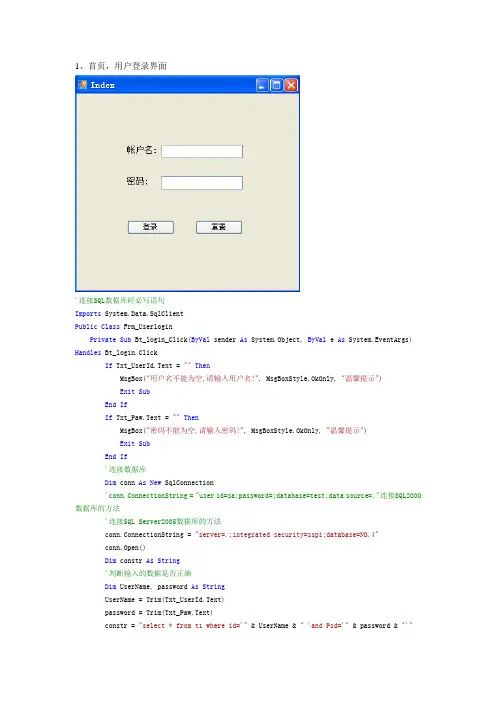
1、首页,用户登录界面'连接SQL数据库时必写语句Imports System.Data.SqlClientPublic Class Frm_UserloginPrivate Sub Bt_login_Click(ByVal sender As System.Object, ByVal e As System.EventArgs) Handles Bt_login.ClickIf Txt_UserId.Text = ""ThenMsgBox("用户名不能为空,请输入用户名!", MsgBoxStyle.OkOnly, "温馨提示") Exit SubEnd IfIf Txt_Paw.Text = ""ThenMsgBox("密码不能为空,请输入密码!", MsgBoxStyle.OkOnly, "温馨提示")Exit SubEnd If'连接数据库Dim conn As New SqlConnection'conn.ConnectionString = "user id=sa;password=;database=test;data source=."连接SQL2000数据库的方法'连接SQL Server2005数据库的方法conn.ConnectionString = "server=.;integrated security=sspi;database=NO.4"conn.Open()Dim constr As String'判断输入的数据是否正确Dim UserName, password As StringUserName = Trim(Txt_UserId.Text)password = Trim(Txt_Paw.Text)constr = "select * from t1 where id='" & UserName & " 'and Psd='" & password & "'"Dim da As New SqlDataAdapter(constr, conn)Dim ds As New DataSetda.Fill(ds)If ds.Tables(0).Rows.Count >= 1 ThenMDIParent1.ShowDialog()Me.Hide()ElseMsgBox("用户名或密码错误", MsgBoxStyle.OkOnly, "温馨提示")Txt_UserId.Text = ""Txt_Paw.Text = ""Txt_Paw.Focus()Txt_UserId.Focus()End IfEnd SubPrivate Sub Bt_cancel_Click(ByVal sender As System.Object, ByVal e As System.EventArgs) Handles Bt_cancel.ClickTxt_UserId.Text = ""Txt_Paw.Text = ""Txt_Paw.Focus()Txt_UserId.Focus()End SubEnd ClassImports System.Data.SqlClientPublic Class Frm_yhlbDim conn As New SqlConnection()Dim flag As IntegerDim ds As New DataSetPrivate Sub Form2_Load(ByVal sender As System.Object, ByVal e As System.EventArgs) Handles MyBase.Load‘添加数据库中的数据到DGW控件中GroupBox1.Enabled = Falsebaocun.Enabled = Falsequxiao.Enabled = Falseconn.ConnectionString = "server=(local);integrated security=sspi;database=NO.4"conn.Open()Dim st As Stringst = "select * from t1"Dim da As New SqlDataAdapter(st, conn)Dim ds As New DataSetda.Fill(ds)DGW1.ColumnCount = ds.Tables(0).Columns.CountDGW1.RowCount = ds.Tables(0).Rows.Count'DGW1.ColumnCount = 4 '列'DGW1.RowCount = 4 '行For i = 0 To ds.Tables(0).Rows.Count - 1For j = 0 To ds.Tables(0).Columns.Count - 1DGW1.Rows(i).Cells(j).Value = ds.Tables(0).Rows(i).ItemArray(j)Next jFor j = 0 To ds.Tables(0).Columns.Count - 1DGW1.Columns(j).HeaderText = ds.Tables(0).Columns(j).ColumnNameNextNext iEnd SubFunction f_diaoyong(ByVal st As String) As Long'Dim st As String'st = "select * from t1"Dim da As New SqlDataAdapter(st, conn)Dim ds As New DataSetda.Fill(ds)DGW1.ColumnCount = ds.Tables(0).Columns.CountDGW1.RowCount = ds.Tables(0).Rows.Count'DGW1.ColumnCount = 4 '列'DGW1.RowCount = 4 '行For i = 0 To ds.Tables(0).Rows.Count - 1For j = 0 To ds.Tables(0).Columns.Count - 1DGW1.Rows(i).Cells(j).Value = ds.Tables(0).Rows(i).ItemArray(j)Next jFor j = 0 To ds.Tables(0).Columns.Count - 1DGW1.Columns(j).HeaderText = ds.Tables(0).Columns(j).ColumnNameNextNext iEnd FunctionPrivate Sub tianjia_Click(ByVal sender As System.Object, ByVal e As System.EventArgs) Handles tianjia.Clickflag = -1GroupBox1.Enabled = Truebaocun.Enabled = Truequxiao.Enabled = TrueTextBox1.Enabled = TrueTextBox2.Text = ""TextBox1.Text = ""TextBox1.Focus()TextBox3.Text = ""End SubPrivate Sub baocun_Click(ByVal sender As System.Object, ByVal e As System.EventArgs) Handles baocun.ClickIf flag = -1 ThenDim a, b, c As Stringa = Trim(TextBox1.Text)b = Trim(TextBox2.Text)c = Trim(TextBox3.Text)Dim str As StringDim da As New SqlDataAdapter("select * from t1", conn)da.Fill(ds)For i = 0 To ds.Tables(0).Rows.Count - 1str = Trim(ds.Tables(0).Rows(i).ItemArray(0))If Trim(TextBox1.Text) = str ThenMsgBox("对不起,你的ID重复,请重新输入!", MsgBoxStyle.OkOnly, "用户消息提示框")TextBox1.Text = ""TextBox1.Focus()Exit SubEnd IfNextDim stre = "Insert into t1 values('"& Trim(a) & " ',' "& Trim(b) & " ', ' "& Trim(c) & " ' )"Dim com As New SqlCommand(stre, conn)com.ExecuteNonQuery()ElseIf flag = 1 ThenDim name1, mima1, a1 As Stringname1 = TextBox2.Textmima1 = TextBox3.Texta1 = TextBox1.Texta1 = DGW1.SelectedRows(0).Cells(0).ValueDim stre = "update t1 set name= ' " & name1 & " ', psd= ' " & mima1 & " 'where id='" & a1 & " ' "Dim com As New SqlCommand(stre, conn)com.ExecuteNonQuery()End IfTextBox1.Text = ""TextBox1.Focus()TextBox2.Text = ""TextBox3.Text = ""baocun.Enabled = Falsequxiao.Enabled = FalseGroupBox1.Enabled = FalseCall f_diaoyong("select * from t1")End SubPrivate Sub quxiao_Click(ByVal sender As System.Object, ByVal e As System.EventArgs) Handles quxiao.ClickTextBox1.Text = ""TextBox1.Focus()TextBox2.Text = ""TextBox3.Text = ""DGW1.Enabled = Falsebaocun.Enabled = Falsequxiao.Enabled = FalseGroupBox1.Enabled = FalseEnd SubPrivate Sub xiugai_Click(ByVal sender As System.Object, ByVal e As System.EventArgs) Handles xiugai.Clickflag = 1TextBox1.Enabled = Falsebaocun.Enabled = Truequxiao.Enabled = TrueGroupBox1.Enabled = TrueTextBox1.Text = DGW1.SelectedRows(0).Cells(0).ValueTextBox2.Text = DGW1.SelectedRows(0).Cells(1).ValueTextBox3.Text = DGW1.SelectedRows(0).Cells(2).ValueEnd SubPrivate Sub tuichu_Click(ByVal sender As System.Object, ByVal e As System.EventArgs) Handles tuichu.ClickEndEnd SubPrivate Sub shanchu_Click(ByVal sender As System.Object, ByVal e As System.EventArgs) Handles shanchu.ClickDim yh As Stringyh = TextBox1.Textyh = DGW1.SelectedRows(0).Cells(0).ValueDim stre = "delete from t1 where id='" & yh & " '"Dim com As New SqlCommand(stre, conn)com.ExecuteNonQuery()MsgBox("确定删除!", MsgBoxStyle.OkOnly, "提示信息")baocun.Enabled = Truequxiao.Enabled = TrueDGW1.Enabled = FalseCall f_diaoyong("select * from t1")End SubEnd Class。
后台自动登录网页vb脚本实例代码

set IE=createobject("Internetexplorer.application")IE.Visible = TrueIE.Navigate "https:///login.htm"‘等待网页加载完成While IE.busy Or IE.readystate<>4Wend'从网页元素中找到设置的元素,并赋值'因为form没有name或id,只能从document的collection里取forms集合'再从中定位输入框和提交按钮IE.Document.Forms(0).elements("name").value = "aaaa"IE.Document.Forms(0).elements("passwd").value = "1111"IE.Document.Forms(0).elements("Send").click'登录后界面是框架结构,先等主框架加载完成While IE.busy Or IE.readystate<>4Wend'等框架内网页1加载完成While IE.busy Or IE.Document.Frames(1).document.readystate<>"complete"Wend'点击一个图片按钮/链接,需要先定位到框架内,再从document的collection里取images集合IE.Document.Frames(1).document.images(3).click'等主框架加载完成While IE.busy Or IE.readystate<>4Wend'等框架内网页2加载完成While IE.busy Or IE.Document.Frames(2).document.readystate<>"complete"Wend'定位select控件,并作出选择IE.Document.Frames(2).document.Forms(0).elements("lst_ed_day").selectedIndex=8IE.Document.Frames(2).document.Forms(0).elements("lst_st_time").selectedIndex=1'其他操作。
网页登陆代码

height:30px;
border-bottom-color:#000;
border-bottom-style:groove;
border-bottom-width:2px;
line-height:30px;
font-weight:bold;
background-color:#999;
<br/><br/>
<input type="reset" value="重置" style="width:100px height:30px; background-cloor"#666; border-style:hidden;"/>
<input type="submit" value="登录" style="width:100px height:30px; background-cloor"#666; border-style:hidden;"/>
<br/>
用户:<input type="text" style="width:200px height:30px; background-cloor"#999; border-style:hidden;"/>
<br/><br/>
密码:<input type="password" style="width:200px height:30px; background-cloor"#999; border-style:hidden;"/>
VB代码
主界面菜单Click的处理过程Private sub msquitsys_click()EndEnd subPrivate sub msstuinfo_click()Addstu.showEnd subPrivate sub msstuscore_click()Addstuscore.showEnd subPrivate sub msstusearch_click()stusearch.showEnd sub工具条的处理Private sub toolbar1_buttonclick(byval button as mscomctllib.botton) If button.index=6 thenMsstusearch_clickEnd ifIf button.index=7 thenMsstuinfo_clickEnd ifIf button.index=8thenMsstuscore_clickEnd ifIf button.index=3 thenMsquitsys_clickEnd ifEnd sub学生信息查询表单Dim sqlstr as stringPublic sub makesqlstr()Sqlstr=””If trim(stuxh)<>””thenSqlstr=”and xh like’%”+trim(stuxh.text)+”%’”End ifIf trim(stuxm)<>””thenSqlstr=sqlstr+”and xh like’%”+trim(stuxm.text)+”%’”End ifIf trim(stuzy)<>”所有专业”thenSqlstr=sqlstr+”and zy=’”+trim(stuzy.text)+”’”End ifEnd sub专业列表click事件处理Private sub stuzy_click()MakesqlstrStuado.recorsource=”select * from xs,cxb where xs.xb=cxb.xb”_&sqlstr+”and zy=”’+trim(stuzy.text)+’””Stuado.refreshEndsub查询click事件处理Private sub stusch_click()MakesqlstrStuado.recordsource=”select * from xs,cxb where xs.xb=cxb.xb”_ &sqlstrStuado.refreshEnd sub学生信息显示的datagrid 的click事件处理Private sub studg_click()Stukcado.recordsource=”select * from xs,kc,xs_kc”_&”where xs.xh=xs_kc.xh and kc.kch=xs_kc.kch”_&”and xs.xh=’”+stuado.recordset(“xh”)+’””Stukcado.refreshEnd sub学生信息修改表单Sql server 数据库中定义的触发器Create trigger[checkxs] on [dbo].[xs]For deleteAsDelete from xs_kcWhere xh in(select xh from deleted)VB 主要代码General 中定义的全局变量Private filename as stringPrivate sqlcon as new adodb.connectionPrivate sqlres as new adodb.recordsetPrivate sqlcmd as new mandForm 加载Private sub form_load()Sqlcon.provider=”sqloledb”Sqlcon.open”server=microsof-cee903\dcr;database=xscj;uid=wmx;pwd=1234;”End subForm 卸载Private sub form_unload(cancel as integer)Sqlcon.closeEnd sub学生信息记录集记录指针移动完成事件代码Private sub stuado_movecomplete(byval adreason as adodb.eventreasonenum,byval perro as adodb.error,adstatus as adodb.eventstatusenum,byval precordset as adodb.recordset)If not precordset.eof and not precorset.bof thenStuxh.text=precordset(“xh”)Stuxm.text=precordset(“xm”)Stuxssj.text=precordset(“xssj”)Stuzy.text=precordset(“zy”)Stuzxf.text=precordset(“zxf”)Stubz.text=cstr(precordset(“xh”)&””)If precordset(“xb”)=0 thenStuxbf.value=trueElseStuxbm.value=trueEnd ifEnd if删除click 事件Private sub studel_click(index as integer)Ret=msgbox(“是否要删除”+stuado.recordset(“xh”)+”号学生的记录!”,vbyesno,”提示”)If ret=vbyes thenSqlcmd.activeconnection=sqlconmandtext=“delete from xs where xh=’”+stuado.recordset(“xh”)+’””Sqlcmd.executeStuado.recordsource=”select * from xs,cxb where xs.xb=cxb.xb”Stuado.refreshEnd ifEnd sub照片doubleclick 事件处理Private sub stupic_click()Cdlg.filter=”位图(*.bmp)|*.bmp|图像(*。
login的vba代码
VBA代码实现登录功能1. 任务概述本文将介绍如何使用VBA编写一个简单的登录功能。
通过输入用户名和密码,用户可以登录到系统中。
2. VBA代码实现步骤2.1 创建用户表格首先,我们需要创建一个存储用户信息的Excel表格。
在Excel中创建一个新的工作表,并在第一行添加以下标题:用户名、密码。
2.2 添加用户信息在第二行开始,逐行添加用户的用户名和密码。
可以根据需求添加多个测试用户。
2.3 创建登录界面在VBA编辑器中插入一个用户窗体(UserForm)。
在窗体上添加两个文本框和一个按钮,分别用于输入用户名、密码以及执行登录操作。
2.4 编写VBA代码在UserForm的代码模块中编写以下VBA代码:Private Sub cmdLogin_Click()Dim ws As WorksheetDim rng As RangeDim found As Range' 获取当前活动工作表Set ws = ThisWorkbook.ActiveSheet' 获取用户名和密码输入框的值Dim username As StringDim password As Stringusername = txtUsername.Valuepassword = txtPassword.Value' 在用户表格中查找匹配的用户名和密码Set rng = ws.Range("A2:B" & ws.Cells(ws.Rows.Count, "A").End(xlUp).Row)Set found = rng.Find(What:=username, LookIn:=xlValues, LookAt:=xlWhole)' 检查是否找到匹配的用户名If Not found Is Nothing Then' 检查密码是否匹配If found.Offset(0, 1).Value = password ThenMsgBox "登录成功!", vbInformation' 在此处执行登录成功后的操作,例如打开主界面等' 登录成功后,隐藏登录窗体Me.HideElseMsgBox "密码错误,请重新输入!", vbExclamationEnd IfElseMsgBox "用户名不存在,请重新输入!", vbExclamationEnd IfEnd SubPrivate Sub UserForm_QueryClose(Cancel As Integer, CloseMode As Integer)' 防止用户关闭窗体,直接退出应用程序Cancel = True' 显示一个询问框,提示用户是否要退出应用程序Dim result As VbMsgBoxResultresult = MsgBox("确定要退出登录吗?", vbQuestion + vbYesNo)If result = vbYes ThenApplication.QuitEnd IfEnd Sub2.5 运行程序保存并关闭VBA编辑器。
VB代码大全
<?xml version="1.0" encoding="UTF-8" ?>-<rss xmlns:taxo="/rss/1.0/modules/taxonomy/"xmlns:rdf="/1999/02/22-rdf-syntax-ns#"xmlns:dc="/dc/elements/1.1/" version="2.0">-<channel><title>VB代码大全</title><link>fcode</link><description>在这里我们一起学习VB.交流VB文章,VB源程序,VB书籍,VBA代码.</description><managingEditor>lx930</managingEditor><dc:creator>lx930</dc:creator>-<item><title>Excel、Access、VB的结合应用</title><link>/diary,2598801.shtml</link><description><P class=MsoNormal style="MARGIN: 0cm 0cm 0pt"><SPAN style="FONT-SIZE: 9pt; COLOR: #454545; FONT-FAMILY: 宋体;mso-ascii-font-family: 'Times New Roman'; mso-hansi-font-family: 'Times New Roman'; mso-bidi-font-family: Arial">微软公司的</SPAN><SPANlang=EN-US style="FONT-SIZE: 9pt; COLOR: #454545;mso-bidi-font-family: Arial"><FONT face="Times NewRoman">Office</FONT></SPAN><SPAN style="FONT-SIZE: 9pt; COLOR: #454545; FONT-FAMILY: 宋体; mso-ascii-font-family: 'Times New Roman';mso-hansi-font-family: 'Times New Roman'; mso-bidi-font-family: Arial">系列办公软件相信已是众所周知,其中</SPAN><SPAN lang=EN-USstyle="FONT-SIZE: 9pt; COLOR: #454545; mso-bidi-font-family:Arial"><FONT face="Times NewRoman">Excel</FONT></SPAN><SPAN style="FONT-SIZE: 9pt; COLOR: #454545; FONT-FAMILY: 宋体; mso-ascii-font-family: 'Times New Roman';mso-hansi-font-family: 'Times New Roman'; mso-bidi-font-family: Arial">强大的统计制表功能、</SPAN><SPAN lang=EN-US style="FONT-SIZE: 9pt;COLOR: #454545; mso-bidi-font-family: Arial"><FONT face="Times New Roman">Access</FONT></SPAN><SPAN style="FONT-SIZE: 9pt;COLOR: #454545; FONT-FAMILY: 宋体; mso-ascii-font-family: 'Times New Roman'; mso-hansi-font-family: 'Times New Roman'; mso-bidi-font-family: Arial">功能完备的数据处理能力深受众多用户所喜爱。
vb程序设计登陆界面代码详例
vb程序设计登陆界面代码详例Imports System.Data.SqlClientPublic Class frmMagementMain'Inherits System.Windows.Forms.FormDim constr As String = "User ID=sa;pwd=a;Initial Catalog=zbb;Data Source=(local)" '定义一个变量,连接字符串Dim sqlstr As String = "select * from manid" '定义一个变量,SQL语句Dim mycon As New SqlConnection(constr) '定义一个变量,为一个连接对象Dim mycom As New SqlCommand(sqlstr, mycon) '定义一个变量,为命令对象Dim myReader As SqlDataReader '定义一个变量,阅读器Dim i As Integer = 0Dim userIDsys() As ArrayPrivate Sub frmMagementMain_Load(ByVal sender As System.Object, ByVal e AsSystem.EventArgs) Handles MyBase.Loadmycon.Open() '打开这个联接myReader = mycom.ExecuteReader '把这个命令的连接送入阅读器myReader.Read()Dim k As Integer = 0While myReader.Read 'while 为遍历集合的每一项,用阅读器的read的方法来读取'定义一个变量的第一项k = k + 1'MsgBox(myReader.Item(1))End WhileMsgBox(k)End SubPrivate Sub Button1_Click(ByVal sender As System.Object, ByVal e As System.EventArgs)Handles Button1.Click' Visual Basic 2005' Declare a new TextBox.Dim TextBox2 As New TextBox' Set the location below the first TextBoxTextBox2.Left = 102TextBox2.Top = 242' Add the TextBox to the form's Controls collection.Me.Controls.Add(TextBox2)TextBox2.Text = "这可是我动态加的控件呀"End SubPrivate Sub mnu_magement_Click(ByVal sender As System.Object, ByVal e AsSystem.EventArgs) Handles mnu_magement.ClickDim frmlogin As frmlogin = New frmloginfrmlogin.Show()'GBmagemetPeple.Left = 8'GBmagemetPeple.Top = 28'GBmagemetPeple.Visible = TrueEnd SubPrivate Sub Button2_Click(ByVal sender As System.Object, ByVal e As System.EventArgs)Handles Button2.ClickEnd SubEnd Class/////////////////////////////////////Imports System.Data.SqlClientPublic Class frmloginDim i As Integer = 0Dim constr1 As String = "" '定义一个变量,连接字符串Dim sqlstr1 As String = ""Dim mycon1 As New SqlConnection(constr1) '定义一个变量,为一个连接对象Dim mycom1 As New SqlCommand(sqlstr1, mycon1) '定义一个变量,为命令对象Dim myReader1 As SqlDataReader '定义一个变量,阅读器Private Sub OK_Button_Click(ByVal sender As System.Object, ByVal e AsSystem.EventArgs) Handles OK_Button.ClickIf txtUsename.Text = "" Or txtPassword.Text = "" ThenMsgBox("请输入用户名和密码")Exit SubEnd Ifsqlstr1 = "select * from mgpep where usernameID='" & txtUsename.Text & "' andpasswordID='" & txtPassword.Text & "'" '定义一个变量,SQL语句constr1 = "User ID=sa;pwd=a;Initial Catalog=SaleCD;DataSource=(local)" '定义一个变量,连接字符串mycon1.ConnectionString = constr1mandText = sqlstr1mycon1.Open() '重新打开这个联接myReader1 = mycom1.ExecuteReader '第二次把这个命令的连接送入阅读器If myReader1.VisibleFieldCount = 0 ThenMsgBox("密码不对请重新输入~")Exit SubEnd IfmyReader1.Read() '阅读器重新使用read方法On Error GoTo ssIf myReader1(0) > 0 ThenfrmMagementMain.GBmagemetPeple.Visible = Truesqlstr1 = "select * from mgpep"If mycon1.State = 1 Thenmycon1.Close()End Ifmycon1.Open()myReader1 = mycom1.ExecuteReader '把这个命令的连接送入阅读器Dim userIDsys(myReader1.VisibleFieldCount - 1, 2)'ReDim userIDsys(10, 2)Dim k As Integer = 0While myReader1.ReadfrmMagementMain.CmbUser.Items.Add(myReader1(0)) For i = 0 To 2userIDsys(k, i) = myReader1.Item(i)Nextk = k + 1End WhileMsgBox("已经成功登录~")mycon1.Close()Me.Close()Exit SubElseMsgBox("您没有权限登录~")mycon1.Close()Me.Close()Exit SubEnd Ifss:MsgBox("您没有权限登录~")Me.Close()End SubPrivate Sub Cancel_Button_Click(ByVal sender As System.Object, ByVal e AsSystem.EventArgs) Handles Cancel_Button.ClickMe.Close()End SubEnd ClassPublic ADOcn As ConnectionPublic Sub main()Dim strSQLServer As StringstrSQLServer = "Provider=SQLOLEDB.1;Integrated Security=SSPI;Persist SecurityInfo=False;Initial Catalog=图书销售管理系统;DataSource=longmingxue\SQLEXPRESS"Set ADOcn = New ConnectionADOcn.Open = strSQLServerFrmMain.ShowEnd SubPrivate Sub Command1_Click()Dim ADOrs As New RecordsetDim strSQL As StringDim strXB As StringADOrs.ActiveConnection = ADOcnADOrs.Open "select 学号 from 学生表"If Not ADOrs.EOF ThenMsgBox "该学号已经存在,不能继续添加~", vbCritical + vbOKOnly, "信息提示"ElseIf Option1.Value ThenstrXB = "男"ElsestrXB = "女"End IfstrSQL = "Insert Into 学生表( 学号,姓名,性别)"strSQL = strSQL + " Values('" + Text1 + "','"strSQL = strSQL + Text2 + "','" + strXB + "')"ADOcn.Execute strSQLMsgBox "添加成功~", vbOKOnly, "信息提示"End IfEnd Sub。