
bcp 命令的格式
BCP是SYBASE公司提供专门用于数据库表一级数据备份的工具。
一般存放在所安装的ASE或者Open Client 的BIN目录中。
12版本以前的ASE,bcp存放目录为 $SYBASE/bin
12版本(含12版本)以后存放目录为 $SYBASE/OCS-12_x/bin
其中$SYBASE为SYBASE安装目录,12_x代表12.0、12.5版本,显示为12_0或者12_5
可执行文件名称为bcp.EXE
参数列表如下:(可用 bcp –得到)
usage: bcp [[database_name.]owner.]table_name[:slice_number] {in | out} d atafile
[-m maxerrors] [-f formatfile] [-e errfile]
[-F firstrow] [-L lastrow] [-b batchsize]
[-n] [-c] [-t field_terminator] [-r row_terminator]
[-U username] [-P password] [-I interfaces_file] [-S server]
[-a display_charset] [-q datafile_charset] [-z language] [-v]
[-A packet size] [-J client character set]
[-T text or image size] [-E] [-g id_start_value] [-N] [-X]
[-M LabelName LabelValue] [-labeled]
[-K keytab_file] [-R remote_server_principal]
[-V [security_options]] [-Z security_mechanism] [-Q]
常用数据备份格式为:
bcp dbname..tablename out c:\temp\filename -Usa -Ppassword –Ss ervername –c
即可。
其中–U后为SYBASE登录名称,–P后为SYBASE登录口令,–S后为SYBASE 服务名称,–c代表使用可见文本方式导出数据
如果为数据恢复只需要将out 替换为 in 即可。
可用如下方法生成一个可以一次导出一个数据库中所有表的数据的执行脚本。
编辑一个如下文本文件文件名称例为 bcpscript:
use dbname 选中将要导出数据的数据库
go
select 'bcp dbname..' + name + ' out c:\temp\' + name + ' -Usa -P -Ssybcdsrv -c' from sysobjects where type = 'U' 在sysobjects系统表中type为U的表为用户表,系统表为S。
go
用如下格式执行:
isql–Usa –Ppassword –Sservername –i bcpscript –o bcpout.bat
i参数后为输入文件,o参数后文件为输入文件执行后得到的输出文件。
执行后可以得到一个后缀名为 BAT 的批处理文件(在unix下则生成一个shell
文件并更改相应的执行权限),可直接执行。
即在指定的目录下导出了相应的数据文件。
一个表的数据为一个文件。
如在UNIX下则可不用BAT后缀。
备份得到的数据文件如果需要重新往数据库中恢复,只需要将上面操作步骤中BCP命令中的out 参数换为in参数即可。
注意:在对正式数据做操作前最好先作一些测试。
另外,如果牵涉到使用bcp进行字符集的更改,可以采用–J charset 参数进行关于BCP等工具的具体使用指南,请参见SYBASE相关文档。
SQLServer中bcp命令的用法以及数据批量导入导出
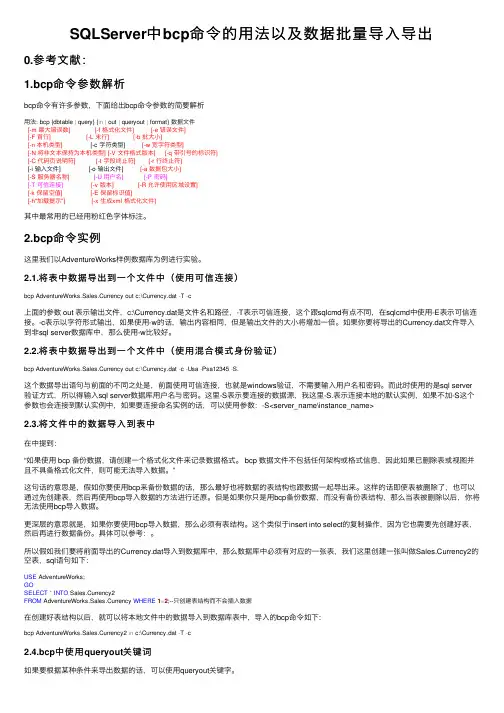
SQLServer中bcp命令的⽤法以及数据批量导⼊导出0.参考⽂献:1.bcp命令参数解析bcp命令有许多参数,下⾯给出bcp命令参数的简要解析⽤法: bcp {dbtable | query} {in| out | queryout | format} 数据⽂件[-m 最⼤错误数][-f 格式化⽂件][-e 错误⽂件][-F ⾸⾏][-L 末⾏][-b 批⼤⼩][-n 本机类型] [-c 字符类型] [-w 宽字符类型][-N 将⾮⽂本保持为本机类型][-V ⽂件格式版本][-q 带引号的标识符][-C 代码页说明符][-t 字段终⽌符][-r ⾏终⽌符][-i 输⼊⽂件] [-o 输出⽂件] [-a 数据包⼤⼩][-S 服务器名称] [-U ⽤户名] [-P 密码][-T 可信连接] [-v 版本][-R 允许使⽤区域设置][-k 保留空值][-E 保留标识值][-h"加载提⽰"][-x ⽣成xml 格式化⽂件]其中最常⽤的已经⽤粉红⾊字体标注。
2.bcp命令实例这⾥我们以AdventureWorks样例数据库为例进⾏实验。
2.1.将表中数据导出到⼀个⽂件中(使⽤可信连接)bcp AdventureWorks.Sales.Currency out c:\Currency.dat -T -c上⾯的参数 out 表⽰输出⽂件,c:\Currency.dat是⽂件名和路径,-T表⽰可信连接,这个跟sqlcmd有点不同,在sqlcmd中使⽤-E表⽰可信连接。
-c表⽰以字符形式输出,如果使⽤-w的话,输出内容相同,但是输出⽂件的⼤⼩将增加⼀倍。
如果你要将导出的Currency.dat⽂件导⼊到⾮sql server数据库中,那么使⽤-w⽐较好。
2.2.将表中数据导出到⼀个⽂件中(使⽤混合模式⾝份验证)bcp AdventureWorks.Sales.Currency out c:\Currency.dat -c -Usa -Psa12345 -S.这个数据导出语句与前⾯的不同之处是,前⾯使⽤可信连接,也就是windows验证,不需要输⼊⽤户名和密码。
sqlserverbcp(数据导入导出工具)一般用法与命令详解

sqlserverbcp(数据导⼊导出⼯具)⼀般⽤法与命令详解bcp是SQL Server中负责导⼊导出数据的⼀个命令⾏⼯具,它是基于DB-Library的,并且能以并⾏的⽅式⾼效地导⼊导出⼤批量的数据。
bcp可以将数据库的表或视图直接导出,也能通过SELECT FROM语句对表或视图进⾏过滤后导出。
在导⼊导出数据时,可以使⽤默认值或是使⽤⼀个格式⽂件将⽂件中的数据导⼊到数据库或将数据库中的数据导出到⽂件中。
下⾯将详细讨论如何利⽤bcp导⼊导出数据。
bcp共有四个动作可以选择。
(1) 导⼊。
这个动作使⽤in命令完成,后⾯跟需要导⼊的⽂件名。
(2) 导出。
这个动作使⽤out命令完成,后⾯跟需要导出的⽂件名。
(3) 使⽤SQL语句导出。
这个动作使⽤queryout命令完成,它跟out类似,只是数据源不是表或视图名,⽽是SQL语句。
(4) 导出格式⽂件。
这个动作使⽤format命令完成,后⽽跟格式⽂件名。
下⾯介绍⼀些常⽤的选项:-f format_fileformat_file表⽰格式⽂件名。
这个选项依赖于上述的动作,如果使⽤的是in或out,format_file表⽰已经存在的格式⽂件,如果使⽤的是format则表⽰是要⽣成的格式⽂件。
-x这个选项要和-f format_file配合使⽤,以便⽣成xml格式的格式⽂件。
-F first_row指定从被导出表的哪⼀⾏导出,或从被导⼊⽂件的哪⼀⾏导⼊。
-L last_row指定被导出表要导到哪⼀⾏结束,或从被导⼊⽂件导数据时,导到哪⼀⾏结束。
-c使⽤char类型做为存储类型,没有前缀且以"\t"做为字段分割符,以"\n"做为⾏分割符。
-w和-c类似,只是当使⽤Unicode字符集拷贝数据时使⽤,且以nchar做为存储类型。
-t field_term指定字符分割符,默认是"\t"。
-r row_term指定⾏分割符,默认是"\n"。
BCP工具
介绍BCP工具三个方面的内容bcp 提供了一种方便快捷的方法,以便在数据库表或视图与操作系统文件之间传输数据。
bcp 可以读取或写入多种格式的文件。
从文件拷入时,bcp 将数据插入现有的数据库表;拷贝到文件时,bcp将覆盖文件以前的任何内容。
1.命令及参数;2.出现的问题及解决方法;3.分析bcp出来的文件结构。
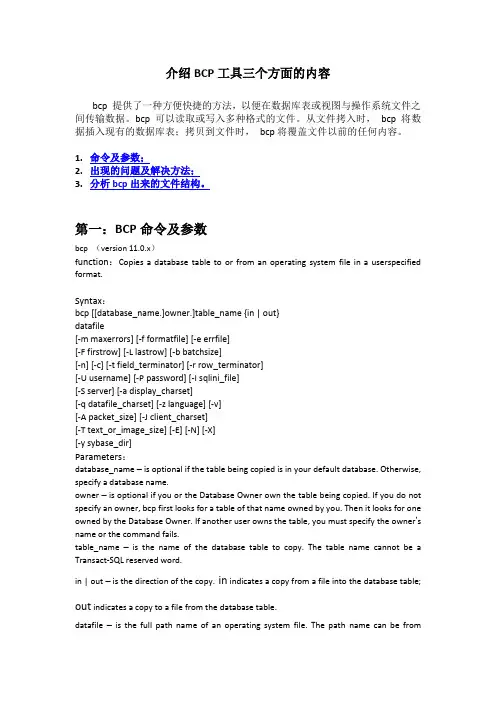
第一:BCP命令及参数bcp (version 11.0.x)f unction:Copies a database table to or from an operating system file in a userspecified format.Syntax:bcp [[database_name.]owner.]table_name {in | out}datafile[-m maxerrors] [-f formatfile] [-e errfile][-F firstrow] [-L lastrow] [-b batchsize][-n] [-c] [-t field_terminator] [-r row_terminator][-U username] [-P password] [-I sqlini_file][-S server] [-a display_charset][-q datafile_charset] [-z language] [-v][-A packet_size] [-J client_charset][-T text_or_image_size] [-E] [-N] [-X][-y sybase_dir]Parameters:database_name – is optional if the table being copied is in your default database. Otherwise, specify a database name.owner – is optional if you or the Database Owner own the table being copied. If you do not specify an owner, bcp first looks for a table of that name owned by you. Then it looks for one owned by the Database Owner. If another user owns the table, you must specify the owner’s name or the command fails.table_name –is the name of the database table to copy. The table name cannot be a Transact-SQL reserved word.in | out – is the direction of the copy. in indicates a copy from a file into the database table; out indicates a copy to a file from the database table.datafile – is the full path name of an operating system file. The path name can be from1–255 characters in length.-m max_errors – is the maximum number of nonfatal errors permitted before bcp aborts the copy. bcp discards each row that it cannot insert (due to a data conversion error, or an attempt to insert a null value into a column that does not allow them), counting eachrejected row as one error. If you do not include this option, bcp uses a default value of 10.-f format_file – is the full path name of a file with stored responses from a previous use of bcp on the same table. After you answer the bcp format questions, bcp asks if you want to save your answers in a format file; creation of the format file is optional. Thedefault file name is bcp.fmt. The bcp program can refer to a format file when copying data, so that you do not have to duplicate your previous format responses interactively. Use this option only when you previously created a format file that you want to use now for a copy in or out. If this option is not used, bcp queries youfor format information interactively.-e errfile – is the full path name of an error file where bcp stores any rows that it was unable to transfer from the file to the database.Error messages from the bcp program appear on your terminal. bcp creates an error file only when you specify this option. If you specify this option, and bcp does not encounter any nonfatal errors, it does not create the error file.-F firstrow – is the number of the first row to copy (default is the first row).-L lastrow – is the number of the last row to copy (default is the last row).-b batchsize – is the number of rows per serial batch of data copied (the default is to copy all the rows in one batch). Each batch is a transaction that is committed at the end of the batch. Batching applies only when bulk copying in; it has no effect on bulkcopying out.-n – performs the copy operation using native (operating system) formats. This option does not prompt for each field. Files in native data format are not human-readable.-c – performs the copy operation with char datatype as the e this format if you are sharing data between platforms. This option does not prompt for each field; it uses char as the default storage type, no prefixes, \t (tab) as the default field terminator, and \n (newline) as the default row terminator.-t field_terminator – specifies the default field terminator.-r row_terminator – specifies the default row terminator.Note:When specifying terminators from the command line with the -t or -r option, escape characters that have special significance to the Windows NT Command Prompt shell (see example 1 on page 1-11). Either place a backslash in front of the special character or enclose it in quotes. This is not necessary when bcp prompts you (interactive mode).-U username – specifies a SQL Server login name. If you do not specify username, bcp uses value of the USERNAME environment variable (the current user’s operating system login name, not the Sybase user name and login).-P password –specifies a SQL Server password. If you do not specify -P password, bcp prompts for a password. If your password is NULL, place the -P flag at the end of the command line by itself.-I sqlini_file – specifies the name and location of the interfaces file (sql.ini) to search when connecting to SQL Server. If you do not specify -I, bcp looks for a file named sql.ini in the ini subdirectory of your Sybase release directory.-S server – specifies the name of the SQL Server to connect to. If you specify -S with no argument, bcp uses the server specified by the DSQUERY environment variable.-a display_charset – runs bcp from a terminal where the character set differs from that of the machine on which bcp is running. (See the System Administration Guide for more information about changing character sets.) -a in conjunction with -J specifies the character set translation file (.xlt file) required for the conversion. Use –a without -J only if the client character set is the same as the default character set.-q datafile_charset – runs bcp to copy character data to or from a file system that uses a character set different from the client character set. -q in conjunction with -J specifies the character set translation file (.xlt file) required for the conversion. In Japanese language environments, the -q flag translates Hankaku Katakana (half-width characters) into Zenkaku Katakana (full-width characters). Use with the argument “zenkaku” and with the -J flag to indicate the client’s Japanese character set (sjis or eucjis). The zenkaku.xlt file was designed totranslate only from terminal display to SQL Server, not from SQL Server to the terminal.Note:The ascii_7 character set is compatible with all character sets. If either the SQL Server’s or client’s character set is set to ascii_7, any 7-bit ASCII character is allowed to pass between client and server unaltered. Other characters produce conversion errors. Character set conversion issues are covered more thoroughly in the System Administration Guide.-z language – is the official name of an alternate language that the server uses to display bcp prompts and messages. Without the –z flag, bcp uses the server’s default language. You can add languages to a SQL Server during installation or add themafterward with the langinstall utility or the stored procedure sp_addlanguage.-v –displays the version number of bcp and a copyright message and returns to the operating system.-A packet_size – specifies the network packet size to use for this bcp session. For example: bcp -A 2048sets the packet size to 2048 bytes for this bcp session. size must be between the values of the default network packet size and max network packet size configuration parameters, one-third the size of the additional network memory configuration parameter, and a multiple of 512. To improve the performance of large bulk copy operations, use network packet sizes that are larger than the default.-J client_charset – specifies the character set to use on the client. bcp uses a filter to convert input between client_charset and the SQL Server character set.-J client_charset requests that SQL Server convert to and from client_charset, the character set used on the client. -J with no argument sets character set conversion to NULL. No conversion takes place. Use this parameter if the client and server use the same character set.The default may not necessarily be the character set that the client is using. See the System Administration Guide for more information about character sets and the associated flags.-T text_or_image_size – specifies in bytes the maximum length of text or image data that SQL Server sends. The default is 32K. If a text or image field is larger than the value of -T or the default, bcp does not send the overflow.-E – explicitly specifies the value of a table’s IDENTITY column. By default, when you bulk copy data into a table with an IDENTITY column, the host file must contain a placeholder for the IDENTITY column (a value of 0 is recommended). The server assigns the row a unique, sequential IDENTITY column value, as bcp inserts each row into the table. If the number of inserted rows exceeds the maximum possible IDENTITY column value, SQL Server returns an error message. To use an explicit IDENTITY column value from the host file for each row, specify the -E flag when copying data into a table. The -E option has no effect on bulk copying out.-N – skips the IDENTITY column. Use this option when you copy data in, if your host data file does not include a placeholder for the IDENTITY column values, or when you copy data out and you do not want to include the IDENTITY column information inthe host file-X –when connecting to the server, bcp initiates the login with clientside password encryption. bcp (the client) specifies to the server that password encryption is desired. The server sends back an encryption key, which bcp uses to encrypt your password, and theserver uses the key to authenticate your password when it arrives. If bcp crashes, the system creates a core file that contains your password. If you did not use the encryption option, the password appears in plain text in the file. If you used theencryption option, your password is not readable.-y sybase_dir – specifies a Sybase directory other than the default Sybase release directory. 第二:出现的问题及解决方法将某表的数据bcp out出来,再次bcp in 的时候,在isql命令行下提示:CSLIB Message: - L0/O0/S0/N24/1/0: cs_convert: cslib user api layer: common library error: The conversion/operation was stopped due to a syntax error in the source field.上Google和论坛寻找解决的方法。
SQL Server数据导入导出工具BCP详解及xp_cmdshell
SQL Server数据导入导出工具BCP详解及xp_cmdshell开发者在线 本文关键词:SQL Server 导入导出bcp exec xp_cmdshellBCP是SQL Server中负责导入导出数据的一个命令行工具,它是基于DB-Library的,并且能以并行的方式高效地导入导出大批量的数据。
BCP可以将数据库的表或视图直接导出,也能通过SELECT FROM语句对表或视图进行过滤后导出。
在导入导出数据时,可以使用默认值或是使用一个格式文件将文件中的数据导入到数据库或将数据库中的数据导出到文件中。
下面将详细讨论如何利用BCP导入导出数据。
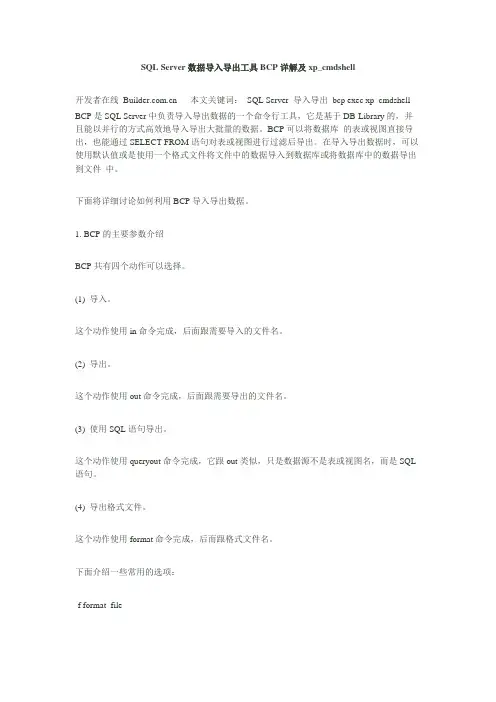
1. BCP的主要参数介绍BCP共有四个动作可以选择。
(1) 导入。
这个动作使用in命令完成,后面跟需要导入的文件名。
(2) 导出。
这个动作使用out命令完成,后面跟需要导出的文件名。
(3) 使用SQL语句导出。
这个动作使用queryout命令完成,它跟out类似,只是数据源不是表或视图名,而是SQL 语句。
(4) 导出格式文件。
这个动作使用format命令完成,后而跟格式文件名。
下面介绍一些常用的选项:-f format_fileformat_file表示格式文件名。
这个选项依赖于上述的动作,如果使用的是in或out,format_file 表示已经存在的格式文件,如果使用的是format则表示是要生成的格式文件。
-x这个选项要和-f format_file配合使用,以便生成xml格式的格式文件。
-F first_row指定从被导出表的哪一行导出,或从被导入文件的哪一行导入。
-L last_row指定被导出表要导到哪一行结束,或从被导入文件导数据时,导到哪一行结束。
-c使用char类型做为存储类型,没有前缀且以"t"做为字段分割符,以"n"做为行分割符。
-w和-c类似,只是当使用Unicode字符集拷贝数据时使用,且以nchar做为存储类型。
BCP导库语句

BCP适合中小零售软件,中小专卖暂不支持1.在进行操作前,请先备份数据库2.首先在D盘新建TESTDB文件夹,并在查询分析器中选择下面语句运行:use kmjxc_proselect 'bcp kmjxc_pro..'+name + ' out '+'d:\testdb\'+name+'.txt -c -Usa -S km8270 -P' FROM SYSOBJECTS WHERE TYPE = 'U'ORDER BY NAME备注:km8270为服务器机器名必须小写把查询的结果集全部复制下来,新建一个文本文件取名为“导出.bat”把结果集复制进去并保存,把该文件存放在d盘目录下。
3.在查询分析器中选择启谋数据库运行select 'bcp kmjxc_pro1..'+name + ' IN '+'d:\testdb\'+name+'.txt -c -Usa -Skm8270 -P ' FROM SYSOBJECTS WHERE TYPE = 'U'ORDER BY NAME备注:kmjxc_pro1为新库库名把查询的结果集全部复制下来,新建一个文本文件取名为“导入.bat”把结果集复制进去并保存,把该文件存放在d盘目录下。
4.运行“导出.bat”(注意:该文件双击即可运行),数据库中的数据会倒出到TESTDB目录中。
5.重新建立新的数据库(新旧数据库版本要一致)6.在查询分析器中运行下面语句:use kmjxc_pro1select 'delete '+name FROM SYSOBJECTS WHERE TYPE = 'U'然后把返回的结果集复制,新建一个查询分析器窗口,把复制的内容粘贴下运行!7.最后运行“导入.bat”,倒入成功后就恢复数据库了!8.检查导入的数据对比在执行以下命令时,因为原数据库中的某些表可能有损坏,会导致执行失败,在错误信息前一行会显示该表名。
SQL2005 数据的导出 bcp 命令
bcp命令是SQL2005 一个实用的数据导出导入工具,我们可以运用这个命令方便的到处导入数据
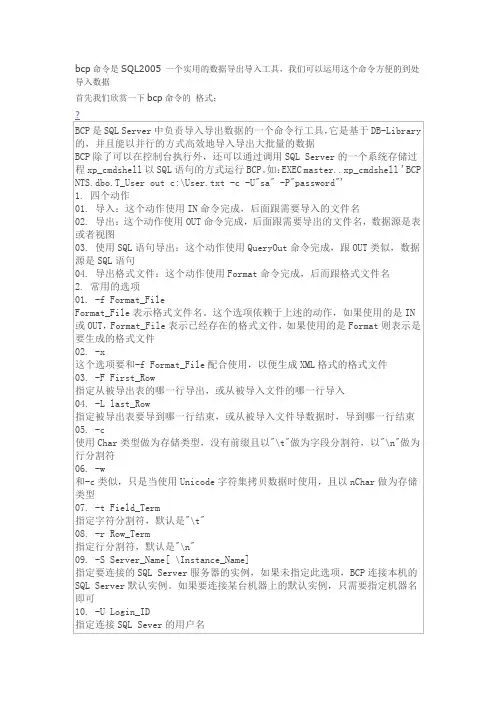
首先我们欣赏一下bcp命令的格式:
就打开了
然后我们执行这个命令就ok了
EXEC master..xp_cmdshell 'bcp "select * from buyV4_TEST..tb_bill_i " quer yout e:\12666.xls -c -S"XXXX" -U"XXXX" -P"XXXX"'
执行这个是用到的存储过程这个是命令数据查询语句导出命令导出路径和文件转为字符char 数据库所在服务器名称XXXX换为数据库账号XXXX换为密码
友情提醒:
1、如果遇到bcp主数据文件无法打开是因为你所要导出的数据的所在盘没有权限这样你需要把这个盘符的everyone赋予他修改权限就可以了
导出的文件是在数据库安装的机器上得哦
2、SQL2000 执行语句是可能会报语法不对提示你格式是什么一堆的你把命令放到一行语法对的情况下应该对的。
sqlserver bcp语句
sqlserver bcp语句SQL Server BCP(Bulk Copy Program)是一种用于高效地将大量数据从文件复制到SQL Server表中的工具。
它可以通过命令行或脚本调用,提供了一种快速、可靠的方式来导入和导出数据。
下面将列举10个关于SQL Server BCP语句的例子。
1. 导出整个表的数据到文件:```bcp [数据库名].[模式名].[表名] out [文件路径] -S [服务器名] -U [用户名] -P [密码] -c -t, -T```这个命令将指定表的所有数据导出到指定的文件路径中,使用逗号作为字段分隔符,并且使用Windows身份验证登录到SQL Server。
2. 导入文件中的数据到表:```bcp [数据库名].[模式名].[表名] in [文件路径] -S [服务器名] -U [用户名] -P [密码] -c -t, -T```这个命令将指定文件中的数据导入到指定的表中,使用逗号作为字段分隔符,并且使用Windows身份验证登录到SQL Server。
3. 导出查询结果到文件:```bcp "SELECT * FROM [数据库名].[模式名].[表名] WHERE [条件]" queryout [文件路径] -S [服务器名] -U [用户名] -P [密码] -c -t, -T ```这个命令将指定查询的结果导出到指定的文件路径中,使用逗号作为字段分隔符,并且使用Windows身份验证登录到SQL Server。
4. 导入文件中的数据到临时表:```bcp [数据库名].[模式名].[表名] in [文件路径] -S [服务器名] -U [用户名] -P [密码] -c -t, -T -h"TABLOCK"```这个命令将指定文件中的数据导入到指定的临时表中,使用逗号作为字段分隔符,并且使用Windows身份验证登录到SQL Server。
bcp参数详解
bcp 说明以用户指定的格式将数据库表复制到操作系统文件或从操作系统文件中复制出来。
bcp 位于$SYBASE/$SYBASE_OCS/bin 中。
Windows NT 实用程序是 bcp.exe,它位于 %SYBASE%\%SYBASE_OCS%\bin 中。
语法 bcp [[database_name.]owner.]table_name [:slice_number] {in | out} datafile[-m maxerrors][-f formatfile][-e errfile][-F firstrow][-L lastrow][-b batchsize][-n][-c][-t field_terminator][-r row_terminator]-U username[-P password][-I interfaces_file][-S server][-a display_charset][-z language][-A packet_size][-J client_charset][-T text_or_image_size][-E][-g id_start_value][-N][-X][-K keytab_file][-R remote_server_principal][-V [security_options]][-Z security_mechanism][-Q][-Y]或bcp -v参数 database_name如果正被复制的表位于缺省数据库或 master 中,则此参数是可选项。
否则,必须指定数据库名。
所有者如果您或数据库所有者拥有正被复制的表,则此参数是可选项。
如果未指定所有者,bcp 首先查找您所拥有的表是否有此名称,然后查找数据库所有者所拥有的表是否有此名称。
如果其他用户拥有此表,则必须指定所有者名,否则命令将失败。
view_name是正在拷出的视图名。
不同类型数据库导出数据文件格式
不同类型数据库导出数据文件格式不同的数据库系统导出数据时,通常会使用特定的文件格式来存储数据。
以下是几种常见数据库系统的数据导出文件格式:1. MySQL:默认的导出格式是 `.sql` 文件,其中包含了用于重新创建数据库结构的 SQL 语句。
使用 `mysqldump` 工具进行导出。
2. PostgreSQL:使用 `pg_dump` 工具进行导出,导出格式为 `.sql` 文件。
可以选择其他格式如 `.csv`, `.json`, `.xml` 等,但这需要安装额外的工具或插件。
3. Oracle:使用 `exp` 或 `expdp` (Data Pump) 工具进行导出,导出格式为`.dmp` 文件。
4. SQL Server:使用 `bcp` 工具或 SQL Server Management Studio 进行导出,导出格式为 `.bcp`, `.txt` 或其他自定义格式。
5. SQLite:SQLite 不像其他数据库系统那样有一个专门的“导出”工具,但可以使用 `.dump` 命令将数据库转储为 SQL 文件。
6. MongoDB:MongoDB 使用 BSON 格式存储数据,但通常导出为 JSON 格式以方便查看和使用。
可以使用 `mongoexport` 工具进行导出。
7. Cassandra (Apache Cassandra):Cassandra 的数据通常以 SSTables 的形式存储,但也可以使用工具如 `cqlsh` 的 `COPY TO` 命令导出为 CSV 或其他格式。
8. CouchDB:CouchDB 的数据存储在 JSON 格式中,通常可以直接查看或使用工具如 `curl` 进行导出。
9. Neo4j:Neo4j 使用 Cypher 作为查询语言,但通常使用 Neo4j Browser 或Neo4j Desktop 进行数据导出,导出格式为 CSV 或其他自定义格式。
业务连续性计划BCP【范本模板】
业务连续性计划事先制定一个完备的业务连续性计划(Business Continuity Planning,缩写为BCP),积极防范并且应变处理灾难发生的一系列后果,将灾难的蔓延和损失控制在企业能够承担的范围以内,已成为现代企业管理范畴内的一个十分重要的任务.【第一部分】BCP的基本要素笼统地说,BCP的目标只有一个,那就是确定并减少危险可能带来的损失,有效地保障业务的连续性.而有关BCP的一些特定目标我们将在以下各个部分中加以描述。
BCP实施的最终结果是:●一组防范危险的评测指标;●一支执行团队,在经过培训后可以处理各种危险事件;●一套计划,提供危险发生时的路线图.该计划应该是充分和完备的,必须详细落实到该计划实施范围内的每一个单位、人员或设备。
我们下面所要讨论的主要是与企业中IT设施相关的内容,没有涉及到企业人员在危险状况下的安全管理问题。
每个企业所制定的BCP都应该有每个企业或者所处行业独有的特色,彼此之间不会完全一致,但大致上说来,一个完备的BCP主要是由以下一些关键部分构成的:一、危险评估危险评估就是认识并分析各种潜在危险的结果.这些危险的来源可能是:●各种区域性的天然灾难,如洪水、地震、疫病等;●人为事故或蓄意破坏造成的严重灾难,如火灾、恐怖主义袭击等;●安全威胁、硬件、网络或通信故障;●灾难性的应用系统错误。
所有的危险都应纳入企业的危险评估范围,并且应对各种危险的可能来源地进行较准确的定位。
对于每一种危险的来源都应该认识到:●危险的类型;●危险的程度;●危险发生的可能性.比如说,如果按照有无警示性先兆来分,各类危险还可以分为:●有些危险可能没有任何先兆而突然发生,无法事先防范;●有些危险可以有一定的先兆,可以迅速启动应急计划加以防范,比如疫病的传播;●有些危险可能从来不会发生。
如果按照危险的破环类型或程度来分,它们对业务的影响可以分为:●经营场所及设备完全破环;●经营场所及设备部分破环;●经营场所及设备完好,但人员不能进入,比如疫病的隔离、恐怖威胁造成的人员输散等。