
三星D838说明书
干擾
任何手機都可能會受到干擾,影響通話音質。
特殊規定
請遵守有關場所的特別規定,在禁止使用手機的 地方,或使用手機可能會引起干擾或產生危險 時,請關上手機。
配件及電池
請使用三星公司專用的配件及電池, 例如耳機及 電腦數據傳輸線。使用非三星公司認可的配件會 損壞您的手機並可能引起危險。
3
目錄
配件簡介
確保所有配件齊備
6 6 7
本手機
按鍵、功能及位置
瀏覽網頁 .......................................... 使用電話簿 ....................................... 發送信息 .......................................... 查看信息 .......................................... 使用藍芽技術..................................... 使用記憶咭 ....................................... 在電視觀看手機顯示屏..........................
SGH-D838 用戶手冊
緊記交通安全
駕駛時切勿使用沒有免提裝置的手機;如要使用電 話,請先停車。
入油時要關機
在入油站或靠近易燃物品和化學劑的地方,切勿使 用手機。
重要安全注意事項
不遵守以下注意事項可能導致危險或 觸犯法例。
乘飛機時要關機
手機會造成干擾。在飛機上使用手機不僅危險而且 屬違法。
在所有醫療設備附近要關機
開始使用
9
開始使用
顯示屏
說明
圖標 顯示各種圖標。 文字與圖形 顯示信息、說明 及您輸入的資 訊。
功能表 聯絡人
來電轉駁功能啟動 第 83 頁 住宅範圍 (如果您註冊了 相關的服務) 辦公室範圍 (如果您註冊 了相關的服務) 國際漫遊網絡 信息 電子郵件 留言信息 連接至免提裝置或耳機 第 85 頁 藍芽功能啟動 第 85 頁 正在播放音樂 暫停播放音樂 已插入記憶咭 第 23 頁
如果電池電量太低,手機將自動關機。請將電池 充電。
8
按鍵和顯示屏
按鍵
執行顯示屏幕最底一行指示的功 能。 在閒置模式下,直接進入常用功 第79頁 能表選項。 在功能表模式下,捲動功能表選 項。 在閒置模式下,啟動網頁瀏覽器。 在功能表模式下,選取反白顯示 的功能表選項。 撥出或接聽電話。 在閒置模式下,存取上次撥出、 未接或已接的電話。 從顯示屏刪除字元及刪除在程式 中已選擇的項目。
智能拼音輸入法、筆劃輸入法、智能英文 (T9) 輸入 法 、英文字母輸入法、數字輸入法、特殊符號和韓文 輸入法
基本功能
進階通話功能
31 34 89 91
功能表
列出全部功能表選項
疑難解答
幫助及個人需要
通話以外的其他功能
使用相機、音樂播放器和其他特殊功能
15
使用相機 .......................................... 15 播放音樂 .......................................... 16
軟鍵功能指示位置 顯示當時分配給兩 個軟鍵的功能。
圖標
1
接收訊號強度 GPRS網絡 連接至 GPRS 網絡 在 GPRS 網絡中傳送數據 通話進行中 身處服務區之外,您不能 撥出或接聽電話 與電腦同步
10
鬧鐘已設定響鬧 第 45 頁 啟動寧靜模式 (震機) 啟動寧靜模式 (靜音) 已設為震機 在通話中,靜音模式啟動 電量圖標
4
健康與安全資訊
功能表綜覽
要存取功能表模式,請於閒置模式下按 < 功能表 >。 1 通話記錄
1 2 3 4 5 6 7 1 2 3 4 5 6 7 8 9 當前聯絡人 未接來電 已撥電話 已接來電 全部刪除 通話時間 通話費用1 聯絡人列表 增加聯絡人 分組 快速撥號 個人名片 本機號碼 電話簿管理 服務號碼 1 資訊號碼 1
網頁存取/ 確認鍵 右軟鍵 修改/ 退出功能表鍵 修改鍵 字母/數字鍵 話筒 特殊功能鍵
6
開始使用
使用手機前的準備事項
安裝電池。
將電池殼蓋上手機。
SIM咭資訊
開始使用
當您申請電話網絡時,會獲得一張插入式SIM (用戶識別模組)咭,其中載入了您的申請詳細 資料,例如PIN及可選擇的服務。
安裝手機並充電
3 程式 ( 繼續 )
11 密碼管理 12 備忘錄 13 SIM 咭應用套件 1
第 48 頁 第 48 頁 第 48 頁 第49頁 第 49 頁 第 50 頁 第 50 頁 第 51 頁 第 51 頁 第 51 頁 第 51 頁 第 51 頁 第52頁 第 52 頁 第 55 頁 第 59 頁 第 60 頁 第 60 頁 第 65 頁 第65頁 第 65 頁 第 66 頁 第 67 頁 第 67 頁
1. 打開手機。 2. 按住 [ ],開啟手機。
3. 如果需要,請輸入PIN碼 並按<確認>。 1. 打開手機。 2. 按住 [ ]。
關機
低電量顯示
當手機電量不足時: • 發出警告音, • 電池低電量信息顯示,並且 • 空電池圖標 閃爍。
離線模式
您可將手機切換到離線模式,在離線模式下,會 停用需要網絡連接的手機功能。如果要在禁止使 用無線裝置的地方 (例如在飛機上及醫院裏) 使用手機,此模式十分有用。 要切換到離線模式,請按 < 功能表 > 並選擇設 定 → 手機設定 → 離線模式 → 開啟。 在離線模式下,您可以使用非無線功能,例如遊 戲、日程表、相機和音樂播放器。
17 18 19 20 21 22 24
開始使用
使用手機前的準備事項
輸入文字
25
安裝手機並充電 ............................................. 7 開機或關機 ......................................... 8 按鍵和顯示屏 ...................................... 9 按鍵............................................................... 9 顯示屏 ......................................................... 10 存取功能表 .................................................. 11 自訂手機 .......................................... 12 撥出/接聽電話.................................. 15
• 離線模式 在飛機上,請將手機切換到 離電子郵件 收發包括圖像、影片和音效 附件的電子郵件。 • 多媒體信息服務 (MMS) 收發包括文字、圖像、影片 和音效組合的多媒體信息。 • Java 玩 JavaTM 內置遊戲及下載 新遊戲。 • 錄音機 錄製備忘錄或聲音。
重要安全注意事項
防水
本手機並不防水,請保持手機乾爽。
• 使用不正確的電池可引起手機爆炸。 • 請依製造商的指引棄置已損耗的電池。
長期使用高音量的耳機,您的聽覺會受到 傷害。
小心使用
只可在正常位置 (耳邊)使用手機。開機後, 不要無故用手觸摸天線。
合格檢修服務
只有合資格的維修人員,才可安裝或檢修您的手 機。 詳細的安全資訊,請參閱第 91 頁的 「健康與安 全資訊」 。
→
• 相機和攝錄機 使用手機中的相機模塊來拍 照或錄影。
本手機的特殊功能
• 圖像編輯器 裁剪、調整相片大小、旋轉 和裝飾相片。 • 音樂播放器 將手機當作媒體播放器來播 放音樂檔案。 • 相片列印 列印出您的相片,保留美好 的回憶。
表示您需要按瀏覽鍵來捲動至特定的 選項,然後選取該選項。 ] 表示手機上的按鍵。例如 [ ]
取出電池。 插入SIM咭。
將旅行充電器插入手機。
將充電器插入標準交流電源插座。 如果已經開機,請 。 先按住 [ ] 關機 確保SIM咭金色接 觸點向下朝著手機。
7
開始使用
手機充電完畢後 (電池圖標停止閃爍) ,請 從電源插座取下充電器。 從手機上拔下充電器。
開機或關機
開機
在禁止使用手 機的地方,請 不要開機。
1. 視乎您所在國家或服務供應商的不同,顯示屏上顯 示的圖標可能存在差異。
存取功能表
使用軟鍵 軟鍵的功能視乎您目前使用的 功能而變化。顯示屏最底一行 顯示了軟鍵當時的功能。
開始使用
選擇
返回
按左軟鍵選擇反 白顯示的選項
按右軟鍵返回前一 級功能表。
11
開始使用
選擇一個選項
1. 按適當的軟鍵。 2. 按瀏覽鍵,移動至上一個 或下一個選項。 3. 按 < 選擇 >、< 確認 > 或 [ ],確認顯示的功能或反 白顯示的選項。 4. 要退出,選擇以下方法之 一。 • 按 < 返回 >,移至上 一級功能表。 • 按[ 式。 ],返回閒置模
緊急通話
輸入當地的緊急電話號碼,然後按 。
勿讓兒童接觸手機
本手機及其配件應放在兒童接觸不到的地方。
1
關於本手冊
本用戶手冊簡要介紹如何使用本手機。要快速瞭 解本手機的基本知識,請參閱 「開始使用」和 「通話以外的其他功能」 。 本手冊中將會出現以下指示圖標: 表示您需要特別注意隨後有關安全或 手機功能的資訊。 表示您可以在參考頁數獲得有關詳情 。
6 個人檔案 ( 繼續 )
三星 V-NAND SSD 860 PRO 2018 数据表说明书

DISCLAIMERSAMSUNG ELECTRONICS RESERVES THE RIGHT TO CHANGE PRODUCTS, INFORMATION AND SPECIFICATIONS WITHOUT NOTICE.Products and specifications discussed herein are for reference purposes only. All information discussed herein may change without notice and is provi ded on an “AS IS” basis, without warranties of any kind. This document and all information discussed herein remain the sole and exclusive property of Samsung Electronics. No license of any patent, copyright, mask work, trademark or any other intellectual property right is granted by one party to the other party under this document, by implication, estoppels or otherwise. Samsung products are not intended for use in life support, critical care, medical, safety equipment, or similar applications where product failure could result in loss of life or personal or physical harm, or any military or defense application, or any governmental procurement to which special terms or provisions may apply. For updates or additional information about Samsung products, contact your nearest Samsung office.COPYRIGHT © 2018This material is copyrighted by Samsung Electronics. Any unauthorized reproductions, use or disclosure of this material, or any part thereof, is strictly prohibited and is a violation under copyright law. TRADEMARKS & SERVICE MARKSThe Samsung Logo is the trademark of Samsung Electronics. Adobe is a trademark and Adobe Acrobat is a registered trademark of Adobe Systems Incorporated. All other company and product names may be trademarks of the respective companies with which they are associated.For more information, please visit /ssd and .To download the latest software & manuals, please visit /samsungssdRevision HistoryTHE SAMSUNG SSD 860 PROThe Samsung SSD 860 PRO is the new Samsung’s Client-PC SATA SSDs, specially designed for high-end computing devices. Building on the reputation of the Samsung SSD 850 PRO, the world’s first V-NAND SSD for Client PCs, the new Samsung SSD 860 PRO drives achieve top class performance for SATA SSDs, offering improvements in speed, reliability, and compatibility. The 860 PRO comes equipped with Samsung’s newly designed MJX controller along with the latest 2bit MLC V-NAND architecture.Professional PerformanceThe legacy Serial-ATA (SATA) interface faces the theoretical bandwidth limitation of 600MB/s which many SSD manufacturers have tried to reach over the years. Among them, Samsung, which first brought V-NAND technology to the market through the 850 PRO, continuously strives to improve product reliability and performance, even with the SATA interface limitations. Powered by Samsung’s latest 64-layer 2bit MLC V-NAND technology, the 860 PRO, the successor of the 850 PRO, delivers best-in-class sequential read (up to 560 MB/s) and write (up to 530 MB/s) speeds and along with high sustainable performance for the professionals who always pursue best achievement Ultimate ReliabilityThe 860 PRO offers guaranteed endurance and ultimate reliability, with up to approximately 8 times higher Total Bytes Written (TBW) than the 850 PRO and an industry-leading 5-year limited warranty. Up to 4,800 TBW powered by the latest V-NAND technology, which is the highest TBW rating industry-wide, will give you absolute confidence in your SSD*.*All documented endurance test results are obtained in compliance with JESD218 standards. Please visit for detailed information on the standard. Furthermore, the 860 PRO assures long-term dependable performance with minimal performance degradation. The 860 PRO provides up to 25% better sustained performance compare to that of its predecessor. This means you can experience the high performance of the SSD even with heavy daily workload.Smart Compatibility with a Refined ControllerThe 860 PRO delivers expanded system compatibility. The refined ECC algorithm and revamped controller generate strong sustainable performance near SATA’s limits, and the improved queued trim provides for better Linux compatibility. The 860 PRO is uniquely designed for not only Client-PCs but also NASs (Network Attached Storages) and workstations thanks to its Samsung 2bit MLC V-NAND composition.Advanced Data EncryptionThe 860 PRO provides multiple advanced data encryption features. Self-Encrypting Drive (SED) security technology will help keep data safe at all times. The 860 PRO includes an AES 256-bit hardware-based encryption engine to ensure that your personal files remain secure. Being hardware-based, the encryption engine secures your data without the performance degradation that you may experience with software-based encryption. Also, the 860 PRO is compliant with various advanced security management solutions (TCG Opal and Encrypted Drive-IEEE1667). Samsung Data Migration and Magician SoftwareThe 860 PRO comes with Samsung Data Migration and Magician software, which is easy to install and makes management of you SSD simple.* Samsung Data Migration software is easy to use, yet provides a very powerful “Custom Cloning”feature that makes migration effortless even when the source data is greater than the SSD’s capacity. Magician provides personalized firmware checks and additional functions tailored for individual users’drives. It even updates the firmware automatically to make sure that the drives’ performance stays up to date.*To download Samsung Data Migration and Magician, please visit /samsungssdTECHINCAL SPECIFICATIONSmay differ from the labeled total capacity.2)Sequential performance measurements are based on CrystalDiskMark v. 5.0.2. Random performance measurements are based on IOmeter1.1.0.Performance may vary based on SSD’s firmware version, system hardware & configuration. Test system configuration: Intel®****************** GHz, DDR3 1333MHz 4GB, OS-Windows 7 Ultimate 64bit, Chipset-ASUS P8H77-V3)Power consumption is measured with IOmeter1.1.0 version with Intel Core i7-7700K @ 4.2GHz, SAMSUNG DDR4 16GB, Gigabyte GA-Z270X, OS –Windows 10 PRO K x644)All documented endurance test results are obtained in compliance with JESD218 Standards. Please visit for detailed information onJESD218 Standards5)TBW means Total Bytes Written.6)Please refer to the detailed warranty statement here at /samsungssd.7)Warranty provides coverage for the stated time period or the TBW, whichever comes first.PRODUCT LINEUPto the warranty provided for this product, please visit /ssd and .。
多普达838说明书 使用手册.
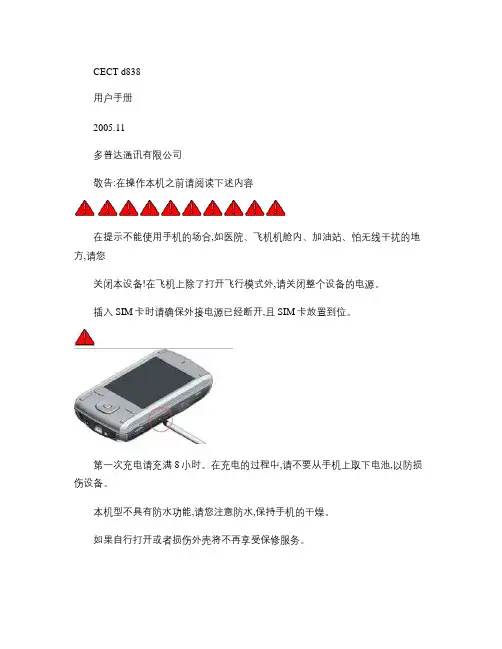
汉字词组/同音字联想的切换。
z使用标准键盘输入
z将设备横向放置,将整个屏幕往上推,这样
就可以使用标准键盘了。
z
快速顺序点击→
可以用来切换输入
发。可以选择A全角英文、A半角英文、拼全
角中文拼半角中文。
z输入中文时,按回车键确认,当出现带下划
线的汉字时,按退格键选择待选字,按空格
本机型不具有防水功能,请您注意防水,保持手机的干燥。
如果自行打开或者损伤外壳将不再享受保修服务。
请使用由多普达公司指定的附件和认可的第三方软件,否则如果设备出现问题多普达公
司将不承担任何责任。
请注意保护好手机屏幕,防止磨损或挤伤。此类损伤均被认为是人为损坏。
请及时备份数据!dopod公司不承担因产品故障导致信息丢失而造成的一切直接或间接
损失。尤其在更换电池前更加需要备份数据。
本设备中包含有一个锂聚合物电池。如果电池处理不当,将会有着火和燃烧的危险。不
要分解、挤压、刺穿电池,不要短路电池外部的接头,更不要将其投入火中或者水中。
不要试图打开或者维修该电池,只能使用产品指定的电池来进行更换。请正确处理电池
不要随意丢弃。
由于软件版本更新而造成界面和功能变更,恕不另行通知。
1.“今日”界面图标示例
状态图标含义状态图标含义
系统音量/振动设置静音模式
状态图标含义状态图标含义
振动模式电池正在充电
电池电量很低主电池电量充足
电池电量极低主电池电量不足
网络信号最强状态无SIM卡、SIM卡无效或不在服务区
处于拨叫或通话状态有未接来电
免提模式搜索网络
GPRS已附着(未连接GPRS已连接
韩国SAMSUNG(三星电子) 数码监控器材 说明书
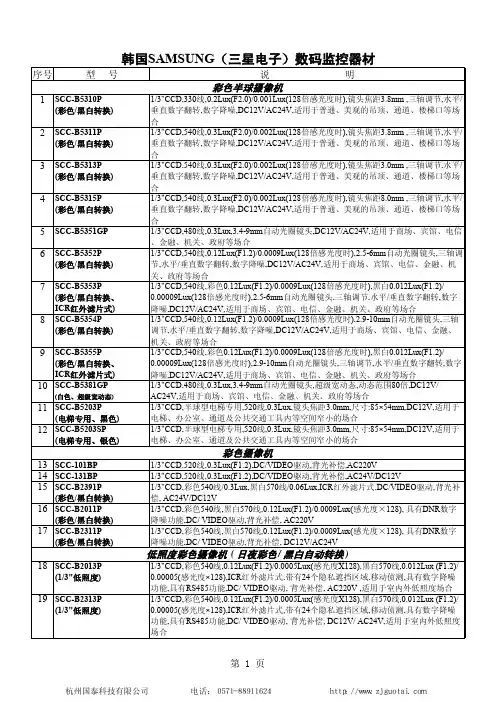
23 SCC-A2313P
(1/2"超感低照度)
1/2"EX-view HAD CCD,彩色540线,0.036Lux(F1.2)/0.0001Lux(感光度X256),黑白570 线,0.0036Lux (F1.2)/ 0.00001(感光度×256),ICR红外滤片式,带有24个隐私遮挡区域,移动 侦测,具有数字降噪功能,具有RS485功能,DC/ VIDEO驱动, 背光补偿,DC12V/ AC24V,适 用于室内外低照度场合
一体化彩色摄像机
28 SCC-C4201P
1/4"CCD,480线,0.3Lux(感光度×4) /0.01Lux(感光度×128),内置22倍光学变焦,焦距:3.679.2mm,10倍电子放大,背光补偿,自动光圈,自动/手动聚焦,屏幕菜单设置, DC12V/1A
29 SCC-C4203AP
(彩色/黑白转换)
21 SCC-B2307P
(1/3"超感低照度)
22 SCC-A2013P
(1/2"超感低照度)
1/3"EX-view HAD CCD,彩色500线,0.2Lux(F1.2)/ 0.001Lux(感光度×128),黑白530线 /0.03Lux (F1.2)/ 0.0002Lux(感光度×128),ICR红外滤片式,具有强光抑制功能,移动侦测, 内置×2-×10数码变焦(带画中画), DC/VIDEO驱动,背光补偿,AC220V 1/3"EX-view HAD CCD,彩色500线,0.2Lux(F1.2)/ 0.001Lux(感光度×128),黑白530线 /0.03Lux (F1.2)/ 0.0002Lux(感光度×128),ICR红外滤片式,具有强光抑制功能,移动侦测, 内置×2-×10数码变焦(带画中画), DC/VIDEO驱动,背光补偿,DC12V/AC24V 1/2"EX-view HAD CCD,彩色540线,0.036Lux(F1.2)/0.0001Lux(感光度X256),黑白570 线,0.0036Lux (F1.2)/ 0.00001(感光度×256),ICR红外滤片式,带有24个隐私遮挡区域,移动 侦测,具有数字降噪功能,具有RS485功能,DC/ VIDEO驱动,背光补偿,AC220V,适用于室 内外低照度场合
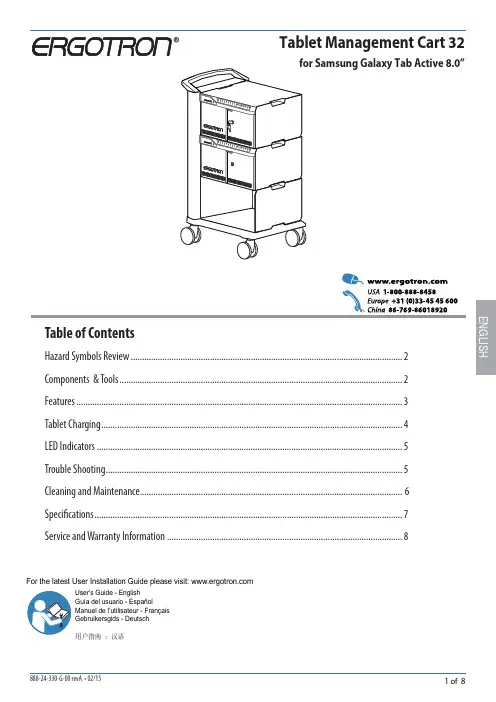
三星Galaxy Tab Active 8.0管理车位用户指南说明书
User's Guide - EnglishGuía del usuario - EspañolManuel de l’utilisateur - Français Gebruikersgids - Deutsch用户指南 : 汉语ENGLISHTablet Management Cart 32Table of ContentsHazard Symbols Review ........................................................................................................................2Components & Tools .............................................................................................................................2Features ................................................................................................................................................3Tablet Charging .....................................................................................................................................4LED Indicators .......................................................................................................................................5Trouble Shooting ...................................................................................................................................5 Cleaning and Maintenance.................................................................................................................... 6Specifi cations ........................................................................................................................................7Service and Warranty Information .. (8)For the latest User Installation Guide please visit: Safety Hazard ReviewThese symbols alert users of a safety condition that demands attention. All Charging and Managed Cart users should be able to recognize and understand the signifi cance of the following Safety Hazards if encountered on the Cart or within Cart documentation. Children who are not able to recognize and respond appropriately to Safety Alerts should not use the Cart without adult supervision!ComponentsOne Tablet Management Cart includes 4 keys, 12.5’(3.8m) power cordENGLISHFeaturesAuxilary Power Outlet(s) USB PortFans (one for each module)Cord Wrap Bay and Power Cord 2 Locking CastersHandleLED Power IndicatorIndividual Status Indicators (ISI)Tablet Access DoorsBottom Shelf 2 Non-locking Casters12345Verify blue power LED is not fl ashingTablet ChargingTo begin charging the tablets, plug in the Cart power cord.The power cord is used to turn the Cart power on and off . Charging occurswhenever the cart power cord is connected.NOTE: The cart power cord acts as the connect/disconnect device switching power off and on.Insert Samsug Galaxy Tab Active 8.0” devices into cart. Screen should be facing left and pen side should be inserted fi rst for a correct connection.Verify ISI is on and solid.Close door and lock when done.NOTE: Product is designed for use with case that ships with Samsung Galaxy Tab Active 8.0”. Please verify case isinstalled.ENGLISHPower Indicator – communicates sync and charge status with the following signals :LED - IndicatorsOff=No power to the cart.On - solid =Galaxy Tab Active devices are charging.On - fast blink =Fault Status. Please make sure the Samsung Galaxy Tab Active 8.0”i s s eated c orrectly w ithin u nit a nd c art i s o perating w ithin s pecifi ed operating temperature. Contact Erg otron Customer Support if problem continues.Blue Power On LED Flashing: Samsung Galaxy Tab Active 8.0” possibly inserted incorrectly. Try reinserting, verifying the screen is facing to the leftTrouble ShootingThis cart is intended for use only with loading as indicated. Use with loads greater than indicated may result in instability causing possible injury.Cart and Equipment Electric Safety There are specifi c risks associated with the use of equipment having power cables. You must be aware of, and avoid these risks when the Cart is located in closeproximity to children.WARNING: Failure to observe the following Electrical Safety notices can result in fire or death by electric shock. re or death by electrical shock.• Double Pole / Neutral Fusing• Inspect power cables thoroughly before each use.• Do not use cables that are damaged.• Insert the plug completely into the outlet. • Grasp the plug to remove from the outlet. • Do not unplug by pulling on the cable.• Do not use excessive force to make connections.• Do not plug the cable into an extension cable.• Do not remove, bend or modify any metal prongs or pins of cable.• Do not drive, drag or place objects over the cable.• Do not walk on the cable.• Avoid overheating. Uncoil the cable and do not cover it with any material.• Do not run cable through doorways, holes in ceilings, walls or floors.Keep the Cart away from water. • Do not use it when wet.• Do not place the Cart in close proximity to fl ammable liquids or gases. Cart Use Safety There are specifi c risks associated with the use of Cart when moving or stationary (for charging or storage). You must be aware of, and avoid these risks when theWARNING: Failure to observe the following Cart Use Safety notices may result in serious personal injury or equipment damage.Only Adults should move this cart.• Do not allow anyone to sit, stand, or climb on the Cart. • Do not lift the Cart from the bottom.• Do not block the fans and vent openings. To prevent overheating, leave at least 127 mm (5-inch) clearance around fans and vents.The Cart is designed to be used indoors only.• Do not use the Cart to transport or store equipment other than what has been noted in this guide.• Do not use the Cart to store liquids or cleaning supplies.• Do not place heavy objects on the Cart surface or shelf.– The maximum weight capacity of the top surface is 11.4 kg (25 lb). – The maximum weight capacity of the shelf is 16 kg (35.2 lb).The cart power cord acts as the connect/disconnect device switching power off and on.CAUTION: Changes or Modifi cations not expressly approved byErgotron could void the user’s authority to operate the equipment.Moving the Cart• Before moving the Cart:1. Disconnect the power cable from the wall.2. Make sure the cable is wrapped and secure.3. Close and lock the doors.4. Remove items from the top work surface.5. Unlock the casters.• Push (do not pull) the Cart for optimum maneuverability and to prevent muscle strain.• Do not move the Cart across rough, uneven or irregular surfaces such as gravel.Parking the CartObserve these safety alerts for times when the cart is stationary:• Do not park the Cart in areas of heavy traffi c.• Do not run cables through doorways, holes in ceilings, walls, or fl oors.• Do not run cables across hallways, classrooms, or other areas where they will be walked on.• Do not leave Cart unattended in areas where children have access.• Keep Cart doors closed and locked whenever it is unattended or parked for charging or storage.• Keep Cart casters locked whenever it is unattended.Cleaning and MaintenanceENGLISHPower system100-120 V~, 12A, 50/60 Hz or220-240 V~, 5.5A, 50/60 Hz Depending on region and model of cart.Tip Test/Angle: 10 degreesEnvironmental Temperature range:Operating 0° to 40°C (32° to 104°F)Storage -40° to 60°C (-40° to 140°F)Relative humidity (maximum):Operating 10%–90% (non condensing)Storage 5%–95% (non condensing)Altitude (maximum): 2000 m (6,562 ft)Compatibility: Made forSamsung Galaxy Tab Active 8.0” only.Cart dimensions23”W x 18.4”D x 39.3”H (58.4 x 46.7 x 100 cm)Cart weight (w/o equipment)32 Unit Cart 100 lbs (45.4 kg)Rated weight capacityTop Work Surface 25 lb (11.3 kg)Bottom Shelf (32 Unit Carts, only) 25 lb (11.3 kg)LED status indicators (ISI) Lights indicate charge status .32 Unit Cart32 LED lightsCooling/ventilationOne 5-volt DC continuous operation fan in each module. External power outlet(s)One or two outlets, depending on region100-120 V~, 3A, 50/60 Hz or 220-240 V~, 1.5A, 50/60 HzShipping dimensions46.1 x 29.9 x 22.8 in (117 x 76 x 58 cm)Shipping weight32 Unit Cart 147 lb (67 kg)Specifi cationsThis device complies with Part 15 of the FCC Rules. Operation is subject to the following two conditions: 1) This device may not cause harmful interference.2) This device must accept any interference received, including interference that may cause undesired operation. CAN ICES3(A)/NMB-3(A).Changes or modifi cations not expressly approved by the Ergotron could void the user's authority to operate the equipment.Service and WarrantyFor local customer care phone numbers visit: 1234567-1234。
三星 SGH-F308 说明书

• 名片 编制带有您的电话号码和 个人信息的名片。无论何 时向他人做自我介绍,都 方便您使用的电子名片。
• 管理目录 记录每天、每周和每月的 日程。
3
手机的特殊功能
目录
配件介绍
6
您可能拥有下列配件
您的手机
6
手机部位图
开始使用
7
使用手机的初始步骤
在本说明书中,有下列指示图标:
表示您需要仔细阅读关于安全或手机 功能的信息。
表示您可以在提到之页上了解到更多 的信息。
→
表示您需要按下导航键,滚动到指定
的选项,然后选择该选项。
[ ] 表示手机上的按键。例如 [ ]。
< > 表示软键,手机屏幕上显示该软键的 功能。例如 < 功能表 >。
• 多媒体开启 手机具有不可同时使用的 双显示屏,可单独使用手 机功能或多媒体播放器功 能。
网址
中国印刷 编码 : GH68-14046A 中文 05/2007. 版本 1.1
SGH-F308 使用说明书
重要安全措施
如未遵守以下注意事项,可能会引起危险 或违反法律。
版权信息 • Bluetooth® 是世界各地 Bluetooth SIG 公司
基本功能
35
高级通话功能
功能表功能
38
列出所有功能选项
疑难解答
79
帮助和个人需要
健康和安全信息
80
功能表
在待机模式下按 < 功能表 >,进入功能表模式。
1 通话记录
p. 38
4 浏览器
1 近期联系人 2 未接来电 3 已拨电话 4 已接来电 5 全部删除 6 通话时间 7 通话费用1
三星SGH-B308说明书

打开或关闭手机1.按住一秒以上,可打开手机。
2.是软键,并遵循屏幕说明,设置时间和日期。
3.如欲关闭手机,按住两秒以上。
改变显示语言1.在待机模式下,按下功能表软键。
2.选择设定→话机设定→语言。
3.选择语言。
拨打电话1.2.如欲结束通话,按下接听电话1.当手机被呼叫时,按下接听软键或可接听电话。
按下拒绝软键或可拒接电话。
2.按下可结束电话。
调节音量1.在待机模式下,按下功能表软键。
2.选择设定→声音设定→响铃音量。
3.按下上或下,可调节音量。
4.按下确认软键。
在接通或通话时,按下上或下调节听筒音量。
改变来电铃声1.在待机模式下,按下功能表软键。
2.选择设定→声音设定→响铃类型。
3.选择铃声。
重拨最近所用号码1.在待机模式下,按下2.按下上或下,选择电话号码。
3.按下拨号。
如欲返回上一级C。
功能表1. 通信录1.1搜寻1.2新建条目1.3呼叫组搜寻1.4呼叫组编辑1.5速拨1.6全部复制1.7全部删除1.8存储器状态2. 通话记录2.1未接来电2.2已接来电2.3已拨电话2.4全部删除2.5通话时间2.6通话费用*3. 移动梦网4. 中国移动服务4.1无线音乐4.2游戏社区4.3新闻天气4.4 飞信Fetion4.5手机电视4.6 在线理财4.7 新业务推荐4.8 SIM卡应用4.9 我的梦网4.10 移动梦网5. 信息5.1 发信息5.2 我的信息5.3 模板5.4 全部删除5.5 设定5.6存储器状态6. 客户服务6.1心机服务指南6.2掌上营业厅6.3客户服务热线6.4客户经理6.5我的梦网6.6客户服务设置7. 我的收藏7.1我的B3087.2 百宝箱7.3 图片7.4 声音7.5 彩信贺卡7.6其他8. 应用8.1 闹钟8.2 日历8.3 FM收音机8.4 时间和日期8.5计算器8.6 记事本8.7语音记录8.8货币兑换9. 设定9.1 话机设定9.2 声音设定9.3 网络服务*只在SIM卡支持时可以使用。
三星 GPRS 移动电话 SGH-D488 说明书
World Wide Web * 本手册中的一些内容可能与手机不同,取决于安装的软件或服务提供商。
Printed in China Code No.: GH68-05995A Chinese. 03/2005. Rev. 1.1无线电发射型号核准证:2004CP1411 (CMII ID)入网许可证号码:02-5827-042446GPRS移动电话SGH-D488用户手册目录安全措施 (7)配件介绍 (9)您的手机 (10)手机部位图 (10)显示屏 (14)外置显示屏 (17)服务指示灯 (18)照相机 (18)内置天线 (19)开始使用 (20)安装/取出SIM卡 (20)安装/取下电池/电池充电 (21)开机和关机 (25)选择功能和选项 (26)基本功能 (28)拨打电话 (28)结束通话 (30)接听来电 (30)拒绝接听 (31)调节音量 (31)通话中访问选项 (32)使用耳机 (40)输入文本 (41)改变文本输入法 (42)使用手写板 (43)智能拼音输入法 (44)中文笔画输入法 (45)智能英文输入法 (48)基本英文输入法 (50)数字输入法 (51)特殊符号输入法 (51)使用功能表 (52)访问功能表 (52)功能表 (53)3目录4电话簿功能表................................................ 59查找 (电话簿 1.1 )................................................ 59增加记录 (电话簿 1.2 )......................................... 61分组查找 (电话簿 1.3 )......................................... 63快速拨号 (电话簿 1.4 )......................................... 63全部复制到话机 (电话簿 1.5 ).............................. 65由红外线发送全部 (电话簿 1.6 )........................... 65全部删除 (电话簿 1.7 )......................................... 67本机号码 (电话簿 2.1 )......................................... 68分组设定 (电话簿 2.2 )......................................... 69存储器状态 (电话簿 2.3 )..................................... 69服务目录 (电话簿 3.1 ).. (70)SIM-AT (SIM 应用工具箱) (71)通话记录....................................................... 72未接来电 (功能 2.1 )............................................ 72已接来电 (功能 2.2 )............................................ 72已拨电话 (功能 2.3 )............................................ 73全部删除 (功能 2.4 )............................................ 73通话时间 (功能 2.5 )............................................ 74通话费用 (功能 2.6 ).. (74)网络服务....................................................... 76呼叫转移 (功能 3.1 )............................................ 76呼叫限制 (功能 3.2 )............................................ 77呼叫等待 (功能 3.3 )............................................ 79网络选择 (功能 3.4 )............................................ 80主叫号码 (功能 3.5 )............................................ 81线路选择 (功能 3.6 ).. (81)声音设定....................................................... 82来电 (功能 4.1 )................................................... 82信息 (功能 4.2 )................................................... 83开/关机 (功能 4.3 )............................................ 83连接指示音 (功能 4.4 )........................................ 84按键音 (功能 4.5 )............................................... 84分钟提示音 (功能 4.6 )........................................ 84安静模式 (功能 4.7 )............................................ 85翻盖铃声 (功能 4.8 )............................................ 85整点报时 (功能 4.9 )............................................ 85通话中提示 (功能 4.10 ) (86)目录5信息............................................................... 87短信息 (功能 5.1 )............................................... 87多媒体信息 (功能 5.2 )........................................ 93WAP 短信 (功能 5.3 )........................................ 103预置信息清单 (功能 5.4 ).................................. 103语音信箱 (功能 5.5 ).......................................... 104小区信息 (功能 5.6 ).......................................... 105设定 (功能 5.7 )................................................. 106存储器状态 (功能 5.8 )...................................... 109娱乐功能..................................................... 110WAP 浏览器 (功能 6.1 )..................................... 110三星乐园 (功能 6.2 ).......................................... 115图铃宝盒 (功能 6.3 ).......................................... 116JAVA 世界 (功能 6.4 )....................................... 119管理目录..................................................... 123新备忘录 (功能 7.1 ).......................................... 123日历 (功能 7.2 )................................................. 125记事本 (功能 7.3 )............................................. 127时钟 (功能 7.4 )................................................. 128闹钟 (功能 7.5 )................................................. 129计算器 (功能 7.6 )............................................. 131换算 (功能 7.7 )................................................. 132定时器 (功能 7.8 )............................................. 133秒表 (功能 7.9 )................................................. 134字典 (功能 7.10 )............................................... 135照相机......................................................... 136拍照 (功能 8.1 )................................................. 136我的相片 (功能 8.2 ).......................................... 141我的相册 (功能 8.3 ).......................................... 141全部删除 (功能 8.4 ).......................................... 141批量删除 (功能 8.5 ).......................................... 142设定 (功能 8.6 )................................................. 142存储器状态 (功能 8.7 )...................................... 143话机设定..................................................... 144显示屏设定 (功能 9.1 )...................................... 144问候语 (功能 9.2 )............................................. 145语言 (功能 9.3 ). (146)目录6保密设定 (功能 9.4 ).......................................... 146自动重拨 (功能 9.5 ).......................................... 149清晰话音 (功能 9.6 ).......................................... 149翻盖接听 (功能 9.7 ).......................................... 149任意键应答 (功能 9.8 )...................................... 150侧键 (功能 9.9 )................................................. 150红外线启动 (功能 9.10)..................................... 150出厂设置 (功能 9.11 )........................................ 151ALS (线路选择)....................................... 152疑难解答..................................................... 153访问密码..................................................... 156话机密码......................................................... 156PIN 码............................................................. 156PIN2码........................................................... 156PUK 码........................................................... 157PUK2码......................................................... 157呼叫限制密码.................................................. 157健康和安全信息........................................... 158电池安全......................................................... 158使用电池的注意事项....................................... 159交通安全......................................................... 160使用环境......................................................... 160电子设备......................................................... 160可能发生危险的环境....................................... 162紧急呼叫......................................................... 162其它重要安全信息.......................................... 163保养和维护..................................................... 164术语解释..................................................... 165快速指南.. (169)安全措施使用无线移动话机前请仔细阅读以下注意事项。
三星SCX-4833HD机器使用说-文档资料
扫描功能
基本扫描操作:USB 连接方式
1 将单页文档正面朝下放在文档玻璃板上,或者将文档正面朝上装入进稿器。
2 从控制面板中选择
(扫描)> 扫描到 PC > 本地 PC。
注意: 需要通过 Samsung Easy Printer Manager程序 > 切换到高级模式 > 扫描至 PC 设置 下将扫描启动设置为:从设备面板启用扫描。并保存设置。
三星SCX-4833HD机器使用说明
SCX-4833HD使用培训
主要培训内容
1.机器各项使用功能:
➢ 控制面板按键功能 ➢ 机器菜单内容和操作方法 ➢ 介质和纸盘设定 ➢ 调整打印属性 ➢ 基本复印操作 ➢ 基本扫描操作 ➢ 基本传真操作
2.维护打印机:
➢ 更换墨粉盒 ➢ 清洁打印机
3.简单故障排除:
在选定菜单的可用选项间滚动,以及增大或减小值。
打开“菜单”模式,在可用菜单间滚动。 确认屏幕上的选择。 拨号或输入字母数字字符。
存储常用传真号码与电子邮件地址,或者搜索已存储的传真号码或电子邮件地址。
在就绪模式下重拨上次拨打号码,或在编辑模式下在传真号码间插入暂停。
随时停止操作。 打开或关闭电源,或从节能模式中唤醒机器。要关闭机器,请按住此按钮超过 3 秒钟。 表明机器的状态。 开始执行作业。
基本复印操作:
1 选择控制面板上的
(复印)。
2 将单页文档正面朝下放在文档玻璃板上,或者将文档正面朝上装入进稿器。
3 根据需要自定义缩小/放大、暗度和原稿类型等复印设置。
4 使用向左/向右箭头或数字键盘输入复印份数。
5 按开始,进行复印。
6 如果需要在操作期间取消复印作业,按 (停止/清除),复印将停止。
三星 SyncMaster 788DF 说明书
z 显示器可能会发生故障,导致电击或失火。
在暴风雨或雷电期间,或者要有相当长一段时间不用时,请把插头从插座上拔 下。
z 如果不这样做,有可能造成电击或起火。
不要试图用拉电线或信号电缆的办法来移动显示器。 z 这样由于会损坏电缆而造成破坏、电击或起火。
不要直接往显示器上喷洗涤剂。
使用我们推荐的洗涤剂,并用光滑的布。 z 这样你可以避免镀膜的显像管受到损伤,或者显示器机箱表面的漆溶化, 机箱开裂或褪色。 z 你可以在任何一家三星服务中心买到我们推荐的洗涤剂。
如果插头和插脚之间的接头有灰尘或脏了,用一块干布好好地擦干净。 z 脏的接头会造成电击或火灾。
清洁
在清洁显示器的机箱或显像管的表面时,要用一块稍稍润湿了的软纤维布来擦 拭。 不要用水来清洁显示器。要用水稀释了的柔和的洗涤剂。 (有些洗涤剂包含大量基于酒精的溶剂,这会损坏(颜色改变)显示器机箱或使它 开裂。 显像管上的防眩光/抗静电的表面镀膜也会受到影响。) 使用前先用水稀释洗涤剂 (1:10的比例)。
“进入”按钮。 [ ]
电源按钮[ ]
电源指示灯
打开 OSD 菜单。也用于退出 OSD 菜单或回到上一菜单。
这些按钮让你选择突出并调整菜单里的一些项目。 用于选择 OSD 菜单 使用这个按钮来打开或关闭显示器。 表示正常模式或节电模式。
有关节电功能的进一步信息请看手册里说明的节电器。为了节省能源,在不需要它,或长时 间不去看它的时候,请把你的显示器关掉。
不要使用损坏了的或松动了的插头。
z 这会引起电击或起火
不要去拉电线来试图拔出插头,也不要用湿手去触摸插头。 z 这会引起电击或起火。
samsung portable ssd t3 用户手册说明书
Rev. 1.0Samsung Portable SSD T3用户手册MU-PT250B / MU-PT500B / MU-PT1T0B / MU-PT2T0B法律声明免责声明SAMSUNG ELECTRONICS 保留更改产品、信息和规格的权利,恕不另行通知。
此处说明的产品和规格仅供参考。
此处说明的信息均按“原样”提供,不附带任何形式的担保。
如有更改,恕不另行通知。
本文档及此处说明的所有信息均为Samsung Electronics 的唯一、专有财产。
本文档未通过隐含、禁止反悔或其他任何方式将任何一方的专利、版权、标志作品、商标或其他任何知识产权授予另一方。
Samsung 产品不适用于生命支持、急救护理、医药、安全设备等发生产品故障可能导致生命危险、个人或人身伤害的应用,也不适用于任何军事或防御应用,以及可能采用特殊条款或规定的政府采购。
有关Samsung 产品的更新或其他信息,请与附近的Samsung 营业处联系。
所有的品牌名称、商标和注册商标都属于其各自的所有者。
Copyright © 2016 Samsung Electronics Co., Ltd. 保留所有权利。
* 本用户手册中显示的图像可能与实际产品有差异,并且本手册中的内容如有更改,恕不另行通知。
Samsung Portable SSD T3目录使用入门 (1)包装清单 (1)系统要求 (1)使用T3 (3)在PC 上使用T3 (3)连接到Android 移动设备 (7)警告 (10)备份重要数据和担保 (10)与忘记密码有关的担保 (10)遵从安全标准并连接到经认证的设备 (10)冲击 (10)拆解、损坏、移除 (10)使用原厂配件 (10)在适当的温度和湿度下使用产品 (10)连接到PC 以外的设备或Android 设备 (10)拔下缆线 (10)病毒扫描和更新 (11)清洁产品 (11)远离儿童、婴儿和宠物 (11)产品规格和认证 (12)产品规格 (12)认证 (12)FCC(美国联邦通信委员会) (13)CE(欧盟符合性) (13)WEEE(废旧电气电子设备) (13)使用入门在使用Samsung Portable SSD T3(简称为“T3”)之前,请通读本用户手册并且以安全和恰当的方式使用产品。