
oracle中trunc()和to_char()函数用法
oracle中trunc()和to_char()函数⽤法
-----trunc(for date)
select sysdate from dual; --当前时间 2016/9/7 10:32:04
select trunc(sysdate) from dual;--取当天 2016/9/7
select trunc(sysdate,'yyyy') from dual; --取当年第⼀天 2016/1/1
select trunc(sysdate,'mm') from dual; --取当⽉第⼀天 2016/9/1
select trunc(sysdate,'dd') from dual; --取当天 2016/9/7
select trunc(sysdate,'d') from dual; --返回当前星期的第⼀天 2016/9/4
select trunc(sysdate,'hh') from dual; --返回当前时间,精确到⼩时 2016/9/7 10:00:00
select trunc(sysdate,'mi') from dual; --返回当前时间,精确到分钟 2016/9/7 10:32:00
--trunc(for number)
select trunc(2016.11) from dual; --2016
select trunc(2016.99) from dual; --2016
select trunc(2016.99,1) from dual; --2016.9
select trunc(2016.99,3) from dual; --2016.99
select trunc(2016.99,-1) from dual; --2010
select trunc(2016.99,-2) from dual; --2000
select trunc(2016.99,-4) from dual; --0
select trunc(2016,1) from dual; --2016
select trunc(2016,-1) from dual; --2010
select to_char(sysdate,'yyyy-mm-dd hh24:mi:ss') as nowTime from dual; --⽇期转化为字符串 2016-09-07 10:33:11
select to_char(sysdate,'yyyy') as nowYear from dual; --获取时间的年 2016
select to_char(sysdate,'mm') as nowMonth from dual; --获取时间的⽉ 09
select to_char(sysdate,'dd') as nowDay from dual; --获取时间的⽇ 07
select to_char(sysdate,'hh24') as nowHour from dual; --获取时间的时 10
select to_char(sysdate,'mi') as nowMinute from dual; --获取时间的分 33
select to_char(sysdate,'ss') as nowSecond from dual; --获取时间的秒 11
select to_char(sysdate,'day') as nowDay from dual; --获取当天是星期⼏ 星期三
select to_char(sysdate,'D') as nowDay from dual; --获取当天是星期⼏ 4
select floor(sysdate - to_date('2016-08-05','yyyy-mm-dd')) from dual; --取两个⽇期间的天数 33
oracle常用函数使用大全Oracle除法(转)

oracle常⽤函数使⽤⼤全Oracle除法(转)
/chenmeng2192089/article/details/9155625
⼀、运算符
算术运算符:+ - * / 可以在select 语句中使⽤
连接运算符:|| select deptno|| dname from dept;
⽐较运算符:> >= = != < <= like between is null in
逻辑运算符:not and or
集合运算符: intersect ,union, union all, minus
要求:对应集合的列数和数据类型相同 查询中不能包含long 列
列的标签是第⼀个集合的标签
使⽤order by时,必须使⽤位置序号,不能使⽤列名
例:集合运算符的使⽤:intersect ,union, union all, minus
select * from emp intersect select * from emp where deptno=10 ;
select * from emp minus select * from emp where deptno=10;
select * from emp where deptno=10 union select * from emp where deptno in (10,20); --不包括重复⾏
select * from emp where deptno=10 union all select * from emp where deptno in (10,20); --包括重复⾏
⼆.ORACLE⽇期时间函数⼤全
TO_DATE格式(以时间:2007-11-02 13:45:25为例)
Year:
yy two digits 两位年 显⽰值:07
yyy three digits 三位年 显⽰值:007
yyyy four digits 四位年 显⽰值:2007
Oracle 日期时间函数的用法

Oracle 日期时间函数的用法
在oracle中处理日期大全 TO_DATE格式 Day: dd number 12 dy abbreviated fri
day spelled out friday ddspth spelled out, ordinal twelfth Month: mm
number 03 mon abbreviated mar month spelled out march Year: yy two digits
98 yyyy four digits 1998
在oracle中处理日期大全
TO_DATE格式
Day:
dd number 12
dy abbreviated fri
day spelled out friday
ddspth spelled out, ordinal twelfth
Month:
mm number 03
mon abbreviated mar
month spelled out march
Year:
yy two digits 98
yyyy four digits 1998
24小时格式下时间范围为: 0:00:00 - 23:59:59....
12小时格式下时间范围为: 1:00:00 - 12:59:59 ....
1.
日期和字符转换函数用法(to_date,to_char)
2.
select to_char( to_date(222,'J'),'Jsp') from dual
显示Two Hundred Twenty-Two
3.
求某天是星期几
select to_char(to_date('2002-08-26','yyyy-mm-dd'),'day') from dual;
星期一
select
to_char(to_date('2002-08-26','yyyy-mm-dd'),'day','NLS_DATE_LANGUAGE =
oraclesql日期比较:
oraclesql⽇期⽐较:
共三部分:
第⼀部分:oracle sql⽇期⽐较:
第⼆部分:Oracle 获取当前⽇期及⽇期格式
第三部分:
获取昨天:
select trunc(SYSDATE-1) from dual;
检查⼀下:
select to_char (trunc(SYSDATE-1),'yyyy-mm-dd HH24:MI:SS') from dual;
获取上个⽉第⼀天00:00:00:
select add_months(trunc(sysdate,'MON'),-1) from dual
select add_months(trunc(sysdate,'MON'),-13) from dual也可以
获取上个⽉今天00:00:00:
SELECT trunc(add_months(sysdate,-1))FROM dual
获得本季度第⼀天
SELECT TRUNC(add_months(SYSDATE,0),'Q') FROM dual
获得上季度第⼀天
SELECT TRUNC(add_months(SYSDATE,-3),'Q') FROM dual
获得去年1⽉1⽇
to_char(add_months(trunc(sysdate, 'Year'), -12), 'YYYY-MM-DD')
between and 前⾯的时间⼩后⾯的时间⼤
to_date('20110105','YYYYMMDD')-7 此处 -7代表天
第四部分:
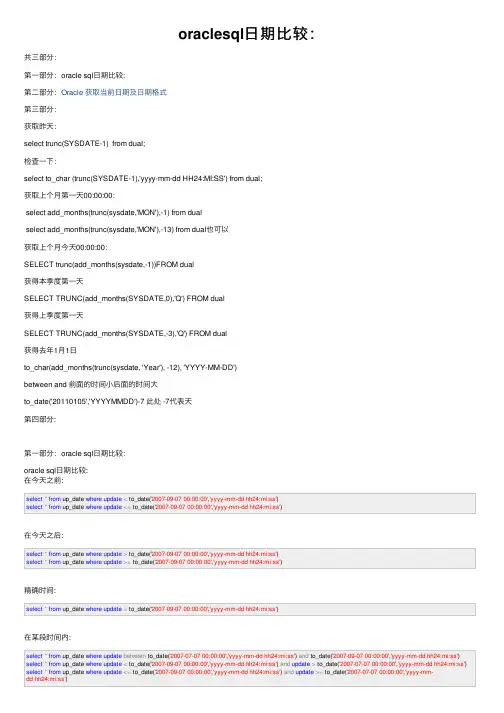
第⼀部分:oracle sql⽇期⽐较:
oracle sql⽇期⽐较:
在今天之前:
select * from up_date where update < to_date('2007-09-07 00:00:00','yyyy-mm-dd hh24:mi:ss')select * from up_date where update <= to_date('2007-09-07 00:00:00','yyyy-mm-dd hh24:mi:ss')
oracle日期处理全集__日期加减全活儿

1、add_months(d,n) 日期d加n个月
SQL> SELECT SYSDATE AS This_Day,add_months(SYSDATE,1) AS Next_Day FROM dual;
THIS_DAY NEXT_DAY
-------------- ------------
08-9月 -10 08-10月-10
2、last_day(d) 包含d的月份的最后一天的日期
SQL> select last_day(sysdate) as last_day from dual;
LAST_DAY
-----------
30-9月 -10
3、new_time(d,a,b) 时区的日期和时间d在b时区的日期和时间
SQL> select to_char(sysdate,'YYYY-MM-DD HH24:MI:SS') as china,
to_char(new_time(sysdate,'est','GMT'),'YYYY-MM-DD HH24:MI:SS') as GMT
from dual;
CHINA GMT
------------------- -------------------
2010-09-08 09:51:50 2010-09-08 14:51:50
4、next_day(d,day) 比日期d晚,由day指定的周几的日期
SQL> select sysdate as this_day, next_day(sysdate,7) as next_sat from dual;
THIS_DAY NEXT_SAT
-------------- --------------
08-9月 -10 11-9月 -10
N天前的日期:
SQL> select to_date(to_char(sysdate-5, 'yyyy-MM-dd'), 'yyyy-MM-dd') from dual;
trunc函数date_trunc()

trunc函数date_trunc()
PostgreSQL date_trunc() 截断⽇期函数,完成定时时间语法
Oracle有⼤量的⽇期函数可供使⽤,trunc, new_time,months_between,next_day,last_day,add_months,round等函数.当然PostgreSQl 也有⼤量的时间函数,详情请移步. 所以在此只说明
Postgresql 中的TRUNC取断函数.
1.⾸先介绍⼀下Oracle的trunc函数:
select trunc(sysdate) from dual //返回当前⽇期 sysdate: 系统时间
select trunc(sysdate,'year') from dual; //返回本年的第⼀天
select trunc(sysdate,'month') from dual; //返回本⽉的第⼀天
select trunc(sysdate,'q') from dual; //返回本季度的第⼀天
select to_char(trunc(sysdate),'yyyy-mm-dd hh24:mi:ss') from dual; //获取当天的零时零分零秒
select trunc(sysdate,'mi') from dual; //获取当前分
2. 接下来 介绍 Postgresql 的trunc函数.
截断数字类型函数trunc为数字截断函数.移步.
截断⽇期类型函数date_trunc(text,time/timestamp/timestamptz);
PostgreSQL:trunc函数
这个PostgreSQL教程解释了如何在语法和⽰例中使⽤PostgreSQL trunc函数。
描述
PostgreSQL的TRUNC函数返回⼀个数截断到⼀定的⼩数位数。
句法
PostgreSQL中trunc函数的语法是:trunc( number, [ decimal_places ] )
to_char()、to_date()的区别

to_char()、to_date()的区别
to_char 是把⽇期或数字转换为字符串
to_date 是把字符串转换为数据库中得⽇期类型
还记得以前初次接触oracle时对⼀些函数还不是很熟悉,⽼是弄错,⽐如在mysql中可以运⾏,但在oracle中就⼀直报错,也找不到具体的原因就会很烦恼,特别是⼩组⾥mysql和oracle混⽤的情况下,
如下sql在oracle中就会报错,⽽在mysql中就正常运⾏,后来才知道是两种库的校验⽅式不同select t.create_time,t.* from td_f_opt_201908 t where t.create_time > '20190813';
具体原因是这样的:‘20190813’是属于字符串,在oracle中需要进⾏转换成⽇期形式,此处⽤to_date()函数,如下:select T.CREATE_TIME,T.* from TD_F_ORDER_KFK T where T.create_time > to_date('2019-08-13','yyyy-MM-dd hh24:mi');
另⼀个⽇期函数to_char(),⼀般⽤在mybatis等持久层框架中,因为查出的数据默认是字符串,所以需要转换成我们需要的⽇期格式,不然就会在页⾯显⽰出很尴尬的情况,到时候热⼼的测试姐姐⼜要找你聊天了,具体⽤法如下:
oracle中to_date详细用法示例(oracle日期格式转换)
oracle中to_date详细用法示例(oracle日期格式转换)
作者: 字体:[增加 减小] 类型:转载 时间:2014-01-13 我要评论
这篇文章主要介绍了oracle中to_date详细用法示例,包括期和字符转换函数用法、字符串和时间互转、求某天是星期几、两个日期间的天数、月份差等用法
TO_DATE格式(以时间:2007-11-02 13:45:25为例)
1. 日期和字符转换函数用法(to_date,to_char)
复制代码代码如下:
select to_char(sysdate,'yyyy-mm-dd hh24:mi:ss') as nowTime from dual; //日期转化为字符串
select to_char(sysdate,'yyyy') as nowYear from dual; //获取时间的年
select to_char(sysdate,'mm') as nowMonth from dual; //获取时间的月
select to_char(sysdate,'dd') as nowDay from dual; //获取时间的日
select to_char(sysdate,'hh24') as nowHour from dual; //获取时间的时
select to_char(sysdate,'mi') as nowMinute from dual; //获取时间的分
select to_char(sysdate,'ss') as nowSecond from dual; //获取时间的秒
2. 字符串和时间互转
复制代码代码如下:
select to_date('2004-05-07 13:23:44','yyyy-mm-dd hh24:mi:ss') from
oracle中to_date详细用法示例(oracle日期格式转换)
oracle中to_date详细⽤法⽰例(oracle⽇期格式转换)
这篇⽂章主要介绍了oracle中to_date详细⽤法⽰例,包括期和字符转换函数⽤法、字符串和时间互转、求某天是星期⼏、两个⽇期间的天
数、⽉份差等⽤法
TO_DATE格式(以时间:2007-11-02 13:45:25为例)
1. ⽇期和字符转换函数⽤法(to_date,to_char)
select to_char(sysdate,'yyyy-mm-dd hh24:mi:ss') as nowTime from dual; //⽇期转化为字符串
select to_char(sysdate,'yyyy') as nowYear from dual; //获取时间的年
select to_char(sysdate,'mm') as nowMonth from dual; //获取时间的⽉
select to_char(sysdate,'dd') as nowDay from dual; //获取时间的⽇
select to_char(sysdate,'hh24') as nowHour from dual; //获取时间的时
select to_char(sysdate,'mi') as nowMinute from dual; //获取时间的分
select to_char(sysdate,'ss') as nowSecond from dual; //获取时间的秒
2. 字符串和时间互转
select to_date('2004-05-07 13:23:44','yyyy-mm-dd hh24:mi:ss') from dual
select to_char( to_date(222,'J'),'Jsp') from dual //显⽰Two Hundred Twenty-Two
3.求某天是星期⼏
select to_char(to_date('2002-08-26','yyyy-mm-dd'),'day') from dual; //星期⼀
oracle中to_date详细用法示例(oracle日期格式转换) 2
oracle中to_date详细⽤法⽰例(oracle⽇期格式转换)
1. ⽇期和字符转换函数⽤法(to_date,to_char)
select to_char(sysdate,'yyyy-mm-dd hh24:mi:ss') as nowTime from dual; //⽇期转化为字符串
select to_char(sysdate,'yyyy') as nowYear from dual; //获取时间的年
select to_char(sysdate,'mm') as nowMonth from dual; //获取时间的⽉
select to_char(sysdate,'dd') as nowDay from dual; //获取时间的⽇
select to_char(sysdate,'hh24') as nowHour from dual; //获取时间的时
select to_char(sysdate,'mi') as nowMinute from dual; //获取时间的分
select to_char(sysdate,'ss') as nowSecond from dual; //获取时间的秒
2. 字符串和时间互转
select to_date('2004-05-07 13:23:44','yyyy-mm-dd hh24:mi:ss') from dual
select to_char( to_date(222,'J'),'Jsp') from dual //显⽰Two Hundred Twenty-Two
3.求某天是星期⼏
select to_char(to_date('2002-08-26','yyyy-mm-dd'),'day') from dual; //星期⼀
select to_char(to_date('2002-08-26','yyyy-mm-dd'),'day',
sqlto_char日期转换字符串
sqlto_char⽇期转换字符串
1、转换函数
与date操作关系最⼤的就是两个转换函数:to_date(),to_char() to_date() 作⽤将字符类型按⼀定格式转化为⽇期类型:
具体⽤法:to_date('2004-11-27','yyyy-mm-dd'),前者为字符串,后者为转换⽇期格式,注意,前后两者要以⼀对应。
如;to_date('2004-11-27 13:34:43', 'yyyy-mm-dd hh24:mi:ss') 将得到具体的时间
多种⽇期格式:
YYYY:四位表⽰的年份
YYY,YY,Y:年份的最后三位、两位或⼀位,缺省为当前世纪
MM:01~12的⽉份编号
MONTH:九个字符表⽰的⽉份,右边⽤空格填补
MON:三位字符的⽉份缩写
WW:⼀年中的星期
D:星期中的第⼏天
DD:⽉份中的第⼏天
DDD:年所中的第⼏天
DAY:九个字符表⽰的天的全称,右边⽤空格补齐
HH,HH12:⼀天中的第⼏个⼩时,12进制表⽰法
HH24:⼀天中的第⼏个⼩时,取值为00~23
MI:⼀⼩时中的分钟
SS:⼀分钟中的秒
SSSS:从午夜开始过去的秒数
to_char():将⽇期转按⼀定格式换成字符类型
SQL> select to_char(sysdate,'yyyy-mm-dd hh24:mi:ss') time from dual;
TIME
-------------------
2004-10-08 15:22:58
即把当前时间按yyyy-mm-dd hh24:mi:ss格式转换成字符类型
在oracle中处理⽇期⼤全
TO_DATE格式
Day:
dd number 12
dy abbreviated fri
day spelled out friday
ddspth spelled out, ordinal twelfth
Month:
mm number 03