
【人教版】高中英语必修二:Unit 3 Computers 教案
Unit 3 Computers I. 单元教学目标II. 目标语言III. 教材分析与教材重组1. 教材分析本单元以computers为话题,旨在通过单元教学,综合听、说、读、写等多种形式,使学生了解计算机和信息技术的产生和发展过程及其在我们的学习、工作、娱乐等生活中所起的重要作用,激发学生对信息技术的兴趣。
1.1 Warming up提供几幅与计算机有关的图片,形象地说明了计算机的发展历程,并用三个问题引发学生对这一话题的思考,从而起到热身的作用。
1.2 Pre-reading根据文章内容预设问题,检查学生对computers相关知识及应用的了解。
学生对computers的了解可能参差不齐,这更能激发学生想获取更多知识的欲望,从而引出下面的阅读文章——WHO AM I?。
1.3 Reading中以别致的标题WHO AM I?引起学生的好奇心,使学生迫不急待地阅读这篇文章,并判断出“I”是computer,从而对文章的内容印象更深刻。
文章以第一人称的形式按时间先后顺序讲述了computers的产生、发展和现状,并用拟人化的口吻表达了computers乐于为人类服务的精神。
1.4 Comprehending 1 通过scanning的方式完成反映计算机发展历程的时间进程;2 通过填表的形式帮助学生宏观梳理文章结构,找出每个段落的主题句(论点)及具体的支持性论据;3 是读后讨论,要求学生结合自己的生活实际讨论计算机如何改变了我们的生活。
1.5 Learning about language分词汇(Discovering useful words and expressions)和语法(Discovering useful structures)两大部分。
Discovering useful words and expressions 1 根据单词释义写出相对应的词汇,考查学生对WHO AM I? 文章中的重要词汇及短语的理解。
2 是以对短文填词完型的形式考查学生对几个重点词汇在篇章中的运用。
3 以personalize的形式练习几个表时间状语的短语的用法。
Discovering useful structures 是学习现在完成时的被动语态。
1 是让学生根据例子提示在WHO AM I?文章中找出两个含有现在完成时的被动语态的句子,初步了解这一时态的形式。
2 是根据例句提示把所给的现在完成时句子变为被动语态。
3 通过欣赏一首小诗进一步理解现在完成时的被动语态的用法。
1.6 Using language从听、说、读、写四个部分强化学生的语言应用能力。
Listening and Speaking 以“信息技术”为子话题展开听说活动。
说的活动主要是就信息技术各种形式的优势和劣势展开讨论,并用所给的表reasoning的功能项目展开讨论,决定哪种类型是最有用的。
Reading, speaking and writing以“芯片”为子话题展开读、说和写的活动。
阅读文章介绍了叫一个叫Andy的机器人的故事,故事以第一人称的拟人话手法来写,说明了计算机芯片在机器人领域的应用。
1 根据文章内容完成Andy的个人简历,检验学生对一些具体信息的掌握。
2 激发学生的想象力,让他们设计出自己的机器人,并能用简历的形式描述。
3 是写作任务,学生根据所给范文和2中的notes写篇文章,介绍自己设计的机器人。
1.7 LISTENING 材料的话题衔接Reading, speaking and writing的话题,介绍了三个不同的机器人。
1 听前预测。
2 听大意。
3 听细节完成表格。
1.8 TALKING根据假设情境在听力的基础上展开讨论,讨论每个机器人的优势和劣势,最终做出决定并给出理由,同时也是对前面所学的功能项目的复习应用。
1.9 USING WORDS AND EXPRESSIONS通过各种形式练习本单元的重点词汇和短语。
USING STRUCTURES设计了各种活动练习巩固本单元的语法项目。
1.10 LSITENING TASK也是以机器人为话题,从机器人的权利这一角度展开听力活动,引发学生思考机器人和人类的异同点及机器人应该拥有的权利。
1.11 READING TASK 阅读材料介绍了一种未来机器人——体育机器人,文章为科幻类型,预测了机器人发展的前景。
1.12 SPEAKING TASK是任务型活动,紧接着READING TASK的话题,让学生运用想象力俩俩结对做一个针对体育机器人的采访,为校报准备新闻素材。
1.13 WRITING TASK是SPEAKING TASK的书面输出活动,根据采访活动内容和范文结构提示写篇采访稿。
2. 教材重组2.1 将Warming up、Pre-reading、Reading和Comprehending整合在一起,上一节“精读课”。
2.2 将Learning about Language和Workbook中的USING WORDS AND EXPRESSIONS及USING STRUCTURES整合为一节“语言学习课”。
2.3 将Using language中的Listening and Speaking设计为一节“听说课”。
2.4 将Using language中的Reading, speaking and writing及Workbook中的LISTENING和TALKING整合为一节“综合技能课(一)”。
2.5 将Workbook中的LISENING TASK、READING TASK、SPEAKING TASK以及WRITING TASK整合为另一节“综合技能课(二)”。
3. 课型设计与课时分配(经教材分析,根据学情,本单元可以用五课时教完)1st Period Intensive reading2nd Period Language study3rd Period Listening and Speaking4th Period Integrative skills (I)5th Period Integrative skills (II)V. 分课时教案The First Period Intensive ReadingTeaching goals 教学目标1. Target language 目标语言a. 重点词汇和短语simplify logically technological revolution solve from…on personalas a result totally so…that network Web application explore anyhow human raceb. 重点句子Over time my memory has developed so much that, like an elephant, I never forget anything I have been told!And my memory became so large that even I couldn’t believe it!2. Ability goals 能力目标Enable students to learn about the development and history of computers.3. Learning ability goals 学能目标By finishing the timeline and the chart, help students grasp the basic structure and main idea of the passage.Teaching important and difficult points 教学重难点Understand how details are used to support topic sentences.Teaching methods 教学方法Prediction, scanning and discussion.Teaching aids 教具准备Projector and tape recorder.Teaching procedures & ways 教学过程与方式Step I Warming-upT: How many of you have computers in your home? Please put up your hands.Ss respond accordingly.T: What do you usually do on your computers?Ss: Type documents/homework, listen to music, watch videos, play games, search on the Internet, send mails …T: When I were at your age, I knew nothing about computers. Most Chinese families never heard about it. However, in recent years, computers have become more and more popular, and most families in cities have one or more than one computer intheir home. And some families in villages also have their own computers.Computers make life more convenient and colorful. However, it took a long time for humans to have computers that we see today. Now look at the pictures on page17 and discuss what they have in common. Then think about Questions 2 & 3. Suggested answers:1.These pictures are all technological inventions.2.From these pictures, we know computers have experienced a long developmentprocess, and the development will never stop.3.(There may be various answers.)Step II Pre-readingPredictionLet students predict the content of the passage according to the pictures and the title. This will involve students in active thinking and exploring.Then let them make a list of the ways computers are used today.Sample list:date processingindustrial designlearning and teaching aidsTV program editingentertainment (watch TV/video, listen to music, play games, online chat…) communication (e-mail, e-card, instant message)…T: Now look at the inventions in activity 3. First check their meanings in your dictionaries. Then put them in the order according to the time when they appeared. Help students understand the meanings of the words: analytical, calculate and universal.Note:Universal machine is also known as Alan Turing's “universal computing machine”, is capable of computing any algorithm.Students may have different answers. They will check it after reading the passage.T: Have you put them in the right order? You will find it after reading the passage. Now turn to page 18 please.Step III ReadingSkimmingGet students read the whole passage and try to get the main idea of it.After readingT: What does “I” in the title refer to?Ss: Computer.T: What is the main idea of the passage?Ss: The passage is mainly about the history and development of computers. ScanningT: Correct! Now read the passage and finish the timeline. With this timeline, you will have a clear idea of the development of computer.Check the answers.T: The passage has three paragraphs. Find out the topic sentence of each paragraph, and the details that are used to support the topic sentences. Then complete the chart in activity 2.Suggested answers:T: From this chart, you will know the basic structure of this passage. As you may have found the topic sentences are not standing there alone, they are supported with details and date, which make the topic sentences more convincing. Now I will play the tape of this passage. Listen and find out/underline the difficult words and expressions.Teacher gives some explanations.T: What can be “over time” replaced by?Ss: As time goes by.T: How do you understand the word “simplify”? Look! (on the board: simple+-ify). -ify is a suffix which means to turn into, make or become. For example, beautify. So if you know the meaning of “simple”, you can easily get the meaning of “simplify”. Who can tell me its meaning?S: To make something easier or less complicated.T: What does “it” in line 9 refer to?Ss: It refers to the fact that computer was programmed by an operator who used cards with holes.T: Why was Alan Turing called computer’s real father?S: I guess that’s because Alan made computer more powerful, which could solve any difficult mathematical problem.T: What does “this reality” in line 15 refer to?S: It refers to the reality that computer had grown as large as a room.T: In paragraph two, there are two sentences which contain the use of “so…that…”structure. Underline them and study carefully.Show the following on the screen/board:●Over time my memory has developed so much that, like an elephant, I neverforget anything I have been told!And my memory became so large that even I couldn’t believe it!Help students sum up the form and function of this structure:Form:so + adj./adv. + that + clauseFunction:This structure is used when emphasizing the degree or amount of something by saying what the result is.Step IV DiscussionDeal with activity 3 on page 19. Let students discuss how computers have changed our lives?Sample discussion:S1: I think it’s impossible to live without computers!S2: What makes you say that? My grandparents didn’t use a computer and they were still able to entertain themselves, to operate big machines, to analyze data, to make robots and so on.S1: You are right. But computers do change the way we live. They change the way we learn by providing distance-learning programs. They change the way wecommunicate with the use of e-mail and instant messenger. They change the way we obtain information with Internet search engine such as Google and Baidu.They change the way we deal with documents and pictures.S2: I agree. Can you imagine what our life would be like If we could not use computers any more?S2: We would go back to the world when everything goes slowly. For example, send mails via train or air plane, which takes several days or even long; go to libraries to search for information, where limited information are provided; spend long time to solve difficult mathematical problems etc. And on the other hand, we may have more time for outdoor activities instead of spending much time on computer. S1: Yes, computers changed our lives both in a good way and in a bad way. It depends on how we make use of it. I hope we can make good use if it.T: Do you want to see how cyber friends answer this question? Look at the screen. Show the following on the screen or let students visit the web page:(One the screen)User 1Computers have made it easier for us to access a wealth of information and have all but rendered printer encyclopedias obsolete. They have also made it easier and cheaper to advertise our business anywhere we wish and do business with anyone anywhere in the world. On the downside however, computers have also made it easier for sexual predators to find victims, for criminals to steal our hard-earned money, and to even steal our identity, something nearly unheard of just a few decades ago. Also, children are more likely to sit in front of a computer and chat when they could just as easily speak with their friends on a telephone or go outside and play like children used to before the "computer revolution". As with any new technology, there are good and bad points, but in the end the general public through their actions will determine whether or not computers have actually improved our lives.User 2Of course!!!!! They have changed the way we shop, play, chat, work and more.User 3They have made us a lazy generation.User 4A computer has changed my life certainly even still at a very young age. It's fulfilled my dreams, knowledge and much more. For some it's gained them employment and giving others something to do. It's opened a new world of gaming, chatting and finding advice and information. I COULDN'T LIVE WITHOUT ONE!User 5Well, they made our lives easier, the made us lazier and they gave us the chance to have some adventure when we are bored.User 6Majority of "addicted" computer users lack "real life" social skills these days.User 7They hurt my eyes.User 8Computers change our attitudes, the way we live, the way we express ourselves, the way we are too others, views on life, views overall, how we dress, what we listen too, what we think of one another, how we work, interests. Basically everything without computers we wouldn’t have the internet and like newspapers radios magazines and television we get these all on the internet. These change how we are so basically everything about it. Also we get addicted and learn about things that maybe we shouldn’t. Also can get into trouble e.g. downloading, piracy all done with a computer. Good things are that computers have helped reach forward into the future.Helps with technology, education and will help the future generations. Soon everything will be run by computers the good thing for us is we don’t have to lift a finger the bad thing is will computers take over.Step V Homework (retelling)T: Suppose you work for an information technology magazine. Write a short passage which briefly introduces the history and development of computers. Don’t write in the first person.The Second Period Language studyTeaching goals 教学目标1. Target language 目标语言a. 重点词汇和短语revolution network simplify sum mobile solve explore totally anyhow finance artificial technology intelligent application Webreality logicallyb. 重点句子As time had gone by, I have been made smaller and smaller.I have been used in offices and homes since the 1970s.Over time my memory has developed so much that, like an elephant, I never forget anything I have been told!Since the 1970s many new applications have been found for me.I have also been put into robots and used to make mobile phones as well as helpwith medical operations.I have even been put into space rockets and sent to explore the Moon and Mars.2. Ability goals 能力目标Enable students to learn the meanings and use of some key words in the reading passage.Enable students to learn the form and function of present perfect passive voice.3. Learning ability goals 学能目标By writing a poem using present perfect passive voice, enable students to use the structure freely and creatively.Teaching important and difficult points 教学重难点How to change the sentences into the present perfect passive voice.Teaching methods 教学方法Personalization, Induction and imitation.Teaching aids 教具准备Projector and tape recorder.Teaching procedures & ways 教学过程与方式Step I RevisionCheck the homework. Ask two students to read the passage they have written. Their passage should be brief and include the key information or facts about the development of computers.Step II Discovering useful words and expressionsT: Look at activity 1. These are the meanings of some words or expressions in the text we learned yesterday. Find out these words or expressions.Check the answers.T: Now look at the words in activity 2. Do you know their meanings? Check their meanings in your dictionaries. Then complete the passage with the words.Check the answers.T: Now activity 3. Look at the phrases in bold in the story. What do they have in common?S: They are all time phrases except “as a result”. They are used in the passage toindicate the development of the story. From them, we get a clear timeline of the story.T: Correct! Now use these phrases to create one of your own stories. The story can be a real one or an imaginary one.After they finish writing, let students exchange their stories and proofread for each other.Step III Discovering useful structuresLet students find sentences in the present perfect passive voice in the text and then analyze their form and function. (Activity 1 on page 21.)Students may find the following sentences:1. I have been used in offices and homes since the 1970s.2. Over time my memory has developed so much that, like an elephant, I never forget anything I have been told!3. Since the 1970s many new applications have been found for me.4. I have also been put into robots and used to make mobile phones as well as help with medical operations.5. I have even been put into space rockets and sent to explore the Moon and Mars. Then let students study these sentences carefully and sum up the form of present perfect passive voice tense.Elicit the structure: S + have/has + been + V-edT: Why is the passive voice used here? When do we usually use passive voice?Ss: …T: The passive voice is used when the subject of a sentence is the person or thing affected by the action of the sentence. We particular use the passive voice when don’t know or aren’t bothered exactly who has done something. Now look at activity 2. Change the sentences into the present perfect passive voice. Pay attention to the use of has/have. When do we use has and when do we use have? Ss: We use has when the recipient of the action is the third person single or single nouns. We use have when the recipient of the action is the first or second person or plural nouns.After students finish, check the answers.T: Now write passive sentences in Present Perfect according to the words given. Show the following on the screen.1 the postcard / send __________________________2 the pencils / count ___________________________3 the door / close _____________________________4 the beds / make _____________________________5 the mail / write _____________________________6 the trees / plant _____________________________7 the money / spend ___________________________8 the room / book / not _________________________9 the rent / pay / not ___________________________10 the people / inform / not _______________________Answers:1 The postcard has been sent.2 The pencils have been counted.3 The door has been closed.4 The beds have been made.5 The mail has been written.6 The trees have been planted.7 The money has been spent.8 The room has not been booked.9 The rent has not been paid.10 The people have not been informed.Then deal with activity 3.T: Read the poem. Underline the use of the present perfect passive voice. Then decide which things have been done well and which have been done badly. Guess what might have happened to the face, hair and shoes and what might have happened to the flowers, grass and paths. You can get cues from the examples.After students finish, check their work.Then get them to write a similar poem following the rhythm and intonation.T: Which words in the poem rhymes?Ss: washed, combed, cleaned, planted, cut, swept, again, again.T: Right! Now write your own poem with similar rhythm and intonation. After you finish, exchange yours with your partner’s and check for each other. Pay attention to the rhythm and grammar.Then, let some read their poems to the class.Step IV Workbook ExercisesGive students some time to finish USING WORDS AND EXPRESSIONS and USING STRUCTURES in Workbook individually. If time is limited, leave them as homework.The Third Period Listening and SpeakingTeaching goals 教学目标1. Target language 目标语言功能句式The advantage/disadvantage is …I think/don’t think that …What’s your reason?What makes you think so …?I think … because (of) …I believe that …I agree/don’t agree … because …First … Second …I’ve decided that …As/Since …, I think …2. Ability goals 能力目标Enable students to talk about the advantages and disadvantages of each form of IT by using the reasoning expressions.3. Learning ability goals 学能目标Help students learn how to make use of the reasoning expressions.Teaching important and difficult points 教学重难点Reasoning expressionsTeaching methods 教学方法DiscussionTeaching aids 教具准备Tape recorderTeaching procedures & ways 教学过程与方式Step I Lead-inIntroduce the term “information technology”.T: We are now in a new century. As you may have heard, it will be a century of information technology. How do you understand this frequently used term? Encourage students to voice their own opinions.S: I think IT is closely connected with computers. Without computers, there would be no IT.S: I guess IT refers to the computer-based information systems, which include software application and hardware.S: …Show the definition of IT on the screen to help students better understand this term. What is IT?IT is the study, design, development, implementation, support or management of computer-based information systems, particularly software applications and computer hardware. In short, IT deals with the use of electronic computers and computer software to convert, store, protect, process, transmit and retrieve information, securely.Today, the term information technology has ballooned to encompass many aspects of computing and technology, and the term is more recognizable than ever before. The information technology umbrella can be quite large, covering many fields. IT professionals perform a variety of duties that range from installing applications todesigning complex computer networks and information databases. A few of the duties that IT professionals perform may include:•Data management•Computer networking•Database systems design•Software design•Management information systems•Systems managementStep II ListeningDeal with activities 1-3 on page 22.T: Excellent opinions! Now discuss in pairs what IT consists of. Make a list and compare your ideas with another pair.Give a few minutes for them to discuss and make a list.T: Now you will hear a text about IT which will tell you more about it. First listen and get the main idea of the text. Write down the main idea in one sentence.Play the tape for the first time.Then check the sentences they write.T: What does IT include? What is the most popular form of IT? Now listen to the first part again and fill in the chart, Part A.Play Part A, check the answers.T: Which form of IT describes the skills of a sport best? Which form of IT has the most functions? Now listen to the second part again and fill in the chart, Part B. Play Part B, check the answers.Step III SpeakingGet students to talk about the advantages and disadvantages of each form of IT in groups, using the reasoning expressions. Then decide when each kind of IT is most useful.T: Look at the expressions in activity 4. Which are used to make decisions?Ss: The advantage/disadvantage is …I think/don’t think that …I believe that …I’ve decided that …T: Then which ask about reasons?Ss: What’s your reason?What makes you thinks so?T: Good! Which are used to state reasons?Ss: I think … because (of) …I agree/don’t agree … because …First … Second …As/Since …, I think …T: From the listening material, we have learned about the different forms of IT such as computer, TV, book and radio. Now work in groups and discuss: What are the advantages and disadvantages of each form of IT? Use the expressions we just talked about. Then fill in the chart with your discussion results.It’s better that students work in groups of four and each focus on one form of IT. Sample discussion:A: I think computer is the most powerful IT form because it can store plenty of information in various forms. The advantage of computer IT is that the information can be updated at anytime and you can get almost information when connect with Internet.B: I think TV is the most popular form of IT and can be accepted by people at any age. It is easy to operate and there are more and more channels and programs to choose from. As most people still prefer to get information or have fun from TV, I think TV will continue to be a dominant IT form in the 21st century.C: I think radio has many disadvantages.D: What makes you think so?C: First, you can only hear but can’t watch. Second, the information that you can get from it is very limited. However, it also has its advantages. You can listen to radioprograms when you are driving, walking or doing housework. What’s more, it’s small and easy to take.D: I prefer to read books. I think book is the most reliable IT form. The information in books are usually better selected and organized. Compared with TV and computer, books do less harm to eyes. You can read them again and again. While the disadvantage of book IT that it is expensive.After discussion, ask some group representatives to report their results.Step V HomeworkT: Chips play a very important role in computer technology. They are the “core” of computers. How much do you know about chips? After class, please find some information about it.The Fourth Period Integrating skillsTeaching goals 教学目标1. Target language 目标语言重点词汇和短语chips android appearance character2. Ability goals 能力目标Enable students to write a description of an android.Enable students to talk about the advantages and disadvantages of some types of robots.3. Learning ability goals 学能目标Help students learn how to write a description of an android.Teaching important and difficult points 教学重难点Describe an android in details.Teaching methods 教学方法Scanning, imitation and discussion.Teaching aids 教具准备Tape recorderTeaching procedures & ways 教学过程与方式Step I Lead-inCollect the information students have found about chips. Share them with the whole class.About Chips:A small piece of semiconducting material (usually silicon) on which an integrated circuit is embedded. A typical chip is less than square inches and can contain millions of electronic components (transistors). Computers consist of many chips placed on electronic boards called printed circuit boards.Computer chip technology is in all sorts of everyday items, from space shuttles to coffee makers, traffic lights, and computers. A basic rule of thumb is, if a device uses electricity and you can “tell it what to do”by programming it or customizing it, th ere’s a chip inside.Step II Reading, speaking and writingT: The development of “chips”has brought many applications of computer technology. One of them is robots or androids.Write “robot” and “android” on the board, and explain the difference.T: Android is a robot that looks completely human. Some robots don’t look human. Now read the passage about Andy, the android.After reading, let students fill in the file or Andy in activity 1.Then check the file they filled.T: Now I’d like you to create your own android. Use your imagination and be creative. Draw a picture of it and fill in the file in activity 2. Then compare with your partner.Then get students to write a description of the android they draw.T: Before you write your own passage, read the sample one in activity 3 and tell me how the writers describes his/her android.Ss: He/she gives details about the android’s abilities and jobs.T: Right! Does he/she describe the appearance or character of the android?Ss: No.T: But you can include this information in your passage. Now write your own passage according to the file you filled and the picture you drew.After they finish writing, let them read their passages to each other in groups and choose the most creative one.Step III ListeningLISTENING on page 56.T: Turn to page 55. Look at the pictures in activity 2. What do you think these robots can do according to their appearance?S1: I think the first one can play guitar.S2: The second one can play sports, read books and write.S3: The third one can sing songs.S4: The fourth one can do house work.T: According to the pictures, what do you think you are going to hear? Tell your partner one sentence about what you think you will hear.Sa: We will hear about a robot design competition.Sb: We will hear a lecture on the development of robots.T: Now let’s listen and check.Play the tape. Students try to get the main idea of it.T: Identify the three robots and number them.Play the tape again and check the answers.T: Now listen to the tape again and try to complete the chart in activity 3. Pay attention to information about height, appearance, ability and price of each robot. Play the tape. Stop at the end of each part. Then check the answer.Step IV TalkingTALKING on page 55.T: Imagine that your family is thinking of buying a robot. You can afford these three robots mentioned in the listening text. Please discuss which one is the best for you. Remember to discuss the advantages and disadvantages of each one. Then make your choice and give reasons. Remember to use the expressions on page 22 in your discussion. You may do it in groups of four.Give students 5 minutes for discussion. Then let some group representatives report their results. e.g.Our group has chosen the one who can do house work because there are always so much housework do to everyday, and our parents are all busy working and they feel too tired to do house work after work. So if we buy the robot, our families will have more time for fun.The Fifth Period Integrating skills (II)Teaching goals 教学目标1. Target language 目标语言liaison and incomplete explosion2. Ability goals 能力目标Enable students to write a news article about the sporting robot, Hua Fei.3. Learning ability goals 学能目标Help students learn how to write news articles by following the sample passage. Teaching important and difficult points 教学重难点The structure of a news articleTeaching methods 教学方法Discussion and imitation。
人教版高中英语必修二unit3+Computers+教案3.doc
Unit 3 ComputersPeriod One Warming up and ReadingBy Zhang SuochengTeaching contents:Warming up; Pre-reading; Reading; Comprehending (Page 17-19)Teaching important points:1. Students are able to learn more about the history and basic knowledge of computers.2. Students are able to learn different reading skills. Teaching difficult points:1.Help students to improve their reading abilities.2.Students are able to express their opinions.3.Help the students learn to use personification,chronology and topic sentences when writingTeac hing methods:1. Task-based teaching and learning2. Cooperative learning3. DiscussionTeaching aidsThe multimediaTeaching aimsKnowledge aims:1. Students are able to learn the useful new words and expressions in this passage2. Students are able to know basic knowledge about computers.Ability aims:1. Help students to improve their reading abilities.2. Train the students’ability to collect usefulinformation from the Internet by themselves.Emotional aim:Guide the students to work hard to create more wonderful and convenient inventions for human beings.Teaching procedureStep One Warming up1. Talk about the importance of computer and the Internet.2. Cooperative learning: Show some pictures of the development of computers.Questions: 1. What can you see in the pictures?(abacus, calculator, huge computer, PC, laptop, PDA, robot)2. What do you think will be the next development?Discussion (pair work): What do they have in common, in your opinion?Some useful expressions: I think that…In my opinion…I believe that… What’s your reason? Why do you think so?Step Two Pre-readingAsk the students to predict what the text is going to be about from the title and the pictures.Step Three While-readingTask 1: Skimming the passage for the general ideaQ 1: What is the main idea of the passage?This passage is mainly about the history of the development of computers.Q 2. Who am I?I am a computer.Task 2: Scanning for detailed information.Read the passage and finish the timeline below. (Ex. 1 on Page19)Task 3: Listen and read aloudTas k 4: Read the passage again. In pairs find out the topic sentence of each paragraph and the supporting details. (Ex.2 on Page19)Question & Summary: How to find out the main idea of a paragraph quicklyA topic sentence sets out / explains the main idea of a paragraph.A topic sentence is usually the first or the last sentence of a paragraph.Step Four Post-readingTask 5: Guessing gamesFind the word or expression for each of the following meanings from the text according to the context.(Ex. 1 on Page 20)Task 6: True or False?1. The passage mainly tells us the history of the computer.2. The computer was considered simple-minded before it got artificial intelligence.3. Charles Babbage invented the first computer.4. Since its birth the computer has been built to take the place of the human race.Step Five Brief summaryWhat have we learnt in this class?1) some words about computerscalculating machine, analytical machine, universal machine, PC, laptop,tubes, transistors, chips, network, World Wide Web, communications, finance, trade, robots, mobile phones, medical operations, space rockets2)the short history of the development of computersgreat changes in size—from__________ to ___________great changes in memory—from___________to ___________great changes in function—from___________to ___________great changes in application—from___________to ___________3) some scientists relating to computers________________built the analytical machine.________________made the first computer.4) some good methods of writinga. in the first person—personification “Who am I? ”b. in an order of time—chronologyc. topic sentencesStep Six Discussion in groups of fourWork in groups of four and discuss the advantages and disadvantages ofcomputers.Step Seven HomeworkRead the passage again. Underline the words, phrases or sentences that you don’t understand, and try to solve the problems using context clues and the dictionary.Design on the blackboardUnit 3 ComputersPeriod One Warming up and ReadingMain idea of the passage:This passage is about the history of the development of computers.Topic sentences of each paragraph:Paragraph 1: Over time I have been changed quite a lot.Paragraph 2: These changes only became possible as my memory improved.Paragraph 3: Since the 1970s many new applications have been found for me.Summary: What have we learnt in this class?1) some words about computers2) the short history of the development of computers3) some scientists relating to computers4) some good methods of writinga. in the first person—personification “Who am I? ”b. in an order of time—chronologyc. topic sentences品味人生1、不管鸟的翅膀多么完美,如果不凭借空气,鸟就永远飞不到高空。
人教版高中英语必修2《Unit3Computers》教案
人教版高中英语必修2《Unit3Computers》教案人教版高中英语必修2《Unit 3 Computers》教案【一】教学准备教学目标1. To practise listening comprehension.2.To practise making decisions and reasoning教学重难点1. To practise listening comprehension.2.To practise making decisions and reasoning教学工具课件教学过程Step1. revision1. check the homework exercises.1). It has been reported that children will be offered free education.It has been reported that free education will be offered to children.2). It has been said that we will be offered the latest computer science course book.It has been planned that the latest computer science course book will be offered to us.3). I have been told by Peter that I will be lent his notebook computer for a week.I have been told by Peter that his notebook computer will be lent to me for a week.2. Question: What can computers be used as?Step2. Lead-inAs we know, science and technology is developing very fastand computers have become smaller and smaller. They have been used in many fields. So, the 21st century is the century of information technology What does it mean? Does information technology/ IT only mean things like computers? Of cause not. Actually, it means more than computers. Computers are just one kind of IT. What else do you know is part of IT?(TV, radio, CD-ROM, DVD, books……)Step3. Listening (SB)1. Pre-listening: What are the changes brought by different forms of IT ?What are the advantages and disadvantages of them ?2. While-listening:Go through the chart and make sure the students look at the chart before they listen to the tape. (This is to sharpen their attention and listen for the answers. This will also help them get the gist of the text.) Then Listen to the tape and finish filling in the chart. (If necessary, play the tape for several times.) Say: After listening to their talk, we know all kinds of IT have both disadvantages and advantages.Let’s check the answers together.Type of IT Advantages DisadvantagesTV You can both listen and watch. You cannot write to friends.Web You can find information. It is very expensive.Radio You can listen to English. You cannot watch a film.Book You can get information. Sometimes it is out of date.3. Post-listening:1) (pair work): decide which type of IT is best for you to use right now. Make your choice and give your reasons by using the following expressions.I think that….In my opinion, ….I believe that….I agree because….I disagree because….I’ve decided that….2) (group work): Discussion :Computers are useful and have brought us lots of good things, but they also cause bad effects. What attitude should we have towards the computer? (Make good use of it but never get trapped by it.)Step4. Speaking1. Pre-speakingSay: From what we have learn, we should admit that computers and the web have a great influence on the school education as well as people’s life. It has come into people’s everyday life and many families hold computers in their homes. Now there is a task for you.2. While-speaking1) Situation: You have been asked by your parents to help choose computers for your home. You and your friend have looked at several computers. Talk about the special things each computer can do. Make a decision about which kind of computer to buy and explain why.Information input: Show students some pictures of different computers (desktop computer & laptop computer & …) Language input: Useful expressions (Repeat it to strengthen students’ ability of use it.)Supporting an opinion Challenging an opinionI think that … , because … Perhaps, but what if / about …?First, … Have you thought about …?One reason is that … What makes you think that …?I think it is better because… I don’t like it because….(Pair work )Use the expressions to support your opinion or challenging other’s opinions.2) Oral report: (individual work )Do an oral report to your father and start your report like this: I looked at many different computers. The one I have chosen is the PEP personal computer. One of the main reasons is that it is suitable for homes. I found that…3. Post-speakingConclusion—What useful expression do we use to make a decision and reason?(In this way, they can review and use the words and phrases again.)Step6 Pre-writingSay: Imagine what problems and delights this android might have to deal with while it is serving you. Try yourself in someone else’s shoes is an important way of understanding how other people feel.Then discuss: You are an android. You work for a family with one child who is very spoiled. The parents want you to do everything for them. The parents are nice, but they often ask you to watch over their child. How do you feel? What would you do if the child asked you to do his/her homework for him/her? Would you ever tell the chi ld “no”?Step7 WritingSay: Write a passage about the result of your discussion! It should contain:What do you have to do?What is the child like?What is the parents’ requirement of the child?What do the parents want you to do?What does the child want you to do?Then what will you do? How do you feel?Sample writing:Hello everybody, my name is Liu Yan.I am a 321 model android.I work for the Li family. Mr and Mrs Li work very hard too.Mr Li is an architect and designs great tall apartment blocks.Mrs Li is a doctor and has to look after many patients.I remember all the plans for Mr Li's projects and can tell Mrs Li which drugs are the best to give any particular patient. And I also look after their library. I store all the books that they borrow from their school or friends in my brain.Of course my brain is as large as a mountain, so work like that is no trouble to me.I really eat books just like people eat food.The Lis have a child who is very spoiled. He needs me to remember all his school textbooks so that I can do his homework for him.He just gives me the information on the subject, what has to be done and the page numbers and I get on with it while he enjoys himself with his friends.Sometimes I don't think it is right to do his homework for him — it's somewhat cheating. However, his parents are very concerned at the pressure of work in school these days.The child has too much homework to do. They like him to go to the key school but they also want him to be able to have hobbies, learn to swim and keep fit! Poor child!So they consider me the most important person in the family after themselves.I am always introduced to their friends and play with visiting children.I am the perfect family academic aid and, although I was not cheap to buy, Mr Li says I was worth every yuan!Step8 AssessmentGet the students to assess their writing ability according to the following the questions:1. Is your composition well developed?2. Are your ideas well organized to the point?3. Do you have a good choice of words and idioms in your writing?4. Do you get a good mastery of complex structures of language?5. What kind of mistakes have you made in your writing?Step9: HomeworkWrite about your discussion. You may begin like this:Hello, everyone. My name is ___. I’m 321 m odel android. I work for the Li family….课后小结学了这节课,你有什么收获?课后习题完成课后习题一、二。
人教英语必修二Unit3Computers教案3

Unit 3 Computers
ExtensiveReading
The General Idea of This Period:
This period includes revision of the text,Reading and speaking on Page 22、Reading task on Page 58.In this period the students will be involved in a speakingactivity about designing an android after reading the story of Andy,and learn something about the performances of a sporting robot of the 22nd century,Hua Fei in 78th Olympics and 79th Olympics,so that the students will not only improve their reading and speaking,but also their creative thinking.
Talk about the different ways of designing the robots.
人教新课标高中英语必修二Unit 3 Computers教案
Unit 3 ComputersPeriod 1 ReadingI.Teaching aims1. Knowledge aims(1)Get the students to learn the useful and expressions in this part.(2)Let students to learn about history and basic knowledge of computers.2. Ability aimDevelop students' reading abilities and let them learn different reading skills.3. Emotional aimArouse students' great interest in learning computers and let them learn to use the computers in their daily lives.II.Teaching difficult and important points1.Let the students learn more about history and basic knowledge of computers.2.Get the students to learn different reading skills.III.Teaching methods1.Task-based teaching and learning2.Cooperative learning3.DiscussionIV. Teaching proceduresStep1.Lead-in and warming upShow the students some pictures of Steve Jobs and let them guess who he is. After showing the third picture, they may get the right answer. Then let them focus on the tablet in his hands and ask them what kind of computers it is.Then show them a short video about the history of Apple’s computers and ask them how many different kinds of computers they can see.At last, show them some kinds of computers.T: Do you want to know more about computers?Step2.SkimmingRead the whole passage as fast as you can.Try to get the main idea of this passage.A. The computer wants to find “who he is”.B. The function (功能) of the computer.C. The computer becomes popular around the world.D. The history and the applications of the computer.Find out the topic sentence of each paragraph and underline them.Step3. Careful-reading Para 1ScanningLet the students read this paragraph carefully and try to finish the following char.T: How could these changes become possible?Step4. Careful-reading Para 2Let the students read paragraph 2 quickly and find the answer to this question. After check the answer, give them one minute to find the five different ways of memory for computers in different periods of time.Step5. Careful-reading Para 3Since the memory of computers has been improved greatly, will them become more powerful and can be used in more fields?Now read the last paragraph and find out the new applications of computers.Step6. Further Reading1.The passage is written by_______ order?2. What is the most used rhetoric (修辞法) in this passage?A. simile(明喻)B. personification (拟人)C. metaphor (暗喻)3. In what ways have computer been changed?Ask some students to summarize. If they have any difficulty, give them some hints. Step7. Activity: Be the next Jobs!We have learned the history of computers and seen the great development of computers. What will the computers be like in the future? Do you want to design your computers as Jobs did? Now try to design your computers.For example:This is the new computer designed by our company.It is very small and transparent(透明的). You can even put it into your pocket. (Shape/color)It has a free-internet in it. You can… (Applications/functions)It only costs you … (Price)Give the students five minutes to prepare and invite some of them to show their ideas. Step8. Homework1. Try to retell the history of computers.2. Read the passage carefully and underline the difficult sentences.。
高中英语必修二人教版:Unit+3+Computers+教案3.doc
Unit 3Computers教学目标(一)、知识目标1.学习本课重点的词汇2.充分理解课文大意并完成所设计出的任务。
(二)、能力目标在阅读课文,运用语言的过程中培养学生的自学能力、分析能力、想象力和合作能力。
帮助学生扩大词汇,提高思维能力和运用英语的综合能力,激发创造能力。
让学生进一步学习使用恰当的阅读方式与技能。
(三)、情感目标利用多媒体手段加强学习本课内容及相关英语表达的氛围,使学生不自觉地进入情景之中,充分调动学生的思维活动和情感体验,让学生不但学习袁隆平的科研精神,更要学习他不计名利、踏踏实实的生活态度。
本部分旨在培养学生通过自主阅读、合作探索来获取有关知识,扩大他们的词汇量,提高阅读能力。
学情分析本节课的教学对象是高一年级的学生,他们的智力发展趋于成熟,认知能力比刚入学时有进一步发展,逐渐能用英语来获取信息、处理信息、分析问题和解决问题。
本班学生英语基础相对而言较好,他们对计算机这个话题比较感兴趣,但本单元所选取文章仍然属于科普类说明文,其中不乏一些专业术语,因此本文对本班学生来说还是有一定难度。
重点难点(1) 本单元的生词和短语;(2)通过学习本单元,使学生了解计算机的发展历程,及其在当今社会的广泛运用;(3)鼓励学生用英语表达自己的观点,进行简单的推理和做出决定。
(1) 教会学生通过时间的先后顺序来表达一件事;(2) 使学生了和掌握现在完成时的被动语态的用法;(3) 指导学生按类别归纳整理词汇,让学生学会有效地记忆词汇的方法;(4) 引导学生发现本单元重点语言结构,让学生自己发现并感悟相关的语言规律,在学习过程中培养语感。
教学过程活动1 【讲授】Step 1 Warming up Guessing game 请学生看PPT上的图片,说出物品的英文名称。
若学生说不出个别物品名称,教师提供帮助。
然后请学生两人一组讨论问题。
•What do these pictures have in common? •What do they tell you about the development of computers? •What do you think will be the next development ? 通过看图片和回答问题引出本单元话题。
高中英语Unit3Computers教案新人教版必修2
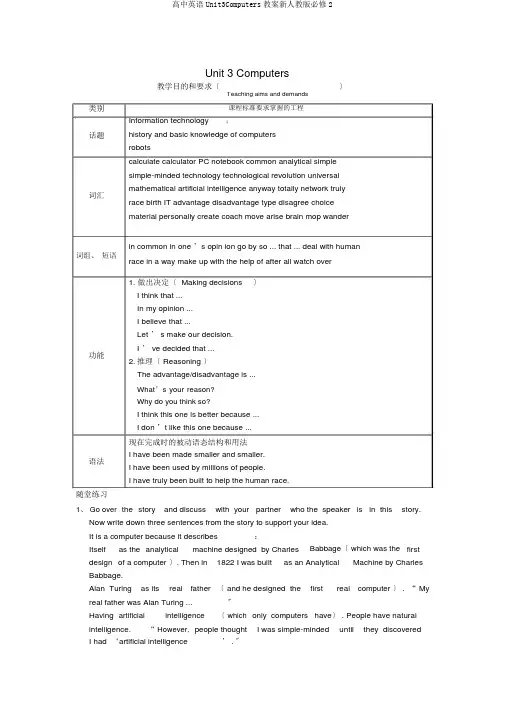
Unit 3 Computers类别 话题词汇词组、 短语功能语法随堂练习教学目的和要求〔〕Information technologyhistory and basic knowledge of computers robotscalculate calculator PC notebook common analytical simple simple-minded technology technological revolution universal mathematical artificial intelligence anyway totally network truly race birth IT advantage disadvantage type disagree choice material personally create coach move arise brain mop wanderin common in one ’s opin ion go by so ... that ... deal with humanrace in a way make up with the help of after all watch over1. 做出决定〔 Making decisions〕I think that ... In my opinion ... I believe that ...Let ’ s make our decision.I ’ ve decided that ...2. 推理〔 Reasoning 〕The advantage/disadvantage is ...What ’s your reason? Why do you think so?I think this one is better because ...I don ’t like this one because ...现在完成时的被动语态结构和用法I have been made smaller and smaller.I have been used by millions of people.I have truly been built to help the human race.1、 Go over the story and discuss with your partner who the speaker is in thisstory.Now write down three sentences from the story to support your idea. It is a computer because it describes :Itselfas the analyticalmachine designed by CharlesBabbage 〔 which was the firstdesign of a computer 〕. Then in 1822 I was builtas an AnalyticalMachine by CharlesBabbage.Alan Turing as its real father 〔 and he designed thefirstreal computer 〕 . “ Myreal father was Alan Turing ...〞Having artificial intelligence〔 which only computers have 〕 . People have naturalintelligence.“ However, people thoughtI was simple-mindeduntilthey discoveredI had ‘artificial intelligence’ . 〞课程标准要求掌握的工程 ;Teaching aims and demands2、 Look at the timeline below.Fillin the blanks with information from the reading above.Timeline1642: The computer began as a calculating machine.1822: The Analytical Machine was made by Charles Babbage.1936: Alan Turing wrote a book to describe how computers could be made.1960s:Computers had new transistors and became smaller.1960s:The first family of computers was connected to each other.1970s:Computers were brought into people’ s homes.Now: Computers connect people all over the world together.课堂笔记1、 I know this sounds very simple,but at that time it was a technological revolution.我知道这听起来很简单,但是在那个时候这却是一项技术革命。
人教版高中英语必修二教学案unit3Computers
人教版英语必修二unit3Computers教学一体化教案3.Learn more about computers.1.Help the students to understand the passage better.2.Learn how to use some important words and phrases in this passage1.How to help the students improve their reading ability and understand thecomputer)and get the students name them in English.Through this task,students can have a general idea about what they are going to learn.Besides,students are expected to have a discussion about what they have in common while looking at them.And they are required to use the given expressions in their discussion to express their ideas.Boys and girls,today I am going to introduce some machines to you.Now let’s see whether you can name them in English correctly,and talk about them.Now work together with your partners and try to find out what they have in common.Step 2 Pre-readingWhat do you know about computer?Now,please have a discussion first,and then I’ll ask some students to report your work.who would like to answer the first question?Voluntee r!I’ll have a try.I know that computers have developed from large machines.They have been made smaller and smaller,but work faster and faster.I really can’t imagine what they will be like and wh ether they can take the place of human beings in the future.I think computers have changed our lives greatly.We use computers widely in our study,in our work.You are using the computer to teach us English,aren’t you?In my opinion,in the modern society,using the computers means grasping a tool of controlling the world.We may communicate with each other from a very long distance.In short,we can not live freely without them.I agree with you.The computers are becoming more and more important in our lives.But learning more about computers is also importa nt,isn’t it?OK,let’s come to the reading passage “Who am I”.Step 3 ReadingTask 1.Skim the passage for the general idea.Boys and girls,you will be given two minutes to skim the passage and try to find out who “I”am and get the general idea of this passage.“I”am the computer.The passage is mainly about the history and development of computers.The passage is also about the relationship of computers and humans.Task 2.Scan for the details.Boys and girls,you will be given two more minutes to scan the passage and try to find out theTimeline1642:The computer began a s a calculating machine.1822:The Analytical Machine was built by Charles Babbage.1936:Alan Turing wrote a book to describe how computers could be made. 1960s:Computers had new transistors and became smaller.1960s:The first family of computers connected to each other.1970s:Computers were brought into people’s homes.Now:Computers connect people all over the world together.。
人教版高中英语必修二UNIT3COMPUTERS教学设计
Unit 3 Computers(教学设计)Reading: Who am I?Teaching goals:1. To have a better understanding of the main idea of the passage.2. To enable the students to talk about computers and robots in English3.To learn two reading skills.Teaching aids: Computer, student’s book.Teaching difficulty: How to find topic sentences and supporting details.Teaching procedures:Step 1. Lead-inShow the topic of the unit and tell the students that what we are going to learn today. At first,I will show them some pictures and get them to say what they are.An old calculating machine used in China until now. (An abacus)It is built to solve some mathematical problems. But it is too big. (A huge computer) It is a new calculating machine which can solve a large number of mathematical problems.(A calculator)It is a personal computer which can solve all kinds of problems and is used widely now.(A PC / personal computer)Then show these pictures out of order and let them put the pictures in order of time. Check the answers together. Let the students know what they’ll learn today.Show the teaching aims on the screen: Getting a better understanding of the passage. Learning two reading skills.Step 2 SkimmingAsk the students to skim the first paragraph as quickly as they can and answer: Who am I in the passage?They can deal with this question easily so we just need to check the answer.Reading for the main idea of the passage. They can choose it from two sentences. Give students only 1 minute, then ask them to get the main idea of the passageStep 3 Reading for specific information.At the beginning, explain to the students what topic sentence and supporting details mean. Students can read the explanation on the screen by themselves.As the passage is a bit difficult, I’ll lead the students to find out the topic sentence and supporting details of paragraph 1. Add explanations where necessary.Next, the students should be able to find out the topic sentences and supporting details of paragraphs 2 and 3. Give them several minutes.After finishing the tasks, make a simple summary.As we talk about the development of something, time is very important for us to understand better. Now let’s complete the timeline on page 19. Give them three minutes to finish it individually.A chain of events showing the development of computer / Changes of the machineTimeline1642: ____________________________________________::the Analytical Machine was made by Charles Babbage.1936:_______________________________________________________________________1960s:______________________________________________________________________: the first family of computers was connected to each other.1970s: ______________________________________________________________________Now:_______________________________________________________________________In order to help the students get a better understanding, I’ll show them a short video about the development of computers.Step 4 Post-readingNow we know the development of computers(show the pictures in the right order). Can you guess What’s Next?Give students 2 minutes to talk with parters about What will robots do for us in the future?Then ask some students to share their opinions with us.Summarize like this: Robots are useful in our daily life. For example, it can help us cook, clean the room, wash clothes and accompany us . Also, they can direct the traffic,carry out operations and even do some dangerous jobs.Blow the short summary, I’ll show them two sentences and they are supposed to decide which one is the topic sentence:A.Robots can do a lot of things for us.B.Robots have changed a lot.Step 5 SummaryToday we have learnt:1). the development of computers2) how to find topic sentences and supporting details.Encourage the students to use the reading skills in study.Step 6 Homework1. Read the text aloud and try to retell it in order of time.2. Read the passage again. Underline the sentences that you don’t understand and try to solve the problems using context clues and the dictionary.。
人教新课标高中英语必修二Unit3Computers教案
Unit 3 ComputersPeriod 1 Read ingI. Teaching aims1. Kno wledge aims(1) Get the stude nts to lear n the useful and expressi ons in this part.(2) Let stude nts to lear n about history and basic kno wledge of computers.2. Ability aimDevelop stude nts' readi ng abilities and let them lear n differe nt readi ng skills.3. Emoti onal aimArouse students' great interest in learning computers and let them learn to use the computers in their daily lives.II. Teaching difficult and important points1. Let the stude nts lear n more about history and basic kno wledge of computers.2. Get the students to learn different reading skills.III. Teaching methods1. Task-based teachi ng and lear ning2. Cooperative lear ning3. Discussi onIV. Teaching proceduresStep1.Lead-i n and warm ing upShow the students some pictures of Steve Jobs and let them guess who he is. After show ing the third picture, they may get the right an swer. The n let them focus on the tablet in his hands and ask them what kind of computers it is.Then show them a short video about the history of Appl'computers and ask them how many differe nt kinds of computers they can see.At last, show them some kinds of computers.T: Do you want to know more about computers?Step2.Skimmi ngRead the whole passage as fast as you csTry to get the main idea of this passage.A. The computer wants to find “who he is ”.B. The function (功能)of the computer.C. The computer becomes popular around the world.D. The history and the applications of the computer.Find out the topic sentence of each paragraph and un derl ine them.Step3. Careful-readi ng Para 1ScanningLet the students read this paragraph carefully and try to finish the following char.T: How could these cha nges become possible?Step4. Careful-read ing Para 2Let the students read paragraph 2 quickly and find the answer to this question. After check the answer, give them one minute to find the five different ways of memory for computers in differe nt periods of time.Step5. Careful-read ing Para 3Since the memory of computers has been improved greatly, will them become more powerful and can be used in more fields?Now read the last paragraph and find out the new applications of computers.Step6. Further Read ing1. The passage is writte n by _____ order?2. What is the most used rhetoric 修辞法)in this passage?A. simile (明喻)B. pers on ificati on (拟人)C. metaphor 暗喻)3. In what ways have computer bee n cha nged?Ask some students to summarize. If they have any difficulty, give them some hints. Step7. Activity: Be the next Jobs!We have lear ned the history of computers and see n the great developme nt of computers. What will the computers be like in the future? Do you want to design your computers as Jobs did? Now try to desig n your computers.For example:This is the new computer desig ned by our compa ny.It is very small an d tran spare nt透明的).You can eve n put it into your pocket. (Shape/color)It has a free-internet in it.You can …(Applications/functions)It only costs you Price)(Give the students five minutes to prepare and invite some of them to show their ideas. Step8. Homework1. Try to retell the history of computers.2. Read the passage carefully and un derl ine the difficult senten ces.。
人教版高中英语必修2教案Unit3Computer
人教版高中英语必修2教案Unit3Computerunit 3 computerpart one: teaching design (第一部分:教学设计) period 1: a sample lesson plan for reading (who am i?) aims to talk about computer to read about computer procedures i. warming upwarming up by talking about computerlook at the pictures on page 17. what are they? what do they have in common? yes, they are computers. then what is a computer? a computer is a machine which stores knowledge in its memory and does calculations on that knowledge. this knowledge is stored in symbols; it is called data. a computer usually has a monitor to show results. however, some computers can speak; these computers can be used for voice mail. 计算机室a computer frequently requires a boot device. the boot device contains the computer’s operating system and data. computer programs can be installed onto a computer. some people think that computers are less useful if they do not have access to the internet. they think this because the internet allows the computers to send and receive data and email across the world. 曙光3000巨型计算机a computer is now almost always an electronic device. it usually contains materials which are toxic; these materials will become toxic waste when disposed of. when a new computer is purchased in some places, laws require that the cost of its waste management must also be paid for. this is called product stewardship. in some countries old computers are recycled (melted down) to get gold and other metals. this is dangerous, because this procedure releases the toxic waste into the water and soil. computers become obsolete quickly. very often they are given away and new ones replace them within two or three years. this makes the problem worse. computer recycling is thus common. many projects try to send working computers to developing nations so they can be re-used and will not become waste as quickly.computer jargon 计算机行话computer jargon means words to do with computers and surrounding topics. knowing what these words mean can help you know more about computers. some people use these words to impress other people (also known as buzzwords). examples of jargon: bit - the smallest data unit, can either be a “0.”or a “1.”. byte - unit of data. see also kilobyte, megabyte, gigabyte and nibble cpu –centralprocessing unit, another name for processor data - information stored on a computer disk -a place to store data. email -electronic mail. ghz -gigahertz. used often incorrectly to describe the speed of a processor. but with some 2.4 ghz processors faster than 3.6 ghz ones, it is clear that it is just a salesman trick. 共12页,当前第1页123456789101112load - get data from a disk nibble - half a byte save - put data on a disk ram –random-access memory(随机存取存储器), the more the better. usb -universal serial bus(通用串行总线,一种简化了插接多种附件的薄型插座)www - world wide web, part of the internet ii. pre-reading 1. questioning and answering‑‑‑what do you know about computer? ●electronic machine capable of performing calculations and other manipulations of various types of data, under the control of a stored set of instructions. the machine itself is the hardware; the instructions are the program or software. depending upon size, computers are called mainframes, minicomputers, and microcomputers. microcomputers include desk-top and portable personal computers. ●a multi-function electronic device that can execute instructions to perform a task. ●a device that accepts information, processes it, and supplies an output. acomputer usually contains memory, a control unit, arithmetic and logical units, and a means for input and output. ●a programmable hardware component that is controlled by internally stored programs and that can perform substantial computations (including arithmetic and logic operations) without human intervention. a computer typically consists of one or more processing units, memory units, and associated peripheral input and output devices. ●related to automation and electronic data processing. the library of congress commonly classes most computer-related books in hf5548, qa75-76, z52, t385, and some tk ranges. ●a machine for performing calculations automatically calculator: an expert at calculation (or at operating calculating machines) ●a computer is a device or machine for making calculations or controlling operations that are expressible in numerical or logical terms. computers are constructed from components that perform simple well-defined functions. the complex interactions of these components endow computers with the ability to process information. if correctly configured (usually by, programming) a computer can be made to represent some aspect of a problem or part of a system. if a computerconfigured in this way is give 2. discussing and sharing‑‑‑how have computers changed our lives? someday soon, if you haven’t already, you’re likely to plug into the computer network nation growing in our midst. computer terminals, or small computers connected via modem (a modulator/demodulator circuit for encoding/decoding computer chatter) to ordinary telephone lines, should be as ubiquitous as the telephone itself. they’re a much more useful and humane tool than the phone, and with corporate america behind them the networks will be everywhere----changing our lives more than any technology since the automobile. 共12页,当前第2页123456789101112joining a computer network is the same as joining a community. small systems are like villages, where new members are formally welcomed. the larger networks, the source and compuserve, for example, are cities-anonymous, full of life and events, but difficult to fit into. iii. reading 1. listening and reading to the recording of the text who am i? turn to page 18 and listen and read to the recording of the text. pay attention to the pauses, pronunciation and intonation of the native reader. 2. reading aloud and underlining expressions now we are to readthe text once again and underline all the expressions in the text. put them down into your notebook after class as homework. collocations from who am i? begin as…, a calculating machine, be built as…, follow instructions from…, sound simple, at the time, a technological revolution, write a book, make…work, solve problems, become huge, had artificial intelligence, go back to…, the size of…, go by, change size, become small and thin, get quick, stand there by oneself, be connected by…, share information by…, talk to…, bring…into…, deal with…, communicate with…, serve the human race 3. reading, identifying and settling attention, please! it is time to skim the text one more time and identify the difficult sentences. try analyzing the structures of the difficult sentences and discuss them among your group members. you may also put your questions to me for help. chat (online)(在线)聊天to chat is to talk about ordinary things that are not very important. you can chat to one person or to many people. people also use this word now for parts of the internet where we can talk with many different people at the same time. usually, you chat on the internet in a chat room or messaging service like aol(american on-line) instant messenger (aim),yahoo messenger, or msn messenger. 4. reading and transferring scan the text for information to complete the table below, describing the development of computer. in 1642 in 1822 in 1936 in 1960s in 1970s iv. closing down by doing comprehending exercises turn to page 18 and in pairs do the comprehending exercises no. 1 and 2. period 2: a sample lesson plan for learning about language (the present perfect passive voice) aims to learn to usethe present perfect passive voice to discover useful words and expression to discover useful structures proceduresi. warming up by reading to the tapeto begin with, turn to page 18, listening to and reading to the recording of the text who am i? attention goes to the pauses and intonation, as well as the pronunciation of the reader. 共12页,当前第3页123456789101112ii. discovering useful words and expressions in pairs do the exercises 1, 2 and 3 on pages 19 and 20. you must finish them in 10 minutes. iii. learning about grammar 1. passive voice—overview tense or model passive sentence simple present the toefl exam is given every six months. simple past the toefl exam was given last month. simple future the toefl exam this year will be given on october15. present continuous the toefl exam is being givenevery year. present perfect the toefl exam has been given every year since 1950. past perfect the toefl exam had been given before the vietnam war occurred. simple modal the toefl exam should be given to every foreign student. past modal the toefl exam should have been given to all to enter us colleges. 2. the present perfect passive voice the structure of the present perfect passive voice is: have/ has +been+~ed iv. reading aloud and discovering now go back to page 18 to read aloud and discover in the text examples of the present perfect passive voice. as the years have gone by, i have been made smaller and smaller. since then, my family and i have been used by billions of people to deal with information with each other around the world by the internet. v. discovering useful structure we shall do grammar exercises 1, 2 and 3 on page 20. vi. closing down by doing a quiz correct the mistakes in these passive voice sentences example: the house was build in 1880. (correct = the house was built in 1880.) 1. 3000 employees were laying off. 2. a story will made up. 3. an idea was putted forward for discussion. 4. has the book been give back to you yet? 5. my bank loan will be payed off in five years time. 6. nothing can be hold against me. 7. our allies will belend support. 8. she has never heard of. 9. she was being knocked down by a bus. 10. she was letted off with a fine. 11. the candle was blow out by the draught. 12. the criminal were locked up. 13. the flood water was be kept back by barriers. 14. the inconvenience will made up for by this money. 15. the keys must have been being left behind. 16. the old cinema is being pull down. 17. the protesters being held back by the police. 18. the road was blocking off. 19. thirty more people were laid off last week. 20. your jacket can be hanged up over there. period 3: a sample lesson plan for using language 共12页,当前第4页123456789101112(andy—the android) aims to discuss about it to write a report about it to read about androids or robots procedures i. warming up by talking about itwhat is information technology?information technology (it) or information and communication technology (ict) is the technology required for information processing. in particular the use of electronic computers and computer software to convert, store, protect, process, transmit, and retrieve information from anywhere, anytime. ii. listening and writing turn to page 21. look at the pictures and listen to aconversation about different kinds of information technology or it, discuss and write down in groups the advantages and disadvantages of each kind. iii. speaking and writing suppose you and your partner are going to help choose computers for your school. now talk about the special things each of the computer can do and write a report to your headmaster. iv. reading, underlining and speaking it is said that computers could be put into androids or robots. read the text andy—the android, underlining all the expressions and think of the fun you could have! expressions from andy—the android part of a football team, once a year, get together, play a football game, be as…as…, in fat, look like…, on the football team, run fast, think like a human, shout to…, in computer language, have a good shot for a goal, get second place, win the first place, have a new kind of program, improve one’s intelligence, create a better system, play against a human team, in a way, program…with…, make up…, after all, with the help of…v. writing a letter suppose you are an android. what would say to a spoiled child who would not do his homework? write a letter to the boy. android an android is an artificially created being that resembles a human being. theword derives from greek andr-‘man, human’and the suffix -eides used to mean ‘of the species, kind, alike’(from eidos ‘species’). the word droid, a robot in the star wars universe, is derived from this meaning. some people maintain that, etymologically, the word android means resembling a male human and that a robot resembling a woman should logically be called a gynoid for sexist language to be avoided; however, this word is not commonly used. unlike the terms robot (a mechanical being) and cyborg (a being that is partly organic and partly mechanical), the word android has been used in literature and other media to denote several different kinds of man-made, autonomous creations: 共12页,当前第5页123456789101112a robot that closely resembles a human a cyborg that closely resembles a human an artificially created, yet primarily organic, being that closely resembles a human although essentially human morphology is not the ideal form for working robots, the fascination in developing robots that can mimic it can be found historically in the assimilation of two concepts: simulacra (devices that exhibit likeness) and automata (devices that have independence). the term android was first used by the french authormathias villiers de l'isle-adam (1838-1889) in his work tomorrow’s eve, featuring a man-made human-like robot named hadaly. as said by the officer in the story, “in this age of realien advancement, who knows what goes on in the mind of those responsible for these mechanical dolls.”找教案http://zhaojiaoan part tw teaching resources (第二部分:教学资源) section 1: a text structure analysis of who am i? i. type of writing and summary of who am i? type of writing this is a piece of narrative writing. main idea of the passage beginning as just a calculating machine in 1642 in france, the computer has been experiencing improvement again and over again over 300years or more, which has not only made it more beautiful and intelligent but also changed man’s life a great deal! topic sentence of 1st paragraph i began as a calculating machine in 1642 in france. topic sentence of 2nd paragraph no one could recognize me after i got my new transistors in the 1960s. ii. a chain of events showing the development of computer a calculating machine in 1642 in france →an analytical machine in 1822 → a “universal machine.”in 1936 →the size of a large room →made smaller and smaller →getting new transistors in 1960s→clever and quicker →anetwork in the early 1960s →talking to humans using basic in the early 1960s →brought into people’s homes in 1970s →internet iii. a retold version of the text who am i? i, the computer, was a calculating machine in 1642 in france. then i was built as an analytical machine in 1822, which was a technological revolution. i became a “universal machine”in 1936 to solve any mathematical problem. i was not very big at first then i became huge, the size of a large room before i was made smaller and smaller. getting new transistors in 1960s i became clever and quicker. i was connected with other computers and turned out to part of a network in the early 1960s. then i began talking to humans using basic in the early 1960s. in 1970s i was brought into people’s homes, and came the internet. 共12页,当前第6页123456789101112section 2: background information computers i. how do computers work? computer basics to accomplish a task using a computer, you need a combination of hardware, software, and input. hardware consists of devices, like the computer itself, the monitor, keyboard, printer, mouse and speakers. inside your computer there are more bits of hardware, including the motherboard, where you would find the main processingchips that make up the central processing unit (cpu). the hardware processes the commands it receives from the software, and performs tasks or calculations. software is the name given to the programs that you install on the computer to perform certain types of activities. there is operating system software, such as the apple os for a macintosh, or windows 95 or windows 98 for a pc. there is also application software, like the games we play or the tools we use to compose letters or do math problems. you provide the input. when you type a command or click on an icon, you are telling the computer what to do. that is called input. how they work togetherfirst, you provide input when you turn on the computer. then the system software tells the cpu to start up certain programs and to turn on some hardware devices so that they are ready for more input from you. this whole process is called booting up. the next step happens when you choose a program you want to use. you click on the icon or enter a command to start the program. let’s use the example of an internet browser. once the program has started, it is ready for your instructions. you either enter an address (called a url, which stands for uniform resource locator), or click on an address you’ve savedalready. in either case, the computer now knows what you want it to do. the browser software then goes out to find that address, starting up other hardware devices, such as a modem, when it needs them. if it is able to find the correct address, the browser will then tell your computer to send the information from the web page over the phone wire or cable to your computer. eventually, you see the web site you were looking for. if you decide you want to print the page, you click on the printer icon. again, you have provided input to tell the computer what to do. the browser software determines whether you have a printer attached to your computer, and whether it is turned on. it may remind you to turn on the printer, then send the information about the web page from your computer over the cable to the printer, where it is printed out. ii. television 共12页,当前第7页123456789101112old portable television a television (also tv or telly) is a device (tool) with a screen that receives broadcast signals and turns them into pictures and sound. the word “television”comes from the words tele (greek for far away) and vision (seeing). usually a tv looks like a box. older tvs had large wooden frames and sat on the floor like furniture. newer tvs became smaller sothey could fit on shelves, or even portable so you could take it with you wherever you went. the smallest tvs can fit in your hand. the largest tvs can take up a whole wall in your house, and may sit on the floor, or be just a large flat screen that can be mounted on the wall. many tvs are now made in wide screen shape like movie theatre screens, rather than old, more square tvs. a television has an antenna (or aerial), or it has a cable. this gets the signal from the air, or cable provider. tvs can also show movies from dvd players or vcrs. tvs can be connected to computers and game consoles, usually through a kind of socket called “scart”. iii. web or world wide web the world wide web is the part of the internet that contains web sites and web pages. it is not used to describe webpages that are used offline where net services are not available, or no computer network exists -such as wikipedia on cd. in this case no real physical site exists other than the place where the computer is. blog and wiki capabilities will also not be available because these require a communication with other computers. iv. radio radio is a communications invention. though originally used to communicate between two people, it is now used to listen to music, news, and peopletalking. radio shows were the predecessor to tv programs. v. dvd dvd most commonly stands for “digital versatile disk”. it can play video that is of a higher quality than a vhs tape. vi. two kinds of dvd they can also hold 4.7 gb of information as opposed to the 700 mb that a cd can hold.a plus of using a dvd for a video is the ability to have interactive menus and bonus features such as deleted scenes and commentaries. vii. email email (electronic mail) is a message, usually text, sent from one internet user to another. email is quicker than snail mail(mail) when sending over long distances and is usually free. to send or receive an email, a computer with a modem and telephone line connected to the internet, and an email program are required. email addresses are generally formated like this: login@server.(com or fr or org or uk or other). 共12页,当前第8页123456789101112some companies let you send and receive email for free from a website. gmail, hotmail and yahoo! do this. viii. human here are two humans. a man is on the left and a woman is on the right. a human or human being is a person, like you. a male human is a man, a female human is a woman. if you think about all humans in the whole world, they are called humanity. in the past, people have alsoused man and mankind to mean all humans. humans are called homo sapiens by scientists. humans are an animal species that belongs to the group called primates. monkeys are primates too, but the primates most like people are gorillas and chimpanzees. most scientists think that chimpanzees and humans came from a common ancestor by what is called evolution. other animals even more like humans than chimpanzees once lived too, but they are now extinct. human rights are those things that everyone deserves and the way they should be treated by other people. section 3: words and expressions from unit 3 computers common n. 1. an area of grassland with no fences which all people are free to use or a piece of open land for recreational use in an urban area (常用于专有名词中): every saturday jean went riding on the village common. harlow common is very beautiful in winter.哈洛公园在冬天时风景很美。