
Oracle TimesTen深入内存数据库解析
20
TimesTen: 架构
Client/Server Application or Tool Network / Message Bus Application-Tier Server Platform
Server daemon Server proxies Replication agent(s)
250,550
250,000 200,000 150,000 100,000 50,000 0
32,663
1 CPU 2 CPUs 4 CPUs
121,705
98,568
70,111
54,303
update
mixed
70% select; 20% update; 10% insert
select
7
针对物理内存而特别设计优化的数据库
15
内存数据库与磁盘数据库的比较
数据库特性 目标应用 Oracle Database 10g 关键业务应用 Oracle TimesTen In-Memory Database 关键业务应用
数据模型 优化
典型部署方式 架构 响应时间 数据容量 可扩展性
关系型 - SQL
关系型 - SQL
磁盘为中心
ClientServer
In-Memory Database(s)
Transaction Logs Checkpoint files
标准 APIs (ODBC, JDBC, SQL-92) 易于安装与配置
Application-Tier Platform
8
内存数据库的部署
针对物理内存而优化的应用层数据库,可以获得极高的响 应速度并实现实时数据缓存
0 update mixed
70% select; 20% update; 10% insert
select
6
极高的处理能力
Oracle TimesTen 6.0, 4-CPU, 3 GHz x86 Xeon, 32-bit RHLinux
Transactions per second
300,000
数据库层 客户机/服务器 毫秒到秒级
TB到PB级 Cluster (RAC) & SMP
内存为中心
应用层 嵌入式(直接数据访问) 微秒到毫秒级
GB级 SMP
16
响应时间及吞吐量的比较
17
Oracle TimesTen 产品家族
18
Oracle TimesTen 产品家族
Product: Oracle TimesTen In-Memory Database
4
内存数据库解决方案
实时数据管理软件
即时响应 高可伸缩性 持续可用性
For managing events, transactions and data within performance-critical applications.
全球有超过1500家企业客户采用Oracle TimesTen内存数据库解决方案
所有数据存于物理内存 采用关系型数据模型 针对物理内存而特别设计优 化的数据存储结构与算法 多进程/多线程共享数据存 储(Data Store)
•
Network
Application
TimesTen libraries
...
Application
TimesTen libraries
嵌入式 或 客户机-服务器式
Option: Replication – TimesTen to TimesTen Option: Cache Connect to Oracle
19
Oracle TimesTen 产品特性
l l l l l l l l 实时性能 多用户并发 无数据丢失 基于标准 几乎无需管理 灵活的部署选项 相关的产品和服务: Replication - TimesTen to TimesTen (选项) Cache Connect to Oracle(选项)
MilliSeconds
MicroSeconds
Response time
Seconds
Oracle Database 10g
(Terabyte DB’s)
100’s 1000’s
Oracle Database 10g RAC
(Terabyte DB’s)
10,000’s 100,000’s
Throughput (simple txn / sec)
1996 – TimesTen 公司成立
• •
1999 – 在英国商业运作 2001 – 增加Cache Connect功能 2005 – 由Oracle收购
• •
11 主要的版本产生 (TimesTen 6.0) 200+ 客户, 1500+ 部署系统
至今 – 迅速发展…
3
内存数据库的特性
订单匹配 智能订单路由 成交撮合 实时分析
SOA呼叫中心 用ຫໍສະໝຸດ 个性化在线BI / BAM
收入保障
网络/Qos管理 自服务门户
SOA
实时物流 实时订座
10
内存数据库 和 传统关系型数据库 的比较
11
12
13
14
性能扩展
Oracle TimesTen In-Memory Database
(Gigabyte DB’s)
The Information Company TM
1
深入内存数据库
涂世明(Ken) TimesTen咨询顾问 Ken.tu@
TimesTen 历史
1992 – 起源于惠普实验室研究项目
•
针对电信网络应用的内存数据库研究
核心成员都来自HP实验室原来成员 第一个商业版本产生 (TimesTen 2.0)
5
极快的响应速度
TimesTen In-Memory Database 6.0, 4-CPU, 3 GHz x86 Xeon, 32-bit RHLinux
30
microseconds
20
28 millionths of a second
10
25 millionths of a second 9 millionths
呈现层
“针对性能要求高的 系统的应用层数据 管理解决方案”
应用层
数据库层
9
Oracle TimesTen支持“实时世界”
In Networks In Telecom On Wall Street
In the Enterprise
呼叫处理
软交换 一键通话(PTT) 定位服务 呈现业务
实时计费 认证鉴权
Oracle_TimesTen内存数据库_6.0版推荐编程实践

Oracle TimesTen TM内存数据库6.0版推荐编程实践性能和稳定性最佳的TimesTen应用程序的设计方法内存数据库版权© 1996、2005归Oracle公司所有。
未经允许不得以任何方式和手段进行复制和使用。
附带的和光盘上的软件和文档(不管是硬拷贝形式还是电子形式)的使用和披露均应依据本许可协议。
被许可方可印刷存储在光盘上的文档,但仅限内部使用。
除上面提到的以外,未经TimesTen公司事先书面许可,不得以任何电子或机械形式或手段,包括影印、录制或通过任何信息存储和检索系统,复制或传播本文档的任何部分(不管是硬拷贝形式还是电子形式)。
Oracle、JD Edwards、PeopleSoft、Retek、TimesTen、TimesTen标志、MicroLogging和Direct Data Access是 Oracle公司和/或其子公司的商标或注册商标。
其他名称可能是其各自所有者的商标。
程序(包括软件和文档)包含专有信息;是依据一份包含了使用和披露限制条款的许可协议而提供的,并受版权、专利其他知识产权和工业产权法的保护。
除非法律有明确规定,或是为实现与其他独立开发的软件间的互操作性,否则不得对软件程序进行反向工程、反汇编或反编译。
本文所含信息如有变动,恕不另行通知。
如果您在本文中发现任何错误,请书面通知我们。
我们不保证本文没有错误。
除非在您的许可协议中对此有明确许可,否则不得为任何目的,以任何电子或机械形式或手段复制或传播这些程序的任何部分。
2005年8月19日在美国印刷。
目录1 概述TimesTen文档参考索引 (1)术语 (1)“TimesTen应用程序”或“直连应用程序” (1)“TimesTen客户机/服务器应用程序” (2)install_dir (2)C++用户:考虑使用TTClasses (2)2 实现最佳性能TimesTen文档中的性能信息 (4)有关最常见问题的(影响性能的因素)建议 (4)运行对性能要求高的直连应用程序 (4)预先准备好所有SQL语句 (5)控制磁盘写频率 (6)为查询创建合适的索引 (6)使用“showplan”验证是否使用了合适的索引来进行查询 (8)关闭自动提交(autocommit)并定期提交 (9)C/C++ (ODBC)与Java (JDBC)性能比较 (9)通过在加载数据之后创建索引来加速(大批量)数据加载 (10)使用TTClasses,避免使用OLEDB 、ADO和第三方中间件 (10)多CPU性能调优 (10)使用连接池 (11)最大限度地提高数据库的并发性 (11)及时关闭只读游标 (11)避免大批量的删除语句 (11)考虑使用 “DELETE FIRST NumRows” (12)缩短不必要的长期运行的事务 (12)3 最大限度地提高稳定性最大限度地提高稳定性 (13)TimesTen文档 (13)TimesTen架构和数据库恢复简明指南 (13)避免应用程序的意外失败 (14)必须断开TimesTen应用程序与数据库的连接 (14)避免对TimesTen应用程序使用“kill –9”命令 (14)备份 (14)检查点 (15)其他好的实践 (15)检查所有ODBC函数的返回码,然后处理它们 (15)处理数据库失效错误 (16)处理死锁和锁超时错误 (16)从一个已满磁盘恢复 (17)4 复制和XLA复制 (18)将DSN名用作文件名前缀 (18)在进行–duplicate操作之前执行两个检查点操作 (19)复制配置应(手动)指定端口号 (19)监控复制 (20)SEQUENCE与复制和故障恢复的相互影响 (21)XLA (21)使用持久性XLA (21)始终监控XLA (22)最大限度地提高XLA性能 (22)索引1 概述本文详细介绍了如何利用TimesTen开发具有最佳性能和强健性的应用程序。
Timesten内存数据库新特性

OCI -- Functionality
• TimesTen support for OCI APIs
• A subset of the Oracle OCI functionality • A subset of the SQL functionality(at the same level as TimesTen
Oracle Confidential
OCI -- Motivation & Benefit
• OCI has a very large customer base
• Oracle Call Interface provides a set of C API with Oracle DB • OCI has been available since Oracle DB V6
<Insert Picture Here>
TimesTen 11gR2 New Features
Oracle Confidential
<Insert Picture Here>
Application Development TimesTen Support for OCI, Pro*C/C++, PL/SQL, ttSrcScan
C or C++ source programs • Supports embedded SQL 92 syntax • Provides same level of SQL functionality as supported in the
TimesTen ODBC interface • TimesTen 11.2.1 installer provides all required software for
Oracle TimesTen In-Memory Database 在 Oracle Exalog

Oracle TimesTen In-Memory Database on Oracle Exalogic Elastic CloudO R A C L E W H I T E P A P E R| M A R C H2019Executive Summary With the growing speed of messages moving through business networks,the use of real-time processing to capture, analyze, and respond intelligently to key events has become the benchmark for corporate excellence.Not only are the execution and management of critical business processes important, customers expect highly tailored interactions and the utmost responsiveness from any company with which they do significant business. Oracle TimesTen In-Memory Database (TimesTen)is a memory-optimized relational database.TimesTen provides real-time data management for performance critical systems deployed in the application tier to deliver blazing-fast response and real-time caching of application data from the Oracle Database to the TimesTen database. Exalogic Elastic Cloud SoftwareLinuxSolarisExalogic Networking Stack and System ToolsApplicationsExalogic Software – installed on premisesValue-added products -Installed on premisesFactory Assembled and InstalledEL X2-2Oracle Exalogic Elastic Cloud (Exalogic)is an integrated hardware and software system designed to provide a complete platform for a wide range of application types and widely varied workloads.Oracle Exalogic is intended for large-scale, performance-sensitive, mission-critical application deployments.It combines Oracle Fusion Middleware software and industry-standard Sun hardware to enable a high degree of isolation between concurrently deployed applications,which have varied security, reliability, and performance requirements. Real-time OLTP applications can benefit greatly from the combined compute power of Exalogic and TimesTen.Using the TimesTen TPTBM performance program running an80-10-5-5 workload (80%read transactions, 10% update transactions, 5% insert transactions, and 5% delete transactions), throughput on each compute node reached 1.6 million Transactions per Second(TPS).Using a workload simulating a Prepaid Mobile application or an Online Banking application,TimesTen achieved peak throughput of 8.7 million TPS running on a quarter-rack Exalogic configuration (8 compute nodes). More details of the tests are presented in subsequent sections of this paper.IntroductionOracle TimesTen In-Memory Database11g has been certified for the Oracle Exalogic Elastic Cloud.This white paper describes configuration considerations,best practices and performance results of TimesTen running on Exalogic.TimesTen is targeted to run in the application tier,close to applications,and optionally in-process with applications to deliver very low response time and very high throughput for performance-critical applications.TimesTen can be used as the database of record or as a relational cache database to the Oracle Database.The enterprise architectures that derive the greatest benefit from real-time processing provide event,data, and transaction management in the application tier,empowering front-line systems with rapid response and deeper insight.It is not sufficient to merely collect and cache data next to applications,as is often the case with first-generation in-house efforts.Nor is it practical to locate the corporate database on the same tier with the applications.Enterprise companies can extend their software infrastructures with TimesTen to create systems that are instantly responsive,highly scalable,and continuously available using the familiar SQL programming interfaces with minimal changes.These systems are used to increase customer loyalty,attract new customers,streamline operations,and avoid the costly alternative of proprietary software development.The Exalogic certification was performed using the TimesTen11.2.1.8.3release with a quarter-rack Exalogic version1.0server.All TimesTen product components were installed and tested,including TimesTen Replication,Application-Tier Database Cache,integration with Oracle Clusterware,Oracle SQL Developer, and TimesTen Plug-in for Oracle Enterprise Manager.Our testing results showed that TimesTen is extremely fast, reliable,and resilient on Exalogic.Hardware and Software OverviewThe Exalogic test server was configured with a quarter rack consisting of8Compute Nodes.Compute NodeEach of the8Compute Nodes has» Two sockets of6-core Xeon X5670processors at2.93GHz» 96GB RAM» 32GB Flash/Solid State Disk (internal storage local to each compute node)The compute nodes are connected to a shared Storage Server.Storage ServerShared storage is provided by a dual-controller Sun7320storage server regardless of whether the configuration is a full,half or quarter rack.The storage server consists of two Intel x86_64Xeon servers configured to run an active-standby Sun ZFS cluster. The storage server has 40TB of disk space.InfiniBandThe compute nodes are interconnected through a Sun Network QDR InfiniBand switch. The storage servers are also connected to the InfiniBand switch.Standard Oracle LinuxFor the purpose of running TimesTen,each compute node can be viewed as an individual Linux server. Kernel configuration parameters should be set following the guidelines in the Oracle TimesTen In-Memory Database Installation Guide.TimesTen Performance and Scalability on ExalogicThis section describes 3different performance tests demonstrating TimesTen performance running on Exalogic.Test#1:TPTBM80-10-5-5 WorkloadTPTBM is a sample program shipped with the TimesTen product to enable customers to conduct simple performance tests to assess base-line performance of the server where TimesTen is installed.Using a workload of80-10-5-5with80%reads (SELECT),10%updates,5%inserts, and5%deletes,the peak throughput measured using10 concurrent TPTBM processes achieved an unprecedented throughput of about1.6million transactions per second per compute node with very stable response time. Note that each compute node consists of12cores;we reserved2cores for the TimesTen data manager for transaction execution including transaction persistence to the disk on the shared storage server.Test#2:TPTBM100%Read WorkloadThe second test involved a workload of100% read transactions. As shown in the chart below,TimesTen scales extremely well on Exalogic,achieving over4million reads per second with12concurrent processes executing SELECT queries as fast as possible(with zero think time).Test#3:Prepaid Mobile(PPM)and Online Banking(OLB)Application WorkloadIn this test,the PPM/OLB workload represents a typical real-time prepaid mobile application with5different types of transactions:» Authenticate user and account status» Check account balance» Update account profile» Refill, credit,or debit account» Search accounts with a low balanceThe application was implemented in Java using the JDBC interface to TimesTen.The workload transactions were executed and committed in TimesTen;the committed data were asynchronously propagated to the Oracle Database.Response time and throughput were captured in a TimesTen table for visual display by the presentation program,as shown in the figure below:TimesTen In-Memory Cache Grid was configured on all8compute nodes in the Exalogic machine.Four cache grid members were configured for each compute node to take advantage of the compute power and available RAM.Mobile prepaid subscriber applications and banking applications share similar transaction characteristics where real-time access is required for very high volume transactions.As shown in the chart below,TimesTen scales very well as the number of grid members increases.With32grid members running the workload,the peak throughput reached an impressive8.7 million transactions per second for all8compute nodes.InstallationExalogic File System LayoutFrom the operating system perspective,each compute node has 5mounted file systems./or the root volume is located on the SSD. Swap is also located on the SSD. In the first Exalogic release,SSD is the only storage internal to any compute node. All other storage is located on the shared storage server.Each compute node has 4NFS mounts to the storage server. These "NFS shares"are divided into2global shares and2local shares. Files placed on the local shares are visible only to the compute node that mounts them;files on the global shares are visible across all compute nodes. The file systems from the storage server appear as:/u01/common/patches # global share/u01/common/images # global share/u01/<hostname>/dumps # local share/u01/<hostname>/general # local shareLocation of TimesTen Installation BinariesTimesTen must be installed on every compute node where it is to be used. Sharing installations across compute nodes is not supported.Customers should not install TimesTen on a global share and use that instance on more than one compute node.Oracle Clusterware(CRS)ConsiderationsThe default NFS shares in the Exalogic machine are not mounted with noac option required for a CRS voting disk as specified in the Oracle Clusterware Installation Guide.It is recommended to create a new global share with the proper options,and then mount this file system to the compute nodes that will be clustered using CRS. Customers should ensure that enough IP addresses are provisioned, including any desired VIPs used by CRS.TimesTen Database Files and Transaction Log FilesFile Placement and AccessEach compute node has 32GB of internal disk storage(SSD). In practice,only 14-16GB of free space is available on these file systems since the Operating System installation and swap space use up the rest of the space.The free space on the SSD may not be adequate to hold TimesTen database checkpoint files or transaction log files. To set up appropriate data access control from each of compute nodes,the TimesTen database files and transaction log files should be placed on the local share storage.NFS Shared File SystemTo place the TimesTen database and transaction log files on an NFS local shared file system,it is necessary to set the -allowNetworkFiles option in the <install-dir>/info/ttendaemon.options file before starting the TimesTen daemons.Database RecoveryIn the event of a node failure and if the database is not using TimesTen Replication for high availability,the database checkpoint files and the transaction log files of the failed compute node cannot be “recovered”using a TimesTen installation from a different compute node.Customers who are not using TimesTen Replication should use ttBackup/ttRestore or ttMigrate utility to transfer database and transaction log files among compute nodes.Note that it is supported to take periodic backups on one compute node,store the files on a global share,and restore them to a distinct TimesTen installation on a second compute node.Users can monitor the activity of the storage server,as described in the Oracle Fusion Middleware Machine Owner’s Guide,by directing a browser to the Sun7320management interface at the following URL:https://<storage-node>:215/#status/dashboardPerformance ConsiderationsThe /u01/<hostname>/general file system shows slightly higher transaction logging throughput than the/u01/<hostname>/dumps file system. Using connection attribute LogFlushMethod=1,(the default setting)provides higher write throughput than LogFlushMethod=2.On Exalogic,the storage server is a shared resource across the compute nodes. Storage I/O activity on one compute node affects I/O activity on other compute nodes.It does not matter whether the I/O activity is to a local share or a global share. Local and global refer to the visibility of file systems;the I/O to a local share still goes through the shared storage server.Given the shared nature of the storage server,it is recommended that customers use the CkptRate connection attribute(or ttCkptConfig built-in procedure)to throttle the rate of checkpoints.Un-throttled checkpoints can use up all the I/O bandwidth available on any one compute node,reducing the I/O bandwidth available on other compute nodes.A checkpoint rate of10-25MB/sec should not cause undue interference with logging nor with other compute nodes.Since each of the compute nodes has 12cores,it is recommended to set LogBufParallelism <=12.Setting it too low can impede throughput. Setting it to higher values can cause the log flusher to incur unnecessary overhead. An application that uses fewer than16 active threads can set the value to the number of active threads or12.In summary,the following are examples of recommended settings:Datastore=<file path for the database on local share>LogFile=<directory on local share>LogBufParallelism=12 # number of transaction log buffer strandsLogFlushMethod=1 # direct I/O used regardless of setting on NFS file systemsLogBufMB=1024 # larger value helps parallelism, async replication; max=1024LogFileSize=1024 # >= LogBufMB(maximum value)CkptRate=20 # MB/sec;adjust for your particular requirementsCkptFrequency= 600 # default frequency 10 minutesCkptLogVolume=0 # governed by frequency and ratePrivateCommands=1 # improves concurrency at expense of temp spaceRecoveryThreads=12 # 12 core systemMemoryLock=<3 or 4> # setting for large memory systemsBenefit From InfiniBandPresently,the TimesTen11g release makes use of the InfiniBand via TCP/IP protocol(EoIB).Future releases of TimesTen may take advantage of other InfiniBand protocols.TimesTen ResourcesFor additional product information,please reference the TimesTen Product Documentation set either» Online at /technetwork/database/database-technologies/timesten/documentation/index.html or» Local copy of the documentation set that is optionally placed within the TimesTen installation directory <TimesTen Install Dir>/docThe TimesTen technical forum is available on the Oracle Technology Networkhttps:///community/developer/english/oracle_database/timesten_in-memory_databaseOracle Corporation,World Headquarters Worldwide Inquiries500 Oracle Parkway Phone: +1.650.506.7000Redwood Shores, CA 94065, USA Fax: +1.650.506.7200C O N N E C T W I T H U S/oracle/oracle/oracleCopyright © 2019, Oracle and/or its affiliates. All rights reserved. This document is provided for information purposes only, and thecontents hereof are subject to change without notice. This document is not warranted to be error-free, nor subject to any otherwarranties or conditions, whether expressed orally or implied in law, including implied warranties and conditions of merchantability orfitness for a particular purpose. We specifically disclaim any liability with respect to this document, and no contractual obligations areformed either directly or indirectly by this document. This document may not be reproduced or transmitted in any form or by anymeans, electronic or mechanical, for any purpose, without our prior written permission.Oracle and Java are registered trademarks of Oracle and/or its affiliates. Other names may be trademarks of their respective owners.Intel and Intel Xeon are trademarks or registered trademarks of Intel Corporation. All SPARC trademarks are used under license andare trademarks or registered trademarks of SPARC International, Inc. AMD, Opteron, the AMD logo, and the AMD Opteron logo aretrademarks or registered trademarks of Advanced Micro Devices. UNIX is a registered trademark of The Open Group. 0614。
TimesTen安装配置-Oracle 内存数据库
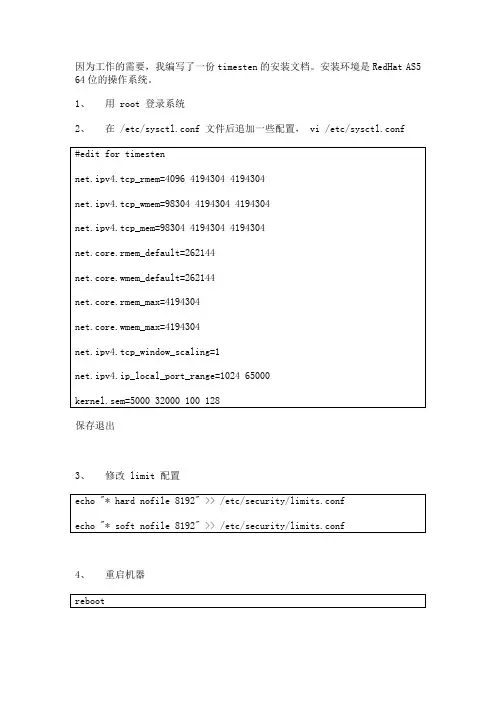
因为工作的需要,我编写了一份timesten的安装文档。
安装环境是RedHat AS5 64位的操作系统。
1、用 root 登录系统2、在 /etc/sysctl.conf 文件后追加一些配置, vi /etc/sysctl.conf保存退出3、修改 limit 配置4、重启机器5、建用户6、用 passwd 命令修改 timesten 用户的口令为 timesten7、切换成 timesten 用户8、把 tt70install.tar.gz 放到 /timesten 目录下9、解压 tt70install.tar.gz10、安装 timesten11、选择产品是 64 位,还是 32 位,出现如下提示:选择安装 64 位 Linux 版本,确认回车12、确认 timesten 实例名,出现如下提示默认选择 timesten 的 instance 名字,直接回车,提示:默认回车13、选择安装产品,出现如下提示选择安装“ Oracle TimesTen In-Memory Database with Cache Connect to Oracle ”,输入 2 ,确认回车14、选择安装组件,出现如下提示选择安装“ Client/Server and Data Manager ”,默认确认回车15、选择安装 timesten 的目录,出现如下提示选择 /timesten ,确认回车16、选择创建守护进程的主目录,出现如下提示默认回车,出现如下提示:提示目录不存在是否创建,默认选择 yes ,确认回车。
开始解压安装,提示如下17、解压结束后,安装 Demo 程序,出现如下提示默认回车确认,提示如下:18、选择 timesten 守护进程的端口,出现如下提示默认选择 17001 端口,确认端口没有被占用[1] ,确认方法见脚注。
如果 17001 端口没有被占用的话,则默认回车确认,如果被占用,则输入 no ,回车,出现如下提示输入一个没有被占用的端口,回车确认。
内存数据库的使用—TimesTen和Altibase

TimesTen篇—简介
结构
Log
TimesTen有自己的日志文件,以及存放日志文件 的目录(LogDir),缺省的就是和DataStore放在 同一个目录下。但一般建议分开放。日志的概念 和Oracle的一样,在回滚以及恢复的时候,都会 用到它。
TimesTen篇—简介
连接方式
Direct Driver连接 连接 Client/Server连接 连接 Driver Manager连接 连接
TimesTen篇—TT命令集
ttRepStart/ttRepStop : 功能:启动和关闭replication agent 用法: call ttrepstart(); call ttrepstop(); history Description: Lists previously executed commands. monitor Command Usage: monitor
TimesTen篇—简介
结构
DataStore
DataStore 是指TimesTen中的表、索引等放在内 存段中的一个集合,类似与Oracle中库的概念。 一个TimesTen Data Manager可以管理多个 DataStore。DataStore由放在相应ODBC配置文 件中的一个DSN(Data Source Name)所定义, 该DSN由一个名字和相关的属性组成
TimesTen篇—简介
连接方式
Direct Driver连接 连接 ቤተ መጻሕፍቲ ባይዱimesten推荐连接方式,由于没有了协议转换的开 销,这种连接方式具有最高的效率。对于JDBC应 JDBC 用程序,可以通过JDBC库访问ODBC的direct driver。这种连接方式要求应用程序和Timesten数 据库处于同一台服务器上。对于共享模式,数据库 被加载到共享内存中,多个应用程序可以共享访问 内存中的数据。可以减少TCP/IP,IPC方面的开销。
深入Oracle内存数据库Timesten

订单匹配 智能订单路由 成交撮合 实时分析
SOA 呼叫中心 用户个性化在线 BI / BAM 实时物流 实时订座
内存数据库 和 传统关系型数据库 的比较
内存数据库与磁盘数据库的比较
数据库特性 目标应用 数据模型 优化 典型部署方式 架构 响应时间 数据容量 可扩展性 Oracle Database 10g 关键业务应用 关系型 - SQL 磁盘为中心 数据库层 客户机/服务器 毫秒到秒级 TB到PB级 Cluster (RAC) & SMP Oracle TimesTen In-Memory Database 关键业务应用 关系型 - SQL 内存为中心 应用层 嵌入式(直接数据访问) 微秒到毫秒级 GB级 SMP
§ 所有数据存于物理内存 § 采用关系型数据模型 § 针对物理内存而特别设计优 化的数据存储结构与算法 § 多进程/多线程共享数据存 储(Data Store)
•
Network
Application
TimesTen libraries
...
Application
TimesTen libraries
嵌入式 或 客户机-服务器式
内存数据库的特性
内存数据库解决方案
实时数据管理软件
即时响应 Ÿ 高可伸缩性 Ÿ 持续可用性
For managing events, transactions and data within performance-critical applications.
全球有超过1500家企业客户采用Oracle TimesTen内存数据库解决方案
ClientServer
In-Memory Database(s)
Transaction Logs Checkpoint files
Oracle Database 18c 中的 Oracle Database In-Memory 技
Oracle Database 18c 中的 Oracle Database In-Memory 技术概述Oracle 白皮书 | 2018 年 2 月免责声明以下内容旨在概述产品的总体发展方向。
该内容仅供参考,不可纳入任何合同。
本文档不承诺提供任何材料、代码或功能,也不应将其作为购买决策的依据。
此处所述有关Oracle 产品的任何特性或功能的开发、发布以及相应的日程安排均由 Oracle 自行决定。
目录免责声明1概述1目标读者1引言2 Oracle Database In-Memory 概述3行格式与列格式3 In-Memory 列存储4动态大小调整和自动内存管理4填充 In-Memory 列存储4 In-Memory 压缩6 In-Memory FastStart8 In-Memory 扫描9 In-Memory 存储索引9 SIMD 向量处理10 In-Memory 动态扫描11 In-Memory 优化运算11 In-Memory 外部表11 In-Memory 表达式12 In-Memory 虚拟列12自动检测的 In-Memory 表达式13 JSON 文档支持13In-Memory 联接14联接组15 In-Memory 聚合17 DML 和 In-Memory 列存储19批量数据加载19分区交换加载20事务处理20 RAC 上的 In-Memory 列存储22基于服务分发23滚动补丁和升级支持23应用亲和性23 In-Memory 容错23 RAC 上的 In-Memory FastStart25控制 In-Memory 列存储的内容25自动数据优化25用户定义的 ADO 策略26自动 In-Memory 管理26多租户环境中的 In-Memory 列存储27 Active Data Guard 环境中的 In-Memory 列存储28 Active Data Guard 上的限制29在 Exadata 上将 In-Memory 列格式扩展至闪存29控制 Oracle Database In-Memory 的使用30核心初始化参数30其他初始化参数31优化器提示32总结33附录 A —监视和管理 Oracle Database In-Memory34监视 In-Memory 列存储中的对象34管理 IM 列存储填充的 CPU 占用36会话级统计信息36概述Oracle Database In-Memory 为Oracle 数据库增添了In-Memory 功能,能以透明的方式将分析查询速度提高若干数量级,从而有助于实时做出业务决策。
TimesTen 基础认识
1.什么是Oracle TimesTen内存数据库Oracle TimesTen内存数据库是一款内存优化的关系型数据库。
该产品可使应用大幅提高响应速度和吞吐量来满足当今有实时需求的企业,尤其适合电信,金融,互联网,旅游,在线游戏,保险等行业的企业。
部署在应用层的TimesTen数据库是一款可嵌入式或者独立的数据库。
它完全驻留在物理内存中,通过标准SQL接口进行数据库操作。
此外,该产品还包括复制技术来进行实时事务在TimesTen数据库之间的复制,进而实现高可用性和分担负载的目的。
2.什么是Oracle TimesTen应用层数据库缓存自从Oracle 12c 数据库推出了In-Memory功能,为了避免理解上的误解,将之前的Im-Memory Database Cache 改为了应用层数据库缓存。
该功能是Oracle TimesTen数据库的一个选项,来提供实时的对Oracle 数据库的读写缓存。
通过缓存性能敏感的表的子集从Oracle数据库到应用层,来提高应用事务响应时间。
缓存表在TimesTen数据库中的管理仍然是常规的关系型数据库表的管理方式。
因此,可以提供给应用一个完全通用和功能完备的关系型数据库,与Oracle数据库保持缓存透明维护的一致,并且实时高效的内存数据库。
为了实现高可用性,OraleTimesTen应用层数据库缓存可以通过使用actinve-standby配置的部署方案,且缓存表可以在Oracle TimesTen数据库之间进行实时复制。
3.TimesTen 内存数据库是否是Oracle 12c数据库的一部分Oracle TimesTen应用层数据库缓存是针对Oracle 12c 和11g数据库的一个数据库功能。
它包括了TimesTen内存数据库和缓存技术。
可以使得TimesTen作为一个内存缓存数据库自动将数据在TimesTen 和Oracle 数据库同步。
Oracle TimesTen内存数据库需要单独购买License。
TimesTen培训分解
C/S连接
应用必须和TimesTen部署在不同的机子上,或者 32位的 应用程序必须连接64位的DataStore,且32位的应用不能 在64位的机子上重新编译,此时就只能选择C/S连接方式。
ODBC驱动管理器
驱动管理器是独立于具体的数据源的,即在应
用和数据源之间增加了一个抽象层。
2018/10/20 23
System Managed类型:
•ReadOnly: TimesTen 中的数据只读,数据只在Oracle中更新, 然后通过Autorefresh 机制刷新到TimesTen 中 •SWT : 即当应用提交事务时,首先在Oracle提交,然后在 TimesTen中提交,在此期间,应用一直被阻塞 •AWT :即事务先在TimesTen中提交,然后以异步的模式在
2018/10/20 3
与传统数据库比较(1)
传统数据库的目的是处理永久、稳定的数据。强调维护数据的 完整性、一致性,但很难顾及数据及其处理的定时限制,不能 满足实时应用的需要 传统数据库由于磁盘IO、缓存管理、排队等待及锁的延迟等使 得事务实际平均执行时间与估算的最坏情况执行时间相差很大; 内存数据库由于没有磁盘IO和缓存管理,能搞准确估算事务响 应时间 内存数据库处理的数据通常是“短暂”的,即有一定的 时效。所以,实际应用中内存数据库主要处理实时性强 的业务逻辑处理数据。而传统数据库旨在处理永久、稳 定的数据,其性能目标是高的系统吞吐量和低的代价 传统数据库是IO密集型应用,内存数据库为CPU密集 型应用
异步复制
2018/10/20
31
Replication (6)
Return-receipt异步复制
2018/10/20
32
TimesTen
Oracle TimesTen 内存数据库第一章Timesten1.1 TT的简介1.2 TT的特性1.3 TT的基本概念1.4 DataStore介绍1.5 用户级别1.6 锁机制1.7 数据持久性1.8 索引1.9 命令大全1.10 DSN属性大全1.11 环境变量第二章LINUX平台下2.1 安装2.2 启动和关闭2.3 创建数据源2.4 C/S配置2.5 CacheConnect2.6 复制配置2.7 复制异常恢复第三章WINDOWS平台下3.1 安装3.2 创建数据源3.3 初步使用3.4 C/S配置3.5 CacheConnect第一章Timesten1.1 TT的简介Oracle TimesTen 内存数据管理软件由TimesTen数据库服务器、数据复制选件和高速缓存选件三部分组成。
本文该部分简要介绍了这些产品和技术,后续部分将提供更多详细信息。
∙Oracle TimesTen In- Memory DatabaseOracle TimesTen In-Memory Database 是一个内存优化的关系数据库,它为应用程序提供了当今实时企业和行业(例如电信、资本市场和国防)所需的即时响应性和非常高的吞吐量。
Oracle TimesTen In-MemoryDatabase 作为高速缓存或嵌入式数据库被部署在应用程序层中,它利用标准的 SQL 接口对完全位于物理内存中的数据存储区进行操作。
∙Replication – TimesTen to TimesTenReplication – TimesTen to TimesTen 是 Oracle TimesTen In-Memory Database 的一个选项,它支持服务器间的实时数据复制,以获得高可用性和负载共享。
数据复制配置可以是双机热备份 (active-standby) 或负载均衡 (active-active),可以使用异步或同步传输,可以包含冲突检测和冲突解决以及在故障服务器恢复后自动重新同步。