
Java读取Properties文件的六种方法
Java读取Properties文件的六种方法1。
使用java.util.Properties类的load()方法示例:InputStream in = lnew BufferedInputStream(new FileInputStream(name));Properties p = new Properties();p.load(in);2。
使用java.util.ResourceBundle类的getBundle()方法示例:ResourceBundle rb = ResourceBundle.getBundle(name, Locale.getDefault());3。
使用java.util.PropertyResourceBundle类的构造函数示例:InputStream in = new BufferedInputStream(new FileInputStream(name));ResourceBundle rb = new PropertyResourceBundle(in);4。
使用class变量的getResourceAsStream()方法示例:InputStream in = JProperties.class.getResourceAsStream(name);Properties p = new Properties();p.load(in);5。
使用class.getClassLoader()所得到的ng.ClassLoader的getResourceAsStream()方法示例:InputStream in = JProperties.class.getClassLoader().getResourceAsStream(name);Properties p = new Properties();p.load(in);6。
使用ng.ClassLoader类的getSystemResourceAsStream()静态方法示例:InputStream in = ClassLoader.getSystemResourceAsStream(name);Properties p = new Properties();p.load(in);补充Servlet中可以使用javax.servlet.ServletContext的getResourceAsStream()方法示例:InputStream in = context.getResourceAsStream(path);Properties p = new Properties();p.load(in);JProperties.java文件public class JProperties {public final static int BY_PROPERTIES = 1;public final static int BY_RESOURCEBUNDLE = 2;public final static int BY_PROPERTYRESOURCEBUNDLE = 3;public final static int BY_CLASS = 4;public final static int BY_CLASSLOADER = 5;public final static int BY_SYSTEM_CLASSLOADER = 6;public final static Properties loadProperties(final String name, final int type) throws IOException {Properties p = new Properties();InputStream in = null;if (type == BY_PROPERTIES) {in = new BufferedInputStream(new FileInputStream(name));assert (in != null);p.load(in);} else if (type == BY_RESOURCEBUNDLE) {ResourceBundle rb = ResourceBundle.getBundle(name, Locale.getDefault());assert (rb != null);p = new ResourceBundleAdapter(rb);} else if (type == BY_PROPERTYRESOURCEBUNDLE) {in = new BufferedInputStream(new FileInputStream(name));assert (in != null);ResourceBundle rb = new PropertyResourceBundle(in);p = new ResourceBundleAdapter(rb);} else if (type == BY_CLASS) {assert (JProperties.class.equals(new JProperties().getClass()));in = JProperties.class.getResourceAsStream(name);assert (in != null);p.load(in);// return new JProperties().getClass().getResourceAsStream(name);}否则如果(类型== BY_CLASSLOADER){断言(JProperties.class.getClassLoader()。
等于(新JProperties()。
的getClass()。
getClassLoader ()));。
在= JProperties.class.getClassLoader()getResourceAsStream(姓名);断言(在=空!);p.load(中);/ /返回新JProperties()的getClass()getClassLoader()getResourceAsStream(名)。
;}否则如果(类型== BY_SYSTEM_CLASSLOADER){在= ClassLoader.getSystemResourceAsStream(姓名);断言(在=空!);p.load(中);}如果(在!=空){in.close();}返回磷;}/ / ---------------------------------------------- Servlet的使用/ / ----------------------------------------------支持类公共静态类ResourceBundleAdapter扩展性能{公共ResourceBundleAdapter(ResourceBundle的包){断言(经常预算的instanceof java.util.PropertyResourceBundle);this.rb =经常预算;java.util.Enumeration é= rb.getKeys();而(e.hasMoreElements()){对象o = e.nextElement();this.put(海外,rb.getObject((字符串)o)条);}}私人的ResourceBundle包= 0;公众的ResourceBundle的getBundle(弦乐的basename){返回ResourceBundle.getBundle(基名);}公众的ResourceBundle的getBundle(弦乐的basename,语系语系){返回ResourceBundle.getBundle(基名,语言环境);}公众的ResourceBundle的getBundle(弦乐的basename,现场的语言环境,类加载器加载器){返回ResourceBundle.getBundle(基名,语言环境,装载机);}公共枚举getKeys(){返回rb.getKeys();}公共区域设置getLocale(){返回rb.getLocale();}公共对象的GetObject(String键){返回rb.getObject(关键);}公共字符串的getString(String键){返回rb.getString(关键);}公众的String [] getStringArray(String键){返回rb.getStringArray(关键);}保护对象handleGetObject(String键){返回((PropertyResourceBundle)包)handleGetObject(键)。
}}}JPropertiesTest.java文件扩展TestCase的公共类JPropertiesTest {JProperties jProperties;String键=“helloworld.title”;字符串值=“!世界您好”;公共无效testLoadProperties()抛出异常{字符串名称= 0;属性p值=()的新特性;名称=的“C:\ \ IDEAP \ \ Properties4Methods \ \型钢\ \的COM \ \ kindani \ \测试\ \LocalStrings.properties”;P值JProperties.loadProperties(姓名,JProperties.BY_PROPERTIES);的assertEquals(值,p.getProperty(键));名称=“com.kindani.test.LocalStrings”;P值JProperties.loadProperties(姓名,JProperties.BY_RESOURCEBUNDLE);的assertEquals(值,p.getProperty(键));的assertEquals(值,((JProperties.ResourceBundleAdapter)芘)的getString(键)。
);名称=的“C:\ \ IDEAP \ \ Properties4Methods \ \型钢\ \的COM \ \ kindani \ \测试\ \ LocalStrings.properties”;P值JProperties.loadProperties(姓名,JProperties.BY_PROPERTYRESOURCEBUNDLE);的assertEquals(值,p.getProperty(键));的assertEquals(值,((JProperties.ResourceBundleAdapter)芘)的getString(键)。
java读取properties

at com.liuchen.getProperties.<clinit>(getProperties.java:16)
Exception in thread "main"
似乎config.load(in);这里的in是null,但有文件啊,这是怎么回事?谢谢!问题补充:
已经放在src目录了,但还是报那个错的
}
}
public static void main(String args[]) {
// String LaSaPhone=config.getProperty("LaSaPhone");
// System.out.println(LaSaPhone);
// System.out.println(getPhone.readValue("LaSaPhone"));
java读取properties文件
public class getProperties {
private static Properties config = null;
static {
InputStream in = getProperties.class.getClassLoader().getResourceAsStream(
"config.properties");
这一句换个写法试试:
Properties props = new Properties();
String url = this.getClass().getClassLoader().getResource(
Properties读取

java读取 .properties配置文件的几种方法java中的properties文件是一种配置文件,主要用于表达配置信息,文件类型为*.properties,格式为文本文件,文件的内容是格式是 "键=值"的格式,在properties文件中,可以用"#"来作注释,properties文件在Java编程中用到的地方很多,操作很方便。
JDK中的Properties类存在于胞Java.util中,该类继承自Hashtable,它提供了几个主要的方法:1.getProperty(String key) 用指定的键在此属性列表中搜索属性。
也就是通过参数key ,得到key 所对应的value;2.load(InputStream inStream) 从输入流中读取属性列表(键和元素对)。
通过对指定的文件(如test.properties文件)进行装载来获取该文件中的所有键 - 值对。
以供getProperty(String key)来搜索。
3.setProperty(String key,String value),调用Hashtable的方法put。
他通过调用基类的put方法来设值键 - 值对。
4.store(OutputStream out,String comments),以适合使用load方法加载到Properties表中的格式,将此Properties表中的属性列表(键和元素对)写入输出流。
与load()方法相反,该方法将键 - 值对写入到指定的文件中去。
5.clear(),清除所有装载的键 - 值对。
该方法在基类中提供。
方式一使用java.util.Properties类的load()方法关键代码如下:try{// 创建Properties对象Properties p = new Properties();// 设置读取文件路径String s_xmlpath="config.properties";InputStream io=Test.class.getClassLoader().getResourceAsStream(s_xmlpath);// 加载文件p.load(io);// 取得文件的值system.out.println(p.getProperty("key"));// 关闭流io.close();}catch(Exception ex){ex.printStackTrace();}该方法可放到Servlet中,在工程初期化时一次性加载配置文件,具体代码如下:import java.io.IOException;import java.io.InputStream;import java.io.PrintWriter;import java.util.Properties;import javax.servlet.ServletException;import javax.servlet.http.HttpServlet;import javax.servlet.http.HttpServletRequest;import javax.servlet.http.HttpServletResponse;public class Test extends HttpServlet {public static Properties p;private static Test instance = null;/*** Constructor of the object.* 默认构造方法*/public Test() {super();}/*** Constructor of the object.* 私有构造方法,调用init()方法读取配置文件*/private Test(String str) {super();try {this.init();} catch (ServletException e) {e.printStackTrace();}/*** 静态方法,取得对象实例* @return*/public static Test getInstance(){// 当前实例为空时if(instance == null){instance = new Test("");}return instance;}/*** Destruction of the servlet. <br>*/public void destroy() {super.destroy(); // Just puts "destroy" string in log// Put your code here}/*** The doGet method of the servlet. <br>* This method is called when a form has its tag value method equals to get.*/public void doGet(HttpServletRequest request, HttpServletResponse response) throws ServletException, IOException {……}/*** The doPost method of the servlet. <br>* This method is called when a form has its tag value method equals to post.*/public void doPost(HttpServletRequest request, HttpServletResponse response) throws ServletException, IOException {……}/*** Initialization of the servlet. <br>* @throws ServletException if an error occurs*/public void init() throws ServletException {try{// 创建Properties对象p = new Properties();// 设置读取文件路径String s_xmlpath="sql.properties";InputStream io=Test.class.getClassLoader().getResourceAsStream(s_xmlpath);// 加载文件p.load(io);// 关闭流io.close();}catch(Exception ex){ex.printStackTrace();}}}在工程的web.xml文件中添加以下配置:<description>This is the description of my J2EE component</description><display-name>This is the display name of my J2EE component</display-name><servlet-name>Test</servlet-name><servlet-class>com.Test</servlet-class><load-on-startup>1</load-on-startup></servlet>经过以上配置,可以通过Test类的静态属性读取配置文件中的值。
JAVAProperties配置文件的读写

JAVAProperties配置⽂件的读写 通常我们就会看到⼀个配置⽂件,⽐如:jdbc.properties,它是以“.properties”格式结尾的。
在java中,这种⽂件的内容以键值对<key,value>存储,通常以“=”分隔key和value,当然也可以⽤":"来分隔,但通常不这么⼲。
读取配置⽂件 这⾥有⼀个⽂件叫asfds.properties,⾥⾯简单的存了两个键值对,如下图所⽰: 读取配置⽂件的基本步骤是:1. 实例化⼀个Properties对象;2. 将要读取的⽂件放⼊数据流中;3. 调⽤Properties对象的load⽅法,将属性⽂件的键值对加载到Properties类对象中;4. 调⽤Properties对象的getProperty(String key)读⼊对应key的value值。
注:如果想要读取key值,可以调⽤Properties对象的stringPropertyNames()⽅法获取⼀个set集合,然后遍历set集合即可。
读取配置⽂件的⽅法: 1/**2 * read properties file3 * @param paramFile file path4 * @throws Exception5*/6public static void inputFile(String paramFile) throws Exception7 {8 Properties props=new Properties();//使⽤Properties类来加载属性⽂件9 FileInputStream iFile = new FileInputStream(paramFile);10 props.load(iFile);1112/**begin*******直接遍历⽂件key值获取*******begin*/13 Iterator<String> iterator = props.stringPropertyNames().iterator();14while (iterator.hasNext()){15 String key = iterator.next();16 System.out.println(key+":"+props.getProperty(key));17 }18/**end*******直接遍历⽂件key值获取*******end*/1920/**begin*******在知道Key值的情况下,直接getProperty即可获取*******begin*/21 String user=props.getProperty("user");22 String pass=props.getProperty("pass");23 System.out.println("\n"+user+"\n"+pass);24/**end*******在知道Key值的情况下,直接getProperty即可获取*******end*/25 iFile.close();2627 }写⼊配置⽂件 写⼊配置⽂件的基本步骤是:1. 实例化⼀个Properties对象;2. 获取⼀个⽂件输出流对象(FileOutputStream);3. 调⽤Properties对象的setProperty(String key,String value)⽅法设置要存⼊的键值对放⼊⽂件输出流中;4. 调⽤Properties对象的store(OutputStream out,String comments)⽅法保存,comments参数是注释; 写⼊配置⽂件的⽅法:1/**2 *write properties file3 * @param paramFile file path4 * @throws IOException5*/6private static void outputFile(String paramFile) throws IOException {7///保存属性到b.properties⽂件8 Properties props=new Properties();9 FileOutputStream oFile = new FileOutputStream(paramFile, true);//true表⽰追加打开10 props.setProperty("testKey", "value");11//store(OutputStream,comments):store(输出流,注释) 注释可以通过“\n”来换⾏12 props.store(oFile, "The New properties file Annotations"+"\n"+"Test For Save!");13 oFile.close();14 }测试输出 ⽂件读取: @Testpublic void testInputFile(){//read properties filetry {inputFile("resources/asfds.properties");} catch (Exception e) {e.printStackTrace();}} 输出: ⽂件写⼊:@Testpublic void testOutputFile(){//write properties filetry {outputFile("resources/test.properties");} catch (Exception e) {e.printStackTrace();}} 写⼊的⽂件:。
Java程序读取配置文件的几种方法
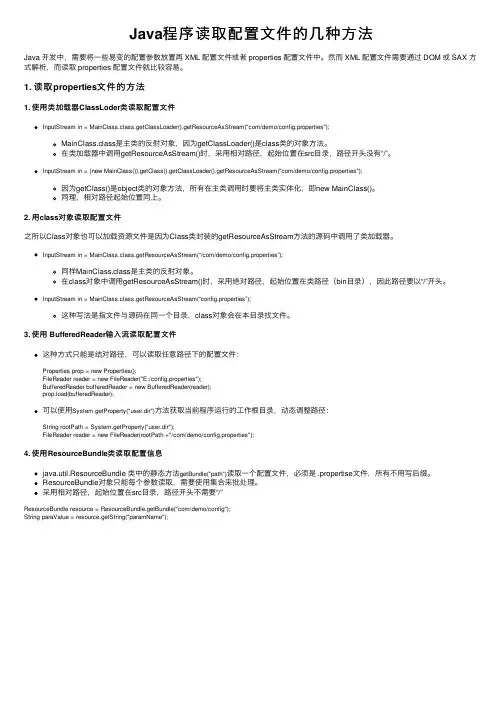
Java程序读取配置⽂件的⼏种⽅法Java 开发中,需要将⼀些易变的配置参数放置再 XML 配置⽂件或者 properties 配置⽂件中。
然⽽ XML 配置⽂件需要通过 DOM 或 SAX ⽅式解析,⽽读取 properties 配置⽂件就⽐较容易。
1. 读取properties⽂件的⽅法1. 使⽤类加载器ClassLoder类读取配置⽂件InputStream in = MainClass.class.getClassLoader().getResourceAsStream("com/demo/config.properties");MainClass.class是主类的反射对象,因为getClassLoader()是class类的对象⽅法。
在类加载器中调⽤getResourceAsStream()时,采⽤相对路径,起始位置在src⽬录,路径开头没有“/”。
InputStream in = (new MainClass()).getClass().getClassLoader().getResourceAsStream("com/demo/config.properties");因为getClass()是object类的对象⽅法,所有在主类调⽤时要将主类实体化,即new MainClass()。
同理,相对路径起始位置同上。
2. ⽤class对象读取配置⽂件之所以Class对象也可以加载资源⽂件是因为Class类封装的getResourceAsStream⽅法的源码中调⽤了类加载器。
InputStream in = MainClass.class.getResourceAsStream(“/com/demo/config.properties”);同样MainClass.class是主类的反射对象。
在class对象中调⽤getResourceAsStream()时,采⽤绝对路径,起始位置在类路径(bin⽬录),因此路径要以“/”开头。
五种方式让你在java中读取properties文件内容不再是难题
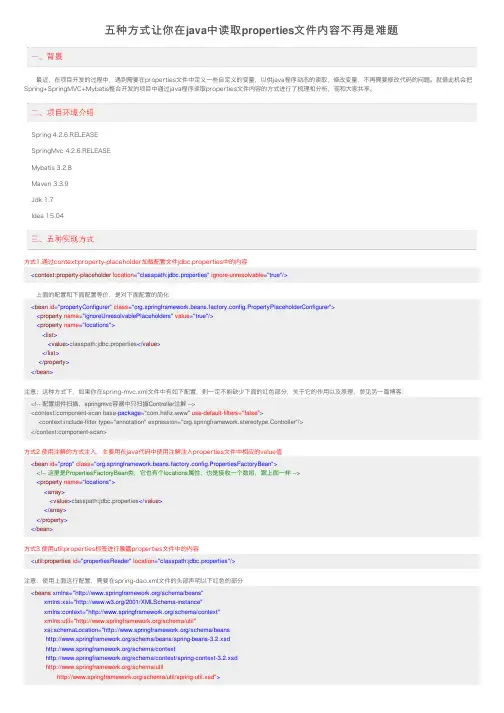
五种⽅式让你在java中读取properties⽂件内容不再是难题 最近,在项⽬开发的过程中,遇到需要在properties⽂件中定义⼀些⾃定义的变量,以供java程序动态的读取,修改变量,不再需要修改代码的问题。
就借此机会把Spring+SpringMVC+Mybatis整合开发的项⽬中通过java程序读取properties⽂件内容的⽅式进⾏了梳理和分析,现和⼤家共享。
Spring 4.2.6.RELEASESpringMvc 4.2.6.RELEASEMybatis 3.2.8Maven 3.3.9Jdk 1.7Idea 15.04⽅式1.通过context:property-placeholder加载配置⽂件jdbc.properties中的内容<context:property-placeholder location="classpath:jdbc.properties" ignore-unresolvable="true"/> 上⾯的配置和下⾯配置等价,是对下⾯配置的简化<bean id="propertyConfigurer" class="org.springframework.beans.factory.config.PropertyPlaceholderConfigurer"><property name="ignoreUnresolvablePlaceholders" value="true"/><property name="locations"><list><value>classpath:jdbc.properties</value></list></property></bean>注意:这种⽅式下,如果你在spring-mvc.xml⽂件中有如下配置,则⼀定不能缺少下⾯的红⾊部分,关于它的作⽤以及原理,参见另⼀篇博客:<!-- 配置组件扫描,springmvc容器中只扫描Controller注解 --><context:component-scan base-package="com.hafiz.www" use-default-filters="false"><context:include-filter type="annotation" expression="org.springframework.stereotype.Controller"/></context:component-scan>⽅式2.使⽤注解的⽅式注⼊,主要⽤在java代码中使⽤注解注⼊properties⽂件中相应的value值<bean id="prop" class="org.springframework.beans.factory.config.PropertiesFactoryBean"><!-- 这⾥是PropertiesFactoryBean类,它也有个locations属性,也是接收⼀个数组,跟上⾯⼀样 --><property name="locations"><array><value>classpath:jdbc.properties</value></array></property></bean>⽅式3.使⽤util:properties标签进⾏暴露properties⽂件中的内容<util:properties id="propertiesReader" location="classpath:jdbc.properties"/>注意:使⽤上⾯这⾏配置,需要在spring-dao.xml⽂件的头部声明以下红⾊的部分<beans xmlns="/schema/beans"xmlns:xsi="/2001/XMLSchema-instance"xmlns:context="/schema/context"xmlns:util="/schema/util"xsi:schemaLocation="/schema/beans/schema/beans/spring-beans-3.2.xsd/schema/context/schema/context/spring-context-3.2.xsd/schema/util /schema/util/spring-util.xsd">⽅式4.通过PropertyPlaceholderConfigurer在加载上下⽂的时候暴露properties到⾃定义⼦类的属性中以供程序中使⽤<bean id="propertyConfigurer" class="com.hafiz.www.util.PropertyConfigurer"><property name="ignoreUnresolvablePlaceholders" value="true"/><property name="ignoreResourceNotFound" value="true"/><property name="locations"><list><value>classpath:jdbc.properties</value></list></property></bean>⾃定义类PropertyConfigurer的声明如下:package com.hafiz.www.util;import org.springframework.beans.BeansException;import org.springframework.beans.factory.config.ConfigurableListableBeanFactory;import org.springframework.beans.factory.config.PropertyPlaceholderConfigurer;import java.util.Properties;/*** Desc:properties配置⽂件读取类* Created by hafiz.zhang on 2016/9/14.*/public class PropertyConfigurer extends PropertyPlaceholderConfigurer {private Properties props; // 存取properties配置⽂件key-value结果@Overrideprotected void processProperties(ConfigurableListableBeanFactory beanFactoryToProcess, Properties props)throws BeansException {super.processProperties(beanFactoryToProcess, props);this.props = props;}public String getProperty(String key){return this.props.getProperty(key);}public String getProperty(String key, String defaultValue) {return this.props.getProperty(key, defaultValue);}public Object setProperty(String key, String value) {return this.props.setProperty(key, value);}}使⽤⽅式:在需要使⽤的类中使⽤@Autowired注解注⼊即可。
Java获取properties的几种方式

Java获取properties的⼏种⽅式⽬录第1种:直接在spring的xml中使⽤第2种:在java 启动加Conifg库中或者在controller中调⽤第3种:不要在spring.xml中引⽤commonConfig.properties,在类注⼊时引⽤,然后使⽤Environment获取它的值第4种:不需要借⽤spring,直接在类中读取.但要注意:(redisson.properties配置⽂件中不能有.句号),否则将报错spring下获取Properties⽅式⽐如已有的commonConfig.propertiesmain.db.driverClassName=com.mysql.jdbc.Drivermain.db.url=jdbc\:mysql\://\:3306/huagang?useUnicode\=true&characterEncoding\=UTF-8&zeroDateTimeBehavior\=convertToNullername=huagangmain.db.password=xxxHGtest在spring中引⽤commonConfig.properties第1种:直接在spring的xml中使⽤<!-- 加载配置⽂件 --><bean id="propertyConfig" class="org.springframework.beans.factory.config.PropertyPlaceholderConfigurer"><property name="location"><value>classpath:/resources/config/commonConfig.properties</value></property></bean> <!--或者引⼊多配置⽂件<context:property-placeholder location="classpath:/resources/config/commonConfig.properties,classpath:XXX.properties"/> --><!-- 配置数据源 --><bean id="ajbDataSource" class="boPooledDataSource" destroy-method="close"><!--驱动类 --><property name="driverClass"><value>${main.db.driverClassName}</value></property><!--url连接串 --><property name="jdbcUrl"><value>${main.db.url}</value></property><!--⽤户名 --><property name="user"><value>${ername}</value></property><!--密码 --><property name="password"><value>${main.db.password}</value></property><!-- 连接池中保留的最⼩连接数最⼩链接数 --><property name="minPoolSize"><value>1</value></property><!--连接池中保留的最⼤连接数最⼤连接数 --><property name="maxPoolSize"><value>4</value></property><!-- 最⼤空闲的时间,单位是秒,⽆⽤的链接再过时后会被回收 --><property name="maxIdleTime"><value>1800</value></property><!-- 在当前连接数耗尽的时候,⼀次获取的新的连接数 --><property name="acquireIncrement"><value>1</value></property><!--JDBC的标准参数,⽤以控制数据源内加载的PreparedStatements数量。
java读取properties文件中文乱码的解决方法
java读取properties文件时,如果包含中文,那么该中文字段读出为乱码。这是因为java中文件大多以UTF-8或GBK的方式保存,而java程序在读出properties文件时则采用unicode编码方式,这样自然会导致中文乱码情况的发生。
}
public String getProperties(String key) throws Exception{
is=new FileInputStream(propPath);
prop.load(is);
return prop.getProperty(key);
}
}
public class TestPorperty {
at sun.reflect.DelegatingMethodAccessorImpl.invoke(DelegatingMethodAccessorImpl.java:25)
at ng.reflect.Method.invoke(Method.java:597)
at org.junit.internal.runners.TestMethodRunner.executeMethodBody(TestMethodRunner.java:99)
at org.eclipse.jdt.internal.junit.runner.RemoteTestRunner.run(RemoteTestRunner.java:386)
at org.eclipse.jdt.internal.junit.runner.RemoteTestRunner.main(RemoteTestRunner.java:196)
prop.load(is);
java如何读取properties文件
java如何读取properties⽂件1.情景展⽰ 将要访问的接⼝地址等常⽤的配置添加到properties⽂件中,⽐直接写到java类中的好处在于: 当我们需要修改相应配置时,直接修改properties⽂件,重启tomcat即可,避免了重新编译引⽤该配置的java⽂件,同时,也便于项⽬的维护。
⽅式⼀ 通过spring的⼯具类PropertiesLoaderUtils来实现对properties⽂件的解析 所需jar包:spring的核⼼jar包,spring-core-版本号.jarimport java.io.IOException;import java.util.HashMap;import java.util.Map;import java.util.Properties;import org.springframework.core.io.support.PropertiesLoaderUtils;/*** 借助spring读取Properties⽂件* @explain Spring 提供的 PropertiesLoaderUtils* 允许您直接通过基于类路径的⽂件地址加载属性资源最⼤的好处就是:实时加载配置⽂件,修改后⽴即⽣效,不必重启* @author Marydon* @creationTime 2018年5⽉23⽇上午9:58:59* @version 1.0* @since* @email marydon20170307@*/public class PropertiesUtils {/*** 读取properties⽂件* @param fileName properties⽂件名及所在路径* @explain 参数说明* 1.传递的参数不是properties类型⽂件,不会报错,返回的是空Map;* 2.传递的参数是根本不存在的properties⽂件,也不会报错,返回的是空Map;* 3.传递的参数可以带路径,可以正常解析到* @return*/public static Map<String, String> readProperties(String fileName) {Map<String, String> resultMap = new HashMap<String, String>();try {Properties props = PropertiesLoaderUtils.loadAllProperties(fileName);for (Object key : props.keySet()) {resultMap.put(key.toString(), props.get(key).toString());}} catch (IOException e) {e.printStackTrace();}return resultMap;}/*** @param args*/public static void main(String[] args) {// Map map = readProperties("base/web/imageInfo/fileRootDirectories.properties");Map map = readProperties("fileRootDirectories.properties");for (Object key : map.keySet()) {System.out.println(key.toString() + "=" + map.get(key).toString());}// 打印结果// fileRootPath=uploadFiles}} 这种⽅式的缺点在于: 每次调⽤都要重新解析对应的properties⽂件,所以,我们可以在项⽬启动的时候,就把该⽂件加载到内存中(⼀次加载解析,永久使⽤)。
java读取properties文件的几种方法
java读取properties⽂件的⼏种⽅法⼀、项⽬中经常会需要读取配置⽂件(properties⽂件),因此读取⽅法总结如下:1、通过java.util.Properties读取1 Properties p=new Properties();2//p需要InputStream对象进⾏读取⽂件,⽽获取InputStream有多种⽅法:3//1、通过绝对路径:InputStream is=new FileInputStream(filePath);4//2、通过Class.getResourceAsStream(path);5//3、通过ClassLoader.getResourceAsStream(path);6 p.load(InputStream is);7 is.close();8 p.getString(String(key))2、通过java.util.ResourceBundle读取ResourceBundle rb=ResourceBundle.getBundle(packageName);rb.getString(String key);⼆、Class.getResourceAsStream与ClassLoader.getResourceAsStream的区别⾸先,Java中的getResourceAsStream有以下⼏种:1. Class.getResourceAsStream(String path) : path 不以’/'开头时默认是从此类所在的包下取资源,以’/'开头则是从ClassPath根下获取。
其只是通过path构造⼀个绝对路径,最终还是由 ClassLoader获取资源。
2. Class.getClassLoader.getResourceAsStream(String path) :默认则是从ClassPath根下获取,path不能以’/'开头,最终是由ClassLoader 获取资源。
Java读取.properties配置文件的几种方式
Java读取.properties配置⽂件的⼏种⽅式Java 开发中,需要将⼀些易变的配置参数放置再 XML 配置⽂件或者 properties 配置⽂件中。
然⽽ XML 配置⽂件需要通过DOM 或 SAX ⽅式解析,⽽读取 properties 配置⽂件就⽐较容易。
介绍⼏种读取⽅式:1、基于ClassLoder读取配置⽂件注意:该⽅式只能读取类路径下的配置⽂件,有局限但是如果配置⽂件在类路径下⽐较⽅便。
Properties properties = new Properties();// 使⽤ClassLoader加载properties配置⽂件⽣成对应的输⼊流InputStream in = PropertiesMain.class.getClassLoader().getResourceAsStream("config/config.properties");// 使⽤properties对象加载输⼊流properties.load(in);//获取key对应的value值properties.getProperty(String key);2、基于 InputStream 读取配置⽂件注意:该⽅式的优点在于可以读取任意路径下的配置⽂件Properties properties = new Properties();// 使⽤InPutStream流读取properties⽂件BufferedReader bufferedReader = new BufferedReader(new FileReader("E:/config.properties"));properties.load(bufferedReader);// 获取key对应的value值properties.getProperty(String key);3、通过 java.util.ResourceBundle 类来读取,这种⽅式⽐使⽤ Properties 要⽅便⼀些1>通过 ResourceBundle.getBundle() 静态⽅法来获取(ResourceBundle是⼀个抽象类),这种⽅式来获取properties属性⽂件不需要加.properties后缀名,只需要⽂件名即可 properties.getProperty(String key);//config为属性⽂件名,放在包com.test.config下,如果是放在src下,直接⽤config即可ResourceBundle resource = ResourceBundle.getBundle("com/test/config/config");String key = resource.getString("keyWord");2>从 InputStream 中读取,获取 InputStream 的⽅法和上⾯⼀样,不再赘述ResourceBundle resource = new PropertyResourceBundle(inStream);注意:在使⽤中遇到的最⼤的问题可能是配置⽂件的路径问题,如果配置⽂件⼊在当前类所在的包下,那么需要使⽤包名限定,如:config.properties⼊在com.test.config包下,则要使⽤com/test/config/config.properties(通过Properties来获取)或com/test/config/config(通过ResourceBundle来获取);属性⽂件在src根⽬录下,则直接使⽤config.properties或config即可。