
JS URL编码转换函数
JS URL编码转换函数(2009-07-30 11:45:03)转载标签:分类:技术转贴itURL编码转换,escape() encodeURI() encodeURIComponent()escape() 方法:采用ISO Latin字符集对指定的字符串进行编码。
所有的空格符、标点符号、特殊字符以及其他非ASCII字符都将被转化成%xx格式的字符编码(xx等于该字符在字符集表里面的编码的16进制数字)。
比如,空格符对应的编码是%20。
unescape方法与此相反。
不会被此方法编码的字符:@ * / +英文解释:MSDN JScript Reference: The escape method returns a string value (in Unicode format) that contains the contents of [the argument]. All spaces, punctuation, accented characters, and any other non-ASCII characters are replaced with %xx encoding, where xx is equivalent to the hexadecimal number representing the character. For example, a space is returned as "%20."Edge Core Javascript Guide: The escape and unescape functions let you encode and decode strings. The escape function returns the hexadecimal encoding of an argument in the ISO Latin character set. The unescape function returns the ASCII string for the specified hexadecimal encoding value.encodeURI() 方法:把URI字符串采用UTF-8编码格式转化成escape格式的字符串。
不会被此方法编码的字符:! @ # $& * ( ) = : / ; ? + '英文解释:MSDN JScript Reference: The encodeURI method returns an encoded URI. If you pass the result to decodeURI, the original string is returned. The encodeURI method does not encode the following characters: ":", "/", ";", and "?". Use encodeURIComponent to encode these characters. Edge Core Javascript Guide: Encodes a Uniform Resource Identifier (URI) by replacing each instance of certain characters by one, two, or three escape sequences representing the UTF-8 encoding of the characterencodeURIComponent() 方法:把URI字符串采用UTF-8编码格式转化成escape格式的字符串。
与encodeURI()相比,这个方法将对更多的字符进行编码,比如 / 等字符。
所以如果字符串里面包含了URI的几个部分的话,不能用这个方法来进行编码,否则 / 字符被编码之后URL将显示错误。
不会被此方法编码的字符:! * ( )英文解释:MSDN JScript Reference: The encodeURIComponent method returns an encoded URI. If you pass the result to decodeURIComponent, the original string is returned. Because the encodeURIComponent method encodes all characters, be careful if the string represents a path such as /folder1/folder2/default.html. The slash characters will be encoded and will not be valid if sent as a request to a web server. Use the encodeURI method if the string contains more than a single URI component. Mozilla Developer Core Javascript Guide: Encodes a Uniform Resource Identifier (URI) component by replacing each instance of certain characters by one, two, or three escape sequences representing the UTF-8 encoding of the character.因此,对于中文字符串来说,如果不希望把字符串编码格式转化成UTF-8格式的(比如原页面和目标页面的charset是一致的时候),只需要使用 escape。
如果你的页面是GB2312或者其他的编码,而接受参数的页面是UTF-8编码的,就要采用encodeURI或者encodeURIComponent。
另外,encodeURI/encodeURIComponent是在javascript1.5之后引进的,escape则在javascript1.0版本就有。
英文注释:The escape() method does not encode the + character which is interpreted as a space on the server side as well as generated by forms with spaces in their fields. Due to this shortcoming, you should avoid use of escape() whenever possible. The best alternative is usually encodeURIComponent().Use of the encodeURI() method is a bit more specializedthan escape() in that it encodes for URIs [REF] as opposed to the querystring, which is part of a URL. Use this method when you need to encode a string to be used for any resource that uses URIs and needs certain characters to remain un-encoded. Note that this method does not encode the ' character, as it is a valid character within stly, the encodeURIComponent() method should be used in most cases when encoding a single component of a URI. This method will encode certain chars that would normally be recognized as special chars for URIs so that many components may be included. Note that this method does not encode the ' character, as it is a valid character within URIs.js对文字进行编码涉及3个函数:escape,encodeURI,encodeURIComponent,相应3个解码函数:unescape,decodeURI,decodeURIComponent1、传递参数时需要使用encodeURIComponent,这样组合的url才不会被#等特殊字符截断。
例如:<script language="javascript">document.write('<a href="/?logout&aid=7&u='+encodeURIComponent("/bruce42")+'">退出</a& gt;');</script>2、进行url跳转时可以整体使用encodeURI例如:Location.href=encodeURI("/do/s?word=百度&ct=21");3、 js使用数据时可以使用escape[编辑]例如:搜藏中history纪录。
4、 escape对0-255以外的unicode值进行编码时输出%u****格式,其它情况下escape,encodeURI,encodeURIComponent编码结果相同。
最多使用的应为encodeURIComponent,它是将中文、韩文等特殊字符转换成utf-8格式的url编码,所以如果给后台传递参数需要使用encodeURIComponent时需要后台解码对utf-8支持(form中的编码方式和当前页面编码方式相同)escape不编码字符有69个:*,+,-,.,/,@,_,0-9,a-z,A-ZencodeURI不编码字符有82个:!,#,$,&,',(,),*,+,,,-,.,/,:,;,=,?,@,_,~,0-9,a-z,A-Z encodeURIComponent不编码字符有71个:!, ',(,),*,-,.,_,~,0-9,a-z,A-Z。
JSURL传中文参数引发的乱码问题

JSURL传中⽂参数引发的乱码问题解决⽅法如下:1、在JS⾥对中⽂参数进⾏两次转码复制代码代码如下:var login_name = document.getElementById("loginname").value;login_name = encodeURI(login_name);login_name = encodeURI(login_name);2、在服务器端对参数进⾏解码复制代码代码如下:String loginName = ParamUtil.getString(request, "login_name");loginName = .URLDecoder.decode(loginName,"UTF-8");在使⽤url进⾏参数传递时,经常会传递⼀些中⽂名的参数或URL地址,在后台处理时会发⽣转换错误。
在有些传递页⾯使⽤GB2312,⽽在接收页⾯使⽤UTF8,这样接收到的参数就可能会与原来发⽣不⼀致。
使⽤服务器端的urlEncode函数编码的URL,与使⽤客户端javascript的encodeURI函数编码的URL,结果就不⼀样。
javaScript中的编码⽅法:escape() ⽅法:采⽤ISO Latin字符集对指定的字符串进⾏编码。
所有的空格符、标点符号、特殊字符以及其他⾮ASCII字符都将被转化成%xx 格式的字符编码(xx等于该字符在字符集表⾥⾯的编码的16进制数字)。
⽐如,空格符对应的编码是%20。
unescape⽅法与此相反。
不会被此⽅法编码的字符: @ * / +如果是gb2312编码的可以使⽤escape,不能⽤encodeURIComponent,要不会乱码。
escape的使⽤⽅法:https:///w3school/jsref/jsref_escape.htm英⽂解释:MSDN JScript Reference: The escape method returns a string value (in Unicode format) that contains the contents of [the argument]. All spaces, punctuation, accented characters, and any other non-ASCII characters are replaced with %xx encoding, where xx is equivalent to the hexadecimal number representing the character. For example, a space is returned as "%20."Edge Core Javascript Guide: The escape and unescape functions let you encode and decode strings. The escape function returns the hexadecimal encoding of an argument in the ISO Latin character set. The unescape function returns the ASCII string for the specified hexadecimal encoding value.encodeURI() ⽅法:把URI字符串采⽤UTF-8编码格式转化成escape格式的字符串。
js unescape函数

js unescape函数摘要:一、js unescape函数简介二、js unescape函数的使用方法三、实例演示四、注意事项正文:一、js unescape函数简介在JavaScript中,unescape函数是一个用于解码URL编码的字符串的工具。
URL编码是一种将字符串转换为指定编码格式的过程,通常用于在Web 浏览器中传递数据。
unescape函数的作用是将URL编码的字符串恢复为其原始的字符串形式。
二、js unescape函数的使用方法js unescape函数的使用方法非常简单,只需将URL编码的字符串作为参数传入unescape函数即可。
以下是一个基本的使用示例:```javascript// 示例:URL编码的字符串const urlEncodedString = "Hello%20World";// 使用unescape函数解码URL编码const decodedString = unescape(urlEncodedString);// 输出解码后的字符串console.log(decodedString); // 输出:Hello World```三、实例演示下面是一个更实际的示例,演示如何使用unescape函数解码从服务器返回的URL编码的字符串:```javascript// 假设服务器返回的JSON数据中包含URL编码的字符串const serverResponse = `{"name": "张三","age": 30,"job": "工程师","description": "张三,男,30岁,工程师,热爱技术和生活"}`;// 使用unescape函数解码JSON中的URL编码const responseData = JSON.parse(unescape(serverResponse));// 输出解码后的数据console.log(responseData);```四、注意事项1.unescape函数仅适用于解码URL编码的字符串,不适用于其他类型的编码解码。
Js的Url中传递中文参数乱码,如何获取Url中参数问题
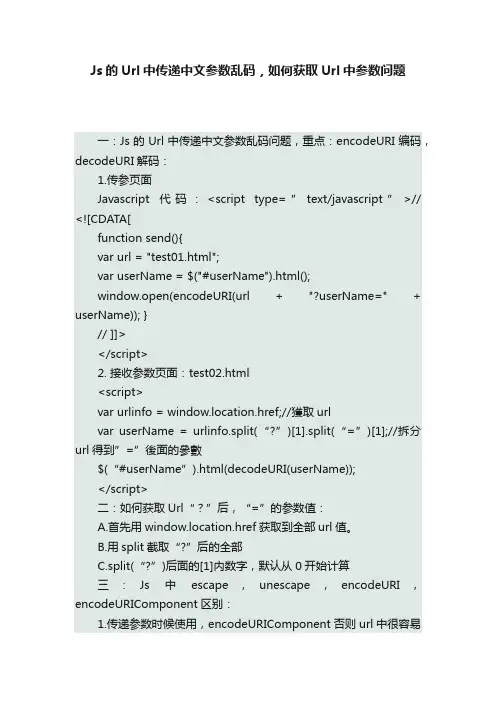
Js的Url中传递中文参数乱码,如何获取Url中参数问题一:Js的Url中传递中文参数乱码问题,重点:encodeURI编码,decodeURI解码:1.传参页面Javascript代码:<script type=”text/javascript”>// <![CDATA[function send(){var url = "test01.html";var userName = $("#userName").html();window.open(encodeURI(url + "?userName=" + userName)); }// ]]></script>2. 接收参数页面:test02.html<script>var urlinfo = window.location.href;//獲取urlvar userName = urlinfo.split(“?”)[1].split(“=”)[1];//拆分url得到”=”後面的參數$(“#userName”).html(decodeURI(userName));</script>二:如何获取Url“?”后,“=”的参数值:A.首先用window.location.href获取到全部url值。
B.用split截取“?”后的全部C.split(“?”)后面的[1]内数字,默认从0开始计算三:Js中escape,unescape,encodeURI,encodeURIComponent区别:1.传递参数时候使用,encodeURIComponent否则url中很容易被”#”,”?”,”&”等敏感符号隔断。
2.url跳转时候使用,编码用encodeURI,解码用decodeURI。
3.escape() 只是为0-255以外ASCII字符做转换工作,转换成的 %u**** 这样的码,如果要用更多的字符如 UTF-8字符库就一定要用encodeURIComponent() 或encodeURI() 转换才可以成%nn%nn 这的码才可以,其它情况下escape,encodeURI,encodeURIComponent编码结果相同,所以为了全球的统一化进程,在用 encodeURIComponent() 或 encodeURI() 代替 escape() 使用吧!可以任意转载, 转载时请务必以超链接形式标明文章原始出处及此声明本文地址:。
js将URL网址转为16进制加密与解密函数

js将URL⽹址转为16进制加密与解密函数⼗六进制(Hexadecimal)是计算机中数据的⼀种表⽰⽅法。
同⽇常⽣活中的表⽰法不⼀样,它由0-9,A-F组成,字母不区分⼤⼩写。
与10进制的对应关系是:0-9对应0-9;A-F对应10-15;N进制的数可以⽤0~(N-1)的数表⽰,超过9的⽤字母A-F。
不同电脑系统、编程语⾔对于16进制数值有不同的表⽰⽅式:如增加0x前缀。
php函数:bin2hex(str)将字符串转换成16进制bin2hex(hex)将16进制转换成字符串下⾯的函数都是单个转换字符串转16进制function strToHexCharCode(str) { if(str === "") return ""; var hexCharCode = []; hexCharCode.push("0x"); for(var i = 0; i < str.length; i++) { hexCharCode.push((str.charCodeAt(i)).toString(16)); } return hexCharCode.join("");}16进制转字符串function hexCharCodeToStr(hexCharCodeStr) { var trimedStr = hexCharCodeStr.trim(); var rawStr = trimedStr.substr(0,2).toLowerCase() === "0x"?trimedStr.substr(2):trimedStr; var len = rawStr.length; if(len % 2 !== 0) { alert("Illegal Format ASCII Code!"); return ""; } var curCharCode; var resultStr = []; for(var i = 0; i < len;i = i + 2) { curCharCode = parseInt(rawStr.substr(i, 2), 16); // ASCII Code Value resultStr.push(String.fromCharCode(curCharCode)); } return resultStr.join("");}修改的⼀个⽀持将⽹址转换为编码的function strToHexjb51(str) { if(str === "") return ""; var hexCharCode = []; for(var i = 0; i < str.length; i++) {hexCharCode.push("\ "); hexCharCode.push((str.charCodeAt(i)).toString(16)); } return hexCharCode.join("");}例如输出68 74 74 70 73 3a 2f 2f 77 77 77 2e 6a 62 35 31 2e 6e 65 74想看看对不是,直接⽤js的alert或document.write("")即可看到加密的字符串,⽅便隐藏⽹址与字符等。
JS获取url参数及url编码、解码

JS获取url参数及url编码、解码完整的URL由这⼏个部分构成:scheme://host:port/path?query#fragment ,各部分的取法如下:window.location.href:获取完整url的⽅法:,即scheme://host:port/path?query#fragmentwindow.location.protocol:获取rul协议schemewindow.location.host:获取hostwindow.location.port:获取端⼝号window.location.pathname:获取url路径window.location.search:获取参数query部分,注意此处返回的是?querywindow.location.hash:获取锚点,#fragment在js中可以使⽤escape(), encodeURL(), encodeURIComponent(),三种⽅法都有⼀些不会被编码的符号:escape():@ * / +encodeURL():! @ # $& * ( ) = : / ; ? + 'encodeURIComponent():! * ( ) '在java端可以使⽤URLDecoder.decode(“中⽂”, "UTF-8");来进⾏解码但是由于使⽤request.getParameter()来获取参数时已经对编码进⾏了⼀次解码,所以⼀般情况下只要在js中使⽤encodeURIComponent("中⽂");在java端直接使⽤request.getParameter()来获取即可返回中⽂。
如果你想在java端使⽤URLDecoder.decode(“中⽂”, "UTF-8");来解码也可以在js中进⾏⼆次编码,即:encodeURIComponent(encodeURIComponent("中⽂"));如果不进⾏⼆次编码的话,在java端通过decode⽅法取的会是乱码。
【转】url的三个js编码函数escape(),encodeURI(),encodeURI。。。
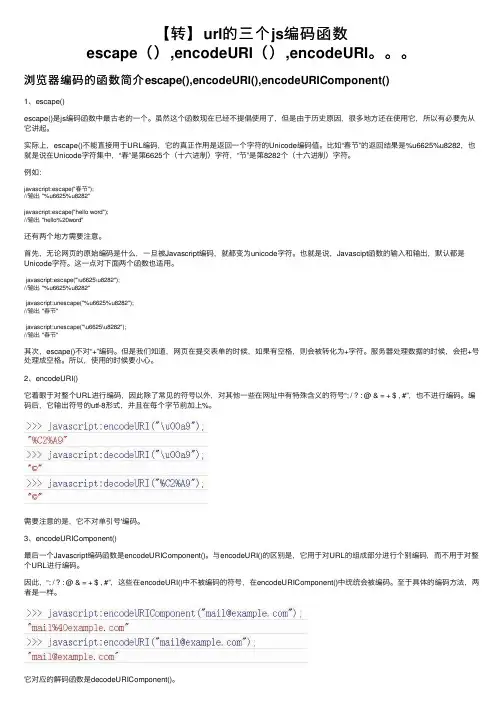
【转】url的三个js编码函数escape(),encodeURI(),encodeURI。
浏览器编码的函数简介escape(),encodeURI(),encodeURIComponent()1、escape()escape()是js编码函数中最古⽼的⼀个。
虽然这个函数现在已经不提倡使⽤了,但是由于历史原因,很多地⽅还在使⽤它,所以有必要先从它讲起。
实际上,escape()不能直接⽤于URL编码,它的真正作⽤是返回⼀个字符的Unicode编码值。
⽐如“春节”的返回结果是%u6625%u8282,也就是说在Unicode字符集中,“春”是第6625个(⼗六进制)字符,“节”是第8282个(⼗六进制)字符。
例如:javascript:escape("春节");//输出 "%u6625%u8282"javascript:escape("hello word");//输出 "hello%20word"还有两个地⽅需要注意。
⾸先,⽆论⽹页的原始编码是什么,⼀旦被Javascript编码,就都变为unicode字符。
也就是说,Javascipt函数的输⼊和输出,默认都是Unicode字符。
这⼀点对下⾯两个函数也适⽤。
javascript:escape("\u6625\u8282");//输出 "%u6625%u8282"javascript:unescape("%u6625%u8282");//输出 "春节"javascript:unescape("\u6625\u8282");//输出 "春节"其次,escape()不对“+”编码。
但是我们知道,⽹页在提交表单的时候,如果有空格,则会被转化为+字符。
服务器处理数据的时候,会把+号处理成空格。
JavaScriptBase64编码和解码,实现URL参数传递。
JavaScriptBase64编码和解码,实现URL参数传递。
为什么需要对参数进⾏编码?相信有过开发的经验的⼴⼤程序员都知道,在Web中,若是直接在Url地址上传递参数值,若是中⽂,或者+等什么的就会出现乱码现象,若是数字或者英⽂的好象没有什么问题,简⾔之,传递过来的参数是需要进⾏编码的。
在这⾥,也许有⼈会说,为什么不直接⽤Server.UrlDecode和Server.UrlEncode这两个来进⾏编码和解码的操作呢?
的确,这两个服务器端对象很好使⽤,⽤起来也很⽅便,但是,若在客户端是HTML的Input,查询的时候页⾯是HTML或者其他的,反正不是.NET的,那这个对象还可以⽤吗?
我现在就遇到这样的问题,查询的东东放在页⾯,⽽且那个页⾯我根本不想让他是.aspx结尾的,哈,感觉HTML的挺不错,⽽且⾥⾯的控件也是⽤HTML对象的。
下⾯先来看两个函数,UTF16转UTF8和UTF8转Utf16的。
那么为什么需要进⾏转化呢?因为在JavaScript中获得的中⽂字符是⽤UTF16进⾏编码的,和我们统⼀的页⾯标准格式UTF-8可不⼀样哦,所以需要先进⾏转化,上⾯的函数UTF-16到UTF8,然后再进⾏Base64的编码。
下⾯是关于Js进⾏Base64编码和解码的相关操作:
这样传递过去的值就可以在服务器端解码操作了。
下⾯是C#的Base64加码和解码的相关类:
服务器端使⽤以下代码调⽤:。
js字符串转base方法
js字符串转base方法在JavaScript中,将字符串转换为Base64编码可以通过几种不同的方式完成。
我将提供两种常见的方法:方法一:使用内置的`btoa`函数```javascriptfunction stringToBase64(str) {return btoa(unescape(encodeURIComponent(str)));}```这个函数的工作原理如下:1. `encodeURIComponent`将字符串转换为UTF-8编码的URL组件,这样可以确保所有字符都可以被正确地表示。
2. `unescape`将这些URL组件转换回原始的UTF-8字符。
3. `btoa`将这些字符转换为Base64编码。
方法二:使用第三方库有许多JavaScript库提供了更复杂、更灵活的Base64编码和解码功能。
例如,你可以使用`js-base64`库:首先,你需要安装这个库。
如果你使用npm,你可以通过以下命令安装:```bashnpm install js-base64```然后,你可以使用库中的`base64Encode`函数将字符串转换为Base64编码:```javascriptconst Base64 = require('js-base64').Base64;function stringToBase64(str) {return (str);}```请注意,你需要根据你的实际情况选择最适合你的方法。
如果你只需要进行简单的Base64编码和解码,内置的`btoa`函数可能就足够了。
然而,如果你需要更高级的功能(例如,编码二进制数据),那么使用一个强大的第三方库可能是一个更好的选择。
js转换编码格式的方法
js转换编码格式的方法在JavaScript中,可以使用以下方法来转换编码格式:1. 使用`encodeURIComponent()`和`decodeURIComponent()`函数来转换URL编码:```javascriptvar encodedString = encodeURIComponent("编码内容");var decodedString = decodeURIComponent(encodedString);```2. 使用`btoa()`和`atob()`函数来转换Base64编码:```javascriptvar encodedString = btoa("编码内容");var decodedString = atob(encodedString);```3. 使用`TextEncoder`和`TextDecoder`对象来转换UTF-8编码:```javascriptvar textEncoder = new TextEncoder();var textDecoder = new TextDecoder();var encodedData = textEncoder.encode("编码内容");var decodedData = textDecoder.decode(encodedData);```4. 使用`String.fromCharCode()`和`charCodeAt()`函数来转换字符编码:```javascriptvar encodedString = "";for (var i = 0; i < "编码内容".length; i++) {encodedString += String.fromCharCode("编码内容".charCodeAt(i) + 1);}var decodedString = "";for (var i = 0; i < encodedString.length; i++) {decodedString +=String.fromCharCode(encodedString.charCodeAt(i) - 1); }```这些方法可以根据不同的编码格式进行转换操作。
encodeuri()方法
encodeuri()方法-概述说明以及解释1引言本文将介绍JavaScript中的`encodeURI()`方法,详细阐述其概述、文章结构和目的。
`encodeURI()`方法是JavaScript中用于编码URL的函数之一。
在Web开发中,URL编码是常见的操作,它可以确保URL中的特殊字符不会导致解析错误或安全问题。
`encodeURI()`方法可以将指定的字符串进行编码,以便在URL中使用。
本文将对该方法进行概述说明,并解释其使用方法和功能。
1.1概述`encodeURI()`方法是JavaScript中一个重要的URL编码函数,用于将特殊字符进行编码,以便在URL中使用。
以下是对`encodeURI()`方法概述的详细阐述:1.1.1什么是URL编码在Web开发中,URL编码是将URL中的特殊字符转换为特定格式的过程。
由于URL中某些字符具有特殊含义(例如空格、问号、哈希符号等),如果直接在URL中使用这些字符,可能会导致解析错误或安全问题。
因此,需要对URL中的特殊字符进行编码。
1.1.2`encodeURI()`方法的作用`encodeURI()`方法可以对URL中的特殊字符进行编码,以确保其在URL中的正确使用。
该方法能够将URL中的特殊字符转换为对应的编码表示,例如将空格转换为"%20"、将问号转换为"%3F"等。
通过使用`encodeURI()`方法,可以生成符合URL规范的字符串。
1.1.3`encodeURI()`方法与其他URL编码函数的区别在JavaScript中,除了`encodeURI()`方法,还有`encodeURIComponent()`方法用于URL编码。
这两个方法在处理特殊字符时略有不同。
`encodeURI()`方法主要用于对整个URL进行编码,而`encodeURIComponent()`方法则用于对URL中的某个特定部分(如查询参数)进行编码。