
Excel 表格怎么去掉保护密码
Excel 表格怎么去掉保护密码?浏览次数:2369次悬赏分:30 |解决时间:2010-4-21 18:09 |提问者:匿名最佳答案Excel工作表保护密码破解方法一个excel文档要修改其中的内容,可是被保护了,找了一堆破解软件,要么需要购买,要么是破解打开密码的,非保护密码。
好不容易找到解决方案!excel保护密码破解(绝对经典) 如果你的Excel文件设置了保护密码而遗忘了,那麼请依照下面的步骤来操作,也许会有奇迹出现.不需要多麼高难度的操作和专业的软件支持.简单.方便.费时一般最多两分钟. (建议:操作前把原文件COPY一份) 方法:1打开文件2工具---宏----录制新宏---输入名字如:aa3停止录制(这样得到一个空宏)4工具---宏----宏,选aa,点编辑按钮5删除窗口中的所有字符(只有几个),替换为下面的内容:Public Sub AllInternalPasswords()' Breaks worksheet and workbook structure passwords. Bob McCormick' probably originator of base code algorithm modified for coverage' of workbook structure / windows passwords and for multiple passwords'' Norman Harker and JE McGimpsey 27-Dec-2002 (Version 1.1)' Modified 2003-Apr-04 by JEM: All msgs to constants, and' eliminate one Exit Sub (Version 1.1.1)' Reveals hashed passwords NOT original passwordsConst DBLSPACE As String = vbNewLine & vbNewLineConst AUTHORS As String = DBLSPACE & vbNewLine & _"Adapted from Bob McCormick base code by" & _"Norman Harker and JE McGimpsey"Const HEADER As String = "AllInternalPasswords User Message"Const VERSION As String = DBLSPACE & "Version 1.1.1 2003-Apr-04" Const REPBACK As String = DBLSPACE & "Please report failure " & _"to the microsoft.public.excel.programming newsgroup."Const ALLCLEAR As String = DBLSPACE & "The workbook should " & _ "now be free of all password protection, so make sure you:" & _ DBLSPACE & "SAVE IT NOW!" & DBLSPACE & "and also" & _DBLSPACE & "BACKUP!, BACKUP!!, BACKUP" & _DBLSPACE & "Also, remember that the password was " & _"put there for a reason. Don't stuff up crucial formulas " & _"or data." & DBLSPACE & "Access and use of some data " & _"may be an offense. If in doubt, don't."Const MSGNOPWORDS1 As String = "There were no passwords on " & _ "sheets, or workbook structure or windows." & AUTHORS & VERSION Const MSGNOPWORDS2 As String = "There was no protection to " & _ "workbook structure or windows." & DBLSPACE & _"Proceeding to unprotect sheets." & AUTHORS & VERSIONConst MSGTAKETIME As String = "After pressing OK button this " & _ "will take some time." & DBLSPACE & "Amount of time " & _"depends on how many different passwords, the " & _"passwords, and your computer's specification." & DBLSPACE & _"Just be patient! Make me a coffee!" & AUTHORS & VERSIONConst MSGPWORDFOUND1 As String = "You had a Worksheet " & _ "Structure or Windows Password set." & DBLSPACE & _"The password found was: " & DBLSPACE & "$$" & DBLSPACE & _ "Note it down for potential future use in other workbooks by " & _"the same person who set this password." & DBLSPACE & _"Now to check and clear other passwords." & AUTHORS & VERSION Const MSGPWORDFOUND2 As String = "You had a Worksheet " & _ "password set." & DBLSPACE & "The password found was: " & _ DBLSPACE & "$$" & DBLSPACE & "Note it down for potential " & _ "future use in other workbooks by same person who " & _"set this password." & DBLSPACE & "Now to check and clear " & _ "other passwords." & AUTHORS & VERSIONConst MSGONLYONE As String = "Only structure / windows " & _ "protected with the password that was just found." & _ALLCLEAR & AUTHORS & VERSION & REPBACKDim w1 As Worksheet, w2 As WorksheetDim i As Integer, j As Integer, k As Integer, l As IntegerDim m As Integer, n As Integer, i1 As Integer, i2 As IntegerDim i3 As Integer, i4 As Integer, i5 As Integer, i6 As IntegerDim PWord1 As StringDim ShTag As Boolean, WinTag As BooleanApplication.ScreenUpdating = FalseWith ActiveWorkbookWinTag = .ProtectStructure Or .ProtectWindowsEnd WithShTag = FalseFor Each w1 In WorksheetsShTag = ShTag Or w1.ProtectContentsNext w1If Not ShTag And Not WinTag ThenMsgBox MSGNOPWORDS1, vbInformation, HEADER Exit SubEnd IfMsgBox MSGTAKETIME, vbInformation, HEADERIf Not WinTag ThenMsgBox MSGNOPWORDS2, vbInformation, HEADER ElseOn Error Resume NextDo 'dummy do loopFor i = 65 To 66: For j = 65 To 66: For k = 65 To 66For l = 65 To 66: For m = 65 To 66: For i1 = 65 To 66 For i2 = 65 To 66: For i3 = 65 To 66: For i4 = 65 To 66 For i5 = 65 To 66: For i6 = 65 To 66: For n = 32 To 126 With ActiveWorkbook.Unprotect Chr(i) & Chr(j) & Chr(k) & _Chr(l) & Chr(m) & Chr(i1) & Chr(i2) & _Chr(i3) & Chr(i4) & Chr(i5) & Chr(i6) & Chr(n)If .ProtectStructure = False And _.ProtectWindows = False ThenPWord1 = Chr(i) & Chr(j) & Chr(k) & Chr(l) & _Chr(m) & Chr(i1) & Chr(i2) & Chr(i3) & _Chr(i4) & Chr(i5) & Chr(i6) & Chr(n)MsgBox Application.Substitute(MSGPWORDFOUND1, _ "$$", PWord1), vbInformation, HEADERExit Do 'Bypass all for...nextsEnd IfEnd WithNext: Next: Next: Next: Next: NextNext: Next: Next: Next: Next: NextLoop Until TrueOn Error GoTo 0End IfIf WinTag And Not ShTag ThenMsgBox MSGONLYONE, vbInformation, HEADERExit SubEnd IfOn Error Resume NextFor Each w1 In Worksheets'Attempt clearance with PWord1w1.Unprotect PWord1Next w1On Error GoTo 0ShTag = FalseFor Each w1 In Worksheets'Checks for all clear ShTag triggered to 1 if not.ShTag = ShTag Or w1.ProtectContentsNext w1If ShTag ThenFor Each w1 In WorksheetsWith w1If .ProtectContents ThenOn Error Resume NextDo 'Dummy do loopFor i = 65 To 66: For j = 65 To 66: For k = 65 To 66For l = 65 To 66: For m = 65 To 66: For i1 = 65 To 66 For i2 = 65 To 66: For i3 = 65 To 66: For i4 = 65 To 66 For i5 = 65 To 66: For i6 = 65 To 66: For n = 32 To 126 .Unprotect Chr(i) & Chr(j) & Chr(k) & _Chr(l) & Chr(m) & Chr(i1) & Chr(i2) & Chr(i3) & _Chr(i4) & Chr(i5) & Chr(i6) & Chr(n)If Not .ProtectContents ThenPWord1 = Chr(i) & Chr(j) & Chr(k) & Chr(l) & _Chr(m) & Chr(i1) & Chr(i2) & Chr(i3) & _Chr(i4) & Chr(i5) & Chr(i6) & Chr(n)MsgBox Application.Substitute(MSGPWORDFOUND2, _ "$$", PWord1), vbInformation, HEADER'leverage finding Pword by trying on other sheetsFor Each w2 In Worksheetsw2.Unprotect PWord1Next w2Exit Do 'Bypass all for...nextsEnd IfNext: Next: Next: Next: Next: NextNext: Next: Next: Next: Next: NextLoop Until TrueOn Error GoTo 0End IfEnd WithNext w1End IfMsgBox ALLCLEAR & AUTHORS & VERSION & REPBACK, vbInformation, HEADEREnd Sub6关闭编辑窗口7工具---宏-----宏,选AllInternalPasswords,运行,确定两次,等2分钟,再确定.OK,没有密码了!!。
excel表格如何解除保护密码
excel表格如何解除保护密码
在Excel中录入过多的重要数据是人们的习惯,因此这些文件都需要利用密码进行保护。
但过了段时间以后却觉得不需要进行保护。
就需要解除密码保护了。
接下来店铺举例简单的例子告诉大家解除excel 表格密码保护的方法。
解除excel表格密码保护的方法
解除密码步骤1:先录入密码,确定打开要取消密码的excel文件。
解除密码步骤2:在文件菜单下点击另存为,取消密码的办法其实就是再把文件保存一次,在保存替换原文件或重命名时将密码取消掉。
解除密码步骤3:点击工具选择常规选项
解除密码步骤4:删除密码,点击确定并保存。
解除密码步骤5:提示文件已存在要替换它吗?如果想要覆盖原文件直接点击是就替换掉了。
解除密码步骤6:如果想保留原文件重新存一份,点击否再修改文件名保存为一份新的文件。
excel 考勤表 撤销保护密码 的方法
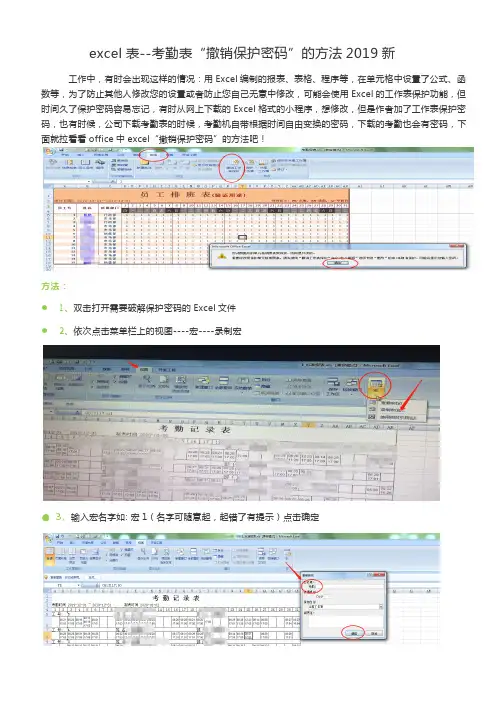
excel表--考勤表“撤销保护密码”的方法2019新工作中,有时会出现这样的情况:用Excel编制的报表、表格、程序等,在单元格中设置了公式、函数等,为了防止其他人修改您的设置或者防止您自己无意中修改,可能会使用Excel的工作表保护功能,但时间久了保护密码容易忘记,有时从网上下载的Excel格式的小程序,想修改,但是作者加了工作表保护密码,也有时候,公司下载考勤表的时候,考勤机自带根据时间自由变换的密码,下载的考勤也会有密码,下面就拉看看office中excel“撤销保护密码”的方法吧!方法:●1、双击打开需要破解保护密码的Excel文件●2、依次点击菜单栏上的视图----宏----录制宏●3、输入宏名字如: 宏1(名字可随意起,起错了有提示)点击确定●4、依次点击菜单栏上的视图---宏----停止录制●5、依次点击菜单栏上的视图---宏----查看宏●6、选择“考勤1”点击编辑●7、将窗口内的内容全选后删除●8、然后将下面分割线以内的内容开始复制粘贴在上面的窗口内:从横线下开始复制--------------------复----------------制----------------横-------------线----------------------------------------------------以------------------------------------下-----------------------------------------Option ExplicitPublic Sub AllInternalPasswords()' Breaks worksheet and workbook structure passwords. Bob McCormick' probably originator of base code algorithm modified for coverage' of workbook structure / windows passwords and for multiple passwords'' Norman Harker and JE McGimpsey 27-Dec-2002 (Version 1.1)' Modified 2003-Apr-04 by JEM: All msgs to constants, and' eliminate one Exit Sub (Version 1.1.1)' Reveals hashed passwords NOT original passwordsConst DBLSPACE As String = vbNewLine & vbNewLineConst AUTHORS As String = DBLSPACE & vbNewLine & _"Adapted from Bob McCormick base code by" & _"Norman Harker and JE McGimpsey"Const HEADER As String = "AllInternalPasswords User Message"Const VERSION As String = DBLSPACE & "Version 1.1.1 2003-Apr-04"Const REPBACK As String = DBLSPACE & "Please report failure " & _"to the microsoft.public.excel.programming newsgroup."Const ALLCLEAR As String = DBLSPACE & "The workbook should " & _"now be free of all password protection, so make sure you:" & _DBLSPACE & "SAVE IT NOW!" & DBLSPACE & "and also" & _DBLSPACE & "BACKUP!, BACKUP!!, BACKUP" & _DBLSPACE & "Also, remember that the password was " & _"put there for a reason. Don't stuff up crucial formulas " & _"or data." & DBLSPACE & "Access and use of some data " & _"may be an offense. If in doubt, don't."Const MSGNOPWORDS1 As String = "There were no passwords on " & _"sheets, or workbook structure or windows." & AUTHORS & VERSIONConst MSGNOPWORDS2 As String = "There was no protection to " & _"workbook structure or windows." & DBLSPACE & _"Proceeding to unprotect sheets." & AUTHORS & VERSIONConst MSGTAKETIME As String = "After pressing OK button this " & _"will take some time." & DBLSPACE & "Amount of time " & _"depends on how many different passwords, the " & _"passwords, and your computer's specification." & DBLSPACE & _"Just be patient! Make me a coffee!" & AUTHORS & VERSIONConst MSGPWORDFOUND1 As String = "You had a Worksheet " & _"Structure or Windows Password set." & DBLSPACE & _"The password found was: " & DBLSPACE & "$$" & DBLSPACE & _"Note it down for potential future use in other workbooks by " & _"the same person who set this password." & DBLSPACE & _"Now to check and clear other passwords." & AUTHORS & VERSIONConst MSGPWORDFOUND2 As String = "You had a Worksheet " & _"password set." & DBLSPACE & "The password found was: " & _DBLSPACE & "$$" & DBLSPACE & "Note it down for potential " & _"future use in other workbooks by same person who " & _"set this password." & DBLSPACE & "Now to check and clear " & _"other passwords." & AUTHORS & VERSIONConst MSGONLYONE As String = "Only structure / windows " & _"protected with the password that was just found." & _ALLCLEAR & AUTHORS & VERSION & REPBACKDim w1 As Worksheet, w2 As WorksheetDim i As Integer, j As Integer, k As Integer, l As Integer Dim m As Integer, n As Integer, i1 As Integer, i2 As Integer Dim i3 As Integer, i4 As Integer, i5 As Integer, i6 As Integer Dim PWord1 As StringDim ShTag As Boolean, WinTag As BooleanApplication.ScreenUpdating = FalseWith ActiveWorkbookWinTag = .ProtectStructure Or .ProtectWindowsEnd WithShTag = FalseFor Each w1 In WorksheetsShTag = ShTag Or w1.ProtectContentsNext w1If Not ShTag And Not WinTag ThenMsgBox MSGNOPWORDS1, vbInformation, HEADERExit SubEnd IfMsgBox MSGTAKETIME, vbInformation, HEADERIf Not WinTag ThenMsgBox MSGNOPWORDS2, vbInformation, HEADERElseOn Error Resume NextDo 'dummy do loopFor i = 65 To 66: For j = 65 To 66: For k = 65 To 66For l = 65 To 66: For m = 65 To 66: For i1 = 65 To 66For i2 = 65 To 66: For i3 = 65 To 66: For i4 = 65 To 66For i5 = 65 To 66: For i6 = 65 To 66: For n = 32 To 126 With ActiveWorkbook.Unprotect Chr(i) & Chr(j) & Chr(k) & _Chr(l) & Chr(m) & Chr(i1) & Chr(i2) & _Chr(i3) & Chr(i4) & Chr(i5) & Chr(i6) & Chr(n)If .ProtectStructure = False And _.ProtectWindows = False ThenPWord1 = Chr(i) & Chr(j) & Chr(k) & Chr(l) & _Chr(m) & Chr(i1) & Chr(i2) & Chr(i3) & _Chr(i4) & Chr(i5) & Chr(i6) & Chr(n)MsgBox Application.Substitute(MSGPWORDFOUND1, _ "$$", PWord1), vbInformation, HEADERExit Do 'Bypass all for...nextsEnd IfEnd WithNext: Next: Next: Next: Next: NextNext: Next: Next: Next: Next: NextLoop Until TrueOn Error GoTo 0End IfIf WinTag And Not ShTag ThenMsgBox MSGONLYONE, vbInformation, HEADERExit SubEnd IfOn Error Resume NextFor Each w1 In Worksheets'Attempt clearance with PWord1w1.Unprotect PWord1Next w1On Error GoTo 0ShTag = FalseFor Each w1 In Worksheets'Checks for all clear ShTag triggered to 1 if not.ShTag = ShTag Or w1.ProtectContentsNext w1If ShTag ThenFor Each w1 In WorksheetsWith w1If .ProtectContents ThenOn Error Resume NextDo 'Dummy do loopFor i = 65 To 66: For j = 65 To 66: For k = 65 To 66For l = 65 To 66: For m = 65 To 66: For i1 = 65 To 66For i2 = 65 To 66: For i3 = 65 To 66: For i4 = 65 To 66For i5 = 65 To 66: For i6 = 65 To 66: For n = 32 To 126.Unprotect Chr(i) & Chr(j) & Chr(k) & _Chr(l) & Chr(m) & Chr(i1) & Chr(i2) & Chr(i3) & _Chr(i4) & Chr(i5) & Chr(i6) & Chr(n)If Not .ProtectContents ThenPWord1 = Chr(i) & Chr(j) & Chr(k) & Chr(l) & _Chr(m) & Chr(i1) & Chr(i2) & Chr(i3) & _Chr(i4) & Chr(i5) & Chr(i6) & Chr(n)MsgBox Application.Substitute(MSGPWORDFOUND2, _"$$", PWord1), vbInformation, HEADER'leverage finding Pword by trying on other sheetsFor Each w2 In Worksheetsw2.Unprotect PWord1Next w2Exit Do 'Bypass all for...nextsEnd IfNext: Next: Next: Next: Next: NextNext: Next: Next: Next: Next: NextLoop Until TrueOn Error GoTo 0End IfEnd WithNext w1End IfMsgBox ALLCLEAR & AUTHORS & VERSION & REPBACK, vbInformation, HEADEREnd Sub--------------------复----------------制----------------横-------------线----------------------------------------------------以------------------------------------上-----------------------------------------得到情况如下:●9、保存以下,关闭编辑窗口●10、依次点击菜单栏上的视图-----宏-----查看宏●11、选AllInternalPasswords,执行●12、点击“确定”三次,这是第三次的确定图●13、最后记得要保存一下,否则下次开还是保护状态,撤销成功了,可以随意改动了。
如何能取消Excel工作表密码保护教程

Excel工作表保护密码清除1,打开需要解除保护的EXCEL工作表;2,选择工具---宏----录制新宏---输入名字如:aa;3,停止录制(这样得到一个空宏);4,工具---宏----宏,选aa,点编辑按钮;5,删除窗口中的所有字符(只有几个),替换为下面的内容:(复制吧);6,关闭编辑窗口;7,工具---宏-----宏,选AllInternalPasswords,运行,确定两次,等2分钟,再确定.OK,旧的密码自动提示,工作表也自动解除保护了。
内容如下:==================================================================================Public Sub AllInternalPasswords()' Breaks worksheet and workbook structure passwords. Bob McCormick' probably originator of base code algorithm modified for coverage' of workbook structure / windows passwords and for multiple passwords'' Norman Harker and JE McGimpsey 27-Dec-2002 (Version 1.1)' Modified 2003-Apr-04 by JEM: All msgs to constants, and' eliminate one Exit Sub (Version 1.1.1)' Reveals hashed passwords NOT original passwordsConst DBLSPACE As String = vbNewLine & vbNewLineConst AUTHORS As String = DBLSPACE & vbNewLine & _"Adapted from Bob McCormick base code by" & _"Norman Harker and JE McGimpsey"Const HEADER As String = "AllInternalPasswords User Message"Const VERSION As String = DBLSPACE & "Version 1.1.1 2003-Apr-04" Const REPBACK As String = DBLSPACE & "Please report failure " & _ "to the microsoft.public.excel.programming newsgroup."Const ALLCLEAR As String = DBLSPACE & "The workbook should " & _ "now be free of all password protection, so make sure you:" & _ DBLSPACE & "SAVE IT NOW!" & DBLSPACE & "and also" & _DBLSPACE & "BACKUP!, BACKUP!!, BACKUP!!!" & _DBLSPACE & "Also, remember that the password was " & _"put there for a reason. Don't stuff up crucial formulas " & _ "or data." & DBLSPACE & "Access and use of some data " & _"may be an offense. If in doubt, don't."Const MSGNOPWORDS1 As String = "There were no passwords on " & _ "sheets, or workbook structure or windows." & AUTHORS & VERSION Const MSGNOPWORDS2 As String = "There was no protection to " & _ "workbook structure or windows." & DBLSPACE & _"Proceeding to unprotect sheets." & AUTHORS & VERSIONConst MSGTAKETIME As String = "After pressing OK button this " & _ "will take some time." & DBLSPACE & "Amount of time " & _ "depends on how many different passwords, the " & _"passwords, and your computer's specification." & DBLSPACE & _"Just be patient! Make me a coffee!" & AUTHORS & VERSIONConst MSGPWORDFOUND1 As String = "You had a Worksheet " & _ "Structure or Windows Password set." & DBLSPACE & _"The password found was: " & DBLSPACE & "$$" & DBLSPACE & _"Note it down for potential future use in other workbooks by " & _ "the same person who set this password." & DBLSPACE & _"Now to check and clear other passwords." & AUTHORS & VERSION Const MSGPWORDFOUND2 As String = "You had a Worksheet " & _ "password set." & DBLSPACE & "The password found was: " & _ DBLSPACE & "$$" & DBLSPACE & "Note it down for potential " & _ "future use in other workbooks by same person who " & _"set this password." & DBLSPACE & "Now to check and clear " & _ "other passwords." & AUTHORS & VERSIONConst MSGONLYONE As String = "Only structure / windows " & _ "protected with the password that was just found." & _ALLCLEAR & AUTHORS & VERSION & REPBACKDim w1 As Worksheet, w2 As WorksheetDim i As Integer, j As Integer, k As Integer, l As IntegerDim m As Integer, n As Integer, i1 As Integer, i2 As IntegerDim i3 As Integer, i4 As Integer, i5 As Integer, i6 As Integer Dim PWord1 As StringDim ShTag As Boolean, WinTag As BooleanApplication.ScreenUpdating = FalseWith ActiveWorkbookWinTag = .ProtectStructure Or .ProtectWindowsEnd WithShTag = FalseFor Each w1 In WorksheetsShTag = ShTag Or w1.ProtectContentsNext w1If Not ShTag And Not WinTag ThenMsgBox MSGNOPWORDS1, vbInformation, HEADERExit SubEnd IfMsgBox MSGTAKETIME, vbInformation, HEADERIf Not WinTag ThenMsgBox MSGNOPWORDS2, vbInformation, HEADERElseOn Error Resume NextDo 'dummy do loopFor i = 65 To 66: For j = 65 To 66: For k = 65 To 66 For l = 65 To 66: For m = 65 To 66: For i1 = 65 To 66 For i2 = 65 To 66: For i3 = 65 To 66: For i4 = 65 To 66 For i5 = 65 To 66: For i6 = 65 To 66: For n = 32 To 126 With ActiveWorkbook.Unprotect Chr(i) & Chr(j) & Chr(k) & _Chr(l) & Chr(m) & Chr(i1) & Chr(i2) & _Chr(i3) & Chr(i4) & Chr(i5) & Chr(i6) & Chr(n) If .ProtectStructure = False And _.ProtectWindows = False ThenPWord1 = Chr(i) & Chr(j) & Chr(k) & Chr(l) & _ Chr(m) & Chr(i1) & Chr(i2) & Chr(i3) & _Chr(i4) & Chr(i5) & Chr(i6) & Chr(n)MsgBox Application.Substitute(MSGPWORDFOUND1, _ "$$", PWord1), vbInformation, HEADERExit Do 'Bypass all for...nextsEnd IfEnd WithNext: Next: Next: Next: Next: NextNext: Next: Next: Next: Next: NextLoop Until TrueOn Error GoTo 0End IfIf WinTag And Not ShTag ThenMsgBox MSGONLYONE, vbInformation, HEADERExit SubEnd IfOn Error Resume NextFor Each w1 In Worksheets'Attempt clearance with PWord1w1.Unprotect PWord1Next w1On Error GoTo 0ShTag = FalseFor Each w1 In Worksheets'Checks for all clear ShTag triggered to 1 if not. ShTag = ShTag Or w1.ProtectContentsNext w1If ShTag ThenFor Each w1 In WorksheetsWith w1If .ProtectContents ThenOn Error Resume NextDo 'Dummy do loopFor i = 65 To 66: For j = 65 To 66: For k = 65 To 66 For l = 65 To 66: For m = 65 To 66: For i1 = 65 To 66 For i2 = 65 To 66: For i3 = 65 To 66: For i4 = 65 To 66 For i5 = 65 To 66: For i6 = 65 To 66: For n = 32 To 126 .Unprotect Chr(i) & Chr(j) & Chr(k) & _Chr(l) & Chr(m) & Chr(i1) & Chr(i2) & Chr(i3) & _Chr(i4) & Chr(i5) & Chr(i6) & Chr(n)If Not .ProtectContents ThenPWord1 = Chr(i) & Chr(j) & Chr(k) & Chr(l) & _Chr(m) & Chr(i1) & Chr(i2) & Chr(i3) & _Chr(i4) & Chr(i5) & Chr(i6) & Chr(n)MsgBox Application.Substitute(MSGPWORDFOUND2, _"$$", PWord1), vbInformation, HEADER'leverage finding Pword by trying on other sheetsFor Each w2 In Worksheetsw2.Unprotect PWord1Next w2Exit Do 'Bypass all for...nextsEnd IfNext: Next: Next: Next: Next: NextNext: Next: Next: Next: Next: NextLoop Until TrueOn Error GoTo 0End IfEnd WithNext w1End IfMsgBox ALLCLEAR & AUTHORS & VERSION & REPBACK, vbInformation, HEADEREnd Sub============================================================================== Excel表格密码保护的解除方法表格受密码保护时,我们修改数据Excel弹出“您试图更改的单元格或图表受保护,因而是只读的。
简单粗暴快速移除Excel工作表保护密码
简单粗暴快速移除Excel⼯作表保护密码导读:如果你因为忘记了⼯作表保护密码⽽懊恼,那么下⾯的代码会帮到你。
在⼯作表中,按Alt F11进⼊VBE窗⼝,依次按Alt、i、m插⼊⼀个模块,将代码cp进去,按F5运⾏,幸福来得太突然。
操作演⽰:代码截图:代码:Option Explicit''********************''或许这是Ms Excel的⼀个漏洞,只要将AllowFiltering设置为True,那么呵呵!''在Excel 2003、2007下亲测有效''********************''取消全部⼯作表保护Sub RemoveAllShtPwd()Dim sh As WorksheetApplication.ScreenUpdating = FalseFor Each sh In Sheets''关键在这:允许⽤户使⽤⼯作表受保护之前设置的“⾃动筛选”sh.Protect AllowFiltering:=Truesh.UnprotectNextApplication.ScreenUpdating = TrueMsgBox ''已取消全部⼯作表保护''End Sub''取消指定⼯作表保护Sub RemoveShtPwd()''这⾥指定的是 Employee 表With Sheets(''Employee'').Protect AllowFiltering:=True.UnprotectEnd WithMsgBox ''已取消⼯作表保护''End Sub''对全部⼯作表设定保护密码''如果⼯作表已有密码,则先运⾏⼀下RemoveAllShtPwd Sub AddAllShtPwd()Dim sh As Worksheet''为常量指定密码字符串 ''Asd123''Const pwd As String = ''Asd123''Application.ScreenUpdating = FalseFor Each sh In Sheetssh.Protect pwdsh.ProtectNextApplication.ScreenUpdating = TrueMsgBox ''已对全部⼯作表设定密码保护''End。
取消工作表保护
取消工作表保护
在使用Excel表格的过程中,我们经常会对工作表进行保护,以防止他人对表格内容进行意外修改。
但是在某些情况下,我们需要取消工作表的保护,以便对表格内容进行修改和编辑。
下面将介绍如何取消工作表的保护。
首先,打开需要取消保护的Excel表格文件。
在文件中找到需要取消保护的工作表,然后点击工具栏上的“审阅”选项卡。
接下来,在“审阅”选项卡中找到“工作表保护”选项。
点击“工作表保护”选项下的“取消工作表保护”。
在弹出的对话框中,输入取消工作表保护时设定的密码(如果有的话),然后点击“确定”按钮。
完成以上步骤后,工作表的保护就会被成功取消。
此时,您就可以对表格内容进行修改和编辑了。
需要注意的是,在取消工作表保护之前,您必须拥有取消保护的权限。
否则,系统将不允许您取消工作表的保护。
另外,取消工作表保护后,建议您在完成操作后重新对工作表进行保护,以免对表格内容造成意外修改。
总之,取消工作表保护是一个简单而重要的操作,它可以帮助我们更好地管理和编辑Excel表格内容。
希望以上介绍对您有所帮助,谢谢阅读!。
工作表密码忘了?一招教你删除EXCEL工作表密码
工作表密码忘了?一招教你删除EXCEL工作表密码
大家好!刚学习到一个新的实用技能-删除EXCEL保护密码,所以迫不及待来跟大家分享。
一、痛点概括1、日常工作中,为了让别人不能随意更改工作表,经常会有设置保护密码的时候,如果工作表太多,自己都会记不住;2、别人下发的工作表,想学习函数公式,或者重新修订,有密码保护,不能修改。
二、步骤演示1、如图,我们的工作表已经保护,无法更改和修订;2、关闭当前工作簿,修改后缀名为.RAR;3、双击修改后的文件-找到Sheet1.xml,我的路径是xl-worksheets-sheet1.xml,大家应该差不多;4、复制或者拖动一份到压缩文件外,右键-选择记事本-打开;5、在打开的记事本中,查找:PROTECTION,并删除包含这一词汇的整句语句;(以这两个符号开头和结尾)6、保存记事本文档,并拖动或者复制到原压缩文件中,替换;7、修改文档为.xlsx格式,打开EXCEL,此时已经可以自由编辑。
注意:2003版不适用、EXCEL打开密码不适用。
Excel中表格工作表保护密码撤销的操作方法
Excel中表格工作表保护密码撤销的操作方法在做excel表格时我们有时候会给自己的工作表加密,一旦忘记密码就会很麻烦,如何绕过密码,直接撤销保护。
今天,学习啦小编就教大家在Excel中表格工作表保护密码撤销的操作方法。
Excel中表格工作表保护密码撤销的操作步骤打开excel,点击菜单栏的“视图”,点击二级菜单里的“宏”,选择录制宏。
表格工作表保护密码撤销的操作图1 在弹出来的方框中输入宏的名称,点击确认。
表格工作表保护密码撤销的操作图 2 重复第一步的步骤,不过这次点击“停止录制”。
表格工作表保护密码撤销的操作图3 选择查看宏。
表格工作表保护密码撤销的操作图4 编辑宏。
表格工作表保护密码撤销的操作图5 在弹出来的代码框输入下面的代码:Option ExplicitPublic Sub AllInternalPasswords()’Breaks worksheet and workbook structure passwords. Bob McCormick’probably originator of base code algorithm modified for coverage’ of workbook structure / windows passwords and for multiple passwords’’Norman Harker and JE McGimpsey 27-Dec-2002 (Version 1.1)’Modified 2003-Apr-04 by JEM: All msgs to constants, and’ eliminate one Exit Sub (Version’Reveals hashed passwords NOT original passwords Const DBLSPACE As String = vbNewLine & vbNewLine Const AUTHORS As String = DBLSPACE & vbNewLine & _”Adapted from Bob McCormick base code by” & _ ”Norman Harker and JE McGimpsey”Const HEADER As String = “AllInternalPasswords User Message”Const VERSION As String = DBLSPACE & “Version1.1.1 2003-Apr-04”Const REPBACK As String = DBLSPACE & “Please report failure “ & _”to the newsgroup.”Const ALLCLEAR As String = DBLSPACE & “The workbook should “ & _”now be free of all password protection, so make sure you:” & _DBLSPACE & “SAVE IT NOW!” & DBLSPACE & “and also” & _DBLSPACE & “BACKUP!, BACKUP!!, BACKUP!!!” & _ DBLSPACE & “Also, remember that the password was “ & _”put there for a reason. Don’t stuff up crucial formulas “ & _”or data.” & DBLSPACE & “Access and use of some data “ & _”may be an offense. If in doubt, don’t.”Const MSGNOPWORDS1 As String = “There were no passwords on “ & _”sheets, or workbook structure or windows.” & AUTHORS & VERSION。
EXCEL中如何破解撤销工作表保护密码并获取原始密码
Excel中如何破解“撤销工作表保护密码”并获取原始密码一、保护工作表的方法1、全选定工作表右击设置单元格格式找到保护将锁定和隐藏两个的勾去掉;2、将要保护的工作表单元格选定右击设置单元格格式找到保护将锁定和隐藏两个的勾打上;3、点菜单栏的工具中的保护里的保护工作表将保护工作表及锁定的单元内容打上勾,下选允许此工作表的所有用户选定未锁定的单元格打上勾二、Excel工作表保护密码破解方法1、打开您需要破解保护密码的Excel文件;2、依次点击菜单栏上的工具---宏----录制新宏,输入宏名字如:aa;3、停止录制这样得到一个空宏;4、依次点击菜单栏上的工具---宏----宏,选aa,点编辑按钮;5、删除窗口中的所有字符只有几个,替换为下面的内容;从横线下开始复制------------------------------------------------------------------------------------------Option ExplicitPublic Sub AllInternalPasswords' Breaks worksheet and workbook structure passwords. Bob McCormick ' probably originator of base code algorithm modified for coverage' of workbook structure / windows passwords and for multiple passwords '' Norman Harker and JE McGimpsey 27-Dec-2002 Version' Modified 2003-Apr-04 by JEM: All msgs to constants, and' eliminate one Exit Sub Version 1.1.1' Reveals hashed passwords NOT original passwordsConst DBLSPACE As String = vbNewLine & vbNewLineConst AUTHORS As String = DBLSPACE & vbNewLine & _"Adapted from Bob McCormick base code by" & _"Norman Harker and JE McGimpsey"Const HEADER As String = "AllInternalPasswords User Message" Const VERSION As String = DBLSPACE & "Version 2003-Apr-04"Const REPBACK As String = DBLSPACE & "Please report failure " & _ Const ALLCLEAR As String = DBLSPACE & "The workbook should " & _ "now be free of all password protection, so make sure you:" & _ DBLSPACE & "SAVE IT NOW" & DBLSPACE & "and also" & _DBLSPACE & "BACKUP, BACKUP, BACKUP" & _DBLSPACE & "Also, remember that the password was " & _"put there for a reason. Don't stuff up crucial formulas " & _ "or data." & DBLSPACE & "Access and use of some data " & _"may be an offense. If in doubt, don't."Const MSGNOPWORDS1 As String = "There were no passwords on " & _"sheets, or workbook structure or windows." & AUTHORS & VERSION Const MSGNOPWORDS2 As String = "There was no protection to " & _ "workbook structure or windows." & DBLSPACE & _"Proceeding to unprotect sheets." & AUTHORS & VERSIONConst MSGTAKETIME As String = "After pressing OK button this " & _ "will take some time." & DBLSPACE & "Amount of time " & _ "depends on how many different passwords, the " & _ "passwords, and your computer's specification." & DBLSPACE & _ "Just be patient Make me a coffee" & AUTHORS & VERSIONConst MSGPWORDFOUND1 As String = "You had a Worksheet " & _ "Structure or Windows Password set." & DBLSPACE & _"The password found was: " & DBLSPACE & "$$" & DBLSPACE & _ "Note it down for potential future use in other workbooks by " & _ "the same person who set this password." & DBLSPACE & _"Now to check and clear other passwords." & AUTHORS & VERSION Const MSGPWORDFOUND2 As String = "You had a Worksheet " & _ "password set." & DBLSPACE & "The password found was: " & _ DBLSPACE & "$$" & DBLSPACE & "Note it down for potential " & _ "future use in other workbooks by same person who " & _"set this password." & DBLSPACE & "Now to check and clear " & _ "other passwords." & AUTHORS & VERSIONConst MSGONLYONE As String = "Only structure / windows " & _"protected with the password that was just found." & _ ALLCLEAR & AUTHORS & VERSION & REPBACKDim w1 As Worksheet, w2 As WorksheetDim i As Integer, j As Integer, k As Integer, l As Integer Dim m As Integer, n As Integer, i1 As Integer, i2 As Integer Dim i3 As Integer, i4 As Integer, i5 As Integer, i6 As Integer Dim PWord1 As StringDim ShTag As Boolean, WinTag As Boolean= FalseWith ActiveWorkbookWinTag = .ProtectStructure Or .ProtectWindowsEnd WithShTag = FalseFor Each w1 In WorksheetsShTag = ShTag OrNext w1If Not ShTag And Not WinTag ThenMsgBox MSGNOPWORDS1, vbInformation, HEADERExit SubEnd IfMsgBox MSGTAKETIME, vbInformation, HEADERIf Not WinTag ThenMsgBox MSGNOPWORDS2, vbInformation, HEADERElseOn Error Resume NextDo 'dummy do loopFor i = 65 To 66: For j = 65 To 66: For k = 65 To 66 For l = 65 To 66: For m = 65 To 66: For i1 = 65 To 66 For i2 = 65 To 66: For i3 = 65 To 66: For i4 = 65 To 66 For i5 = 65 To 66: For i6 = 65 To 66: For n = 32 To 126 With ActiveWorkbook.Unprotect Chri & Chrj & Chrk & _Chrl & Chrm & Chri1 & Chri2 & _Chri3 & Chri4 & Chri5 & Chri6 & ChrnIf .ProtectStructure = False And _.ProtectWindows = False ThenPWord1 = Chri & Chrj & Chrk & Chrl & _Chrm & Chri1 & Chri2 & Chri3 & _Chri4 & Chri5 & Chri6 & ChrnMsgBox MSGPWORDFOUND1, _"$$", PWord1, vbInformation, HEADERExit Do 'Bypass all for...nextsEnd IfEnd WithNext: Next: Next: Next: Next: NextNext: Next: Next: Next: Next: NextLoop Until TrueOn Error GoTo 0End IfIf WinTag And Not ShTag ThenMsgBox MSGONLYONE, vbInformation, HEADERExit SubEnd IfOn Error Resume NextFor Each w1 In Worksheets'Attempt clearance with PWord1PWord1Next w1On Error GoTo 0ShTag = FalseFor Each w1 In Worksheets'Checks for all clear ShTag triggered to 1 if not. ShTag = ShTag OrNext w1If ShTag ThenFor Each w1 In WorksheetsWith w1If .ProtectContents ThenOn Error Resume NextDo 'Dummy do loopFor i = 65 To 66: For j = 65 To 66: For k = 65 To 66 For l = 65 To 66: For m = 65 To 66: For i1 = 65 To 66 For i2 = 65 To 66: For i3 = 65 To 66: For i4 = 65 To 66 For i5 = 65 To 66: For i6 = 65 To 66: For n = 32 To 126 .Unprotect Chri & Chrj & Chrk & _Chrl & Chrm & Chri1 & Chri2 & Chri3 & _Chri4 & Chri5 & Chri6 & ChrnIf Not .ProtectContents ThenPWord1 = Chri & Chrj & Chrk & Chrl & _Chrm & Chri1 & Chri2 & Chri3 & _Chri4 & Chri5 & Chri6 & ChrnMsgBox MSGPWORDFOUND2, _"$$", PWord1, vbInformation, HEADER'leverage finding Pword by trying on other sheetsFor Each w2 In WorksheetsPWord1Next w2Exit Do 'Bypass all for...nextsEnd IfNext: Next: Next: Next: Next: NextNext: Next: Next: Next: Next: NextLoop Until TrueOn Error GoTo 0End IfEnd WithNext w1End IfMsgBox ALLCLEAR & AUTHORS & VERSION & REPBACK, vbInformation, HEADER End Sub-----------------------------------------------------------------------------------------复制到横线以上6、关闭编辑窗口;7、依次点击菜单栏上的工具---宏-----宏,选AllInternalPasswords,运行,确定两次;等一会,就会出现以下对话框:这就是Excel密码对应的原始密码此密码和原先设置的密码都能打开此文档;如果是别人的文档,你又想恢复密码设置,就可以用此密码进行保护,他就能用他设置的密码打开,你可以试试,很有趣的;字母一定要大写:再点击确定;Excel的原始密码就被清除了。
excel表格取消加密怎么操作
Excel表格取消加密操作指南Microsoft Excel是一款广泛使用的电子表格软件,它提供了一些安全特性,如文件加密,以保护表格中的敏感信息。
然而,如果你需要对加密的Excel表格进行修改或查看,你将需要取消表格的加密。
本文将向您介绍如何取消Excel表格的加密。
步骤一:打开加密的Excel表格首先,双击打开加密的Excel表格文件。
在打开文件时,Excel将会要求您输入密码。
步骤二:进入工作簿保护窗口在成功输入密码后,Excel会自动解密表格并打开文件。
接下来,我们需要进入工作簿保护窗口。
1.在Excel顶部菜单栏中找到“文件”选项。
2.单击“文件”选项后,打开下拉菜单。
3.在下拉菜单中,选择“保护工作簿”选项。
步骤三:取消工作簿保护在工作簿保护窗口中,您可以取消工作簿的保护。
1.在工作簿保护窗口中,您将看到一个密码框。
这是用于取消工作簿保护的密码框。
2.删除密码框中的现有密码,保持密码框为空。
3.单击“确定”按钮。
步骤四:保存并关闭文件取消工作簿保护后,您可以继续进行对Excel表格的修改、查看等操作。
最后,不要忘记保存您的更改。
1.在Excel顶部菜单栏中找到“文件”选项。
2.单击“文件”选项后,打开下拉菜单。
3.在下拉菜单中,选择“另存为”选项。
4.在弹出的窗口中,选择您想要保存文件的位置,并为文件命名。
5.单击“保存”按钮来保存文件。
现在,您已成功取消了Excel表格的加密。
您可以自由地编辑、查看或分享这个文件。
小结取消Excel表格的加密非常简单。
只需按照上述步骤,您就能轻松取消表格的加密,从而修改、查看或共享该文件。
请记住,在取消加密后,务必保存您的更改。
使用Excel表格时,保护您的数据非常重要,但也要确保您能够在需要时访问和修改它们。
希望本文对您有所帮助,谢谢阅读!。
wpsexcel表格忘记工作表保护密码怎么办?
wpsexcel表格忘记⼯作表保护密码怎么办?wps/excel考勤表格忘记修改⼯作表保护默认密码怎么办?考勤⼯作表密码破解?
在我们的⽇常⽣活中,⽤到密码的地⽅很多,同样在我们的⼯作中,同样也会⽤到!特别是⼯
作中,由于经常性的换⼈,交接不好,导致好多⼯作表的密码等你接⼿的时候都不知道,想编
辑⼜编辑不了,怎么办呢?好烦躁。
下⾯我们以考勤打卡记录为例来讲⼀下忘记⼯作表保护密码怎么样撤销⼯作表保护?
1. 打开清除密码系统
2. 启动宏(默认启⽤的则忽略此步骤)
3. 点击按钮“清除密码”
4. 选择你要清除密码的⽂件,需要是.xls 或者.xlsx 格式
5. 如出现输⼊密码的提⽰框,点击“取消”按钮,⼀直出现就⼀直点
6. 出现提⽰,则密码清除完成。
亲测清除密码有效率基本达到99.999%,需要清除密码系统的可以私我哦!6.6。