
winradius使用说明
WINRADIUS使用说明
免费定制:
WinRadius 可以通过定制,支持更多的接入服务器(NAS):如 Shasta、Ascend、Shiva、USR/3Com、Cisco、 Livingston、Versanet、Acc/Newbridge、华为 Quickway A8010 Refiner 2.0、高凌 Comleader as2000 等。
安装方法:
∙启动 WinRadius。
按照 WinRadius 的提示配置 ODBC,然后重新启动WinRadius。
∙把接入服务器(NAS)的 Radius 设置为 WinRadius 服务器,缺省端口为:1812(认证)、1813(计费),密钥为:WinRadius。
具体配置方法参见RADIUS 配置指南。
∙在 WinRadius 上添加用户。
∙如果该用户开始拨打电话或上网,计费信息会实时 Log 到服务器和远程操作维护平台,并进入数据库。
这时您也可以使用 RadiusTest 进行测试,请保证 Radius IP、端口、用户名正确,(RadiusTest 采用的密钥是缺
省密钥,用户密码是:"password")。
一些 NAS 的特殊设置:
∙一般情况下,请不要选取"设置/认证方法..."下任何选项。
∙如果您使用的是 Lucent Portmaster X,请选取"设置/认证方法..."下的"Service-Type"、 "Framed-Type"、 "Framed-IP-Address" 选项。
∙如果您使用的是 QUINTUM VoIP,请选取"设置/认证方法..../VoIP"下的"Access-Accept 同时也是Account-Request 开始记录" 。
∙对于某些 NAS,您可以通过"设置/认证方法..."下的"Class"属性设置用户的上网带宽。
例如:"00655360001310720065536000131072" 表示
WinRadius 向用户分配上行峰值速率640K(00655360)、上行平均速率
128K(00131072)、下行峰值速率640K(00655360)、下行平均速率
128K(00131072)。
∙如果您使用的是 MS RAS 或 MS VPN,请配置该 NAS 支持 CHAP 和 PAP,同时禁用 MS-CHAP 和 MS-CHAP v2。
∙如果您使用的是 WLAN(802.11),请配置该 NAS 支持
EAP-MD5(username/password)。
∙(更多参见英文版)
性能测试:
∙使用 RadiusTest 进行性能测试,可以发现您的硬件环境可以支撑的业务吞吐量大小:系统每秒接入用户量。
∙用非法用户名进行性能测试,得到的性能报告是 WinRadius 信令处理能力,体现 CPU 速度。
∙用合法用户名(无数据库)进行性能测试,得到的性能报告是 WinRadius 信令处理能力和自动数据库故障备份能力,体现 CPU 速度和文件读写速
度。
∙用合法用户名(有数据库)进行性能测试,得到的性能报告是 WinRadius 信令处理能力和数据库处理能力,体现 CPU 速度和数据库速度。
∙测试表明:最影响速度的是数据库处理,其次是自动数据库故障备份,最后是 Log 显示。
∙通过系统试运行,得到高峰时段时长、高峰时段用户接入率等参数,从而可以估算出合适的总用户个数。
(一般可以假定总用户中有 30% 的用户
会在高峰时段接入,即高峰时段用户接入率为:30%)。
总用户个数 = 系统每秒接入用户量 X 高峰时段时长 / 高峰时段用户接
入率。
∙以下是 P4(1.5G hz) 128 MB 上的测试结果,表明:用非法用户名进行测试,系统每秒接入用户量为 2000;用合法用户名(无数据库)进行测试,系统每秒接入用户量为 500;用合法用户名(有数据库)进行测试,系
统每秒接入用户量为 100。
性能优化:
∙使用更好的硬件设备,尤其是大内存可以明显提高性能。
∙数据库优化,提高数据库响应速度,具体优化方法请查有关数据库优化方面的资料。
∙减少 Log 程度。
使用技巧:
∙删除 WinRadius.config,可以恢复到原始配置。
如果修改了配置,一般需要重新启动 WinRadius 才生效。
∙自动数据库故障备份的信息在 WinRadius.backup 文件中。
∙在认证过程中,用户密码为空表示任何密码都是可接受的。
∙WinRadius 服务器界面最小化后会变成一个任务栏上的一个小图标,可以通过点击该图标放大 WinRadius 界面。
∙WinRadius 远程操作维护平台和 WinRadius 服务器之间的传输是用系统NAS 密钥进行加密的,请确保 WinRadius 远程操作维护平台和
WinRadius 服务器都采用了相同的系统 NAS 密钥。
∙对于您自己定义的数据库,您可以用"高级\创建 Radius 表"来创建具有相同数据库表结构的数据表。
∙出于安全性考虑,建议不采用系统缺省密钥,同时WinRadius 服务器和WinRadius 远程操作维护平台应该为同一版本。
在 WinRadius 服务器运行过程中,数据库系统出现突然故障,WinRadius 服务器可以继续运行,所有数据库操作会自动故障备份。
您只需在数据库系统恢复正常后执行自动故障恢复操作即可。
802.1x系统接入相关情况说明
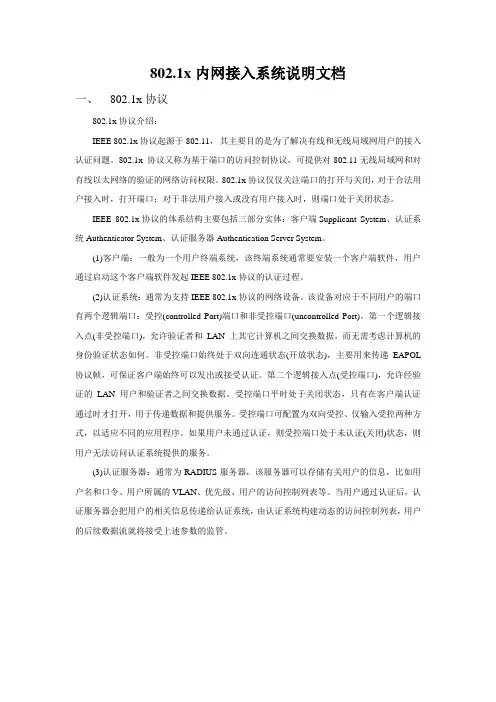
802.1x内网接入系统说明文档一、802.1x协议802.1x协议介绍:IEEE 802.1x协议起源于802.11,其主要目的是为了解决有线和无线局域网用户的接入认证问题。
802.1x 协议又称为基于端口的访问控制协议,可提供对802.11无线局域网和对有线以太网络的验证的网络访问权限。
802.1x协议仅仅关注端口的打开与关闭,对于合法用户接入时,打开端口;对于非法用户接入或没有用户接入时,则端口处于关闭状态。
IEEE 802.1x协议的体系结构主要包括三部分实体:客户端Supplicant System、认证系统Authenticator System、认证服务器Authentication Server System。
(1)客户端:一般为一个用户终端系统,该终端系统通常要安装一个客户端软件,用户通过启动这个客户端软件发起IEEE 802.1x协议的认证过程。
(2)认证系统:通常为支持IEEE 802.1x协议的网络设备。
该设备对应于不同用户的端口有两个逻辑端口:受控(controlled Port)端口和非受控端口(uncontrolled Port)。
第一个逻辑接入点(非受控端口),允许验证者和LAN 上其它计算机之间交换数据,而无需考虑计算机的身份验证状态如何。
非受控端口始终处于双向连通状态(开放状态),主要用来传递EAPOL 协议帧,可保证客户端始终可以发出或接受认证。
第二个逻辑接入点(受控端口),允许经验证的LAN 用户和验证者之间交换数据。
受控端口平时处于关闭状态,只有在客户端认证通过时才打开,用于传递数据和提供服务。
受控端口可配置为双向受控、仅输入受控两种方式,以适应不同的应用程序。
如果用户未通过认证,则受控端口处于未认证(关闭)状态,则用户无法访问认证系统提供的服务。
(3)认证服务器:通常为RADIUS服务器,该服务器可以存储有关用户的信息,比如用户名和口令、用户所属的VLAN、优先级、用户的访问控制列表等。
ForestTools 1.0.1 版本商品说明说明书

Package‘ForestTools’October2,2023Type PackageTitle Tools for Analyzing Remote Sensing Forest DataVersion1.0.1Date2023-09-27Description Tools for analyzing remote sensing forest data,including functions for detecting tree-tops from canopy models,outlining tree crowns,and calculating textural metrics. Depends R(>=4.2)License GPL-3Encoding UTF-8LazyData trueLinkingTo RcppImports terra,sf,Matrix,plyr,imager,RcppSuggests testthat(>=3.0.0),knitr,rmarkdownRoxygenNote7.2.3URL https:///andrew-plowright/ForestToolsBugReports https:///andrew-plowright/ForestTools/issues VignetteBuilder knitrConfig/testthat/edition3NeedsCompilation yesAuthor Andrew Plowright[aut,cre],Jean-Romain Roussel[ctb](Contributed to segment-based GLCMsegmentation)Maintainer Andrew Plowright<***************************.ca>Repository CRANDate/Publication2023-10-0217:00:02UTC12glcm R topics documented:glcm (2)glcm0 (3)glcm135 (4)glcm45 (4)glcm90 (5)glcm_features (5)kootenayBlocks (7)kootenayCHM (8)kootenayCrowns (8)kootenayOrtho (9)kootenayTrees (9)mcws (10)quesnelBlocks (11)quesnelCHM (12)quesnelTrees (13)vwf (13)Index16 glcm Grey-Level Co-Occurrence MatrixDescriptionGenerate textural metrics using Grey-Level Co-Occurrence Matrices(GLCM).Can be applied to an entire or image or,if a coterminous raster of segments is provided,GLCM can be calculated for each segment.Usageglcm(image,segs=NULL,n_grey=32,angle=0)Argumentsimage SpatRaster.A single-band raster layer from which texture is measuredsegs SpatRaster.A segmented raster.Cell values should be equal to segment num-bers.If segs are not provided,GLCM will be calculated for the entire image.n_grey integer.Number of grey levels into which the image will be discretizedangle integer.Angle at which GLCM will be calculated.Valid inputs are0,45,90,or 135DetailsThe underlying C++code for computing GLCMs and their statistics was originally written by Joel Carlson for the defunct[radiomics](https:///cran/radiomics)library.It has been reused here with permission from the author.Valuedata.frameReferencesParmar,C.,Velazquez,E.R.,Leijenaar,R.,Jermoumi,M.,Carvalho,S.,Mak,R.H.,Mitra,S., Shankar,B.U.,Kikinis,R.,Haibe-Kains,B.and Lambin,P.(2014).Robust radiomics feature quantification using semiautomatic volumetric segmentation.PloS one,9(7)See AlsomcwsExamples##Not run:library(terra)library(ForestTools)chm<-rast(kootenayCHM)image<-rast(kootenayOrtho)[[1]]#Generate raster segmentssegs<-mcws(kootenayTrees,chm,minHeight=0.2,format="raster")#Get textural metrics for ortho s red bandtex<-glcm(image,segs)##End(Not run)glcm0Create a0degree GLCMDescriptionUsed internally by glcm()Usageglcm0(x,n_grey,d)Argumentsx A Numeric matrix,integer values onlyn_grey Number of grey levelsd distance from reference pixel to neighbour pixelglcm135Create a135degree GLCMDescriptionUsed internally by glcm()Usageglcm135(x,n_grey,d)Argumentsx A Numeric matrix,integer values onlyn_grey Number of grey levelsd distance from reference pixel to neighbour pixel glcm45Create a45degree GLCMDescriptionUsed internally by glcm()Usageglcm45(x,n_grey,d)Argumentsx A Numeric matrix,integer values onlyn_grey Number of grey levelsd distance from reference pixel to neighbour pixelglcm905 glcm90Create a90degree GLCMDescriptionUsed internally by glcm()Usageglcm90(x,n_grey,d)Argumentsx A Numeric matrix,integer values onlyn_grey Number of grey levelsd distance from reference pixel to neighbour pixelglcm_features GLCM FeaturesDescriptionGLCM FeaturesUsageglcm_mean(glcm)glcm_variance(glcm)glcm_autoCorrelation(glcm)glcm_cProminence(glcm)glcm_cShade(glcm)glcm_cTendency(glcm)glcm_contrast(glcm)glcm_correlation(glcm)glcm_differenceEntropy(glcm,base=2)glcm_dissimilarity(glcm)6glcm_featuresglcm_energy(glcm)glcm_entropy(glcm,base=2)glcm_homogeneity1(glcm)glcm_homogeneity2(glcm)glcm_IDMN(glcm)glcm_IDN(glcm)glcm_inverseVariance(glcm)glcm_maxProb(glcm)glcm_sumAverage(glcm)glcm_sumEntropy(glcm,base=2)glcm_sumVariance(glcm)Argumentsglcm A matrix of class"glcm"produced by glcm.base Base of the logarithm in differenceEntropy.Functions•glcm_mean():Mean•glcm_variance():Variance•glcm_autoCorrelation():Autocorrelation•glcm_cProminence():Cluster Prominence•glcm_cShade():Cluster Shade•glcm_cTendency():Cluster Tendency•glcm_contrast():Contrast•glcm_correlation():Correlation•glcm_differenceEntropy():Difference Entropy•glcm_dissimilarity():Dissimilarity•glcm_energy():Energy•glcm_entropy():Entropy•glcm_homogeneity1():Homogeneity•glcm_homogeneity2():Homogeneity2kootenayBlocks7•glcm_IDMN():Inverse Difference Moment(Normalized)•glcm_IDN():Inverse Difference(Normalized)•glcm_inverseVariance():Inverse Variance•glcm_maxProb():Maximum Probability•glcm_sumAverage():Sum Average•glcm_sumEntropy():Sum Entropy•glcm_sumVariance():Sum VarianceReferenceshttps:///plosone/article?id=10.1371/journal.pone.0102107 kootenayBlocks Kootenay forest-Cut blocksDescriptionBoundaries of cut blocks within a1.5hectare section of forest in the Kootenay mountains,in British Columbia,Canada.Each block contains trees of different levels of maturity.Overlaps with koote-nayTrees,kootenayCrowns,kootenayOrtho and kootenayCHM.UsagekootenayBlocksFormatSimple polygon feature collection with the following attributes:BlockID numerical identifier for each blockShape_Leng length of polygon on metersShape_Area area of polygon in square metersSee AlsokootenayTrees kootenayCHM kootenayCrowns kootenayOrtho8kootenayCrowns kootenayCHM Kootenay forest-Canopy height modelDescriptionA canopy height model of a1.5hectare section of forest in the Kootenay mountains,in BritishColumbia,Canada.UsagekootenayCHMFormatPackedSpatRaster objectCell values are equal to canopy height above ground(in meters)SourceData acquired from a photogrammetric drone survey performed by Spire Aerobotics on June16th, 2016.See AlsokootenayTrees kootenayBlocks kootenayCrowns kootenayOrthokootenayCrowns Kootenay forest-Tree crownsDescriptionOutlines of tree crowns corresponding to the kootenayTrees treetops.Generated using mcws.UsagekootenayCrownsFormatSimple polygon feature collection with the following attributes:height height of the tree’s apex,in meters above ground.Inherited from kootenayTrees.winRadius radius of the moving window at the treetop’s location.Inherited from kootenayTrees.crownArea area of crown outline in square metersSee AlsokootenayTrees kootenayCHM kootenayBlocks kootenayOrthokootenayOrtho9 kootenayOrtho Kootenay forest-OrthomosaicDescriptionAn orthomosaic of a1.5hectare section of forest in the Kootenay mountains,in British Columbia, Canada.UsagekootenayOrthoFormatPackedSpatRaster objectCell values are equal to canopy height above ground(in meters)SourceData acquired from a photogrammetric drone survey performed by Spire Aerobotics on June16th, 2016.See AlsokootenayTrees kootenayBlocks kootenayCrowns kootenayCHMkootenayTrees Kootenay forest-Dominant trees over2mDescriptionDominant trees from a1.5hectare section of forest in the Kootenay mountains,in British Columbia, Canada.Trees were detected by applying the vwf function to the kootenayCHM raster dataset.Only trees over2m above ground were detected.UsagekootenayTreesFormatSimple point feature collection with the following attributes:height height of the tree’s apex,in meters above groundwinRadius radius of the moving window(see vwf)at the treetop’s location10mcwsSee AlsokootenayCHM kootenayBlocks kootenayCrowns kootenayOrthomcws Marker-Controlled Watershed SegmentationDescriptionThis function implements the watershed function to segment(i.e.:outline)crowns from a CHM (canopy height model).Segmentation is guided by the point locations of treetops,typically detected using the vwf function.See Meyer&Beucher(1990)for details on watershed segmentation. Usagemcws(treetops,CHM,minHeight=0,format="raster",OSGeoPath=NULL,IDfield="treeID")Argumentstreetops sf.The point locations of treetops in sf format.CHM SpatRaster.Canopy height model in SpatRaster format.This should be the same CHM that was used to the detect the treetops.minHeight numeric.The minimum height value for a CHM pixel to be considered as part ofa crown segment.All CHM pixels beneath this value will be masked out.Notethat this value should be lower than the minimum height of treetops.format string.Format of the function’s output.Can be set to either’raster’or’poly-gons’.OSGeoPath character.Obsolete.Will be removed next versionIDfield of thefield for storing the unique tree identifierDetailsCrown segments are returned as either a SpatRaster or a sf(Simple Feature)class object,as defined using the format argument.For many analytic purposes,it is preferable to have crown outlines as polygons.However,polygonal crown maps take up significantly more disk space,and take longer to process.It is advisable to run this function using a raster outputfirst to review results and adjust parameters.NOTE:when setting format to’polygons’,orphaned segments(i.e.:outlines without an associated treetop)will be removed.This will NOT occur using’raster’format.This issue will be resolved eventually but requires the watershed function to be rewritten.quesnelBlocks11 ValueDepending on the setting for format,this function will return a map of outlined crowns as eithera SpatRaster class object,in which distinct crowns are given a unique cell value,or a sf classobject,in which each crown is represented by a polygon.ReferencesMeyer,F.,&Beucher,S.(1990).Morphological segmentation.Journal of visual communication and image representation,1(1),21-46.See AlsovwfExamples##Not run:library(terra)library(ForestTools)chm<-rast(kootenayCHM)#Use variable window filter to detect treetopsttops<-vwf(chm,winFun=function(x){x*0.06+0.5},minHeight=2)#Segment tree crownssegs<-mcws(ttops,chm,minHeight=1)##End(Not run)quesnelBlocks Quesnel forest-Cut blocksDescriptionBoundaries of cut blocks within a125hectare section of forest in the Quesnel Timber Supply Area, in British Columbia,Canada.Each block contains trees of different levels of maturity.Overlaps with quesnelTrees and quesnelCHM.UsagequesnelBlocks12quesnelCHM FormatSimple polygon feature collection with the following attributes:BlockID numerical identifier for each blockShape_Leng length of polygon on metersShape_Area area of polygon in square metersSee AlsoquesnelTrees quesnelCHMquesnelCHM Quesnel forest-Canopy height modelDescriptionA canopy height model of a125hectare section of forest in the Quesnel Timber Supply Area,inBritish Columbia,Canada.UsagequesnelCHMFormatPackedSpatRaster objectCell values are equal to canopy height above ground(in meters)SourceData acquired from a photogrammetric drone survey performed by Spire Aerobotics on September 15th,2016.See AlsoquesnelTrees quesnelBlocksquesnelTrees13 quesnelTrees Quesnel forest-Dominant trees over2mDescriptionDominant trees from a125hectare section of forest in the Quesnel Timber Supply Area,in British Columbia,Canada.Trees were detected by applying the vwf function to the quesnelCHM raster dataset.Only trees over2m above ground were detected.UsagequesnelTreesFormatSimple point feature collection with the following attributes:height height of the tree’s apex,in meters above groundwinRadius radius of the moving window(see vwf)at the treetop’s locationSee AlsoquesnelCHM quesnelBlocksvwf Variable Window FilterDescriptionImplements the variable windowfilter algorithm(Popescu&Wynne,2004)for detecting treetops from a canopy height model.Usagevwf(CHM,winFun,minHeight=NULL,warnings=TRUE,minWinNeib="queen",IDfield="treeID")14vwfArgumentsCHM SpatRaster.Canopy height model in SpatRaster format.winFun function.The function that determines the size of the window at any given location on the canopy.It should take the value of a given CHM pixel as its onlyargument,and return the desired*radius*of the circular search window whencentered on that pixel.Size of the window is in map units.minHeight numeric.The minimum height value for a CHM pixel to be considered as a po-tential treetop.All CHM pixels beneath this value will be masked out.warnings logical.If set to FALSE,this function will not emit warnings related to inputs.minWinNeib character.Define whether the smallest possible search window(3x3)should usea queen or a rook neighborhood.IDfield offield for unique tree identifierDetailsThis function uses the resolution of the raster tofigure out how many cells the window needs to cover.This means that the raster value(representing height above ground)and the map unit (represented by the raster’s resolution),need to be in the_same unit_.This can cause issues if the raster is in lat/lon,whereby its resolution is in decimal degrees.ValueSimple feature collection of POINT type.The point locations of detected treetops.The object contains twofields in its data table:height is the height of the tree,as extracted from the CHM,and winRadius is the radius of the search window when the treetop was detected.Note that winRadius does not necessarily correspond to the radius of the tree’s crown.ReferencesPopescu,S.C.,&Wynne,R.H.(2004).Seeing the trees in the forest.Photogrammetric Engineer-ing&Remote Sensing,70(5),589-604.See AlsomcwsExamples##Not run:library(terra)library(ForestTools)chm<-rast(kootenayCHM)#Set function for determining variable window radiuswinFunction<-function(x){x*0.06+0.5}#Set minimum tree height(treetops below this height will not be detected)vwf15 minHgt<-2#Detect treetops in demo canopy height modelttops<-vwf(chm,winFunction,minHgt)##End(Not run)Index∗datasetskootenayBlocks,7kootenayCHM,8kootenayCrowns,8kootenayOrtho,9kootenayTrees,9quesnelBlocks,11quesnelCHM,12quesnelTrees,13glcm,2glcm0,3glcm135,4glcm45,4glcm90,5glcm_autoCorrelation(glcm_features),5 glcm_contrast(glcm_features),5glcm_correlation(glcm_features),5 glcm_cProminence(glcm_features),5 glcm_cShade(glcm_features),5glcm_cTendency(glcm_features),5glcm_differenceEntropy(glcm_features), 5glcm_dissimilarity(glcm_features),5 glcm_energy(glcm_features),5glcm_entropy(glcm_features),5glcm_features,5glcm_homogeneity1(glcm_features),5 glcm_homogeneity2(glcm_features),5 glcm_IDMN(glcm_features),5glcm_IDN(glcm_features),5glcm_inverseVariance(glcm_features),5 glcm_maxProb(glcm_features),5glcm_mean(glcm_features),5glcm_sumAverage(glcm_features),5 glcm_sumEntropy(glcm_features),5 glcm_sumVariance(glcm_features),5 glcm_variance(glcm_features),5 kootenayBlocks,7,8–10kootenayCHM,7,8,8,9,10kootenayCrowns,7,8,8,9,10kootenayOrtho,7,8,9,10kootenayTrees,7–9,9mcws,3,8,10,14quesnelBlocks,11,12,13quesnelCHM,11,12,12,13quesnelTrees,11,12,13vwf,9–11,13,13watershed,1016。
windows2003搭建RADIUS服务器
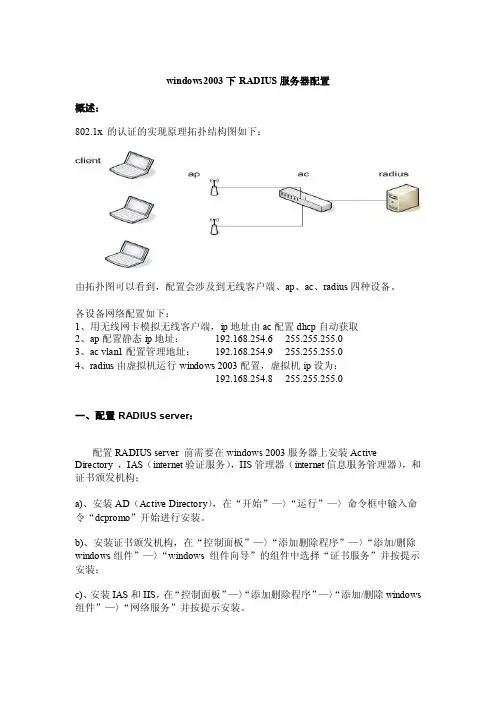
windows2003下RADIUS服务器配置概述:802.1x 的认证的实现原理拓扑结构图如下:由拓扑图可以看到,配置会涉及到无线客户端、ap、ac、radius四种设备。
各设备网络配置如下:1、用无线网卡模拟无线客户端,ip地址由ac配置dhcp自动获取2、ap配置静态ip地址:192.168.254.6 255.255.255.03、ac vlan1配置管理地址:192.168.254.9 255.255.255.04、radius由虚拟机运行windows 2003配置,虚拟机ip设为:192.168.254.8 255.255.255.0一、配置RADIUS server:配置RADIUS server 前需要在windows 2003服务器上安装Active Directory ,IAS(internet验证服务),IIS管理器(internet信息服务管理器),和证书颁发机构;a)、安装AD(Active Directory),在“开始”—〉“运行”—〉命令框中输入命令“dcpromo”开始进行安装。
b)、安装证书颁发机构,在“控制面板”—〉“添加删除程序”—〉“添加/删除windows组件”—〉“windows 组件向导”的组件中选择“证书服务”并按提示安装;c)、安装IAS和IIS,在“控制面板”—〉“添加删除程序”—〉“添加/删除windows 组件”—〉“网络服务”并按提示安装。
d)、注:没有安装AD和证书服务时,要先安装AD然后再安装证书服务,如果此顺序相反,证书服务中的企业根证书服务则不能选择安装;在这四个管理部件都安装的条件下,就可以开始进行RADIUS服务器配置。
1、默认域安全、默认域控制器安全设置为了在配置客户端密码时省去一些麻烦,进行下面的配置:a)、进入“开始”—〉“管理工具”—〉“域安全策略”,进入默认域安全设置,展开“安全设置”—〉“账户策略”—〉“密码策略”,在右侧列出的策略中作如下设置:●右键点击“密码必须符合复杂性要求”选择“属性”,将这个策略设置成“已禁用”。
winbox基本操作

NAT Router 图形管理操作手册基本设置在使用NAT Router图形管理前,必须在本机上启用和设置网卡查看网卡状态:当我们需要查看路由器上的网卡使用情况,点开Interfaces可以看到网卡的使用状况:如果需要查看W AN口的使用情况,直接点开Interface列表中的W AN口的选项点开Traffic可以看到W AN口上的流量波型图:设置一个双网口的基本路由1、添加IP地址:当我们需要添加IP地址,先进入IP-Addresses目录:如果我们要在LAN口上添加192.168.0.1/255.255.255.0(子网掩码24位)的地址,点开Addresses项后,点加号并填入相应的设置,设置完后点OK。
WAN口的设置同样的操作。
2、添加网关:进入IP-Routers中添加网关,列如网关假设为192.168.0.254,在路由列表中点加号,在Gateway中填写网关:3、IP伪装当IP地址和网关设置完毕后,这时可根据自己的路由器需要是否伪装内网的IP地址(即NA T功能),假设内网地址段为192.168.0.0/24,具体设置如下:进入IP-firewall-src-nat中添加一条策略,将src-address设置为192.168.0.0/24,并将action 设置为masquerade(伪装):一个双网口的基本路由设置就完成。
设置双WAN口的负载均衡基本情况:用户有两条Internet线路,一条是使用光纤,另一条是使用ADSL。
使用IP伪装使一个局域网共享上网。
NAT Router共有3块网卡,WAN1用于ADSL,WAN2用于光纤,LAN用于连接终端。
实现负载平衡,并且在其中一条线路断掉后自动切换为单线路,线路恢复后,继续使用负载平衡。
实施:1、配置光纤线路在IP-address中为光纤线路配置IP地址、子网掩码,地址为 61.139.77.77,掩码24,网关61.139.77.1,interface WAN2 设置的方法同上面相同。
分享windowsapi手册

【分享】W i n d o w s A P I手册(总19页)--本页仅作为文档封面,使用时请直接删除即可----内页可以根据需求调整合适字体及大小--Windows API 手册1. API之网络函数WNetAddConnection 创建同一个网络资源的永久性连接WNetAddConnection2 创建同一个网络资源的连接 WNetAddConnection3 创建同一个网络资源的连接 WNetCancelConnection 结束一个网络连接WNetCancelConnection2 结束一个网络连接 WNetCloseEnum 结束一次枚举操作WNetConnectionDialog 启动一个标准对话框,以便建立同网络资源的连接WNetDisconnectDialog 启动一个标准对话框,以便断开同网络资源的连接WNetEnumResource 枚举网络资源 WNetGetConnection 获取本地或已连接的一个资源的网络名称 WNetGetLastError 获取网络错误的扩展错误信息WNetGetUniversalName 获取网络中一个文件的远程名称以及/或者UNC(统一命名规范)名称 WNetGetUser 获取一个网络资源用以连接的名字WNetOpenEnum 启动对网络资源进行枚举的过程2. API之消息函数 BroadcastSystemMessage 将一条系统消息广播给系统中所有的顶级窗口 GetMessagePos 取得消息队列中上一条消息处理完毕时的鼠标指针屏幕位置 GetMessageTime 取得消息队列中上一条消息处理完毕时的时间PostMessage 将一条消息投递到指定窗口的消息队列字串2 PostThreadMessage 将一条消息投递给应用程序RegisterWindowMessage 获取分配给一个字串标识符的消息编号ReplyMessage 答复一个消息SendMessage 调用一个窗口的窗口函数,将一条消息发给那个窗口SendMessageCallback 将一条消息发给窗口SendMessageTimeout 向窗口发送一条消息SendNotifyMessage 向窗口发送一条消息3. API之文件处理函数CloseHandle 关闭一个内核对象。
[na]802.1x协议无线认证协议dot1x有线认证实验
![[na]802.1x协议无线认证协议dot1x有线认证实验](https://360docs-1393072327.cos.ap-beijing.myqcloud.com/1ebebe53326c1eb91a37f111f18583d049640f8f.webp)
[na]802.1x协议⽆线认证协议dot1x有线认证实验以前搞⽆线时候,会涉及到⽆线client接⼊⽅式的认证协议. 认证⽅式+加密⽅式+有线的dot1x.注:以前都是doc粘贴到博客的,加上没写博客的习惯,因此会⽐较乱.0,扩展认证协议1,⼀个灵活的传输协议,⽤来承载任意的认证信息(不包括认证⽅式)2,直接运⾏在数据链路层,如ppp或以太⽹3,⽀持多种类型认证注:EAP 客户端---服务器之间⼀个协议802.1x协议:客户端---NAD,承载电脑到交换机之间⼀段的⼀个⼆层的封装协议.radius:NAD—服务器,承载交换机到radius服务器之间的⼀个三层的radius的封装协议.如下图.(交换机的作⽤:转来转去做封装;交换机收到电脑的包,把外层的802.1x的包去掉,封装成3层的radius报⽂.发给服务器.)前两者都把EAP封装.请求者:路由器 交换机 pc认证者:AP Sw Router什么是802.1x协议?pc和交换机之间的传输认证信息的⼆层封装协议.跑在以太⽹上就叫EAPoL基于mac地址认证的.端⼝状态监控.802.1x的特点?802.1x 和AAA管理设备不⼀样. AAA管理设备是由NAS来认证,去radius服务器读取数据,⽽802.1x认证是由radius认证.原因:ap和sw⼀般不适合做认证,ios⼩.802.1x怎么⼯作?严重声明:EAP的认证是客户⼀直到服务器之间的.EAP的种类?1,EAP-MD52,EAP-TLS3,EAP-FAST4,PEAPEAP-MD5场景:⼤量的有线交换机环境中使⽤.--pc接上来,sw就会给pc打招呼"你是否⽀持802.1x呀,你要提供xxx"原理:通过MD5来保证密码安全性特点:不是⼀个安全的协议EAP-TLS特点:1,提供per packet私密性和完整性的保护.2,提供了密钥交换机制3,提供基于802.1x基于端⼝访问的证书认证.4,每个客户端和服务器都要有证书,部署⿇烦.EAP-FAST(灵活的认证通过隧道)特点:1,使⽤TLS隧道保障⽤户私密性和完整性2,不需要PKI为⽤户提供证书.(通过共享密钥实现安全.)3,S针对每个C的密钥都是唯⼀的.这个密钥叫做PAC.PEAP(保护的PEAP)1,radius需要安装个⼈证书(服务器端证书)和证书服务器根证书,客户也建议安装2,客户端也建议安装证书3,能够实现域的⼀次性登陆.类似于HTTPS加密过程⼤致如下:1) SSL客户端通过TCP和服务器建⽴连接之后(443端⼝),并且在⼀般的tcp连接协商(握⼿)过程中请求证书。
EasyRadius FOR Wayos简单使用教程
EasyRadius FOR Wayos简单使用教程EasyRadius FOR Wayos简单使用教程 (1)系统概述: (2)简单说明: (2)详细步骤: (3)EasyRadius FOR Wayos菜单说明 (6)系统设置 (6)消息管理 (6)日常管理 (6)帐目管理 (7)EasyRadius FOR Wayos常见问题FAQ (8)怎么知道是否有操作员直接操作Wayos路由器来添加、编辑用户信息 (8)异常帐目如何清除 (8)如果操作员使用免费策略来给正常的用户充值,而且人数较多,如果较快识别 (8)EasyRadius主要操作方式是什么? (8)如果我给用户加错金额,要怎么操作? (8)实时消息如何发送,用户端如何显示? (8)为什么用户在客户端修改密码的时候提示找不到该用户? (9)用户到期后,上不了网,如何续费? (9)充值卡如何打印? (9)系统概述:EasyRadius For Wayos是一套专业的Wayos计费系统,目前完美对接Wayos的所有版本。
本系统采用WEB远程管理方式,使用Wasyos管理协议对用户进行添加、删除、修改的功能,用户无需准备独立的电脑,即可在全世界范围内完成Wayos的计费功能。
简单说明:EasyRadius For Wayos使用简单概述为以下步骤:4、EasyRadius管理系统帐号注册4、EasyRadius与Wayos通讯接口设置4、将Wayos用户数据智能导入EasyRadius计费系统4、设置计费策略详细步骤:1、EasyRadius管理系统帐号注册打开,单击右上脚的用户注册,注册信息请如实填写,当丢失用户密码时,可通过注册信息重置密码2、EasyRadius与Wayos通讯接口设置打开,进入EasyRadius For Wayos控制台,点击主菜单的[系统设置]、[通讯接口设置]EasyRadius 默认有两个管理地址,当主地址不可用时,会自动切换到次管理地址,保证EasyRadius与Wayos的正常通讯。
winradius ros对接说明
Winradius 4.0 5000用户破解版下载地址:/share/link?shareid=156102&uk=3255163592
一直用的ROS的user-manager管理的pppoe账号,想用winradius试试。
按网上的教程做一直和ROS对接不上,现在说几个重要的问题所在
Pppoe serverr 的建立就不说了,比较简单
1,装winradius的电脑是服务器,ROS是客户端,ROS里的设置如下
ROS里的设置就这几个地方了。
如果装了ROS里装了user-manager最好把他禁用,我之前老是做不通就是因为没有禁用它。
Winradius里需要设置的地方1
2
3
4
注意因为winradius是服务器软件,如果退出winradius就不能用winradius里创建的账号拨号了。
要常开一台电脑呀,如果用户少的话就不如用ROS里的user-manager了,起码不用开一台电脑。
WINRADIUS使用手册
Winradius使用手册RADIUS概述RADIUS(Remote Authentication Dial In User Service,远程用户拨号认证服务),它是一种在网络接入服务器(Network Access Server,NAS)和共享认证服务器间传输认证、授权和配置信息的标准协议,并负责传送网络接入服务器和共享计费服务器之间的计费信息。
设置WinRadius服务器的操作步骤(1)运行WinRadius。
在真实计算机上打开软件包中的"4\WinRadius"文件夹。
双击文件夹中的"WinRadius.exe"文件运行WinRadius,第1次运行会提示"未发现数据源名称并且未指定默认的驱动程序"提示信息,如图4-16所示。
图4-16 提示信息(2)配置ODBC。
单击WinRadius中的菜单"设置"→"数据库"选项,打开"ODBC设置"对话框,如图4-17所示,单击"自动配置ODBC"按钮,ODBC配置完成,单击"确定"按钮返回。
系统提示"您修改了重要配置参数,您必须重新启动WinRadius以便使这些参数生效"。
图4-17 "ODBC设置"对话框(3)配置WinRadius客户端。
关闭WinRadius,然后重新运行WinRadius。
单击WinRadius"设置"→"多重密钥"选项,打开"多重密钥"对话框,如图4-18所示。
在对于"IP(NAS)"文本框中输入ROS服务器外网接口的IP地址"10.0.248.231",在"采用密钥"文本框中输入"12345"(这里配置的密钥需要与ROS中设置的密钥相同),单击"添加"按钮。
Windows2008R2-AD-FS配置指南
Windows Server 2008 R2 AD FS 配置指南Active Directory® 联合身份验证服务 (AD FS) 是可以在Windows Server® 2008 R2 操作系统中安装的服务器角色。
可使用 AD FS 服务器角色创建可高度扩展、可通过 Internet 升级和安全的身份访问解决方案,此解决方案可在多个平台上工作,包括Microsoft® Windows® 环境和非 Windows 环境。
关于本指南本指南提供了在 Hyper-V™ 测试实验室中针对运行 Windows Server 2008 R2 的计算机的设置 AD FS 的说明。
它介绍如何安装和测试单个声明感知应用程序。
有关设置 Hyper-V 服务器的详细信息,请参阅“用 Hyper-V 虚拟化”(/fwlink/?LinkId=126326)(可能为英文网页)。
可以使用本指南中的代码创建一个示例声明感知应用程序。
不需要使用任何其他下载内容。
本指南中的说明大概需要花费两个小时才能完成。
可以使用该测试实验室环境评估 AD FS 技术以及评估如何在组织中部署该技术。
当完成本指南的步骤后,您将能够:∙设置四台计算机(一个客户端计算机、一个启用了 AD FS 的 Web 服务器和两台联合身份验证服务器),以参与两个虚构公司(A. Datum Corporation 和 TreyResearch)之间的 AD FS 联合身份验证。
∙创建两个林,以用作联合用户的指定帐户存储。
每个林将代表一个虚构公司。
∙使用 AD FS 在两个公司之间建立联合信任关系。
∙使用 AD FS 创建、填充和映射声明。
∙为一个公司的用户提供访问位于另一个公司的声明感知应用程序的联合访问权限。
为尽可能成功地完成本指南中的目标,请务必执行以下所有操作:∙按顺序执行本指南中的步骤。
∙使用指定的精确 IP 地址。