
NGFW命令行手册
已经添加的规则,会被入侵防御策略引用。
event modify [tid <number>] [content <string1>] [dstport <string2>] [protocol <icmp|tcp|udp>]
[srcport <string3>] [msg <st来定义检测到攻击事件后,系统需要做出的响应。
action add name <string> block [yes|no] firewall [yes|no] log [yes|no] permit [yes|no] tcpreset [yes|no] packetlog [yes|no] 命令描述:
版权所有 不得翻印© 1995-2008 天融信公司
商标声明
本手册中所谈及的产品名称仅做识别之用。手册中涉及的其他公 司的注册商标或是版权属各商标注册人所有,恕不逐一列明。
TOPSEC® 天融信公司
信息反馈
IPS 配置
目录
命令行详细说明 ......................................................................................................................................... 1 IPS ............................................................................................................................................................ 1 action................................................................................................................................................... 1 engine .................................................................................................................................................. 3 event .................................................................................................................................................... 4 eventset................................................................................................................................................ 5 flow...................................................................................................................................................... 8 fw-link ................................................................................................................................................. 8 policy................................................................................................................................................. 10 service ............................................................................................................................................... 12 update................................................................................................................................................ 13 version............................................................................................................................................... 14
action delete name <string>
服务热线:8008105119
2
命令描述:
删除已经添加的动作。
参数说明:
delete name string 使用说明:
删除动作 已经存在的动作的名称 字符串,表示动作名称。
已经被入侵防御策略引用的动作不能进行删除。
action show [name <string>] <cr> 命令描述:
查看已经添加的动作内容。
参数说明:
show name string
查看动作内容 指定要查看的动作的名称 字符串,表示动作名称。
action clean <cr> 命令描述:
清除所有未被入侵防御策略引用的动作。
engine 设置 IPS 引擎的相关参数。
engine restart<cr> 命令描述:
修改过滤规则。
参数说明:
modify tid number content
string1
dstport string2 protocol icmp|tcp|udp srcport string3 msg string4
修改过滤规则 设置要修改的规则的 ID 号 数值,表示 ID 号 设置规则的内容 字符串,表示规则内容。规则内容具有特定的格式, 请参考《NGFW 管理手册——IPS 配置》的相关章节。 设置规则的目的端口 字符串,表示目的端口 设置规则适用的协议类型 协议类型,可选值为 ICMP、TCP、UDP 设置规则的源端口 字符串,表示源端口 设置规则的备注信息 字符串,表示注释内容。
按已经进入本命令模块书写。
下一级命令表
命令 action engine event eventset flow fw-link policy service update version
功能 定义动作对象 重启 ips 引擎 设置入侵防御设备的过滤规则 设置过滤规则的集合 流量统计 防火墙联动配置 ips 策略配置 定义服务对象 ips 规则升级配置 ips 规则版本
添加过滤规则。
参数说明:
add tid number content
string1
dstport string2 protocol icmp|tcp|udp srcport string3 msg string4 使用说明:
添加过滤规则 设置规则的 ID 号 数值,表示 ID 号 设置规则的内容 字符串,表示规则内容。规则内容具有特定的格式, 请参考《NGFW 管理手册——IPS 配置》的相关章节。 设置规则的目的端口 字符串,表示目的端口 设置规则适用的协议类型 协议类型,可选值为 ICMP、TCP、UDP 设置规则的服务端口 字符串,表示服务端口 设置规则的备注信息 字符串,表示注释内容。
IPS 配置 命令行手册
天融信 TOPSEC® 北京市海淀区上地东路 1 号华控大厦,100085 电话:(8610)82776666 传真:(8610)8277667 服务热线:800 810 5119 http: //
版权声明
本手册中的所有内容及格式的版权属于北京天融信公司(以下简 称天融信)所有,未经天融信许可,任何人不得仿制、拷贝、转译或 任意引用。
修改已经添加的响应动作。
参数说明:
modify name string block yes|no firewall
yes|no
log yes|no permit yes|no tcpreset
yes|no
packetlog yes|no
修改动作 要修改的动作的名称。 字符串,表示动作名称 设置是否要阻止报文通过 “yes”表示阻止,“no”表示不阻止。 设置是否进行防火墙联动 yes:表示进行防火墙联动 no:不进行防火墙联动 设置是否要记录日志 “yes”表示记录日志,“no”表示不记录日志。 设置是否允许报文通过 “yes”表示允许通过,“no”表示不允许通过。 设置是否重置 TCP 连接 yes:表示进行重置 no:表示不重置 设置是否要记录报文,与日志配合使用。 “yes”表示记录报文,“no”表示不记录报文。
服务热线:8008105119
i
命令行详细说明
IPS 配置
IPS
本命令用来设置入侵防御的相关参数。
进入本命令模块操作如下:
# ips<cr> 退出本命令模块操作如下:
# exit<cr> CLI 管理员登录天融信入侵防御设备进入本命令模块后,可以执行相应的组件管理 命令。下面将详细描述本命令模块下的所有组件管理命令。命令的实例输入格式将
NGFW管理手册

防病毒配置天融信TOPSEC® 北京市海淀区上地东路1号华控大厦 100085电话:+8610-82776666传真:+8610-82776677服务热线:+8610-8008105119版权声明 本手册中的所有内容及格式的版权属于北京天融信公司(以下简称天融信)所有,未经天融信许可,任何人不得仿制、拷贝、转译或任意引用。
版权所有不得翻印© 1995-2008 天融信公司商标声明 本手册中所谈及的产品名称仅做识别之用。
手册中涉及的其他公司的注册商标或是版权属各商标注册人所有,恕不逐一列明。
TOPSEC® 天融信公司信息反馈目录1病毒防御 (1)1.1查看病毒信息 (1)1.2配置病毒过滤策略 (3)1.2.1HTTP病毒过滤策略 (3)1.2.2FTP病毒过滤策略 (7)1.2.3SMTP病毒过滤策略 (9)1.2.4POP3病毒过滤策略 (11)1.2.5IMAP病毒过滤策略 (13)1.3配置反病毒引擎参数 (15)1.4许可证更新 (16)1.5病毒库更新 (17)1.5.1在线升级 (17)1.5.2离线升级 (18)1病毒防御当前网络病毒泛滥,病毒一旦进入网络内部,就会很快地在网络环境中传播,造成整个网络的阻塞,甚至瘫痪。
网络病毒已被公认为网络安全的最主要威胁之一。
为了解决这一问题,天融信公司在原有网络安全产品的基础上增加了反病毒功能,能够对使用HTTP、FTP传输的文件以及对使用SMTP、POP3和IMAP协议传送的邮件正文、附件进行病毒检查过滤,并可根据文件扩展名选择过滤或者不过滤的附件类型等。
本文档主要介绍反病毒功能,包括的内容有:z查看病毒信息:主要介绍如何查看和统计病毒扫描的情况,以方便用户优化病毒过滤策略,进一步增强网络安全性。
z配置反病毒引擎过滤策略:主要介绍如何设置病毒过滤策略。
目前,该反病毒引擎主要支持HTTP过滤、FTP过滤、SMTP过滤、POP3过滤和IMAP过滤。
天融信防火墙NGFW4000配置手册

天融信防火墙NGFW4000快速配置手册目录一、防火墙的几种管理方式.................................................... 错误!未定义书签。
1.串口管理.............................................................. 错误!未定义书签。
2.TELNET管理............................................................ 错误!未定义书签。
3.SSH管理 .............................................................. 错误!未定义书签。
4.WEB管理 .............................................................. 错误!未定义书签。
5.GUI管理 .............................................................. 错误!未定义书签。
二、命令行常用配置.......................................................... 错误!未定义书签。
1.系统管理命令(SYSTEM) .................................................. 错误!未定义书签。
命令........................................................................ 错误!未定义书签。
功能........................................................................ 错误!未定义书签。
天融信 网络卫士防火墙系统 命令手册 索引分册

网络卫士防火墙系统命令手册索引分册天融信TOPSEC® 北京市海淀区上地东路1号华控大厦,100085电话:(8610)82776666传真:(8610)8277667服务热线:800 810 5119http: //版权声明 本手册中的所有内容及格式的版权属于北京天融信公司(以下简称天融信)所有,未经天融信许可,任何人不得仿制、拷贝、转译或任意引用。
版权所有不得翻印 © 2009天融信公司商标声明 本手册中所谈及的产品名称仅做识别之用。
手册中涉及的其他公司的注册商标或是版权属各商标注册人所有,恕不逐一列明。
TOPSEC® 天融信公司信息反馈目录前言 (1)1概述 (3)1.1手册使用指南 (3)1.2人机命令的描述 (3)1.3命令辅助功能 (4)1.4命令模式 (4)2命令索引 (8)2.1 A开头的命令 (8)2.2 B开头的命令 (13)2.3 C开头的命令 (15)2.4 D开头的命令 (19)2.5 E开头的命令 (29)2.6 F开头的命令 (31)2.7 G开头的命令 (32)2.8 H开头的命令 (33)2.9 I开头的命令 (34)2.10 J开头的命令 (48)2.11 K开头的命令 (49)2.12 L开头的命令 (49)2.13 M开头的命令 (53)2.14 N开头的命令 (58)2.15 O开头的命令 (61)2.16 P开头的命令 (62)2.17 Q开头的命令 (64)2.18 R开头的命令 (65)2.19 S开头的命令 (68)2.20 T开头的命令 (92)2.21 U开头的命令 (96)2.22 V开头的命令 (97)2.23 W开头的命令 (100)2.24 X开头的命令 (101)2.25 Z开头的命令 (101)前言手册说明《网络卫士防火墙系统命令手册》共有16个分册,手册和内容分别为:手册名称手册内容《网络卫士防火墙系统命令手册_索引分册》介绍网络卫士防火墙每条命令对应的分册、章节《网络卫士防火墙系统命令手册_IPv6分册》介绍网络卫士防火墙与IPv6相关的命令《网络卫士防火墙系统命令手册_IPv4路由分册一》介绍网络卫士防火墙与RIP、OSPF和IS-IS 路由协议相关的命令《网络卫士防火墙系统命令手册_IPv4路由分册二》介绍网络卫士防火墙与BGP路由协议、路由映射和路由策略相关的命令《网络卫士防火墙系统命令手册_MPLS分册》介绍网络卫士防火墙与MPLS相关的命令《网络卫士防火墙系统命令手册_QoS分册》介绍网络卫士防火墙与QoS相关的命令《网络卫士防火墙系统命令手册_安全分册》介绍网络卫士防火墙与网络安全相关的命令《网络卫士防火墙系统命令手册_防火墙分册》介绍网络卫士防火墙与防火墙相关的命令《网络卫士防火墙系统命令手册_基本配置分册一》介绍网络卫士防火墙与系统管理、文件管理、用户界面、日志统计、FTP/TFTP服务器和IPv4基础协议相关的命令《网络卫士防火墙系统命令手册_基本配置分册二》介绍网络卫士防火墙与接口配置、DHCP和VRRP相关的命令《网络卫士防火墙系统命令手册_基本配置分册三》介绍网络卫士防火墙与NAT、Time Range、堆叠和DEBUG调试相关的命令《网络卫士防火墙系统命令手册_网络管理分册》介绍网络卫士防火墙与网络管理相关的命令《网络卫士防火墙系统命令手册_以太网交换分册》介绍网络卫士防火墙与MAC、VLAN、SuperVLAN、STP、链路聚合、VBAS、MAC PING和UDLD相关的命令《网络卫士防火墙系统命令手册_组播分册》介绍网络卫士防火墙与组播协议相关的命令内容介绍本手册主要介绍了《网络卫士防火墙系统命令手册》的命令索引部分,本手册的章节名及其概要如下:章名概要第1章概述本章介绍命令手册的使用方法、命令的描述、格式约定、辅助功能和模式第2章命令索引本章以表格形式指明了《网络卫士防火墙命令手册》中每条命令所在的分册、章节,其中命令以字母A~Z的顺序进行排列1概述1.1手册使用指南《网络卫士防火墙命令手册》按内容分为16个分册,各分册的内容请参看本手册前言部分。
天融信防火墙NGFW4000快速配置手册23198
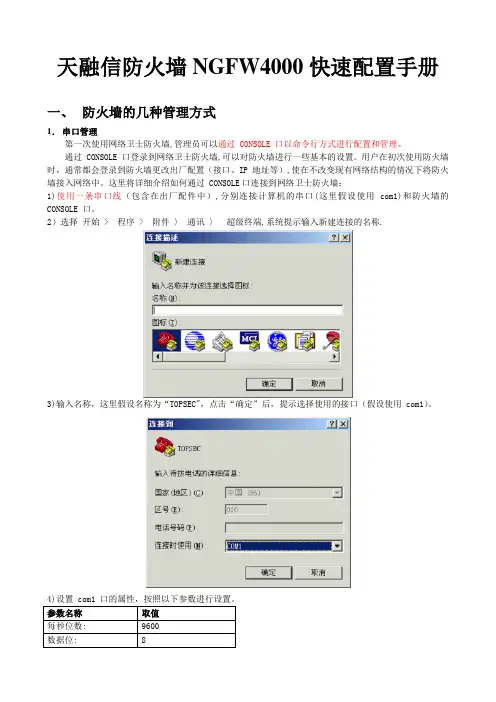
天融信防火墙NGFW4000快速配置手册一、防火墙的几种管理方式1.串口管理第一次使用网络卫士防火墙,管理员可以通过 CONSOLE 口以命令行方式进行配置和管理。
通过 CONSOLE 口登录到网络卫士防火墙,可以对防火墙进行一些基本的设置。
用户在初次使用防火墙时,通常都会登录到防火墙更改出厂配置(接口、IP 地址等),使在不改变现有网络结构的情况下将防火墙接入网络中。
这里将详细介绍如何通过 CONSOLE口连接到网络卫士防火墙:1)使用一条串口线(包含在出厂配件中),分别连接计算机的串口(这里假设使用 com1)和防火墙的CONSOLE 口。
2)选择开始 > 程序 > 附件〉通讯〉超级终端,系统提示输入新建连接的名称.3)输入名称,这里假设名称为“TOPSEC",点击“确定”后,提示选择使用的接口(假设使用 com1)。
4)设置 com1 口的属性,按照以下参数进行设置。
参数名称取值每秒位数: 9600数据位: 8奇偶校验:无停止位: 15)成功连接到防火墙后,超级终端界面会出现输入用户名/密码的提示,如下图。
6)输入系统默认的用户名:superman 和密码:talent,即可登录到网络卫士防火墙.登录后,用户就可使用命令行方式对网络卫士防火墙进行配置管理。
2.TELNET管理TELNET管理也是命令行管理方式,要进行TELNET管理,必须进行以下设置:1)在串口下用“pf service add name telnet area area_eth0 addressname any”命令添加管理权限2)在串口下用“system telnetd start”命令启动TELNET管理服务3)知道管理IP地址,或者用“network interface eth0 ip add 192。
168。
1。
250 mask 255。
255.255。
0”命令添加管理IP地址4)然后用各种命令行客户端(如WINDOWS CMD命令行)管理:TELNET 192.168.1。
天融信防火墙NGFW4000配置手册

天融信防火墙NGFW4000快速配置手册目录一、防火墙的几种管理方式 (4)1.串口管理 (4)2.TELNET管理 (5)3.SSH管理 (5)4.WEB管理 (6)5.GUI管理 (7)二、命令行常用配置 (12)1.系统管理命令(SYSTEM) (12)命令 (12)功能 (12)WEBUI界面操作位置 (12)二级命令名 (12)V ERSION (12)系统版本信息 (12)系统>基本信息 (12)INFORMATION (12)当前设备状态信息 (12)系统>运行状态 (12)TIME (12)系统时钟管理 (12)系统>系统时间 (12)CONFIG (12)系统配置管理 (12)管理器工具栏“保存设定”按钮 (12)REBOOT (12)重新启动 (12)系统>系统重启 (12)SSHD (12)SSH服务管理命令 (12)系统>系统服务 (12)TELNETD (12)TELNET服务管理 (12)系统>系统服务命令 (12)HTTPD (12)HTTP服务管理命 (12)系统>系统服务令 (12)MONITORD (12)MONITOR (12)服务管理命令无 (12)2.网络配置命令(NETWORK) (13)4.定义对象命令(DEFINE) (13)5.包过滤命令(PF) (13)6.显示运行配置命令(SHOW_RUNNING) (13)7.保存配置命令(SAVE) (13)三、WEB界面常用配置 (14)1.系统管理配置 (14)A)系统 > 基本信息 (14)B)系统 > 运行状态 (14)C)系统 > 配置维护 (15)D)系统 > 系统服务 (15)E)系统 > 开放服务 (16)F)系统 > 系统重启 (16)2.网络接口、路由配置 (16)A)设置防火墙接口属性 (16)B)设置路由 (18)3.对象配置 (20)A)设置主机对象 (20)B)设置范围对象 (21)C)设置子网对象 (21)D)设置地址组 (22)E)自定义服务 (22)F)设置区域对象 (23)G)设置时间对象 (23)4.访问策略配置 (24)5.高可用性配置 (27)四、透明模式配置示例 (29)拓补结构: (29)1.用串口管理方式进入命令行 (29)2.配置接口属性 (29)3.配置VLAN (29)4.配置区域属性 (29)5.定义对象 (29)6.添加系统权限 (29)7.配置访问策略 (30)8.配置双机热备 (30)五、路由模式配置示例 (31)拓补结构: (31)1.用串口管理方式进入命令行 (31)2.配置接口属性 (31)3.配置路由 (31)4.配置区域属性 (31)5.配置主机对象 (31)6.配置访问策略 (31)一、防火墙的几种管理方式1.串口管理第一次使用网络卫士防火墙,管理员可以通过 CONSOLE 口以命令行方式进行配置和管理。
Cisco Firepower NGFW数据手册说明书

Data SheetCisco Firepower NGFWThe Cisco Firepower ® NGFW (next-generation firewall) is the industry’s first fully integrated, threat-focused next-gen firewall with unified management. It uniquely provides advanced threat protection before, during, and after attacks.Stop more threatsGain more insight Reduce complexityPerformance HighlightsTable 1 summarizes the performance highlights of the Cisco Firepower 4100 Series NGFW, 9300 Series Security Appliances, and select Cisco ASA 5500-X appliances.Table 1.Appliance Performance Highlights1 HTTP sessions with an average packet size of 1024 bytes 21024 bytes TCP firewall performanceNote: NGFW performance varies depending on network and traffic characteristics. Consult your Cisco representative for detailed sizing guidance. Performance is subject to change with new software releases.Cisco Firepower 2100 Series:The industry’s first midr ange NGFWs delivering sustainable performance when threat inspection is enabledCisco Firepower 4100 Series:The industry’s first 1RU NGFWs with 40-GbpsinterfacesCisco Firepower 9300:Ultra-high-performance NGFW, expandable as yourneeds growCisco ASA 5500-X Series:Models for branch offices, industrial applications, and the Internet edgeFirepower NGFWv:The NGFW for virtual and cloud environmentsPlatform Image SupportThe Cisco Firepower NGFW includes Application Visibility and Control (AVC), optional next-gen IPS (NGIPS), Cisco ® Advanced Malware Protection (AMP) for Networks, and URL Filtering. The Cisco Firepower 2100 Series, 4100 Series, and 9300 appliances use the Cisco Firepower Threat Defense software image. Alternatively, Cisco Firepower 4100 Series, and 9300 appliances can support the Cisco Adaptive Security Appliance (ASA) software image.Management OptionsCisco Firepower NGFWs may be managed in a variety of ways depending on the way you work, your environment, and your needs.The Cisco Firepower Management Center (formerly FireSIGHT) provides centralized management of the Cisco Firepower NGFW, the Cisco Firepower NGIPS, and Cisco AMP for Networks. It also provides threat correlation fornetwork sensors and Advanced Malware Protection (AMP) for Endpoints.The Cisco Firepower Device Manager is available for local management of 2100 Series and select 5500-X Series devices running the Cisco Firepower Threat Defense software image.The Cisco Adaptive Security Device Manager is available for local management of the Cisco Firepower 4100 Series, Cisco Firepower 9300 Series, and Cisco ASA 5500-X Series devices running the ASA software image.Cisco Defense Orchestrator cloud-based management is also available for consistent policy management across Cisco security devices running the ASA software image, enabling greater management efficiency for the distributed enterprise.Firepower DDoS MitigationAlso available on the Cisco Firepower 4100 Series and 9300 appliances is tightly integrated, comprehensive, behavioral DDoS mitigation for both network and application infrastructure protection. This DDoS mitigation is Radware’s Virtual DefensePro (vDP). It i s available from and supported directly by Cisco.Cisco Firepower 2100 Series AppliancesThe Cisco Firepower 2100 Series is a family of four threat-focused NGFW security platforms that deliver business resiliency through superior threat defense. It offers exceptional sustained performance when advanced threat functions are enabled. These platforms uniquely incorporate an innovative dual multicore CPU architecture that optimizes firewall, cryptographic, and threat inspection functions simultaneously. The ser ies’ firewall throughput ranges from 1.9 to 8.5 Gbps, addressing use cases from the Internet edge to the data center.Cisco Firepower 4100 Series AppliancesThe Cisco Firepower 4100 Series is a family of four threat-focused NGFW security platforms. Their throughput ranges from 35 to 75 Gbps, addressing data center use cases. They deliver superior threat defense, at faster speeds, with a smaller footprint.Cisco Firepower 9300 Security ApplianceThe Cisco Firepower 9300 is a scalable (beyond 1 Tbps when clustered), carrier-grade, modular platform designed for service providers, high-performance computing centers, large data centers, campuses, high-frequency trading environments, and other environments that require low (less than 5-microsecond offload) latency and exceptional throughput. Cisco Firepower 9300 supports flow-offloading, programmatic orchestration, and the management of security services with RESTful APIs. It is also available in Network Equipment Building Standards (NEBS)-compliant configurations.Cisco ASA 5500-FTD-X Series AppliancesThe Cisco ASA 5500-FTD-X Series is a family of eight threat-focused NGFW security platforms. Their throughput ranges from 750 Mbps to 4 Gbps, addressing use cases from the small or branch office to the Internet edge. They deliver superior threat defense in a cost-effective footprint.Cisco Firepower NGFW Virtual (NGFWv) AppliancesCisco Firepower NGFWv is available on VMware, KVM, and the Amazon Web Services (AWS) and Microsoft Azure environments for virtual, public, private, and hybrid cloud environments. Organizations employing SDN can rapidly provision and orchestrate flexible network protection with Firepower NGFWv. As well, organizations using NFV can further lower costs utilizing Firepower NGFWv.Performance Specifications and Feature HighlightsTable 2 summarizes the capabilities of the Cisco Firepower NGFWv, Firepower 2100 Series, and 4100 Series and 9300 appliances as well as the Cisco ASA 5500-FTD-X appliances when running the Cisco Firepower Threat Defense image.Table 2.Performance Specifications and Feature Highlights for Physical and Virtual Appliances with the Cisco Firepower Threat Defense Image211021202130214041104120414041509300 1 249300 1 369300 1 4493003 4455065506550655085516552555455555 Throughput: FW + AVC 1.2 Gbps 2.0 Gbps 3 Gbps 4.75 Gbps 8.5 Gbps 12 Gbps 20 Gbps 25 Gbps 30 Gbps 30 Gbps 42 Gbps 54 Gbps 135 Gbps 250 Mbps 250 Mbps 250 Mbps 450 Mbps 850 Mbps 1100 Mbps 1500 Mbps 1750 Mbps Throughput: AVC + IPS 1.1 Gbps 2.0 Gbps 3 Gbps 4.75 Gbps 8.5 Gbps 10 Gbps 15 Gbps 20 Gbps 24 Gbps 24 Gbps 34 Gbps 53 Gbps 133 Gbps 125 Mbps 125 Mbps 125 Mbps 250 Mbps 450 Mbps 650 Mbps 1000 Mbps 1250 Mbps Maximum concurrent sessions, with AVC 100,0001 millio n1.2 million2 millio n3.0 millio n9 millio n15 millio n25 millio n30 millio n30 millio n30 millio n30 millio n60 millio n20,00020,00020,000100,000250,000500,000750,0001,000,000Maximum new connections per second, with AVC 10,00012,00016,000 24,00040,00068,000120,000160,000200,000120,000160,000300,000900,0003,000 3,000 3,000 7,000 8,000 10,00015,00020,000IPSec VPN Throughput (1024B TCP w/Fastpath) - 750 Mbps1000 Mbps1500 Mbp s3000 Mbps- - - - - - - - - - - - - - -- Maximum VPN Peers - 1500 3500 7500 10000- - - - - - - - - - - - - - --Cisco Firepower Device Manager (local managemen t)Yes (VMw are only)Yes Yes Yes Yes - - - - - - - - Yes Yes Yes Yes Yes Yes Yes YesCentralized managemen tCentralized configuration, logging, monitoring, and reporting are performed by the Management Center or alternatively in the cloud with Cisco Defense OrchestratorApplication Visibility and Control (AVC) Standard, supporting more than 4000 applications, as well as geolocations, users, and websitesAVC: OpenAppID support for custom, open source, application detectors StandardCisco Security Intelligence Standard, with IP, URL, and DNS threat intelligenceCisco Firepower NGIPS Available; can passively detect endpoints and infrastructure for threat correlation and indicators of compromise (IoC) intelligenceCisco AMPAvailable; enables detection, blocking, tracking, analysis, and containment of targeted and persistent malware, addressing the attack continuum both during and after attacks. IntegratedNote: Throughput assumes HTTP sessions with an average packet size of 1024 bytes.Performance will vary depending on features activated, and network traffic protocol mix, packet size characteristics and hypervisor employed (NGFWv). Performance is subject to change with new software releases. Consult your Cisco representative for detailed sizing guidance.Table 3 summarizes the performance and capabilities of the Cisco Firepower 4100 Series and 9300 appliances when running the ASA image. For Cisco ASA 5500-X Series performance specifications with the ASA image, please visit the Cisco ASA with FirePOWER Services data sheet.Table 3. ASA Performance and Capabilities on Firepower Appliances1 Throughput measured with User Datagram Protocol (UDP) traffic measured under ideal test conditions.2“Multiprotocol” refers to a traffic profile consisting primarily of TCP-based protocols and applications like HTTP, SMTP, FTP, IMAPv4, BitTorrent, and DNS.3 Available for the firewall feature set.4 In unclustered configuration.Table 4. Operating Requirements for Firepower NGFWv Virtual AppliancesHardware SpecificationsTables 5, 6, and 7 summarize the hardware specifications for the 2100 Series, 4100 Series, and 9300 Series, respectively. Table 8 summarizes regulatory standards compliance. For Cisco ASA 5500-X Series hardware specifications, please visit the Cisco ASA with FirePOWER Services data sheet.Table 5. Cisco Firepower 2100 Series Hardware Specifications1 Dual power supplies are hot-swappable.2 Fans operate in a 3+1 redundant configuration where the system will continue to function with only3 operational fans. The 3 remaining fans will run at full speed.3 FPR-2130 platform is designed to be NEBS ready. The availability of NEBS certification is pending.Table 6. Cisco Firepower 4100 Series Hardware Specifications1 Dual power supplies are hot-swappable.2 DC power option is expected on Cisco Firepower 4110 and 4120 in the second half of 2016.Table 7. Cisco Firepower 9300 Hardware Specifications* Minimum turn-on voltage is -44V DCTable 8. Cisco Firepower 4100 Series and Cisco Firepower 9300 NEBS, Regulatory, Safety, and EMC ComplianceCisco Trust Anchor TechnologiesCisco Trust Anchor Technologies provide a highly secure foundation for certain Cisco products. They enable hardware and software authenticity assurance for supply chain trust and strong mitigation against a man-in-the-middle compromise of software and firmware.Trust Anchor capabilities include:●Image signing: Cryptographically signed images provide assurance that the firmware, BIOS, and othersoftware are authentic and unmodified. As the system boots, the system’s software signatures are checked for integrity.●Secure Boot: Secure Boot anchors the boot sequence chain of trust to immutable hardware, mitigatingthreats against a system’s foundational state and the software that is to be loaded, regardless of a user’s privilege level. It provides layered protection against the persistence of illicitly modified firmware.●Trust Anchor module: A tamper-resistant, strong-cryptographic, single-chip solution provides hardwareauthenticity assurance to uniquely identify the product so that its origin can be confirmed to Cisco, providing assurance that the product is genuine.Firepower DDoS MitigationFirepower DDoS Mitigation is provided by Radware Virtual DefensePro (vDP), available and supported directly from Cisco on the following Cisco Firepower 9300 and 4100 series appliances:Radware vDP is an award-winning, real-time, behavioral DDoS attack mitigation solution that protects organizations against multiple DDoS threats. Firepower DDoS mitigation defends your application infrastructure against network and application degredation and outage.DDoS Mitigation: Protection SetFirepower’s vDP DDoS mitigation consists of patent-protected, adaptive, behavioral-based real-time signature technology that detects and mitigates zero-day network and application DDoS attacks in real time. It eliminates the need for human intervention and does not block legitimate user traffic when under attack.The following attacks are detected and mitigated:●SYN flood attacks●Network DDoS attacks, including IP floods, ICMP floods, TCP floods, UDP floods, and IGMP floods●Application DDoS attacks, including HTTP floods and DNS query floods●Anomalous flood attacks, such as nonstandard and malformed packet attacksPerformanceThe performance figures in Table 9 apply to all Cisco Firepower 4100 series models.Table 9. Key DDoS Performance Metrics for Cisco Firepower 4100 SeriesThe performance figures in Table 10 are for Cisco Firepower 9300 with 1 to 3 Security Modules irrespective of Security Module type (SM-24, SM-36 or SM-44).Table 10. Key DDoS Performance Metrics for Cisco Firepower 9300 with 1, 2, or 3 Security Modules.Ordering InformationCisco Smart LicensingThe Cisco Firepower NGFW is sold with Cisco Smart Licensing. Cisco understands that purchasing, deploying, managing, and tracking software licenses is complex. As a result, we are introducing Cisco Smart Software Licensing, a standardized licensing platform that helps customers understand how Cisco software is used across their network, thereby reducing administrative overhead and operating expenses.With Smart Licensing, you have a complete view of software, licenses, and devices from one portal. Licenses are easily registered and activated and can be shifted between like hardware platforms. Additional information is available here: /web/ordering/smart-software-licensing/index.html. Related information, on Smart Licensing Smart Accounts, is available here: /web/ordering/smart-software-manager/smart-accounts.html.Cisco Smart Net Total Care Support: Move Quickly with Anytime Access to Cisco Expertise and ResourcesCisco Smart Net Total Care™ is an award-winning technical support service that gives your IT staff direct anytime access to Technical Assistance Center (TAC) engineers and resources. You receive the fast, expert response and the dedicated accountability you require to resolve critical network issues.Smart Net Total Care provides the following device-level support:●Global access 24 hours a day, 365 days a year to specialized engineers in the Cisco TAC●Anytime access to the extensive online knowledge base, resources, and tools●Hardware replacement options include 2-hour, 4-hour, next-business-day (NDB) advance replacement, aswell as return for repair (RFR)●Ongoing operating system software updates, including both minor and major releases within your licensedfeature set●Proactive diagnostics and real-time alerts on select devices with Smart Call HomeIn addition, with the optional Cisco Smart Net Total Care Onsite Service, a field engineer installs replacement parts at your location and helps ensure that your network operates optimally. For more information on Smart Net Total Care please visit: /c/en/us/services/portfolio/product-technical-support/smart-net-total-care.html.Select Part NumbersTables 11, 12, and 13 provide details on part numbers for Cisco Firepower NGFW solutions. Please consult the Ordering Guide for additional configuration options and accessories.Table 11. Cisco Firepower 2100 Series: Select Product ComponentsTable 12. Cisco Firepower 4100 Series: Select Product ComponentsTable 13. Cisco Firepower 9300: Select Product Components*Note: Firepower 9300 may also be deployed as a dedicated threat sensor, with fail-to-wire network modules. Please contact your Cisco representative for details.Warranty InformationFind warranty information on at the Product Warranties page.Cisco ServicesCisco offers a wide range of service programs to accelerate customer success. These innovative services programs are delivered through a unique combination of people, processes, tools, and partners, resulting in high levels of customer satisfaction. Cisco Services help you protect your network investment, optimize network operations, and prepare your network for new applications to extend network intelligence and the power of your business. For more information about Cisco services for security, visit /go/services/security.Cisco CapitalFinancing to Help You Achieve Your ObjectivesCisco Capital® financing can help you acquire the technology you need to achieve your objectives and stay competitive. We can help you reduce CapEx. Accelerate your growth. Optimize your investment dollars and ROI. Cisco Capital financing gives you flexibility in acquiring hardware, software, services, and complementary third-party equipment. And there’s just one predictable payment. Cisco Capital is available in more than 100 countries. Learn more.More Information for Service ProvidersFor information about Cisco Firepower in service provider environments, please visit:●/c/en/us/solutions/enterprise-networks/service-provider-security-solutions/More Information about Firepower NGFWsFor further information about Cisco Firepower NGFWs, please visit:●/go/ngfwMore Information about Cisco AnyConnect●Cisco AnyConnect Secure Mobility Client/go/anyconnect●Cisco AnyConnect Ordering Guide/c/dam/en/us/products/security/anyconnect-og.pdf。
天融信防火墙NGFW4000快速配置手册
天融信防火墙NGFW4000快速配置手册一、防火墙的几种管理方式1.串口管理第一次使用网络卫士防火墙,管理员可以通过CONSOLE 口以命令行方式进行配置和管理。
通过CONSOLE 口登录到网络卫士防火墙,可以对防火墙进行一些基本的设置。
用户在初次使用防火墙时,通常都会登录到防火墙更改出厂配置(接口、IP 地址等),使在不改变现有网络结构的情况下将防火墙接入网络中。
这里将详细介绍如何通过CONSOLE口连接到网络卫士防火墙:1)使用一条串口线(包含在出厂配件中),分别连接计算机的串口(这里假设使用com1)和防火墙的CONSOLE 口。
2)选择开始> 程序> 附件> 通讯> 超级终端,系统提示输入新建连接的名称。
3)输入名称,这里假设名称为“TOPSEC”,点击“确定”后,提示选择使用的接口(假设使用com1)。
4)设置com1 口的属性,按照以下参数进行设置。
参数名称取值每秒位数:9600数据位:8奇偶校验:无停止位: 15)成功连接到防火墙后,超级终端界面会出现输入用户名/密码的提示,如下图。
6)输入系统默认的用户名:superman 和密码:talent,即可登录到网络卫士防火墙。
登录后,用户就可使用命令行方式对网络卫士防火墙进行配置管理。
2.TELNET管理TELNET管理也是命令行管理方式,要进行TELNET管理,必须进行以下设置:1)在串口下用“pf service add name telnet area area_eth0 addressname any”命令添加管理权限2)在串口下用“system telnetd start”命令启动TELNET管理服务3)知道管理IP地址,或者用“network interface eth0 ip add 192.168.1.250 mask 255.255.255.0”命令添加管理IP地址4)然后用各种命令行客户端(如WINDOWS CMD命令行)管理:TELNET 192.168.1.2505)最后输入用户名和密码进行管理命令行如图:3.SSH管理SSH管理和TELNET基本一至,只不过SSH是加密的,我们用如下步骤管理:1)在串口下用“pf service add name ssh area area_eth0 addressname any”命令添加管理权限2)在串口下用“system sshd start”命令启动TELNET管理服务3)知道管理IP地址,或者用“network interface eth0 ip add 192.168.1.250 mask 255.255.255.0”命令添加管理IP地址4)然后用各种命令行客户端(如putty命令行)管理:192.168.1.2505)最后输入用户名和密码进行管理命令行如图:4.WEB管理1)防火墙在出厂时缺省已经配置有WEB界面管理权限,如果没有,可用“pf service add name webui area area_eth0 addressname any”命令添加。
天融信防火墙NGFW4000配置手册[精品文档]
天融信防火墙NGFW4000快速配置手册目录一、防火墙的几种管理方式 (4)1.串口管理 (4)2.TELNET管理 (5)3.SSH管理 (6)4.WEB管理 (7)5.GUI管理 (8)二、命令行常用配置 (13)1.系统管理命令(SYSTEM) (13)命令 (13)功能 (13)WEBUI界面操作位置 (13)二级命令名 (13)V ERSION (13)系统版本信息 (13)系统>基本信息 (13)INFORMATION (13)当前设备状态信息 (13)系统>运行状态 (13)TIME (13)系统时钟管理 (13)系统>系统时间 (13)CONFIG (13)系统配置管理 (13)管理器工具栏“保存设定”按钮 (13)REBOOT (13)重新启动 (13)系统>系统重启 (13)SSHD (13)SSH服务管理命令 (13)系统>系统服务 (13)TELNETD (13)TELNET服务管理 (13)系统>系统服务命令 (13)HTTPD (13)HTTP服务管理命 (13)系统>系统服务令 (13)MONITORD (14)MONITOR (14)服务管理命令无 (14)3.双机热备命令(HA) (14)4.定义对象命令(DEFINE) (14)5.包过滤命令(PF) (14)6.显示运行配置命令(SHOW_RUNNING) (14)7.保存配置命令(SAVE) (14)三、WEB界面常用配置 (15)1.系统管理配置 (15)A)系统> 基本信息 (15)B)系统> 运行状态 (15)C)系统> 配置维护 (16)D)系统> 系统服务 (16)E)系统> 开放服务 (17)F)系统> 系统重启 (17)2.网络接口、路由配置 (17)A)设置防火墙接口属性 (17)B)设置路由 (19)3.对象配置 (21)A)设置主机对象 (21)B)设置范围对象 (22)C)设置子网对象 (22)D)设置地址组 (23)E)自定义服务 (23)F)设置区域对象 (24)G)设置时间对象 (24)4.访问策略配置 (25)5.高可用性配置 (28)四、透明模式配置示例 (30)拓补结构: (30)1.用串口管理方式进入命令行 (30)2.配置接口属性 (30)3.配置VLAN (30)4.配置区域属性 (30)5.定义对象 (30)6.添加系统权限 (30)7.配置访问策略 (31)8.配置双机热备 (31)五、路由模式配置示例 (32)拓补结构: (32)1.用串口管理方式进入命令行 (32)2.配置接口属性 (32)3.配置路由 (32)4.配置区域属性 (32)6.配置访问策略 (32)7.配置双机热备 (33)一、防火墙的几种管理方式1.串口管理第一次使用网络卫士防火墙,管理员可以通过 CONSOLE 口以命令行方式进行配置和管理。
受限Shell部分命令指导手册
NGFW常用命令指导手册1.用户视图与配置视图的区别受限shell中提供CLI命令行配置模式、配置的存储、读取、删除等功能。
在受限shell中有两种视图,用户视图、配置视图。
系统启动之后进入的视图是用户视图。
1.1用户视图用户视图提供访问命令行、显示清除信息、重启系统、恢复默认的出厂值、备份恢复等操作权限,在用户视图下不能对NGFW进行配置,相关的配置只能在配置视图下操作。
1.2配置视图配置视图提供创建、删除、修改、提交和显示配置、保存NGFW配置的命令功能,主要的功能是对NGFW进行配置,如配置策略、网络等。
在配置模式之下,可以进行配置的保存:“/config”目录:该目录下存放系统的配置文件,主要是save命令执行之后的,配置会保存在该目录之下。
1.3用户视图与配置视图的切换两种视图之间的切换如下图:使用用户名admin,密码:ngfw2012 登陆的界面,进入的便是用户视图;config——由用户视图进入配置视图;exit——退出配置视图到用户视图;2.配置视图常用命令简介2.1Showshow :查看所有的配置信息2.1.1策略show rulebaseshow rulebase:查看配置好的全部策略:showrulebase security:查看已经配置好的安全策略showrulebasenat:查看nat(包括源nat、目的nat、双向nat)show rulebase dos:查看配置好的dos防护show rulebase rules-route:查看策略路由2.1.2对象show objectshow object:查看配置的全部对象show object address :查看地址对象show object address-group :查看地址组对象show objectapplication :查看应用对象show object application-group:查看应用组对象show object application-filter:查看应用过滤对象show object isp-addresses :查看自定义运营商地址对象show object service:查看服务对象show object service-group :查看服务组对象show object time-schedule:查看时间对象2.1.3 接口show interfacesshow interface :查看所有的接口信息show interfacesethernet:查看物理接口配置show interfacesvlan:查看vlan配置show interfaces wire:查看虚拟线配置2.1.4路由show protocols静态路由:show protocols static routeOSPF路由:show protocols ospf2.1.5系统配置show systemshow system name-server :查看配置的DNS信息show system mgt-interface:查看管理口的配置2.2配置管理口set2.2.1 配置管理口set system mgt-interface设置管理口的地址(默认的地址是192.168.1.23):set system mgt-interface address192.168.40.23/24设置允许访问管理口的IP:set system mgt-interface management address 192.168.30.24/24 设置管理口允许的服务:set system mgt-interface management pingset system mgt-interface management webset system mgt-interface management sshset system mgt-interface management snmp2.3用户视图常用命令2.3.1设备重启立即重启:reboot now选择时间点重启:reboot at 时间点如选择在十一点重启:reboot at 11:002.3.2设备关机关机:poweroff2.3.3恢复出厂设备system reset2.3.4ping查看是否可以ping通百度:查看是否可以ping通网关ip地址:ping 192.168.30.1。
天融信防火墙NGFW4000配置手册
天融信防火墙NGFW4000快速配置手册目录一、防火墙的几种管理方式 (4)1.串口管理 (4)2.TELNET管理 (5)3.SSH管理 (5)4.WEB管理 (6)5.GUI管理 (7)二、命令行常用配置 (12)1.系统管理命令(SYSTEM) (12)命令 (12)功能 (12)WEBUI界面操作位置 (12)二级命令名 (12)V ERSION (12)系统版本信息 (12)系统>基本信息 (12)INFORMATION (12)当前设备状态信息 (12)系统>运行状态 (12)TIME (12)系统时钟管理 (12)系统>系统时间 (12)CONFIG (12)系统配置管理 (12)管理器工具栏“保存设定”按钮 (12)REBOOT (12)重新启动 (12)系统>系统重启 (12)SSHD (12)SSH服务管理命令 (12)系统>系统服务 (12)TELNETD (12)TELNET服务管理 (12)系统>系统服务命令 (12)HTTPD (12)HTTP服务管理命 (12)系统>系统服务令 (12)MONITORD (12)MONITOR (12)服务管理命令无 (12)2.网络配置命令(NETWORK) (13)4.定义对象命令(DEFINE) (13)5.包过滤命令(PF) (13)6.显示运行配置命令(SHOW_RUNNING) (13)7.保存配置命令(SAVE) (13)三、WEB界面常用配置 (14)1.系统管理配置 (14)A)系统> 基本信息 (14)B)系统> 运行状态 (14)C)系统> 配置维护 (15)D)系统> 系统服务 (15)E)系统> 开放服务 (16)F)系统> 系统重启 (16)2.网络接口、路由配置 (16)A)设置防火墙接口属性 (16)B)设置路由 (18)3.对象配置 (20)A)设置主机对象 (20)B)设置围对象 (21)C)设置子网对象 (21)D)设置地址组 (22)E)自定义服务 (22)F)设置区域对象 (23)G)设置时间对象 (23)4.访问策略配置 (24)5.高可用性配置 (27)四、透明模式配置示例 (29)拓补结构: (29)1.用串口管理方式进入命令行 (29)2.配置接口属性 (29)3.配置VLAN (29)4.配置区域属性 (29)5.定义对象 (29)6.添加系统权限 (29)7.配置访问策略 (30)8.配置双机热备 (30)五、路由模式配置示例 (31)拓补结构: (31)1.用串口管理方式进入命令行 (31)2.配置接口属性 (31)3.配置路由 (31)4.配置区域属性 (31)5.配置主机对象 (31)6.配置访问策略 (31)一、防火墙的几种管理方式1.串口管理第一次使用网络卫士防火墙,管理员可以通过CONSOLE 口以命令行方式进行配置和管理。