
戴尔DELL笔记本最新BIOS 中英文对照表
Use the check boxes to enable/disable the following devices:
Internal Modem
Module Bay
ExpressCard or PC Card
Media Card, PC Card and 1394
External USB Port
禁用,
启用
或启用w/PXE;
默认设置是启用w/PXE
Parallel Port
并口
This field determines how the parallel port on the docking station operates. The settings areDisabled, AT, PS2andECP.
外置USB口
内置麦克风
eSATA口
自由落体硬盘保护
摄像头/麦克风
默认所有设备启用。
Latitude On™;Reader
This field lets you choose the operating mode of the Latitude On™;Reader.
Default setting:Enabled
oVideo Controller
oVideo BIOS Version
oVideo Memory
oPanel Type
oNative Resolution
o
oAudio Controller
oModem Controller
oWi-Fi Device
oCellular Device
oBluetooth Device
启用或禁用Latitude On Reader
默认启用Latitude On Reader。
Keyboard Illumination
键盘背景光(如没有配置背景光键盘该项不会出现)
This field lets you choose the operating mode of the keyboard illumination feature. Settings areDisabled, Auto ALS and InputandAuto Input Only
描述
Integrated NIC
集成网卡
Enables or disables the onboard LAN controller. The settings areDisabled, EnabledandEnabled w/PXE.
Default setting:Enabled w/PXE
启用或禁用主板LAN控制器;设置有:
Default setting:Disabled
键盘背景光设置选择:
禁用,自动ALS调节,自动调节
默认设置禁用键盘背景光。
Video显示设置
Option
Description
描述
Ambient Light Sensor
环境感光器
Enabling ambient light sensor will allow your system to automatically change the brightness of your system's LCD panel based on the amount of light in the environment.
在环境观光器关闭时,可以分别设定连接电源或电池时显示器的亮度。
Security安全设置
Option
Description
描述
Admin Password
管理员密码
This field lets you set, change, or delete the administrator (admin) password (sometimes called the "setup" password). The admin passwaord enables several security features when set including:
Substitutes for the system password if the system prompts for a password during power on.
Successful changes to this password take effect immediately.
Default Setting:Not set
Lists the the following:
System Information
oBIOS Version
oService Tag
oAsset Tag
oOwnership Tag
oManufacture Date
oOwnership Date
Memory Information
oMemory Installed
Boot Sequence
启动顺序
The computer attempts to boot from the sequence of devices specified in this list:
Diskette drive
USB Storage Device
CD/DVD/CD-RW Drive.
This also where the UEFI boot option can be enable or disable.
计算机尝试从以下列表顺序启动:
软驱
USB存储设备
光驱
Internal HDD (IRRT)
Cardbus NIC
Onboard NIC
我们可以勾选需要启动的设备。并在界面右侧对显示的设备设置启动的顺序,可以通过鼠标也可以通过上下键选择。
Default setting: COM1
串口设置选项:
禁用,COM1,COM2,COM3,COM4
默认设置是COM1
SATA Operation
SATA设置
This option configures the operating mode of the internal SATA hard drive controller. The settings areDisabled,ATA,AHCI, andRAID On.
电池信息
Indicates the primary battery and the media bay battery status. Also displays the AC adapter type connected to the system.
侦测主电池和第二块电池状态,也显示AC外接电源的型号。
Internal HDD (IRRT)
Cardbus NIC
Onboard NIC
This list specifies the order that the BIOS searches devices when trying to find an operating system to boot. To change the boot order, select the device to be changed in the list then click the up/down arrows or use the keyboard PgUp/PgDn keys to change the boot order of the device. The boot devices can also be de-selected from the list using the check boxes.
(有些项目为机器可选配置)
General常规信息
Option
Description
中文
System Information
系统信息
This section lists out the primary hardware features of the system. There are no configurable options in this section, only information.
☆
NOTE:
If you delete the admin password, the system password is also deleted. Also, the admin password can be used to delete the HDD password. For this reason, you cannot set an admin password if a system password or HDD is already set. The admin password must be set first if used in conjunction with a system and/or HDD password.
Restricts changes to the settings in Setup
Restricts the boot devices listed in the F12 Boot Menu to those enabled in the "Boot Sequence" field.
Prohibits changes to the owner and asset tags.
oCPU核数(几核)
oCPU ID
o当前时钟频率
o最小时钟频率
o最大时钟频率
设备信息
o主硬盘容量
o光驱型号
o系统eSATA设备
oDock eSATA设备
o
o显卡
o显卡BIOS版本
o显存大小
DELL笔记本中英文选项对照表
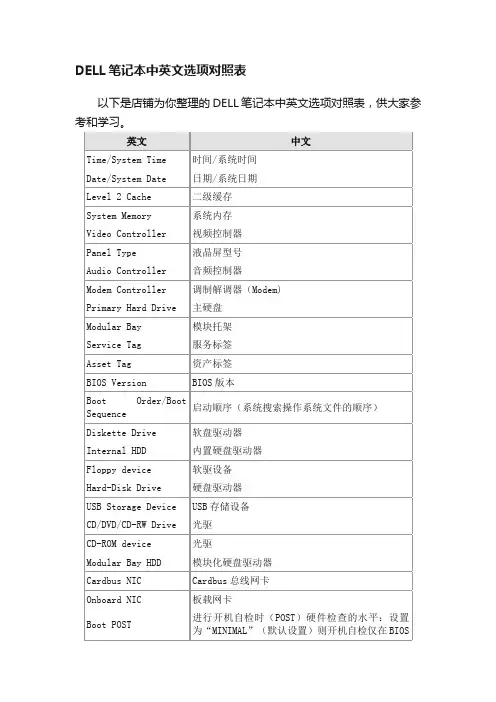
USB仿真:使用该选项可以在不直接支持USB的操作系统中使用USB键盘、USB鼠标及USB软驱。该设置在BIOS启动过程中自动启用。启用该功能后,控制转移到操作系统时仿真继续有效。禁用该功能后在控制转移到操作系统时仿真关闭。
Pointing Device
指针设备:设置为“SERIAL MOUSE”时外接串口鼠标启用并集成触摸板被禁用。设置为“PS/2 MOUSE”时,若外接PS/2鼠标,则禁用集成触摸板。设置为“TOUCH PAD-PS/2 MOUSE”(默认设置)时,若外接PS/2鼠标,可以在鼠标与触摸板间切换。更改在计算机重新启动后生效。
LAN Controller
网络控制器:使用该选项可启用或禁用PCI以太网控制器。禁用后该设备在操作系统中不可见。
PXE BIS Policy/PXE BIS Default Policy
PXE BIS策略:该选项控制系统在没有认证时如何处理(启动整体服务Boot Integrity Services(BIS))授权请求。系统可以接受或拒绝BIS请求。设置为“Reset”时,在下次启动计算机时BIS将重新初始化并设置为“Deny”。
硬盘驱动器
USB Storage Device
USB存储设备
CD/DVD/CD-RW Drive
光驱
CD-ROM device
光驱
Modular Bay HDD
模块化硬盘驱动器
Cardbus NIC
Cardbus总线网卡
Onboard NIC
板载网卡
Boot POST
进行开机自检时(POST)硬件检查的水平:设置为“MINIMAL”(默认设置)则开机自检仅在BIOS升级,内存模块更改或前一次开机自检未完成的情况下才进行检查。设置为“THOROUGH”则开机自检时执行全套硬件检查。
戴尔DELL笔记本最新BIOS 中英文对照表

系统信息
oBIOS版本
o机器编号
o资产编号
oOwnership编号
o出厂日期
oOwnership日期
内存信息
o安装内存容量
o可用内容容量
o当前内存频率
oMemory通道
oMemory技术
oDIMM A尺寸
oDIMM B尺寸
CPU信息
oCPU型号
启用或禁用Latitude On Reader
默认启用Latitude On Reader。
Keyboard Illumination
键盘背景光(如没有配置背景光键盘该项不会出现)
This field lets you choose the operating mode of the keyboard illumination feature. Settings areDisabled, Auto ALS and InputandAuto Input Only
☆
NOTE:
If you delete the admin password, the system password is also deleted. Also, the admin password can be used to delete the HDD password. For this reason, you cannot set an admin password if a system password or HDD is already set. The admin password must be set first if used in conjunction with a system and/or HDD password.
DELL新版BIOS中英文对照表汇编(doc 24页)

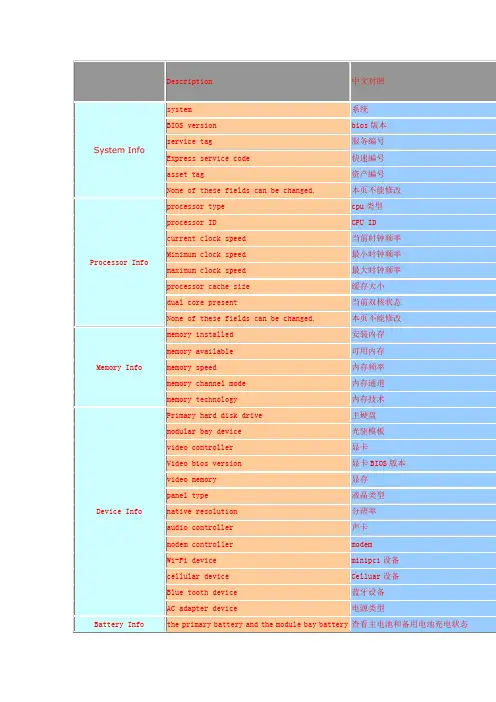
Memory Info
memory installed
安装内存
memory available
可用内存
memory speed
内存频率
memory channel mode
内存通道
memory technology
内存技术
Device Info
Primary hard disk drive
modem
Wi-Fi device
minipci设备
cellular device
Celluar设备
Blue tooth device
蓝牙设备
AC adapter device
电源类型
Battery Info
the primary battery and the module bay battery status.
查看主电池和备用电池充电状态
AC adapter status
电源状态
Battery Health
Indicates the primary battery and the module bay battery status.
查看主电池和备用电池健康状态
Date/Time
Displays current date and time settings.
《国学智慧、易经》
《人力资源学院》
《各阶段员工培训学院》
《员工管理企业学院》
《工厂生产Байду номын сангаас理学院》
《财务管理学院》
《销售经理学院》
《销售人员培训学院》
《中小企业管理全能版》
《总经理、高层管理》
《中层管理学院》
《国学智慧、易经》
DEll电脑BIOS选项中英文对照
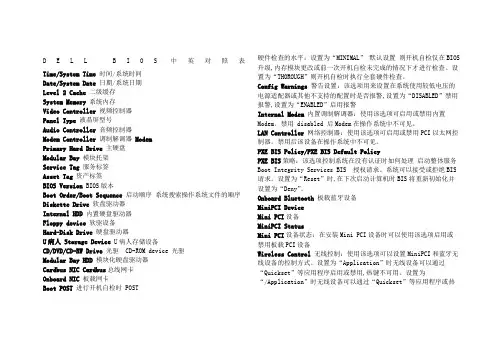
D E L L B I O S中英对照表Time/System Time时间/系统时间Date/System Date日期/系统日期Level 2 Cache二级缓存System Memory系统内存Video Controller视频控制器Panel Type液晶屏型号Audio Controller音频控制器Modem Controller 调制解调器 ModemPrimary Hard Drive主硬盘Modular Bay模块托架Service Tag服务标签Asset Tag资产标签BIOS Version BIOS版本Boot Order/Boot Sequence启动顺序系统搜索操作系统文件的顺序Diskette Drive软盘驱动器Internal HDD内置硬盘驱动器Floppy device软驱设备Hard-Disk Drive硬盘驱动器U病人 Storage Device U病人存储设备CD/DVD/CD-RW Drive光驱 CD-ROM device 光驱Modular Bay HDD 模块化硬盘驱动器Cardbus NIC Cardbus总线网卡Onboard NIC板载网卡Boot POST 进行开机自检时 POST 硬件检查的水平:设置为“MINIMAL”默认设置则开机自检仅在BIOS 升级,内存模块更改或前一次开机自检未完成的情况下才进行检查。
设置为“THOROUGH”则开机自检时执行全套硬件检查。
Config Warnings 警告设置:该选项用来设置在系统使用较低电压的电源适配器或其他不支持的配置时是否报警,设置为“DISABLED”禁用报警,设置为“ENABLED”启用报警Internal Modem 内置调制解调器:使用该选项可启用或禁用内置Modem。
禁用 disabled 后Modem在操作系统中不可见。
LAN Controller 网络控制器:使用该选项可启用或禁用PCI以太网控制器。
DELL BIOS中文信息对照表

“System”(系统) “System”(系统)
“System Info”(系统信息) “Processor Info”(处理器信 息)
“Memory Info”(内存信息) “PCI Info”(PCI 信息) “Date/Time”(日期/时间) “Boot Sequence”(引导顺序)
驱动器
电源管理) 电源管理)
确定掉电后重新连接交流电源时的系统响应方式。 “Off”(关)可以命令系统重新连接电源时保持关闭状态。必须先按前面板电源按钮才能打开系统。 “On”(开)可以命令系统重新连接电源时打开。 “Last”(上一状态)可以命令系统恢复为在其关闭之前所处的电源状态。 将计算机设置为自动开机。 “Off”(关)将禁用此功能。 “Everyday”(每天)可以每天在“Auto Power Time”(自动开机时间)中设置的时间打开计算机。 “Weekdays”(工作日)可以在星期一至星期五中的每一天,于“Auto Power Time”(自动开机时间)中设置的时间打开计算机。 注:如果您使用配电盘上的开关或电涌保护器关闭计算机电源,则此功能无效。
HDD Acoustic Mode(HDD 的声音 模式) (默认为“Bypass”[忽略])
“Security”(安全保护) “Security”(安全保护)
戴尔新版BIOS中英文对照表
Device Info
Primary hard disk drive
主硬盘
modular bay device
光驱模板
video controller
显卡
Video bios version
显卡BIOS版本
video memory
显存
panel type
液晶类型
native resolution
Option
Description
中文对照
ALS Enabled
off
关闭环境观光设备,需要通过调节亮度组合键来调节亮度
enable
启用环境观光设备,系统将根据quickset中设置好的亮度自动调节亮度
Brightness
调整电池时亮度
Brightness (AC)
调整使用电源时亮度
LCD Panel Expansion
查看主电池和备用电池充电状态
AC adapter status
电源状态
Battery Health
Indicates the primary battery and the module bay battery status.
查看主电池和备用电池健康状态
Date/Time
Displays current date and time settings.
该页是控制安全芯片
Off - The BIOS will not turn on the TPM at POST.
off--关闭
On - The BIOS will turn on the TPM at POST so it can be used by the operating system.
DELL的BIOS的中英文对照
DELL的BIOS的中英文对照开机按F12进入选择光盘启动!应该就行啊,如果还不行就开机按F2下面我把我自己总结的DELL的BIOS的中英文对照发上来你看看!自己漫漫研究解决吧!Time/System Time 时间/系统时间Date/System Date 日期/系统日期Level 2 Cache 二级缓存System Memory 系统内存Video Controller 视频控制器Panel Type 液晶屏型号Audio Controller 音频控制器Modem Controller 调制解调器(Modem)Primary Hard Drive 主硬盘Modular Bay 模块托架Service Tag 服务标签Asset Tag 资产标签BIOS Version BIOS版本Boot Order/Boot Sequence 启动顺序(系统搜索操作系统文件的顺序)Diskette Drive 软盘驱动器Internal HDD 内置硬盘驱动器Floppy device 软驱设备Hard-Disk Drive 硬盘驱动器USB Storage Device USB存储设备CD/DVD/CD-RW Drive 光驱CD-ROM device 光驱Modular Bay HDD 模块化硬盘驱动器Cardbus NIC Cardbus总线网卡Onboard NIC 板载网卡Boot POST 进行开机自检时(POST)硬件检查的水平:设置为“MINIMAL”(默认设置)则开机自检仅在BIOS升级,内存模块更改或前一次开机自检未完成的情况下才进行检查。
设置为“THOROUGH”则开机自检时执行全套硬件检查。
Config Warnings 警告设置:该选项用来设置在系统使用较低电压的电源适配器或其他不支持的配置时是否报警,设置为“DISABLED”禁用报警,设置为“ENABLED”启用报警Internal Modem 内置调制解调器:使用该选项可启用或禁用内置Modem。
dell 电脑 BIOS 中英文对照表
eSATA Ports
Hard Drive Free Fall Protection
Camera / Microphone
Default setting: All enabled.
请点击复选框启用/禁用下面设备:
内置Modem
模块设备
ExpressCard或PC Card
SD卡, PC卡和1394
EXX10系列笔记本最新BIOS中英文对照表
(有些项目为机器可选配置)
General常规信息
Option
Description
中文
System Information
系统信息
This section lists out the primary hardware features of the system. There are no configurable options in this section, only information.
电池信息
Indicates the primary battery and the media bay battery status. Also displays the AC adapter type connected to the system.
侦测主电池和第二块电池状态,也显示AC外接电源的型号。
oMemory Available
oMemory Speed
oMemory Channel Mode
oMemory Technology
oDIMM A Size
oDIMM B Size
Processor Information
oProcessor Type
oCore Count
戴尔DELL笔记本BIOS中英文对照表
SATAOperation设置选项:
禁用,ATA,AHCI和RaidOn
默认设置是RaidOn=SATA设置支持Raid
MiscellaneousDevices
多种设备设置
Usethecheckboxestoenable/disablethefollowingdevices:
RestrictschangestothesettingsinSetup
RestrictsthebootdeviceslistedintheF12BootMenutothoseenabledinthe"BootSequence"field.
Prohibitschangestotheownerandassettags.
oMaximumClockSpeed
DeviceInformation
oPrimaryHardDrive
oModularBayDevice
oSystemeSATADevice
oDockeSATADevice
oVideoController
oVideoBIOSVersion
oVideoMemory
oPanelType
o出厂日期
oOwnership日期
内存信息
o安装内存容量
o可用内容容量
o当前内存频率
oMemory通道
oMemory技术
oDIMMA尺寸
oDIMMB尺寸
CPU信息
oCPU型号
oCPU核数(几核)
oCPUID
o当前时钟频率
o最小时钟频率
o最大时钟频率
戴尔(DELL)新版BIOS中英文对照表格模板
Off - The BIOS will not turn on the TPM at POST.
off--关闭
On - The BIOS will turn on the TPM at POST so it can be used by the operating system.
on--开启
Enables or off the external USB ports.
启用或关闭外置usb口
Default setting: Enabled
默认:启用
Parallel Port
OFF,AT,PS/2,ECP
并口
Default setting: ECP
默认:ECP
Serial Port
COM1, COM2, COM3 and COM4.
默认:许可
Wi-Fi Catcher Change
Permitted - The Wi-Fi catcher settings may be modified or deleted without having knowledge of the administrator password.
许可--不需要管理员密码可以修改或者删除无线捕捉器设置
分辨率
audio controller
声卡
modem controller
modem
Wi-Fi device
minipci设备
cellular device
Celluar设备
Blue tooth device
蓝牙设备
AC adapter device
电源类型
Battery Info
the primary battery and the module bay battery status.