
飞耐时Fenix2菜单中文翻译
Tools工具
History历史记录
waypoints 航点 tracks 轨迹 track由route加时间、海拔组成 routes由航点组成
user data用户数据
routes 线路 cities 城市
share wirelessly 无线共享
recovery恢复建议
需要奔跑十分钟以上 VO2 Max最大摄氧
pos. format 位置格式 menu 菜单 reset 重置 about 关于 backlight 背光 alarm clock闹钟 notification 提醒 add alarm 新增闹钟
clock时钟
Timer 记时器 stopwatch 倒计时 alt.zones 附加时区 mark point 标记地点 satellite 卫星 project Wpt. sun & moon 日月升降 hunt & fish 打猎钓鱼建议 area calc. 面积计算 Wpt. Avg. MOB active route Jumpmaster 跳伞
Sync同步
要在settings-bluetooth中设置、配对后才会显示此菜单 XC Ski 越野滑雪 Ski-Board 滑雪板 Mountaineer 登山 Hike 徒步 Navigate 导航 Trail Run 越野跑 activity活动 Run 跑步 Bike 骑行 Open Water 公开水域 Pool 游泳池 Custom 自定义 Custom2 Custom3 display 显示 compass 指南针 North Ref. 以北为准 Mode 模式 Calibrate 校准 auto cal. 自动计算 calibrate 校准 status 状态 hr zones 心率区间 status 状态 foot pod speed 踏频速度 status 状态 bike speed 车辆速度 status 状态 status bike speed status bike speed power 自行车功率计 wheel size crank length power zone tempe 外挂温度感应 chirp status Data Pages 数据页面 Alerts 警报 Auto lap 自动记圈 Auto pause 自动暂停 3D speed 3D速度 3D distance 3D距离 Data recording 数据记录 GPS mode GPS模式 Virtual Partner 虚拟伙伴 Reset 重置 In menu 开始按钮中
time page 时钟页面 display 显示
gerneral一般设置
format 格式
timezone 时区 language 语言 english 英文 distance 距离 pace/speed 配速/速度 elevation 海拔 weight 体重 units单位 height 身高 depth 深度 temp 温度
altimeter 高度计
heart rate 心率计
food pod 外挂踏步器
sensors传感器
bike spd/cad
bike cadence 自行车踏频器
bike speed 自行车速度计
always on 一直连接 not in activity 非运动时 connection 连接 in activity 运动时 manual Sync 手动同步 bluetooth蓝牙 notifications 提醒 off 关闭 show 显示 hide 隐藏
every second 每秒/smart 智能 Normal 正常/UltraTrac 省电
time layout 时钟布局 sec. style 秒针模式 addl. data 附加显示(如电池) ind. incons 60个小箭头 12-hour 12小时模式 24-hour 24小时模式 military 军用模式
settings设置
pair new 新建配对 birth year 出生年份 weight 体重 user profile用户信息 height 身高 gender 性别 lifetime athlete 运动员生涯 messages 信息 keys 按键 sounds声响 alerts 警报 notifications 提醒 alarm clock 闹钟 backlight 背光 contract 对比度
units单位
pressure 压力 vert speed 垂直速度 WAAS hot keys 快捷键 usb mode usb模式 orientation 方位取向
map 地图ห้องสมุดไป่ตู้system系统
auto zoom 自动缩放 points 点 track log 跟踪记录 go to line map colors 地图颜色
north up 按北方 track up 按行进
飞耐时3菜单
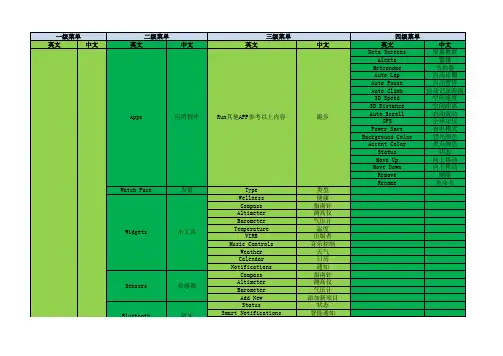
移动设备 同步 状态 移动警报 地图 向导 屏幕 用户配置文件 快捷键 语言 时间 背光 音效 Time Format Set Time Mode Timeout Key Tones Alert Tones Vibration Distance Pace/Speed Elevation Weight Height Temperature Pressure Vert Speed Format Datum Spheroid Pace/Speed Preference Start of Week 时间格式 设置时间 模式 亮度 按键音 警报音调 振动 距离 步速/速度 海拔高度 重量 高度 温度 压力 速度格式 格式 数据 球体 速度/偏好 星期的开始 Hold START Hold BACK 保持 阻止
关于
锻炼开始 编辑 历史 下载 状态 时间 通知设置
日落 日出
坐标 佳明台湾 佳明欧洲 佳明
今天 昨天 运动 循环 游泳 删除所有活动 重置总数 回复时间 状态提示 运动 循环
My Stats
我的统计
Records My Stats 我的统计 Odometer
记录 里程表
User Profile
用户配置
Running Cycling Distance Climb Gender Birth Year Height Weight Wrist Heart Rate Zones Power Zones
运动 循环 距离 海拔高度 性别 出生年月 身高 体重 习惯手 心率设置 能量设置
类型 健康 指南针 测高仪 气压计 温度 出版者 音乐控制 天气 日历 通知 指南针 测高仪 气压计 添加新项目 状态 智能通知
Bluetooth Settings 设置 Wi-Fi Activity Tracking Navigation
fenix PD32 V2.0 用户手册说明书
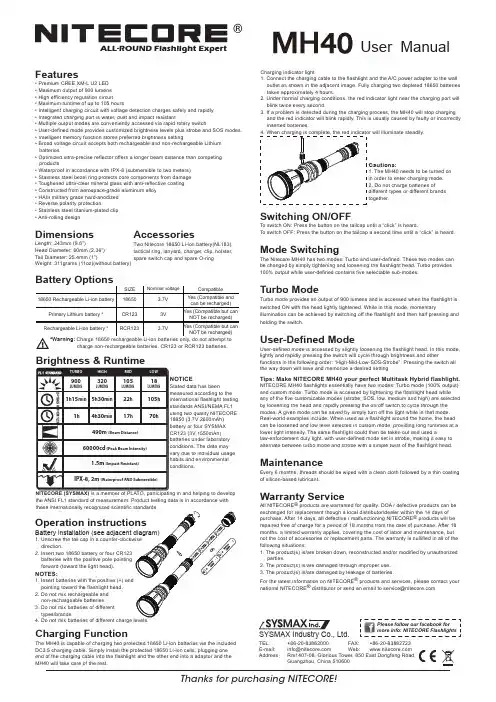
®User ManualFeatures• Premium CREE XM-L U2 LED • Maximum output of 900 lumens • High efficiency regulation circuit • Maximum runtime of up to 105 hours• Intelligent charging circuit with voltage detection charges safely and rapidly • Integrated charging port is water, dust and impact resistant• Multiple output modes are conveniently accessed via rapid rotary switch• User-defined mode provides customized brightness levels plus strobe and SOS modes.• Intelligent memory function stores preferred brightness setting• Broad voltage circuit accepts both rechargeable and non-rechargeable Lithium batteries• Optimized ultra-precise reflector offers a longer beam distance than competing products• Waterproof in accordance with IPX-8 (submersible to two meters)• Stainless steel bezel ring protects core components from damage • Toughened ultra-clear mineral glass with anti-reflective coating • Constructed from aerospace-grade aluminum alloy • HAIII military grade hard-anodized • Reverse polarity protection• Stainless steel titanium-plated clip • Anti-rolling designDimensionsLength: 243mm (9.6”)Head Diameter: 60mm (2.36”)Tail Diameter: 25.4mm (1”)Weight: 311grams (11oz)(without battery)Thanks for purchasing NITECORE!SYSMAX Industry Co., Ltd.TEL: +86-20-83862000 FAX: +86-20-83882723 E-mail: *****************Web: Address :Rm1407-08, Glorious Tower, 850 East Dongfeng Road,Guangzhou, China 510600ALL-ROUND Flashlight Expertdirection.2. Insert two 18650 battery or four CR123 batteries with the positive pole pointing forward (toward the light head).NOTES:pointing toward the flashlight head.2. Do not mix rechargeable and non-rechargeable batteries.3. Do not mix batteries of different types/brands.Charging indicator light1. Connect the charging cable to the flashlight and the A/C power adapter to the wall outlet as shown in the adjacent image. Fully charging two depleted 18650 batteries takes approximately 4 hours.2. Under normal charging conditions, the red indicator light near the charging port will blink twice every second.3. If a problem is detected during the charging process, the MH40 will stop charging and the red indicator will blink rapidly. This is usually caused by faulty or incorrectly inserted batteries.4. When charging is complete, the red indicator will illuminate steadily.AccessoriesTwo Nitecore 18650 Li-ion battery(NL183), tactical ring, lanyard, charger, clip, holster, spare switch cap and spare O-ring charge non-rechargeable batteries, CR123 or RCR123 batteries.Brightness & RuntimeTURBOHIGHMIDLOWLUMENS320LUMENS900LUMENS105LUMENS18105h 22h 1h 15min 4h 30min5h 30min70h17h1h490m (Beam Distance)60000cd (Peak Beam Intensity)IPX-8, 2m (Waterproof AND Submersible)1.5m (Impact Resistant)4×CR1232×18650NOTICEStated data has beenmeasured according to the international flashlight testing standards ANSI/NEMA FL1 using two quality NITECORE 18650 (3.7V 2600mAh) battery or four SYSMAX CR123 (3V 1550mAh) batteries under laboratory conditions. The data may vary due to individual usage habits and environmental conditions.NITECORE (SYSMAX) is a member of PLATO, participating in and helping to develop the ANSI FL1 standard of measurement. Product testing data is in accordance with Cautions:1. The MH40 needs to be turned on in order to enter charging mode.2. Do not charge batteries ofdifferent types or different brands together.Switching ON/OFF To switch ON: Press the button on the tailcap until a “click” is heard.To switch OFF: Press the button on the tailcap a second time until a “click” is heard.Mode SwitchingThe Nitecore MH40 has two modes: Turbo and user-defined. These two modes can be changed by simply tightening and loosening the flashlight head. Turbo provides 100% output while user-defined contains five selectable sub-modes.Turbo ModeTurbo mode provides an output of 900 lumens and is accessed when the flashlight is switched ON with the head lightly tightened. While in this mode, momentaryillumination can be achieved by switching off the flashlight and then half pressing and holding the switch.User-Defined ModeUser-defined mode is accessed by slightly loosening the flashlight head. In this mode, lightly and rapidly pressing the switch will cycle through brightness and otherfunctions in the following order: “High-Mid-Low-SOS-Strobe”. Pressing the switch all the way down will save and memorize a desired setting.Tips: Make NITECORE MH40 your perfect Multitask Hybrid flashlight.NITECORE MH40 flashlights essentially have two modes: Turbo mode (100% output) and custom mode. Turbo mode is accessed by tightening the flashlight head while any of the five customizable modes (strobe, SOS, low, medium and high) are selected by loosening the head and rapidly pressing the on/off switch to cycle through the modes. A given mode can be saved by simply turn off the light while in that mode. Real-world examples include: When used as a flashlight around the home, the head can be loosened and low level selected in custom mode, providing long runtimes at a lower light intensity. The same flashlight could then be taken out and used alaw-enforcement duty light, with user-defined mode set in strobe, making it easy to alternate between turbo mode and strobe with a simple twist of the flashlight head.MaintenanceEvery 6 months, threads should be wiped with a clean cloth followed by a thin coating of silicon-based lubricant.Warranty ServiceAll NITECORE ® products are warranted for quality. DOA / defective products can be exchanged for replacement though a local distributor/dealer within the 14 days of purchase. After 14 days, all defective / malfunctioning NITECORE ® products will be repaired free of charge for a period of 18 months from the date of purchase. After 18 months, a limited warranty applies, covering the cost of labor and maintenance, but not the cost of accessories or replacement parts. The warranty is nullified in all of the following situations:1. The product(s) is/are broken down, reconstructed and/or modified by unauthorized parties.2. The product(s) is/are damaged through improper use.3. The product(s) is/are damaged by leakage of batteries.For the latest information on NITECORE ® products and services, please contact your national NITECORE ®**********************************************Charging FunctionThe MH40 is capable of charging two protected 18650 Li-ion batteries via the included DC3.5 charging cable. Simply install the protected 18650 Li-ion cells, plugging one end of the charging cable into the flashlight and the other end into a adaptor and the MH40 will take care of the rest.Please follow our facebook for more info: NITECORE Flashlights。
Garmin Feni 英文版菜单翻译

警报 匹配电话 连接wifi 自动上传 自动监测
performance notifications
体质信息
log HRV gender birth year height weight wrist heart rate power zones status move alerts goal alerts move IQ data screen
跑步 走路 越野跑 导航 运动轨迹 心率监测 添加应用 心率 性能 最后一次运动 步数 高度、温度和电子罗 日历 通知 天气 添加小工具
add new wrist heart rate
compass altimeter barometer
orientation track up
新添加 手腕心率 指南针 高度计 气压计
navigate
track me HRV stress
跑步 走路 越野跑
导航
运动轨迹 心率监测
about
courses activities saved locations sight'N go coordinates
press start to measure
关于
课程 活动 保存的位置 坐标 心率区间
长按左中键
setting
设置
map phone
地图 电话
长按左中键 setting
设置
phone wifi
电话 无线
physiological metrics 生理指标
user profile
用户文件
activity tracking
活动跟踪
navigation
导航
system
系统
短按右上键
佳明飞耐时3心率英文版版(Fenix 3 HR)
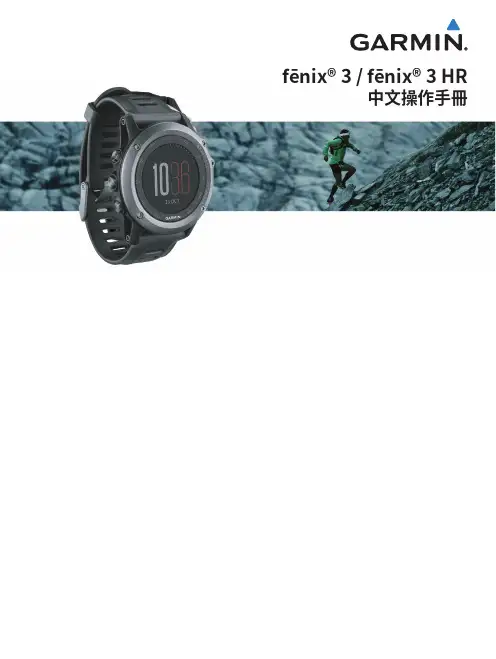
中文操作手冊
目錄
產品介紹............................................. 3
按鍵......................................................................... 3 為fēnix 3充電......................................................... 3 配對手持裝置與 fēnix 3 ....................................... 3 支援與更新............................................................. 4 Garmin Express設定............................................. 4 腕式心率................................................................. 4
ANT+感測器...................................... 27
配對ANT+感測器................................................. 27 佩戴心率感測器 (選購)....................................... 27 步頻感測器校正................................................... 28 踏頻感測器 (選購)............................................... 28
Garmin Fenix 英文版菜单翻译
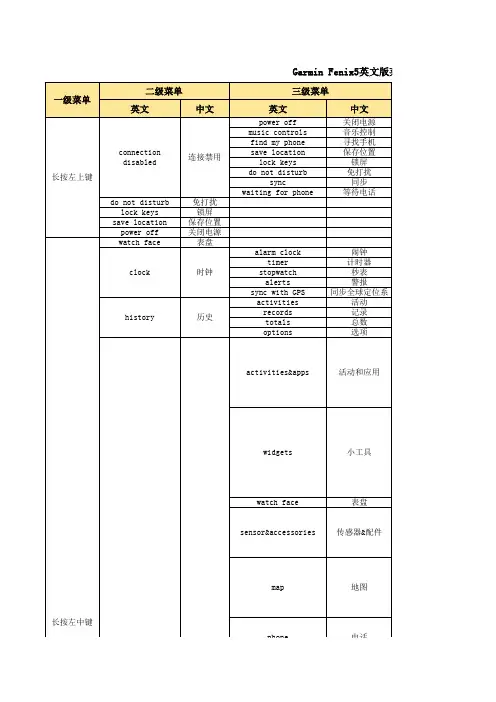
警报 匹配电话 连接wifi 自动上传 自动监测
performance notifications
体质信息
log HRV gender birth year height weight wrist heart rate power zones status move alerts goal alerts move IQ data screen
方向跟踪
user location show
用户位置显示
auto zoom
status waiting for phone smart notification
自动缩放
等待电话状态 智能通知
track up north up
show hide
on off
跟踪方向 固定北方
显示 隐藏 开 关
alerts pair phone connect to wifi auto upload auto detection
ix5英文版菜单 中文翻译对照
四级菜单
英文
中文
五级菜单
英文
中文
run walk trail run navigate track me HRV stress add apps heart rate performance last steps steps abc calendar notifications weather add widgets
跑步 走路 越野跑 导航 运动轨迹 心率监测 添加应用 心率 性能 最后一次运动 步数 高度、温度和电子罗 日历 通知 天气 添加小工具
add new wrist heart rate
compass altimeter barometer
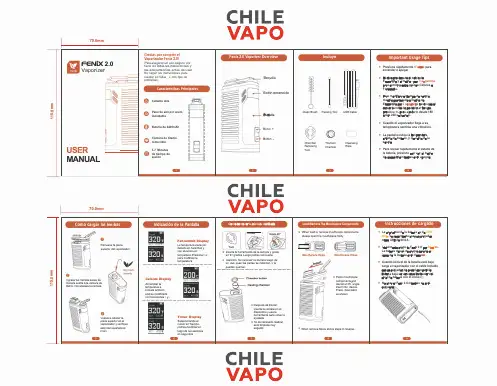
Fenix 2.0 晶莹蒸发器说明书
o
Titanium Chamber
..
D
Cleansing Wipe
lmportant Usage Tips
• Presiona rápidamente 5 veces para encender o apagar.
• Mantén presionado el botón de Encendido y el botón - por 3 segundos para cambiar entre grados Celsius o Farenheils.
Características Principales
@ Calienta Aire
� �
Paso de aire por acero Inoxidable
Cj Batería de 4400mAh
Cámara de titanio removible
3-7 Minutes
.. de tiempo de
Load/RemoveThe Mouthpiece Components
• When load ar remove mouthpiece components, please open the mouthpiece firstly .
Mouthpiece Open
Mouthpiece Clase
• Place mouthpiece components and device at 25 ºangle, insert into device. Press downward as shown.
Heating chamber
• Después de limpiar, inserta la cámara en el dispositivo y usa la herramienta para volver a ajustarla.
inspire 2 用户手册说明书
fenix3 中英文对照说明书
Owner’s Manual
翻译仅供参考,如有错误之处,请不吝指出,联系QQ:12594065 (SUNG),随时交流修正
February 2015
Printed in Taiwan
190-01840-00_0B
Table of Contents
Setting a Training Target .设...定....训...练...目...标........................................... 7 Cancelling a Training Target .取...消...训...练...目....标................................. 7
Setting up Garmin express 设...置.... G...a..r.m..i.n.. .e..x.p..r.e..s.s....................... 1
Activities .运...动..................................................................... 1 Starting an Activity .开...始...活...动............................................................ 2 Stopping an Activity .停...止...活...动.......................................................... 2 Skiing .滑...雪...................................................................................... 2
佳明Fenix HR菜单英中文对照 Version
Options (选项) Recovery Advisor (恢复指导) VO2 Max. (最大摄氧量) Race Predictor (竞赛预测) Lactate Threshould (乳酸阈值) Records (记录) Odometer (里程表)
Delete All Activities(删除所有活动记录) Reset Totals(重置总数) Recovery Time(恢复时间) Status(状态) Running(跑步) Cycling(循环)
Power Zones(能量范围)
四级菜单 DataScreen(屏幕) Alerts(警报) Metronome(节拍器) Auto lap(自由计圈) Auto pause(自动暂停) Auto climb(自动记录海拔) 3D Speed(空间速度) 3D Distance(空间距离) Auto Scroll(自动滚动) GPS(全球定位) Power Save(省电模式) Background Color(背光颜色) Accent Color(重点颜色) Status(状态) Move Up(向上移动) Move Down(向下移动) Remove(删除) Rname(重命名)
Status(状态)(打开关闭) Rate(每小时气压变化的速度)(气压变化预警值
Map(地图)(打开关闭) Guide(向导、导航)(打开关闭) Elevation plot(海拔)(打开关闭) Screen1 Screen2 Screen3 Screen4 Bearing(方位) Course(航线)
Default(缺省) Running(运动时) Cycling(循环时) Swimming(游泳时)
一级菜单
二级菜单
三级菜单
LOFC2中英文对照键位表(word版本)
Key Command List 关键命令列表General 一般功能EscEnd mission 结束使命PausePause 暂停Z - LCtrlTime accelerate 加快游戏速度Z - LAltTime decelerate 减速游戏速度Z - LShiftTime normal 正常游戏速度'Score window 得分窗口`Multiplayer chat - mode All 多人聊天窗口- 全员模式` - RCtrlMultiplayer chat - mode Allies 多人聊天窗口- 盟军模式Y - LCtrlInfo bar view toggle 信息条视图切换(显示开关)Tab - RCtrl - RShiftGet new plane - respown 获取新的飞机- 复合UShip Take Off Position 船舶起飞位置J - RAltJump into other aircraft 跳到其他飞机(进入飞机座舱)SysRQScreenshot 截图Pause - RCtrlFrame rate counter - Service info 帧速率计数器显示帧数- 服务资讯Y - LAltInfo bar coordinate units toogle 切换信息栏坐标位置C - LAltMouse cursor cockpit mode 座舱鼠标模式S - LCtrlSound On/Off 静音/取消静音Flight Control 飞行控制UpAircraft Down 飞机迫降DownAircraft Up 飞机提升LeftAircraft Bank Left 飞机向左侧滚RightAircraft Bank Right 飞机向右侧滚ZAircraft Rudder Left 飞机左舵XAircraft Rudder Right 飞机右舵. - RCtrlTrim Up 向上配平; - RCtrlTrim Down 向下配平, - RCtrlTrim Left 向左配平/ - RCtrlTrim Right 向右配平Z - RCtrlTrim Left Rudder 左舵配平X - RCtrlTrim Right Rudder 右舵配平T - LCtrlTrim Reset 取消配平Num+Power Up 通电Num-Power Down 断电PageUpThrust Up 增加引擎推力PageDownThrust Down 降低引擎推力Num+ - RAltPower Up Left 通左电Num- - RAltPower Down Left 断左电PageUp - RAltThrust Up Left 增加左推力PageDown - RAltThrust Down Left 减小右推力Num+ - RShiftPower Up Right 通右电Num- - RShiftPower Down Right 断右电PageUp - RShiftThrust Up Right 增加右推力PageDown - RShiftThrust Down Right 减小左推力Autopilot 自动驾驶仪AHAutopilot - Barometric Altitude Hold 'H' 开关高度锁定1 - LAltAutopilot - Attitude Hold 保持高度2 - LAltAutopilot - Altitude And Roll Hold 保持高度和翻滚姿态3 - LAltAutopilot - Transition To Level Flight Control 转为水平飞行4 - LAltAutopilot - Barometric Altitude Hold 保持气压5 - LAltAutopilot - Radar Altitude Hold 保持雷达高度6 - LAltAutopilot - 'Route following' 自动导航模式9 - LAltAutopilot Disengage 取消自驾模式Systems 系统BAirbrake 开关减速板B - LShiftAirbrake On 开减速板B - LCtrlAirbrake Off 关减速板RFuel Dump 放油TSmoke 拉烟LIllumination Cockpit 座舱照明开关L - RCtrlNavigation lights 导航灯开关L - RAltGear Light Near/Far/Off 着陆近光/远光/关闭FFlaps Up/Down 放下/收起襟翼F - LShiftFlaps Landing Position 放下襟翼至着陆状态F - LCtrlFlaps Up 收起襟翼GLanding Gear Up/Down 放下起落架G - LCtrlLanding Gear Up 收起起落架G - LShiftLanding Gear Down 放下起落架WWheel Brake On 机轮刹车C - LCtrlCanopy Open/Close 着舰勾收放开关PDragging Chute 释放减速伞N - RShiftAudible Warning Reset 重设语音告警W - LCtrlWeapons Jettison 抛弃武器E - LCtrlEject (3 times) 弹弹连按三次C - RShiftFlight Clock Start/Stop/Reset 时钟开始停止重设Home - RShiftEngines Start 启动引擎End - RShiftEngines Stop 关闭引擎Home - RAltEngine Left Start 启动左引擎End - RAltEngine Left Stop 关闭左引擎Home - RCtrlEngine Right Start 启动右引擎End - RCtrlEngine Right Stop 关闭右引擎H - RCtrlHUD Color 切换HUD颜色Modes 模式` - LCtrl(`) Next Waypoint, Airfield Or Target 下一个路径点机场目标1(1) Navigation Modes 导航模式2(2) Beyond Visual Range Mode 超视距空战模式3(3) Close Air Combat Vertical Scan Mode 近距空战-垂直扫描模式4(4) Close Air Combat Bore Mode 近距空战-孔径扫描模式5(5) Close Air Combat HMD Helmet Mode 近距空战-头盔瞄准模式6(6) Longitudinal Missile Aiming Mode 导弹引导头扫描模式7(7) Air-To-Ground Mode 对地模式8(8) Gunsight Reticle Switch 升起瞄准分划板Sensors 传感器EnterTarget Lock 目标锁定BackTarget Unlock 解除锁定IRadar On/Off 雷达打开I - RAltRadar RWS/TWS Mode Select 目标跟踪雷达模式切换I - RCtrlTarget Designator To Center 目标指示框归中I - RShiftRadar Pulse Repeat Frequency Select 雷达频率选择OElectro-Optical System On/Off 光电扫描仪(开/关);Target Designator Up 目标指示框向上.Target Designator Down 目标指示框向下,Target Designator Left 目标指示框向左/Target Designator Right 目标指示框向右; - RShiftScan Zone Up 向上移动雷达. - RShiftScan Zone Down 向下移动雷达, - RShiftScan Zone Left 向左移动雷达/ - RShiftScan Zone Right 向右移动雷达=Display Zoom In 减小显示范围-Display Zoom Out 扩大显示范围W - LAltLaunch Permission Override 强制解锁武器- - RCtrlRadar Scan Zone Decrease 减小减小显示范围= - RCtrlRadar Scan Zone Increase 扩大小显示范围= - RAltTarget Specified Size Increase 减小炮位间距- - RAltTarget Specified Size Decrease 扩大炮位间距R - RShiftRWR/SPO Mode Select 威胁告警切换, - RAltRWR/SPO Sound Signals Volume Down 威胁告警音量调低. - RAltRWR/SPO Sound Signals Volume Up 威胁告警音量调高Weapons 武器SpaceWeapon Fire 发射武器DWeapon Change 切换武器CCannon 机炮选择V - LCtrlSalvo Mode 齐射模式开关C - LShiftCut Of Burst select 机炮点射模式切换CountermeasuresQ - LShiftCountermeasures Continuously Dispense 自动释放干扰弹QCountermeasures Release 手动释放干扰弹DeleteCountermeasures Flares Dispense 释放干扰红外制导导弹InsertCountermeasures Chaff Dispense 释放干扰雷达制导导弹EECMRadio Communications 电子干扰开关E - LWinFlight - Complete mission and RTB 命令同僚机执行任务,完后返回R - LWinFlight - Complete mission and rejoin 完成任务后重新加入编队T - LWinToggle Formation 切换编队形态Y - LWinJoin Up Formation 加入编队Q - LWinAttack My Target 攻击我的目标W - LWinCover Me 掩护我U - LWinRequest AWACS Home Airbase 呼叫预警机--请求机场方位,距离I - LWinRequest AWACS Available Tanker 呼叫预警机--请求加油机方位,距离G - LWinFlight - Attack ground targets 攻击地面目标D - LWinFlight - Attack air defenses 攻击防空目标\Communication menu 无线电通讯启动键View 视角Num4View Left slow 慢速左看Num6View Right slow 慢速右看Num8View Up slow 慢速上看Num2View Down slow 慢速下看Num9View Up Right slow 慢速右上看Num3View Down Right slow 慢速右下看Num1View Down Left slow 慢速左下看Num7View Up Left slow 慢速左上看Num5View Center 视角置中Num*Zoom in slow 慢速拉近Num/Zoom out slow 慢速推远NumEnterZoom normal 恢复正常Num* - RCtrlZoom external in 外部视角放大Num/ - RCtrlZoom external out 外部视角缩小NumEnter - RCtrlZoom external normal 外部视角恢复正常Num* - LAltF11 Camera moving forward F11 视角向前移Num/ - LAltF11 Camera moving backward F11 视角向后移F1F1 Cockpit view 座舱视角F1 - LCtrlF1 Natural head movement view 自然头部运动视角F1 - LAltF1 HUD only view switch HUD视角开关F2F2 Aircraft view 飞机视角F2 - LCtrlF2 View own aircraft 查看我方飞机F2 - RAltF2 Toggle camera position 视野位置切换F2 - LAltF2 Toggle local camera control 切换当前视野控制F3 Fly-By view 飞跃视角F3 - LCtrlF3 Fly-By jump view 从其他视角转为飞跃视角F4F4 Look back view 机尾视角F4 - LCtrlF4 Chase view 尾随视角F5F5 nearest AC view 最近飞机视角F5 - LCtrlF5 Ground hostile view 地面对抗视角F6F6 Released weapon view 武器视角F6 - LCtrlF6 Weapon to target view 从武器到目标视角F7F7 Ground unit view 地面单位视角F8F8 Target view 目标视角F8 - RCtrlF8 Player targets/All targets filter 玩家目标/所有目标筛选F9 Ship view 船舶视角F9 - LAltF9 Landing signal officer view 着陆信号官视角F10F10 Theater map view 战区地图视角F10 - LCtrlF10 Jump to theater map view over current point 从当前点跳转到地图视角F11F11 Airport free camera 机场自由视角F11 - LCtrlF11 Jump to free camera 跳转到自由视角F12F12 Static object view 静态目标视角F12 - LCtrlF12 Civil traffic view 民用设施视角F12 - LShiftF12 Trains/cars toggle 火车/汽车切换F1 - LWinF1 Head shift movement on / off 头部转向移动开关] - LShiftKeyboard Rate Fast 加快按键速度] - LCtrlKeyboard Rate Slow 减缓按键速度] - LAltKeyboard Rate Normal 按键速度恢复正常[ - LShiftMouse Rate Fast 加快鼠标速度[ - LCtrlMouse Rate Slow 加快鼠标速度[ - LAltMouse Rate Normal 恢复鼠标速度View CockpitNum0Cockpit panel view in 查看座舱面板Num0 - RCtrlCockpit panel view toggle 座舱面板视角切换Num0 - RAltSave Cockpit Angles 保存座舱角度Num8 - RShiftView up 向上看Num2 - RShiftView down 向下看Num4 - RShiftView left 向左看Num6 - RShiftView right 向右看Num9 - RShiftView up right 右上看Num3 - RShiftView down right 右下看Num1 - RShiftView down left 左下看Num7 - RShiftView up left 左上看Num8 - RCtrl - RShiftCockpit Camera Move Up 座舱视野上移Num2 - RCtrl - RShiftCockpit Camera Move Down 座舱视野下移Num4 - RCtrl - RShiftCockpit Camera Move Left 座舱视野左移Num6 - RCtrl - RShiftCockpit Camera Move Right 座舱视野右移Num* - RCtrl - RShiftCockpit Camera Move Forward 座舱视野前移Num/ - RCtrl - RShiftCockpit Camera Move Back 座舱视野后移Num5 - RCtrl - RShiftCockpit Camera Move Center .... 居中Num8 - RCtrlGlance up 向上扫视Num2 - RCtrlGlance down 向下扫视Num4 - RCtrlGlance left 左....Num6 - RCtrlGlance right 右.....Num7 - RCtrlGlance up-left 左上扫视Num1 - RCtrlGlance down-left 左下..Num9 - RCtrlGlance up-right 右上...Num3 - RCtrlGlance down-right 右下...Z - LAlt - LShiftCamera pan mode toggle 视角模式切换Num8 - RAltCamera snap view up 视角向上缓慢移动Num2 - RAltCamera snap view down 视角向下.... Num4 - RAltCamera snap view left 向左缓慢.... Num6 - RAltCamera snap view right 向右缓慢..... Num7 - RAltCamera snap view up-left 左上..... Num1 - RAltCamera snap view down-left 左下.... Num9 - RAltCamera snap view up-right 右上.... Num3 - RAltCamera snap view down-right 右下... Num5 - RShiftCenter Camera View 视野归中Num5 - RCtrlReturn Camera 返回视野Num5 - RAltReturn Camera Base 返回基本视野Num0 - LWinCustom Snap View 0 捕捉视角0Num1 - LWinCustom Snap View 1 捕捉视角1 Num2 - LWinCustom Snap View 2 (2)Num3 - LWinCustom Snap View 3 (3)Num4 - LWinCustom Snap View 4 (4)Num5 - LWinCustom Snap View 5 (5)Num6 - LWinCustom Snap View 6 (6)Num7 - LWinCustom Snap View 7 (7)Num8 - LWinCustom Snap View 8 ..8Num9 - LWinCustom Snap View 9 (9)N - RAltMirror Left On 左观后镜开启M - RAltMirror Right On 右观后镜开启Num* - RShiftZoom in 视角放大Num/ - RShiftZoom out 视角缩小View Extended 高级视角控制J - LShiftCamera jiggle toggle 视角微调K - LAltKeep terrain camera altitude 保持地景视角高度Home - RCtrl - RShiftView friends mode 友军视角模式End - RCtrl - RShiftView enemies mode 敌军视角模式Delete - RCtrlView all mode 所有视角模式Num+ - RCtrlToggle tracking fire weapon 跟踪武器PageDown - LCtrlObjects switching direction forward 目标变换方向前移PageUp - LCtrlObjects switching direction reverse 目标变换方向反转Delete - LAltObject exclude 去除目标Insert - LAltObjects all excluded - include 去除所有目标View PadlockNum.Lock View (cycle padlock) 锁定视角NumLockUnlock view (stop padlock) 解锁视角Num. - RShiftAll missiles padlock 跟踪所有导弹Num. - RAltThreat missile padlock 跟踪威胁导弹Num. - RCtrlLock terrain view 锁定地景视角Labels 标签F10 - LShiftAll Labels 所有标签F2 - LShiftAircraft Labels 飞行器标签F6 - LShiftMissile Labels 导弹标签F9 - LShiftVehicle & Ship Labels 载具和舰船标签Simplifications 简易模式F5 - RAltAuto lock on nearest aircraft 自动锁定最近的飞机F6 - RAltAuto lock on center aircraft ......中间的....F7 - RAltAuto lock on next aircraft ...下一个...F8 - RAltAuto lock on previous aircraft ..上一个...F9 - RAltAuto lock on nearest surface target .... 地面目标F10 - RAltAuto lock on center surface target ...中间地面目标F11 - RAltAuto lock on next surface target ...下一个地面目标F12 - RAltAuto lock on previous surface target ... 上一个地面目标。