
正则表达式日期正则应用的 日期正则表达式
如果可以在源串中唯定位yyyy-MM-dd格式日期则可用做提取 对于验证如果仅仅是验证组成及格式是没有多大意义还要加入对规则校验由于闰年存在使得日期校验正则变得 比较复杂 先来考察下日期有效范围以及什么是闰年 2 日期规则 2.1 日期有效范围 对于日期有效范围区别应用场景会有所区别 MSDN中定义DateTime对象有效范围是:0001-01-01 00:00:00到9999-12-31 23:59:59 UNIX时间戳0按照ISO 8601规范标准为 :1970-01-01T00:00:00Z 而实际应用中日期范围基本上不会超出DateTime所规定范围所以正则验证取其中常用日期弥补因人为历法规定造成年度天数和地球实际公转周期时间差而设立补上时间差年份为 闰年 地球绕日运行周期为365天5小时48分46秒(合365.24219天)即回归年(tropical year)公历平年只有365日比回归 年短约0.2422 日每 4年累积约天把这天加于2月末(即2月29日)使当年时间长度变为366日这年就为闰年 需要注意是,现在公历是根据罗马人“儒略历”改编而得由于当时没有了解到每年要多算出0.0078天问题从公元 前46年到16世纪共累计多出了10天为此当时教皇格雷果里十 3世将1582年10月5日人为规定为10月15日并开 始了新闰年规定即规定公历年份是整百数必须是400倍数才是闰年不是400倍数就是平年比如1700年、1800年 和1900年为平年2000年为闰年此后平均每年长度为365.2425天约4年出现1天偏差按照每 4年个闰年计算平均
下面仅考虑月和日正则 Ø 包括平年在内所有年份月份都包含1-28日 复制代码 代码如下: (0[1-9]|1[0-2])-(0[1-9]|1[0-9]|2[0-8])
Ø 包括平年在内所有年份除2月外都包含29和30日 复制代码 代码如下: (0[13-9]|1[0-2])-(29|30)
பைடு நூலகம்
Ø 包括平年在内所有年份1、3、5、7、8、10、12月都包含31日 复制代码 代码如下: (0[13578]|1[02])-31)
合起来就是所有闰年2月29日 复制代码 代码如下: ([0-9]{2}(0[48]|[2468][048]|[13579][26])|(0[48]|[2468][048]|[13579][26])00)-02-29)
4条规则都已实现且互相间没有影响合起来就是所有符合DateTime范围日期正则 复制代码 代码如下: ^((?!0000)[0-9]{4}-((0[1-9]|1[0-2])-(0[1-9]|1[0-9]|2[0-8])|(0[13-9]|1[0-2])-(29|30)|(0[13578]|1[02])31)|([0-9]{2}(0[48]|[2468][048]|[13579][26])|(0[48]|[2468][048]|[13579][26])00)-02-29)$
这就是“年月日”这种形式最全个正则了区别含义部分以区别颜色标识可以根据自己需要进行栽剪 4.2 其它形式扩展 了解了以上正则各部分代表含义互相间关系后就很容易扩展成其它格式日期正则如dd/MM/yyyy这种“日月年 ”格式日期 复制代码 代码如下: ^(?:(?:(?:0?[1-9]|1[0-9]|2[0-8])([-/.]?)(?:0?[1-9]|1[0-2])|(?:29|30)([-/.]?)(?:0?[13-9]|1[0-2])|31([/.]?)(?:0?[13578]|1[02]))([-/.]?)(?!0000)[0-9]{4}|29([-/.]?)0?2([-/.]?)(?:[09]{2}(?:0[48]|[2468][048]|[13579][26])|(?:0[48]|[2468][048]|[13579][26])00))$
9]{2}(?:0[48]|[2468][048]|[13579][26])|(?:0[48]|[2468][048]|[13579][26])00)-02-29)$
以上正则年份0001-9999格式yyyy-MM-dd可以通过以下代码验证正则有效性和性能 复制代码 代码如下: DateTime dt = DateTime(1, 1, 1); DateTime endDay = DateTime(9999, 12, 31); Stopwatch sw = Stopwatch; sw.Start; Regex dateRegex = Regex(@"^(?:(?!0000)[0-9]{4}-(?:(?:0[1-9]|1[0-2])-(?:0[1-9]|1[0-9]|2[0-8])|(?:0[139]|1[0-2])-(?:29|30)|(?:0[13578]|1[02])-31)|(?:[09]{2}(?:0[48]|[2468][048]|[13579][26])|(?:0[48]|[2468][048]|[13579][26])00)-02-29)$"); //Regex dateRegex = Regex(@"^((?!0000)[0-9]{4}-((0[1-9]|1[0-2])-(0[1-9]|1[0-9]|2[0-8])|(0[13-9]|1[02])-(29|30)|(0[13578]|1[02])-31)|([09]{2}(0[48]|[2468][048]|[13579][26])|(0[48]|[2468][048]|[13579][26])00)-02-29)$"); Console.WriteLine("开始日期: " + dt.("yyyy-MM-dd")); while (dt <= endDay) { (!dateRegex.IsMatch(dt.("yyyy-MM-dd"))) { Console.WriteLine(dt.("yyyy-MM-dd") + " false"); } (dt endDay) { ; } dt = dt.AddDays(1); } Console.WriteLine("结束日期: " + dt.("yyyy-MM-dd")); sw.Stop; Console.WriteLine("测试用时: " + sw.ElapsedMilliseconds + "ms"); Console.WriteLine("测试完成!"); Console.ReadLine;
合起来就是除闰年2月29日外其它所有日期 复制代码 代码如下: (?!0000)[0-9]{4}-((0[1-9]|1[0-2])-(0[1-9]|1[0-9]|2[0-8])|(0[13-9]|1[0-2])-(29|30)|(0[13578]|1[02])-31)
接下来考虑闰年实现 Ø 闰年2月包含29日 这里月和日是固定就是02-29只有年是变化 可通过以下代码输出所有闰年年份考察规则 复制代码 代码如下: for ( i = 1; i < 10000; i) { ((i % 4 0 && i % 100 != 0) || i % 400 0) {
正则表达式日期:正则应用的 日期正则表达 式
疯狂代码 / ĵ:http://DeveloperUtil/Article69992.html 1概述 首先需要介绍说明点无论是Winform还是Webform都有很成熟日历Control控件无论从易用性还是可扩展性上 看日期选择和校验还是用日历Control控件来实现比较好 前几天在CSDN多个版块看到需要日期正则帖子所以整理了这篇文章和大家起讨论交流如有遗漏或地方还请大 家指正 日期正则般是对格式有要求且数据不是直接由用户输入时使用因应用场景区别写出正则也区别复杂程度也自然 区别正则书写需要根据具体情况具体分析个基本原则就是:只写合适不写复杂 对于日期提取只要能和非日期区分开写最简单正则即可如 复制代码 代码如下: \d{4}-\d{2}-\d{2}
richTextBox2.Text .Format("{0:0000}", i) + "\n"; } }
根据闰年规则很容易整理出规则 4年闰; 复制代码 代码如下: ([0-9]{2}(0[48]|[2468][048]|[13579][26])
百年不闰 4百年再闰 复制代码 代码如下: (0[48]|[2468][048]|[13579][26])00
考虑到这个正则表达式仅仅是用作验证所以捕获组没有意义只会占用资源影响匹配效率所以可以使用非捕获组 来进行优化 复制代码 代码如下: ^(?:(?!0000)[0-9]{4}-(?:(?:0[1-9]|1[0-2])-(?:0[1-9]|1[0-9]|2[0-8])|(?:0[13-9]|1[0-2])(?:29|30)|(?:0[13578]|1[02])-31)|(?:[0-
每年就要多算出0.0078天经过 4百年就会多出大约3天来因此每 4百年中要减少 3个闰年闰年计算归结起来就是 通常说: 4年闰;百年不闰 4百年再闰 2.3 日期格式 根据区别语言文化日期连会有所区别通常有以下几种格式: yyyyMMdd yyyy-MM-dd yyyy/MM/dd yyyy.MM.dd 3 日期正则表达式构建 3.1 规则分析 写复杂正则个常用思路方法就是先把不相关需求拆分开分别写出对应正则然后组合检查下相互关联关系以及影 响基本上就可以得出对应正则 按闰年定义可知日期可以有几种分类思路方法 3.1.1 根据天数是否和年份有关划分为两类 和年份无关类中根据每月天数区别又可细分为两类 Ø 1、3、5、7、8、10、12月为1-31日 Ø 4、6、9、11月为1-30日 和年份有关类中 Ø 平年2月为1-28日 Ø 闰年2月为1-29日 3.1.2 根据包含日期区别可划分为 4类 Ø 所有年份所有月份都包含1-28日 Ø 所有年份除2月外都包含29和30日 Ø 所有年份1、3、5、7、8、10、12月都包含31日 Ø 闰年2月包含29日 3.1.3 分类思路方法选择 日期分类的后实现是要通过(exp1|exp2|exp3)这种分支结构来实现而分支结构是从左侧分支依次向右开始尝试 匹配当有个分支匹配成功时就不再向右尝试否则尝试所有分支后并报告失败 分支多少每个分支复杂程度都会影响匹配效率考虑到被验证日期概率分布绝大多数都是落到1-28日内所以采用 第 2种分类思路方法会有效提高匹配效率 3.2 正则实现 采用3.1.2节分类思路方法就可以针对每个规则写出对应正则以下暂按MM-dd格式进行实现 先考虑和年份无关前 3条规则年份可统写作 复制代码 代码如下: (?!0000)[0-9]{4}
C# 正则应用之——最全的日期正则表达式,没有之一

正则应用之——日期正则表达式1概述首先需要说明的一点,无论是Winform,还是Webform,都有很成熟的日历控件,无论从易用性还是可扩展性上看,日期的选择和校验还是用日历控件来实现比较好。
前几天在CSDN多个版块看到需要日期正则的帖子,所以整理了这篇文章,和大家一起讨论交流,如有遗漏或错误的地方,还请大家指正。
日期正则一般是对格式有要求,且数据不是直接由用户输入时使用。
因应用场景的不同,写出的正则也不同,复杂程度也自然不同。
正则的书写需要根据具体情况具体分析,一个基本原则就是:只写合适的,不写复杂的。
对于日期提取,只要能与非日期区分开,写最简单的正则即可,如\d{4}-\d{2}-\d{2}如果可以在源字符串中唯一定位yyyy-MM-dd格式的日期,则可用做提取。
对于验证,如果仅仅是验证字符组成及格式是没有多大意义的,还要加入对规则的校验。
由于闰年的存在,使得日期的校验正则变得比较复杂。
先来考察一下日期的有效范围以及什么是闰年。
2日期的规则2.1日期的有效范围对于日期的有效范围,不同的应用场景会有所不同。
MSDN中定义的DateTime对象的有效范围是:0001-01-01 00:00:00到9999-12-31 23:59:59。
UNIX时间戳的0按照ISO 8601规范为:1970-01-01T00:00:00Z。
而实际应用中,日期的范围基本上不会超出DateTime所规定的范围,所以正则验证取其中常用的日期范围即可。
2.2什么是闰年(以下摘自百度百科)闰年(leap year)是为了弥补因人为历法规定造成的年度天数与地球实际公转周期的时间差而设立的。
补上时间差的年份为闰年。
地球绕日运行周期为365天5小时48分46秒(合365.24219天),即一回归年(tropical year)。
公历的平年只有365日,比回归年短约0.2422 日,每四年累积约一天,把这一天加于2月末(即2月29日),使当年时间长度变为366日,这一年就为闰年。
常用的正则表达式实例整理
常⽤的正则表达式实例整理收集在业务中经常使⽤的正则表达式实例,⽅便以后进⾏查找,减少⼯作量。
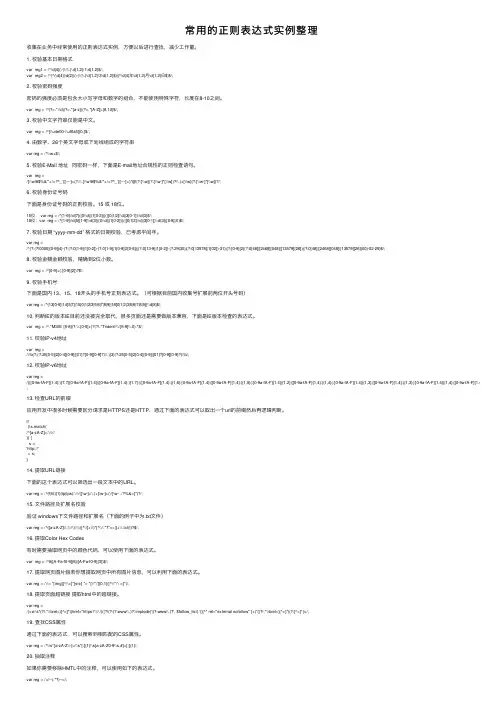
1. 校验基本⽇期格式var reg1 = /^\d{4}(\-|\/|\.)\d{1,2}\1\d{1,2}$/;var reg2 = /^(^(\d{4}|\d{2})(\-|\/|\.)\d{1,2}\3\d{1,2}$)|(^\d{4}年\d{1,2}⽉\d{1,2}⽇$)$/;2. 校验密码强度密码的强度必须是包含⼤⼩写字母和数字的组合,不能使⽤特殊字符,长度在8-10之间。
var reg = /^(?=.*\\d)(?=.*[a-z])(?=.*[A-Z]).{8,10}$/;3. 校验中⽂字符串仅能是中⽂。
var reg = /^[\\u4e00-\\u9fa5]{0,}$/;4. 由数字、26个英⽂字母或下划线组成的字符串var reg = /^\\w+$/;5. 校验E-Mail 地址同密码⼀样,下⾯是E-mail地址合规性的正则检查语句。
var reg =/[\\w!#$%&'*+/=?^_`{|}~-]+(?:\\.[\\w!#$%&'*+/=?^_`{|}~-]+)*@(?:[\\w](?:[\\w-]*[\\w])?\\.)+[\\w](?:[\\w-]*[\\w])?/;6. 校验⾝份证号码下⾯是⾝份证号码的正则校验。
15 或 18位。
15位: var reg = /^[1-9]\\d{7}((0\\d)|(1[0-2]))(([0|1|2]\\d)|3[0-1])\\d{3}$/;18位:var reg = /^[1-9]\\d{5}[1-9]\\d{3}((0\\d)|(1[0-2]))(([0|1|2]\\d)|3[0-1])\\d{3}([0-9]|X)$/;7. 校验⽇期 “yyyy-mm-dd” 格式的⽇期校验,已考虑平闰年。
var reg =/^(?:(?!0000)[0-9]{4}-(?:(?:0[1-9]|1[0-2])-(?:0[1-9]|1[0-9]|2[0-8])|(?:0[13-9]|1[0-2])-(?:29|30)|(?:0[13578]|1[02])-31)|(?:[0-9]{2}(?:0[48]|[2468][048]|[13579][26])|(?:0[48]|[2468][048]|[13579][26])00)-02-29)$/;8. 校验⾦额⾦额校验,精确到2位⼩数。
日期正则表达式

日期正则表达式日期正则表达式是一种通过文本代码查找出日期类型的表达式,它可以在电脑编程中用于捕捉、处理和格式化日期。
它的一般格式是YYYY/MM/DD、YYYY-MM-DD 或者 YYYYMMDD,其中 YYYY、MM 和 DD 分别是年、月和日。
日期正则表达式主要包括以下使用方法:一、常用格式1. 年/月/日格式:^\d{4}/\d{1,2}/\d{1,2}$2. 年-月-日格式:^\d{4}-\d{1,2}-\d{1,2}$3. 年月日格式:^\d{4}[- /.]\d{1,2}\d{1,2}二、更具体格式1. 匹配年-月-日日期格式:^(?:(?!0000)[0-9]{4}-(?:(?:0[1-9]|1[0-2])-(?:0[1-9]|1[0-9]|2[0-8])|(?:0[13-9]|1[0-2])-(?:29|30)|(?:0[13578]|1[02])-31)|(?:[0-9]{2}(?:0[48]|[2468][048]|[13579][26])|(?:0[48]|[2468][048]|[13579][26])00 )-02-29)$2. 匹配非负整数:^\d+$3. 匹配正整数:^[0-9]*[1-9][0-9]*$4. 匹配负整数:^-[0-9]*[1-9][0-9]*$5. 匹配非正整数:^((-\d+)|(0+))$6. 匹配非负浮点数:^\d+(\.\d+)?$7. 匹配正浮点数:^(([0-9]+\.[0-9]*[1-9][0-9]*)|([0-9]*[1-9][0-9]*\.[0-9]+)|([0-9]*[1-9][0-9]*))$8. 匹配负浮点数:^(-(([0-9]+\.[0-9]*[1-9][0-9]*)|([0-9]*[1-9][0-9]*\.[0-9]+)|([0-9]*[1-9][0-9]*)))$三、总结日期正则表达式可以帮助我们提取和格式化日期类型的文本代码,可以提高程序的开发效率,非常实用。
日期正则表达式(很实用)

日期正则表达式:2009-03-29 19:17一、简单的日期判断(YYYY/MM/DD):^\d{4}(\-|\/|\.)\d{1,2}\1\d{1,2}$二、演化的日期判断(YYYY/MM/DD|YY/MM/DD):^(^(\d{4}|\d{2})(\-|\/|\.)\d{1,2}\3\d{1,2}$)|(^\d{4}年\d{1,2}月\d{1,2}日$)$三、加入闰年的判断的:实例:^((((1[6-9]|[2-9]\d)\d{2})-(0?[13578]|1 [02])-(0?[1-9]|[12]\d|3[01]))|(((1[6-9]|[2-9]\d)\d{2})-(0?[13456789]|1[012])-(0?[1-9]| [12]\d|30))|(((1[6-9]|[2-9]\d)\d{2})-0?2-(0?[1-9]|1\d|2[0-8]))|(((1[6-9]|[2-9]\d)(0[48]| [2468][048]|[13579][26])|((16|[2468][048]| [3579][26])00))-0?2-29-))$分析:1、什么是合法的日期范围?对于不同的应用场景,这个问题有不同的解释。
这里采纳MSDN中的约定:DateTime值类型表示值范围在公元(基督纪元)0001 年 1 月 1 日午夜12:00:00 到公元(C.E.) 9999 年12 月31 日晚上11:59:59 之间的日期和时间。
2、关于闰年的阐释。
关于公历闰年是这样规定的:地球绕太阳公转一周叫做一回归年,一回归年长365日5时48分46秒。
因此,公历规定有平年和闰年,平年一年有365日,比回归年短0.2422日,四年共短0.9688日,故每四年增加一日,这一年有366日,就是闰年。
但四年增加一日比四个回归年又多0.0312日,400年后将多3.12日,故在400年中少设3个闰年,也就是在400年中只设97个闰年,这样公历年的平均长度与回归年就相近似了。
检验时间格式的正则表达式

检验时间格式的正则表达式正则表达式是一种强大的文本匹配工具,可以用于快速匹配并提取出符合特定格式要求的文本。
在许多应用场景中,时间格式的验证是非常常见的一种需求。
下面我们来介绍一些常见时间格式的正则表达式。
1. 日期格式日期格式一般有两种,分别是“YYYY-MM-DD”和“MM/DD/YYYY”,它们的正则表达式如下:- YYYY-MM-DD:^d{4}-d{2}-d{2}$- MM/DD/YYYY:^d{2}/d{2}/d{4}$2. 时间格式常见的时间格式有“HH:mm:ss”、“h:mm a”和“HH:mm:ss.SSS”,它们的正则表达式如下:- HH:mm:ss:^([0-1][0-9]|2[0-3]):([0-5][0-9]):([0-5][0-9])$- h:mm a:^([1-9]|1[0-2]):[0-5][0-9](s)?(AM|PM)$- HH:mm:ss.SSS:^([0-1][0-9]|2[0-3]):([0-5][0-9]):([0-5][0-9]).([0-9]{3})$ 3. 日期时间格式日期时间格式一般是将日期格式和时间格式结合起来,常见的格式有“YYYY-MM-DD HH:mm:ss”和“MM/DD/YYYY h:mm a”,它们的正则表达式如下:- YYYY-MM-DD HH:mm:ss:^d{4}-d{2}-d{2}([01]d|2[0-3]):([0-5]d):([0-5]d)$- MM/DD/YYYY h:mm a:^d{2}/d{2}/d{4}([1-9]|1[0-2]):[0-5][0-9](s)?(AM|PM)$通过使用这些正则表达式,我们可以快速地验证输入的时间格式是否符合要求,并进行进一步的处理。
同时,也可以通过修改正则表达式来适配不同的时间格式要求。
日期时间格式正则表达式
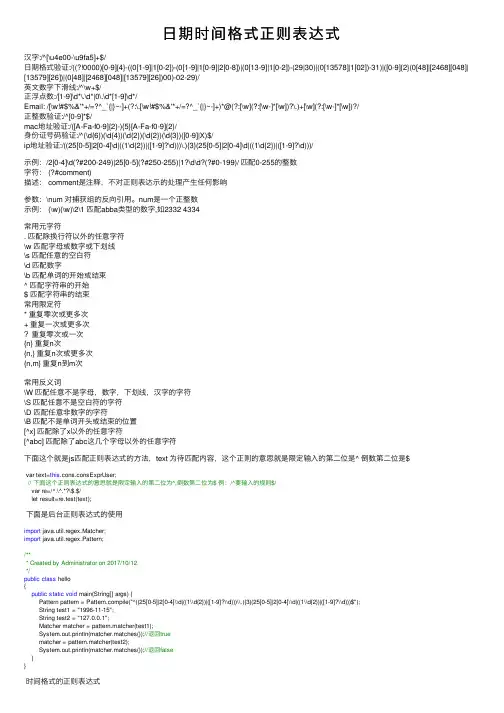
⽇期时间格式正则表达式汉字:/^[\u4e00-\u9fa5]+$/⽇期格式验证:/((?!0000)[0-9]{4}-((0[1-9]|1[0-2])-(0[1-9]|1[0-9]|2[0-8])|(0[13-9]|1[0-2])-(29|30)|(0[13578]|1[02])-31)|([0-9]{2}(0[48]|[2468][048]| [13579][26])|(0[48]|[2468][048]|[13579][26])00)-02-29)/英⽂数字下滑线:/^\w+$/正浮点数:/[1-9]\d*\.\d*|0\.\d*[1-9]\d*/Email: /[\w!#$%&'*+/=?^_`{|}~-]+(?:\.[\w!#$%&'*+/=?^_`{|}~-]+)*@(?:[\w](?:[\w-]*[\w])?\.)+[\w](?:[\w-]*[\w])?/正整数验证:/^[0-9]*$/mac地址验证:/([A-Fa-f0-9]{2}-){5}[A-Fa-f0-9]{2}/⾝份证号码验证:/^(\d{6})(\d{4})(\d{2})(\d{2})(\d{3})([0-9]|X)$/ip地址验证:/((25[0-5]|2[0-4]\d|((1\d{2})|([1-9]?\d)))\.){3}(25[0-5]|2[0-4]\d|((1\d{2})|([1-9]?\d)))/⽰例:/2[0-4]\d(?#200-249)|25[0-5](?#250-255)|1?\d\d?(?#0-199)/ 匹配0-255的整数字符: (?#comment)描述: comment是注释,不对正则表达⽰的处理产⽣任何影响参数:\num 对捕获组的反向引⽤。
num是⼀个正整数⽰例: (\w)(\w)\2\1 匹配abba类型的数字,如2332 4334常⽤元字符. 匹配除换⾏符以外的任意字符\w 匹配字母或数字或下划线\s 匹配任意的空⽩符\d 匹配数字\b 匹配单词的开始或结束^ 匹配字符串的开始$ 匹配字符串的结束常⽤限定符* 重复零次或更多次+ 重复⼀次或更多次?重复零次或⼀次{n} 重复n次{n,} 重复n次或更多次{n,m} 重复n到m次常⽤反义词\W 匹配任意不是字母,数字,下划线,汉字的字符\S 匹配任意不是空⽩符的字符\D 匹配任意⾮数字的字符\B 匹配不是单词开头或结束的位置[^x] 匹配除了x以外的任意字符[^abc] 匹配除了abc这⼏个字母以外的任意字符下⾯这个就是js匹配正则表达式的⽅法,text 为待匹配内容,这个正则的意思就是限定输⼊的第⼆位是^ 倒数第⼆位是$var text=this.cons.consExprUser;// 下⾯这个正则表达式的意思就是限定输⼊的第⼆位为^,倒数第⼆位为$ 例:/^要输⼊的规则$/var re=/^.\^.*?\$.$/let result=re.test(text);下⾯是后台正则表达式的使⽤import java.util.regex.Matcher;import java.util.regex.Pattern;/*** Created by Administrator on 2017/10/12.*/public class hello{public static void main(String[] args) {Pattern pattern = pile("^((25[0-5]|2[0-4]\\d|((1\\d{2})|([1-9]?\\d)))\\.){3}(25[0-5]|2[0-4]\\d|((1\\d{2})|([1-9]?\\d)))$");String test1 = "1996-11-15";String test2 = "127.0.0.1";Matcher matcher = pattern.matcher(test1);System.out.println(matcher.matches());//返回truematcher = pattern.matcher(test2);System.out.println(matcher.matches());//返回false}}时间格式的正则表达式24⼩时制时:分格式 0[0-9]:[0-5][0-9]|1[0-9]:[0-5][0-9]|2[0-3]:[0-5][0-9]12⼩时制时:分格式 0[0-9]:[0-5][0-9]|1[0-1]:[0-5][0-9]正则表达式其实不难,虽然学习的时候有⼈会告诉你,这个不⽤记,上⽹⼀搜就有了,真正搜的时候才发现很多不靠谱。
php 验证时间格式的正则表达式
一、概述在网页开发中,经常需要对用户输入的时间进行验证,以确保输入的时间格式正确。
而正则表达式是一种强大的工具,可以用来匹配和验证字符串,因此在验证时间格式时,可以使用正则表达式来实现。
本文将介绍如何使用PHP来验证时间格式的正则表达式。
二、时间格式的常见形式在验证时间格式之前,首先需要了解时间的常见形式。
在不同的国家和地区,时间的表达方式可能有所不同,但在国际标准ISO 8601中,时间的常见形式包括以下几种:1. 完整日期和时间:YYYY-MM-DDTHH:MM:SS(例如:2022-01-01T12:00:00)2. 年月日:YYYY-MM-DD(例如:2022-01-01)3. 时分秒:HH:MM:SS(例如:12:00:00)4. 时分:HH:MM(例如:12:00)三、使用PHP验证时间格式的正则表达式在PHP中,可以通过preg_match函数来使用正则表达式进行匹配和验证。
下面是一些常见的时间格式的正则表达式示例:1. 完整日期和时间的正则表达式:```php$pattern = '/^(\d{4})-(\d{2})-(\d{2})T(\d{2}):(\d{2}):(\d{2})$/';```2. 年月日的正则表达式:```php$pattern = '/^(\d{4})-(\d{2})-(\d{2})$/';```3. 时分秒的正则表达式:```php$pattern = '/^(\d{2}):(\d{2}):(\d{2})$/';```4. 时分的正则表达式:```php$pattern = '/^(\d{2}):(\d{2})$/';```四、示例下面通过一个具体的示例来演示如何使用PHP验证时间格式的正则表达式。
```php$time = "2022-01-01T12:00:00";$pattern = '/^(\d{4})-(\d{2})-(\d{2})T(\d{2}):(\d{2}):(\d{2})$/';if (preg_match($pattern, $time)) {echo "时间格式正确";} else {echo "时间格式不正确";}```五、注意事项在使用正则表达式验证时间格式时,需要注意以下几点:1. 正则表达式中的^表示匹配字符串的开头,$表示匹配字符串的结尾,以确保匹配的字符串是完整的时间格式。
2023常用正则表达式
2023常用正则表达式
2023年常用的正则表达式可能会涉及到各种不同的需求和情况,因此我会尽量涵盖一些常见的正则表达式示例。
首先,我们知道正
则表达式是一种用来匹配字符串模式的方法,它可以用来验证输入
的格式是否符合特定的要求。
以下是一些可能在2023年常用的正则
表达式示例:
1. 邮箱验证:
^[a-zA-Z0-9._%+-]+@[a-zA-Z0-9.-]+\.[a-zA-Z]{2,}$。
2. 手机号码验证(中国大陆):
^1[3-9]\d{9}$。
3. 身份证号码验证(中国大陆):
^(^\d{15}$|^\d{18}$|^\d{17}(\d|X|x))$。
4. URL验证:
^(http|https)://[a-zA-Z0-9-\.]+\.[a-z]{2,4}(/\S)?$。
5. IP地址验证:
\b(?:\d{1,3}\.){3}\d{1,3}\b.
6. 日期格式验证(yyyy-mm-dd):
^\d{4}-\d{2}-\d{2}$。
7. 数字验证(整数或小数):
^-?\d+(\.\d+)?$。
8. 用户名验证(包括字母、数字、下划线,4-16位):
^[a-zA-Z0-9_]{4,16}$。
以上是一些可能在2023年常用的正则表达式示例,它们涵盖了邮箱、手机号码、身份证号码、URL、IP地址、日期格式、数字和用户名等常见的验证需求。
当然,随着技术的发展和应用场景的不
断变化,可能会出现新的常用正则表达式。
希望这些示例能够帮助你理解在2023年可能会常用的正则表达式。
正则应用之——日期正则表达式(R...
正则应用之——日期正则表达式(Regular applications -- dateregular expressions)1 OverviewFirst of all, it should be noted, either Winform, or Webform, has a very mature calendar controls, whether or scalability from the ease of use, selection and calibration date or use the calendar control to achieve better.A few days ago in the CSDN section see the need for dates, regular posts, so tidy up this article, and discuss and exchange with you, if there are omissions or errors, but also please correct me.The date regular is generally required for formatting, and the data is not used directly by the user input. Because of the different scenarios, the rules are different and the complexity is different. Regular writing needs to be analyzed in detail according to specific circumstances. A basic principle is to write only the right one and not the complex one.For date extraction, as long as it can be separated from the non date, write the simplest regular, such as\d{4}-\d{2}-\d{2}If you can uniquely locate the date in the yyyy-MM-dd format in the source string, you can extract it.For validation, it is not meaningful to verify only thecomposition and format of the characters, but also to check the rules. Because of the existence of leap year, the check routine of dates becomes more complicated.Let's examine the effective range of the date and what is a leap year.2 date rule2.1 the valid range of the dateFor the valid range of the date, different application scenarios will vary.The valid range of the DateTime object defined in MSDN is: 0001-01-01 00:00:00 to 9999-12-31 23:59:59.UNIX timestamp 0, according to the ISO 8601 specification: 1970-01-01T00:00:00Z.In practical applications, the date range will not go beyond the scope of DateTime, so regular verification takes the usual range of dates.2.2 what is a leap year?(excerpt from Baidu Encyclopedia)Leap (year) is designed to make up for the time difference between the number of days per year for the calendar and the actual orbital period of the earth's revolution. The year thatmakes up the time difference is a leap year.The earth moves around the sun for 365 days, 5 hours, 48 minutes, 46 seconds (365.24219 days), that is, tropical year. The Gregorian calendar year only 365 days shorter than the tropical year of about 0.2422 days, every four years accumulated about a day, this day to the end of 2 (February 29th), so that the length of time for 366 days, this year is a leap year.Note that now the Gregorian calendar is based on Roman "Julian" adapted to. Since we did not realize that we had to calculate more than 0.0078 days a year, the total was 10 days from 46 BC to sixteenth Century. Therefore, when the Pope Gregorian thirteen, October 5, 1582 to October 15th will be artificially specified. And began a new leap year provisions. Which provides the entire calendar year is a few hundred, must be a multiple of 400 is not a leap year, is a multiple of 400. For example, in 1700, 1800 and 1900 for the year 2000 is a leap year. Since then, the average annual length of 365.2425 days, about 4 years, a deviation of 1 days. According to a leap year every four years, an average of 0.0078 days per year will be calculated, and after four hundred years it will take about 3 days. Therefore, three leap year will be reduced every four hundred years. The calculation of the leap year boils down to what it usually says: four years and one year; a hundred years without a leap, four hundred years later.2.3 date formatDepending on the language and culture, the date's hyphen will vary, usually in the following formats:YyyyMMddYyyy-MM-ddYyyy/MM/ddYyyy.MM.dd3 date regular expression construction3.1 rule analysisA commonly used method to write complex regular, is the first requirement of separation is not relevant, write the corresponding regular check, and then mix, the relationship and mutual influence, regular basically can draw the corresponding.According to the definition of leap year, the date can be classified in several ways.3.1.1 is divided into two categories depending on whether the number of days is related to the yearA class unrelated to the year and subdivided into two groups depending on the number of days per month1, 3, 5, 7, 8, 10 and December were 1-314, 6, 9 and November were 1-30Of or relating to a yearThere is 1-28 on February?Leap year, February, 1-293.1.2 can be divided into four categories depending on the date of inclusionAll months in all years contain 1-28 daysAll years, except for February, contain 29 and 30 daysAll 1, 3, 5, 7, 8, 10, and December all contain 31 daysLeap year February contains 29 days3.1.3 classification method selectionBecause the implementation of the date classification is achieved through the (exp1|exp2|exp3) branch structure,The branch structure starts from the left branch to the right and tries to match. When a branch match succeeds, it attempts not to try right, otherwise, try all branches and report failure.How many branches, the complexity of each branch will affect the matching efficiency, taking into account the validated date probability distribution, most of them fall within 1-28 days,so the second kinds of classification methods, can effectively improve the matching efficiency.3.2 regular implementationUsing the 3.1.2 section of the classification method, you can write the corresponding rules for each rule, the following temporary MM-dd format to achieve.Consider the first three rules unrelated to the year, and write in years(... 0000) [0-9]{4}Next, consider only the regular of months and daysIncluding the year of all years? Every month, contains 1-28(0[1-9]|1[0-2]) - - (0[1-9]|1[0-9]|2[0-8])All year, including? Year except February contains 29 and 30(0[13-9]|1[0-2]) - - (29|30)Including the year of all years? 1, 3, 5, 7, 8, 10, 31, December are included(0[13578]|1[02]) -31)Together, all dates except for leap year February 29th(?! (0000) [0-9]{4}- (0[1-9]|1[0-2]) - (0[1-9]|1[0-9]|2[0-8]) | (0[13-9]|1[0-2]) - (29|30) | (0[13578]|1[02]) -31)Next, consider leap year implementationsLeap year February contains 29 daysThe months and days here are fixed, that is, 02-29, only the year is changing.All leap year years can be output by the following code, and the rules are examinedFor (int, I = 1, I, < 10000, i++){If ((I% 4 = = 0 & & I% 100! = 0) || I% 400 = = 0){RichTextBox2.Text = string.Format ({0:0000}, I) + \n "";}}According to the rule of leap year, it is easy to sort out the rules, four years in one;([0-9]{2} (0[48]|[2468][048]|[13579][26])Not a hundred years, four hundred years and then intercalated.(0[48]|[2468][048]|[13579][26]) 00Together is the February 29th of all leap year([0-9]{2} (0[48]|[2468][048]|[13579][26]) |(0[48]|[2468][048]|[13579][26]) 00) -02-29)The four rules have been implemented and are not affected by each other. The combination is the regular of all dates that match the DateTime range^ ((?! (0000) [0-9]{4}- (0[1-9]|1[0-2]) -(0[1-9]|1[0-9]|2[0-8]) | (0[13-9]|1[0-2]) - (29|30) |(0[13578]|1[02]) -31 ([0-9]{2}) |(0[48]|[2468][048]|[13579][26]) |(0[48]|[2468][048]|[13579][26]) 00) -02-29).Given that this regular expression is only for validation, the capture group does not make sense; it only takes up resources and affects the efficiency of the matching, so you can use the non capturing group to optimize.^ (?: (?! [0-9]{4}- (0000): (??: 0[1-9]|1[0-2]) - (?:0[1-9]|1[0-9]|2[0-8]) | (?: 0[13-9]|1[0-2]) - (?: 29|30) | (? 0[13578]|1[02]) | (-31): [0-9]{2} (??:0[48]|[2468][048]|[13579][26]) | (0[48]|?[2468][048]|[13579][26]) 00) -02-29 $)The regular year 0001-9999, format yyyy-MM-dd. The validity and performance of the regularization can be verified by the following codeDateTime DT = new DateTime (1, 1, 1);DateTime endDay = new DateTime (9999, 12, 31);Stopwatch SW = new, Stopwatch ();Sw.Start ();Regex dateRegex = new Regex (@ ^ (?: (?! [0-9]{4}- (0000): (??: 0[1-9]|1[0-2]) - (?: 0[1-9]|1[0-9]|2[0-8]) | (?:0[13-9]|1[0-2]) - (?: 29|30) | (? 0[13578]|1[02]) -31 ([0-9]{2}) |? (0[48]|[2468][? 048]|[13579][26]) | (?) 00:0[48]|[2468][048]|[13579][26]) -02-29) $");//Regex dateRegex = new Regex (@ ^ ((?! (0000) [0-9]{4}-(0[1-9]|1[0-2]) - (0[1-9]|1[0-9]|2[0-8]) | (0[13-9]|1[0-2]) - (29|30) | (0[13578]|1[02]) -31 ([0-9]{2}) |(0[48]|[2468][048]|[13579][26]) |(0[48]|[2468][048]|[13579][26]) 00) -02-29) $");Console.WriteLine (start date: + dt.ToString (yyyy-MM-dd));While (DT < endDay){If (... DateRegex.IsMatch (dt.ToString ("yyyy-MM-dd")){Console.WriteLine (dt.ToString ("yyyy-MM-dd") + "false");}DT = dt.AddDays (1);}If (... DateRegex.IsMatch (dt.)ToString(“yyyy-mm-dd”))){控制台。
yyyymmdd的正则表达式
yyyymmdd的正则表达式yyyymmdd的正则表达式是用于匹配日期的一种正则表达式。
其中yyyy表示年份,mm表示月份,dd表示日期。
此类正则表达式在各种编程语言中都得到了广泛的应用。
1. 正则表达式的基本概念首先,我们来了解一下正则表达式的基本概念。
正则表达式是用来描述文本模式的一种语法,它可以用来查找、匹配和替换文本。
在正则表达式中,我们可以使用各种特殊字符和元字符来描述文本模式。
2. yyyymmdd的正则表达式接下来,我们通过举例来了解一下yyyymmdd的正则表达式。
具体地说,yyyymmdd的正则表达式可以用以下语句来表示:^[0-9]{4}[0-9]{2}[0-9]{2}$其中^表示字符串的起始位置,$表示字符串的结束位置,[0-9]表示匹配任意数字,{4}表示匹配4次,{2}表示匹配2次。
因此,以上的正则表达式可以匹配像20201231这样的日期字符串。
3. 正则表达式的常用语法在实际应用中,我们还需要了解一些正则表达式的常用语法。
以下是常用的正则表达式语法:· . 表示匹配任一字符,比如.oo可以匹配foo、goo、coo等。
· * 表示匹配前面的字符出现任意多次,比如an*可以匹配an、ann、annn等。
· + 表示匹配前面的字符出现至少一次,比如an+可以匹配an、ann、annn等,但无法匹配a。
· ? 表示匹配前面的字符出现0次或1次,比如colou?r可以匹配color和colour。
· 匹配范围用[]表示,比如[abc]表示匹配其中的任意一个字符,[0-9]表示匹配0-9中的任意一个数字。
· 括号()可以用来表示子表达式,方便匹配操作。
4. 总结通过本文的介绍,我们了解了yyyymmdd的正则表达式的表示方法,以及正则表达式的基本语法。
正则表达式是一种非常强大的文本匹配工具,在各种编程语言和操作系统中都得到了广泛应用。