
Module 10 Unit 1 How do I write my homework on the computer课件1(外研版七上)
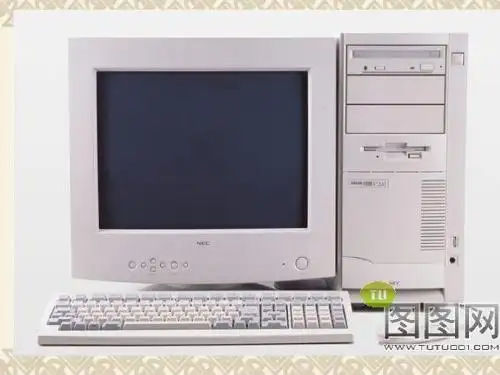
keyboard printer mouse
Listen and number the words as you hear them. (Activity 1) computer
1
keyboard 3 monitor 2 mouse 4 printer 5
Complete these sentences with these words. (Activity 3) connect switch on
一、根据句意及首字母提示完成单词。 根据句意及首字母提示完成单词。 1. Let me do it a gain I’m sure it will be ___. OK. _____on the lights. I can’t see 2. Please s witch anything. 3. The p rinter to print the document. _____is 4. Where do you w rite ___the name? 5. You c____ “save” and write a name for lick it. _____to 6. First, connect the m onitor the computer.
3. -I don’t know how to make tea. -First, you get some hot water ready. ___ put the tea in the cup.___ pour the hot water into the cup. A. Then; Finally B. And ;And 4. -Don’t ___ this pen to do your homework. -Is there anything wrong with it? A .make B. use
ቤተ መጻሕፍቲ ባይዱ
Look through the dialogue and write the words they go with. (Activity 5) click open print new document click _____________ 1. open ______________________ a new document 2. use the mouse/the keyboard ______________________ 3. write______________________ your homework/a name/it 4. save ______________________ the document 5. print ______________________ it save use write
Answer the questions. Then work in pairs. (Activity 7) 1. How do you open a document? You click “new document.” 2. Where do you write your homework? You write it in the new document. 3. How do you save the document? You click “save”.
4. Where do you write its name? You write it in the box. 5. What do you do next? You click “save” again. 6. How do you print it? You click “print” and “Ok”.
1. First, _______ the monitor to the connect computer. 2. Finally, _________ the computer. switch on
Listen and answer: 1. What does Lingling want to do on the computer? She wants to write her homework. 2. Who is good at using the computer? Daming
二、翻译下列短语。 翻译下列短语。 1. 连接显示器 与主机 2. 打开电脑 3. 打开一个新 文件 4. 使用键盘 5. 给它命名 6. 再点击保存 connect the monitor to the computer switch on the computer open a new document use the keyboard write a name for it click “save” again
1. First, connect the monitor to the computer. 首先,连接显示器与主机。 首先,连接显示器与主机。 connect “连接,把……联系起来”。 连接, 联系起来” 连接 联系起来 connect +名词 代词 +( with/to) 名词/代词 名词 eg: The railway line connects Wuhan and Shanghai. 这条铁路线连接武汉和上海。 这条铁路线连接武汉和上海。 Please connect me with Beijing University. (打电话用语 请给我接北京大学。 打电话用语)请给我接北京大学 打电话用语 请给我接北京大学。
Number the instructions in the correct order. (Activity 6) 1. Write your homework 2. Print your document 3. Open a new document 4. Save the document The key: 3----1----4-----2
三、单项选择。 单项选择 1. -___the printer___ the computer. Then you can print your document. -I see. A. Connect ; to B. Switch ; on 2. -How can I go online? -Click “Internet Explorer” with the__. A. keyboard B. mouse
2. switch on 打开 意思是“打开或接通电源” 意思是“打开或接通电源”。其反义词 为 switch off “关闭”,与turn on (打 关闭” 关闭 );turn off (关闭 意思相同。 关闭)意思相同 开); 关闭 意思相同。
3. So, use the mouse and click “new document”. 然后,用鼠标点击“新文件” 然后,用鼠标点击“新文件”。 这是一个祈使句 祈使句, ① 这是一个祈使句,使用了并列连词 and 并列 并列use 和click。也可以不用 。也可以不用and, 改为动词不定式来表达。 动词不定式来表达 改为动词不定式来表达。即:use the mouse to click “new document”. 介词with有“使用,用……工具”之 工具” ② 介词 有 使用, 工具 该句也可以用介词with 来改写。So, 来改写。 意,该句也可以用介词 click “new document” with the mouse.
Words and expressions first document use click next save box then again 首先 文件 使用 点击 然后; 然后;其次 保存; 保存;挽救 方框 然后 再次; 再次;又
Label the parts of the computer. (Activity 2) computer monitor
Module 10 Computers
Unit 1 How do I write my homework on the computer?
Words and expressions keyboard monitor mouse print printer connect switch switch on finally 键盘 显示器 鼠标;老鼠 鼠标 老鼠 打印 打印机 连接 用开关把…开启(或关掉 或关掉) 用开关把…开启 或关掉 连通;开 电灯 机器等) 电灯、 连通 开(电灯、机器等 最后
初一 Module 10 Unit 1
Module 10 ComputersUnit 1 How do I write my homework on the computer?诸城市贾悦镇孟疃初中王启砚课型:听说课【学习目标】1.知识目标:掌握下列重点单词和词组:computer, keyboard, monitor, mouse, print,connect, switch, switch on, document, click, save, use, first, finally2. 能力目标:能在实际情境中简单表述计算机的使用。
3.情感目标:通过学习,提高学生学习电脑和英语的兴趣,促进学生适应时代的发展,进一步培养学生的良好情感。
【教学重难点】:1.重点句式:How do I write my homework on the computer?First, open a new document. Next, write your homework in the new document.Then, click “save”again. Finally, click “print” and “OK”.2.难点:how, wh- 引导的一般现在时的特殊疑问句。
【教学过程】[课前朗读]: 朗读单词from “keyboard” to “again”[检查词汇预习]:a. 采取学生结对、小组互查等形式来检查学生对词汇的预习情况。
b.朗读单词,注意发音。
一、情境导入二、小听力(自主完成,合作释疑)Listen and number the words as you hear them. 完成activity 1 .三、大听力多层听四、理解意思1.小组内合作解决activity 4的汉语意思,找出不懂的地方。
2.小组间合作解决不懂的地方,教师适时点拨。
五、突破重点与难点(一)对重点内容和疑难问题进行合作探究学习。
1. How do I write my homework on the computer?中how 意为___________, 做疑问词引导特殊疑问句。
Module_10_Unit_1_How_do_I_write_my_homework_on_the_computer教学设计

Module 10 ComputersUnit 1 How do I write my homework on the computer?【教学媒体的选择与设计】使用教材:新标准英语授课题目:Unit 1 How do I write my homework on the computer?教学总体思路:采用各种有效的、合理的教学方法激发学生的学习兴趣,让学生在积极的参与和思维中获得能力的提高。
课前准备设计思路:英文歌曲欢快的节奏能激发学生学习英语的兴趣,能够最大限度地减轻学生说英语的紧张感,同时消除了师生之间的陌生感,也为新课做了铺垫。
百度搜索:/v?ct=301989888&word=%D3%A2%CE%C4%B8%E8%C7%FA%A3%BAif+yo u+are+happy“活动一”设计思路:首先通过设定一定的情景,让学生学习本节课的新单词,然后通过听力练习,提出问题,让学生有目的的学习本节课的重难点。
“活动二”设计思路:主要是让学生进行自主的学习,通过质疑、纠错,在互帮互助中不知不觉地涉及、解决本课的重点和难点。
“活动三”设计思路:通过创设一定的情景,检查学生对语言的掌握和运用能力,使学生在玩中学,学中玩。
“活动四”设计思路:是对本课所学内容的一个扩展,让学生运用本节课所学词汇介绍运用电脑写作业的步骤,既贴近生活,又开阔学生的眼界,大大提高了学生学习英语的积极性。
一、教材分析本课所使用的教材是外语教学与研究出版社出版的中小学英语教材——《英语》(新标准)的初中一年级上册。
本模块以电脑为主题,内容涉及如何用电脑完成作业、世界不同地方的人们对电脑的利用程度等,既贴近生活,又开阔学生的眼界。
第一单元是听说课,主要以呈现相关词汇为主。
内容很吸引学生,有利于激发学生的学习兴趣,也有助于学生对计算机的了解和使用。
本模块的重点是掌握电脑方面的基本词汇,读懂含有一般现在时的句子,掌握一般现在时的特殊疑问句和答句。
Module 10 Unit 1
“教学中的互联网搜索”教案:Module 10 ComputersUnit 1 How do I write my homework on the computer?诸城卢山中学李宏霞教案背景:1.面向学生:七年级学生2.学科:英语3.课时:1教案内容:一、学习目标:1、知识目标:掌握下列重点单词和词组的意思及用法,computer, keyboard, monitor, mouse, print, connect, switch, switch on, document, click, save, use, first, finally2. 能力目标:能在实际情境中简单表述计算机的使用。
3.情感目标:通过学习电脑方面的词汇了解一些不同国家和地区的人们使用电脑的情况,提高对英语的学习兴趣。
二、学习重、难点::1.重点:How do I write my homework on the computer?First, open a new document. Next, write your homework in the new document.Then, click “save”again. Finally, click “print” and “OK”.2.难点:how, wh- 引导的一般现在时的特殊疑问句。
教学之前通过百度在网上搜索了“Module 10 Unit 1 How do I write my homework on the computer?”教学的相关教学材,如参考教案(/view/e72befedaeaad1f346933ffe.html)和课件(/view/5d7d0aa70029bd64783e2cb1.html),了解了教学的重点和难点。
三、教具准备:多媒体、录音机和彩笔四、教学方法:教法:本节课采取启发式教学法、自主学习与小组讨论相结合的教学方法,开放式教学,让学生在愉快的氛围中探索新知识,调动学生学习的主动性。
七年级上册module10unit1教案及练习题教案

Unit 1 How do I write my homework on the computer?刘振杰李子昌教学内容 How do I write my homework on the computer?教材分析 Students need to practice the names of different parts of the computer again and again so that they can use them in the following drills fluently, that is the vocabulary practicing. Then the step of doing homework on the computer may be the difficulty in this unit, more practice is also necessary.学情分析 Vocabulary about computer is easy, but the step of using it may be a little difficult to express.教学目标To get to know basic words about computerTo understand conversations about how to use a computerTo learn how to give instructions教学重点The vocabulary about computersThe step of using computers to write homework设计思路 Through the dialogue, let Ss grasp the vocabulary of parts of the computer, and be able to express the step of using computer to write homework freely.教学设计情景导入,活跃课堂Step I. Show Ss pictures of some different kinds of computers in our daily life, ask them if they know the names of different parts of the computer. I. Try to name the parts of the computer in English. (pay attention to the pronunciation of each word)Step 2.知识新授,各显才能I. Point different parts of the computer, let Ss grasp all the . Ask Ss what they do with different parts of the computer. I. Ss read the words (try to remember them as many as possible)II. Say what they often do with different parts of the computer.(Try to use the sentences in the book)Step 3.情景操练,沙场点兵I. Ask Ss “What do you often do on your computer?”II. Ask Ss “Do you do your homework on your computer?”III. If we want to write our homework on the computer? How can we do it? I. Ss answer th e question as they like“I often surf the Internet on the computer…”II. Ss answer the question according to their own experienceIII. Try to tell the step of using the computer to do homework one by one. Then put them in pairs.Step 4.情景回归,耳听目明I. Play the tape, ask Ss to listen carefully. Do Activity 6. II. Ask Ss to read the text by themselves . Ask Ss to make a dialogue in pairs between Daming and .Ask Ss to get in groups, teach each other how to use a computer to write the homework.I. Listen to the tape carefully, and put the phrases in the right order according to what they . Read the text aloud. III. Practice the dialogue in pairs. IV. Ss get in groups, try to explain to each other how to use a computer to write homework, then come to the front and show the step on the computer with the English explanation. Step5作业布置, Tell the steps of writing the homework with a computerStep6教学反思 This unit is mainly about the first contact with the computer, Ss just need to remember all the names of different parts, try to express the steps of how to use a computer to write homework in English. That’s enough for the aim of this lesson. Through 40 minutes’ practice, most students can use the vocabulary and express in English freely.. Phonetics( ) 1. A. box B. computer C. cross D. document( ) 2. A. printer B. internet C. monitor D. term( ) 3. A. daughter B. August C. mouse D. autumn( ) 4. A. click B. information C. kind D. switch( ) 5. A. save B. travel C. grandchild D. laptopII. Vocabulary.( I )根据句意和首写字母完成单词6. I often visit w_______ to get information for my homework.7. Lingling uses the internet to d ________ the music.8. You can click s________ and write a name for the new document.9. If you want to write something in the document , you can use the k_______.10. Printer is a m________ for printing the words and sentences you save on the computer.( II )找出并连词构成相对应的词组。
七年级英语上:Module 10 Unit 1 How do I write my homework on the computer课件(外研版)
Listen again and answer the questions:
What does Lingling want to do on the computer? She wants to write her homework . Who is good at using the computer?
一、根据句意及首字母提示完成单词。 1. Let me do it a gain I’m sure it will be ___. OK. 2. The p rinter to print the document. _____is 3. Where do you w rite ___the name? 4. You c____ “save” and write a name for lick it. 5. First, connect the monitor the _____to computer.
play games
study
work
shopping
make friends
If
you want to write your homework on the computer, what should you do first, next, and then…
Connቤተ መጻሕፍቲ ባይዱct
二、翻译下列短语。 1. 连接显示器 与主机 2. 打开电脑 3. 打开一个新 文件 4. 使用键盘 5. 给它命名 6. 再点击保存 connect the monitor to the computer switch on the computer open a new document use the keyboard write a name for it click “save” again
外研版英语七年级上Module10Unit1学案

Module 10 ComputersUnit 1how do I write my homework on the computer?学案学习目标:1. keyboard, monitor, mouse, print, printer, connect, switch, finally, first, document, use, click, next, save, box, then, again等词的读音与拼写.检查方式: 上课前的课前读词. 集体读, 个体读. 根据所给首字母填空题; 单词拼写形式.3. connect the monitor to the computer. switch on the computer. write my homework on the computer, open a new document, use the mouse, click” new document”, write your homework in the new document, use the keyboard, save the document, write a name for the document, write it in the box, click “save” again 等短语的掌握检查方式: 短语翻译练习. 评价方式: 小组内互批加分. 班内进行评比.预习时间: 利用早晨美好的时间自己进行晨读预习.4. 特殊疑问句:How do you open a new document? Where do you write your homework?How do you save the document? Where do you write its name?What do you do next? How do you print it?自主学习自测:一、根据所给单词首字母或句汉语意思填空.1. It’s my ________________(第一) time to be online.2. How do you _________(打开)a new document?3. Daming and Lingling ___________(使用)computers to do their homework.4. What _________(种类)of music do you like?5. I visit my website at the ______________(周末).6. I want to know how to ________________(保存) a document.7. Do you make a travel _______________(计划) on the Internet?8. The __________(打印机) is to print the document.9. How many (手提电脑) do you have at home.10. Where do you write your _____________(家庭作业)?二. 用括号内所给动词的适当形式填空:1. Tony _________________(not visit) his uncle, but he often _________(send) emails.2. We often _______(use) the Internet, but we _________(not play) games on our computer.3. Daming _____________(not use) a computer to do his homework, but he _________(download) music sometimes.4. Betty and Lingling _________(do) their homework on Sunday.5. My parents often ___________(watch) TV in the evening.6. Jack, ___________(open) a new document first, please.三、汉译英:1.打开电脑_______________2. 把显示器连接到主机上___________________3. 发送邮件_______________4. 打开一个新文件夹_____________________5. on the computer_________________6. click “save” _________________7. save the document__________________ 8. and then___________________四、句型转换:1. its, you, write, where, do, name(连词成句)______________________________________________2. I always get online at night. (改成否定句)_______________________________________________3. Does your friend like playing table tennis?(作否定回答)________________.4. Lingling has dinner at eight o’clock. (划线部分提问)_____________________________________________5. I can write a name of the document next. (对划线部分提问)五. 根据汉语提示完成句子.1. How do you _____________ ___________ ____________ ___________(保存一个新文件)?2. I don’t usually ___________ ___________ (用电脑).3. I don’t ____________ ____________ (玩游戏) on the computer.4. ______________(最后), how do I ____________(打印)the homework?5. we ___________ _________ ___________ __________ (没有电脑) at home.六.中考链接:1. She reads the instructions to find out how _____ the computer.A. useB. to useC. usingD. uses2. ---________ is “Luck 52” shown on CCTV? --- Once a week.(一周一次)A. How soonB. How oftenC. How many times.。
七年级英语Module10 Unit1教案 外研社
MODULE 10 ComputersPart 1: Teaching design第一部分教学设计Function Describing a processStructure Wh- questions in present simpleListening/Speaking Recognizing parts of the computer; recognizing question wordsAsking and answering questions about computerReading/Writing Matching questions and answersCorrecting false information; using conjunction: butCulture American teenagers and the InternetTask Doing a questionnaire about computersUnit 1 How do I write my homework on the computer?■Warming upGood morning, class! Do I have a computer at home? Yes, I do. I have a laptop at home. What do I usually do on my computer? I usually listen to CDs and watch films on my computer. Do I write my diary on it? Yes, I do. How do I write my diary on the computer? First, I open a new document. I use the mouse and click “new document”. Next, I write my diary in the new document. I use the keyboard. At last, I click “save”, and write a name for it. So everybody can write his or her diary on the computer. What can you do on your computer besides this? You can write your homework on it! After you finish your homework, you can click “print” and “OK”. And then you can hand in your homework to teachers. Do you know how to use the computer now? Let’s turn to page 60 and learn more about the computer!■Vocabulary and listening1 Listen and number the words as you hear them.Here is a computer. It has several different parts. The big screen we see is the monitor. In front of the monitor is the keyboard. We use the keyboard to write things on the computer. The mouse is next to the keyboard. We use the mouse to click things on the monitor. The part on the left side is the printer. We use the printer to print images and1 →printer2 →monitor3 →computer4 →keyboard5 →mouse2 Label the parts of the computer.Now we are going to label the parts of the computer. Look at the above picture please. Which part is the mouse?1 →printer2 →monitor3 →computer4 →keyboard5 →mouse3 Complete these sentences with these words.Hi, class! Can you tell me how to turn on the computer? First, we connect the monitor to the computer. Next, we connect the keyboard and the mouse to the computer. Finally we switch on the computer. In this way the computer4 Listen and read.Now we are going to listen and read.Lingling and Daming are talking about how to write the homework on the computer. Lingling doesn’t know how to do it. She asks Daming questions of writing the homework on the computer. Daming answers to her questions. Listen carefully.Now let’s go on to read the dialogue. While reading try to cut(断句)/ the sentences into parts, blacken(涂黑)the predicates, shade(加影)the connectives and underline(划线)the expressions.5 Find these words in the dialogue. Write the words they go with.There are six verbs in the box below. We can find these words in the dialogue in Activity 4. Do you know how to use these words after reading the dialogue? First, find these words in the dialogue yourself. Second, make new sentences with these words. For example, I save my new document. I use the keyboard to write my diary. I open the document. I use the mouse to click print and OK. I use the mouse to draw a picture in the new document. I use6 Number the instructions in the correct order.Hello, class! I would like you to write today’s English homework on your computer. Do you know how to writethe homework on the computer now? What do you need to do first? Of course, you need to switch on the computer first. What do you need to do next? You should open a new document for your homework. What is the third step? You write your homework in the new document. How do you save the document? You use the mouse and click save. Do you print your homework? Yes, you do. You need to click print and OK to print the document.2 Write your homework.4 Print your document.1 Open a new document.3 Save the document7 Answer the questions.These are some questions about the conversation we learn. Now please answer them yourself. Use the correct sentences from the conversation.■Pronunciation and Speaking8 Listen and repeat.On page 61 there is one sound and one word. You are going to listen and repeat. Pay attention to the sound on the//swit ch9 Listen and repeat the questions.There are five sentences here. Listen to the tape and repeat the questions. Make sentences like these by yourself. Say as many sentences as you can. Now I give you some examples. What’s the printer? What’s the polar bear? What do you do at weekends? What does he do on Sunday? How do I open a new document? How does a washing machine work? Where is the zoo? Where is the monitor? Where do we write our homework? Where do you go swimming?10 Work in pairs.Test your partner about computers.Work with your partner. Ask each other questions about computers. Try to think of as many as questions as possible. Use the word where, what and how. When you answer the questions, please try to make your answers---What’s this? ---I t’s the keyboard.---How do you save a new document? ---I click “save”.---Where do you write the name of the document? ---I write it in the box.---What’s that? ---It’s the printer.---How do you print a document? ---I use the mouse and click “print” and “OK”.。
七年级英语上册 Module 10 Unit 1 How do I write my homewor
Module10 putersUnit1 How do I write my homework on the puter?教学内容: How do I write my homework on the puter?教材分析: This unit is focused on puter学情分析: More than 90% students can use puter nowadays. It’s new for students toknow puter knowledge in English.教学目标: To get to know basic words about puter. To understand the dialogueTo learnhow to give instructions教学重点:puter knowledgeGive instructions. Learn to use four words in writing ---first/ next/ then/ finally设计思路: Give students pre-tasks to get to know the puter words in English Start withwords first. Then listen and read the conversation. Finally, answer the questions. 教学步骤:Step1: Warming up.Step2: Get the students to talk about the development of exchanging information, present thenew word puter. Learn the parts of the puter.Step3: Listen and number the words as the students hear themStep4: plete these sentences with these words.Step5: Listen and answer,then Listen to the dialogue and number the instructions in the correct order.Next Find these words in the conversation. Write the words they go with.Work in st listen and read.Step6 : Discussion how the students write their homework on the puter? Work in pairs . Step7: Do some exercises .Step8: Language pointsStep9: Homework1. Read activity 4.e puter to write an article “ puter in my life”。
人教版七年级英语上册 Module 10 Unit 1 How do I write my home
computeyboar d
First open a new document. use the mouse and click “new document”
Next write the feelings in the document. use the keyboard
Then save the document
click “save”, and write a name for it in the box, and click “save” again
Finally print it click “print” and “OK”
How do I write my feeling on the computer?
Listen and number 2 Write your homework 4 Print your document 1 Open a new document 3 Save the document
Read and imitate
1. How do you open a new document? 2. Where do you write your homework? 3. How do you save the document? 4. Where do you write its name? 5. What do you do next? 6. How do you print it?
Monitor, monitor, monitor Let me use the computer
Open a document Use the mouse to click Write what I like With my dear keyboard
外研版英语七上Module10Unit1HowdoIwritemyhomeworkonthecomp
外研版初一英语上册第10模块第1单元7A Module10 Unit1说课稿于城中学曾燕梅一、教材分析本课的内容取自外研版新标准初一英语上册第10模块第1单元。
本模块以电脑为话题而展开。
从熟悉电脑的各部份到如何利用电脑完成作业,最后通过采访实录的形式介绍世界各地的人们利用电脑的情形。
整个内容新颖,切近学生的生活,对学生有很强的吸引力,容易激发他们的学习爱好。
通过学习能帮忙学生开阔眼界,丰硕电脑方面的知识,并提高他们的运用能力。
本人所执教的是第1单元的内容,主若是熟悉电脑的各个部份,和如何运用电脑来写作业。
因此,我在教学中,以教材内容为依据,结合学生已有的知识储蓄进行激活,灵活组织教学,充分调动学生的踊跃性,开展听说读写的活动。
二、教学目标这节课我要紧设计了四个目标:一、语言知识目标:学习本课时涉及并要求运用的新单词与短语,和运用与表达特殊疑问句。
二、语言技术目标:能运用有关电脑方面的辞汇及特殊疑问句进行听说读写活动,并能简单描述利用电脑写作业的步骤。
3、情感态度目标:通过学习电脑方面的辞汇及运用来提高学生对英语学习的爱好。
4、任务目标:通过学习,能独立完成在电脑上写作业的任务。
三、本节的重点与难点重点是把握电脑方面的大体辞汇,学会利用电脑写作业的大体步骤。
难点是把握一样此刻时的特殊疑问句及其答语。
四、教学流程设计和设计用意step1:warming-up通过听歌曲营造轻松的气氛,师生之间的问候拉近师生的情感距离,为开始这一堂课做了一个气氛上的铺垫。
Step2:Leading-in by guessing and learn some new words.我呈现一张自己在电脑上工作的图片引入本课话题电脑。
我在此处设计了一个guessing“What do I usually do on the computer? ”利用情景激活学生原有知识,然后又激发学生对此话题的爱好。
通过猜想游戏,引出“write my document”,教学新单词document。