
SQLServer数据库基准安全配置标准
MS SQL Server 数据库基准安全配置标准目录1. 将SQL SERVER身份验证设置为仅限WINDOWS (2)2. 安装最新的补丁更新程序 (2)3. 优化服务 (2)4. 限制SQL SERVER 只采用TCP/IP (3)5. 帐户 (3)5.1. 使用最低权限帐户运行SQL S ERVER (3)52 为SA帐号设置强壮的口令 (3)53 删除SQL来宾用户帐户 (5)54 删除BUILTIN\A DMINISTRATORS 服务器登录 (5)5.5. 不为公共角色授予权限 (5)6. 文件和目录 (5)6.1. 验证对SQL S ERVER安装目录的访问权限 (6)6.2. 验证E VERYONE组是否不具有对SQL S ERVER文件的访问权限 (6)63 保证安装日志文件的安全 (7)7. SQL SERVER 数据库对象 (7)7.1. 删除示例数据库 (7)7.2. 保证存储过程的安全 (7)7.3. 限制CMD E XEC对SYSADMIN角色的访问权限 (9)8. 审核和日志 (11)1.将SQL Server身份验证设置为仅限Windows应当对SQL Server进行配置,使其支持仅限Win dows身份验证,因为这种验证方式有诸多优点。
不必在网络上传送凭据;可避免在数据库连接字符串中嵌入用户名和密码;更易于进行安全管理,因为只需要与一个Windows安全模块而不是另外的SQL Server安全模块打交道;密码到期期间的登录安全性得到提高;最低限度的长度要求及帐户锁定策略。
2. 安装最新的补丁更新程序包括最新的Windows操作系统以及SQL Server的Service Pack。
3. 优化服务SQL服务安装程序运行期间将安装以下四个Windows服务:MSSQLSERVER(对于命名实例,则为MSSQL$InstanceNam©。
此为SQLServer数据库引擎,是唯一的强制安装服务。
SQLSERVERAGENT (对于命名实例,则为SQLAgent$lnstanceName)。
可借助此支持服务制定命令执行计划及在出错时通知操作人员。
MSSQLServerADHelper。
它可提供Active Directory集成服务,包括数据库实例注册。
Microsoft Search。
它可提供全文搜索能力。
在任何情况下均须通过本地系统帐户来运行此服务。
只有MSSQLSERVER数据库引擎是必备的。
其余服务提供了附加功能,只在特定情况下才需要使用。
如并非必需,请禁用这些服务。
注意:不应将SQL Server配置为以本地系统帐户或本地Administrators组的任何成员帐户运行。
4.限制SQL Server 只采用TCP/IP禁用“ SQL Server网络实用工具”中除TCP/IP外的所有协议。
SQL Server 2000数据库系统本身没有提供网络连接的安全解决办法,但是Win dows 2000提供了这样的安全机制。
使用操作系统自己的IPSec可以实现IP数据包的安全性。
请对IP连接进行限制,只保证自己的IP能够访问,也拒绝其他IP进行的端口连接,把来自网络上的安全威胁进行有效的控制。
5.帐户5.1. 使用最低权限帐户运行SQL Server使用最低权限帐户运行SQL Server服务可将设法从SQL Server执行操作系统命令的攻击者所造成的危害降至最低水平。
不应为SQL Server服务帐户授予诸如Administrators组成员身份等较高特权。
5.2. 为SA帐号设置强壮的口令默认系统管理员(sa)帐户一直是无数攻击的目标。
它是SQL Server管理固定服务器角色sysadmin的默认成员。
请确保对此帐户使用强密码。
注意:应对所有帐户,尤其是特权帐户(如sysadmin和db_owner角色的成员) 均使用强密码。
如果使用复制,请给用于与远程分布式服务器建立连接的distributor_admin帐户也使用强密码。
具体实施步骤:1、打开sqlserver企业管理器i.沖轻■•白岸ffrM 曲衣鬧厂Hf?■汁崔Wt ■空穴珂 3r ・Z ]《SQL Server 基准安全配置标准》 第4页共13页 t 側自中四凶MPtHHHmd gro iw I 」・峠I 旳IWl bE)辱I 瞬|j 宰丨塾iBkfli BE ・*knri<j(l 逆 iciraa I TH USmSegrSl竊戸旨 ||j 甦 辛 % Jhb^Qt So**1" Mnpw Hfl... 迥总■ JJt«32、单击“安全性”的登录3 、修改sa 用户口令叫 ZT S SS M S 日 Cy 三甘玛'SflTEit E tb 口测 柯 j sa* ・ _j HfiRnUfi W _IM 田Off*_ v :xE JEM I£ ^K4^ r 」]★耐蒼H ;? >tw.Ba ・H4 -I *ffl*专 _| PM ■匸・■ Sen :■尹 0 眉 | 唁 5QI S TIVT Ript — H ■… 数据库管理员应该定期查看是否有不符合密码要求的帐号。
比如使用下面的SQL 语句:Use masterSelect n ame,Password from syslog ins where password is n ull-jsufeifln*HH1心JW |」4峠|旳[Bl X 害睜|曹|]宰|塾|・@電[3 1耳at>•马4追月 I BL^KK I 叫话茗 IB 刚L r 村曲仙汨w 剛仟町 C- fhrww 頭丄*|r IT : *4台|工> WO I ^I MRhn Vl 2-tTtH5.3. 删除SQL来宾用户帐户如果启用了Windows 2000的来宾帐户,则安装SQL Server时会创建一个来宾用户帐户。
如果登录有对SQL Server的访问权限,但没有通过数据库用户帐户对数据库进行访问的权限,则登录便会具有来宾的身份。
好的做法是禁用Windows的来宾帐户。
此外,还要从所有用户定义数据库中删除来宾帐户。
请注意,无法从master, tempdb、复制及分发数据库中删除来宾帐户。
5.4. 删除BUILTIN\Administrators 服务器登录默认情况下,系统会将BUILTIN\Administrators 本地Windows组添加到sysadmin 固定服务器角色,以对SQL Server进行管理。
这意味着作为BUILTIN\Administrators成员的域管理员可以不受限制地访问SQL Server数据库。
大多数公司会对域管理员和数据库管理员角色加以区分。
如果要进行这种区分,请删除BUILTIN\Administrators SQL Server 登录。
5・5・不为公共角色授予权限所有数据库均包含一个公共数据库角色。
每个其他用户、组和角色都是该公共角色的成员。
您无法删除公共角色的成员,不过,可以不为授予对应用程序的数据库表、存储过程及其他对象访问权限的公共角色授予权限。
否则,便无法利用用户定义的数据库角色获得所需授权,因为公共角色会为数据库中的用户授予默认权限。
6. 文件和目录除利用ACL保证操作系统文件的安全外,还要强化NTFS权限来限制对SQL Server程序文件、数据文件、日志文件以及系统级工具的访问。
此外,还应只允许SQL Server服务帐户访问其所需的内容。
6.1.验证对SQL Server安装目录的访问权限根据下表中所列的权限对SQL Server服务所赖以运行的帐户进行验证。
括号中指定的位置为默认安装位置,可能会视安装的具体情况而不同。
如果使用企业管理器”来设置SQL Server服务帐户,它将为帐户授予对SQL Server 安装目录及所有子文件夹('Program Files'Microsoft SQL Server\MSSQL\*) 的完全控制”权限。
取消对该文件夹及其所有子文件夹的写入授权,然后有选择性地授予对数据、错误日志、备份及作业文件目录的完全控制权限,便可使新帐户无法覆盖SQL Server二进制文件。
6.2.验证Everyone组是否不具有对SQL Server文件的访问权限不应使Everyone组具有对SQL Server文件位置(默认情况下为\ProgramFiles\Microsoft SQL Server\MSSQL)的访问权限,这可通过验证Everyone 组并未经ACL获得访问权限和只为SQL Service帐户、Administrators组及本地系统帐户提供显式完全控制来实现。
6・3・保证安装日志文件的安全安装SQL Server 2000 Service Pack 1或2后,系统管理员或服务帐户的密码可能会遗留在SQL安装目录中。
请使用Killpwd.exe实用程序从日志文件中删除密码实例。
7. SQL Server数据库对象SQL Server提供了两个用于开发和训练的示例数据库以及一系列内置存储过程和扩展存储过程。
不应将示例数据库安装在生产服务器上,并应保证功能强大的存储过程和扩展存储过程的安全。
7.1.删除示例数据库使用SQL Server企业管理器来删除任何示例数据库。
默认情况下,SQL Server 包含Pubs和Northwind示例数据库。
72保证存储过程的安全限制对应用程序的存储过程的访问。
请不要为公共角色或来宾用户授予对所创建的任何存储过程的访问权限。
保证存储过程安全的主要防线先是要确保使用强身份验证,然后是提供精确授权,从而实现只允许必要的用户权限来运行存储过程。
建议的做法是:为应用程序创建一个SQL Server登录,将登录映射到数据库用户,再将用户添加到用户定义数据库角色,然后为角色授予权限。
打开sql查询分析器,粘贴如下的内容到分析器:use masterexec dropexte ndedproc "xp_availablemedia"exec dropexte ndedproc "xp_e nu mgroups"exec dropexte ndedproc "xp_e nu mds n"exec dropexte ndedproc "xp_dirtree"exec dropexte ndedproc "dbo.xp_makecab"exec dropexte ndedproc "xp_ un packcab"exec dropexte ndedproc "xp_ ntsec_e nu mdomai ns"exec dropexte ndedproc "xp_term in ate_process"exec dropexte ndedproc "xp_serviceco ntrol"exec dropexte ndedproc "dbo.xp_subdirs"exec dropexte ndedproc "xp_cmdshell"exec sp_dropexte ndedproc 'Xp_regaddmultistri ng'exec sp_dropexte ndedproc 'Xp_regdeletekey'exec sp_dropexte ndedproc 'Xp_regdeletevalue'exec sp_dropexte ndedproc 'Xp_rege num values'exec sp_dropexte ndedproc 'Xp_regread'exec sp_dropexte ndedproc 'Xp_regremovemultistri ng'exec sp_dropexte ndedproc 'Xp_regwrite'exec dropextendedproc "xp_regwrite"〃删除打部分reg 打头的过程exec sp_dropexte ndedproc 'Sp_OACreate'exec sp_dropexte ndedproc 'Sp_OADestroy'exec sp_dropexte ndedproc 'Sp_OAGetErrorl nfo'exec sp_dropexte ndedproc 'Sp_OAGetProperty'exec sp_dropexte ndedproc 'Sp_OAMethod'exec sp_dropexte ndedproc 'Sp_OASetProperty'exec sp_dropextendedproc 'Sp_OAStop'〃删除大部分oa 打头的过程exec sp_dropexte ndedproc 'xp_e nu mgroups'exec sp_dropexte ndedproc 'xp_fixeddrives'exec sp_dropexte ndedproc 'xp_logi neon fig'exec sp_dropexte ndedproc 'xp_e nu merrorlogs'exec sp_dropexte ndedproc 'xp_getfiledetails'drop procdure sp_makewebtaskGo7.3.限制cmdExec对sysadmin角色的访问权限SQL Server代理使用cmdExec函数来执行Windows命令行应用程序和其排定的脚本。
SQL Server 2008 安全性与合规性指南说明书
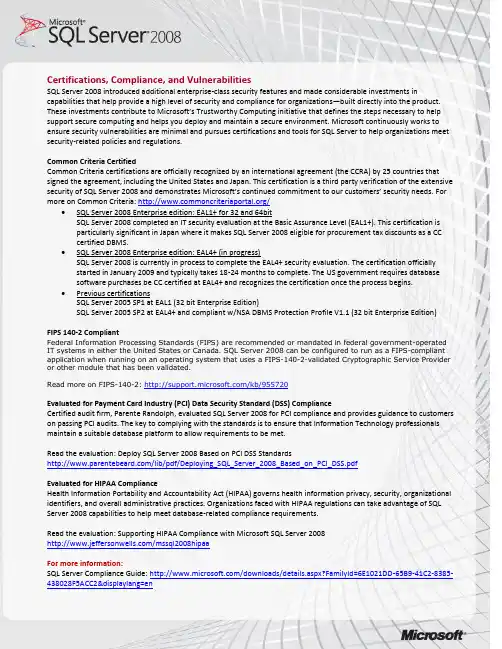
Certifications, Compliance, and VulnerabilitiesSQL Server 2008 introduced additional enterprise-class security features and made considerable investments in capabilities that help provide a high level of security and compliance for organizations—built directly into the product. These investments contribute to Microsoft’s Trustworthy Computing initiative that defines the steps necessary to help support secure computing and helps you deploy and maintain a secure environment. Microsoft continuously works to ensure security vulnerabilities are minimal and pursues certifications and tools for SQL Server to help organizations meet security-related policies and regulations.Common Criteria CertifiedCommon Criteria certifications are officially recognized by an international agreement (the CCRA) by 25 countries that signed the agreement, including the United States and Japan. This certification is a third party verification of the extensive security of SQL Serv er 2008 and demonstrates Microsoft’s continued commitment to our customers’ security needs. For more on Common Criteria: /∙SQL Server 2008 Enterprise edition: EAL1+ for 32 and 64bitSQL Server 2008 completed an IT security evaluation at the Basic Assurance Level (EAL1+). This certification isparticularly significant in Japan where it makes SQL Server 2008 eligible for procurement tax discounts as a CCcertified DBMS.∙SQL Server 2008 Enterprise edition: EAL4+ (in progress)SQL Server 2008 is currently in process to complete the EAL4+ security evaluation. The certification officiallystarted in January 2009 and typically takes 18-24 months to complete. The US government requires databasesoftware purchases be CC certified at EAL4+ and recognizes the certification once the process begins.∙Previous certificationsSQL Server 2005 SP1 at EAL1 (32 bit Enterprise Edition)SQL Server 2005 SP2 at EAL4+ and compliant w/NSA DBMS Protection Profile V1.1 (32 bit Enterprise Edition)FIPS 140-2 CompliantFederal Information Processing Standards (FIPS) are recommended or mandated in federal government-operated IT systems in either the United States or Canada. SQL Server 2008 can be configured to run as a FIPS-compliant application when running on an operating system that uses a FIPS-140-2-validated Cryptographic Service Provider or other module that has been validated.Read more on FIPS-140-2: /kb/955720Evaluated for Payment Card Industry (PCI) Data Security Standard (DSS) ComplianceCertified audit firm, Parente Randolph, evaluated SQL Server 2008 for PCI compliance and provides guidance to customers on passing PCI audits. The key to complying with the standards is to ensure that Information Technology professionals maintain a suitable database platform to allow requirements to be met.Read the evaluation: Deploy SQL Server 2008 Based on PCI DSS Standards/lib/pdf/Deploying_SQL_Server_2008_Based_on_PCI_DSS.pdfEvaluated for HIPAA ComplianceHealth Information Portability and Accountability Act (HIPAA) governs health information privacy, security, organizational identifiers, and overall administrative practices. Organizations faced with HIPAA regulations can take advantage of SQL Server 2008 capabilities to help meet database-related compliance requirements.Read the evaluation: Supporting HIPAA Compliance with Microsoft SQL Server 2008/mssql2008hipaaFor more information:SQL Server Compliance Guide: /downloads/details.aspx?FamilyId=6E1021DD-65B9-41C2-8385-438028F5ACC2&displaylang=enSQL Server 2008 Key Security Features1.Transparent Data Encryption (TDE)Implementing encryption in a database traditionally involves complicated applicationchanges such as modifying table schemas, removing functionality, and significant performance degradations. TDE solves these problems by simply encrypting everything without requiring changes to the application.2.All Actions AuditedWith SQL Server 2008 you can create audits that will allow you to analyze the data usage patterns for the data in your database. With SQL Server 2008 you can audit not only changes to data but also which users are reading data. From a security standpoint this will allow you to see when a user who would normally have access to a certain set of data is accessing more than they should and take corrective action if necessary.3.Extensible Key ManagementExtensible key management works with transparent data encryption to separate the encryption key from thedatabase. With the growing demand for regulatory compliance and concern for data privacy, organizations can take advantage of 3rd party Hardware Security Modules (HSM) which store encryption keys on hardware or software modules away from the data for added security.4.Policy-Based ManagementPolicy-Based Management allows DBAs to define a set of policies that can control many different aspects of SQL Server. Policies can be applied to a single server or to groups of servers. Use Policy-Based Management to help manage and detect non-compliance with security polices for data across the enterprise.5.Clustering AuthenticationSQL Server 2008 clustering supports Kerberos authentication on a virtual server. Administrators are able to specify Microsoft Windows–style policies on standard logins so that a consistent policy is applied across all accounts in the domain.6.Surface Area ConfigurationSQL Server 2008 includes the SQL Server Surface Area Configuration Tool, which provides an intuitive graphical user interface (GUI) for configuring the server. Running this tool should be your first task after installing SQL Server. The tool opens with a brief explanation of its purpose, and a link to documentation. It includes a link to configure services and protocols and another to configure other features.7.Off By DefaultTo reduce the SQL Server 2008 surface area to unauthorized access after initial installation, a number of services have been turned off or set for manual start-up so no inadvertent access is granted. Services that are off by default include the Microsoft .NET Framework, Service Broker network connectivity, and HTTP connectivity for Analysis Services.Services that require manual intervention to start include SQL Server Agent, Full Text Search, and IntegrationServices, which can all be reset for automatic start-up.8.Surface Area Reduction and Advanced SecuritySQL Server 2008 provides rich security features to protect data and network resources. It is much easier to achieve a secure installation of the software, because all but the most essential features are either not installed by default or disabled if they are installed. SQL Server provides plenty of tools to configure the server. Its authentication features make it harder to get access to a server running SQL Server by integrating more closely with Windows authentication and protecting against weak or old passwords. Granting and controlling what a user can do when authenticated is far more flexible with granular permissions.SQL Server Vulnerabilities ComparisonMicrosoft, IBM, MySQL, and Oracle regularly report security vulnerabilities (or CVEs) to NIST National Vulnerability Database (/view/vuln/search ). Based on this reported information, the following is a historical representation of database security vulnerabilities reported by Microsoft, IBM, MySQL, and Oracle over the past 8 years.Database features alone should not be assessed to determine “security.” Organizations need to understand howvulnerable their database solution is from attacks —and not just external attacks, according to Forrester (March 2009), 70% of threats come from inside the enterprise. This means it’s no longer safe to assume that a database behind a firewall is protected and vulnerabilities or patching are not of concern.Notes : Update as of 4/20/2010. Vulnerabilities are included for SQL Server 2000 , SQL Server 2005 , SQL Server 2008. Oracle (8i, 9i, 9iR2, 10g,10gR2,11g), IBM DB2 (8.0, 8.1, 8.2, 9.0, 9.5), Query for Oracle was run with vendor name: ‘Oracle’ , and product name: ‘any’ (all database product name variations were queried) . Query for IBM DB2 was run with vendor name: ‘IBM’ , and product name: ‘db2.’ Query for MySQL was run with vendor name: ‘MySQL’, and product name: ‘Any.’ Query for Microsoft was run with vendor name: ‘Microsoft ‘ ; product name: ‘Microsoft SQL Server’; version name: ’Any’This chart counts NIST CVE – Software Flaws (Each CVE might include more than one Oracle vulnerabilities)20406080100120140160200220032004200520062007200820092010SQL Server Oracle DB2MySQL。
中国联通内网SQL数据库安全基线配置指南
中国联通内网SQL数据库平安配置指南
(试行)
名目
前言
为确保中国联通信息系统的网络支撑和内网信息平安,指导各省级分公司做好SQL数据库的平安维护相关工作,在研究国际先进企业最正确实践的根底上,结合中国联通内网信息平安现状和实际需求,特制定本配置指南。
本文档由中国联合网络通信治理信息系统部提出并回口治理。
本文档起草单位:中国联合网络通信、系统集成公司。
本文档要紧起草人:钮吉安,安莹。
本文档解释单位:中国联合网络通信治理信息系统部。
1范围
本文档了中国联通范围内安装有SQL数据库的主机应当遵循的平安性设置标准,本文档旨在指导系统治理人员进行SQL数据库的平安配置。
本文档适用版本:SQL数据库
本文档的适用范围为中国联通集团总部、各直属单位、各省级分公司。
2定义与缩略语
2.1缩略语
以下符号和缩略语适用于本标准:
术语及缩写英文中文
SQL StructuredQueryLanguage 结构化查询语言
3平安配置要求
3.7名目平安
3.10范例数据库
3.13SQLServer属性配置常规选项
3.14SQLServer属性配置连接选项
3.15SQLServer属性配置数据库设置选项
3.17审计信息检查
3.19审计日志
4评审与修订
本指南由中国联通集团治理信息系统部每年审查一次,并依据需要进行修订;如遇国家相关发生变化或中国联通企业信息平安策略发生重大变更等情况时,本指南将适时修订。
MicrosoftSQLServer数据库系统配置安全基线标准与操作指引-网络

Microsoft SQL Server数据库系统配置安全基线标准与操作指南南京农业大学图书与信息中心2018年6月目录第1章概述 (1)1.1 安全基线概念 (1)1.2 文档编制目的 (1)1.3 文档适用范围 (1)1.4 文档修订 (1)第2章帐号与口令 (1)2.1 口令安全 (1)2.1.1 删除不必要的帐号 (1)2.1.2 用户口令安全 (1)2.1.3 帐号分配管理 (2)2.1.4 分配数据库用户所需的最小权限 (2)2.1.5 网络访问限制 (2)第3章日志 (3)3.1 日志审计 (3)3.1.1 登录审计 (3)3.1.2 安全事件审计 (3)第4章其他安全配置 (4)4.1 安全策略 (4)4.1.1 通讯协议安全策略 (4)4.2 更新补丁 (4)4.2.1 补丁要求 (4)4.3 存储保护 (5)4.3.1 停用不必要存储过程 (5)第1章概述1.1 安全基线概念安全基线是指满足最小安全保证的基本要求。
1.2 文档编制目的本文档针对安装运行Microsoft SQL Server数据库系统的服务器主机所应当遵循的基本安全设置要求提供了参考建议,供校园网用户在安装使用Microsoft SQL Server数据库系统提供数据存储服务过程中进行安全合规性自查、检查、加固提供标准依据与操作指导。
1.3 文档适用范围本文档适用于Microsoft SQL Server数据库系统的各类版本。
1.4 文档修订本文档的解释权和修改权属于南京农业大学图书与信息中心,欢迎校园网用户提供意见或建议,请发送至security@。
第2章帐号与口令2.1 口令安全2.1.1 删除不必要的帐号2.1.2 用户口令安全查看password 字段应不为null2.1.3 帐号分配管理2.1.4 分配数据库用户所需的最小权限2.1.5 网络访问限制在防火墙中做限制,只允许与指定的IP 地址建立1433 的通第3章日志3.1 日志审计3.1.1 登录审计3.1.2 安全事件审计打开企业管理器,查看数据库“管理”中的“ SQL Server第4章其他安全配置4.1 安全策略4.1.1 通讯协议安全策略4.2 更新补丁4.2.1 补丁要求级效果,再在实际运行环境更新数据库。
SQL Server的安装与配置

SQL Server的安装与配置SQL Server的安装使用相对Access来说要复杂很多,因此本章将会详细介绍它的安装使用。
SQL Server是目前中小型数据库中使用最为广泛的数据库,因此作为一个数据库开发人员,这是必须要掌握的。
SQL Server 2000目前有好几个版本,通常在Windows 2000操作系统上安装企业版,而在Windows 98等操作系统上安装标准版。
推荐使用企业版,本节将介绍企业版的安装使用。
1 SQL Server安装实例准备好SQL Server安装盘以后,进入安装目录,双击“SETUP.exe”文件,进入安装界面(很多时候安装程序会自动运行),如图1所示。
如果是Windows 2000或者是Windows XP操作系统,则直接单击“安装SQL Server 2000组建”进行安装,如果是Windows 98,则有可能需要先安装“安装SQL Server 2000先决条件”,由于作者采用Windows XP操作系统,所以直接单击第一项安装,进入安装组件界面,如图2所示。
图1 数据录入、编辑界面图2 安装组件界面在图2中,单击“安装数据库服务器”(其他两个选项一般不用),进入安装向导界面,如图3所示。
在图3中,选择“本地计算机”单选按钮,然后单击按钮“下一步”,进入选择安装计算机界面,如图4所示。
图4主要是让用户选择数据库要安装的计算机,通常是默认安装在本地计算机上,其中“远程计算机”是将数据库安装在另外一台计算机上,不过很少使用,也就不多介绍。
单击按钮“下一步”,进入如图5所示界面。
图3 安装向导图4 选择数据库安装的计算机图5是让读者选择创建一个新的SQL Server实例,默认选择是第一项,而“高级选项”则是设定安装程序,使得安装在无人的情况下也能够安装,不鼓励使用。
这里不改变选择,直接单击按钮“下一步”,进入下一个界面,如图6所示。
图5 选择安装SQL Server实例图6 输入用户信息图6没什么用处,是让用户输入一些基本的信息,单击按钮“下一步”,进入下一个界面如图7所示。
Microsoft SQL Server安全配置基线
Microsoft SQL Server数据库系统安全配置基线中国移动通信公司管理信息系统部2012年 4月版本版本控制信息更新日期更新人审批人V1.0 创建2009年1月V2.0 更新2012年4月备注:1.若此文档需要日后更新,请创建人填写版本控制表格,否则删除版本控制表格。
目录第1章概述 (4)1.1适用范围 (4)1.2适用版本 (4)1.3实施 (4)1.4例外条款 (4)第2章帐号与口令 (5)2.1口令安全 (5)2.1.1删除不必要的帐号* (5)2.1.2SQLServer用户口令安全 (5)2.1.3根据用户分配帐号避免帐号共享* (6)2.1.4分配数据库用户所需的最小权限* (6)2.1.5网络访问限制* (7)第3章日志 (8)3.1日志审计 (8)3.1.1SQLServer登录审计* (8)3.1.2SQLServer安全事件审计* (8)第4章其他 (10)4.1安全策略 (10)4.1.1通讯协议安全策略* (10)4.2更新补丁 (10)4.2.1补丁要求* (10)4.3存储保护 (11)4.3.1停用不必要存储过程* (11)第5章评审与修订 (13)第1章概述本文档规定了中国移动通信有限公司管理信息系统部门所维护管理的SQL Server 数据库应当遵循的数据库安全性设置标准,本文档旨在指导系统管理人员或安全检查人员进行SQL Server 数据库的安全合规性检查和配置。
1.1 适用范围本配置标准的使用者包括:数据库管理员、应用管理员、网络安全管理员。
本配置标准适用的范围包括:中国移动总部和各省公司信息化部门维护管理的SQL Server数据库系统。
1.2 适用版本SQL Server系列数据库。
1.3 实施本标准的解释权和修改权属于中国移动集团管理信息系统部,在本标准的执行过程中若有任何疑问或建议,应及时反馈。
本标准发布之日起生效。
1.4 例外条款欲申请本标准的例外条款,申请人必须准备书面申请文件,说明业务需求和原因,送交中国移动通信有限公司管理信息系统部进行审批备案。
操作系统安全基线配置
Win2003&2008操作系统安全配置要求2.1. 帐户口令安全帐户分派:应为不一样用户分派不一样的帐户,不一样意不一样用户间共享同一帐户。
帐户锁定:应删除或锁定过期帐户、无用帐户。
用户接见权限指派:应只同意指定受权帐户对主机进行远程接见。
帐户权限最小化:应依据实质需要为各个帐户分派最小权限。
默认帐户管理:应付Administrator帐户重命名,并禁用Guest(贵宾)帐户。
口令长度及复杂度:应要求操作系统帐户口令长度起码为8位,且应为数字、字母和特别符号中起码2类的组合。
口令最长使用限期:应设置口令的最长使用限期小于90天。
口令历史有效次数:应配置操作系统用户不可以重复使用近来5次(含5次)已使用过的口令。
口令锁定策略:应配置当用户连续认证失败次数为5次,锁定该帐户30分钟。
2.2.服务及受权安全服务开启最小化:应封闭不用要的服务。
SNMP服务接受集体名称设置:应设置SNMP接受集体名称不为public或弱字符串。
系统时间同步:应保证系统时间与NTP服务器同步。
DNS服务指向:应配置系统DNS指向公司内部DNS服务器。
2.3.补丁安全系统版本:应保证操作系统版本更新至最新。
补丁更新:应在保证业务不受影响的状况下实时更新操作系统补丁。
2.4.日记审计日记审查策略设置:应合理配置系统日记审查策略。
日记储存规则设置:应设置日记储存规则,保证足够的日记储存空间。
日记储存路径:应更他日记默认寄存路径。
日记按期备份:应按期对系统日记进行备份。
智能2.5.系统防火墙:应启用系统自带防火墙,并依据业务需要限制同意通信的应用程序或端口。
2.6.防病毒软件:应安装由总部一致部署的防病毒软件,并实时更新。
2.7.封闭自动播放功能:应封闭Windows自动播放功能。
2.8.共享文件夹删除当地默认共享:应封闭Windows当地默认共享。
共享文件权限限制:应设置共享文件夹的接见权限,仅同意受权的帐户共享此文件夹。
中国联通内网SQL数据库安全基线配置指南
中国联通内网SQL数据库安全基线配置指南中国联通内网SQL数据库安全基线配置指南中国联通内网SQL数据库安全配置指南(试行)目录前言................................................................ V II 1范围12定义与缩略语12.1定义................................. 错误!未定义书签。
2.2缩略语 (1)3安全配置要求13.1操作系统安全 (1)3.2互联网访问安全 (2)3.3服务器应用安全 (3)3.4测试开发环境安全 (3)3.5SQL Server服务帐户安全 (4)3.6磁盘分区安全 (4)3.7目录安全 (5)3.8SQL Server补丁 (6)3.9SQL Server端口 (7)3.10范例数据库 (7)3.11停用SQL Server的命名管道 (8)3.12删除扩展的存储过程 (8)3.13SQL Server属性配置常规选项 (9)3.14SQL Server属性配置连接选项 (9)3.15SQL Server属性配置数据库设置选项 (10)3.16SQL 登录帐号 (10)3.17审计信息检查 (11)3.18审计启用 (11)3.19审计日志 (12)3.20数据库备份 (12)4评审与修订13前言为确保中国联通信息系统的网络支撑和内网信息安全,指导各省级分公司做好SQL数据库的安全维护相关工作,在研究国际先进企业最佳实践的基础上,结合中国联通内网信息安全现状和实际需求,特制定本配置指南。
本文档由中国联合网络通信有限公司管理信息系统部提出并归口管理。
本文档起草单位:中国联合网络通信有限公司、系统集成公司。
本文档主要起草人:钮吉安,安莹。
本文档解释单位:中国联合网络通信有限公司管理信息系统部。
1范围本文档规定了中国联通范围内安装有SQL 数据库的主机应当遵循的安全性设置标准,本文档旨在指导系统管理人员进行SQL数据库的安全配置。
SQLServer2000数据库安全设置方法
1、建立用户(用计算机管理器);先创建一个帐户如:MSSQL设置好密码,记住密码,分配好组,如GUETST 2、在分配其他必须权限,此处如果配置不好SQL将无法启动(例:mssql装在D盘)右键点D盘,属性,安全,高级,添加,输入创建的帐户名,选择:只有该文件夹,勾上:读取权限(倒数第三个),点确定。
3、在sql 2000企业管理器中配置该用户启动;A:打开企业管理器,点到(local)(Windows NT)上,点右键选属性,再点安全性,在启动服务帐户选项卡下面选择本帐户,输入:.\帐号名(如.\MSSQL),输入密码,点确定,然后一路确定,出错也没事,不用管!B:打开服务,找到MSSQLSERVER服务,双击打开属性,登陆里输入.\帐号名(如.\MSSQL),输入密码,点确定,然后一路确定,好了后重启一下服务,如果能正常启动就可以了,不能正常启动检查你输入的用户名或密码是否正确!4、删除危险存储过程,方法如下:删除MSSQL危险存储过程的代码执行以下操作,一般不会影响其他操作,只是删除了比较危险的几个存储过程,一般我们也用不太到!这仅对于做虚拟主机的朋友来说的安全配置方法!如果人个,企业,就不必这样做了,有时这些功能也是用到比较多的!1.drop PROCEDURE sp_makewebtask2.exec master..sp_dropextendedproc xp_cmdshell3.exec master..sp_dropextendedproc xp_terminate_process4.exec master..sp_dropextendedproc sp_oamethod5.exec master..sp_dropextendedproc sp_oacreate6.exec master..sp_dropextendedproc xp_regaddmultistring7.exec master..sp_dropextendedproc xp_regdeletekey8.exec master..sp_dropextendedproc xp_regdeletevalue9.exec master..sp_dropextendedproc xp_regenumkeys10.exec master..sp_dropextendedproc xp_regenumvalues11.exec master..sp_dropextendedproc sp_add_job12.exec master..sp_dropextendedproc sp_addtask13.exec master..sp_dropextendedproc xp_regwrite14.exec master..sp_dropextendedproc xp_readwebtask15.exec master..sp_dropextendedproc xp_makewebtask16.exec master..sp_dropextendedproc xp_regremovemultistring在查询分析器里执行就可以了。
(完整版)SQL-Server-2008的安全设置技巧方法详解(转)
Sqlserver 2008数据库安全设置方法目录一、服务器身份验证 (1)1.验证登录模式 (1)二、SQL Server服务的运行身份 (1)1.用户身份验 (1)三、sa密码的安全性 (1)1.修改sa的用户名 (1)四、端口相关问题 (2)1.修改端口号 (2)2. 卸载SQL的不安全组件 (2)3. 权限设置 (2)五、数据库安全策略 (3)1.使用安全的密码策略 (3)2.使用安全的帐号策略 (3)3.加强数据库日志的记录 (3)4.管理扩展存储过程……………………………………………………5.使用协议加密 (4)6.不要让人随便探测到你的TCP/IP端口 (4)7.修改TCP/IP使用的端口 (5)8.拒绝来自1434端口的探测 (5)9.对网络连接进行IP限制 (5)数据库安全设置方法一、服务器身份验证MSSQL Server 2008的身份验证模式有两种:一种是Windows 身份验证模式, 另一种是SQL Server和Windows身份验证模式(即混合模式)。
对大多数数据库服务器来说,有SQL Server 身份验证就足够了,只可惜目前的服务器身份验证模式里没有这个选项,所以我们只能选择同时带有SQL Server和Windows身份验证的模式(混合模式)。
但这样就带来了两个问题:1、混合模式里包含了Windows身份验证这个我们所不需要的模式,即设置上的冗余性。
程序的安全性是与冗余性成反比的。
2、所谓Windows身份验证,实际上就是通过当前Windows管理员帐户(通常为Administrator)的登录凭据来登录MSSQL Server。
使用Windows身份验证,会增加Administrator密码被盗的风险。
为解决以上两个问题,我们需要限制混合模式里的Windows身份验证。
方法如下:打开Microsoft SQL Server Management Studio,点击安全性->登录名,将Administrator对应的登录名删除即可。
sql server标准版本对操作系统的要求
sql server标准版本对操作系统的要求
不同版本的 SQL Server 对操作系统的要求有所不同,因此需要仔细查看相关文档。
以 SQL Server 2000 为例,它支持 Windows 95、Windows 98、Windows Me、Windows NT Workstation 、Windows 2000(所有版本)、Windows XP Professional、Windows XP Home Edition、Windows Server 2003,标准版1、Windows Server 2003,企业版1、Windows Server 2003,Datacenter 版1。
硬件资源:SQL Server 对硬件资源的要求较高,特别是对 CPU、内存和硬盘空间的需求比较大。
在选择硬件时,需要根据数据量大小和访问压力等
因素进行合理的配置。
网络环境:SQL Server 通常会作为一个网络应用程序运行,因此需要保证
网络的稳定性和安全性,包括网络带宽、安全策略等方面。
安装组件:SQL Server 安装需要一些额外的组件,例如 .NET Framework 和 Visual C++ Redistributable 等,需要在安装之前先行安装好。
数据库文件存储:SQL Server 数据库需要存储在磁盘上,因此需要保证磁
盘空间充足,并且需要按照最佳实践进行文件组织和配置。
硬盘空间:至少 6 GB 的可用磁盘空间。
最佳配置:硬盘空间至少为 100 GB 的可用磁盘空间。
以上内容仅供参考,如需更具体准确的回答,建议查阅微软官网或咨询专业计算机技术人员。