
公京检第1511398(新)号_智能球型摄像机_DS-2DE71XYZIW-ABC-VWS
海康威视摄像机字母意思命名规则分析
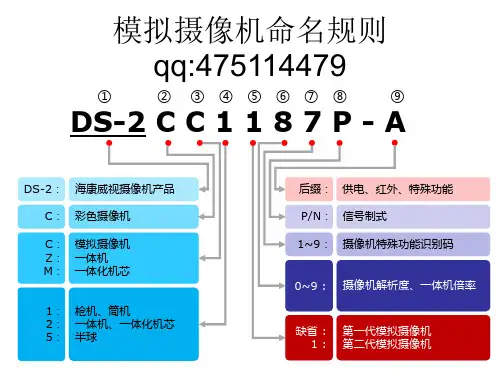
模拟摄像机命名规则
举例 (第一代模拟摄像机)
① ② ③ ④ ⑤ ⑥ ⑦ ⑧ ⑨
DS-2 C C 1
海康威视摄像机产品 彩色摄像机
75P-A
A: 支持AC24V/DC12V供电 P: PAL制式 5: 支持超低照度
DS-2: C:
C: 模拟摄像机
7: 1: 枪机
540TVL(彩色),600TVL(黑白)
①
⑨
模拟摄像机命名规则
① ② ③ ④ ⑤ ⑥ ⑦ ⑧ ⑨
• 后缀的补充说明
FB : VP : VF : A: C: MM : PT : IPT : H: DG : BT : FD :
DS-2 C C 1 1 8 7 P - A
第一代防暴 Vandal-proof第二代防暴 Vari-focal变焦 支持AC 24V和DC 12V 支持AC100V~240V 迷你型设计 内置云台 内置云台,红外距离10米 带加热模块 针孔摄像机 笔筒摄像机 飞碟摄像机 IR IR1 IR3 IRT IR5 IRA IRP : : : : : : : 支持红外 红外距离10~20m 红外距离30~40m 红外距离30~40m,遥控变焦 红外距离50~60m 红外距离100~110m 红外距离10~20m(室内海螺)
1:
第二代模拟摄像机
网络摄像机命名规则
① ② ③ ④ ⑤ ⑥ ⑦ ⑧
DS-2 C D 8 9 3 PF - E
DS-2: 海康威视摄像机产品 后缀2: 供电、红外、特殊功能 后缀1: 制式、清晰度、存储方式 1~9: 0/1/9 : 3: 5/8 : 6/7 : 6/7/8 : 摄像机特殊功能识别码 标清CCD摄像机 标清CMOS摄像机 高清CMOS摄像机 高清CCD摄像机 分辨率(抓拍机) C: 彩色摄像机 D: 网络摄像机 8: 81: 82: 83: 84: 7: 71: 72: 9: 枪机、筒机 卡片机 新一代筒机 热成像枪机 新一代卡片机 半球 迷你半球 新一代防水防暴半球 高清抓拍机(交通)
海视晨光网络速度球型摄像头说明书

DS-2DE7A232IW-AEB(T5)2 MP 32× IR Network Speed DomeHikvision DS-2DE7A232IW-AEB(T5) 2 MP 32× IR Network Speed Dome adopts 1/2.8" progressive scan CMOS chip. With the 32× optical zoom lens, the camera offers more details over expansive areas.This series of cameras can be widely used for wide ranges of high-definition, such as the rivers, roads, railways, airports, squares, parks, scenic spots, and venues, etc. Empowered by deep learning algorithms, Hikvision AcuSense technology brings human and vehicle targets classification alarms to front- and back-end devices. The system focuses on human and vehicle targets, vastly improving alarm efficiency and effectiveness.⏹1/2.8" progressive scan CMOS⏹High quality imaging with 2 MP resolution⏹Excellent low-light performance withpowered-by-DarkFighter technology⏹Audio visual alarm: The white flashing light and audible warning can be triggered by certain events⏹32× optical zoom and 16× digital zoom provide close up views over expansive areas⏹Expansive night view with up to 200 m IR distance⏹Focuses on human and vehicle targets classification based on deep learning⏹Face capture: Up to 5 faces captured at the same time⏹DORIThe DORI (detect, observe, recognize, identify) distance gives the general idea of the camera ability to distinguish persons or objects within its field of view. It is calculated based on the camera sensor specification and the criteria given by EN 62676-4: 2015.DORI Detect Observe Recognize IdentifyDefinition25 px/m63 px/m125 px/m250 px/m Distance (Tele)2200 m (7217.8 ft)873 m (2864.2 ft) 440 m (1443.6 ft)220 m (721.8 ft)⏹SpecificationCameraImage Sensor 1/2.8" progressive scan CMOSMax. Resolution 1920 × 1080Min. Illumination Color: 0.005 Lux @ (F1.6, AGC ON), B/W: 0.001 Lux@(F1.6, AGC ON), 0 Lux with IR Shutter Speed 1/1 s to 1/30000 sSlow Shutter YesDay & Night IR cut filterZoom 32x optical, 16x digitalLensFocal Length 4.8 mm to 153 mmZoom Speed Approx. 4.8 sFOV Horizontal field of view: 50.8° to 2.6° (wide-tele), Vertical field of view: 29.4° to 1.5° (wide-tele), Diagonal field of view:57.4° to 3° (wide-tele)Aperture Max. F1.6Focus Auto, semi-auto, manualIlluminatorSupplement Light Type IRSupplement Light Range IR Distance: up to 200 mPTZMovement Range (Pan) 360°Movement Range (Tilt) -15° to 90° (auto flip)Pan Speed Pan speed: configurable from 0.1° to 160°/s; preset speed: 240°/sTilt Speed Tilt speed: configurable from 0.1° to 120°/s, preset speed 200°/sProportional Pan YesPresets 300Patrol Scan 8 patrols, up to 32 presets for each patrolPattern Scan 4 pattern scansPower-off Memory YesPark Action Preset, pattern scan, auto scan, tilt scan, random scan, frame scan, panorama scan 3D Positioning YesPTZ Status Display YesPreset Freezing YesScheduled Task Preset, pattern scan, patrol scan, auto scan, tilt scan, random scan, frame scan, panorama scan, dome reboot, dome adjust, aux outputVideoMain Stream 50 Hz: 25 fps (1920 × 1080, 1280 × 960, 1280 × 720);60 Hz: 30 fps (1920 × 1080, 1280 × 960, 1280 × 720)Sub-Stream 50 Hz: 25 fps (704 × 576, 640 × 480, 352 × 288);60 Hz: 30 fps (704 × 480, 640 × 480, 352 × 240)Third Stream 50 Hz: 25 fps (1920 × 1080, 1280 × 960, 1280 × 720, 704 × 576, 640 × 480, 352 × 288);60 Hz: 30 fps (1920 × 1080, 1280 × 960, 1280 × 720, 704 × 480, 640 × 480, 352 × 240)Video Compression Main stream: H.265+/H.265/H.264+/H.264 Sub-stream: H.265/H.264/MJPEGThird stream: H.265/H.264/MJPEGVideo Bit Rate 32 kbps to 16384 kbpsH.264 Type Baseline Profile/Main Profile/High ProfileH.265 Type Main ProfileScalable Video Coding (SVC) H.264 and H.265 encodingRegion of Interest (ROI) 8 fixed regions for each streamAudioAudio Compression G.711alaw, G.711ulaw, G.722.1, G.726, MP2L2, AAC, PCMAudio Bit Rate 64 Kbps (G.711)/16 Kbps (G.722.1)/16 Kbps (G.726)/32-192 Kbps (MP2L2)/16-64 Kbps (AAC)Audio Sampling Rate 8 kHz/16 kHz/32 kHz/48 kHzEnvironment Noise Filtering YesNetworkNetwork Storage NAS (NFS, SMB/CIFS), auto network replenishment (ANR)Protocols IPv4/IPv6, HTTP, HTTPS, 802.1x, QoS, FTP, SMTP, UPnP, SNMP, DNS, DDNS, NTP, RTSP, RTCP, RTP, TCP/IP, UDP, IGMP, ICMP, DHCP, PPPoE, Bonjour, Websocket, WebsocketsAPI Open Network Video Interface (Version 19.12, Profile S, Profile G, Profile T), ISAPI, SDK, ISUPSimultaneous Live View Up to 20 channelsUser/Host Up to 32 users, 3 user levels: administrator, operator, and userSecurity Password protection, complicated password, HTTPS encryption, 802.1X authentication (EAP-TLS, EAP-LEAP, EAP-MD5), watermark, IP address filter, basic and digest authentication for HTTP/HTTPS, RTP/RTSP over HTTPS, control timeout settings, security audit log, TLS 1.2, TLS 1.3, host authentication (MAC address)Client iVMS-4200, HikCentral Pro, Hik-Connect Web Browser IE11, Chrome 57+, Firefox 52+, Safari 11+ ImageDay/Night Switch Day, Night, Auto, ScheduleImage Enhancement BLC, HLC, 3D DNRWide Dynamic Range (WDR) 120 dBDefog Digital defogImage Stabilization EISRegional Exposure YesRegional Focus YesImage Settings Saturation, brightness, contrast, sharpness, gain, and white balance adjustable by client software or web browserPrivacy Mask 24 programmable polygon privacy masks, mask color or mosaic configurable SNR > 52 dBInterfaceEthernet Interface 1 RJ45 10M/100M self-adaptive Ethernet portOn-board Storage Built-in memory card slot, support microSD/SDHC/SDXC card, up to 256 GB Alarm 2 inputs, 1 outputAudio 1 input (line in), max. input amplitude: 2-2.4 vpp, input impedance: 1 kΩ ± 10%;1 output (line out), line level, output impedance: 600 ΩReset YesBuilt-in Speaker 1 built-in speaker with effective distance reaching max. 30 metersEventBasic Event Motion detection, video tampering alarm, exception, alarm input and outputSmart Event Line crossing detection, intrusion detection, region entrance detection, region exiting detection, unattended baggage detection, object removal detection, audio exception detectionSmart Tracking Manual tracking, auto-trackingAlarm Linkage Upload to FTP/NAS/memory card, notify surveillance center, send email, trigger alarm output, trigger recording, audible warning, white light flashing, and PTZ actions (such as preset, patrol scan, pattern scan)Deep Learning FunctionFace Capture Detects up to 5 faces simultaneously.Supports detecting, capturing, grading, selecting of face in motion, and output the best face picture of the facePerimeter Protection Line crossing, intrusion, region entrance, region exitingSupport alarm triggering by specified target types (human and vehicle)GeneralPower 24 VAC, max. 42 W (including max. 18 W for IR and max. 10 W for heater); Hi-PoEOperating Condition -30 °C to 65 °C (-22 °F to 149 °F). Humidity 90% or less (non-condensing) Demist YesMaterial ADC12Dimension Ø 220 mm × 363.3 mm (Ø 8.66" × 13.91")Weight Approx. 5 kg (11.03 lb.)ApprovalProtection IP66 (IEC 60529-2013), IK10 (excluding glass window), TVS 6000V lightning protection, surge protection and voltage transient protectionEMC FCC SDoC (47 CFR Part 15, Subpart B);CE-EMC (EN 55032: 2015, EN 61000-3-2: 2019, EN 61000-3-3: 2013, EN 50130-4: 2011 +A1: 2014);RCM (AS/NZS CISPR 32: 2015);IC VoC (ICES-003: Issue 6, 2019);KC (KN 32: 2015, KN 35: 2015)SafetyUL (UL 62368-1);CB (IEC 60950-1:2005 + Am 1:2009 + Am 2:2013, IEC 62368-1:2014);CE-LVD (EN 62368-1:2014+A11:2017); BIS (IS 13252(Part 1):2010+A1:2013+A2:2015); LOA (SANS IEC60950-1)EnvironmentCE-RoHS (2011/65/EU); WEEE (2012/19/EU); Reach (Regulation (EC) No 1907/2006)⏹Typical ApplicationHikvision products are classified into three levels according to their anti-corrosion performance. Refer to the following description to choose for your using environment.This model has NO SPECIFIC PROTECTION.LevelDescriptionTop-level protectionHikvision products at this level are equipped for use in areas where professional anti-corrosion protection is a must. Typical application scenarios include coastlines, docks, chemical plants, and more.Moderate protectionHikvision products at this level are equipped for use in areas with moderate anti-corrosion demands. Typical application scenarios include coastal areas about 2 kilometers (1.24 miles) away from coastlines, as well as areas affected by acid rain.No specific protectionHikvision products at this level are equipped for use in areas where no specific anti-corrosion protection is needed.⏹Available Model DS-2DE7A232IW-AEB(T5)⏹Dimension⏹Accessory⏹IncludedDS-1602ZJ ⏹OptionalDS-1681ZJ DS-1667ZJ DS-1660ZJ DS-1604ZJ-BOX-POLEDS-1661ZJDS-1663ZJ DS-1673ZJ DS-1619ZJ DS-1682ZJ DS-1604ZJDS-1662ZJ DS-1604ZJ-BOX-CORNERDS-1604ZJ-box*DS-1673ZJ should be used with DS-1661ZJ or DS-1662ZJ.。
中维世纪智能网络摄像机JVS-A2产品说明书

1. 装箱清单
1)智能网络摄像机主机×1 2)电源适配器×1 3)电源线×1
4)膨胀螺丝套件×1 5)产品说明书×1
2. 产品介绍
中维世纪 JVS-A2 是一款通过 WIFI 连接网络,搭配手机 APP 使用的智能网络摄像机。通过 A2,您可以 随时随地远程观看实时视频、双向语音对讲。A2 还提供异常报警功能,及时将报警信息推送至您的手机。 中维世纪智能网络摄像机致力于为家庭和企业用户提供可视化的关爱、沟通及分享服务。
产品说明书
智能网络摄像机
400-637-6777 济南中维世纪科技有限公司 山东省济南市高新区新泺大街 2008 号银荷大厦 4-1101 号
快速操作指南-智能网络摄像机
2015-12-2
执行标准编号:Q/370100 JVS001-2013 使用产品前请仔细阅读本使用说明书,并请妥善保管。
6.问:怎样对设备进行升级? 答:设备升级方式共支持以下三种方式,可根据实际需要选择其中任意一种方式。
①通过电脑在线升级,确保设备在线,在电脑上登录“中维高清监控系统(JNVR)”或“中维云视通 网络监控系统”,并成功连接设备,右键点击视频画面→远程设置→系统管理→系统维护,选择升 级方式为“网站升级”,单击“升级”按钮后,根据系统提示操作即可完成设备升级,升级过程中 设备不要断电。
②通过手机在线升级,确保设备在线,登录云视通手机 APP,点击配置→版本信息→一键升级功能, 即可完成设备升级,升级过程中设备不要断电。
③TF 卡升级,联系中维世纪客服人员提供 TF 卡升级文件,将升级文件拷贝到 TF 卡中,TF 卡插入设 备的 TF 卡槽,设备插上电源,待设备完成升级后,给设备断电,取出 TF 卡,把升级文件删除(装 有带升级文件的 TF 卡的设备上电会重复升级)。
高清智能球型网络摄像机用户手册说明书

V2.3 2021.05前言Kedacom™、TrueSens™、、为苏州科达科技股份有限公司的商标,不得擅自使用。
苏州科达科技股份有限公司版权所有,保留所有权利。
本手册可能包含技术上不准确的地方、或与产品功能及操作不相符的地方、或印刷错误。
我司将根据产品功能的增强而更新本手册的内容,并将定期改进或更新本手册中描述的产品或程序。
更新的内容将会在本手册的新版本中加入,恕不另行通知。
通过互联网访问说明将本产品接入互联网需自担风险,包括但不限于产品可能遭受的网络攻击、黑客攻击、病毒感染等,本公司不对因此造成的产品工作异常、信息泄露等问题承担责任,本公司将及时为您提供产品相关技术支持。
注意为了提高产品网络使用的安全性,建议您设置高强度密码,密码必须包含8-16 个字符,且至少由数字、字母或特殊字符中的两种或两种以上类型组合而成。
请您定期更改用户名的密码,建议每3 个月更新一次。
如果设备在较高安全风险的环境中使用,建议每月或每周更新一次。
请妥善保管好您的用户名与密码。
环保声明请遵守有关设备包装材料、耗尽电池和废旧设备处理的本地法规,并支持回收行动。
读者对象监控产品管理员、操作人员。
适用软件版本7.2.3关于本手册本手册用于指导用户操作,手册中的界面截图、图表等仅用于解释和说明的目的,与具体产品可能存在差异,请以实际为准。
本书约定“”苏州科达科技股份有限公司地址:江苏省苏州市高新区金山路131号邮编:215011 网址:电话:*************传真:*************客户咨询热线:400-828-2866此内容的目的是确保用户正确使用本产品,以避免危险或财产损失。
在使用此产品之前,请认真阅读此手册并妥善保存以备日后参考。
如果因为没有按照本手册说明的正确操作,而产生的事故,本公司概不负责,亦不承担任何相关法律责任。
设备安装前,请确保符合安装要求。
注意事项1) 请使用满足安全电压要求的电源。
2) 如果设备工作不正常,请联系购买设备的商店或最近的服务中心,不要以任何方式随意拆卸或修改设备(未经许可的修改或维修所导致的问题,责任自负)。
红外高速智能球型摄像,机使用说明书

3.3 异常情况处理.................................................................................................................................... - 25 -
4 线缆连接 .............................................................................................................................. - 26 4.1 线缆连接 ........................................................................................................................................... - 26 4.1.1 电源板线缆连接 ....................................................................................................................... - 26 4.1.2 报警线缆连接 ........................................................................................................................... - 27 4.2 系统连接 ........................................................................................................................................... - 28 4.2.1 4.2.2 4.2.3 系统图 .................................................................................................................................... - 28 报警连接图............................................................................................................................. - 29 键盘连接图............................................................................................................................. - 29 -
海康威视人脸抓拍筒机、半球产品说明书

DS-2CD7A27FWD-(I)(L)Z(S)
200 万星光级 1/1.8” CMOS 海康威视 AI功能
适用于火车站、汽车站、地铁进出口,学校、小区、超市、银行出入口, 沿街商铺、餐馆等关键道路
⚫ 采用深度学习算法,以海量图片及视频资源为路基,通过机器自身提取 目标特征,形成深层可供学习的人脸图像。极大的提升了目标人脸的检
支持,同时检测 30 张人脸,对运动人脸进行检测、跟踪、抓拍、评分、筛选,输出最优的人脸抓图 支持人脸+人体抓拍,支持评分 支持 1-24 小时检测周期,支持非法摆摊事件检测 支持背向行驶车辆抓拍,支持车牌、子品牌、车身颜色、车辆类型。支持行人、非机动车、机动车的混行检测 支持越界侦测,区域入侵侦测,进入/离开区域侦测
订货型号
出率。
⚫ 支持五种智能资源切换:人脸抓拍、混合目标检测(默认)、智慧城管、 DS-2CD7A27FWD-IZ、DS-2CD7A27FWD-IZS
道路监控、周界
DS-2CD7A27FWD-LZ、DS-2CD7A27FWD-LZS
⚫ 人脸抓拍:支持同时检测 30 张人脸,支持对运动人脸进行检测、跟踪、
子码流分辨率与帧率
第三码流分辨率与帧率
图像设置 图像增强 日夜转换方式 区域裁剪 图片叠加 感兴趣区域 网络功能 存储功能 智能报警 支持协议 接口协议 通用功能 专业智能 人脸抓拍 混合目标检测(默认) 智慧城管 道路监控 周界 智能补光
SMART 功能 行为分析 异常侦测 过线计数 音频 环境噪声过滤
DS-2CD7127FWD-IZ
200 万星光级 1/1.8” CMOS 海康威视 AI 泛智能抓拍半球型网络摄像机
海康威视摄像机前端设备型号参数快速查询:
海康威视摄像机前端设备型号参数快速查询:一、快球设备1 DS-2AF1-611 6寸18倍彩色模拟高速球(SONY 机芯)2DS-2AF1-613 6寸18倍彩色日夜型模拟高速球(SONY 机芯)3 DS-2AF1-615 6寸26倍彩色日夜型模拟高速球(SONY 机芯)4 DS-2AF1-617 6寸36倍彩色日夜型模拟高速球(SONY 机芯)5 DS-2AF1-612 6寸22倍彩色模拟高速球6 DS-2AF1-614 6寸23倍彩色日夜型模拟高速球7 DS-2AF1-616 6寸30倍彩色日夜型模拟高速球8 DS-2AF1-601 6寸18倍彩色模拟室内高速球(SONY 机芯)9 DS-2AF1-603 6寸18倍彩色日夜型模拟室内高速球(SONY 机芯)10 DS-2AF1-605 6寸26倍彩色日夜型模拟室内高速球(SONY 机芯)11 DS-2AF1-607 6寸36倍彩色日夜型模拟室内高速球(SONY 机芯)12 DS-2AF1-602 6寸22倍彩色模拟室内高速球13 DS-2AF1-604 6寸23倍彩色日夜型模拟室内高速球14 DS-2AF1-606 6寸30倍彩色日夜型模拟室内高速球15 DS-2AF1-401 4”10倍彩色日夜型室内模拟高速球16 DS-2AF1-402 4”10倍彩色日夜型室内模拟高速球(SONY 机芯)17 DS-2AF1-3014”手动变焦彩色日夜型室内球( P/T功能)二、IP快球设备1 DS-2DF1-611 6寸18倍彩色网络高速球(SONY 机芯)2 DS-2DF1-613 6寸18倍彩色日夜型网络高速球(SONY 机芯)3 DS-2DF1-615 6寸26倍彩色日夜型网络高速球(SONY 机芯)4 DS-2DF1-617 6寸36倍彩色日夜型网络高速球(SONY 机芯)5 DS-2DF1-612 6寸22倍彩色网络高速球6 DS-2DF1-614 6寸23倍彩色日夜型网络高速球7 DS-2DF1-616 6寸30倍彩色日夜型网络高速球8 DS-2DF1-601 6寸18倍彩色网络室内高速球(SONY 机芯)9 DS-2DF1-603 6寸18倍彩色日夜型网络室内高速球(SONY 机芯)10 DS-2DF1-605 6寸26倍彩色日夜型网络室内高速球(SONY 机芯)11 DS-2DF1-607 6寸36倍彩色日夜型网络室内高速球(SONY 机芯)12 DS-2DF1-602 6寸22倍彩色网络室内高速球13 DS-2DF1-604 6寸23倍彩色日夜型网络室内高速球14 DS-2DF1-606 6寸30倍彩色日夜型网络室内高速球15 DS-2DF1-401 4”10倍彩色日夜型室内网络高速球16 DS-2DF1-402 4”10倍彩色日夜型室内网络高速球(SONY 机芯)17 DS-2DF1-301 4”手动变焦彩色日夜型室内网络球18 DS-2DF1-401E 4”10倍彩色日夜型室内网络高速球有POE功能19 DS-2DF1-402E 4”10倍彩色日夜型室内网络高速球(SONY 机芯) 有POE功能20 DS-2DF1-301E4”手动变焦彩色日夜型室内网络球( P/T功能)有POE功能三、经济型彩色摄像机1 DS--2CC102P1/3” SONY CCD枪式彩色摄像机 420线2 DS--2CC102P-A "1/3” SONY CCD枪式彩色摄像机 420线,DC12V/AC24V"3 DS--2CC112P 1/3” SONY CCD枪式彩色摄像机 480线4 DS--2CC112P-A 1/3” SONY CCD枪式彩色摄像机 480线 DC12V/AC24V5 DS--2CC192P 1/3” SONY CCD枪式彩色摄像机 530线6 DS--2CC192P-A 1/3” SONY CCD枪式彩色摄像机 530线 DC12V/AC24V7 DS--2CC502P1/3” SONY CCD半球彩色摄像机 420线8 DS--2CC512P 1/3”SONY CCD半球彩色摄像机 480线9 DS--2CC592P 1/3”SONY CCD半球彩色摄像机 530线四、彩色摄像机1 DS--2CC191P-A 1/3” SONY CCD 日夜型枪式彩色摄像机 540线 DC12V/AC24V2 DS--2CC193P-A1/3” SONY CCD 日夜型枪式彩色摄像机 540/600线 DC12V/AC24V3 DS--2CC194P-A 1/3” SONY CCD 日夜型枪式彩色摄像机 540/600线 DC12V/AC24V4 DS--2CC194P-C 1/3” SONY CCD 日夜型枪式彩色摄像机 540/600线 AC220V5 DS--2CC195P-A "1/3""SONY Exview CCD日夜型超高解超低照度摄像机 540/600线DC12V/AC24V"6 DS--2CC197P-A1/3” SONY CCD,日夜型超高解超宽动态摄像机 540/600线DC12V/AC24V7 DS--2CC593P-A 1/3” SONY CCD,3.7mm-12mm手动变焦大镜头半球彩色摄像机 540线DC12V/AC24V五、网络摄像机2 DS-2CD802PF 1/3” SONY CCD420线枪型网络摄像机,带SD卡接口3 DS-2CD812P 1/3” SONY CCD480线枪型网络摄像机4 DS-2CD812PF 1/3” SONY CCD480线枪型网络摄像机,带SD卡接口5 DS-2CD892P 1/3” SONY CCD540线枪型网络摄像机6 DS-2CD892PF 1/3” SONY CCD540线枪型网络摄像机,带SD卡接口7 DS-2CD832 CMOS35万像数枪型网络摄像机8 DS-2CD832F CMOS35万像数枪型网络摄像机,带SD卡接口9 DS-2CD852 CMOS200万像数枪型网络摄像机10 DS-2CD852F CMOS200万像数枪型网络摄像机,带SD卡接口11 DS-2CD802P-IR11/3” SONY CCD420线10米红外枪型网络摄像机12 DS-2CD802P-IR3 1/3” SONY CCD420线30米红外枪型网络摄像机13 DS-2CD812P-IR1 1/3” SONY CCD480线10米红外枪型网络摄像机14DS-2CD812P-IR31/3” SONY CCD480线30米红外枪型网络摄像机六、无线网络摄像机1 DS-2CD802PF-W 1/3” SONY CCD420线10米红外枪型网络摄像机,带SD卡接口,10/100BaseTEther net 802.11gWLAN2 DS-2CD812PF-W1/3” SONY CCD480线10米红外枪型网络摄像机,带SD卡接口,10/100BaseTEther net 802.11gWLAN七、红外摄像机1 DS-2CC102P-IR11/3” SONY CCD420线10米枪型红外摄像机2 DS-2CC112P-IR1 1/3” SO NY CCD480线10米枪型红外摄像机3 DS-2CC192P-IR1 1/3” SONY CCD540线10米枪型红外摄像机4 DS-2CC102P-IR31/3” SONY CCD420线30米枪型红外摄像机5 DS-2CC112P-IR3 1/3” SONY CCD480线30米枪型红外摄像机6 DS-2CC192P-IR31/3” SONY CCD540线30米枪型红外摄像机7 DS--2CC502P-IR1 1/3” SONY CCD红外半球彩色摄像机 420线 10米8 DS--2CC512P-IR1 1/3” SONY CCD红外半球彩色摄像机 480线 10米9 DS--2CC502P-IR31/3” SONY CCD红外半球彩色摄像机 420线 30米10 DS--2CC512P-IR3 1/3” SONY CCD红外半球彩色摄像机 480线 30米八、ATM专用摄像机2 DS-2CC112P-MM 1/3” SONY CCD480线迷你摄像机3 DS-2CC502P-DG1 1/3” SONY CCD420线针孔摄像机4 DS-2CC512P-DG11/3” SONY CCD480线针孔摄像机5 DS-2CC502P-DG2 1/3” SONY CCD420线广角摄像机6 DS-2CC512P-DG2 1/3” SONY CCD480线广角摄像机九、防暴专用摄像机1 DS-2CC502P-FB 1/3” SONY CCD420线防暴半球摄像机2 DS-2CC512P-FB1/3” SONY CCD480线防暴半球摄像机3 DS-2CC592P-FB 1/3” SONY CCD540线防暴半球摄像机十、电梯专用摄像机1 DS-2CC502P-FD1 1/3” SONY CCD420线飞碟摄像机2 DS-2CC502P-FD21/3” SONY CCD420线飞碟摄像机3 DS-2CC512P-FD1 1/3” SONY CCD480线飞碟摄像机4 DS-2CC512P-FD2 1/3” SONY CCD480线飞碟摄像机。
HD IR网络球形水晶摄像头用户手册说明书
HD IR Waterproof Network Dome CameraUser’s ManualVersion 4.3.2WelcomeThank you for purchasing our Network camera!This user’s manual is designed to be a reference tool for your system.Please read the following safeguard and warnings carefully before you use this series product! Please keep this user’s manual well for future reference!Important Safeguards and Warnings1.Electrical safetyAll installation and operation here should conform to your local electrical safety codes.The power shall conform to the requirement in the SELV (Safety Extra Low Voltage) and the Limited power source is rated 12V DC or 24V AC in the IEC60950-1. (Refer to general introduction)Please note: Do not connect two power supplying sources to the device at the same time; it may result in device damage! The product must be grounded to reduce the risk of electronic shock. We assume no liability or responsibility for all the fires or electrical shock caused by improper handling or installation.We are not liable for any problems caused by unauthorized modification or attempted repair.2.Transportation securityHeavy stress, violent vibration or water splash are not allowed during transportation, storage and installation.3.InstallationDo not apply power to the camera before completing installation.Please install the proper power cut-off device during the installation connection.Always follow the instruction guide the manufacturer recommended.4.Qualified engineers neededAll the examination and repair work should be done by the qualified service engineers.We are not liable for any problems caused by unauthorized modifications or attempted repair.5.EnvironmentThis series network camera should be installed in a cool, dry place away from direct sunlight, inflammable, explosive substances and etc.Please keep it away from the electromagnetic radiation object and environment.Please make sure the CCD (CMOS) component is out of the radiation of the laser beam device. Otherwise it may result in CCD (CMOS) optical component damage.Please keep the sound ventilation.Do not allow the water and other liquid falling into the camera.Thunder-proof device is recommended to be adopted to better prevent thunder.The grounding studs of the product are recommended to be grounded to further enhance the reliability of the camera.6. Daily MaintenancePlease shut down the device and then unplug the power cable before you begin daily maintenance work.Do not touch the CCD (CMOS) optic component. You can use the blower to clean the dust on the lens surface.Always use the dry soft cloth to clean the device. If there is too much dust, please use the water to dilute the mild detergent first and then use it to clean the device. Finally use the dry cloth to clean the device.Please put the dustproof cap to protect the CCD (CMOS) component when you do not use the camera. Dome enclosure is the optical component, do not touch the enclosure when you are installing the device or clean the enclosure when you are doing maintenance work. Please use professional optical clean method to clean the enclosure. Improper enclosure clean method (such as use cloth) may result in poor IR effect of camera with IR function.7. AccessoriesBe sure to use all the accessories recommended by manufacturer.Before installation, please open the package and check all the components are included.Contact your local retailer ASAP if something is broken in your package.Table of Contents1General Introduction (1)1.1Overview (1)1.2Features (1)1.3Specifications (2)2Structure (4)2.1Components (4)2.2Framework and Dimension (4)3Device Installation (6)3.1Installation Steps (6)3.2Restore Factory Default Setup Introduction (8)4Quick Configuration Tool (9)4.1Overview (9)4.2Operation (9)5Web Operation (11)5.1Network Connection (11)5.2Login and Main Interface (11)6FAQ (13)Appendix Toxic or Hazardous Materials or Elements (14)1General Introduction1.1OverviewThis series network camera integrates the traditional camera and network video technology. It adopts video data collection, transmission together. It can connect to the network directly without any auxiliary device.This series network camera uses standard H.264 video compression technology, which maximally guarantees the video quality.It supports the IR night vision function. In the night environments, the device can use the IR light to highlight the object which is suitable for the surveillance function in the low illumination environments. The waterproof design conforms to the IP 66 level. It has the sound waterproof function suitable for use in the outdoor environments.It can be used alone or used in a network area. When it is used lonely, you can connect it to the network and then use a network client-end. Due to its multiple functions and various uses, this series network camera is widely used in many environments such office, bank, road monitor and etc.1.2Features1.3SpecificationsPlease refer to the following sheet for network camera performance specification.2Structure2.1ComponentsYou can refer to the following figure for multiple-function combination cable information. See Figure .2-12.2Framework and DimensionPlease refer to the following two figures for dimension information. The unit is mm. See Figure 2-2 and Figure 2-3.Figure 2-2 Dimension illustration 1Figure 2-3 Dimension illustration 23Device Installation3.1Installation StepsImportantBefore the installation, please make sure the installation environments can at least support 3x weight of the camera.Please follow the steps listed below to install the device. Please refer to Figure 3-1 for reference.Step 1Turn clockwise to remove the decoration ring from the snap joints.Step 2Please take the installation position map in the accessories bag, and then paste it on the ceiling or the wall according to your monitor area requirements. Draw and then dig three plastic expansion bolts holes in the installation surface and then insert three expansion bolts in the holes. Secure these three bolts firmly. Please draw the cable out from the cable exit when you install the device.Step 3Adjust the device installation pedestal to the proper position and then line up the three screw holes in the device pedestal to the three plastic expansion bolt holes in the installation position. Put the three self-tapping screws in the three plastic expansion bolts firmly. Loosen the M3X8 cross recessed pan head slot screw of the pedestal to unfasten the preforming. (Do not remove, loosen a little bit will be OK.). Adjust the lens to the proper monitor angle and then use the original preforming to turn the M3X8 cross recessed pan head slot screw back.Step4Line up the three spigots of the decoration ring to the jags from the bottom to the top and then turn clockwise until you hear a clear sound ”KA”. Now the installation is complete.Figure 3-1 Device installation illustration 1ImportantPlease pay attention to the dome camera direction when you are installing. Please refer to the following figure for detailed information. See Figure 3-2.Figure 3-2 Device installation illustration 2NoteThis series product supports two cable exits. One is from the bottom and the other is from the side.Please earth the GND port of the device to enhance the device reliability. The GND port is near the cable exit port on the rear of the dome. The GND screw uses the M2X5 pan screw.Figure 3-3 Device installation illustration 33.2Restore Factory Default Setup IntroductionImportantPlease use RESET button when device is running.Step1Please refer to step1 and step2 in chapter 3.1to loose the dome body. Push a little bit; you can take the dome body from the gland cover.Step2Take the dome body out and then turn the top cover hard to remove.Step3Slightly press the RESET button to complete the reset function. See Figure 3-4.Step4Turn the top cover back to the original position. Please make sure it reaches the original position, otherwise it may result in water leakage!Step5Put the dome back to the gland cover. Please refer to step4 in chapter 3.1 to install the decoration ring back.Figure 3-4 Reset4 Quick Configuration Tool4.1 OverviewQuick configuration tool can search current IP address, modify IP address. At the same time, you can use it to upgrade the device.Please note the tool only applies to the IP addresses in the same segment.4.2 OperationDouble click the “ConfigTools.exe” icon, you can see an interface is shown as in Figure 4-1.In the device list interface, you can view device IP address, port number, subnet mask, default gateway, MAC address and etc.Figure 4-1 Search interfaceSelect one IP address and then right click mouse, you can see an interface is shown as in Figure 4-2. Select the “Open Device Web” item; you can go to the corresponding web login interface.Figure 4-2 Search interface 2If you want to modify the device IP address without logging in the device web interface, you can go to the configuration tool main interface to set.In the configuration tool search interface (Figure 4-1), please select a device IP address and then double click it to open the login interface. Or you can select an IP address and then click the Login button to go to the login interface. See Figure 4-3.In Figure 4-3, you can view device IP address, user name, password and port. Please modify the corresponding information to login.Please note the port information here shall be identical with the port value you set in TCP port in Web Network interface. Otherwise, you cannot login the device.If you are using device background upgrade port 3800 to login, other setups are all invalid.Figure 4-3 Login promptAfter you logged in, the configuration tool main interface is shown as below. See Figure 4-4.Figure 4-4 Main interfaceFor detailed information and operation instruction of the quick configuration tool, please refer to the Quick Configuration Tool User’s Manual included in the resources CD.5 Web OperationThis series network camera products support the Web access and management via PC.Web includes several modules: Monitor channel preview, system configuration, alarm and etc.5.1 Network ConnectionPlease follow the steps listed below for network connection.●Make sure the network camera has connected to the network properly.●Please set the IP address, subnet mask and gateway of the PC and the network camerarespectively. Network camera default IP address is 192.168.1.108. Subnet mask is 255.255.255.0.Gateway is 192.168.1.1●Use order ping ***.***.***.***(* network camera address) to check connection is OK or not.5.2 Login and Main InterfaceOpen IE and input network camera address in the address bar. See Figure 5- 1.Figure 5- 1 IP addressThe login interface is shown as below. See Figure 5- 2.Please input your user name and password.Default factory name is admin and password is admin.Note: For security reasons, please modify your password after you first login.Figure 5- 2 Web loginAfter you successfully logged in, please install WEB plug-in unit. Please refer to the Web Operation Manual included in the resource CD for detailed operation instruction.See Figure 5- 3.Figure 5- 3 Web monitoring window6FAQAppendix Toxic or Hazardous Materials or ElementsO: Indicates that the concentration of the hazardous substance in all homogeneous materials in the parts is below the relevant threshold of the SJ/T11363-2006 standard.X: Indicates that the concentration of the hazardous substance of at least one of all homogeneous materials in the parts is above the relevant threshold of the SJ/T11363-2006 standard. During the environmental-friendly use period (EFUP) period, the toxic or hazardous substance or elements contained in products will not leak or mutate so that the use of these (substances or elements) will not result in any severe environmental pollution, any bodily injury or damage to any assets. The consumer is not authorized to process such kind of substances or elements, please return to the corresponding local authorities to process according to your local government statutes.Note●This user’s manual is for reference only. Slight difference may be found in user interface.●All the designs and software here are subject to change without prior written notice.●All trademarks and registered trademarks mentioned are the properties of their respectiveowners.●If there is any uncertainty or controversy, please refer to the final explanation of us.●Please visit our website for more information.。
C581CB_QSG_SP_R2 5MP HD球形安防摄像头产品说明书
Ranura para cables
Para instalar su cámara:
1. Coloque la cámara en la posición de montaje deseada y marque agujeros para los tornillos a través de la base de la cámara.
C
A
Tornillo de ajuste
B
6. Apriete el tornillo de ajuste al finalizar. 7. Luego de completar la instalación, retire la película de vinilo
de la lente de la cámara.
• No está diseñada para sumergirse en el agua. Se recomienda la instalación en una ubicación resguardada.
• Esta cámara incluye un filtro de corte IR mecánico automático. Cuando la cámara pasa del modo de visualización diurno al modo nocturno y viceversa, se oye un clic. Este sonido es normal e indica que se ha activado el filtro de la cámara.
Recursos
¿Necesita ayuda?
Visítenos en línea para encontrar software actualizado y manuales de instrucción completos
DS-2CD2183G0-I(S) 8 MP IR 固定球形网络摄像头的产品介绍说明书
• BLC/3D DNR/ROI/HLC • IP67, IK10•Built-in micro SD/SDHC/SDXC card slot, up to 128 GBKey Features• 1/2.5" Progressive Scan CMOS • 3840 × 2160 @15 fps • 2.8/4/6/8 mm fixed lens• Color: 0.01 lux @(F1.2, AGC ON), 0.028 lux @(F2.0, AGC ON), 0 lux with IR • H.265+, H.265, H.264+, H.264 • 2 Behavior analyses • 120dB WDRSpecificationsCameraImage Sensor1/2.5" Progressive Scan CMOSMin. Illumination Color: 0.01 lux @(F1.2, AGC ON), 0.028 lux @(F2.0, AGC ON), 0 lux with IR Shutter Speed1/3 s to 1/100,000 sSlow Shutter YesDay & Night IR Cut FilterDigital Noise Reduction 3D DNRWDR 120dB3-Axis Adjustment Pan: 0° to 355°, tilt: 0° to 75°, rotate: 0° to 355°LensFocal Length 2.8/4/6/8 mmAperture F2.0Focus FixedFOV 2.8 mm, horizontal FOV: 102°, vertical FOV: 53°, diagonal FOV: 124°4 mm, horizontal FOV: 79°, vertical FOV: 42°, diagonal FOV: 95°6 mm, horizontal FOV: 50°, vertical FOV: 28°, diagonal FOV: 59°8 mm, horizontal FOV: 40°, vertical FOV: 25°, diagonal FOV: 53°Lens Mount M12IRIR Range Up to 30 m Wavelength850nm Compression StandardVideo Compression Main stream: H.265/H.264Sub-stream: H.265/H.264/MJPEG Third stream: H.265/H.264H.264 Type Main Profile/High ProfileH.264+ Main stream supportsH.265 Type Main ProfileH.265+Main stream supportsVideo Bit Rate32 Kbps to 16 MbpsAudio Compression (-S)G722.1/G.711/G726/MP2L2/PCM/MP3Audio Bit Rate (-S)64Kbps(G.711)/16Kbps(G.722.1)/16Kbps(G.726)/32-192Kbps(MP2L2)/8Kbps-320Kbps(MP3) Smart Feature-setSmart Event Line crossing detection, intrusion detection, face detectionBasic Event Motion detection, video tampering alarm, exception (network disconnected, IP address conflict, illegal login, HDD full, HDD error)Linkage Method Trigger recording: memory card, network storage, pre-record and post-record Trigger captured pictures uploading: FTP, HTTP, NAS, EmailTrigger notification: HTTP, ISAPI, alarm output (-S), EmailRegion of Interest Support 1 fixed region for main stream and sub-stream ImageMax. Resolution3840 × 2160Main Stream 50Hz: 12.5 fps (3840 × 2160), 20fps (3072 × 1728), 25 fps (2560 × 1440, 1920 × 1080, 1280 × 720) 60Hz: 15 fps (3840 × 2160), 20fps (3072 × 1728), 30 fps (2560 × 1440, 1920 × 1080, 1280 × 720)Sub-Stream 50Hz: 25fps (640 × 480, 640 × 360, 320 × 240) 60Hz: 30fps (640 × 480, 640 × 360, 320 × 240)Third Stream 50Hz: 25fps (1280 × 720, 640 × 360, 352 × 288) 60Hz: 30fps (1280 × 720, 640 × 360, 352 × 240)Image Enhancement BLC/3D DNR/HLCImage Setting Saturation, brightness, contrast, sharpness, AGC, and white balance adjustable by client software or web browserTarget Cropping NoDay/Night Switch Day/Night/Auto/Schedule/Triggered by Alarm In (-S)*Note: When the main stream resolution is 3840 × 2160, max frame rate is 12.5 fps (50Hz)/15 fps (60Hz) for all streams. When the main stream resolution is 3072 × 1728, max frame rate is 20 fps for all streams.NetworkNetwork Storage Support Micro SD/SDHC/SDXC card (128G), local storage and NAS (NFS,SMB/CIFS), ANRProtocols TCP/IP, UDP, ICMP, HTTP, HTTPS, FTP, DHCP, DNS, DDNS, RTP, RTSP, RTCP, PPPoE, NTP, UPnP, SMTP, SNMP, IGMP, 802.1X, QoS, IPv6, UDP, Bonjour, SSL/TLS, WebSocket, WebSocketsGeneral Function Anti-flicker, three streams, heartbeat, mirror, privacy masks, password reset via e-mail, pixel counter, HTTP listeningAPI ONVIF (PROFILE S, PROFILE G, PROFILE T), ISAPI, SDKSecurity Password protection, complicated password, HTTPS encryption, 802.1X authentication (EAP-TLS 1.2, EAP-LEAP, EAP-MD5), watermark, IP address filter, basic and digest authentication for HTTP/HTTPS, WSSE and digest authentication for ONVIF, TLS1.2Simultaneous Live View Up to 6 channelsUser/Host Up to 32 users3 levels: Administrator, Operator and UserClient iVMS-4200, Hik-Connect, Hik-CentralWeb Browser Plug-in required live view: IE8+Plug-in free live view: Chrome 57.0+, Firefox 52.0+, Safari 11+ Local Service: Chrome 41.0+, Firefox 30.0+InterfaceAudio (-S) 1 input (line in/mic in), 1 output (line out), terminal block, mono sound Alarm (-S) 1 input, 1 output (max. 12 VDC, 30 mA), terminal blockVideo Output NoCommunicationInterface 1 RJ45 10M/100M self-adaptive Ethernet portOn-board Storage Built-in microSD/SDHC/SDXC slot, up to 128 GBSVC H.264 and H.265 encoding supportReset Button YesAudioEnvironment NoiseFiltering YesAudio Sampling Rate8 kHz/16 kHz/32 kHz/44.1 kHz/48 kHzGeneralOperating Conditions-30 °C to +60 °C (-22 °F to +140 °F), humidity 95% or less (non-condensing)Web Client Language 32 languagesEnglish, Russian, Estonian, Bulgarian, Hungarian, Greek, German, Italian, Czech, Slovak, French, Polish, Dutch, Portuguese, Spanish, Romanian, Danish, Swedish, Norwegian, Finnish, Croatian, Slovenian, Serbian, Turkish, Korean, Traditional Chinese, Thai, Vietnamese, Japanese, Latvian, Lithuanian, Portuguese (Brazil)Power Supply 12 VDC ± 25%, Φ 5.5 mm coaxial power plug PoE(802.3af, class 3)Φ111(4.4")Φ100.4(4")Φ79.1(3.1")82.4(3.2")Power Consumption and Current DC: 12 V, 0.6 A, max. 7.5 WPoE: (802.3af, 36 V to 57 V), 0.3 A to 0.2 A, max. 9 W Protection Level IP67, IK10Material Camera body: metal, bubble: plasticDimensionsCamera: Φ 111 mm × 82.4 mm (Φ 4.4" × 3.2")Package: 134 × 134 × 108 mm (5.3" × 5.3" × 4.3")WeightCamera: approx. 500 g (1.1 lb.)Inclined Ceiling MountDS-1259ZJWall Mount DS-1272ZJ-110Wall Mount + Junction BoxDS-1272ZJ-110BPendant Mount DS-1271ZJ-110Junction Box DS-1280ZJ-DM18Corner Mount DS-1276ZJ-SUSVertical Pole MountDS-1275ZJRain-proof Cap DS-1250ZJAvailable ModelDS-2CD2183G0-I (2.8/4/6/8 mm), DS-2CD2183G0-IS (2.8/4/6/8 mm)DimensionAccessoryWall Mount DS-1258ZJ Inclined Ceiling MountDS-1259ZJ(Black)Pendant MountDS-1271ZJ-110(Black)Wall MountDS-1272ZJ-110(Black)Corner Mount DS-1276ZJ-SUS(Black)Junction BoxDS-1280ZJ-DM18(Black)Wall MountDS-1258ZJ(Black)Vertical Pole MountDS-1275ZJ-SUS(Black)。