
java课程设计五子棋游戏完整版
对于五子棋游戏,无论人机对战,还是双人对战,都需要判断棋盘上是否存在五子连珠情况,这既是游戏名字的由来,也是游戏结束的标志。判断五子连珠的原理是从横,竖,左斜线,右斜线4条线上判断是否存在5个相连的同类棋子。
对战一方落子后,在该处向8个方向检测连续的同类棋子,如果检测到直线方向上存在5个连续的同类棋子(包含本位置棋子),则判断为“连五”并结束检测循环。基于检测结果,可以判断游戏是否结束,并根据获胜方的落程设计的目的
计算机技术的不断发展给人们的日常工作和生活都带来了许多益处,从Windows系统的推出使电脑从高雅的学术殿堂走入了寻常百姓家开始,各行各业的人们无须经过特别的训练就能够使用电脑完成许许多多复杂的工作。然而,虽然现在世界上已经充满了花样繁多的各种软件,但它们依然不能满足用户的各种特殊需要,人们还不得不开发适合自己特殊需求的软件。Java语言作为一种面向对象的编程语言,具有分布式,可移植,高性能等特点。通过系统的学习,就可以使用它开发出功能齐全,满足特殊需求的应用程序。它对学习者掌握技能,开拓思维都有很大的帮助。
通过自己动手,自主得学习,对Java这门课程有更深得了解与认识,并通过自己动手,自主得学习,对Java这门课程有更深得了解与认识,通过本次课设,实现本学期容的回顾与综合运用,包括类的建立,用类创建对象,方法的调用,图形组建的使用方法,图形界面的布局形式,事件处理机制,文件对话框的使用,文件操作的基本方法,数据读写的基本用法等。
Java语言的开发方法是当今世界最流行的开发方法,是当今流行的网络编程语言。它具有面向对象、跨平台、分布应用等特点。它不仅具有更贴近自然的语义,而且有利于软件的维护和继承。很多程序开发人员得第一选择。为了将课堂上得知识掌握得更加透彻,深刻把握Java语言的重要概念及其面向对象的特性,锻炼学生熟练的应用面向对象的思想和设计方法解决实际问题的能力,开设了Java程序设计课程设计。让学生自己动手动脑,将书本上得知识运用到实践当中去,使知识能更好得融会贯通。
有了以上的准备就可以把棋盘绘制出来了,下棋时每次在适当位置点击鼠标的时候就在所点击的位置上画出你这个角色的颜色,然后计算机会自动的下棋,计算机自动下棋要有一个控制变量来控制能不能下棋。人可以随意的下子,可是计算机就要计算在哪个位置下子了。这里由计算机下子的算法来确定,人人对战的话就不象单机游戏一样,要计算机来判断人下子之后计算机下那一个地方了,人人对战只要在双方下子的时候判断赢棋情况,当然还要同步的控制两个人下棋的顺序,这样的话就要用到线程了,各自都继承或实现线程类或接口,以便各自能随时单独控制接发消息。
2.2需求分析
一款小游戏的确立是建立在各种各样的需求上面的,这种需求往往来自于玩家的实际需求,其中玩家的实际需求最为重要.面对游戏拥有不同知识和理解层面的玩家,游戏制作人对玩家需求的理解程度,在很大程度上决定了此类游戏开发的成败.因此如何更好地的了解,分析,明确玩家需求,并且能够准确,清晰以文档的形式表达给游戏制作人,保证开发过程按照满足玩家需求为目的正确开发方向进行,是每游戏游戏制作人需要面对的问题。
2.设计方案论证
2.1设计思路
(1)棋盘界面设计
在对棋盘界面设计方面要考虑简洁友好,符合游戏者需求。棋子的设计方面系统中设置了两种棋子颜色,yellow或者red, 游戏者可自行选择。棋子怎样画出来,怎样使棋子按我们所想的方式来绘制出来是设计的主要难题。运行时要求当每次点击鼠标的时候就在点击鼠标的地方画一个棋子,所以得定义一个棋子的类使点击鼠标时系统把棋子绘制出来。这样主界面里的棋子就确定了,而且也确定了几个所需要的类。可以先定义好这些类了。
学习任何知识得目的都是要将它运用到实践中去,所以我们要运用已有的知识,独立得将这个课程设计完成,只有这样,我们才能将知识变成本领,变成属于自己得东西,通过一个学习得学习,我们已经有可一定得Java基础,现在我们就要利用这些基础,来完成课程设计。
这次课程设计我主要研究了利用已学的Java知识编辑一个五子棋小游戏。通过此次课程设计,来巩固所学Java语言基本知识,增进Java语言编辑基本功,掌握JDK、JCreator等开发工具的运用,拓宽常用类库的应用。
双三:由于黑方走一着在无子交叉点上同时形成二个或二个以上黑方"活"的局面。
双四:由于黑方走一着在无子交叉点上同时形成二个或二个以上黑方"四"的局面。
四三:指某一方同时具备两个先手,其中一个是"四",一个是"活三"。
在实现上面这些高级算法的时候,我们需要一个基础,就是对制定位置周围情况进行检测。在棋盘上面,棋子存在8个移动方向,检测时需要对每个方向进行检测。为了简单直观,这里将每步棋子的移动生成一个新的棋子。
由于不考虑禁手问题,在实现“连五”过程中,我们可以考虑完成“双四”,“四三”,“双三”,“冲四”,“活三”,“活四”来实现目的。
活四:有两个点能形成“连五”的四就是活四;
冲四:只有一个点能形成“连五”的四叫做“冲四”,或者叫做“单四”;
活三:己方在落一子就能形成“活四”的三叫做“活三”。“活三”分为“连活三”和“跳活三”。连活三:在棋盘某一条阳线或阴线上有同色三子相连,且在此三子两端延长线上有一端至少有一个,另一端至少有两个无子的交叉点与此三子紧密相连。跳活三:中间仅间隔一个无子交叉点的连三,但两端延长线均至少有一个无子的交叉点与此三子相连。
作为五子棋的设计需要考虑到的最基本的需求莫过于人机对战与人人对战功能的实现,当然还有下棋过程中的下棋悔棋功能以及判断游戏的胜负等方面的要求。当然最好是要考虑到界面的友好性,作为一个娱乐软件,还应该考虑到玩家在游戏时的舒适性。
2.3系统流程图
图1程序流程图
2.4设计方法
2.4.1主要方法设计
五子棋的娱乐性强、规则简单、易学、流行性广,普通人不需长时间专门训练即可自如行棋,因此极受大众喜欢,本系统可以实现人与人手动下棋,扫描整个棋盘记录连在一起的黑白棋子数,实现人与人有次序的下棋,判断人与人的胜负,为人下棋提供帮助,五子棋规则为:
java五子棋课程设计

java五子棋课程设计一、课程目标知识目标:1. 学生能理解五子棋游戏的基本规则和胜负判断方法。
2. 学生掌握Java编程语言的基本语法,如变量声明、循环结构、条件判断等。
3. 学生能运用面向对象编程思想,设计五子棋游戏的相关类和对象。
技能目标:1. 学生能运用所学知识,独立编写五子棋游戏的代码,实现人机对战和胜负判断功能。
2. 学生通过编程实践,提高解决问题的能力和逻辑思维能力。
3. 学生能运用调试工具,优化代码,提高程序的执行效率和稳定性。
情感态度价值观目标:1. 学生在编程过程中,培养耐心、细心和团队合作精神。
2. 学生通过五子棋游戏,体验编程的乐趣,激发对计算机科学的兴趣和求知欲。
3. 学生在学习过程中,树立正确的竞争观念,学会尊重对手,公平竞争。
课程性质:本课程为实践性课程,注重培养学生的动手能力和编程思维。
学生特点:五年级学生,具备一定的计算机操作能力和逻辑思维能力,对编程有浓厚兴趣。
教学要求:结合学生特点,注重理论与实践相结合,以学生为主体,引导学生主动探究、合作学习,培养其编程素养。
将课程目标分解为具体的学习成果,以便在教学设计和评估中有的放矢。
二、教学内容1. 五子棋游戏规则及胜负判断方法介绍- 游戏规则讲解- 胜负判断方法分析2. Java基本语法复习- 数据类型与变量- 循环结构(for、while)- 条件判断(if-else、switch)3. 面向对象编程思想- 类与对象- 封装、继承、多态4. 五子棋游戏设计与实现- 游戏界面设计- 游戏逻辑实现(人机对战、胜负判断)- 代码编写与调试5. 教学内容的安排与进度- 第一节课:五子棋游戏规则介绍,Java基本语法复习- 第二节课:面向对象编程思想学习,五子棋游戏设计思路分析- 第三节课:五子棋游戏代码编写与调试,实现人机对战和胜负判断功能6. 教材章节及内容关联- 第五章:面向对象编程- 第六章:数组与字符串- 第七章:异常处理与调试技巧教学内容依据课程目标进行选择和组织,保证科学性和系统性。
五子棋游戏_java课设_含可运行程序
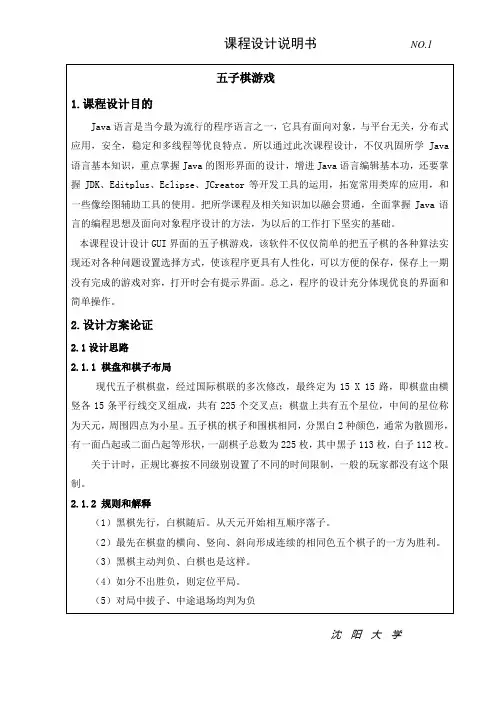
沈阳大学
沈阳大学
沈阳大学
沈阳大学
沈阳大学
沈阳大学
图2 界面修剪图
沈阳大学
图3 游戏说明图
图4 游戏关于图
运行游戏后,正式的对战可以有时间设定,点击设置游戏时间,出现对话框这时你可以输入你想要设定的时间,该时间是按分钟设置的,会出现如图3所示:
沈阳大学
图4 游戏设置确定图
当点击确定后,双方就可以进行对战了,当轮到一方时,该方的设定时间就会走动,而另一方就会停止。
如图5所示:
图5 游戏对战图
如果这场游戏时间超时,或者一方中途认输的,就可以提示出单击认输的按钮,这样就可以结束游戏啦!如图6所示:
沈阳大学
图7 游戏结束图
设计体会
通过编写这个程序,我体会最为深刻的一点是五子棋游戏的整体结构的设计和
程序流程设计模式的重要性。
即使是对于这一个并不大的程序,代码的组织都觉得变得非常重要,因为这关系到日后的运行维护以及扩展。
这个游戏之中,有关程序的实现以及对五子棋界面的设计有大量的方法,而且大都都相似,但是对于整个程序的架构,却只有亲身去实践后才可以知道各个模块是怎样衔接和联系的。
几千上万行的代码需要通
沈阳大学
沈阳大学
沈阳大学
沈阳大学
沈阳大学
沈阳大学
沈阳大学
沈阳大学
沈阳大学
沈阳大学
沈阳大学
沈阳大学
沈阳大学
沈阳大学
沈阳大学
沈阳大学
沈阳大学
沈阳大学
沈阳大学
沈阳大学。
java课程设计报告_五子棋

目录第一章软件平台……………………………游戏设计思路…………………………第二章小游戏五子棋的开发过程………………第一节JAVA基础知识………………………第二节启动程序的分析……………………第三节游戏设计过程………………………第三章总结…………………………………………第四章参考文献……………………………………第五章附录…………………………………………第一章游戏设计思路:第二章第一节java程序基础知识本系统有4个程序每个程序都导入了不同的包和类运用了不同的所学知识。
不同的类和包提供的方法、类型等都不同,本程序还使用了继承。
以至使其能够完成不同的功能。
本节主要讲述本系统所使用的基础知识。
1、类的基础<1、类的定义JAVA中的类实质上是一种对象类型,它是对具有相同属性和相同行为对象的一种抽象。
类是java程序中最小的组成单位。
<2、Java中类定义的格式为:[类修饰符] class 类名[extends 基类] [implements 接口]{// 成员变量声明(Member variable declaration)// 成员方法声明(Member method declaration)}其中,class、extends和implements都是Java的关键字。
类修饰符、extends和implements是关于修饰符、继承和接口的内容。
2、继承继承性是面向对象程序设计语言的一个重要特征,通过继承可以实现代码的复用。
Java语言中,所有的类都是直接或间接的继承ng.object类而得到的。
被继承的类称为基类或父类,继承而的来的类成为子类。
子类继承基类的方法和属性,同时也可以修改基类的方法和属性,并增加自己新的属性和方法。
Java不支持多重继承。
即一个子类不能拥有两个或以上的父类。
3、包<1、包的定义在Java中,把相关的代码组织到一起,称为“包”。
包市一种将相关类、接口或其他包组织起来的集合体,目的是为了将包含类代码的文件组织起来,易于查找和使用。
java课程设计报告五子棋

计算机网络技术专业专业代码:590102《动态网站基础程序设计》课程设计班级:网站1101班学号:20112749 20113170 20110394 20114839 20112646 20112647 20113619 20112144 20112925姓名:兰辉程进呈向子剑万晨刘开鑫刘燕平周莹黄双凤徐玉书课题:单机版五子棋指导教师:胡志锋答辩日期:2022年4月27日目录一、任务描述 (1)二、任务分析 (1)1、OOA分析 (1)2、OOD分析 (1)3、java源文件及其功能 (3)4、ChessBoard类使用的方法及功能 (3)三、任务解决过程与方法 (4)1、主窗体设计 (5)2、棋子设计 (7)3、棋盘对弈算法设计 (8)四、运行结果 (16)1、图4.1 (16)2、图4.2 (16)五、总结 (17)一、任务描述设计一个18╳18围棋棋盘由两玩家交替进行对战并可以实现以下功能1.选择落子的先后顺序。
2.重置棋盘。
3.刷新重新开始。
4.退出提示并且规定退出者判为负,但退出过程中要有提示。
以防不小心点错了。
最后判断某一方是否为五子连珠。
实现一个简单的多用户五子棋的游戏程序,包括如下两个界面:1.选择对弈桌执黑、执白。
2.在游戏界面,有开始,退出,悔棋。
二、任务分析五子棋是一种深受大众喜爱的棋牌类游戏,其规则简单,变化多端,非常富有趣味性。
这里设计和实现了双人对下的五子棋程序。
根据当前最后一个落子的情况来判断来判断胜负,实际上需要从四个位置判断,以该子为出发点的水平、竖直及两条分别为45度角和135度角的线,目的是看在这四个方向是否最后落子的一个构成连续五个的棋子,如果是的话,就表示该盘棋局已经分出胜负。
该游戏还提供悔棋的功能。
OOA分析:单机版五子棋游戏的程序由chessboard.java、point.java和startchessjframe.java三个文件组成。
Chessboard.java由兰辉、向子剑、程进呈完成。
java课程设计五子棋游戏完整版

沈阳大学沈阳大学沈阳大学沈阳大学沈阳大学沈阳大学沈阳大学沈阳大学算下一步棋,isMatrix位true参数为插入点棋格坐标,否则参数为插入点像素坐标。
当游戏结束的时候使用Graphics g调用方法,在游戏过程中如果是黑方或是白方获胜在棋盘中就会显示是哪方获胜。
3.设计结果与分析(1)当进入到游戏当中可以选择是哪个颜色的棋先出,选择好之后便可以单机开始进行下棋,如果在游戏过程中出现什么问题可以单机再来一局重新开始游。
五子棋游戏的主界面如图2所示:图2.程序主界面(2)如果实黑棋先开始那么开始后的界面中先出的棋显示的是黑棋,如果是白棋先出则显示的是白棋,以黑棋为例如图3所示:沈阳大学图3.黑棋先出的界面图(3)对于五子棋游戏,无论人机对战,还是双人对战,都需要判断棋盘上是否存在五子连珠情况,这既是游戏名字的由来,也是游戏结束的标志。
判断五子连珠的原理是从横,竖,左斜线,右斜线4条线上判断是否存在5个相连的同类棋子,黑棋的五个棋子在横、竖或斜方向上连接成一线即为该方赢如图4所示:沈阳大学图4.游戏结束界面(4)白棋的五个棋子在横、竖或斜方向上连接成一线即为该方赢如图4所示:沈阳大学图5.白棋胜利界面图4.设计体会通过这次课程设计,我进一步加深对基础理论的理解,扩大专业知识面,对收集资料、查阅文献、方案制定等实践方面得到了很好的锻练,促进对所学知识应用能力的提高。
同时我渐渐的复习了Java使用方法和编程语法,之后的编程过程也相对得心应手,基本完成了预期计划的要求。
在此感谢我的指导老师—原玥老师,她在课题的研究上不遗余力的给予指导。
她严谨的治学态度深深的影响了我,使我受益匪浅!这个课设题对我来说有一定的挑战性,因为我自己也不知道自己到底学到了一个什么样的境界。
但可以肯定,这个课设题的要求绝对在我的能力范围以上。
之所以选择这个题目是想逼着自己去查更多的资料,学到更多的东西。
结果也确实是这样的,我在这次课设中学到了不少东西,也理解了许多原来不理解的东西。
java课程设计报告五子棋
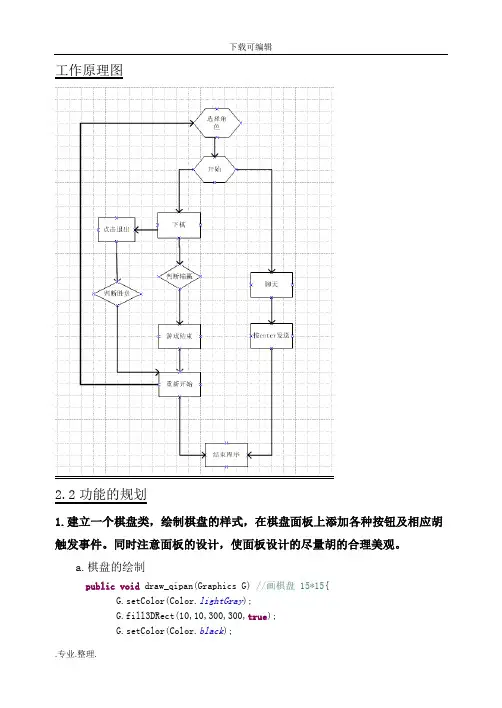
工作原理图2.2功能的规划1.建立一个棋盘类,绘制棋盘的样式,在棋盘面板上添加各种按钮及相应胡触发事件。
同时注意面板的设计,使面板设计的尽量胡的合理美观。
a.棋盘的绘制public void draw_qipan(Graphics G) //画棋盘 15*15{G.setColor(Color.lightGray);G.fill3DRect(10,10,300,300,true);G.setColor(Color.black);for(int i=1;i<16;i++){G.drawLine(20,20*i,300,20*i);G.drawLine(20*i,20,20*i,300);}}b.添加按钮与按钮胡规划Button b1=new Button("开始");Button b2=new Button("重置游戏");Label lblWin=new Label(" ");Checkbox ckbHB[]=new Checkbox[3];Button exist = new Button("退出");public void init(){ckbHB[0]=new Checkbox("执白",ckgHB,false);ckbHB[1]=new Checkbox("执黑",ckgHB,false);ckbHB[2]=new Checkbox("观看",ckgHB, false);}C.鼠标棋子胡相应触发事件public void mouseClicked(MouseEvent e) {Graphics g=getGraphics();int x1,y1;x1=e.getX();y1=e.getY();if (e.getX()<20 || e.getX()>300 || e.getY()<20 || e.getY()>300) { return;}if (x1%20>10) {x1+=10;}if(y1%20>10) {y1+=10;}x1=x1/20*20;y1=y1/20*20;set_Qizi(x1,y1);m*=(-1);}d.按钮的触发事件public void actionPerformed(ActionEvent e) {Graphics g=getGraphics();if (e.getSource()==b1) {Game_start();}else{Game_re();}if(e.getSource()==exist){Game_re();lblWin.setText(Get_qizi_color(color_Qizi)+"输了!");intGame_Start=0;}2.编写一个功能判断落子的位置及画出相应的黑白棋子public void set_Qizi(int x,int y) //落子{if (intGame_Start==0) //判断游戏未开始{return;}if (intGame_Body[x/20][y/20]!=0) {return;}Graphics g=getGraphics();if (color_Qizi==1)//判断黑子还是白子{g.setColor(Color.black);color_Qizi=0;}else{g.setColor(Color.white);color_Qizi=1;}g.fillOval(x-10,y-10,20,20);intGame_Body[x/20][y/20]=color_Qizi+1;}3.判断胜负if (Game_win_1(x/20,y/20)) //判断输赢1{lblWin.setText(Get_qizi_color(color_Qizi)+"赢了!");intGame_Start=0;}if (Game_win_2(x/20,y/20)) //判断输赢2{lblWin.setText(Get_qizi_color(color_Qizi)+"赢了!");intGame_Start=0;}if (Game_win_3(x/20,y/20)) //判断输赢3{lblWin.setText(Get_qizi_color(color_Qizi)+"赢了!");intGame_Start=0;}if (Game_win_4(x/20,y/20)) //判断输赢4{lblWin.setText(Get_qizi_color(color_Qizi)+"赢了!");intGame_Start=0;} }4.添加用户聊天功能NetchatClient chat=new NetchatClient();chat.frame();chat.setVisible(true);三具体实现3.1创建棋盘类Public class WcyChess extends Applet implements ActionListener,MouseListener,MouseMotionListener,ItemListener{ int color_Qizi=0;//旗子的颜色标识 0:白子 1:黑子int intGame_Start=0;//游戏开始标志 0未开始 1游戏中int intGame_Body[][]=new int[16][16]; //设置棋盘棋子状态int m=-1;Button b1=new Button("开始");Button b2=new Button("重置游戏");Label lblWin=new Label(" ");Checkbox ckbHB[]=new Checkbox[3];Button exist = new Button("退出");CheckboxGroup ckgHB=new CheckboxGroup();NetchatClient chat=new NetchatClient();public void init(){setLayout(null);addMouseListener(this);add(b1);b1.setBounds(330,50,80,30);b1.addActionListener(this);add(b2);b2.setBounds(330,90,80,30);b2.addActionListener(this);ckbHB[0]=new Checkbox("执白",ckgHB,false);ckbHB[0].setBounds(320,20,60,30);ckbHB[1]=new Checkbox("执黑",ckgHB,false);ckbHB[1].setBounds(380,20,60,30);ckbHB[2]=new Checkbox("观看",ckgHB, false);add(ckbHB[0]);add(ckbHB[1]);add(ckbHB[2]);ckbHB[0].addItemListener(this);ckbHB[1].addItemListener(this);add(lblWin);lblWin.setBounds(330,180,80,30);lblWin.setBackground(Color.red);lblWin.setText("胜利者!");//没有显示?ckbHB[2].setBounds(440, 20,60, 30);add(exist);exist.setBounds(330,130,80,30);exist.addActionListener(this);// add(chat);chat.setBounds(20, 500, 300, 300);chat.frame();chat.setVisible(true);Game_start_csh();setSize(500,600);setVisible(true);}public void itemStateChanged(ItemEvent e) {if (ckbHB[0].getState()) //选择黑子还是白子{color_Qizi=0;}else{color_Qizi=1;}}public void mousePressed(MouseEvent e){}public void mouseClicked(MouseEvent e) {Graphics g=getGraphics();int x1,y1;x1=e.getX();y1=e.getY();if (e.getX()<20 || e.getX()>300 || e.getY()<20 || e.getY()>300) { return;}if (x1%20>10) {x1+=10;}if(y1%20>10) {y1+=10;}x1=x1/20*20;y1=y1/20*20;set_Qizi(x1,y1);m*=(-1);}public void actionPerformed(ActionEvent e) {Graphics g=getGraphics();if (e.getSource()==b1) {Game_start();}else {Game_re();}if(e.getSource()==exist){Game_re();lblWin.setText(Get_qizi_color(color_Qizi)+"输了!");intGame_Start=0;}}public void mouseEntered(MouseEvent e){}public void mouseExited(MouseEvent e){}public void mouseReleased(MouseEvent e){}public void mouseDragged(MouseEvent e){}public void mouseMoved(MouseEvent e){}public void paint(Graphics g) {draw_qipan(g);}3.2判断输赢功能实现if (Game_win_1(x/20,y/20)){ //判断输赢1lblWin.setText(Get_qizi_color(color_Qizi)+"赢了!");intGame_Start=0;}if (Game_win_2(x/20,y/20)){//判断输赢2lblWin.setText(Get_qizi_color(color_Qizi)+"赢了!");intGame_Start=0;}if (Game_win_3(x/20,y/20)) //判断输赢3{lblWin.setText(Get_qizi_color(color_Qizi)+"赢了!");intGame_Start=0;}if (Game_win_4(x/20,y/20)) //判断输赢4{lblWin.setText(Get_qizi_color(color_Qizi)+"赢了!");intGame_Start=0;}//判断输赢程序实现在详细过程public boolean Game_win_1(int x,int y){ //横向判断输赢int x1,y1,t=1;x1=x;y1=y;for (int i=1;i<5 ;i++ ) {if (x1>15) {break;}if (intGame_Body[x1+i][y1]==intGame_Body[x][y]) {t+=1;}else{break;}}for (int i=1;i<5 ;i++ ){if (x1<1)break;}if(intGame_Body[x1-i][y1]==intGame_Body[x][y])t+=1;}else{break;}}if (t>4){return true;}else{return false;}}public boolean Game_win_2(int x,int y) { //纵向判断输赢int x1,y1,t=1;x1=x;y1=y;for (int i=1;i<5 ;i++ ){if (x1>15){break;}if (intGame_Body[x1][y1+i]==intGame_Body[x][y]){ t+=1;}else{break;}}for (int i=1;i<5 ;i++ ){if (x1<1){break;}if(intGame_Body[x1][y1-i]==intGame_Body[x][y]){ t+=1;}else{break;}}if (t>4){return true;}else{return false;}}public boolean Game_win_3(int x,int y) //左斜判断输赢{ int x1,y1,t=1;x1=x;y1=y;for (int i=1;i<5 ;i++ ){if (x1>15){break;}if (intGame_Body[x1+i][y1-i]==intGame_Body[x][y]){ t+=1;}else{break;}}for (int i=1;i<5 ;i++ ){if (x1<1){break;}if(intGame_Body[x1-i][y1+i]==intGame_Body[x][y]){ t+=1;}else{break;}}if (t>4){return true;}else{return false;}}public boolean Game_win_4(int x,int y) { //左斜判断输赢int x1,y1,t=1;x1=x;y1=y;for (int i=1;i<5 ;i++ ) {if (x1>15) {break;}if (intGame_Body[x1+i][y1+i]==intGame_Body[x][y]) {t+=1;}else{break;}}for (int i=1;i<5 ;i++ ) {if (x1<1) {break;}if(intGame_Body[x1-i][y1-i]==intGame_Body[x][y]) {t+=1;}else{break; } }if (t>4) {return true;}else{return false;}}3.3实现聊天功能类package NetchatClient;import java.awt.*;import java.awt.event.*;import .*;import java.io.*;import javax.swing.*;public class NetchatClient extends Frame {Frame x=new Frame("liaotianchengxu");TextField tf=new TextField();TextArea ta=new TextArea();Socket s=null;DataOutputStream dos=null;public static void main(String[] args) {new NetchatClient().frame();}public void frame(){System.out.println("frame()");setLocation(20, 400);setSize(300,300);add(tf,BorderLayout.SOUTH);add(ta,BorderLayout.NORTH);pack();setVisible(true);connect();this.addWindowListener(new WindowAdapter() {public void windowClosing(WindowEvent arg0) { cconnect();System.exit(0);}});addWindowListener(new WindowAdapter()//窗口适配器 {public void windowClosing(WindowEvent e) {System.exit(0);//程序退出} } );tf.addActionListener(new nclistener());}public void connect() {System.out.println("connnect()..");try {s=new Socket("127.0.0.1",8888);//设置客户端的IP和端口 dos=new DataOutputStream(s.getOutputStream());} catch (UnknownHostException e) {e.printStackTrace();} catch (IOException e) {e.printStackTrace();}}public void cconnect(){try {dos.close();s.close();} catch (IOException e) {e.printStackTrace();} }public class nclistener implements ActionListener{public void actionPerformed(ActionEvent e) {String st=tf.getText();ta.setText(st);tf.setText("");try {dos.writeUTF(st);dos.flush();} catch (IOException e1) {e1.printStackTrace();} } } }四测试结果4.1 进入游戏的界面分析:游戏开始的界面有三个选择项,用户可以选择相应的角色,选择完毕后点击开始进入游戏。
Java五子棋课程设计报告程序
Java五子棋课程设计报告程序----------------------------------EXCE.JAVA--------------------------------------------- importjavax.swing.*;importjava.awt.*;importjava.awt.geom.*;public class Exce{public static void main(String args[]){JFrame win=new JFrame();JMenuBarmenubar;JMenu menu;JMenuItem item2,item1,item3;menubar=new JMenuBar();menu=new JMenu("菜单");item1=new JMenuItem("开始");item2=new JMenuItem("重新开始");item3=new JMenuItem("结束");menu.add(item1);menu.add(item2);menu.add(item3);menubar.add(menu);win.setJMenuBar(menubar);win.setTitle("五子棋");win.setSize(700,750);//win.setBackground(Color.orange);win.add(new Wuziqi());win.setVisible(true);win.setResizable(false);win.setDefaultCloseOperation(JFrame.EXIT_ON_CLOSE);}}------------------------ WUZHIQI.JAVA------------------------ importjavax.swing.*;importjava.awt.*;importjava.awt.geom.*;public class Wuziqi extends JPanel{//棋盘距离边界的距离public static int x=50, y=50;//棋子的多少及格子大小public static int n=16, fangge=40,qizi=40;public static int s[][]=new int[n][n];//初始数组,数组全赋为0public void chushi(){for(inti=0;i<n;i++)< p="">{for(int j=0;j<n;j++)< p="">{s[i][j]=0;}}}//绘制棋盘public void paint(Graphics g){//调用父类的方法,清空棋盘super.paint(g);WuziqiListener listen= new WuziqiListener();listen.setWuziqiQP(this);//添加鼠标事件listen.setWuziqiG(g);this.addMouseListener(listen);this.addMouseListener(listen);Graphics2D g_2d=(Graphics2D)g;for(inti=0;i<n;i++)< p="">{Line2D line=new Line2D.Double(x+i*fangge,y,x+i*fangge,y+(n-1)*fangge);g_2d.draw(line);}for(inti=0;i<n;i++)< p="">{Line2D line=new Line2D.Double(x,y+i*fangge,x+(n-1)*fangge,y+i*fangge);g_2d.draw(line);} //画棋子for(inti=0;i<n;i++)< p="">{for(int j=0;j<n;j++)< p="">{if(s[i][j]==1){//黑棋子g.setColor(Color.BLACK);Ellipse2D ellipse=new Ellipse2D.Double(x+i*Wuziqi.fangge-Wuziqi.fangge/2,y+j*Wuziqi.fangge-Wuziqi.fangge/2, Wuziqi.qizi,Wuziqi.qizi);g_2d.fill(ellipse);}else if(s[i][j]==-1){//将颜色改为白色g.setColor(Color.WHITE);Ellipse2D ellipse=new Ellipse2D.Double(x+i*Wuziqi.fangge-Wuziqi.fangge/2,y+j*Wuziqi.fangge-Wuziqi.fangge/2 ,Wuziqi.qizi,Wuziqi.qizi);g_2d.fill(ellipse);}}}}//判断输赢public booleanisWin(intx,inty,int t){inti,j,count;//白棋或黑棋相连的个数//判断x负方向for(i=0,count=0;x-i>=0&&i<5;i++){if(t==s[x-i][y]){count++;}else{break;}if(count==5) //return true;}for(i=0,count=0;x+i<16&&i<5;i++) {if(t==s[x+i][y]){count++;}else{break;}if(count==5)return true;}//判断y方向for(i=0,count=0;y-i>=0&&i<5;i++) {if(t==s[x][y-i]){count++;}else{break;}if(count==5)return true;}for(i=0,count=0;y+i<16&&i<5;i++) {if(t==s[x][y+i]){count++;}else{break;}if(count==5)return true;}//判断左下方向for(i=0,count=0;x-i>=0&&y-i>=0&&i<5;i++) {if(t==s[x-i][y-i]){count++;}else{break;}if(count==5)return true;}for(i=0,count=0;x+i<16&&y+i<16&&i<5;i++) {if(t==s[x+i][y+i]){count++;}else{break;}if(count==5)return true;}}//判断右上方向for(i=0,count=0;x+i<16&&y-i>=0&&i<5;i++) {if(t==s[x+i][y-i]){count++;}else{count=0;}if(count==5)return true;}for(i=0,count=0;x-i>0&&y+i<16&&i<5;i++) {if(t==s[x-i][y+i]){count++;}else{break;}if(count==5){return true;}return false;}}---------------------------------------------WuziqiListener.JAVA--------------------------------------------------- importjava.awt.Graphics;importjava.awt.event.MouseEvent;importjava.awt.event.MouseListener;importjava.awt.*;importjavax.swing.*;//棋盘鼠标监视器public class WuziqiListener implements MouseListener{Wuziqiwzq;Graphics g;//用来确定下什么棋public static int t=1;public void setWuziqiQP(Wuziqiwzq){this.wzq=wzq;}public void setWuziqiG(Graphics g){this.g=g;}public void mousePressed(MouseEvent e){//利用四舍五入,获得要下的棋子的行和列int x1=(int)((double)(e.getX()-Wuziqi.x)/Wuziqi.fangge+0.5);int y1=(int)((double)(e.getY()-Wuziqi.y)/Wuziqi.fangge+0.5);//判断是否越界,及是否放了棋子while(x1>=0&&x1<wuziqi.n&&y1>=0&&y1<wuziqi.n&&w uziqi.s[x1][y1]==0)< p="">{//wzq.repaint();//wzq.paint(g);//棋子放在棋盘上后,数组做相应标示Wuziqi.s[x1][y1] = t;//调用iswin方法,来判断输赢if((wzq.isWin(x1,y1,t))&&t==1){ //弹出提示对话框int n=JOptionPane.showConfirmDialog(null,"黑棋赢了,再来一盘吧!", "确认对话框",JOptionPane.YES_NO_CANCEL_OPTION);if(n==JOptionPane.YES_OPTION){wzq.chushi();Wuziqi.s[x1][y1]=-2;wzq.repaint();}else if(n==JOptionPane.NO_OPTION){System.exit(0);}}else if((wzq.isWin(x1,y1,t))&&t==-1){int n=JOptionPane.showConfirmDialog(null,"白棋赢了,再来一盘吧!", "确认对话框",JOptionPane.YES_NO_CANCEL_OPTION);if(n==JOptionPane.YES_OPTION){wzq.chushi();Wuziqi.s[x1][y1]=-2;wzq.repaint();}else if(n==JOptionPane.NO_OPTION){System.exit(0);}}else{ //重新棋盘wzq.repaint();t = -t;}}}public void mouseClicked(MouseEvent e) {}public void mouseReleased(MouseEvent e) {}public void mouseEntered(MouseEvent e) {}public void mouseExited(MouseEvent e) {}}</wuziqi.n&&wuziqi.s[x1][y1]==0)<></wuziqi.n&&y1> </n;j++)<></n;i++)<></n;i++)<></n;i++)<></n;j++)<></n;i++)<>。
java课程设计五子棋
java课程设计五子棋一、课程目标知识目标:1. 理解五子棋游戏的规则及基本算法。
2. 掌握Java编程语言的基本语法,如变量声明、条件语句、循环结构等。
3. 学会使用Java中的数组进行数据存储和处理。
4. 了解面向对象编程的基本概念,如类的定义、对象创建和使用。
技能目标:1. 能够编写出实现五子棋游戏核心功能(如棋盘绘制、落子判断、胜负判断)的Java程序。
2. 通过编程实践,提升问题分析能力,学会将现实问题转化为计算机程序解决问题。
3. 能够使用合适的调试工具检查和修复程序中的错误,提高代码调试能力。
4. 培养良好的编程习惯,如编写规范的注释、合理的变量命名等。
情感态度价值观目标:1. 培养学生对编程的兴趣,激发其探究计算机科学领域的好奇心。
2. 鼓励学生积极合作,通过小组讨论和交流,培养团队协作精神。
3. 培养学生的逻辑思维能力和创新意识,使其在面对问题时能够主动思考、寻找解决方案。
4. 增强学生的自信心,使其在完成五子棋项目的过程中感受到编程带来的成就感。
课程性质分析:本课程为实践性较强的学科项目,结合Java编程语言,以五子棋游戏为载体,引导学生学习编程知识,培养其编程技能。
学生特点分析:学生处于能够理解编程基本概念,具备初步编程能力的阶段,对实际项目充满兴趣,希望将所学知识应用于实际问题。
教学要求:教师应注重理论与实践相结合,引导学生主动探索,关注学生个体差异,提供个性化指导,确保学生在完成课程目标的同时,提高编程能力和综合素质。
二、教学内容1. Java基本语法复习:变量声明与赋值、数据类型、运算符、条件语句(if-else、switch)、循环结构(for、while)。
相关教材章节:第一章至第三章。
2. 数组的使用:一维数组的定义、初始化、遍历;二维数组的应用。
相关教材章节:第四章。
3. 面向对象基础:类的定义、属性、方法;对象的创建与使用。
相关教材章节:第五章。
4. 五子棋游戏设计:a. 棋盘绘制:使用二维数组表示棋盘,绘制初始界面。
JAVA课程设计 五子棋(内附完整代码)
JAVA课程设计设计题目:五子棋游戏一.简要的介绍五子棋1.五子棋的起源五子棋,又被称为“连五子、五子连、串珠、五目、五目碰、五格、五石、五法、五联、京棋”。
五子棋相传起源于四千多年前的尧帝时期,比围棋的历史还要悠久,可能早在“尧造围棋”之前,民间就已有五子棋游戏。
有关早期五子棋的文史资料与围棋有相似之处,因为古代五子棋的棋具与围棋是完全相同的。
2.现在五子棋标准棋盘(如图所示)3.五子棋的棋子五子棋采用两种颜色棋子,黑色棋子和白色棋子,和围棋相同,4.五子棋规则五子棋就是五个棋子连在一起就算赢,黑棋先行,下棋下在棋盘交叉线上,由于黑棋先行,优势太大,所以对黑棋设了禁手,又规定了“三手交换”,就是黑棋下第 2 手棋,盘面第 3 着棋之后,白方在应白 2 之前,如感觉黑方棋形不利于己方,可出交换,即执白棋一方变为执黑棋一方。
和“五手两打法”,就是黑棋在下盘面上关键的第 5 手时,必须下两步棋,让白方在这两步棋中任选一步,然后再续下。
不过一般爱好者不需要遵循这么多规则。
二.程序流程三.代码设计与分析main方法创建了ChessFrame类的一个实例对象(cf),并启动屏幕显示显示该实例对象。
public class FiveChessAppletDemo {public static void main(String args[]){ChessFrame cf = new ChessFrame();cf.show();}}用类ChessFrame创建五子棋游戏主窗体和菜单import java.awt.*;import java.awt.event.*;import java.applet.*;import javax.swing.*;import java.io.PrintStream;import javax.swing.JComponent;import javax.swing.JPanel;class ChessFrame extends JFrame implements ActionListener { private String[] strsize={"标准棋盘","改进棋盘","扩大棋盘"}; private String[] strmode={"人机对战","人人对战"};public static boolean iscomputer=true,checkcomputer=true; private int width,height;private ChessModel cm;private MainPanel mp;构造五子棋游戏的主窗体public ChessFrame() {this.setTitle("五子棋游戏");cm=new ChessModel(1);mp=new MainPanel(cm);Container con=this.getContentPane();con.add(mp,"Center");this.setResizable(false);this.addWindowListener(new ChessWindowEvent());MapSize(14,14);JMenuBar mbar = new JMenuBar();this.setJMenuBar(mbar);JMenu gameMenu = new JMenu("游戏");mbar.add(makeMenu(gameMenu, new Object[] {"开局", null,"棋盘",null,"模式", null, "退出"}, this));JMenu lookMenu =new JMenu("外观");mbar.add(makeMenu(lookMenu,new Object[] {"类型一","类型二","类型三"},this));JMenu helpMenu = new JMenu("版本");mbar.add(makeMenu(helpMenu, new Object[] {"关于"}, this));}构造五子棋游戏的主菜单public JMenu makeMenu(Object parent, Object items[], Object target){ JMenu m = null;if(parent instanceof JMenu)m = (JMenu)parent;else if(parent instanceof String)m = new JMenu((String)parent);elsereturn null;for(int i = 0; i < items.length; i++)if(items[i] == null)m.addSeparator();else if(items[i] == "棋盘"){JMenu jm = new JMenu("棋盘");ButtonGroup group=new ButtonGroup();JRadioButtonMenuItem rmenu;for (int j=0;j<strsize.length;j++){rmenu=makeRadioButtonMenuItem(strsize[j],target);if (j==0)rmenu.setSelected(true);jm.add(rmenu);group.add(rmenu);}m.add(jm);}else if(items[i] == "模式"){JMenu jm = new JMenu("模式");ButtonGroup group=new ButtonGroup();JRadioButtonMenuItem rmenu;for (int h=0;h<strmode.length;h++){rmenu=makeRadioButtonMenuItem(strmode[h],target);if(h==0)rmenu.setSelected(true);jm.add(rmenu);group.add(rmenu);}m.add(jm);}elsem.add(makeMenuItem(items[i], target));return m;}构造五子棋游戏的菜单项public JMenuItem makeMenuItem(Object item, Object target){ JMenuItem r = null;if(item instanceof String)r = new JMenuItem((String)item);else if(item instanceof JMenuItem)r = (JMenuItem)item;elsereturn null;if(target instanceof ActionListener)r.addActionListener((ActionListener)target);return r;}构造五子棋游戏的单选按钮式菜单项public JRadioButtonMenuItem makeRadioButtonMenuItem(Object item, Object target){JRadioButtonMenuItem r = null;if(item instanceof String)r = new JRadioButtonMenuItem((String)item);else if(item instanceof JRadioButtonMenuItem)r = (JRadioButtonMenuItem)item;elsereturn null;if(target instanceof ActionListener)r.addActionListener((ActionListener)target);return r;}public void MapSize(int w,int h){setSize(w * 24, h * 27);if(this.checkcomputer)this.iscomputer=true;elsethis.iscomputer=false;mp.setModel(cm);mp.repaint();}public boolean getiscomputer(){return this.iscomputer;}public void restart(){int modeChess = cm.getModeChess();if(modeChess <= 3 && modeChess >= 0){cm = new ChessModel(modeChess);MapSize(cm.getWidth(),cm.getHeight());}}public void actionPerformed(ActionEvent e){String arg=e.getActionCommand();try{if (arg.equals("类型三"))UIManager.setLookAndFeel("com.sun.java.swing.plaf.windows.WindowsLookAndFeel");else if(arg.equals("类型二"))UIManager.setLookAndFeel("com.sun.java.swing.plaf.motif.MotifLookAndFeel");elseUIManager.setLookAndFeel("javax.swing.plaf.metal.MetalLookAndFeel" );SwingUtilities.updateComponentTreeUI(this);}catch(Exception ee){}if(arg.equals("标准棋盘")){this.width=14;this.height=14;cm=new ChessModel(1);MapSize(this.width,this.height);SwingUtilities.updateComponentTreeUI(this);}if(arg.equals("改进棋盘")){this.width=18;this.height=18;cm=new ChessModel(2);MapSize(this.width,this.height);SwingUtilities.updateComponentTreeUI(this);}if(arg.equals("扩大棋盘")){this.width=22;this.height=22;cm=new ChessModel(3);MapSize(this.width,this.height);SwingUtilities.updateComponentTreeUI(this);}if(arg.equals("人机对战")){this.checkcomputer=true;this.iscomputer=true;cm=new ChessModel(cm.getModeChess());MapSize(cm.getWidth(),cm.getHeight());SwingUtilities.updateComponentTreeUI(this);}if(arg.equals("人人对战")){this.checkcomputer=false;this.iscomputer=false;cm=new ChessModel(cm.getModeChess());MapSize(cm.getWidth(),cm.getHeight());SwingUtilities.updateComponentTreeUI(this);}if(arg.equals("开局")){restart();}if(arg.equals("关于"))JOptionPane.showMessageDialog(null, "第一版", "版本",JOptionPane.PLAIN_MESSAGE );if(arg.equals("退出"))System.exit(0);}}用类ChessModel实现了整个五子棋程序算法的核心import java.awt.*;import java.awt.event.*;import java.applet.*;import javax.swing.*;import java.io.PrintStream;import javax.swing.JComponent;import javax.swing.JPanel;class ChessModel {规定棋盘的宽度、高度、棋盘的模式private int width,height,modeChess;规定棋盘方格的横向、纵向坐标private int x=0,y=0;棋盘方格的横向、纵向坐标所对应的棋子颜色,数组arrMapShow只有3个值:1,2,3,-1,其中1代表该棋盘方格上下的棋子为黑子,2代表该棋盘方格上下的棋子为白子,3代表为该棋盘方格上没有棋子,-1代表该棋盘方格不能够下棋子private int[][] arrMapShow;交换棋手的标识,棋盘方格上是否有棋子的标识符private boolean isOdd,isExist;public ChessModel() {}该构造方法根据不同的棋盘模式(modeChess)来构建对应大小的棋盘public ChessModel(int modeChess){this.isOdd=true;if(modeChess == 1){PanelInit(14, 14, modeChess);}if(modeChess == 2){PanelInit(18, 18, modeChess);}if(modeChess == 3){PanelInit(22, 22, modeChess);}}按照棋盘模式构建棋盘大小private void PanelInit(int width, int height, int modeChess){ this.width = width;this.height = height;this.modeChess = modeChess;arrMapShow = new int[width+1][height+1];for(int i = 0; i <= width; i++){for(int j = 0; j <= height; j++){arrMapShow[i][j] = -1;}}}获取是否交换棋手的标识符public boolean getisOdd(){return this.isOdd;}设置交换棋手的标识符public void setisOdd(boolean isodd){ if(isodd)this.isOdd=true;elsethis.isOdd=false;}获取某棋盘方格是否有棋子的标识值public boolean getisExist(){return this.isExist;}获取棋盘宽度public int getWidth(){return this.width;}获取棋盘高度public int getHeight(){return this.height;}获取棋盘模式public int getModeChess(){return this.modeChess;}获取棋盘方格上棋子的信息public int[][] getarrMapShow(){return arrMapShow;}判断下子的横向、纵向坐标是否越界private boolean badxy(int x, int y){if(x >= width+20 || x < 0)return true;return y >= height+20 || y < 0;}计算棋盘上某一方格上八个方向棋子的最大值,这八个方向分别是:左、右、上、下、左上、左下、右上、右下public boolean chessExist(int i,int j){if(this.arrMapShow[i][j]==1 || this.arrMapShow[i][j]==2)return true;return false;}判断该坐标位置是否可下棋子public void readyplay(int x,int y){if(badxy(x,y))return;if (chessExist(x,y))return;this.arrMapShow[x][y]=3;}在该坐标位置下棋子public void play(int x,int y){if(badxy(x,y))return;if(chessExist(x,y)){this.isExist=true;return;}elsethis.isExist=false;if(getisOdd()){setisOdd(false);this.arrMapShow[x][y]=1;}else{setisOdd(true);this.arrMapShow[x][y]=2;}}计算机走棋说明:用穷举法判断每一个坐标点的四个方向的的最大棋子数,最后得出棋子数最大值的坐标,下子public void computerDo(int width,int height){int max_black,max_white,max_temp,max=0;setisOdd(true);System.out.println("计算机走棋 ...");for(int i = 0; i <= width; i++){for(int j = 0; j <= height; j++){算法判断是否下子if(!chessExist(i,j)){判断白子的最大值max_white=checkMax(i,j,2);判断黑子的最大值max_black=checkMax(i,j,1);max_temp=Math.max(max_white,max_black);if(max_temp>max){max=max_temp;this.x=i;this.y=j;}}}}setX(this.x);setY(this.y);this.arrMapShow[this.x][this.y]=2;}记录电脑下子后的横向坐标public void setX(int x){this.x=x;}记录电脑下子后的纵向坐标public void setY(int y){this.y=y;}获取电脑下子的横向坐标public int getX(){return this.x;}获取电脑下子的纵向坐标public int getY(){return this.y;}计算棋盘上某一方格上八个方向棋子的最大值,这八个方向分别是:左、右、上、下、左上、左下、右上、右下public int checkMax(int x, int y,int black_or_white){ int num=0,max_num,max_temp=0;int x_temp=x,y_temp=y;int x_temp1=x_temp,y_temp1=y_temp;判断右边for(int i=1;i<5;i++){x_temp1+=1;if(x_temp1>this.width)break;if(this.arrMapShow[x_temp1][y_temp1]==black_or_white)num++;elsebreak;}判断左边x_temp1=x_temp;for(int i=1;i<5;i++){x_temp1-=1;if(x_temp1<0)break;if(this.arrMapShow[x_temp1][y_temp1]==black_or_white) num++;elsebreak;}if(num<5)max_temp=num;判断上面x_temp1=x_temp;y_temp1=y_temp;num=0;for(int i=1;i<5;i++){y_temp1-=1;if(y_temp1<0)break;if(this.arrMapShow[x_temp1][y_temp1]==black_or_white) num++;elsebreak;}判断下面y_temp1=y_temp;for(int i=1;i<5;i++){y_temp1+=1;if(y_temp1>this.height)break;if(this.arrMapShow[x_temp1][y_temp1]==black_or_white) num++;elsebreak;}if(num>max_temp&&num<5)max_temp=num;判断左上方x_temp1=x_temp;y_temp1=y_temp;num=0;for(int i=1;i<5;i++){x_temp1-=1;y_temp1-=1;if(y_temp1<0 || x_temp1<0)break;if(this.arrMapShow[x_temp1][y_temp1]==black_or_white) num++;elsebreak;}判断右下方x_temp1=x_temp;y_temp1=y_temp;for(int i=1;i<5;i++){x_temp1+=1;y_temp1+=1;if(y_temp1>this.height || x_temp1>this.width)break;if(this.arrMapShow[x_temp1][y_temp1]==black_or_white) num++;elsebreak;}if(num>max_temp&&num<5)max_temp=num;判断右上方x_temp1=x_temp;y_temp1=y_temp;num=0;for(int i=1;i<5;i++){x_temp1+=1;y_temp1-=1;if(y_temp1<0 || x_temp1>this.width)break;if(this.arrMapShow[x_temp1][y_temp1]==black_or_white) num++;elsebreak;}判断左下方x_temp1=x_temp;for(int i=1;i<5;i++){x_temp1-=1;y_temp1+=1;if(y_temp1>this.height || x_temp1<0)break;if(this.arrMapShow[x_temp1][y_temp1]==black_or_white) num++;elsebreak;}if(num>max_temp&&num<5)max_temp=num;max_num=max_temp;return max_num;}判断胜负public boolean judgeSuccess(int x,int y,boolean isodd){ int num=1;int arrvalue;int x_temp=x,y_temp=y;if(isodd)arrvalue=2;elsearrvalue=1;int x_temp1=x_temp,y_temp1=y_temp;判断右边胜负for(int i=1;i<6;i++){x_temp1+=1;if(x_temp1>this.width)break;if(this.arrMapShow[x_temp1][y_temp1]==arrvalue)num++;elsebreak;}判断左边胜负x_temp1=x_temp;for(int i=1;i<6;i++){x_temp1-=1;break;if(this.arrMapShow[x_temp1][y_temp1]==arrvalue) num++;elsebreak;}if(num==5)return true;判断上方胜负x_temp1=x_temp;y_temp1=y_temp;num=1;for(int i=1;i<6;i++){y_temp1-=1;if(y_temp1<0)break;if(this.arrMapShow[x_temp1][y_temp1]==arrvalue) num++;elsebreak;}判断下方胜负y_temp1=y_temp;for(int i=1;i<6;i++){y_temp1+=1;if(y_temp1>this.height)break;if(this.arrMapShow[x_temp1][y_temp1]==arrvalue) num++;elsebreak;}if(num==5)return true;判断左上胜负x_temp1=x_temp;y_temp1=y_temp;num=1;for(int i=1;i<6;i++){y_temp1-=1;if(y_temp1<0 || x_temp1<0)break;if(this.arrMapShow[x_temp1][y_temp1]==arrvalue) num++;elsebreak;}判断右下胜负x_temp1=x_temp;y_temp1=y_temp;for(int i=1;i<6;i++){x_temp1+=1;y_temp1+=1;if(y_temp1>this.height || x_temp1>this.width)break;if(this.arrMapShow[x_temp1][y_temp1]==arrvalue) num++;elsebreak;}if(num==5)return true;判断右上胜负x_temp1=x_temp;y_temp1=y_temp;num=1;for(int i=1;i<6;i++){x_temp1+=1;y_temp1-=1;if(y_temp1<0 || x_temp1>this.width)break;if(this.arrMapShow[x_temp1][y_temp1]==arrvalue) num++;elsebreak;}判断左下胜负x_temp1=x_temp;y_temp1=y_temp;for(int i=1;i<6;i++){x_temp1-=1;y_temp1+=1;if(y_temp1>this.height || x_temp1<0)break;if(this.arrMapShow[x_temp1][y_temp1]==arrvalue)num++;elsebreak;}if(num==5)return true;return false;}赢棋后的提示public void showSuccess(JPanel jp){JOptionPane.showMessageDialog(jp,"你赢了","结果",RMATION_MESSAGE);}输棋后的提示public void showDefeat(JPanel jp){JOptionPane.showMessageDialog(jp,"你输了","结果",RMATION_MESSAGE);}}用类MainPanel主要完成如下功能:1、构建一个面板,在该面板上画上棋盘;2、处理在该棋盘上的鼠标事件(如鼠标左键点击、鼠标右键点击、鼠标拖动等)import java.awt.*;import java.awt.event.*;import java.applet.*;import javax.swing.*;import java.io.PrintStream;import javax.swing.JComponent;import javax.swing.JPanel;class MainPanel extends JPanelimplements MouseListener,MouseMotionListener{设定棋盘的宽度和高度private int width,height;private ChessModel cm;根据棋盘模式设定面板的大小MainPanel(ChessModel mm){cm=mm;width=cm.getWidth();height=cm.getHeight();addMouseListener(this);}根据棋盘模式设定棋盘的宽度和高度public void setModel(ChessModel mm){cm = mm;width = cm.getWidth();height = cm.getHeight();}根据坐标计算出棋盘方格棋子的信息(如白子还是黑子),然后调用draw方法在棋盘上画出相应的棋子public void paintComponent(Graphics g){super.paintComponent(g);for(int j = 0; j <= height; j++){for(int i = 0; i <= width; i++){int v = cm.getarrMapShow()[i][j];draw(g, i, j, v);}}}根据提供的棋子信息(颜色、坐标)画棋子public void draw(Graphics g, int i, int j, int v){ int x = 20 * i+20;int y = 20 * j+20;画棋盘if(i!=width && j!=height){g.setColor(Color.darkGray);g.drawRect(x,y,20,20);}画黑色棋子if(v == 1 ){g.setColor(Color.gray);g.drawOval(x-8,y-8,16,16);g.setColor(Color.black);g.fillOval(x-8,y-8,16,16);}画白色棋子if(v == 2 ){g.setColor(Color.gray);g.drawOval(x-8,y-8,16,16);g.setColor(Color.white);g.fillOval(x-8,y-8,16,16);}if(v ==3){g.setColor(Color.cyan);g.drawOval(x-8,y-8,16,16);}}响应鼠标的点击事件,根据鼠标的点击来下棋,根据下棋判断胜负等public void mousePressed(MouseEvent evt){int x = (evt.getX()-10) / 20;int y = (evt.getY()-10) / 20;System.out.println(x+" "+y);if (evt.getModifiers()==MouseEvent.BUTTON1_MASK){cm.play(x,y);System.out.println(cm.getisOdd()+" "+cm.getarrMapShow()[x][y]); repaint();if(cm.judgeSuccess(x,y,cm.getisOdd())){cm.showSuccess(this);evt.consume();ChessFrame.iscomputer=false;}判断是否为人机对弈if(ChessFrame.iscomputer&&!cm.getisExist()){puterDo(cm.getWidth(),cm.getHeight());repaint();if(cm.judgeSuccess(cm.getX(),cm.getY(),cm.getisOdd())){ cm.showDefeat(this);evt.consume();}}}}public void mouseClicked(MouseEvent evt){}public void mouseReleased(MouseEvent evt){}public void mouseEntered(MouseEvent mouseevt){}public void mouseExited(MouseEvent mouseevent){}public void mouseDragged(MouseEvent evt){}响应鼠标的拖动事件public void mouseMoved(MouseEvent moveevt){int x = (moveevt.getX()-10) / 20;int y = (moveevt.getY()-10) / 20;cm.readyplay(x,y);repaint();}}import java.awt.event.WindowAdapter;import java.awt.event.WindowEvent;响应退出窗口class ChessWindowEvent extends WindowAdapter{public void windowClosing(WindowEvent e){System.exit(0);}ChessWindowEvent(){}}四.程序调试与运行运行:标准棋盘改进棋盘:扩大棋盘:外观类型二:外观类型三:人机对战:结果:五.结论通过对五子棋游戏的编写,使自己对java语言有了更深的了解。
java课程设计五子棋
下面的原始码分为4个文件;chessclient.java:客户端主程式。
chessinterface.java:客户端的界面。
chesspad.java:棋盘的绘制。
chessserver.java:服务器端。
可同时容纳50个人同时在线下棋,聊天。
没有加上周详注释,不过绝对能运行,j2sdk1.4下通过。
/****************************************************************** ***************************1.chessclient.java******************************************************************* ***************************/import java.awt.*;import java.awt.event.*;import java.io.*;import .*;import java.util.*;class clientthread extends thread{chessclient chessclient;clientthread(chessclient chessclient){this.chessclient=chessclient;}public void acceptmessage(string recmessage){if(recmessage.startswith("/userlist ")){stringtokenizer usertoken=new stringtokenizer(recmessage," "); int usernumber=0;erlist.removeall();erchoice.removeall();erchoice.additem("所有人");while(usertoken.hasmoretokens()){string user=(string)usertoken.nexttoken(" ");if(usernumber>0 && !user.startswith("[inchess]")){erlist.add(user);erchoice.additem(user);}usernumber++;}erchoice.select("所有人");}else if(recmessage.startswith("/yourname ")){chessclient.chessclientname=recmessage.substring(10);chessclient.settitle("java五子棋客户端 "+"用户名:"+chessclient.chessclientname);}else if(recmessage.equals("/reject")){try{chessclient.chesspad.statustext.settext("不能加入游戏");chessclient.controlpad.cancelgamebutton.setenabled(false);chessclient.controlpad.joingamebutton.setenabled(true);chessclient.controlpad.creatgamebutton.setenabled(true);}catch(exception ef){chessclient.chatpad.chatlinearea.settext("chessclient.chesspad.ches ssocket.close无法关闭");}chessclient.controlpad.joingamebutton.setenabled(true);}else if(recmessage.startswith("/peer ")){chessclient.chesspad.chesspeername=recmessage.substring(6);if(chessclient.isserver){chessclient.chesspad.chesscolor=1;chessclient.chesspad.ismouseenabled=true;chessclient.chesspad.statustext.settext("请黑棋下子");}else if(chessclient.isclient){chessclient.chesspad.chesscolor=-1;chessclient.chesspad.statustext.settext("已加入游戏,等待对方下子...");}}else if(recmessage.equals("/youwin")){chessclient.isonchess=false;chessclient.chesspad.chessvictory(chessclient.chesspad.chesscolor);chessclient.chesspad.statustext.settext("对方退出,请点放弃游戏退出连接");chessclient.chesspad.ismouseenabled=false;}else if(recmessage.equals("/ok")){chessclient.chesspad.statustext.settext("创建游戏成功,等待别人加入...");}else if(recmessage.equals("/error")){chessclient.chatpad.chatlinearea.append("传输错误:请退出程式,重新加入\n");}else{chessclient.chatpad.chatlinearea.append(recmessage+"\n");chessclient.chatpad.chatlinearea.setcaretposition(chessclient.chatpad.chatlinearea.gettext().length());}}public void run(){string message="";try{while(true){message=chessclient.in.readutf();acceptmessage(message);}}catch(ioexception es){}}}public class chessclient extends frame implements actionlistener,keylistener{userpad userpad=new userpad();chatpad chatpad=new chatpad();controlpad controlpad=new controlpad();chesspad chesspad=new chesspad();inputpad inputpad=new inputpad();socket chatsocket;datainputstream in;dataoutputstream out;string chessclientname=null;string host=null;int port=4331;boolean isonchat=false; //在聊天?boolean isonchess=false; //在下棋?boolean isgameconnected=false; //下棋的客户端连接?boolean isserver=false; //如果是下棋的主机boolean isclient=false; //如果是下棋的客户端panel southpanel=new panel();panel northpanel=new panel();panel centerpanel=new panel();panel westpanel=new panel();panel eastpanel=new panel();chessclient(){super("java五子棋客户端");setlayout(new borderlayout());host=controlpad.inputip.gettext(); westpanel.setlayout(new borderlayout()); westpanel.add(userpad,borderlayout.north); westpanel.add(chatpad,borderlayout.center); westpanel.setbackground(color.pink); inputpad.inputwords.addkeylistener(this); chesspad.host=controlpad.inputip.gettext(); centerpanel.add(chesspad,borderlayout.center); centerpanel.add(inputpad,borderlayout.south);centerpanel.setbackground(color.pink);controlpad.connectbutton.addactionlistener(this); controlpad.creatgamebutton.addactionlistener(this); controlpad.joingamebutton.addactionlistener(this); controlpad.cancelgamebutton.addactionlistener(this); controlpad.exitgamebutton.addactionlistener(this); controlpad.creatgamebutton.setenabled(false); controlpad.joingamebutton.setenabled(false); controlpad.cancelgamebutton.setenabled(false); southpanel.add(controlpad,borderlayout.center); southpanel.setbackground(color.pink); addwindowlistener(new windowadapter(){public void windowclosing(windowevent e){if(isonchat){try{chatsocket.close();}catch(exception ed){}}if(isonchess || isgameconnected) {try{chesspad.chesssocket.close();}catch(exception ee){}}system.exit(0);}public void windowactivated(windowevent ea) {}});add(westpanel,borderlayout.west);add(centerpanel,borderlayout.center);add(southpanel,borderlayout.south);pack();setsize(670,548);setvisible(true);setresizable(false);validate();}public boolean connectserver(string serverip,int serverport) throws exception{try{chatsocket=new socket(serverip,serverport);in=new datainputstream(chatsocket.getinputstream());out=new dataoutputstream(chatsocket.getoutputstream());clientthread clientthread=new clientthread(this);clientthread.start();isonchat=true;return true;}catch(ioexception ex){chatpad.chatlinearea.settext("chessclient:connectserver:无法连接,建议重新启动程式\n");}return false;}public void actionperformed(actionevent e){if(e.getsource()==controlpad.connectbutton){host=chesspad.host=controlpad.inputip.gettext();try{if(connectserver(host,port)){chatpad.chatlinearea.settext("");controlpad.connectbutton.setenabled(false);controlpad.creatgamebutton.setenabled(true);controlpad.joingamebutton.setenabled(true);chesspad.statustext.settext("连接成功,请创建游戏或加入游戏"); }}catch(exception ei){chatpad.chatlinearea.settext("controlpad.connectbutton:无法连接,建议重新启动程式\n");}}if(e.getsource()==controlpad.exitgamebutton){if(isonchat){try{chatsocket.close();}catch(exception ed){}}if(isonchess || isgameconnected){try{chesspad.chesssocket.close();}catch(exception ee){}}system.exit(0);}if(e.getsource()==controlpad.joingamebutton){string selecteduser=erlist.getselecteditem();if(selecteduser==null || selecteduser.startswith("[inchess]") || selecteduser.equals(chessclientname)){chesspad.statustext.settext("必须先选定一个有效用户");}else{try{if(!isgameconnected){if(chesspad.connectserver(chesspad.host,chesspad.port)){isgameconnected=true;isonchess=true;isclient=true;controlpad.creatgamebutton.setenabled(false);controlpad.joingamebutton.setenabled(false);controlpad.cancelgamebutton.setenabled(true);chesspad.chessthread.sendmessage("/joingame"+erlist.getselecteditem()+" "+chessclientname);}}else{isonchess=true;isclient=true;controlpad.creatgamebutton.setenabled(false);controlpad.joingamebutton.setenabled(false);controlpad.cancelgamebutton.setenabled(true);chesspad.chessthread.sendmessage("/joingame"+erlist.getselecteditem()+" "+chessclientname);}}catch(exception ee){isgameconnected=false;isonchess=false;isclient=false;controlpad.creatgamebutton.setenabled(true);controlpad.joingamebutton.setenabled(true);controlpad.cancelgamebutton.setenabled(false);chatpad.chatlinearea.settext("chesspad.connectserver无法连接\n"+ee);}}}if(e.getsource()==controlpad.creatgamebutton){try{if(!isgameconnected){if(chesspad.connectserver(chesspad.host,chesspad.port)){isgameconnected=true;isonchess=true;isserver=true;controlpad.creatgamebutton.setenabled(false);controlpad.joingamebutton.setenabled(false);controlpad.cancelgamebutton.setenabled(true);chesspad.chessthread.sendmessage("/creatgame "+"[inchess]"+chessclientname);}}else{isonchess=true;isserver=true;controlpad.creatgamebutton.setenabled(false);controlpad.joingamebutton.setenabled(false);controlpad.cancelgamebutton.setenabled(true);chesspad.chessthread.sendmessage("/creatgame "+"[inchess]"+chessclientname);}}catch(exception ec){isgameconnected=false;isonchess=false;isserver=false;controlpad.creatgamebutton.setenabled(true);controlpad.joingamebutton.setenabled(true);controlpad.cancelgamebutton.setenabled(false);ec.printstacktrace();chatpad.chatlinearea.settext("chesspad.connectserver无法连接\n"+ec);}}if(e.getsource()==controlpad.cancelgamebutton){if(isonchess){chesspad.chessthread.sendmessage("/giveup "+chessclientname); chesspad.chessvictory(-1*chesspad.chesscolor);controlpad.creatgamebutton.setenabled(true);controlpad.joingamebutton.setenabled(true);controlpad.cancelgamebutton.setenabled(false);chesspad.statustext.settext("请建立游戏或加入游戏");}if(!isonchess){controlpad.creatgamebutton.setenabled(true);controlpad.joingamebutton.setenabled(true);controlpad.cancelgamebutton.setenabled(false);chesspad.statustext.settext("请建立游戏或加入游戏");}isclient=isserver=false;}}public void keypressed(keyevent e){textfield inputwords=(textfield)e.getsource();if(e.getkeycode()==keyevent.vk_enter){if(erchoice.getselecteditem().equals("所有人")) {try{out.writeutf(inputwords.gettext());inputwords.settext("");}catch(exception ea){chatpad.chatlinearea.settext("chessclient:keypressed无法连接,建议重新连接\n");erlist.removeall();erchoice.removeall();inputwords.settext("");controlpad.connectbutton.setenabled(true);}}else{try{out.writeutf("/"+erchoice.getselecteditem()+""+inputwords.gettext());inputwords.settext("");}catch(exception ea){chatpad.chatlinearea.settext("chessclient:keypressed无法连接,建议重新连接\n");erlist.removeall();erchoice.removeall();inputwords.settext("");controlpad.connectbutton.setenabled(true);}}}}public void keytyped(keyevent e){}public void keyreleased(keyevent e){}public static void main(string args[]){chessclient chessclient=new chessclient();}}/****************************************************************** ************************下面是:chessinteface.java******************************************************************* ***********************/import java.awt.*;import java.awt.event.*;import java.io.*;import .*;class userpad extends panel{list userlist=new list(10);userpad(){setlayout(new borderlayout());for(int i=0;i<50;i++){userlist.add(i+"."+"没有用户");}add(userlist,borderlayout.center);}}class chatpad extends panel{textarea chatlinearea=newtextarea("",18,30,textarea.scrollbars_vertical_only);chatpad(){setlayout(new borderlayout());add(chatlinearea,borderlayout.center);}}class controlpad extends panel{label iplabel=new label("ip",label.left); textfield inputip=new textfield("localhost",10); button connectbutton=new button("连接主机"); button creatgamebutton=new button("建立游戏"); button joingamebutton=new button("加入游戏"); button cancelgamebutton=new button("放弃游戏"); button exitgamebutton=new button("关闭程式"); controlpad(){setlayout(new flowlayout(flowlayout.left));setbackground(color.pink);add(iplabel);add(inputip);add(connectbutton);add(creatgamebutton);add(joingamebutton);add(cancelgamebutton);add(exitgamebutton);}}class inputpad extends panel{textfield inputwords=new textfield("",40); choice userchoice=new choice();inputpad(){setlayout(new flowlayout(flowlayout.left));for(int i=0;i<50;i++){userchoice.additem(i+"."+"没有用户");}userchoice.setsize(60,24);add(userchoice);add(inputwords);}}/****************************************************************** ****************************下面是:chesspad.java******************************************************************* ***************************/import java.awt.*;import java.awt.event.*;import java.io.*;import .*;import java.util.*;class chessthread extends thread{chesspad chesspad;chessthread(chesspad chesspad){this.chesspad=chesspad;}public void sendmessage(string sndmessage){try{chesspad.outdata.writeutf(sndmessage);}catch(exception ea){system.out.println("chessthread.sendmessage:"+ea);}}public void acceptmessage(string recmessage){if(recmessage.startswith("/chess ")){stringtokenizer usertoken=new stringtokenizer(recmessage," "); string chesstoken;string[] chessopt={"-1","-1","0"};int chessoptnum=0;while(usertoken.hasmoretokens()){chesstoken=(string)usertoken.nexttoken(" ");if(chessoptnum>=1 && chessoptnum<=3){chessopt[chessoptnum-1]=chesstoken;}chessoptnum++;}chesspaint(integer.parseint(chessopt[0]),integer.parsei nt(chessopt[1]),integer.parseint(chessopt[2]));}else if(recmessage.startswith("/yourname ")){chesspad.chessselfname=recmessage.substring(10);}else if(recmessage.equals("/error")){chesspad.statustext.settext("错误:没有这个用户,请退出程式,重新加入");}else{//system.out.println(recmessage);}}public void run(){string message="";try{while(true){message=chesspad.indata.readutf(); acceptmessage(message);}}catch(ioexception es){}}}class chesspad extends panel implementsmouselistener,actionlistener{int chesspoint_x=-1,chesspoint_y=-1,chesscolor=1;int chessblack_x[]=new int[200];int chessblack_y[]=new int[200];int chesswhite_x[]=new int[200];int chesswhite_y[]=new int[200];int chessblackcount=0,chesswhitecount=0;int chessblackwin=0,chesswhitewin=0;boolean ismouseenabled=false,iswin=false,isingame=false;textfield statustext=new textfield("请先连接服务器");socket chesssocket;datainputstream indata;dataoutputstream outdata;string chessselfname=null;string chesspeername=null;string host=null;int port=4331;chessthread chessthread=new chessthread(this);chesspad(){setsize(440,440);setlayout(null);setbackground(color.pink);addmouselistener(this);add(statustext);statustext.setbounds(40,5,360,24);statustext.seteditable(false);}public boolean connectserver(string serverip,int serverport) throws exception{try{chesssocket=new socket(serverip,serverport);indata=new datainputstream(chesssocket.getinputstream()); outdata=new dataoutputstream(chesssocket.getoutputstream()); chessthread.start();return true;}catch(ioexception ex){statustext.settext("chesspad:connectserver:无法连接\n"); }return false;}public void chessvictory(int chesscolorwin){this.removeall();for(int i=0;i<=chessblackcount;i++) {chessblack_x[i]=0;chessblack_y[i]=0;}for(int i=0;i<=chesswhitecount;i++) {chesswhite_x[i]=0;chesswhite_y[i]=0;}chessblackcount=0;chesswhitecount=0;add(statustext);statustext.setbounds(40,5,360,24); if(chesscolorwin==1){ chessblackwin++;statustext.settext("黑棋胜,黑:白为"+chessblackwin+":"+chesswhitewin+",重新开局,等待白棋下子...");}else if(chesscolorwin==-1){chesswhitewin++;statustext.settext("白棋胜,黑:白为"+chessblackwin+":"+chesswhitewin+",重新开局,等待黑棋下子...");}}public void getlocation(int a,int b,int color){if(color==1){chessblack_x[chessblackcount]=a*20;chessblack_y[chessblackcount]=b*20;chessblackcount++;}else if(color==-1){chesswhite_x[chesswhitecount]=a*20;chesswhite_y[chesswhitecount]=b*20;chesswhitecount++;}}public boolean checkwin(int a,int b,int checkcolor){int step=1,chesslink=1,chesslinktest=1,chesscompare=0;if(checkcolor==1){chesslink=1;for(step=1;step<=4;step++){for(chesscompare=0;chesscompare<=chessblackcount;chesscompare++) {if(((a+step)*20==chessblack_x[chesscompare]) && ((b*20)==chessblack_y[chesscompare])){chesslink=chesslink+1;if(chesslink==5){return(true);}}}if(chesslink==(chesslinktest+1))chesslinktest++;elsebreak;}for(step=1;step<=4;step++){for(chesscompare=0;chesscompare<=chessblackcount;chesscompare++) {if(((a-step)*20==chessblack_x[chesscompare]) &&(b*20==chessblack_y[chesscompare])){chesslink++;if(chesslink==5){return(true);}}}if(chesslink==(chesslinktest+1))chesslinktest++;elsebreak;}chesslink=1;chesslinktest=1;for(step=1;step<=4;step++){for(chesscompare=0;chesscompare<=chessblackcount;chesscompare++) {if((a*20==chessblack_x[chesscompare]) &&((b+step)*20==chessblack_y[chesscompare])){chesslink++;if(chesslink==5){return(true);}}}if(chesslink==(chesslinktest+1))chesslinktest++;elsebreak;}for(step=1;step<=4;step++){for(chesscompare=0;chesscompare<=chessblackcount;chesscompare++) {if((a*20==chessblack_x[chesscompare]) && ((b-step)*20==chessblack_y[chesscompare])){chesslink++;if(chesslink==5){return(true);}}}if(chesslink==(chesslinktest+1))chesslinktest++;elsebreak;}chesslink=1;chesslinktest=1;for(step=1;step<=4;step++){for(chesscompare=0;chesscompare<=chessblackcount;chesscompare++) {if(((a-step)*20==chessblack_x[chesscompare]) &&((b+step)*20==chessblack_y[chesscompare])){chesslink++;if(chesslink==5){return(true);}}}if(chesslink==(chesslinktest+1))chesslinktest++;elsebreak;}for(step=1;step<=4;step++){for(chesscompare=0;chesscompare<=chessblackcount;chesscompare++) {if(((a+step)*20==chessblack_x[chesscompare]) && ((b-step)*20==chessblack_y[chesscompare])){chesslink++;if(chesslink==5){return(true);}}}if(chesslink==(chesslinktest+1))chesslinktest++;elsebreak;}chesslink=1;chesslinktest=1;for(step=1;step<=4;step++){for(chesscompare=0;chesscompare<=chessblackcount;chesscompare++){if(((a+step)*20==chessblack_x[chesscompare]) && ((b+step)*20==chessblack_y[chesscompare])){chesslink++;if(chesslink==5){return(true);}}}if(chesslink==(chesslinktest+1))chesslinktest++;elsebreak;}for(step=1;step<=4;step++){for(chesscompare=0;chesscompare<=chessblackcount;chesscompare++) {if(((a-step)*20==chessblack_x[chesscompare]) && ((b-step)*20==chessblack_y[chesscompare])){chesslink++;if(chesslink==5){return(true);}}}if(chesslink==(chesslinktest+1))chesslinktest++;elsebreak;。