
php用户登录页面代码源代码
//登入页面$conn=mysql_connect('127.0.0.1','root','')or die("连接失败");mysql_select_db('tujian',$conn)or die("未找到该数据库");define(ALL_PS,"vivid"); mysql_query("set names GBK");if($_POST[submit]){$postcode=strtolower($_POST["code"]);$postcode=strtoupper($_POST["code"]);$uid=str_replace(" ","",$_POST[uid]);$sql="select * from users where `uid`='$_POST[uid]'";$query=mysql_query($sql);$user=is_array($row=mysql_fetch_array($query));$mi=$user?md5($_POST[pass].ALL_PS)==$row[pass]:FALSE;if($mi){$_SESSION[uid]=$row[uid];$_SESSION[name]=$row[name];$_SESSION[id]=$row[id];$_SESSION[user_shell]=md5($row[uid].$row[pass].ALL_PS);if( $_SESSION["code"]==$postcode){echo"<script>alert('登录成功!');location.href='index.php';</script>";}else{echo"<div class='show'>验证码输入错误,请重新输入!</div>";}}else{echo"<div class='show'>用户名或密码输入错误</div>";session_destroy();}}><SCRIPT language=javascript>function Checklogin(){if(myform.uid.value=="账号/学号"){alert("请填写登录名");myform.uid.focus();return false;}if(myform.pass.value=="密码/身份证后六位数"){alert("密码不能为空");myform.pass.focus();return false;if(myform.code.value=="验证码"){alert("请填写验证码");myform.code.focus();return false;}}</SCRIPT><style type="text/css"><!--body {background-image: url(images/user_loginbg.jpg); }--></style><style type="text/css"><!--.STYLE1 {color: #000000;font-size: 18px;}body {background-color: #f7f4f6;}.position{position: absolute;top: 10pxright: 200pxwidth: 296px;left: 878px;top: 161px;height: 304px;width: 258px;}.position2{position: absolute;left:63px;top:250px;}.position3{position:absolute;left: 935px;top: 122px;font-size:25px;font-family: Arial, Helvetica, sans-serif;}.STYLE8 {position: absolute;font-size: 30px;font-family: Arial, Helvetica, sans-serif;color: #0000FF;top: 0px;left: 40px;}.STYLE9 {font-size: 18px;font-family: "宋体";}.STYLE10 {font-family: "Courier New", Courier, monospace;font-weight: bold;}.STYLE11 {color: #FFFFFF;font-weight: bold;text-decoration:none;}.show{position:absolute;left:1135px;top:400px;}--></style><html><title>用户登录</title><body background="images/login.PN"><form action="" method="post" name="myform" onsubmit="return Checklogin();"><div class="position"><table width="296" height="250" align="right" bordercolor="#ffffff" bgcolor="#ffffff"><tr><td width="292" height="37" bgcolor="#ffffff"> <h1 class="STYLE1"> 欢迎登录</h1></td> </tr><tr><td><div align="center"><br> <input type="text" value="账号" onfocus="if(value=='账号') {value=''}" onblur="if (value=='') {value='账号'}" name="uid" style="width:180px;height:25px;color:#939597;"/><br></div></td></tr><tr><td> <div align="center"> <input type="text" value="密码" onfocus="if(value=='密码') {value=''}" onblur="if (value=='') {value='密码'}" name="pass" style="width:180px;height:25px;color:#939597;"/><br></div></td></tr><br><tr><td> <div align="center"> <input type="text" value="验证码" onfocus="if(value=='验证码') {value=''}" onblur="if (value==''){value='验证码'}" name="code" style="width:80px;height:25px;color:#939597;"/> <span style="color:#867e82;font-size:10pt;">填写下图所示文字</span><br /> <img src="code.php?" alt="点击刷新" onClick="this.src=this.src+'?'" /><span size="20px"style="color:#867e82;font-size:10pt;">看不清?点击图片刷新</span></p></div></td></tr><tr><td height="297"><div class="position2"> </div><span class="position2"><input type="submit" name="submit" style="background:#2c64f3; height:39px; width:110px; font-size: 24px; font-style: inherit; font-weight: normal;color:#fff" value="登入"/></span></td></tr></table></div><p class="STYLE8"> </p><p class="STYLE8"><span class="STYLE10">土建学院交流平台</span><span class="STYLE9"> 登录界面</span></p><p class="STYLE8"> </p><p class="STYLE8"> </p></form><p> </p><p> </p><p><div class="position3"><a href="register.php"class="STYLE11">立即注册</a></div></p></body></html>。
web前端设计代码案例

web前端设计代码案例这是一个简单的Web前端设计代码案例,它包括HTML、CSS和JavaScript。
这个案例是一个基本的登录页面,它包括一个表单,用户可以在其中输入用户名和密码。
HTML代码:```html<!DOCTYPE html><html><head><title>登录页面</title><link rel="stylesheet" type="text/css" href=""></head><body><div class="login-container"><h2>登录</h2><form id="login-form"><input type="text" id="username" placeholder="用户名" required><input type="password" id="password" placeholder="密码" required><button type="submit">登录</button></form></div><script src=""></script></body></html>```CSS代码():```cssbody {font-family: Arial, sans-serif;}.login-container {width: 300px;padding: 30px;border: 1px solid ccc;border-radius: 5px;}form {display: flex;flex-direction: column;}input[type="text"], input[type="password"] { width: 100%;padding: 10px;margin-bottom: 10px;border: 1px solid ccc;border-radius: 5px;}button {width: 100%;background-color: 007BFF;color: white;border: none;border-radius: 5px;cursor: pointer;}```JavaScript代码():```javascript("login-form").addEventListener("submit", function(event) {(); // 阻止表单的默认提交行为,以便我们可以执行一些自定义的逻辑。
ajax与php结合实现用户登录(详解)

reto('login.html','登录失败…','2'); }
} else {} ?>
这是 js 页面
// JavaScript Document function createXMLHttpRequest() {
if(window.XMLHttpRequest) {
XMLHttp=new XMLHttpRequest(); }//mozilla 浏览器 else if(window.ActiveXObject) {
onblur="getyzm()"/> <img src="yzm.php" onClick="this.src=this.src+'?'+Math.random();"
style="cursor:pointer" id="img11" /><a onClick="RefreshImage()" style="cursor:pointer" > 看不 清?</a><span id="yz"></span>
//登录界面的用户名 function getuser() {
createXMLHttpRequest(); var id=document.getElementById('user').value;
var url="user.php?pid="+id; //alert(url); XMLHttp.open('GET',url,true); XMLHttp.onreadystatechange=getC1; XMLHttp.send(null); } function getC1() { if(XMLHttp.readyState==4)
html用户登陆界面代码

</label> <label>
<input type="submit" name="Submit2" value="重置" />
</label></td>
<html xmlns="/1999/xhtml">
<head>
<meta http-equiv="Content-Type" content="text/html; charset=gb2312" />
<title>用户注册</title>
</head>
<body>
<td width="182"><label>
<input name="user_name" type="text" id="user_namt;
</tr>
<tr>
<td height="36">密码:</td>
<td><label>
<input name="user_pass1" type="text" id="user_pass1" />
ASP登录代码介绍

ASP登录代码介绍1(index.asp 用户登录页面)<!-- #include file="conn.asp" --><html><head><meta http-equiv="Content-Type" content="text/html; charset=gb2312"><title>会员</title><style type="text/css"><!--body,td,th {font-family: 宋体;font-size: 14px;}--></style></head><body><center><p>会员注册系统</p><form name="form1" method="post" action="login.asp"><table width="34%" border="0"><tr><td width="33%" height="30">用户名:</td><td width="67%" height="30"><input name="username" type="text" id="username" size="15"></td></tr><tr><td height="30">密码:</td><td height="30"><input name="password" type="password" id="password" size="15"></td></tr><tr><td colspan="2" align="center"><input type="submit" name="Submit" value="确定"><input type="reset" name="Submit" value="重置"></td></tr><tr><td colspan="2"><a href="reg.asp" target="_self">注册</a></td></tr></table></form></center></body></html>2(login.asp 用户数据处理文件)<!-- #include file="conn.asp" --><%'打开数据库判断用户是否存在,info为表名,username为字段名set rsc=server.createobject("adodb.recordset")sqlc="select * from info where username='"&request.Form("username")&"' and password='"&request.Form("password")&"'"rsc.open sqlc,conn,1,1session("username")=rsc("username")session("password")=rsc("password")session.Timeout=30set rsc=nothingresponse.Redirect("change.asp")'如果用户不存在,session("username")为空%>3(change.asp 用户信息修改页面)<!-- #include file="conn.asp" --><html><head><meta http-equiv="Content-Type" content="text/html; charset=gb2312"><title>修改</title><style type="text/css"><!--body,td,th {font-size: 14px;}--></style></head><center><body><br><%set rsc=server.createobject("adodb.recordset")sqlc="select * from info where username='"&session("username")&"' and password='"&session("password")&"'"rsc.open sqlc,conn,1,1nr=rsc("password")username=rsc("username")password=rsc("password")sex=rsc("sex")qq=rsc("qq")mail=rsc("mail")add=rsc("add")personalinfo=rsc("personalinfo")vv=rsc("ntime")set rsc=nothingif nr="" thenresponse.Redirect("index.asp")end ifif strcomp(nr,request.Form("password"))=0 thenresponse.Write("欢迎你!"&request.Form("username"))response.Write("你是在"&vv&"注册的")session("username")=request.Form("username")end ifif session("username")="" thenresponse.Redirect("index.asp")end if%><form name="form1" method="post" action="change.asp?ac=ch"><table width="39%" height="105" border="0" ><tr><td width="27%" height="30">用户名:</td><td width="73%" height="30"><input name="username" type="text" id="username" value="<%=username%>">*</td></tr><tr><td height="30">密码:</td><td height="30"><input name="password" type="text" id="password" value="<%=password%>">*</td></tr><tr><td height="30">性别:</td><td height="30"><input name="sex" type="text" id="sex" value="<%=sex%>"></td></tr><tr><td height="30">QQ:</td><td height="30"><input name="qq" type="text" id="qq" value="<%=qq%>"></td></tr><tr><td height="30">Mail:</td><td height="30"><input name="mail" type="text" id="mail" value="<%=mail%>"></td></tr><tr><td height="30">地址:</td><td height="30"><input name="add" type="text" id="add" value="<%=add%>"></td></tr><tr><td>介绍</td><td><textarea name="personalinfo" cols="30" rows="6" id="personalinfo"><%=personalinfo%></textarea></td></tr><tr><td> </td><td><input type="submit" name="Submit" value="修改"><a href="change.asp?se=y" target="_self">退出系统</a></td><% if strcomp(request.QueryString("se"),"y")=0 thensession("username")=""response.Redirect("index.asp")end if%></tr></table></form><%if strcomp(request.QueryString("ac"),"ch")=0 thenset rs=server.createobject("adodb.recordset")sql="select * from info where username='"&session("username")&"'"rs.open sql,conn,1,3rs("username")=request.Form("username")rs("password")=request.Form("password")rs("mail")=request.Form("mail")rs("sex")=request.Form("sex")rs("qq")=request.Form("qq")rs("add")=request.Form("add")rs("personalinfo")=request.Form("personalinfo")rs.updateset rs=nothingresponse.Write("修改完成!")end if%></body></center></html>4(reg.asp 新用户注册页面)<html><head><meta http-equiv="Content-Type" content="text/html; charset=gb2312"><title>用户注册</title><style type="text/css"><!--body,td,th {font-family: 宋体;font-size: 14px;}--></style></head><body><center>用户注册<br><%=request.QueryString("msg")%><form name="form1" method="post" action="addnewdata.asp?ac=adduser"><table width="39%" height="105" border="0" ><tr><td width="27%" height="30">用户名:</td><td width="73%" height="30"><input name="username" type="text" id="username"> *</td></tr><tr><td height="30">密码:</td><td height="30"><input name="password" type="password" id="password">*</td></tr><tr><td height="30">确定密码:</td><td height="30"><input name="password2" type="password" id="password2">*</td></tr><tr><td height="30">性别:</td><td height="30"><input name="sex" type="text" id="sex"></td></tr><tr><td height="30">QQ:</td><td height="30"><input name="qq" type="text" id="qq"></td></tr><tr><td height="30">Mail:</td><td height="30"><input name="mail" type="text" id="mail"></td></tr><tr><td height="30">地址:</td><td height="30"><input name="add" type="text" id="add"></td></tr><tr><td>个人介绍</td><td><textarea name="personalinfo" cols="30" rows="6" id="personalinfo"></textarea></td> </tr><tr><td> </td><td><input type="submit" name="Submit" value="提交"></td></tr></table></form></center></body></html>5(addnewdata.asp 新用户注册数据处理文件)<!-- #include file="conn.asp" --><html><head><meta http-equiv="Content-Type" content="text/html; charset=gb2312"><title>成功</title></head><body><%ac=request.QueryString("ac")msg="注册错误信息"if request.Form("username")="" thenmsg=msg&"<br>"&"用户名不能为空"end ifif strcomp(cstr(request.Form("password")),cstr(request.Form("password2")))<>0 thenmsg=msg&"<br>"&"两次密码输入不同"end ifif len(request.Form("password"))<6 thenmsg=msg&"<br>"&"密码太简单"end ifif strcomp(msg,"注册错误信息")>0 thenresponse.Redirect("reg.asp?msg="&msg)end ifif ac="adduser" thenset rsc=server.createobject("adodb.recordset")sql="select * from info where username='"&request.Form("username")&"'" rsc.open sql,conn,1,1ck=rsc("username")set rsc=nothingif ck<>"" thenmsg=msg&"<br>"&"用户名被人注册"response.Redirect("reg.asp?msg="&msg)end ifdsql="select * from info where id is null"set rs=server.createobject("adodb.recordset")rs.open dsql,conn,1,3rs.addnewrs("username")=request.Form("username")rs("password")=request.Form("password")rs("mail")=request.Form("mail")rs("sex")=request.Form("sex")rs("qq")=request.Form("qq")rs("add")=request.Form("add")rs("personalinfo")=request.Form("personalinfo")rs("ntime")=nowrs.updateset rs=nothing%><center><a href="index.asp" target="_self">注册成功,点击登陆</a></center><%end if%></body></html>6(conn.asp 数据库连接文件)<%'连接数据库开始dim conn,rs,sqlon error resume nextdbpath=server.mappath("userinfo.mdb")set conn=server.createobject("adodb.connection")conn.open "PROVIDER=Microsoft.jet.OLEDB.4.0;data source="&dbpath '创建记录对象set rs=server.createobject("adodb.recordset")%>7(userinfo.mdb ACCESS 数据库)在ACCESS中建一个表,然后在这个表中建立字段名称表名:info字段名称数据类型id 自动编号username 文本password 文本sex 文本quest 文本qq 文本mail 文本personalinfo 文本ntime 文本。
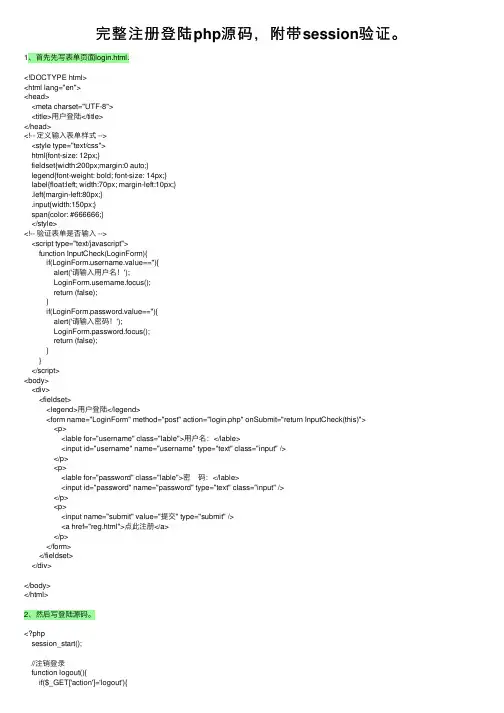
完整注册登陆php源码,附带session验证。
完整注册登陆php源码,附带session验证。
1、⾸先先写表单页⾯login.html.<!DOCTYPE html><html lang="en"><head><meta charset="UTF-8"><title>⽤户登陆</title></head><!-- 定义输⼊表单样式 --><style type="text/css">html{font-size: 12px;}fieldset{width:200px;margin:0 auto;}legend{font-weight: bold; font-size: 14px;}label{float:left; width:70px; margin-left:10px;}.left{margin-left:80px;}.input{width:150px;}span{color: #666666;}</style><!-- 验证表单是否输⼊ --><script type="text/javascript">function InputCheck(LoginForm){if(ername.value==''){alert('请输⼊⽤户名!');ername.focus();return (false);}if(LoginForm.password.value==''){alert('请输⼊密码!');LoginForm.password.focus();return (false);}}</script><body><div><fieldset><legend>⽤户登陆</legend><form name="LoginForm" method="post" action="login.php" onSubmit="return InputCheck(this)"><p><lable for="username" class="lable">⽤户名:</lable><input id="username" name="username" type="text" class="input" /></p><p><lable for="password" class="lable">密 码:</lable><input id="password" name="password" type="text" class="input" /></p><p><input name="submit" value="提交" type="submit" /> <a href="reg.html">点此注册</a></p></form></fieldset></div></body></html>2、然后写登陆源码。
实现登录功能的代码

实现登录功能的代码以下是一个使用 Python 实现登录功能的简单示例代码:```python# 假设有一个用户表,包含用户 ID 和密码user_table = {'user1': 'pass1','user2': 'pass2',}# 登录功能实现def login(username, password):# 检查用户是否存在if username in user_table:# 检查密码是否匹配if user_table[username] == password:print(f"登录成功,用户 {username} 已登录。
") return Trueelse:print(f"密码错误,登录失败。
")return Falseelse:print(f"用户 {username} 不存在,登录失败。
")return False# 示例用法username = input("请输入用户名:")password = input("请输入密码:")if login(username, password):print("欢迎登录!")else:print("登录失败,请检查用户名和密码。
")```在这个示例中,我们使用一个字典 `user_table` 来模拟用户表,其中包含了用户 ID 和对应的密码。
`login()` 函数接受用户名和密码作为参数,检查用户是否存在并验证密码是否匹配。
请注意,这只是一个简单的示例代码,实际的登录功能可能需要考虑更多的因素,如数据库操作、密码加密、用户权限等。
根据你的具体需求,你可能需要使用数据库来存储和验证用户信息,以及使用更复杂的密码加密算法来保护用户密码的安全性。
php会员注册登入系统开发代码
因为全棋同学的系统需求,虽然会员机制并不难,他一定也很快就学会了,而我还是写此教学来引导他,帮助他系统扩展的更快,相信他的系统在未来也一定会很有用的! 而这个教学主要是说明session应用在会员机制上,而教学的程序码还是有些地方有没有考虑的很周详,安全上还是会有瑕疵,希望大家见谅。
以下为资料表的栏位资料:以下为会员系统示意图:(1) 首页- 登入页面(index.php)<!-- 设定网页编码为UTF-8 --><meta http-equiv="Content-Type" content="text/html; charset=utf-8" /><form name="form" method="post" action="connect.php">账号:<input type="text" name="id" /> <br>密码:<input type="password" name="pw" /> <br><input type="submit" name="button" value="登入" /><a href="register.php">申请账号</a></form>(2) php连结MySQL数据库语法(mysql_connect.inc.php)<meta http-equiv="Content-Type" content="text/html; charset=utf-8" /><?php//数据库设定//数据库位置$db_server = "localhost";//数据库名称$db_name = "mydb";//数据库管理者账号$db_user = "root";//数据库管理者密码$db_passwd = "1234";//对数据库连线if(!@mysql_connect($db_server, $db_user, $db_passwd))die("无法对数据库连线");//数据库连线采UTF8mysql_query("SET NAMES utf8");//选择数据库if(!@mysql_select_db($db_name))die("无法使用数据库");>(3) 会员ID、PW与MySQL数据库作认证(connect.php)<?php session_start(); ?><!--上方语法为启用session,此语法要放在网页最前方--><meta http-equiv="Content-Type" content="text/html; charset=utf-8" /><?php//连接数据库//只要此页面上有用到连接MySQL就要include它include("mysql_connect.inc.php");$id = $_POST['id'];$pw = $_POST['pw'];//搜寻数据库资料$sql = "SELECT * FROM member_table where username = '$id'";$result = mysql_query($sql);$row = @mysql_fetch_row($result);//判断账号与密码是否为空白//以及MySQL数据库里是否有这个会员if($id != null && $pw != null && $row[1] == $id && $row[2] == $pw){//将账号写入session,方便验证使用者身份$_SESSION['username'] = $id;echo '登入成功!';echo '<meta http-equiv=REFRESH CONTENT=1;url=member.php>';}else{echo '登入失败!';echo '<meta http-equiv=REFRESH CONTENT=1;url=index.php>';}>(4) 会员登入成功后页面- 此页面有「新增」、「修改」、「删除」与「登出」的连结并且会显示出所有会员资料(member.php)<?php session_start(); ?><meta http-equiv="Content-Type" content="text/html; charset=utf-8" /><?phpinclude("mysql_connect.inc.php");echo '<a href="logout.php">退出</a> <br><br>';//此判断为判定观看此页有没有权限//说不定是路人或不相关的使用者//因此要给予排除if($_SESSION['username'] != null){echo '<a href="register.php">新增</a> ';echo '<a href="update.php">修改</a> ';echo '<a href="delete.php">删除</a> <br><br>';//将数据库里的所有会员资料显示在画面上$sql = "SELECT * FROM member_table";$result = mysql_query($sql);while($row = mysql_fetch_row($result)){echo "$row[0] - 名字(账号):$row[1], " ."电话:$row[3], 地址:$row[4], 备注:$row[5]<br>";}}else{echo '您无权限观看此页面!';echo '<meta http-equiv=REFRESH CONTENT=2;url=index.php>';}>(5) 登出- 洗掉登入使用者之session(logout.php)<?php session_start(); ?><meta http-equiv="Content-Type" content="text/html; charset=utf-8" /><?php//将session清空unset($_SESSION['username']);echo '登出中......';echo '<meta http-equiv=REFRESH CONTENT=1;url=index.php>';>(6) 加入(注册)会员- 「填写」会员资料(register.php)<meta http-equiv="Content-Type" content="text/html; charset=utf-8" /><form name="form" method="post" action="register_finish.php">账号:<input type="text" name="id" /> <br>密码:<input type="password" name="pw" /> <br>再一次输入密码:<input type="password" name="pw2" /> <br>电话:<input type="text" name="telephone" /> <br>地址:<input type="text" name="address" /> <br>备注:<textarea name="other" cols="45" rows="5"></textarea> <br><input type="submit" name="button" value="确定" /></form>(7) 加入(注册)会员- 「新增」会员资料进MySQL数据库(register_finish.php) <?php session_start(); ?><meta http-equiv="Content-Type" content="text/html; charset=utf-8" /><?phpinclude("mysql_connect.inc.php");$id = $_POST['id'];$pw = $_POST['pw'];$pw2 = $_POST['pw2'];$telephone = $_POST['telephone'];$address = $_POST['address'];$other = $_POST['other'];//判断账号密码是否为空值//确认密码输入的正确性if($id != null && $pw != null && $pw2 != null && $pw == $pw2){//新增资料进数据库语法$sql = "insert into member_table (username, password, telephone, address, other) values ('$id', '$pw', '$telephone', '$address', '$other')";if(mysql_query($sql)){echo '新增成功!';echo '<meta http-equiv=REFRESH CONTENT=2;url=index.php>';}else{echo '新增失败!';echo '<meta http-equiv=REFRESH CONTENT=2;url=index.php>';}}else{echo '您无权限观看此页面!';echo '<meta http-equiv=REFRESH CONTENT=2;url=index.php>';}>(8) 修改会员资料- 「填写」要修改之会员资料(update.php)<?php session_start(); ?><meta http-equiv="Content-Type" content="text/html; charset=utf-8" /><?phpinclude("mysql_connect.inc.php");if($_SESSION['username'] != null){//将$_SESSION['username']丢给$id//这样在下SQL语法时才可以给搜寻的值$id = $_SESSION['username'];//若以下$id直接用$_SESSION['username']将无法使用$sql = "SELECT * FROM member_table where username='$id'";$result = mysql_query($sql);$row = mysql_fetch_row($result);echo "<form name=\"form\" method=\"post\" action=\"update_finish.php\">";echo "账号:<input type=\"text\" name=\"id\" value=\"$row[1]\" />(此项目无法修改) <br>";echo "密码:<input type=\"password\" name=\"pw\" value=\"$row[2]\" /> <br>";echo "再一次输入密码:<input type=\"password\" name=\"pw2\" value=\"$row[2]\" /> <br>";echo "电话:<input type=\"text\" name=\"telephone\" value=\"$row[3]\" /> <br>";echo "地址:<input type=\"text\" name=\"address\" value=\"$row[4]\" /> <br>";echo "备注:<textarea name=\"other\" cols=\"45\" rows=\"5\">$row[5]</textarea> <br>";echo "<input type=\"submit\" name=\"button\" value=\"确定\" />";echo "</form>";}else{echo '您无权限观看此页面!';echo '<meta http-equiv=REFRESH CONTENT=2;url=index.php>';}>(9) 修改会员资料- 「更新」要修改之会员资料进MySQL数据库(update_finish.php)<?php session_start(); ?><meta http-equiv="Content-Type" content="text/html; charset=utf-8" /><?phpinclude("mysql_connect.inc.php");$id = $_POST['id'];$pw = $_POST['pw'];$pw2 = $_POST['pw2'];$telephone = $_POST['telephone'];$address = $_POST['address'];$other = $_POST['other'];//红色字体为判断密码是否填写正确if($_SESSION['username'] != null && $pw != null && $pw2 != null && $pw == $pw2){$id = $_SESSION['username'];//更新数据库资料语法$sql = "update member_table set password=$pw, telephone=$telephone, address=$address, other=$other where username='$id'";if(mysql_query($sql)){echo '修改成功!';}else{echo '修改失败!';echo '<meta http-equiv=REFRESH CONTENT=2;url=member.php>';}}else{echo '您无权限观看此页面!';echo '<meta http-equiv=REFRESH CONTENT=2;url=index.php>';}>(10) 删除会员资料- 「填写」要删除之会员账号(delete.php)<?php session_start(); ?><meta http-equiv="Content-Type" content="text/html; charset=utf-8" /><?phpif($_SESSION['username'] != null){echo "<form name=\"form\" method=\"post\" action=\"delete_finish.php\">";echo "要删除的账号:<input type=\"text\" name=\"id\" /> <br>";echo "<input type=\"submit\" name=\"button\" value=\"删除\" />";echo "</form>";}else{echo '您无权限观看此页面!';echo '<meta http-equiv=REFRESH CONTENT=2;url=index.php>';}>(11) 删除会员资料- 对MySQL数据库进行「删除」会员资料(delete_finish.php) <?php session_start(); ?><meta http-equiv="Content-Type" content="text/html; charset=utf-8" /><?phpinclude("mysql_connect.inc.php");$id = $_POST['id'];if($_SESSION['username'] != null){//删除数据库资料语法$sql = "delete from member_table where username='$id'";if(mysql_query($sql)){echo '删除成功!';}else{echo '删除失败!';echo '<meta http-equiv=REFRESH CONTENT=2;url=member.php>';}}else{echo '您无权限观看此页面!';echo '<meta http-equiv=REFRESH CONTENT=2;url=index.php>';}>。
网页登陆代码
height:30px;
border-bottom-color:#000;
border-bottom-style:groove;
border-bottom-width:2px;
line-height:30px;
font-weight:bold;
background-color:#999;
<br/><br/>
<input type="reset" value="重置" style="width:100px height:30px; background-cloor"#666; border-style:hidden;"/>
<input type="submit" value="登录" style="width:100px height:30px; background-cloor"#666; border-style:hidden;"/>
<br/>
用户:<input type="text" style="width:200px height:30px; background-cloor"#999; border-style:hidden;"/>
<br/><br/>
密码:<input type="password" style="width:200px height:30px; background-cloor"#999; border-style:hidden;"/>
PHP登陆页面完整代码
PHP登陆页⾯完整代码/*包括的⽂件*//*login.php*/<?phprequire('./mysql.php');$username=$_REQUEST['username'];$passwd=$_REQUEST['passwd']session_start();$_SESSION['s_username']=$username;$query_user="select * from user where username = '$username' and passwd = '$passwd'";$db=new mysql();//实例化类mysql$result = $db->query_exec($query_user);//验证⽤户$num_results=$result->num_rows;//取得数据库中的记录⾏if($num_results==0){echo 'login fail!!';><p><a href="./template/login.htm">返回登陆</a></p><?php}else{header("Location: ./index.php");}>/*templates/login.tpl*/<html><head><meta http-equiv="text/html;charset='utf-8'"><link rel="stylesheet" type="text/css" href="./css/login.css"><script type="text/javascript" src="js/face.js"></script></head><body><table width="400px" height="208" border="0" cellpadding="0" cellspacing="0" ><form id="login" name="login" method="post" action="a.php" onSubmit=""><tr><td height="25" align="right">⽤户名:</td><td><input name="name" type="text" onmouseover="this.style.backgroundColor='#ffffff'"onMouseOut="this.style.backgroundColor='#e8f4ff'" size="15" /></td></tr><tr><td height="25" align="right">密码:</td><td><input name="password" type="password" id="password" onmouseover="this.style.backgroundColor='#ffffff'" onMouseOut="this.style.backgroundColor='#e8f4ff'" size="15" /></td></tr><tr><td height="25"align="right">验证码:</td><td><input name="check" type="text" id="check" onmouseover="this.style.backgroundColor='#ffffff'" onMouseOut="this.style.backgroundColor='#e8f4ff'" size="10" /><img src="code.php" id="code" /></td> </tr>/*mysql.php*/<?phpvar $db_host = 'localhost';var $db_username= 'root';var $db_password= '123';var $db_database= 'new';$db =mysql_connect($ db_host,$db_username,$-> db_password,$-> db_database);if (mysqli_connect_errno()) {echo "连接数据库失败!";exit;}return $db;}}>/*效果为*/分类:。
用HTML代码制作简单的登录界面
用HTML代码制作简单的登录界面HTML部分<section login"><form id="loginForm" name="loginForm" action="#" method="get"><table><tr><td for="login_username">账户名</label></td><td id="login_username" name="login_username" type="text" maxlength="32" required="" /></td></tr><tr><td for="login_password">密 码</label></td><td id="login_password" name="login_password" type="password" maxlength="32" required="" /></td></tr><tr><td for="login_code">验证码</label></td><td id="login_code" name="login_code" type="text" maxlength="6" required="" /><img src="style/images/checkcode.jpg" alt="" /><input type="hidden" value="true" name="need_check_code"></td></tr><tr style="font-family: Verdana; font-size: 16px;"< <td style="font-family: Verdana; font-size: 16px;"< <td type="checkbox" id="login_save"><label for="login_save">自动登录</label></td></tr><tr style="font-family: Verdana; font-size: 16px;"< <td style="font-family: Verdana; font-size: 16px;"< <td name="login_submit" type="submit" value="登录" /><a target="_blank" href="#">忘记密码?</a></td> </tr></table><div><a target="_blank" href="#">免费注册</a></div></form></section>CSS部分.input_text{width: 150px;height: 24px;cursor: pointer;}.input_button{width: 60px;height: 30px;color: #FFF;background: #3399ff;border: solid 1px #6699cc;margin: 3px 4px 5px 3px;border-radius:5px; -moz-border-radius:5px; -webkit-border-radius:5px;background-image: -moz-linear-gradient(0% 100% 90deg, #3399ff,#99ccff 100%);box-shadow:1px 2px 3px #999;-moz-box-shadow:1px 2px 3px #999;-webkit-box-shadow:1px 2px 3px #999;}/* Login */.login{padding: 10px;}.login .name{width: 60px;color: #F60;font-weight: 700;}.login .data{width: 180px;}.login label, .login input{cursor: pointer;}.login label{line-height: 28px;width: 50px;}.login .input_checkbox{height: 32px;}.login .code img, .login .code a, #login_code{float: left;}#login_code{width: 50px;}#login_safe img{float: left;}.login .save-login, .login .submit{padding-left: 50px;}.login .submit a{padding: 0 6px;}.login .change_code{float: left;line-height: 14px;}JavaScript部分$("#loginForm").ready(function(){$("#loginForm").submit(function(){var username = $("#login_username").val();var password = $("#login_password").val();var code = $("#login_code").val();if(username==""){ $("#login_username").focus(); return false; }if(password==""){ $("#login_password").focus(); return false; }if(code==""){ $("#login_code").focus(); return false; } });});最终效果:IE下。