
IP Addressing IP地址举例(英文)
• • •
When subnetting is used, one generally speaks of a “subnetmask” (instead of a netmask) and a “subnet” (instead of a network) Use of subnetting or length of the subnetmask is decided by the network administrator Consistency of subnetmasks is responsibility of administrator
128.143.137.144
Example
• Example: 128.143 137.144
• Network address is: 128.143.0.0 • Host number is: 137.144 • Netmask is: 255.255.0.0
•
Convention (but not a reserved address)
Default gateway has host number set to ‘1’, e.g., e.g., 192.0.1.1
Subnetting
• Problem: Organizations have multiple networks which are independently managed
– all addresses 127.0.0.1-127.0.0.255 are reserved for loopback interfaces – Most systems use 127.0.0.1 as loopback address – loopback interface is associated with name “localhost”
extended network prefix
Advantages of Subnetting
• With subnetting, IP addresses use a 3-layer hierarchy:
» Network » Subnet » Host
• Reduces router complexity. Since external routers do not know about subnetting, the complexity of routing tables at external routers is reduced. • Note: Length of the subnet mask need not be identical at all subnetworks.
128.143
network prefix extended network prefix
137
subnet number
144
host number
1111111111111111 1111111100000000 subnetmask
Example: Subnetmask
• • • • 128.143.0.0/16 is the IP address of the network 128.143.137.0/24 is the IP address of the subnet 128.143.137.144 is the IP address of the host 255.255.255.0 (or ffffff00) is the subnetmask of the host
Network Prefix and Host Number
• The network prefix identifies a network and the host number identifies a specific host (actually, interface on the network). network prefix host number
(or 128.143) (or ffff0000)
• Prefix or CIDR notation: 128.143.137.144/16
» Network prefix is 16 bits long
Special IP Addresses
• Special addresses:
Loopback interfaces
128.143.137.32/24
subnetmask: 255.255.255.0
128.143.137.144/24
subnetmask: 255.255.255.0
128.143.71.21/24
subnetmask: 255.255.255.0
Dotted Decimal Notation
• IP addresses are written in a so-called dotted decimal notation • Each byte is identified by a decimal number in the range [0..255]: • Example: 10000000 1st Byte = 128 10001111 2nd Byte = 143 10001001 3rd Byte = 137 10010000 4th Byte = 144
• Split the host number portion of an IP address into a subnet number and a (smaller) host number. • Result is a 3-layer hierarchy network prefix host number
• How do we know how long the network prefix is? – The network prefix is implicitly defined (see class-based addressing) – The network prefix is indicated by a netmask.
No Subnetting
• All hosts think that the other hosts are on the same network
128.143.137.32/16
subnetmask: 255.255.0.0
128.143.137.144/16 subnetmask: 255.255.0.0
network prefix
subnet number
host number
• The extended network prefix is also called subnetmask • Then:
• Subnets can be freely assigned within the organization • Internally, subnets are treated as separate networks • Subnet structure is not visible outside the organization
Subnetmask
• Routers and hosts use an extended network prefix (subnetmask) to identify the start of the host numbers
128.143
network prefix
137.144
host number
•
Test / Experimental addresses
Certain address ranges are reserved for “experimental use”. Packets should get dropped if they contain this destination address (see RFC 1918): 10.0.0.0 - 10.255.255.255 172.16.0.0 - 172.31.255.255 192.168.0.0 - 192.168.255.255
– Solution 1: Allocate many network addresses Difficult to manage • From the outside of the organization, each network must be addressable. – Solution 2: Add
Ethernet Header
IP Header
TCP Header
Application data
Ethernet Trailer
Ethernet frame
What is an IP Address?
• An IP address is a unique global address for a network interface • Exceptions: – IP addresses are dynamically assigned ( DHCP) – IP addresses in private networks ( NAT) • An IP address: - is a 32 bit long identifier - encodes a network number (network prefix) and a host number
128.143.71.21/16 subnetmask: 255.255.0.0
128.143.71.201/16
subnetmask: 255.255.0.0
128.143.0.0/16
With Subnetting
• Hosts with same extended network prefix belong to the same network
网络地址详解

是由48比特/bit长(6字节/byte,1byte=8bits),16进制的数字组成.
如:44-45-53-54-00-00 0-23位叫做组织唯一标志符(organizationally uniqu), 是识别LAN(局域网)
节
的标识. 24-47位是由厂家自己分配.
其中第40位是组播地址标志位。
2001:0db8:85a3:0000:1319:8a2e:0370:7344 == 2001:0db8:85a3::1319:8a2e:0370:7344
Page 6
IP address form—IPv6
如果因为省略而出现了两个以上的冒号的话,可以压缩为一个,
但这种零压缩在地址中只能出现一次。
Page 8
IP Category
IP地址有两部分组成,一部分为网络地址,另一部分为主机地址。
将IP地址分成了网络号和主机号两部分,设计者就必须决定每部分包
含多少位。网络号的位数直接决定了可以分配的网络数(计算方法2^网 络号位数-2);主机号的位数则决定了网络中最大的主机数(计算方法
2^主机号位数-2)
Page 20
global/site/local address
Private network site-local IPv4 address ranges for private networks 24-bit block 20-bit block
RFC1918 name IP address range
Page 14
Submask子网掩码 举例:
Submask/VLSM
A类地址的缺省子网掩码为255.0.0.0,B类为255.255.0.0,C类为 255.255.255.0。下表是C类地址子网划分及相关子网掩码: 子网位数 1 2 3 4 5 6 子网掩码 255.255.255.128 255.255.255.192 255.255.255.224 255.255.255.240 255.255.255.248 255.255.255.252 主机数 128 64 32 16 8 4 可用主机数 126 62 30 14 6 2
IP Addressing
组网模型四
集中转发/bas认证/三层网络
AC:管理与配置AP, 三层交换机包含DHCP relay 功能 AP从三层交换机处获IP地址, 一般为内网地址。 User从三层交换机处获取IP地址, 为外网地址。 BAS:转发user的数据流
组网模型五
AC:管理与配置AP, AP从AC处获IP地址, 一般为内网地址。 User从AC处获取IP地址, 为外网地址。
IP Addressing
1. User 2. Network Element
组网模型
网络层次: 二层网络 三层网络 业务转发: 集中转发 本地转发 功能: AC/BAS
组网模型一
本地转发/bas认证/二层网络
AC:管理与配置AP, AP从AC处获IP地址, 一般为内网地址。 User从ac处获取IP地址, 为外网地址。 地址的区分:option 43/52 BAS:转发user的数据流
集中和本地转发/二层网络
组网模型六
集中和本地转发/三层网络
AC:管理与配置AP, 三层交换机包含DHCP relay 功能 AP从三层交换机处获IP地址, 一般为内网地址。 User从三层交换机处获取IP地址, 为外网地址。
组网模型二
集中转发/bas认证/二层网络
AC:管理与配置AP, AP从AC处获IP地址, 一般为内网地址。 User从AC处获取IP地址, 为外网地址。 BAS:转发user的数据流
组网模型三
本地转发/bas认证/三层网络
AC:管理与配置AP, 三层交换机包含DHCP relay 功能 AP从三层交换机处获IP地址, 一般为内网地址。 User从三层交换机处获取IP地址, 为外网地址。 BAS:转发user的数据流
ipaddress什么意思
ip address什么意思
小编整理了IP地址是什么意思,大家可以参考一下。
互联网协议地址(英语:Internet Protocol Address,又译为网际协议地址),缩写为IP地址(IP Address)。
IP地址,每个电脑都有一个固定上网IP,IP就是你现在上网用的电脑在网络中的地址,就像你收快递要留的地址差不多的意思!
P address
[英][ˌaɪˈpi: ədres]
n.
IP地址;
复数:IP addresses
1
Every connection that you make to the network is stamped with your IP address.
你每次连接到网络都会留下你的IP地址。
2
The hypervisor itself requires another IP address so that it can be managed remotely.
虚拟机管理程序本身需要另一个IP地址以便进行远程管理。
查看本机IP的方法如下:
方法1:在百度上输入“本机IP查询”,可以找到查找本机IP的网页。
方法2:借助软件查询,不如windows优化大师就有这个功能。
方法3:用命令查询,打开命令提示符,输入“ipconfig/all”即可查询本机IP。
IP addressing
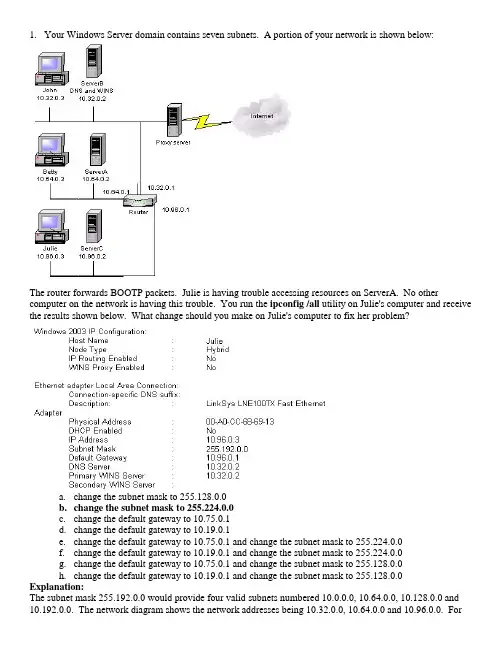
1.Your Windows Server domain contains seven subnets. A portion of your network is shown below:The router forwards BOOTP packets. Julie is having trouble accessing resources on ServerA. No other computer on the network is having this trouble. You run the ipconfig /all utility on Julie's computer and receive the results shown below. What change should you make on Julie's computer to fix her problem?a.change the subnet mask to 255.128.0.0b.change the subnet mask to 255.224.0.0c.change the default gateway to 10.75.0.1d.change the default gateway to 10.19.0.1e.change the default gateway to 10.75.0.1 and change the subnet mask to 255.224.0.0f.change the default gateway to 10.19.0.1 and change the subnet mask to 255.224.0.0g.change the default gateway to 10.75.0.1 and change the subnet mask to 255.128.0.0h.change the default gateway to 10.19.0.1 and change the subnet mask to 255.128.0.0 Explanation:The subnet mask 255.192.0.0 would provide four valid subnets numbered 10.0.0.0, 10.64.0.0, 10.128.0.0 and 10.192.0.0. The network diagram shows the network addresses being 10.32.0.0, 10.64.0.0 and 10.96.0.0. Forthis to work, the subnet mask must include at least 3 bit masked. The number 224 is 11100000 in binary. The correct subnet mask for the network configuration shown is 255.224.0.0. This subnet mask will allow up to eight subnets, so that there is room for growth on the network. The valid subnet addresses with a mask of 255.224.0.0 would be 10.0.0.0, 10.32.0.0, 10.64.0.0, 10.96.0.0, 10.128.0.0, 10.160.0.0, 10.192.0.0, 10.224.0.0. The proper default gateway is the router's IP address that is attached to the same subnet as a client's computer. The DNS and WINS server settings on Julie's computer are correct. Julie's default gateway is correct. The only thing you must change is the subnet mask.To prevent problems like this, you should use a DHCP server to hand out all IP addresses, subnet masks, default gateway, DNS server and WINS server settings to clients.2.Your network consists of 29 locations. All servers are 2k3 and all clients are XP Pro. You are planning anIP address space for the network. You will use the Class B private network address of 172.20.0.0/16. The network in each location will be configured as a single subnet. Each subnet must be capable of supporting 1500 hosts. All of your routers support subnets whose subnet ID's consist of all 0's or all 1's. Which of the following subnet masks should you use for each location?a.255.255.128.0b.255.255.192.0c.255.255.224.0d.255.255.240.0e.255.255.248.0f.255.255.252.0g.255.255.254.0h.255.255.255.0Explanation:The 16 bit subnet mask given to you by your ISP must be extended to support the appropriate number of subnets and hosts. In this case, each subnet must be able to support 1,500 hosts. This means that the number of host bits for the HOST - ID required is 11 which leaves 5 bits for the SUBNET - ID. 10 HOST - ID bits would only support 1022 hosts, and 11 bits will support 2046 hosts. So the HOST - ID portion must be 11 bits long. This means that the subnet mask must be extended by 5 bits into the third byte of the subnet mask. That is, the subnet mask will now be 255.255.11111000.00000000 or 255.255.248.0. Five bits for the SUBNET - ID will allow for up to 32 subnets if your routers support SUBNET - IDs of 11111 and 00000. If your routers do not do this then you can only have 30 subnets.3.You administer the network shown below. All client computers use XP Pro and they have all beenmanually configured with TCP/IP information.A user reports that he cannot use his XP Pro computer named Sys142_6 to access Server005. All other hosts on Subnet A are able to access resources on Server005. From Sys142_6 you successfully ping the IP address of the local router interface, but you cannot ping the IP address of Server005 or the IP address of the remote router interface. You use the route print command on Sys142_6 and receive the output shown below:What is preventing Sys142_6 from connecting to Server005?a.Sys142_6 is configured with an incorrect IP addressb.Sys142_6 is configured with an incorrect subnet maskc.Sys142_6 is configured to use an incorrect default gateway addressd.The router interface for Subnet B is configured with an incorrect IP addressExplanation:The default gateway setting for Sys142_6 is the first line in the routing table and shows that this setting is 185.75.129.1. However, the router interface for Subnet A is 185.75.128.1. Because the routing table is created dynamically according to the local host's IP configuration, the inaccurate gateway address has been configured. To prevent these types of problems, you should configure a DHCP server on your network.4.Your network consists of 29 locations. Your corporate network has been assigned the Class B networkaddress 172.20.1.0/16. You are required to allocate addresses so that each location has its own subnet.Each subnet must be able to support 1500 hosts. All of your routers support SUBNET - IDs containing all 0's and all 1's. Which prefix length should you use for each location?a./17b./18c./19d./20e./21f./22g./23h./245.You administer the network of a small branch office of a large corporation. Your network consists of 85hosts and 10 Servers. You have been assigned the IP address of 204.29.99.0/24. You are not allowed to usea different IP address range. However, subnetting is permitted. All 3 subnets at your location connect to acentral router. An additional subnet will be added in the future. You must divide the IP addresses,reserving the maximum number of IP addresses for the future subnet. Subnet1 contains 10 computers, subnet2 contains 25 computers and subnet3 contains 60 computers. How should each subnet's network IP address be configured?a.subnet1 - 204.29.99.192/27subnet2 - 204.29.99.128/26subnet3 - 204.29.99.0/25b.subnet1 - 204.29.99.240/29subnet2 - 204.29.99.224/28subnet3 - 204.29.99.192/27c.subnet1 - 204.29.99.224/28subnet2 - 204.29.99.192/27subnet3 - 204.29.99.128/26d.subnet1 - 204.29.99.192/27subnet2 - 204.29.99.192/27subnet3 - 204.29.99.192/27Explanation:From the requirements, you can see that subnet3 will require a /26 mask, subnet2 a /27 and Subnet1 a /28 because of the number of hosts each must support. Recognizing this alone is enough to answer the question. A 28 bit subnet mask for subnet1 allows for 4 HOST - ID bits, allowing for 14 hosts which meets the 10 host requirement. A 27 bit subnet mask for subnet 2 allows for 5 HOST - ID bits, allowing for 30 hosts which meets the 25 computer requirement. A 26 bit subnet mask allows for 6 HOST - ID bits, allowing for 62 hosts which meets the 60 host requirement. Subnet1 will have a subnet-ID of 1110, subnet2 an ID of 110 and subnet3 an ID of 10. The address ranges for these subnets will then be as follows:∙Subnet1 - 204.29.99.11100001 to 204.29.99.11101110 = 204.29.99.225 to 204.29.99.238∙Subnet2 - 204.29.99.11000001 to 204.29.99.11011110 = 204.29.99.193 to 204.29.99.222∙Subnet3 - 204.29.99.10000001 to 204.29.99.10111110 = 204.29.99.129 to 204.29.99.192This will leave the final subnet to use a 25 subnet mask to support a single subnet identified as 204.29.99.0/25 supporting an address range of 204.29.99.00000001 to 204.29.99.01111110 = 204.29.99.1 to 204.29.99.126.Notice here that the subnet with the smallest address range requirement was put at the top of the total available address range, followed by the next largest requirement and then the largest requirement. Notice that all the used address ranges are completely continuous, leaving as much as possible for the final address range.Note also that the assumption has been made here that it is OK to use a SUBNET - ID for the final subnet of 0, which means the routers must be able to cope with this.6.Your network headquarters is in Los Angeles and you have branch offices located in Denver, Phoenix andSeattle. Your company uses the Class C network address 192.168.50.0/24. You are required to assign network addresses so that Los Angeles can support 99 hosts, Denver can support 43 hosts, Phoenix can support 17 hosts and Seattle 7 hosts. All of your routers support CIDR, variable length subnet masks (VLSMs) and the use of subnets-id's of all 0's and all 1's. From the available addresses given, write the correct subnet mask assignments in the boxes provided in the diagram below:Explanation use the same technique as the question above。
ip地址的格式

IP地址的格式1. 简介IP地址(Internet Protocol address)是指分配给网络中设备的一串数字。
在互联网中,每个设备都需要一个唯一的IP地址以便进行通信。
IP地址可以用于识别设备的位置,通过它可以确定设备所属的网络和子网,以及设备与其他设备之间的通信路径。
2. IPv4地址的格式IPv4(Internet Protocol version 4)是目前互联网上广泛使用的IP地址协议版本。
IPv4地址采用32位二进制数表示,通常以点分十进制(dotted-decimal)形式呈现,即将32位二进制数分为4个8位的字段,并以十进制数表示每个字段。
IPv4地址的格式示例:192.168.0.1IPv4地址由四个数字字段组成,每个字段的取值范围为0-255。
每个字段之间用.进行分隔。
由于每个字段只占8位,所以它可以表示的地址数量有限,约为42亿个。
3. IPv6地址的格式IPv6(Internet Protocol version 6)是IPv4的后继版本,为了解决IPv4地址空间紧张的问题而产生。
IPv6采用128位二进制数表示,通常以冒号分隔的8个16位的字段形式呈现。
IPv6地址的格式示例:2001:0db8:85a3:0000:0000:8a2e:0370:7334IPv6地址由8个以冒号分隔的字段组成,每个字段的取值范围为0-FFFF(十六进制表示)。
由于IPv6采用128位长度,所以它可以表示的地址数量相当大,约为340十的38次方。
4. 特殊IP地址除了常见的IPv4和IPv6地址外,还存在一些特殊的IP地址:•回环地址:回环地址用于在设备上测试网络功能,其IPv4地址表示为127.0.0.1,IPv6地址表示为::1。
•广播地址:广播地址用于在网络中向所有设备发送消息。
IPv4广播地址通常以网络地址加主机地址全为1的形式表示,例如192.168.0.255;IPv6广播地址使用特殊的全1地址表示,例如ff02::1。
ipaddr计算机术语
ipaddr计算机术语
"ipaddr" 是一个计算机术语,代表IP 地址(IP address)。
IP 地址是用于在互联网上标识和定位设备的一组数字,它是网络通信中的基本元素之一。
IP 地址由一系列数字组成,通常以点分十进制表示,例如"192.168.0.1"。
IP 地址分为两个主要类型:IPv4(Internet Protocol version 4)和IPv6(Internet Protocol version 6)。
IPv4 是较早采用的版本,使用32 位二进制数表示,总共有大约43 亿个唯一地址。
而IPv6 是较新的版本,使用128 位二进制数表示,拥有更多的唯一地址,可以满足互联网中不断增长的设备数量需求。
IP 地址的作用是在网络中定位和识别设备,类似于门牌号码。
它允许设备之间进行通信,并确保数据能够准确地从源设备发送到目标设备。
IP 地址还可以用于区分局域网内的设备和公共互联网上的设备。
除了IP 地址本身,还有其他相关的概念,如子网掩码(subnet mask)、默认网关(default gateway)、DNS 服务器(Domain Name System server)等,这些都是网络通信中的重要概念,用于帮助设备正确地进行网络通信和寻址。
ipaddr计算机术语
ipaddr计算机术语ipaddr 是一个计算机网络术语,是 Internet 协议地址(IP Address)的缩写。
IP 地址是一个数字,用来给互联网上的计算机和其它网络设备做唯一的标识。
IP 地址通常由 4 组数字构成,每个数字的范围是 0-255,中间用点隔开,比如 192.168.1.1。
IP 地址有两大分类:1. IPv4 地址:目前主流使用的 IP 地址,由 4 组 0-255 的数字构成,共有 4294967296 (2^32) 个可用地址。
2. IPv6 地址:新一代 IP 地址,由 8 组十六进制数字构成,共有3.4×10^38 个可用地址,用来替代 IPv4 地址以解决其地址数量有限的问题。
IP 地址还可以细分为公网 IP 地址和私有 IP 地址:1. 公网 IP 地址:在公共网络上唯一标识一台主机,需要向 ISP 申请。
2. 私有 IP 地址:在私有网络内使用,不需要申请。
常用的私有 IP 地址范围有:- 10.0.0.0 - 10.255.255.255- 172.16.0.0 - 172.31.255.255- 192.168.0.0 - 192.168.255.255所以 ipaddr 这个术语代表的就是互联网上设备的数字标识 - IP 地址。
是的,ipaddr 代表互联网协议地址,即 IP 地址。
它用数字唯一标识互联网及其它网络中的计算机和设备。
IP 地址有两种版本:IPv4 和 IPv6。
IPv4 地址是目前主流使用的版本,由 4 组 0-255 的数字组成,共有约 42 亿个地址。
由于地址数量有限,IPv4 正在逐步被 IPv6 替代。
IPv6 地址由 8 组 16 进制数字组成,地址数量极为巨大,可以解决 IPv4 地址数量不够的问题。
IP 地址还可以分为公网 IP 地址和私有 IP 地址。
公网 IP 地址在公共网络中唯一标识一台主机,需要向 ISP 申请。
addressing 翻译
addressing 翻译"Addressing"的中文翻译是“寻址”或“地址”。
在不同的语境下,该词可以有不同的含义和用法。
1. 在计算机领域中,"addressing"指的是计算机系统中对数据或指令的访问和定位。
例如:“The addressing mode determines how a memory address is calculated.”(寻址模式决定了如何计算内存地址。
)2. 在邮件或信函中,"addressing"是指写明收件人的地址和称呼。
例如:“Please make sure you put the correct addressing on the envelope before mailing it.”(请确保在信封上正确填写收件人的地址。
)3. 在社交场合中,"addressing"指的是对他人的称呼和对话方式。
例如:“When addressing someone older or in a position of authority, it is respectful to use their proper title and last name.”(当与年长者或权威人士交谈时,使用他们的正确头衔和姓氏是表示尊重的方式。
)4. "addressing"也可以表示解决或处理问题。
例如:“The government is actively addressing the issue of climate change.”(政府正在积极解决气候变化问题。
)总结一些常用的用法和中英文对照例句:- "Addressing mode" 寻址模式- "Addressing an envelope" 填写信封地址- "Proper addressing" 正确的称呼方式- "Addressing a problem" 解决问题希望以上内容能够满足您的需求。
NAT网络地址翻译
r1(config)#ip nat pool NAT 200.200.200.3 200.200.200.50 netmask 255.255.255.0 r1(config)#access-list 1 permit 10.1.1.0 0.0.0.255 r1(config)#ip nat inside source list 1 pool NAT overload r1(config)#interface f0/0 r1(config-if)#ip nat inside r1(config)#int s0/0 r1(config-if)#ip nat outside r1(config)#ip route 0.0.0.0 0.0.0.0 200.200.200.2
Pc2:10.1.1.2---------->200.200.200.2
X Pc3:10.1.1.3----------> 200.200.200.2?
Pc4:10.1.1.4---------->
2. 动态NAT 动态NAT的特征是内部主机使用地址池中的公网地址 来映射 Dynamic NAT is designed to map a private IP address to a public address. Any IP address from a pool of public IP addresses is assigned to a network host.
Private IP addresses are reserved and can be used by anyone.
私有地址范围(Private Address Range)
NAT操作(NAT Operation)
Addressing IPv4, IPv6, and Beyond
Customer 1
12.20.231.0/24
12.0.0.0/8 Internet
AT&T Customer 2 12.20.249.0/24
1994-1998: Linear Growth
Source: Geoff Huston
• About 10,000 new entries per year • In theory, less instability at the edges (why?)
Use two 32-bit numbers to represent a network. Network number = IP address + Mask
Example: BellSouth Prefix: 65.14.248.0/22
01000001 00001110 11111000 00000000 11111111 11111111 11111100 00000000
Routing Table Growth: Who Cares?
• On pace to run out of allocations entirely
• Memory
– Routing tables – Forwarding tables
• “Churn”: More prefixes, more updates
Problem: Routing Table Growth
Source: Geoff Huston
பைடு நூலகம்
• Growth rates exceeding advances in hardware and software capabilities • Primarily due to Class C space exhaustion • Exhaustion of routing table space was on the horizon