
骐达说明书1
给新手看的,开始我也搞不清(超级菜鸟)
[attach]***[/attach]
左操纵杆分为A、B、C三个区。
A区的功能是车前大灯的开关控制。
当OFF对准旁边的小白点时,表示此时车大灯处于关闭状态;当AUTO对准小白点时则处于自动亮灯状态,即当户外光线暗到一定程度时车灯自动启亮;而下面的两个标识Auto下,分别是示宽灯(轮廓灯)以及前大灯(近光灯)。
B区的作用是开关雾灯。
当OFF位于正对小白点的位置时,表示此时的雾灯处于关闭状态;当位于下面一个标识时,表示前雾灯已经开启;而第三个标识则是将前后雾灯同时开启。
在雾天或能见度不好的时候行车时,请务必将雾灯启动,这不仅仅是为您自身的安全考虑,同时也是为
其他车辆的行车安全考虑。
C区的功能比较简单,是负责远近灯光的切换。
从图示中我们即可以看出,上下拨动操纵杆即可将远光灯与近光灯互相切换。
这个功能不仅仅可以在照亮的时候用,也可以用来提示前面的车辆或行人注意,因为如果突然鸣笛有可能吓到被提示的对象,而用灯光的强弱来提示对方不失
为一个好办法。
[本帖最后由c999c 于08-01-10 09:50 编辑]
c999c
青铜长老
财产679
帖子335
注册07-12-17
来自车友群434
14295
社会影响力0
爱卡长号码113
8952
3楼
发表于08-01-08 17:08
[attach]***[/attach]
骐达右操纵杆的功能比较单一,负责雨刷器的开启与关闭。
右
操纵杆分为A、B、C三个区域。
A区域的功能主要是控制后雨刷器的开启与关闭。
第一行标识
的意思是上下拨动右操纵杆可以将玻璃水喷到前后风挡玻璃
上。
其中,向下按是前风挡玻璃进水;向上抬是后风挡玻璃进
水。
第二个标识是开启前雨刷器。
下面的虚实线代表了雨刷的
频率。
B区域的功能是控制后雨刷器的开启与关闭。
同样,将OFF对
齐白点时为关闭。
这个功能不是每个车都有的,因为不是每辆
车都配有后雨刷器。
B区域中OFF下面出现的白色虚线和实线
代表雨刷器波动的频率。
C区域的功能就是雨刷器跳到间歇刮水档位时调节间歇时间
的。
骐达说明书

骐达说明书(总2页) -CAL-FENGHAI.-(YICAI)-Company One1-CAL-本页仅作为文档封面,使用请直接删除给新手看的,开始我也搞不清(超级菜鸟)[attach]***[/attach]左操纵杆分为A、B、C三个区。
A区的功能是车前大灯的开关控制。
当OFF对准旁边的小白点时,表示此时车大灯处于关闭状态;当AUTO对准小白点时则处于自动亮灯状态,即当户外光线暗到一定程度时车灯自动启亮;而下面的两个标识Auto下,分别是示宽灯(轮廓灯)以及前大灯(近光灯)。
B区的作用是开关雾灯。
当OFF位于正对小白点的位置时,表示此时的雾灯处于关闭状态;当位于下面一个标识时,表示前雾灯已经开启;而第三个标识则是将前后雾灯同时开启。
在雾天或能见度不好的时候行车时,请务必将雾灯启动,这不仅仅是为您自身的安全考虑,同时也是为其他车辆的行车安全考虑。
C区的功能比较简单,是负责远近灯光的切换。
从图示中我们即可以看出,上下拨动操纵杆即可将远光灯与近光灯互相切换。
这个功能不仅仅可以在照亮的时候用,也可以用来提示前面的车辆或行人注意,因为如果突然鸣笛有可能吓到被提示的对象,而用灯光的强弱来提示对方不失为一个好办法。
[本帖最后由 c999c 于 08-01-10 09:50编辑]c999 c青铜长老财产3楼发表于 08-01-08 17:0867 9帖子 3 35注册 07-12-17社会影响力 0爱卡长号码 1 138 952 [attach]***[/attach]骐达右操纵杆的功能比较单一,负责雨刷器的开启与关闭。
右操纵杆分为A、B、C三个区域。
A区域的功能主要是控制后雨刷器的开启与关闭。
第一行标识的意思是上下拨动右操纵杆可以将玻璃水喷到前后风挡玻璃上。
其中,向下按是前风挡玻璃进水;向上抬是后风挡玻璃进水。
第二个标识是开启前雨刷器。
下面的虚实线代表了雨刷的频率。
B区域的功能是控制后雨刷器的开启与关闭。
骐达维修手册GI
概述A 概述目录C D E F G H I J K L M B GI部分GI注意事项 (2)燃油的注意事项 (2)HR16DE 发动机(普通汽油) (2)CONSULT-II 诊断仪检查系统 (3)功能和系统应用 (3)检查设备 (4)CONSULT-II 诊断仪启动步骤 ....................................4识别信息 . (6)车型种类 (6)识别号码 (7)尺寸 (8)车轮和轮胎 (8)注意事项注意事项PFP:00001燃油的注意事项CAS0001H HR16DE 发动机(普通汽油)SAIA0915ECDEFGHIJKLMBGICONSULT-II 诊断仪检查系统PFP:00000功能和系统应用CAS00018x :适用*1: NA TS (日产防盗系统)诊断测试模式功能发动机A /T安全气囊仪表I P D M E /RB C MA B S智能钥匙N A T S *1后视相机E P SWork support 此模式可使维修技师根据 CONSULT -II 诊断仪的指示更迅速更准确地对某些装置进行调整。
x x ---x -x -x -Self-diagnostic results可以迅速地读取并擦除自诊断结果。
x x x x x x x x x -x Troublediagnostic record 可以读取当前自诊断结果和以前所有的故障诊断记录。
--x --------Data monitor 可以读取 ECU 中的输入/输出数据。
x x -x x x x x -x x CAN diagnosis support monitor 可以读取 CAN 通讯线路的状态。
x x -x x x x x --x Active test CONSULT -II 诊断仪用这种诊断测试模式驱动一些脱离 ECM 的执行器,也可以在指定的范围内改变某些参数。
x ---x x x x ---ECU (ECM/TCM) part number 可以读取 ECU (ECM/TCM )零部件号。
12年骐达使用说明书

12年骐达使用说明书摘要:一、前言二、车辆简介1.品牌与型号2.车辆特点三、使用说明1.驾驶前的检查2.驾驶时的注意事项3.车辆维护与保养四、车辆操作1.启动与熄火2.驾驶操作3.停车与制动五、车辆安全1.安全带与安全气囊2.儿童安全3.紧急事故处理六、故障排除与维修1.常见故障2.维修注意事项3.应急处理方法七、车辆附件与随车工具1.车辆附件2.随车工具3.使用方法与注意事项八、车辆保修与售后服务1.保修政策2.售后服务网络3.联系方式正文:【前言】欢迎使用东风日产12年骐达汽车。
本使用说明书旨在帮助您更好地了解和操作您的爱车,请在使用前仔细阅读本说明书,以确保您的驾驶安全和车辆的长期使用。
【车辆简介】1.品牌与型号:本车辆为东风日产生产的骐达车型,是一款紧凑型家用轿车。
2.车辆特点:动力性能优越,油耗低,空间宽敞,驾驶舒适。
【使用说明】1.驾驶前的检查:在驾驶前,请检查油量、轮胎气压、灯光等设备是否正常。
2.驾驶时的注意事项:遵守交通规则,保持安全距离,避免急刹车、急转弯等不安全驾驶行为。
3.车辆维护与保养:定期进行保养,更换机油、机滤等部件,确保车辆的正常运行。
【车辆操作】1.启动与熄火:将钥匙插入钥匙孔,转动至ON位置,启动发动机;行驶完毕后,将钥匙转动至OFF位置,熄火。
2.驾驶操作:踩下油门踏板,转动方向盘,操作刹车和换挡器进行驾驶。
3.停车与制动:提前观察路况,轻踩刹车踏板,使车辆缓慢减速;在停车时,将刹车踏板踩到底,使车辆完全停止。
【车辆安全】1.安全带与安全气囊:驾驶时请系好安全带,避免在行驶过程中解开;安全气囊在发生碰撞时自动弹出,保护乘员安全。
2.儿童安全:不要让儿童单独留在车内,避免发生意外;使用儿童安全座椅,确保儿童安全。
3.紧急事故处理:发生事故时,首先确保自身安全,然后拨打122报警,按照接警员的指示进行处理。
【故障排除与维修】1.常见故障:如发动机故障灯亮起、车辆抖动等,请及时进行维修。
2019年NissanTITAN和TITAN XD产品说明书

SEE TITAN ®/TITAN XD ® COME TO LIFEGo to and find an interactive brochure for TITAN, TITAN XD, and every Nissan in the lineup. Available on desktop, smartphone, or tablet, it’s the full product story – including demos, videos, and complete info on trims, colors, and accessories.Nissan Intelligent Mobility guides everything we do. We’re using new technologies to transform cars from mere driving machines into assistants. Together the journey is more confident, connected, and exciting. Whether it’s cars that assist in the driving task, or highways that charge your EV as you go along, it’s all in the very near future. And it’s a future already taking shape in the Nissan you drive today.3EPICSTRENGTHTITAN®TITAN XDThe TITAN of Trucks is built to work, and work hard. You’ve got massive power, a 7-speed transmission, and 4-wheel ventilated disc brakes. Underneath, a reinforced frame and rugged components. Add in a bold look, an interior that would make a luxury sedan jealous, and advanced technology, and the TITAN is ready to take on just about whatever you need. And if you need even more groundbreaking performance – check out the TITAN XD.Just imagine what you can do with TITAN XD. It all starts with a solid core, and TITAN XD lays the groundwork with a full-length, fully boxed ladder frame, reinforced in key areas for incredible lateral rigidity. From there, we attach components, many of them tried and proven from our Nissan Commercial Vehicles program. It all adds up to strength, durability, and reliability you can count on for years to come.390-hp 5.6-L Endurance ® V8Available 5.0-L Cummins Turbo Diesel Reinforced, Fully Boxed, Full-length Reinforced, Fully Boxed, Full-length Ladder Frame with Commercial Grade ComponentsMaximum Payload: (not shown 5) Maximum Payload:Crew Cab up to 1,920-lbs.Single Cab up to 2,990-lbs.AvailableGooseneck Towing Maximum Towing: (not shown 7) Maximum Towing:Crew Cab up to 11,960 lbs.Single Cab up to 12,710-lbs.Available on TITAN and TITAN XD, the Endurance ® V8 gas engine features Direct Injection, a 4-valve-per- cylinder design, and Variable Valve Event and Lift (VVEL ®) technology for power, efficiency, and refinement in a Nissan tested and proven package.390HORSEPOWERLB-FT OF TORQUE394Legendary power, reliability, and efficiency. Under TITAN XD’s hood beats the heart of a beast – an available 5.0-liter V8 turbo diesel built by legendary manufacturer Cummins.® Boasting a 4-valve-per-cylinder DOHC design, with a two-stage turbo and ceramic glow plugs, it’s as modern as it is powerful.TITAN XD5.0-L CUMMINS ® TURBO DIESELTITAN ® / TITAN XD ®5.6-L ENDURANCE ® V8 GAS ENGINE®Nissan TITAN XD® Crew Cab Platinum Reserve 4x4 with Cummins® diesel engine shown.310HORSEPOWERLB-FT OF TORQUE555TITAN XDWith its super-size 7.0" screen, it’s easy to use the Intelligent Around View ® Monitor to line up to a trailer. And with the system’s virtual 360° composite bird’s-eye view, you’ve got enhanced visibility to help you maneuver even in tight spots.11, 12, 13ON THE LOOKOUTThe innovative Trailer Light Check makes it easier to tow – even when you’re going solo. Once you’ve hooked up your trailer, you can easily check all brake light connections by cycling through the lights with your Nissan Intelligent Key.® No muss, no fuss, no help needed.10, 11TOWING MADE EASYTITAN ® is ready to tackle the tough jobs, with flexible rear-seat storage thanks to a lockable cargo organizer that helps keep things secure and out of sight.11, 14 The container’s top even folds out to create a flat floor for easy loading.11, 14 TITAN’s truck bed is a master of bring it, with features like a spray-on bedliner,11 Utili-track ® multi-channel system,11, 14 120-V in-bed power outlet,11 and bright LED bed lighting.11MASTER MULTI-TASKERIf you can’t go up, over or around, it’s good to know that along with oil pan and fuel tank skid plates, PRO-4X adds transfer case and lower radiator skid plates to help protect vital parts.BUILT TO TAKE A BEATINGEpic starts where the pavement ends. And with the PRO-4X model, it’s never been more exciting – with a truckload of advanced 4x4 gear, including hill start assist, hill descent control, and 4-wheel ABLS. It keeps getting better, with unique interior trim and competition-grade equipment that reads like a serious off-roader’s wish list. SERIOUSLY EQUIPPEDPRO-4X takes advantage of advanced technology to tackle the most challenging conditions. The Advanced Drive-Assist ® Display 11, 15, 16 includes a dedicated off-road display as well as a Tire Pressure Monitoring System.11, 17 And the Intelligent Around View ® Monitor is a game-changer,11, 12 helping you rock-crawl and avoid obstacles you might not otherwise see.TECHNICAL CLIMBER18" All-terrain TiresElectronic Locking Rear DifferentialBilstein ® Off-roadPerformance Shocks181719®Space and innovation mean long-term appreciation of the interior. Relocating the shift lever to theCars can sneak up on you or sit in the blind spot area,and shopping carts can appear out of nowhere. TITANhelps out with a range of available Nissan IntelligentMobility features that can detect movement aroundyour vehicle, whether you’re parked or out on the road.22SEE AND SENSE MORE AROUND YOUBlind Spot Warning11, 23Rear Cross Traffic Alert11, 24Intelligent Around View® Monitor11, 12rear vents. There’s even a power outlet for charging up.Heated OutboardRear SeatsLet our people help look after you and your people. WithNissanConnect Services,and services, including remote engine start access fromyour compatible smartphone, Alexa, or Google Assistantto calling for help if the system senses there’s been anaccident.19 Hey, that’s what friends are for.FIRST CABINFor 2019, TITAN® and TITAN XD® put your world at your fingertips with enhanced smartphone connectivity,20 and a new class-leading Fender® audio system. Add in features like front and rear Zero Gravity seats21 and climate-controlled front seats, and this truck’s premium features will spoil you for anything else.CHOOSE YOUR INTERIORCHOOSE YOUR COLOR Gun MetallicMoab Sunset Metallic 26Midnight Pine MetallicForged Copper MetallicDeep Blue PearlMagnetic Black PearlBrilliant SilverMetallicCayenne Red MetallicPearl White TriCoat 26Java MetallicGlacier Whitewhether viewed in daylight, fluorescent or incandescent light. Please see the actual colors at your dealer.Standard OptionalBlack LeatherSV 26, 28 | SLBlack ClothSBeige LeatherSV 26, 28 | SLBeige ClothSV 27Black LeatherPRO-4X ®26Black ClothSVBlack/Brown LeatherPlatinum ReserveBlack ClothPRO-4X ®TITAN ® wheel shown.TITAN ® wheel shown.TITAN ® wheel shown.TITAN ® wheel shown.TITAN ® wheel shown.CHOOSE YOUR PACKAGE TITAN® SINGLE CAB TITAN KING CAB®TITAN CREW CAB TITAN XD® SINGLE CAB TITAN XD KING CAB TITAN XD CREW CABGENUINE NISSAN ACCESSORIESFor more information and to shop online for TITAN Genuine Nissan Accessories, go to bit.ly/19titan-estoreEvery Genuine Nissan Accessory is custom-fit, cus-tom-designed and durability-tested. Each one is backed by Nissan’s 5-year/100,000-mile (whichever occurs first) limited warranty (if installed by dealer at the time ofpurchase), and can be financed when installed by dealer at time of purchase.40A.T ITAN ® Boxes 14Store and protect your gear. Lockable and removable.B.T ailgate GuardHelps stop things from slipping between the cracks.C.F og LightsHelp you see and be seen.D. A luminum-insert Door SillsPremium as soon as you open the door.E. R unning Boards and Running Board Lighting (sold separately)The bright way to step up to style and strength.F.I mpact SensorSounds an alert if there’s a small impact, or a break-in or wheel theft is attempted.G. W ireless Smartphone Charger 20 Power up without plugging in.H. S liding Bed Extender 14 Extend the possibilities. Additional Accessories:• Remote Engine Start System 25• Water-resistant Seat Covers • Sliding Bed Divider • Fixed Bed Extender• Frameless Auto-dimming Rearview Mirror with Universal Remote• Stainless Steel Exhaust Finisher• Electronic Tailgate Lock • Gooseneck Ball and Anchor Kit 10, 11• 5th Wheel Adaptor • Nissan WiFi 19ABC DEFG HTo see Genuine Nissan Accessories in action, go to bit.ly/19titan-gnaAlong with the other hard-working accessories listed below, you’ll find a full line of accessories designed specifically to work with the unique system of channels and cleats in TITAN’s incredibly versatile Utili-track ® system.14A. W eight-distributing Hitch Ball Mount and Hitch Ball (Class IV)2, 6If you’re getting hitched, do it right.B. C hrome Step Rails Get a leg up in style.C. L ockable Rear-seat Cargo Organizer with Fold-out Flat Floor 14Under-seat storage that’s out of sight.D.T ie-down Cleats 14Help keep your cargo in lockdown.E.B ed Tent 14It’s your TITAN! It’s your campsite! It’s both!F. H itch Ball Mount, Class III 2, 6 We’ll hook you up.G. S ide Step AssistEasy access? Step right up!H. A ll-season Floor MatsDon’t let the muck mess up your truck.ABC EG HDFTo see Genuine Nissan Accessories in action, go to bit.ly/19titan-gnaTITAN CAPACITIES4x2: S, SV, SL, Platinum Reserve 15/21/18 15/21/18 15/21/184x4: S, SV, SL, Platinum Reserve 15/21/18 15/21/18 15/21/184x4: PRO-4X15/20/17 15/20/17 15/20/17TITAN XD CAPACITIESMaximum payload - Gas/DieselMaximum payload (4x2)1 — 2,690/2,250 2,990/2,490Maximum payload (4x4)1 2,470/1,920 2,590/2,080 2,890/2,400Maximum towing - Gas/DieselMaximum towing (4x2)2 — 11,390/12,480 11,680/12,710Maximum towing (4x4)2 10,950/11,960 11,680/12,120 11,360/12,430Cab 4x4 with Endurance® V8 gas engine; 1,920 lbs for 2019 TITAN XD Crew Cab 4x4 with Cummins® V8 diesel engine; 2,250 lbs for 2019 TITAN XD King Cab 4x2 with Cummins® V8 diesel engine; 2,080 lbs for 2019 TITAN XD King Cab 4x4 with Cummins® V8 diesel engine; 2,490 lbs for 2019 TITAN XD Single Cab 4x2 with Cummins® V8 diesel engine; 2,400 lbs for 2019 TITAN XD Single Cab 4x4 with Cummins® V8 diesel engine. Payload capacity varies by configuration. See Nissan Towing Guide and Owner’s Manual for additional information. 2 P lease follow Towing Guidelines. Maximum towing capacity when properly equipped. Maximum towing of up to: 10,950 lbs. for 2019 TITAN XD Crew Cab 4x4 with Endurance® V8 gas engine; 11,390 lbs. for 2019 TITAN XD King Cab® 4x2 with Endurance® V8 gas engine; 11,060 lbs. for 2019 TITAN XD King Cab 4x4 with Endurance® V8 gas engine; 11,680 lbs. for 2019 TITAN XD Single Cab 4x2 with Endurance® V8 gas engine; 11,360 lbs. for 2019 TITAN XD Single Cab 4x4 with Endurance® V8 gas engine; 11,960 lbs. for 2019 TITAN XD Crew Cab 4x4 with Cummins® V8 diesel engine; 12,480 lbs. for 2019 TITAN XD King Cab 4x2 with Cummins® V8 diesel engine; 12,120 lbs. for 2019 TITAN XD King Cab 4x4 with Cummins® V8 diesel engine; 12,710 lbs. for 2019 TITAN XD Single Cab 4x2 with Cummins® V8 diesel engine; 12,430 lbs. for 2019 TITAN XD Single Cab 4x4 with Cummins® V8 diesel engine. Towing capacity varies by configuration. See Nissan Towing Guide and Owner’s Manual for additional information. 3 C laim based on years/mileage (whichever occurs first) covered under the New Vehicle Limited Warranty basic coverage. Ward’s in-market Large Pickup- Flat-tire changes - Vehicle lockouts- Trip Interruption benefits - Emergency fuel delivery- Jump startsYour peace of mind is on us. For 36 months or 36,000 miles, whichever comes first, your new Nissan vehicle is covered for the following:50NISSAN ROADSIDE ASSISTANCEYOUTUBE LOGO SPECS。
骐达维修手册EI
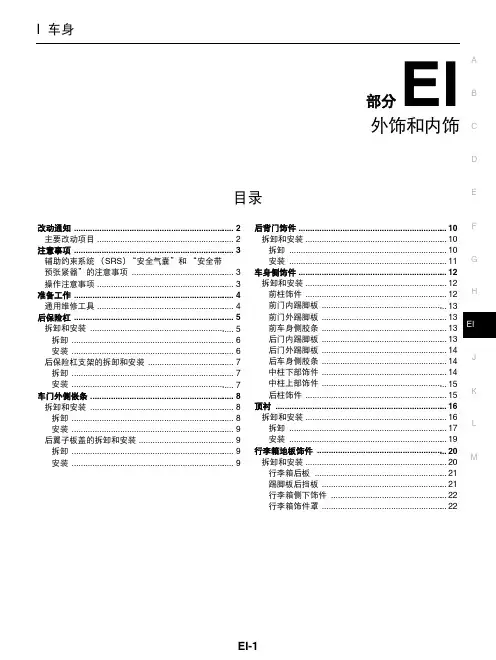
6. 拆卸后保险杠饰板上侧的卡子和螺钉。
7. 从后保险杠上侧固定器上拆下保险杠卡箍,然后朝车尾方向拉出 保险杠装饰板。
注意: 拆卸保险杠饰板时,需要两个人操作,以免跌落。
PIIB2547J
8. 拆卸保险杠吸能装置。 9. 拆下保险杠装饰板之后,拆卸以下零部件。
● 保险杠撑杆 (左 / 右)。 ● 保险杠侧支架 (左 / 右)。 ● 后保险杠保护装置 (左 / 右)。 ● 牌照灯支架
顶衬 .......................................................................... 16 拆卸和安装 ............................................................. 16 拆卸 .................................................................... 17 L 安装 .................................................................... 19
EI-6
PIIB7502E PIIB2548J
后保险支架固定卡子,然后拆下后保险杠支架。
安装
按照与拆卸相反的顺序安装。
CIS000CL
A B C D
PIIB2551J
E F G H EI J K L M
EI-7
车门外侧嵌条 拆卸和安装
车门外侧嵌条
PFP:82820
行李箱地板饰件 ........................................................ 20 拆卸和安装 ............................................................. 20 M 行李箱后板 ......................................................... 21 踢脚板后挡板 ...................................................... 21 行李箱侧下饰件 .................................................. 22 行李箱饰件罩 ...................................................... 22
09年骐达仪表盘各开关使用说明
09年骐达仪表盘各开关使用说明(一)中控按键
1、车身电子稳定系统(ESP)
有效防止车身侧滑、甩尾等失控情况,一般情况不建议驾驶员手动关闭。
2、危险警报灯(俗称双闪灯)
起到警示作用,在紧急或特殊情况下使用。
3、音量调节按键
除了调节音量,还可以进行切歌操作。
4、自动驻车
在红绿灯等停车的情况,松开刹车踏板后,自动驻车功能会锁住车轮,解放车主的脚部疲劳。
再次踩下油门,车辆又会继续前进。
5、自动启停
主要作用:使发动机短暂熄火。
一旦脚部离开制动踏板,发动机重新着火。
6、内/外循环
内循环指车内的空气加热或制冷再送回车内,外循环则是让外界的空气进入车内。
拥堵路段或空气质量差的环境使用内循环。
在长时间使用内循环时,应当不超过1个钟时间,换入外循环以防空气质量影响健康(恶劣外界环境除外)。
(二)车门按键
日产骐达驾驶员车门处:
①后车窗锁止按钮
②车窗一键升降控制开关
③外后视镜的调节开关(角度调节)
④中控锁按键
(三)车顶按键
①天窗开启
②驾驶阅读灯
③阅读灯。
东风日产培训骐达09.pptx
1. CSC (同轴从缸) 4. 支架
2. 离合器管 5. 主缸
3. 离合器缓冲器
5
安全措施
采用离合器互锁开关可使发动机在没有踩下离合器踏板之前无法启动。
1. 离合器踏板
2.
4. 离合器互锁开关 *1
5.
7. 踏板限位器橡胶
*1:安装了按钮式点火开关系统
*2:安装了 ASCD 或按钮式点火开关系统
8
4. 维修要点
倒车灯开关和驻车/空挡位置开关 (RS5F91R)
倒车灯开关检查
端子 1-2
档位 倒档 除倒档外
导通性 存在 不存在
驻车/空档位置开关检查
端子 2-3
档位 空档 除空档外
导通性 存在 不存在
9
4. 维修要点
倒车灯开关和驻车/空挡位置开关 (RS6F94R)
倒车灯开关检查
端子 1-2
• 5、You have to believe in yourself. That's the secret of success. ----Charles Chaplin人必须相信自己,这是成功的秘诀。-Wednesday, August 5, 2020August 20Wednesday, August 5, 20208/5/2020
3. 控制轴总成 6. 选择电缆 9. 控制杆
1. 支架 4. 换档杆 7. 选择电缆 10. 控制杆
2. 换档电缆 5. 攻丝螺栓 8. 索环 11. 控制杆手柄
3. 选档杆 6. 电缆固定支架 9. 控制装置总成
11
4. 维修要点
推荐手动变速箱油
RS5F91R
正品日产手动变速箱油 (MTF) HQ Multi 75W-85 或同等产品
Nissan车型信息面板说明书
Instrument PanelDriver Information InterfaceThe driver information interface shows information such as the estimated travelable distance and fuel economy of the vehicle. It also displays messages such as warnings and other helpful information.■Accessing contents in the main displayPress the (home) button, then roll the left selector wheel to scroll to the content you want to see. Press the left selector wheel to see detailed information.■Switching the Display1Switching the DisplayTo go back to the previous screen, press the (back) button.You can edit, add, or delete the meter contents using the audio/information screen.2Customizing the Meter P.272Instrument Panel(Home) Button Left Selector WheelRoll the left selectorwheel.WarningsP.Safety SupportP.MaintenanceP.Rear Seat BeltsP.Driver AttentionP.Driving SupportP.Traffic SignP.NavigationP.Power/ChargeP.Eco DriveP.Power FlowP.Range & FuelP.Fuel EconomyP.Speed & Time P.AudioP.PhoneP.Instrument Panel■Sub displayPress the TRIP button to change the display.Shows the total number of miles or kilometers that your vehicle has accumulated.■OdometerOdometerOutside TemperatureTrip A Trip BTRIP ButtonInstrument Panel Shows the total number of miles or kilometers driven since the last reset. Meters Aand B can be used to measure two separate trips.■Resetting a trip meterTo reset a trip meter, display it, then press and hold the TRIP Button. The trip meteris reset to 0.0.Shows the outside temperature in Fahrenheit (U.S.) or Celsius (Canada).■Adjusting the outside temperature displayAdjust the temperature reading by up to ±5°F or ±3°C if the temperature readingseems incorrect.■Trip Meter■Outside Temperature1Trip MeterSwitch between trip meter A and trip meter B bypressing the TRIP Button.1Outside TemperatureThe temperature sensor is in the front bumper.Road heat and exhaust from another vehicle canaffect the temperature reading when your vehiclespeed is less than 19 mph (30 km/h).It may take several minutes for the display to beupdated after the temperature reading has stabilized.You can adjust the temperature reading.2Customized Features P.357Instrument PanelRoll the left selector wheel to switch between trip computer A and trip computer B.■Range & FuelLeft Selector WheelRollInstrument Panel ■Trip meterShows the total number of miles or kilometers driven since the last reset. Meters Aand B can be used to measure two separate trips.Resetting a trip meterTo reset the trip meter, display it, then press the left selector wheel and then selectReset.u The trip meter is reset to 0.0.■Average fuel economy (Avg. Fuel)Shows the estimated average fuel economy of each trip meter in mpg or l/100 km.The display is updated at set intervals. When a trip meter is reset, the average fueleconomy is also reset.■Instant fuel economyShows the instant fuel economy as a bar graph in mpg or l/100 km.■RangeShows the estimated distance you can travel on the remaining power and fuel. Thisestimated distance is based on the vehicle’s current fuel economy.1Trip meterSwitch between trip meter A and trip meter B byrolling the left selector wheel.When resetting the trip meter in the Range & Fuel,the trip meter in the sub display resets at the sametime.1Average fuel economy (Avg. Fuel)You can change when to reset the average fueleconomy.2Customized Features P.357Instrument PanelRoll the left selector wheel to switch between trip computer A and trip computer B.■Speed & TimeRollLeft Selector WheelInstrument Panel ■Trip meter2Trip meter P.148■Elapsed timeShows the time elapsed since Trip A or Trip B was reset.■Average speed (Avg. Speed)Shows the average speed in mph or km/h since Trip A or Trip B was reset.1Elapsed timeYou can change when to reset the elapsed time.2Customized Features P.3571Average speed (Avg. Speed)You can change when to reset the average speed.2Customized Features P.357Instrument Panel■CompassShows the compass screen.■Turn-by-Turn DirectionsWhen driving guidance is provided by the navigation system *, Android Auto or Apple CarPlay, turn-by-turn directions to your destination appear.2Refer to the Navigation System Manual 2Android Auto P.3262Apple CarPlay P.320■Navigation1NavigationYou can select whether to have the turn-by-turn display come on or not during the route guidance.2Customized Features P.357Turn-by-turn directions may not be available for all apps.When the compass or turn-by-turn directions are displayed, you can control some navigation system functions on the driver information interface by scrolling the left selector wheel.2Refer to the navigation systemModels with navigation systemCompassTurn-By-Turn Driving Directions*Not available on all modelsInstrument Panel2Driver Information Interface Warning andInformation Messages P.115Shows the remaining oil life and MaintenanceMinder TM.2Maintenance Minder TM P.533■Warnings1WarningsIf there are no Warnings, None message appears onthe driver information interface.If there are multiple warnings, you can roll the leftselector wheel to see other warnings.(Example)■MaintenanceInstrument PanelShows the current phone information.2Bluetooth ® HandsFreeLink ® P.381■PhoneInstrument Panel■Electric motorThe degree to which the electric motor isbeing powered is displayed by the readings onthe POWER side.■Battery charge in progressThe degree to which the High Voltage batteryis being charged is displayed by the readingson the CHARGE side.■Speed/Distance UnitsEnables you to show another unit on thedriver information interface, head-up display*and audio/information screen and set thedisplayed measurements to read in eithermiles and mph or km and km/h.Press and hold the left selector wheel whenyou select Power/Charge on the driverinformation interface. Each time you do this,the unit will change from miles, mph to km,km/h or vice versa. After this, a confirmationscreen will appear for a few seconds.■POWER/CHARGE Gauge*Not available on all modelsInstrument PanelShows the current audio information.2Audio System Basic Operation P.257Shows the traffic sign recognition system.2Traffic Sign Recognition System P.493■Audio■Traffic Sign Recognition SystemInstrument PanelAppears when any of the rear seat belts arelatched or unlatched.2Seat Belt Reminder P.46■Rear Seat Belt ReminderInstrument PanelThe Driver Attention Monitor analyzes steering inputs to determine if the vehicle is being driven in a manner consistent with drowsy or inattentive driving. If it determines that the vehicle is being driven in such a manner, it will display the degree of the driver’s attention on the driver information interface.When you select Driver Attention on thedriver information interface, bars on it light upin white to indicate the degree of the driver’sattention.2Accessing contents in the main displayP.143■Driver Attention Monitor 1Driver Attention Monitor The Driver Attention Monitor cannot always detect if the driver is tired or inattentive.Regardless of the system’s feedback, if you arefeeling tired, stop in a safe location and rest for as long as needed.Driver InformationInterfaceLeft Selector Wheel(Home) Button LevelInstrument Panel If two bars light up, the Driver Attention Level Low message will appear.If one bar lights up, the Driver Attention Level Low. Time For A Break message will appear, a beep will sound, and the steering wheel will vibrate.If this message appears, stop in a safe location and rest for as long as needed.The message will disappear when the left selector wheel is pressed or when the system has determined that the driver is driving normally.If the driver does not take a break and the monitor continues to detect that the driver is very tired, the message will appear again after approximately 15 minutes, accompanied by a beep and steering wheel vibrations.The message does not appear when thetraveling time is 30 minutes or less.Instrument Panel■The Driver Attention Monitor resets when:•The power system is turned off.•The driver unfastens the seat belt and opens the door while the vehicle is stopped.■For the Driver Attention Monitor to function:•The vehicle must be traveling above 25 mph (40 km/h).•The electric power steering (EPS) system indicator must be off.■Depending on driving conditions or other factors, the Driver Attention Monitor may not function in the following circumstances:•The steering assist function of the Lane Keeping Assist System (LKAS) is active.2Lane Keeping Assist System (LKAS) P.480•The condition of the road is poor, e.g. the surface is unpaved or bumpy.•It is windy.•The driver is frequently operating the vehicle in an assertive manner such as changing lanes or accelerating.■CustomizingYou can change the Driver Attention Monitor settings. Select Tactile And Audible Alert , Tactile Alert , or OFF .2Customized Features P.3571For the Driver Attention Monitor to function:The bars on the driver information interface remain grayed out unless the Driver Attention Monitor isfunctioning.Instrument PanelShows the distance between your vehicle andthe vehicle detected ahead.Informs you whether ACC with Low SpeedFollow and/or LKAS is activated or not. If ACCwith Low Speed Follow is activated, the setfollowing interval is displayed. If LKAS isactivated, the displayed lane marks change toindicate that LKAS is activated.2Adaptive Cruise Control (ACC) with LowSpeed Follow P.4642Lane Keeping Assist System (LKAS) P.480■Driving Support Information1Driving Support InformationIn case ACC with Low Speed Follow is not activated,when the distance between your vehicle and thevehicle ahead becomes too small, the section behindthe vehicle icon turns amber and alerts you.Amber gradation Icon of vehicle aheadDistance to vehicle aheadWhen ACC with Low Speed Follow andLKAS are OnSet Vehicle IntervalACC with Low Speed Follow on: The section behind the vehicle icon turns green.LKAS on: The lane outlines appear on the display.LKAS starts: The lane lines change to solid ones.LKAS suspend: The lane lines change to dotted ones.Instrument PanelIndicates the status of RDM, Low Speed Braking Control *, CMBS TM , and blind spot information system *, such as On, Off, or Failure, by color and letters.The following colors indicate the status of any of the above mentioned systems:•Green: The system is on.•Gray: The system is off.•Amber: There is a problem with the system.■Safety Support 1Safety Support If a system is indicated by the color amber, have your vehicle checked by a dealer immediately.To turn on or off each system, first rotate the leftselector wheel to switch displays. From the next display you can select which system to turn on or off.2RDM On and Off P.4912CMBS TM On and Off P.4532Blind spot information system on and offP.4452System On and Off P.461You can also confirm the status of each function bythe color of the safety support indicator.2Safety Support Indicator (Amber) P.1112Safety Support Indicator (Green/Gray)P.114Even when the Low Speed Braking Control icon is green, if the parking sensor is turned off for the rearonly, the brake assist will not operate when reversing.2Turning off All Rear Sensors P.518Models with Low Speed Braking ControlBraking Control Icon and Status *Not available on all modelsInstrument PanelShows the average fuel economy for the lastthree driving cycles (1-3), and the currentdriving cycle (0) in mpg or l/100 km.Each time you set the power mode to ON, thedisplay is updated, and the oldest record isdeleted.■Average Fuel Economy Recordsuu Gauges and Displays u Driver Information Interface Instrument Panel■Eco Drive Display The vehicle icon on the display moves forward or backward while driving.The more aggressive the acceleration is, the further the icon moves forward.The more aggressive the deceleration is, the further the icon moves backward.Keep the icon near the center of the circle for better fuel economy while driving.■Eco Drive Display/Drive Cycle Score/Lifetime Points 1Eco Drive Display Switch between the average fuel economy A and average fuel economy B by rolling the left selector wheel.Decelerationuu Gauges and Displays u Driver Information InterfaceInstrument Panel ■Drive Cycle Score/Lifetime PointsAppear for a few seconds when you set the power mode to VEHICLE OFF. Each has three stages. Depending on your driving style, the leaf icon(s) and the gauge increase or decrease to indicate that you have reached a different stage of fuel economy.■Resetting the Drive Cycle Score1.Make sure the shift position is in P. Turn the power mode to ON.2.If ECON mode is on, press the ECON button to turn it off.3.Turn the power mode to VEHICLE OFF.4.Turn the power mode to ON again.u Make sure to complete steps from 4 through 6 within 30 seconds.5.Depress the brake pedal twice.6.Press the ECON button twice.u The color of the ambient meter will turn to monochrome.7.Turn the power mode to VEHICLE OFF.Lifetime PointsAdvancinguu Gauges and Displays u Driver Information Interface Instrument Panel Displays the power flow of the motor and engine, indicating the vehicle’s power source and whether the battery is being charged.■Power Flow Monitor 1Power Flow Monitor While the vehicle is stationary with the engine running, the following may appear on the driverinformation interface.Power is supplied by the motor and the engine.Hybrid (HV)The engine is running and the motor is charging the HighVoltage battery.Power is being supplied by the engine only.Engine ONEngine OFFPower is supplied by the motor.Electric Vehicle (EV)The engine is running and the motor is charging the HighVoltage battery.Engine (Direct Drive)The motor is charging the High Voltage battery.Regeneration。
骐达操作技巧
骐达操作技巧骐达操作技巧达达的变速箱是前进4檔的设计,故名4AT.其中第4檔为O/D檔(省油檔).除了前进檔外,还有R檔(倒车檔), N檔(空档), P檔(驻车檔).在变速杆有P-R-N-D-2-1 6个檔位.后文将针对这6个檔位做介绍.操作介面:SHIFT RELEASE我们先从达达的变速器面板看起, 在右下角一个小圆形按钮, 有SHIFT RELEASE字样. 达达必须要踩住剎车才可将变速杆从P檔移出, 但如果车没电了, 或是感应器坏了, 就算踩了剎车也移不出来. SHIFT RELEASE这个按钮就是在这种情况下解锁, 让变速杆能从P檔移出.O/D控制钮:O/D控制钮可以控制变速箱O/D檔的开关(ON/OFF). (点火时, 默认是开(ON)).可从仪表盘来看O/D檔开关的情形. 我们且将O/D称为省油檔好了.O/D按鈕的操作會在後面提到防呆按钮:在变速杆上最大的按钮就是防呆按钮. 之所以叫防止误动作以免损害汽车.在以下3种情况是必须按下防呆钮才可以进行的.1. 进入R檔 (不管是从P->R或是N->R都一样)2. 进入1檔 (从2到1)3. 进入P檔 (从R到P)有些人开车, 在任何情况都按着防呆钮, 这样等于放弃了一层保护, 是错误的驾驶方式. 所以以上3种情况刚开始要熟记, 等开久了会就变成习惯性的动作.檔位显示:在仪表上有檔位显示, 这样就不用低头看变速杆在什么位置了各檔说明:P檔: (驻车档)停车时使用, 打入P档时, 变速箱会缩住驱动轮.(达达的驱动轮是前轮).P档必须在车辆完全停住后才可打入, 否则可能会造成变速箱损坏.P档必须配合手剎使用, 正确的顺序是先拉手剎再入P檔. 否则的话容易造成从P档移出时会受到较大的阻力.R檔: (倒车檔)这不用我说了, 就是倒车时使用.在车辆还在前进时打入R檔, 如果车速快, 会有打齿,并可能造成变速箱的损坏. 速度慢虽然没有打齿声, 但车子的顿挫感会很大, 久了也会伤变速箱. 最好的方法, 就是完全停止再入R檔.N檔: (空档)发动机和变速箱在空档时是断开的.超过1分钟的红灯, 可打入N檔, 可省一些油, 也可避免变速箱油温过高.如果行驶中(车子还在动)遇到熄火状况, 可打入N檔再打火. (有没有熄火要看仪表, 以免误判).下坡时N檔溜车, 是危险行为. N檔溜车, 最好等车停止了再入D檔, 以免产生顿挫感及伤变速箱.D檔: (Dynamic, 自动檔)可应付一般80%以上的行车状况.当仪表上亮起O/D OFF灯时, 变速箱会在1~3檔变动.当仪表上没亮O/D OFF灯时, 变速箱会在1~4檔变动.达达点火时, 是默认在O/D OFF灯灭, 也就是在1~4檔变动.透过变速杆上的O/D控制钮, 可控制O/D OFF灯的亮和灭.关于O/D檔操作, 详见: [观念]O/D檔及O/D OFF (AT车)给油后松一下油门, 可前进一个檔位.需要动力时, 多给一些油, 有可能会后退一个档位(电脑判断, 后文会说明)2檔:变速箱在1~2檔间变换.从D打到2, 不需要停车, 控制车速在100km/h以下即可.1檔:变速箱固在1檔.从2打到1, 不需要停车, 控制车速在65km/h以下即可.行车电脑:有部份人认为行车电脑只有显示油耗功能.非也, 现在的车都有行车电脑, 给油, 点火, 变速(AT), 剎车(ABS, EBD)等功能都由行车电脑的辅助.而AT变速箱更是由行车电脑来控制的. 而且行车电脑有学习功能,[本人认为,没有学习功能,鉴于对转贴的尊重,没有修改], 会随着驾驶着的习惯来调整, 所以各位会觉得车子越开越顺手. 同样型号的车, 自己的和别人的开起来总觉得不一样. 车子借人开几天后, 刚拿回来总觉得怪怪的.总是在市区车的人, 会发现车子上高速反应有点慢, 但开着开着就顺手了, 这就是行车电脑的学习功能.自动檔的操作技巧:总算把理论的部份说完了, 接下来, 用案例的方式来提示一些操作技巧.一般行驶:用D檔行驶可应付大部份路况. 车子会自动换檔.给一下油, 车速起来了, 再收一下油, 会往上进一檔.给多点油, 如果转速过低, 会往下降檔.油门到底, , 会强迫降檔, 并且件随着很大的轰鸣声及突然涌出的动力.短暂停车:如果短暂停车, 例如等红灯, 预期会停一分钟以上, 可打到N檔. 如果停不到一分钟就留在低档就好.如果在路边等人, 预期会超过3分钟, 可熄火, 省一些油.超车:可分为用油门控制及用变速杆控制两种方法.油门控制: (KICK DOWN)油门到底[笔者认为应该是深踩油门], 会触动降檔开关, 变速箱会降檔, 以获得较大的动力. 但如果这时候收油, 变速箱可能会升檔, 动力又回落, 所以这种方式要一气呵成. 适用在高速上, 或是对向车道没车时使用.这种方式用在低速行驶时, 可能会触动变速箱连降两檔, 会有较长的动力空白期. 另外, 如果油给不够, 是不会触动降檔, 动力提升较缓慢, 可能不适合超车. 总之, 这种方式受到行车电脑的控制很大, 而行车电脑的反应不一定是我们要的, 所以不推荐使用.变速杆控制:用变速杆控制, 就可从行车电脑的手中拿回变速箱的控制权. 在高速时(60m/以上), 可在超车前先按下O/D控制钮, 让O/D OFF灯亮起,[转速会快速增加但是不会升档,超车瞬间,按下O/D档,变速器升档,车子瞬间提速超车,很爽的],再慢慢等待超车机会. 等超完车了再用O/D控制钮切回来.在市区时, 可将变速杆拉到2檔实行超车.这样的行为也会反馈到行车计算机, 让计算机学习你的习惯.上下坡:是指较陡的坡(40km/h以下)或是较长的坡, 可将变速杆打到2檔, 上坡时可获得充足动力, 下坡时可用发动机制动减轻发动机的负担.雪地或湿滑路面行车:用D檔, 给油要轻就可以了.有人说要用O/D OFF或是打到2, 如果油给多了, 反而会更容易打滑.雪地行车的要领是越早进檔越好.赢在起跑点:想在绿灯一亮时第一个冲出去有一个方法:用左脚踩位剎车, 打入D檔, 右脚踩油门, 将转速控制在2500~3000之间.绿灯亮, 左脚放剎车, 右脚油门到底.你会发现在起步的瞬间车子是弹射出去的.[注意安全啊]上坡起步:先用脚剎让车子停止, 拉手剎, 入D檔, 给油, 等车子蠢蠢欲动时, 放手剎.如果是很陡的坡, 手剎停不住, 不要用手剎, 用左脚踩剎车.堵车: (指走走停停的情况)用O/D OFF(可走到40km/h以上), 或是打到2檔(开不到40km/h就要剎车)理由: 1.减少无谓的换檔 2.动力够, 反应快, 预防恶意加塞.。
___骐达2008款1
___骐达2008款1.6自动挡时尚型维修手册本手册是针对___骐达2008款1.6自动挡时尚型车型的维修手册。
它旨在提供详细的维修信息和操作指南,帮助车主和维修人员更好地理解和修理该车型。
手册的内容涵盖了骐达2008款1.6自动挡时尚型车型的各个方面,包括引擎系统、电气系统、传动系统、制动系统、悬挂系统、车身外观、内部装配等。
每个系统和部件都有详细的说明、技术规格和维修步骤,方便用户进行维修和保养。
通过研究本手册,车主和维修人员可以更好地了解骐达2008款1.6自动挡时尚型车型的构造和工作原理,并学会正确维修和保养方法。
本手册旨在使用户能够维持车辆的性能和安全性,并延长车辆的使用寿命。
请注意,本手册只适用于骐达2008款1.6自动挡时尚型车型,不适用于其他型号和配置的车辆。
在进行任何维修前,请务必先阅读并理解本手册中的所有说明和警告提示,并按照指导进行操作。
祝愿您在使用本手册时取得愉快和有益的经验!如有任何疑问或需要进一步的协助,请随时联系我们。
本手册的目的是为___骐达2008款1.6自动挡时尚型车主和维修人员提供一份全面且易于理解的维修手册。
通过手册中所提供的信息和指导,用户可以更加有效地维修和保养车辆,确保车辆的可靠性和安全性。
手册的目标是:提供详细的车辆结构和系统功能说明,帮助用户了解车辆的工作原理。
提供准确的维修步骤和操作指南,帮助用户正确地进行维修和保养工作。
提供技术规格和注意事项,帮助用户进行维护和故障排除。
强调安全操作和事故预防,确保用户维修过程中的安全性。
本手册的目的是为了满足用户对骐达2008款1.6自动挡时尚型车辆维修的需求,并提供一种更加便捷和可靠的解决方案。
我们希望通过本手册的使用,用户能够更加熟悉和了解他们的车辆,并能够进行正确的维修和保养。
希望这本维修手册能够给您带来实质性的帮助,并使您在维修骐达车辆时感到更加自信和满意!如果您有任何问题或需要进一步的协助,请随时联系我们。