
支持1000条中英文语音识别芯片GM11A550芯片使用手册
上海华镇电子科技有限公司提供专业的语音识别解决方案
GM11A550语音识芯片开发手册
日期2013-12-26
CN版本1.0
目录
1 、GM11A550 简介 (3)
2 、A550架构说明 (4)
3 、A550 EVB Module (5)
4、二次开发工具软件使用说明 (7)
5、二次开发样例说明 (16)
一、GM11A550 简介
A550芯片是公司第三代语音识别芯片,支持MP3音频文件的解码播放。
可用于智能识别等诸多领域。
A550芯片可以通过多个接口与其它MCU进行通信。
A550支持非特定人中文、英文语音的识别,通过双麦克风降噪收音,并允许用户通过USB接口对关键词和关键句的更新。
A550可以支持多达1000词条的语音识别,对于非易混词表,系统给出的识别率达到97%以上,系统支持在噪音环境下的语音识别,芯片采用了双麦克设计,在模电和数电中加入了专门的滤波模块。
二、A550架构说明
A550芯片作为一颗主控处理器,内含8052核和DSP核,可以外扩SD卡或者TF卡。
架构图如下:
三、550 EVB Module
图纸如下:
四、二次开发工具软件使用说明
在\LiangLiangV1_A500_sdk_v0.4.0_release1文件夹下,有asr、bsp、demo、image、tools 几个文件夹,其中asr中放了中英文的语音库,bsp中放了语音识别和MP3解码的lib和头文件、demo中放了亮亮灯光语音识别控制的工程文件,image中放了亮亮灯光控制工程生成的镜像文件,tools中放了550 norflash镜像下载工具软件。
我们以亮亮灯光控制为例说说二次开发的流程:
运行如下程序:
LiangLiangV1_A500_sdk_v0.4.0_release1\tools\EvolutionASR_v3.00.RC4\EvolutionASR.e xe,
这个工具软件将语音识别列表、MP3提示音文件、工程代码的bin文件,整合在一起,下载到550 norflash芯片中。
按下按钮:
进入语音识别指令列表的设置界面:
按下按钮:
进入MP3提示音界面:
按下按钮:
进入firmware界面
这三部全部设置好,就可以下载到550中去了:
首先550开发板上拨动开关拨到下载的一侧,
用USB线将550开发板和电脑连起来,打开
LiangLiangV1_A500_sdk_v0.4.0_release1\tools\EvolutionASR_v3.00.RC4\EvolutionASR .exe,界面上会出现Flash ID的信息:
下载成功后界面:
如果要生成一个镜像,操作如下:
点击,选择存储的目录,然后自动生成镜像。
如果要下载已有的镜像到550中去,步骤如下:点击,
五、二次开发样例说明
样例在LiangLiangV1_A500_sdk_v0.4.0_release1\demo文件夹下,
demo\Philps\data\asrcmd_cn\asrgrp1.txt里面放的是识别列表:
词表的编辑规则是,前面ID号,后面是识别指令,ID从0x10开始,识别后返回回来的识别结果也是此ID号。
demo\Philps\data\audio\prompt此文件夹下放的是MP3文件,每个MP3文件都对应一个ID号,在代码中要播放此MP3文件,函数会直接调用此ID号。
demo\Philps\source\project下有3个工程,boot、doris、usb,请先安装keil编译软件,二次开发基本都是基于doris工程来写的,其他两个工程可以不用去修改。
代码部分,就不细讲了,具体见代码中的注释。
代码有修改后,用keil进行编译,生成16进制文件。
但下载550中要二进制文件,运行\demo\binary\philps\build_philps.bat,会将16进制转化为二进制,然后再用EvolutionASR.exe下载到550中去。
每次下载结束后,开发板上的拨动开关拨到语音识别模式,然后开始运行,根据串口输出的接口,看识别结果是否正确,播放是否成功等。
WH-GM5硬件设计手册说明书
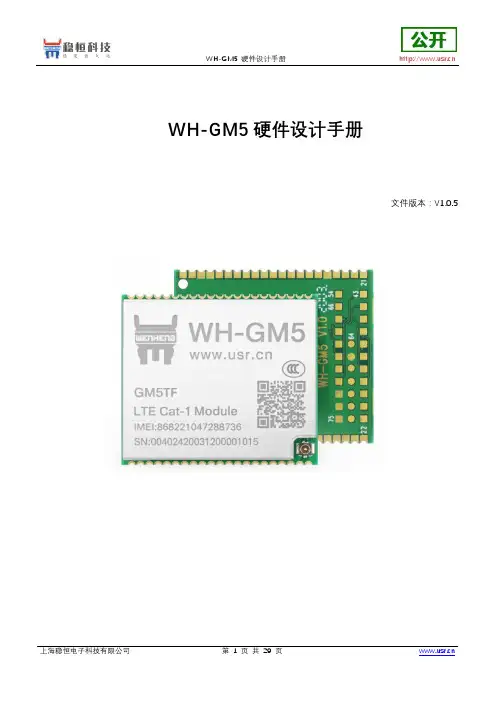
WH-GM5硬件设计手册文件版本:V1.0.5目录1. 关于文档 (3)1.1. 文档目的 (3)1.2. 安全警告 (3)1.3. 产品外观 (4)1.4. 参考文档列表 (4)2. 产品简介 (5)2.1. 基本参数 (5)2.2. 模块应用框图 (6)2.3. 引脚定义 (7)2.4. 开发套件 (10)3. 硬件参考设计 (11)3.1. 外围电路框架参考 (11)3.2. 电源接口 (11)3.2.1. 主电源输入: VBAT (11)3.2.2. 参考电平输出:V_PAD,VDD_1V8 (13)3.3. USB接口 (13)3.4. UART接口 (14)3.5. SIM接口 (16)3.6. 工作状态指示 (17)3.7. RESET引脚 (19)3.8. RELOAD引脚 (19)3.9. PWRKEY引脚 (20)3.10. RF接口 (20)4. 电气特性 (22)4.1. 工作存储温度 (22)4.2. 输入电源 (22)4.3. 模块IO口电平 (22)4.4. IO驱动电流 (23)4.5. ESD防护等级 (23)5. 机械特性 (24)5.1. 回流焊建议 (24)5.2. 外形尺寸 (24)6. 联系方式 (27)7. 免责声明 (28)8. 更新历史 (29)1.关于文档1.1.文档目的本文档描述了WH-GM5/WH-GM5TF模块的硬件应用接口,包括相关应用场合的电路连接以及射频接口等。
WH-GM5是2G+Cat1模块,WH-GM5TF是单Cat1模块增加了内置WiFi/蓝牙功能,本文档将详细介绍WH-GM5模块的所有功能。
本文档可以帮助用户快速的了解WH-GM5/WH-GM5TF模块的接口定义、电气性能和结构尺寸的详细信息。
结合本文档和其他的WH-GM5/GM5TF模块的应用文档,用户可以快速的使用GM5来设计移动通讯应用方案。
1.2.安全警告在使用或者维修任何包含GM5模块的终端或者手机的过程中要留心以下的安全防范。
905中文说明书

3.3 3.3.1 3.3.2 3.3.3
连接 MSB 设备 ..................................................................... 12 连接配液器 .......................................................................... 13 连接搅拌器或滴定台 ........................................................... 13 安装遥控盒 .......................................................................... 14
8.4 电磁兼容性(EMC) ............................................................ 34
8.5 环境温度 ............................................................................... 34
905 Titrando
■■■■■■■■ III
目录
■■■■■■■■■■■■■■■■■■■■■■
3.5.6 连接 iConnect ....................................................................... 23 3.5.7 电位差计 .............................................................................. 24
九芯电子科技 N930x MP3模块使用说明书

Guangzhou nine chip electron technology co.,Ltd网址:广州市九芯电子科技有限公司使用说明书N930x MP3解码芯片(包括N9300,N9301,N9302,N9303使用手册)N930x芯片选型一览表型号封装按键UART串口一线串口SPI FLASH U盘USB下载TF卡格式备注N9300SOP16X√√√√√X MP3,WAV外挂flash N9301SOP16X√√X√√√MP3,WAV外挂TF卡N9302SOP16ADKEY X X√√√X MP3,WAV外挂flash N9303SOP16ADKEY X X X√√√MP3,WAV外挂TF卡备注:x代表不支持。
√代表支持。
文档版本V1.5发布日期2021.5.20Guangzhou nine chip electron technology co.,Ltd网址:历史版本说明版本号日期修改记录V1.02021.04.19初次编制V1.42021.05.07修改了电路原理图,解决断字问题,修改了芯片封装尺寸图V1.52021.05.20加入历史版本说明,完善指定路径说明Guangzhouninechipelectrontechnology co.,Ltd网址:备注:1、图片仅供参考,请以实物为准,九芯公司保留对产品外观及设计改进的权利,恕不另行通知。
2、广州市九芯电子为客户提供全方位的技术支持,客户可与就近的九芯电子办事或者代理机构联系,也可直接与公司总部电话联系。
3、本手册的最终解释权归广州市九芯电子科技有限公司所有。
绿色通道消费者全国服务热线:4008-616-826服务QQ:980154908服务邮箱:***************地址:广州市天河区棠下街道广棠西路8号F栋3楼楼1楼楼楼Guangzhou nine chip electron technology co.,Ltd网址:目录历史版本说明 (2)1.概述 (5)1.1简介 (5)1.2特征 (5)1.3应用场合 (6)2.芯片使用参数 (7)2.1芯片结构图 (7)2.2电路参数 (7)3.芯片管脚图与管脚说明 (8)3.1芯片管脚图 (8)3.1.1N9300芯片管脚说明 (8)3.1.2N9301芯片管脚说明 (9)3.1.3N9302芯片管脚说明 (9)3.1.3N9303芯片管脚说明 (10)3.2模块管脚说明 (10)3.2.1N9300模块、N9301模块管脚说明 (10)4.文件命名以及控制方式说明 (11)4.1ADKEY按键控制 (11)4.2MCU一线串口控制 (13)4.3文件排列与命名规则 (15)4.3.1一线串口时序 (15)4.3.2程序范例 (15)4.4UART串口通信协议 (16)4.4.1.通信数据格式: (16)4.4.2.容错要求: (17)4.4.3.协议约定: (17)5.4.4CMD通信指令控制列表(16进制) (18)5芯片参考电路图 (25)5.1N9300电路参考图 (25)5.2N9301电路参考图 (25)5.3N9302电路参考图 (26)5.4N9303电路参考图 (26)6.模块及芯片封装尺寸图 (27)7.文件夹路径格式说明及校验码的算法 (28)7.1文件夹路径要求 (28)7.2校验和计算方法 (30)8.注意事项 (31)8.1GPIO特性 (31)8.2应用中的注意事项 (31)8.3串口操作 (32)8.3.1串口操作需要延时的注意事项 (32)Guangzhou nine chip electron technology co.,Ltd网址:8.3.2串口编程参考的说明 (33)8.3.3串口编程需要适当延时的注意点 (33)9.免责声明 (33)9.1开发预备知识 (33)9.2EMI和EMC (33)9.3修改文档的权力 (33)9.4ESD静电放点保护 (33)1.概述1.概述1.1简介N930X是一个提供串口的MP3芯片,完美的集成了MP3、WAV的硬解码芯片。
语音模块使用说明书

语音模块使用说明书V1.1(型号:YL07)秦皇岛千目电子有限公司电话:************/3250825传真:************地址:河北省秦皇岛市海港区和平大街和平E站1.产品特性 (3)2.产品图片、接口介绍及典型应用示意图 (4)42.1产品外形和接口图片..................................................................................................................................................................................................................442.2接口介绍..........................................................................................................................................................................................................................................................442.2.1左侧8P 蓝色端子........................................................................................................................................................................................................442.2.2右侧4P 蓝色端子........................................................................................................................................................................................................442.2.3 3.5音频输出..................................................................................................................................................................................................................442.2.4右侧2P 蓝色端子.. (4)42.3产品尺寸图 (4)42.4七路按键控制放音接线示意图..................................................................................................................................................................................553.语音录制过程................................................................................................................................................................................................................................................................553.1准备音频文件..........................................................................................................................................................................................................................................553.1.1打开一个任意格式音频文件....................................................................................................................................................................663.1.2另存文件 (6)63.1.3选择另存格式 (6)63.2音频文件存储到指定目录..................................................................................................................................................................................................773.3连接好硬件设备..................................................................................................................................................................................................................................773.4软件录音..........................................................................................................................................................................................................................................................883.4.1连接设备....................................................................................................................................................................................................................................883.4.2连续录音..................................................................................................................................................................................................................................883.4.3放音测试 (9)93.5软件设置参数 (9)93.5.1设置485的波特率和设备ID ID (9)93.5.2设置触点信号采集方式..................................................................................................................................................................................994.放音应用............................................................................................................................................................................................................................................................................10104.1触点触发方式......................................................................................................................................................................................................................................10104.1.1闭合播放一次..............................................................................................................................................................................................................10104.1.2闭合循环播放.. (10)104.1.3断开播放一次 (10)104.1.4断开循环播放................................................................................................................................................................................................................10104.1.5触点变化播放................................................................................................................................................................................................................10104.1.6矩阵键盘.. (10)104.2RS485通讯触发方式 (11)4.2.1RS485连接控制示意图........................................................................................114.2.2通讯协议 (11)5.性能参数 (11)6.1注意事项 (11)6.1.1音频输出接口.......................................................................................................116.1.2 3.5音频输出接口.. (11)6.2常见问题......................................................................................................................................................................................................................................................12126.2.1录音是软件连接不上.. (12)126.2.2录音软件按钮不可用 (12)126.2.3RS485转换器导致软件连接不正常........................................................................................................................................12127.技术支持及联系方式 (12)12语音模块使用说明书(型号:YL07)YL07语音模块是基于YS07型语音模块改版型号。
华擎A55M-HVS主板说明书
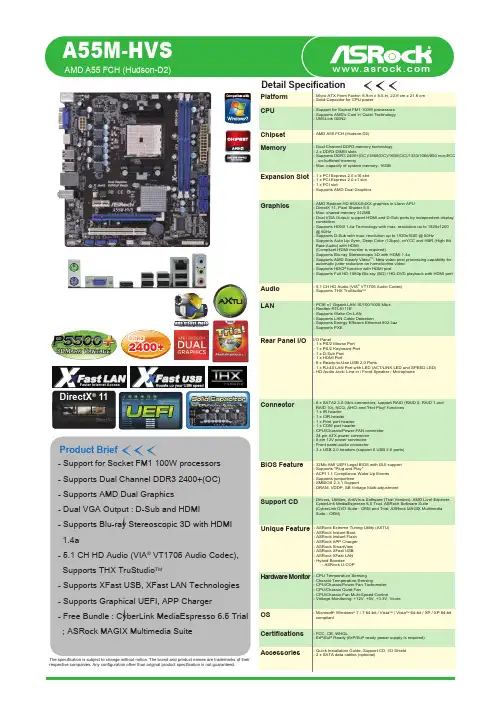
Detail SpecificationProduct BriefCPU MemoryExpansion SlotGraphicsAudio LANRear Panel I/OConnectorBIOS FeatureSupport CDAccessoriesHardware MonitorOSCertifications The specification is subject to change without notice. The brand and product names are trademarks of their respective companies. Any configuration other than original product specification is not guaranteed.Chipset Platform - Support for Socket FM1 100W processors - Supports Dual Channel DDR3 2400+(OC)- Supports AMD Dual Graphics - Dual VGA Output : D-Sub and HDMI- Supports Blu-ray Stereoscopic 3D with HDMI 1.4a- 5.1 CH HD Audio (VIA ® VT1705 Audio Codec), Supports THX TruStudio TM- Supports XFast USB, XFast LAN Technologies - Supports Graphical UEFI, APP Charger- Free Bundle : CyberLink MediaEspresso 6.5 Trial ; ASRock MAGIX Multimedia Suite- Micro ATX Form Factor: 8.9-in x 8.5-in, 22.6 cm x 21.6 cm - Solid Capacitor for CPU power- Support for Socket FM1 100W processors - Supports AMD's Cool 'n' Quiet Technology - UMI-Link GEN2- AMD A55 FCH (Hudson-D2)- Dual Channel DDR3 memory technology - 2 x DDR3 DIMM slots- Supports DDR3 2400+(OC)/1866(OC)/1600(OC)/1333/1066/800 non-ECC , un-buffered memory- Max. capacity of system memory: 16GB - 1 x PCI Express 2.0 x16 slot - AMD Radeon HD 65XX/64XX graphics in Llano APU - DirectX 11, Pixel Shader 5.0- Max. shared memory 512MB- Dual VGA Output: support HDMI and D-Sub ports by independent display controllers- Supports HDMI 1.4a Technology with max. resolution up to 1920x1200 @ 60Hz- Supports D-Sub with max. resolution up to 1920x1600 @ 60Hz- Supports Auto Lip Sync, Deep Color (12bpc), xvYCC and HBR (High Bit Rate Audio) with HDMI(Compliant HDMI monitor is required)- Supports Blu-ray Stereoscopic 3D with HDMI 1.4a- Supports AMD Steady Video : New video post processing capability for automatic jutter reduction on home/online video - Supports HDCP function with HDMI port- Supports Full HD 1080p Blu-ray (BD) / HD-DVD playback with HDMI port - 5.1 CH HD Audio (VIA VT1705 Audio Codec)- PCIE x1 Gigabit LAN 10/100/1000 Mb/s - Realtek RTL8111E- Supports Wake-On-LAN- Supports LAN Cable Detection- Supports Energy Efficient Ethernet 802.3az - Supports PXEI/O Panel- 6 x SATA2 3.0 Gb/s connectors, support RAID (RAID 0, RAID 1 and RAID 10), NCQ, AHCI and "Hot Plug" functions - 1 x IR header - 1 x CIR header- 1 x Print port header - 1 x COM port header- CPU/Chassis/Power FAN connector - 24 pin ATX power connector - 8 pin 12V power connector - Front panel audio connector- 3 x USB 2.0 headers (support 6 USB 2.0 ports)- 32Mb AMI UEFI Legal BIOS with GUI support - Supports "Plug and Play"- ACPI 1.1 Compliance Wake Up Events - Supports jumperfree - SMBIOS 2.3.1 Support- DRAM, VDDP, SB Voltage Multi-adjustment- Drivers, Utilities, AntiVirus Software (Trial Version), AMD Live! Explorer, CyberLink MediaEspresso 6.5 Trial, ASRock Software Suite(CyberLink DVD Suite - OEM and Trial; ASRock MAGIX Multimedia Suite - OEM)- CPU Temperature Sensing - Chassis Temperature Sensing- CPU/Chassis/Power Fan Tachometer - CPU/Chassis Quiet Fan- CPU/Chassis Fan Multi-Speed Control- Voltage Monitoring: +12V, +5V, +3.3V, Vcore- Microsoft Windows 7 / 7 64-bit / Vista / Vista 64-bit / XP / XP 64-bit compliant- FCC, CE, WHQL- ErP/EuP Ready (ErP/EuP ready power supply is required)- Quick Installation Guide, Support CD, I/O Shield - 2 x SATA data cables (optional)AMD A55 FCH (Hudson-D2)Unique Feature- ASRock Extreme Tuning Utility (AXTU)- ASRock Instant Boot - ASRock Instant Flash - ASRock APP Charger - ASRock SmartView - ASRock XFast USB - ASRock XFast LAN - Hybrid Booster:- ASRock U-COPA55M-HVSDirectX ® 11T r i a lFaster Internet AccessDDR32400+Gra Other A55 MotherboardConfigurationModel ASRock A55M-HVS Chipset Hudson D2CPU AMD A8-3850 2.9 GHzRAM Kingston DDRIII 2250 2GB*2VGA Card ATI HD 6600HDDWestern Digital WD6402AAEXOther A55 Motherboard Hudson D2AMD A8-3850 2.9 GHzKingston DDRIII 2250 2GB*2ATI HD 6600Western Digital WD6402AAEX* Graphical Visual Experience * Mouse Enabling* Supports 3TB bootable HDDThe fastest video media conversation softwareT r i alMediaEspresso6.5 TrialASRock Extreme Tuning Utility (AXTU) is anall-in-one software to fine-tune different features inan userfriendly interface, which includes HardwareMonitor, Fan Control, Overclocking, OC DNA andIES.AXTU MAGIX MultimediaSuiteThe ultimate solutions to enhance your mediaexperience. From music management, musiccreation, video editing to photo management.Simply do more with your media than youever thought possible.You can configure your application priority ideallyand/or add new programs.You can watch Youtube HD video and download filesThe best Apple charge companionApp Charger New Video Post ProcessingCapability : automatic jitter reductionon home/online video.Before AfterUSB 2.0 Benchmark。
SMSL A50-说明书.pdf

/使用说明书A5O本说明书的内容可能会随版本更改,如有变动,恕不另行通知Ver 1.0请将设备安装在通风良好、阴凉、干燥、干净的位置,远离直射阳光热源、振动、灰尘、 潮湿或寒冷。
只能使用本机指定的电压。
使用高于指定数值的电压很危险,而且可能导致火灾,损坏本机或造成人身伤害。
对于使用高于指定电压造成的任何损害,我司将不负任何责任。
不要试图自行改造或修理本机。
如果需要任何服务,请与销售或者我司客服人员联系。
不管有任何理由,都没有打开机壳的必要。
如果打算长时间不使用本机(比如度假时),请从墙壁交流电源插座上断开电佛山双木三林科技有限公司承诺产品的良好品质,产品自售出之后7天内 正常使用情况下出现故障,客户可以选择退货或者保修(不影响二次销售 才可退货)。
正常使用一年内出现故障可以免费保修。
二、购买日期以销售商开出的购机发票或收据日期为准,网购可以交易截图为准。
三、有以下情况都不能享受“三包”服务1.一切人为因素损坏,包括非正常工作环境下使用或不按照说明书使用。
2.用户私自拆机、改装、维修。
3.使用非指定或许可的配件造成损坏的。
4.机身的QC或保修贴损毁。
5.不能出示有效购机凭证。
6.不属于本公司产品。
四、保修方式为送修此条款只适于中国大陆,其它地区请参考当地销售代理商的规定和国家法规。
使用2片美国TI大功放数字放大芯片TPA3116。
新的蓝牙5.0技术, 兼具低功耗和高音质。
电子音量控制, 杜绝电位器调音量时的杂音。
具备音效调节, 高低音单独可调。
具备pop声控制电路,开关机没有pop声。
大功率电源适配器, 适配音频的动态响应。
极致的小体积, 放置更加灵活。
配备全功能高品质遥控器。
使用环境有其它WiFi 2.4G、蓝牙设备,容易产生干扰,可能导致连接不成功,或者声音卡顿、甚至播放中断。
蓝牙还会因距离太远或受到阻挡物(如墙壁)阻隔而影响有效传输, 建议一般无障碍直线距离为8-10米左右。
部分安卓移动设备,可能存在蓝牙不完全兼容的情况,而导致不能正常放,请使用前确认手机不存在兼容性问题。
GAC 电子调速器 EDG5500 说明书(北京京城科丰国际贸易有限公司-中国区大客户代理)
•
(起动终止转速,单位:RPM)
•
(指令转速,单位:RPM)
图1 用户界面
使用键盘和 LCD
• 数字区显示所选参数或实时运行参 数的值。字母区显示参数的单位( 例如,1800 RPM)。
• 当 EDG 运行时,字母区的默认状 态为显示发动机当前转速,柱状图 表示燃料阀位置。EDG 也可以显 示燃料阀位置,而在柱状图上表示 指令转速与实际转速之间的差值。
ON 旋钮最小位置代表的转 旋钮最大位置代表的转 速(例:1000RPM) 速(例:2000RPM)
本文内容如有改动,恕不另行通知 注意:此GAC产品尚未取得可用于航空控制系统的验证证明。
3
PIB4145 A
Quikset菜单各参数详解
超速保护:当转速超过这个预设值,执 行器自动关闭
(单位:RPM) 范围:500-9999 出厂默认值:2250
超速保护
当EDG5500检测到发动机已达到
参数所设
定的速度时,EDG会控制转速回到 0RPM,并设定执行
器输出为0V。
是一个Quikset参数,用RPM
表示。
显示形式
1 2
3
主显示区
柱状图
发动机转速(RPM) 燃料阀位置(%),每格 5%
燃料阀位置(%)
发动机转速与指令转速间的差, 每格 5RPM
执行器电流(安)
如果需要返回到Quikset参数,同时按下并按住三个 COLUMN键2秒。
如果需要改变Special菜单中的参数值,按下或按住上调 键可增加参数值,按下或按住下调键可减小参数值。
按第三个COLUMN键选择下一个参数。按第一个 COLUMN键选择上一个参数。
Advanced-高级菜单
FOXX A55智能手机用户指南说明书
Manuals+— User Manuals Simplified.FOXX A55 Smartphone User GuideHome » FOXX » FOXX A55 Smartphone User GuideFOXX A55 SmartphoneContents1 Product Safety Information2 What’s in the Box3 Getting to Know Your Phone4 Before Getting Started5 Basic Settings5.1 Network and Internet6 Technical Specifications7 SAR Information Statement8 FCC Declaration ofConformity9 FCC Warning10 Documents / Resources11 Related PostsProduct Safety InformationDo not use while re-charging.Do not use hand-held while driving.This device may produce a bright or flashing light.For body-worn operation maintain a separation of 5 mm.Do not dispose of the phone in a fire.Small parts may cause a choking hazard.Avoid contact with magnetic media.This device may produce a loud sound.To prevent possible hearing damage, do not listen at high volume levels for long periods.Avoid extreme temperatures.Keep away from pacemakers and other personal medical devices.Avoid any contact with liquid. Keep it dry.Switch off when instructed in hospitals and medical facilities.Do not attempt to disassemble your phone.Switch off when instructed in aircrafts and airports.Do not rely on this device for emergency communications.Switch off in explosive environments.Only use approved accessories.What’s in the BoxThe phone packaging box should contain the following items and accessories:Phone, Battery, Charger, Headset, USB cable, Phone case and Quick Start GuideNotices for the Use of Your PhoneYour phone should be treated with care. The following suggestions can help you extend the life of your mobile phone.1. Place the mobile phone and its parts and components out of reach of young children.2. Keep the phone dry. Rain, humidity and all types of liquids which contain minerals will corrode electroniccircuits.3. Don’t touch the phone with wet hands when charging, it will cause an electric shock or damage the phone.4. Avoid placing the device in high temperature environments. High temperatures can shorten the life of electronicdevices, damage batteries, and warp or melt certain plastics.5. Avoid placing the device in a low temperature environment. When the temperature rises, the phone willproduce water vapor that may damage electronic circuits.6. Avoid placing the phone in dusty, dirty places, otherwise parts may be damaged.7. Avoid placing the phone near a lit cigarette, open flame or any heat source.8. Do not drop, knock or shake the phone. Rough handling can damage internal circuit boards.9. Do not paint the phone. The paint may block headphones, microphones or other removable parts, and causethem not to work.10. Use a clean, soft, dry cloth to clean the camera, light sensor lenses. Prohibit the use of harmful chemicals andcleaning agents to clean the phone.11. Pacemaker manufacturers recommend that a minimum separation of 5 mm be maintained between a mobilephone and a pacemaker to avoid potential interference with the pacemaker(when the device is used in the USA. the separation distance can be maintained at 10mm between the user’s body and the handset.). To achieve this use the phone on the opposite ear to your pacemaker and do not carry it in a breast pocket.12. Please consult your doctor and the device manufacturer to determine if operation of your phone may interferewith the operation of your medical device.13. Tum off your mobile phone or wireless device when in a blasting area or in areas posted tum off “two-wayradios” or “electronic devices” to avoid interfering with blasting operations.14. There is a risk of explosion if the battery is replaced with an incorrect type. Dispose of used batteries accordingto the instructions.Getting to Know Your PhonePower KeyInstalling the SIM CardInstalling the BatteryInstalling a microSD Card (Not Included)NOTE: Some applications may require a microSD card to work normally or may store certain data on it. Therefore, it is recommended that you keep a microSD card installed and not remove or replace it randomly.Wi-FiSwipe Wi-Fi to right to switch on WiFi. Once it’s on, it will search for available WiFi networks automatically. Check whether the network has a password. Network without a password can be used directly, for others you will need to enter the password to use.Note: Wi-Fi will switch off automatically when the phone is changed to flight mode, even if WiFi is on. Switch on Connected devicesBluetoothDisplayBrightnessBrightness level: Adjust the screen bright less.SystemLanguages and inputYou can set up all the languages supported by the phone.Keyboards: You can set On-screen keyboard and Physical keyboard.Date and timeSet time automatically: Swipe right to use date and time provided by network.Time Zone: You can choose to use time zone provided by network or use location to set time zone.Time format: You can choose to use local default time format or to use 24-hour format.About phoneHere you can check out basic information including:Device name, phone number, local software update, and device details including SIM status, Model, RAM, IMEI, Android version, IP address, Wi-Fi MAC address, Device Wi-Fi MAC address, Bluetooth address, Uptime, Build(*): The storage capacity actually available in the unit’s internal memory may be less due to the preloaded operating system and I or other pre- installed or configured applications. Check the space actually available on your computer.SAR Information StatementThe SAR limit of USA (FCC) is 1.6 W/kg averaged over one gram of tissue. Device types: smart phone (FCC ID: 2AQRM-A55 ) has also been tested against this SAR limit. The highest SAR value for this mobile phone tested is 0.988W/kg against the head and 0.446W/kg at 10 mm from the body.FCC Declaration of ConformityThis device complies with part 15 of the FCC Rules.Operation is subject to the following two conditions: (1) This device may not cause harmful interference, and (2) this device must accept any interference received, including interference that may cause undesired operation. Any Changes or modifications not expressly approved by the party responsible for compliance could void the user’s authority to operate the equipmentUse the smartphone in the environment with the temperature between -10″C and 45″CUse the earphone carefully. Excessive sound pressure from earphones and headphones can cause hearing loss.The product shall only be connected to a USB interface of version USB2.0CAUTION: RISK OF EXPLOSION IF BATTERY IS REPLACED BY AN INCORRECT TYPE. DISPOSE OF USED BATTERIES ACCORDING TO THE INSTRUCTIONS.Manufacturer: Foxx Development Inc.,3480 Preston Ridge Road, Suite500, Alpharetta, GAInformation for auxiliary equipmentBatteryModel:A55Power Rating:7.6 WhManufacturer:Phenix New Energy (Huizhou) Co., LtdAddress of Manufacturer:Building 1-5,ZhiRong Industrial Park, TangJing Group, BaiShi Village, QiuChang Street, Huiyang District,Huizhou City ChinaWEEE Recycling:This product should not be treated as household waste, instead it should be handed over to the applicable collection point for the recycling of electrical and electronic equipment.Operation frequency2412MHz-2472MHz for (802.11 b/802.11g/802.11 n(HT20)) WIFI Max power(2.4G)16.4dBm(EIRP)BT/BLEOperation Frequency2402MHz-2480MHzGSMOperation Frequency GSM 850TX:824-849MHz;RX:869-894MHz GSM 900TX:880-915MHz;RX:925-960MHzDCS 1800TX:1710-1785 MHz;RX:1805- 1880MHz PCS 1900TX:1850-1910MHz;RX:1930-1990MHzWCOMAOperation Frequency Band 2:TX 1852-1908MHz; RX 1932-1988MHzBand 4:TX 1712-1753MHz; RX 2112-2153MHzBand 5:TX 826-847MHz; RX 871-892MHzLTEOperation Frequency Band 2:TX:1850-1910MHz; RX:1930-1990MHzBand 4:TX:1710-1760MHz; RX:2110-2155MHzBand 5:TX:824-849MHz; RX:869-894MHzBand 7:TX:2500-2570MHz; RX:2620-2690MHzBand 12:TX:699-716MHz; RX:729-746MHzBand 17:TX:704-716MHz; RX:734-746MHzBand 41 :TX:2496-2690MHz RX:2496-2690MHzBand 66:TX: 1710-1780MHz RX:2110-2180MHzBand 71 :TX:663-698MHz; RX:617-652MHzOperation Frequency87.5MHz-108MHz GPS/GLONASSOperation Frequency L 1, 1559MHz-1610MHz R1, 1559MHz-1610MHzGoogle and Android are trademarks of Google LLC.FCC WarningThis device complies with part 15 of the FCC Rules. Operation is subject to the following two conditions: (1) This device may not cause harmful interference, and (2) this device must accept any interference received, including interference that may cause undesired operation.Any Changes or modifications not expressly approved by the party responsible for compliance could void the user’s authority to operate the equipment.Note: This equipment has been tested and found to comply with the limits for a Class B digital device, pursuant to part 15 of the FCC Rules. These limits are designed to provide reasonable protection against harmful interference in a residential installation. This equipment generates uses and can radiate radio frequency energy and, if not installed and used in accordance with the instructions, may cause harmful interference to radio communications. However, there is no guarantee that interference will not occur in a particular installation. If this equipment does cause harmful interference to radio or television reception, which can be determined by turning the equipment offand on, the user is encouraged to try to correct the interference by one or more of the following measures: Reorient or relocate the receiving antenna.Increase the separation between the equipment and receiver.Connect the equipment into an outlet on a circuit different from that to which the receiver is connected.Consult the dealer or an experienced radio/TV technician for help.Specific Absorption Rate (SAR) information:This Smart phone meets the government’s requirements for exposure to radio waves. The guidelines are based on standards that were developed by independent scientific organizations through periodic and thorough evaluation of scientific studies. The standards include a substantial safety margin designed to assure the safety of all persons regardless of age or health.FCC RF Exposure Information and StatementThe SAR limit of USA (FCC) is 1.6 W/kg averaged over one gram of tissue. Device types: Smart phone (FCC ID:2AQRM-A55) has also been tested against this SAR limit. The highest SAR value reported under this standard during product certification for use at the ear is 0.988W/kg and when properly worn on the body is 0.446W/kg. This device was tested for typical body-worn operations with the back of the handset kept 10mm from the body. To maintain compliance with FCC RF exposure requirements, use accessories that maintain a 10mm separation distance between the user’s body and the back of the handset. The use of belt clips, holsters and similar accessories should not contain metallic components in its assembly. The use of accessories that do not satisfy these requirements may not comply with FCC RF exposure requirements, and should be avoided.Body-worn OperationThis device was tested for typical body-worn operations. To comply with RF exposure requirements, a minimum separation distance of 10mm must be maintained between the user’s body and the handset, including the antenna. Third-party belt-clips, holsters, and similar accessories used by this device should not contain any metallic components. Body-worn accessories that do not meet these requirements may not comply with RF exposure requirements and should be avoided. Use only the supplied or an approved antenna.Documents / ResourcesFOXX A55 Smartphone [pdf] User Guide2AQRM-A55, 2AQRMA55, A55, A55 Smartphone, Smartphone Manuals+,。
A55使用说明书2.doc
使用之前(重要)警告小部件应存放在儿童和婴儿触及不到的地方。
如果不小心吞食,请立即就医。
警告本装置不具备防水性。
为防止火灾或触电事故,请勿将任何装有液体的窗口安放在本装置附近,或将其暴露于滴水、飞溅、雨或湿气之中。
关于电源适配器注意事项❖从电源插座上拔下电源适配器时,请握紧适配器。
如果您拉拽电源线,可能造成损坏,导致火灾或触电。
❖请将电源适配器保存在婴幼儿接触范围之外。
❖请勿用湿手挺拔电源适配器。
可能造成触电。
❖如果将电源适配器插上电源插座后依然松垮不牢,则请勿使用该插座.否则可能引起发热,导致火灾。
关于设备❖在下列情况下,请不要使用本设备:设备发出异常气味、设备变热、设备的颜色或形状改变、使用期间发生其它异常情况时。
❖不要将本设备置于高温、高湿处,因为这样可能会使设备过热或短路导致损坏。
关于防水请遵循以下与设备的抗水性相关的防护措施:❖不要将本装置放入水中或将水泼溅在本装置上。
❖确保将本装置安置在平稳的表面上。
不要以上端朝下或倾斜的方式使用本装置.❖当本装置已接触到水,请彻底擦干本装置主体上可能已进水的所有缺口.❖接近水时,请不要使用电源适配器。
※即使发生在保修期之内,由于使用不当遭受水损而导致的故障不在产品保修涵盖范围内。
注意一、感谢您选择泊声出品的背景音乐产品,在使用产品之前,请认真阅读本说明书,以了解本机的正确操作方法.阅读完毕后,请妥善保存说明书,以备日后参考。
二、本说明书所涉及的内容改变时,恕不另行通知,以产品实物为准.如有需要,可到泊声网站()查询。
目录2。
1. 产品特点及功能ﻩ错误!未定义书签。
2.2。
主机功能键介绍ﻩ错误!未定义书签。
2.2.1.主机系统功能设置说明ﻩ错误!未定义书签。
2。
3. 纯触摸控制面板使用说明ﻩ错误!未定义书签。
2.3.1.产品特点ﻩ错误!未定义书签。
2。
4.标准控制面板使用说明ﻩ错误!未定义书签。
3.系统安装说明ﻩ错误!未定义书签。
3.1. 喇叭选型及安装............................................................................ 错误!未定义书签。
科大讯飞 XF-S3011中文语音合成芯片 数据手册
XF-S3011 数据手册
版本历史
版 本 Rev1.0 Rev1.1 日 期 2004-12-22 2005-5-11 修改记录
完成本手册第一版 强调音频电路设计的注意事项
作 者
科大讯飞 科大讯飞
声
明
本产品数据手册由安徽中科大讯飞信息科技有限公司版权所有, 未经许可, 任何单位和 个人都不得以电子的、机械的、磁性的、光学的、化学的、手工的等形式复制、传播、转录 和保存该出版物,或翻译成其他语言版本。一经发现,将追究其法律责任。 科大讯飞保证本手册提供信息的准确性和可靠性, 但并不对文本中可能出现的文字错误 或疏漏负责。科大讯飞保留更改本手册的权利,如有修改,恕不相告。请在订购时联系我们 以获得产品最新信息。 对任何用户使用我们产品时侵犯第三方版权或其他权利的行为科大讯 飞概不负责。另外,在讯飞未明确表示产品有该项用途时,对于产品使用在极端条件下导致 一些可预见失灵或损毁而造成的损失概不负责。
7.
控制命令..................................................................................................................................... - 6 7.1 7.2 7.3 7.4
芯片封装形式........................................................................................................................... - 13 外观 ...................................................................................................................................- 13 引脚定义 ...........................................................................................................................- 13 装配图 ...............................................................................................................................- 15 电气特性 .............................................................................................................................. - 16 极限参数 ...........................................................................................................................- 16 直流特性 ...........................................................................................................................- 16 -