
富士通高速图像扫描仪fi6130Z技术规格
性能简述
富士通fi-6130Z是一款ADF双面彩色图像扫描仪(USB2.0接口),在同类产品中,性能更优。
它所具有的高效,多功能和高可靠的特点,为富士通用户的未来工作提供高效的解决方式。
∙同类产品中,性能更优
o彩色灰度/黑白:40ppm/80ipm(A4,200dpi300dpi)
o连续扫描50张不同厚度和尺寸的混合文档。
o一次可扫描3张塑料卡片。
∙具备多种“智能”功能,扫描更高效
o智能多页进纸检测,更人性化,方便准确。
o自动删除图像中的打孔区域。
o自动识别彩色/黑白,自动识别大小,自动纠偏功能。
o自动裁剪功能:可扫描附有标签的纸张。
∙ScandAll PRO V2.0提供强大的图像处理功能
o图像浏览、文件归档同步进行。
o进行插入/删除等缩略图管理操作。
输出图像一分为二
o一键中英文OCR输出至Office Word或Ecxel。
o通过条码/补码识别来分隔工作。
o生成高压缩的PDF文件,并对PDF文件进行密码保护。
o输出多种格式的图像:Bmp Tif,多页Tif,jpg,jpg2000,pdf,单页pdf, pdf/a,单页pdf/a。
o扫描后的图像发送至FTP、e-mail,Microsoft SharePoint Server,或保存、打印。
其它
o扫描加长纸张达3048mm。
o ADF可选黑/白扫描背景。
o USB2.0接口,方便与其它PC设备连接。
o标准的TWAIN & ISIS驱动程序。
o捆绑Adobe Acrobat(标准版)。
o支持Windows Vista操作系统。
富士通文件扫描仪FI-7240说明书

The essential fi Series scanner with exceptional business performance.40Pages per minute DuplexScans bothsidesSizes up toLegal8.5” x 14” max.ScansPlastic CardsFlat andembossed600Optical DPI24-bit ColorAcceptsSticky NotesTapedReceiptsLabelsTWAIN& ISIS®SupportedProfessional workgroupdocument scannerTechnical Specifi cationsDocument feeding methodsAutomatic Document Feeder (ADF)FlatbedScanning modes Simplex/Duplex in Color, Grayscale, or MonochromeImage sensor type Color Charge-Coupled Device (CCD) x 3(Front x 1, Back x 1, Flatbed x 1)Light source White LED Array x 3 (Front x 1, Back x 1, Flatbed x 1)Multi-feed protection Ultrasonic multi-feed detection sensorPaper detection sensorPaper protectionLag detection Document sizeMinimum2.0” x 2.13” (50.8 x 54 mm)Maximum8.5” x 14” (216 x 355.6 mm)Long page scanning 18.5” x 220” (216 x 5,588 mm)Flatbed maximum8.5” x 11.7” (216 x 297 mm)Paper weightPaper 7.2 to 110 lb (27 to 413 g/m 2)Plastic cardUp to 1.4mm 2Scanning speed 3200 or 300 dpi, Letter, Color 4, Grayscale 4and Monochrome 5ADF, Simplex 40 pages/minute ADF, Duplex 80 images/minute Flatbed1.7 seconds (200 dpi)ADF capacity 680 Sheets (A4/Letter: 20 lb. or 80 g/m 2)Background colors ADF: White / Black (switchable)Flatbed: White (Black optional, sold separately)Output resolution 7Color (24-bit), Grayscale (8-bit), Monochrome (1-bit)50 to 600 dpi, 600 dpi optical, 1200 dpi software 8InterfaceUSB 2.0 / USB 1.1Power requirements 100 to 240 VAC, 50/60 Hz Power consumption Operating: 39 W or less Sleep mode: 1.8 W or lessAuto-standby (Off) mode: 0.35 W or lessOperating environmentTemperature 41° to 95°F (5° to 35°C)Relative humidity 20% to 80% (non-condensing) Dimensions (WxDxH) 911.8” x 22.7” x 9.2” (300 x 577 x 234 mm)Weight19.4 lb (8.8 kg)Included in the boxADF paper chute, AC cable & adapter,USB cable, Setup DVD-ROM Bundled software (DVD format)PaperStream IP (TWAIN/ISIS) Driver, WIA Driver 12,PaperStream Capture, ABBYY FineReader for ScanS-nap 10, Scanner Central Admin, Software OperationPanel, Error Recovery GuideEnvironmental designations 11ENERGY STAR®, RoHS, and EPEAT Silver Supported operating systemsWindows® 10 (32-bit/64-bit), Windows® 8.1 (32-bit/64-bit), Windows® 7 (32-bit/64-bit), Windows Server® 2019 (64-bit),Windows Server® 2016 (64-bit),Windows Server® 2012 R2 (64-bit),Windows Server® 2012 (64-bit), Windows Server® 2008 R2 (64-bit), Windows Server® 2008 (32-bit/64-bit)Linux (Ubuntu)12Image processing functionsMulti-image output, Auto color detection, Blank page detection, Dynamic threshold (iDTC), Advanced DTC, SDTC, Error diffusion, Dither, De-screen, Emphasis, Dropout color, sRGB output, Hole punch removal, Index tab cropping, Split image, De-skew, Edge fi ller, Vertical streak reduction, Cropping, Static threshold,Moire removal1 Can scan documents longer than A4 sheets. Documents longer than 34” require using lower resolution (200DPI or less) 2 Can scan up to 3 flat plastic cards or one embossed card at a time 3 Actual scanning speeds are affected by data transmission and software processing times 4 Using JPEG compression 5 Using TIFF CCITT Group 4 compression 6 Maximum capacity varies depending upon paper thickness 7 Selectable maximum density may vary depending on length of document 8 When scanning at high resolutions (600 dpi or higher), some limitations to document size may apply depending on system environment 9 Dimensions measured with machine closed to minimum positions. During operation, machine depth is increased by the ADF chute and output tray 10 Can be downloaded following instructions on Setup DVD-ROM 11 PFU Limited, a Fujitsu company, hasdetermined that this product meets the ENERGY STAR ® guidelines for energy efficiency and RoHS requirements (2005/95/EC) 12 Functions equivalent to those offered by PaperStream IP may not be available with the ImageScanner Driver for Linux and WIA DriverFujitsu Computer Products of America, Inc.1250 East Arques Avenue, Sunnyvale, CA 94085888.425.8228 Sales · 800.626.4686 Technical Support /fcpa·*****************.comThe essential business scanner▪Scans documents at up to 40 pages / 80 images per minute ▪Large-capacity 80-page Automatic Document Feeder ▪Letter-sized fl atbed for delicate and bound documents ▪Supports plastic and embossed cards ▪Scans long documents up to 220”Smart features to enable your workfl ow▪Scan documents of mixed paper sizes and weights all at once—no need to pre-sort ▪Doesn’t slow down when scanning in color at 300dpi▪Intelligent MultiFeed Function allows easy manual bypass for sticky notes, taped receipts, andlabels that can slow down batch scanning▪Ultrasonic Double Feed Detection identifi es sheets stuck together so you don’t miss an image ▪Skew Reduction signifi cantly improves feeding performance and ensures that your wholedocument gets accurately captured from edge to edge Clean up and optimize scans without changing settings in advancePaperStream IP (PSIP) is a TWAIN/ISIS ®-compliant driver with easy-to-use features including:▪Assisted Scanning lets you choose the best image cleanup through visual selection▪Advanced Image Cleanup corrects the toughest documents, including colored and decoratedbackgrounds, to improve OCR and reduce rescans▪Auto Color Detection identifi es the best color mode for the document ▪Blank Page Detection removes blank pages automatically▪Front and Back Merge places two sides of a page into one convenient imagePaperStream Capture makes scanning fast and easyEliminate the learning curve. PaperStream Capture’s user-friendly interface allows easy operation from start to fi nish. Changing scan settings is simple. Indexing and sorting features include barcode, patch code, and blank page separation —making batch scanning a breeze for operators.Centralized fl eet managementIncludes Scanner Central Admin Agent to remotely manage your entire fi Series fl eet. Effectively allocate your resources based on scan volume, consumables wear, and more.Make it even better with PaperStream Capture Pro Optional PaperStream Capture Pro software offerssuperior front-end capture, image processing, and options for enhanced data extraction and indexing for release.Popular Consumables and OptionsBrake Roller PA03670-0001Replace every 200,000 sheets or 1 year Pick Roller PA03670-0002Replace every 200,000 sheets or 1 yearBlack Flatbed Pad PA03670-D801Black fl atbed background pad PaperStream Capture ProPA43404-A665PaperStream Capture Pro workgroup licenseVisit to buy Genuine Fuijtsu Parts and Consumables©2019 Fujitsu Computer Products of America, Inc. All rights reserved. Microsoft, SharePoint, and Windows are trademarks of Microsoft Corporation. ISIS is a registered trademark of EMC Corporation. ABBYY , FineReader are trademarks of ABBYY Software Ltd. ENERGY STAR is a U.S. registered trademark. PaperStream is registered trademark of PFU Limited. All other trademarks are the property of their respective owners. Specifi cations subject to change without notice. Printed in USA on paper from responsible sources. Please recycle. 190331R1♼Insist on Genuine Fujitsu Service to keep your scanner running at its best. Ask your reseller or call 888.425.8228.。
扫描仪参数

明基K 明基K708 明基T 明基T880 明基Q 明基Q808 明基6800 明基6800 明基M 明基M208 明基F 明基F208 明基F 明基F700 明基1800 明基1800
富士通S1500 富士通S 富士通5110c 富士通5110c 5110 富士通 6125LA 富士通 6225LA 富士通6130 6130C 富士通6130C 富士通 fi6230 富士通 fi6140 富士通 fi6140 富士 fi5530CII 富士通 fi6750S 富士通f 富士通f6670 富士通 fi6770 富士通 M4099D 富士通 fi4990c 虹光V2100 虹光 虹光V5100 虹光 虹光AV2600 虹光 虹光AV AV710 虹光AV710 虹光AV121 虹光 虹光AV122 虹光 虹光AV610U 虹光 虹光AV2600 AV26 虹光AV26 虹光AV710 虹光
虹光 AV210C2 虹光 AV220C2 虹光 AV830C+ 虹光 AV3200SU 虹光AV AV3300 虹光AV3300 虹光 AV3750SU 虹光 AV3850SU 虹光 AV8050U 虹光AV8350 虹光 虹光AV320 虹光 虹光FB2100 虹光 虹光 FB2080E 虹光FB 虹光 6080E 虹光FB 虹光 6000U 虹光 FB2600C 虹光AV710 虹光 虹光AV830C 虹光 柯达i1120 柯达 柯达i40 柯达 柯达i1210 柯达 柯达i1220 柯达 柯达I1310 柯达 柯达I1320 柯达 柯达i150 柯达 柯达i160 柯达 柯达i1410 柯达 柯达i1420 柯达 柯达i1440 柯达 柯达i610 柯达 柯达i620 柯达 柯达i640 柯达 柯达i660 柯达
富士通图像扫描器FI-6670说明书
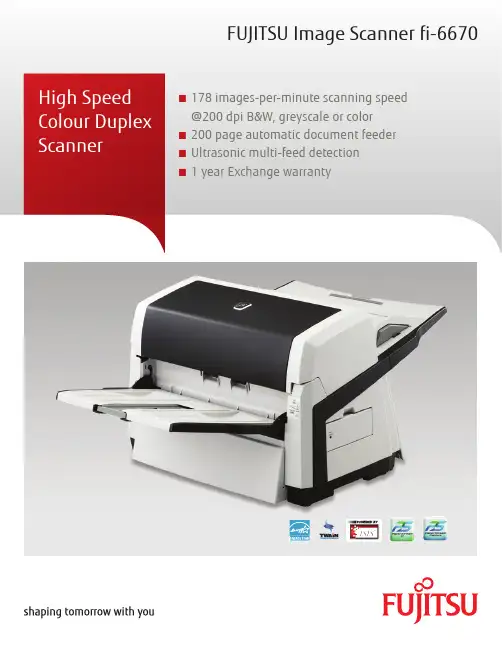
FUJITSU Image Scanner fi-6670■ 178 images-per-minute scanning speed@200 dpi B&W, greyscale or color■ 200 page automatic document feeder■ Ultrasonic multi-feed detection■ 1 year Exchange warrantyFujitsu and the Fujitsu logo are trademarks or registered trademarks of Fujitsu Limited. ABBYY™ FineReader™ Engine ©2011 ABBYY. OCR by ABBYY, ABBYY and FineReader are trademarks of ABBYY. Adobe, Acrobat are either registered trademarks or tradenames of Adobe Systems Incorporated in Canada and/or other countries. Evernote is a registered trademark or trademark of Evernote Corporation. Google, Google Docs, Android and Google Play are registered trademarks or trademarks of Google Inc. Intel, Pentium, and Intel Core are registered trademarks or trademarks of Intel Corporation in Canada and other countries. ISIS® is a registered trademark of EMC Corporation in Canada. Mac, Mac OS, OS X, iPad, iPhone and App Store are trademarks of Apple Inc. Microsoft, Windows, Windows Vista, Excel, PowerPoint, SharePoint and Internet Explorer are either registered trademarks or trademarks of Microsoft Corporation in Canada and/or other countries. Word is the product of Microsoft Corporation in Canada. Salesforce and Salesforce CRM are registered trademarks or trademarks of , inc. in Canada and other countries. ScanSnap, ScanSnap logo, ScanSnap Manager, ScanSnap Organizer, CardMinder and Rack2-Filer are registered trademarks or trademarks of PFU LIMITED in Japan. Wi-Fi and Wi-Fi Protected Setup are trademarks of Wi-Fi Alliance. Other company names and product names are the registered trademarks or trademarks of the respective companies.The statements provided herein are for informational purposes only and may be amended or altered by Fujitsu Canada, Inc. without notice or liability. Product description data represents Fujitsu design objectives and is provided for comparative purposes; actual results may vary based on a variety of factors. Specifications are subject to change without notice.Copyright ©2014 Fujitsu Canada, Inc. All rights reserved. FCI_14.0159FUJITSU Canada, InC.155 University Avenue, Suite 1600 Toronto, Ontario M5H 3B7 Telephone: 1-800-263-8716 Website: http://www.fujitsu.ca Haveaquestion?Emailusat:*********************.com/ca/en1) CGA board does not support Microsoft Windows 64 bit versions 2) Actual scanning speeds are affected by data transmission and software processing times 3) JPEG compressed figures 4) Maximum capacity varies, depending upon paper weight 5) You cannot use both SCSI and USB 2.0/1.1 interfaces at the same time 6) You cannot connect multiple computers to the scanner using each type of interface cables at the same time 7) Excluding the ADF paper chute and stacker 8) PFU Limited, a Fujitsu company, has determined that this product meets RoHS requirements (2005/95/EC) 9) The fi-6670 is capable of scanning the following documents that exceed A3 in length:- Documents not exceeding 863 mm (34”) in length at resolutions between 201 dpi and 400 dpi, and documents not exceeding 3048 mm (120”) in length at resolutions between 50 dpi and 200 dpi with TWAIN and ISIS™ (Long paper scanning does not support resolutions that exceed 400 dpi.)- Documents not exceeding 863 mm (34”) in length at resolutions of 300 dpi or lower with VRSSpeedy and versatileTransform your paper documents into useful electronic data in a flash with the Fujitsu fi-6670 production scanner. Image processing is made easy, with the ability tocontinuously scan 200 sheet documents containing paper of different weights, quality and sizes. The fi-6670 can even scan paper up to 3 m long enabling digitization of electrocardiograms, instrumental data readings and other long documents.“Intelligent” functions/design for efficient operationThe ability to adapt to different paper types is the key to a true batch document scanner. The fi-6670 comes loaded with features allowing the scanner to work autonomously. ■Intelligent multi-feed functionThe intelligent multi-feed function simplifiespre-scanning preparation and improves efficiency by identifying documents that tend to trigger false multi-feed alerts, such as documents with photos or sticky notes attached. ■Straight paper pathThe straight paper path virtually eliminates paper jams while permitting a greater diversity of paper types. ■dust resistant sealed optical unitsThe sealed optical units in the fi-6670 ensure that image quality is maintained, even in the most demanding environments such as factories and warehouses.PaperStream IP – produce high quality image processing PaperStream IP is the scanner driver for fi Series which is compatible with the TWAIN and ISIS standards. With its advanced image processing, various documents can be automatically and easily converted into image files suitable for OCR (Optical character recognition).PaperStream Capture – enhanced batch scanningPaperStream Capture is an application to scan and manage the scanned images using fi Series scanners. Whether it is adjusting the scanning settings or performing batch scanning, you can complete the tasks easily with the user-friendly UI. With the seamless linkage with PaperStream IP, you can perform high quality image processing and batch scanning at the same time.The fi-6670CGA version has the optional Kofax VRS accelerator board installed.FUJITSU Image Scanner fi-6670。
富士通以品质赢得市场fi系列高速扫描仪助力金融行业

出色表 现 , 在银 行 系统 中有着 广泛 赞誉 。
作为高速 扫描仪 行业 的领跑者 , f i 系
列以稳定高品质 、
人 性化 设计 、
不断在高
速 扫描 领 域 进 行 突 破 。 富士 通 fi 一 5 系列 与
f i - 6 系 列 在银 行 系 统 内部 以其 高效 、 高
速 、
高 品 质等特 点 ,
富±通 以品质赢猩壶场
一
一
氡j系列 高 速扫描 仪助 办金融 行亚 _i¨__
一
富士 通高速扫描仪 f i 系列以海量 文档
扫描 、 人性化设 计和 网络 管理 应 用 为基础 ,
简单 易用 、
高效扫描速度 、逼 真 写 的 图像处理 能力 , 在降低 工 作成本 、 提升工 作
效能 加速企 业文档信息化进程方面有着 、
括 B m p . T f 、 多 页 T f 、 j P g 、 j p g 2 0 0 0 、 p d f 、 单 页 p d f 、 p d f /a 、 单
页 p d f /a ; 扫 描 后 的 图 像 发 送 至 F T P . e - m a i l , M i c r o s o f t S h a r e P o i n t
2 0 0 d p i ) , 彩 色 : 3 0 P p m /6 0 i Dre (A 4 , 2 0 0 7 3 0 0 d p i ~, 可 以 连 续 扫描 5 0 张
不 同 厚度 和尺 寸 的混 合文 档 , 一 次 可 扫描 3 张塑 料卡 片 , 强 大 的扫描
性 能 满 足 银 行 票据 中心 的 , 录 入 处 理 , fi - 6 1 3 0 输 出 多 种格式 的 图像 包
富士通fi-6130z fi-6230Z 高速文档图像扫描仪 产品手册

Win XPWinServer2003/ 2008Win Vista Win 7“一键式”按钮操作,简单方便。
扫描速度达40ppm/80ipm(A4纵向,200dpi)。
多种 “智能”功能,节省人力、物力和时间。
可进行扫描后打印(选件),方便归档和查找。
绑定ScandAll PRO 应用软件,满足多种图像处理需求。
增强型的工作分隔功能,令您的文件归档更方便高效。
一次扫描3张不同的塑料卡片,并对薄纸扫描进行纸张保护。
可在同一地点,利用网络扫描仪,对多台fi-6130Z/fi-6230Z 进行管理。
富士通6130Z /高速文档图像扫描仪6230Zfi-6130Zfi-6230Z富士通产品咨询热线:800 830 679040ppm/80ipm自动纠偏智能多页进纸检测自动检查纸张大小自动检查彩色/黑白集中管理异地扫描仪同类产品中,性价比更高●彩色/灰度/黑白:40ppm/80ipm(A4,200dpi),30ppm/60ipm(A4,300dpi)。
●“一键式”按钮操作,连续扫描50张不同厚度和尺寸的混合文档。
●一次可扫描3张塑料卡片,包括浮字卡。
集中管理异地扫描仪●在同一地点对多台图像扫描仪和网络扫描仪进行安装和操作的集中管理功能,有效削减了费用成本。
具备多种“智能”功能,扫描更高效●智能多页进纸检测,更人性化,方便准确。
在多页检测功能打开时,实现贴有票据的纸张顺利通过,而正 常发生重张的纸张又能被扫描仪捕捉到,从而正确发出报警或 暂停扫描。
●纸张保护功能,防止纸张在扫描过程中被损坏。
●自动删除图像中的打孔区域。
●自动识别彩色/黑白,自动识别大小,自动纠偏功能。
●自动裁剪功能:可扫描附有标签的纸张。
绑定了ScandAll PRO软件,提供强大的图像处理功能●图像浏览、文件归档同步进行。
●进行插入/删除等缩略图管理操作。
●输出多流图像。
●通过条码来实现图像的分隔归档。
可识别出条码信息,实现以条码信息来命名分割文件夹的归档 方法。
富士通图像扫描器fi-7160市场分享说明书

#1 Global Image Scanner Market ShareS i nc e 2009S i nc e 2009FUJITSU Image ScannerBecause Results MatterQuality possesses definite technological strengthHuman Centric InnovationS i nc e 2009S i nc e 2009#1 Global Image Scanner Market.* fi-7160Do you know what defines a good scanner?User friendly and long-lasting scanners possess a precise foundation.The data is based on the market share of document scanners.The market share data for Japan and North America is based on the records of 2017 collected by KEYPOINT INTELLIGENCE(Info Trends) for 6 segments of document scanners excluding Mobile/Micro scanners. Collected records are mainly about documentscanners with a speed of more than 8ppm. The market share data for Europe is based on the records of 2017 collected byInfoSource in Western Europe (including Turkey and Greece).Image Scanner fi-7160THB31,900Excl. VATScanner Type ADF Scanning Speed Simplex 60ppmDuplex 120ipmOutput Resolution Maximun 1,200 dpi Document Size A8-A4 , Long Page Scan @ 5,588 mm Interface USB 3.0Paper Capacity 80 sheets Dimension 300 x 170 x 163 mm Weight 4.2 kg :::: ::: :1Warranty yearHightlight ModelQuality possesses definite technological strength.A4 Scanner SizeImage Scanner fi-7240THB42,000Excl. VATScanner Type ADF and Flatbed Scanning Speed Simplex 40 ppmDuplex 80 ipmOutput Resolution Maximun 1,200 dpi Document Size A8-A4 , Long Page Scan @ 5,588 mm Interface USB 2.0Paper Capacity 80 sheets Dimension 300 x 577 x 234 mm Weight 8.8 kg Image Scanner fi-7260THB49,000Excl. VATScanner Type ADF and Flatbed Scanning Speed Simplex 60 ppmDuplex 120 ipmOutput Resolution Maximun 1,200 dpi Document Size A8-A4 , Long Page Scan @ 5,588 mm Interface USB 3.0Paper Capacity 80 sheetsDimension 300 x 577 x 234 mm Weight 8.8 kgImage Scanner fi-7280THB79,000Excl. VATScanner Type ADF and Flatbed Scanning Speed Simplex 80 ppmDuplex 160 ipmOutput Resolution Maximun 1,200 dpi Document Size A8-A4 , Long Page Scan @ 5,588 mm Interface USB 3.0Paper Capacity 80 sheetsDimension 300 x 577 x 234 mm Weight 8.8 kgImage Scanner fi-7140THB28,000Excl. VATScanner Type : ADF Scanning Speed : Simplex 40 ppmDuplex 80 ipmOutput Resolution : Maximun 1,200 dpi Document Size : A8-A4 , Long Page Scan @ 5,588 mm Interface : USB 2.0Paper Capacity : 80 sheetsDimension : 300 x 170 x 163 mm Weight : 4.2 kgImage Scanner fi-7180THB59,000Excl. VATScanner Type : ADFScanning Speed : Simplex 80 ppmDuplex 160 ipmOutput Resolution : Maximun 1,200 dpi Document Size : A8-A4 , Long Page Scan @ 5,588 mm Interface : USB 3.0Paper Capacity : 80 sheetsDimension : 300 x 170 x 163 mm Weight : 4.2 kgfi-7260fi-7140FUJITSU Image Scanner fi-7260 : ::: ::::: ::: ::::: ::: ::::1Warranty year1Warranty year1Warranty year1Warrantyyear1Warranty yearA4 ADF and FlatbedFUJITSU Image Scanner fi-7600The fi-7600 scans document at 100 ppm/200ipm (A4 landscape 200/300 dpi)and improves work effciency with its ability to can a wide variety of business documents as well as capacity to load 300 sheets at a time.• Fast scanning at 100 ppm/200 ipm • Paper chute capacity up to 300 sheets• Capable of handling various thicknesses and sizes• Paper Protect function which protects against paper jams by detecting anomalies in sound (iSOP: Intelligent Sonic Paper Protection) and document length• Flexible design and LCD panel for easy operation• Bypass the inconvenience of making fine adjustment OCR setting with the Paperstream IP scanner deriver.Image Scanner fi-7600THB255,000 Excl. VAT Scanner Type : ADFScanning Speed : Simplex 100 ppmDuplex 200 ipmOutput Resolution : Maximun 1,200 dpi Document Size : A8-A3 , Long Page Scan @ 5,588 mm Interface : USB 3.1Paper Capacity : 300 sheetsDimension : 236 x 432 x 214 mm Weight : 11 kg1Warranty yearImage Scanner fi-7460THB139,000Excl. VATScanner Type : ADFScanning Speed : Simplex 60 ppmDuplex 120 ipmOutput Resolution : Maximun 1,200 dpi Document Size : A8-A3 , Long Page Scan @ 5,588 mm Interface : USB 3.0Paper Capacity : 100 sheetsDimension : 380 x 209 x 168 mm Weight : 7.6 kgImage Scanner fi-7480THB163,000Excl. VATScanner Type : ADFScanning Speed : Simplex 80 ppmDuplex 160 ipmOutput Resolution : Maximun 1,200 dpi Document Size : A8-A3 , Long Page Scan @ 5,588 mm Interface : USB 3.0Paper Capacity : 100 sheetsDimension : 380 x 209 x 168 mm Weight : 7.6 kg1Warranty year1Warranty yearA3 Scanner SizeHeavy-duty Flexible Production Image Scanner fi-7700STHB149,900Excl. VATScanner Type ADF and Flatbed Scanning Speed Simplex 75 ppm Output Resolution Maximun 1,200 dpi Document Size A8-A4 , Long Page Scan @ 5,588 mm Interface USB 3.1Paper Capacity 300 sheetsDimension 706 x 500 x 345 mm Weight 35 kg: :: :::::1Warranty yearFUJITSU Image Scanner fi-7700Scanner for Professional UseImage Scanner fi-7700THB295,000Excl. VATScanner Type ADF and Flatbed Scanning Speed Simplex 100 ppmDuplex 200 ipmOutput Resolution Maximun 1,200 dpi Document Size A8-A4 , Long Page Scan @ 5,588 mm Interface USB 3.1Paper Capacity 300 sheetsDimension 706 x 500 x 345 mm Weight 35 kg1Warranty year: ::: ::::FUJITSU Image Scanner fi-7800, fi-7900FUJITSU introduces the fi-7800 and fi-7900, the fastest huge-volume scanner with great usability for operatorsImage Scanner fi-7900THB580,000Excl. VATScanner Type ADFScanning Speed Simplex 140 ppmDuplex 280 ipmOutput Resolution Maximun 1,200 dpi Document Size A8-A3 , Long Page Scan @ 5,588 mm Interface USB 2.0Paper Capacity 500 sheets Dimension 460 x 430 x 310mm Weight 32 kgImage Scanner fi-7800THB380,000Excl. VATScanner Type ADFScanning Speed Simplex 110 ppmDuplex 220 ipmOutput Resolution Maximun 1,200 dpi Document Size A8-A4 , Long Page Scan @ 5,588 mm Interface USB 2.0Paper Capacity 500 sheets Dimension 460 x 430 x 310mm Weight 32 kgSkew reducerStacking control function Manual Feed Mode Low profile design & LCDKey Features: ::: ::::: ::: ::::1Warranty year1Warranty yearHigh speed scanning up to110 ppm for fi-7800High speed scanning up to140 ppm for fi-7900Paper chute capacity up to 500 sheets Automatic Separation control functionfi-7900 front/openfi-7900 sideCapture today.Advance tomorrow.INTUITIVE SCANNING AT YOUR FINGERTIPSAccess Point Connect ModeDirect Connect ModeScansnap SV600THB26,000Excl. VATBook ScannerScanner Type Over Head System Scanning Speed 3 Second / page Output Resolution Maximun 1,200 dpi Document Size Book, A3,A4,A5,A6,B5, B6 ,Letter,Business Card,Post Card, Legal andCustom sizes Interface USB 2.0Document Thickness 30 mm (Book)Dimension 210 x 156 x 383 mm Weight : 3 kgScansnap iX100THB8,500Excl. VATScansnap S1300i THB10,200Excl. VATScanner Type CDF (ContinuousDocument Feeding)Scanning Speed 5.2 Second / Page Output Resolution Maximun 600 dpi Document Size A4,A5,A6,B5,B6 , Letter, Business Card, Post Card, Legal and Custom sizes Interface WiFi, USB 2.0Dimension 273 x 47.5 x 36 mm Weight 0.4 kgScanner Type : ADFScanning Speed : Simplex 12 ppmDuplex 24ipmOutput Resolution : Maximun 1,200 dpi Document Size : A4,A5,A6,B5,B6 , Letter, Business Card, Post Card, Legal and Custom sizes Interface : USB 2.0Paper Capacity : 10 sheets Dimension : 284 x 99 x 77 mm Weight : 1.4 kg: ::: ::: ::: ::::Scansnap iX1500THB22,000Excl. VATScanner Type ADF Scanning Speed Simplex 30 ppmDuplex 60 ipmOutput Resolution Maximun 1,200 dpi Document Size A4,A5,A6,B5,B6 , Letter, Business Card, Post Card, Legal and Custom sizes Interface WiFi, USB 3.1Paper Capacity 50 sheetsDimension 292 x 162 x 152 mm Weight 3.4 kg::::::::1Warrantyyear1Warranty year1Warranty year1Warranty yearBasic SP Series model for professional useA6 Scanner SizeImage Scanner SP-1120THBExcl. VATScanner Type ADF Scanning Speed Simplex 20 ppmDuplex 40 ipmOutput Resolution Maximun 1,200 dpi Document Size A8-A4 , Long Page Scan @ 3,048 mm Interface USB 2.0Paper Capacity 50 sheets Dimension 298 x 135 x 133 mm Weight 2.5 kg Image Scanner SP-1125THBExcl. VATScanner Type ADF Scanning Speed Simplex 25 ppmDuplex 50 ipmOutput Resolution Maximun 1,200 dpi Document Size A8-A4 , Long Page Scan @ 3,048 mm Interface USB 2.0Paper Capacity 50 sheets Dimension 298 x 135 x 133 mm Weight 2.5 kg SP SeriesImage Scanner SP-1425THBExcl. VATScanner Type ADF and Flatbed Scanning Speed Simplex 25 ppmDuplex 50 ipmOutput Resolution Maximun 1,200 dpi Document Size A8-A4 , Long Page Scan @ 3,048 mm Interface USB 2.0Paper Capacity 50 sheets Dimension 454 x 331 x 129 mm Weight 4.3 kg :::: ::::: ::: :::::::: ::::22-23 Fl., Exchange Tower, 388 Sukhumvit Road Klongtoey, Klongtoey Bangkok 10110Tel: +66 2302-1500 Fax: +66 2302-1555Fujitsu (Thailand) Co., Ltd.27,00014,50017,500Image Scanner SP-1130THBExcl. VATScanner Type ADF Scanning Speed Simplex 30 ppmDuplex 60 ipmOutput Resolution Maximun 1,200 dpi Document Size A8-A4 , Long Page Scan @ 3,048 mm Interface USB 2.0Paper Capacity 50 sheets Dimension 298 x 135 x 133 mm Weight 2.5 kg :::: ::::19,000Image Scanner fi-65FTHBExcl. VATScanner Type Flatbed Scanning Speed Color 1.7 secondB/W 1.0 secondOutput Resolution Maximun 1,200 dpi Document Size A6 , Business Card,ID Card, PassportInterface USB 2.0Dimension 145 x 234 x 40 mm Weight 0.9 kg: ::: :::14,6001Warranty year1Warranty year1Warranty year1Warrantyyear1Warranty yearSP-1125The company reserves the right to change all prices,conditions ,cancel without notice.The company reserves the right to assume any responsibility due to printing errors.OpenCloseAdvanced software for maximized efficiencyEmpower reception workflows and use information more efficiently with ourenhanced PaperStream IP scanner driver and integrated PaperStream Capture software. With the MRZ Recognition function, the Machine Readable Zone on passports are recognized and extracted as metadata for fast client retrieval. Users no longer need to organize documents or check if documents with photo IDs are scanned in face up, since the Front Side Detection function detects photos on ID cards and passports to automat-ically set pages with photos as the front side.With a few simple setting configurations,Automatic Profile Selection also allows documents to undergo image processingappropriate to each document format. All these functionalities work together to offer a wider variety of batch scanning features and make employees more efficient.Clever ID scanning for a great customer onboarding processUsing Return Scan, scan passports and ID up to 5 mm thick without using a carrier sheet. Simple one sheet scanning also no longer requires the hassle of opening the feeder. Clever operation and fast scanning speeds of a mere 3.5 seconds reduce customer wait times and help provide great customer experiences.Stress-free operation with accurate paper feeding performance Serve customers faster with the fi-800R’srobust feeding functionalities. With Automatic Skew Correction functionality, documents are straightened one sheet at a time for precise paper feeding. Active Separation also adjusts pressure to ensure each sheet is separatedand captured without any misfeeds.Confidently scan mixed batches and makecustomer onboarding more efficient.The fi-800R scans A4 portrait documentsat comfortable speeds of 40 ppm/80 ipm (200/300 dpi) and makes customer onboard-ing easy with its compact size and versatile scanning abilities.Ultra compact footprint for limited spacesThe fi-800R is the perfect scanner whenspace is limited. Designed to fit in narrowoffice spaces, it comes equipped with DualPath Mechanism, enabling scanning of awider variety of documents. Satisfy all yourscanning needs, from plastic cards tobooklets, with a single device.Versatile scanning functionalities U-turn Scan using the ADF makes a smallfootprint even smaller. The stacker extends to provide neatly stacked output documents and returns to its original position once scanning has completed, so that users can easily start scanning their next batch.Compact and versatile scanner for the front officeDatasheetFUJITSU Image Scanner fi-800RTrademarksISIS is a trademark of Open Text. Any other products or company names appearing in this document are the trademarks or registered trademarks of the respective companies.Safety PrecautionsBe sure to carefully read all safety precautions prior to using this product and use this device as instructed. Do not place this device in wet, moist, steamy, dusty or oily areas. Using this product under such conditions may result in electrical shock, fire or damage to this product. Be sure to limit the use of this product to listed power ratings.ENERGY STAR®PFU Limited, a Fujitsu company, has determined that this product meets the ENERGY STAR® guidelines for energy efficiency. ENERGY STAR® is a registered trademark of the United States.Specifications are subject to change without notice. Visit the fi Series website for more information. /*1 Actual scanning speeds are affected by data transmission and software processing times. *2 Indicated speeds are from using JPEG compression. *3 Indicated speeds are from using TIFF CCITT Group 4 compression.*4 When scanning in high resolutions (500 dpi or above), scanning may be rejected depending on scanning mode, document size, memory size, and application program. Selectable maximum density may vary depending on the length of the scanned document. *5 Limitations may apply to the size of documents that can be scanned, depending on system environment, when scanning at high resolution (over 600 dpi). *6 Long page scanning is only available when using the ADF. Supports documents with lengths of up to 5,588 mm (220 in.) when resolutions are set to 200 dpi or less. For higher resolutions, supported document lengths vary. *7 Maximum capacity depends on paper weight and may vary. *8 Numbers are calculated using scanning speeds and typical hours of scanner use, and are not meant to guarantee daily volume or unit durability. *9 With the ADF paper chute closed. *10 Functions equivalent to those offered by PaperStream IP may not be available with the WIA Driver. *11 Software can be downloaded from the website designated in the Setup DVD-ROM.Pad UnitPA03795-0002Every 30,000 sheets or one yearPick Roller PA03795-0001 Every 150,000 sheets or one year ConsumablesReads PDF417, QR code, Data Matrix,Aztec CodePA43404-A433 2D Barcode for PaperStreamEach package contains 1 carrier sheet PA03795-0018 Booklet Carrier Sheets Each package contains 3 carrier sheets PA03770-0015 Photo Carrier Sheets Each package contains 5 carrier sheets PA03360-0013 Carrier Sheets OptionsAC cable, AC adapter, USB cable, Setup DVD-ROMMulti image output, Automatic color detection, Blank page detection, Static threshold, Dynamic threshold (iDTC), Advanced DTC, SDTC, Error diffusion, Dither, De-Screen, Emphasis, Dropout color (None/Red/Green/Blue/White/Saturation/Custom), sRGB output, Hole punch removal, Cropping, Index tab cropping, Split image, De-Skew, Edge correction, Vertical streaks reduction, Character extraction, Background pattern removalPaperStream IP driver (TWAIN/TWAIN x64/ISIS), WIADriver *¹⁰, PaperStream Capture, Software Operation Panel, Error Recovery Guide, ABBYY FineReader for ScanSnap™*¹¹,Scanner Central AdminWindows® 10, Windows® 8.1, Windows® 7, Windows Server® 2019, Windows Server® 2016, Windows Server® 2012 R2, Windows Server® 2012, Windows Server® 2008 R2, Windows Server® 2008Included ItemsImage Processing FunctionsIncluded Software / Drivers2.0 kg (4.4 lb)Supported Operating SystemWeight296 x 105 x 83 mm (11.7 x 4.1 x 3.3 in.)Dimensions *⁹(Width x Depth x Height)ENERGY STAR®, RoHSEnvironmental Compliance 20 to 80% (non-condensing)Relative Humidity 5 to 35 °C (41 to 95 °F)Temperature Operating Environment 0.15 W or lessAuto Standby (Off) Mode1.7 W or less Sleep Mode19 W or less Operating Mode Power Consumption AC 100 to 240 V ± 10%Power Requirements USB 3.2 Gen 1x1 / USB 2.0 / USB 1.1InterfaceOverlap detection (Ultrasonic sensor)Multifeed Detection 4,500 sheetsExpected Daily Volume *⁸20 sheets (A4 80 g/m² or Letter 20 lb),30 sheets (A4 52 g/m² or Letter 14 lb)ADF Capacity *⁷5 mm or lessBooklet1.4 mm or less Plastic Card 20 to 413 g/m² (5.4 to 110 lb)Paper Manual Feed 40 to 127 g/m² (11 to 34 lb)For A6 or smaller: 40 to 209 g/m² (11 to 56 lb)For A8 or smaller: 127 to 209 g/m² (34 to 56 lb)PaperADFPaper Weight (Thickness)5,588 mm (220 in.)Long Page Scanning *⁶50.8 x 50.8 mm (2 x 2 in.)Minimum215.9 x 355.6 mm (8.5 x 14 in.)Maximum Document Size WhiteBackground Colors Color: 24-bit, Grayscale: 8-bit, Monochrome: 1-bit Output Format 50 to 600 dpi (adjustable by 1 dpi increments)1,200 dpi (driver)*⁵Output Resolution *⁴(Color / Grayscale / Monochrome)600 dpiOptical ResolutionRGB LED (front x 1, back x 1)Light Source CIS x 2 (front x 1, back x 1)Image Sensor Type 3.5 seconds (200/300 dpi)Manual Feed Simplex: 40 ppm (200/300 dpi)Duplex: 80 ipm (200/300 dpi)ADFScanning Speed *¹ (A4 Portrait)(Color *²/Grayscale *²/Monochrome *³)ADF (Automatic Document Feeder) / Manual Feed, DuplexScanner TypeTechnical InformationContact。
富士通fi-4750C图像扫描器说明书
Q UALITY S CANNERThe fi-4750C image scanner (SCSI-2 interface) offers high-speed, duplex scanning, and color scanning capabilities. Fujitsu is proud of these excellent features,which will ensure this product is used well into the future.s High Performance • High-Speed Scanning– Simplex: 50 pages per minutes (A4/200 dpi)– Duplex: 90 images per minutes (A4/200 dpi)– Color: 12 pages per minutes (A4/200 dpi)• Continuous Scanning– 100-sheet automatic document feeder for improved operator productivity• 32MB Memory pre-installed (Per simplex scanning)s Quality Results• Enhanced Error Diffusion– Sophisticated error diffusion algorithm for improved halftone scanning • Various Document Sizes– A8 (2.1 in. x 2.9 in.) to A3 or double letter (11 in. x 17 in.)• Manual Feeding Mode • Double Feed Detection • Page End Detection• Quality Output Resolution– Up to 600 dpi for binary/mono scanning of high-quality images– Up to 400 dpi for grayscale/color scanning of high-quality images s Others• Page Counter• Gray Scale and Color Output • LCD Panel• Slot for Optional Board• Video Board Option (for video I/F)• Imprinter (imprinting option) *Available Jan. 2001• JPEG Compression Option *Available Mar. 2001Specifications are subject to change without notice. For the latest information, contact your local Fujitsu representative.First edition, August 2000FUJITSU LIMITEDComputer Products Business Group4-1-1, kamikodanaka, Nakahara-ku, Kawasaki-shi, Kanagawa-ken, 211-8588, Japan Phone: (81-44) 754-8347 Fax: (81-44) 754-8348http://www.fujitsu.co.jp/hypertext/scanner/eng/Corporate Headquarters6-1, Marunouchi 1-chome, Chiyoda-ku, Tokyo 100-8211, Japan©2000 FUJITSU LIMITEDPrinted in Japan BC0122-1SNorth American contact:FUJITSU COMPUTER PRODUCTS OF AMERICA, INC.2904 Orchard Parkway,San Jose, CA 95134-2009, U.S.A.Phone: (1-408) 432-6333Fax: 894-1709/FUJITSU CANADA, INC.2800 Matheson Boulevard East,Mississauga, Ontario L4W 4X5, Canada Phone: (1-905) 602-5454 Fax: 602-5457http://www.fujitsu.ca/European contact:FUJITSU EUROPE LTD.2, Longwalk Road, Stockley Park,Uxbridge, Middlesex UB11 1AB, England Phone: (44-181) 573-4444 Fax: 573-2643/FUJITSU DEUTSCHLAND GmbH.Frankfurter Ring 211,80807 München, GermanyPhone: (49-89) 32378-0 Fax: 32378-100FUJITSU ITALIA S.p.A.Via Nazario Sauro, 3820099 Sesto S, Giovanni (MI), Italy Phone: (39-2) 26294-1Fax: (39-2) 26294-201FUJITSU NORDIC AB Kung Hans Väg 12,S-192 68 Sollentuna, SwedenPhone: (46-8) 626-4502 Fax: 626-4588FUJITSU ESPAÑA, S.A.Almagro, 4028010 Madrid, SpainPhone: (34-91) 581-8000 Fax: 581-8300FUJITSU FRANCE S.A.1, Place des Etats-Unis, SILIC 310,94588 Rungis cedex, France Phone: (33-1) 4180-3880Fax: 4180-3866Australian contact:FUJITSU AUSTRALIA LTD.Fujitsu House 2 Julius Avenue North Ryde N.S.W 2113 AustraliaPhone: (61-2) 9776-4555 Fax: 9776-4019.au/Asian contact:FUJITSU HONG KONG LTD.10th Fl., Lincoln House, 979 Kings Road, Taikoo Place, Island East, Hong Kong Phone: (852) 2827-5780 Fax: 2827-4724FUJITSU KOREA LTD.11th Fl., Korea Financial Center Building,Yoido-Dong 23-6, Youngdeungpo-ku,Seoul, Republic of KoreaPhone: (82-2) 3787-6000 Fax: 3787-6074http://www.fujitsu.co.krFUJITSU COMPUTER (SINGAPORE) PTE. LTD.20 Science Park Road #03-01, Tele Teck Park Singapore Science Park @, Singapore 117674Republic of SingaporePhone: (65) 771-5555 Fax: 771-5588.sg/FUJITSU TAIWAN LTD.8F, No.170 Hung Tai Center Bldg.,Tun Hwan. Rd., Taipei, Taiwan, R.O.C.Phone: (886-2) 545-7700 Fax: 717-4644FUJITSU SYSTEMS BUSINESS (THAILAND) LTD.12th Fl., Olympia Thai Tower,444 Rachadapisek Road, Samsennok,Huay Kwang, Bangkok 10320, Thailand Phone: (662) 512-6066 Fax: 512-6068As an E NERGY S TAR Partner, Fujitsu has determined that this product meets the E NERGY S TAR guidelines for energy efficiency. E NERGY S TAR is a U.S. registered mark.。
富士通扫描仪怎么用富士通高速文档扫描仪ScanSnapiX1500黑色版上市
富士通扫描仪怎么用富士通高速文档扫描仪ScanSnapiX1500黑色版上市2018年10月,上海必优信息系统公司隆重推出了新一代文档扫描仪ScanSnap iX1500白色版,该款扫描仪自上市以来,凭借一键触达的便捷操作、4.3英寸液晶触摸屏、智能化扫描等优点,深受广大中国用户的青睐。
2019年7月1日,上海必优信息系统有限公司再次宣布:富士通高速文档扫描仪的旗舰机型ScanSnap iX1500黑色版正式上市销售。
此次推出的黑色版ScanSnap iX1500在外形设计上更改了颜色,愈显商务范儿,而硬件技术及功能上则继承了白色版的各类优势。
配备触摸屏,操作更简单ScanSnap iX1500装配了一块4.3英寸触摸屏,这是首款属于ScanSnap的触屏界面,屏幕上浅显易懂的图标,令用户界面非常友好,即使非专业人员也能快速入门,并找到相关的功能操作。
高速启动,高效扫描从打开盖板到进入扫描状态,ScanSnap iX1500只需要2.7秒的时间,这样高速的启动时间,会让用户感觉不到等待的时间。
而接下来,只要将设备与扫描仪连接成功,按下扫描键,即可开始扫描工作。
可多人共享,可拥有专属图标ScanSnap iX1500默认可4台设备共享使用(也可额外购买更多的用户许可证),一台设备连接成功后,再次使用不仅不用再次连接,甚至可以拥有一个专属颜色的图标,这样多人共同使用时,就能快速找到自己的设备对应的图标,并进行扫描工作。
全新软件ScanSnap Home,辅助管理文件ScanSnap iX1500凭借的全新软件ScanSnap Home,能将文档、票据、名片、照片等其他文件的扫描数据进行整合,并能对内容的浏览、编辑、管理、搜索以及与APP的连动提供智能辅助,减少人工输入的次数。
智能化图像处理,告别重复劳作扫描文档后自动识别文档的不同形式;自动识别文件色彩、尺寸;自动矫正偏斜文件;去除空白页等一系列的智能化操作,让过去使用扫描仪后,需要不断重复的手动处理工作一去不复返。
FUJITSU文档扫描仪FI-7160说明书
Organizations of all types and sizes choose the fi -7160 for its speed, reliability, and accuracy. Small enough to fi t on any desk, yet powerful enough to sail through routine billing, data entry, and other administrative tasks. It’s the class-leading standard for small teams and workgroups.60Pages per minute DuplexScans bothsidesSizes up toLegal8.5” x 14” max.ScansPlastic CardsFlat andembossed600Optical DPI24-bit ColorAcceptsSticky NotesTapedReceiptsLabelsTWAIN& ISIS®Supportedfi -7160 Technical Specifi cationsDocument feeding method Automatic Document Feeder (ADF) Scanning modes Simplex/Duplex in Color, Grayscale, or MonochromeImage sensor type Color Charge-Coupled Device (CCD) x 2 (Front x 1, Back x 1)Light source White LED Array x 2 (Front x 1, Back x 1)Multi-feed protection Ultrasonic multi-feed detection sensor Paper detection sensorPaper protection iSOP (Intelligent Sonic Paper Protection)Document size Minimum 2.0” x 2.13” (50.8 x 54 mm) Maximum8.5” x 14” (216 x 355.6 mm) Long page scanning 18.5” x 220” (216 x 5,588 mm)Paper weight Paper7.2 to 110 lb (27 to 413 g/m2) Plastic card Up to 1.4mm 2Scanning speed 3200 or 300 dpi, Letter,Color 4, Grayscale 4and Monochrome 5Simplex60 pages/minuteDuplex120 images/minuteADF capacity 680 Sheets (A4/Letter: 20 lb. or 80 g/m2) Background colors White / Black (switchable)Output resolution 7Color (24-bit),Grayscale (8-bit),Monochrome (1-bit)50 to 600 dpi, 600 dpi optical, 1200 dpi software 8Internal video processing10-bit (1,024 levels) Interface USB 3.0 / USB 2.0 / USB 1.1 Power requirements100 to 240 VAC, 50/60 HzPower consumptionOperating: 38 W or lessSleep mode: 1.8 W or less Auto-standby (Off) mode: 0.35 W or lessOperating environment Temperature41° F to 95° F (5° C to 35° C) Relative humidity20% to 80% (non-condensing)Dimensions (WxDxH) 911.81” x 6.69” x 6.42” (300 x 170 x 163 mm)Weight9.26 lb (4.2 kg)Included in the box Stacker, ADF paper chute, AC cable & adapter, USB cable, Setup DVD-ROMBundled software (DVD format)PaperStream IP (TWAIN/ISIS) Driver, PaperStream Capture, ScanSnap Manager for fi Series 10, Scan to Microsoft SharePoint 10, ABBYY FineReader for ScanSnap 10, Scanner Central Admin Agent, Software Operation Panel, Error Recovery GuideEnvironmental designations 11ENERGY STAR®, RoHS, and EPEAT SilverSupported operating systemsWindows® 10 (32-bit/64-bit),Windows® 8.1 (32-bit/64-bit),Windows® 7 (32-bit/64-bit),Windows Server® 2016 (64-bit), Windows Server® 2012 R2 (64-bit),Windows Server® 2012 (64-bit), Windows Server® 2008 R2 (64-bit), Windows Server® 2008 (32-bit/64-bit)macOS 1213Linux (Ubuntu)12 13Image processing functions Multi-image output, Auto color detection, Blank page detection, Dynamic threshold (iDTC), Advanced DTC, SDTC, Error diffusion, De-screen, Emphasis, Halftone, Dropout color, sRGB output, Hole punch removal,Index tab cropping, Split image, De-skew, Edge correction, Streak reduction, Cropping, Dither, Staticthreshold, Divide long page1 Can scan documents longer than A4 sheets. Documents longer than 34” require using lower resolution (200 DPI or less)2 Can scan up to3 fl at plastic cards or one embossed card at a time 3 Actual scanning speeds are affected by data transmission and software processing times4 Using JPEG compression5 Using TIFF CCITT Group 4 compression6 Maximum capacity varies depending upon paper thickness7 Selectable maximum density may vary depending on length of document8 When scanning at high resolutions (600 dpi or higher), some limitations to document size may apply depending on system environment9 Dimensions measured with machine closed to minimum positions. During operation, machine depth is increased by the ADF chute and output tray. Minimum depth during operation is about 13.0” (330.2 mm) with ADF attached and output tray open but not extended, and can extend up to 27.56” (700 mm) when ADF and output trays are open and fully extended to their maximum postitions. 10 Can be downloaded following instructions on Setup DVD-ROM 11 PFU Limited, a Fujitsu company, has determined that this product meets the ENERGY STAR® guidelines for energy effi ciency and RoHS requirements (2005/95/EC)12Functions equivalent to those offered by PaperStream IP may not be available with the Image Scanner Driver for macOS/Linux and WIA Driver 13Refer to the fi Sereies Support Sitefor driver/software downloads and full lineup of all supported operating systems versions.Fujitsu Computer Products of America, Inc.1250 East Arques Avenue, Sunnyvale, CA 94085888.425.8228 Sales · 800.626.4686 Technical Support/fcpa·*****************.comfi -7160Workgroup-class professional document scannerA capable workhorse that keeps up with your businessPowers through your documents at up to 120 images per minuteLarge-capacity 80-page Automatic Document FeederSupports documents up to 220” long and embossed plastic cardsGive your teams the convenience of desktop scanningThe fi -7160 offers robust scanning right on your desk, with smart features to make it painless.Scan documents of mixed paper sizes and weights all at once - no need to pre-sortIntelligent MultiFeed Function allows easy manual bypass for sticky notes, taped receipts, andlabels that can slow down batch scanningUltrasonic Double Feed Detection identifi es sheets stuck together so you don’t miss an imageForgot to remove a staple? Intelligent Sonic Paper Protection “listens” to paper fl owing throughthe machine and stops if a misfeed occurs, reducing damage to your documentsSkew Reduction signifi cantly improves feeding performance and ensures that your wholedocument gets accurately captured from edge to edgeSuper-fast USB 3.0 interfaceClean up and optimize scans without changing settings in advancePaperStream IP (PSIP) is a TWAIN/ISIS ®-compliant driver with easy-to-use features including:Assisted Scanning lets you choose the best image cleanup through visual selectionAdvanced Image Cleanup corrects the toughest documents, including colored and decoratedbackgrounds, to improve OCR and reduce rescansAuto Color Detection identifi es the best color mode for the documentBlank Page Detection removes blank pages automaticallyFront and Back Merge places two sides of a page into one convenient imagePaperStream Capture makes scanning fast and easyEliminate the learning curve. PaperStream Capture’s user-friendly interface allows easy operation fromstart to fi nish. Changing scan settings is simple. Indexing and sorting features include barcode, patchcode, and blank page separation – making batch scanning a breeze for operators.Centralized fl eet managementIncludes Scanner Central Admin Agent to remotely manage your entire fi Series fl eet.Effectively allocate your resources based on scan volume, consumables wear, and more.Make it even better with PaperStream Capture ProOptional PaperStream Capture Pro software offerssuperior front-end capture, image processing, and optionsfor enhanced data extraction and indexing for release.A value-priced bundle is available.©2018 Fujitsu Computer Products of America, Inc. All rights reserved. Microsoft, SharePoint, and Windows are trademarks of Microsoft Corporation.ISIS is a registered trademark of EMC Corporation. ABBYY, FineReader are trademarks of ABBYY Software Ltd. ENERGY STAR is a U.S. registeredtrademark. PaperStream is registered trademark of PFU Limited. All other trademarks are the property of their respective owners. Specifi cationssubject to change without notice. Printed in USA on paper from responsible sources. Please recycle. 161108R4♼Insist on Genuine Fujitsu Service to keep your scanner running at its best。
富士通文档扫描器fi-6110颜色双面桌面扫描机用户手册说明书
•True, 600dpi optical resolution with dual-CCDs capture minute details•50-page automatic document feeder withdouble-feed detection•Fast, 20 ppm (simplex) / 40 ipm (duplex) scanningin monochrome and color•Automatic Image Cleanup with PaperStream IP driver (TWAIN & ISIS)•Advanced PaperStream Capture Software•Scanner Central Admin Software for fleet management/fcpa*****************.com11 mm- The surrounding border is not required.- Label must be in black, white or green. Background may be in any color.19 mm ©2014 Fujitsu Computer Products of America, Inc. All rights reserved. Fujitsu and the Fujitsu logo are registered trademarks of Fujitsu Limited. Microsoft, SharePoint, Windows and Vista are either registered trademarks or trademarks of Microsoft Corporation in the United States and/or other countries. ISIS is a registered trademark of Pixel Translations, a division of Captiva Software Corporation. PaperStream is a registered trademark of PFU LIMITED Japan. ABBYY, FineReader are trademarks of ABBYY Software House. All other trademarks are the property of their respective owners. All statements herein are valid only in the U.S. for U.S. residents, are based on normal operating conditions, are provided for informational purposes only, and are not intended to create any implied warranty of merchantability or fitness for a particular purpose. Fujitsu Computer Products of America, Inc. reserves the right to modify at any time without prior notice these statements, our products, their performance specifications, availability, price and warranty, post-warranty and service programs. Printed in the U.S.A. Qty. 10M DS404001205Get paperwork out of the way with this powerful desktop scanning solutionThe Fujitsu fi-6110 scanner’s small footprint and advanced feature set make it an ideal solution for decentralized scanning environments. With its true, 600-dpi optical resolution and dual-CCD cameras, it captures your documents’ finest details in color, grayscale, and monochrome. What’s more, it shares much of the advanced technology found in higher-end scanners, including a 50-sheet automatic document feeder (ADF) that accommodates a wide range of document sizes (2.1 in. x 2.9 in. to 8.5 in. x 14 in.), ultrasonic double-feed detection for greater security, and a Carrier Sheet function for feeding fragile or oversized (A3) docu-ments. Plus at speeds up to 20 ppm (simplex) / 40 ipm (duplex) it quickly and efficiently transforms your paper documents into more manageable digital files. PaperStream IP and PaperStream Capture utilities are included with the Fujitsu fi-6110scanner, which allow you to quickly and easily integrate it into your workflow.Fleet ManagementScanner Central Admin provides IT departments an efficient wayto manage medium to large scanner deployments. With remotely accessible fleet information, IT departments can now allocate resources effectively based on scan volume, consumable wear, depreciation schedules and maintenance expiration.Help maximize uptime with service by Fujitsu.The fi-6110 scanner includes a one-year Limited Warranty andis eligible for our Advance Exchange Program for fast up-time response and total peace-of-mind. For full details on the Limited Warranty and on all service programs, go to or call (800) 626-4686.About Fujitsu Computer Products of America, Inc.Fujitsu Computer Products of America, Inc., a subsidiary of Fujitsu Ltd., is an established leader in the Document Imaging industry, delivering innovative scanning solutions and services that enable our customers to solve critical business productivity issues and streamline operations. We provide cutting-edge docu-ment capture and workflow solutions for business and personalenvironments, backed by a comprehensive portfolio of service andsupport programs.fi-6110Color Duplex Desktop Scanner1 Maximum output resolutions may vary, depending upon the size of the area being scanned and whether the scanner is scanningin simplex or duplex.。