
bosch电子锁说明书
bosch电子锁说明书
1、初始化。
按住初始化按键(后面板按键)6秒,则语音播报:“初始化成功”,初始化后所有数据清空,注意初始化状态下任意指纹、密码、磁卡均可开门。
2、添加管理员信息(必需连续添加,最多有三个管理员),初始化状态下按管理键添加管理员指纹、密码、卡片。
其中001,003为管理员编号,当3组管理员添加完成后,才可添加普通用户开锁信息。
3、设置指纹。
按管理键,输入管理员信息,添加开锁信息,添加指纹,确定,保存,设置成功。
4、注意事项:博世智能指纹锁有一组管理密码,是为管理员使用的,管理员是“一家之主”,控制着指纹的录入、查询、删除等,最好选择熟悉操作,并且常在家的主人,这样在须要调整关键设置的时候,会更加方便快捷。
BOSCH 防盗报警系统 CP516LW LCD 键盘 说明书
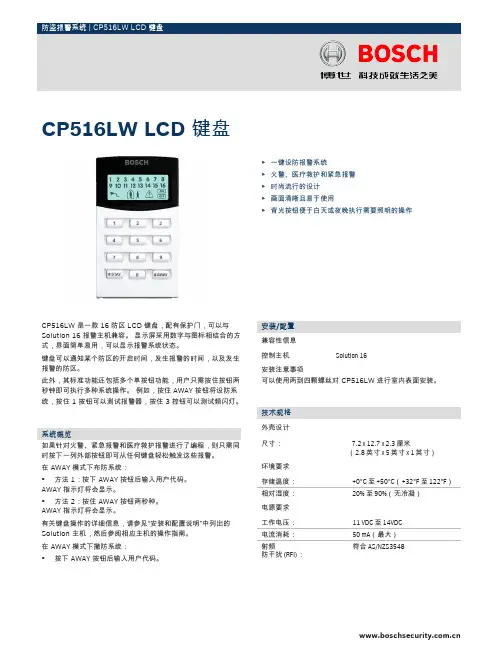
CP516LW 是一款 16 防区 LCD 键盘,配有保护门,可以与Solution 16 报警主机兼容。
显示屏采用数字与图标相结合的方式,界面简单易用,可以显示报警系统状态。
键盘可以通知某个防区的开启时间,发生报警的时间,以及发生报警的防区。
此外,其标准功能还包括多个单按钮功能,用户只需按住按钮两秒钟即可执行多种系统操作。
例如,按住 AWAY 按钮将设防系统,按住 1 按钮可以测试报警器,按住 3 控钮可以测试频闪灯。
系统概览如果针对火警、紧急报警和医疗救护报警进行了编程,则只需同时按下一列外部按钮即可从任何键盘轻松触发这些报警。
在 AWAY 模式下布防系统:•方法 1:按下 AWAY 按钮后输入用户代码。
AWAY 指示灯将会显示。
•方法 2:按住 AWAY 按钮两秒种。
AWAY 指示灯将会显示。
有关键盘操作的详细信息,请参见“安装和配置说明”中列出的Solution 主机,然后参阅相应主机的操作指南。
在 AWAY 模式下撤防系统:•按下 AWAY 按钮后输入用户代码。
安装/配置兼容性信息控制主机Solution 16安装注意事项可以使用两到四颗螺丝对 CP516LW 进行室内表面安装。
技术规格外壳设计尺寸:7.2 x 12.7 x 2.3 厘米(2.8 英寸 x 5 英寸 x 1 英寸)环境要求存储温度:+0°C 至 +50°C (+32°F 至 122°F )相对湿度:20% 至 90%(无冷凝)电源要求工作电压:11 VDC 至 14VDC 电流消耗:50 mA (最大)射频防干扰 (RFI):符合 AS/NZS3548CP516LW LCD 键盘▶一键设防报警系统▶火警、医疗救护和紧急报警▶时尚流行的设计▶画面清晰且易于使用▶背光按钮便于白天或夜晚执行需要照明的操作2定购信息CP516LW LCD 键盘可显示 16 个防区,提供 LCD 显示屏,配有保护门,可以与 Solution 16 报警主机兼容。
BOSCH ICP-CMS6-CHI 说明书

版权声明除非特别声明,本出版物的版权归博世安保系统有限公司(“博世公司”)所有,并保留所有权利。
您可以下载本出版物的单份副本。
一旦您下载本出版物,即表明您同意:(i) 只使用此出版物供自己参 考;(ii) 不会利用此出版物从事商业活动或向任何 人收取费用;(iii) 未经博世公司的事先书面许可, 不会以任何方式更改此出版物。
除上述规定或《版权法案 1968 (Cth)》授权以外,未经博世安保系统有限公司的事先书面许可,任何人不得以任何形式或经由任何方式复制、传输、修改或存储本出版物的任何部分。
责任声明我们已经尽量认真仔细地准备本材料,博世安保系统有限公司及其代表机构对其中任何信息或遗漏给任何个人或实体带来的任何直接或间接的责任、损失或损害不承担任何责任。
博世安保系统有限公司保留随时修改其产品功能与规格的权力,恕不另行通知。
ICP-KP8-CHI 八防区 LED 键盘 ICP-KP8L-CHI 八防区 LCD 键盘键盘操作快捷指南系统布防外出布防 [ 用户码 ] + [ # ]居家布防 [ 用户码 ] + [ * ]系统撤防撤防 [ 用户码 ] + [ # ]其他设置命令添加/更改用户码 [ 主码 ] + [ 1 ] [ # ] + [ 用户编号 ] [ # ] + [ 新用户码(四位)][ # ]删除用户码 [ 主码 ] + [ 1 ] [ # ] + [ 用户编号 ] [ # ] + [ * ]编程个人报警电话 [ 主码 ] + [ 2 ] [ # ] + [ 电话号码 ] [ # ]取消个人电话报警 [ 主码 ] + [ 2 ] [ # ] + [ * 5 ] [ # ]报警复位 [ 用户码 ] + [ 6 ] [ # ]隔离防区 [ 主码 ] + [ 9 ][ # ]+ [隔离防区号] [ * ] + [ # ]查看系统故障 长按[ 5 ]胁持报警 [ 用户码 ] + [ 0 ] [ # ]紧急报警 同时长按[ 1 ] 和 [ 3 ]火警 同时长按[ 4 ] 和 [ 6 ]医疗救护报警 同时长按[ 7 ] 和 [ 9 ]键盘指示说明LCD 键盘指示图标 LED 键盘指示灯 状态 定义亮起 防区处于触发状态。
电子锁的基本使用介绍与说明
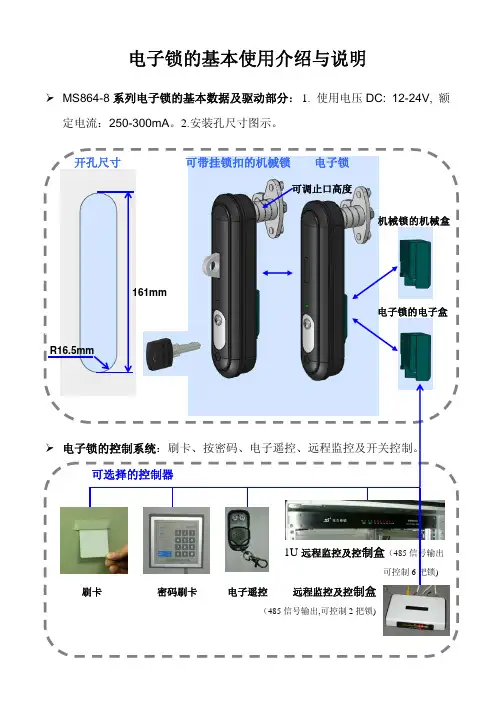
电子锁的基本使用介绍与说明MS864-8系列电子锁的基本数据及驱动部分:1. 使用电压DC: 12-24V, 额定电流:250-300mA。
2.安装孔尺寸图示。
开孔尺寸可带挂锁扣的机械锁电子锁A 可调止口高度机械锁的机械盒161mm电子锁的电子盒R16.5mm电子锁的控制系统:刷卡、按密码、电子遥控、远程监控及开关控制。
可选择的控制器1U远程监控及控制盒(485信号输出AA 刷卡密码刷卡电子遥控电子锁各控制器的使用说明:1.使用IC卡,通过软件刷卡授权有效方可使用。
2.卡授权可以单独开门,也可以通开所有的门锁。
3.IC卡开门可通过网路进行记录相应信息。
4.IC卡可以不通过网路控制单独使用,可记忆储存200条开门信息。
1.密码刷卡器是在柜外的话即是户内柜。
2.户外柜该密码刷卡器是在柜内,看上图示。
3.该密码刷卡器也可对IC卡进行授权。
1.电子遥控器可以单独控制各门锁,也可以通开所有门锁。
1.型号:M 2000-U-2柜锁控制终端。
2.该基电盒可通过网络线进行控制(2把门锁)。
对门锁状态进行实时监控(记录相应信息)和控制(开关)。
1.型号:M 2000-U-6柜锁控制终端。
2.该基电盒可通过网络线进行控制(6把门锁)。
对门锁状态进行实时监控(记录相应信息)和控制(开关)。
1.写卡器:通过软件对IC卡进行授权写卡,可以单独(单门锁),也可通开(所有门锁)。
MS899系列电子锁的基本数据及驱动部分:电压/电流/安装孔尺寸与MS864-8一致。
机械锁盒电子锁盒电子锁的控制系统:刷卡、远程监控及开关控制。
1U远程监控及控制盒M2000-U-6(通过485信号输出总线,可控制6把锁)公共网线网路控制中心:1.管理人员通过电闹显示终端对各地区所有柜锁状态进行实时监控(记录相应信息)和控制(开门和关门)。
电脑操作界面2.通过电脑软件在写卡器上进行IC卡授权。
3.当刷卡或远程开锁时,电子锁手柄上绿色指示灯闪烁10秒(可设定),在闪烁时,按手柄下部小圆圈即手柄弹开,即可打开电子锁。
TSB 1300 Professional 说明书

OBJ_BUCH-1372-001.book Page 2 Tuesday, November 9, 2010 3:49 PM2 |1 609 929 X82 | (9.11.10)Bosch Power ToolsOBJ_BUCH-1372-001.book Page 3 Tuesday, November 9, 2010 3:49 PM4 | 中文1 609 929 X82 | (9.11.10)Bosch Power Tools安全规章电动工具通用安全警告阅读所有警告和所有说明! 不遵照以下警告和说明会导致电击、着火和/或严重伤害。
保存所有警告和说明书以备查阅。
在所有下列的警告中术语 "电动工具" 指市电驱动(有线)电动工具或电池驱动(无线)电动工具。
1)工作场地的安全a)保持工作场地清洁和明亮。
混乱和黑暗的场地会引发事故。
b)不要在易爆环境,如有易燃液体、气体或粉尘的环境下操作电动工具。
电动工具产生的火花会点燃粉尘或气体。
c)让儿童和旁观者离开后操作电动工具。
注意力不集中会使你失去对工具的控制。
2)电气安全a)电动工具插头必须与插座相配。
绝不能以任何方式改装插头。
需接地的电动工具不能使用任何转换插头。
未经改装的插头和相配的插座将减少电击危险。
b)避免人体接触接地表面,如管道、散热片和冰箱。
如果你身体接地会增加电击危险。
c)不得将电动工具暴露在雨中或潮湿环境中。
水进入电动工具将增加电击危险。
d)不得滥用电线。
绝不能用电线搬运、拉动电动工具或拔出其插头。
使电线远离热源、油、锐边或运动部件。
受损或缠绕的软线会增加电击危险。
e)当在户外使用电动工具时,使用适合户外使用的外接软线。
适合户外使用的软线将减少电击危险。
f)如果在潮湿环境下操作电动工具是不可避免的,应使用剩余电流动作保护器(RCD )。
使用RCD 可减小电击危险。
3)人身安全a)保持警觉,当操作电动工具时关注所从事的操作并保持清醒。
博世 集成安防及职能门禁系统 快捷门禁控制器 说明书
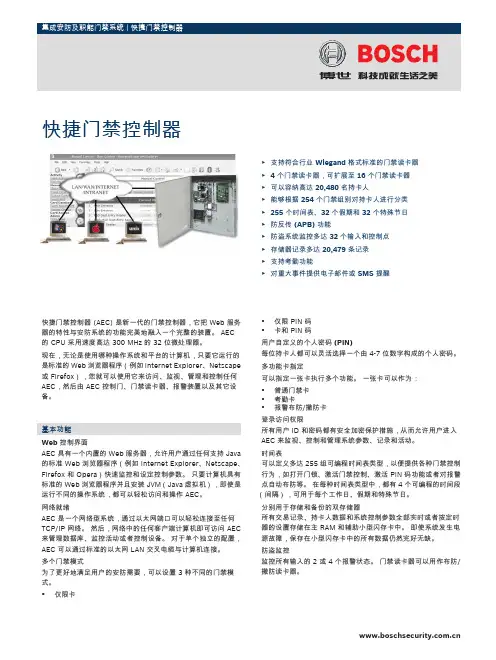
快捷门禁控制器 (AEC) 是新一代的门禁控制器,它把 Web 服务器的特性与安防系统的功能完美地融入一个完整的装置。
AEC的 CPU 采用速度高达 300 MHz 的 32 位微处理器。
现在,无论是使用哪种操作系统和平台的计算机,只要它运行的是标准的 Web 浏览器程序(例如 Internet Explorer、Netscape 或 Firefox),您就可以使用它来访问、监视、管理和控制任何AEC,然后由 AEC 控制门、门禁读卡器、报警装置以及其它设备。
基本功能Web 控制界面AEC 具有一个内置的 Web 服务器,允许用户通过任何支持 Java 的标准 Web 浏览器程序(例如 Internet Explorer、Netscape、Firefox 和 Opera)快速监控和设定控制参数。
只要计算机具有标准的 Web 浏览器程序并且安装 JVM(Java 虚拟机),即使是运行不同的操作系统,都可以轻松访问和操作 AEC。
网络就绪AEC 是一个网络型系统,通过以太网端口可以轻松连接至任何TCP/IP 网络。
然后,网络中的任何客户端计算机即可访问 AEC 来管理数据库、监控活动或者控制设备。
对于单个独立的配置,AEC 可以通过标准的以太网 LAN 交叉电缆与计算机连接。
多个门禁模式为了更好地满足用户的安防需要,可以设置 3 种不同的门禁模式。
•仅限卡•仅限 PIN 码•卡和 PIN 码用户自定义的个人密码 (PIN)每位持卡人都可以灵活选择一个由 4-7 位数字构成的个人密码。
多功能卡指定可以指定一张卡执行多个功能。
一张卡可以作为:•普通门禁卡•考勤卡•报警布防/撤防卡登录访问权限所有用户 ID 和密码都有安全加密保护措施,从而允许用户进入AEC 来监视、控制和管理系统参数、记录和活动。
时间表可以定义多达 255 组可编程时间表类型,以便提供各种门禁控制行为,如打开门锁、激活门禁控制、激活 PIN 码功能或者对报警点自动布防等。
波士顿电子产品说明书.pdf_1702027035.8662379

Warranties: Please see Use & Care manual or Bosch website for statement of limited warranty.
For more information on our entire line of products, go to /us or call 1-800-944-2904
© BSH Home Appliances Corporation. All rights reserved. Bosch is a registered trademark of Robert Bosch GmbH.
06/19
Features & Benefits
Remotely monitor and control your refrigerator with the Home Connect™ app.
Bright LED lighting illuminates the entire interior.
Optiflex® hinge allows for flush-mount doors, without damaging surrounding cabinetry.
Notes: All height, width and depth dimensions are shown in inches. BSH reserves the absolute and unrestricted right to change product materials and specifications, at any time, without notice. Consult the product’s installation instructions for final dimensional data and other details prior to making cutout.
Bosch FLEXIDOME corner 9000 IR VCN-9095 快速操作手册说明书
子菜单
颜色
子菜单
移动侦测
子菜单
图像调整
子菜单
FLEXIDOME corner 9000 IR
说明 设置操作模式 1 - 6 曝光控制 用于彩色 / 黑白操作的日 / 夜设置
图片增强和性能 白平衡和色彩重现 视频移动探测 设置数字放大或数字图像稳定性
1.5.1
项目
模式子菜单
选项
模式
1至6
模式 ID
字母数字
配置 | zh 11
项目
选项
说明
转换时延
1 秒、2 秒、3 秒、5 秒、10 秒、20 秒、30 秒、60 秒、 120 秒、 240 秒
在自动模式下为日夜过渡设置评估时间。
优先级
Motion (移 动)、Color (彩色)
在 AUTO (自动)模式下: 彩色 - 只要光照强度允许,摄像机便会提 供彩色图像。 移动 - 只要光照强度允许,摄像机便会避 免移动模糊 (它切换至黑白模式的优先级 高于彩色)。
秒。 主菜单会出现在监视器上。 主菜单允许用户选择和设置图像 增强功能。 如果不满意自己的更改,可以随时恢复模式的默认 值。 - 摄像机还配有一个 Install (安装)菜单,用户可以通过它设定安 装设置。要访问安装菜单,请按住菜单 / 选择按钮 (中心),时 间超过 2 秒。
AM18-Q0661 | v1.0 | 2013.03
1.4
摄像机控制通信 (Bilinx)
此摄像机配有一个同轴电缆通信收发器 (也称 Bilinx)。与 VPCFGSFT 配合使用时,可从同轴电缆上的任何位置更改摄像机设置。 所有菜单均可远程访问,以便用户完全控制摄像机。 通过这种通信方 法,还可禁用摄像机上的本地按键。在使用远程控制时,为了避免中 断已安装的摄像机上的通信,已禁用了 Communication On/Off (通 信开启 / 关闭)选项。此功能只能通过摄像机按钮访问。只能使用摄 像机上的按钮禁用 Bilinx 通信。
智能锁使用说明书
智能锁使用说明书使用前请仔细阅读使用说明书,并妥善保管一.技术参数1.技术参数启动方式指纹/密码/卡/机械钥匙指纹传感器半导体供电方式5号碱性电池4节应急电源5V应急电源接口·MiroUSB待机功耗60uA动态功耗小于5A显示OLED键盘背光独立LED指纹容量100枚指纹识别速度小于1S指纹拒真率小于0.01%指纹认假率0.0001%密码输入防窥视密码长度6-12位用户总量300卡类型Mifare 1 高频卡工作温度-30℃ ~ 70℃开锁记录250组初始管理员密码12345623二.用户构成三.功能说明1.用户构成1.功能说明用户类型数量权限管理用户5开锁、进入管理普通开锁用户295开锁1.默认管理员密码:123456,按 + # +管理员密码进入操作系统。
2.系统初始化:初始化系统有两种方式,软件初始化和硬件初始化,软件初始化是进入系统设置后选择初始化菜单,硬件初始化是在后锁面的电池盖里面有个复位按键孔,按住复位按键5秒,屏幕提示初始化系统,按#号键确认初始化。
3.用户容量:用户总量为300个,对应300个用户编号。
每一个用户编号只可以对应一个指纹或者密码或者卡。
编号1~5为管理员用户,6~300为普通开锁用户。
指纹用户量受限于指纹模组。
比如指纹模组的指纹容量为100,则最大指纹用户量为100。
四.操作设置1.按键功能触摸唤醒屏幕指示灯亮起,按 + # 键进入功能菜单验证入口注意:所有的设置和更改都需要进入功能菜单设置。
2号键是上翻,8号键是下翻,#号键是确认, 号键是返回。
***42.设置管理员指纹/密码/智能卡3.删除开锁信息按 + # 号键,进入功能菜单验证入口;输入管理员密码,输入初始密码123456 + # 号键;进入设置界面。
进入设置界面,如图所示;先择录入开锁信息,按#号键确认。
录入管理员信息,按#号键确认;输入密码、指纹、IC 卡;管理员可以设置5位(包括指纹、卡片、密码)编号位001-005。
Bosch TWS 6000 Professional电动工具使用说明书
2 |6128131011124OBJ_BUCH-1386-001.book Page 2 Monday, November 29, 2010 4:04 PM| 341516171418145OBJ_BUCH-1386-001.book Page 3 Monday, November 29, 2010 4:04 PM4 | 中文1 619 P09 397 | (29.11.10)Bosch Power Tools安全规章电动工具通用安全警告阅读所有警告和所有说明! 不遵照以下警告和说明会导致电击、着火和/或严重伤害。
保存所有警告和说明书以备查阅。
在所有下列的警告中术语 "电动工具" 指市电驱动(有线)电动工具或电池驱动(无线)电动工具。
1)工作场地的安全a)保持工作场地清洁和明亮。
混乱和黑暗的场地会引发事故。
b)不要在易爆环境,如有易燃液体、气体或粉尘的环境下操作电动工具。
电动工具产生的火花会点燃粉尘或气体。
c)让儿童和旁观者离开后操作电动工具。
注意力不集中会使你失去对工具的控制。
2)电气安全a)电动工具插头必须与插座相配。
绝不能以任何方式改装插头。
需接地的电动工具不能使用任何转换插头。
未经改装的插头和相配的插座将减少电击危险。
b)避免人体接触接地表面,如管道、散热片和冰箱。
如果你身体接地会增加电击危险。
c)不得将电动工具暴露在雨中或潮湿环境中。
水进入电动工具将增加电击危险。
d)不得滥用电线。
绝不能用电线搬运、拉动电动工具或拔出其插头。
使电线远离热源、油、锐边或运动部件。
受损或缠绕的软线会增加电击危险。
e)当在户外使用电动工具时,使用适合户外使用的外接软线。
适合户外使用的软线将减少电击危险。
f)如果在潮湿环境下操作电动工具是不可避免的,应使用剩余电流动作保护器(RCD )。
使用RCD 可减小电击危险。
3)人身安全a)保持警觉,当操作电动工具时关注所从事的操作并保持清醒。
Bosch 电器用品说明书
R e g i s t e ry o u rn e w d e v i c eo nM y B o s c h no w a n dg e t f r e e b en e f i t s:b o sc h-h o me.c o m/w e l c o m e HobPKE6..CA.,PKF6..CA1.[en]User manualPKF6..CA..PKE6..CA.2Ø = cmSafety en 3Table of contents1Safety (3)2Preventing material damage (4)3Environmental protection and saving en-ergy (5)4Familiarising yourself with your appliance (6)5Basic operation (6)6Cleaning and servicing (7)7Disposal (8)8Customer Service.................................................81 SafetyObserve the following safety instructions.1.1 General information¡Read this instruction manual carefully.¡Keep the instructions, the appliance passand the product information safe for futurereference or for the next owner.¡Do not connect the appliance if it has beendamaged in transit.1.2 Intended useOnly a licensed professional may connect ap-pliances without plugs. Damage caused by in-correct connection is not covered under thewarranty.Only use this appliance:¡To prepare meals and drinks.¡Under supervision. Never leave the appli-ance unattended when cooking for shortperiods.¡In private households and in enclosedspaces in a domestic environment.¡Up to an altitude of max. 2000 m abovesea level.Do not use the appliance:¡With an external timer or a separate remotecontrol. This does not apply if operationwith appliances included in EN 50615 isswitched off.1.3 Restriction on user groupThis appliance may be used by children aged8 or over and by people who have reducedphysical, sensory or mental abilities or inad-equate experience and/or knowledge,provided that they are supervised or have been instructed on how to use the appliance safely and have understood the resulting dangers.Children must not play with the appliance.Children must not perform cleaning or user maintenance unless they are at least 15 years old and are being supervised.Keep children under the age of 8 years away from the appliance and power cable.1.4 Safe use WARNING ‒ Risk of fire!Hot oils and fats ignite very quickly.▶Never leave hot oil or fat unattended.▶Never use water to put out burning oil or fat.▶Switching off the hotplate.▶Extinguish flames carefully using a lid, fire blanket or something similar.The hotplates become very hot.▶Never place combustible items on the hob.▶Do not store any objects on the hob.The appliance will become hot.▶Do not keep combustible objects or aero-sol cans in drawers directly underneath the hob.The hob switches off automatically and can no longer be operated. It may switch on unin-tentionally at a later point.▶Switch off the circuit breaker in the fuse box.▶Call the after-sales service.Hob covers can cause accidents, for example due to overheating, catching fire or materials shattering.▶Do not use hob covers.WARNING ‒ Risk of burns!The hotplates and surrounding area (particu-larly the hob surround, if fitted) become very hot.▶Never touch the hot surfaces.▶Keep children at a safe distance.The hotplate heats up but the display does not work.▶Switch off the circuit breaker in the fuse box.▶Call the after-sales service.Unsuitable safety devices or child hob guards may result in accidents.▶Only use safety devices, such as child hobguards, which have been approved by us.en Preventing material damage4The appliance becomes hot during operation.▶Allow the appliance to cool down beforecleaning.WARNING ‒ Risk of electric shock!Incorrect repairs are dangerous.▶Repairs to the appliance should only becarried out by trained specialist staff.▶Only use genuine spare parts when repair-ing the appliance.▶If the power cord of this appliance is dam-aged, it must be replaced with a specialconnection cable, which is available fromthe manufacturer or his Customer Service.If the appliance or the power cord is dam-aged, this is dangerous.▶Never operate a damaged appliance.▶Never operate an appliance with a crackedor fractured surface.▶Call customer services. → Page 8An ingress of moisture can cause an electricshock.▶Do not use steam- or high-pressure clean-ers to clean the appliance.The insulation on cables of electrical appli-ances may melt if it touches hot parts of the appliance.▶Never bring electrical appliance cables intocontact with hot parts of the appliance.WARNING ‒ Risk of injury!Saucepans may suddenly jump due to liquid between the saucepan base and the hotplate.▶Always keep hotplates and saucepanbases dry.WARNING ‒ Risk of suffocation!Children may put packaging material over their heads or wrap themselves up in it and suffocate.▶Keep packaging material away from chil-dren.▶Do not let children play with packaging ma-terial.Children may breathe in or swallow small parts, causing them to suffocate.▶Keep small parts away from children.▶Do not let children play with small parts.2 Preventing material damageATTENTION!Rough pot and pan bases will scratch the ceramic.▶Check your cookware.Boiling pans dry may damage cookware or the appli-ance.▶Never place empty pans on a heated hotplate or al-low to boil dry.Incorrectly positioned cookware can cause the appli-ance to overheat.▶Never place hot pots or pans on the controls or thehob surround.Damage can occur if hard or pointed objects fall ontothe hob.▶Do not let hard or pointed objects fall onto the hob.Non heat-resistant materials will melt on heated hot-plates.▶Do not use oven protective foil.▶Do not use aluminium foil or plastic containers. 2.1 Overview of the most common damage Here you can find the most common types of damage and tips on how to avoid them.Damage Cause Measure Stains Food boiling over Remove boiled-over food immediately with a glass scraper.Stains Unsuitable cleaning products Only use cleaning products that are suitable for glass ceramic.Scratch es Salt, sugar or sand Do not use the hob as a work surface or storage space.Scratch es Rough pot or pan bases Check your cookware.Discol-ouration Unsuitable cleaning products Only use cleaningproducts that are suitablefor glass ceramic.Discol-ouration Pan abrasion,e.g. aluminium Lift pots and pans tomove on the hob.Blisters Sugar or food with a high sugar contentRemove boiled-over foodimmediately with a glassscraper.Environmental protection and saving energy en 53 Environmental protection and saving energy3.1 Disposing of packagingThe packaging materials are environmentally compat-ible and can be recycled.▶Sort the individual components by type and disposeof them separately.3.2 Saving energyIf you follow these instructions, your appliance will useless energy.Select the cooking zone to match the size of yourpan. Centre the cookware on the hob.Use cookware whose base diameter is the same dia-meter as the hotplate.Tip: Cookware manufacturers often give the upperdiameter of the saucepan. It is often larger than thebase diameter.¡Unsuitable cookware or incompletely covered cook-ing zones consume a lot of energy.Cover saucepans with suitable lids.¡Cooking without a lid consumes far more energy.Lift lids as infrequently as possible.¡When you lift a lid, a lot of energy escapes.Using a glass lid¡You can see into the pan through a glass lid without having to lift it.Use pots and pans with flat bases.¡Uneven bases increase energy consumption.Use cookware suited to the quantity of food.¡Large items of cookware containing little food need more energy to heat up.Cook with little water.¡The more water contained in cookware, the more energy is required to heat it up.Turn down to a lower heat setting early on. Use a suit-able ongoing cooking setting to continue cooking.¡If you continue cooking with an ongoing cooking setting that is too high, you'll waste energyTake advantage of the hob's residual heat. Withlonger cooking times switch off the hotplate5-10 minutes before the end of cooking.¡Unused residual heat increases energy consump-tion.en Familiarising yourself with your appliance 64 Familiarising yourself with your appliance4.1 Control panelYou can use the control panel to configure all functionsof your appliance and to obtain information about theoperating status.Hotplate controls The hotplate controls are permanently fixed in place.They must not be removed. Forcibly removing the hot-plate controls leads to them being destroyed.4.2 HotplatesYou can find an overview of the different activations ofthe hotplates here.If you operate the activations, the relevant displays lightup.Switching off: Turn the hot-plate switch to 0 and reset.Never turn the hotplateswitch past the symbol to0.Notes¡Dark areas in the glow pattern of the hotplate arepart of the technical design. They do not affect thefunctionality of the hotplate.¡The hotplate regulates the temperature by switchingthe heat on and off. The heat may also switch onand off when on the highest setting.–This protects easily damaged components fromoverheating.–The appliance is protected from electrical over-load.–Better cooking results are achieved.¡With multi-circuit hotplates, the heating of the innerfilament circuits and the heating of the activations may switch on and off at different times.4.3 Hotplate display and residual heatindicatorThe hob has a hotplate display and a residual heat in-dicator. The display lights up when a hotplate is warm.DisplayMeaning Hotplatedisplay Lights up during operation, shortly after switching on.Residualheat indic-ator Lit up after cooking when the hotplate is still warm.Note: You can keep small dishes warmor melt cooking chocolate.5 Basic operation5.1 Switching the hob on or off You can switch the hob on and off with the hotplateswitch.5.2 Setting the hotplatesYou can use the hotplate control to adjust the heat out-put of the hotplate.Heat setting1Lowest setting Heat setting 9Highest setting The symbol in the display panel indicates the hotplatewhich the display refers to, e.g. for the right rear hot-plate.Cleaning and servicing en75.3 Recommended cooking settingsYou can find an overview of different foods with appro-priate heat settings here.The cooking time will vary depending on the type,weight, thickness and quality of the food. The ongoingcooking setting depends on the cookware used.Cooking tips¡To bring food to the boil, use heat setting 9.¡Stir thick liquids occasionally.¡Food that needs to be seared quickly or that initiallyloses a lot of liquid during frying should be fried insmall portions.¡Tips for saving energy when cooking. → Page 5MeltingFood Ongoing cooking setting Ongoingcookingtime inminutesButter, gelatine 1-Heating or keeping warm Stew, e.g. lentil stew 1-Milk 11-2-1Prepare the dish without the lid.Poaching or simmering Dumplings 1, 23-420-30Fish 1, 2310-15White sauce, e.g. béchamel 13-61Bring the water to the boil with the lid on.2Continue to cook the dish without a lid.Boiling, steaming or braising Rice with double the volume of water 315-30Potatoes boiled in their skin 3-425-30Boiled potatoes 3-415-20Pasta, noodles 1, 256-10Stew, soup 3-415-60Vegetables, fresh or frozen 3-410-20Food in a pressure cooker 3-4-1Bring the water to the boil with the lid on.2Continue to cook the dish without a lid.Stewing Beef olives 3-450-60Pot roast 3-460-100Goulash 3-450-60Frying with little oilFry food without a lid.Escalope, plain or breaded 6-76-10Chops, plain or breaded 16-78-12Steak, 3 cm thick 7-88-12Fish or fish fillet, plain orbreaded 4-58-20Fish or fish fillet, breaded andfrozen, e.g. fish fingers 6-78-12Stir fry, frozen 6-76-10Pancakes 5-6-1Turn the dish several times.6 Cleaning and servicingTo keep your appliance working efficiently for a longtime, it is important to clean and maintain it carefully.6.1 Cleaning products You can obtain suitable cleaning products and glass scrapers from customer service, the online shop or a retailer.ATTENTION!Unsuitable cleaning products may damage the sur-faces of the appliance.▶Never use unsuitable cleaning products.Unsuitable cleaning products ¡Undiluted detergent¡Detergent intended for dishwashers¡Abrasive cleaners¡Aggressive cleaning products such as oven sprayor stain remover¡Abrasive sponges¡High-pressure or steam jet cleaners 6.2 Cleaning the glass ceramic Clean the hob after every use to stop cooking residuesfrom getting burnt on.Note: Note the information on unsuitable cleaningproducts. → Page 7Requirement: The hob has cooled down.1.Remove heavy dirt using a glass scraper.2.Clean the hob with a cleaning product for glassceramic.Follow the cleaning instructions on the productpackaging.Tip: You can achieve good cleaning results if youuse a special sponge for glass ceramic.6.3 Cleaning the hob surround Clean the hob frame after use if dirty or stained.Notes ¡Note the information on unsuitable cleaningproducts. → Page 7¡Do not use the glass scraper.1.Clean the hob frame with hot soapy water and a softcloth.en Disposal8Wash new sponge cloths thoroughly before use. 2.Dry with a soft cloth.7 DisposalFind out here how to dispose of old appliances cor-rectly.7.1 Disposing of old applianceValuable raw materials can be reused by recycling.▶Dispose of the appliance in an environmentallyfriendly manner.Information about current disposal methods areavailable from your specialist dealer or local author-ity.(waste electrical and electronic equip-ment - WEEE).The guideline determines the frame-work for the return and recycling of used appliances as applicable throughout the EU.8 Customer ServiceIf you have any queries on use, are unable to rectifyfaults on the appliance yourself or if your applianceneeds to be repaired, contact Customer Service.Function-relevant genuine spare parts according to thecorresponding Ecodesign Order can be obtained fromCustomer Service for a period of at least 10 years fromthe date on which your appliance was placed on themarket within the European Economic Area.Note: Under the terms of the manufacturer's warrantythe use of Customer Service is free of charge.Detailed information on the warranty period and termsof warranty in your country is available from our after-sales service, your retailer or on our website.If you contact Customer Service, you will require theproduct number (E-Nr.) and the production number(FD) of your appliance.The contact details for Customer Service can be foundin the enclosed Customer Service directory or on ourwebsite.8.1 Product number (E-Nr.) and productionnumber (FD)You can find the product number (E-Nr.) and the pro-duction number (FD) on the appliance's rating plate.The rating plate is located on the appliance certificate.Make a note of your appliance's details and the Cus-tomer Service telephone number to find them againquickly.Thank you for buying a Bosch Home Appliance!Register your new device on MyBosch now and profit directly from:•Expert tips & tricks for your appliance •Warranty extension options •Discounts for accessories & spare-parts •Digital manual and all appliance data at hand •Easy access to Bosch Home Appliances Service Free and easy registration – also on mobile phones:/welcomeLooking for help? You'll find it here.Expert advice for your Bosch home appliances, help with problems or a repair from Bosch experts.Find out everything about the many ways Bosch can support you: /serviceContact data of all countries are listed in the attached service directory.*9001596004*9001596004 (001215)en Robert Bosch Hausgeräte GmbH Carl-Wery-Straße 3481739 München GERMANY Valid within Great Britain:Imported to Great Britain by BSH Home Appliances Ltd.Grand Union House Old Wolverton Road Wolverton, Milton Keynes MK12 5PT United Kingdom。