
everything使用说明书
1.1“Everything”是什么?
1.2“Everything”建立数据库需要多长时间?
1.3“Everything”能否搜索文件内容?
1.4“Everything”是不是非常占用系统资源?
1.5“Everything”能否监视文件系统更改?
1.6“Everything”免费吗?
1.7“Everything”不在运行的时候,它还能否监视文件系统更改?
1.8“Everything”的系统要求?
1.9如何把一个分区转化成NTFS?
2搜索
2.1如何搜索?
2.2如何运用布尔算子?
2.3如何运用通配符?
2.4如何运用正则表达式?
2.5如何在搜索条件中包含空格?
2.6如何搜索特定的文件类型?
2.7如何指定搜索位置?
3结果
3.1如何跳转到搜索结果?
4HTTP服务器
4.1如何同时搜索多个HTTP服务器?
4.2如何通过一个HTTP服务器共享数据库?
5定制
5.1如何改变“Everything”按钮?
5.2如何设置“Everything”而让它调用外部文件管理器?
6故障排除
6.1在Windows Vista SP1系统下运行,“Everything”需要管理员权限
6.2没有搜索结果
1.1“Everything”是什么?
“Everything”是一个运行于Windows系统,基于文件、文件夹名称的快速搜索引擎。
“Everything”在搜索之前就会把所用的文件和文件夹都列出来,这一点与Windows自带的搜索系统不一样,所以我们称之为“Everything”。
1.2“Everything”建立数据库需要多长时间?
“Everything”搜索只基于文件和文件夹的名称,所以它创建数据库很快。
一个刚安装完的Windows XP SP2系统(约20,000份文件),需要一秒钟。
索引一百万份文件则需要一分钟。
1.3“Everything”能否搜索文件内容?
不,不能搜索文件内容,“Everything”搜索只基于文件和文件夹的名称。
1.4“Everything”是不是非常占用系统资源?
不,“Everything”使用非常少的系统资源。
一个刚安装完的Windows XP SP2系统(约20,000份文件)需要占用3-5 mb内存和不到1 mb的硬盘空间。
一百万份文件大概需要45 mb内存和5 mb硬盘空间。
1.5“Everything”能否监视文件系统更改?
是的,“Everything”能够监视文件系统改变。
文件和文件夹名称的改变会实时地反映到“Everything”数据库。
1.6“Everything”免费吗?
是的,“Everything”是自由软件。
1.7“Everything”不在运行的时候,它还能否监视文件系统更
改?
即使在“Everything”没有运行的情况下,更改文件系统也不会有什么问题,因为“Everything”在每次启动的时候会更新数据库。
1.8“Everything”的系统要求?
“Everything”能够运行于Windows 2000,XP,2003以及Vista下。
记住:“Everything”只能索引本地NTFS分区。
1.9如何把一个分区转化成NTFS?
参见/kb/307881
2搜索
2.1如何搜索?
在搜索框中键入文件或文件夹名称的一部分,结果立刻呈现。
2.2如何运用布尔算子?
AND是缺省使用的布尔算子。
例如:如果要搜索foo和bar同时出现的文件:foo bar(注:在两个单词之间有空格)。
OR用|表示。
例如:如果要搜索.jpg或.bmp文件:.jpg | .bmp(注:在|两侧有空格)。
2.3如何运用通配符?
通配符*可以匹配任意长度和类型的字符。
例如:如果要搜索以e开头并且以g结尾的文件或文件夹:e*g 。
通配符?可以匹配单个任意字符。
例如:如果要搜索扩展名为两个字符的文件:*.?? 。
2.4如何运用正则表达式?
在使用之前,确保已经打开正则表达式选项(菜单Search->Enable Regex)
2.5如何在搜索条件中包含空格?
为了在搜索条件中包含空格,你可以使用双引号。
例如:”foo bar”只能匹配foo bar,而不能匹配fooadbar、fooibar等等。
2.6如何搜索特定的文件类型?
为了搜索特定的文件类型,可以在搜索框中添加文件扩展名。
例如:搜索mp3文件可用*.mp3。
如果想搜索多个文件类型,可以用|分割检索词。
例如:*.bmp | *.jpg可用找到扩展名为bmp或jpg的文件。
2.7如何指定搜索位置?
在检索条件中使用\,可以指定查找位置。
例如:downloads\ .avi表示在downloads文件夹中寻找所有avi文件。
也可用通过菜单Search->Match Path激活路径选项,这样可以把路径直接包含在搜索条件中。
例如:激活菜单Search->Match Path后,在downloads文件夹中需找所有avi 文件可以表示为downloads .avi。
3结果
3.1如何跳转到搜索结果?
选择需要的结果,鼠标右击,选择菜单。
4HTTP服务器
4.1如何同时搜索多个HTTP服务器?
为了同时搜索多个HTTP服务器,需要打开Allow multiple instances选项,并且同时运行多个“Everything”窗口。
4.2如何通过一个HTTP服务器共享数据库?
为了通过一个HTTP服务器共享数据文件,需要打开Allow multiple instances 选项,并且同时运行多个“Everything”窗口。
5定制
5.1如何改变“Everything”按钮?
需要“Everything”1.2.0 beta或更高版本。
复制你的图标文件,放进“everything”文件夹,并且重命名为“Everything.ico”。
5.2如何设置“Everything”而让它调用外部文件管理器?
需要“Everything”1.2.0 beta或更高版本。
退出“Everything”。
打开“Everything”安装文件夹中的Everything.ini文件。
添加如下两行到文件末尾。
open_folder_command=$exec("ExternalFileManager.exe" "%1")
open_folder_path_command=$exec("ExternalFileManager.exe" "$parent(%1)")
请用完整的路径名和文件名替换上两行中的ExternalFileManager.exe。
阅读外部文件管理器的帮助,看是否需要其它的参数。
重启“Everything”。
6故障排除
6.1在Windows Vista SP1系统下运行,“Everything”需要管理员
权限
“Everything”需要高级别的硬盘读写权限,所以在Vista SP1系统下需要以管理员身份运行。
6.2没有搜索结果
你的分区有可能是FAT32或FAT16。
“Everything”只能检索NTFS,对FAT32、FAT16不支持。
重要说明:这是根据“Everything”的英文FAQ翻译而来,有不知所云的地方请参看原文。
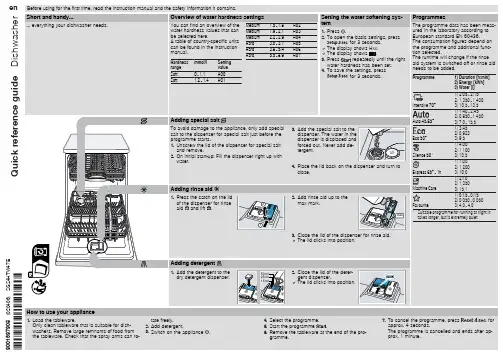
洗碗机使用指南说明书
The filters in the water connection of the supply or AquaStop hose are blocked. 1. Switch off the appliance. 2. Pull out the mains plug. 3. Turn off the water tap. 4. Unscrew the water connection. 5. Remove the filter from the sup-
and remove. 2. On initial start-up: Fill the dispenser right up with
water.
Adding rinse aid
1. Press the catch on the lid
of the dispenser for rinse
2
aid and lift .
Setting the water softening sys-
H02
tem
H03
1. Press .
H04
2. To open the basic settings, press
H05
for 3 seconds.
H06
a The display shows Hxx.
H07
a The display shows .
6. Re-assemble the filter system.
7. Insert the filter system into the appliance and turn the coarse filter clockwise. Make sure that the arrow markings match up.
Sanus 电视墙挂架说明书

STEPCut channel to desired length.STEPInsert cords and snap shut.STEPInsert cords and press firmly against wall.**Wall surface must be clean. Do not use on textured surfaces.EASY INSTALLATION Our US-based install experts are standing by to help.Call us at:+1 (800) 359-5520WE’RE HERE TO HELPWarning:• Not to be used to extend hard-wired (permanent) electrical wiring • Two power cord maximum • Do not loop cordEVERYTHING YOU NEED©2023 Legrand AV Inc. All rights reserved. Sanus is a brand of Legrand. SANUS and the SANUS logo are registered trademarks of Legrand Legrand AV Inc. and its a iliated corporations and subsidiaries (collectively,“Legrand”), intend to make this manual accurate and complete. However, Legrand makes no claim that the information contained herein covers all details, conditions,or variations. Nor does it provide for every possible contingency in connection with the installation or use of this product. The information contained in this document is subject to change without notice or obligation of any kind. Legrand makes no representation of warranty, expressed or implied, regarding the informationcontained herein. Legrand assumes no responsibility for accuracy, completeness or su iciency of the information contained in this document.+1 (800) /chatSP 05/2023(1) Installation instructions Legrand AV Inc.6436 City West Parkway Eden Prairie, MN 55344 USA。
Nordic Thingy 91产品简要说明版本1.4说明书

RGB LEDs
Temperature, humidity, air quality
and air pressure Light/color sensor
Buzzer
2.4 GHz antenna
Low-power accelerometer PMIC Battery connector Power switch
Nordic Thingy:91 Product Brief Verent Program/debug device
selection switch nRF9160 SiP
nRF52840 WLCSP
High-g accelerometer
Nano/4FF SIM card slot
An exhaustive set of sensors is included to gather data about the environment, and the movement of the Nordic Thingy:91. Temperature, humidity, air quality, air pressure, color and light data can easily be extracted for local or remote analysis.
and air pressure, plus a color and light sensor Low-power accelerometer and high-g accelerometer Buzzer 4 x N-MOS transistors for external DC motors or LEDs Rechargeable Li-Po battery with 1440 mAh capacity
GIGABYTE笔记本产品使用说明书

P35V1.0<10% 11-30% 31-50%12English3Left ViewBase ViewRight ViewWarning:DO NOT remove the built-in lithium battery. For any service needs, please contact your local GIGABYTE Authorized Service Center.English7GIGABYTE Smart ManagerYou can activate GIGABYTE Smart Manager by double clicking on the shortcut icon on the desktop if the machine you purchased has the operation system built-in. GIGABYTE Smart Manager is an icon-based control interface, enabling users to intuitionally access common system setup as well as GIGABYTE exclusive utilities. Please be noted that the GIGABYTE Smart Manager interface, icons, utilities and software versions may vary based on the purchased models. Please operate GIGABYTE Smart Manager according to the actual version built-in.GIGABYTE Software Application• The window will pop out when the creation of recovery disk is done.lease press F12 on starting the system when you need to restore the system. SelectEnglish9 System Recovery (Restore your laptop operating system)When something is going wrong with the laptop operating system, the storage of the laptop hasa hidden partition containing a full back up image of the operating system that can be used to restore the system to factory default settings.All ready to goMake sure your PC is plugged in. This will take a few minutes.21Recovery GuideNote˙If the storage has been switched or the partition deleted, the recovery option will no longer be available and a recovery service will be needed.˙The recovery function is only available on devices with O/S preinstalled. Devices with DOS do not have the recovery function.Launch System RecoveryThe system recovery feature is preinstalled before the laptop is shipped from the factory. The option menu allows you to launch the Windows recovery tool to reinstall the operating system to factory default.The brief introduction below will show you how to start the recovery tool and restore your system.Turn off and restart the laptop.During the laptop turn on process, press and hold F9key to launch the tool.CautionO nce the “Recovery” is selected, your personaldata and files will be deleted after the laptop startsrestoring, and the operating system will be reset tofactory default settings.The recovery will be activated and you will see the optionbuttons on the window. Click on “Recovery” to start it.3E n g l i s h 10A progress indicator bar will show on the window when the recovery process is running. Please make sure theAC-adapter is plugged in and do not turn off the laptop.4Reboot the laptop after the system recovery is complete.5During the laptop turn on process, press and hold F9 key to launch the tool.213Turn off and restart the laptop.There are two options for system recovery˙Reset this PCYou can choose to keep or remove your files and then reinstalls Windowswithout losing your files.˙ G IGABYTE Smart RecoveryYour PC settings will be restored to factory default settings.Caution: All personal data and files will be lost.Choose “Troubleshoot” to enter the recovery settings. (Also you can choose“Continue” to exit recovery system and continue to Windows 10 for files ordata backup.)English 11Here are what will happen˙All of your personal files and apps will be removed.˙Your PC settings will be restored to pure O/S (without GIGABYTE app) .4▓▓▓C hoose “Reset this PC”◆K eep my files Choose an account to continue.All apps will be removed, and settingswill back to pure O/S (without GIGABYTE app), but your personal fileswill be kept.◆R emove everything All apps, setting and personal files will be removed.♋J ust remove my files Only personal data and files will be removed, but computer settings willbe kept.♋F ully clean the drive The drive will be completely restored to factory default settings. It takesmore time. > [Click on “Reset” to execute recovery function.]▓▓▓G IGABYTE Smart RecoveryCaution˙Once the “Recovery” is selected, your personal data and files will be deletedafter the laptop starts restoring, and the operating system will be reset tofactory default settings.˙A progress indicator bar will show on the window when the recovery process isrunning. Please make sure the AC-adapter is plugged in and do not turn off thelaptop.The recovery will be activated and you will see theoption buttons on the window. Click on “Yes” to start it.After the system recovery is completed, you will seethe option button on the window, please click on“Shutdown”.E n g l i s h 12▓Advanced options System RestoreUse a restore point recorded on your PC to restore Windows.System Image RecoveryRecover Windows using a specific system image file.Startup RepairFix problems that keep Windows from loading.Command PromptUse the Command Prompt for advanced trobleshooting.UEFI Firmware SettingsChange settings in your PC’s UEFI firmware.Startup SettingsChange Windows Startup behavior.Warranty & Service:Warranty and service and related information please refer to the warranty card or GIGABYTE service website as the below link:/support-downloads/technical-support.aspxFAQ:FAQ (Frequent Asked Questions) please refer to the below link:/support-downloads/faq.aspx Appendix。
洗碗机介绍及使用方法说明书

D i s h w a s h e r i n t r o d u c t i o nread the installation andoperating instructions before you use the dishwasher for the first time.Switch on the appliance the dishwasher starts...Switch off the appliance that’s it...Press the on/off switch, the cycle time for the programme selected appearsPress the on/off switch whenthe indicator shows 0 (programme end)Pour in the water/special saltPour in the rinsing agentPour in the cleaning agentSelect the programme Dissolves limescale (not required for set value 0!)Only before using the dishwasher for the first time pour approx. 1 l /1 1/4 pt water the salt opening.Always refill when the level indicator is clear.Little dirt, little cleaning agentWarning,Quick, economical or intensive ...Programme overviewThis overview lists the max. possible number of programmes. The programmes supplied with your appliance are indicated on the fascia.The programme data are values measured in the laboratory in compliance with Standard EN 50242.Deviations is practice are possible.1121,6021181401,0514–720,801512300,8010–95-1451,15-1,5011-19–45_70_55_ /6540_Auto Intesive Quick GentleAdditional programmes **Increased flexibility ...Time reduction/time saving ...shortens thecleaning time, reduces the drying.** on some modelsLower basket cleaning ...Only the crockery in the h.Time selection...switches on as soon as you press the time selection button:Alters the programme start in hourly stepsInsert lower arm ...Screw in upper arm Eliminating minor faults yourself ...... Self–help pays!Possible CauseDevice does not work/stops Supply fitting not openSupply hose kinked Open supply fitting.Lay supply hose without kinks.2. Clean filter in the water connection.3. Flow rate must be min. 9 l/min when If the flow rate is less, replace the RemedyToo little cleaning product Discoloration caused by food colourings (tomato sauce)Follow manufacturer’s specifications Discoloration is quite safe; fades afterResidual water in the device Waste-water pump blockedProgramme not yet ended Clean waste-water pump (see above).Switch on appliance and close orterminate programme (see Terminatingthe programme).Fault Possible CauseStains and streaksMilky residues on dishes(can be removed)Rinse aid dosage too high / too lowMilky film, glasses cloudy /dull (cannot be removed)Dishes not cleanSand or grainy residueson dishesUtensils are situated too close to eachother or on top of each otherToo little cleaning productUnsuitable programme selectedSpray nozzles blockedFilters dirty, not installed securely。
Everything DiSC Workplace 视频观看指南说明书

WORKPLACE®Video Viewing GuideEVERYTHING DiSC WORKPLACE ®Video Viewing GuideEverything DiSC Workplace ® video helps people build more effective working relationships using the power of DiSC ®, with 16 segments of real-world, workplace-specific examples.This manual provides an overview of the video content located in the Facilitation Materials folder. Everything DiSC Workplacevideo is available with English subtitles or without subtitles.INTRODUCTION TO DiSC ®Introduces the DiSC ® model and describes the four DiSC styles.GALAXY PROJECT Uses a team project senario to introduce four coworkers of different DiSC styles and to elicit people’s instinctive reaction to each style.WORKING WITH…Includes team discussions about the challenges of working with each DiSC style and strategies for becoming more effective in those relationships. PEOPLE READING Shows one actor modeling various DiSC styles. Page 3Page 3Page 4Page 7VIDEO VIEWING GUIDE INTRODUCTION TO DiSC®Total Length: 4 minutesWhat if people had their needs written all over them? This video segment introducesthe DiSC® model and shows how understanding people’s needs can improveworkplace relationships. The video illustrates the four DiSC styles and their priorities,and addresses the complexities of the real world by showing how people can havepriorities in addition to those that are expected for their DiSC styles.GALAXY PROJECTTotal Length: 11 minutesThese segments let participants experience their instinctive reactions to the four DiSCstyles. Four coworkers are introduced in the context of a team project. Their DiSCstyles are not revealed.Using the Galaxy Project Segments in FacilitationThese segments are used in Module 2, where it helps participants experience their initial reactions to each style. As they watch each segment, participants go through a process of identifying each character’s DiSC style, stressors, and conflict reactions.Galaxy ProjectIn this video, the team members discuss how they’ll approach an impending projectdeadline. Each character provides a brief aside to help clarify the person’s DiSC style.Galaxy Project 2In this video, which takes place later in the same day as the first one, team memberscontinue to discuss their project. The character asides provide insight as to whatcauses stress for each person.Galaxy Project 3In this video, which takes place on the day of the project presentation, team membersare feeling unprepared. The character asides provide insight as to how each personresponds during conflict.EVERYTHING DiSC WORKPLACE®WORKING WITH…Total Length: 10 minutesThese segments, which take place roughly six months after the Galaxy Project videos,show the team discussing specific strategies for working with different DiSC® styles.Each team member recounts examples of issues they’ve faced in working with oneanother and how they’ve applied what they’ve learned about one another’s styles toimprove their relationships.Using the Working With… Segments in FacilitationThese four segments are used in Module 3, where they help participants see different approaches to working more effectively with each DiSC style. After watching these segments, participants can create an action plan for working more effectively with their coworkers.Working with Sally (D Coworker)Length: 2:10 minutesIn this video, the team discusses challenges and effective strategies for working withSally.Stephanie (i style) says that she understands that Sally wants to get things done, so,when talking with Sally, she tries to get to the point more quickly. Stephanie also triesnot to take things personally when Sally communicates more bluntly.Tom (S style) used to think that Sally was abrupt, but now he understands that it isbecause she is focused on getting things done. Like Stephanie, he tries not to takethings personally when Sally communicates more bluntly.Dante (C style)thinks that Sally moves too fast sometimes, but now he tries to makea fair assessment of her suggestions. He’s getting better about pushing for moretime when needed while also recognizing that sometimes he needs to allow things toprogress.Sally (D style) has no problem confronting others and speaking her mind, but sheforgets that others may struggle with this. So, she encourages her coworkers to pushback and say something to her if they disagree or have another opinion to offer.VIDEO VIEWING GUIDE Working with Stephanie (i Coworker)Length: 2:20 minutesIn this video, the team discusses challenges and effective strategies for working with Stephanie.Sally (D style) used to think that Stephanie put too much emphasis on relationships,but now is learning to make the relationship with Stephanie a priority since that is keyfor Stephanie.Tom (S style) thinks that things with Stephanie can be chaotic at times. He recognizes that she has a lot of ideas and energy at the start of a project, but that she loses interest when things become routine, so he is working on finding a balance between supporting and questioning her ideas.Dante (C style) also thinks things can be chaotic with Stephanie, but his response would be to just things down. He’s now learning to allow himself time to sit with things and think about Stephanie’s ideas before reacting.Stephanie (i style) often felt shut down or ignored in the past. She wants people to hear her out to help her feel like she is part of the team, and she says the team is now doing a better job of this.Working with Tom (S Coworker)Length: 2:10 minutesIn this video, the team discusses challenges and effective strategies for working with Tom.Sally (D style) says that Tom is good about bringing other views into projects, which she initially thought was slowing things down. But now she’s learning that the group needs other opinions to get buy-in.Stephanie (i style) acknowledges that she tends to bounce around rather than seeing things through, which has caused problems with Tom in the past. She’s learning to check in more often, especially when she decides to switch gears on Tom.Dante (C style) notes that he and Tom are similar in that they can both take too much time on a project. He says that he and Tom are learning to encourage each other to take risks to get things done more quickly.Tom (S style) says he has a hard time committing to a decision when it is unclear howit will affect the team. He wants an understanding of where things are going and how others are going to be affected before buying in.EVERYTHING DiSC WORKPLACE®Working with Dante (C Coworker)Length: 3:10 minutesIn this video, the team discusses challenges and effective strategies for working withDante.Sally (D style) knows that Dante needs time to sit with things. She makes sure she getsDante any background materials in advance and takes the time to identify what needsto be done in order to move forward.Stephanie (i style) didn’t think Dante felt like he could count on her, and she oftenpushed too hard for him to understand her ideas. Now, she knows that she needs toslow down and focus on the facts when working with Dante.Tom (S style) was never sure when to approach Dante or how to bring things up. Now,Tom tries not to interrupt when Dante is working, sometimes finding that e-mail is amore effective communication method.Dante (C style) wants to full understand ideas and to know what is behind them. It isn’this intend to appear closed off; he’s usually just thinking. Although he does like to getabsorbed in what he’s doing, that doesn’t mean that he always wants to work alone.VIDEO VIEWING GUIDE PEOPLE READING (OPTIONAL ACTIVITY)Total Length: 4 minutesThe 30-second segments in this collection provide an opportunity for participantsto learn how to identify people’s DiSC® styles through the people-reading process. Asingle actor, Jen, plays all of the styles in order to keep participants focused on thebehaviors and not on the individual.Using the People Reading Segments in FacilitationSix of the eight segments are used in an optional people-reading activity that helps participants understand the people they work with. Scenarios 5 and 6 feature a combination of styles, and are likely to be more challenging for participants.Scenario 1C style: Jen is cautious and reserved as she provides an improved outline. She revealsher C style through her focus on accuracy and analysis. Her systematic approach andlogical reasoning are also characteristic of her style.Scenario 2i style: Jen is fast-paced and high-spirited, showing her enthusiasm about an upcomingbrainstorming meeting. Her expressive nature and her interest in getting everyoneinvolved reveal her i style.Scenario 3D style: Jen is outspoken and assertive. Her impatience and her eagerness to get goingshow her fast-paced D style. She is straightforward and somewhat blunt, showing herdetermination to get things done.Scenario 4S style: Jen is accepting and warm, and her accommodating approach reveals herS style. She expresses a sincere willingness to help and shows empathy. She alsorequests plenty of notice about changes.Scenario 5CD or DC style: Jen is skeptical and direct and she expresses her frustration openly.Her desire to be prepared and her no-nonsense approach illustrate her CD or DC style.Jen’s preference is to get things done right the first time.Scenario 6iS or Si style: Jen is warm and accepting. Her friendly approach and interest incollaboration reveal her iS or Si style. She also wants to make sure that the team hasfun while being productive.Scenario 7D style: Jen is fast-paced and direct. Her bluntness and impatience illustrate her Dstyle. She is irritated with how they’ve been going around in circles without making adecision and expresses her willingness to push others to get the job done.Scenario 8S style: Jen is warm and apologetic. She supports others and this accommodatingapproach illustrates her S style. She is moderate-paced and soft-spoken, and sheshows that she is both humble and obliging when she goes out of her way to makethings easy for her colleague.。
搜索软件everything帮助文档全文翻译
搜索软件everything帮助⽂档全⽂翻译"Everything" is a filename search engine for Windows.Everything是windows下的⽂件名搜索引擎How is Everything different from other search engines Small installation file.Clean and simple user interface.Quick file indexing.Quick searching.Quick startup.Minimal resource usage.Small database on disk.Real-time updating.Everything与其他搜索⼯具的区别(优势):安装⽂件⼩简洁明了的⽤户界⾯超快的⽂件索引超快的搜索超快的启动最⼩的资源占⽤硬盘上的数据库很⼩实时更新Installing EverythingEverything can be installed or run as a portable executable.The installer and portable version of Everything can be found on the .What version of Everything should I download?Version DescriptionInstaller The installer version will guide the user through the installation of Everything (recommended). The installed Everything.exe is the same as the portable Everything.exe.Portable The user must extract the Everything.exe to the desired location. No changes to the system are made. Most of the options in the installer are available in the portable version in the .available in the portable version in the .x86Only x86 context menu extensions will work in Everything. This version will work on both x86 and x64 versions of Windows.x64The x64 version requires a 64bit x64 OS. Supports databases larger than 2GB. Only x64 context menu extensions will work in Everything. The x64 version will use more memory than the x86 version.English (US)Only English is available for this version, the can be installed manually.Multilingual Includes the Everything for multiple language support.安装EverythingEverything可以安装也可以⽤便携版这个安装⽂件以及便携版可以在下载版本选择版本描述安装版安装版会引导⽤户进⾏安装(推荐⽅式),安装版和便携版Everything.exe是⼀样的。
Everything使用说明
Everything 使用说明修订历史目录Everything 使用说明 (1)1. 简介 (1)2. 安装及运行 (2)2.1安装Everything (2)2.2安装语言包 (3)2.3运行 (3)3. 使用方法 (5)3.1基本搜索 (5)3.2搜索技巧 (5)3.2.1高效搜索之“与”“或” (5)3.2.2正则表达式 (5)3.2.3指定搜索范围 (5)3.2.4网络分享 (6)4. 参考文档 (7)1. 简介Everything是voidtools(中文主页)开发的一款文件搜索工具,官网描述为“基于名称实时定位文件和目录(Locate files and folders by name instantly)”。
它体积小巧,界面简洁易用,快速建立索引,快速搜索,同时占用极低的系统资源,实时跟踪文件变化,并且还可以通过http或ftp形式分享搜索。
注意:●只搜索文件名,不能搜索文件内容;●只适用NTFS文件系统,不适合FAT32;●自V1.2.x开始完美支持中文。
2. 安装及运行2.1 安装Everything运行【Everything-1.3.3.658b.x86.exe】开始软件安装,软件提示如图2.1.1所示的安装路径选择界面。
图 2.1.1 安装路径选择界面点击【Browse】选择好要安装的路径后,直接点【Next >】按钮,出现安装配置选择界面,如图2.1.2。
图 2.1.2 安装配置选择界面按默认选择即可,然后点【Install】按钮开始安装。
稍等片刻后,安装就完成了。
2.2 安装语言包运行【Everything.lng.exe】开始语言包安装,软件提示如图2.2.1所示的安装路径选择界面。
图 2.2.1 安装路径选择界面点击【Browse】选择好要安装的路径后(最好选择和软件安装路径一样),直接点【Install】按钮完成安装。
完成安装后,软件立即弹出图2.2.2所示的语言界面。
Omega产品说明书
Where Do I Find Everything I Need for Process Measurement and Control?OMEGA…Of Course!Shop online at SMTEMPERATUREM U Thermocouple, RTD & Thermistor Probes, Connectors, Panels & AssembliesM U Wire: Thermocouple, RTD & ThermistorM U Calibrators & Ice Point ReferencesM U Recorders, Controllers & Process MonitorsM U Infrared PyrometersPRESSURE, STRAIN AND FORCEM U Transducers & Strain GagesM U Load Cells & Pressure GagesM U Displacement TransducersM U Instrumentation & AccessoriesFLOW/LEVELM U Rotameters, Gas Mass Flowmeters & Flow ComputersM U Air Velocity IndicatorsM U Turbine/Paddlewheel SystemsM U Totalizers & Batch ControllerspH/CONDUCTIVITYM U pH Electrodes, Testers & AccessoriesM U Benchtop/Laboratory MetersM U Controllers, Calibrators, Simulators & PumpsM U Industrial pH & Conductivity EquipmentDATA ACQUISITIONM U Communications-Based Acquisition SystemsM U Data Logging SystemsM U Wireless Sensors, Transmitters, & ReceiversM U Signal ConditionersM U Data Acquisition SoftwareHEATERSM U Heating CableM U Cartridge & Strip HeatersM U Immersion & Band HeatersM U Flexible HeatersM U Laboratory HeatersENVIRONMENTALMONITORING AND CONTROLM U Metering & Control InstrumentationM U RefractometersM U Pumps & TubingM U Air, Soil & Water MonitorsM U Industrial Water & Wastewater TreatmentM U pH, Conductivity & Dissolved Oxygen InstrumentsM0200/0117AC05-B, AC15-B,DC05-B, DC15-BSolid State Switch Modules and SSS-PC-B Series Backplanes e-mail:**************For latest product manuals: Shop online at SMUser’s G ui d eDI S C O N T I N U E D***********************Servicing North America:U.S.A. Omega Engineering, Inc.Headquarters: Toll-Free: 1-800-826-6342 (USA & Canada only)Customer Service: 1-800-622-2378 (USA & Canada only)Engineering Service: 1-800-872-9436 (USA & Canada only)Tel: (203) 359-1660 Fax: (203) 359-7700e-mail:**************For Other Locations Visit /worldwideThe information contained in this document is believed to be correct, but OMEGA accepts no liability for any errors it contains, and reserves the right to alter specifications without notice.WARRANTY/DISCLAIMEROMEGA ENGINEERING, INC. warrants this unit to be free of defects in materials and workmanship for a period of 13 months from date of purchase. OMEGA’s WARRANTY adds an additional one (1) month grace period to the normal one (1) year product warranty to cover handling and shipping time. T his ensures that OMEGA’s customers receive maximum coverage on each product.If the unit malfunctions, it must be returned to the factory for evaluation. OMEGA’s Customer Service Department will issue an Authorized Return (AR) number immediately upon phone or written request. Upon examination by OMEGA, if the unit is found to be defective, it will be repaired or replaced at no charge. OMEGA’s WARRANT Y does not apply to defects resulting from any action of the purchaser, including but not limited to mishandling, improper interfacing, operation outside of design limits, improper repair, or unauthorized modification. This WARRANTY is VOID if the unit shows evidence of having been tampered with or shows evidence of having been damaged as a result of excessive corrosion; or current, heat, moisture or vibration; improper specification; misapplication; misuse or other operating conditions outside of OMEGA’s control. Components in which wear is not warranted, include but are not limited to contact points, fuses, and triacs.OMEGA is pleased to offer suggestions on the use of its various products. However, OMEGA neither assumes responsibility for any omissions or errors nor assumes liability for any damages that result from the use of its products in accordance with information provided by OMEGA, either verbal or written. OMEGA warrants only that the parts manufactured by the company will be as specified and free of defects. OMEGA MAKES NO OTHER WARRANTIES OR REPRESENTATIONS OF ANY KIND W HATSOEVER, EXPRESSED OR IMPLIED, EXCEPT THAT OF TITLE, AND ALL IMPLIED W ARRANTIES INCLUDING ANY W ARRANTY OF MERCHANTABILITY AND FITNESS FOR A PARTICULAR PURPOSE ARE HEREBY DISCLAIMED. LIMITATION OF LIABILITY: The remedies of purchaser set forth herein are exclusive, and the total liability of OMEGA with respect to this order, whether based on contract, warranty, negligence, indemnification, strict liability or otherwise, shall not exceed the purchase price of the component upon which liability is based. In no event shall OMEGA be liable for consequential, incidental or special damages.CONDITIONS: Equipment sold by OMEGA is not intended to be used, nor shall it be used: (1) as a “Basic Component” under 10 CFR 21 (NRC), used in or with any nuclear installation or activity; or (2) in medical applications or used on humans. Should any Product(s) be used in or with any nuclear installation or activity, medical application, used on humans, or misused in any way, OMEGA assumes no responsibility as set forth in our basic WARRANTY / DISCLAIMER language, and, additionally, purchaser will indemnify OMEGA and hold OMEGA harmless from any liability or damage whatsoever arising out of the use of the Product(s) in such a manner.RETURN REQUESTS/INQUIRIESDirect all warranty and repair requests/inquiries to the OMEGA Customer Service Department. BEFORE RET URNING ANY PRODUCT (S) T O OMEGA, PURCHASER MUST OBT AIN AN AUT HORIZED RET URN (AR) NUMBER FROM OMEGA’S CUST OMER SERVICE DEPART MENT (IN ORDER T O AVOID PROCESSING DELAYS). T he assigned AR number should then be marked on the outside of the return package and on any correspondence.The purchaser is responsible for shipping charges, freight, insurance and proper packaging to prevent breakage in transit.OMEGA’s policy is to make running changes, not model changes, whenever an improvement is possible. This affords our customers the latest in technology and engineering.OMEGA is a registered trademark of OMEGA ENGINEERING, INC.© Copyright 2017 OMEGA ENGINEERING, INC. All rights reserved. This document may not be copied, photocopied, reproduced, translated, or reduced to any electronic medium or machine-readable form, in whole or in part, without the prior written consent of OMEGA ENGINEERING, INC.FOR WARRANTY RETURNS, please have the following information available BEFORE contacting OMEGA:1. Purchase Order number under which the product was PURCHASED,2. M odel and serial number of the product under warranty, and3. R epair instructions and/or specific problems relative to the product.FOR NON-WARRANTY REPAIRS, consult OMEGA for current repair charges. Have the following information available BEFORE contacting OMEGA:1. P urchase Order number to cover the COST of the repair,2. Model and serial number of the product, and 3. Repair instructions and/or specific problemsrelative to the product.。
Everything 说明
Everything 1.2.1.375简体中文版描述:这是“工具”下的“选项”中的“排除”子栏,大家看到了,如果你的见不得人的东西都要隐藏的,我用箭头都标注了,可以排除隐藏文件和目录,还可以手动添加目录,文件等。
图片:描述:默认的第一项搜索硬盘是打够的,如果没打勾软件是不会去搜索的。
监视更新的意思就是如果你开着everything时你的某一个盘的文件发生变化,erverthing中这个文件也随之发生变化,实时更新文件的,这个比较不错,不需要重启软件的图片:描述:这是我的移动硬盘,没有开启搜索,所以我这个硬盘的文件erverthing是不去扫描的图片:描述:看看这些贴心的功能,每一项我就不解释了,特别提醒下“搜索词高亮”这个建议开启,还有最后一个的“搜索词为空”那个开启,个人习惯。
也方便查找描述:各种贴心的小功能,你自己选吧,因人而异,最底下2个是快捷键组合,我的自己设置的是“F8”个人爱好描述:看到这是什么了么,“工具”下开启http服务了,来这里设置就可以了,小小软件强大之处。
不顶妄对我啊描述:看到这是什么了么,“工具”下开启ftp服务了,来这里设置就可以了,小小软件强大之处。
不顶妄对我啊描述:勾选上就可以了图片:描述:这个没用过,不明真相,不过你们可以研究下图片:描述:不解释,上面说过了图片:优点:安装文件小巧界面简洁易用快速文件索引快速文件搜索极低资源占用轻松分享文件索引实时跟踪更新……….....还有很多不一一列举缺点就是有点太多特别提醒:erverthing工作原理是扫NTFS文件流,所以仅支持NTFS的。
所以说呢,现在还在用FAT32、FAT16等的用户赶紧改格式了,linux用户就抱歉了。