
爱普生针式打印机,营业厅里的变形金刚
爱普生针式打印机,营业厅里的变形金刚
在爱普生老用户里,国有企业用户占绝大多数,国有企业是中国经济快速发展的根本和基础,为国民经济发展做出了有力的保障和贡献。
爱普生伴随着这些企业共同成长,为它们的后勤工作提供可靠的支持与帮助。
中国网络通信集团公司(以下简称中国网通)是中国特大型电信企业,也是国内外知名的电信运营商。
旗下的山东网通于2004年在纽约、香港两地成功上市,一跃成为中国网通(集团)有限公司的重要组成部分。
热情的网通人
早就听说山东人性格爽朗外向,刚一下火车,我们就感受到了。
网通淄博分公司数据中心的工作人员赵明玮和孙强特地开车来接我们。
刚一坐上车,赵明玮就跟我们说:“听说你们要来,我们特地安排了一个环境恶劣的电话局。
网通公司在淄博市条件好的营业厅特别多,好地方不具有特殊性和代表性。
在恶劣的环境里正常工作,才更能显示出爱普生打印机的优势。
”听到此,大家都乐了。
原来,所谓环境恶劣,是因为我们要去的沣水电话局位
于淄博市郊区的重工业区里,工业区有众多生产化工、化学类产品的工厂,所以空气中酸性值高,粉尘多。
小赵还跟我们说:新买来的电脑没多久外壳就变成黄色的了。
爱普生的打印机也不例外,整体都变成土黄色了,工作起来却一点儿也不逊色!现在局里的打印机已经用了11年了,丝毫没有受到粉尘和空气中酸性物质的影响,还在继续使用着。
驱车15分钟,我们便来到沣水电话局。
热情的李远中局长接待了我们。
李局长原是淄博分公司的经理,现到基层锻炼,不久还将回到分公司担任更重要的工作。
恰好此次采访遇上李局长下基层锻炼,我们借此机会了解到更多宝贵的信息。
一万台爱普生针式打印机
回想起初次使用爱普生针式打印机,李局长娓娓道来:“大约是在1996年,淄博分公司根据各所使用情况,统一配量购买了爱普生的针式打印机。
刚使用针式打印机时大家都比较兴奋,很新鲜,而且当时用的还是8针的针式打印机,但能够满足我们工作中的各种打印要求,报表呀、文件呀,票据就更不用说了,速度快、操作简单,大家很快全都学会使用了。
”李局长还说道,“几十年来网通淄博分公司不断发展壮大,截止目前共有108家业务受理店。
随着营业厅不断的增多,以及各个银行、代收点的增加,这几十年来我们不断更新换代使用爱普生各种针式打印机,
加起来有一万台左右。
”“啊,这么多啊!”听到此,大家都不约而同地惊呼。
李局长乐呵呵地继续给我们讲道:“之所以这几十年来淄博分公司采购这么多爱普生打印机,是因为爱普生的针式打印机确实有过人之处。
举个例子来说吧:沣水电话局的主要业务针对周边几十个村庄,每月会有两次赶集,这时来电话局的人就会特别多。
如果打印机在这时出现故障,就会直接导致延误受理、收入损失,还会引起投诉。
这就要求所有设备不能出现故障,以保障业务授理畅通无阻。
所以,在淄博的所有电话局营业厅里,除了前台办理的地方,一定会有一台爱普生针式打印机作为后备机,以备紧急时使用。
”李局长给我们解释道,“使用爱普生的打印机作为一个电话局的后备机,意味着我们对它相当信赖和信任。
实践证明爱普生的确也做到了这一点:连续打印效果非常好,故障率也很低。
这也是淄博分公司几十年来一直在使用爱普生的原因。
”
营业厅里的变形金刚
数据中心主要负责整个淄博分公司及管辖单位所有设
备的维护与管理、内网信息建设、程序开发与应用等等。
在
此次拜访中,我们采访到网通数据中心的管理员赵明玮。
由于每天忙碌于全市的各个营业厅,所以小赵对淄博分公司所有的营业厅、电话局、代收点的各种情况都特别熟悉。
“各个营业厅里每天要处理大量的、种类繁多的业务,每一单的业务授理基本上都离不开打印机:一会儿打报表,一会儿打票据,一会儿打文档。
各种纸的厚度、宽度打印要求都不一样,如果是人工手动来调节的话,工作效率就会大打折扣,一天顶多处理几十单。
而且打印量相当大,基本是8小时连续打印,每天都得打几百张各种各样的票据、流水单、报表等等。
这些需求对于爱普生针打来说完全可以满足:连续打印速度飞快,多联打印清晰度也相当好。
所以,每当看到爱普生针式打印机时,就觉得它特别像营业厅里的一个变形金刚:默默地、有条不紊地、景然有序地帮助工作人员处理业务。
说实在的,爱普生打印机为营业厅的创收和网通不断发展壮大作出了巨大的贡献。
”
小赵还说道:“我们每天要处理大量的维护和技术指导工作,爱普生针打却很少给我们添麻烦,即便有需要维护或维修的情况,爱普生售后服务处理效率相当快。
爱普生针打的驱动程序很完美,基本可以兼容所有品牌的程序,这一点对于我们的工作来说也是如虎添翼。
”
另外,各个营业厅要求将成本控制在最低,就必须要求耗材成本低廉。
爱普生针打的色带不仅便宜而且经久耐用,
也正因为这一点,爱普生的针打也备受大家的青睐。
情有独钟
当我们问起李局长和小赵,网通公司用了几十年爱普生针式打印机,有没有想过使用其他的品牌打印机时,还没等李局长开口,小赵急急地说:“当然没有了,在网通淄博分公司任何品牌都代替不了爱普生。
”李局长笑咪咪地说道:“是啊,我们对它特别有感情,对爱普生针打情有独钟,每天都要用到它,就像我们的左右手一样,工作中一天都离不开它。
并且,十几年来爱普生针打每出一款新品,网通公司都会采购回来,我们是爱普生真正的第一批用户。
我们都是在最贵的时候买的,因为新品刚上市都贵嘛。
”
说到此,我们告诉李局长和小赵,爱普生刚刚面向中国市场推出一款136列平推产品Epson LQ-2680K,价格适中且性价比极高。
小赵说道:“那我们肯定继续一如既往地将第一批用户的口号贯彻下去,既便宜又好用的产品更赢得人心呵。
”
结尾
小赵是个电子迷,采访结束时还告诉我们他家里还有爱普生喷墨打印机,专门用来打照片,特别好用。
而且,几年来,他为周围的同事、朋友介绍爱普生的各种产品不下100
台。
我们感到特别的惊讶,真心地感谢这些可爱纯朴的用户,没有他们也就没有爱普生今天的成就与辉煌。
真心祝福中国网通淄博分公司发展壮大,越走越好。
爱普生XP 400

质保时间:1年
备注:周一至周五:8:30-18:00(节假日休息)
爱普生支持全国联保,可享有三包服务。若用户按使用说明和操作指南正常使用情况下,本品发生故障,用 户需在送修整机时提供有效的保修凭证(未在爱普生用户俱乐部注册成功的用户或未注册的用户需在送修机器时 提供保修卡原件和购机发票)符合保修范围的维修不收备件费和维修费。产品的保修起始日期以购机发票标明的 购机日期为准。
爱普生XP 400
爱普生公司生产的打印机产品
01 产品简介
03 品牌介绍
目录
02 主要参数 04 保修信息
爱普生XP-400是一款打印机,络打印为支持。
产品简介
爱普生XP-400是StylusNX420的升级版。这部打印机是目前爱普生打印机市场上体积最小的产品。不过“麻 雀虽小五脏俱全”,它具备了云打印、空中打印、局域WIFI使用等技术。XP-400还可以应用于移动设备,能直接 从智能手机或者平板电脑上导出打印。而凭借自带的SD储存卡,XP-400还能够连接到摄像爱普生(中国)有限公司成立于1998年4月,是精工爱普生株式会社在中国的全资子公司,负责统括精工爱 普生集团在中国的投资和业务拓展。2004年5月,爱普生(中国)有限公司经中国商务部批准,成为中国首家获 得“地区总部”资格认定的外商独资企业。
保修信息
保修政策:全国联保,享受三包服务
Epson针式打印机具有微调整功能
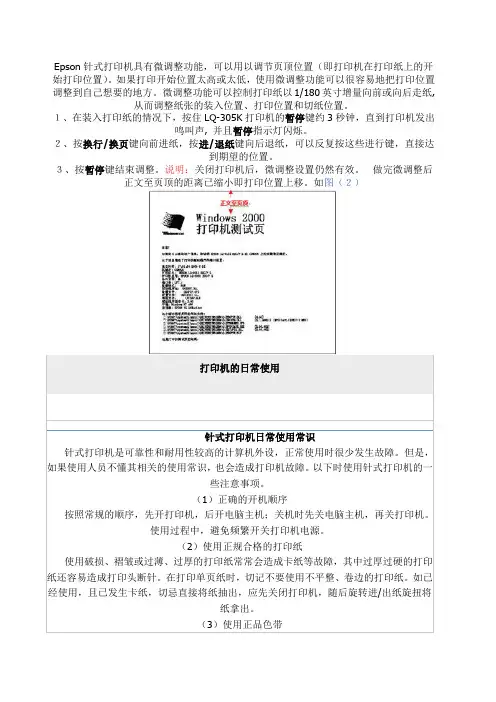
Epson针式打印机具有微调整功能,可以用以调节页顶位置(即打印机在打印纸上的开始打印位置)。
如果打印开始位置太高或太低,使用微调整功能可以很容易地把打印位置调整到自己想要的地方。
微调整功能可以控制打印纸以1/180英寸增量向前或向后走纸,从而调整纸张的装入位置、打印位置和切纸位置。
1、在装入打印纸的情况下,按住LQ-305K打印机的暂停键约3秒钟,直到打印机发出鸣叫声, 并且暂停指示灯闪烁。
2、按换行/换页键向前进纸,按进/退纸键向后退纸,可以反复按这些进行键,直接达到期望的位置。
3、按暂停键结束调整。
说明:关闭打印机后,微调整设置仍然有效。
做完微调整后正文至页顶的距离已缩小即打印位置上移。
如图(2)打印机的日常使用针式打印机日常使用常识针式打印机是可靠性和耐用性较高的计算机外设,正常使用时很少发生故障。
但是,如果使用人员不懂其相关的使用常识,也会造成打印机故障。
以下时使用针式打印机的一些注意事项。
(1)正确的开机顺序按照常规的顺序,先开打印机,后开电脑主机;关机时先关电脑主机,再关打印机。
使用过程中,避免频繁开关打印机电源。
(2)使用正规合格的打印纸使用破损、褶皱或过薄、过厚的打印纸常常会造成卡纸等故障,其中过厚过硬的打印纸还容易造成打印头断针。
在打印单页纸时,切记不要使用不平整、卷边的打印纸。
如已经使用,且已发生卡纸,切忌直接将纸抽出,应先关闭打印机,随后旋转进/出纸旋扭将纸拿出。
(3)使用正品色带针式打印机打印连续纸设置在使用前需要先定义纸张格式,定义好后在打印时才可以选择所定义纸张,方法如下:win98系统: 开始->设置->打印机及传真, 在此页面点目标打印机,右击打开属性页面,在“纸张”选项卡中上部格式部分选择最后一个"自定义",然后输入报表纸的宽及高,确定后退出。
win2000及xp系统:开始->设置->打印机及传真,点选目标打印机,然后打开本页面"文件"菜单(本窗口),选"服务器属性", 然后建立新格式,输入格式名称及宽和高,保存后关闭。
epson针式打印机换针及维修(Needle replacement and maintenance of Epson needle printer)

epson针式打印机换针及维修(Needle replacement andmaintenance of Epson needle printer)Needle replacement and maintenance of EPSON needle printerNeedle printerAbnormal character of needle type machineUnlike the inkjet printer, the needle type machine usually does not need to replace the word car, but the bestsolution is to use the axleRemove, clean, and add oil to the linoleum.Another cause of abnormal car is the word car motor missing phase, the judgment method is to drag the car by hand, feeling more than normalToo light or too heavy to be normal.Another is the HP sensor caused by abnormal car, only the replacement of sensors can solve the problem.Print head troubleshootingBroken needle is the most common failure of printing head, the main reason is:1, printing intensity, large amount of printing, naturally is the main reason for broken needle;2, print head dirt, due to long-term use, the printing headbetween the needle board accumulated ink and paper scraps of dirt, so that the needleBlocked, easy to break the printing needle;3, ribbon broken needle, the use of non original ribbon or ribbon, the use of too long time, so that the organization of the ribbon damage, whenThe stylus is easy to pin off when it hits the ribbon.4, coil short circuit: exclude the quality of the coil itself, the main board of the needle drive tube is also a major reason,If the needle drive is damaged, the corresponding needle drive tube shall be replaced simultaneously after changing the coil.5, thermistor: thermistor damage is very small, the performance of the fault is like the printing head overheating out of the situation.Troubleshooting of printing head of stylus printerThe printing head failure mainly includes: the printing head breaks the needle, the printing needle coil burns out, the gap between the printing head and the printing roller deviatesPrint head cable disconnection.1. print head broken needlePrinter head broken needle is the most common fault printer, this fault almost accounted for half of the total failure. Because the printer hitsThe printing principle consists of a dot array formed by a plurality of printing needles striking the ribbon to form a character / Chinese character. If there is a broken needlein the print head, it will be brokenThe printed characters / Chinese characters have fewer disadvantages. This paper focuses on the needle changing methods of several models:(1) LQ-1600K/ LQ-1900K printer1) structure: LQ-1600K and LQ-1900K printing heads are double needle arrangement structure, needle length andshort two specifications, eachL2 root.2) arrangement: print head 24 pins, odd even double row, as shown in figure 1. The long needles were: 2, 6, 10, 14, 18, 22,3, 7, 11, l 5, 19, 23; short: 4, 8, 12, l 6, 20, 24, l, 5, 9, l3.Needle changing method:First of all, use the print head fault test program to check which needle is out of order, then remove the ribbon box and open the print head lockClamping, pinch the print head fins (i.e. the shell) from both sides, lift up the print head and see two flexibleflat cables connected,Pull out the cable and take out the print head. Wipe the ink stain in front of the print head with alcohol cotton ball to see if there is any needle missing.If you break the needle, you need to change the needle. Change the needle to prepare tools, mainly tweezers, blade, diamond, and steel,Special fixture for oil stone and print head (a tool specially used for removing radiator of printing head). Remove heat sink with special fixture,You can see several layers of structure.Head down, loosen the positioning claw, take the top of the rear copper cover, you can see the ring distribution of 12 long needle, fromThe test results distinguish the broken needle needle is long or short, then the number of the long needle position, with tweezers removed aside; such asFruit and short needle, then continue to remove all long needle, then the blade along separate beneath a yellow copper gasket in the middle, revealing 12 rootShort, use the same method to remove the broken needle. Then take a needle (take long needle or needle as broken needles may be), with fine steelThe accurate measurement of the length of the needle, the needle according to the size of the amount of steel, with good (pay attention to the ground and grinding needle head, and burr)Insert from original position,After changing the finger, gently press the tail of the 12 needles, so that the needle out from the front, at this time, you should see the number 1 needleThe needle No. 24 and the needle pin are exposed, and each pin and the needle should be spaced apart. If there is a wrong position, it must be readjusted. withWhen the finger is released, each needle can receive the needle immediately, so as to ensure the smooth flow of each needle.Only confirm the needle after all the place, before you can install the long needle. The dowel pin must be inserted in front of the copper holderSlot, the long needle layer positioning hole close, check no gaps, you can install long needle. The long needle only needs to be inserted according to the corresponding hole position,Long needle from the tail to the head, to go through a few guide groove, the top slot is very easy to wear. Second holes slightlyIt's difficult. As long as you wear it, the needle can go down, and it's easy to get where you are. Use the thumb to press the armature. The needle should be exposed1mm, that means the needle is good. All after planting, the pressure on the copper cover, no gap should be installed, tripod positioning claw sleeve.The heat sink can be printed and tested on the machine.2. printing needle coil faultAs the print head moves out of the needle, it depends on the magnetic field generated by the driving coil of the printing needle, and controls the attraction or release of the armatureAdvance and retreat of printing needle. If the needle drive coil burns (open circuit), the corresponding printing needle will not be needle, resulting in less printing shortcomingsIf the pin drive coil is short circuited (Ji Chuan), the printer may not work.Printing needle drive coil is normal or not, generally use multimeter R x 1 block to measure its DC resistance method to identify. severalThe direct current resistance of the driving coil of the printing head for various printers is shown in table 1. Take LQ1600K printer as an exampleIntroduce the method of replacing coil.When replacing the coil, a bad coil should be found in accordance with the fixed coil correspondence (Fig. 4), and the bond on the ring frame should be cut off with a knifeRemove the coil with tweezers and electric iron. When removing the bad coil, be careful not to touch the adjacent good coil, install the coilShould pay attention to the coil and iron pins do not collide. Finally, the coils are fixed with gelatin.After the print head has been repaired, the print head is restored according to the reverse order of the disassembly.After the print pin and coil are repaired, don't rush to boot first. If there is a coil damage in the print head, you need to check the printerThe driving triode V1-V24 is normal, the 24 drivetransistor peripheral circuit is exactly the same, so, under normal circumstancesThe static online parameters of each transistor are very close. When the printer is powered off, the drive tubes are measured with a multimeterThe resistance between the B-E and C-E can determine whether the drive tube is defective or not. If the drive tube is damaged, it will still burn out the driveCoil.LQ-1600K 29 soil 2LQ-1600K II is about 42LQ-180OK about 42LQ-1900K about 15DLQ-2000K about 16LQ-800 / 100047 soil 10%LQ-2500 24 soil 10%LX-800 19.2 soil 10%3. the gap between the print head and the printing rollerAfter the printer has been used for a long time, due to the impact and vibration of the printer, or after the printer maintenance (printer's word car mechanism)Being disassembled, repaired or cleaned, the gap between the print head and the print roller changes. If the gap is too small, the impact of the printing needle is too large,It is easy to cause the printing head to break the needle or print too thick, even to become the ink Regiment (commonly known as "brown belt"); if the gap is too large, print the needle fromThe guide plate extends longer and is easy to break the needle. At the same time, the printed characters / Chinese characters are too pale. Therefore, periodic inspection is necessaryThe clearance between the print head and the printingroller is checked and adjusted (especially after the repair of the car mechanism).The clearance between the print head and the printingroller is an important parameter of the printer. If thereis deviation, the light affects the printing effect, the weight of the personUsers should pay attention to regular inspection and adjustment.(1) a general "gap" adjustment method1) remove the ribbon box on the print head.2) open the printer casing and remove the fixed screw of the frame, and the machine is equipped with one end of the adjusting rod of the printing headPlay.3) loosen the fixing nut of the printing head adjusting rod (the adjusting rod is installed on the screw rod bolt with the eccentricity by the nut,Some printers use the screw), the printing head lever dial to second (usually paper position), and in the print headAuthor: 119.122.158.*2009-9-24 15:33Reply to this statementNeedle replacement and maintenance of 3 EPSON needleprinterInsert 4 layers of printing paper (about 0.23-0.27mm thick) between the printing rollers, turn the car slide rod (pay attention to keep the adjusting lever always)In the second, the insertion of 4 layer) paper can have a little friction but gilles. At this time, in the left and middle of the printing roller, respectively,Adjust the right position, and then tighten the fixed nut of the adjusting rod to be uniform.(4) "gap" adjustment method for LQ-1600K, LQ-2500 and LQ-800 / 1000 printersFirst remove the print head, take out the ribbon guide piece, then print the head back to the car, insert the word with the knife edge of the screwdriverThe left and right rotation of the axle is used to adjust the clearance between the print head and the printingroller so as to meet the specified value.4. print head cable disconnection faultThe print head cable is usually made of flexible plastic ribbon cable. This kind of cable is easy to produce crease in useIt is a cable inserted at the end of the print head socket. With the increase of the number of insertion and output of the print head, it will break at the creaseYou need to remove the print head;On the other hand, with the increase of printing time, themiddle part of the printed cable can be easily worn out during the movement of the vehicleProduce crease. If the insulation layer of the cable is worn off, the printing needle drive signal will be short circuited with the printer frame, which will lead to the printerThe main control circuit fault; if the printed cable creases broken, will make the printing needle drive signal open, causing the corresponding printing needle can not be outPin printing, resulting in printing characters / Chinese characters shortcomings less strokes.The two faults of the cable can be checked with a multimeter. The method is to use two million pen tables respectively put on both ends of the cableIf the resistance is zero on the corresponding line, the bending test should be done at the crease if necessary, and the resistance value of the multimeter is observedChange. After the diagnosis of broken wires, the same type of print head cable can be replaced. Remember that the fracture of the cable can not be weldedThis is because the signal short circuit method will be used in the process, and the signal will be short circuited to the ground when it is serious,Causes the printer main control circuit to have the breakdown.When the cable of the print head creases, but the end breaks, preventive measures can be taken to avoid breaking the signal line. The method is:First, cut a sticky tape about 1.5cm long, and then put a piece of tissue paper with the width of about O, 5cm, width and adhesive tape widthGo to the middle of the belt to avoid sticking the middle part of the tape to the cable. Then make the cable bend slightly at the crease, let the paperThe tape is on the right crease, and the tape is attached to the cable.In this way, the pulling force produced by the adhesive tape will always force the cable to bend slightly at the crease so that the cable is in creaseAn external tension is produced so that the printhead can be reliably moved to the right in the printing process, resulting in the cable being in the processFolding at the crease prevents the breakage of the signal line in the print head cable.The director of the hospital has broken the TV and repairedit at the repair shop.Repair shop receptionist: "OK, the boot fee is 50 yuan.""Hospital president: "why is it necessary to pay for it before it is repaired?"Repair shop receptionist: "our repair shop system is like this, your hospital registration fee is not before the doctor should pay?"The president of the hospital had nothing to say, but had to pay 50 yuan."Hello," said the receptionist at the repair shop,What's wrong with your TV set?"Hospital director: "there is no response, the sound image is gone."."Repair shop receptionist: "it seems that your TV is an internal problem, you want to see the engineer or senior engineer, repair fee is an additional 20 yuan engineer, senior engineer to add 30 yuan."."Hospital director: "not just repair TV?" You can fix it, and what engineers do you have?"Repair shop receptionist: "not the same, senior engineer of high level, what problems can repair the TV repaired, therepair rate is significantly lower than the engineers, but the repair cost is relatively high, so the customer of your choice".The director of the hospital: "my TV should not be a general engineer Difficult miscellaneous diseases, good".Repair shop receptionist: that's fine. Please pay 20 yuan for repairs first".Hospital president: "why is it necessary to pay for it before it is repaired?"Repair shop receptionist: "our repair system is like this, your hospital is not before you have to pay it?"The president of the hospital had nothing to say, had to pay 20 yuan, the TV set into the repair shop, came to the engineer's work. The engineer asked about the TV set, first opened three pay lists, and asked the hospital president to pay:First, multimeter measurement fee is 20 yuan;Two, oscilloscope measurement fee 50 yuan;Three, sweep frequency meter fee 80 yuan.The director of the hospital said: "why should the customer the test fee, it is not convenient for you to repair the Engineer?"Engineer: Yes, our engineers previously relied on the "look, smell, ask, cut, listen, experience of repair, but now science has developed, what instruments have, repair to do the test will be more accurate, can also test out not yet manifested the fault. And we're going to spend a lot of money on these instruments, so we're going to have to pay some reasonable fees. You are OK, no more instruments, the last customer sent an electric appliance, we used the network analyzer to test the antenna resistance, the testfee is 150 yuan, people also measured. We will try our best to think for customers, try our best to save money aslittle as possible. Of course, you can also insist on not testing, but when we repair, we may judge mistakes, replace the good parts, and cause unnecessary costs to customers. You may not be able to fix your appliances, and finallyyour time will be delayed."The hospital director had to pay 150 yuan test fee first. After half an hour of testing, the engineer made a circuit diagram with a printer and found that only one triode burned. He took a few minutes and changed a two yuan triode to fix the TV set.The printed circuit Tusai engineer to the hands of the Dean after open a billing, call the hospital to pay 8 yuan feefor printing. Dean asked puzzled: "printing fees also want me out?"" "Yes, this is the rule of the store. The printing fee is out of the customer. Isn't that the picture for you?" "But I can't understand it. What do you want this picture for?"" "Patients in your hospital do B ultrasound,print the drawings, the patient can not understand ah, not the same is the patient money?"Hospital president speechless, had to pay.Finally, the engineer said to the Dean, "we have a computer management system in the store. Please pick up the TV set at the pick up counter.".The delivery counter made a list of repairs to the president of the hospital, which was written on the bill of payment:"According to the Price Bureau regulations, our shop implement sub charges, so that customers clearly consumption. Your repair fee is as follows:35W white light brand soldering iron fee (1 times of welding and disassembly): 10 yuan;Disposable iron head cleaning cotton: 2 yuan;Suction gun charge 1 times: 5 yuan;0.8 environmental protection tin wire 10g: 5 yuan;2N1234 transistor 1: 2 yuan;Cutting triode tube foot oblique pliers use fee: 5 yuan;Water charge for washing plate after welding: 5 yuan;Repair welding triode, cleaning pad and other labor costs: 20 yuan;Total: 54 yuan".The hospital director almost fainted. The president of the hospital spent 282 yuan on television,Only replaced a value of two yuan accessories note: please forward all groups: despise hospital arbitrary charges。
针式打印机也可以小巧

龙源期刊网 针式打印机也可以小巧作者:张楠来源:《中国计算机报》2014年第41期针式打印机作为生产工具,一直广泛用于医疗、酒店、交通客运、财务办公等领域。
过去,人们总认为,针式打印机尤其是滚筒式针式打印机只能是大个子,小巧跟它不挨边。
但是,爱普生最近推出的LQ-300KH则打破了这个传统,该机不仅拥有更好的稳定性和更方便的使用方式,“身材”也比过去的产品“苗条”不少。
过去,在一些窗口行业中,比如医院收费处、银行柜台等一些空间狭小的地方,想要安置一台滚筒票据打印机并不是一件容易的事。
爱普生新推出的LQ-300KH则很好地解决了这一问题。
LQ-300KH的体积比上一代产品减少了10%,让用户可以更加从容地摆放设备。
值得一提的是,LQ-300KH不仅在体积上有了减小,在打印速度方面也有了大幅提升。
得益于爱普生的超精微碳合金打印头技术,LQ-300KH的打印针拥有比普通打印针多达1倍的寿命,达到了每针4亿次的击打,可以打印2000万行,延长了使用寿命,减少了用户后续的维护成本。
对于要经常操作打印机的业务员来说,机器操作麻烦,是一件令人头疼的事情,但是IT部门人手又不足,如果出现问题,就会严重影响业务。
LQ-300KH很好地解决了这些问题。
LQ-300KH采用智能化设计,拥有6种定时关机设定,可供用户随心选择,操作版面布局清晰,轻松易懂,即便是“小白”用户,也可以轻松使用LQ-300KH。
值得一提的是,LQ-300KH 能够提供多达4种压缩模式,满足用户广泛的打印需求。
除了智能化的功能,LQ-300KH拥有1+3联拷贝打印功能,能够一次完成4联的复写打印,使打印效果更清晰,同时还标准配备串口、并口和USB等丰富的接口类型,全面满足不同用户的使用,带来更高效更便捷的工作方式。
由于LQ-300KH的工作环境大都是营业部门,长时间高强度是必然的,这时候设备的能耗就成为了用户非常关注的指标。
如果能耗大的话,对于用户来说会大幅提升日常的开支。
HP Color LaserJet Pro MFP M282-M285 用户指南说明书

用户指南
/videos/LaserJet /support/ljM282MFP
HP Color LaserJet Pro MFP M282-M285
用户指南
版权和许可证
© Copyright 2019 HP Development Company, L.P.
Microsoft®、Windows®、Windows® XP 和 Windows Vista® 是 Microsoft Corporation 在美国的注册商标。
UNIX® 是 The Open Group 的注册商标。
目录
1 打印机概述 ............................................................................................................................................................................................... 1 警告图标 ................................................................................................................................................................................... 2 打印机视图 .............................................................................................................................................................................. 3 打印机前视图 ..................................................................................................................................................... 3 打印机后视图 ..................................................................................................................................................... 4 控制面板视图 ..................................................................................................................................................... 5 主页屏幕布局 ................................................................................................................................. 6 如何使用触摸屏控制面板 .......................................................................................................... 7 打印机规格 .............................................................................................................................................................................. 8 技术规格 .............................................................................................................................................................. 8 支持的操作系统 ................................................................................................................................................. 8 移动打印解决方案 .......................................................................................................................................... 10 打印机尺寸 ....................................................................................................................................................... 11 功耗、电气规格和噪声发射 ........................................................................................................................ 12 操作环境范围 ................................................................................................................................................... 12 打印机硬件设置与软件安装 ............................................................................................................................................. 13
快速高效稳定输出爱普生针式打印机LQ—595K

快速高效稳定输出爱普生针式打印机LQ—595K作者:来源:《中国电脑教育报》2012年第39期一台快速高效、稳定耐用的打印机,将明显提高工作效率。
爱普生新推出80列专业卷筒针式打印机LQ-595K,可用于打印各类大小规格不一的票据,凭借超高速打印和超长稳定性和耐用性,可有效缓解办公压力。
快速稳定提高效率爱普生LQ-595K具有超高的打印速度,每秒可以打印247个汉字,在同档的80列卷筒式针式打印机中速度更快,可以从容应对对打印速度的苛刻要求,有效减少等待时间。
它还具有可支持打印1000万字符的超大容量色带,不用频繁更换色带,这也间接地提高了票据的打印速度。
爱普生80列卷筒式票据打印机LQ-595K不仅打印速度快,而且具有超强的稳定性和耐用性。
实验证明,平均无故障时间为20000小时,即可以实现平均6.8年打印无故障,如此强悍的稳定性,对于需要长时间高负荷打印的行业用户来说非常重要。
其实爱普生LQ-595K票据打印机能有如此强捍的稳定性,主要依赖于爱普生的打印头技术。
爱普生针式打印机的打印头均采用超精微碳合金技术,在高品质钢锋的内部渗入碳C等微量元素,使微量元素在打印针内定向分布,以实现超强硬度和韧性的结合。
同时,打印头的出针导件精选特种高分子耐磨材料制作而成,保证了打印头的耐用性,所以爱普生打印机的打印头寿命可高达4亿次/针,而且有超强的耐热和耐击打性,因此具有惊人的长时间连续打印能力。
即打即停省时省纸在关注快速稳定的同时,对打印成本也要非常关注。
爱普生LQ-595K作为专用打印机,具有即打即停模式。
这种打印模式有别于传统模式,传统模式是不管有没有字符内容,打印针都必须走完整张打印纸,而即打即停模式是可以根据票据的具体字符内容的长短来决定打印时间,打印到没有字符的位置就自行停止打印,这种模式可有效节省打印票据花费的时间。
同时,这种模式还可以灵活打印不同规格大小的票据,在排成长龙的收费处,可以打印收据;在繁忙的办公室,可以打印总费用清单等票据,又可以打印费用结算单等,这有效避免了打印纸张的浪费。
爱普生(Epson)针式打印机恢复出厂设置的方法小结
爱普⽣(Epson)针式打印机恢复出⼚设置的⽅法⼩结爱普⽣针式打印机恢复出⼚设置⼤全
1、针式打印机LX-300+
换⾏/换页+进纸/退纸+暂停+电源
2、针式打印机LQ-580K
换⾏/换页+进退纸+暂停+电源.
3、针式打印机LQ-630K
清EEPROM:换⾏/换页+进退纸+暂停+电源;
设置:进纸/退纸 + 暂停 + 电源;
键盘锁定:换⾏/换页 + 暂停 + 5秒以上,响⼆声;
解锁:进纸/退纸 + 换⾏/换页 + on。
4、LQ-670K/LQ-670K+/LQ-670K+T 恢复打印机的出⼚设置
按住⾼速/缩⼩键+切纸/存折键开机,可听到“嘀……”⼀声长鸣,等待打印机复位后关机,即恢复了打印机的出⼚设置。
5、针式打印机LQ-680K
换⾏/换页+进纸/退纸+暂停+电源
6、针式打印机LQ-1600K3/K3+,2600K
字体+切纸+电源
7、针式打印机LQ-1600K4/K4+
字体+切纸+电源
8、针式打印机LQ-1900K 针式打印机LQ-2600K
字体 + 切纸 + 电源
9、针式打印机DLQ-1000K
Line Feed + Form Feed + Micro Adjust↓ + 电源
10、针式打印机DLQ-3000K
清EEPROM:Selec Type + Paper Select + Pause +电源
11、针式打印机DLQ-3500K
LF/FF + Load/Eject + Pause + 电源
12、针式打印机实达3200+
进⼀张纸,然后把联机灯按灭,按下联机键不松⼿再按下最左边键三秒种就可以恢复出⼚值了。
IT助力金融 与奥运同行——爱普生金融行业打印解决方案亮相金融展
专业 化的 产品服 务;有 针对银 行的 自助式 服务业 务以及 金融 系统 内的 日常办 公业 务 ,有专 致 ,在屏幕配置更换为2 6 英寸OV A 写触摸屏 , G手
业 的存折补 登机 内嵌 式打 印设 备 ,及 高端 彩色激光打 印机 等优秀 的打印 产品及解决 方案 。
随 着技 术进 步 和产 品功 能 改善 , 自助金 融 服 务在 全球 面临 巨 大的 发展 空 间。 自助 金
手 机 中包含有 康佳乐园 ,互联 网.资讯空 间、下载 天地 、移动证 券等众多与 网络 应用相关的功 能 ,用 户随时随地都 能享受全面的 网络功 能所带来 的移动 快感。在功能设 置上 ,D 1 的功 能基本上和D 1 一 39 36 给操 作上 带 来更 多种便 捷 !键盘 手 写两不 误 。集 2 0 像素成像 、影 音娱乐功 能、丰 富的工具箱 于 0万
圈 爱融奥同方相展 —力金业解案金 I普融打行 亮融 T 金与运决 — 生行印 助
9 1— 6 t 月 1 ,一年 ・ 3 E 度的 金融 盛 会—— 2 0 年 中国 国 际金 融( 行) 术 暨设 备展 览 07 银 技
会 正式 开幕 , 由于 2 0 足 中 国奥 运 年 ,今年 的金 融 展 更 以 “ 快 金融 综 合 服 务 创新 进 08 加
程 ,构建 和 谐金融 社 会” 为主 题 ,吸 引 了包 括亚 太周 边国 家 与地 区组 团参 展 、观 展 ,同
一
八月 中下 旬开 始 .沪深 两市 一 路高 歌猛 进 .
屡创 新高的上证指 数日前 更是突破5 0 点 炒股再 30 次成 为城 中最热 门的话 题。为迎合 炒股热潮 ,各
炒 股软件 的D 1 还拥 有2 4 寸的大屏 幕以及高精 36 英
epson针式打印机维修经验汇总
LQ-630K 实例1:打印第七联不清 故障原因:打印机击打力度小,头间隙太大,复写纸有问题。解决方法: 1、 降低打印速度,加大分辨率,用调节杆调节头间隙。 2、 调节头间隙,并调节纸薄纸厚传感器,使传感器在厚纸的位置上,而头间隙在薄纸的位置上。 3、 更换复写纸。天津英普 实例2、开机正常,进纸时纸进到最里端后停下报警该现象与LQ-680K拨掉头传感器线缆的现象一样(不同点是纸达不到打印头处,而630K则超过打印头)所以怀疑与传感器有关,经查果然是后端传感器的Flag已折断,不起作用。 EBTS(西三环) 实例3、打增值税票时上下错位或最后一列内容丢失建议在金穗软件中使用微调整方法,按照实际打印情况输入“向下调整“及“向右调整“的参数。前进纸:在航天金穗防伪税控系统的发票打印窗口中,调整上边距为+2,左边距为-5,进纸板上纸张定位器调整到10mm。后进纸:在发票打印窗口中将上边距调整为+2,左边距为-5,同时将后部左侧连续纸的定位拖纸链轮轮齿高速到6-7之间。 实例4:客户新购买的LQ630K,打印多层纸时,从后向前打印时卡纸。故障原因:进纸传感器安装的角度不对略微偏前(设计问题),当纸打印到出口(进纸传感器)处将传感器翻起造成卡纸。解决办法:将进纸传感器拆下,用锉刀将白色支架头部锉一下。
LQ-1600K3+
一、打印文档或表格时发生错位。故障分析: ⑴ 按常规清洁字车组件,之后进行BI-D调整,BI-D调整的打印样张均正常后,联机打印WORD文档,发现故障并未排除; ⑵ 接下来就试着更换字车电机,故障依旧; ⑶ 更换字车组件(字车导轴,字车托架)后,故障依旧; ⑷ 用排除法,肯定是机械的问题,发现跟字车移动有关的只剩下色带驱动组件(含字车同步带)了,试更换之,问题终于排除了。维修总结:该故障是由于字车同步带的松紧度不佳造成的,使得打印头左右移动时的定位不准,引起打印错位了。
爱普生墨仓式专业数码印花机 SureColor F9380 说明书
精准快 打出彩Epson Edge Print 爱普生RIP软件爱普生重新设计了打印机的硬件结构,令其可以方便的适合打印工作或者运输状态。
更紧凑的结构LED照明系统行业应用家居装饰时尚服装体育服装型号SureColor F9380主要部件技术参数打印头双PrecisionCoreTM TFP微压电打印头 (智能墨滴变换技术)喷嘴设置每种颜色1440个喷嘴打印方向双向打印\单向打印本机最高分辨率720x1440 dpi墨水系统墨水爱普生“活的色彩DS”热转印墨水颜色青色、洋红色、黄色、高浓度黑色墨水容量3000ml/色打印速度360x720dpi 1 pass 108.6平方米/小时720x720dpi 2 pass60平方米/小时720x720dpi 3 pass44.1平方米/小时720x720dpi 4 pass29.9 平方米/小时介质介质幅宽300-1626mm(64in.)卷纸尺寸卷纸最大外径250mm本机可承载最大卷纸重量45kg本机可容纳最大纸张厚度1 mm接口USB 2.0, 100/1000MB 以太网语言ESC/P raster内存主机512MB网络128MB环境条件温度运行:15°C - 35°C(20°C - 30°C推荐)湿度运行:20% - 80%(40% - 60%推荐)墨水保存温度 15℃-25℃墨水运输温度 5℃-35℃产品参数914mm收纸器搓纸轮进纸器高稳定性爱普生半色调技术将决定在喷墨中使用大中小墨滴的比例(即VSDT技术)以及墨滴的离散排布算法。
最终,可精确将连续色调的图像进行数字化,减少画面的颗粒感。
爱普生微羽化技术降低打印横纹现象,应用在了所有的打印模式上。
是依靠一个算法故意分散墨点的排布,来弥补进纸误差,消除打印横纹现象。
分散墨点的程度在高质量打印模式中更大,高质量模式下,打印横纹现象效果最不明显。
喷头保护装置可以有效地避免打印头和起皱的介质表面发生刮擦,从而避免打印头的物理损伤和用户的宕机时间。