
化学信息学——第八讲hyperchem 软件学习
分 子
1 环 己 烷
2 异 戊 二 烯
3 丙 二 炔
4 甲 苯
5 己 醇
6 苯 酚
7 己 醚
8 己 醛
9 丙 酮
10 苯 磺 酸
57
作业模式
•Word文件 •姓名 学号 •1.分子结构图 •子轨道 •3.红外光谱 •4.紫外光谱
58
作业模式
•Word文件 •应化0501 姓名 学号
59
谢 谢!
第八讲 HyperChem 程序使用方法
HyperChem程序简介 •Hyperchem是优秀的分子模拟与教学软 件,灵活易操作,质量高,可进行量子化 学计算,分子力学及分子动力学模拟。 Hyperchem有方便的的模拟工具,美观的 图形界面,可使用量子化学的半经验方法 (AM1、PM3等),从头算方法(UHF,RHF 和CI等),密度泛函方法(7.0版后增加)进 行计算。可进行单点能,几何优化,分子 轨道分析,蒙特卡罗和分子力学计算,预 测可见-紫外光谱。
19
显示模式 •Dispay-Rendering
20
球堆积模式
21
球棍模式
22
设置特定元素
23
显示指定元素的基本性质
24
选择绘图工具绘制键结构 •得到碳碳骨架。左键、右键增减键序
25
添加模型氢原子
26
把2D框架转换为3D图像
27
设定初始数据
•用Build— Set设定键长、键角、形式电荷 等分子构型数据
5
HyperChem程序简介 11. 蛋白质设计。 12. 电场。 13. 梯度的图形显示。 14. 新增功能:密度泛函理论(DFT)计 算,NMR模拟,数据库,Charmm蛋白质 模拟,半经验方法TNDO,磁场中分子计 算,激发态几何优化,MP2相关结构优 化,新的芳香环图,交互式参数控制,增 强的聚合物构造功能,新增基组。
46
计算红外光谱 •振动分析
47
查看红外光谱 •振动分析
48
红外光谱计算结果 •振动分析
49
查看红外光谱振动模式 •振动分析
50
计算紫外光谱 •设置组态CI
51
计算紫外光谱 •完成单点能计算Elecreon Spectrum
52
查看紫外光谱 •完成单点能计算Elecreon Spectrum
2
HyperChem程序简介
•程序具体功能 1. 输入结构、读取数据文件和直接操作 分子。以球、棍及其混合模式等不同方式 显示分子。 2. 用量子化学或经典势能曲面方法,进 行单点、几何优化和过渡态寻找计算。可 以进行的计算类型有:单点能,几何优 化,计算振动频率得到简正模式,过渡态 寻找,分子动力学模拟,Langevin动力学 模拟,Monte Carlo模拟。
4
HyperChem程序简介 6. 其它模块:RAYTRACE模块,RMS Fit,SEQUENCE编辑器,晶体构造器糖 类构造器,构像搜寻,QSAR特性,脚本 编辑器。 7. 新的力场方法:Amber 2,Amber 3, 用于糖类的Amber,Amber 94,Amber 96。 8. ESR谱。 9. 电极化率。 10. 二维和三维势能图。
28
保存为数据文件
•缺省扩展名为hin
29
设置二面角
•扭转
30
修改原子骨架 •把某个氢原子改为氯原子:选定缺省元素 后,在指定原子位置上双击即可。
31
移动、旋转、放大、缩小分子图像
32
设定初始数据
•可以用Build— Set,如键长、键角、形式 电荷等等。也可以用来直接测定分子构型 数据。
39
计算几何构型 •COMPUTE---GEOMETRY
40
计算结果 •优化结束
41
测量键长、键角、二面角等结构参数 •数值显示在底部状态栏
42
单点能计算
•对给定体系优化构型后,可对优化后的构 型再进行单点计算。
43
单点能结果 •单点能结果
44
输出结果
45
计算结果的输出文件
• • • • • • • • • • • • • • • HyperChemlog start -- Sun May 28 21:38:15 2000. Geometry optimization, SemiEmpirical, molecule = (untitled). CNDO PolakRibiere optimizer Convergence limit = 0.0001000 Iteration limit = 50 Accelerate convergence = YES Optimization algorithm = Polak-Ribiere Criterion of RMS gradient = 0.0100 kcal/(A mol) Maximum cycles = 150 RHF Calculation: Singlet state calculation Number of electrons = 22 Number of Double Occupied Levels = 11 Charge on the System = 0 Total Orbitals = 22
3
HyperChem程序简介 3.支持的计算方法有:从头计算,半经验 方法,分子力学,混合计算等。 4. 可以用来研究的分子特性有:同位素 的相对稳定性,生成热,活化能,原子电 荷,HOMO-LUMO能隙,电离势,电子 亲和力,偶极矩,电子能级,MP2电子相 关能,CI激发态能量,过渡态结构和能 量,非键相互作用能,UV-VIS吸收谱, IR吸收谱,同位素对振动的影响,对结构 特性的碰撞影响,团簇的稳定性。 5. 支持用户定制的外部程序。
33
优化分子构型
•丁二烯分子体系能量极小值的计算 记录输出结果: FILE---START LOG… . 绘出丁二烯分子骨架模型:DRAW
34
测量键长
•SELECT
35
设定键角
36
设定二面角
37
用半经验方法优化分子构型 •SETUP--CNDO
38
选择方法、确定电荷、多重度 •选择方法、确定状态
13
工具 条 •使用图标工具可以简化操作 •从左至右分别是绘制、选择、旋转、平面 转动、平移
14
工作状态
•工作 区: •状态 行:
15
2、打开已存在的数据文件 •File-Open
16
浏览文件夹
17
C60分子
18
选择分子图形的显示方式 •Display- Labels可以选择原子、化学键等 标记方式:
•为了能够以最佳方式显示分子图像,最好 有VGA以上显示器。
9
HyperChem程序文件
10
注册激活,点击 Try进入工作区窗口
11
HyperChem程序启动
12
窗口各部分功能简介 •标题名称:最大、最小化、退出按钮 •菜单 条: •FILE、EDIT、BUILD、SELECT、 DISPLAY、DATABASE、 •SETUP 、COMPUTE、CANCEL、 SCRIPT、HELP
7
HyperChem程序简介
•HyperChem 程序有不同的版本,是适合 于微机环境运行的教学程序。通过网络可 以免费下载HyperChem程序包的演示版 本,现在该公司提供的最新版本为V8.0。 •该公司的网址为:
8
HyperChem程序的运行环境
•1、软件环境 •Windows95、Windows98或Windows2000 系统。 •2、硬件环境 •486以上的微机,内存应在8M以上,硬盘 至少有32M以上自由空间。
53
计算分子轨道能级 •有单点能结果就有分子轨道数据
54
查看分子轨道 •orbital
55
练习题
•基于课件内容进行下列练习,要求保存练习结 果,包括分子的数据文件(*.hin),相应的图形文 件可以存入word文档中,任何两个人的hin文件
或图形相同将被视为抄袭。
56
练习题
•绘制下列分子模型,选择计算方法进行优化, 确定并显示特定的碳碳、碳氧、碳氢键长,绘 制一组最高占据和最低未占分子轨道、绘制红 外和紫外光谱图,要求保存分子的hin文件。
60
6
HyperChem程序简介 7.5版新增功能 OpenGL绘图: 基础演示模式:已全部转换为全新的 OpenGL模式,使分子演示图形具有更高 质量支持自定义色彩,1600万种颜色代替 了传统的8种标准色。 混合演示:棒型,球型或组合型等分子 演示手段可以用于该分子的任意原子及链 段的演示,及全新的适用于原子的"管型" 演示。增强的蛋白质模型构建功能,支持 多种蛋白质二级结构演示,大分子的电子 密度近似方法。
化学信息学——第八讲hyperchem 软件学习

HyperChem程序简介 7.5版新增功能 OpenGL绘图: 基础演示模式:已全部转换为全新的 OpenGL模式,使分子演示图形具有更高 质量支持自定义色彩,1600万种颜色代替 了传统的8种标准色。 混合演示:棒型,球型或组合型等分子 演示手段可以用于该分子的任意原子及链 段的演示,及全新的适用于原子的"管型" 演示。增强的蛋白质模型构建功能,支持 多种蛋白质二级结构演示,大分子的电子 密度近似方法。
13
工具 条 •使用图标工具可以简化操作 •从左至右分别是绘制、选择、旋转、平面 转动、平移
14
工作状态
•工作 区: •状态 行:
15
2、打开已存在的数据文件 •File-Open
16
浏览文件夹
17
C60分子
18
选择分子图形的显示方式 •Display- Labels可以选择原子、化学键等 标记方式:
39
计算几何构型 •COMPUTE---GEOMETRY
40
计算结果 •优化结束
41
测量键长、键角、二面角等结构参数 •数值显示在底部状态栏
42
单点能计算
•对给定体系优化构型后,可对优化后的构 型再进行单点计算。
43
单点能结果 •单点能结果
44
输出结果
45
计算结果的输出文件
• • • • • • • • • • • • • • • HyperChemlog start -- Sun May 28 21:38:15 2000. Geometry optimization, SemiEmpirical, molecule = (untitled). CNDO PolakRibiere optimizer Convergence limit = 0.0001000 Iteration limit = 50 Accelerate convergence = YES Optimization algorithm = Polak-Ribiere Criterion of RMS gradient = 0.0100 kcal/(A mol) Maximum cycles = 150 RHF Calculation: Singlet state calculation Number of electrons = 22 Number of Double Occupied Levels = 11 Charge on the System = 0 Total Orbitals = 22
HyperChem软件

HyperChem软件中Script的常用语句注解1. 计算方法及参数设定calculation-method item计算方法设定item: MolecularMechanics, SemiEmpirical, AbInitio, DFT molecular-mechanics-method item分子力学方法设定item: mm+, amber, bio+, opls, amber94, charmm22, tndo optim-max-cycles x优化最大迭代次数x设定optim-convergence goal 优化收敛目标goal设定optim-converged返回是否收敛(true/false)optim-algorithm item 优化算法设定item: PolakRibiere, NewtonRaphson, etc.assign-basisset item abinitio计算基组设定item: 3-21G, STO-3G, etc.semi-empirical-method item半经验计算方法设定item: am1, pm3, extendedhuckel, cndo, indo, zindos, mndod, tndo, etc.accelerate-scf-convergence true/false 是否加速SCF收敛scf-convergence goal SCF收敛目标goal设定max-iterations n SCF计算的最大迭代次数n设定2. 计算结果输出omsgs-to-file filename 将信息输出到filename文件append-omsgs-to-file filename 将信息追加到filename文件omsgs-not-to-file 关闭输出文件query-response-has-tag yes/no 提取的信息回显开关query-value HSV提取系统数据结构中的信息并单行输出HSV: current-file-name, coordinates,dipole-moment, dipole-moment-componentstotal-energy, heat-of-formation,scf-binding-energy, scf-core-energy, scf-electronic-energy start-logging HyperChem运行记录开启stop-logging HyperChem运行记录关闭export-property-file filename将分子轨道信息写入filename文件3. 分子结构及其文件操作file-format item定义分子结构文件格式item: hin, mol, zmt, ent, skc, xyz, ml2open-file filename 读入filename分子结构文件write-file filename 将分子结构写入filename文件menu-build-add-hydrogens 给分子加氢menu-build-model-build 给分子加氢并规格化do-optimization 进行优化操作do-single-point 进行单点计算do-molecular-dynamics进行分子动力学操作4. 屏幕显示设置screen-refresh-period n屏幕刷新周期atom-labels item原子标识设定item: none, number, symbol, name, charge, etc.show-hydrogens yes/no 分子中氢显示开关show-multiple-bonds yes/no分子中重键显示开关request string弹出窗口并显示由双引号表达的字符串string 5. 其它read-script filename读取名为filename的script文件exit-script 退出script实例: example.scrcalculation-method molecular-mechanicsmolecular-mechanics-method mm+optim-max-cycles 2048optim-convergence 0.1optim-algorithm PolakRibiereomsgs-to-file results.txtquery-response-has-tag nofile-format molopen-file 000A-0001.molmenu-build-model-builddo-optimizationquery-value total-energyfile-format zmtwrite-file 000A-0001.zmtomsgs-not-to-fileexit-script附: HyperChem State Variables (HSV)abinitio-buffer-size: Variable, Read/Write.Type: integer in range (1 .. 2147483647).Two electron integral buffer size.abinitio-calculate-gradient: Variable, Read/Write.Type:boolean.Enable Ab Initio gradient calculation (Single Point only).abinitio-cutoff: Variable, Read/Write.Type: float in range (0 .. 1e+010).Two electron integral cutoff.abinitio-d-orbitals: Variable, Read/Write.boolean.Type:Either five (False) or six (True).abinitio-direct-scf: Variable, Read/Write.boolean.Type:Enable Ab Initio Direct SCF calculation.abinitio-f-orbitals: Variable, Read/Write.boolean.Type:Either seven (False) or ten (True).abinitio-integral-format: Variable, Read/Write.Type: enum(raffenetti, regular).Either regular or raffenetti.abinitio-integral-path: Variable, Read/Write.string.Type:Path for storing integrals.abinitio-mo-initial-guess: Variable, Read/Write.Type: enum(core-hamiltonian, projected-huckel, projected-cndo, projected-indo).Either core-hamiltonian, projected-huckel, projected-cndo, projected-indo. abinitio-mp2-correlation-energy: Variable, Read/Write.boolean.Type:Enable Ab Initio MP2 correlation energy.abinitio-mp2-frozen-core: Variable, Read/Write.boolean.Type:Enable Ab Initio MP2 frozen core.abinitio-scf-convergence: Variable, Read/Write.Type: float in range (0 .. 100).SCF Convergence for Ab Initio.abinitio-use-ghost-atoms: Variable, Read/Write.boolean.Type:Include or ignore ghost atoms.accelerate-scf-convergence: Variable, Read/Write.Type:boolean.Whether to use DIIS procedure.add-amino-acid: Command.Arg list: string.String-1 gives the name of an amino acid residue to add to the system.add-nucleic-acid: Command.Arg list: string.String-1 names the nucleotide to add to the current system.align-molecule: Command.Arg list: .Align the inertial axes of the molecular system.align-viewer: Command.Arg list: enum(x, y, z, line).Align the viewer's line-of-sight with the indicated axis or LINE.allow-ions: Variable, Read/Write.Type:boolean.Whether to allow excess valence on atoms.alpha-orbital-occupancy: Variable, Read/Write.Type: vector of float.(i) Number of electrons in the i-th MO.alpha-scf-eigenvector: Variable, Read/Write.Type: vector of float-list.(i) Coefficients for the i-th MO.amino-alpha-helix: Command.Arg list: (void).Subsequent additions of amino acid residues are to use alpha-helix torsions. amino-beta-sheet: Command.Arg list: (void).Subsequent additions of amino acid residues are to use beta-sheet torsions. amino-isomer: Variable, Read/Write.Type: enum(l, d).Whether amino acids are l or d.amino-omega: Variable, Read/Write.Type: float angle in range (-360 .. 360).The Omega amino acid backbone angle.amino-phi: Variable, Read/Write.Type: float angle in range (-360 .. 360).The Phi amino acid backbone angle.amino-psi: Variable, Read/Write.Type: float angle in range (-360 .. 360).The Psi amino acid backbone angle.animate-vibrations: Variable, Read/Write.boolean.Type:Whether or not to animate vibrations.annotation-color: Variable, Read/Write.string.Type:Default color for annotations.annotation-filled: Variable, Read/Write.boolean.Type:The circle and rectangle annotations are filledannotation-layer-hidden: Variable, Read/Write.boolean.Type:The annotation layer is hidden andd only molecule layer shows. annotation-layer-in-front: Variable, Read/Write.boolean.Type:The annotation layer is in front of molecule layer.append-dynamics-average: Command.Arg list: string.Add a named selection to dynamics average gathering.append-dynamics-graph: Command.Arg list: string.Add a named selection to dynamics graph display.append-omsgs-to-file: Command.Arg list: string.String-1 gives the name of a file to which o-msgs are to be appended. assign-basisset: Command.Arg list: string.Assign a basis set to a selection or system.atom-basisset: Variable, Read/Write.Type: array of string.(iat, imol) The basis set of atom iat in molecule imol.atom-charge: Variable, Read/Write.(iat, imol) The charge of atom iat in molecule imol.atom-color: Variable, Read/Write.Type: array of enum(ByElement, Black, Blue, Green, Cyan, Red, Violet, Yellow, White).(iat, imol) The current color of the atom.atom-count: Variable, Readonly.Type: vector of integer.(imol) The number of atoms in molecule imol.atom-extra-basisset: Variable, Read/Write.Type: array of string, float.(iat, imol) The basis set of atom iat in molecule imol.atom-info: Variable, Readonly.(unknown).Type:Funny composite to support backends.atom-label-text: Variable, Readonly.Type: array of string.(iat, imol) RO. The text of the current atom label.atom-labels: Variable, Read/Write.Type: enum(None, Symbol, Name, Number, Type, Charge, Spin, Mass, BasisSet, Chirality, RMSGradient, Custom).Label for atoms.atom-mass: Variable, Read/Write.Type: array of float.(iat, imol) The mass of atom iat in molecule imol.atom-name: Variable, Read/Write.Type: array of string.(iat, imol) The name of atom iat in molecule imol.atom-spin-density-at-nucleus: Variable, Read/Write.Type: array of float.(iat, imol) The electron density of nucleus of atom iat in molecule imol.atom-spin-population: Variable, Read/Write.Type: array of float.(iat, imol) The spin density of atom iat in molecule imol.atom-type: Variable, Read/Write.Type: array of string.(iat, imol) The type of atom iat in molecule imol.atomic-number: Variable, Read/Write.(iat, imol) The atomic number of atom iat in molecule imol.atomic-symbol: Variable, Readonly.Type: array of string.(iat, imol) The element symbol of the atom.auxilliary-basis: Variable, Read/Write.Type: integer in range (0 .. 3).1=A1, 2=A2, 3=P1back-clip: Variable, Read/Write.float.Type:Set back clipping plane.backend-active: Variable, Read/Write.boolean.Type:Whether current channel is an active backend.backend-communications: Variable, Read/Write.Type: enum(Local, Remote).Whether to compute on local or remote host.backend-host-name: Variable, Read/Write.string.Type:The name of remote host for backend communications.backend-process-count: Variable, Read/Write.Type: integer in range (1 .. 32).The number of processes to run.backend-user-id: Variable, Read/Write.string.Type:The user id to use on the remote host for backend communications.backend-user-password: Variable, Read/Write.string.Type:The password for user id to use on the remote host for backend communications. balls-highlighted: Variable, Read/Write.boolean.Type:Balls and Balls-and-Cylinders should be highlighted when shaded.balls-radius-ratio: Variable, Read/Write.Type: float in range (0.001 .. 1).Size of the Balls relative to the maximum value.balls-shaded: Variable, Read/Write.boolean.Type:Balls and Balls-and-Cylinders should be shaded.basisset-count: Variable, Readonly.integer.Type:Number of coefficients required to describe a molecular orbital.bend-energy: Variable, Readonly.Type: float in range (-1e+010 .. 1e+010).Results from backend computation.beta-orbital-occupancy: Variable, Read/Write.Type: vector of float.(i) Number of electrons in the i-th MO.beta-scf-eigenvector: Variable, Read/Write.Type: vector of float-list.(i) Coefficients for the i-th MO.bond-color: Variable, Read/Write.Type: enum(ByElement, Black, Blue, Green, Cyan, Red, Violet, Yellow, White).The color used for drawing atoms and bonds.bond-spacing-display-ratio: Variable, Read/Write.Type: float in range (0 .. 1).Bond spacing display ratio.builder-enforces-stereo: Variable, Read/Write.boolean.Type:Whether the model builder implicitly enforces any existing stereochemistry. calculation-method: Variable, Read/Write.Type: enum(MolecularMechanics, SemiEmpirical, AbInitio, DFT).Whether molecular mechanics, semi-empirical, or ab initio.cancel-menu: Variable, Read/Write.Type:boolean.Whether the cancel menu is up, or the normal one.cancel-notify: Command.Arg list: string.String-1 names a variable to stop watching.change-stereochem: Command.Arg list: integer, integer.Immediately change the stereochemistry about (iat, imol).change-user-menuitem: Command.Arg list: integer, string, string.Change the text and procedure associated with the specified user MenuItem. chirality: Variable, Read/Write.Type: array of string.(iat, imol) A, R, S, or ?, for achiral, R, S, or unknown chirality. ci-criterion: Variable, Read/Write.Type: enum(Energy, Orbital).One of: energy, orbital.ci-excitation-energy: Variable, Read/Write.Type: float in range (0 .. 10000).When ci-criterion=energy, maximum excitation energy.ci-occupied-orbitals: Variable, Read/Write.Type: integer in range (0 .. 32767).When ci-criterion=orbital, count of occupied orbitals included. ci-state-to-optimize: Variable, Read/Write.Type: integer in range (0 .. 32767).Which CI state to optimize with conjugate directionsci-unoccupied-orbitals: Variable, Read/Write.Type: integer in range (0 .. 32767).When ci-criterion=orbital, count of unoccupied orbitals included. clip-cursor: Variable, Read/Write.Type: float in range (0 .. 1000).Select Z axis clip cursor tool.clip-icon-step: Variable, Read/Write.Type: float in range (0 .. 1000).Select clip step.color-element: Command.Arg list: integer, enum().Element Int-1 gets color String-2 as its default color.color-selection: Command.Arg list: string.String-1 names a color for the current selection.compile-script-file: Command.Arg list: string, string.Compile file string-1, writing result to string-2 configuration: Variable, Read/Write.integer.Type:The current UV configuration of the system.configuration-interaction: Variable, Read/Write.Type: enum(NoCI, SinglyExcited, Microstate).One of: no-ci, singly-excited, microstate.connectivity-in-pdb-file: Variable, Read/Write.Type:boolean.Whether connectivity information is to be included in a PDB file.constrain-bond-angle: Command.Arg list: float angle in range (-360 .. 360).Float-1 gives the angle constraint for the three currently selected atoms. constrain-bond-down: Command.Arg list: integer, integer, integer, integer.Constrain the bond from (iat1, imol1) to (iat2, imo2) to be down.constrain-bond-length: Command.Arg list: float in range (0 .. 100).Float-1 gives the length constraint for the two currently selected atoms. constrain-bond-torsion: Command.Arg list: float angle in range (-360 .. 360).Float-1 gives the torsion constraint for the four currently selected atoms. constrain-bond-up: Command.Arg list: integer, integer, integer, integer.Constrain the bond from (iat1, imol1) to (iat2, imo2) to be up.constrain-change-stereo: Command.Arg list: integer, integer.Constrain atom (iat, imol) to change the current stereochemistry.constrain-drawing: Variable, Read/Write.boolean.Type:Whether to constrain bond lengths and angles to canonicalize drawing of moleculeconstrain-fix-stereo: Command.Arg list: integer, integer.Constrain atom (iat, imol) to enforce the current stereochemistry.constrain-geometry: Command.Arg list: string.String-1 describes the geometry constraint around the currently selected atom. coordinates: Variable, Read/Write.Type: array of float, float, float.(iat, imol) The x, y, and z coordinates of atom iat in molecule imol. coordination: Variable, Readonly.Type: array of integer.(iat, imol) The coordination number for the specified atom.correlation-functional: Variable, Read/Write.Type: enum(None, Perdew86, VWN, LYP, PZ81, PW91, PBE96, HCTH98).Perdew, LYP, etc.cpk-max-double-buffer-atoms: Variable, Read/Write.Type: integer in range (0 .. 2147483647).Maximum number of double buffered atoms in cpk rendering mode. create-atom: Command.Arg list: integer in range (0 .. 103).Create a new atom at the origin with atomic number nAtno.current-file-name: Variable, Readonly.string.Type:The name of the current file.custom-title: Variable, Read/Write.string.Type:Custom Title string, append string to title.cutoff-inner-radius: Variable, Read/Write.Type: float in range (0 .. 1e+010).The distance (in Angstroms) to begin a switched cutoff.cutoff-outer-radius: Variable, Read/Write.Type: float in range (0 .. 1e+010).The distance (in Angstroms) at which nonbonded interactions become zero. cutoff-type: Variable, Read/Write.Type: enum(None, Switched, Shifted).Electrostatic cutoff to apply to molecular mechanics calculations.cycle-atom-stereo: Command.Arg list: integer, integer.Advance the stereo constraint about atom (iat, imol).cycle-bond-stereo: Command.Arg list: integer, integer, integer, integer.Advance the stereo constraint along the bond (iat1, imol1)--(iat2, imol2). cylinders-color-by-element: Variable, Read/Write.boolean.Type:Color Cylinders using element colors.cylinders-width-ratio: Variable, Read/Write.Type: float in range (0 .. 1).Width of the Cylinders relative to the maximum value.d-orbitals-on-second-row: Variable, Read/Write.Type:boolean.Include D orbitals on second row.declare-float: Command.Arg list: string.Declare a new floating-point variable.declare-integer: Command.Arg list: string.Declare a new integer variable.declare-string: Command.Arg list: string.Declare a new string variable.default-element: Variable, Read/Write.Type: integer in range (0 .. 103).The atomic number of the default element for drawing operations. delete-atom: Command.Arg list: integer, integer.Delete the specified atom.delete-file: Command.Arg list: string.filename to be deleted.delete-named-selection: Command.Arg list: string.Remove the named selection String-1 from the list of named selections. delete-selected-atoms: Command.Arg list: (void).Delete the currently selected atoms.dipole-moment: Variable, Read/Write.Type: float in range (-1e+010 .. 1e+010).Dipolemoment.dipole-moment-components: Variable, Read/Write.Type: float, float, float.Dipole moment components.do-langevin-dynamics: Command.Arg list: (void).Perform a Langevin dynamics computation on the system.do-molecular-dynamics: Command.Arg list: (void).Perform a molecular dynamics computation on the system.do-monte-carlo: Command.Arg list: (void).Perform a Monte Carlo computation on the system.do-optimization: Command.Arg list: (void).Perform a structure optimization on the system.do-qm-calculation: Variable, Read/Write.boolean.Type:For single-point QM calculations, whether to re-compute wave function. do-qm-graph: Variable, Read/Write.boolean.Type:For single-point QM calculations, to graph some data.do-qm-isosurface: Variable, Read/Write.boolean.Type:For single-point QM calculations, to generate iso-surface of results.do-single-point: Command.Arg list: (void).Perform a single-point computation on the system.do-vibrational-analysis: Command.Arg list: (void).Perform a vibrational analysis computation on the system.dot-surface-angle: Variable, Read/Write.Type: float angle in range (-90 .. 90).Dot surface angle.double-buffered-display: Variable, Read/Write.boolean.Type:Whether display operations are double-buffered.dynamics-average-period: Variable, Read/Write.Type: integer in range (1 .. 32767).Computation results from dynamics run.dynamics-bath-relaxation-time: Variable, Read/Write.Type: float in range (0 .. 1e+010).Bath relaxation time for dynamics.dynamics-collection-period: Variable, Read/Write.Type: integer in range (1 .. 32767).Dynamics data collection interval.dynamics-constant-temp: Variable, Read/Write.boolean.Type:Whether to keep temperature fixed at dynamics-simulation-temp. dynamics-cool-time: Variable, Read/Write.Type: float in range (0 .. 1e+010).Time taken to change from dynamics-simulation-temp to dynamics-final-temp. dynamics-final-temp: Variable, Read/Write.Type: float in range (0 .. 1e+010).Temperature to cool back to when annealing.dynamics-friction-coefficient: Variable, Read/Write.Type: float in range (0 .. 1000000).Friction coefficient for Langevin dynamics.dynamics-heat-time: Variable, Read/Write.Type: float in range (0 .. 1e+010).Time taken to change from dynamics-starting-temp ->dynamics-simulation-temp.dynamics-info-elapsed-time: Variable, Readonly.Type: float in range (0 .. 1e+010).Elapsed time in dynamics run.dynamics-info-kinetic-energy: Variable, Readonly.Type: float in range (-1e+010 .. 1e+010).Computation results from dynamics run.dynamics-info-last-update: Variable, Readonly.boolean.Type:Last update from dynamics run.dynamics-info-potential-energy: Variable, Readonly.Type: float in range (-1e+010 .. 1e+010).Computation results from dynamics run.dynamics-info-temperature: Variable, Readonly.Type: float in range (0 .. 1e+010).Computation results from dynamics run.dynamics-info-total-energy: Variable, Readonly.Type: float in range (-1e+010 .. 1e+010).Computation results from dynamics run.dynamics-playback: Variable, Read/Write.Type: enum(none, playback, record).Playback a recorded dynamics run.dynamics-playback-end: Variable, Read/Write.Type: integer in range (0 .. 32767).End playback of recorded dynamics run.dynamics-playback-period: Variable, Read/Write.Type: integer in range (1 .. 32767).Dynamics playback interval.dynamics-playback-start: Variable, Read/Write.Type: integer in range (0 .. 32767).Start playback of recorded dynamics run.dynamics-restart: Variable, Read/Write.boolean.Type:Use saved velocities.dynamics-run-time: Variable, Read/Write.Type: float in range (0 .. 1e+010).Total integration time at dynamics-simulation-temp. dynamics-seed: Variable, Read/Write.Type: integer in range (-32768 .. 32767).Seed for dynamics initialization random number generator. dynamics-simulation-temp: Variable, Read/Write.Type: float in range (0 .. 1e+010).High temperature for the dynamics run.dynamics-snapshot-filename: Variable, Read/Write.string.Type:Name file of to store dynamics run.dynamics-snapshot-period: Variable, Read/Write.Type: integer in range (1 .. 32767).Set recording interval of dynamics run.dynamics-starting-temp: Variable, Read/Write.Type: float in range (0 .. 1e+010).Starting temperature for the dynamics run.dynamics-temp-step: Variable, Read/Write.Type: float in range (0 .. 1e+010).Step size (K) by which temperature is changed.error: Variable, Read/Write.string.Type:The current error.errors-are-not-omsgs: Command.Arg list: (void).Specifies that error messages are to appear in message boxes. errors-are-omsgs: Command.Arg list: (void).Specifies that error messages should be treated like o-msgs. estatic-energy: Variable, Readonly.Type: float in range (-1e+010 .. 1e+010).Results from backend computation.exchange-functional: Variable, Read/Write.Type: enum(None, Hartree-Fock, Slater, Becke88, PW91, Gill96, PBE96, HCTH98, B3-LYP, B3-PW91, EDF1, Becke97).Slater, Becke88, etc.excited-state: Variable, Read/Write.boolean.Type:False for lowest state, true for next-lowest state.execute-client: Command.Arg list: string.Run a client application.execute-hyperchem-client: Command.Arg list: string.Run a client application. App can reliably connect to instance of HyperChem. execute-string: Command.Arg list: string.Execute the string variable as a script.exit-script: Command.Arg list: (void).Exit the current script.explicit-hydrogens: Variable, Read/Write.boolean.Type:Whether hydrogens are to be drawn explicitly.export-dipole: Variable, Read/Write.boolean.Type:Whether or not to export dipole moment data to .EXT file.export-ir: Variable, Read/Write.boolean.Type:Whether or not to export IR data to .EXT file.export-orbitals: Variable, Read/Write.boolean.Type:Whether or not to export orbital data to .EXT file.export-property-file: Command.Arg list: string.Writes properties to the named file.export-uv: Variable, Read/Write.boolean.Type:Whether or not to export UV data to .EXT file.factory-settings: Command.Arg list: (void).Reset chem to its out-of-the-box state.field-direction: Variable, Read/Write.Type: integer in range (1 .. 3).direction (X,Y or Z) of the static electric field applied to the systemfield-strength: Variable, Read/Write.Type: float in range (-1000 .. 1000).strength (a.u.) of the static electric field applied to the systemfile-diff-message: Command.Arg list: string, string, string, string.Compare file1 to file2; if they are the same say string3, else say string4.file-format: Variable, Read/Write.string.Type:The molecule file format.file-needs-saved: Variable, Read/Write.Type:boolean.Whether the current system needs to be saved.formal-charge: Variable, Read/Write.Type: array of integer.(iat, imol) Positive or negative formal charge on atom used by model builder. front-clip: Variable, Read/Write.float.Type:Set front clipping plane.global-inhibit-redisplay: Variable, Readonly.Type:boolean.Whether redisplay of the system is inhibited (readonly)gradient-x: Variable, Readonly.Type: float in range (-1e+010 .. 1e+010).Molecular gradient in the X directiongradient-y: Variable, Readonly.Type: float in range (-1e+010 .. 1e+010).Molecular gradient in the Y directiongradient-z: Variable, Readonly.Type: float in range (-1e+010 .. 1e+010).Molecular gradient in the Z directiongradients: Variable, Read/Write.Type: array of float, float, float.(iat, imol) The x, y, and z gradients of atom iat in molecule imol.graph-beta: Variable, Read/Write.boolean.Type:If true and UHF, graph beta-spin orbitals instead of alpha.graph-contour-increment: Variable, Read/Write.Type: float in range (-1e+010 .. 1e+010).Increment between contour lines.graph-contour-increment-other: Variable, Read/Write.boolean.Type:Whether to use graph-increment-other (true) or use defaults (false).graph-contour-levels: Variable, Read/Write.Type: integer in range (1 .. 32767).The number of contour levels to plot.graph-contour-start: Variable, Read/Write.Type: float in range (-1e+010 .. 1e+010).Value for first contour line.graph-contour-start-other: Variable, Read/Write.boolean.Type:Whether to use graph-contour-start (true) or use defaults (false).graph-data-row: Variable, Readonly.Type: vector of float-list.(i) The values on the i-th row of graph data.graph-data-type: Variable, Read/Write.Type: enum(electrostatic, charge-density, orbital, orbital-squared, spin-density).The type of wavefunction data to plot.graph-horizontal-grid-size: Variable, Read/Write.Type: integer in range (2 .. 8192).Number of data grid points for plotting in the horizontal direction.graph-orbital-offset: Variable, Read/Write.Type: integer in range (0 .. +Inf).Display orbital offset.graph-orbital-selection-type: Variable, Read/Write.Type: enum(lumo-plus, homo-minus, orbital-number).Display orbital type.graph-plane-offset: Variable, Read/Write.Type: float in range (-1e+010 .. 1e+010).Offset along viewer's Z axis of the plane of the data to plot.graph-vertical-grid-size: Variable, Read/Write.Type: integer in range (2 .. 8192).Number of data grid points for plotting in the vertical direction.grid-max-value: Variable, Readonly.Type: float in range (-1e+010 .. 1e+010).The isosurface maximum grid value.grid-min-value: Variable, Readonly.Type: float in range (-1e+010 .. 1e+010).The isosurface minimum grid value.hbond-energy: Variable, Readonly.Type: float in range (-1e+010 .. 1e+010).Results from backend computation.heat-of-formation: Variable, Read/Write.Type: float in range (-1e+010 .. 1e+010).Heat of formation.help: Command.Arg list: string.Give help on topic String-1.hide-errors: Variable, Read/Write.boolean.Type:Whether to display error messages on the screen (channel specific). hide-messages: Variable, Read/Write.boolean.Type:Whether to display MESSAGE value on the screen.hide-toolbar: Variable, Read/Write.boolean.Type:Command to toggle the toolbar.hide-warnings: Variable, Read/Write.boolean.Type:Whether to display warning messages on the screen (channel specific). huckel-constant: Variable, Read/Write.Type: float in range (0 .. 10).Extended Huckel constant.huckel-scaling-factor: Variable, Read/Write.Type: float in range (0 .. 100000).Extended Huckel scaling factor.huckel-weighted: Variable, Read/Write.boolean.Type:Extended Huckel weighting factor.。
HyperChem

分子图形与分子模型设计——HyperChem使用简介厦门大学化学系2005年3月HyperChem使用简介HyperChem是HyperCube Inc.的产品,它具有非常强大的综合计算与分析功能,是优秀的分子图形和分子设计的工具软件之一。
HyperChem是运行在Windows系统的分子计算与建模软件,具有量子化学(半经验和从头算)、分子力学、分子动力学、随机动力学、Monte Carlo模拟等计算功能,计算结果可以用三维图形显示。
它还提供用户VB、C/C++和FORTRAN等语言的应用程序接口。
HyperChem 7.5版本已经推出。
图1是HyperChem的工作窗口,最下部是工作状态档。
在菜单下面是常用工具档。
图1 HyperChem的工作窗口HyperChem的操作可以使用鼠标和键盘两种。
在工具档从左开始有8个工具图标,当鼠标点图标之后,鼠标在工作区的形状也改变为该图标的形状:1.绘图工具。
鼠标双击该图标可直接进入缺省元素周期表,选择所要绘制元素。
2.选择工具。
3.xy轴方向旋转工具,也可使用键盘的上下左右光标键进行相同的操作。
4.z轴方向旋转工具,也可使用键盘的Home和End键进行相同的操作。
5.xy轴平移工具,也可使用键盘的Shift+上下左右光标键进行相同的操作。
6.z轴平移工具。
7.缩放工具,也可使用键盘的PgUp和PgDn键进行相同的操作。
8.z轴截片工具。
鼠标操作有较为多样:左点击、右点击、左拖拉、右拖拉、左右拖拉、Shift+左点击、Shift+右点击、双击等。
一般的旋转和平移操作是使用鼠标的左键进行,当完成了某个基团、分子的选择之后,可以使用右键对所选部分进行旋转和平移操作。
HyperChem的详细操作将结合具体的实例进行讲解。
以下通过对HyperChem 5.1的菜单命令的介绍,说明它的主要功能和使用方法。
一、File1.New (Ctrl+N):新建一个沿尚未命名文件。
谷晓明 物理化学HyperChem

HyperChem 程序及其应用1、绘制丙二烯分子骨架模型,并测量有关分子构型的几何信息2、指定输出文件File---Start Log。
(1)先用半经验方法进行分子优化,从Setup中选择Semi-empirical…设定参数如下所示(2)选择Options…可设置收敛限和迭代次数,如下所示:(3)从Compute中选择Geometry Optimzation…进行集合构型优化:(4)优化完成之后,在Compute选择Single Point可进行单点计算。
3、采用从头算的方法:(1)Setup中选择Ab Initio…设定参数如下:(2)从Compute中选择Geometry Optimzation…进行集合构型优化:(3)完成集合构型优化后,从Compute选择Single Point可进行单点计算。
4、计算结束后,停止数据输出,从File---Stop Log。
5、分析有关分子的性质并简单分析讨论分子性质(1)采用从头算方法后,分析振动光谱:(该图显示谱线的位置、强度和振动模式)虚振动频率-185.84意味着,此结构不是一个稳定结构,而是一个过渡态。
(2)计算电子光谱最低能量跃迁π-π*在373.90,是禁阻跃迁允许的跃迁是116.84单态π-π*跃迁。
(3)分子偶极矩(4)轨道特征1、最高占据轨道2、最低空轨道(5)绘分子图,测电子光谱从Comput选择Plot Molecular Graphs1、2D图像2、3D图像6、结论与经验1、丙烯分子为一平面型分子,并且其振动频率存在虚频-185.84,意味着此平面结构不是一个稳定结构,而是一个过渡态。
2、半经验算法计算分子总能量为-16180.6852898 (kcal/mol),从头算方法计算分子总能量为-72576.4084722 (kcal/mol),所以计算方法的选择很重要。
3、计算分子的电子光谱能够得到该分子最低能量跃迁π-π*在373.90,是禁阻跃迁;允许的跃迁是116.84单态π-π*跃迁。
HyperChem
分子图形与分子模型设计——HyperChem使用简介厦门大学化学系2005年3月HyperChem使用简介HyperChem是HyperCube Inc.的产品,它具有非常强大的综合计算与分析功能,是优秀的分子图形和分子设计的工具软件之一。
HyperChem是运行在Windows系统的分子计算与建模软件,具有量子化学(半经验和从头算)、分子力学、分子动力学、随机动力学、Monte Carlo模拟等计算功能,计算结果可以用三维图形显示。
它还提供用户VB、C/C++和FORTRAN等语言的应用程序接口。
HyperChem 7.5版本已经推出。
图1是HyperChem的工作窗口,最下部是工作状态档。
在菜单下面是常用工具档。
图1 HyperChem的工作窗口HyperChem的操作可以使用鼠标和键盘两种。
在工具档从左开始有8个工具图标,当鼠标点图标之后,鼠标在工作区的形状也改变为该图标的形状:1.绘图工具。
鼠标双击该图标可直接进入缺省元素周期表,选择所要绘制元素。
2.选择工具。
3.xy轴方向旋转工具,也可使用键盘的上下左右光标键进行相同的操作。
4.z轴方向旋转工具,也可使用键盘的Home和End键进行相同的操作。
5.xy轴平移工具,也可使用键盘的Shift+上下左右光标键进行相同的操作。
6.z轴平移工具。
7.缩放工具,也可使用键盘的PgUp和PgDn键进行相同的操作。
8.z轴截片工具。
鼠标操作有较为多样:左点击、右点击、左拖拉、右拖拉、左右拖拉、Shift+左点击、Shift+右点击、双击等。
一般的旋转和平移操作是使用鼠标的左键进行,当完成了某个基团、分子的选择之后,可以使用右键对所选部分进行旋转和平移操作。
HyperChem的详细操作将结合具体的实例进行讲解。
以下通过对HyperChem 5.1的菜单命令的介绍,说明它的主要功能和使用方法。
一、File1.New (Ctrl+N):新建一个沿尚未命名文件。
HyperChem程序及其应用
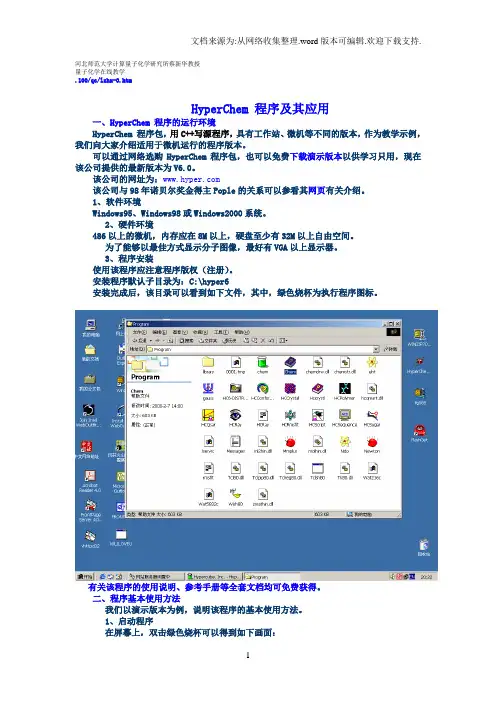
河北师范大学计算量子化学研究所蔡新华教授量子化学在线教学.100/qc/lzhx-0.htmHyperChem 程序及其应用一、HyperChem 程序的运行环境HyperChem 程序包,用C++写源程序,具有工作站、微机等不同的版本,作为教学示例,我们向大家介绍适用于微机运行的程序版本。
可以通过网络选购HyperChem程序包,也可以免费下载演示版本以供学习只用,现在该公司提供的最新版本为V6.0。
该公司的网址为:该公司与98年诺贝尔奖金得主Pople的关系可以参看其网页有关介绍。
1、软件环境Windows95、Windows98或Windows2000系统。
2、硬件环境486以上的微机,内存应在8M以上,硬盘至少有32M以上自由空间。
为了能够以最佳方式显示分子图像,最好有VGA以上显示器。
3、程序安装使用该程序应注意程序版权(注册)。
安装程序默认子目录为:C:\hyper6安装完成后,该目录可以看到如下文件,其中,绿色烧杯为执行程序图标。
有关该程序的使用说明、参考手册等全套文档均可免费获得。
二、程序基本使用方法我们以演示版本为例,说明该程序的基本使用方法。
1、启动程序在屏幕上,双击绿色烧杯可以得到如下画面:点击 Try进入工作区窗口窗口各部分功能简介标题名称:最大、最小化、退出按钮菜单条:FILE、EDIT、BUILD、SELECT、DISPLAY、DATABASE、SETUP 、COMPUTE、CANCEL、SCRIPT、HELP工具条:工作区:状态行:2、打开已存在的数据文件File-Open选择分子图形的显示方式Display- Labels可以选择原子、化学键等标记方式:Dispay-RenderingRenderings-BallsRendering—Balls and Cylinders3、建立计算分子的数据文件以丁二烯为例:选择Build-Default Element可以显示指定元素的基本性质:选择绘图工具后,得到碳碳骨架。
Hyperchem学习
OK Thr Mutate
谢谢观赏
胡非非
hyperchem学习 hyperchem
*保存文件
• File→Save As→
保存←
*改变键型连接
• 将鼠标移动至需要修改键型的原子上面,左击鼠标同时移 动至另一个原子上面,则
*制作苯环
• 用鼠标单击环形结构中的任一原子,则可画出苯环
*标记原子
• Display→Labels ↓ →→Symbol→OK ↑ ↓ ↑ ↑ →→↑
*编辑个人原子
Line Options→ 移动鼠标 ← ↓ ←
→Turn on Perspective ↓ ←确定
*缩放工具的使用
按着鼠标左键移 动鼠标
*定心和缩放
• Display Select to Y轴的旋转
*Z轴的旋转
将鼠标移动至工作区, 则可以对分子进行旋转
原子间距离显示在 状态栏
*键角测量
• 按住鼠标左键从碳原子拖到氢原子,接着放开鼠标则
键角显示
六、创建多肽
• • • •
Amino Acids对话框的使用 创建一个多肽 创建一个两性分子 位点专一诱变
*Amino Acids对话框的使用
• Databases→Amino Acids→
不同氨基酸结构
• 双击鼠标左键→Element Table→选择原子→关闭Element Table→将鼠标移动至想要编辑的原子上面,单击左键, 则该原子变为自己后面所选原子,如
*选用模型生成器
• Build→Add H and Model Build→
如果没有显示相应原子,则进入 Display→Show Hydrogens
Hyperchem学习
化学软件ChemOffice的使用说明
•文件命令对话框
图4 文件命令的对话框
(2)
主 工 具 图 标 板
图 5主工具图标板
主 工 具 图 表 板
图6 主工具图表板的子图标板
2、模板
图7 模板工具图标板示例
3、绘制与编辑典型化学物质结构式
(1)键工具: 主工具图标板上提供了九个键操作的命令,其中双
键命令板中的子菜单中还包 括12个键命令。利用键工 具进行结构绘制操作的基本操作:首先在命令面板中选 取键命令,绘制的基本操作是“点位”、 “拖动”和 “点击”。
(2)方程式的建立
•箭头的选择 •利用绘图工具选择合适的阴影框罩住方程式
(3)化学反应方程式绘制举例
乙酰水杨酸又称为阿司匹林,为常用的退热镇痛药物。制备乙酰水杨酸 最常用的方法是将水杨酸与乙酐作用,生成乙酰水杨酸。
OH
(CH3CO)2 70°C80°C 15min水浴
COOH
OOCCH3 COOH
一概述
ChemOffice软件是由剑桥化学软件公司开发的集 成化学软件桌面系统,集成了Chem3D、ChemDraw、 ChemFinder和ChemInfo,以及Chem TableEditor等软 件,具有强大的高端开发功能。
ChemDraw Ultra 8.0 化学结构绘图 Chem3D Ultra 8.0 分子模型及仿真 ChemFinder Pro8.0 化学信息搜寻整合系统
图18 复制修改得到的乙酰水杨酸结构式
图19 乙酰水杨酸合成反应方程式
图20 符号窗口
图21 字体选项
图22 “Color”菜单选项
图23 调色板
6、绘制实验装置
利用实验仪器模板工具1和实验仪器模板工具2进行实验装置的绘制,在模板 中选择所需的实验仪器,单击产生相应的玻璃仪器。玻璃仪器连接处为阴影。通 过旋转选择框改变角度和大小进行玻璃仪器的连接。示范图例见下图4-24。
计算化学教程01Gaussian和Hyperchem使用
双击在跳出的对话框中选择相应的元素,如下图选择了C,同时把对话框底部Allow Ions 选项选上,这样就可以任意画键。
然后右上角关闭对话框。
意结构图选择按钮,旋转图形成近平面,如左图们同平面三个原子连接起来。
如下7. 删除键的方法:鼠标在Draw模式下放至要删除的键的中部,点击右键。
Hyperchem搭建初步构型的粗模型,在键长和键角上可能很不合理,我们可通过中的几何优化功能,粗略优化一下构型。
如下选择菜单Compute →在跳出的对话框中选择Ok,程序就会对刚才的模型进行优化。
这样就得到了化学上相对合理构型,如右。
(比较一下可以看出,程序对键长自动作了一定的调整)用Hyperchem9. 保存构型。
选择菜单File →Save,保存为10. 用Gaussview打开,C5.mol 如右,在Gaussview中可以进行一定的修改。
打开时注意选择*.mol 扩展名。
中选择File →Save 保存为C5.gjf,文件用Scite编辑器打开,内容如下第1行%开头定义chk文件,类似还可以定义内存%mem,%rwf等。
第2行#开头定义计算关键字第3行空第4行说明性文字第5行空第6行0 指体系电荷,如负1价离子则写-1. 1 为体系多重度= 2s+1 s为体系总自旋第7-11行为原子坐标。
第12空行用Gaussian优化构型下面以优化C5为例进行说明:1. 编辑C5.gjf文件,内容如右%mem定义内存为4GB%nprocshared=8定义使用CPU数目#P B3LYP/6-31+G*定义了优化Freq。
文件传到计算服务器上。
转换文件格式(注意Linux上区分大小写)5. 运行ps x 查看,如果正常,则显示如下:Gaussian优化构型传回文件。
查看工作是否计算完可以通过类似5步中的ps 录下运行tail C5.out 查看文件末尾信息,如果最后一行显示如下:Normal termination …说明任务正常结束,结果文件可用。
HyperChem应用 乙烯最低电子激发态的从头计算
HyperChem应用乙烯最低电子激发态的从头计算优化乙烯的基态通过前面几个例子的学习,你已经对从头计算有了初步的了解,所以下面的一些指令将省略。
用STO-3G基组构造乙烯:1. 在File菜单中选择New,刷新工作区。
2. 确保Explicit Hydrogens没有选择。
3. 从Default Element中选择碳,并画一条C-C单键。
单击碳键中部使它变成双键。
4. 从Build菜单选择Add H和Model Build构造乙烯。
5. 从Setup菜单选择Ab Initio,并选基组为Minimal (STO-3G)。
同时令Total charge = 0,Spin multiplicity = 1,Spin pairing = RHF,Accelerate convergence =Yes,SCF Convergence limit = 0.0001. 按下CI按钮选择CI Method 为None。
优化乙烯基态:1. 选择Compute菜单的Geometry Optimization。
选择Polak-Ribiere方法,RMS gr adient 为0.01。
选择OK关闭对话框。
得到的结果为:C-C bond length:1.31埃,C-H bond length:1.08埃,H-C-H angle:115.7度。
计算相关能:1. 在Setup菜单选择Ab Initio,按下Options按钮并选择MP2 correlation energy。
单击OK回到工作区。
2. 在Compute菜单选择Single Point。
得到结果:SCF能量:-48364.64 kcal/mol ,MP2总能量:-48438.61 kcal/mol,包括-74.97kc al/mol相关能。
具体运算结果可能会与这个值有微小的差别。
乙烯基态轨道观察乙烯的轨道和轨道能量图:1. 从Compute菜单选择Orbitals。