
2504HA配置
一,将无线控制器2504和2504HA都接到核心交换机。
调试无线控制器2504让所有的无线AP全部注册上来,测试无线网络没有问题;二,升级2504HA的版本,将版本升级到和2504的版本一样,调试2504HA设备跟2504的配置一样,管理地址不一样,其它配置一样;三,在无线控制器2504上配置:Step 1Choose Wireless > Access Points > Global Configuration to open the GlobalConfiguration page.Step 2From the Local Mode AP Fast Heartbeat Timer State drop-down list,choose Enable to enable the fast heartbeat timer for access points in local mode orchoose Disable to disable this timer. The default value is Disable.Step 3If you chose Enable in Step 2, enter the Local Mode AP Fast Heartbeat Timeouttext box to configure the fast heartbeat timer for access points in local mode.Specifying a small heartbeat interval reduces the amount of time it takes to detect acontroller failure.The range for the AP Fast Heartbeat Timeout value for Cisco Flex 7500 Controllersis 10–15 (inclusive) and is 1–10 (inclusive) for other controllers. The default valuefor the heartbeat timeout for Cisco Flex 7500 Controllers is 10. The default value forother controllers is 1 second.Step 4.From the FlexConnect Mode AP Fast Heartbeat Timer State drop-down list,choose Enable to enable the fast heartbeat timer for FlexConnect access points orchoose Disable to disable this timer. The default value is Disable.Step 5If you enable FlexConnect fast heartbeat, enter the FlexConnect Mode AP FastHeartbeat Timeout value in the FlexConnect Mode AP Fast Heartbeat Timeout textbox. Specifying a small heartbeat interval reduces the amount of time it takes todetect a controller failure.The range for the FlexConnect Mode AP Fast Heartbeat Timeout value for CiscoFlex 7500 Controllers is 10–15 (inclusive) and is 1–10 for other controllers. Thedefault value for the heartbeat timeout for Cisco Flex 7500 Controllers is 10. Thedefault value for other controllers is 1 second.Step 6In the AP Primary Discovery Timeout text box, a value between 30 and 3600seconds (inclusive) to configure the access point primary discovery request timer.The default value is 120 seconds.Step 7If you want to specify a primary backup controller for all access points, enter theIPv4/IPv6 address of the primary backup controller in the Back-up PrimaryController IP Address (IPv4/IPv6) text box and the name of the controller in theBack-up Primary Controller Name text box.Note The default value for the IP address is 0.0.0.0, which disables the primary backup controller.Step 8If you want to specify a secondary backup controller for all access points, enter theIPv4/IPv6 address of the secondary backup controller in the Back-up SecondaryController IP Address (IPv4/IPv6) text box and the name of the controller in theBack-up Secondary Controller Name text box.Note The default value for the IP address is 0.0.0.0, which disables the secondary backup controller.Step 9Click Apply to commit your changes.Step 10Configure primary, secondary, and tertiary backup controllers for a specific accesspoint as follows:a. Choose Access Points > All APs to open the All APs page.b. Click the name of the access point for which you want to configure primary,secondary, and tertiary backup controllers.c. Choose the High Availability tab to open the All APs > Details for (HighAvailability) page.d. If desired, enter the name and IP address of the primary controller for thisaccess point in the Primary Controller text boxes.Note Entering an IP address for the backupcontroller is optional in this step and the nexttwo steps. If the backup controller is outside themobility group to which the access point isconnected (the primary controller), then youneed to provide the IP address of the primary,secondary, or tertiary controller, respectively.The controller name and IP address mustbelong to the same primary, secondary, ortertiary controller. Otherwise, the access pointcannot join the backup controller.e. If desired, enter the name and IP address of the secondary controller forthis access point in the Secondary Controller text boxes.f. If desired, enter the name and IP address of the tertiary controller for thisaccess point in the Tertiary Controller text boxes.g. Click Apply to commit your changes.Step 11Click Save Configuration to save your changes.四,在2504HA上面的配置跟在2504控制器上面的配置是一样的五,测试注:在调试过程或者测试过程中可能会导致断网,请做好准备。
华为AR系列工业物联网关技术主打胶片

2 工业物联网关解决方案
3 应用场景
21
工业物联网关全家福
AR2500 series
AR2504--H
AR550 series
AR550-8FE-D-H
AR550-24FE-D-H
AR530 series
AR531-2C-H
AR531-F2C-H
AR531GPe-U-H
AR531GR-U-H
AR531G-U-D-H
18
即插即用,简化物联网现场部署或备件更换
+
② 按下SETUP
① 串口对接
坏件
备件
(无需 供电)
③ 配置倒换
19
坚固
融合
安全
简易
U盘开局,配置简单
操作过程简单,现场安装人员不需要经过 专业的设备调试培训,插上U盘上电即完成 配置
1”键式备份,“0”操作更换
产品特有SETUP按键,可以实现“1”键 式配置备份,“0”操作现场设备更换
网络融合挑战:
企业生产网与办公网融合成为趋势,面临更复杂的安全挑战。远程站点也可能通过租用公共链路或 3G/4G共有网络进行通信,数据将暴露在公开的互联网中。
7
挑战4:物联网网络运维复杂度高
站点分散,部署工作量大
海量物联网设备,管理困难
人员经验要求高
网络运维复杂度随着管理终端的增加承几何倍数增长 各厂商配置方式不同,增加了管理复杂性,多种设备能否统一管理
10
管理&应用
管理APP 第三方APP
SDK
网络管理
终端管理
华为工业物联网关如何迎接挑战?
? 严苛工业环境下可靠通信
坚固 设备工业化设计,满足严酷环境 品质 网络多重冗余可靠
曙光服务器典型配置
曙光服务器典型配置
服务器是指专门用于提供技术服务的计算机,是网络的核心部分,因而配置选择正确至关重要。
下面介绍曙光服务器的典型配置。
1、处理器
曙光服务器采用Intel最新的Sandy Bridge-E技术,使用Xeon E5-2600处理器,提供2比特、4比特处理器,具有更高的处理能力和更低的功耗。
它可以提供更高的性能,更低的延迟,更多的核心和更多的缓存,使服务器更加高效。
2、主板
曙光服务器采用Super micro的X9DR7-LF主板,支持1800W电源,该主板提供8个DIMM,支持最高256G内存,支持双ZFS,RAID,和双
10G网卡,最多支持8TB硬盘,可以更好的满足各类服务器的需求。
3、硬盘
4、内存
5、显卡。
Cisco无线控制器配置基础
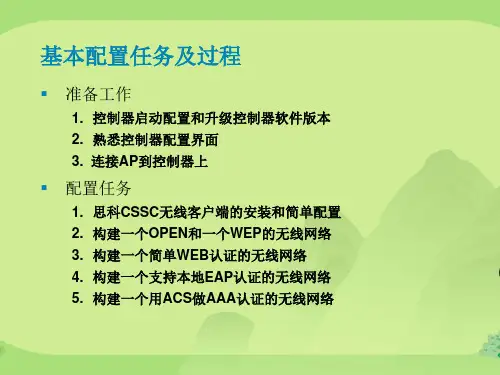
WLC的组成及接口(续)
▪ 动态接口:根据需要,为通过CAPWAP 隧道扩展到LAP 的VLAN自动创建 的接口,动态 接口有时也被称为用户接口,动态接口使用的IP 地址属于无 线客户端VLAN 的子网。
▪ Configure a RADIUS Server now? [YES][no]: no ▪ Warning! The default WLAN security policy requires a RADIUS server. ▪ Please see documentation for more details.
$3,743.00 $7,493.00 $13,493.00 $19,493.00
5500系列无线控制器
▪ 1 RU 高度
8口千兆上联
▪ 支持 12, 25, 50, 100, 250, 500 AP; ▪ 支持多达7000个客户端; ▪ 经过优化的802.11n性能;
▪ 智能射频控制平面,可以自行配置、修 复和优化。
$220,490.00 $136,490.00
$83,990.00 $47,240.00 $33,590.00 $23,090.00
准备工作
▪ 网线和Console线。 ▪ 如果是5508,需要GLC光纤模块和光纤或者GLC-T模块 ▪ 确认控制器版本是否需要升级 (用命令show sysinfo查看系统版本) ▪ 相应数量的瘦AP
▪ 高效漫游功能可提升应用性能; ▪ 2 热插拔电源模块插槽
AIR-CT5508-500-K9 AIR-CT5508-250-K9 AIR-CT5508-100-K9 AIR-CT5508-50-K9 AIR-CT5508-25-K9 AIR-CT5508-12-K9
AtlasIED DNA2404 数字网络4路强电源音频放大器说明书

S o u n d L P . T h e A t l a s “C i r c l e A ”, S o u n d o l i e r , a n d A t l a s S o u n d a r e t r a d e m a r k s o f A t l a s S o u n d L .P . I E D i s a R e g i s t e r e d T r a d e m a r k o f I n n o v a t i v e E l e c t r o n i c D e s i g n s L L C . A l l r i g h t s r e s e r v e d . d e m a r k s a r e p r o p e r t y o f t h e i r r e s p e c t i v e o w n e r s . N o e n d o r s e m e n t i s i m p l i e d . D u e t o c o n t i n u a l p r o d u c t d e v e l o p m e n t , s p e c i f i c a t i o n s a r e s u b j e c t t o c h a n g e w i t h o u t n o t i c e . A T S 005968 R e v A 6/19Digital Network 4-CH Power Amplifier DNA2404CL/DNA2404DL/DNA2404CH/DNA2404DHDNA2404Class D operation, combined with an integral switching mode power supply, offers many advantages, and the unique IED design makes full use of these benefits. They include higher efficiency, increased reliability, improved performance, and lower operating cost. Switching mode operation combined with high voltage power MOSFET devices make it possible to eliminate the heavy, costly, bulky transformers. IED’s design is stable under all load conditions (phase angles of 0 to 360degrees). The amplifier card has 34dB of gain from its analog input to the loudspeaker output. Attenuation is handled ahead of the power amplifier by DSP controls through software.Inputs are provided for connecting up to eight (8) 540S ambient noise sensors (2 sensors for each output channel). This allows the output of each channel to be automatically adjusted in real time based on the measured ambient noise level in the zone.The power amplifier has built-in voltage limiting to protect theloudspeakers being driven. In addition, a temperature sensor on the heatsink will annunciate a trouble condition if an amplifier becomes too hot.The DNA2404 series amplifiers feature LED indicators for power, audio signals and fault status. A Form C relay is also included that will indicate that a fault is present.The DNA2404 amplifiers provide 600-watts per channel in either 70.7-volt or 100-volt transformer-distributed loudspeaker systems.Models DNA2404CL and DNA2404CH utilize CobraNet ® for digital audio while models DNA2404DL and DNA2404DH utilize Dante™ for digital audio transmissions. Models DNA2404CL and DNA2404DL operate from a 120 VAC power source and the DNA2404CH and DNA2404DH models operate from a 240 VAC power source.Models DNA2404CL and DNA2404CH can be used in conjunction with a GLOBALCOM ® Announcement Controller for sound masking applications. The sound masking functionality can be enabled andcontrolled on a per channel basis. Each of the four (4) output channels has eighteen (18) bands of dedicated 1/3 octave filter sets. Sound masking can be layered on top of background music (BGM) and / or paging allowing for a complete paging, masking, BGM solution.Features• Supports Dante™ or CobraNet ® Digital Audio Inputs (Depending on Model)• Compatible with IED GLOBALCOM ® Systems and 3rd Party Dante™ or CobraNet ® Devices• Provides Redundant Ethernet Ports• 7-Band Parametric EQ and a High-Pass and Low-Pass Filter per Channel• Output Audio Monitoring• Four 600-Watt Amplifier Output cChannels • 70.7-Volt or 100-Volt Output Models Available• LED Indicators for Power, Audio Signals and Faults• Built-in Supervision of Amplifier Cards and Loudspeaker Lines • Fault Reports and Amplifier Status Available Over Ethernet Using Standard SNMP Protocol• Supports Independent Background Music for All Channels with Automatic Ducking When Paging Audio is Present (CobraNet ® Versions Only)• Two Inputs for Ambient Noise Sensors for Each Amplifier Output Channel• ETL Safety Listed - DNA2404CL(DL) Are Also Listed to UL1711 Which is Required for UL2572 Mass Notification Systems • Can be Used on Class A, B or AB Loudspeaker CircuitsGeneral DescriptionThe DNA2404 series of amplifiers are an integral part of the IEDGLOBALCOM ® Communications System, allowing a few audio zones to be added where necessary when a full 16-zone T9160 amplifier frame is not required. The amplifiers feature either CobraNet ® or Dante™ digital audio input and four channels of 600 watt amplification. The DNA2404 amplifiers are controlled with network commands for selectinginput routing and configuring EQ, output levels, ambient noise levelcompensation, and sound masking (CobraNet ® versions only). Amplifiers are controlled through the GLOBALCOM ® System Management Center.The internal amplifier cards are Class D (switching mode) dual channelS o u n d L P . T h e A t l a s “C i r c l e A ”, S o u n d o l i e r , a n d A t l a s S o u n d a r e t r a d e m a r k s o f A t l a s S o u n d L .P . I E D i s a R e g i s t e r e d T r a d e m a r k o f I n n o v a t i v e E l e c t r o n i c D e s i g n s L L C . A l l r i g h t s r e s e r v e d . d e m a r k s a r e p r o p e r t y o f t h e i r r e s p e c t i v e o w n e r s . N o e n d o r s e m e n t i s i m p l i e d . D u e t o c o n t i n u a l p r o d u c t d e v e l o p m e n t , s p e c i f i c a t i o n s a r e s u b j e c t t o c h a n g e w i t h o u t n o t i c e . A T S 005968 R e v A 6/19S o u n d L P . T h e A t l a s “C i r c l e A ”, S o u n d o l i e r , a n d A t l a s S o u n d a r e t r a d e m a r k s o f A t l a s S o u n d L .P . I E D i s a R e g i s t e r e d T r a d e m a r k o f I n n o v a t i v e E l e c t r o n i c D e s i g n s L L C . A l l r i g h t s r e s e r v e d .d e m a r k s a r e p r o p e r t y o f t h e i r r e s p e c t i v e o w n e r s . N o e n d o r s e m e n t i s i m p l i e d . D u e t o c o n t i n u a l p r o d u c t d e v e l o p m e n t , s p e c i f i c a t i o n s a r e s u b j e c t t o c h a n g e w i t h o u t n o t i c e . A T S 005968 R e v A 6/19l l r i g h t s r t i c e . A T SS o u n d L P . T h e A t l a s “C i r c l e A ”, S o u n d o l i e r , a n d A t l a s S o u n d a r e t r a d e m a r k s o f A t l a s S o u n d L .P . I E D i s a R e g i s t e r e d T r a d e m a r k o f I n n o v a t i v e E l e c t r o n i c D e s i g n s L L C . A l l r i g h t s r e s e r v e d . d e m a r k s a r e p r o p e r t y o f t h e i r r e s p e c t i v e o w n e r s . N o e n d o r s e m e n t i s i m p l i e d . D u e t o c o n t i n u a l p r o d u c t d e v e l o p m e n t , s p e c i f i c a t i o n s a r e s u b j e c t t o c h a n g e w i t h o u t n o t i c e . A T S 005968 R e v A 6/19The rear panel is to include dual ethernet connectors (100Mbps), dual 4-pin Phoenix™ style connectors for speaker line connection, eight (8) 3-pin Phoenix™ style ambient noise sensor connections, power connectors and Fault Relay (NO/NC) to trigger an optional redundant back up amplifier switch model AtlasIED 1544BAS.The Power Amplifier shall be capable of live or delayed paging, pre-recorded message playback, and muting of individual amplifier channels, zones, and zone groups in any combination when used with optional GCK software deployment.Amplifier is able to function on Class A, B or AB Loudspeaker Circuits.The Power Amplifier shall require 2 rack units of vertical space in a 19-inch rack.AtlasIED DNA2404CL and DNA2404DL models comply with UL60065, CAN/CSA C22.2 No. 60065, IEC 60065, EN 60065, CB Certificate, and UL1711.AtlasIED DNA2404CH and DNA2404DH models comply with UL60065, CAN/CSA C22.2 No. 60065, IEC 60065, EN 60065 and CB Certificate.The DNA2404 Series of amplifiers are made in America, and are BAA Compliant.Architect and Engineer SpecificationsThe DNA2404 Series of amplifiers are an integral part of the AtlasIED GLOBALCOM™ Communications System. The 4-channel amplifier shall provide 4-600Watt at 70.7V channels or 100V channels and provide digital audio connections via a Dante™ or CobraNet ® audio distribution depending on the models.The integrated NIC (Network Interface Card) shall include dual ports for redundant network connections. The system shall detect a failure in any of the amplifier channels and report the failure to the GLOBALCOM™ System Console via Ethernet using standard SNMP protocol.The integrated digital signal processor shall provide processing to include level control of individual circuits, up to 7 bands of parametric equalization, high pass filter, low pass filters signal delay of up to 25 ms on each channel. Ambient analysis control shall be achieved via an integrated ambient noise collector for each channel. Ambient analysis and control shall be accomplished via an adjustment of signal levels via external noise sensing and / or computer commands. Up to 2 sensors shall be connected to each channel. Ambient control of amplifier channels shall be in real time. All setup, monitoring, configuration, testing and control shall be under software control.Front panel indicators include audio signal presence, clipping, card fault, temperature fault, ground fault and fan fault.。
蜚声功放说明书

5. 安装孔 用于安装到机柜时固定用。
6. 通道1的音量控制器 功放工作于立体声或并接模式时由此控制器控制通道1的输出电平,功放工作于桥接模式时由此控制器控 制输出电平,此时通道2的音量控制器失效。
7. 保护指示 当此指示灯亮,处于保护状态,方便找出问题所在。 指示的保护功能有:削峰压限保护、过热保护、过载保护、短路保护、直流保护功能。
11电压增益频率响应总谐波失真转换速率阻尼系数动态范围信噪比输入灵敏度输入阻抗平衡不平衡输出级电路类型保护功能高通滤波器低通滤波器散热气流方向输入电压频率外箱尺寸mm重量压限直流短路开关机零冲击开机软启动vhf甚高频保护压限直流短路开关机零冲击开机软启动从功放面板进风23kg29kg29kg33kg35kg38kg33kgl620xw585xh210max1200max2400max3600max4300max7200max7800650wx21250wx2450wx2675wx2800wx2975wx21650wx21950wx2520wx2450wx2300wx21100wx2max4800830wx21250wx2900w1350w1600w1950w3300w3900w2500w620wx21000wx21200wx21400wx22160wx22700wx21850wx2桥接功率1240w2000w2400w2800w43200w5400w3700wmax系列技术参数12注意
2. TRS输入座(平衡或不平衡)。连接到上一级的周边处理设备。 3. 直通插座
与XLR 输入并联,提供一个与输入信号一样的输出信号,用此平衡插座连接到另一台设备。 (仅限于MAX4300、MAX4800、MAX7200、MAX7800) 4. 输入灵敏度开关 此开关用于选择功放的输入灵敏度:0.775V、1.0V及1.4V。(仅限于MAX4300、MAX4800、MAX7200、 MAX7800)。 5. 工作模式选择开关 用此开关去选择功放的工作模式: STEREO/立体声:两个通道完全独立。 PARALLEL/并接:信号共用通道1输入,音量独立控制,输出独立。 BRIDGE/桥接:信号共用通道1输入,音量由通道1控制,输出接通道1的SPEAKON。当使用到该工作模式 时,背板的指示灯亮。 注意:具体见下页的接线图。 6. 150Hz低通滤波器开关 若系统中需要推动超低音的音箱时,将开关拨到“ON”的位置可以滤掉150Hz以上的信号,直接使用功放 推动超低音的音箱,无需外加电子分频器。(仅限于MAX4300、MAX4800、MAX7200、MAX7800) 7. 音箱螺旋座输出 这是功放螺旋座的输出端。1+接喇叭的正端,1-接喇叭的负端,桥接时1+接喇叭的正端、2+接喇叭的负端。 8. 喇叭接线柱输出 这是功放喇叭接线柱的输出端。红色接喇叭的正端,黑色接喇叭的负端,桥接时只使用红色接喇叭的正端。 9. 保险管座 此保险管座内装由标准规格的保险管,用于故障时保护功放,如果功放已经接上电源待机指示灯没有点亮 时,请检查保险管的情况,如发现保险管已熔掉,在故障排除后,必须更换同一规格的保险管。 10. 散热的气流入口,不要有任何东西堵住。
常见端口一览

端口:137
说明:SQL Named Pipes encryption over other protocols name lookup(其他协议名称查找上的SQL命名管道加密技术)和SQL RPC encryption over other protocols name lookup(其他协议名称查找上的SQL RPC加密技术)和Wins NetBT name service(WINS NetBT名称服务)和Wins Proxy都用这个端口。
端口:636
服务:LDAP
说明:SSL(Secure Sockets layer)
端口:666
服务:Doom Id Software
说明:木马Attack FTP、Satanz Backdoor开放此端口
端口:993
服务:IMAP
说明:SSL(Secure Sockets layer)
端口:464
说明:Kerberos kpasswd(v5)。另外TCP的464端口也是这个用途。
端口:500
说明:Internet Key Exchange(IKE)(Internet密钥交换)
端口:513
服务:Login,remote login
说明:是从使用cable modem或DSL登陆到子网中的UNIX计算机发出的广播。这些人为入侵者进入他们的系统提供了信息。
端口:25
服务:SMTP
说明:SMTP服务器所开放的端口,用于发送邮件。入侵者寻找SMTP服务器是为了传递他们的SPAM。入侵者的帐户被关闭,他们需要连接到高带宽的E-MAIL服务器上,将简单的信息传递到不同的地址。木马Antigen、Email Password Sender、Haebu Coceda、Shtrilitz Stealth、WinPC、WinSpy都开放这个端口。
TP-Link R系列企业级路由器主要功能配置实例说明书
声明Copyright © 2021 普联技术有限公司版权所有,保留所有权利未经普联技术有限公司明确书面许可,任何单位或个人不得擅自仿制、复制、誊抄或转译本手册部分或全部内容,且不得以营利为目的进行任何方式(电子、影印、录制等)的传播。
为普联技术有限公司注册商标。
本手册提及的所有商标,由各自所有人拥有。
本手册所提到的产品规格和资讯仅供参考,如有内容更新,恕不另行通知。
除非有特殊约定,本手册仅作为使用指导,所作陈述均不构成任何形式的担保。
目录第1章前言 (1)1.1 目标读者 (1)1.2 本书约定 (1)1.3 适用机型 (1)第2章基础联网设置 (3)2.1 企业路由器基本设置指南 (3)2.1.1 应用介绍 (3)2.1.2 需求介绍 (3)2.1.3 设置方法 (3)2.1.4 注意事项 (7)2.2 企业路由器IPv6上网配置指导 (8)2.2.1 应用介绍 (8)2.2.2 需求介绍 (8)2.2.3 设置方法 (8)2.2.4 疑问解答 (15)第3章设备管理 (17)3.1 如何在外网远程管理(控制)路由器? (17)3.1.1 应用介绍 (17)3.1.2 需求介绍 (17)3.1.3 设置方法 (17)3.1.4 注意事项 (20)3.1.5 疑问解答 (21)3.2 如何设置自动重启? (22)3.2.1 应用介绍 (22)3.2.2 需求介绍 (22)3.2.3 设置方法 (22)3.2.4 注意事项 (23)第4章负载均衡 (24)4.1 多WAN口路由器负载均衡的设置指南 (24)4.1.1 应用介绍 (24)4.1.2 需求介绍 (24)4.1.3 工作原理 (24)4.1.4 设置方法 (25)第5章路由转发模块 (27)5.1 策略路由设置指南 (27)5.1.1 应用介绍 (27)5.1.2 需求介绍 (27)5.1.3 设置方法 (28)5.1.4 疑问解答 (31)5.2 ISP选路设置指南 (33)5.2.1 应用介绍 (33)5.2.2 需求介绍 (33)5.2.3 设置方法 (34)5.3 静态路由设置指南 (36)5.3.1 应用介绍 (36)5.3.2 需求介绍 (36)5.3.3 设置方法 (37)5.4 线路备份设置指南 (38)5.4.1 应用介绍 (38)5.4.2 需求介绍 (38)5.4.3 设置方法 (38)5.4.4 注意事项 (40)5.5 虚拟服务器设置指南 (41)5.5.1 应用介绍 (41)5.5.2 需求介绍 (41)5.5.3 设置方法 (42)5.5.4 疑问解答 (43)5.6 NAT-DMZ功能设置指南 (44)5.6.1 应用介绍 (44)5.6.2 需求介绍 (44)5.6.3 设置方法 (45)第6章AP和易展管理 (47)6.1 AP管理设置指南 (47)6.1.1 应用介绍 (47)6.1.2 需求介绍 (47)6.1.3 设置方法 (47)6.2 易展AP设置指南 (53)6.2.1 应用介绍 (53)6.2.2 需求介绍 (53)6.2.3 设置方法 (54)6.2.4 注意事项 (58)第7章行为管控 (59)7.1 连接数限制设置指南 (59)7.1.1 应用介绍 (59)7.1.2 需求介绍 (59)7.1.3 设置方法 (59)7.1.4 疑问解答 (60)7.2 访问控制设置指南 (61)7.2.1 应用介绍 (61)7.2.2 需求介绍 (61)7.2.3 设置方法 (61)7.2.4 疑问解答 (67)7.3 应用限制设置指南 (68)7.3.1 应用介绍 (68)7.3.2 需求介绍 (68)7.3.3 设置方法 (68)7.4 网址过滤设置指南 (71)7.4.1 应用介绍 (71)7.4.2 需求介绍 (71)7.4.3 设置方法 (71)7.4.4 疑问解答 (75)7.5 网页安全设置指南 (76)7.5.1 应用介绍 (76)7.5.2 需求介绍 (76)7.5.3 设置方法 (76)第8章安全防护 (78)8.1 ARP防护设置指南 (78)8.1.1 应用介绍 (78)8.1.2 需求介绍 (78)8.1.3 设置方法 (78)8.1.4 疑问解答 (84)8.2 MAC地址过滤设置指南 (86)8.2.1 应用介绍 (86)8.2.2 需求介绍 (86)8.2.3 设置方法 (86)第9章VPN模块 (88)9.1 IPSec VPN设置指南 (88)9.1.1 应用介绍 (88)9.1.2 需求介绍 (88)9.1.3 设置方法 (89)9.2 L2TP VPN设置指南 (96)9.2.1 应用介绍 (96)9.2.2 需求介绍 (96)9.2.3 设置方法 (97)9.3 PPTP VPN设置指南 (105)9.3.1 应用介绍 (105)9.3.2 需求介绍 (105)9.3.3 设置方法 (106)9.4 L2TP VPN代理上网设置指南 (115)9.4.1 应用介绍 (115)9.4.2 需求介绍 (115)9.4.3 设置方法 (115)9.5 PPTP VPN代理上网设置指南 (120)9.5.1 应用介绍 (120)9.5.2 需求介绍 (120)9.5.3 设置方法 (120)第10章认证管理 (125)10.1 一键上网设置指南 (125)10.1.1 应用介绍 (125)10.1.2 需求介绍 (125)10.1.3 设置方法 (126)10.2 短信认证设置指南 (130)10.2.1 应用介绍 (130)10.2.2 需求介绍 (130)10.2.3 设置方法 (131)10.3 Portal认证设置指南—使用内置WEB服务器和内置认证服务器 (136)10.3.1 应用介绍 (136)10.3.2 需求介绍 (136)10.3.3 设置方法 (137)10.4 Portal认证设置指南—使用内置WEB服务器和外部认证服务器 (141)10.4.1 应用介绍 (141)10.4.2 需求介绍 (141)10.4.3 设置方法 (142)10.5 Portal认证设置指南—使用外置WEB服务器和内置认证服务器 (146)10.5.1 应用介绍 (146)10.5.2 需求介绍 (146)10.5.3 设置方法 (147)10.6 Portal认证设置指南—使用外置WEB服务器和外置认证服务器 (150)10.6.1 应用介绍 (150)10.6.2 需求介绍 (150)10.6.3 设置方法 (151)10.7 免认证策略的使用方法 (154)10.7.1 应用介绍 (154)10.7.2 需求介绍 (154)10.7.3 设置方法 (155)10.8 Portal认证中,外部WEB服务器建立规范 (158)10.8.1 应用介绍 (158)10.8.2 流程规范 (159)第11章工业级特性 (163)11.1 如何使用工业级路由器? (163)11.1.1 产品介绍 (163)11.1.2 需求介绍 (163)11.1.3 设置方法 (164)第12章其它功能 (168)12.1 地址组的设置与管理 (168)12.1.1 应用介绍 (168)12.1.2 需求介绍 (168)12.1.3 设置方法 (168)12.1.4 疑问解答 (170)12.2 带宽控制设置指南 (172)12.2.1 应用介绍 (172)12.2.2 需求介绍 (172)12.2.3 设置方法 (172)12.2.4 疑问解答 (175)12.3 PPPOE服务器应用设置指南 (177)12.3.1 应用介绍 (177)12.3.2 需求介绍 (177)12.3.3 设置方法 (178)12.3.4 疑问解答 (181)12.4 网络唤醒功能使用指南 (183)12.4.1 应用介绍 (183)12.4.2 需求介绍 (183)12.4.3 设置方法 (183)12.5 诊断工具使用指南 (186)12.5.1 应用介绍 (186)12.5.2 需求介绍 (186)12.5.3 设置方法 (187)第1章前言本手册旨在帮助您正确使用R系列企业级路由器。
Haiwell(海为)4G工业路由器GBOX+使用说明说明书
厦门海为科技有限公司4G 工业路由器GBOX+使用说明目录一、产品型号列表与外观尺寸 (3)二、指示灯说明 (3)三、产品规格 (3)四、环境规格 (3)五、恢复出厂设置 (3)六、4G工业路由器应用实例 (4)5.14G工业路由器与设备(HMI)直连 (4)5.24G工业路由器与交换机相连 (4)七、4G工业路由器使用注意事项 (5)一、产品型号列表与外观尺寸型号功率(12VDC)外形尺寸GBOX+4G工业无线路由器,5*RJ-45接口(10/100MB),支持4G全网通,带WIFI小于12W130mm×83mm×34mm1.POWER指示灯N3口指示灯2.3/4G运行指示灯N4口指示灯3.WIFI指示灯9.3G/4G天线接口4.WAN指示灯10.2.4G天线接口N1口指示灯11.3G/4G天线接口N2口指示灯12..2.4G天线接口二、指示灯说明指示灯指示灯颜色指示灯状态POWER指示灯红色常亮-电源正常3/4G指示灯蓝色慢闪烁-3/4G正常工作WIFI指示灯蓝色闪烁-WIFI正常工作WAN指示灯蓝色闪烁-网络正常工作LAN指示灯蓝色接对应的LAN口对应LAN灯常亮三、产品规格项目规格外壳黑色铁壳接口WAN口(10MB/100MB),LAN口(10MB/100MB),SIM口,SMA天线接口,Micro SD卡接口,USB2.0接口指示灯依次为Power,3/4G指示灯,WLAN,WAN,LAN1,LAN2,LAN3,LAN4认证RoHS、CE、FCC、3C认证网络制式国内全网通TCP/IP协议IPV4/IPV6四、环境规格项目环境规格温度工作温度:-20~+60ºC储存温度:-40~+70ºC工作湿度:10%~90%RH不凝结存储湿度:5%~90%RH不凝结五、恢复出厂设置5.1当遇到忘记密码、无法登陆设备、设备配置异常等情况建议恢复出厂配置后重新设置本设备。
拟投入本方案的主要维护设备清单
拟投入本方案的主要维护设备清单以下是拟投入本方案的主要维护设备清单:
1.电脑及配件
品牌。
Dell
型号。
Latitude 5410
数量。
10台
备注。
配备高性能处理器和大容量内存
2.打印机
品牌。
HP
型号。
LaserJet Pro M404dn
数量。
2台
备注。
支持双面打印和高速打印功能
3.扫描仪
品牌。
Epson
型号。
DS-970
数量。
1台
备注。
支持快速双面扫描和自动文档进纸功能
4.网络交换机
品牌。
___
型号。
Catalyst 2960X-48FPD-L
数量。
1台
备注。
支持48个千兆以太网端口和PoE供电功能
5.服务器
品牌。
HP
型号。
ProLiant DL380 Gen10
数量。
2台
备注。
配备强大的处理器和大容量存储空间,适用于承载大型应用和数据处理任务
6.数据存储设备
品牌。
NetApp
型号。
FAS2552
数量。
1台
备注。
提供可靠的数据存储和备份功能
以上是拟投入本方案的主要维护设备清单,这些设备将能够提供高效稳定的支持,保障方案的正常运行和维护。
爱快软路由推荐硬件配置
爱快软路由推荐硬件配置(代表型号 P4)2核心数量_1M-2M缓存可以带100-250台左右 (代表型号 E6500)(例如D525是四线程能带250左右)4核心数量_3M以上的缓存可以带300-600台左右 (代表型号 intel i3530)8核心数量_4M以上的缓存可以带700-1500台左右 (代表志强E3-1230和intel_I7)以上都是一般环境比如10M-200M带宽这样,再一个就是大带宽的时候需要适当减少带机量50-150台以下:推荐配置1:CPU:Intel(R)Pentium(R)D CPU2、80GHz 双核2M二级缓存内存:512M网卡:普通百兆网卡淘宝整机平均价格:200元推荐配置2:CPU:Intel(R) Pentium(R)4 CPU3、00GHz 双核1M二级缓存内存:512M网卡:普通百兆网卡淘宝整机平均价格:260元100-250台推荐配置1:CPU:Pentium(R)Dual-Core CPU E6500 @2、93GHz 双核2M二级缓存内存:512M网卡:普通千兆网卡淘宝整机平均价格:750推荐配置2:CPU:intel D525 双核4线程1、8G内存:512M网卡:普通千兆网卡淘宝整机平均价格:800200-350台CPU:,Intel(R)Core(TM)2 Quad CPU Q8300 @2、50GHz 四核2M二级缓存内存:1G网卡:Intel(R)PRO/1000淘宝整机平均价格:950300-600台CPU: IntelL54202、5G 内存:1G网卡:Intel(R)PRO/1000淘宝整机平均价格:1100以上就是推荐配置,爱快将一如既往的尊重用户的感受,我们不能做到最好,但是我们会做到更好。
备注:爱快采用的七层流控技术,比传统流控更加精准,精准的识别也会对CPU要求更高一点,爱快也会持续的优化CPU使用率。
以上的服务器推荐配置,请按照您的实际环境灵活参考,建议不要使用配置太差的机器,以免无法体验爱快以后增加的创新功能。