
FLEXlm对多个License的管理
有限元软件安装设置FLEXlm对多个License的管理FLEXlm是应用广泛的License管理工具,它以使软件License能够在网上浮动而出名。
浮动的License有利于软件的使用和对License的管理,这使得用户能够高效地使用有效的许可,并使管理者能够控制允许使用它的节点。
由于有大约1500厂商使用FLEXlm管理License,所以CAD系统管理人员极有可能要同时安装和管理来自不同厂商的License或同一厂商多个产品的License文件。
可采取以下方法避免产生冲突:(1)用一个服务器运行一个Lmgrd(License文件的后台管理程序)和多个License文件;(2)用一个服务器运行多个Lmgrd和License文件;(3)运用多个服务器节点,每个服务器运行单独的Lmgrd和License文件。
第一种选择主要适用于高版本的Lmgrd,V6之前的FLEXlm,每个Lmgrd只能管理一个License文件;第二种选择,将使用一台服务器,但需要运行多个Lmgrd;第三种选择,必须使用多个License服务器。
一、服务器端设定1. License文件的设定在使用FLEXlm进行管理的License文件中一般有SERVER行,如图1所示,它通过SERVER行的hostname和hostID定义License服务器。
例如:SERVER dodge 00E04CE219232. 服务方式的选择(1) 一个服务器运行一个Lmgrd 和多个License文件如果多个License文件具有相同的hostID,则可以通过修改hostname进行合并。
合并时,首先将多个License文件加到一个文件中,然后修改SERVER行,并且只保留一个SERVER行。
对于Windows NT操作系统,应在各License的默认存放位置保存一个合并后的备份,这样每个软件将在其默认位置找到License信息,从而避免了对LM_LICENSE_FILE的设定;对于UNIX操作系统,可以建立一个默认位置到License 存放位置的Link。
合并后的License文件,就可以使用同一个Lmgrd。
(2)一个服务器运行一个Lmgrd和一个License文件如果HostID不一样,则这些License服务只能运行于不同的服务器节点上,并且License不能合并。
可以选择使用一个服务器运行一个Lmgrd和License文件。
(3)一个服务器运行多个Lmgrd和License文件如果多个License未进行合并,可以通过在同一台机器上启动多个Lmgrd,每个Lmgrd管理一个License文件。
使用多个Lmgrd管理多个License文件对服务器的性能并没有明显影响。
如果License是由不同版本的FLEXlm产生的,一般是新版本可以管理旧版本的License文件。
所以应使用最新的Lmgrd和Vendor daemon。
另外,当用一个服务器的多个Lmgrd管理多个License文件时,应该注意任何二个License文件的post都不能一样,并且对于每个License而言,应选用合适的Lmgrd。
二、客户端设定当使用客户端应用程序时(a Licensed application),可以通过在系统的环境变量中设定LM_LICENSE_FILE,使Application能够指向不同服务器上的License文件。
如果要使a Licensed application使用不同服务器的License(每一个License服务器都有单独的一个License文件),客户端应将需要用到的License 文件拷贝到本机目录下,并指定LM_LICENSE_FILE环境变量。
UNIX: % setenv LM_LICENSE_FILE lfpath1 : lfpath2:.... : lfpathN Windows: lfpath1 ;lfpath2:.... ;lfpathNLfpathN为第N个License的路径;UNIX下路径间用“:”隔开;Windows/NT 下路径间使用“;”隔开;这样,每个Licensed application在启动时将依次查询LM_LICENSE_FILE中所指定的License文件,并向相应的License服务器申请许可,以便用户能从所列的服务器得到许可。
LM_LICENSE_FILE也可以使用各License文件中所指定的“post@hostname”。
下面以Windows NT为例介绍多个FLEXlm的安装。
三、同一机器上多个FLEXlm License Server的安装(1)以Administrator身分登录;(2)在C盘建C:\FLEXlm 目录,并拷贝相关文件到其下;(3)在C:\FLEXlm下建立欲安装License Server的软件目录,放置各软件的License文件, Daemon和Daemon所需的动态连接库;(4)修改License.dat的SERVER行和DAEMON的位置,并启动FLEXlm License Manager,界面如下图所示;(5)在Setup修改Service Name,输入适当名称,以区别是何种License服务;利用Browse选择合适Lmgrd.exe和对应的License.dat并指定 Debug.log的放置路径;(6)选中“StartServer at Power-Up”与“Use NT Services”,这样下次启动机器时,将自动启动该License服务;(7)点击Control按钮检查Service Name是否与设定名称相同,如果不同,回到“Setup”重新选择Service Name;如果一样,点击“Start”启动该License Server;点击“Status”检查License Server启动情况,若出现Server_name: License server UP (MASTER),表示 License Server 启动成功;(8)安装另外的License Server:可依上述⑶~⑺重新执行一次即可;(9)切换不同License Server:在“Setup”中选择适当的“Service Name”,然后启动或停止相应的License服务;(10)移除License Server:在“Setup”选择适当的“Service Name”,然后按“Remove”即可。
采用FLEXLM加密的软件安装及如何使多个软件共存杂谈1.设定环境变量(控制面板--->系统-->环境)LM_LICENSE_FILE,多数软件都使用这个变量,这也是冲突根源。
但也有一些软件用别的名称如UG--------->UGII_LICENSE_FILE=27000@CADESRD------->ESRD5_LICENSE_FILE=F:\ESRD\STRESSCHECK5以下变量由软件安装时或第一次设定后自动保存在注册表里:MASTERCAM----->MCFLEX_LICENSE_FILE=F:\MILL72\LICENSECOSMOS系列---->BRNI_LICENSE_FILE=F:\COSMOSM\LICENSE\FLEXLM\LICENSE.DATMSC系列------->MSC_LICENSE_FILE=F:\MSC\FLEXLM\LICENSES\LICENSE.DATMAPLE6-------->MAPLELMG_LICENSE_FILE=F:\MAPLE 6\LICENSE\LICENSE.DAT注:A:没有设好会出现错误如:I-DEAS:DETECTED LOSS OF COMMUNICATION WITH I-DEAS LICENSE DAEMON.B:PRO/E好像不用设定LM_LICENSE_FILE安装自动设<COMPUTER NAME>@7788;C:LM_LICENSE_FILE变量可设置多个路径如:F:\FEMAP80\LICENSE.DAT;F:\MARC\security\license.dat;中间用";"格开D:若是I-DEAS和别的软件冲突可在\IDEAS\MS7\bin\setup_varbs.cmd中加set LM_LICENSE_FILE=%SDRC_INSTL%\sec\license.datE:MASTERCAM7.2B安装后好像应清除LM_LICENSE_FILE设置,软件第一次运行时会让你查找LICENSE.DAT,然后自动保存在注册表里。
F:FEMAP8.0A的LICENSE.DAT应设在路径最前面,否则会出现以下错误: INVALID LICENSE INFO,可能是它采用FLEXLM7.1b的原因?G:若设定多个LM_LICENSE_FILE路径有问题,可先设一个调试,确定是否是LM_LICENSE_FILE的原因?2.在控制面板-->FLEXLM LICENSE MANAGER-->SETUP中设SERVICE NAME,详细可到CAMONLINE(http://go.16/~camonline/)查看注:A:若控制面板没有FLEXLM LICENSE MANAGER可从\PTC\FLEXLM\OBJ OR\UG160\UGFLEXLM拷贝一个FLEXLM.CPL到\WINNT\SYSTEM32,当然对FLEXLM7.0可直接用LMTOOLS.EXE,但是其START/STOP SERVER和查询SERVER STATUS不在一组内我感觉不如6.1方便,也可到控制面板-->服务中查询SERVER STATUS,更加直观B:SERVICE NAME有时要手工设定,这取决于安装时选SERVER或CLIEN,详细可看.NFO文件,SERVICE NAME最好取与软件及版本相关如:I-DEAS8.0,因为软件安装时可能自动取相同的SERVICE NAMEC:对PTC Pro/E和UG设一个SERVICE NAME就可以了,因为其高版本LICENSE可用于低版本,PTC PRO/E2000i的FLEXLM6.1不用UNINSTALL,可直接用于代替PRO/E2000i2 FLEXLM7.0,对于UG带PACKAGE的license得用UG FLEXlm Licensing选择不同PACKAGE好像最多只能选两个?D:对MSC和COSMOS(SRAC)系列可能要合并LICENSE,设一个SERVICE NAME并用最新的LMGRD.EXE及DAEMON(MSC.EXE,SRAC.EXE),对于NASTRAN FOR WIN4.6还要多设一个FEAMAP7E:若是对同一软件设多个SERVICE NAME,会使LMGRD.EXE不断调用DAMON,系统会很慢,CPU近100%,应REMOVE一个SERVICE NAMEF:有些软件不用设SERVICE NAME如:IMAGWARE SURF,ESRD STRESSCHECK,MASTERCAMMAPLE6直接COPY LICENSE.DAT到安装目录或C:\FEXLM,不知道是何原因?G:要查看LICENSE是否正确可STOP SERVER,START SERVER再看Debug.log信息2005年 02月12日Flexlm 介绍—常见EDA软件的license管理Flexlm 介绍—常见EDA软件的license管理大型工程软件如Ansys、Fluent、Unigraph、ProE等安装需要经过注册程序Flexlm才可以使用,而Flexlm中涉及到很多知识、技巧,也存在许多问题。
FLEXlm_License_Management
FLEXlm LicenseManagementRevised 07/17/2003Metrowerks, the Metrowerks logo, and CodeWarrior are registered trademarks of Metrowerks Corp. in the US and/or other countries. All other tradenames and trademarks are the property of their respective owners.Copyright © Metrowerks Corporation. 2003. ALL RIGHTS RESERVED.The reproduction and use of this document and related materials are governed by a license agreement media, it may be printed for non-commercial personal use only, in accordance with the license agreement related to the product associated with the documentation. Consult that license agreement before use or reproduction of any portion of this document. If you do not have a copy of the license agreement, contact your Metrowerks repre-sentative or call 800-377-5416 (if outside the US call +1-512-996-5300). Subject to the foregoing non-commercial personal use, no portion of this documentation may be reproduced or transmitted in any form or by any means, electronic or mechanical, without prior written permission from Metrowerks.Metrowerks reserves the right to make changes to any product described or referred to in this document without further notice. Metrowerks makes no warranty, representation or guarantee regarding the merchantability or fitness of its prod-ucts for any particular purpose, nor does Metrowerks assume any liability arising out of the application or use of any product described herein and specifically disclaims any and all liability. Metrowerks software is not authorized for and has not been designed, tested, manufactured, or intended for use in developing applications where the fail-ure, malfunction, or any inaccuracy of the application carries a risk of death, serious bodily injury, or damage to tangible property, including, but not limited to, use in factory control systems, medical devices or facilities, nuclear facilities, aircraft navigation or communication, emergency systems, or other applications with a simi-lar degree of potential hazard.USE OF ALL SOFTWARE, DOCUMENTATION AND RELATED MATERIALS ARE SUBJECT TO THE METROWERKS END USER LICENSE AGREEMENT FOR SUCH PRODUCT.How to Contact MetrowerksCorporate Headquarters Metrowerks Corporation7700 West Parmer LaneAustin, TX 78729U.S.A.World Wide Web Sales Voice: 800-377-5416Fax: 512-996-4910Email: sales@Technical Support Voice: 800-377-5416Email: support@Table of Contents1Introduction5 Minimum System Requirements . . . . . . . . . . . . . . . . . . . . . 5Glossary . . . . . . . . . . . . . . . . . . . . . . . . . . . . . . 62Quick Start7 Installing the FLEXlm Licensing Software . . . . . . . . . . . . . . . . . 7FLEXlm using USB Dongles . . . . . . . . . . . . . . . . . . . . . . 7FLEXlm using Borrowing . . . . . . . . . . . . . . . . . . . . . . 11 Borrowing a License . . . . . . . . . . . . . . . . . . . . . . . 12 General FLEXlm Software Installation . . . . . . . . . . . . . . . . . 12 Software Installation . . . . . . . . . . . . . . . . . . . . . . . 13Software Setup/Uninstall. . . . . . . . . . . . . . . . . . . . . . 13FLEXlm Standalone Software Installation . . . . . . . . . . . . . . . 14 Your Software Needs a License File . . . . . . . . . . . . . . . . . . 15How to Obtain a License File?. . . . . . . . . . . . . . . . . . . . . 15 Single User License . . . . . . . . . . . . . . . . . . . . . . . . 15Floating License . . . . . . . . . . . . . . . . . . . . . . . . . 16 License File installation . . . . . . . . . . . . . . . . . . . . . . . 18 Single User License . . . . . . . . . . . . . . . . . . . . . . . . 18Floating License . . . . . . . . . . . . . . . . . . . . . . . . . 18 How to Find the Host-Name? . . . . . . . . . . . . . . . . . . . . . 20 Using ipconfig (NT) or winipcfg (Windows 95). . . . . . . . . . . . . 21Using lmtools . . . . . . . . . . . . . . . . . . . . . . . . . . 22Using the About Box . . . . . . . . . . . . . . . . . . . . . . . 233License Management25 Types of Licenses. . . . . . . . . . . . . . . . . . . . . . . . . . 25Installing the License . . . . . . . . . . . . . . . . . . . . . . . . 25Uninstalling the License . . . . . . . . . . . . . . . . . . . . . . . 26The License File (license.dat) . . . . . . . . . . . . . . . . . . . . . 26The License Manager (lmgrxxx.dll). . . . . . . . . . . . . . . . . . . 26 FLEXlm License Management3Table of ContentsSingle User (Workstation) License . . . . . . . . . . . . . . . . . . . 27Floating License . . . . . . . . . . . . . . . . . . . . . . . . . . 27The About Box . . . . . . . . . . . . . . . . . . . . . . . . . . . 29Demo Limitation . . . . . . . . . . . . . . . . . . . . . . . . . . 30Evaluation License . . . . . . . . . . . . . . . . . . . . . . . . . 30 4Frequently Asked Questions (FAQ)31 Index354FLEXlm License Management1 IntroductionFLEXlm provides an easy way for licensing our software. It offers a simple licensingsystem that requires only a system DLL and a license text file. This avoids anyhardware conflict and allows flexibility of licensing for our customers.For more information about FLEXlm, visit us on the World Wide Web at.This document describes the Metrowerks FLEXlm License Management system.This guide explains the Licensing on WINDOWS hosts. Many things apply as well toother hosts (like LINUX or SOLARIS), but does not go into details for it.Minimum System Requirements•PC - Pentium class processor (Pentium IV recommended)•128 MByte of RAM (512 Mbyte recommended)•256 color 1024x768 display•Windows NT 4.0 (Workstation or Server version) or higher (recommended). For USB dongles OS with USB support required (e.g. Windows 2000 or WindowsXP)•CD-ROM drive for installation from CD•For Floating Licenses, a network card and the TCP/IP network protocol is required. For Windows NT, the IPX/SPX protocol may also be necessary toobtain the ethernet card ID.NOTE Floating Licenses for Novell Networks or from LINUX servermachines are not supported for all Metrowerks products.•Optional (Web browser, Adobe Acrobat Reader, and an Internet connection). FLEXlm License Management5IntroductionGlossaryGlossaryFLEXlm License Management software, (c) Globetrotter Software.Lmgr*.dll License Manager DLL from Globetrotter Software. This isnecessary both for Single Workstation and for FloatingLicenses.metrowks.exe License Demon, needed for Floating Licenses.License.dat License text file, read by the License Manager.Feature Part of a software to be licensed, e.g. a Compiler or Linker.Package A set of features.Host-id Unique key identifying a machine.Single Workstation License Also called Node Locked License. A Single Workstationlicense limits a feature or a package to a PC (workstation)using a host-id.Floating License Also called Concurrent License. This kind of license limits theconcurrent usage of a feature in a network. The features arebound to the host-id of the license server(s), but everyworkstation with access to the servers can use the softwareas long as the number of concurrent users is does notexceed the number granted by the license.Unregistered, Demo If there is no valid license, the software is automatically indemo mode with some restrictions (e.g. the maximum codesize is limited).Expire A feature only valid until a specific date is an expire feature.A package used for evaluation may have an expire date.After the expire date the software is running in demo mode.License Server Machine which is a license server in a floating licenseenvironment. This can be any machine on the network, butWindows 95/98 or Windows NT 4.0 or higher operatingsystem is required.License Client Machine where the software runs in a floating licenseenvironment. To run the software the license client checks-out the license from the license server.6FLEXlm License Management2 Quick StartHere we present the shortest possible path to getting up and running with your newsoftware.Installing the FLEXlm Licensing Software Usually you do not need to install the separate FLEXlm software for licensing. Youonly want to install it for following cases:•To set up a floating license server•To configure the licensing using all its configuration methods, and to read advanced information on it•To install dongle driversFLEXlm using USB DonglesNOTE USB dongles are only supported on Win32 platforms with nativeUSB support (e.g. Windows NT4 is not recommended).In order that USB dongles can work with all existing Metrowerks products, a floatinglicense environment has to be set up on each machine the dongle shall be used:•Install CodeWarrior software•Install FLEXlm Standalone Software with dongle driver•Install License File•Set up Floating License EnvironmentThe following step-by-step instructions will get you trough the process.Typically for a USB dongle environment you will get:•The CodeWarrior software itself (if not already received)FLEXlm License Management7Quick StartFLEXlm using USB Dongles 8FLEXlm License Management•This instructions (either electronically or printed out)•FLEXlm installation program (either on CD or electronically)•License file (license.dat), either by email or on a diskette•The USB dongle itselfTogether with the USB dongle, there is a special CD containing this document and a self-extracting installation of the FLEXlm Standalone Software.•Install CodeWarrior software you want to use with the USB dongle (if not already installed)•Launch the MW_FLEXlm_V1_0.exe•Click through the welcome dialog•Specify the program group for the shortcuts createdFigure 2.1 Select Component Dialog in FLEXlm Standalone Installation•Select both the ‘FLEXlm License Manger ’ and the ‘FLEXlm dongle driver ’ to be installed•Complete the installation process•Because USB dongle drivers have been installed, you are asked to reboot your system•After reboot, plug in the USB dongle. With the drivers installed, the dongle will be detected automatically. If the USB dongle is correctly powered, the LED in it will be onQuick Start FLEXlm using USB Dongles9FLEXlm License Management •With a separate medium (diskette/email), you got your license file (named ‘license.dat’). You need to have this license.dat file in two locations: onC:\FLEXlm\license.dat and where you have installed the CodeWarrior software (e.g. C:\Metrowerks\CodeWarrior for xxx\license.dat)NOTE Depending on where you installed the software, the above path maybe different. The CodeWarrior installation already comes with a license file. In this case simply append the text from your new licensefile to the existing one (not to overwrite any existing license).Figure 2.2 FLEXlm License Manager shortcut•The setup has installed a short cut. Run the ‘FLEXlm License Manager ’Figure 2.3 LMTOOLS System Settings Dialog•If you go to the ‘System Settings ’ tab, you can check if the USB dongle isrecognized properly (the FLEXID field will show the USB dongle number (e.g. 9-54f989f6)Quick StartFLEXlm using USB Dongles 10FLEXlm License Management Figure 2.4 LMTOOLS Service/License File Dialog •After launching the FLEXlm license Manger (LMTOOLS), select the ‘Service/License File’ tab, and choose ‘Configuration using Services ’.Figure 2.5 LMTOOLS Configure Services Dialog•Switch to the ‘Config Services ’ tab:–Specify a ‘Service Name ’ (e.g. Metrowerks)–Specify the ‘Path to the lmgrd.exe file ’ as C:\FLEXlm\Lmgrd.exe (you can use the Browse button)–Specify the ‘Path to the license file ’ with the path/file name of the license file you copied in the previous step (usually C:\FLEXlm\license.dat) (you can use the Browse button)FLEXlm using Borrowing–Enable ‘Use Services’–Enable ‘Start Server at Power Up’–Press the ‘Save Service’ button to store your settingsFigure 2.6 LMTOOLS Start/Stop/Reread Dialog•Switch to the ‘Start/Stop/Reread’ tab. Select your service just installed and press the ‘Start Server’ button. This shall successfully start your license service NOTE You can also use the Windows standard control panel to start/stopservices.•You can close now the LMTOOLSYou are now ready to use your software with the USB dongle. Start theCodeWarrior IDE of the product you have installed.FLEXlm using BorrowingNOTE Borrowing is only supported with FLEXlm V8.0 or later (e.g. withCodeWarrior IDE 5.5. Note that IDE 5.5 needs a lmgr8c.dll with abuild date later than 30-Sept-2003 in order to support borrowing.Borrowing is only supported with floating licenenses having theBORROW keyword in it.General FLEXlm Software InstallationBorrowing is used together with floating licenses, it allows users to ‘borrow’ a licensefrom the floating license server for a limited time, disconnect from the network and touse the borrowed license even with no connection to the license server. This is veryuseful in case you want to use the software abroad.Borrowing a LicenseIn order you to borrow a license, you need to perform some steps on the server and onthe client:1.Make sure the license server is running correctly and serves floating licenses in anormal way.2.On the client side, you need to run the lmborrow.exe utility (this executable islocated in the server C:\FLEXlm folder. It is important that you run thelmborrow.exe on the client (and not on the server). You can copy thelmborrow.exe to the client for this. To get a list of possible arguments, runlmborrow.exe in a DOS shell / command line prompt without arguments.3.run lmborrow.exe with the desired vendor name, the date (and optionally the time)until when you want to borrow a license. e.g.lmborrow.exe metrowks 20-oct-2003 10:454.Now use your software. For every license you use, the license will be borrowedfrom the license server. Note that you need to be connected to the license server.5.You can get a status about the borrowed licenses usinglmborrow.exe -status6.Disconnect the client from the server network. Now with the borrowed license youare able to use the software even not connected to the server.NOTE For additional information about borrowing, please check out theprovided additional documentation provided by the FLEXlminstaller.General FLEXlm Software Installation There are several ways to get the FLEXlm licensing software installed:•Software Installation•Software Setup/UninstallGeneral FLEXlm Software Installation •FLEXlm Standalone InstallationSoftware InstallationIn many cases while installing Metrowerks software, you also have the choice toinstall the FLEXlm licensing software. During the Setup, you are asked if you want toinstall the FLEXlm License Manager too.Figure 2.7 CodeWarrior Setup DialogSoftware Setup/UninstallIf you already have installed Metrowerks software, if you do a setup/uninstall, wherein the Installation Maintenance dialog you can add the FLEXlm licensing softwareGeneral FLEXlm Software InstallationFigure 2.8 Installation Maintenance DialogFigure 2.9 Installation Maintenance Dialog: Selecting FLEXlm License ManagerFLEXlm Standalone Software InstallationFor the FLEXlm standalone installation, usually a self-extracting executable isprovided. Such a executable may come on a separate CD or you can download it fromthe Metrowerks web page ().Your Software Needs a License FileYour Software Needs a License File You received software from Metrowerks that uses a flexible license managementtechnology. You need a license file to run the full version of the software. Without alicense file, the software may run in a limited demo mode (for example, the code sizeis limited).You may have received a license file (license.dat) by e-mail or on a diskette thatunlocks the software. In case you received a single user license file, you can copy thatlicense file (license.dat) to the directory where you installed the software (usuallyC:\Metrowerks) or copy it to the directory C:\FLEXLM.The software setup/installation has created a shortcut to the license.dat file as well foreasy reference. If you installed the Peripheral Builder, you also need to copy thelicense file to the subdirectory debug of your Peripheral Builder installation. If yourlicense file is a floating license file, please refer to the section “License Fileinstallation” on page 18 of this document.If you did not receive a license file with the software, we need some information inorder to generate a license file for you. Therefore you need to:•Fax or send by post the registration card•Send your license file request by e-mail to license_europe@ or license@ and give us your support number, licensee’s name,company name, address, telephone number, and fax number.If there are questions, do not hesitate to contact us at:(license_europe@ or license@). Additionalinformation about the licensing (performance, FAQ’s) is also available on our web site().How to Obtain a License File?Please read this section if you did not receive a license file with the software. Thissection explains how to get a license file. Depending on your order, you have either aFloating License or a Single User License.Single User License1.Send your license file request by e-mail to license_europe@ orlicense@ (preferred), or fax it to us. Please give us your supportnumber, name, company, address, phone number, fax number, and e-mail address.How to Obtain a License File?2.Based on your information we will send you a permanent license file (license.dat).Floating License1.Install the software on the client machines and/or server machines. There areusually three license servers, but it is possible to use only one machine as a licenseserver. With three license servers, at least two servers have to be running. Withone license server, the server machine must always be running.2.Install the FLEXlm license software on your license server(s) in yourC:\FLEXlm directory, if not already done in the installation:a.From the installation: Run the installation script and install the FLEXlmLicense Manager.b.By e-mail: Send an e-mail to license@ orlicense_europe@ and ask for the FLEXLM.EXE file.3.Retrieve the host names of all license servers.a.Start lmtools.exe on the machine where you want to get the host name.lmtools is usually in C:\FLEXlm, available on the CD-ROM (FLEXlmdirectory) or available from our web site.b.Click the System Settings tab and find the host name. The SystemSettings property sheet appears as shown in Figure 2.10.How to Obtain a License File? Figure 2.10 System Settings Property Sheetc.You can select the text in each field. Select the content of the EthernetAddress field and copy it (CTRL-C).d.Send us this information.4.Start netstat.exe from your DOS prompt. Netstat.exe is located in yourWindows directory. This application reports the used ports on your machine. Weuse port 1700 for the license daemon. If port 1700 is already used by another pieceof software, please inform us.5.Send the information from step 3 and 4 to license_europe@ orlicense@ (preferred) or fax it. Please give us your supportnumber, name, company, address, phone number, fax number, and e-mail address.6.Based on your information, we will send you the license information for server(s)and clients.NOTE The Floating License will not work in a Novell Network.License File installationLicense File installationThis section explains how to install the license file for your software. Follow theinstructions below for either a Single User License or a Floating License, based on thepackage you purchased.Single User License1.Copy the license.dat to your installation’s directory above the ‘bin’ folder(usually C:\Metrowerks) or to C:\FLEXLM. If you installed the PeripheralBuilder, you also need to copy the license file to the debug subdirectory of yourPeripheral Builder installation. If you already have such a license file, you caneither update it or add the information you received at the end of the license file byusing a text editor.2.The new license file registers your software. You can check this in the About boxof each tool or by using the -Lic option on the compiler command line.Floating License1.The diskette you received with the software contains two directories (server andclient), each of which contains a license.dat file (one for the server(s) andone for the clients). Copy the file \server\license.dat to the C:\FLEXlmdirectory on the server(s) and the \client\license.dat to the installationdirectory where you installed the software for the clients (usuallyC:\Metrowerks\license.dat). If there is already a license.dat containingonly expired temporary licenses in one of the directories, you can replace it withthe new file. If the license files contain valuable license information, you cansimply add the new information below by using a text editor (for example,Notepad).If you received the license files by e-mail, you may receive the files in a zip filecalled floating.zip. The zip file contains two directories (server and client),each of which contains a license.dat file (one for the server(s) and one forthe clients). Extract the file (for example, by using WinZip)\server\license.dat to the C:\FLEXlm directory on the server(s) and the\client\license.dat to the directory where you installed the software forthe clients (usually C:\Metrowerks\license.dat).2. Check if the host name in the license.dat files corresponds with the hostname on the server(s).License File installationa.Start lmtools.exe on the machine where you want to get the host name.lmtools is usually in C:\FLEXlm, available after installing it from the setup.b.Click the System Settings tab to get the host name. The System Settingsproperty sheet appears as shown in Figure 2.10.If the Computer/Hostname in the license.dat files is different from yourserver’s host name, you need to adapt it to your server’s host name by using atext editor.3.Now you have to install/start the License Manager Service on every license server.This has to be done by the server administrator:a.Log on as a user with satisfactory privileges (for example, Administrator).b.Start the lmutil.exe in your FLEXlm directory (usually C:\flexlm).c.Click the Configure Services tab. The Configure Services property sheetappears as shown in Figure 2.11.Figure 2.11 Configure Services Property SheetPath to the lmgrd.exe file has to point to lmgrd.exe.License File has to be C:\FLEXlm\license.dat.Path to Debug Log File can be empty.d.For Window 95, select Start Server at Power Up.How to Find the Host-Name?e.For Windows NT, select Use Services.f.Click the Save Service button to save your settings.g.Click the Start/Stop/Reread tab. The Start/Stop/Reread property sheetappears, as shown in Figure 2.12.h.Start the service by clicking the Start Server button.Figure 2.12 Start/Stop/Reread Property Sheeti.Reboot the server4.This registers your software. You can check this in the About box of each tool orby using the -Lic option on the compiler command line or the information in theAbout box of each tool.How to Find the Host-Name?There are three ways to find the host-name:•Using ipconfig (NT) or winipcfg (Windows 95)•Using lmtools•Using the About BoxQuick Start How to Find the Host-Name?Using ipconfig (NT) or winipcfg (Windows 95)• In Windows NT, run ipconfig /all from the Windows\System32 directory in a DOS Shell as shown in Figure 2.13. Figure 2.13 ipconfig/all command in DOS Shell• In Windows 95, run winipcfg /all from the Windows directory in a DOS Shell. Click the more info button to get to the dialog shown in Figure 2.14.FLEXlm License Management21Quick Start How to Find the Host-Name?Figure 2.14 IP Configuration DialogUsing lmtools• Start lmtools.exe on the machine where you want to get the host name. lmtools is usually in C:\FLEXlm, available on the CD-ROM (FLEXlm directory) or available from our web site. • Select the System Settings property sheet. The System Settings property sheet appears as shown in Figure 2.15.22FLEXlm License ManagementQuick Start How to Find the Host-Name?Figure 2.15 System Settings Property SheetUsing the About BoxThe 8/16bit tools offer as well to get the information from the About box. 1. Start one of the tools (for example, compiler or linker) on the machine for which you want to find the host name. 2. Open the About box of the tool. 3. Select the text in the About box and copy it to your clipboard using <CTRL-C>. 4. Paste the text from the clipboard to your e-mail program using <CTRL-V>.FLEXlm License Management23Quick Start How to Find the Host-Name?24FLEXlm License Management3License ManagementTypes of LicensesThere are following kind of licenses: • Single User (Workstation) License (the software runs on one machine), also called Node Locked License, which uses a license text file on the client. • Floating License (the software runs on any machine in the network, only the maximum number of concurrent use is limited), which uses a license text file both on the clients and the server(s). • Expire License. This is used for evaluation or during the first phase until there is a permanent license file.Installing the LicenseThe \FLEXlm directory from the CD-ROM is installed during the software installation on C:\FLEXlm. C:\FLEXlm contains the ‘metrowks.exe file, which is necessary for run floating licenses. The directory also contains drivers for dongle versions. The license manager dll (lmgr*.dll) is installed with the software as well. For a Single User License configuration, the license file license.dat can be either installed where the executable is (usually C:\Metrowerks) or in the default FLEXlm location (C:\FLEXlm). If you do not need C:\FLEXlm to store your license file (license.dat) or if you do not want to use the utilities in this directory, you can remove the directory C:\FLEXlm to reduce disk space usage.FLEXlm License Management25License Management Uninstalling the LicenseUninstalling the LicenseThe installer provides an automatic way to uninstall the FLEXlm software. However, if you want to uninstall it manually, see the steps below: 1. Launch the lmtools.exe file in the C:\flexlm directory. Click the Start/ Stop/Reread tab, click Stop Server to stop any running license services (used for floating licenses). In the Setup tab, clear Start Server at Power Up and Use Services (NT only). 2. Remove the lmgr*.dll in you Windows System directory NOTE If this dll is used by other applications, do not delete it.Depending on the different versions of FLEXlm, there may be several lmgr*.dll files. 3. Remove the C:\FLEXlm directory. If other software on your systems uses this directory, do not delete it. If there is a valuable license.dat file in this directory, do not forget to save it to a different location (for example, on a diskette). 4. Reboot your machine.The License File (license.dat)All tools first look for the license license.dat file in the directory where the application is installed (for example, C:\Metrowerks\license.dat), and then in the default FLEXlm path (usually C:\FLEXLM\license.dat).The License Manager (lmgrxxx.dll)The license manager is the DLL lmgrxxx.dll. This DLL is copied into the prog/ bin directory (usually C:\Metrowerks\prog or C:\Metrowerks\bin), but can also be copied to the Windows System directory, if desired.26FLEXlm License Management。
License管理,流程和页面设计说明
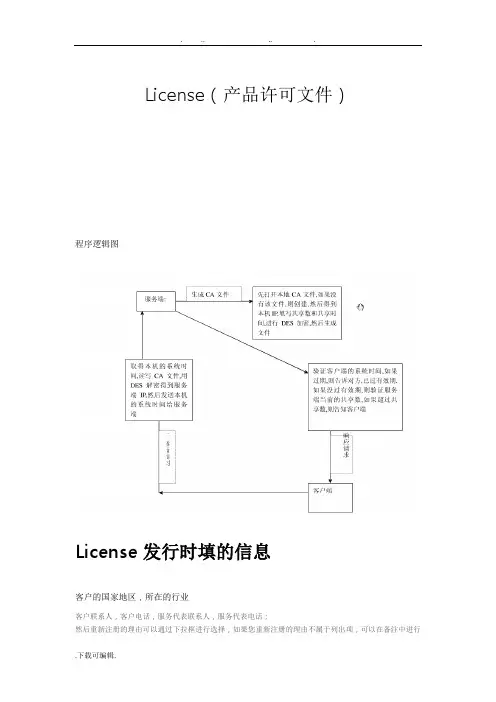
License(产品许可文件)程序逻辑图License发行时填的信息客户的国家地区,所在的行业客户联系人,客户电话,服务代表联系人,服务代表电话;然后重新注册的理由可以通过下拉框进行选择,如果您重新注册的理由不属于列出项,可以在备注中进行补充,最后输入产品序列号、CDKEY、验证码,点击“提交”。
见红色标记。
●License管理首先我们需要确立我们实现的管理目标1、license资源使用的统计、管理和分析2、CAD应用软件使用的统计和分析3、用户使用情况的统计与分析分配license给用户对用户进行分组控制将使用软件的所有用户分成若干组,对应于实际工作中的各个工作/项目组,每组具有不同的优先级。
每一组拥有的license 种类、数量、运行时间窗口都可以由LSF来定义和管理。
根据用户优先级优化软件license的使用用软件的不同用户/项目组具有不同的优先级。
当软件的license数量足够多时,用户都可以正常使用。
当软件license不足时,高优先级的用户作业将强行抢占低优先级的作业,保证紧要作业的及时完成。
License到期监控及预警许可证到期预警信息窗口能够非常直观的显示各个功能模块的到期预警,以便用户续买License而不妨碍正常工作需求。
此窗口显示信息包括:功能模块的到期时间、功能模块的供应商和软件所在的服务器信息。
许可证服务器预警界面默认显示到当前为止1个月内将到期的所有功能模块内容,每天晚上系统自动的将快到期的功能模块打包作为附件发送到指定的用户邮箱。
同时,用户可以自定义到期时间进行查询更短或更长时间到期的功能模块信息,查询的结果支持导出到Excel和TXT文件中。
License对应实时用户信息许可证管理监控系统(Reporter License的统计分析)许可证管理监控系统(License Reporter简称Reporter)统计本地或者全局的许可证服务器(License Server)详细和准确的使用信息,这些服务器可以分布于任意位置,不同的时区。
Fluent经典问题答疑

Fluent经典问题及答疑1 对于刚接触到FLUENT新手来说,面对铺天盖地的学习资料和令人难读的FLUENT help,如何学习才能在最短的时间内入门并掌握基本学习方法呢?(#61)2 CFD计算中涉及到的流体及流动的基本概念和术语:理想流体和粘性流体;牛顿流体和非牛顿流体;可压缩流体和不可压缩流体;层流和湍流;定常流动和非定常流动;亚音速与超音速流动;热传导和扩散等。
(13楼)3 在数值模拟过程中,离散化的目的是什么?如何对计算区域进行离散化?离散化时通常使用哪些网格?如何对控制方程进行离散?离散化常用的方法有哪些?它们有什么不同?(#80)4 常见离散格式的性能的对比(稳定性、精度和经济性)(#62)5 在利用有限体积法建立离散方程时,必须遵守哪几个基本原则?(#81)6 流场数值计算的目的是什么?主要方法有哪些?其基本思路是什么?各自的适用范围是什么?(#130)7 可压缩流动和不可压缩流动,在数值解法上各有何特点?为何不可压缩流动在求解时反而比可压缩流动有更多的困难?(#55)8 什么叫边界条件?有何物理意义?它与初始条件有什么关系?(#56)9 在一个物理问题的多个边界上,如何协调各边界上的不同边界条件?在边界条件的组合问题上,有什么原则?10 在数值计算中,偏微分方程的双曲型方程、椭圆型方程、抛物型方程有什么区别?(#143)11 在网格生成技术中,什么叫贴体坐标系?什么叫网格独立解?(#35)12 在GAMBIT的foreground和background中,真实体和虚实体、实操作和虚操作四个之间是什么关系?13 在GAMBIT中显示的“check”主要通过哪几种来判断其网格的质量?及其在做网格时大致注意到哪些细节?(#38)14 画网格时,网格类型和网格方法如何配合使用?各种方法有什么样的应用范围及做网格时需注意的问题?(#169)15 对于自己的模型,大多数人有这样的想法:我的模型如何来画网格?用什么样的方法最简单?这样做网格到底对不对?(#154)16 在两个面的交界线上如果出现网格间距不同的情况时,即两块网格不连续时,怎么样克服这种情况呢?(#40)17 依据实体在GAMBIT建模之前简化时,必须遵循哪几个原则?(#170)18 在设置GAMBIT边界层类型时需要注意的几个问题:a、没有定义的边界线如何处理?b、计算域内的内部边界如何处理(2D)?(#128)19 为何在划分网格后,还要指定边界类型和区域类型?常用的边界类型和区域类型有哪些?(#127)20 何为流体区域(fluid zone)和固体区域(solid zone)?为什么要使用区域的概念?FLUENT是怎样使用区域的?(#41)21 如何监视FLUENT的计算结果?如何判断计算是否收敛?在FLUENT中收敛准则是如何定义的?分析计算收敛性的各控制参数,并说明如何选择和设置这些参数?解决不收敛问题通常的几个解决方法是什么?(9楼)22 什么叫松弛因子?松弛因子对计算结果有什么样的影响?它对计算的收敛情况又有什么样的影响?(7楼)23 在FLUENT运行过程中,经常会出现“turbulence viscous rate”超过了极限值,此时如何解决?而这里的极限值指的是什么值?修正后它对计算结果有何影响?(#28)24 在FLUENT运行计算时,为什么有时候总是出现“reversed flow”?其具体意义是什么?有没有办法避免?如果一直这样显示,它对最终的计算结果有什么样的影响?(#29)25 燃烧过程中经常遇到一个“头疼”问题是计算后温度场没什么变化?即点火问题,解决计算过程中点火的方法有哪些?什么原因引起点火困难的问题? (#183)26 什么叫问题的初始化?在FLUENT中初始化的方法对计算结果有什么样的影响?初始化中的“patch”怎么理解?(12楼)27 什么叫PDF方法?FLUENT中模拟煤粉燃烧的方法有哪些?(#197)28 在利用prePDF计算时出现不稳定性如何解决?即平衡计算失败。
LMT-LicManager许可证管理系统对license的管理分配

LMT-LicManager许可证管理系统对license的管理分配管理是一项很能反映资源分配本质的过程。
从生产经营活动的整个流程来说,人、财,物的消耗和增值贯穿始终。
俗话说吃不穷,穿不穷,算计不到就是穷。
以财务为主线的资源分配是管理的主体。
小到家庭理财,大到企业规划,无一离不开计划。
在企业信息化管理领域也是一样,就拿大型企业的license server管理来说,软件的license server很多,每一类浮点license都涉及一个不同的license server,由于保证稳定安全运行的原因,很多企业不仅仅将一类License用一个license server,可能将产用分布式结构或者冗余式结构,使得我们的license server的数量更加多,如何实时掌控这些license server 的运行状态,而不是等到server档机后,用户抱怨才采取行动?License的动态管理1.License简介目前使用最普遍的license类型有Nodelocked、Concurrent-use、Use-once三种,这三种License有如下共同的特点:●用作满足iFOR/LS client申请的License请求●每个License由一串加密了的字符集组成●每个License只对特定的产品有效●每个License都一定的有效期●每个License必须安装特定的机器上下面以表格的形式比较一下这三种License的不同点。
Nodelocked License安装在特定机器的特定文件中(/usr/lib/netls/conf/nodelock),不需要License Server对它进行管理,在应用软件启动时去读nodelock文件即可,相对简单,下面就不多介绍。
Concurrent-useLicense和 Use-once License即为浮动License,它们的管理是动态的,相当复杂,但它们的管理方法是相同的,都使用iFOR/LS(Information For Operation Retrieval/License System) 应用软件。
Moldflow安装及常见软件许可有问题的解决

Autodesk Moldflow 2011 安装注册向导变化概述:•产品名称:Moldflow Plastic Insight (MPI) 转变为Autodesk Moldflow Insight (AMI)Moldflow Plastic Adviser (MPA) 转变为 Autodesk Moldflow Adviser (AMA) •FlexLM 用于license管理. 安装license manager的步骤请参考第10步.•支持平台已经变化,请参考DVD上的安装向导.•DVD光盘包括所有的Autodesk Moldflow产品和语言文件.•模块整合为三种不同的软件包(AMI 和AMA). 如下所示:1. Autodesk Moldflow Insight Basic2. Autodesk Moldflow Insight Performance3. Autodesk Moldflow Insight Advanced1. Autodesk Moldflow Adviser Design2. Autodesk Moldflow Adviser Manufacturing3. Autodesk Moldflow Adviser Advanced•所有的license现在都是浮动license。
关于安装的更多的信息包含在DVD中。
安装步骤:以下为Autodesk Moldflow Insight 2011 (AMI) 在Windows XP 64位机器上的安装步骤. Autodesk Moldflow Adviser和其它产品的安装都参考此步骤.1.选择你需要安装的产品.2.开始Autodesk Moldflow Insight (AMI)的安装.3.接受license协议.4.选择安装路径. 建议安装在默认路径.5.设定默认的项目路径。
可以选择用户的“My Documents” 文件夹. 建议设定特定的客户路径,如(c:\My_AMI_2011_Projects)。
Flexlm?license管理

Flexlm license管理Flexlm license管理2009-01-10 22:54:21标签:license Flexlm EDA [推送到技术圈]大型工程软件如OrCAD、PADs,Ansys、Fluent、Unigraph、ProE等安装需要经过注册程序Flexlm才可以使用,而Flexlm中涉及到很多知识、技巧,也存在许多问题。
本篇文章就是针对上述软件安装中的常见问题作一些探讨与解决。
Flexlm 介绍—常见EDA软件的license管理一、什么是 Flexlm?Flexlm 是由Globetrotter 公司发明的软件加密方法Flexible LicenseManager。
Globetrotter公司向软件厂商出售相关开发软件,软件厂商把此加密程序集成到自己的软件中。
可以锁定机器的硬盘号,网卡号,使用日期,支持加密狗,以保护软件的知识产权。
被80%以上的EDA软件公司所采用,是目前最流行的EDA软件加密方法,保护着世界上价值几百亿美元的EDA软件。
了解Flexlm可以使我们正确的安装,管理和使用多个EDA软件。
Flexlm所管理的是License文件,所以我们首先要了解License 文件的结构,以便于运行Flexlm管理License文件。
二、License文件的结构License文件由注释行,Server行,Demon行, 以及Feature行构成。
注释行:当一行的开始是'#'符号时,该行被LicenseManager(lmgr32xx)认为是注释行,有时候'|'也可以作为注释行的开始。
Server行:Server行用来标识一台特定的主机,其格式是::SERVER nodename id port-numberTCP端口号,如 1700主机的ID号,Win95/98/NT平台下通常是网卡物理地址主机的名称,win95/98/NT下可以用ipconfig命令看到Server行开头的关键字,标识该行为Server行,不能更改.例如:SERVER hostname 000012345678 TCP:1700Daemon(或Vendor)行:Deamon行是用来标识不同的卖主,或者说是用来标识不同的软件商吧。
FLEXlm许可证管理的工作原理及使用方法
FLEXlm许可证管理的工作原理及使用方法
章泳健
【期刊名称】《福建电脑》
【年(卷),期】2002(000)010
【摘要】@@ 一、概述rnFLEXlm是当前软件业中应用最为广泛的软件使用许可证管理软件,在全球获得了超过2000个软件商的广泛支持,特别在机械
CAD/CAM/CAE软件中,几乎所有的高端软件均使用它作为使用许可证管理软件,如pro/Engineer、UGII、I-DEAS、ANSYS、ADAMS、VERICUT等.
【总页数】3页(P10-11,13)
【作者】章泳健
【作者单位】常熟高专机电工程系,215500
【正文语种】中文
【中图分类】TP3
【相关文献】
1.直流电子负载的工作原理及使用方法 [J], 张毅;丁鼎
2.浅谈绝缘电阻表的工作原理、使用方法 [J], 汪良州
3.谷物干燥机的工作原理及规范使用方法 [J], 陈延龙
4.浅析饲料机械的工作原理与使用方法 [J], 李彬
5.区域气象站现场核查设备工作原理及使用方法研究 [J], 田世芹;刘非;孙亚丽因版权原因,仅展示原文概要,查看原文内容请购买。
License授权管理制度(3篇)
第1篇第一部分:总则一、目的为规范我司软件、硬件等产品的授权管理,保障公司知识产权的合法权益,提高公司产品的市场竞争力,特制定本制度。
二、适用范围本制度适用于我司所有软件、硬件产品的授权管理,包括但不限于销售、许可、租赁、技术支持等环节。
三、授权原则1. 合法性原则:授权行为必须符合国家法律法规和行业规范。
2. 公平原则:授权行为应公平合理,保障双方合法权益。
3. 自愿原则:授权行为应基于双方自愿,不得强迫或欺诈。
4. 保密原则:授权方对授权信息负有保密义务。
第二部分:授权类型一、销售授权1. 销售授权书:销售授权方需与我司签订销售授权书,明确授权范围、销售区域、销售期限等。
2. 销售授权证:授权方取得销售授权证,作为销售我司产品的凭证。
二、许可授权1. 许可授权协议:许可授权方与我司签订许可授权协议,明确许可范围、许可期限、许可费用等。
2. 许可授权证:授权方取得许可授权证,作为使用我司产品的凭证。
三、租赁授权1. 租赁授权协议:租赁授权方与我司签订租赁授权协议,明确租赁范围、租赁期限、租赁费用等。
2. 租赁授权证:授权方取得租赁授权证,作为租赁我司产品的凭证。
四、技术支持授权1. 技术支持授权协议:技术支持授权方与我司签订技术支持授权协议,明确技术支持范围、技术支持期限、技术支持费用等。
2. 技术支持授权证:授权方取得技术支持授权证,作为提供技术支持的凭证。
第三部分:授权流程一、申请1. 销售授权申请:销售授权方向我司提交销售授权申请,包括企业资质证明、销售渠道介绍等。
2. 许可授权申请:许可授权方向我司提交许可授权申请,包括企业资质证明、产品用途说明等。
3. 租赁授权申请:租赁授权方向我司提交租赁授权申请,包括企业资质证明、租赁用途说明等。
4. 技术支持授权申请:技术支持授权方向我司提交技术支持授权申请,包括企业资质证明、技术支持范围说明等。
二、审批1. 销售授权审批:我司对销售授权申请进行审核,符合条件的授权方获得销售授权。
如何用flexlm管理多个licence
同一机器上多个FLEXlm License Server的安装(1)以Administrator身分登录;(2)在C盘建C:\FLEXlm 目录,并拷贝相关文件到其下;(3)在C:\FLEXlm下建立欲安装License Server的软件目录,放置各软件的License文件, Daemon和Daemon所需的动态连接库;(4)修改License.dat的SERVER行和DAEMON的位置,并启动FLEXlm License Manager,界面如下图所示;(5)在Setup修改Service Name,输入适当名称,以区别是何种License服务;利用Browse 选择合适Lmgrd.exe和对应的License.dat并指定 Debug.log的放置路径;(6)选中“StartServer at Power-Up”与“Use NT Services”,这样下次启动机器时,将自动启动该License服务;(7)点击Control按钮检查Service Name是否与设定名称相同,如果不同,回到“Setup”重新选择Service Name;如果一样,点击“Start”启动该License Server;点击“Status”检查License Server启动情况,若出现Server_name: License server UP (MASTER),表示 License Server 启动成功;(8)安装另外的License Server:可依上述⑶~⑺重新执行一次即可;(9)切换不同License Server:在“Setup”中选择适当的“Service Name”,然后启动或停止相应的License服务;(10)移除License Server:在“Setup”选择适当的“Service Name”,然后按“Remove”即可。
制作Flexlm license总结
标题:【原创】制作Flexlm license总结!作者:laoqian时间: 2005-12-15,17:45:50链接: /showthread.php?t=19435作者: laoqian [FCG]时间:2005-12-15软件名称: Zendenc (FLEXlm 7.1d)软件类别:Nolan Blender提供的经典例子软件介绍: FLEXlm 7.1d加密破解工具:ollydbg 1.10(FLY修改) ,w32Dasm_2002828_pll621,UltraEdit10.0,Flexlm7.2 SDK,calcseed,lmkg7,lmcryptgui,flexlm9.2sdk的源码等破解目的:制作无限制使用license文件通过这篇文章我们将向你介绍如何制作FlexLm的license,并总结经验第一部分: 废话Zendenc这个软件是Nolan Blender提供的经典例题,crackZ或网上有下载和分析文章。
玩了几个Flexlm, 想总结一下,就拿它来开刀方便!本文是关于7.x的,但有部分适用于8.x和9.x,甚至10.x。
第二部分: 转入正题破解FlexLm最主要的是找到4样东西.1. 确定版本号2. 找vendor3. 计算ENCRYPTION_SEED4. 找FEATURE有了这几个,就可以使用FlexLm SDK(如果你有)或工具做出注册机了.btw:FlexLm SDK一般是通用兼容的的,比如7.2就可以制作7.1的,甚至有时7.1也可以制作7.2的,关键是参数设置。
1. 确定FlexLm版本号 BEHAVIOR Version方法一:* 用二进制编辑器,推荐使用HexWorkshop(我用UltraEdit10.0,呵呵),它的查找功能很强,特别是Find All Instances更是我最最常用的.在查找对话框Type中选择类型Text String,Value中输入"@(#) FLEXlm v",查找,"@(#) FLEXlm v"后面的就是版本号.【以上是tulipfan[CCG]大虾说的】方法二:用Flexlm SDK里的lmtools(在\flexlm\v7.1\i86_n3目录里),运行进入Utilities,点击“Browse”查找你的Flexlm加密的程序主exe或dll,然后“find version”,在下面就会显示你的Flexlm版本,用v7.1版甚至可以看到8.3版以后,是通用的。