
计算器vb代码
计算器vb代码'=================版权所有 domes==================================' Public Function Arthmetic(ByVal s As String) On Error GoTo eeDim m(500) As String '可随意改变数组的上限,这里可执行500位的算术Dim i, j As Integer '全局申明Dim add As StringDim count As Integercount = 0Dim v As Integer'begin'执行括号域分离' 再次调用本程序,即递归Const e = 2.01111Const pi = 3.1415926'=================================================================== ===========Dim chDoch = InStr(s, ")") '查找")"以便识别括号内容If ch <> 0 ThenFor j = ch To 1 Step -1If Mid(s, j, 1) = "(" Then '找到后在往前识别"("Dim before As Stringbefore = Mid(s, j + 1, ch - j - 1) '收集括号的内容Dim after As Stringafter = "(" & before & ")"Dim mm As Stringmm = Arthmetic(before)s = Replace(s, after, mm) '收集包括括号的内容Exit ForEnd IfNextElseIf ch = 0 Then '当找不到)是退出循环,不会进入死循环Exit DoEnd IfEnd IfLoop'===============过滤了符号下一处理是式子里没有括号======================================='=========================将字符和运算符号分离==========================================For i = 1 To Len(s) '把符号和数字分开呈数组Dim check As Stringcheck = Mid(s, i, 1)If check = "*" Or check = "/" Or check = "-" Or check = "+" Or check ="$" Or check = "\" Or check = "&" Then '在四则运算中判断符号If Mid(add, 1, 1) = "M" Thenadd = "-" & Mid(add, 2, Len(add) - 1)End Ifm(count) = addcount = count + 1 '组织数组的项的完整性m(count) = checkadd = ""check = ""count = count + 1End Ifadd = add + checkIf i = Len(s) ThenIf Mid(add, 1, 1) = "M" Thenadd = "-" & Mid(add, 2, Len(add) - 1)End Ifm(count) = add '累积数字成数字End IfNext'=================================================================== ========='==================================最高级运算==================================For i = 0 To countDim w As Integerw = InStr(1, m(i), "^") '^乘方运算If w Thena1 = Val(Mid(m(i), 1, w - 1)) '高级用方括号填写参数,避免和小括号处理冲突a2 = Val(Mid(m(i), w + 1, Len(m(i)) - w))m(i) = Val(a1) ^ Val(a2)End If'lg()对数运算w = InStr(1, m(i), "lg[")If w Thena1 = Val(Mid(m(i), 4, Len(m(i)) - 4))m(i) = Log(Val(a1)) '下面是常用函数调用End Ifw = InStr(1, m(i), "sin[")If w Thena1 = Val(Mid(m(i), 5, Len(m(i)) - 5))m(i) = Sin(Val(a1))End Ifw = InStr(1, m(i), "cos[")If w Thena1 = Val(Mid(m(i), 5, Len(m(i)) - 5))m(i) = Cos(a1)End Ifw = InStr(1, m(i), "tan[")If w Thena1 = Val(Mid(m(i), 5, Len(m(i)) - 5))m(i) = Tan(a1)End IfIf m(i) = "pi" Thenm(i) = piEnd IfIf m(i) = "e" Thenm(i) = eEnd Ifw = InStr(1, m(i), "log[")If w ThenDim ghgh = Split(Mid(m(i), 5, Len(m(i)) - 5), ",") m(i) = Log((Val(gh(0))) / Log(Val(gh(1)))) End Ifw = InStr(1, m(i), "ln[")If w Thena1 = Mid(m(i), 4, Len(m(i)) - 4)m(i) = Log(Val(a1))End Ifw = InStr(1, m(i), "sqrt[")If w Thena1 = Mid(m(i), 6, Len(m(i)) - 6)m(i) = Sqr(Val(a1))End Ifw = InStr(m(i), "!")If w Thena1 = 1For j = 1 To Mid(m(i), 1, Len(m(i)) - 1)a1 = a1 * jNextm(i) = a1End IfIf m(i) = "result" Then m(i) = ansNext'=================================低级运算四则运算基本运算==================================='===================================乘除运算==============================不算加减保留DoDim fu As Integer '检查是否还有*或/的符号,以便再次调用方法fu = 0For i = 1 To countIf m(i) = "*" Or m(i) = "/" Or m(i) = "$" Or m(i) = "\" Or m(i) = "&" Thenfu = iExit ForEnd IfIf i = count Thenfu = 0 '没有符号是发出信号该下一句End IfNextIf fu <> 0 ThenIf m(fu) = "*" Thenm(fu - 1) = Val(m(fu - 1)) * Val(m(fu + 1)) '单目乘法End IfIf m(fu) = "/" Thenm(fu - 1) = Val(m(fu - 1)) / Val(m(fu + 1)) '单目除法End IfIf m(fu) = "$" Thenm(fu - 1) = Val(m(fu - 1)) Mod Val(m(fu + 1))End IfIf m(fu) = "\" Thenm(fu - 1) = Val(m(fu - 1)) \ Val(m(fu + 1))End IfIf m(fu) = "&" Thenm(fu - 1) = (m(fu - 1)) & (m(fu + 1))End IfFor i = fu To count - 2 '把数组空的部位给后面的数组填充m(i) = m(i + 2)Nextm(i) = ""m(i + 1) = ""count = count - 2 '删除多余的数组ElseExit Do '跳出循环End IfLoop'最后把一条只有加减法的算式提供给下一子程序'=====================加减法运算================================子程序Dim n As Integern = 1DoIf m(n) = "+" Or m(n) = "-" ThenIf m(n) = "+" Thenm(n - 1) = Val(m(n - 1)) + Val(m(n + 1)) '执行加法End IfIf m(n) = "-" Thenm(n - 1) = Val(m(n - 1)) - Val(m(n + 1)) '执行减法End IfFor i = n To count - 2m(i) = m(i + 2) '缩减数组长度,便于答案析出Nextm(count) = ""m(count - 1) = "" '剪掉后面无用项count = count - 2If m(n) <> "+" And m(n) <> "-" Then '跳出循环Exit Do '关闭循环End IfElseExit DoEnd IfLoopIf Mid(m(0), 1, 1) = "-" Thenm(0) = "M" & Mid(m(0), 2, Len(m(0)) - 1) End IfArthmetic = m(0) '显示答案返回给调用的程序Exit Functionee:MsgBox Err.DescriptionEnd Function'如果大家有什么建议,可发表!。
vb计算器代码

'单击"+",添加其代码
Private Sub Btnplus_Click(ByVal sender As System.Object, ByVal e As System.EventArgs) Handles Button11.Click
data1 = Val(TextBox1.Text) '将先输入的Textbox1.Text的值转为数型并赋值给data1
OperatorState = 2 '记录选中“-”时,Operatorstate值为2
labvarious = TextBox1.Text & Button12.Text '将此时TextBox1.Text与“-”赋值给labvarious
TextBox1.Text = "" '清空文本框TextBox1
End Sub
'单击"/",添加其代码
Private Sub btnchu_Click(ByVal sender As System.Object, ByVal e As System.EventArgs) Handles Button14.Click
data1 = Val(TextBox1.Text) '将先输入的Textbox1.Text的值转为数型并赋值给data1
End Sub
Private Sub Btnfour_Click(ByVal sender As System.Object, ByVal e As System.EventArgs) Handles Button4.Click
TextBox1.Text = TextBox1.Text + "4" '若点击button4,则连接文本框内容与字符“4”
VB计算器(界面设计全部代码)
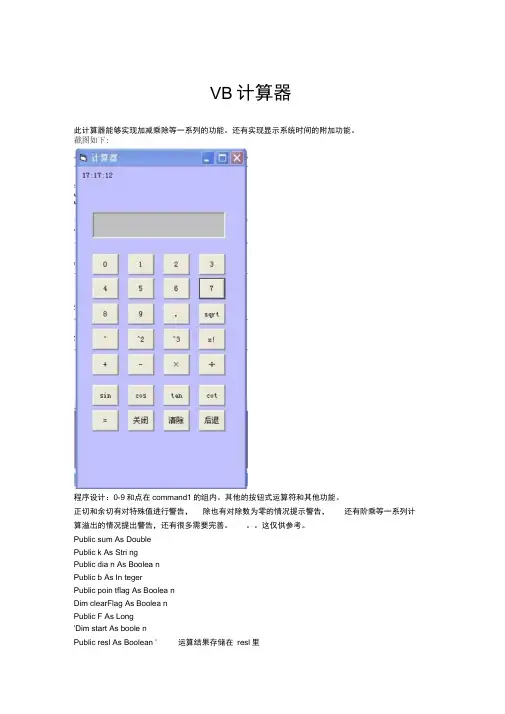
VB计算器此计算器能够实现加减乘除等一系列的功能。
还有实现显示系统时间的附加功能。
程序设计:0-9和点在command1的组内。
其他的按钮式运算符和其他功能。
正切和余切有对特殊值进行警告,除也有对除数为零的情况提示警告,还有阶乘等一系列计算溢出的情况提出警告,还有很多需要完善。
这仅供参考。
Public sum As DoublePublic k As Stri ngPublic dia n As Boolea nPublic b As In tegerPublic poin tflag As Boolea nDim clearFlag As Boolea nPublic F As Long'Dim start As boole nPublic resl As Boolean ' 运算结果存储在resl里数字按钮在一个组内,点Public ff As Double 'resl 里是否为空'llllllllllllllllllllllllllllllllllllllllllllllllllllllll击按钮输入数字 lllllllllllllllllllllllllllllllllllllllllllPrivate Sub comma nd1_click(l ndex As In teger) Select Case In dex Case 1If Not clearFlag The n ' 不是等号,那么显示 1 Text1.Text = Text1.Text & 1 Else'是等号,那么清空Text1.Text = 1 clearFlag = False End IfIf Len(Text1.Text) = 2 And InStr(1, Text1, "0") = 1 Then Text1 = Right(Text1, 1) '如果第一位的数位 0,字符串的长度为 2.那么取字符串右面的数,即两个数中右面的数Case 2If Not clearFlag Then Text1.Text = Text1.Text & 2 ElseText1.Text = 2 clearFlag = False End IfIf Len (Text1.Text) = 2 And In Str(1, Text1, "0") = 1 The n Text1 : Case 3 If Not clearFlag The n Text1.Text = Text1.Text & 3 Else=Right(Text1, 1)Text1.Text clearFlag = End If=3 False If Len (Text1.Text) = 2 And In Str(1, Text1, "0") = 1 The n Text1 : =Right(Text1, 1)Case 4If Not clearFlag The nText1.Text =Text1.Text & 4ElseText1.Text =4clearFlag = FalseEnd IfIf Len (Text1.Text) = 2 And In Str(1, Text1, "0") = 1 The n Text1 : =Right(Text1, 1)Case 5If Not clearFlag ThenTextl.Text = Textl.Text & 5 ElseTextl.Text = 5 clearFlag = False End IfIf Len(Text1.Text) = 2 And InStr(1, Text1, "0")= =1 The n Text1 ==Right(Text1, 1)Case 6If Not clearFlag The nText1.Text =Text1.Text & 6ElseText1.Text =6clearFlag = End IfFalseIf Len(Text1.Text) = 2 And InStr(1, Text1, "0")= =1 The n Text1= =Right(Text1, 1)Case 7If Not clearFlag The n Text1.Text = Text1.Text & 7 ElseTextl.Text = 7 clearFlag = False End IfIf Len(Textl.Text) = 2 And InStr(1, Textl, "0") = 1 Then Textl = Right(Text1, 1) Case 8If Not clearFlag The n Textl.Text = Textl.Text & 8 ElseTextl.Text = 8 clearFlag = False End IfIf Len(Textl.Text) = 2 And InStr(1, Textl, "0") = 1 Then Textl = Right(Text1, 1) Case 9If Not clearFlag The n Text1.Text = Text1.Text & 9 ElseText1.Text = 9 clearFlag = False End IfIf Len(Text1.Text) = 2 And InStr(1, Text1, "0") = 1 Then Text1 = Right(Text1, 1) Case 0定义加号按钮 //////////////////////////////////////If Not clearFlag Then Textl.Text = Textl.Text & 0 ElseText1.Text = 0 clearFlag = False End IfIf Len(Text1.Text) = 2 And InStr(1, Text1, "0") = 1 Then Text1 = Right(Text1, 1) Case 10If Not clearFlag The n Text1.Text = Text1.Text + "." ElseText1.Text ="" clearFlag = False End If7///////////////////////////////////////////////// 对输入点 的个数进行约 束///////////////////////////////////////////////////////////If (In Str(Text1.Text, ".")= =1) The n 对点的处理,检查是否有点,有点再输入的话为空,否则加入其中Textl.Text =""End IfIf InStr(Text1.Text, ".") < Len(Textl.Text) Then Textl.Text = Left(Text1.Text, Len(Textl.Text) - 1) End IfEnd SelectText1.SetFocus End Sub '////////////////////////Private Sub comma nd2_click() If Text1.Text = "" The n End IfIf Trim(Text1.Text) <> "" Then sum = Text1.Text Text1.Text ="" k = "+" Else Exit Sub End If End Sub 7////////////////////////定义减号按钮 ////////////////////////////////////// Private Sub comma nd3_click()定义除号按钮If Text1.Text = "" Then End IfIf Trim(Text1.Text) <> "" The n sum = Text1.Text ' 第一个数字填入方框里 Text1.Text =""' 方框的值置空k ="-" Else Exit Sub End If End Sub '///////////////////////定义乘号按钮 ////////////////////////////////////////Private Sub comma nd4_click()If Text1.Text = "" The n End IfIf Trim(Text1.Text) <> "" Then sum = Text1.Text Text1.Text ="" k = "*" Else Exit Sub End If End Sub '/////////////////////////////////////////////////////////////////// Private Sub comma nd5_click() If Text1.Text = "" Then End IfIf Trim(Text1.Text) <> "" Then sum = Text1.Text Text1.Text ="" k = "/" Else Exit Sub End If End Sub'IIIIIIIIIIIIIIIIIIIIIIIIIIII 定 义sin号 按钮/////////////////////////////////////Private Sub comma nd1O_click() If Text1.Text = "" Then End IfIf Trim(Text1.Text) <> "" The n sum = Text1.TextElseExit SubEnd IfEnd Sub'///////////////////////////// 定义cos 按钮/////////////////////////////////////Private Sub comma nd11_click()If Text1.Text = "" The nEnd IfIf Trim(Text1.Text) <> "" The nsum = Text1.Textk ="cos"ElseExit SubEnd IfEnd Sub'///////////////////////////// 定义tan 按钮////////////////////////////////////Private Sub comma nd12_click()If Text1.Text = "" The nEnd IfIf Trim(Text1.Text) <> "" The nsum = Text1.Textk = "tan"ElseExit SubEnd IfEnd Sub'////////////////////////// 定义cot 按钮//////////////////////////////////////Private Sub comma nd13_click()If Text1.Text = "" The nEnd IfIf Trim(Text1.Text) <> "" Then sum = Textl.Textk = "cot"ElseExit SubEnd IfEnd Sub7////////////////////////// 定义人按钮///////////////////////////////////////Private Sub Comma nd14_click()If Textl.Text = "" The nExit SubIf Trim(Textl.Text) <> "" The nsum = Textl.TextTextl.Text =""k = "A"ElseExit SubEnd IfEnd Sub'///////////////////////// 定义2A ///////////////////////////////////////////Private Sub comma nd15_click()If Textl.Text = "" The nExit SubEnd IfIf Trim(Textl.Text) <> "" The nsum = Textl.Textk = "2人"ElseExit SubEnd IfEnd Sub'/////////////////////// 定义3A 按钮/////////////////////////////////////////// Private Sub comma nd16_click()If Textl.Text = "" The nExit SubEnd IfIf Trim(Textl.Text) <> "" The nsum = Textl.Textk = "3A"ElseExit SubEnd IfEnd Sub'IIIIIIIIIIIIIIIIIIII定义X!按钮///////////////////////////////////////////// Private Sub comma nd17_click()If Text1.Text = "" The nExit SubEnd IfIf Trim(Text1.Text) <> "" The nsum = Text1.Textk = "x!"ElseExit SubEnd If'////////////////// 定义sqrt 按钮////////////////////////////////////////////// Private Sub comma nd18_click()If Text1.Text = "" The nExit SubEnd IfIf Trim(Text1.Text) <> "" The nsum = Text1.Textk = "sqrt"ElseExit SubEnd IfEnd Sub'///////////////////////////// 定义阶乘的函数////////////////////////////////// Private Fu nction Ni(N As Long) As Boolea n 'Ni = FalseDim Mm As Long 'Dim F1 As Lo ngF = 1For Mm = 1 To NIf Mm > 12 The n 'If F1 > The n Ni = False Exit Fun cti on End IfF = F * MmNext MmNi = TrueEnd FunctionPrivate Sub equalbut_click() clearFlag = FalseEnd SubPrivate Sub comma nd6_click()If Trim(Text1.Text) <> "" Then 'Dim F As DoubleDim a As DoubleDim pi As DoubleDim i, j As In tegerpi = 3.14159265358979If Text1.Text > 2147483647 ThenMsgBox "溢出,请确认", vbExclamation, Me.CaptionExit SubEnd If a = Text1.Text clearFlag = TrueIf k = "+" Then sum = sum + a Text1.Text = sumElseIf k = "s in" The n sum = Sin(a * pi / 180) Textl.Text = sumElseIf k = "cos" ThenDim t As In tegert = a Mod 180 - 90If t = 0 ThenText1.Text = 0If m = 0 The n MsgBox " ElseElsesum = Cos(a * pi / 180) Textl.Text = sum End IfElseIf k = "tan" Then Dim m As In teger Dim N As In teger m = a Mod 180 - 90(90+180*n )度的正切值无意义,请重新输入 sum = (Tan(a * pi / 180)) Textl.Text = sum End IfElseIf k = "cot" The n If a = 0 The n MsgBox "0 度余切没有意义!请重新输入!Elsesum = 1 / (Tan(a * pi / 180)) Textl.Text = sum End If'ElseIf k = "x!" The n 'If Text1.Text > 0 The n 'Call fact(Text1.Text, F) ' Text1.Text = F'ElseIf Text1.Text = 0 The n 'sum = 1' Text1.Text = sum'ElseIf Text1.Text < 0 The n 'MsgBox " 负数没有阶乘! ”'End If减法运算Elself k = "x!" The nIf Ni(Textl.Text) = False The nMsgBox "溢出", vbExclamation, Me.CaptionText1.Text =""Exit SubElseText1.Text = FEnd IfElself k = "2A " The nTextl.Text = Val(Textl.Text) * Val(Textl.Text)Elself k = "3A" The nTextl.Text = Val(Textl.Text) * Val(Textl.Text) * Val(Textl.Text) Elself k = "sqr" The nIf a >= 0 The nsum = Math.Sqr(a)Textl.Text = sumElseMsgBox "开方数不能为负数!”End If Elself k = "A" The n sum =sum A a Textl.Text = sum Elself k = "-" The n sum = sum - a Textl.Text = sum resl = 1Elself k = "*" The n sum = sum * a Textl.Text = sum Elself k = "/" The nIf Textl.Text = 0 The nMsgBox "除数不能为零!请重新输入Textl.Text =""Elsesum = sum / aTextl.Text = sumIf Len( Textl.Text) > 14 The nMsgBox "溢出,请确认", vbExclamation, Me.Caption Exit SubEnd IfExit SubEnd IfEnd IfEnd IfEnd SubPrivate Sub Comma nd9_Click()If Len(Text1.Text) >= 2 ThenText1.Text = Left(Text1.Text, Len(Text1.Text) - 1) ElseText1.Text =""End IfEnd SubPrivate Sub form」。
VB简易计算器代码
VB简易计算器代码下面是一个简单的VB计算器代码,用于执行基本的加、减、乘、除运算。
```vbOption Strict OnPublic Class CalculatorPrivate Sub btnAdd_Click(sender As Object, e As EventArgs) Handles btnAdd.ClickDim num1 As Double = CDbl(txtNum1.Text)Dim num2 As Double = CDbl(txtNum2.Text)Dim result As Double = num1 + num2txtResult.Text = result.ToStringEnd SubPrivate Sub btnSubtract_Click(sender As Object, e As EventArgs) Handles btnSubtract.ClickDim num1 As Double = CDbl(txtNum1.Text)Dim num2 As Double = CDbl(txtNum2.Text)Dim result As Double = num1 - num2txtResult.Text = result.ToStringPrivate Sub btnMultiply_Click(sender As Object, e As EventArgs) Handles btnMultiply.ClickDim num1 As Double = CDbl(txtNum1.Text)Dim num2 As Double = CDbl(txtNum2.Text)Dim result As Double = num1 * num2txtResult.Text = result.ToStringEnd SubPrivate Sub btnDivide_Click(sender As Object, e As EventArgs) Handles btnDivide.ClickDim num1 As Double = CDbl(txtNum1.Text)Dim num2 As Double = CDbl(txtNum2.Text)If num2 = 0 ThenMessageBox.Show("除数不能为0!", "错误", MessageBoxButtons.OK, MessageBoxIcon.Error)ElseDim result As Double = num1 / num2txtResult.Text = result.ToStringEnd IfEnd Sub```此代码创建了一个简单的窗体应用程序,其中包含两个文本框用于输入两个数字,四个按钮用于执行不同的计算操作,以及一个文本框用于显示结果。
VB简单计算器(截图附代码)

VB程序简单计算器最近学完VB,感觉很好,写了个计算器程序,虽然花了不少时间,可也着实高兴。
其中遇到很多问题,最终也在各种资料中得到解决。
现在附上截图和全部代码,希望和大家交流一下,相互学习。
也希望能帮助到准备做计算器的同学。
计算器最终执行文件图标:计算器包括三个窗体(form):主页面form1:其中的“欢迎各位到此一游”是闪烁效果,呵呵,是自己想着无聊,就想出这么个玩意。
与计算器计算功能无关。
具体实现看下来代码。
Form1的实现代码:Public haha As BooleanPrivate Sub Command1_Click()Dim a As Integera = MsgBox("亲爱的你,真的想要退出本系统吗?", _vbYesNo + vbInformation + vbDefaultButton1, "退出系统前的询问撒(⊙o⊙)")If a = 6 Then '表示当选择“是”的时候的返回值EndEnd IfEnd SubPrivate Sub Command2_Click()Me.HideForm2.ShowEnd SubPrivate Sub Command3_Click()Me.HideForm3.ShowEnd SubPrivate Sub Form_Load()haha = FalseEnd SubPrivate Sub Timer1_Timer()haha = Not hahaIf haha ThenLabel2.ForeColor = &HFF00FFElseLabel2.ForeColor = vbWhiteEnd IfEnd Sub有些像图像等一些可见的控件属性就没在代码里写了,直接在属性里设置了。
页面(form2):此页面将鼠标点上去,还有意想不到的效果喲。
全部代码为:Dim isFocus1, isFocus2 As BooleanPrivate Sub Command1_Click()If isFocus1 Then '判断焦点在那个文本框中,便于实现按钮输入Text1.Text = Text1.Text & 0End IfIf isFocus2 ThenText2.Text = Text2.Text & 0End IfEnd SubPrivate Sub Command10_Click() If isFocus1 ThenText1.Text = Text1.Text & 9 End IfIf isFocus2 ThenText2.Text = Text2.Text & 9 End IfEnd SubPrivate Sub Command11_Click() If isFocus1 ThenText1.Text = Text1.Text & "." End IfIf isFocus2 ThenText2.Text = Text2.Text & "." End IfEnd SubPrivate Sub Command12_Click() If isFocus1 ThenText1.Text = -Val(Text1.Text)End IfIf isFocus2 ThenText2.Text = -Val(Text2.Text)End IfEnd SubPrivate Sub Command13_Click()Dim a As Integera = Val(Text1.Text) + Val(Text2.Text)Text3.Text = Val(Text1.Text) & "+" & Val(Text2.Text) & "=" & aIf Text1.Text = "" Or Text2.Text = "" ThenMsgBox "哼哼,双目运算一定要是两个数喔" & vbCrLf & vbCrLf & _ "不用说,补上去是必须的撒", vbCritical, "温馨小提醒(*^__^*)" End IfEnd SubPrivate Sub Command14_Click()Dim a As Integera = Val(Text1.Text) - Val(Text2.Text)Text3.Text = Val(Text1.Text) & "-" & Val(Text2.Text) & "=" & aIf Text1.Text = "" Or Text2.Text = "" ThenMsgBox "哼哼,双目运算一定要是两个数喔" & vbCrLf & vbCrLf & _ "不用说,补上去是必须的撒", vbCritical, "温馨小提醒(*^__^*)" End IfEnd SubPrivate Sub Command15_Click()a = Val(Text1.Text) * Val(Text2.Text)Text3.Text = Val(Text1.Text) & "×" & Val(Text2.Text) & "=" & aIf Text1.Text = "" Or Text2.Text = "" ThenMsgBox "哼哼,双目运算一定要是两个数喔" & vbCrLf & vbCrLf & _ "不用说,补上去是必须的撒", vbCritical, "温馨小提醒(*^__^*)" End IfEnd SubPrivate Sub Command16_Click() '除法的特殊性,除数不能为零If Val(Text2.Text) Thena = Val(Text1.Text) / Val(Text2.Text)Text3.Text = Val(Text1.Text) & "÷" & Val(Text2.Text) & "=" & aIf Text1.Text = "" Or Text2.Text = "" ThenMsgBox "哼哼,双目运算一定要是两个数喔" & vbCrLf & vbCrLf & _ "不用说,补上去是必须的撒", vbCritical, "温馨小提醒(*^__^*)" End IfElseText3.Text = "无穷大∞"MsgBox "亲,除数不可以为零的哟!", vbInformation, "矮油,不得了嘞(*^__^*)"Text2.Text = ""Text2.SetFocusEnd IfEnd SubPrivate Sub Command17_Click() '实现清零,并将焦点给文本框1Text1.Text = ""Text2.Text = ""Text3.Text = ""Text1.SetFocusEnd SubPrivate Sub Command18_Click()Me.Hide '进入计算器1Form1.ShowEnd SubPrivate Sub Command2_Click() If isFocus1 ThenText1.Text = Text1.Text & 1 End IfIf isFocus2 ThenText2.Text = Text2.Text & 1 End IfEnd SubPrivate Sub Command3_Click() If isFocus1 ThenText1.Text = Text1.Text & 2 End IfIf isFocus2 ThenText2.Text = Text2.Text & 2 End IfEnd SubPrivate Sub Command4_Click() If isFocus1 ThenText1.Text = Text1.Text & 3 End IfIf isFocus2 ThenText2.Text = Text2.Text & 3 End IfEnd SubPrivate Sub Command5_Click() If isFocus1 ThenText1.Text = Text1.Text & 4 End IfIf isFocus2 ThenText2.Text = Text2.Text & 4 End IfEnd SubPrivate Sub Command6_Click() If isFocus1 ThenText1.Text = Text1.Text & 5 End IfIf isFocus2 ThenText2.Text = Text2.Text & 5 End IfEnd SubPrivate Sub Command7_Click() If isFocus1 ThenText1.Text = Text1.Text & 6 End IfIf isFocus2 ThenText2.Text = Text2.Text & 6 End IfEnd SubPrivate Sub Command8_Click() If isFocus1 ThenText1.Text = Text1.Text & 7 End IfIf isFocus2 ThenText2.Text = Text2.Text & 7 End IfEnd SubPrivate Sub Command9_Click() If isFocus1 ThenText1.Text = Text1.Text & 8End IfIf isFocus2 ThenText2.Text = Text2.Text & 8End IfEnd SubPrivate Sub Form_Load()isFocus1 = False: isFocus2 = FalseEnd SubPrivate Sub Form_MouseMove(Button As Integer, Shift As Integer, X As Single, Y As Single)Label4.ForeColor = vbBlackLabel4.FontUnderline = FalseLabel4.FontBold = FalseEnd SubPrivate Sub Label4_Click()Form3.ShowEnd SubPrivate Sub Label4_MouseMove(Button As Integer, Shift As Integer, X AsSingle, Y As Single)Label4.ForeColor = vbGreen Label4.FontUnderline = True Label4.FontBold = True End SubPrivate Sub Text1_GotFocus() isFocus1 = TrueisFocus2 = FalseEnd SubPrivate Sub Text2_GotFocus() isFocus2 = TrueisFocus1 = FalseEnd Sub页面(form3):这里面的亮点自己找哦。
vb编写的计算器代码
Option ExplicitConst CC1 = 1E+28, CC2 = 0.000000000000001, CC3 = 100000000000000# Dim Op1, Op2 ' 预先输入操作数。
Dim DecFlag% ' 小数点存在吗?Dim Klast ' 指示上一次按键事件的类型。
Dim OpFlag ' 指示未完成的操作。
Dim Kedt% ' 指示键入状态,0-未操作,1-算过,2-改过Dim MemNum ' 存储器Dim Temp2'Function sqr28(a As V ariant) As V ariantDim c As Doublec = Sqr(a)If c > CC3 Or c < CC2 Thensqr28 = cElsesqr28 = CDec(Sqr(a))sqr28 = sqr28 - (sqr28 * sqr28 - a) / sqr28 * 0.5End IfEnd FunctionFunction cur28(a As V ariant) As V ariantDim t As V ariant, c As Doublec = Abs(a) ^ (1 / 3)If c > 1000000000# Or c < 0.000000001 Thencur28 = c * Sgn(a)Elsecur28 = CDec(c) * Sgn(a)t = cur28 * cur28cur28 = cur28 - (cur28 * t - a) / t / 3End IfEnd Function' 存入存储器Private Sub BtMS_Click()If Kedt = 2 Then GetOp1MemNum = Op1LabMem.Visible = MemNum <> 0Kedt = 1End Sub' 取出存储器数据Private Sub BtMr_Click()CancelEntry_ClickOp1 = MemNumDisp = Op1Kedt = 1End Sub' 清除存储器Private Sub BtMC_Click()MemNum = CDec(0)LabMem.Visible = FalseEnd SubPrivate Sub BtOff_Click()EndEnd SubPrivate Sub Form_KeyPress(KeyAscii As Integer) Dim K As StringK = Chr(KeyAscii)'Select Case KCase Chr(24): EndCase Chr(8): CancelEntry_ClickCase Chr(27): Cancel_ClickCase "0" To "9": Number_Click KeyAscii - 48 Case ".": Decimal_ClickCase "=": Equal_ClickCase "s": BtMS_ClickCase "c": BtMC_ClickCase "r": BtMr_ClickCase "%": Func_Click 4Case "^": Func_Click 1Case "+": Operator_Click 1Case "-": Operator_Click 3Case "*": Operator_Click 2Case "/": Operator_Click 0Case "i": Func_Click 2Case "'": Func_Click 3Case "]": Func_Click 5Case "\": Func_Click 0Case ";": negcmd_ClickEnd SelectEqual.SetFocusEnd Sub' 窗体的初始化过程' 设置所有变量为其初始值。
VB简易计算器代码
VB简易计算器代码以下是一个简单的VB计算器代码:```Public Class Form1Dim firstNum As Double ' 第一个数字Dim secondNum As Double ' 第二个数字Dim operation As Integer ' 1-加法,2-减法,3-乘法,4-除法Private Sub Button0_Click(sender As Object, e As EventArgs) Handles Button0.ClickTextBoxResult.Text = TextBoxResult.Text & "0"End SubPrivate Sub Button1_Click(sender As Object, e As EventArgs) Handles Button1.ClickTextBoxResult.Text = TextBoxResult.Text & "1"End SubPrivate Sub Button2_Click(sender As Object, e As EventArgs) Handles Button2.ClickTextBoxResult.Text = TextBoxResult.Text & "2"End SubHandles Button3.ClickTextBoxResult.Text = TextBoxResult.Text & "3"End SubPrivate Sub Button4_Click(sender As Object, e As EventArgs) Handles Button4.ClickTextBoxResult.Text = TextBoxResult.Text & "4"End SubPrivate Sub Button5_Click(sender As Object, e As EventArgs) Handles Button5.ClickTextBoxResult.Text = TextBoxResult.Text & "5"End SubPrivate Sub Button6_Click(sender As Object, e As EventArgs) Handles Button6.ClickTextBoxResult.Text = TextBoxResult.Text & "6"End SubPrivate Sub Button7_Click(sender As Object, e As EventArgs) Handles Button7.ClickTextBoxResult.Text = TextBoxResult.Text & "7"End SubHandles Button8.ClickTextBoxResult.Text = TextBoxResult.Text & "8"End SubPrivate Sub Button9_Click(sender As Object, e As EventArgs) Handles Button9.ClickTextBoxResult.Text = TextBoxResult.Text & "9"End SubPrivate Sub ButtonDot_Click(sender As Object, e As EventArgs) Handles ButtonDot.ClickIf Not TextBoxResult.Text.Contains(".") ThenTextBoxResult.Text = TextBoxResult.Text & "."End IfEnd SubPrivate Sub ButtonAdd_Click(sender As Object, e As EventArgs) Handles ButtonAdd.ClickfirstNum = Double.Parse(TextBoxResult.Text)TextBoxResult.Text = ""operation = 1End SubPrivate Sub ButtonSubtract_Click(sender As Object, e As EventArgs) Handles ButtonSubtract.ClickfirstNum = Double.Parse(TextBoxResult.Text)TextBoxResult.Text = ""operation = 2End SubPrivate Sub ButtonMultiply_Click(sender As Object, e As EventArgs) Handles ButtonMultiply.ClickfirstNum = Double.Parse(TextBoxResult.Text)TextBoxResult.Text = ""operation = 3End SubPrivate Sub ButtonDivide_Click(sender As Object, e As EventArgs) Handles ButtonDivide.ClickfirstNum = Double.Parse(TextBoxResult.Text)TextBoxResult.Text = ""operation = 4End SubPrivate Sub ButtonClear_Click(sender As Object, e As EventArgs) Handles ButtonClear.ClickTextBoxResult.Text = ""End SubPrivate Sub ButtonEquals_Click(sender As Object, e As EventArgs) Handles ButtonEquals.ClickDim result As DoublesecondNum = Double.Parse(TextBoxResult.Text)Select Case operationCase 1result = firstNum + secondNumCase 2result = firstNum - secondNumCase 3result = firstNum * secondNumCase 4result = firstNum / secondNumEnd SelectTextBoxResult.Text = result.ToStringEnd SubEnd Class```这个计算器包括数字按钮0-9、小数点按钮、加法、减法、乘法、除法和等于按钮。
计算器(用vb)代码
计算器(用vb)代码Dim dflag As IntegerDim I As IntegerDim opnre As IntegerDim prev As DoubleDim oflag As IntegerDim ind As IntegerDim soundbz As BooleanDim ProgramPath As StringPrivate Declare Function SetWindowPos Lib "user32" (ByVal hwnd As Long, ByVal hWndInsertAfter As Long, ByVal X As Long, ByVal Y As Long, ByVal Cx As Long, ByVal Cy As Long, ByVal wFlags As Long) As LongPublic Sub SetOnTop(ByVal IsOnTop As Integer)Dim rtn As LongIf IsOnTop = 1 Then'将窗口置于最上面rtn = SetWindowPos(Me.hwnd, -1, 0, 0, 0, 0, 3)Elsertn = SetWindowPos(Me.hwnd, -2, 0, 0, 0, 0, 3)End IfEnd SubPrivate Sub Check1_Click()If Check1.Value = 1 ThenSetOnTop 1ElseSetOnTop 0End IfEnd SubPrivate Sub Command1_Click(Index As Integer)text1 = Trim(text1)If Len(text1) > 20 ThenBeepExit SubEnd Ifsoundbz = Falsemand = "Close"MMControl1.FileName = ProgramPath & "/声音文件/" & Index & ".wav"mand = "Open"mand = "Play"If ind = 4 Thenprev = 0text1.Caption = " "ind = 0End Ifopnre = 0If oflag = 0 Thentext1.Caption = " "End Ifoflag = 1If Command1(Index).Caption <> "." ThenIf text1.Caption <> " 0" Thentext1.Caption = text1.Caption & Command1(Index).CaptionText = Mid(text1, 1, 1)If Text = "." Thentext1 = "0" & text1End IfElsetext1.Caption = " " & Command1(Index).CaptionEnd IfElseIf dflag = 0 Thentext1.Caption = text1.Caption & "."dflag = 1ElseCommand6.SetFocusExit SubEnd IfEnd IfCommand6.SetFocusEnd SubPrivate Sub Command1_KeyPress(Index As Integer, KeyAscii As Integer) If KeyAscii = 13 Then KeyAscii = 0End SubPrivate Sub Command2_Click(Index As Integer)soundbz = Falsemand = "Close"If Index = 0 Then MMControl1.FileName = ProgramPath & "/声音文件/加.wav"If Index = 1 Then MMControl1.FileName = ProgramPath & "/声音文件/减.wav"If Index = 3 Then MMControl1.FileName = ProgramPath & "/声音文件/乘.wav"If Index = 2 Then MMControl1.FileName = ProgramPath & "/声音文件/除.wav"If Index = 4 ThenMMControl1.FileName = ProgramPath & "/声音文件/等于.wav"soundbz = TrueEnd Ifmand = "Open"mand = "Play"If opnre = 0 Or Index = 4 ThenIf ind = 0 Thenprev = prev + Val(text1.Caption)ElseIf ind = 1 Thenprev = prev - Val(text1.Caption)ElseIf ind = 2 ThenIf Val(text1.Caption) = 0 Thentext1 = "错误!"BeepCommand6.SetFocusExit SubElseprev = prev / Val(text1.Caption)End IfElseIf ind = 3 Thenprev = prev * Val(text1.Caption)End Iftext1.Caption = Str(prev)oflag = 0End Ifopnre = 1ind = Indexdflag = 0Command6.SetFocusIf Index = 4 ThenIf Option1.Value = True Then text1 = Trim(Round(text1, 2))If Option2.Value = True Then text1 = Trim(Round(text1, 3))If Option3.Value = True Then text1 = Trim(Round(text1, 4))If Option4.Value = True Then text1 = Trim(text1)If text1 <> 0 ThenText = Mid(text1, 1, 1)If Text = "." Thentext1 = "0" & text1End IfEnd Ifls = Len(text1)If ls <> 0 ThenFor I = 1 To lst = Mid(text1, I, 1)DoEventsDo While (MMControl1.Mode <> 525) And soundbzDoEventsLoopmand = "Close"If t <> "." ThenIf t = "-" ThenMMControl1.FileName = ProgramPath & "/声音文件/负.wav"ElseMMControl1.FileName = ProgramPath & "/声音文件/" & t & ".wav"End IfElseMMControl1.FileName = ProgramPath & "/声音文件/10.wav"End Ifmand = "Open"mand = "Play"Next IEnd IfEnd IfEnd SubPrivate Sub Command2_KeyPress(Index As Integer, KeyAscii As Integer) If KeyAscii = 13 Then KeyAscii = 0End SubPrivate Sub Command3_Click()soundbz = Falsemand = "Close"MMControl1.FileName = ProgramPath & "/声音文件/归零.wav"mand = "Open"mand = "Play"text1.Caption = " 0"Command6.SetFocusEnd SubPrivate Sub Command3_KeyPress(KeyAscii As Integer)If KeyAscii = 13 Then KeyAscii = 0End SubPrivate Sub Command4_Click()soundbz = Falsemand = "Close"MMControl1.FileName = ProgramPath & "/声音文件/清除.wav"mand = "Open"mand = "Play"dflag = 0prev = 0oflag = 0ind = 0opnre = 0text1.Caption = " 0"Command6.SetFocusEnd SubPrivate Sub Command4_KeyPress(KeyAscii As Integer)If KeyAscii = 13 Then KeyAscii = 0End SubPrivate Sub Command5_Click()soundbz = FalseSaveSetting App.EXEName, "保留", "n1", Option1.Value SaveSetting App.EXEName, "保留", "n2", Option2.Value SaveSetting App.EXEName, "保留", "n3", Option3.Value SaveSetting App.EXEName, "保留", "n4", Option4.Value SaveSetting App.EXEName, "置顶", "yorn", Check1.Value ' mand = "Close"Unload MeEnd SubPrivate Sub Command5_KeyPress(KeyAscii As Integer) If KeyAscii = 13 Then KeyAscii = 0End SubPrivate Sub Command6_Click()Command2_Click (4)End SubPrivate Sub Form_KeyPress(KeyAscii As Integer)If text1 = "错误!" ThenCommand4_ClickEnd IfIf KeyAscii = Asc(".") ThenI = 10Command1_Click (I)ElseIf KeyAscii = Asc("0") ThenI = 0Command1_Click (I)ElseIf KeyAscii = Asc("1") ThenI = 1Command1_Click (I)ElseIf KeyAscii = Asc("2") ThenI = 2Command1_Click (I)ElseIf KeyAscii = Asc("3") ThenI = 3Command1_Click (I)ElseIf KeyAscii = Asc("4") ThenI = 4Command1_Click (I)ElseIf KeyAscii = Asc("5") ThenI = 5Command1_Click (I)ElseIf KeyAscii = Asc("6") ThenI = 6Command1_Click (I)ElseIf KeyAscii = Asc("7") ThenI = 7Command1_Click (I)ElseIf KeyAscii = Asc("8") ThenI = 8Command1_Click (I)ElseIf KeyAscii = Asc("9") ThenI = 9Command1_Click (I)ElseIf KeyAscii = Asc("0") ThenI = 0Command1_Click (I)ElseIf KeyAscii = Asc("+") ThenI = 0Command2_Click (I) ElseIf KeyAscii = Asc("+") ThenCommand2_Click (I)ElseIf KeyAscii = Asc("-") ThenI = 1Command2_Click (I)ElseIf KeyAscii = Asc("/") ThenI = 2Command2_Click (I)ElseIf KeyAscii = Asc("*") ThenI = 3Command2_Click (I)ElseIf KeyAscii = Asc("=") Or KeyAscii = 13 ThenI = 4Command2_Click (I)ElseIf KeyAscii = Asc("c") Or KeyAscii = Asc("C") Or KeyAscii = 27 Then Command4_ClickElseIf KeyAscii = Asc("d") Or KeyAscii = Asc("D") ThenCommand3_ClickEnd IfEnd SubPrivate Sub Form_Load()If App.PrevInstance = True ThenUnload MeMsgBox "程序正在运行,不可重复运行多个!", 64, "系统提示"EndEnd Ifsoundbz = Truedflag = 0prev = 0oflag = 0ind = 0Clipboard.ClearMMControl1.DeviceType = "WaveAudio"ProgramPath = App.PathOption1.Value = GetSetting(App.EXEName, "保留", "n1", True) Option2.Value = GetSetting(App.EXEName, "保留", "n2", False) Option3.Value = GetSetting(App.EXEName, "保留", "n3", False) Option4.Value = GetSetting(App.EXEName, "保留", "n4", False) Check1.Value = GetSetting(App.EXEName, "置顶", "yorn", 0)End SubPrivate Sub Form_Unload(Cancel As Integer)mand = "Close"EndEnd SubPrivate Sub text1_Click()End Sub。
VB计算器源代码
Private Sub txtDisplay_KeyUp(KeyCode As Integer, Shift As Integer)
Select Case KeyCode
Case vbKeyNumpad0
cmdNumber_Click 0
Case vbKeyNumpad1
' 显示小数点
Private Sub cmdDecimal_Click()
If InStr(txtDisplay.Text, ".") Then
Beep
Else
If NewEntry Then
txtDisplay.Text = "."
NewEntry = False
Else
txtDisplay.Text = txtDisplay.Text & "."
End If
End If
End Sub
'计算上一操作符的运算结果
Private Sub cmdEquals_Click()
Case vbKeyBack, vbKeyDelete
DeleteCharacter
End Select
KeyCode = 0
End Sub
cmdNumber_Click 4
Case vbKeyNumpad5
cmdNumber_Click 5
Case vbKeyNumpad6
cmdNumber_Click 6
Case vbKeyNumpad7
Case vbKeySubtract
cmdOperator_Click opSubtract
VB 计算器 代码
VB 计算器代码==表单控件设置================================================数字用了一个控件数组(cmdN),+-*/也用了一个控件数组(cmdY),小数点cmdP,"="cmdE,"C"(清除所有)cmdC,"CE"(清除当前数)cmdCE,Breakspace(清除最后一个输入的数)cmdCELast,输出是Test1所有按钮TabStop = False将Text1.locked = .T.==代码部分====================================================Option ExplicitDim dblN(0 To 1) As Double '用于计算的数Dim dblM As Double '记忆数值Dim blnP As Boolean '小数点Dim bytY As Byte '运算符Private Sub cmdCE1_Click() '清除输入的最后一个键Me.Text1.Text = dblN(1)dblN(1) = CDbl(Left(Me.Text1.Text, Len(Me.Text1.Text) - 1))Me.Text1.Text = dblN(1)End SubPrivate Sub cmdCE_Click() '清除输入的这个数值dblN(1) = 0Me.Text1.Text = dblN(1)End SubPrivate Sub cmdCELast_Click()Me.Text1.Text = dblN(1)If Len(Me.Text1.Text) = 1 ThendblN(1) = 0ElsedblN(1) = CDbl(Left(Me.Text1.Text, Len(Me.Text1.Text) - 1))End IfMe.Text1.Text = dblN(1)End SubPrivate Sub cmdE_Click() '计算结果On Error GoTo errSelect Case bytYCase Is = 0dblN(0) = dblN(0) + dblN(1)Case Is = 1dblN(0) = dblN(0) - dblN(1)Case Is = 2dblN(0) = dblN(0) * dblN(1)Case Is = 3dblN(0) = dblN(0) / dblN(1)End SelectMe.Text1.Text = dblN(0)If Left(Me.Text1.Text, 1) = "." Then Me.Text1.Text = "0" + Me.Text1.Text bytY = 0dblN(1) = 0blnP = FalseExit Suberr:Me.Text1.Text = "错误:" & Error(err.Number)bytY = 0dblN(1) = 0: dblN(0) = 0blnP = FalseEnd SubPrivate Sub cmdN_Click(Index As Integer) '数字输入If Not blnP ThendblN(1) = dblN(1) * 10 + IndexElseIf InStr(CStr(dblN(1)), ".") > 0 ThendblN(1) = Val(CStr(dblN(1)) + CStr(Index))ElsedblN(1) = dblN(1) + Index / 10End IfEnd IfMe.Text1.Text = dblN(1)If Left(Me.Text1.Text, 1) = "." Then Me.Text1.Text = "0" + Me.Text1.Text End SubPrivate Sub cmdP_Click() '小数点输入blnP = TrueEnd SubPrivate Sub cmdY_Click(Index As Integer) '运算符输入Call cmdE_ClickbytY = IndexEnd SubPrivate Sub cmdC_Click() '归零bytY = 0dblN(1) = 0: dblN(0) = 0blnP = FalseMe.Text1.Text = dblN(1)End SubPrivate Sub Text1_KeyUp(KeyCode As Integer, Shift As Integer)'处理键盘输入数值Select Case KeyCodeCase 96 To 105, 48 To 57If Shift = 0 Then Call cmdN_Click(KeyCode - IIf(KeyCode >= 96, 96, 48)) '数字输入If Shift = 1 And KeyCode = 56 Then Call cmdY_Click(2) '大键盘上档*Case 110, 190 '小数点If Shift = 0 Then Call cmdP_ClickCase Is = 107, 187 '+Call cmdY_Click(0)Case 109, 189 '-Call cmdY_Click(1)Case Is = 106 '小键盘*Call cmdY_Click(2)Case 111, 191 '/Call cmdY_Click(3)Case Is = 13 '回车(=)Call cmdE_ClickCase Is = 187If Shift = 1 ThenCall cmdY_Click(0) '大键盘上档+ElseCall cmdE_Click '大键盘=End IfCase Is = 27 'CCall cmdC_ClickEnd SelectEnd SubPrivate Sub Text1_Validate(Cancel As Boolean) '焦点一直在text1Me.Text1.SetFocusEnd Sub。
VB计算器
用VB写计算器这是我设计的计算器样式,代码如下:Dim data1 As Double‘定义变量类型’Dim data2 As DoubleDim j As IntegerDim flag As BooleanDim result As StringPrivate Sub Form_Load()flag = TrueText1 = "0"End Sub0~9的代码:Private Sub Command1_Click(Index As Integer)‘0’If flag = True ThenIf Text1 <> "0" ThenText1 = Text1 + "0"End IfElseText1 = ""Text1 = Text1 + "0"End Ifflag = TrueEnd SubPrivate Sub Command11_Click(Index As Integer)‘1’If flag = True ThenIf Text1 <> "0" ThenText1 = Text1 + "1"ElseText1 = ""Text1 = "1"End IfElseText1 = ""Text1 = Text1 + "1"End Ifflag = TrueEnd SubPrivate Sub Command12_Click(Index As Integer)‘2’If flag = True ThenIf Text1 <> "0" ThenText1 = Text1 + "2"ElseText1 = ""Text1 = "2"End IfElseText1 = ""Text1 = Text1 + "2"End Ifflag = TrueEnd SubPrivate Sub Command13_Click(Index As Integer)‘3’If flag = True ThenIf Text1 <> "0" ThenText1 = Text1 + "3"ElseText1 = ""Text1 = "3"End IfElseText1 = ""Text1 = Text1 + "3"End Ifflag = TrueEnd SubPrivate Sub Command14_Click(Index As Integer)‘4’If flag = True ThenIf Text1 <> "0" ThenText1 = Text1 + "4"ElseText1 = ""Text1 = "4"End IfElseText1 = ""Text1 = Text1 + "4"End Ifflag = TrueEnd SubPrivate Sub Command15_Click(Index As Integer)‘5’If flag = True ThenIf Text1 <> "0" ThenText1 = Text1 + "5"ElseText1 = ""Text1 = "5"End IfElseText1 = ""Text1 = Text1 + "5"End Ifflag = TrueEnd SubPrivate Sub Command16_Click(Index As Integer)‘6’If flag = True ThenIf Text1 <> "0" ThenText1 = Text1 + "6"ElseText1 = ""Text1 = "6"End IfElseText1 = ""Text1 = Text1 + "6"End Ifflag = TrueEnd SubPrivate Sub Command17_Click(Index As Integer)‘7’If flag = True ThenIf Text1 <> "0" ThenText1 = Text1 + "7"ElseText1 = ""Text1 = "7"End IfElseText1 = ""Text1 = Text1 + "7"End Ifflag = TrueEnd SubPrivate Sub Command18_Click(Index As Integer)‘8’If flag = True ThenIf Text1 <> "0" ThenText1 = Text1 + "8"ElseText1 = ""Text1 = "8"End IfElseText1 = ""Text1 = Text1 + "8"End Ifflag = TrueEnd SubPrivate Sub Command19_Click(Index As Integer)‘9’If flag = True ThenIf Text1 <> "0" ThenText1 = Text1 + "9"ElseText1 = ""Text1 = "9"End IfElseText1 = ""Text1 = Text1 + "9"End Ifflag = TrueEnd SubPrivate Sub Command2_Click()‘小数点的实现’If Text1 <> "" ThenText1 = Text1 + "."End Ifflag = TrueEnd SubPrivate Sub Command3_Click()‘正负号的转换’If Text1 > 0 And Text1 < 1 ThenText1 = Trim("-") + Trim(Text1)Exit SubEnd IfIf Text1 > -1 And Text1 < 0 ThenText1 = "0" + Trim(-Text1)Exit SubEnd IfText1 = -Text1End Sub‘+-*/加减乘除的实现’Private Sub Command4_Click()‘+’data1 = Text1j = "1"Text1 = "0"Text1.SetFocusEnd SubPrivate Sub Command5_Click()‘-‘data1 = Text1j = "2"Text1 = "0"Text1.SetFocusEnd SubPrivate Sub Command6_Click()‘*’data1 = Text1j = "3"Text1 = "0"Text1.SetFocusEnd SubPrivate Sub Command7_Click()‘/’data1 = Text1j = "4"Text1 = "0"Text1.SetFocusEnd SubPrivate Sub Command10_Click()‘=’data2 = Text1If j = 1 Thenresult = data1 + data2ElseIf j = 2 Thenresult = data1 - data2ElseIf j = 3 Thenresult = data1 * data2ElseIf j = 4 Thenresult = data1 / data2End IfIf result > 0 And result < 1 Thenresult = "0" + Trim(result)End IfIf result > -1 And result < 0 Thenresult = "0" + Trim(-result)result = "-" + resultEnd IfText1 = resultdata1 = "0"flag = FalseEnd SubPrivate Sub Command9_Click()‘C清除按钮’Text1 = "0"Text1.SetFocusEnd Sub。