
Datacard SP30 Plus卡机使用说明
DataCard SP30 Plus 人像证卡打印机使用说明
请用户在使用前阅读本说明后
再进行该系统的软硬件操作
2010年11月印制
第一部分 SP30 Plus打印机的硬件连接与驱动程序的安装
一、打印机的硬件连接
1、如何开盖与安装清洁滚轴
2、如何安装色带
3、如何装载卡片
4、如何连接电源
二、SP30 Plus系列打印机驱动程序的安装
3、电脑会自动搜索新硬件,自动安装新硬件驱动。
4、待屏幕右下角出现图标时,即完成打印机驱动的安装。
第二部分 使用打印机工具栏
一 、调出打印机工具栏
双击电脑任务栏右边的打印机图标,调出打印机工具栏。
状态
状态一栏提供打印机的一般设置,日常维护清洁,打印样卡和磁条卡,打印机暂停等功能。
点击-高级设置,进入打印机打印头设置,图如下。
二、打印头设置
三、色彩设置
四、边到边设置
五、打印次数及耗材
打印次数记录打印机的入卡数量、卡片完成数量、拒卡数量及失卡数量。
耗材如下图:
第三部分 使用打印机诊断程序
当打印机出现故障并需要更改打印机参数时,用户可通过使用打印机诊断程序进行修改,以下为使用打印机诊断程序修改打印机参数的步骤。
具体修改哪个参数、修改数值为多少,当打印机需要调整参数时,请与供经销商联系,或按经销商电话指导进行,请用户不要擅自修改。
打印机诊断程序的安装
1、将驱动光盘放入光驱中,待弹出的安装界面中选择打印机支持(p)…,再点击打印机诊断(s)按钮,如下图
2、回车,或者单击点Next>
3、回车,或者单击Finish,完成安装。
运行诊断程序
安装完打印机诊断程序后,在桌面上找到打印机诊断程序的快捷方式图标,双击该图
标,运行打印机诊断程序。
运用诊断程序修改打印机参数的步骤
1、启动打印诊断程序,进入程序界面。
选择打印机,只安装一台Datacard打印机的用户,点击OK直接进入诊断程序主界面。
安装多台Datacard打印机的用户,在下拉菜单中选择你需要修改参数的打印机,点击OK即可。
打印机诊断程序主界面如下图,图中灰色和绿色的方块为打印机传感器工作状态指示标志。
日常的维护过程中,通过传感器工作状态指示标志可以分析各传感器的工作情况。
主界面中包括了File(文件),Printer(打印机),Magnetic Stripe(磁条),Smart Card(智能卡),Lam inator(覆膜)和Help(帮助)菜单。
日常打印机参数修改工作在Printer中进行。
注:Magnetic Stripe(磁条),Smart Card(智能卡)菜单仅针对装有写磁模块、智能卡模块的机器,Lam inator(覆膜)针对SP75、SP75Plus、CP80、CP80Plus机器。
2、Printer菜单简述
点击Printer,在弹出的菜单中包含了打印机大部分测试和修改参数子菜单,菜单如下图:
3、Values,打印机参数的修改过程。
点击
Values,进入参数修改界面,如下图
以下以修改YMC Power 值为例,介绍打印机参数的修改步骤。
其它值的修改,请咨询经销商或电话咨询冠苑技术部。
1)、在Current values 中找到YMC Power 选项,选中YMC Power 选项,如下图
2)、左边的New value框中输入数值,下面有该值的可调节范围,输入30,点击Apply,如下
修改密码:42360,点击OK按钮,完成参数的修改。
再查看右边的YMC Power数值,已经被修改为30,按close关闭次界面。
退出诊断程序
单击诊断程序主界面右上角的,关闭诊断程序(以此方式关闭诊断程序,打印机则会自动重启)。
也可以单击File-Exit Without Reset,退出诊断程序机器不重启。
第四部分 打印机清洁及日常维护
1、打印头清洁
受打印机工作环境、打印机发卡张数等影响,需要定期的对打印头进行清洁。
打开打印机的顶盖,用清洁笔在打印头上灰色的陶瓷区域来回拖动,清除打印头上的灰尘和异物。
2、打印机内部滚轮清洁
打印机所处工作环境中的灰尘会降低打印机的打印效果以及打印机的使用寿命,需要对打印机做定期的清洁(具体应根据所处的工作环境决定)。
双击电脑任务栏上的打印机图标,再弹出的打印机工具栏上点击清洁打印机。
下图为弹出的提示框,按提示框中的步骤操作,完成打印机的内部清洁。
如果退出的清洁卡比较脏,多做几次清洁。
3、更换清洁滚筒
定期的检查打印机内的清洁滚筒,发现没有粘性时,应及时更换。
打开打印机顶盖,取出清洁轴,从清洁轴上取下无粘性的滚筒,按下图更换新的清洁滚筒,更换完后将清洁轴放入到打印机内,盖上顶盖。
合理的、定期的更换清洁滚筒有助于保护打印头。
注:定期的对打印机做清洁工作,能够延长打印机的使用寿命,并且能够在一定程度降低打印机的出错概率。
4、打印机的日常维护
在日常的使用过程中,有良好的使用习惯。
不要随意打开打印机顶盖、进卡盒。
机器在不使用的时候,应该切断打印机的电源、拔掉USB线,最好给打印机加个防护层,防止灰尘进入打印机内部。
刷卡机的使用方法

刷卡机的使用方法刷卡机是一种常见的电子支付设备,广泛应用于各种零售、餐饮、超市等场所。
下面将为您介绍刷卡机的使用方法。
1.检查设备首先,确定刷卡机是否正常工作。
检查电源是否连接,刷卡机是否处于开机状态,屏幕是否亮起。
同时,还需确认刷卡机是否已经连接到电脑或收银系统。
2.插入卡片用户在刷卡机的正面会发现一个卡槽,通常是一个长方形的插槽,用户可将银行卡或信用卡插入其中。
注意插卡时要确保卡片的芯片或磁条面朝上,并且卡片应该与插槽的方向保持一致。
3.输入密码当卡片插入并正确识别之后,刷卡机通常会要求用户输入密码。
密码一般是几位数的数字组合。
用户需要在刷卡机的数字键盘上输入正确的密码。
4.验证信息刷卡机在用户输入密码之后,会将密码与银行卡或信用卡上存储的密码进行比对,以验证用户的身份。
刷卡机通常会显示一个“验证中”的信息或者是一条进度条,直到验证完成。
5.选择支付方式一旦用户的身份验证通过,刷卡机会显示一个支付方式的选择界面。
用户需要选择支付方式,在屏幕上选择借记卡还是信用卡支付。
一般情况下,用户可以通过上下方向键来选择不同的支付方式,然后按下“确认”按钮。
6.输入金额在选择了支付方式之后,刷卡机会要求用户输入支付金额。
用户可以使用刷卡机上的数字键盘输入支付金额。
通常,刷卡机会在输入金额后显示支付确认界面,用户可以确认支付金额是否正确。
7.确定支付在确认支付金额无误后,用户需要按下刷卡机上的“确认”按钮,以便完成支付。
此时,刷卡机通常会显示一个“支付中”的提示,表示正在处理支付事务。
8.支付结果支付处理完成后,刷卡机会显示支付结果。
如果支付成功,刷卡机会显示一个“支付成功”的消息,并且用户可以选择是否需要打印支付凭条。
如果支付失败,刷卡机会显示一个“支付失败”的消息,通常还会提示用户原因,例如余额不足、卡片被冻结等。
9.完成交易一旦支付成功,交易就算完成了。
用户可以选择是否继续进行其他操作,如继续刷卡支付商品或选择其他支付方式。
POS机端操作使用指南 ppt课件
7 卡 管 理 →3 售 卡 → 刷卡或输入号码 → 确认 卡号信息 →输入售卡张数 (以所刷卡为起始卡号) → 输入售卡金额(即充值 金额) → 确认(即为售 出的每张卡充入该金额) → 售卡确认 → 售卡完毕
中“5 会员优惠信息修改”中进行设置。
赋予卡以会员等级
04 设置完会员参数后,可以在POS上的菜单里,“9 会员与活动”
中“2 会员查询修改”,按提示进行操作并修改卡的会员等级。
非会员优惠卡
05 单张卡如果不赋予会员等级信息,则只是普通的卡,
并不享受任何等级会员优惠。
ppt课件
11
例:以下会员参数表格里的内容仅供参考,具体以商户实际设置为准 A商户共设置有9个等级会员,如下
3.商户自定义会员卡的优惠项目 ①权限——打折 ②红包——满减 ③积分赠送 ……
4.将开发者ID及优惠项目提供给我们, 约5个工作pp日t课便件可将POS终端与微信公众号关联
28
1504666359@ TTG123456
ppt课件
29
ppt课件
30
谢谢
ppt课件
31
卡系统 POS端操作使用指南
ppt课件
1
POS机操作使用流程
开关机 与
WIFI设置
会员卡 优惠 参数设置
手机支付 绑定
二
四
六
一
三
五
管理员 权限设定
卡管理
卡消费 及
余额查询
其他 设置
七
八
微信 公众号 关联
点击数字即可进入该操作页
ppt课件
IC卡充值机使用说明书(最新)

IC 卡充值机使用说明书IC卡充值机使用说明书1、开机后显示“PL”,放入授权卡即进入工作状态显示“0.00”2、充值,放入用户卡输入充值金额再按确认健即可(余额显示栏上显示此用户的余额)3、误充处理(即减去用户卡内的金额),按设置和“9”两健再放入授权卡,显示“-0.00”时放入用户卡输入要扣除的金额后按确认键即可,每次只能进行一次。
4、设置费率卡按“设置”和7键,系统会显示“FL”然后把费率卡放在感应区,系统会显示“A”,这时输三位数字,不超过255;接下来系统会显示“b”,输入三位数字,不超过255;接下来系统会显示“D”,输入三位数字,不超过255;A和B是一组,A表示扣费金额,B表示水表输出的脉冲(流量控制模式),或者间隔时间(时间控制)。
A和B是一组,A表示扣费金额;B表示水表输出的脉冲(流量控制模式),或者问题隔时间(时间控制,单位间隔0.25秒)。
C和D是一组,C表示金额,D表示水表输出的脉冲,(流量控制模式),或者间隔时间(时间控制,单位间隔0.25秒)。
费率设置成功后会“嘀”的一声报警,失败会报警(E----16),设置成功后把“费率卡”放在水控中感应2秒钟即可把费率程序写到水控中。
5、充值机清零按两次“+”号健,再按“F1、F2、F3”三健后再按“确认”健后,放入“清零卡”后即可清除充值机内的充值金额,按“查询”健,显示金额为“0.00”注:1、一体流量热水水控中的“b”的脉冲数中,2个脉冲表示为1升水。
2、饮水机水控中的“b”的脉冲数中,58个脉冲数表示为1升水。
举例说明:1、一体机热水设置说明;(1)无限量使用0.3元每桶热水的收费标准,(每桶水按20升/桶计算)设置如下:把收费标准换算成“元/升”,即0.3元÷20升=0.0015元/升:水控的收费精确度为分,不能精确到厘钱,则要把1.5分换算成最小整数,1.5分×2=3分,表示每2升水扣3分钱。
则把“A”设置成“003”就可以了,“b”设置成“004”表示4个脉冲2升水。
Datacard 身份证打印机系列产品说明说明书
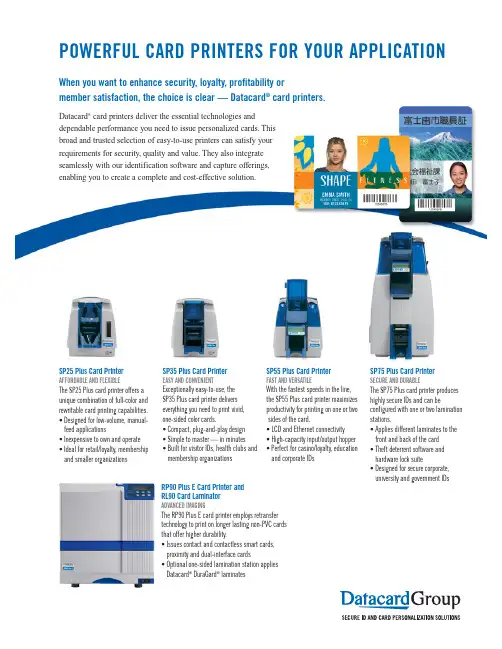
POWERFUL CARD PRINTERS FOR YOUR APPLICATIONWhen you want to enhance security, loyalty, profitability ormember satisfaction, the choice is clear — Datacard®card printers.Datacard®card printers deliver the essential technologies anddependable performance you need to issue personalized cards. Thisbroad and trusted selection of easy-to-use printers can satisfy yourrequirements for security, quality and value. They also integrateseamlessly with our identification software and capture offerings,enabling you to create a complete and cost-effective solution.SP75 Plus Card PrinterSECURE AND DURABLEThe SP75 Plus card printer produceshighly secure IDs and can beconfigured with one or two laminationstations.• Applies different laminates to thefront and back of the card• Theft deterrent software andhardware lock suite• Designed for secure corporate,university and government IDsRP90 Plus E Card Printer andRL90 Card LaminatorADVANCED IMAGINGThe RP90 Plus E card printer employs retransfertechnology to print on longer lasting non-PVC cardsthat offer higher durability.• Issues contact and contactless smart cards,proximity and dual-interface cards• Optional one-sided lamination station appliesDatacard®DuraGard®laminatesSP25 Plus Card PrinterAFFORDABLE AND FLEXIBLEThe SP25 Plus card printer offers aunique combination of full-color andrewritable card printing capabilities.• Designed for low-volume, manual-feed applications• Inexpensive to own and operate• Ideal for retail/loyalty, membershipand smaller organizationsSP55 Plus Card PrinterFAST AND VERSATILEWith the fastest speeds in the line,the SP55 Plus card printer maximizesproductivity for printing on one or twosides of the card.• LCD and Ethernet connectivity• High-capacity input/output hopper• Perfect for casino/loyalty, educationand corporate IDsSP35 Plus Card PrinterEASY AND CONVENIENTExceptionally easy-to-use, theSP35 Plus card printer deliverseverything you need to print vivid,one-sided color cards.• Compact, plug-and-play design• Simple to master — in minutes• Built for visitor IDs, health clubs andmembership organizationsDatacard, DuraGard,Intelligent Supplies Technology and the Datacard Certified Supplies icon are registered trademarks,trademarks and/or service marks of DataCard Corporation in the United States and/or other countries.Personalization throughput will depend on card design, printer settings and smart card encoding. Names and logos on sample cards are fictitious. Any similarity to actual names,trademarks or tradenames is coincidental. ©2008 DataCard Corporation. All rights reserved.DP8-9011Datacard specializes in end-to-end solutions for secure identification and instantly issued transaction cards. Ask your reseller about Datacard ®software and capture solutions that will seamlessly integrate with your printer.DATACARD ®CARD PRINTERS11111Bren Road West Minnetonka, MN 55343-9015+1 952 Datacard ®Certified Supplies featuring IntelligentSupplies Technology ™help ensure superior image quality,consistent card printing and outstanding performance when used with Datacard card printers.S P 25 Plus S P35 Plus S P55 Plus S P75 Plus RP 90 Plus E Print ca p a b ilities One-si d e d One-si d e d One- (or two*-) si d e dOne- or two-si d e dOne- or two-si d e dPrint metho d Direct-to-car d Direct-to-car d Direct-to-car d Direct-to-car d Retransferd ye-sublimation d ye-sublimation d ye-sublimation d ye-sublimation d ye-sublimation an d rewritable One-color, one-si d e d p rint s p ee d 7.2 secon d s p er car dU p to 750 C PH U p to 1,000 C PH --One-color, two-si d e d p rint s p ee d - - U p to 450 C PH - -Full-color, one-si d e d p rint s p ee d30 secon d s p er car d U p to 160 C PH U p to 190 C PH U p to 175 C PH U p to 100 C PH(with lamination)Full-color (front), two-si d e d p rint s p ee d - - U p to 155 C PH U p to 165 C PH U p to 75 C PH(with lamination)Clear car d p rinting - Yes Yes - -Car d in p ut ho pp er ca p acity Manual-fee d 100 car d s 100 car d s/ 100 car d s/300 car d s200* 200*Car d out p ut ho pp er ca p acity 15 car d s 20 car d s 40 car d s/ 40 car d s/ 100 car d s 200* 100* Car d reject area - - - Yes -Car d exce p tion slot - - Yes Yes -S ECURITY FEATURE S Locks- - Yes* Yes* - Printer – PC software - - - Yes* - U V fluorescent p rinting - - - Yes* - Ri bb on security erase- - - - Yes IP S EC encry p te d networking security- - - - YesS ingle-p ass to p coats Yes (T -p anel) Yes (T -p anel) Yes (T -p anel) One- or two-si d e d One-si d e d *S ingle-p ass Datacar d ® DuraGar d ® laminates ---One- or two-si d e d ** One-si d e d *CARD TECHNOLOGYBar co d es Yes Yes Yes Yes Yes Magnetic stri p eYes* Yes* Yes* Yes* Yes* S mart car d (contact/contactless) Yes* Yes* Yes* Yes* Yes*Connectivity U S B U S B U S B/Ethernet* U S B/Ethernet U S B/EthernetDis p layS tatus li g ht S tatus li g ht S tatus li g ht/L C D* L C D* L C D** Optional** Can apply two separate supply types to front and back with optional second laminator。
PLUS实时定位系统产品说明书

PLUS实时定位系统 产品说明书北京奇立世通科技发展有限公司2010年1月1概述PLUS超宽频即时定位系统的由美国Time Domain公司出品。
和同类产品相比,该系统具有部署简单,性能价格比高,精度高,标签位置稳定不飘移,信号抗干扰能力强,标签发射状态和频率可以动态更新等突出特点。
系统由标签,阅读器,同步分配器,天线,标签确认点和定位软件组成。
标签是一个超宽频信号发射装置,每秒发射1~10次信号。
接收器(天线和阅读器的组合)接收标签发来的标签识别号,记录到达时间(TOA),然后传给同步器进行同步处理,解析出到达时间差(TDOA),然后把以上信号和其他一些验证信号例如信号强度等打包通过网络协议发送给服务器进行处理,就可以计算出标签(也就是需要被跟踪的人员或者物体)所处位置以及运动轨迹。
每一个标签都有一个独一无二的识别号,所以系统知道每一个标签在每一个时刻的位置以及运动信息。
标签确认点TAP向标签发射2.4 GHz 信号,可以动态地改变标签的发射频率(1~10Hz)和操作模式(活跃或者待机)。
这种设计可以使标签在非工作时间内处于待机状态,节省电池消耗,延长电池寿命。
PLUS系统部署符合本项目通过在固定场所布设定位接收装置,被定位人员佩戴射频信号发射标签的方式,实现指定区域内人员的实时精确定位并且被定位人员的坐标数据通过以太网实时传输给上层应用系统的要求。
标签位置偏差通常情况下不超过正负15cm,如果增加接收装置部署密度,精度更可达到正负5cm以下,超过建设要求。
如果部署在室外,标签的防护等级为IP64,满足建设要求。
信号中心频率为7.3GHz,带宽大约为1GHz,该频段为我国无线电管理开放频段,不会和现有通讯设备相互干扰,符合我国无线电管理规定。
系统遵循如下原则进行建设:(1) 先进性与成熟性原则:PLUS系统是著名实时射频定位系统生产商Time Domain的产品,在该领域享有盛誉,10多年来PLUS系统在美国的很多医院,养老院,超级市场部署,是先进成熟的产品。
SP30CN采集--调机手册
一、 手册说明本手册是计费文件远程采集传输系统(以下简称远程采集系统)调机手册,本手册仅供整机调测、工程与服务人员使用。
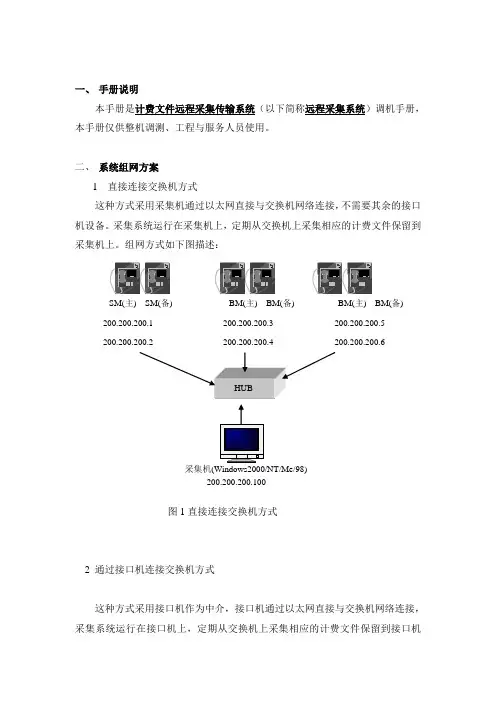
二、 系统组网方案1 直接连接交换机方式这种方式采用采集机通过以太网直接与交换机网络连接,不需要其余的接口机设备。
采集系统运行在采集机上,定期从交换机上采集相应的计费文件保留到采集机上。
组网方式如下图描述:SM(主) SM(备) BM(主) BM(备) BM(主) BM(备) 200.200.200.1 200.200.200.3 200.200.200.5200.200.200.2 200.200.200.4 200.200.200.6采集机(Windows2000/NT/Me/98)200.200.200.100图1直接连接交换机方式2 通过接口机连接交换机方式这种方式采用接口机作为中介,接口机通过以太网直接与交换机网络连接,采集系统运行在接口机上,定期从交换机上采集相应的计费文件保留到接口机上。
采集机将从接口机上采集计费文件,避免了采集机与交换机网络的直接连接。
组网方式如上图描述,采用这种方式组网,在接口机上需要正确配置FTP 服务器。
SM(主) SM(备) BM(主) BM(备) BM(主) BM(备)200.200.200.1 200.200.200.3 200.200.200.5200.200.200.6接口机(Windows2000/WindowsNT)采集机Windows2000/Me WindowsMe Window98192.168.24.231 192.168.24.241 192.168.24.221图2 通过接口机连接交换机方式接口机中必须首先配制FTP 服务器,并且保证接口机的操作系统是WindowsNT/2000;采集机不必配置FTP 服务器,并且操作系统可以是Windows98/Me/2000/NT ;FTP 服务器配置流程以下为针对WindowsNT4.0操作系统的FTP 服务器配置:1) 用鼠标双击Microsoft Optional Pack 4.0软件包中的setup.exe 文件,就开始安装了;2)在安装的过程中会出现图3,选择“典型”安装方式;图3安装方式选择3) 在以下的步骤中接受默认的设置,重新启动系统后就能完成Optional Pack4.0的安装了;4) 用鼠标单击开始→程序→Windows NT 4.0 Optonal Pack→Microsoft Internet Information Server→Internet 服务管理器,会出现图4的界面;图4 Microsoft管理控制台5) 在图4的控制台目录树的“默认FTP站点”上单击鼠标右键→属性会出现FTP 站点服务器的一个配置向导,见图5所示;图5 FTP站点向导6) 输入站点名字,单击“下一步”会出现图6;图6 填写站点向导7)输入接口机的IP地址(这个IP地址应该与采集机的IP地址在同一个网段上)和端口号(输入21既可),鼠标单击“下一步”会出现图7;图7填写主目录路径8) 在以下的配置过程中接受默认的设置,并在配置完成后启动该FTP服务器,如图8所示。
IC卡充值机使用说明书(最新)
IC卡充值机使用说明书(最新)IC 卡充值机使用说明书IC卡充值机使用说明书1、开机后显示“PL”,放入授权卡即进入工作状态显示“0.00”2、充值,放入用户卡输入充值金额再按确认健即可(余额显示栏上显示此用户的余额)3、误充处理(即减去用户卡内的金额),按设置和“9”两健再放入授权卡,显示“-0.00”时放入用户卡输入要扣除的金额后按确认键即可,每次只能进行一次。
4、设置费率卡按“设置”和7键,系统会显示“FL”然后把费率卡放在感应区,系统会显示“A”,这时输三位数字,不超过255;接下来系统会显示“b”,输入三位数字,不超过255;接下来系统会显示“D”,输入三位数字,不超过255;A和B是一组,A表示扣费金额,B表示水表输出的脉冲(流量控制模式),或者间隔时间(时间控制)。
A和B是一组,A表示扣费金额;B表示水表输出的脉冲(流量控制模式),或者问题隔时间(时间控制,单位间隔0.25秒)。
C和D是一组,C表示金额,D表示水表输出的脉冲,(流量控制模式),或者间隔时间(时间控制,单位间隔0.25秒)。
费率设置成功后会“嘀”的一声报警,失败会报警(E----16),设置成功后把“费率卡”放在水控中感应2秒钟即可把费率程序写到水控中。
5、充值机清零按两次“+”号健,再按“F1、F2、F3”三健后再按“确认”健后,放入“清零卡”后即可清除充值机内的充值金额,按“查询”健,显示金额为“0.00”注:1、一体流量热水水控中的“b”的脉冲数中,2个脉冲表示为1升水。
2、饮水机水控中的“b”的脉冲数中,58个脉冲数表示为1升水。
举例说明:1、一体机热水设置说明;(1)无限量使用0.3元每桶热水的收费标准,(每桶水按20升/桶计算)设置如下:把收费标准换算成“元/升”,即0.3元÷20升=0.0015元/升:水控的收费精确度为分,不能精确到厘钱,则要把1.5分换算成最小整数,1.5分×2=3分,表示每2升水扣3分钱。
Datacard SP25 Plus Card Printer技术指南说明书
TECHNOLOGY GUIDE FOR REWRITABLE CARD PRINTING Datacard®SP25 Plus Card PrinterUNDERSTANDING REWRITABLE CARD PRINTING TECHNOLOGYINNOVATIVE APPLICATIONSFOR A WIDE RANGE OF MARKETSHealthcareHospitals and other healthcareproviders can issue patient ID cards that feature preprinted permanent information on the PVC side, such as a hospital logo, and rewritable information on the opposite side,such as the patient’s demographic data or medical record cationK-12 schools, colleges and universities can print a student’s photo and demographics on a fully rewritable ID, or print a photo on the PVC side and use the rewritable side to print a classschedule or school events calendar.Y ou can also print a library card with rewritable due dates or issue copy cards that combine amagnetic stripe with a rewritable tally of the user’s remaining copies.T ransportationPublic and private transportation organizations can issue rider cards with rewritable ticketing details or schedules for buses, trains and subways. Airlines can issuefrequent flyer cards with rewritable point totals, or boarding passes with flight information.RetailRetailers can print loyalty cards with rewritable point totals or limited-time special offers. Beauty salons and other shops that rely on appointments can issue rewritable appointment cards for clients.Movie and video game rentaloutlets can issue membership cards with rewritable return-by dates.Restaurants can issue frequent diner cards with point totals.EntertainmentApplications include ski lift tickets,rate cards for casinos, lottery tickets, gaming cards, tickets for concerts and sporting events, and membership cards for health clubs.Corporate IDRewritable cards are ideal for issuing temporary and visitor IDs that include a name and photo, yet can be returned at the end of the visit and easily reused for adifferent visitor. Paired with other card personalization technologies,rewritable cards can also be used for access control or time and attendance.Nonprofit OrganizationsNonprofits and other organizations that would like to issue temporary ID cards are ideal candidates for rewritable card printing. Examples include blood donation sites and charities with volunteer workers.2.The single-feedSP25 Plus card printer fully erases and rewrites the card in 20 seconds.1.Insert the card3.The rewritten card is available for use.Applications for rewritable cards are numerous and growing quickly as the technology increases in popularity.Overall, card issuers can use this technology to create two kinds of rewritable cards. The first type will be updated frequently with dynamic information that is pertinent to the cardholder, such as a shopper’s loyalty points or a student’s class schedule. The second type will be a reusable card that is issued to a new cardholder every time it is rewritten, such as temporary visitor IDs or patient IDs in a hospital. Here are a few likely examples of ways rewritable cards can be used to improve the end-user’s experience and reduce the need for card reissuance.11111Bren Road West Minnetonka, MN 55343-9015+1 952 9331223+1 952 931 0418 F AX Datacard is a registered trademark, trademark and/or service mark of DataCard Corporation in the United States and/or other countries. Names and logos on sample cards are fictitious. Any similarity to actual names, trademarks or tradenames is coincidental.©2007 DataCard Corporation. All rights reserved.Specifications subject to change without notice.DP7-9016Card characteristicsBecause the dye embedded within rewritable cards changes in relationship to temperature, ambient temperature can affect the information printed onrewritable cards. Rewritable cards should not be left in a car or other high-temperature environment.Prolonged exposure to temperatures of 100°F and above will cause the card’s print density to decrease and will eventually erase the card. The card can be rewritten, but any existing information is lost.Ultraviolet (UV) rays may also affect the appearance of rewritable cards. Specifically, dyes can be damaged by prolonged UV exposure, which may permanently “fix” the image on the card and prevent it from being erased.Printer adjustmentsPrinting temperatures may also affect the process of erasing and rewriting the card. This is why the “erasing power” and the “writing power” are user-adjustable in the Datacard ®SP25 Plus card printer. Users may need to find the precise balance that works best in their specific environment. If the writing power is too high,the image may become difficult to erase. (This is known as “image ghosting.”) Other factors may come into play as well. For example, the quality of the card surface and the number of erase/rewrite cycles already completed can each affect the quality of a newly written image. Over time, print density will fade and cards will no longer be reusable.LEARN MORE TODA YRewritable card printing holds a great deal of promise for card issuers in a variety of markets. For more details about how to implement anaffordable rewritable card printing program, please contact your Datacard Sales representative or visit /SP25Plus for more information.Rewritable cards and security Rewritable cards are not appropriate for secure photo IDs or other high-security applications,because rewritable information can fade or be erased.Ultimately,issuers should think of rewritable cards in terms of enhancing the end-user’s convenience — not the end-user’s security.ADDITIONAL CONSIDERATIONS。
AlphaCard Datacard SD460 ID卡打印机说明书
Get everything you need to start printing IDs in one box!ID Card Printing Made EasyDatacard SD460 ID Card PrinterThe Datacard SD460 ID card printer is designed for medium to large organizations looking for long lasting, secure ID cards. The SD460 includes single or dual-sided lamination and a tactileimpression die for secure card printing.P R I N T E R H I G H L I G H T S :• Fast dye sublimation printing – produces 200 fullcolor cards per hour• Choose from single or dual-sided lamination • Upgrade to the tactile impression for secure cards• 2.5 year manufacturer warranty covering parts & laborTo see complete features visit:/dcsd460printerO P T I O N A L U P G R A D E S :Mag. Encoding Tactile ImpressionI D Card SoftwareWith AlphaCard ID Suite software you can design, print, and manage ID cards and badges for any professional application. Whether you’re implementing a basic photo ID program or issuing multifunctional ID badges, AlphaCard ID Suite providesyou with the necessary tools to achieve your goals.S O F T WA R E F E AT U R E S :• Available in five different editions • Customizable record layouts• Advanced card design toolsFor software details & demos visit:/id-card-softwareOptional warranty upgrades are available to extend coverageup to 5 years. Significant discounts are available within 60 days after your printer ships – ask for more details!Warranty5 y rs.–Full Color Ribbon–Blank PVC Cards–Digital Camera–Cleaning Kit–AlphaCare Support ProgramThe AlphaCard Difference ID printer experts with unparalleled customer service and supportAlphaCard has been a trusted provider of secure ID solutions since 1998 with over 30,000 satisfied customers. Our experts have an average of 5+ years of ID printer experience, and are dedicatedto helping you choose & implement the best ID system.T H E A L P H A C A R D D I F F E R E N C E:• Guaranteed best prices & widest selection• 100% satisfaction guaranteed, backed by the industry’s best return policy• Same day shipping available on orders placed by 4:00 PM PST• A+ Better Business Bureau (BBB) Rating• FREE Super Saver Shipping on all orders over $99 to the lower 48 statesMore about AlphaCard at: /about-us/why-shop-alphacardEvery ID System is covered by AlphaCare.AlphaCare is the industry’s most comprehensive service and support plan–it representsour pledge to always be there when our customers need assistance.P R O G R A M H I G H L I G H T S:• One FREE hour of remote training & setup assistance ($150 value)• FREE lifetime technical support via email• FREE phone support with remote assistance for 30 days• On-call manufacturer certified technicians available Monday – Friday, 6:30am – 5:00pm PSTSee AlphaCare details at:/alphacareVisit our Learning Center for How-To Guides & moreWant to Learn More?The AlphaCard Learning Center is designed to provide you with a better understanding of card printing technology and ID card applications. You’ll find a wealth of information covering all aspects of your ID card program including detailed analysis of common card uses and how-to articles. Click the links below or visit /learning-centerNeed Help with ID Card Design?Looking for some inspiration? Find samples, templates & best practices at: /sample-id-cardsDon’t Forget Accessories!How will your ID Cards be worn or displayed? See our most popular options at: /popular-accessories。
sp35卡机说明书2000-XP
DataCard SP35人像证卡打印机使用说明请用户在使用前阅读本说明后再进行该系统的软硬件操作。
2008年4月印制第一部分 SP35打印机的硬件连接与驱动程序的安装(一)打印机的硬件连接 一、如何开盖与安装色带二、如何连接电脑与打印机如图安装好USB 数据线 如图安装好电源线三如何安装清洁滚轴(二)DATACARD SP—35打印机驱动程序的安装当您在此次安装新驱动前请在光盘根目录下运行“\Support\ Cleanup\ Cleanup”将上次您安装的驱动卸载掉,具体方法如下:1.运行Cleanup2.以下各步骤全部选择“是”3.电脑自动重起后进行以下操作WIN2000,WINXP驱动的安装1,在光盘根目录下运行“\ XP-2000\setup.exe";2,3,4,此时将打印机电源线安好,USB线与电脑连接等待1分钟,单击"next"(如果是usb打印线则会弹出找到新的硬件,点击自动安装)5,安装完成.第二部分使用打印机高级设置一调出高级设置双击屏幕右下角打印机图标之后,将弹出打印机状态栏单击高级设置,将弹出高级设置菜单二、打印头设置点击打印头,出现如下图示上一栏打印密度,为分别调节K(黑)覆膜的强度。
下一栏位置打印Position Printing为调节打印在卡片上下左右的位置。
比如说卡片左有一白边打不到,那么可将滑杆往左拖一点点,幅度为3—5个值。
上下打印位置的调节道理一样。
当参数被修改后,确认按钮会变为实心,点击该按钮,使更改生效。
退出高级设置。
三 打印机色彩设置用户单击色彩设置,即可调出色彩管理菜单。
用户移动滑标,可改变数值。
当数值改变后,单击确认更改保存更改的数值。
当所有的设置完成后,可点取按钮最小退出设置。
第三部分 使用打印机诊断程序当打印机出现故障并需要更改打印机参数时,用户可通过使用打印机诊断程序进行修改,以下为使用打印机诊断程序修改打印机参数的步骤。