
Opensips 配置文件
sunky045@
Opensips 配置文件 Opensips.conf
####### 全局定义 (Global Parameters) 文件的这一部分包含了 OpenSIPS 的几个工作参 #######数,包括 SIP 服务的监听 ip 端口对和 debug 等级。#########
#要使用明文密码
#modparam("auth_db", "password_column", "password")
#modparam("auth_db", "db_url",
#
"mysql://opensips:opensipsrw@localhost/opensips")
####### 模块 (Modules Section) ######## 包含了外部库的列表,这些外部库是核心所没有的但却是能够展现其功能的。模#### #####块的加载使用 loadmodule
#set module path mpath="/usr/local/lib/opensips/modules/"
sunky045@
# ----- auth_db params -----
/* uncomment the following lines if you want to enable the DB based
authentication */
#modparam("auth_db", "calculate_ha1", yes) #calculate_hal 告诉 auth_db 模块
fork=yes children=4
#设置了 yes 进程会在在后台运行,有时候在前台运行也很重要,可以来找到脚本 #中的错误如果 fork disabled OpenSIPs 只能监听一个网卡,tpc/tls 也会自 #动 disabled。 在单进程模式,只有 udp 接口允许。 #每个 UDP 地址打开子进程数,不过对于 tcp 进程没有影响。
modparam("usrloc","db_mode",0)
# usrloc 模块负责用户定位服务,当用户注册的时候它
#保存定位信息,在这儿的 0 代表内存,关掉服务器信息
#会丢失
/* uncomment the following lines if you want to enable DB persistency
# ----- acc params ----/* what sepcial events should be accounted ? */ modparam("acc", "early_media", 1) modparam("acc", "report_ack", 1) modparam("acc", "report_cancels", 1)
modparam("acc", "detect_direction", 0) /* account triggers (flags) */ modparam("acc", "failed_transaction_flag", 3) modparam("acc", "log_flag", 1) modparam("acc", "log_missed_flag", 2) /* uncomment the following lines to enable DB accounting also */ modparam("acc", "db_flag", 1) modparam("acc", "db_missed_flag", 2)-1-OpensFra bibliotekps 配置文件
#tls_private_key = "/usr/local/etc/opensips/tls/user/user-privkey.pem" #tls_ca_list = "/usr/local/etc/opensips/tls/user/user-calist.pem"
#支持那些不对 record_route 头域进行管理的 SIP 客户端
#如果设为 1,;lr=on 将被使用而不是;lr。 # do not append from tag to the RR (no need for this script) modparam("rr", "append_fromtag", 0)
NOTE: a DB (like db_mysql) module must be also loaded */ #loadmodule "alias_db.so" /* uncomment next line for multi-domain support
NOTE: a DB (like db_mysql) module must be also loaded
/* uncomment the following lines to enable TLS support (default off) */ #disable_tls = no #listen = tls:your_IP:5061 #tls_verify_server = 1 #tls_verify_client = 1 #tls_require_client_certificate = 0 #tls_method = TLSv1 #tls_certificate = "/usr/local/etc/opensips/tls/user/user-cert.pem"
/* uncomment the following lines to enable debugging */ #debug=6 #fork=no #log_stderror=yes
/* uncomment the next line to disable TCP (default on) */ #disable_tcp=yes
# ----- registrar params ----/* uncomment the next line not to allow more than 10 contacts per AOR */ #modparam("registrar", "max_contacts", 10)
# ----- usrloc params -----
/* uncomment the next line to enable the auto temporary blacklisting of
not available destinations (default disabled) */ #disable_dns_blacklist=no
/* uncomment the next line to enable IPv6 lookup after IPv4 dns
lookup failures (default disabled) */ #dns_try_ipv6=yes
/* uncomment the next line to disable the auto discovery of local aliases
based on revers DNS on IPs (default on) */ #auto_aliases=no
# ----- mi_fifo params ----modparam("mi_fifo", "fifo_name", "/tmp/opensips_fifo") #命名管道被创建用来监听
# 和读外来命令
# ----- rr params ----# add value to ;lr param to cope with most of the UAs modparam("rr","enable_full_lr",1)
sunky045@
port=5060
#监听端口,一般不用改
/* uncomment and configure the following line if you want opensips to
bind on a specific interface/port/proto (default bind on all available) */ #listen=udp:192.168.1.2:5060
for location entries */
#modparam("usrloc", "db_mode", 2)
#modparam("usrloc", "db_url",
#
"mysql://opensips:opensipsrw@localhost/opensips")
# ----- uri params ----modparam("uri", "use_uri_table", 0)
-3-
Opensips 配置文件
/* by default ww do not adjust the direct of the sequential requests. if you enable this parameter, be sure the enable "append_fromtag" in "rr" module */
OpenSips+FreeSwitch负载均衡
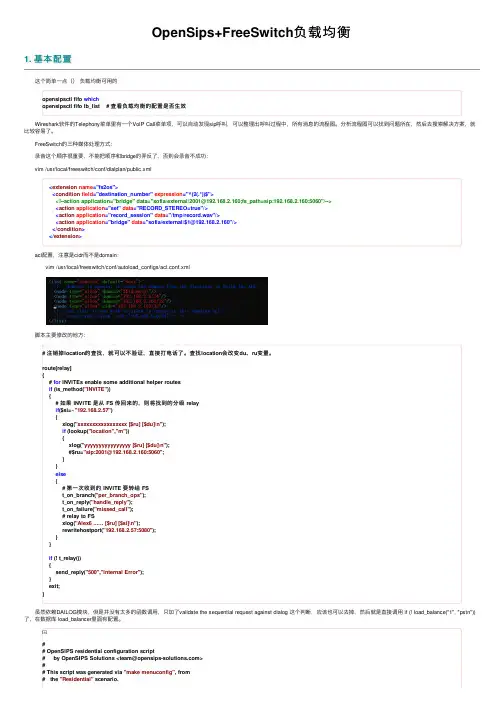
OpenSips+FreeSwitch负载均衡1. 基本配置 这个简单⼀点()负载均衡可⽤的opensipsctl fifo whichopensipsctl fifo lb_list # 查看负载均衡的配置是否⽣效 Wireshark软件的Telephony菜单⾥有⼀个VoIP Call菜单项,可以⾃动发现sip呼叫,可以整理出呼叫过程中,所有消息的流程图。
分析流程图可以找到问题所在,然后去搜索解决⽅案,就⽐较容易了。
FreeSwitch的三种媒体处理⽅式: 录⾳这个顺序很重要,不能把顺序和bridge的弄反了,否则会录⾳不成功: vim /usr/local/freeswitch/conf/dialplan/public.xml<extension name="fs2os"><condition field="destination_number" expression="^(2(.*))$"><!--action application="bridge" data="sofia/external/2001@192.168.2.160;fs_path=sip:192.168.2.160:5060"/--><action application="set" data="RECORD_STEREO=true"/><action application="record_session" data="/tmp/record.wav"/><action application="bridge" data="sofia/external/$1@192.168.2.160"/></condition></extension> acl配置,注意是cidr⽽不是domain: vim /usr/local/freeswitch/conf/autoload_configs/acl.conf.xml 脚本主要修改的地⽅:# 注销掉location的查找,就可以不验证,直接打电话了。
如何学习opensips-kamailio-openser

2.基本安装和基本命令
opensips
kamailio
备注
安装教程
/Docu /wik
mentation/Install-
i/install/4.0.x/git
CompileAndInstall-1-9
主程序
/4.0.x/
ation/Modules-1-10
开发文档 kamailio提供的是文档教程 /pub/kamail /Document
opensips提供的是视频录像及代码。 io-devel-guide/
ation/Development-Tutorials
评论排行
移动互联网SIP在线状态方案分析(3) freepbx 安装配置教程 for CentOS 5.1(1) VOXEN开源软交换系统 您的最佳选择(1) freepbx模块开发 FreePbx API:modules(0) mingw 环境编译eXosip2-3.6.0 故障解决(0) kamailio/opensips/openser 日志分割/logrotate 日志配置(0) 面试题:非阻塞tcp socket调用close时缓冲区未发送数据的处理逻辑(0) kamailio/opensips snmp/cacti/zabbix监控(0) kamailio/openser/opensips 生成RPM包/RPM打包(0) 如何学习opensips/kamailio/openser(0)
ation/Script-CoreParameters-1-10
/Document
ation/Script-CoreFunctions-1-10
http://www.opБайду номын сангаас/Document
opensips发起呼叫的流程

opensips发起呼叫的流程## English Answer:OpenSIPS Call Initiation Process.OpenSIPS is an open-source Session Initiation Protocol (SIP) server used to establish, maintain, and terminate SIP sessions. The call initiation process involves several steps:1. User Request: A user initiates a call by sending an INVITE request to the OpenSIPS server. The request contains the destination address, calling party information, and session parameters.2. OpenSIPS Routing: OpenSIPS receives the INVITE request and routes it based on predefined rules. It can use parameters such as caller ID, destination address, and call type to determine the appropriate route.3. Authentication and Authorization: OpenSIPS can perform authentication and authorization checks on the incoming request. It verifies the user's identity and ensures they have permission to make the call.4. Call Setup: After successful authentication, OpenSIPS establishes the call path. It sends a 100 Trying response to the calling party and forwards the INVITE request to the destination.5. Callee Response: The callee receives the INVITE request and responds with a 180 Ringing response. This indicates that the callee is being alerted and the call is about to connect.6. Call Connection: Once the callee accepts the call, OpenSIPS sends a 200 OK response to the calling party. The call is now established and the audio/video streams can be exchanged.## 中文回答:OpenSIPS呼叫发起流程。
SIP服务器安装配置

目录目录 (1)sipserver在单板上安装.................................................................................... 错误!未定义书签。
1.1. linux的安装 .................................................................................. 错误!未定义书签。
1.2. sipserver的安装............................................................................ 错误!未定义书签。
1.3. sipserver的配置............................................................................ 错误!未定义书签。
1.4. sipserver的启动............................................................................ 错误!未定义书签。
在VMware上安装 ........................................................................................... 错误!未定义书签。
1.5. VMware的安装和配置 ................................................................ 错误!未定义书签。
1.6. linux的安装 .................................................................................. 错误!未定义书签。
SIP服务器调查报告
开源SIP服务器调查报告一、引言随着通信IP化的发展,IP传输的高带宽、低成本等优势使得越来越多的企业、电信运营商加快建设基于IP的各种通信应用。
在通信协议IP化发展中,SIP协议毫无争议地成为各大电信运营商构建其未来网络的基础协议,越来越多的SIP软件产品也不断出现在行业应用中。
SIP协议的标准化,同时也造就了一大批优秀的开源软件产品,包括Asterisk、SipXecs、FreeSWITCH、OpenSIPS等SIP服务端软件,也包括X-lite、LinPhone、eyeBeam等SIP客户端软件。
二、调查目的根据目前已经着手开发的系统所采用的服务器Asterisk来看,Asterisk支持视频通话的效果不是很理想,影响通话的质量。
为此,本文对当前所有的SIP开源服务器进行调查分析,对其性能、使用方便程度等多方面进行分析,从而为选取支持视频且视频质量较高的服务器做准备。
三、调查内容目前SIP开源服务器主流的有以下几个:1、OpenSIPSOpenSIPS是一个成熟的开源SIP服务器,除了提供基本的SIP代理及SIP路由功能外,还提供了一些应用级的功能。
OpenSIPS的结构非常灵活,其核心路由功能完全通过脚本来实现,可灵活定制各种路由策略,可灵活应用于语音、视频通信、IM以及Presence等多种应用。
同时OpenSIPS性能上是目前最快的SIP服务器之一,可用于电信级产品构建。
凭借其可扩展、模块化的系统架构,OpenSIPS提供了一个高度灵活的、用户可配置的路由引擎,可以为voice、video、IM和presence等服务提供强大高效的路由、鉴权、NAT、网关协议转化等功能。
由于其稳定高效等特点,OpenSIPS已经被诸多电信运营商应用在自己的网络体系中。
其主要功能如下:⏹SIP注册服务器/代理服务器(lcr、dynamic routing、dialplan)/重定向服务器⏹SIP presence agent⏹SIP B2BUA⏹SIP IM Server⏹SIP to SMS/XMPP网关⏹SIP to XMPP网关⏹SIP 负载均衡⏹SIP NAT traversal源码下载网址:/Downloads/Downloads详细介绍:/wiki/view/OpenSIPS官方网站:/2、KamailioKamailio® (former OpenSER) is an Open Source SIP Server released under GPL, able to handle thousands of call setups per second. Among features: asynchronous TCP, UDP and SCTP,secure communication via TLS for VoIP (voice, video); WebSocket support for WebRTC; IPv4 and IPv6; SIMPLE instant messaging and presence with embedded XCAP server and MSRP relay; IMS extensions; ENUM; DID and least cost routing; load balancing; routing fail-over; accounting, authentication and authorization; support for many backend systems such as MySQL, Postgres, Oracle, Radius, LDAP, Redis, Cassandra; XMLRPC control interface, SNMP monitoring. It can be used to build large VoIP servicing platforms or to scale up SIP-to-PSTN gateways, PBX systems or media servers like Asterisk™, FreeSWITCH™ or SEMS. Kamailio and the SIP Express Router (SER) teamed up for the integration of the two applications and new development.源码下载地址:/w/download/安装指南:/yetyongjin/article/details/8106997/rosekin/article/details/7103183/p/kamailio官方网站:/w/3、sipXecssipXecs is a modular and scalable communications solution for enterprises of all sizes. It provides a highly available SIP routing core integrated with a growing suite of communications services all managed through a unified web based management application. sipXecs provides traditional PBX telephony services integrated with instant messaging, and allows the use of advanced communications tools like video calling.The sipXecs Enterprise Communications Solution is a native SIP based solution that offers all the typical features expected from a PBX, including voicemail, unified messaging, auto-attendant, conferencing, presence and call center capabilities. sipXecs can be deployed on a single server for smaller installations or as a distributed and optionally redundant system for larger deployments. It's Web Services (SOA) based management and configuration system allows centralized management of a distributed system and offers plug & play configuration for all phones and gateways.The sipXecs developer community is strong and growing. sipXecs has built a reputation for being easy to use, scalable and of high quality. In addition, sipXecs is a unified communications solution, not just an IP PBX.The sipXecs project delivers a fully capable open source unified communications solution for the small to mid-enterprise market. This market ranges from a few users to several thousand users, possibly located in different buildings, cities, or countries.源码下载地址:/pub/sipXecs/ISO/参考资料:/p-4455907895111.html4、freeswitchFreeSWITCH 是一个免费、开源的通信软件,可用于创建音、视频以及短消息类产品和应用。
opensips 拨号规则

opensips 拨号规则
OpenSIPS拨号规则是指在OpenSIPS服务器上配置的一系列规则,用于决定呼叫如何被路由和处理。
这些规则可以根据呼叫的来源、目的地、时间、用户身份等不同条件进行配置,以实现灵活的呼叫路由和处理。
在OpenSIPS中,拨号规则可以通过配置文件中的路由块来定义。
路由块中的每个规则由一组条件和动作组成。
当一个呼叫到达OpenSIPS服务器时,它会按顺序检查每个规则,找到第一个满足条件的规则,并执行相应的动作。
拨号规则的条件可以基于多个因素进行匹配,例如呼叫的来源和目的地。
通常,这些条件可以包括呼叫的SIP URI、呼叫类型(如呼入或呼出)、呼叫的时间等。
通过灵活配置这些条件,可以实现各种复杂的呼叫路由和处理逻辑。
在OpenSIPS中,拨号规则的动作决定了呼叫的后续处理。
这些动作可以包括路由呼叫到特定的目的地、修改呼叫的消息头、记录呼叫的信息等。
通过配置不同的动作,可以实现呼叫的路由、转接、过滤、记录等各种功能。
除了基本的条件和动作,OpenSIPS还提供了一些高级功能来增强拨号规则的灵活性和功能性。
例如,可以使用正则表达式来匹配呼叫的SIP URI,使用变量来动态配置规则,使用脚本来执行复杂的呼
叫处理逻辑等。
总的来说,OpenSIPS拨号规则是一种强大的配置机制,可以根据呼叫的不同条件和需求,灵活地路由和处理呼叫。
通过合理配置拨号规则,可以实现高效的呼叫路由和处理逻辑,提高通信系统的灵活性和可扩展性。
opensim服务器配置
Setting Up Grid ModeStep 1. Configure OpensimMake a copy of your OpenSim.ini file, and rename the copy to OpenSim.ini.standalone (so you can go back later if you wish). Open your OpenSim.ini file, and in the [Startup] section make gridmode=true, then in the [Network] section change the following keys from 'null' to '1234' as follows: grid_send_key = "1234"grid_recv_key = "1234", user_send_key = "1234", user_recv_key = "1234"ANDChange the following keys togrid_server_url = "http://218.26.117.103:8001"user_server_url = http://218.26.117.103:8002”asset_server_url = http://218.26.117.103:8003”inventory_server_url = http://218.26.117.103:8004”messaging_server_url = http://218.26.117.103:8006”Save the OpenSim.ini file.Step 2. Launch the UGAIM ServicesIn the bin folder, locate the following 5 server services, named the UGAIM services, after their initial letters:erServer.exeOpenSim.Grid.GridServer.exeOpenSim.Grid.AssetServer.exeOpenSim.Grid.InventoryServer.exeOpenSim.Grid.MessagingServer.exeStarting with the first (and the order is important), double-click to launch it. The console will pause to ask you some questions. EXCEPT for the following, you can accept defaults for all other prompts by pressing enter:Answer 1234 for all questions involving keysDatabase connection string should look like this:Data Source=localhost;Database=opensim;UserID=root;Password=opensim;Note: I would type this database connection string out in advance, in notepad, then copy it to the clipboard, as you will have to paste this in to each of the 5 consoles, and will save you some work). Don't forget the final semicolon!The UserServer will then generate an xml file (UserServer_Config.xml) with these settings in, which you can open in Notepad and edit. I only wanted to change the default_startup_message="Welcome to OGS" to "Welcome to RK"Then start each of the other services, in the order given, accepting all the defaults, except answering 1234 for all questions involving keys. As with the UserServer service, xml files will be generated for each service. You can edit these xml’s if you would like to change any of the defaults.Step 3. Launch OpenSim.exe.When all 5 UGAIM servers are loaded, you can launch opensim.exeStep 4. Configure the ViewerTo connect to the grid, use port 8002 instead of 9000.ie. http://218.26.117.103:8002/How to Connect a Separate Region to the Grid at http://218.26.117.103 from a DifferentComputerGrid mode allows multiple users to host their own regions and connect to the main grid. In order for you to connect your grid to the main grid at http://218.26.117.103, you have to:Step 1. Configure OpensimOpen your OpenSim.ini file, and in the [Startup] section make gridmode=trueThen in the [Network] section change the following keys from 'null' to '1234' as follows: grid_send_key = "1234" grid_recv_key = "1234", user_send_key = "1234", user_recv_key = "1234"ANDChange the following keys togrid_server_url = "http://218.26.117.103:8001"user_server_url = http://218.26.117.103:8002”asset_server_url = http://218.26.117.103:8003”inventory_server_url = http://218.26.117.103:8004”messaging_server_url = http://218.26.117.103:8006”Save the OpenSim.ini file.Step 2. Configure region xmlOpen your default.xml in bin\regions. You may change “sim_name” to your desired name for your region. Change “sim_location” so that you do not overlap with already existing regions. Currently, the main grid is occupied from x:[1000,1004] y:[1000,1003] and at (999,1000).Note: These coordinates are OpenSim coordinates.There can be multiple regions hosted from a single user. Each regionxml should have a different UUID and sim_location.Step 3. Run Opensim.exeLaunch opensim.exe from the bin folderStep 4. Configure the ViewerTo connect to the main grid, use port 8002 instead of 9000.ie. http://218.26.117.103:8002/。
Ubuntu下kamailio服务器搭建
Ubuntu下kamailio服务器搭建的部分注意事项SIP服务器搭建实验1 SIP实验基础1.1 Sip服务器端软件∙OpenSIPS(kamailio)∙Asterisk∙SipXecs∙FreeSWITCH1.2 SIP客户端软件∙X-lite(免费使用、不开源、对应商业收费软件eyeBeam)∙LinPhone(开源 C)∙Yate∙Twinkle1.3 抓包工具∙WireShark∙ngrep∙iptool2 OpenSIPS(kamailio)介绍OpenSIPS是一个成熟的开源SIP服务器,除了提供基本的SIP代理及SIP路由功能外,还提供了一些应用级的功能。
OpenSIPS的结构非常灵活,其核心路由功能完全通过脚本来实现,可灵活定制各种路由策略,可灵活应用于语音、视频通信、IM以及Presence等多种应用。
同时OpenSIPS性能上是目前最快的SIP服务器之一,可用于电信级产品构建。
3 Kamailio安装及配置3.1 安装环境ubuntu 11.10(S)3.2 安装步骤step 1 安装mysql服务端$sudo apt-get install mysql-serverstep 2 安装其他需要软件$sudo apt-get install git-core gcc flex bison libmysqlclient15-dev make libcurl4-openssl-dev libxml2-dev libpcre3-devstep 3 建立项目文件目录$sudo mkdir -p /usr/local/src/kamailio-3.0.0$cd /usr/local/src/kamailio-3.0.0step 4 用git下载源码并建立分支$sudo git clone --depth 1 git:///sip-router kamailio$cd kamailio$sudo git checkout -b kamailio_3.0 origin/kamailio_3.0step 5 编译前配置$sudo make cfg①vi modules.lst②Remove db_mysql from the variable exclude_modules.③Save the modules.lst and exit.(①②③建议用$sudo gedit modules.lst 命令操作移除db_mysql并作保存,用vi编辑器修改操作比较困难)$sudo make include_modules="db_mysql dialplan" cfgstep 6 编译$sudo make allstep 7 安装$sudo make install3.3 配置3.3.1 常用配置文件目录/usr/local/sbin 可执行文件目录/usr/local/etc/kamailio 配置文件目录/usr/local/lib/kamailio/modules/ 模块目录/usr/local/lib/kamailio/modules_k/ 模块目录/usr/local/share/doc/kamailio/ 文档目录3.3.2 kamctlrc配置(注意:要去掉前面的注释#号)/usr/local/etc/kamailio/kamctlrc 配置SIP_DOMAIN=ps.sip.uniza.skDBENGINE=MYSQLDBHOST=localhostDBNAME=kamailioDBRWUSER=openserDBRWPW="openserrw"DBROUSER=openserroDBROPW=openserroDBROOTUSER="root"ALIASES_TYPE="DB"CTLENGINE="FIFO"OSER_FIFO="/tmp/kamailio_tmp"VERBOSE=1PID_FILE=/var/run/kamailio.pid建议在/usr/local/etc/kamailio/目录下用$sudo gedit kamctlrc进行编辑修改。
OpenSER IP电话安装配置
请插入P208页 图8-5
实验:跟踪一个完整的对话
& 步骤1:重新启动OpenSER并重新注册电话。 & 步骤2:使用ngrep捕获请求并对文件进行响应: ngrep –p-q-W byline port 5060>rr-stateful & 步骤3:从1000到1001开始一次呼叫。 & 步骤4:使用CTRL_C停止ngrep。CDRTool体系结构
CDRTool包含两个数据库:
一个是RADIUS数据库 另一个是CDRTool 数据库
请插入P233页 图8-13
CDRTool如何定价一个呼叫
定价直接与连接到每天时间、星期及假期的轮廓相关 。一次呼叫可以跨越多个轮廓并被正确地定价。每个客 户可以分配到一个专用的定价计划。 CDRTool定价呼叫步骤:
路由基础
& 在了解如何路由SIP分组前,我们先了解一下两个重要的 概念:事务和对话。 & 事务——从一个请求开始,到得到响应结束。 & 对话——从一个INVITE事务开始,到一个BYE事务结束。
请插入P207页 图8-3
路由基础
& 区分initial和sequential请求 ①对应initial请求,需要决定如何使用发现路由机制, 通常根据DNS或位置表确定。 ②可以使用TO头部域中的TAG参数来区分。
OpenVPN配置文件中文版
OpenVPN配置文件中文版很多情况下我们不得不选择使用openvpn来突破一些封锁,实现自由上网,像GFW、CMWAP 这些具有中国特色的网络文明,我们必须突破。
openvpn是最好的选择。
面对openvpn全英文配置文件,很多朋友肯定很茫然,下面是配置文件的中文翻译版。
# 哪个本地ip地址将被Openvpn监听?# 也可以不注明;local a.b.c.d# 哪一个tcp/udp端口将被监听?# 如果你要在一台机器上启动多个OpenVPN,你需要监听不同的端口# 记着在防火墙那里打开这些端口port 1194# TCP还是UDP协议?# 如果采用HTTP proxy,必须使用TCP协议proto udp# “dev tun” 将创建1个路由隧道# “dev tap” 将创建1个以太网隧道# 如果你选择桥模式,使用“dev tap”# 如果你需要控制每个客户端的访问控制策略# 你必须创建防火墙规则到TUN/TAP接口# 在非Windows系统上,你可以明确该接口,如:tun0# 在Windows上,使用”dev-node”# 在大多数系统上,如果你的防火墙部分或全部禁止TUN/TAP接口的话,Openvpn将可能不起作用;dev tapdev tun# 在Windows上如果你更多的网络接口,你需要在网络连接控制面板上增加# TAP-Win32适配器接口名# 在XP SP2或更高系统上,你需要使windows防火墙对该接口不执行过滤规则# 非Windows系统通常不需要设置这个;dev-node MyTap# 证书/key文件指向ca ca.crt #OpenVPN使用的ROOT CA,使用build-ca生成的,用于验证客户是证书是否合法cert server.crt #Server使用的证书文件key server.key #Server使用的证书对应的key,该文件必须严格控制其安全性#CRL文件的申明,被吊销的证书链,这些证书将无法登录;crl-verify vpncrl.pem# Diffie hellman文件指向# 如果你在建立证书时使用2048的话这里是2048# 否则默认dh dh1024.pem# 给接入的client分配的地址段server 192.168.80.0 255.255.255.0# 维护客户端和虚拟ip地址联系# 在openvpn重启时,再次连接的客户端将依然被分配和以前一样的# ip地址ifconfig-pool-persist ipp.txt# openvpn桥模式用的[我不用桥模式]# 配置服务器桥接模式的前提是必须将俩网卡在操作系统下先建立桥接,之后手动设置ip 地址和子网掩码。