
赫斯曼交换机选型手册
Hirschmann交换机配置手册簿

赫思曼交换机配置手册目录1.准备 (3)1.1 硬件准备 (3)1.2 软件准备 (3)2.配置 (7)2.1初始化设置 (7)2.2 Basic Settings基本配置.............................................................................................102.3Time对时功能 (14)2.4Switching交换功能 (17)2.5Redundancy 冗余设置 (21)2.6Diagnostics 诊断.........................................................................................................242.7Help 帮助 (29)3常见网络故障原因及应对方法 (30)1.准备1.1 硬件准备在对网络系统进行配置前,必须先对系统的硬件配置进行相应的检查。
➢必须保证所有的交换机均正常上电,并成功启动,所有交换机均可以正常通信➢在进行环网配置前,必须保证每个环网为线型链路➢具有一台配置电脑以及至少一台的测试电脑1.2 软件准备1.2. 1HiDiscovery➢在 Manual CD 中找到 HiDiscovery 文件夹➢选择 2.0 版本进行安装,文件名为HiDiscovery20Setup.exe1.2. 2JAVA 运行环境➢ 在 Manual CD 中找到 Java 文件夹点击安装Java或进入Java网站下载 6.23版➢ 安装软件➢➢完成后在Java 网站检测系统内是否还有老版本存在与新版本发生冲突。
1.2.33rd Party 应用软件➢Tftpd32(在 Manual CD 中的 Freeware 文件夹)模拟 TFPF Server 和 Client 端,用于交换机上传/备份交换机配置文件或升级交换机固件。
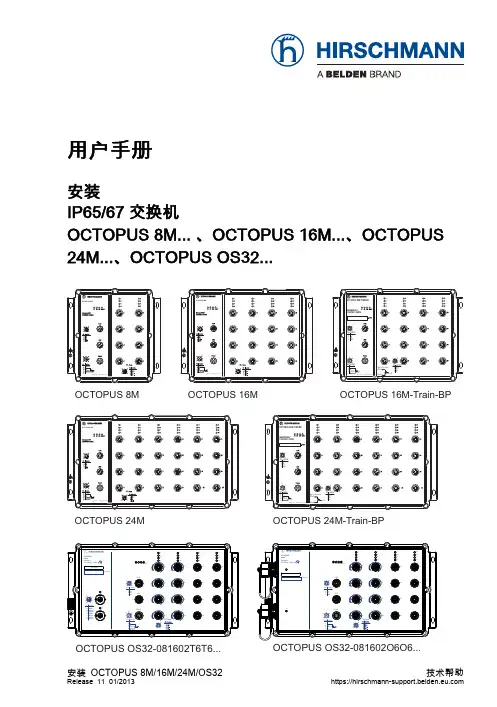
赫斯曼 OCTOPUS 8M用户手册
Port 8
OCTOPUS 24M
x y
OCTOPUS OS32 Managed P ETHERNET Switch
Produktcode
OCTOPUS 24M-Train-BP
x y
OCTOPUS OS32 Managed P ETHERNET Switch
15
1
3 4 5 6 P1 P2 RM FAULT
8
12
16
4 3 Pin Function 1 TX 2 RX 3 N.C. 4 GND
4
8
12
16
1 8 7 6 5 4 1 2
ACA 5 9 13 17
ACA 5 9 13 17
1
3
Pin Function 1 MDX1+ 2 MDX1 3 MDX0+ 4 MDX0 5 MDX2+ 6 MDX2 7 MDX3 8 MDX3+
TP-Ports
1 4 2 3
OCTOPUS OS32-081602T6T6...
安装 OCTOPUS 8M/16M/24M/OS32
Release 11 01/2013
OCTOPUS OS32-081602O6O6...
https://
用户手册
安装 IP65/67 交换机 OCTOPUS 8M... 、OCTOPUS 16M...、OCTOPUS 24M...、OCTOPUS OS32...
OCTOPUS 8M OCTOPUS 8M
OCTOPUS 16M-Train-BP
Managed IP67 ETHERNET Switch
1 4
2 3
Pin Function 1 TX 2 RX 3 N.C. 4 GND
赫斯曼交换机命令行手册
赫斯曼交换机命令行手册一、概述赫斯曼交换机是一种广泛应用于数据通信领域的设备,通过命令行接口(CLI)进行管理。
本手册旨在帮助用户理解和使用赫斯曼交换机的CLI命令,以实现设备的配置、监控和管理。
二、命令行环境赫斯曼交换机命令行接口提供了一个交互式的界面,用户可以通过该界面执行各种操作。
为了使用CLI,您需要一台连接至交换机的计算机,并具备基本的命令行操作知识。
三、常用命令以下是一些常用的CLI命令,用于管理和配置赫斯曼交换机:1.显示系统信息:display命令2.用户管理:user命令(创建、删除用户等)3.端口配置:interface命令(设置接口、速度等)4.VLAN配置:vlan命令(创建、删除VLAN等)5.路由配置:route命令(添加、删除路由等)6.交换机日志:logging命令(设置日志级别等)四、命令使用方法以下是一些常用命令的使用方法示例:1.display命令:displaysystem-view或displayrunning-configer命令:usercreateusernamepassword(创建用户)3.interface命令:interfacevlan100(进入VLAN100接口)4.vlan命令:vlanbatch100,200(批量创建VLAN100和200)5.route命令:routeadd192.168.0.0255.255.255.0192.168.1.1(添加路由)6.logging命令:loggingbuffersize64(设置日志缓冲区大小)五、常见问题及解决方法以下是一些常见问题及解决方法:1.命令输入错误:请仔细检查您的命令,确保输入正确。
如果您不确定某个命令是否正确,请查阅相关文档或寻求技术支持。
2.设备不支持某些命令:请确认您的设备是否支持所需的命令。
如果不支持,您可能需要使用其他方法或设备来完成所需的操作。
3.设备连接问题:请检查您的计算机与设备的连接是否正常,确保网络连接畅通。
Hirschmann RS20交换机配置说明_090420

云南小湾水电站工程通风空调计算机监控系统名称: 赫斯曼RS20交换机说明书代号: WTH-XWTF-02昆明威士科技有限公司2009年3月云南小湾水电站工程通风空调计算机监控系统名称: 赫斯曼RS20交换机说明书代号: WTH-XWTF-02编制:董家瑞校对:苏为斌审定:余兴林批准:张占军昆明威士科技有限公司2009年3月安全须知本安全须知包括在安装、运行和维护电气控制系统(单元)时必须遵循的安全规范。
安全须知说明分为两部分:警告和注意。
警告部分用于说明在进行非正常操作时,何种情况会造成严重的故障,甚至人身伤害或死亡。
注意事项部分用于在文件中提请读者特别注意,注意事项部分虽然不如警告部分重要,但也不应忽视。
警告:本文件中以下标志提醒读者,并说明何种情况会造成严重的人身伤害及设备的损坏。
危险电压警告:警告有高电压存在,会造成严重的人身伤害及设备的损坏。
标志旁注明了避免发生危险的方法。
一般警告:警告非电气原因可能造成人身伤害及设备的损坏。
标志旁注明了避免发生危险的方法。
静电放电警告:警告静电放电可能导致弱电设备损坏。
标志旁注明了避免发生危险的方法。
注意!当读者看到如下标志或相关的附加信息时,需要格外注意。
注意!指需格外注意的地方。
补充说明:补充说明给出信息,或者提供可参考的更多信息。
注意这些贴在控制设备或在本文件中警告、注意符号。
它们提醒错误的操作可能对人体产生危险或损坏相关设备。
在对本控制系统操作或维修前,请详细阅读以下的安全预防和警告事项。
请确定在控制设备上的警告符号被保持在清晰状态,亦请替换不清晰和损坏的符号。
在开始之前,请熟读设备说明书和调试文件使你熟悉操作,不许任何非合格人员操作控制设备。
警告本控制设备将产生危险的电压并控制电机使机械零件旋转;如操作不当,可能对人体产生严重伤害或损坏控制设备;只有合格人员才能操作本控制设备;这些人员必须熟悉所有的警告符号;只有正确地安装、操作和维护,才能确保安全及维持设备正常运行。
Hirschmann交换机配置指南

北京地铁十五号线DCS主控系统Hirschmann交换机配置指南目录1 项目概况 4 1.1 项目背景 4 1.2 DCS控制系统简介 41.3 网络管理系统简介 52 配置准备 6 2.1 硬件准备 62.2 软件准备 63 交换机Web配置界面简介 8 3.1 利用HiDiscovery软件为交换机分配IP地址 8 3.2 登陆配置界面 9 3.3 Web配置界面简介 11 3.3.1 整体结构 11 3.3.2 配置生效及刷新 11 3.3.3 配置保存及读取 11 3.3.4 帮助功能 12 4交换机各项功能实现方式 13 4.1环网配置方法 13 4.2 VLAN配置方法 13 4.3路由功能配置方法 16 4.4端口绑定配置方法 17 5网络管理功能实现方式 19 5.1网管服务器设置方法 19 5.2网管客户端设置方法 21 5.3针对网络故障定位及其应对方法 22 6常见网络故障原因及应对方法 231 项目概况1.1 项目背景北京地铁15号线是北京市2015年“三环、四横、五纵、七放射”地铁线网规划格局的重要组成部分之一。
线路建成后,将极大的缓解北京北部地区交通压力。
整条线路总体呈东西走向,西起海淀区北沙滩站,东到顺义区俸伯站。
线路全长37.058公里,共设有18座车站。
其中,设备集中站6座,非设备集中站12座;另设有1座车辆段,1座停车场,1座主用控制中心,1座备用控制中心,1处维修中心,全部要求实现有线网络覆盖。
1.2 DCS控制系统简介接入DCS系统网络的信号业务有:A TS系统、CI系统和MSS系统。
如下图所示,根据系统需求将信号各系统组成5个环网,其中ATS独立占用2个环网(N网和R网),CI共同占用2个环网(N网和R网),MSS独立占用1个环网(N 网)。
通信通道分为车站间串接通道和首尾站冗余通道。
正常情况下信号各系统使用串接通道进行通信,在串接通道中断的情况下,系统中的网络交换机会自动打开迂回通道进行通信,从而保证信号系统通信的连续性。
赫斯曼交换机操作基础手册

赫斯曼互换机操作手册本网络系统包括一台万兆以太网互换机(MACH 4002)作为核心互换机,两台模块化互换机(MS4128)作为次级互换机。
网络系统规定划分为两个VLAN,两个VLAN之间需要通讯。
1、Vlan配备核心互换机(MACH 4002)管理地址分别为172.16.8.251。
两台次级互换机(MS 4128)管理地址分别为172.16.8.252,172.16.8.253。
第一步:连接好所有设备,不考虑Port口位置。
第二步:VLAN规划本网络划分了两个VLAN,第一种名称为VLAN1,第二个名称为VLAN2,尚有一种默认VLAN,名称为Defult。
Port口详细划分如下:MACH4002:VLAN1 Port口:4.1~4.6,6.3~6.14VLAN2 Port口:3.1~3.8上联Port口:4.7,4.8,6.15,6.16管理Port口:6.1,6.2MS4128:(两台配备同样)VLAN1 Port口:2.3~1.4,3.1~3.4,4.1~4.4,5.1~5.4VLAN2 Port口:无上联Port口:1.1,1.2,2.1,2.2第三步:划分VLAN使用HiDiscovery扫描到网络内所有互换机设备,对互换机管理地址进行设立。
使用HiVision,在Configration-Preference中添加互换机管理地址扫描网段,可以扫描到网络内所有互换机如图:单击Vlan-Manager选项卡,选取Agent list,如图:选取Discovered devices中所有设备并单击添加按钮将它们添加到Participating agents 中,并点击OK按钮,如图:选取“Edit”下拉菜单中“Groups”,空白处右击选取“New”,在“Name”中输Vlan 名称“Vlan1”,单击“Members”选项卡,选中需要添加Port口,点击OK,如图:按照相似环节,创立第二个VLAN,名称为VLAN2,添加相应Port口,点击OK。
赫斯曼交换机的配置和使用
赫斯曼系列交换机配置及使用说明一.M ACH4002系列模块化核心交换机MACH4002 48G—L3P:全千兆模块化工业以太网核心交换机。
设备自带16个千兆端口,其中8个为光、电互换Combo端口.最多支持4个介质模块,可再扩展出32个千兆端口,最多可达48个千兆端口。
该交换机支持三层路由功能,220V AC冗余供电,0~70℃工作范围。
MACH4002 48+4G-L3P:千兆模块化工业以太网核心交换机。
设备自带4个千兆光、电互换Combo端口和16个百兆电缆端口。
最多支持4个介质模块,可再扩展出32个百兆端口,最多可达48个百兆端口和4个千兆端口.该交换机支持三层路由功能,220V AC冗余供电,0~70℃工作范围。
1.设备的安装和拆卸:MACH4002系列核心交换机:该交换机采用标准的19寸机架式安装方式,4个介质模块及设备风扇均支持带电热插拔。
MACH4002 48G-L3P MACH4002 48+4G-L3P下图为设备正面图示,其中包括有设备的连接端口、风扇、LED显示灯、报警输出节点、RJ11配置端口及USB配置端口。
LED显示灯位于正面左下方,如下图所示:交换机的背面为基本电源模块安装位置,如下图所示:2.设备的配置:设置IP地址的方法:1.通过超级终端的命令行(需要有专用的线缆:串口转V.24);2.通过HiDiscovery 软件,搜索所有的网络设备,设置其IP地址和子网掩码;3。
使用BOOTP和DHCP服务器来设置IP地址。
(本方法不推荐在这里使用);4。
使用自动设置适配器ACA21(USB接口)常用的配置方法:1。
通过超级终端的命令行(同上);2.通过WEB界面(需要IE5。
5以上,并且要装有JA VA 1.3以上),在IE地址栏里输入交换机的IP地址,即可访问设置界面。
每次更改设置需要点击“SET”按键,并选择保存; 3。
使用网管软件HiVision进行配置,每次的修改同样需要进行SET和保存.注意:如果要通过WEB界面进行配置,需要PC和交换机的IP地址在同一子网内。
赫斯曼交换机的配置和使用
赫斯曼系列交换机配置及使用说明一.M ACH4002系列模块化核心交换机MACH4002 48G-L3P:全千兆模块化工业以太网核心交换机.设备自带16个千兆端口,其中8个为光、电互换Combo端口。
最多支持4个介质模块,可再扩展出32个千兆端口,最多可达48个千兆端口。
该交换机支持三层路由功能,220V AC冗余供电,0~70℃工作范围。
MACH4002 48+4G—L3P:千兆模块化工业以太网核心交换机。
设备自带4个千兆光、电互换Combo 端口和16个百兆电缆端口。
最多支持4个介质模块,可再扩展出32个百兆端口,最多可达48个百兆端口和4个千兆端口.该交换机支持三层路由功能,220V AC冗余供电,0~70℃工作范围。
1.设备的安装和拆卸:MACH4002系列核心交换机:该交换机采用标准的19寸机架式安装方式,4个介质模块及设备风扇均支持带电热插拔。
MACH4002 48G-L3P MACH4002 48+4G—L3P 下图为设备正面图示,其中包括有设备的连接端口、风扇、LED显示灯、报警输出节点、RJ11配置端口及USB配置端口。
LED显示灯位于正面左下方,如下图所示:交换机的背面为基本电源模块安装位置,如下图所示:2.设备的配置:设置IP地址的方法:1.通过超级终端的命令行(需要有专用的线缆:串口转V。
24);2.通过HiDiscovery 软件,搜索所有的网络设备,设置其IP地址和子网掩码;3.使用BOOTP和DHCP服务器来设置IP地址.(本方法不推荐在这里使用);4。
使用自动设置适配器ACA21(USB接口)常用的配置方法:1。
通过超级终端的命令行(同上);2.通过WEB界面(需要IE5.5以上,并且要装有JA V A 1。
3以上),在IE地址栏里输入交换机的IP地址,即可访问设置界面。
每次更改设置需要点击“SET”按键,并选择保存; 3. 使用网管软件HiVision进行配置,每次的修改同样需要进行SET和保存。
赫斯曼交换机的配置和使用(同名12603)
赫斯曼系列交换机配置及使用说明一.M ACH4002系列模块化核心交换机MACH4002 48G-L3P:全千兆模块化工业以太网核心交换机。
设备自带16个千兆端口,其中8个为光、电互换Combo端口。
最多支持4个介质模块,可再扩展出32个千兆端口,最多可达48个千兆端口。
该交换机支持三层路由功能,220V AC冗余供电,0~70℃工作范围。
MACH4002 48+4G-L3P:千兆模块化工业以太网核心交换机。
设备自带4个千兆光、电互换Combo 端口和16个百兆电缆端口。
最多支持4个介质模块,可再扩展出32个百兆端口,最多可达48个百兆端口和4个千兆端口。
该交换机支持三层路由功能,220V AC冗余供电,0~70℃工作范围。
1.设备的安装和拆卸:MACH4002系列核心交换机:该交换机采用标准的19寸机架式安装方式,4个介质模块及设备风扇均支持带电热插拔。
MACH4002 48G-L3P MACH4002 48+4G-L3P 下图为设备正面图示,其中包括有设备的连接端口、风扇、LED显示灯、报警输出节点、RJ11配置端口及USB配置端口。
LED显示灯位于正面左下方,如下图所示:交换机的背面为基本电源模块安装位置,如下图所示:2.设备的配置:设置IP地址的方法:1.通过超级终端的命令行(需要有专用的线缆:串口转V.24);2.通过HiDiscovery 软件,搜索所有的网络设备,设置其IP地址和子网掩码;3.使用BOOTP和DHCP服务器来设置IP地址。
(本方法不推荐在这里使用); 4.使用自动设置适配器ACA21(USB接口)常用的配置方法:1.通过超级终端的命令行(同上);2.通过WEB界面(需要IE5.5以上,并且要装有JA V A 1.3以上),在IE地址栏里输入交换机的IP地址,即可访问设置界面。
每次更改设置需要点击“SET”按键,并选择保存; 3. 使用网管软件HiVision进行配置,每次的修改同样需要进行SET和保存。
赫斯曼交换机配置说明-TTT_00_04_MC-HandsOn
Notes: Content❑Hands-on L2 multicasting❑Hands-on L3 multicasting (routing)Tasks:T k❑Build up a tree structure without and with IGMP and check the behavior❑Build up a HIPER Ring structure without and with IGMP …❑Build up a routed network with DVMRP and check the behavior❑Build up a routed network with PIM-DM and check the behavior❑Build up a HIPER Ring with routed networks …B ild HIPER Ri ith t d t k© Hirschmann Automation and Control GmbHThis presentation, and the material here in, have been prepared for the purposes of education and training. These slides are the sole property of Hirschmann and of education and training These slides are the sole property of Hirschmann and its subsidiaries, and are not to be altered, duplicated or distributed in any way without express written permission by Hirschmann.❑Microsoft Windows 95 and NT 4.0 support IGMPv1.Notes:❑Microsoft Windows 98 and 2000 support IGMPv2.❑Microsoft Windows XP supports IGMPv3. But there are stilla lot other devices in a network with v2 only. Thus IGMPv2should be configured on devices (default of Hirschmanng(platform). A XP host receiving a v2 packet automaticallychanges to v2 till a timer expires.❑The IGMP snooping release can be configured globally only, thus it is identical in all VLANs.❑On HIPER Ring ports “Forwarding All” should be configured.In HIPER Ring one querier is enough❑In HIPER Ring one querier is enough.❑Querier selection is available as of IGMPv2. Pleaseremember the flooding problem mentioned in the appendixof last presentation.Local workaround is to configure static query ports indirection of the MC source segment.❑Querier interval by default = 125 s. Minimum accepted in Querier interval by default=125s Minimum accepted in3.0.03 = 2 s (depending on max response time)(Config)# set igmp querier tx-interval <seconds>Notes:Commands:❑> enable❑# show igmpsnooping❑# show running-config [all]#fiactivates IGMPsnooping ❑# config ❑(Config)# set igmp❑(Config)# set igmp querier tx-interval <seconds>❑Max response time must be less than querier interval. Default: 10 s(Config)# set igmp querier max-response-time <sec>activates IGMPsnooping(g)g p q p ❑Note:a Windows XP notebook connected to v1 and v2 queriers changed from v3 to v1 after 83 minutes.After changing querier version to v2 the XP client changed from v1to v2after 4:35minutes from v1 to v2 after 4:35 minutes.The next change from v2 to v1 happened after a couple of seconds.Notes:1.Build up a tree structure and produce a MC streama)no IGMP: check behavior if producer is located in sameand in different branch of consumerb)IGMPv1: check behavior if producer is located in sameand in different branch of consumerand in different branch of consumerc)IGMPv2: check behavior if producer is located in sameand in different branch of consumerd)IGMPv3: check behavior if producer is located in sameand in different branch of consumer2.Build up a HIPER Ring structure …a)no IGMP: check behavior if producer is located in sameand in different branch of consumerb)IGMPv1: check behavior if producer is located in sameand in different branch of consumerc)IGMPv2: check behavior if producer is located in sameand in different branch of consumerd)IGMPv3: check behavior if producer is located in sameand in different branch of consumer❑Due to its fast recovery time HIPER Ring is widely used asNotes: link redundancy solution on layer 2 combined with routedVLANs (VRRP for UCs).❑Thus regard special rules for MC routing over HIPER Ring.,❑There should be no distributed VLANs, thus broadcasts need not be propagated over the backbone. The backboneis a separate VLAN with separate subnet. This backboneVLAN is routed (VLAN routing) to the other subnetsconnected redundantly to router ports with VRRP.❑In the displayed application the use of DVMRP as MCIn the displayed application the use of DVMRP as MCrouting protocol is better than PIM-DM, because it uses itsown routing protocol and thus can detect …❑Please note: an IGMP enabled Hirschmann switch new connected first sends out querier packets to get allregistrations thus the next querier interval needs not toregistrations thus the next querier interval needs not toexpire.❑If a router port receives an IGMP packet with lower versionNotes: than globally configured then this port changes to that lowerrelease.❑IGMP snooping release should be configured same as IGMP release!Please note: by default both are v2. IGMP snooping releasecan be configured by web, IGMP release by CLI only (perinterface).❑Because IGMP snooping can be configured globally only IGMP snooping release is identical in all VLANs.CLI commands:❑> enable❑# show igmpsnooping❑# show ip igmp interface <slot/port>Example of configuration:Notes:❑(R1)> enable❑(R1)# configure❑(R1) (Configure)# ip igmp❑(R1) (Configure)# interface 1/1❑(R1) (Interface 1/1)# ip igmp(R1)(Interface1/1)#ip igmp❑(R1) (Interface 1/1)# ip igmp version <1|2|3>❑(R1) (Interface 1/1)# exit❑(R1)# show ip igmpOptional:No.of Group Specific Queries sent(2default):❑No. of Group Specific Queries sent (2 default):(R1) (Interface 1/1)# ip igmp last-member-query-count <1…20>❑Group Specific Query interval ( default):❑Query interval (125 s default):(R1) (Interface 1/1)# ip igmp query-interval <1…3600>❑Query max response time (100 1/10 s):(R1) (Interface 1/1)# ip igmp query-max-response-time <0…255>❑IGMP robustness (2 default):(R1) (Interface 1/1)# ip igmp robustness <0…255>(R1)(I t f1/1)#i i b t0255❑IGMP startup query count (2 default)(R1) (Interface 1/1)# ip igmp startup-query-count <1…20>❑IGMP startup query interval (1 s default):(R1) (Interface 1/1)# ip igmp startup-query-interval <1…300>❑IGMP snooping and thus the snooping querier is a globalNotes: function of a device.❑If the snoop-querier (IGMPv2 or v3) on a switch between two routers is active and the routers have a higher IPaddress than the switch, the switch will win the querierelection and thus the snoop queriers of the connectedrouters are disabled. As a result other switched ports at therouters will loose their querier, if there is no other availableand thus multicasting doesn’t work anymore.❑GMRP cannot be used simultaneously to IGMP, thus itNotes: cannot be used together with dynamic multicast routing.CLI commands:❑(Config) # set gmrp adminmode or # no set…(Config)#set gmrp adminmode or#no set❑(Config) # set gmrp interfacemode❑(Config) # set gmrp forward-all-groups❑(Interface x/y) #set gmrp interfacemode❑(Interface x/y) #set gmrp forward-all-groups❑> show gmrp configuration all>show gmrp configuration all❑> show gmrp configuration <slot/port>Notes: Multicast routing protocols are available in L3P firmwarepackage only!Which MC routing protocol should be selected?❑DVMRP uses its own routing protocol while PIM-DM uses DVMRP uses its own routing protocol while PIM DM usesthe UC protocol in operation. DVMRP knows better thetopology with advantage in routed switched networksespecially together with HIPER Ring, static routes withECMP.❑The opt-out protocols DVMRP and PIM-DM start flooding, asa result devices receive faster the streams.a result devices receive faster the streams.❑As opt-out solutions after expiration of the hold timer MCs are flooded again thus producing high load condition tillprunes are sent again.Holdtime DVMRP 2 h, fixedHoldtime PIM-DM 210 s, configurable till 18 h.❑Convergence after topology changes is faster at PIM DM.Convergence after topology changes is faster at PIM-DM.❑PIM offers configurable timers and thus a higher flexibility if necessary.❑DVMRP is limited to 32 hops.❑Enable unicast routing:Notes: (R1) (Configure)# ip routing❑Enable multicast routing(R1) (Configure)# ip multicast❑Note: if first “ip multicast” is entered with IGMP disabled and error message is displayed, but after “ip igmp” command theconfiguration is o.k.❑To route MCs over one single PIM-DM router there is no need for unicast routing but for routing MCs over cascadedneed for unicast routing, but for routing MCs over cascadedrouters a UC routing protocol is needed (usually OSPF).Notes: Example of configuration:❑(R1)> enable❑(R1)# configure❑(R1) (Configure)# ip igmp(R1)(C fi)#i i❑(R1) (Configure)# ip multicast❑(R1) (Configure)# ip dvmrp❑(R1) (Configure)# interface 1/1❑(R1) (Interface 1/1)# ip igmp❑(R1) (Interface 1/1)# ip dvmrp(R1)(Interface1/1)#ip dvmrp❑(R1) (Interface 1/1)# exit❑(R1) (Configure)# exit❑(R1)# show ip dvmrpNote:For training purposes it’s sufficient to disableDVMRP globally while it’s still enabled on theinterfaces andthen configure PIM-DM (see next slide).Example of configuration:Notes:❑(R1)> enable❑(R1)# configure❑(R1) (Configure)# ip igmp()(g)p❑(R1) (Configure)# ip multicast❑(R1) (Configure)# ip pimdm❑(R1) (Configure)# interface 1/1❑(R1) (Interface 1/1)# ip igmp❑(R1) (Interface 1/1)# ip pimdm mode❑(R1) (Interface 1/1)# exit❑(R1) (Configure)# exit(R1)(C fi)#i❑(R1)# show ip pimdm❑(R1)# show ip mcast❑(R1)# show ip igmpOptional:❑Configuration of holdtime in seconds (210 s default):(R1) (Configure)# ip pimdm holdtimes <30…64800>❑Configuration of hello time in seconds:(Interface s/p)# ip pimdm hello-interval <1…3600>Notes:Consecutive order of minimum configuration:❑Configure and enable router interfaces ❑Set prompt for a better orientation ❑Enable routingCLI command sequence:(replace x by router number)> enable# set prompt R x # configure(Config)# ip routing (Config)#show ip brief ❑Configure UC routing protocol globally❑Enable IGMP globally (automatically enables MC routing and IGMP snooping)❑Enable multicast forwarding (routing)Enable PIM SM globally (Config)# show ip brief (Config)# router ospf(Config-router)# router-id x .1.1.1(Config-router)# enable(Config-router)# redistribute connected [subnets](Config-router)# exit (Config)# ip igmp (Config)# ip multicast (Config)#ip pimsm ❑Enable PIM-SM globally ❑Set static Rendezvous Point ❑Configure routing interfaces❑Configure UC routing protocol per interface ❑Enable IGMP per interface, and set version Optionally change version (default =2)(Config)# ip pimsm(Config)# ip pimsm rp-address <ip-@> <MC @>…(Config)# interface <s/p>(Interface s/p)# ip address <ip-@> <mask>(Interface s/p)# routing(Interface s/p)# ip ospf area-id 0.0.0.0(Interface s/p)# ip ospf (Interface s/p)# ip igmp(Interface s/p)#ip igmp version <1|❑Optionally change version (default = 2)❑Enable PIM-SM on respective interfaces(Interface s/p)# ip igmp version <1|2|3>(Interface s/p)# ip pimsm mode (Interface s/p)# exit (Config)# exit # show ip pimsm# copy system:running-config nvram:startup-config # logoutThe IGMP version by default is 2.Notes: Please note that a Rendezvous Point must be configured on all PIM-SM enabled routers, even at the RP itself.The alternative is to define at least one Bootstrap router(BSR) and at least one RP candidate. At a customer site it’sgrecommended to configure 2 candidate RPs and 2 candidate BSRs for redundancy.Further commands:❑(Interface s/p)# show❑# show ip pimsm❑# show ip mcast#show ip mcast❑# show ip igmpOptional:❑Configuration of DR priority:(Interface s/p)# ip pimsm dr-priority <0…2,147,483,647>Configuration of hello interval in seconds(30s default):❑Configuration of hello interval in seconds (30 s default): (Interface s/p)# ip pimsm hello-interval <0…18000>❑Pre-requisite of PIM-SM is a correctly running UC routingNotes: protocol like OSPF.❑MC routing between 2 IFs on one router works if on this router an RP is defined. But the RP needs not to beconfigured itself.❑MC routing between 2 IFs on two routers only works if RP is defined on both routers and on the RP itself.❑For MC routing protocols at neighbor expiry only a trap is defined. For IGMP there is no trap implemented.❑Instead of statically define RPs, now BSR and RPNotes: candidates are configured from which a BSR and RP areelected.❑CLI commands:❑(Config)# ip pimsm bsr-candidate interface <slot/port>❑(Config)# ip pimsm rp-candidate interface <slot/port>Notes:1.Build up a routed network with DVMRPa)check behavior if producer is located in same and indifferent branch of consumer2.Build up a routed network with PIM-DM and check the2Build up a routed network with PIM DM and check thebehaviora)check behavior if producer is located in same and indifferent branch of consumer3.Build up a HIPER Ring with routed networks …a)check behavior if producer is located in same and indifferent branch of consumerAll MC packets with a TTL value less than the definedNotes: threshold were discarded at the specific interface.。