
Rsoft教程软件第3章
1 BeamProp基本计算步骤
(1)Global Setting Dialog设置
江苏大学陈明阳
江苏大学陈明阳
(2) 光路排布(包括变量设置)
江苏)设置初始场参数
江苏大学陈明阳
(5)设置计算参数
江苏大学陈明阳
(6)查看结果
Gaussian:高斯场
f
(x,
y,
z0
)
e
x2 a2
e
y2 b2
Rectangle:矩形场
江苏大学陈明阳
• MultiMode 初始场由多个等能量的模式场所组成
江苏大学陈明阳
• 初始场不倾斜
江苏大学陈明阳
• 初始场倾斜
江苏大学陈明阳
路径
背景折射率和波导折射率差 用于计算Slab or Fiber Mode 输入场向XZ面或YZ面的倾斜角
波导的宽度和高度
输入场的中心位置
江苏大学陈明阳
例:光纤连接损耗分析
江苏大学陈明阳
江苏大学陈明阳
初始场设置
江苏大学陈明阳
江苏大学陈明阳
江苏大学陈明阳
江苏大学陈明阳
• Guass
江苏大学陈明阳
3 运行设置
• 设置计算区域,计算步长 • 显示模式 • 显示参数及输出文件设置
江苏大学陈明阳
江苏大学陈明阳
江苏大学陈明阳
• LP21
江苏大学陈明阳
江苏大学陈明阳
File:将文件中相应的场作为初始场
Computed Mode:首先计算得到波导的模式,然后将得到 的模式场作为初始场
Slab Mode: 以平板波导的模式场作为初始场(二维)
Fiber Mode: 以圆波导(光纤)的模式场作为初始场(三维)
江苏大学陈明阳
显示模式设置
江苏大学陈明阳
江苏大学陈明阳
• Slices
江苏大学陈明阳
• 3D Slices
江苏大学陈明阳
WireFrame
江苏大学陈明阳
• SolidModel
江苏大学陈明阳
• HeightCoded
江苏大学陈明阳
• ContourMap(XZ)
江苏大学陈明阳
• ContourMap(XZ)
江苏大学陈明阳
2 初始场设置
江苏大学陈明阳
创建初始场
江苏大学陈明阳
• 基本选项
模序号 (Mode Number) TE0, TE1, … TM0, TM1,… 对于Fiber Mode 对LP应mLnP模m的n模n的值m
江苏大学陈明阳
• LP01
江苏大学陈明阳
• LP02
江苏大学陈明阳
• LP11
江苏大学陈明阳
• ContourMap(YZ)
江苏大学陈明阳
• ContourMap(XY) • (动态变化)
江苏大学陈明阳
江苏大学陈明阳
江苏大学陈明阳
• Domain Min and Domain Max 模拟(计算)区域的范围
• Compute Step 计算步长(步长值小,精度高) x,y的步长一般要小于光波长 z的步长一般大于x,y的步长,可达几个光波长
• Slice Step 显示及保存的步长
• Monitor Step • 监视器步长(z方向)
RSoft-仿真软件指导书

RSoft 仿真软件指导书RSoft是一款非常实用的光波导仿真软件。
其中包含了BPM,FDTD,FEM等多种算法,使得它能够适用于各种不同要求场合。
本课程主要使用RSoft算法集中的BPM算法对光波导和简单光波导器件进行仿真计算,从而对光在波导中的传输有一定得了解。
一、软件CAD界面:下载网站上的压缩包,解压缩后运行C:\Program Files\RSoft\bin文件夹中的bcadw32.exe,即出现如下图所示的CAD界面。
此界面是定义波导结构和下一步计算的前提。
二、单根波导的仿真:在软件中,点击左上角的”New Circuit”按钮,如图所示。
点击后弹出基本设置对话框,波导的一些基本特性参数需要在此设定。
我们模拟目前光通信系统中应用最为广泛的掩埋型二氧化硅波导(channel型)。
波导横截面的尺寸结构为6um*6um,芯层折射率为1.465,包层折射率为1.455(包层和芯层的折射率差为0.01),通信波长为1.55um。
基本参数的设定如下图所示(注意,软件中关于长度的单位均为um):设置完毕后点击”OK”,进入CAD界面。
首先画一根直波导。
点击”Segment mode”(新建文件时默认就是此模式),如上图红圈所示。
之后在空白的CAD窗口中某一处单击鼠标左键,在任意另一处再单击左键,即可画出一条波导,如下图所示。
到目前为止,画出的波导是任意的,我们还需要对它进行设置,满足我们设计的要求。
将鼠标移动至波导上(红色区域上),再单击鼠标右键,会弹出波导的设置菜单。
由于我们只需要仿真普通的直波导,所以大部分设置保持默认即可。
主要需要调整波导的位置。
在RSoft 软件中,波导位置是由首尾两个坐标确定的,并且BPM计算的光是只沿着z轴传播(即竖直方向),这个是需要特别注意的。
具体设置见下图。
设置完毕单击”OK”,就可以在CAD界面看到修改后的,沿着z轴、长度为1000um的波导(俯视图)。
单单如此还不够,我们还需要设置光源的特性和观察的路径。
Rsoft软件简介和使用

目录Rsoft简介 (3)Chapter 7 Tutorials 第七章教程 (5)Tutorial 1: Ring Resonator 教程1:环形共振器 (5)Device Layout: 器件结构: (5)Defining Variables 定义变量 (6)Drawing the Structure 画器件结构图 (6)Checking the Index Profile 核对折射率分布 (9)Adding Time Monitors 添加时间监视(探测)器 (10)Simulation: Pulsed Excitation 模拟:脉冲激发 (12)Launch Field 激发场 (12)Wavelength/Frequency Spectrum 波长/频率光谱 (12)Increasing the Resolution of the FFT 提高FFT的分辨率 (14)Simulation: CW Excitation 模拟:连续激发 (16)Tutorial 2: PBG Crystal: Square Lattice 教程 2:PBG 晶体:四方晶格 (17)Lattice layout 晶格布局 (17)Base Lattice Generation 基准晶格的创建 (17)Lattice Customization 定制晶格 (18)Checking the Index Profile 核对折射率分布 (18)Inserting Time Monitors 插入时间监视器 (19)Launch Set Up 激发场设置 (20)Simulation 模拟 (21)Data Analysis 数据分析 (22)Switching Polarization 改变偏振为TM模 (23)Periodic Boundary Condition Set Up (24)Tutorial 3: PBG Crystal: Tee Structure 教程 3:PBG晶体: T型结构 (24)Tutorial 4: PBG Crystal: Defect Mode 教程四:PBG 晶体:缺陷模型 (24)Rsoft简介包括BeamPROP、FullWAVE、BandSOLVE、GratingMOD、DiffractMOD、FemSIM, 以及MOST软件。
Rsoft软件(BPM,光束传播法模拟)中文课件(5.6光纤模式转换器)江苏大学陈明阳教授编写 2018最新版

总结
1.高阶模的监视器设置 2.重叠区波导折射率确定(通过优先级来改变
重叠区折射率值,谁高[优先级]取谁[折射率差] )
江苏大学陈明阳
2. M.-Y. Chen, G.-D. Cao, Y.-Q. Tong, and L. Wang, "High-order mode conversion based on adiabatical mode evolution for mode division multiplexing applications," Applied Optics 56, 5125-5130 (2017).
倒树结构模场转换效果图
江苏大学陈明阳
模分复用器/解复用器
辅助纤芯6
选取辅助纤芯6的折射率差为0.0063 ,为了实现从单芯端面输入LP21b时 ,能从辅助纤芯6输出
辅助纤芯5
辅助纤芯5选取折射率差为 0.0083,为了实现从单芯端 面输入LP11b时,能从辅助纤
芯5输出辅。 助纤芯1-4
第一类辅助纤芯选取折射率差为 0.0095,该结构能够实现从LP01、 LP11a、 LP21a、 LP02模式的依次输出 。
模式复用器成为模 分复用系统通信性 能优劣的关键性因 素。江苏 Nhomakorabea学陈明阳
光纤模式转换器设计
建模
35um
L=80mm 20um
Rsoft软件示例
模型结构图
江苏大学陈明阳
1 模式转换器的功能设想
能够实现模式从低阶到高阶的转换 以及模式从高阶到低阶的转换
LP21b
LP11a
Rsoft软件简介与使用
Rsoft软件简介与使用Rsoft简介包括BeamPROP、FullWAVE、BandSOLVE、GratingMOD、DiffractMOD、FemSIM, 以及MOST软件。
以下是Rsoft各个模块的介绍:BeamPROP :是一个高度集成了计算机辅助设计和模拟仿真的专业软件,专用于设计集成光学波导元件和光路。
此软件使用先进的有限差分光束传播法 (finite-difference beam propagation method)来模拟分析光学器件。
用户界面友好,分析和设计光学器件轻松方便。
其主程序为一套完善的用于设计光波导元件和光路CAD设计系统,且可控制相关的模拟参数,如:数值参数、输入场以及各种显示、分析功能选项。
另一功能为模拟程序,它可以在主程序内或独立执行模拟分析工作,以图形方式显示域的特性以及用户感兴趣的各种数值特性。
FullWAVE:是一高度整合之复杂光子组件仿真设计分析软件,它使用-有限差分时域之模拟分析方法,藉以分析一般光束传播法所无法建立模型分析的光子组件,例如光晶体与环状共振器等。
因此,RSoft公司所开发的 BeamPROP 与 FullWAVE 软体,两者实际上是具有互补之作用。
其主控程序为 BeamPROP 之 CAD Layout 系统,用来设计光波导组件及光路,亦即 BeamPROP 与 FullWAVE 共享同一个 CAD Layout 程序。
BandSOLVE:是目前世界上唯一一套商用的光子晶体能带结构模拟分析设计软件。
集成了CAD和仿真功能,可以对所有光子晶体部件的能带结构进行自动的计算,包括:二维或三维的光子晶片和波导,二维或三维的腔体结构问题以及光子晶体光纤。
GratingMOD:用以设计并分析在光纤/波导光栅元件之应用软件。
体。
其对于发展WDM与DWDM特别有助益。
它适合用来分析已知光栅结构(Design),亦可藉由量测或已它适合用来分析已知光栅结构(Design),亦可藉由量测或已知频谱-决定该光栅之特性(Synthesis)。
IRSoft PC-Software 指导手册说明书

说明
使用
IRSoft 软件用于分析、处理和存放 testo 880 热成像仪 (下称“ 仪器” )所记录的图像。它还集成了清晰的数据表达报告 功能。 可通过仪器控制器对连接好的热成像仪进行设置。
系统要求
操作系统 软件可以在以下操作系统中运行: • Windows® XP ServicePack 2 (SP2) • Windows Vista 有限功能范围: • Windows® 2000 SP4(无仪器控制器) • Windows® XP,无 SP2 计算机 要使软件顺畅工作,应满足以下要求: • 1.2 GHz 以上的 Pentium 处理器或同等性能的处理器 • 256 MB RAM • 100 MB 硬盘剩余空间 • CD-ROM 驱动器 • USB 2.0 接口 • Internet Explorer 5.5 Service Pack 1 或更高版本
6.7.1. 用户界面 .................................................................................................33 6.7.2. 功能和命令..............................................................................................34 6.7.3. 编辑报告模板 ..........................................................................................34
3 说明 ...................................................................................................6 3.1. 使用 ........................................................................................ 6 3.2. 系统要求 .................................................................................... 6
visual foxpro 数据库使用教程 杨绍先版 第三章习题答案
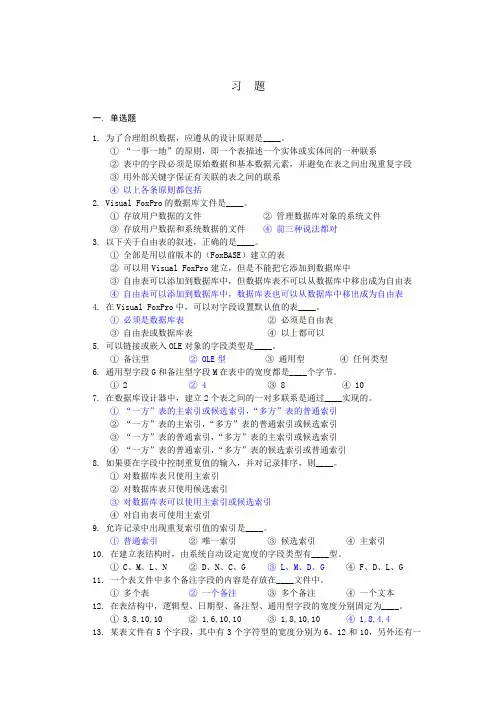
习题一. 单选题1. 为了合理组织数据,应遵从的设计原则是____。
①“一事一地”的原则,即一个表描述一个实体或实体间的一种联系②表中的字段必须是原始数据和基本数据元素,并避免在表之间出现重复字段③用外部关键字保证有关联的表之间的联系④以上各条原则都包括2. Visual FoxPro的数据库文件是____。
①存放用户数据的文件②管理数据库对象的系统文件③存放用户数据和系统数据的文件④前三种说法都对3. 以下关于自由表的叙述,正确的是____。
①全部是用以前版本的(FoxBASE)建立的表②可以用Visual FoxPro建立,但是不能把它添加到数据库中③自由表可以添加到数据库中,但数据库表不可以从数据库中移出成为自由表④自由表可以添加到数据库中,数据库表也可以从数据库中移出成为自由表4. 在Visual FoxPro中,可以对字段设置默认值的表____。
①必须是数据库表②必须是自由表③自由表或数据库表④以上都可以5. 可以链接或嵌入OLE对象的字段类型是____。
①备注型② OLE型③通用型④任何类型6. 通用型字段G和备注型字段M在表中的宽度都是____个字节。
① 2 ② 4 ③ 8 ④ 107. 在数据库设计器中,建立2个表之间的一对多联系是通过____实现的。
①“一方”表的主索引或候选索引,“多方”表的普通索引②“一方”表的主索引,“多方”表的普通索引或候选索引③“一方”表的普通索引,“多方”表的主索引或候选索引④“一方”表的普通索引,“多方”表的候选索引或普通索引8. 如果要在字段中控制重复值的输入,并对记录排序,则____。
①对数据库表只使用主索引②对数据库表只使用候选索引③对数据库表可以使用主索引或候选索引④对自由表可使用主索引9. 允许记录中出现重复索引值的索引是____。
①普通索引②唯一索引③候选索引④主索引10. 在建立表结构时,由系统自动设定宽度的字段类型有____型。
① C、M、L、N ② D、N、C、G ③ L、M、D、G ④ F、D、L、G11. 一个表文件中多个备注字段的内容是存放在____文件中。
RSoft软件许可协议和说明说明书
Obtaining RSoft Software and License Key Files Optical Solutions GroupMarch 2016Copyright Notice and Proprietary InformationCopyright © 2015 Synopsys, Inc. All rights reserved. This software and documentation contain confidential and proprietary information that is the property of Synopsys, Inc. The software and documentation are furnished under a license agreement and may be used or copied only in accordance with the terms of the license agreement. No part of the software and documentation may be reproduced, transmitted, or translated, in any form or by any means, electronic, mechanical, manual, optical, or otherwise, without prior written permission of Synopsys, Inc., or as expressly provided by the license agreement.Right to Copy DocumentationThe license agreement with Synopsys permits licensee to make copies of the documentation for its internal use only. Each copy shall include all copyrights, trademarks, service marks, and proprietary rights notices, if any. Licensee must assign sequential numbers to all copies. These copies shall contain the following legend on the cover page:“This document is duplicated with the permission of Syn opsys, Inc., for the exclusive use of______________________________ and its employees. This is copy number __________.”Destination Control StatementAll technical data contained in this publication is subject to the export control laws of the United States of America. Disclosure to nationals of other countries contrary to United States law is prohibited. It is the reader’s responsibility to determine the applicable re gulations and to comply with them.DisclaimerSYNOPSYS, INC., AND ITS LICENSORS MAKE NO WARRANTY OF ANY KIND, EXPRESS OR IMPLIED, WITH REGARD TO THIS MATERIAL, INCLUDING, BUT NOT LIMITED TO, THE IMPLIED WARRANTIES OF MERCHANTABILITY AND FITNESS FOR A PARTICULAR PURPOSE.TrademarksSynopsys’ company and certain product names are trademarks of Synopsys, as set forth at:/Company/Pages/Trademarks.aspx. All other product or company names may be trademarks of their respective owners.Table of ContentsIntroduction (1)Signing Up for a SolvNet Account (1)Downloading RSoft Products from SolvNet (2)Using SmartKeys to Download License Key Files (4)Installing RSoft Software (5)Ordering Tangible Media (CDs) (6)IntroductionCustomers in Direct-Sales regions (USA and some other countries) who have purchased copies of the RSoft software from Synopsys can download installation files and License Key files from the Synopsys SolvNet web site. Customers in Distributor-Sales regions (see for a complete list of distributors for the RSoft products) should contact their Distributor for access to these items.Signing Up for a SolvNet Account1.Go to and click the Sign Up Now button.2.Click the Sign Up for an Account button.3. A corporate email address is required to register for SolvNet. For example, an address like************************* is valid, whereas public-domain email addresses such as ******************* or ******************* cannot be used. Note that Synopsys has changed the SolvNet access policy for Universities, contact ************************** if you need assistance.4.During the registration process, you will need to enter your company’s Site ID. If you do notknow your Site ID, email ************************ to request it. Be sure to include your company name and address in your email request.5.After you submit your information, you will receive a confirmation email from SolvNetwithin 24 hours with instructions for completing the registration process.Downloading RSoft Products from SolvNet1.Log into SolvNet () using your SolvNet account.2.From the SolvNet homepage, click the Downloads tab.3.The list of Synopsys products displayed will contain all the products currently licensed atyour organization’s location. Select the product you wish to download.4.Select the version of the product that you would like to download.5.Click the Download Here button. Note that you can Sign Up to receive automaticnotifications from SolvNet when new versions of this Synopsys product are released.6.Read and click the Yes, I Agree to the Above Terms for Synopsys’ Electronic SoftwareTransfer (EST).7.Look through the list of files and use the Download button(s) to download the files that youneed. For some of the RSoft products, both Windows and Linux versions will be shown for download. You will only be able to use the Linux version if you are licensed for it separately.If needed, you can also download the latest copy of the RSoft Installation Guide.8.You should go back to Step 3 in this section and repeat Steps 3-7 for any other products thatyou need to install:∙Windows Installations: You will need to download only the RSoft component or system installers. The required Synopsys Common Licensing (SCL) installer isincluded in the RSoft installer.∙Linux Installations: You will need to download the RSoft component or system installers, Synopsys Common Licensing (SCL), and the Synopsys Installer.See the RSoft Installation Guide for a complete list of installation requirements.Using SmartKeys to Download License Key Files A License Key File is a file that contains licensing information that corresponds to your RSoft license. The SmartKeys web interface on Synopsys’ SolvNet website can be used to obtain license key files:1.Go to the SmartKeys page on SolvNet (/SmartKeys). You can also getthere by going to the SolvNet Downloads page and clicking the SmartKeys link in the lower right column.2.On the SmartKeys page, click the Key Retrieval link.3.If you would like to download license key files for all Synopsys products licensed at yoursite, simply click the Retrieve Licenses button. If you want to obtain a license key file for a specific Host ID, enter the Host ID and then click Retrieve Licenses.4.You will receive a separate email for each Host ID you have requested. Save this file to aconvenient location on your computer for use during the RSoft product installation.Installing RSoft SoftwareThe basic installation instructions are:∙Windows Installations: run the RSoft installer as administrator. It will guide you through the installation process. Additional details can be found in the RSoft Installation Guide.∙Linux Installations: See the RSoft Installation Guide for complete instructions.The RSoft Installation Guide can be downloaded from SolvNet or, after installation, can be found at <rsoft_dir>\docs\install.pdf where <rsoft_dir> is the RSoft installation directory (C:\RSoft) by default.Ordering Tangible Media (CDs)If needed, you can order installation CDs for your Synopsys’ Products from SolvNet:1.From the SolvNet homepage, click the Downloads tab.2.Click the MediaCenter link in the lower right corner of the download page.3.Select the Synopsys Tools that you would like included on the CD. If you have a Linuxlicense, be sure to include Synopsys Common Licensing (SCL) and the Synopsys Installer since it is required for installing on Linux.plete the Ship-to Address information. Items in bold are mandatory. Click Continue.5.Review the shipping request click Place Order to complete the CD order.7 Obtaining RSoft Software and License Key Files。
Rsoft软件说明介绍和使用
目录Rsoft 简介 (3)Chapter 7 Tutorials 第七章教程 (5)Tutorial 1: Ring Resonator 教程1: 环形共振器 (5)Device Layout:器件结构: (5)Defining Variables 定义变量 (6)Drawing the Structure 画器件结构图 (6)Checking the Index Profile 核对折射率分布 (9)Adding Time Monitors 添加时间监视(探测)器 (10)Simulation: Pulsed Excitation 模拟:脉冲激发 (12)Launch Field 激发场 (12)Wavelength/Frequency Spectrum 波长/频率光谱 (12)Increasing the Resolution of the FFT 提高FFT 的分辨率 (14)Simulation: CW Excitation 模拟:连续激发 (16)Tutorial 2: PBG Crystal: Square Lattice 教程2:PBG 晶体:四方晶格 (17)Lattice layout 晶格布局 (17)Base Lattice Generation 基准晶格的创建 (17)Lattice Customization 定制晶格 (18)Checking the Index Profile 核对折射率分布 (18)Inserting Time Monitors 插入时间监视器 (19)Launch Set Up 激发场设置 (20)Simulati on 模拟 (21)Data Analysis 数据分析 (22)Switching Polarization 改变偏振为TM 模 (23)Periodic Boundary Condition Set Up (24)Tutorial 3: PBG Crystal: Tee Structure 教程3: PBG 晶体:T 型结构 (24)Tutorial 4: PBG Crystal: Defect Mode 教程四:PBG 晶体:缺陷模型 (24)Rsoft简介包括BeamPROP、FullWAVE、BandSOLVE、GratingMOD、DiffractMOD、FemSIM,以及MOST软件。
Rsoft指导
Rsoft软件使用说明本说明主要讲解Rsoft软件中Beamprop和Fullwave模块的使用,Beamprop是采用光束传播法来仿真的,Fullwave是采用时域有限差分法来仿真的。
具体的算法理论这里不做详细的讲解,可以参考相关的书籍,特别是时域有限差分法,相关的书籍很多。
Beamprop和Fullwave模块在同一个环境中运行,因此CAD画图方法基本是一样的。
本说明不能成为一个完整的教材,因此这里只对软件做简单的说明,不能面面俱到,描述也尽量简洁,不够清晰之处请结合实际操作理解。
本说明也不能对光电子器件的工作原理和设计方法进行讲解,这方面的知识需要参考其他的资料。
1.Rsoft软件安装及界面介绍1.1 安装安装完成之后将"bin" 和 'lincenses'文件夹拷贝到安装目录下,覆盖原来的文件夹。
1.2界面介绍运行软件之后显示如下包括菜单和快捷按钮,菜单和一般软件的布局功能相似,应该很好理解,说明如下。
File:新建、打开、保存、打印、输出GDS2等格式文件。
Edit:复制、粘贴、剪切、旋转、转换成多边形、平坦化。
View:全局视图、放大、缩小。
Option:选项设置、全局设置。
Run:计算仿真。
快捷按钮介绍如下。
包括基本操作按钮、画图按钮、数据查看与仿真按钮。
下图标注了一些常用的按钮的名称,其他的按钮或是相关的设置很少用到,一般选默认。
1.3坐标系界面中显示的是X和Z坐标,Y坐标垂直于界面,由里指向外。
当设置为二维时,y方向无穷大,不需要设置y坐标。
2 CAD画图两个模块的画图方法是一样的,这里,以Beamprop为例。
2.1 新建一个文件点击新建出现下图,主要是选择仿真模块,设置全局参数。
这里需要对全局设置进行说明,每次画一个部件,它的各个参数默认取全部设置中的值。
背景折射率是指没有波导的空间的折射率。
折射率之差决定了波导的折射率,比如背景折射率为1,折射率之差为0.01,那么波导部分的折射率为1.01;二维时,高度为零。
Rsoft指导
Rsoft软件使用说明洪建勋本说明主要讲解Rsoft软件中Beamprop和Fullwave模块的使用,Beamprop是采用光束传播法来仿真的,Fullwave是采用时域有限差分法来仿真的。
具体的算法理论这里不做详细的讲解,可以参考相关的书籍,特别是时域有限差分法,相关的书籍很多。
Beamprop和Fullwave模块在同一个环境中运行,因此CAD画图方法基本是一样的。
本说明不能成为一个完整的教材,因此这里只对软件做简单的说明,不能面面俱到,描述也尽量简洁,不够清晰之处请结合实际操作理解。
本软件也不能对光电子器件的工作原理和设计方法进行讲解,这方面的知识需要参考其他的资料。
1.Rsoft软件安装及界面介绍1.1 安装安装完成之后将"bin" 和 'lincenses'文件夹拷贝到安装目录下,覆盖原来的文件夹。
1.2界面介绍运行软件之后显示如下包括菜单和快捷按钮,菜单和一般软件的布局功能相似,应该很好理解,说明如下。
File:新建、打开、保存、打印、输出GDS2等格式文件。
Edit:复制、粘贴、剪切、旋转、转换成多边形、平坦化。
View:全局视图、放大、缩小。
Option:选项设置、全局设置。
Run:计算快捷按钮介绍如下。
包括基本操作按钮、画图按钮、数据查看与仿真按钮。
下图标注了一些常用的按钮的名称,其他的按钮或是相关的设置很少用到,一般选默认。
1.3坐标系界面中显示的是X和Z坐标,Y坐标垂直于界面,由里指向外。
二维时,y向无穷大,不需要设置y坐标。
2 CAD画图两个模块的画图方法是一样的,这里,以BEAmprop为例。
2.1 新建一个文件点击新建出现下图,主要是选择仿真模块,设置全局参数。
这里需要对全局设置进行说明,每次画一个部件,它的各个参数默认取全部设置中的值。
背景折射率是指没有波导的空间的折射率。
折射率之差决定了波导的折射率,比如背景折射率为1,折射率之差为0.01,那么波导部分的折射率为1.01,二维时,高度为零。