
爱普生打印机使用手册
Epson 打印机用户指南.pdf_1701920929.140531说明书
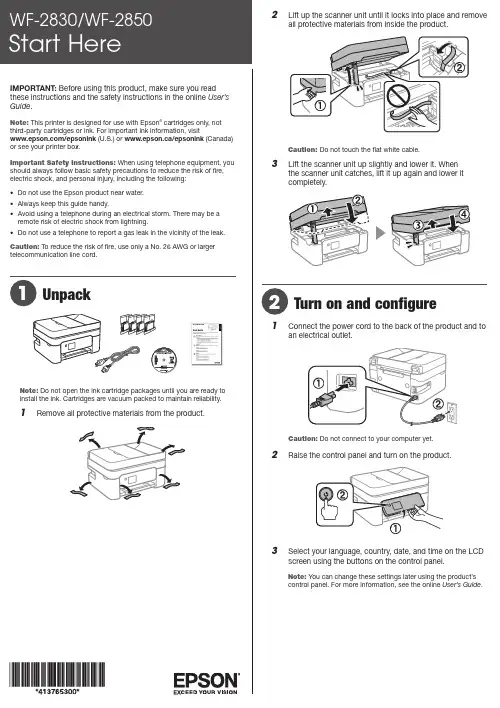
Do not open the ink cartridge packages until you are ready to install the ink. Cartridges are vacuum packed to maintain reliability.emove all protective materials from the product.6 L ift the scanner unit up slightly and lower it. Whenthe scanner unit catches, lift it up again and lower itcompletely.7 F ollow the on-screen instructions to start charging the ink.Ink charging takes approximately 6 minutes. When yousee a completion message on the product’s LCD screen, charging is complete.C aution: Don’t turn off the printer or raise the scanner unit while the printer is charging or you’ll waste ink.N ote: As part of setup, your product’s serial number will be sent to a secure Epson server so that you can be eligible to participate in programs we may offer from time to time, including the Epson ink replenishment program. You will have a separate opportunity to consent to participating in such programs.8 F ollow the on-screen instructions to adjust the printquality of your product.Note:• Y ou need to load paper before you can adjust the print quality.See “Load paper” below for details.• S elect Adjust Later if you want to adjust the print quality later. For more information, see the online User’s Guide .4 Load paperSee the online User’s Guide for information about loading capacity, available paper types and sizes, and loading envelopes.1 M ake sure the product is done charging the ink, and thenpull out the rear paper support.2 S lide the edge guides all the way out.3 Install ink cartridgesCaution: Keep the ink cartridges out the reach of children and do not drink the ink.Note: The included initial cartridges are designed for reliable printer setup and cannot be used as replacement cartridges or resold. After setup, the remaining ink is available for printing.1 L ift up the scanner unit until it locks into place.2 G ently shake the Black (BK) ink cartridge.Note: Do not shake the other ink cartridges.3 Unpack the ink cartridges.4 Remove only the yellow tape from each ink cartridge.Caution: Do not touch the circled area on the cartridge. Doing so may prevent normal operation and printing.5 I nsert the cartridge in the holder for each color. Press eachcartridge down until it clicks. Make sure all cartridges arepushed down into place.1 M ake sure the product is NOT CONNECTED to yourcomputer.Windows ®: If you see a Found New Hardware screen, click Cancel and disconnect the USB cable.2 I nsert the product CD (Windows only) or download andrun your product’s software package. For the latestsoftware, visit:WF-2830 /support/wf2830 (U.S.) www.epson.ca/support/wf2830 (Canada) W F-2850/support/wf2850 (U.S.) www.epson.ca/support/wf2850 (Canada)3 F ollow the instructions on the computer screen to run thesetup program.4 W hen you see the Select Your Connection screen, selectone of the following and follow the on-screen instructions:• Wireless connectionIn most cases, the software installer automaticallyattempts to set up your wireless connection. If setup is unsuccessful, you may need to enter your network name (SSID) and password.• Direct USB connectionMake sure you have a USB cable (not included).Mobile and voice-activatedprinting• Print directly from your iOS device. Simply connect your printer and device to the same network and tap the action icon to select the print option.• Print directly from your Android™ (v4.4 or later) device*.Simply connect your printer and device to the same network and tap the menu icon to select the print option.• Print from wherever you are, next to your printer or remotely, with Epson Connect™ and Google Cloud Print™. See your online User’s Guide for instructions or learn more at /connect (U.S.) or www.epson.ca/connect (Canada).• Use voice-activated assistants to print a variety of creative and everyday items from your Epson product. Simply add your product to an Epson Connect account, then link the account to a voice-activated assistant. See/voice (U.S.) or www.epson.ca/voice (Canada) for more information.* M ay require the Epson Print Enabler or Mopria Print Service app from Google Play™.3 L oad paper, short edge first, in the center of the papersupport with the printable side facing up.N ote:4 S lide the edge guides against the paper, but not tootightly.5 S 6Pull out the output tray and raise the paper stopper.1 C onnect a phone cord to a telephone wall jack and to the LINE port on your product. See the online User’s Guide for more information.2 S elect Proceed on the LCD screen to set up the fax, orselect Set Up Later to set it up later.Note :• I f you are using a Mac or your computer does not have a CD/DVD drive, an Internet connection is required to obtain the product software.• T o print from a Chromebook™, go to /support/gcp (U.S.) or www.epson.ca/support/gcp (Canada) for instructions.Firmware Update Notice: Epson periodically provides firmware updates to address issues of security, performance, minor bug fixes and ensure your printer functions as designed. Your printer was designed to work only with genuine Epson ink cartridges, thereforesome updates may affect the functionality of third-party ink.Call (562) 276-4382 (U.S.) or (905) 709-3839 (Canada), 6 am to 8 pm , Pacific Time, Monday through Friday, and 7 am to 4 pm , Pacific Time, Saturday. Days and hours of support are subject to change without notice. Toll or long distance charges may apply.RecyclingEpson offers a recycling program for end of life hardware and ink cartridges. Please go to /recycle (U.S.) or www.epson.ca/recycle (Canada) for information on how to return your products for proper disposal.Need paper and ink?Ensure brilliant results with Epson specialty and plain papers, engineered specifically for Epson printers. Find Epson papers and Epson Genuine Ink at (U.S. sales) or www.epson.ca (Canadian sales) and at Epson authorized resellers.Call 800-GO-EPSON (800-463-7766).WF-2830/WF-2850 replacement ink cartridgesEPSON and Claria are registered trademarks, EPSON Exceed Your Vision is a registered logomark, and Epson Connect is a trademark of Seiko Epson Corporation.Designed for Excellence is a trademark of Epson America, Inc.Windows is a registered trademark of Microsoft Corporation in the United States and/or other countries.Mac is a trademark of Apple Inc., registered in the U.S. and other countries.Android, Google Cloud Print, Chromebook, and Google Play are trademarks of Google LLC.General Notice: Other product names used herein are for identification purposes only and may be trademarks of their respective owners. Epson disclaims any and all rights in those marks.This information is subject to change without notice.CPD-56928© 2018 Epson America, Inc., 12/18。
epsonl310说明书

epsonl310说明书
打印方式:按需喷墨(微压电打印技术)。
喷嘴数量配置:黑色180个,其它颜色各59个(青色、洋红色、黄色)。
打印方向:双向逻辑查找。
分辨率可大至:5760 x 1440 dpi(带有智能墨滴变换技术)。
墨滴尺寸可小至:3微微升。
黑色文本(A4)。
约33页、分钟(PPM)(经济模式)。
约9.2页、分钟(IPM)。
彩色文本(A4)。
约15页、分钟(PPM)(经济模式)。
约4.5页、分钟(IPM)。
照片(4 x 6英寸)。
27秒、页(有边距,经济模式)。
69秒、页(有边距,默认模式)。
双面打印:仅手动。
逐份打印:支持。
USB接口:USB(兼容USB2.0)。
纸张进纸方式:摩擦进纸。
进纸盒数量:1个。
进纸盒容量:100页,A4普通纸(75g、m2)。
20页,高质量光泽照片纸。
出纸器容量:30页,A4普通纸(文本模式)。
30页,A4普通纸(经济模式)。
20页,高质量光泽照片纸。
(10x15cm、4x6英寸,13x18cm、5x7英寸,9x13cm、3.5x5英寸)。
爱普生L3210打印机说明书

No abra las botellas de tinta hasta que esté listo para llenar los tanques de tinta. Las botellas están embaladas herméticamente para etire todo el material de protección del producto.3 P ulse y mantenga presionado el botón de cancelardurante 5 segundos hasta que el indicador deencendido empiece a parpadear y comience la cargade la tinta.Nota: La carga de la tinta tardará aproximadamente 10 minutos.Cuando el indicador de encendido deja de parpadear, la cargade la tinta ha terminado.P recaución: No apague el producto, abra la tapa frontalo cargue papel mientras el producto se esté cargando ogastará tinta.N ota:en comparación con las botellas de tinta subsiguientes. Consulte el Manual del usuario en línea para obtener información sobre la capacidad de carga y los tipos ytamaños de papel disponibles.1 C ompruebe que la carga de la tinta haya terminado.Luego, gire el protector del alimentador hacia adelante, levante el soporte del papel e inclínelo ligeramentehacia atrás.2 D eslice las guías laterales completamente hacialas orillas.3 C oloque papel de tamaño A4 o Carta en el centro delalimentador de papel posterior en posición vertical, con la cara satinada o imprimible hacia arriba.4 D eslice las guía laterales contra el papel, sin apretarlodemasiado, luego gire el protector del alimentadorhacia atrás.5 E xtienda la bandeja de salida, luego levante el parador.Nota: Si está utilizando un Mac o su computadora no tiene un lector de CD/DVD, se requiere una conexión a Internet para obtener el software del producto.1 A segúrese de que el producto NO ESTÉ CONECTADOa la computadora.Windows®: Si aparece la pantalla Nuevo hardware encontrado, haga clic en Cancelar y desconecte el cable USB.。
epson打印机使用方法
epson打印机使用方法EPSON打印机使用方法引言:EPSON(爱普生)是一家全球知名的打印机制造商,其打印机产品在市场上广受欢迎。
EPSON打印机拥有卓越的打印品质和高度的可靠性,使其成为家庭和办公环境中首选的打印解决方案。
本文将介绍EPSON打印机的使用方法,包括安装驱动程序、连接打印机、打印文档等操作步骤。
第一部分:安装驱动程序在使用EPSON打印机之前,需先安装相应的驱动程序。
下面是安装步骤的详细说明:步骤一:选择正确的驱动程序前往EPSON官方网站,找到与你的打印机型号相对应的驱动程序。
确保选择与你的操作系统兼容的驱动程序。
步骤二:下载驱动程序在驱动程序下载页面,点击“下载”按钮,然后选择文件保存位置。
下载完成后,找到保存的驱动程序。
步骤三:安装驱动程序双击驱动程序安装文件,按照提示完成安装过程。
可能需要重启计算机以使更改生效。
第二部分:连接打印机当驱动程序安装完毕后,需要将打印机与计算机连接起来。
以下是连接过程的详细步骤:步骤一:检查连接接口确保打印机的接口与计算机的接口匹配。
通常,EPSON打印机采用USB接口连接计算机。
步骤二:连接打印机使用打印机附带的USB线缆将打印机与计算机连接起来。
将USB 线缆一端插入打印机的USB接口,将另一端插入计算机的USB接口。
步骤三:打开打印机按下打印机的电源开关打开打印机。
请确保打印机已连接电源并打开。
第三部分:打印文档连接完成后,可以开始打印文档。
以下是打印文档的步骤:步骤一:选择文档打开要打印的文档,例如Microsoft Word文档、PDF文件等。
步骤二:选择打印菜单在文档窗口中,点击“文件”菜单,然后选择“打印”选项。
或者使用快捷键“Ctrl+P”。
步骤三:选择打印机在打印设置界面,选择EPSON打印机作为默认打印设备。
如果有多台打印机连接到计算机上,确保选择正确的打印机。
步骤四:设置打印参数根据需求,设置打印参数,例如打印份数、纸张大小、打印质量等。
Epson 打印机说明书.pdf_1701920863.065749

Do not open the ink cartridge packages until you are ready to install the ink. Cartridges are vacuum packed to maintain reliability.See the online User’s Guide for information about loadingcapacity, available paper types and sizes, loading envelopes, and using the ADF .1 M ake sure the product is done charging the ink, and thenlower the control panel, lift the output tray, and pull out thepaper cassette.2 S3 Insert paper with the glossy or printable side down.Note: Make sure the paper is loaded against the front edgeguide and not sticking out from the end of the cassette.4 S lide the edge guides against the paper, but not tootightly.5 K eep the cassette flat as you insert it all the way, thenlower the output tray.3 F ollow the instructions on the computer screen to run thesetup program.4 W hen you see the Select Your Connection screen, selectone of the following and follow the on-screen instructions:•Wireless connectionIn most cases, the software installer automaticallyattempts to set up your wireless connection. If setup is unsuccessful, you may need to enter your network name (SSID) and password.•Direct USB connectionMake sure you have a USB cable (not included).•Wired network connectionMake sure you have an Ethernet cable (not included).Mobile and voice-activated printing•Print directly from your smartphone or tablet using iOS or Android™ with Epson iPrint™. Simply connect your printer and device to the same network and tap the action icon to select the print option.•Print directly from your Android (v4.4 or later) device*.Simply connect your printer and device to the same network and tap the menu icon to select the print option.•Print from wherever you are, next to your printer or remotely with Epson Connect™. Learn more at /connect (U.S.) or www.epson.ca/connect (Canada).•Use voice-activated assistants to print a variety of creative and everyday items from your Epson product.Simply add your product to an Epson Connect account,then link the account to a voice-activated assistant. See /voice (U.S.) or www.epson.ca/voice (Canada) for more information.* M ay require the Epson Print Enabler or Mopria Print Service app fromGoogle Play™.Any problems?Network setup was unsuccessful.•Print a network connection report to identify network problems and solutions. See your online User’s Guide for instructions.•Make sure you select the right network name (SSID).•Restart your router (turn it off and then on), then try to connect to it again.•If you see a firewall alert message, click Unblock or Allow to let setup continue.•If your network has security enabled, make sure you enteryour network password (WEP key or WPA passphrase)correctly. Be sure to enter your password in the correct case.6 Pull out the output tray extension.7 S elect the paper settings on the product’s control panel.SetUp Later to set it up later.WF-4820/WF-4830: Press Proceed to set up the fax, orpress Close to set it up later.Install softwareNote: If you are using a Mac or your computer does not have a CD/DVD drive, an Internet connection is required to obtain the product software.Firmware Update Notice: The printer is designed to work only with genuine Epson-branded cartridges. Other brands of ink cartridges and ink supplies are not compatible and, even if described as compatible, may not function properly or at all. Epson periodically providesfirmware updates to address issues of security, performance, minor bug fixes and ensure the printer functions as designed. These updates may affect the functionality of third-party ink. Non-Epson branded or altered Epson cartridges that functioned prior to a firmware update may not continue to function.1 M ake sure the product is NOT CONNECTED to yourcomputer.Windows ®: If you see a Found New Hardware screen, click Cancel and disconnect the USB cable.2 I nsert the product CD or download and run yourproduct’s software package. For the latest software, visit /support (U.S.) orwww.epson.ca/support (Canada) and searchfor your product.nsure brilliant results with Epson specialty。
爱普生 ET-2800 无墨盒超大容量打印机 说明书

Specification Sheet | Page 1 of 2Wireless | Print | Copy | ScanThe ideal basic home printer.Innovative Cartridge-Free Printing — High-capacity ink tanks mean no more tiny, expensive ink cartridges; Epson’s exclusive EcoFit ® ink bottles make filling easy and worry-freeDramatic Savings on Replacement Ink — Save up to 90% with replacement ink bottles vs. ink cartridges 1 – that’s enough to print up to 4,500 pages black/7,500 color 2, equivalent to about 90 individual ink cartridges 3Stress-Free Printing — Up to 2 years of ink in the box 4 – and with every replacement ink set – for fewer out of ink frustrationsZero Cartridge Waste — By using an EcoT ank printer, you can help reduce the amount of cartridge waste ending up in landfillsImpressive Print Quality — Unique Micro Piezo Heat-Free T echnology ™ produces sharp text – plus impressive color photos and graphics – on virtually any paper type Built-in Scanner & Copier — High-resolution flatbed scanner and a color display for easy document copying and navigationModern Connectivity — Features wireless, plus hands-free voice-activated printing 5. Easily print from your smart device 6 with the intuitive Epson Smart Panel ® App 7Designed for Reliability — Worry-free 2-year limited warranty with registration 8, including full unit replacement/ecotankReplacement ink bottles1 Actual savings and costs will vary considerably based on print tasks, print volumes and usage conditions. Savings and cost per ISO page are based on the cost of replacement ink bottles and the cost of enough standard cartridges to achieve the total page yields of the bottles using the MSRP (USD) and yields for Epson ® standard-capacity ink cartridges for similarly featured Epson consumer inkjet printers as of October 2020.with registration 8Specification Sheet | Page 2 of 2Max. Resolution 9600 dpi interpolatedScanner Bit Depth Input: 48-bit color/Output: 24-bit color Scan Bed Size 8.5" x 11.7" max.Scan Compatibility TWAIN, WIA, ICAScan Features Scan to Computer Event Manager, Scan to Computer (WSD)TWAIN Reading Resolution 75~9600 dpi (1 dpi step)TWAIN Output Format PDF, JPEG, PNG, TIFF, Multi-TIFF, BMP (Windows ®), PICT (Mac ®)TemperatureOperating: 50 ° to 95 °F (10 ° to 35 °C) Storage: -4 ° to 104 °F (-20 ° to 40 °C)Relative Humidity Operating: 20 – 80%Storage: 5 – 85% (no condensation)Sound Level Power: 6.3 B(A) Pressure: 52 dB(A)Power RequirementsRated Voltage: AC 100 – 240 V Universal (Automatic) Rated Frequency: 50 – 60 Hz Rated Current: 0.4 – 0.2 A4 individual ink bottles (Cyan, Magenta, Yellow and Black)Replacement Ink Bottles 2522 Black ink bottle (65 mL) yield: 4,500; 522 color (Cyan, Magenta, Yellow) ink bottle (65 mL) yield: 7,500Epson strongly recommends the use of genuine ink to ensure optimal print quality and performance.Eco FeaturesENERGY STAR ® qualified RoHS compliant Recyclable product 13Epson America, Inc. is a SmartWay ® Transport Partner 14Ordering InformationET-2800 (Black)0 10343 95788 6C11CJ66201Specifications and terms are subject to change without notice. EPSON, EcoTank, Epson ESC/P , Epson Smart Panel and MicroPiezo are registered trademarks, EPSON Exceed Your Vision is a registered logomark and Better Products for a Better Future, Epson Connect, Epson iPrint and Micro Piezo Heat-Free Technology are trademarks of Seiko Epson Corporation. EcoFit is a registered trademark of Epson America, Inc. AirPrint, Apple, Mac, macOS and OS X are trademarks of Apple Inc., registered in the U.S. and other countries. Android is a trademark of Google LLC. Windows, Windows Server and Windows Vista are either registered trademarks or trademarks of Microsoft Corporation in the United States and/or other countries. Wi-Fi ® and Wi-Fi Direct ® are registered trademarks and Wi-Fi CERTIFIED™ is a trademark of Wi-Fi Alliance ®. SmartWay is a registered trademark of the U.S. Environmental Protection Agency. All other product and brand names are trademarks and/or registered trademarks of their respective companies. Epson disclaims any and all rights in these marks. All other product and brand names are trademarks and/or registered trademarks of their respective companies. Epson disclaims any and all rights in these marks. Copyright 2021 Epson America, Inc. CPD-60628R2 4/21All images simulated.† Black and color print speeds are measured in accordance with ISO/IEC 24734. Actual print times will vary based on factors including system configuration, software, and page complexity. For more information, visit /printspeed | †† Black and color copy speeds are determined in accordance with ISO/IEC 29183. Actual copy times will vary based on factors including system configuration and page complexity. For more information, visit /copyspeed | 1 Actual savings and costs will vary considerably based on print tasks, print volumes and usage conditions. Savings and cost per ISO page are based on the cost of replacement ink bottles and the cost of enough standard cartridges to achieve the total page yields of the bottles using the MSRP (USD) and yields for Epson standard-capacity ink cartridges for similarly featured Epson consumer inkjet printers as of October 2020. | 2 Part of the ink from the included bottles is used for initial setup; yields are lower than those of replacement ink bottles. Replacement and included ink bottle yields based on the ISO/IEC 24712 pattern with Epson’s methodology. Actual ink yields will vary considerably for reasons including images printed, print settings, temperature and humidity. Yields may be lower when printing infrequently or predominantly with one ink color. All ink colors are used for printing and printer maintenance, and all colors must be available for printing. For more information, visit /inkinfo | 3 Individual cartridges estimate based on print yields of a replacement set of black and color ink bottles as compared to Epson standard-capacity ink cartridges for similarly featured printers as of October 2020. | 4 Based on average monthly document print volumes of about 125 pages. | 5 See /voice for device compatibility. Epson Connect account and voice-activated account registration required.| 6 Most features require an Internet connection to the printer, as well as an Internet- and/or email-enabled device. For a list of Epson Connect enabled printers and compatible devices and apps, visit /connect | 7 Requires Epson Smart Panel App download. Data usage fees may apply. | 8 12 months of standard limited warranty or 30,000 plain paper sheets (whichever happens first). For an additional 12-month extended service plan (total of 24 months or 30,000 plain paper sheets, whichever happens first), register your product and use Epson genuine ink bottles. See Limited Warranty for details. | 9 Wi-Fi CERTIFIED™; level of performance subject to the range of the router being used. Wi-Fi Direct may require printer software. | 10 Only printingand scanning are supported under Windows Server OS. | 11 Some applications and/or functions may not be supported under Mac OS X. | 12 Internet access is required to install OS X drivers and software. | 13 For convenient and reasonable recycling options, visit /recycle | 14 SmartWay is an innovative partnership of the U.S. Environmental Protection Agency that reduces greenhouse gases and other air pollutants and improves fuel efficiency.Epson America, Inc.3131 Katella Ave., Los Alamitos, CA 90720Epson Canada Limited185 Renfrew Drive, Markham, Ontario L3R 6G3 www.epson.ca/ecotankContact:。
爱普生 ET-2400 多功能一体机使用手册说明书
Specification Sheet | Page 1 of 2Wireless | Print | Copy | ScanEasy, everyday home printing.Innovative Cartridge-Free Printing — High-capacity ink tanks mean no more tiny, expensive ink cartridges; Epson’s exclusive EcoFit ® ink bottles make filling easy and worry-freeDramatic Savings on Replacement Ink — Save up to 90% with replacement ink bottles vs. ink cartridges 1 – that’s enough to print up to 4,500 pages black/7,500 color 2, equivalent to about 90 individual ink cartridges 3Stress-Free Printing — Up to 2 years of ink in the box 4 – and with every replacement ink set – for fewer out of ink frustrationsZero Cartridge Waste — By using an EcoT ank printer, you can help reduce the amount of cartridge waste ending up in landfillsImpressive Print Quality — Unique Micro Piezo Heat-Free T echnology ™ produces sharp text – plus impressive color photos and graphics – on virtually any paper type Built-in Scanner & Copier — High-resolution flatbed scanner for easy document managementModern Connectivity — Features wireless, plus hands-free voice-activated printing 5. Easily print from your smart device 6 with the intuitive Epson Smart Panel ® App 7Designed for Reliability — Worry-free 2-year limited warranty with registration 8, including full unit replacementGenuine Epson ®Ink — For genuine Epson quality; use of non-genuine ink could cause damage not covered under the printer’s limited warranty/ecotankReplacement ink bottleswith registration 8Specification Sheet | Page 2 of 2Scan Compatibility TWAIN, WIA, ICAOutput Formats PDF, jpeg, png, tiff, multi-tiff, BMP (Windows), PICT (Mac)ConnectivityStandard Connectivity Hi-Speed USBWi-Fi ® 4 (802.11 b/g/n)11Wi-Fi Direct ®11(32-bit, 64-bit), Windows Vista ® (32-bit, 64-bit)Mac ® OS X ®12 10.6.8 – macOS ® 10.15.x 13Windows Server ® 2003 SP2 2008 – 2019 (32-bit, 64-bit)Operating SystemsWindows ® 10 (32-bit, 64-bit), Windows 8, 8.1 (32-bit, 64-bit), Windows 7 (32-bit, 64-bit)Rated Frequency: 50 – 60 Hz Rated Current: 0.4 – 0.2 A Power ConsumptionStandalone Copy Printing: Approx. 12 W (ISO 24712)Ready: Approx. 4.5 W Sleep: Approx. 0.7 W Power Off: Approx. 0.2 W Safety StandardsUL60950, CSA C22.2 No. 60950-1 EMI FCC Part 15 subpart B class BMonthly Duty Cycle 14 Up to 3,000 pages (recommended monthly page volume up to 500 pages)Country of Origin ThailandWarranty 8 2-year limited warranty in the U.S. and Canada, second year requires product registrationRoHS compliant Recyclable product 16Epson America, Inc. is a SmartWay ® Transport Partner 17Ordering InformationEcoTank ET-24000 10343 97104 2C11CJ67201Specifications and terms are subject to change without notice. EPSON, EcoTank, Epson ESC-P , Epson ScanSmart, Epson Smart Panel and MicroPiezo are registered trademarks, EPSON Exceed Your Vision is a registered logomark and Better Products for a Better Future, Epson Connect and Micro Piezo Heat-Free Technology are trademarks of Seiko EpsonCorporation. EcoFit is a registered trademark of Epson America, Inc. Mac, macOS and OS X are trademarks of Apple Inc., registered in the U.S. and other countries. Android is a trademark of Google LLC. Windows, Windows Server and Windows Vista are either registered trademarks or trademarks of Microsoft Corporation in the United States and other countries. SmartWay is a registered trademark of the U.S. Environmental Protection Agency. Wi-Fi ® and Wi-Fi Direct ® are registered trademarks and Wi-Fi CERTIFIED ™ is a trademark of Wi-Fi Alliance ®. All other product and brand names are trademarksand/or registered trademarks of their respective companies. Epson disclaims any and all rights in these marks. Copyright 2022 Epson America, Inc. Com-SS-Oct-13 CPD-62205 6/22All images simulated.† Black and color print speeds are measured in accordance with ISO/IEC 24734. Actual print times will vary based on factors including system configuration, software, and page complexity. For more information, visit /printspeed | †† Black and color copy speeds are determined in accordance with ISO/IEC 29183. Actual copy times will vary based on factors including system configuration and page complexity. For more information, visit /copyspeed | 1 Actual savings and costs will vary considerably based on print tasks, print volumes and usage conditions. Savings and cost per ISO page are based on the cost of replacement ink bottles and the cost of enough standard cartridges to achieve the total page yields of the bottles using the MSRP (USD) and yields for Epson standard-capacity ink cartridges for similarly featured Epson consumer inkjet printers as of March 2022. | 2 Part of the ink from the included bottles is used for initial setup; yields are lower than those of replacement ink bottles. Replacement and included ink bottle yields based on the ISO/IEC 24712 pattern with Epson’s methodology. Actual ink yields will vary considerably for reasons including images printed, print settings, temperature and humidity. Yields may be lower when printing infrequently or predominantly with one ink color. All ink colors are used for printing and printer maintenance, and all colors must be available for printing. For more information, visit /inkinfo | 3 Individual cartridges estimate based on print yields of a replacement set of black and color ink bottles as compared to Epson standard-capacity ink cartridges for similarly featured printers as of March 2022. | 4 Based on average monthly document print volumes of about 125 pages. | 5 See /voice for device compatibility. Epson Connect account and voice-activated account registration required. | 6 Most features require an Internet connection to the printer, as well as an Internet- and/or email-enabled device. For a list of Epson Connect enabled printers and compatible devices and apps, visit /connect | 7 Requires Epson Smart Panel App download. Data usage fees may apply. | 8 12 months of standard limited warranty or 30,000 plain paper sheets (whichever happens first). For an additional 12-month extended service plan (total of 24 months or 30,000 plain paper sheets, whichever happens first), register your product and use Epson genuine ink bottles. See Limited Warranty for details. | 9 See /voice for device compatibility. Epson Connect account and voice-activated account registration required. | 10 Most features require an Internet connection to the printer, as well as an Internet- and/or email-enabled device. For a list of Epson Connect enabled printers and compatible devices and apps, visit /connect |11 Wi-Fi CERTIFIED™; level of performance subject to the range of the router being used. Wi-Fi Direct may require printer software. | 12 Some applications and/or functions may not be supported under Mac OS X. | 13 Some applications and/or functions may not be supported under macOS. | 14 Monthly duty cycle is the highest duty a user could expect in a month, based on near-constant operation of a device of this kind. It is not recommended that the device be run at this duty. For best device performance, run the device at the recommended monthly page volume. | 15 Internet access is required to install OS X drivers and software. | 16 For convenient and reasonable recycling options, visit /recycle | 17 SmartWay is an innovative partnership of the U.S. Environmental Protection Agency that reduces greenhouse gases and other air pollutants and improves fuel efficiency.Epson America, Inc.3131 Katella Ave., Los Alamitos, CA 90720Epson Canada Limited185 Renfrew Drive, Markham, Ontario L3R 6G3 www.epson.ca/ecotankContact:。
爱普生 LQ-136KW 真是打印机 说明书
!"#$%&$'(
!
!"#$%&!'
!"
!"#$%&'(%)
!"#$%!&'()*+,)-
!"#$
!"#$%&
!"#$%$&'()*$+,-
!
rp_
!"#$%&
!"#$%&'()*
!"#$%&#'()*+,-./
!"#$%&'()*+,-./0 123 4
!
!"#$
Windows
!"#$
táåÇçïë=um sáëí~ OMMM !"#$%&'
!"#$%&'
!"#$
!"#$%&'()
!"#$"%&'(
!"!#$%&'()*
!
!"#$%&'
!
!"#$%
!"#$
!"#$%
!"#$#%%&'
!
!"#$%&'()*+,-./01234536718%9
!"
!"#$%
!"#$%&'()*
!"
!
!"#$
!"#$%&'()*+,-./012345678
爱普生LQ-680K2打印机使用说明
您可以通过控制面板上的按键对打印机进行简单操作,如换行、换页、进纸和退纸以及选择打印速度等。
控制面板指示灯可显示打印机的状态。
控制面板按键和指示灯1. 打印速度指示灯*指示当前的打印速度设置当打印机为默认设置模式时,指示灯保持亮。
2. 切纸/存折指示灯当连续纸处于切纸位置时,此指示灯闪烁。
当打印机处于存折模式时,此指示灯亮。
3. 切纸/存折/速度按键•当微调和打印速度有效时,打印速度被选定*将连续打印纸进到切纸位置。
•从切纸位置反向将连续纸进到页顶位置。
•当要打印存折时,按下此按键。
4. 换行/换页按键*•如果没有单页纸装入,不操作•如果装入单页纸,当快速按下此按键时,一行一行进纸,当连续按此按键时,弹出单页纸。
•如果没有装入连续纸,装入连续纸。
•如果已装入连续纸,当快速按下此按键时,一行一行进纸,或当连续按下此按键时,插入一个分页符。
5. 进纸/退纸按键*•如果装入了一张单页纸,退出此张单页纸。
-备用位置装入连续纸。
•将连续纸返回到备用位置。
•如果没有单页纸装入,此时没有操作(导致缺纸错误)。
6. 暂停按键暂时停止打印,再次按下此按键时继续打印。
持续按住此按键3秒钟,打开微调模式*和打印速度。
要关闭此模式,再次按下此按键。
7. 缺纸指示灯•当未在所选的纸张来源中装入打印纸或未正确装入打印纸时,此灯亮。
*打印纸尚未完全退出,此指示灯闪烁。
8. 暂停指示灯*打印机暂停时,此指示灯亮。
*打印机处于微调模式和打印速度可用时,此灯闪烁。
•因打印头过热而停止打印时,此灯闪烁。
9. 缩小指示灯•当选择缩小模式时,此指示灯亮。
•当未处于缩小模式时,此指示灯灭。
*微调模式:按住暂停按键3秒钟后,打印机进入微调模式。
在此模式下,可以按下换行/换页事和进纸/退纸■按键调整页顶位置或切纸位置。
参见调整页顶位置。
**当您同时按下进纸/退纸和暂停按键时,打印机进入缩小模式关于打印机的默认设置*更改默认设置默认设置控制打印机的许多功能。
爱普生ET-4850超大容量连供打印机使用说明书
Specification Sheet | Page 1 of 2Wireless | Print | Copy | Scan | Fax | EthernetThe perfect printer for your office.Innovative Cartridge-Free Printing — High-capacity ink tanks mean no more tiny, expensive ink cartridges; Epson’s exclusive EcoFit ® ink bottles make filling easy and worry-freeDramatic Savings on Replacement Ink — Save up to 90% withreplacement ink bottles vs. ink cartridges 1 – that’s enough to print up to 7,500 pages black/6,000 color 2, equivalent to about 90 individual ink cartridges 3Stress-Free Printing — Up to 2 years of ink in the box 4 – and with every replacement ink set – for fewer out of ink frustrationsZero Cartridge Waste — By using an EcoTank printer, you can help reduce the amount of cartridge waste ending up in landfillsImpressive Print Quality — Unique PrecisionCore Heat-Free Technology ™ and Claria ® ET pigment black ink produce extremely sharp text – plus impressive color photos and graphics – on virtually any paper typeRobust Paper Handling — Auto Document Feeder, paper-saving auto 2-sided printing and a 250-sheet paper tray for high productivityBuilt-in Scanner & Copier — High-resolution flatbed scanner and a 2.4" color touchscreen for easy document copying and navigationModern Connectivity — Features Ethernet and wireless, plus hands-free voice-activated printing 5. Easily print from your smart device 6 with the intuitive Epson Smart Panel ® App 7Designed for Reliability — Worry-free 2-year limited warranty with registration 8, including full unit replacement1 Actual savings and costs will vary considerably based on print tasks, print volumes and usage conditions. Savings and cost per ISO page are based on the cost of replacement ink bottles and the cost of enough standard cartridges to achieve the total page yields of the bottles using the MSRP (USD) and yields for Epson standard-capacity ink cartridges for similarly featured Epson ® consumer inkjet printers as of October 2020./ecotankReplacement ink bottleswith registration 8Specification Sheet | Page 2 of 2Specifications and terms are subject to change without notice. EPSON, EcoT ank, Epson ESC/P , Epson Smart Panel and MicroPiezo are registered trademarks, EPSON Exceed Y our Vision is a registered logomark and Better Products for a BetterFuture, Epson Connect, Epson iPrint and PrecisionCore Heat-Free T echnology are trademarks of Seiko Epson Corporation. EcoFit is a registered trademark of Epson America, Inc. AirPrint, Apple, Mac, macOS and OS X are trademarks of Apple Inc., registered in the U.S. and other countries. Android is a trademark of Google LLC. Windows, Windows Server and Windows Vista are either registered trademarks or trademarks of Microsoft Corporation in the United States and/or other countries. Wi-Fi ® and Wi-Fi Direct ® are registered trademarks and Wi-Fi CERTIFIED ™ is a trademark of Wi-Fi Alliance ®. SmartWay is a registered trademark of the U.S. Environmental Protection Agency. All other product and brand names are trademarks and/or registered trademarks of their respective companies. Epson disclaims any and all rights in these marks. Copyright 2021 Epson America, Inc. CPD-61362 6/21/ecotankContact:Epson America, Inc.3131 Katella Ave., Los Alamitos, CA 90720Epson Canada Limited185 Renfrew Drive, Markham, Ontario L3R 6G3 www.epson.caMax. Hardware Resolution 2400 dpi Hardware Resolution 1200 x 2400 dpi Max. Resolution 9600 dpi interpolatedScanner Bit Depth Input: 48-bit color / Output: 24-bit color Scan Bed Size 8.5" x 11.7"Max. Scan Size (ADF) 8.5" x 14"Scan Features Scan to Computer, Scan to Cloud 9, Scan to Memory DeviceFaxBlack-and-white and color Modem 33.6 KbpsMemory Up to 100 pages Speed Dials 60 (max.)PC-Fax Software Send/Receive, Fax to Email, Fax to FolderGeneralDuty Cycle 13 Up to 5,000 pages (Recommended monthly page volume up to 800 pages)Display 2.4" color touchscreen TemperatureOperating: 50 ° to 95 °F (10 ° to 35 °C)Storage: -4 ° to 104 °F (-20 ° to 40 °C)Relative Humidity Operating: 20 – 80%Storage: 5 – 85% (no condensation)Sound Level Power: 6.4 B(A)Pressure: 52 dB(A)Power RequirementsRated Voltage: AC 100 – 240 V Universal (Automatic)Rated Frequency: 50 – 60 Hz Rated Current: 0.4 – 0.2 AInkInk Bottles 4 individual ink bottles (Cyan, Magenta, Yellow and Black)Replacement Ink Bottles 2502 Black ink bottle (127 mL) yield: 7,500; 502 color (Cyan, Magenta, Yellow) ink bottle (70 mL) yield: 6,000Epson strongly recommends the use of genuine ink to ensure optimal print quality and performance.Eco FeaturesENERGY STAR ® qualified RoHS compliant Recyclable product 15Epson America, Inc. is a SmartWay ® Transport Partner 16Ordering InformationET-48500 10343 95779 4 C11CJ60202Maintenance Box0 10343 93420 7T04D100All images simulated.† Black and color print speeds are measured in accordance with ISO/IEC 24734. Actual print times will vary based on factors including system configuration, software, and page complexity. For more information, visit /printspeed | †† Black and color copy speeds are determined in accordance with ISO/IEC 29183. Actual copy times will vary based on factors including system configuration and page complexity. For more information, visit /copyspeed | 1 Actual savings and costs will vary considerably based on print tasks, print volumes and usage conditions. Savings and cost per ISO page are based on the cost of replacement ink bottles and the cost of enough standard cartridges toachieve the total page yields of the bottles using the MSRP (USD) and yields for Epson standard-capacity ink cartridges for similarly featured Epson consumer inkjet printers as of May 2021. | 2 Part of the ink from the included bottles is used for initial setup; yields are lower than those of replacement ink bottles. Replacement and included ink bottle yields based on the ISO/IEC 24712 pattern with Epson’s methodology. Actual ink yields will vary considerably for reasons including images printed, print settings, temperature and humidity. Yields may be lower when printing infrequently or predominantly with one ink color. All ink colors are used for printing and printer maintenance, and all colors must be available for printing. For more information, visit /inkinfo | 3 Individual cartridges estimate based on print yields of a replacement set of black and color ink bottles as compared to Epson standard-capacity ink cartridges for similarly featured printers as of May 2021. | 4 Based on average monthly document print volumes of about 200 pages. | 5 See /voice for device compatibility. Epson Connect account and voice-activated account registration required. | 6 Most features require an Internet connection to the printer, as well as an Internet- and/or email-enabled device. For a list of Epson Connect enabled printers and compatible devices and apps, visit /connect | 7 Requires Epson Smart Panel App download. Data usage fees may apply. | 8 12 months of standard limited warranty or 50,000 plain paper sheets (whichever happens first). For an additional 12-month extended service plan (total of 24 months or 50,000 plain paper sheets, whichever happens first), you must register your product and use Epson genuine ink bottles. See Limited Warranty for details. | 9 Requires an Internet connection, a free Epson Connect account and a destination email address or cloud storage account. For a list of supported cloud services, visit /connect | 10 Wi-Fi CERTIFIED ™; level of performance subject to the range of the router being used. Wi-Fi Direct may require printer software. | 11 Some applications and/or functions may not besupported under Mac OS X. | 12 Only printing and scanning are supported under Windows Server OS. | 13 Monthly duty cycle is the highest duty a user could expect in a month, based on near-constant operation of a device of this kind. It is not recommended that the device be run at this duty. For best device performance, run the device at the recommended duty. | 14 Internet access is required to install OS X drivers and software. | 15 For convenient and reasonable recycling options, visit /recycle | 16 SmartWay is an innovative partnership of the U.S. Environmental Protection Agency that reduces greenhouse gases and other air pollutants and improves fuel efficiency.See the latest innovations from Epson Business Solutions at /forbusiness。